#support-1
1 messages · Page 1401 of 1
 ornate mural
 royal flower
Hi i want sync permission between two servers how i can do it?
i setup mine MySQL database but don't appear any table in the database
And another thing, its possibile import the localdatabase to the hooked database?
 remote cosmos
 meager fox
royal flower
i setup mine MySQL database but don't appear any table in the database
meager fox
royal flower
i setup mine MySQL database but don't appear any table in the database
You need to create the db (i dont mean the whole mysql, i mean the 'foilder' lp will write into) first.
!network
 wanton stratusBOT
If you run a BungeeCord network, learn how to correctly setup LuckPerms on all server instances (including Bungee).
Also read:
Syncing data between servers
 LuckPerms wiki
meager fox
LuckPerms wiki
meager fox
!switch
wanton stratusBOT
If you wish to change your storage type (e.g. to YAML or MySQL) you may need to follow these instructions to ensure your groups and permissions are migrated to the new storage type.
Read more about the Storage types
LuckPerms wiki
 regal coyote
https://luckperms.net/editor/2A2NX7Y1Mf
why doesn't it say [DISCORD MEMBER] Tompoe [TRIAL HOST] like it's supposed to?


LuckPerms - A permissions plugin for Minecraft servers.
LuckPerms is a permissions plugin for Minecraft servers. It allows server admins to control what features players can use by creating groups and assigning permissions.
 regal coyote
meager fox
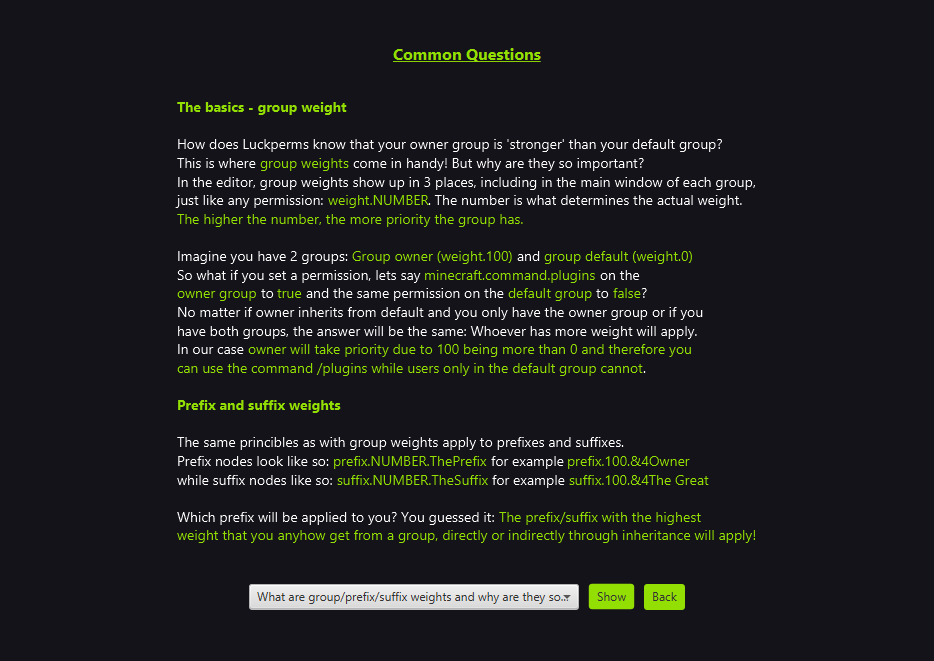
Because both prefixes have the same weight.
regal coyote
meager fox
Because both prefixes have the same weight.
trial host has no prefix, only a suffix
meager fox
trial host inherits from default and default indeed does have a prefix, which is [Player] and displaying as you can see.
regal coyote
meager fox
trial host inherits from default and default indeed does have a prefix, which is...
do i just make it not inherit from default then
im assuming they'll have default perms anyway
meager fox
Just make the prefix a higher priority.
If you do not let the group inherit from default, they will not have default groups permissions and you'll be forced to additionally add them into trial host.
Why do that if all you need to do is edit one number.
regal coyote
trial host is in a separate track
isnt a member always part of default if added to a separate track
?
meager fox
Tracks do not matter when it comes to groups inheriting from each other.
regal coyote
i'll go with changing weights tho, but want to understand it
regal coyote
meager fox
Tracks do not matter when it comes to groups inheriting from each other.
still, members are ALWAYS part of the default group even if added to a different track, right? so wouldnt that in and of itself make them inherit default perms ?
meager fox
Not always. You can strip someone out of default group. You can use 'parent set someothergroup' and that other group does not inherit down to default, then no, they won't have default.
your co host for example
it does not inherit from any other group
if you used 'parent set co host', no default here ;)
regal coyote
meager fox
Not always. You can strip someone out of default group. You can use 'parent set ...
nah just using /lp user <name> promote <track>
meager fox

So considering your default group is part of the rank track, then even if you promote to co host, which inherits nothing, the user is still part of default from the other track.
Unless you yeet a user from the rank track, you'll be good.
 rain vigil
i connected lp and lpv and set on me all perms
but i can't use /ipban command on main server from the plugin on velocity
meager fox
Let's double check /lp info and /lpv info first to make sure there is no connectivity issue :)
meager fox
Are you certain both servers use the same database? It will show connected in lp info, but it will not show you there which db name it's using.
rain vigil
yes, they share the same MariaDB database


I checked the synchronization, gave permission to 1 server and it appeared on another
meager fox
Okay then. The next thing to look at is simple stuff:
- Make sure you are in the group that holds the permission
- Double check the spelling of the permission - typos happen
- Make sure the plugin you are using does not require 2 permissions for this command, this is sometimes the case
- If you are using server context, this could be the issue as well, do you?
- Lastly, you could use verbose, even on the proxy, to check what permissions are exactly checked using
lpv verbose command <yourname> ipban
rain vigil
 meager fox
Please use your proxy console for the verbose command as this is a proxy permission you are checking.
rain vigil
 meager fox
It returns true, that is good. Do you get command feedback in your chat? What does it say?
rain vigil
 meager fox
Have you tried adding these as well https://i.imgur.com/jFisTsW.png
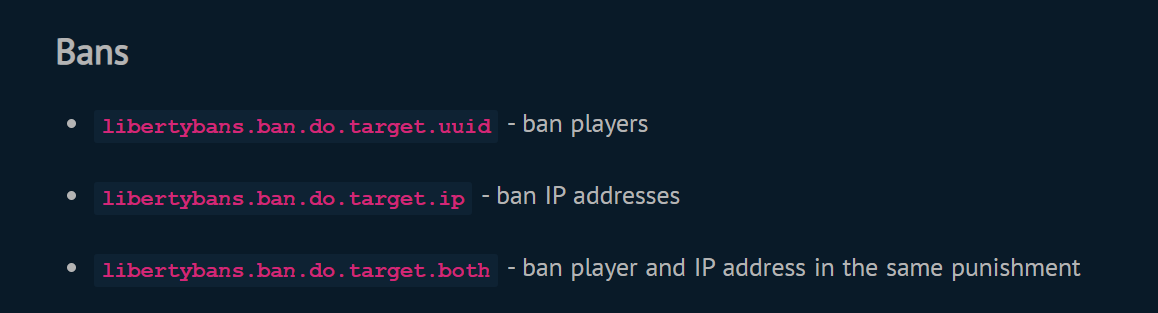
Particularly the ip one I guess.
libertybans.commands appears to be a base permission you will always need to do any commands from this plugin at all.
Here's the docs if you didn't see it/don't have it https://docs.libertybans.org/#/Permissions
A Document for LibertyBans plugin
rain vigil
thanks!
 upbeat vigil
wanton stratusBOT
upbeat vigil
wanton stratusBOT
Please use https://pastes.dev to send files in the future. I have automatically uploaded message.txt for you: https://pastes.dev/c9ErUeRZmI

A paste containing 70 lines of plaintext.
 thorn garden
hey, i'm having some problems getting multiple prefixes to show, i have this set in the config:
meta-formatting:
  prefix:
    format:
      - "highest"
      - "highest"
    duplicates: first-only
    start-spacer: ""
    middle-spacer: " "
    end-spacer: ""```

i have two prefixes set (confirmed with `/lp user __lucyy meta info` but only one is showing
am i misunderstanding something?
 uneven nexus
You do have the first one applied with a context. Is that context met?
 modern bison

thorn garden
yep that did it thank you, that's my mandatory daily self-embarrassment out of the way
modern bison

uneven nexus
No problem!
upbeat vigil
upbeat vigil
.
meager fox
upbeat vigil
.
Did you edit any files manually?
In any case, whatever 44 is, you need to get rid of it.
meager fox
Sir, this is luckperms support.
LuckPerms itself has nothing to do with the speed of command suggestions coming up. It sounds like your server is lagging.
Then how is it that you blame LuckPerms? o.O
Could also be your client/device lagging ngl.
modern bison
Inb4 10 year old android phone
meager fox
Then install another comparably large plugin - the same thing will happen.
It's the general workload, not only lp.
ughhh
 upbeat vigil
meager fox
Did you edit any files manually?
upbeat vigil
meager fox
Did you edit any files manually?
No i use the webeditor
 foggy quartz
I want to make default group not allowed to place blocks
upbeat vigil
upbeat vigil
No i use the webeditor
It does that by everything i do
I cleared the luckperms_actions thing in the database than it worked but the 2th time it just did that all over again
 lapis seal
Ur gonna get real mad now, Zero..
But I was under the impression that this would work now, since I have a chatplugin that supports json installed.
Adding json format to the lp suffix ends in chat not showing up at all
suffix.1.&8&l| {"text":"&a&n#&l1&r","hoverEvent":{"action":"show_text","contents":"&b%parkour_leaderboard_lett_1_player%&f er på førsteplass på &a&lLett&r &fParkour"}
meager fox
I'm not surprised.
modern bison

lapis seal
hahaha I knew that would be the reaction
When looking at the log I think it might be Venture chat error..
meager fox
I highly recommend a chat plugin which supports hover events instead of abusing suffixes.
lapis seal
I think it does..
meager fox
Then why don't u set it there.
lapis seal
meager fox
Then why don't u set it there.
I can try,
I had the idea to have multiple suffixes and when you hover you see different stuff, but I didnt see how I could configure that in VentureChat.
And since it enables json, I thought I could just dump it into the suffix text:)
https://pastebin.com/vhG7h7aQ Here is the pastebin if it is of interest, don't bother otherwise<3
I will check the documentation again. (Venture Chat)
Pastebin
Pastebin.com is the number one paste tool since 2002. Pastebin is a website where you can store text online for a set period of time.
meager fox
It's on the chat plugin to provide conditional hovers then. Such as if %luckperms_suffix% returns "IDEK" then use hover event so and so.
meager fox
*wife but ok
Conditional hovers can look very different in settings btw. A plugin may parse a placeholder as condition, use a permission or a group. Who knows
lapis seal
meager fox
Conditional hovers can look very different in settings btw. A plugin may parse a...
👍
meager fox
That's quite advanced stuff. Only know of one plugin being able to do this.
lapis seal
meager fox
*wife but ok
hm, I thought I allready had asked you that, must have been someone else:)
no, you can't be serious.. not that plugin!
Are you certain it must be used?...
meager fox
What deluxe chat did was per-group chat formats, where obviously you could add a specific hover and click event to each format for itself.
Since specific groups will have a specific suffix or prefix. That makes a lot of sense
lapis seal
yeah
meager fox
The question is: What if you want to change the hover on the suffix based of some other stuff, not just flat out select one?
lapis seal
yeah, like a stat for example?
meager fox
I see I should have finished my chat plugin... lmao
lapis seal
meager fox
The question is: What if you want to change the hover on the suffix based of som...
But then you can use placeholders prolly
lapis seal
meager fox
*I see I should have finished my chat plugin...* lmao
Can you finnish it to tomorrow, so I can use it without paying for it and I would also like it to suite all my special wants and needs?
foggy quartz
foggy quartz
I want to make default group not allowed to place blocks
about that..
lapis seal
foggy quartz
about that..
use worldguard?
make a region with buildrestriction flag, and have other groups bypass it:)
https://worldguard.enginehub.org/en/latest/ WG has great documentation, their staff loves pointing to it:)
lapis seal
Its a very commonly used protection plugin:)
you can make regions where only certain actions are allowed. For example: No building, take no damage, allways full hp
foggy quartz
is there any plugins which allows to move from different world and is compatible with command blocks?
just asking
 restive bough
hi
i know this is abit out of context

but does anyone know how to make the rank prefixes like that
 dusky lily
restive bough
but does anyone know how to make the rank prefixes like that
dusky lily
restive bough
but does anyone know how to make the rank prefixes like that
i think me
but idk it work.
restive bough
wdym
restive bough
im pretty sure it will be a server sided
resource pack
which technically forces every of its player to use the resource pack
but im not sure how to create it
 flat parcel
Yeah creating it is the hardest part
meager fox
oraxen and itemsadder can do it.
restive bough
hmm
welp then i might not be able to do it since i have close to zero knowledge about server sided resource pack, nor client sided
ty for the answers
upbeat vigil
upbeat vigil
I cleared the luckperms_actions thing in the database than it worked but the 2th...
PLEASE Someone help me because i'm getting irritated by this plugin
 flat parcel
Catch me up, what's happening and why in the love of tacos are you hand editing the DB
modern bison

 upbeat vigil
Its like he will not add it i dont know why
If i do it manualy in the database myself it works so it has to do something about the web interface
foggy quartz
When I try to join my server (lobby) it gives me the message Kicked whilst connecting to Hub: [LP] A database error occurred whilst loading permissions data. Please try again later. If you are a server admin, please check the console for any errors. which I'm aware relates to luckperms.
The reason I need support is because it's an issue with the mySQL Database. This has been working fine for about a month with zero errors, this randomly happened. I haven't broken it by editing etc. It's just completely random. I was wondering how I could fix this issue without remaking everything?
Thanks
flat parcel
99% of the time that's just a connection error
!errors look for your error on this page, should tell you how to fix it
wanton stratusBOT
Here's a page with some common storage system errors.
LuckPerms wiki
foggy quartz
I've restarted all servers etc.
Now I've exported my lp data and made a new database
gonna try that
royal flower
Why permissions and other's if i set mine mysql database don't appear in mine database?
and use luckperms-h2.mv.db
flat parcel
what
royal flower
I setup my database in the luckperms configuration
I want switch to h2 local to mysql
flat parcel
!switch
wanton stratusBOT
If you wish to change your storage type (e.g. to YAML or MySQL) you may need to follow these instructions to ensure your groups and permissions are migrated to the new storage type.
Read more about the Storage types
LuckPerms wiki
meager fox
!switch
wanton stratusBOT
If you wish to change your storage type (e.g. to YAML or MySQL) you may need to follow these instructions to ensure your groups and permissions are migrated to the new storage type.
Read more about the Storage types
LuckPerms wiki
royal flower
storage-method: h2 here i need set mysql?
flat parcel
read the page
royal flower
Firstly, run /luckperms export <file>
Then, stop your server completely.
Edit your config file and change the storage type.
Now, start your server again. Let the new datastore initialise.
Then, run /luckperms import <file>
All of your data should have been moved to the new datastore.
i read the page
flat parcel
there ya go, follow that
meager fox
Follow that guide to take your data (groups, permissions) to the new storage^^
meager fox
Then what is the problem
meager fox
Do i change the parameter to mysql?
If you want to use mysql, it would make sense.
royal flower
this is the option that don't create tables in local and create it in mine database?
meager fox
It will then use mysql, yes.
flat parcel
assuming you've also set all the connection details
 livid wind
[14:12:07 ERROR]: [LuckPerms] Exception occurred whilst enabling SQL messaging service
java.lang.RuntimeException: java.sql.SQLTransientConnectionException: luckperms-hikari - Connection is not available, request timed out after 5000ms.
at me.lucko.luckperms.common.messaging.sql.SqlMessenger.init(SqlMessenger.java:57) ~[luckperms-jarinjar6753861937468469319.jar.tmp:?]
at me.lucko.luckperms.common.messaging.MessagingFactory$SqlMessengerProvider.obtain(MessagingFactory.java:195) ~[luckperms-jarinjar6753861937468469319.jar.tmp:?]
at me.lucko.luckperms.common.messaging.LuckPermsMessagingService.<init>(LuckPermsMessagingService.java:71) ~[luckperms-jarinjar6753861937468469319.jar.tmp:?]
at me.lucko.luckperms.common.messaging.MessagingFactory.getServiceFor(MessagingFactory.java:121) [luckperms-jarinjar6753861937468469319.jar.tmp:?]
at me.lucko.luckperms.bukkit.messaging.BukkitMessagingFactory.getServiceFor(BukkitMessagingFactory.java:64) [luckperms-jarinjar6753861937468469319.jar.tmp:?]
at me.lucko.luckperms.common.messaging.MessagingFactory.getInstance(MessagingFactory.java:89) [luckperms-jarinjar6753861937468469319.jar.tmp:?]
at me.lucko.luckperms.common.plugin.AbstractLuckPermsPlugin.enable(AbstractLuckPermsPlugin.java:170) [luckperms-jarinjar6753861937468469319.jar.tmp:?]
at me.lucko.luckperms.bukkit.LPBukkitBootstrap.onEnable(LPBukkitBootstrap.java:177) [luckperms-jarinjar6753861937468469319.jar.tmp:?]
at me.lucko.luckperms.bukkit.loader.BukkitLoaderPlugin.onEnable(BukkitLoaderPlugin.java:51) [LuckPerms-Bukkit-5.4.9%20(2).jar:?]
at org.bukkit.plugin.java.JavaPlugin.setEnabled(JavaPlugin.java:321) [spigot-1.8.8.jar:git-Spigot-21fe707-741a1bd]
at org.bukkit.plugin.java.JavaPluginLoader.enablePlugin(JavaPluginLoader.java:340) [spigot-1.8.8.jar:git-Spigot-21fe707-741a1bd]
at org.bukkit.plugin.SimplePluginManager.enablePlugin(SimplePluginManager.java:405) [spigot-1.8.8.jar:git-Spigot-21fe707-741a1bd]
at org.bukkit.craftbukkit.v1_8_R3.CraftServer.loadPlugin(CraftServer.java:357) [spigot-1.8.8.jar:git-Spigot-21fe707-741a1bd]
at org.bukkit.craftbukkit.v1_8_R3.CraftServer.enablePlugins(CraftServer.java:317) [spigot-1.8.8.jar:git-Spigot-21fe707-741a1bd]
at net.minecraft.server.v1_8_R3.DedicatedServer.init(DedicatedServer.java:199) [spigot-1.8.8.jar:git-Spigot-21fe707-741a1bd]
at net.minecraft.server.v1_8_R3.MinecraftServer.run(MinecraftServer.java:525) [spigot-1.8.8.jar:git-Spigot-21fe707-741a1bd]
at java.lang.Thread.run(Thread.java:748) [?:1.8.0_312]
Caused by: java.sql.SQLTransientConnectionException: luckperms-hikari - Connection is not available, request timed out after 5000ms.
at me.lucko.luckperms.lib.hikari.pool.HikariPool.createTimeoutException(HikariPool.java:696) ~[?:?]
at me.lucko.luckperms.lib.hikari.pool.HikariPool.getConnection(HikariPool.java:197) ~[?:?]
at me.lucko.luckperms.lib.hikari.pool.HikariPool.getConnection(HikariPool.java:162) ~[?:?]
at me.lucko.luckperms.lib.hikari.HikariDataSource.getConnection(HikariDataSource.java:100) ~[?:?]
at me.lucko.luckperms.common.storage.implementation.sql.connection.hikari.HikariConnectionFactory.getConnection(HikariConnectionFactory.java:174) ~[?:?]
at me.lucko.luckperms.common.messaging.sql.SqlMessenger.getConnection(SqlMessenger.java:85) ~[?:?]
at me.lucko.luckperms.common.messaging.sql.AbstractSqlMessenger.init(AbstractSqlMessenger.java:61) ~[?:?]
at me.lucko.luckperms.common.messaging.sql.SqlMessenger.init(SqlMessenger.java:55) ~[?:?]
... 16 more
what is that PLEASE ?
@bitter coral
wanton stratusBOT
Hey Tovaron! Please don't tag helpful/staff members directly.
livid wind
sorry for ping but this error is present 10 days
but is break my brain
one eternity later...
inactive staff bruhhh
7 helpers connected not one who answers !!!
it's not professionnal
flat parcel
All right I'm going to stop you right there.
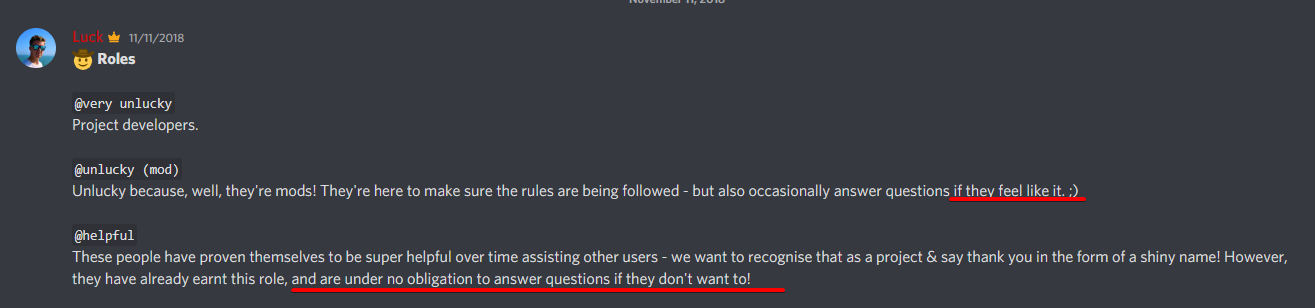
We are all volunteers. We have no obligation to help.
Please be patient
!errors
wanton stratusBOT
Here's a page with some common storage system errors.
LuckPerms wiki
flat parcel
See that page
livid wind
your role is helper no ?
flat parcel
Helpful, not helper.
livid wind
no help on this document
 livid wind
not that error
[14:24:38 WARN]: Caused by: java.sql.SQLException: null, message from server: "Host '172.18.0.9' is blocked because of many connection errors; unblock with 'mysqladmin flush-hosts'"
flat parcel
Do you host your own MySQL server, or are you using a host?
That looks like a docker IP so I'm guessing you're hosting yourself?
livid wind
où exécuter cette commande ?
uneven nexus
livid wind
7 helpers connected not one who answers !!!
Shame on them.
flat parcel
the VPS terminal, fairly good chance you'll need root to do it as well
livid wind
putty ?
flat parcel
(Assuming the MySQL server is also on your VPS at least)
if that's how you SSH, sure
livid wind
i'm usin pterodactyl on vps on dédicated
flat parcel
However since this is no longer a LP issue, if you need more help, please move to #general or another server
livid wind
what is access pterodactyl/phpmyadmin ?
foggy quartz
so my name is this color and i cant use this command i need help

/lp group Owner meta setsuffix Owner
meager fox
Do you have a chat plugin and vault?
foggy quartz
yo
about this
world guard thing I try to do /rg flag HUB block-break deny
but it dosent work
any help?
 nocturne chasm
this isn’t worldguard support
 graceful ether
some plugin cmds are not showing after the restart alsoo
idk y this is happening plss help me

 fossil plaza
Hello, there are certain commands of some plugins that I want to unregister I use luckperms and prevent user from having access to the command but a plugin like title manager has the autocomplete when user types /t how to remove the command?
graceful ether
fossil plaza
Hello, there are certain commands of some plugins that I want to unregister I us...
same to me but with different cmd
meager fox
fossil plaza
Hello, there are certain commands of some plugins that I want to unregister I us...
Lp has no control over tab complete
fossil plaza
meager fox
Lp has no control over tab complete
So how to "unregister" the command if I got that right?
 meager fox
With another plugin.
fossil plaza
fossil plaza
And is that plugin compatible with luckperms? Or there is a better compatible plugin?
fossil plaza
meager fox
With another plugin.
I see but can I ask a question? Most plugins I use when I use luckperms to prevent user from using their commands they don't apper in tab complete y does some plugins appear normally?
livid wind
Caused by: java.sql.SQLException: null, message from server: "Host '172.18.0.9' is blocked because of many connection errors; unblock with 'mysqladmin flush-hosts'"
my database is clear
why this IP
meager fox
fossil plaza
I see but can I ask a question? Most plugins I use when I use luckperms to preve...
Some plugins have a permission check for adding commands to users chat. Some dont
Every dev decides it for each plugin on their own.
fossil plaza
meager fox
Some plugins have a permission check for adding commands to users chat. Some don...
Oh I see thanks for support
nocturne chasm
livid wind
Caused by: java.sql.SQLException: null, message from server: "Host '172.18.0.9'...
do you self host or use a hosting provider?
foggy quartz
hello everyone is luckperms supportive 1.18.2?
nocturne chasm
yes
foggy quartz
thank
foggy quartz
hey there, I seem to have a problem with luckyperms, I added some permissions sucsessfully (for commands that belong to worldedit and worldguard), permissions applied (I can see that in console), but those permissions still don't work and I can use those commands only if I am a server op
Paper 1.18.2, latest version of LuckyPerms
Interestingly enough, permissions that belong to Luckyperms commands work
 mild otter
Send a screenshot of /plugins please
 mild otter
!verbose Can you ensure you've given the correct perm? Verbose should assist with that and let you know what permissions are being checked for
wanton stratusBOT
LuckPerms provides a verbose command to help you find out what permissions a command/plugin is checking.
Read more
LuckPerms wiki
foggy quartz
gimme a sec, I'm gonna try that thing rn (I'm kinda new in server building :D)
ok lol I ran a server instance locally on my PC and everything works there like a charm
gonna try it out on hosted server now
foggy quartz
yeah that's what I'm confused about, I tried /lp verbose command name command, and it not only shown permissions checked but actually performed the command for me
I tried it out and now perms are working on local server I booted for test
now i'm gonna try it on hosted server
ok what the actual heck it works now
is that some kind of magic? I tried to do that several times and rebooted my server but it didn't work and now poof it works
mild otter
magik
foggy quartz
Hello, so I'm trying to apply node contexts to specific worlds in my server but when I do they disable the command. is there possibly something I'm doing wrong or is this a glitch?
meager fox
The command should still work if the context condition is met. Are you saying it doesn't?
foggy quartz
So the command stops being accessible for the group that has the contexted node, I'm trying to make it so the node works for all worlds except one world so I set the value to false and added the world:[wrld] context but it disables the command for all the worlds that shouldn't be affected incuding the one with the context applied to it
one last question as I can't see it in wiki - is it possible to automatically assign any connected user to a certain group?
 echo solstice
help, I have geyser & floodgate right now, and I did enable "allow-invalid-usernames", it still shows I have no permission, and I manually give my bedrock account permissions in LP, still no permission.
nocturne chasm
screenshot/pl


 meager fox
foggy quartz
So the command stops being accessible for the group that has the contexted node,...
meager fox
foggy quartz
So the command stops being accessible for the group that has the contexted node,...
Setting only one world to false is the same thing as not assigning the permission at all. You should at the same time add the same permission in true without a context. False nodes will override true nodes iirc, so it should then be true globally minus that one world.
meager fox
foggy quartz
one last question as I can't see it in wiki - is it possible to automatically as...
Lp will only assign the default group to new players. To auto-assign other groups you need another plugin that can run commands. A few are: deluxe menus (gui based), command signs, vouchers, or something more automatic that can be set up to not need any triggers by players; conditional events
 sharp mantle
I am having a an issue with luckperms (or multiverse, I don't know for sure) that I heed some help with. When I add a permission to the default group, multiverse thinks I still don't have said permission (I am pretty sure luckperms is the only permissions plugin). Is this something I can fix through luckperms, or is it a multiverse issue?
 cedar bone
do you inherit default group?
sharp mantle
Yes
meager fox
!verbose might help
wanton stratusBOT
LuckPerms provides a verbose command to help you find out what permissions a command/plugin is checking.
Read more
LuckPerms wiki
cedar bone
!verbose
wanton stratusBOT
LuckPerms provides a verbose command to help you find out what permissions a command/plugin is checking.
Read more
LuckPerms wiki
wanton stratusBOT
How-to test permissions
Small list of things for you to make sure when testing permissions:
1. Don't test as op, your players/general staff will most likely not have op
2. Make sure you don't have any special permissions (e.g. * or the same permission you are testing) on your user (/lp user <user> permission info)
3. Make sure your parent groups are the ones the target audience you are testing will have (if you are testing mod perms, don't have owner as parent)
4. Use verbose to see exactly what's going on, what permissions are being checked
Also read:
sharp mantle
When I try to run the command dependent on a permission I added, the only verbose I see in the console is worldguard.region.bypass.main, which I set to true.
meager fox
You used /lp verbose command bla bla or just /lp verbose on
sharp mantle
I tried that, but this is what I get:
https://ibb.co/hBBp8FG
 wanton stratusBOT
It is safe to send an editor link in public.
Any changes made in the editor have to be applied using the /lp applyedits command - impossible unless the person with the link is also connected to the server and with the required in-game permissions to use LuckPerms commands. It's effectively just as safe to share an editor link as it would be to share a screenshot of your permissions or a pastebin of a configuration file. The editor doesn't contain any sensitive data (except perhaps player names).
More Information:
Concerns about the proprietary nature of your permissions setup?
Please, don't be. We're here to help, not steal your permissions setup. Additionally, permissions can be tested by players simply joining your server and seeing what they can do.
meager fox
Mv permission debug looks hideous asf lol
cedar bone
lol
meager fox
I rather you use the verbose recorder as that one tends to get more stuff for whatever reason
The link would be easier to view also. But hey ho
sharp mantle
LuckPerms - A permissions plugin for Minecraft servers.
LuckPerms is a permissions plugin for Minecraft servers. It allows server admins to control what features players can use by creating groups and assigning permissions.
cedar bone
yep using the verbose recorder would probably help since it logs like everything
meager fox
Out of ideas already?
cedar bone
i have not mastered the art of luckperms
meager fox
Id like to see /plugins since he indeed does have multiverse.teleport.*, which should cover all of its child permissions
cedar bone
mm
meager fox
And the async msg at the bottom would be there also when another permission plugin is in use
cedar bone
wait he might have to update multiverse and luckperms
that fixes weird problems sometimes
probably not this one tho
meager fox
True but mv permissions havent changed in ages
sharp mantle
multiverse verbose record showed about the same thing as the screenshot
I mean luckperms verbose, my bad
meager fox
Figured
You said you do not run another permission plugin but i head that in the past, turns out users sometimes miss that powerranks is one too
sharp mantle
Here are my plugins, in case you were wondering:
AnimatedScoreboard, BetterRTP, Citizens, CoreProtect, DecentHolograms, dynmap, EconomyShopGUI, LuckPerms, mcMMO, Multiverse-Core, Multiverse-Inventories, Multiverse-Portals, MyCommand, PlaceholderAPI, PlotSquared, PowerRanks, ProtocolLib, ServerListPlus, SimplePortals, TerraformGenerator, Vault, ViaBackwards, ViaVersion, VoidGenerator*, WorldEdit, WorldGuard
meager fox
I called it^^
meager fox
Sir, powerranks is a permission plugin and chokes lp
If you have stuff in it, you can migrate that to luckperms. But both together do not work
!migrate if youre interested, otherwise please delete it.
wanton stratusBOT
Learn about the process of migrating from another permission plugin.
Read more
LuckPerms wiki
sharp mantle
Thanks, you are a lifesaver. I have been on this issue for at least 5 hours 🙂
meager fox
If you migrate stuff, be aware you will need to downgrade powerranks to 1.9.9 or earlier for the migration to work.
In any higher versions there were api changes that the migration jar does not yet contain.
foggy quartz
Hiya! I'm trying to sudo execute giving a temporary permission to a player that is interacting with some (CustomCrates plugin) however "lp user %player% permission set <permission> true" doesn't work for the one interacting with the crate, is there an alternative way I could get around this?
hey @meager fox could you help me with this issue so im trying to assign a prefix to my name right i type this /lp group Owner meta setprefix &c[Owner]
I am using luckperms essentials, essentials chat and spawn it wont assign to my name
Well the console manages the LP things, the sudo is for the command I want it to run for them before removing the perms
meager fox
foggy quartz
Hiya! I'm trying to sudo execute giving a temporary permission to a player that ...
Are you sure %player% is the placeholder your crates plugin uses?
foggy quartz
meager fox
Are you sure %player% is the placeholder your crates plugin uses?
Yup! Was in direct contact with lead dev a while back
LP is the one saying "Command not recognized"
modern bison

meager fox
Ehh
meager fox
foggy quartz
hey <@905017828330045472> could you help me with this issue so im trying to ass...
Youre most likely missing vault.
meager fox
foggy quartz
LP is the one saying "Command not recognized"
You said temporary permission yet you use permission set
foggy quartz
According to the console it seems like the sudo command is preceding the lp commands despite being set in this order
 foggy quartz
meager fox
You said temporary permission yet you use permission set
foggy quartz
meager fox
You said temporary permission yet you use permission set
Oh am I meant to use a different command for a temp permission?
 meager fox
Yes plus whats in the screenshot isnt even correct
meager fox
Lp user %player% permission SET <perm> true
Or
Lp user %player% permission settemp <perm> true [duration]
meager fox
XD
foggy quartz
Thank you so much!
modern bison
…
foggy quartz
Hahahaha
My issue now is sudo is for some reason preceding the commands despite the order
 next kernel
Hey how can i rename a group without everyone losing their rank?
foggy quartz
You think temp would fix it?
nocturne chasm
!bulk
wanton stratusBOT
Quickly update a large amount of user and group permissions by using the bulkupdate command.
Read more
LuckPerms wiki
meager fox
Question
Do you like... assign a permission, give a player an item and then take the permission away?
foggy quartz
Yeah
meager fox
You realize that thats totally not needed?
echo solstice
bruh I hate geyser now, tried to fix issues, but this is really burning my IQ out, maybe I should just stay pure java 🥲
meager fox
Your crates plugin executes the give command as console, not as player
foggy quartz
echo solstice
bruh I hate geyser now, tried to fix issues, but this is really burning my IQ ou...
I love the WLOP picture <3
echo solstice
foggy quartz
I love the WLOP picture <3
ty
foggy quartz
meager fox
Your crates plugin executes the give command as console, not as player
So sudo isn't working with %player% then?
meager fox
No need to sudo either
Player give item
Done
I guess the command structure depends on the way you give the item
foggy quartz
Well, the command I'm aiming to run for them is "/customenchantments give Nulled" issue being it can't be run from a console, has to be run from a player
I guess its just the way CustomEnchants is coded
So I was hoping for a work around
IE: Temp perms or something
meager fox
Id like to meet the dev who seriously did that and chew him up then ngl
foggy quartz
😅
echo solstice
bye bye geyser, guess Microsoft made bedrock for a reason : (
foggy quartz
You can but a console can't run it, hence why I was trying to sudo the command with a temp perm
 meager fox
Why can console not
foggy quartz
I am unsure
 meager fox
Wow
foggy quartz
I already knew of the fact it wouldn't work from a console perspective which is why I was looking for a work-around
So I'm either gonna need to execute a different array of commands or figure out why sudo is preceding LP
despite the command line order in the config
meager fox
I have one: different enchants plugin
foggy quartz

I didn't make it 😭
I mean it WOULD work if Sudo wasn't preceding LP
I just wonder why it does that
meager fox
This makes me wonder two things
- if theres a config setting to allow console to use it
- if the command would work via npc since well, player entiry yk
foggy quartz
Ooooh! Good calls, unsure on the NPC one as its meant to be executed as a crate reward but I'll check the config for the word "console"
meager fox
And 3) if you can ask the dev to change this since its shitty
foggy quartz
meager fox
Setting only one world to false is the same thing as not assigning the permissio...
I see, I'm a brainlet on this since I'm new and I used a tutorial for the multiverse core plugin since thats what I'm using to create new worlds. So how would I do this??
This is all it picked up
 meager fox
If npcs work, you could give players a token in crate which the npc can redeem
foggy quartz
a token?
meager fox
Yea some item with nbt data so ppl cant just use any tripwire hook or whatever
foggy quartz
OOOH WAIT I HAVE AN IDEA
The custom crates has an opening commands line
if I can use that to set the temp perm
Sudo won't precede it
Right?
meager fox
foggy quartz
I see, I'm a brainlet on this since I'm new and I used a tutorial for the multiv...
Like i said give the permission once without context in 'true' value and once with context world=disabledworldname in value 'false'
Or once with all worlds in true and just not use the world you wish to disable it in. But that wouldnt cover worlds created in the future
meager fox
foggy quartz
Right?
Really unsure. Idk how your crates plugin works. Maybe it has delays?
foggy quartz
IT WORKEDDDDDDDDDD
I'M A MEGA GENIUS
I'm gonna have my moment here okay waffle I'm sorry
For you see code looks very much like spaghetti to me
foggy quartz
meager fox
Really unsure. Idk how your crates plugin works. Maybe it has delays?
Thanks a tonne for help with the brain storming! My idea panned out :)
 brazen roost
Can I make the luckperms bungee work with spigot servers?
wanton stratusBOT
If you run a BungeeCord network, learn how to correctly setup LuckPerms on all server instances (including Bungee).
Also read:
Syncing data between servers
LuckPerms wiki
nocturne chasm
read both
cedar bone
first discord message on this, 7 YEARS AGO. btw i turned off ping
(6 years 6 months ago)
not 7 years ago
yet
:0
brazen roost
And is there a chat plugin that works for luckperms bungee?
 strange plume
hello, i can promote someone in a track for a specific time?
 indigo leaf
Hi I need help with something. I added my luckperms to bungeecard and it doesn't give me the prefix saying Owner it gives me the rank I can use perms on it but I just don't see my prefix?
And yes I added luckperms bungee that is what I am using rn
flat parcel
!chat
wanton stratusBOT
LuckPerms does not perform any chat/tablist formatting of its own!
LuckPerms only acts as the source for prefixes / suffixes, it doesn't actually apply them. You need an appropriately configured chat/tablist formatting plugin for them to be displayed. If the values appear correctly when you run /lp user <user> info, LuckPerms is doing its job!
FAQ answer: Prefix isn't showing?
List of chat/tablist formatting plugins that work with LuckPerms
indigo leaf
flat parcel
!chat
Okay, what one do I download the bungeechat or does it metter
indigo leaf
flat parcel
!chat
Okay I went to bungeechat but I don't have perms to talk in chat at all
 novel osprey
modern bison
novel osprey
modern bison
youre pretty out of date, try updating lp to see if that fixes it
restive bough
ok so im back
with

custom prefix texture packs
i dont know if this is the right place to ask
but does anyone know how to apply it
restive bough
 jagged ice
Not the right place to ask
jagged ice
Not the right place to ask
where would be the right place to ask this, because i have no idea where
jagged ice
restive bough
where would be the right place to ask this, because i have no idea where
Oraxen discord its on their spigot page.
restive bough
jagged ice
Oraxen discord its on their spigot page.
oof both of them are paid plugins
do you know any free alternatives by any chance
jagged ice
restive bough
do you know any free alternatives by any chance
There isn't
graceful ether
@full herald can u help me plss
wanton stratusBOT
Hey ROHITHYT! Please don't tag helpful/staff members directly.
graceful ether
ok
 full herald
Nah sorry I’m sleeping 😪
graceful ether
my problem is some of my plugin cmds are not showing :/
full herald
Wdym by plug-in commands not showing
full herald
Their permissions do not pop in within the editor, the commands don’t auto pop up while typing them in ingame, or something else?
 gusty spade
my name is sticking even if i add a space after [Member]

 rocky perch
lp database crash, we redid the database and the latency switching between servers was just insane, sometimes it times us out and we cant connect, the staff told me to contact lp support

we removed the lp database and switching between servers was great
its ann issue to do with lp which my team does not know how to fix
 lyric falcon
Is it possible to add a parent to multiple users that has another specific parent in one command?
cedar bone
!bulk
wanton stratusBOT
Quickly update a large amount of user and group permissions by using the bulkupdate command.
Read more
LuckPerms wiki
 mellow leaf
What am I missing for agrument based permissions. My group has:
luckperms.user.parent.add luckperms.user.parent.add.player luckperms.modify.user.others luckperms.usercontext.global
I just want them to be able to run /lp user not_lerokko parent add player (for others) but it always gives me "no permission...". From what I understand all of these 4 nodes are needed. What am I missing?
*player is a group
 hasty tree
silly question, but did you enable the feature in the config?
mellow leaf
I did. even restarted the server
Added these nodes:
luckperms.usecontext.global luckperms.user.parent luckperms.user.parent.add.modify luckperms.user.parent.add.modify.others luckperms.user.parent.add.modify.self luckperms.user.parent.add.player.modify luckperms.user.parent.add.player.modify.othes luckperms.user.modify luckperms.user.modify.others
still not working :/ (the old throw at the wall and see what sticks method)
This can't be that complicated right? I am missing something here. Before enabling argument based perms lp command were working fine and all other nodes are still working as well
 eager scarab
wanton stratusBOT
eager scarab
wanton stratusBOT
Please use https://pastes.dev to send files in the future. I have automatically uploaded message.txt for you: https://pastes.dev/uYV413vPYx
A paste containing 124 lines of plaintext.
LuckPerms cannot connect to your MySQL server
Read More
Caused By
java.sql.SQLTransientConnectionException: luckperms-hikari - Connection is not available, request timed out after 5000ms.
https://pastes.dev/uYV413vPYx | Sent by Clippy
eager scarab
Thanks Clippy
 winged warren
Is there a specific way to connect the luckperms permissions given to players alongside JobsReborn, for instance if someone chose the miner job then luckperms would be able to assign them a specific role?
brazen roost
brazen roost
And is there a chat plugin that works for luckperms bungee?
Help
 steady girder
How to fix this error?
wanton stratusBOT
Please use https://pastes.dev to send files in the future. I have automatically uploaded latest.log for you: https://pastes.dev/mWh6ZWHKjj
A paste containing 757 lines of log.
meager fox
!libsdir
wanton stratusBOT
LuckPerms dependencies
LuckPerms requires several libraries in order to operate. If you're getting a startup error such as NoClassDefFoundError, ClassNotFoundException or "Unable to load dependency...", stop your server, delete the /plugins/LuckPerms/libs/ directory and start it up again.
 boreal fog

 pallid shoal
Hey, is their a way to make it so people with parent add perms cannot give themselves a rank higher than them?
nocturne chasm
!artbased
wanton stratusBOT
Fine tune exactly what users with permission to use LuckPerms can do.
LuckPerms wiki
pallid shoal
I dont understand? Is their a way to make it so a specific group can only parent add specific groups?
 dry robin
wanton stratus
dry robin
wanton stratus
@pallid shoal
foggy quartz
is it possible to use luckperms with pupur core?
nocturne chasm
yes
nocturne chasm
 ionic gorge
How can i disable lp in a world?
ionic gorge
How can i disable lp in a world?
do you mean permissions/groups?
nocturne chasm
you asked, i can give a better answer if you explain more
pallid shoal
nocturne chasm
!artbased
I dont understand how to make it so a group can only set another specific group.
I gave them luckperms.user.parent.add.admin and luckperms.modify.user.others but they still cant parent add the role
pallid shoal
nocturne chasm
did you read the whole pageV
Yes
ionic gorge
Cas
I have diffrent worlds with multiversecore
but i want in ONE server that the luckperm is disabled
all other worlds the luckperm can stay on
You understand?
 meager fox
also, for what purpose would you want to disable it. if you give no permissions in a server or world, its the same as having no permission plugin installed, which will result in nobody having permissions for anything other than whats added by default outside of luckpermsa
ionic gorge
you see an example:
pvpmap is a world luckperms can stay on there
vuvotopia I want luckperms off
Oké
And how to do that?
No perm?
meager fox
!context
wanton stratusBOT
You can set a permission or group on a per-world/per-server basis, through what we call "contexts".
Read more
LuckPerms wiki
ionic gorge
In that world
foggy quartz
What to do if it says that the command is unknown
ionic gorge
huh
meager fox
set your current permissions to only work in the worlds you want permission management
ionic gorge
how?
meager fox
wanton stratus
this is how^
meager fox
its explained on the page. would you like me to open the link for you and copy paste it's contents here?
meager fox
for example, yes
meager fox
how do i explain this and at the same time keep my sarcasm in check
ionic gorge
....
meager fox
just replace the world name with the world name you use
ionic gorge
You now what to do but please make 1 not more
meager fox
if you alkready have a bunch of permissions and you want to add context, i suggest using the editor
ionic gorge
Nevermind
meager fox
what
ionic gorge
I don't know
 radiant badge
[16:50:16 WARN]: java.sql.SQLException: Can't lock file (errno: 165 - Table is read only)
[16:50:16 WARN]: at me.lucko.luckperms.lib.mysql.cj.jdbc.exceptions.SQLError.createSQLException(SQLError.java:129)
[16:50:16 WARN]: at me.lucko.luckperms.lib.mysql.cj.jdbc.exceptions.SQLExceptionsMapping.translateException(SQLExceptionsMapping.java:122)
[16:50:16 WARN]: at me.lucko.luckperms.lib.mysql.cj.jdbc.ServerPreparedStatement.serverExecute(ServerPreparedStatement.java:637)
[16:50:16 WARN]: at me.lucko.luckperms.lib.mysql.cj.jdbc.ServerPreparedStatement.executeInternal(ServerPreparedStatement.java:418)
[16:50:16 WARN]: at me.lucko.luckperms.lib.mysql.cj.jdbc.ClientPreparedStatement.execute(ClientPreparedStatement.java:370)
[16:50:16 WARN]: at me.lucko.luckperms.lib.hikari.pool.ProxyPreparedStatement.execute(ProxyPreparedStatement.java:44)
[16:50:16 WARN]: at me.lucko.luckperms.lib.hikari.pool.HikariProxyPreparedStatement.execute(HikariProxyPreparedStatement.java)
[16:50:16 WARN]: at me.lucko.luckperms.common.messaging.sql.AbstractSqlMessenger.runHousekeeping(AbstractSqlMessenger.java:144)
[16:50:16 WARN]: at me.lucko.luckperms.common.plugin.scheduler.AbstractJavaScheduler$ErrorReportingRunnable.run(AbstractJavaScheduler.java:131)
[16:50:16 WARN]: at java.base/java.util.concurrent.ThreadPoolExecutor.runWorker(ThreadPoolExecutor.java:1136)
[16:50:16 WARN]: at java.base/java.util.concurrent.ThreadPoolExecutor$Worker.run(ThreadPoolExecutor.java:635)
[16:50:16 WARN]: at java.base/java.lang.Thread.run(Thread.java:833)```Luckperms v5.4.11
flat parcel
radiant badge
```
[16:50:16 WARN]: java.sql.SQLException: Can't lock file (errno: 165 - Table ...
Does your MySQL user have write perms?
 upbeat ridge
nevertheless here is my question. If I, for example, make test.* node false and test.help node true, will it work?
flat parcel
Yes, a more specific node will override a wildcard
(So for your example, test.help would be resolved as true, but anything else starting with test. would be false)
upbeat ridge
thank you so much
radiant badge
flat parcel
Does your MySQL user have write perms?
other servers works fine
 raw plover
question: can you assign permissions to a user who has never logged in?
flat parcel
Yes, use their UUID in commands instead of their name
raw plover
gotcha, thank you
radiant badge
flat parcel
Yes, use their UUID in commands instead of their name
what about offline mode (BUNGEECORD!!!!) servers?
flat parcel
!offline
wanton stratusBOT
Offline mode/cracked servers
Running a Minecraft server in offline mode can cause a lot of issues, particularly with UUIDs and security vulnerabilities. Some people also view it as unethical (piracy). We understand that some people need to run their servers in offline mode. However, due to the reasons mentioned, some users will choose to not support those running a server in offline mode (this does not apply to those running in a Bungeecord network). Please respect their decision, you may continue to seek help for your issue but in most cases, it can be resolved by setting online-mode=true in server.properties.
radiant badge
flat parcel
!offline
bungeecord: ok
flat parcel
Offline for bungee is fine, since if set up correctly their UUID is still mojang-issued. The proxy does authentication, the backends have to be offline because the players are already authenticated
radiant badge
ok
radiant badge
radiant badge
other servers works fine
so, what about my problem?
flat parcel
I have never seen that error bebfore
I'm ~80% confident it's a DB issue, but just in case try updating to latest
!update
wanton stratusBOT
You can download LuckPerms for Bukkit/Spigot/Paper, BungeeCord, Sponge, Fabric, Nukkit and Velocity.
Additional downloads
radiant badge
@blazing crest
radiant badge
flat parcel
I'm ~80% confident it's a DB issue, but just in case try updating to latest
other servers are fine
flat parcel
!paste your full logs pls?
wanton stratusBOT
Please use pastebin!
Seeing a paste of the problem makes everything so much easier! Use https://pastes.dev/ for easy pasting!
For console errors:
Pastebin any relevant segments of the console log. If it's a startup error, this includes the entire startup log!
Other errors:
Pastebin the entire LuckPerms config file (passwords removed) as well as any other relevant files!
flat parcel
that's why you use a pastebin site
radiant badge
im about you
flat parcel
since yeah there's no way to fit logs into 2k characters
radiant badge
4k
radiant badge
radiant badge
im about you
you typing very long time. im scared
flat parcel

 stray summit
If i want to give a player permission to a specific minecraft command how do i do?
The command is:
/give @s minecraft:debug_stick
Or would that allow them to do any /give command?
flat parcel
Yeah the permissions for default MC commands is extremely limited. There's only a permission to use each command, nothing more specific
radiant badge
stray summit
If i want to give a player permission to a specific minecraft command how do i d...
use plugin that will run this coomand.
like /debugstick will run your command
flat parcel
or toss the item in a kit
stray summit
Alright
flat parcel
let's be honest, server software devs don't care that much about the default commands
radiant badge
yes.
flat parcel
As long as they function like vanilla, they're happy
(Since they know people will have plugins overriding them anyways in 90% of the time)
stray summit
Just wanted to have something that could alter stair shape etc, debugging stick was tho only thing i found thats why i asked 😃
radiant badge
radiant badge
```
[16:50:16 WARN]: java.sql.SQLException: Can't lock file (errno: 165 - Table ...
second customer with this error
stray summit
Its not a public server so dw
 ember quest
Is it possible to set a permission for bukkit and bungee so that a player can only assign a certain rank?
like senior-moderator can only be assigned by a moderator?
nocturne chasm
!argbaded
wanton stratusBOT
Fine tune exactly what users with permission to use LuckPerms can do.
LuckPerms wiki
 blazing crest
flat parcel
!paste your full logs pls?
wanton stratusBOT
blazing crest
flat parcel
!paste your full logs pls?
wanton stratusBOT
Please use https://pastes.dev to send files in the future. I have automatically uploaded latest_31.log for you: https://pastes.dev/ISRyVDMBqG
A paste containing 56374 lines of log.
Please use https://pastes.dev to send files in the future. I have automatically uploaded config_60.yml for you: https://pastes.dev/ZQDvkGJyRy
A paste containing 677 lines of yaml.
radiant badge
blazing crest
log https://pastes.dev/ISRyVDMBqG
conf https://pastes.dev/ZQDvkGJyRy
just put file content
blazing crest
radiant badge
just put file content
If you suggest copying, I don't know how to copy a file of this size.
 regal breach
i need some help, lets say i have a group with the permission '*' but i want to remove a specific permission, is that possible?
meager fox
More specific permission override less specific ones.
So negating against * is possible
radiant badge
regal breach
i need some help, lets say i have a group with the permission '*' but i want to ...
permission: permission.to.remove
value: false
wanton stratusBOT
Wildcard issues
Some plugins are created in a way which results in odd behaviour when the root '*' wildcard is used.
More information:
radiant badge
flat parcel
For the reference using `*` is discouraged
upper logs
flat parcel
@blazing crest @radiant badge I've forwarded that error internally since I've never seen that before, one of us should get back to you in a bit
radiant badge
@blazing crest, db restarted. try now
blazing crest
radiant badge
<@!280691388700557312>, db restarted. try now
A paste containing 101 lines of plaintext.
flat parcel
Ok if you're getting more errors, this is seeming more and more like a DB permission issue
ember quest
ember quest
Is it possible to set a permission for bukkit and bungee so that a player can on...
can anyone help me?
wanton stratusBOT
Fine tune exactly what users with permission to use LuckPerms can do.
LuckPerms wiki
ember quest
I've tried it but it doesn't work
blazing crest
flat parcel
Ok if you're getting more errors, this is seeming more and more like a DB permis...
I think so, too, and that's why I started writing to the hosting staff ( @radiant badge )
radiant badge
blazing crest
https://pastes.dev/0KFSum9ct2
bd restarting
blazing crest
radiant badge
bd restarting
how long?
meager fox
ember quest
I've tried it but it doesn't work
you are probably missing this https://i.imgur.com/dx7nfgG.png
 ember quest
flat parcel
you were given a link to the page on how to set that up
ember quest
flat parcel
you were given a link to the page on how to set that up
can you make me an example?
flat parcel
!verbose is helpful while setting up argbased
wanton stratusBOT
LuckPerms provides a verbose command to help you find out what permissions a command/plugin is checking.
Read more
LuckPerms wiki
radiant badge
blazing crest
how long?
now up
radiant badge
blazing crest
how long?
try now
flat parcel
yeah this is almost 100% a DB permissions error
talk to whoever is managing your DB
(If that's you, google is your friend)
blazing crest
thanks ❤️
blazing crest
radiant badge
try now
lp cant add any inf in tables bcs have perm only for read
ember quest
meager fox
you are probably missing this https://i.imgur.com/dx7nfgG.png
dont work
I gave myself these permissions: luckperms.usecontext.global, luckperms.user.parent.add and luckperms.user.parent.add.administrator
ember quest
nocturne chasm
!argbaded
can you make me an example?
foggy quartz
LuckPerms Is Very Nice
I Was Stucked Becausd Deop People Cannot Access My NPC And Travel Through Another World. LuckPerms Solved It 😋 😃 :)
meager fox
Default has lower weight than serverbooster
weight of the prefix or weight of the actual group itself?
ember quest
flat parcel
you were given a link to the page on how to set that up
can you make a example for me?
ember quest
flat parcel
No I don't have an example, use verbose mode
I do not know how to do it
meager fox
 modern bison
or hold down shift before clicking the reply button 😄
ember quest
ok but i need a answer
nocturne chasm
want*
meager fox
*must have now or bad support
You were told to debug what's missing with verbose.
We can't do that for you.
 vestal river
Is it possible to do this?
 meager fox
Really glad to not have a pink name lol
 digital garnet
Hello, I recently updated luckperms on my network and since then some permissions fail, the permissions are set correctly but for some reason it doesn't detect them.
ember quest
flat parcel
!argbased if you lost it
does this also work with luckperms bungee?
nocturne chasm
yes
 arctic ivy
How can I make a rank not grant a rank greater than his?
meager fox
!argbased
wanton stratusBOT
Fine tune exactly what users with permission to use LuckPerms can do.
LuckPerms wiki
foggy quartz
My server crashes with this error, please look at the administration https://pastebin.com/WACrhqzG
Pastebin
Pastebin.com is the number one paste tool since 2002. Pastebin is a website where you can store text online for a set period of time.
 violet ibex
How can I assign all players from a group to a new group? with a command
nocturne chasm
!bulk
wanton stratusBOT
Quickly update a large amount of user and group permissions by using the bulkupdate command.
Read more
LuckPerms wiki
violet ibex
I want to set all of hero to default how do I do that?
arctic ivy
it doesn't work for me with this argument
 digital garnet
what
That command is used from the game
the permission for a user would be group.admin
arctic ivy

 solar geyser
Does luck perms support bedrock
nocturne chasm
allow-invalid-usernames to true in config
foggy quartz
My server crashes with this error, please look at the administration https://pastebin.com/WACrhqzG
Pastebin
Pastebin.com is the number one paste tool since 2002. Pastebin is a website where you can store text online for a set period of time.
foggy quartz
When I change permission directly in database it doesn't update ingame until I restart the server
Can I force LuckPerms read the databse?
meager fox
why would you even do that
foggy quartz
Because I made PHP script to do permission editing
meager fox
Why... can you not just let another plugin launch lp commands? So much easier
foggy quartz
So LuckPerms cannot read the database until reboot?
meager fox
Not what i said. But ok
foggy quartz
Oh I see it is little bit more complicated than I thought
Because there is also luckperms_user_permissions
Okay now it works
meager fox
!verbose this might help to debug
wanton stratusBOT
LuckPerms provides a verbose command to help you find out what permissions a command/plugin is checking.
Read more
LuckPerms wiki
 rocky meadow
Hello,
could I ask how can I make LuckyPerms work with FastLogin without loosing players ranks when player uses /premium and their uuid changes? Is it even possible?
nocturne chasm
no
rocky meadow
nocturne chasm
no
then why others servers somehow players wont loose anything by using /premium
foggy quartz
I need help with my server on minecraftservers.org. The server is up and running and people can join however the website says it is offline. Other websites say my server is online however this is the only website that says it's offline. Please DM me or Ping me if you can help!
arctic ivy
I have the Argument based command permissions enabled and it won't let me modify my range

what am I doing wrong?
 cobalt siren
Hi do i install luckperms on the bungeecord server itself or just backend servers + the hub?
meager fox
Depends
You definitely need lp on your backend servers since the bungee cannot handle not-bungee permissions
If you have bungee plugins, it makes sense to also get that though
Unless you are ok with adding bungee permissions into the bungee config, lets say if you just have a hand ful
cobalt siren
Sorry. i'm unsure on the answer you have given me. I just want LP to handle all permissions.
meager fox
I cant put this any simpler lel.
Yes you need lp bukkit on your spigot/paper servers. Do you also need bungee lp? Yes if you have bungee permissions that need handling, no if you dont
 fossil elbow
Hey there, I'm trying to stop players from using silkspawners to pick up spawners in my dungeon world. I set the context of the "silkspawners.silkdrop.*" to world, world_nether, world_the_end. It successfully disabled it in my resource world, but now its not working in any world.
 cobalt siren
meager fox
I cant put this any simpler lel.
Yes you need lp bukkit on your spigot/paper ser...
cobalt siren
meager fox
I cant put this any simpler lel.
Yes you need lp bukkit on your spigot/paper ser...
thank you.
arctic ivy
cobalt siren
Hi do i install luckperms on the bungeecord server itself or just backend server...
I have it in bungee and in the servers
meager fox
fossil elbow
Hey there, I'm trying to stop players from using silkspawners to pick up spawner...
What changed between it working and not anymore? Did you install anything, edit group weights
cobalt siren
arctic ivy
I have it in bungee and in the servers
did you put luckperms bungee in bungee, then the lp bukkit in all backends yeah?
or just do all backends?
meager fox
Bungee lp on bungee
arctic ivy
cobalt siren
did you put luckperms bungee in bungee, then the lp bukkit in all backends yeah?
yes
meager fox
Bukkit lp on backends
cobalt siren
thank you.
arctic ivy
arctic ivy
I have the Argument based command permissions enabled and it won't let me modify...
help me with this
fossil elbow
meager fox
What changed between it working and not anymore? Did you install anything, edit ...
I added those contexts. I'm trying to disable players picking up spawners in my dungeon world, so I set the contexts of silkspawners.silkdrop.* to world=world,world=world_nether,world=world_the_end
It disabled picking up spawners in all worlds though.
meager fox
Ye i see that. The permission should be allowed only in those 3 worlds now
Do any of your other permissions work unrelated to this or nothing anymore?
fossil elbow
All the other permissions are working fine as far as I can tell. I just cant pick up spawners with silk touch.
meager fox
Are you sure you are in the group that holds the permission?
fossil elbow
I set the permission on my default group. My hosts support team helped me figure it out. I set a second perm with silkspawners.silkdrop.* set to false, and set the context to world=world_resource. I then removed the other world contexts from silkspawners.silkdrop.*=true. Now its working!
no clue why it didnt work with just the one perm since that was correct, but its working as I need it to now so its nbd
 wraith bronze
hi, how can i have 2 ranks in my chat please ?
mild otter
!stacking
wanton stratusBOT
Display multiple prefixes/suffixes alongside a player's name.
LuckPerms wiki
mild otter
I'm assuming you mean 2 prefixes/suffixes
wraith bronze
yeah thx x} (Im bad in English x})
cobalt siren
can the default group be renamed at all?
cobalt siren
alright, is it possible to just make a new group "Member" and go from there as if to totally ignore "default" group and let it do nothing
mild otter
Can't make a new default group but you can make a new group just inherit the default group
!default
wanton stratusBOT
LuckPerms provides a group that every player is added to upon joining the server, called default. You can use multiple methods to change the default group or change the name of it.
LuckPerms wiki
cobalt siren
that works, thanks!
cobalt siren
oops or not, it just made a new group instead of renaming/nick the group?
 meager fox
/lp group default setdisplayname <name>
By the way, nobody will ever know that the groups name is default
Default can receive a member prefix as well. Youd only use the name default in commands or see it in some placeholder unless given a displayname
cobalt siren
ah okay! and when adding permissions to that group i still use default right?
meager fox
Yep :)
cobalt siren
thank you!
 polar falcon
the /wild from essentials doesn’t work for non oped players
 chilly kelp
I am attempting to load luck perms on a shockbyte server that friends and I are hosting and when I attempt to open an editor this is what I get.
wanton stratusBOT
Please use https://pastes.dev to send files in the future. I have automatically uploaded message.txt for you: https://pastes.dev/kwxrdlZ0dB
A paste containing 25 lines of plaintext.
 vestal falcon
chilly kelp
I am attempting to load luck perms on a shockbyte server that friends and I are...
vestal falcon
chilly kelp
I am attempting to load luck perms on a shockbyte server that friends and I are...
Can u send the entire log? From starting
wanton stratusBOT
Please use https://pastes.dev to send files in the future. I have automatically uploaded message.txt for you: https://pastes.dev/DUyodNP2xU
A paste containing 25 lines of plaintext.
chilly kelp
I fixed it
 stable locust
why when I type "lpb" and it says you don't have permission to do this command, when I go to the proxy console to give permission to me it says something like this

 cedar bone
!bulk
wanton stratusBOT
Quickly update a large amount of user and group permissions by using the bulkupdate command.
Read more
LuckPerms wiki
cedar bone
stable locust
why when I type "lpb" and it says you don't have permission to do this command, ...
it seems like your mysql database is causing that
 crisp garden
Is there some sort of luckperms log, where i can see all made changes past hours?
crisp garden
cedar bone
!bulk
lp bulkupdate users delete permission *
Will this delete permnode * from all users?
crisp garden
?
 rough root
does luckperms clash with vault?
uneven nexus
None of those groups are weighted. Apply the correct weights to prioritize them.
Also, when you say “tab doesn’t seem to work”, can you explain?
stable locust
cedar bone
it seems like your mysql database is causing that
I've remade the database but it's still not working
 uneven nexus
Did you set weights for both the groups, and the prefixes?
upbeat ridge
does xauth support luckperms
 toxic wagon
upbeat ridge
does xauth support luckperms
toxic wagon
upbeat ridge
does xauth support luckperms
Ask xauth support team
ionic gorge
How can I disable LPC in ONE world?
meager fox
Didn't you ask this yesterday and also got an answer?
meager fox
The thing is you cannot disable plugins in certain worlds. A plugin is installed on your server and the server holds all of your worlds, which means you cannot disable an entire plugin in a single world. This is like asking a car to drive on the road but not on 100 meters of the road you need to go on - how's that gonna happen lol.
If you aim to disable commands/prefixes/suffixes etc, you can still use world context to do that
!context
wanton stratusBOT
You can set a permission or group on a per-world/per-server basis, through what we call "contexts".
Read more
LuckPerms wiki
meager fox
Also just fyi, LPC (LuckPerms Chat) was not made by Luck and is not affiliated with LuckPerms. Even on the spigot site it says to not ask for support with LPC in this discord.
meager fox
Brother. A plugin is installed on your entire server, no matter what plugin.
ionic gorge
Nevermind
meager fox
If I remember correctly, LPC works with meta. So why not set that meta to world context where you want it and leave out the world you don't want it.
meager fox
I suggest you do that using the editor since you can then see better what you're doing.
ionic gorge
?
meager fox
I'm confused what isn't clear to you.
meager fox
wanton stratus
Click on this page
meager fox
what
ionic gorge
what is gof
meager fox
instead of server you put in world
and worldname where you want the meta to be enabled
 meager fox
not on everything
meager fox
on meta that makes colors
ionic gorge
late but i don't get it at all
ionic gorge
Yes
 meager fox
Spoge is for Forge servers. Forge servers run mods like nucleus
lpc is a spigot plugin
not a mod
ionic gorge
yeah,
mild otter
so confused rn
meager fox
So how are you running mods and plugins at the same time
ionic gorge
mild otter
so confused rn
But I can't help that I don't understand
ionic gorge
meager fox
So how are you running mods and plugins at the same time
plugins folder
mild otter
should probably determine what server software you're running x)
 thorn ermine
hello
mild otter
hm
meager fox
Who frickin knows at this point
thorn ermine
may i get some help with luckperms
mild otter
plugins folder can be used on sponge if configured
meager fox
But for Spigot plugins? Da fuq
meager fox
Ye we talking about nucleus + lpc
 meager fox
That ain't working in my brain
thorn ermine
oh k ty
meager fox
ionic gorge
plugins folder
Just to confirm, did you mean to ask how to disable LPC Chat formatter in a world or LP the luckperms plugin
Because iirc, yesterday you asked about LP, not LPC
Different things.


 lavish cosmos
hey guys I deop myself on my survival server and used lp but I am not taking damage after being deopped and in survival.
what do i do
I am not taking lava damage or fall damage and not losing hunger why?
pallid shoal
I am trying to make it so a specific staff role can parent add and parent remove users from and to a group. I have read https://luckperms.net/wiki/Argument-based-command-permissions and I am still unsure on how I can do this. I set argument-based-command-permissions to true in config already. I am just unsure how to make it so the specific staff role can only give and remove specific groups to a user.
LuckPerms - A permissions plugin for Minecraft servers.
LuckPerms is a permissions plugin for Minecraft servers. It allows server admins to control what features players can use by creating groups and assigning permissions.
flat parcel
lavish cosmos
hey guys I deop myself on my survival server and used lp but I am not taking dam...
Sounds like you've given yourself a wildcard permission that's including stuff you don't want.
Either that or another plugin is being naughty
flat parcel
pallid shoal
I am trying to make it so a specific staff role can parent add and parent remove...
Easiest way to set up argbased is with verbose mode
!verbose
wanton stratusBOT
LuckPerms provides a verbose command to help you find out what permissions a command/plugin is checking.
Read more
LuckPerms wiki
lavish cosmos
Ok thx
 remote lichen
Hi is there a way to force use a command once a paticular action has been done?
uneven nexus
You can have other plugins do this, but not LP alone.
flat parcel
would be a trivial thing to write a plugin that hooks into our api to do so, like 30 lines of code
remote lichen
@uneven nexus Any mods you know on Fabric 1.18?
wanton stratusBOT
Hey ButtonSmasherr! Please don't tag helpful/staff members directly.
uneven nexus
No
meager fox
That doesn't show that default has a lower weight though
 knotty ermine
Is there a way to access the editor of Velocity from a server connected to it?
uneven nexus
/lpv
knotty ermine
Yeah, but wats the default perm?
flat parcel
Same permissions
uneven nexus
they're the same perms
meager fox
Doesnt even matter if theyre connected via db
knotty ermine
Alright, let me try.
meager fox
Same db = same editor
flat parcel
if you can use it on the backend but not the proxy one, you're opped on the backend which is causing issues. Don't use op if you have LP
 flat parcel
Have you synced all instances up to the same DB?
knotty ermine
Yes.
flat parcel
Check console of both the backend server and proxy for errors
knotty ermine
Will do.
flat parcel
Also ensure you don't have luckperms.* set with a context
(Although my money's on a UUID mismatch)
meager fox
Maybe using same db but different tables which is also why i suggested adding table prefix from config into lp info output
Seen that before too lel
flat parcel
I'm sure luck would merge if someone PRed that
uneven nexus
Shouldn't be difficult
meager fox
Like i can enough java for that
flat parcel
^ the info system is quite simple
uneven nexus
It's just pulling a value from the config.
modern bison
🙂
uneven nexus
™️
flat parcel
not even, the db classes should already have that afaik
meager fox
Evident this is your fault btw
uneven nexus
ME?
meager fox
I sent you the link to me suggesting that, hoping to get feedback for it
Never got any
flat parcel
tsk tsk
uneven nexus

flat parcel
well given Evident just forked LP I guess they're off to go do that
 uneven nexus
I should be able to do that all on my own 
meager fox
😂
uneven nexus
 upbeat vigil
I still got the error that he wont save it to the database
wanton stratusBOT
Please use https://pastes.dev to send files in the future. I have automatically uploaded message.txt for you: https://pastes.dev/YHqZluidn3
A paste containing 87 lines of plaintext.
knotty ermine
Duplicate entry '129' for key 'PRIMARY'
upbeat vigil
Thats just it i dont have that permission in there
 queen owl
Im new to luck perms and permission settings on minecraft. I was wondering on how to make a "default" group for the regular players ?
nocturne chasm
!default
wanton stratusBOT
LuckPerms provides a group that every player is added to upon joining the server, called default. You can use multiple methods to change the default group or change the name of it.
LuckPerms wiki
 queen owl
Oh Ok tysm
meager fox
Someone help evident. We just found the class but hes so quiet now, i think he just had a stroke
 nocturne chasm
screenshot /lp info
queen owl
 nocturne chasm
screenshot /lp listgroups now
queen owl
nocturne chasm
screenshot /lp info
the default group is shown on the in-game chat
 knotty ermine
upbeat vigil
Thats just it i dont have that permission in there
knotty ermine
upbeat vigil
Thats just it i dont have that permission in there
You do have permissions to write in the Luckyperms table. Only the thing is, there is already old data in there. You must delete it, or change the table structure and increase the AUTO_INCREMENT


 knotty ermine
ALTER TABLE TABLENAME AUTO_INCREMENT=AMOUNT;
In what table do i have to do that command and with what amount
knotty ermine
What is the highest number in your perms table?
Probably, luckperms_group_permissions
There will be an ID.
Most left row of them all.
upbeat vigil
351
upbeat vigil
But than i can only add 1
knotty ermine
upbeat vigil
But than i can only add 1
It will auto increase the ID from 352
So every perm the ID wil UP by 1.
353
354
Etc.
knotty ermine
Did you run it?
upbeat vigil
Yes
upbeat vigil
It worked thanks
knotty ermine
Np