#support-1
1 messages · Page 1399 of 1
 meager fox
 echo sigil
sure
meager fox
while youre in the group youre testing for and also deopped, use your servers console and do /lp verbose command <yourname> <a command that doesnt work> so for example /lp verbose command zeromaniac tpa
this will force you to run the command and then print a list to you. that list we need to see

 echo sigil
 meager fox
that was an example with my name bruh xD
echo sigil
oh lol
echo sigil
meager fox
https://i.imgur.com/5yB2RiZ.png
when i deop myself i wont be able to use /home tho
meager fox
like i said you need to be deopped and use the console to run this command
if youre opped, it wont show us whats missing
read what i say <.< im not bullshitting you for fun or anything, im seriously trying to help
 meager fox
thats better
you see at essentials.sethome it says undefined
undefined here means you did not add this permission
so that is the problem
echo sigil
wait ill show you
2s
i tried adding the red once some mins ago didnt remove them yet

was just for a test

here
still says same thing in console when i run the command
 meager fox
yes
echo sigil
a
meager fox
iirc craft is an alias for workbench essentials.workbench
 meager fox
looks like youre celebrating me remembering that one o.O
echo sigil
one last question you will get the default rank when you join right or do i use the command everytime one of my friends join
meager fox
default is given automatically to everyone on join
 foggy quartz
Heyy i wanted to add a rank that displays next to the name, i did it BUT it shows the rank 2 times and then my name. whys that?
Like it shows the exact same rank 2 times before it shows my name
 jagged inlet
i want my players to be able to click a button wich activates a command blocks wich then adds them to a group is this possible?
like idk how to select nearest player or however that would work
echo sigil
jagged inlet
i want my players to be able to click a button wich activates a command blocks w...
ye just enable command blocks but the command in there but make instead of the players ign @p
meager fox
foggy quartz
Heyy i wanted to add a rank that displays next to the name, i did it BUT it show...
check /lp user <name> info does it show there twice also or just once?
foggy quartz
oh just once
meager fox
then it's definitely your chat plugin. are you using essentials by chance?
foggy quartz
i think we have essentials chat aswell
meager fox
in that cas check the pins in #support-2 and see if maybe you are using displayname and prefix both in your format. that would very well explain it
jagged inlet
echo sigil
ye just enable command blocks but the command in there but make instead of the p...
it didnt work for me
it said that isnt a valid username/player
echo sigil
idk man i just joint this either maybe zeromaniac knows
 fleet meteor
Hello!
How to delete context all at once in web editor?
 winter elk
hey if I make a new group with luckperm and leave the server i cant reconnect it says invalid player data any idears?
meager fox
echo sigil
idk man i just joint this either maybe zeromaniac knows
i friggin hate command block so nah i cant xD
winter elk
ah i saw Zeromaniac answered that already
echo sigil
jagged inlet
it said that isnt a valid username/player
you can try this

but idk if it lets you use @p
meager fox
fleet meteor
Hello!
How to delete context all at once in web editor?
you could use a bulk edit command. is it a lot we are talking about?
meager fox
echo sigil
but idk if it lets you use @p
no
invalid usernames are bedrock players who have a character in front of their name such as . or _
meager fox
winter elk
hey if I make a new group with luckperm and leave the server i cant reconnect it...
cant say without seeing your latest.log really
 uneven nexus
jagged inlet
i want my players to be able to click a button wich activates a command blocks w...
uneven nexus
jagged inlet
i want my players to be able to click a button wich activates a command blocks w...
there is a config option to resolve command selectors, you can try that. otherwise, something like CommandHook would be a good solution.
jagged inlet
uneven nexus
there is a config option to resolve command selectors, you can try that. otherwi...
luckperms config.yml i assume?
uneven nexus
yes
winter elk
if i type /lp and do tab it doesnt show the followed commands and also its red
 meager fox
try a simple restart. dont /reload or use plugman
winter elk
worked ty
 thin rose
is there a way i can get a hex code fade from colour to another?
 twilit osprey
Hi there. if I use the same mysql database for lpvelocity and lp on child servers to synchronize roles and permissions, will it not cause errors or vulnerabilities for servers?
uneven nexus
thin rose
is there a way i can get a hex code fade from colour to another?
use the format your chat/tab plugin uses. LP doesn't care what you give it.
uneven nexus
twilit osprey
Hi there. if I use the same mysql database for lpvelocity and lp on child server...
Nope, that's how it's intended to be used.
 tropic fulcrum
Hi, do you know why i can't see prefixes in chat ?
I have:
Essentials X Chat
Vault
LP
PlaceholdersAPI
uneven nexus
run /lp user <your user> info and send a screenshot of it
tropic fulcrum
 meager fox
no prefix present
tropic fulcrum
but in my config file i have this
 uneven nexus
confused screaming
uneven nexus
tropic fulcrum
but in my config file i have this
Where is this ?
tropic fulcrum
Luckperms/json-storage/groups/group.json
 uneven nexus
no, the /lp editor
tropic fulcrum
i did
meager fox
link?
tropic fulcrum
but editor is only to manage permissions no ?
uneven nexus
No
meager fox
no
tropic fulcrum
ok my config file is back
meager fox
you can do almost anything in the editor lmao
uneven nexus
you can manage all data LP stores in the db, with the editor
tropic fulcrum
only db ? not json ?
meager fox
db = your storage method
uneven nexus
^
meager fox
whichever any
uneven nexus
Json is whack anyways
meager fox
tru dat
tropic fulcrum
okay
now prefix are here
but they appear 2 times
i guess it's not about luckperms
meager fox
correct
uneven nexus
#support-2 pins 
tropic fulcrum
yup i know i will find the issue
can we use hexa colors ? or still only the fiew colors added to minecraft
tropic fulcrum
i'm in 1.18.1
meager fox
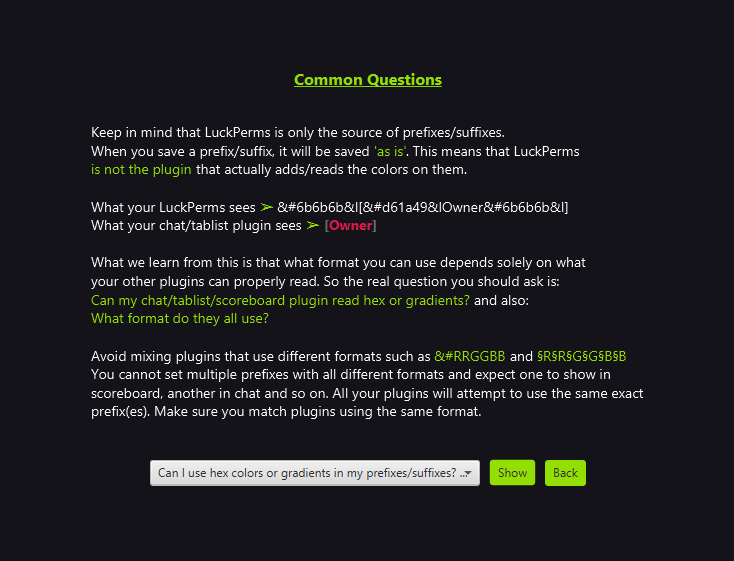
and then the question is if your chat or other plugins displaying the prefix support hex, and also if they all take the same format
meager fox
good idea
if you have some sort of tablist plugin, should check that too
wont make sense to use a format that one can read and the other displays totally f'ed up
 bold vale
can someone knows how to connect maria db to all luckpemrs server
 thick grail
there is like nothing
Okay \can someone help?

that gives the error "&cYou do not have permission."
uneven nexus
so find the perm, and give it.
thick grail
i did...
uneven nexus
!verbose
 wanton stratusBOT
LuckPerms provides a verbose command to help you find out what permissions a command/plugin is checking.
Read more
 LuckPerms wiki
uneven nexus
LuckPerms wiki
uneven nexus
use that, and make sure you gave ALL permissions needed.
thick grail
 uneven nexus
Looks like it's working to me.
 thick grail
o m g
when they right click npc it does that
wtf
now it works
it didnt work before
smh
nvm
with op it works

wtf]

i dont get this
 naive oxide
Hey,
when i drop the jar file (LuckPerms-Bukkit) into my plugin folder and restard the Server the LuckPerms folder is not being generated.
I already watched that video https://www.youtube.com/watch?v=l4anE2wOLdc and read in the wiki but I still dont get how to fix it.
VaultChatFormatter etc is working.

---------- Links ----------
LuckPerms download: https://luckperms.net/
Vault download: https://www.spigotmc.org/resources/vault.34315/
VaultChatFormatter download: https://www.spigotmc.org/resources/vaultchatformatter.49016/
EssentialsX download: https://essentialsx.net/
LuckPerms wiki: https://luckperms.net/wiki/Home
LuckPerms Discord: https:/...
 icy berry
how do i sync the groups from one server on the network to all of them
naive oxide
I dont know at which part I am failling, I just did what the wiki told to do
uneven nexus
naive oxide
Hey,
when i drop the jar file (LuckPerms-Bukkit) into my plugin folder and resta...
!paste send your latest.log
wanton stratusBOT
Please use pastebin!
Seeing a paste of the problem makes everything so much easier! Use https://pastes.dev/ for easy pasting!
For console errors:
Pastebin any relevant segments of the console log. If it's a startup error, this includes the entire startup log!
Other errors:
Pastebin the entire LuckPerms config file (passwords removed) as well as any other relevant files!
uneven nexus
icy berry
how do i sync the groups from one server on the network to all of them
!network
wanton stratusBOT
If you run a BungeeCord network, learn how to correctly setup LuckPerms on all server instances (including Bungee).
Also read:
Syncing data between servers
LuckPerms wiki
 quiet gate
i dont have Developer group, but i shows [Dev] prefix on chat

 icy berry
am i supposed to install lp on the proxy
naive oxide
uneven nexus
!paste send your latest.log

A paste containing 294 lines of plaintext.
uneven nexus
[16:47:59] [Server thread/ERROR]: [LuckPerms] Your server version is not compatible with this build of LuckPerms. :(
[16:47:59] [Server thread/ERROR]: [LuckPerms]
[16:47:59] [Server thread/ERROR]: [LuckPerms] If your server is running 1.8, please update to 1.8.8 or higher.
[16:47:59] [Server thread/ERROR]: [LuckPerms] If your server is running 1.7.10, please download the Bukkit-Legacy version of LuckPerms
I'd recommend updating to 1.8.8 though.
icy berry
am i supposed to install lp on the proxy
uneven nexus
do you want to manage permissions on it
uneven nexus
there are plugins with permissions, for the proxy
 dry robin
@thick grail what command did you add to that npc
 upbeat echo
is there a permission to grant a permission that adds a command to grant one given permission?
thick grail
dry robin
<@!791123105862909982> what command did you add to that npc
wdym
thick grail
uneven nexus
there are plugins with permissions, for the proxy
can you please help


they should have the perm
i gave it to them
uneven nexus
The verbose output shows they do have it. As far as LuckPerms is concerned, they can use /server.
thick grail
it makes no sense
thick grail
uneven nexus
The verbose output shows they do have it. As far as LuckPerms is concerned, they...
so then whats the issue
cause i can manually do /server
uneven nexus
How am i supposed to know? lol
icy berry
after installing lp, i cant use /server. why?
bear in mind, i'm op on all the backends
uneven nexus
well /server is a proxy command, op doesn't effect that.
icy berry
how do i make it so that i can use it then
icy berry
how
uneven nexus
give yourself permissions with lp(b/v)
thick grail
bungeecord.command.server
icy berry
lokl
thick grail
icy berry
tried that
from the proxy?
icy berry
wdym?
uneven nexus
run /lpb user <your user> permission check bungecord.command.server
icy berry
i cant use commands on the proxy
icy berry
i wish
 uneven nexus
icy berry
https://i-own-a.blacklisted.store/K5qYLFyB
uneven nexus
icy berry
https://i-own-a.blacklisted.store/K5qYLFyB
Okay, do you not have access to run proxy commands?
icy berry
just says 'command not found'
uneven nexus
like, in console?
thick grail
smh
icy berry
yeh console dont work
thick grail
icy berry
yeh console dont work
wdym?
uneven nexus
Even when you run lpb in it ?
thick grail
evident
i got it
dw
you can go your freed
ill help him
1dev
do you have luckperms bungee installed on your proxy?
icy berry
thick grail
wdym?
command typed: help https://i-own-a.blacklisted.store/YMK37br0

 icy berry
ah it does
thick grail
yup
so now use the command he sent
please not though, unless you are using a database, this wont all transfer between servers
dry robin
thick grail
use built-in bungee support from citizens, not some weird sudo commands
thick grail
dry robin
use built-in bungee support from citizens, not some weird sudo commands
its my sudo command
and the biult in one doesnt work i dont think
dry robin
it does work, if not contact citizens support
uneven nexus
it does if you set it up properly.
icy berry
 thick grail
it doesnt wanna work
icy berry
i added the perm to group default
thick grail
icy berry
alright so do permission set bungeecord.command.server true
so do
lpb group default permission set bungeecord.command.server true
copy and paste
and that should work
icy berry
[15:15:07 INFO]: [LP] default already has bungeecord.command.server set in context global.
thick grail
cause you spelt it wrong
icy berry
but it doesnt
[15:15:35 INFO]: [LP] default already has bungeecord.command.server set in context global.
thick grail
lpb group default permission check bungeecord.command.server
copy and paste
and send result
icy berry
ayo it works
thick grail
yw
icy berry
ty
thick grail
np
thick grail
dry robin
it does work, if not contact citizens support
its because i have simpleservercommand
fuck
uhhh
i have that so i can sudo people to do it
all it does it registers it as a bukkit command but i think thats causing the issue
dry robin
why tho, citizens has built-in feature right for that, https://wiki.citizensnpcs.co/NPC_Commands
(Youll have to scroll down)
One of the common things Citizens users want is the ability to have NPCs run a command when right-clicked.
thick grail
yeah
nbm
i see
/npc command add -p server MyServerName
yeah
my bad dude
thanks for the help
winter elk
hey i changed 'allow-invalid-usernames' to true but this still shows up

 nocturne chasm
not luckperms
wanton stratusBOT
Hey TheMusulmxn! Please don't tag helpful/staff members directly.
 alpine burrow
how do i make it where the people who join automatically get the default rank'
 rare wing
alpine burrow
how do i make it where the people who join automatically get the default rank'
rare wing
alpine burrow
how do i make it where the people who join automatically get the default rank'
They are have the default role in the luckperms upon joining
It’s another plugin
meager fox

GitHub
Scoreboard + Tablist + Prefix + Chat | Animated. Contribute to Xitee1/PowerBoard development by creating an account on GitHub.
alpine burrow
even though its not your plugins guys still did awesome helping me 🙂 thanks
 proper schooner
i open lp editor, I confirm it, I save, but it still says people in my server dont have the permission. Is there a simple fix?
 cloud hinge
how can i fix this

i recently connect luckperms with mysql database
now thats happend when ever i msg the prefix doubles
anyone ;-;

 stark palm
ok so... I updated my server to 1.18 and now some permissions dont work; like I have a staff member that has luckperms.* and it says they cannot add a parent to a user even though they have the node for it, same thing with mythicmobs and spawning them, idk what is going wrong
 inner plover
foggy quartz
How can I make it so regular members show under staff
inner plover
foggy quartz
How can I make it so regular members show under staff
!tab
wanton stratusBOT
LuckPerms does not perform any chat/tablist formatting of its own!
LuckPerms only acts as the source for prefixes / suffixes, it doesn't actually apply them. You need an appropriately configured chat/tablist formatting plugin for them to be displayed. If the values appear correctly when you run /lp user <user> info, LuckPerms is doing its job!
FAQ answer: Prefix isn't showing?
List of chat/tablist formatting plugins that work with LuckPerms
foggy quartz
inner plover
!tab
Oh ok thanks
stark palm
stark palm
ok so... I updated my server to 1.18 and now some permissions dont work; like I ...
did some permissions perhaps change for 1.18?
stark palm
A paste containing 3731 lines of plaintext.
 torn crag
Hi, I have LuckPerms on bungee installed and I need to set plhide.group.bypass to ranks from SkyBlock server, lobby etc. and it needs to read this bungee permission, what should I do to do this?
meager fox
stark palm
did some permissions perhaps change for 1.18?
Tried verbose yet? Root perms dont just change
meager fox
torn crag
Hi, I have LuckPerms on bungee installed and I need to set plhide.group.bypass t...
I dont see whats the problem. You seem to know exactly what you want to do :manythink:
tropic fulcrum
Hi, can i change name colors with LP ?
meager fox
I suggest you use a chat plugin for that
 fathom wolf
how to fix suffixes its not working
meager fox
Add the placeholder for it into your chat formatter?
foggy quartz
@elfin egret Is there an event for checking if a group is added to a member?
wanton stratusBOT
Hey Immortal! Please don't tag helpful/staff members directly.
 chilly obsidian
when i set the default group to have tpa commands perms and save it, my friends still dont have permissions to use those commands even though they are added to the group
please help me
stark palm
meager fox
Tried verbose yet? Root perms dont just change
Verbose?
meager fox
!verbose
wanton stratusBOT
LuckPerms provides a verbose command to help you find out what permissions a command/plugin is checking.
Read more
LuckPerms wiki
 brave copper
Why does the rank displayname show up as the prefix
 lunar nest
Hello, how to transfer all permissions and data to new server without losing them or setting again?
lunar nest
brave copper
Why does the rank displayname show up as the prefix
Idk. Maybe you have this prefix somewhere in permissions.
brave copper
lunar nest
Idk. Maybe you have this prefix somewhere in permissions.
I have set a prefix, and the prefix is used by the chat plugin. Yet when I set a displayname for the group, it replaces the prefix
lunar nest
brave copper
I have set a prefix, and the prefix is used by the chat plugin. Yet when I set a...
I don't understand man. See if the issue is your custom plugin.
Do you know how to transfer all my perms to new server? Where are they stored?
meager fox
lunar nest
I don't understand man. See if the issue is your custom plugin.
Do you know how...
!switch same basics here; export import
wanton stratusBOT
If you wish to change your storage type (e.g. to YAML or MySQL) you may need to follow these instructions to ensure your groups and permissions are migrated to the new storage type.
Read more about the Storage types
LuckPerms wiki
meager fox
brave copper
I have set a prefix, and the prefix is used by the chat plugin. Yet when I set a...
Check if your chat plugin uses group formats, specifically also the group placeholder
brave copper
meager fox
Check if your chat plugin uses group formats, specifically also the group placeh...
Its EssentialsChat. I should've mentioned that.
Should I use the group name instead of prefix?
Seems counterintuitive.
proper schooner
every time I confirm the permission the people in my server still cant do it.
can someone help>
 ember quest
Is it possible to change the LuckPerms prefix ([LP]) in the source code?
nocturne chasm
yes
cloud hinge
cloud hinge
i recently connect luckperms with mysql database
help!!
brave copper
@cloud hinge Are you using EssentialsChat?
cloud hinge
brave copper
<@!839042329330450432> Are you using EssentialsChat?
yes
brave copper
Okay, shot in the dark here, but set 'add-prefix-suffix: true' to 'false' in the Essentials config on line 63.
if its commented out, remove the hashtag before it.
cloud hinge
okhh lemme check
brave copper
In the Essentials config*
 brave copper
Remove the hashtag, set it to false.
cloud hinge
 brave copper
Save and try it.

 exotic leaf
My member said they can’t use /sellall ( EconomyShopGUI )
I tried /lp group default permission set economyshopgui.sell.all
But it didn’t work
Help me please
brave copper
!verbose
wanton stratusBOT
LuckPerms provides a verbose command to help you find out what permissions a command/plugin is checking.
Read more
LuckPerms wiki
brave copper
@exotic leaf
brave copper
!!verbose
wanton stratusBOT
LuckPerms provides a verbose command to help you find out what permissions a command/plugin is checking.
Read more
LuckPerms wiki
brave copper
@alpine burrow have you tried this?
foggy quartz
hello i have a big problem
alpine burrow
can you walk me through it verbose confuses me
foggy quartz
I put an essentials.fly permission for 10 min after the 10 min is returned, players can still fly (and in the lp editor it says expire since "2 x time")
can i help me please?
 toxic wagon
foggy quartz
I put an essentials.fly permission for 10 min after the 10 min is returned, play...
toxic wagon
foggy quartz
I put an essentials.fly permission for 10 min after the 10 min is returned, play...
Luckperms will only remove the permission, it does not turn the fly off. You'll need another plugin to do that part.
foggy quartz
If i activate the command " lp user permission unsettemp essentials.fly false 10m" is good ?
brave copper
alpine burrow
can you walk me through it verbose confuses me
Type '/lp verbose on', then try to sell something. It will tell you the permission it uses which you can then add to the rank.
foggy quartz
will it remove only that specific permission and not all of the essentials.fly?
toxic wagon
foggy quartz
will it remove only that specific permission and not all of the essentials.fly?
lp user <name> permission unsettemp essentials.fly
would be the command
and it would only do it for that user
and it will only remove the permission, it won't disable fly for them
foggy quartz
okey ty
I will test
alpine burrow
ok so im trying to make it where everyone on my server can use the command /playsound so they can pretty much play any music disc or anyhting while building but they cant access this command even when i give it to the player directly
toxic wagon
alpine burrow
ok so im trying to make it where everyone on my server can use the command /play...
Do /lp verbose command me /playsound and screenshot what it says
brave copper
alpine burrow
ok so im trying to make it where everyone on my server can use the command /play...
You should be adding minecraft.command.playsound
toxic wagon
show me the output from /pl
exotic leaf
How can i set a perm for a player with command?
toxic wagon
exotic leaf
How can i set a perm for a player with command?
!usage
wanton stratusBOT
Here's a guide to help users understand and use LuckPerms for the first time.
Read more
LuckPerms wiki
alpine burrow
 toxic wagon
@alpine burrow Remove PowerRanks!
alpine burrow
what plugin can i use for tablist and chat once i delete it then. and how does it mess with lp
toxic wagon
!meta There is a list at the bottom of this page
wanton stratusBOT
You can set prefixes, suffixes and other meta data in LuckPerms for players and groups. Note that LuckPerms does not manage chat. You need to use another plugin to show prefixes/suffixes in chat.
LuckPerms wiki
toxic wagon
alpine burrow
what plugin can i use for tablist and chat once i delete it then. and how does i...
It is a permissions plugin. You cannot have more than 1 permissions plugin at a time
alpine burrow
it is not it has it just controls the chat and what it shows in tab
toxic wagon
It is a permissions plugin
 gentle perch
how would these options affect the parent groups exactly, not quite sure understand the explanation given?
parents-by-weight: use the users most highly weighted parent
all-parents-by-weight: same as above, but calculates based upon all parents inherited from both directly and indirectly``` alpine burrow
ok well then i come full circle back to the problem with tab and chat where it does'nt show what there rank is
toxic wagon
alpine burrow
ok well then i come full circle back to the problem with tab and chat where it d...
!meta Look at the list on the bottom of this page and use one of them
wanton stratusBOT
You can set prefixes, suffixes and other meta data in LuckPerms for players and groups. Note that LuckPerms does not manage chat. You need to use another plugin to show prefixes/suffixes in chat.
LuckPerms wiki
toxic wagon
alpine burrow
ok well then i come full circle back to the problem with tab and chat where it d...
https://github.com/NEZNAMY/TAB/releases This is the most recommended tab plugin

GitHub
"That" TAB plugin. Contribute to NEZNAMY/TAB development by creating an account on GitHub.
brave copper
gentle perch
how would these options affect the parent groups exactly, not quite sure underst...
1st option is rank weight only.
2nd option is rank weight + all the ranks' weight that it inherits from.
gentle perch
brave copper
1st option is rank weight only.
2nd option is rank weight + all the ranks' weigh...
You happen to know how it affects permissions?
Would the first option only give permissions of the highest weighted rank?
alpine burrow
your didnt work im trying stylizer next and ill try a few others if none of them work i dont know then what to do
toxic wagon
gentle perch
how would these options affect the parent groups exactly, not quite sure underst...
It determines the players primary group
toxic wagon
alpine burrow
your didnt work im trying stylizer next and ill try a few others if none of them...
your didn't work What?
Make sure you have Vault installed as well
alpine burrow
i do now already i saw it got taken off and i added it
 wanton stratusBOT
Hey BM|ahmedRiad 888! Please don't tag helpful/staff members directly.
toxic wagon
 abstract ridge
<@!267605008936206346> i have a peper server what should i download ?
abstract ridge
<@!267605008936206346> i have a peper server what should i download ?
If you have a paper server, use the one that says paper
brave copper
abstract ridge
<@!267605008936206346> i have a peper server what should i download ?
Bukkit
abstract ridge
@toxic wagon if i want to add all prems to my freind in her wthout make other people op group what should i do
wanton stratusBOT
Hey BM|ahmedRiad 888! Please don't tag helpful/staff members directly.
toxic wagon
abstract ridge
<@!267605008936206346> if i want to add all prems to my freind in her wthout m...
All perms means OP
brave copper
/op [Name]
abstract ridge
@toxic wagon whout op
wanton stratusBOT
Hey BM|ahmedRiad 888! Please don't tag helpful/staff members directly.
toxic wagon
abstract ridge
<@!267605008936206346> whout op
Again, if you want to give someone all perms, you have to give them op.
abstract ridge
i want to give him all prems whout op man
brave copper
Can you use a * wildcard to give every permission? lol
brave copper
abstract ridge
i want to give him all prems whout op man
Why
abstract ridge
i dont need him to opped other people
toxic wagon
!nowildcard You can use * to give ALL permissions but keep this in mind:
wanton stratusBOT
Wildcard issues
Some plugins are created in a way which results in odd behaviour when the root '*' wildcard is used.
More information:
brave copper
abstract ridge
i dont need him to opped other people
You don't want him to op other people?
abstract ridge
yes
brave copper
toxic wagon
!nowildcard You can use `*` to give ALL permissions but keep this in mind:
Then do this
exotic leaf
Can i use PowerRanks with LuckPerms?
alpine burrow
im annoyed and im taking a break to pick it up in the afternoon tomorrow you have only set me back but still help me find the problem so thanks you should come checkout my smp on minehut later truthfully idc thanks i guess
abstract ridge
toxic wagon
https://discord.com/channels/241667244927483904/241667244927483904/9600658497613...
if i do this he cant opped any onee ?
brave copper
I don't think he would be able to, but if you're still having doubts, add:
'minecraft.command.op' and set it to 'false'.
abstract ridge
i download the plung then what should i do to edit
and add groups
@brave copper how to add peaple to group ?
wanton stratusBOT
Learn how to use LuckPerms and all of its features by reading the wiki.
Read more
LuckPerms wiki
abstract ridge
@brave copper if the member isnot in the server how can i add it to the group
brave copper
Type in their ingame name.
abstract ridge
 brave copper
You typed it in wrong.
abstract ridge
it says to me not found
brave copper
You typed the name in wrong.
abstract ridge
no the name right
brave copper
If it doesn't recognize the name it is not typed right.
abstract ridge
but he not in server
toxic wagon
abstract ridge
Has he joined the server before, since you installed LP
abstract ridge
@toxic wagon i need to add it
wanton stratusBOT
Hey BM|ahmedRiad 888! Please don't tag helpful/staff members directly.
toxic wagon
abstract ridge
<@!267605008936206346> i need to add it
Has that player joined the server since you have added luckperms
abstract ridge
no
toxic wagon
Then you need to use the players UUID instead of name.
Otherwise wait for the player to join the server
abstract ridge
how can i found it
toxic wagon
Minecraft UUID and username lookup. Resolve, convert and view name history of any username/UUID today.
Enter the players name into that
and it will tell you their uuid
brave copper
Why does LP not do that automatically?
toxic wagon
Because luckperms does not know anything about a player until they join the server
brave copper
toxic wagon
Because luckperms does not know anything about a player until they join the serv...
Yes, why is that?
toxic wagon
Well, where is it suppose to get the info about a player?
Luckperms cannot find the details of every single person who players minecraft...
brave copper
The exact same way /whitelist does it I suppose.
toxic wagon
whitelist doesn't find users.
Whitelist and a permissions plugin are 2 completely different things
All you need to know, is luckperms won't know anything about a player unless they have joined the server atleast once. But you can use the UUID to add stuff to a player who has not joined
brave copper
I type in a name, it gets the UUID. I can't think of a reason why LP can't do that. That's all.
abstract ridge
right ?
 brave copper
abstract ridge
right ?
brave copper
abstract ridge
right ?
Yes
toxic wagon
brave copper
I type in a name, it gets the UUID. I can't think of a reason why LP can't do th...
There is 0 reason for it to...
 remote cosmos
does the current most up to date version of luckperms sponge not work with the sponge 7.0 api?
brave copper
toxic wagon
There is 0 reason for it to...
Convenience/ease of use. One of the few things LuckPerms advertises itself as...
abstract ridge
@brave copperhow can i add tp perms
toxic wagon
abstract ridge
<@!662424570124304416>how can i add tp perms
!usage
wanton stratusBOT
Here's a guide to help users understand and use LuckPerms for the first time.
Read more
LuckPerms wiki
toxic wagon
Give them the permission to tp
abstract ridge
how
wanton stratusBOT
LuckPerms provides a verbose command to help you find out what permissions a command/plugin is checking.
Read more
LuckPerms wiki
toxic wagon
abstract ridge
how
Get a plugin that uses TP then read that plugins docs to find the permission, then add that permission
remote cosmos
its under minecraft
so i think its tp.minecraft
or something like that
most of the default minecraft commands are literally just the command followed by .minecraft
toxic wagon
remote cosmos
most of the default minecraft commands are literally just the command followed b...
False
 wanton stratusBOT
Hey BM|ahmedRiad 888! Please don't tag helpful/staff members directly.
toxic wagon
That says tps not tp
Install a plugin that handles TP and find that plugins permission or google default minecraft permissions
abstract ridge
give me link
toxic wagon
No. Google it yourself
I'm not doing the work for you
Your server, you do the work
remote cosmos
minecraft.command.teleport
abstract ridge
this perms to game mode ?
 remote cosmos
yerp
abstract ridge
what ?
brave copper
Yes
remote cosmos
is there a version that works with sponge that uses the 7.0 api?
abstract ridge
@brave copper i add this prems to my freind and he cant gamemode
toxic wagon
remote cosmos
is there a version that works with sponge that uses the 7.0 api?
A version of what
abstract ridge
?
remote cosmos
add a .* to the end of the gamemode command
will give access to all gamemode commands
minecraft.command.gamemode.*
toxic wagon
remote cosmos
for some reason sponge isnt picking up luckperms
!paste the startup log
wanton stratusBOT
Please use pastebin!
Seeing a paste of the problem makes everything so much easier! Use https://pastes.dev/ for easy pasting!
For console errors:
Pastebin any relevant segments of the console log. If it's a startup error, this includes the entire startup log!
Other errors:
Pastebin the entire LuckPerms config file (passwords removed) as well as any other relevant files!
remote cosmos
A paste containing 212 lines of plaintext.
toxic wagon
remote cosmos
line 44
So you're using Sponge API 7 are you?
 gloomy cloak
Hello!
I would like to ban the use of TNT, Fire for 1 day for beginners. i.e. when they play 1 day, they will be able to use it later. How do you implement this in Luckperms with WorldGuard?
toxic wagon
remote cosmos
pretty sure its 7
https://ore.spongepowered.org/Luck/LuckPerms/versions/5.3.98 Try this version
 toxic wagon
gloomy cloak
Hello!
I would like to ban the use of TNT, Fire for 1 day for beginners. i.e. w...
toxic wagon
gloomy cloak
Hello!
I would like to ban the use of TNT, Fire for 1 day for beginners. i.e. w...
You'd need another plugin that handles the 1 play for 1 day part
gloomy cloak
ok, thanks
remote cosmos
minecraft.command.op false
toxic wagon
abstract ridge
<@!207296617793978368> can you give me op command
Why do you keep expecting people to spoonfeed you answers. If you want to run a server you need to know how to find the answers yourself. Otherwise your server is going no where. You'll never learn how to do things yourself if everyone just gives you the answers.
remote cosmos
minecraft.command.deop false
first one stops you from opping
second stops deopping
 wanton stratusBOT
Hey BM|ahmedRiad 888! Please don't tag helpful/staff members directly.
toxic wagon
abstract ridge
this ?
Try and See
abstract ridge
if i add all prems he can control in this plugin ?
toxic wagon
He will have access to all the things you give him permissions for
abstract ridge
then how can i false him to not control this plugin ?
toxic wagon
If a player does not have permission to use a command, they will not be able to use it.
luckperms.* is the permission for ALL luckperms commands.
abstract ridge
@toxic wagon how can i false perms to not control lcukperms
wanton stratusBOT
Hey BM|ahmedRiad 888! Please don't tag helpful/staff members directly.
abstract ridge
.
toxic wagon
Same as you set all other permissions to false.
toxic wagon
If you set luckperms.* to false, they won't be able to use luckperms
abstract ridge
please i dont understand you
 kindred tusk
abstract ridge
i give him all perms * he can now acces this plugin
kindred tusk
abstract ridge
i give him all perms * he can now acces this plugin
do you mean the dashboard
foggy quartz
hello
abstract ridge
give me commant to falst it to not access this plugin
abstract ridge
@kindred tusk i need to false access for luckprems
toxic wagon
abstract ridge
give me commant to falst it to not access this plugin
/lp user <name> permission set luckperms.* false
abstract ridge
i want him not access this plugin
kindred tusk
abstract ridge
<@!896828815920222238> i need to false access for luckprems
do u mean the dashboard or all /lp commmands
abstract ridge
lp
kindred tusk
here this might help
https://luckperms.net/wiki/Permissions

LuckPerms - A permissions plugin for Minecraft servers.
LuckPerms is a permissions plugin for Minecraft servers. It allows server admins to control what features players can use by creating groups and assigning permissions.
that is all the permissions and the commands they control
abstract ridge
toxic wagon
`/lp user <name> permission set luckperms.* false`
i donot need user i need group
foggy quartz
Hello, good evening, is there a way that I can give permissions to an admin to put and remove ranges but without exceeding their own range?
kindred tusk
abstract ridge
i donot need user i need group
i can try and help you bat can we move to private DMs?
toxic wagon
abstract ridge
i donot need user i need group
Then change user to group
foggy quartz
foggy quartz
Hello, good evening, is there a way that I can give permissions to an admin to p...
? :v
wanton stratusBOT
Hey BM|ahmedRiad 888! Please don't tag helpful/staff members directly.
toxic wagon
foggy quartz
? :v
!argumentbased
wanton stratusBOT
Fine tune exactly what users with permission to use LuckPerms can do.
LuckPerms wiki
toxic wagon
abstract ridge
what doese export cmmant do ?
LuckPerms - A permissions plugin for Minecraft servers.
LuckPerms is a permissions plugin for Minecraft servers. It allows server admins to control what features players can use by creating groups and assigning permissions.
abstract ridge
@toxic wagon i export file how can i delete it
wanton stratusBOT
Hey BM|ahmedRiad 888! Please don't tag helpful/staff members directly.
abstract ridge
.
toxic wagon
abstract ridge
<@!267605008936206346> i export file how can i delete it
It gets exported to the luckperms folder, so go into the luckperms folder and delete the exported file.
abstract ridge
@toxic wagon if i export files it didnot do any think for my server
wanton stratusBOT
Hey BM|ahmedRiad 888! Please don't tag helpful/staff members directly.
abstract ridge
.
 rapid plover
Error Luck Perms Database :/ ~
Please use https://pastes.dev to send files in the future. I have automatically uploaded message.txt for you: https://pastes.dev/lZiyY3doJq
A paste containing 98 lines of plaintext.
LuckPerms cannot connect to your MySQL server
Read More
Caused By
java.sql.SQLTransientConnectionException: luckperms-hikari - Connection is not available, request timed out after 5001ms.
https://pastes.dev/lZiyY3doJq | Sent by Clippy
toxic wagon
@abstract ridge will you stop pinging me and listen to the bot.
@abstract ridge Deleting a exported file will not effect your permissions
toxic wagon
rapid plover
Error Luck Perms Database :/ ~
```
```
You have a typo in the config
toxic wagon
abstract ridge
ok
No. It's just a way to make a backup of luckperms
toxic wagon
rapid plover
gdzie?
!paste your full config.yml and censor the username, ip and password for the database
wanton stratusBOT
Please use pastebin!
Seeing a paste of the problem makes everything so much easier! Use https://pastes.dev/ for easy pasting!
For console errors:
Pastebin any relevant segments of the console log. If it's a startup error, this includes the entire startup log!
Other errors:
Pastebin the entire LuckPerms config file (passwords removed) as well as any other relevant files!
rapid plover
wanton stratusBOT
Please use https://pastes.dev to send files in the future. I have automatically uploaded message.txt for you: https://pastes.dev/D1ChdOuBiz
A paste containing 711 lines of plaintext.
wanton stratusBOT
You can download LuckPerms for Bukkit/Spigot/Paper, BungeeCord, Sponge, Fabric, Nukkit and Velocity.
Additional downloads
rapid plover
Ja dupca
 toxic wagon
rapid plover
Ja dupca
toxic wagon
rapid plover
Ja dupca
Read what it says
wanton stratusBOT
Please use https://pastes.dev to send files in the future. I have automatically uploaded message.txt for you: https://pastes.dev/rNzGWrYF7l
A paste containing 123 lines of plaintext.
LuckPerms cannot connect to your MySQL server
Read More
Caused By
java.sql.SQLTransientConnectionException: luckperms-hikari - Connection is not available, request timed out after 5001ms.
https://pastes.dev/rNzGWrYF7l | Sent by Clippy
ember quest
nocturne chasm
yes
How? I cant find it
 wooden owl
Hello, how i can make something like this in lp? 🙂 i try plugins like HexNicks, LPC - Chat Formatter, etc
just simple gradient set in advance for rank and player name, nothing work so far ;/
 toxic wagon
wooden owl
Hello, how i can make something like this in lp? 🙂 i try plugins like HexNicks,...
toxic wagon
wooden owl
Hello, how i can make something like this in lp? 🙂 i try plugins like HexNicks,...
!formatting
wanton stratusBOT
LuckPerms does not perform any chat/tablist formatting of its own!
LuckPerms only acts as the source for prefixes / suffixes, it doesn't actually apply them. You need an appropriately configured chat/tablist formatting plugin for them to be displayed. If the values appear correctly when you run /lp user <user> info, LuckPerms is doing its job!
FAQ answer: Prefix isn't showing?
List of chat/tablist formatting plugins that work with LuckPerms
chilly obsidian
Bruh why did everyone just ignore me
#support-2 since over here people decided not to read what i said
toxic wagon
rapid plover
Error database
Stop the server, delete the LP config, start the server. Then stop the server again, then edit the LP config for the database details. Then start the server again. See if that works
ember quest
ember quest
Is it possible to change the LuckPerms prefix ([LP]) in the source code?
can anyone help me please?
 lament trench
Hi, someone can give me a hand with this:
https://paste.md-5.net/pebelepowa.md
I get this warnings in the screen and then server stop responding!
What means: HikariPool-2 - Thread starvation or clock leap detected (housekeeper delta=5m15s50ms347µs242ns)
icy berry
how do i get my ranks from one server onto the whole network
i had some ranks setup on survival (h2) then we moved to being a network (sql now) and i lost the ranks
meager fox
!switch youre supposed to take an export before switching storages. ofc, your sql doesnt know about data in your h2 file and wont magically take the data with it upon change. but good news: you can change back to h2, take an export, change to sql again and import the things you had before
wanton stratusBOT
If you wish to change your storage type (e.g. to YAML or MySQL) you may need to follow these instructions to ensure your groups and permissions are migrated to the new storage type.
Read more about the Storage types
LuckPerms wiki
meager fox
lament trench
Hi, someone can give me a hand with this:
https://paste.md-5.net/pebelepowa.md
...
looks like your server is lagging for whatever reason. its a symptom, not the actual cause
inner plover
!cookbook (for me)
wanton stratusBOT
The cookbook is a working example plugin which shows how to get/change data for users and groups, listen to LuckPerms events, and more.
dry robin
!cookie (for you)
wanton stratusBOT
Sorry! I do not understand the command cookie Did you mean cookbook?
Type !help for a list of commands
 sage pond
I have an issue that even with context's applied for particular servers and worlds, permissions still can't be used. I can share my editor if needs be.
meager fox
did you set the server names in the config? (same as what you use as context key)
sage pond
Yeah
 abstract ridge
How to not allow to member to not breaking blocks
 deft cosmos
Can you change the no permission messagae?
uneven nexus
for LuckPerms?
uneven nexus
abstract ridge
How to not allow to member to not breaking blocks
find a plugin that does permission based block breaking, and use it

 odd pond
uneven nexus
find a plugin that does permission based block breaking, and use it
odd pond
uneven nexus
find a plugin that does permission based block breaking, and use it
pls help
ohh i have found
thats was a pluginm
no more help
foggy quartz
How do I see all the permissions that's on my BungeeCord server?
meager fox
ones you addded or all that exist in general
foggy quartz
all that exist in general, im trying to find the permission that keeps non-op players from chatting
meager fox
you are better off finding it with verbose. it would only be connected to anything bungee if your chat plugin is installed on bungee rather than the backend
try /lp verbose record <player who cant chat> in console or as other player but dont test on urself while op obviously
ask the player to send a few chat messages
/lp verbose upload - and have a look at the permissions checked on that list youll get. verbose works on proxy as well if your chat plugin is indeed a proxy one
 covert rapids
hello!
can anyone tell me how can i apply a rainbow effect for a placeholder?
like for example use "#fffffeOwner * &7Player name
foggy quartz
I solved it, it was one of BungeeChat's permission
meager fox
covert rapids
hello!
can anyone tell me how can i apply a rainbow effect for a placeholder?
...
thats up to plugins reading the prefix, such as your chat. lp will accept any formatting, even made up bs that doesnt exist bc lp does not apply colors to prefixes and suffixes. its chat/tablist etc plugins parsing colors
covert rapids
jm okay lets see then so, on the plugin im using, they told me this:
rainbow animation?
if you wan to display the animated color rank then you need to use the placeholder of that rank (i dont know luckperms at all so you need to take a look at their wiki for it) but for the person name its %player_name% from the placeholderapi player extension (install placeholderapi and then run /papi ecloud download player) and then /papi reload
and im not sure about all that coz im noob in this lol
meager fox
i wouldnt know either tbh
covert rapids
so, that plugin has hex support, but for example if i use #fffffe, it doesnt work
so im not sure if inm using it wrong way
ember quest
Is it possible to change the LuckPerms prefix ([LP]) in the source code?
dry robin
in the first place, why do you need to change it
 jolly cliff
Every time something is changed (rank, promote, web editor, etc:) it kicks everyone from the server - anyone know why?
There's also no errors in logs it just says:
[21:20:40] [ForkJoinPool-1-worker-11/INFO]: [LuckPerms] [Messaging] Sending user ping for 'creationmc' with id:
[21:20:40] [Server thread/INFO]: CreationMC lost connection: Disconnected```are you using TAB plugin as well?
jolly cliff
Yea
meager fox
jolly cliff
Thanks my man
 dapper hollow
how do i make it so that a permission is disabled in a certain server?
ember quest
dry robin
in the first place, why do you need to change it
.
dry robin
 ember quest
??
covert rapids
meager fox
probs missing the &
sorry for bothering lol
so, it did worked, howeverm, if i talk in chat for example, it appears the "&" before the rainbowcolor word, and if i dont use the "&" it doesnt work
is there a way to get rid of the "&", looks akward lol
meager fox
you should ask the support team of your chat plugin about that.
covert rapids
oh okay
 weary cradle
Yo for some reason when I deny the default group's permission to a specific thing, setting it for a higher group does not work.
Is there a way to bypass this?
meager fox
yes with setting weight
weary cradle
ah, does the UI not show that?
I was looking for weight, but could not find it
meager fox
weight.NUM
dapper hollow
dapper hollow
how do i make it so that a permission is disabled in a certain server?
a
meager fox
use context ^^
dapper hollow
????
meager fox
!context
wanton stratusBOT
You can set a permission or group on a per-world/per-server basis, through what we call "contexts".
Read more
LuckPerms wiki
ember quest
Is it possible to change the LuckPerms prefix ([LP]) in the source code?
nocturne chasm
don’t cross post
 long wasp
How can I move all permissions to one server?
Basically I have this SMP and we migrated to a network with two servers; creative and smp. I want everyone to have no permissions on creative but everything still on smp
meager fox
then i suggest you add context to your smp stuff or the parent groups with bulk edit, then grab an export, then import so the perms dont apply to creative
!context
wanton stratusBOT
You can set a permission or group on a per-world/per-server basis, through what we call "contexts".
Read more
LuckPerms wiki
meager fox
!switch
wanton stratusBOT
If you wish to change your storage type (e.g. to YAML or MySQL) you may need to follow these instructions to ensure your groups and permissions are migrated to the new storage type.
Read more about the Storage types
LuckPerms wiki
 spare swift
Is there a way to remove a suffix/prefix inherited from a group just for a single player?
foggy quartz
Who can help with the error in the console?
 wanton stratusBOT
Sorry! I do not understand the command permission Did you mean permissions?
Type !help for a list of commands
rapid plover
!permissions
wanton stratusBOT
A list of permissions used by LuckPerms commands.
Read more
LuckPerms wiki
 manic ore
did you ever find a solution for this? i'm having this same problem with pterodactyl as well. tried using the public ip, 172.18.0.1 and 172.17.0.1 to no avail. oddly enough, if i use the public ip without starting the server using pterodactyl, luckperms connects to the db perfectly
 velvet oriole
is there a way i can force update a players head icon, because some of them on the editor are showing a skin from many months ago
 soft thunder
gentle perch
toxic wagon
It determines the players primary group
soft thunder
gentle perch
toxic wagon
It determines the players primary group
parents-by-weight: use the users most highly weighted parent
all-parents-by-weight: same as above, but calculates based upon all parents inherited from both directly and indirectly```

So if i use `parents-by-weight` the group with the highest weight will be the users primary group? Not sure if im understanding this right?

If the above statement is correct then how does the setting `all-parents-by-weight` determine the primary group?is it at all possible to add buyalble ranks with luck perms?
im trying make a ranking system for users to buy ranks from a gui. the only issue is i have to type the promote command through the track each time ?
is there a way to make it so they can pay an amount of in game cash and buy the promotion?
uneven nexus
make the gui run the command.
meager fox
^
foggy quartz
how would i even go about making the gui ? like is that something luck perms covers or do i need a whole seperate plugin with that
uneven nexus
Whole other plugin.
Something like DeluxeMenus would be good for that
Just make sure you have checks for their balance, as well if they already bought it! :)
uneven nexus
hi Aberdeener
foggy quartz
okay imma try that then. ive been using a different plugin for permissions and its honestly been less then useful XD but thanks ill get that install luck perms and work all this out lets hope this wqorks out
meager fox
Just fyi you can migrate data from some other permission plugins so no need to redo from scratch
!migration if you need
wanton stratusBOT
Learn about the process of migrating from another permission plugin.
Read more
LuckPerms wiki
foggy quartz
would that save the Prefixes and all as well???
like everyting would transfer over?
uneven nexus
Should migrate it properly. if not, it shouldn't be a ton of work to fix them.
Yes, it transfers data from other perm plugins.
meager fox
I think you may have to add weights tho
foggy quartz
oml ur a god send then XD ive done so much on powerranks already that like i realllly didnt wanna redo it all XD
im find with that
not hard to add weights to things
meager fox

alpine burrow
hi again im back i need help finding a tab/chat plugin that goes with my plugins including luckperms
 foggy quartz
Migrating didn’t work?
 uneven nexus
!paste send your log
wanton stratusBOT
Please use pastebin!
Seeing a paste of the problem makes everything so much easier! Use https://pastes.dev/ for easy pasting!
For console errors:
Pastebin any relevant segments of the console log. If it's a startup error, this includes the entire startup log!
Other errors:
Pastebin the entire LuckPerms config file (passwords removed) as well as any other relevant files!
uneven nexus
alpine burrow
hi again im back i need help finding a tab/chat plugin that goes with my plugins...
!chat
wanton stratusBOT
LuckPerms does not perform any chat/tablist formatting of its own!
LuckPerms only acts as the source for prefixes / suffixes, it doesn't actually apply them. You need an appropriately configured chat/tablist formatting plugin for them to be displayed. If the values appear correctly when you run /lp user <user> info, LuckPerms is doing its job!
FAQ answer: Prefix isn't showing?
List of chat/tablist formatting plugins that work with LuckPerms
foggy quartz
So I paste my entire log over?
A paste containing 967 lines of plaintext.
like that ?
uneven nexus
oh! I believe this is because the migration jar doesn't support new versions. Try an older version of PowerRanks!
foggy quartz
what version should i use? thats the version for 1.18.1
uneven nexus
@meager fox, i believe you were the one that debugged that issue a few months back. do you remember what version worked ?
foggy quartz
plus if i downgrade my version wouldnt that bug out alot of stuff i have open rn ?
uneven nexus
well obv don't do this in production.
Do it on a test server.
foggy quartz
considering i dont have a test server...
uneven nexus
you can't run one on your pc..?
 turbid egret
im using the same database on my pixelmon server as i am on my vanilla server but they arent linking the ranks and stuff
foggy quartz
considering the hardware on my pc can barely run anything yeah i doubt it XD
turbid egret
/lp info displays that is it connected to the database
alpine burrow
i went through all of these plugins/files putting them on my server and not one worked with my server why?\
VaultChatFormatter - recommended if you just want something simple!
EssentialsX Chat - recommended if you already have Essentials on your server.
ChatEx
VentureChat
Stylizer - includes chat formatting and tablist.
DisplayFormatter - includes chat formatting and tablist, specifically for LuckPerms.
CarbonChat (beta)
thick grail
I got a small problem. I have a database that is linked to 3 1.17.1 servers. There is created 30 ranks. I also have a 1.12 server linked to the same db but no data is transfering over. Whats the problem?
@uneven nexus
foggy quartz
so what v ersion should i use then ?
meager fox
uneven nexus
<@!905017828330045472>, i believe you were the one that debugged that issue a fe...
I did. But i dont remember the ver <.<
I can try to find it
foggy quartz
please lol im struggling over here
 quartz linden
Good Evening Brothers and Sisters, I am looking for an auto-rank feature that works with LP. We are on Fabric. Thank you kindly in advance for your support.
foggy quartz
plus i cant find out how to use that deluxmenus thing....
quartz linden
were you ever able to find a 3rd party that works for fabric?
meager fox
foggy quartz
please lol im struggling over here
Which pr ver are you using atm?
alpine burrow
none of the plugins on the prfixes and meta work at all
uneven nexus
Yes they do. All plugins on that page, listed under bukkit work.
quartz linden
uneven nexus
Yes they do. All plugins on that page, listed under bukkit work.
what about Fabric? nothing for Fabric 😦
foggy quartz
meager fox
Which pr ver are you using atm?
Was using the newes then I dropped to 1.8
uneven nexus
quartz linden
what about Fabric? nothing for Fabric 😦
foggy quartz
Didn’t work it almost did but failed tryna migrate users
meager fox
Ik that 1.10.3 and above dont work but thats about it. I just tested with 1.6 pr version but migration command throws "player is null". Im on phone and thought ill just try to migrate literally nothing but i guess it doesnt like that
So all you can do is keep downgrading til it works but i doubt you need to go as far as versions from idek 1996 yk
gentle perch
Quick question, Let's say i have 2 tracks, If a user is part of both tracks but in different groups, will the user only get the permissions of the highest weighted group or both groups?
meager fox
Tracks dont change the fact that the user has both groups ;)
quartz linden
uneven nexus
https://luckperms.net/wiki/Prefixes,-Suffixes-&-Meta#fabric ..?
Hey @uneven nexus , it is pretty evident that the ONLY 2 mods that work with Fabric stop getting updated 2 years ago. Not very helpful with what I am looking for
Someone please help me
looking for an autorank mod for fabric
Need help
foggy quartz
Dude imma say this much. This server is for luckperms support… not finding mods for auto ranks
So ur not likely gonna get much help here
If it’s a luckperms issue they would be happy to help but from what I’m seeing? This isn’t related to luck perms
foggy quartz
meager fox
Ik that 1.10.3 and above dont work but thats about it. I just tested with 1.6 pr...
Imma try dropping back to 1.5 or something idk imma find it lol
quartz linden
meager fox
I managed to get on my server with minechat lol
whats that?
meager fox
Tryna figure out now whats the latest pr that works for the f of it
foggy quartz
hm i use dedicated mc i wonder if thats gonna work for it
quartz linden
foggy quartz
Dude imma say this much. This server is for luckperms support… not finding mods ...
hey um the auto rank is for perms. i need perms to automatically change based on the player level. thats why i am here
meager fox
Has nothing to do with the host
foggy quartz
ah okay that makes more since.
meager fox
Minechat = get on server via mobile
quartz linden
meager fox
Minechat = get on server via mobile
thats so cool thank you
meager fox
1.6 POWERRANKS VER
foggy quartz
oki thanks 🙂
meager fox
Lel
foggy quartz
imma try it lol lets hope it works XD
meager fox
It didnt like that users were empty
So now i know you cant migrate if you have 0 users in pr
foggy quartz
i have users in PR so it should work
quartz linden
does anyone know how to automate LuckPerms permissions to automatically promote based on player level?
meager fox
Im down to pr 1.9.9 lets see. 1.6 worked.
gentle perch
quartz linden
does anyone know how to automate LuckPerms permissions to automatically promote ...
some plugins can run commands as a rewards. Then you can set a promote command to promote along a rank track
meager fox
So somewhere in between there lol
meager fox
quartz linden
does anyone know how to automate LuckPerms permissions to automatically promote ...
I can recommen conditional events. It can run command on...well... conditions. Such as placeholder x equals or is higher than y -> fire command to promote etc
1.9.9 woks for me
PowerRanks Migration Notice
Powerranks migration requires downgrading to powerranks 1.9.9.
1.10 and above throw 'NoSuchMethod' error.
If powerranks does not enable on restart and you get the following error:
- java.lang.IncompatibleClassChangeError: class nl.svenar.PowerRanks.PowerRanksTABHook can not implement me.neznamy.tab.shared.permission.PermissionPlugin, because it is not an interface (me.neznamy.tab.shared.permission.PermissionPlugin is in unnamed module of loader 'TAB v3.1.4 (1).jar' @186445
... followed by a lot more bla bla, then disable the plugin TAB by neznamy for the time being until migration is done.
wanton stratusBOT
Hey Zeromaniac! Please don't tag helpful/staff members directly.
uneven nexus
@foggy quartz 
foggy quartz

uneven nexus
Close enough!
foggy quartz
meager fox
__**PowerRanks Migration Notice**__
Powerranks migration requires downgrading to...
 upper aurora
hey i have question
how do you add a cool down on commands
like, I want to set my command simpletpa.tpa to like 10 minutes
 mild otter
Lp doesn't do cooldowns, you'll need another plugin to do that
quartz linden
upper aurora
hey i have question
how do you add a cool down on commands
like, I want to set m...
i use essentials for fabric. developed by John Paul
foggy quartz
struggling.., very much so... so the migration said it worked. only it didnt. and now im trying to install essentials chat but it isnt working
luck perms just hates me it seems like frfr
it said it migrated but nothing migrated over. i cant find a version of essentials chat to work with 1.18.1 so the chats not working
cant get the deluxmenus to work. and im being driven insane rn
 lapis seal
Hi! As deop in creative, I am not able to pick block. In verbose mode I get this message: meta: prefix - null
upper aurora
quartz linden
i use essentials for fabric. developed by John Paul
ah well
that's unfortunate
meager fox
foggy quartz
it said it migrated but nothing migrated over. i cant find a version of essentia...
Remember that youll also need vault to display prefixes etc in chat
Also did you check /lp editor? How do you know nothing migrated?
meager fox
lapis seal
Hi! As deop in creative, I am not able to pick block. In verbose mode I get this...
Only deopped or also not as op? Wasnt middle click removed
lapis seal
See for yourself:)
uneven nexus
run /lp verbose record try to pick block, and then run /lp verbose paste send the link it gives you.
meager fox
Use recorder <.<
No way a human can keep up with that spam and the last thing showing is by far not all
Interesting conversation tho
 serene stump
I want to let my players on my server use world edit without op but i do not know what command to do
 cedar bone
LuckPerms - A permissions plugin for Minecraft servers.
LuckPerms is a permissions plugin for Minecraft servers. It allows server admins to control what features players can use by creating groups and assigning permissions.
Also if your new to Luckperms youtube tutorials helped me get started here is one

Luckperms plugin is advanced permissions plugin! I show you how to go over in details how to setup your ranks and permissions for luckperms.
💎 SoulNode Hosting: 💎
➜ Promocode: "STRIKER" for 10% off!
➜ Website: https://soulnode.net
➜ Discord: https://discord.soulnode.net
📥Downloads:
📙 Spigot: https://www.spigotmc.org/resources/28140/...
serene stump
thank you
lapis seal
uneven nexus
run `/lp verbose record` try to pick block, and then run `/lp verbose paste` sen...
meta: prefix - null, thats why I came here, because that doesn't make sense to me
meager fox
Unless excluded via flag on verbose, meta is always checked as well. Think of prefixes as permissions.
I think null comes out if you do not inherit a prefix. Empty would be "" (which would happen if for example your prefix is only a color code such as &4 which, yes, ppl do that, and no, isnt a good idea to do lol) and null = not existent
lapis seal
Okey, so I can't pick block because I dont have the needed prefox
I nnow thats not what you said, I just feel stupid reading it. I dont get it entierly.
Is it possible to get passed this? So that deoped players can pick blocks?
meager fox
The prefix has nothing to do with it...
Lp checks the prefix
Check, check, check no matter what you do
You could turn yourself upside down, chat, jump, and verbose will still print that
Evident told you what to do above. We need to see the entire list of stuff that you got as ridiculous spam in your chat. The whoooooooole list
To achieve that, use the recorder function as he described and send us the link so we can see it without it zooming over the screen
lapis seal
Okey! Thanks Zero. I will do it in the morning, need some sleep!
 leaden lake
Any Supporters Online?
cedar bone
yes
 modern bison
Never
cedar bone
hmm
modern bison

leaden lake
When I Add Luck Perms Plugin And Setup All The Thing Like prefix.1.[VIP] Etc.. And Give To The Members And Save Then It Doesn't Work It Doesnt Show [VIP] DXD_LEGEND Whats The Problem?
modern bison
!chat
wanton stratusBOT
LuckPerms does not perform any chat/tablist formatting of its own!
LuckPerms only acts as the source for prefixes / suffixes, it doesn't actually apply them. You need an appropriately configured chat/tablist formatting plugin for them to be displayed. If the values appear correctly when you run /lp user <user> info, LuckPerms is doing its job!
FAQ answer: Prefix isn't showing?
List of chat/tablist formatting plugins that work with LuckPerms
leaden lake
What?
cedar bone
yep you'll need something like vault & LPC or Vault & EssentialsChat
leaden lake
Essentials Chat??
modern bison
Read
cedar bone
lpc is easier, essentialschat is more popular but you'll need vault either wauy
leaden lake
Ok I Will Try With All The Plugins You Say Waitt
gentle perch
If users have multiple groups with those groups all having different weights, would the user only get the permissions of the group with the highest weight or would the user get the permissions of all the groups?
wanton stratusBOT
Learn about inheritance.
LuckPerms wiki
cedar bone
!weight
wanton stratusBOT
LuckPerms allows you to set weights in order to determine the priority of certain nodes, like permissions and even prefixes. A higher weight number is a higher priority.
Read more
LuckPerms wiki
gentle perch
wanton stratus
this helped clear things up, thanks so much!
foggy quartz
so i have the prefix for admin to be prefix.110.&4Adminbut in doing so its also made the name itsself red and it doesnt put a space between them ? how do i go about making the rank red and the color of the players name like purple or something ? i tried usin prefix.110.&4Admin:&dbut that didnt seem to work either is there someyhing im missing or ?
cedar bone
can't you just setup the chat plugin to do that
foggy quartz
how tho ? i use venturechat and i only know how to cause it to set the prefix correctly
cedar bone
read the docs of it cause idk how to use it
The home of Spigot a high performance, no lag customized CraftBukkit Minecraft server API, and BungeeCord, the cloud server proxy.
modern bison
what about it
foggy quartz
why "group." + group?
modern bison
because groups are "given" to a user by giving them a permission node which is "group.<group name>"
 warm gorge
how do i get a perm item?
foggy quartz
So if I wanna make if statement that has player.hasPermission("group.owner" + group) it will check for owners?
modern bison
what is a "perm item"?
modern bison
foggy quartz
So if I wanna make if statement that has player.hasPermission("group.owner" + gr...
if you want to see if someone is in the "owner" group, check that they have the permission "group.owner"
foggy quartz
I see
modern bison

foggy quartz
Can I also use or ststments?
modern bison
wat
warm gorge
modern bison
what is a "perm item"?
i wanna put the fly perm in a crate but i don't know how to get it
modern bison
we dont know either, check the documentation for your fly item plugin
foggy quartz
Like if Player.hasPermission("group.owner" || "group.pluginmaster" + group) or something like that
modern bison
you can do whatever you want?
foggy quartz
I am thinking of searching for all key words but that sounds little bit inefficient
Is there better way to check if player has higher permissions than default group?
modern bison
if you know a permission node which belongs to a group higher than the default group, you can check if they have that permission
foggy quartz
Well * is a good starting point
Does player.hasPermission("*" + permission) exist?
Honestly not sure how that + something works
modern bison
you should really learn java
foggy quartz
No I mean why is it there
modern bison
+ joins two strings together:
"hello, " + "world" = "hello, world
foggy quartz
As well as player.hasPermission("group.owner")?
modern bison
yes..
modern bison
hasPermission() takes a string, you can put whatever you want in there
foggy quartz
I was confused why is it specifically written in the docs like that
I thought it is something LuckPerms does internally
modern bison
its an example ..
modern bison
no problem 🙂
 compact dome
Hey guys dose anyone know a fix for this i just installed towny when it happened. The issue is the ranks keep getting displayed 3 times
 modern bison
towny is messing with your chat configuration/formatting - edit its config or contact their support. nothing to do with luckperms
compact dome
too easy ill double check the config
abstract ridge
@modern bison why my freind cant tp or do any thing
wanton stratusBOT
Hey BM|ahmedRiad 888! Please don't tag helpful/staff members directly.
abstract ridge
?


 cedar bone
do you have something like essentials that has a tp cmd or do you use the minecraft inbuilt tp command
if you're using inbuilt just add the permission minecraft.command.tp
!nowildcard
wanton stratusBOT
Wildcard issues
Some plugins are created in a way which results in odd behaviour when the root '*' wildcard is used.
More information:
abstract ridge
@cedar bone yes
i use it
in minecraft
@cedar bone man i need him to take all perms
why he cant tp or gamemode or do any thing
cedar bone
i mean you could use * it may cause issues with some plugins.
but add the minecraft.command.tp to the user/group
and minecraft.command.gamemode
for gamemode
abstract ridge
@cedar bone i need him to take all perms i do * put he cant do ant\y thing
cedar bone
because i'd guess minecraft does not understand wildcard permissions.
thats why i use essentials
because the * works
and it replaces the inbuilt gamemode and tp etc. commands
abstract ridge
@cedar bone what shluld i do i need him to all perms
rapid plover
!pl
wanton stratusBOT
Sorry! I do not understand the command pl
Type !help for a list of commands
rapid plover
is there such an option that permissions do not pass from the database to other servers?
is there such an option that permissions do not pass from the database to other servers?
cedar bone
!context
wanton stratusBOT
You can set a permission or group on a per-world/per-server basis, through what we call "contexts".
Read more
LuckPerms wiki
cedar bone
could you not use the server context?
to make some permissions only work on certain servers
i mean it'd still be in the database. Although it would not effect other servers
kindred tusk
!help
wanton stratusBOT
Available commands
!advanced
!api
!argumentbased
!ask
!bulkupdate
!bungee
!bungeecheck
!cauldron
!colours
!commandequivalents
!commands
!config
!context
!cookbook
!default
!downloads
!editor
!editorsafety
!errors
!essentials
!extensions
!extracontexts
!faq
!formatting
!hack
!helpchat
!inheritance
!install
!libsdir
!locale
!meta
!migration
!notworking
!nowildcard
!offline
!pasteit
!permissions
!placeholders
!selfhosting
!stacking
!storage
!suggestions
!switchstorage
!sync
!testingperms
!tracks
!translationprogress
!translations
!tutorial
!upgrade
!usage
!userinfo
!verbose
!version
!weight
!whyluckperms
!wiki
kindred tusk
!weight
wanton stratusBOT
LuckPerms allows you to set weights in order to determine the priority of certain nodes, like permissions and even prefixes. A higher weight number is a higher priority.
Read more
LuckPerms wiki
kindred tusk
!config
wanton stratusBOT
Learn what each of the config options are for.
Read more
LuckPerms wiki
 vestal harness
i get this error on start
wanton stratusBOT
Please use https://pastes.dev to send files in the future. I have automatically uploaded message.txt for you: https://pastes.dev/0rbBzX83Fi
A paste containing 32 lines of plaintext.
cedar bone
!libsdir