#support-1
1 messages · Page 1395 of 1
 ocean dome
 opal tendon
ocean dome
but u can check placeholder wiki page
opal tendon
ocean dome
but u can check placeholder wiki page
I have check that yes, but i didn't see that ^^
 meager fox
its not possible and i can tell you why if you wanna know

 uneven nexus
If you are a server admin, please check the console for any errors.
 foggy quartz
4:55:23 WARN]: Caused by: java.util.concurrent.CompletionException: java.sql.SQLTransientConnectionException: luckperms-hikari - Connection is not available, request timed out after 5000ms.
[14:55:23 WARN]: at me.lucko.luckperms.common.storage.Storage.lambda$future$1(Storage.java:106)
[14:55:23 WARN]: at java.base/java.util.concurrent.CompletableFuture$AsyncRun.run(CompletableFuture.java:1800)
[14:55:23 WARN]: at java.base/java.util.concurrent.CompletableFuture$AsyncRun.exec(CompletableFuture.java:1792)
[14:55:23 WARN]: at java.base/java.util.concurrent.ForkJoinTask.doExec(ForkJoinTask.java:295)
[14:55:23 WARN]: at java.base/java.util.concurrent.ForkJoinPool$WorkQueue.topLevelExec(ForkJoinPool.java:1016)
[14:55:23 WARN]: at java.base/java.util.concurrent.ForkJoinPool.scan(ForkJoinPool.java:1665)
[14:55:23 WARN]: at java.base/java.util.concurrent.ForkJoinPool.runWorker(ForkJoinPool.java:1598)
 graceful ether
i restarted my server but also not showing :/
foggy quartz
foggy quartz
4:55:23 WARN]: Caused by: java.util.concurrent.CompletionException: java.sql.SQL...
pls help
 tawdry zephyr
Hey!
I need some quick help
My prefixes aren't showing up
it was fine before
but I did change some settings in essentials
meager fox
you again lol
foggy quartz
have you lpc installed?
tawdry zephyr
and now it isn't working
meager fox
what did you change in essentials
tawdry zephyr
here they're showing up
 foggy quartz
/lp group meta setprefix 100 ""
meager fox
anyhow touched the section for chat?
tawdry zephyr
foggy quartz
/lp group meta setprefix 100 ""
wait what?
meager fox
dont listen
tawdry zephyr
meager fox
anyhow touched the section for chat?
only that

but now it's default i guess
meager fox
did you change the setting 'add-prefix-suffix', aka removed the # in front of it and set it to false?
tawdry zephyr
nope
 meager fox
did you add more formats or uncommented other ones
tawdry zephyr
nope
meager fox
what does your chat look like rn

 meager fox
check your logs. i think you might have broken the config
tawdry zephyr
oh god
[13:58:37 WARN]: [LuckPerms] Exception occurred in web socket
java.util.concurrent.RejectedExecutionException: null
at java.util.concurrent.ForkJoinPool.externalPush(ForkJoinPool.java:2179) ~[?:?]
at java.util.concurrent.ForkJoinPool.externalSubmit(ForkJoinPool.java:2196) ~[?:?]
at java.util.concurrent.ForkJoinPool.execute(ForkJoinPool.java:2664) ~[?:?]
at me.lucko.luckperms.common.plugin.scheduler.SchedulerAdapter.executeAsync(SchedulerAdapter.java:56) ~[luckperms-jarinjar18392882551834631345.jar.tmp:?]
at me.lucko.luckperms.common.webeditor.socket.listener.WebEditorSocketListener.onMessage(WebEditorSocketListener.java:86) [luckperms-jarinjar18392882551834631345.jar.tmp:?]
at me.lucko.luckperms.lib.okhttp3.internal.ws.RealWebSocket.onReadMessage(RealWebSocket.java:322) ~[okhttp-3.14.9-remapped.jar:?]
at me.lucko.luckperms.lib.okhttp3.internal.ws.WebSocketReader.readMessageFrame(WebSocketReader.java:219) ~[okhttp-3.14.9-remapped.jar:?]
at me.lucko.luckperms.lib.okhttp3.internal.ws.WebSocketReader.processNextFrame(WebSocketReader.java:105) ~[okhttp-3.14.9-remapped.jar:?]
at me.lucko.luckperms.lib.okhttp3.internal.ws.RealWebSocket.loopReader(RealWebSocket.java:273) [okhttp-3.14.9-remapped.jar:?]
at me.lucko.luckperms.lib.okhttp3.internal.ws.RealWebSocket$1.onResponse(RealWebSocket.java:209) [okhttp-3.14.9-remapped.jar:?]
at me.lucko.luckperms.lib.okhttp3.RealCall$AsyncCall.execute(RealCall.java:174) [okhttp-3.14.9-remapped.jar:?]
at me.lucko.luckperms.lib.okhttp3.internal.NamedRunnable.run(NamedRunnable.java:32) [okhttp-3.14.9-remapped.jar:?]
at java.util.concurrent.ThreadPoolExecutor.runWorker(ThreadPoolExecutor.java:1136) [?:?]
at java.util.concurrent.ThreadPoolExecutor$Worker.run(ThreadPoolExecutor.java:635) [?:?]
at java.lang.Thread.run(Thread.java:833) [?:?]
XD
meager fox
whats with this jar in jar crap lately
tawdry zephyr
hmm?
meager fox
restart your server. if something is still broken, then paste your entire latest.log into pastebin and send it to me in dms. the chat not working isnt actually an lp issue so kinda off topic for here
tawdry zephyr
alright
 rich harness
@tawdry zephyr potrzebujesz wciąż pomocy?
tawdry zephyr
rich harness
<@390165046451372034> potrzebujesz wciąż pomocy?
ktoś inny próbuje mi pomóc, jak się nie uda to napiszę
rich harness
git
zawsze możesz zmienić plugin na lpc chat formatter
I wtedy będzie od razu prefix działać
ja nigdy essentials czatu nie używam
uneven nexus
Players will show in the editor (up to 500 at a time) when they're online, and when they have permissions/groups different from group.default
you can use the command in-game to apply groups to users.
!commands user > parent
 wanton stratusBOT
Find all of the available LuckPerms commands on the wiki.
Read more
General commands
User commands
Group commands
Permission commands
Parent commands
Meta commands
Track commands
Log commands
 LuckPerms wiki
uneven nexus
LuckPerms wiki
uneven nexus
shouldn't be related to LP, LP doesn't do anything with chat management.
 sacred prairie
Oh
uneven nexus
okay, so run the command
sacred prairie
What should i do?
uneven nexus
make sure it's not a problem with your client chat settings, afterwards, remove plugins.
https://docs.bloom.host/binarysearch this should help you

How do I fix an obscure error caused by an unknown plugin?
 uneven nexus
er, one sec. wrong page
 hasty tree
sacred prairie
hasty tree
sacred prairie
ow my neck
 crisp garden
Hey uhm @elfin egret sorry for ping, but i requested support for bungeeguard 2 days ago in your other server, mind checking it?
wanton stratusBOT
Hey ! ASebastiaan! Please don't tag helpful/staff members directly.
crisp garden
Sorry i had to
 hot jay
pinging in a different server doesnt make luck anymore likely to respond, i would advise you just to wait patiently, and he will respond when he can
crisp garden
hot jay
pinging in a different server doesnt make luck anymore likely to respond, i woul...
i think he doesn't check the other server thats why i do it here at his more famous plugin
uneven nexus
He uses both servers. When he's available to respond, he'll do so :)
crisp garden
alr ty
hasty tree
crisp garden
i think he doesn't check the other server thats why i do it here at his more fam...
he is far less likely to check pings in here lol
 modern bison
Lucko???? REPLY:?!?!?!?!?
hasty tree
a server with 15k+ people, idk if i'd want to check the countless pings I'd get daily lol
hasty tree
aber i will always appreciate your pings
 upbeat fulcrum
Hi, i cant connect my database with luckperms (storage-method).
I filled in the host, username e.g. correctly but it shows me an error everytime.
java.sql.SQLTransientConnectionException: luckperms-hikari - Connection is not available, request timed out after 5001ms.
wanton stratusBOT
Here's a page with some common storage system errors.
LuckPerms wiki
upbeat fulcrum
ill try
 latent orbit
i get this when i try to connect to a server

(the same will happen if i directly connect)
wanton stratusBOT
Please use https://pastes.dev to send files in the future. I have automatically uploaded message.txt for you: https://pastes.dev/ckCDsKiAWu

A paste containing 71 lines of plaintext.
LuckPerms cannot connect to your MySQL server
Read More
Caused By
java.sql.SQLTransientConnectionException: luckperms-hikari - Connection is not available, request timed out after 5000ms.
https://pastes.dev/ckCDsKiAWu | Sent by Clippy
 fierce zealot
how can i fix this error cause i cant join with luckperms on cause of it
wanton stratusBOT
Please use https://pastes.dev to send files in the future. I have automatically uploaded message.txt for you: https://pastes.dev/BopCmmHV9t
A paste containing 76 lines of plaintext.
 radiant shadow
Is LPC made by Luckperms?
modern bison
no
meager fox

 south ginkgo
Hi, so for some reason, luckperms seems to be messing with placeholders, like now my placeholders that involve player prefixes aren’t working
uneven nexus
What makes you say it’s LP, and what placeholders
south ginkgo
It’s LP because, when I applied a lp web edit, that’s when it stops showing prefixes

Just shows that now
Before it would show owner
uneven nexus
run /papi ecloud list installed as well as /lp user (your name) info
Screenshot both, and send here
south ginkgo

 uneven nexus
You don’t have the LP expansion installed for PlaceholderAPI 🤔
uneven nexus
Doesn't matter for that placeholder
south ginkgo
As I’m also using that on tab

oops wrong ss
Okay I’ll come back if I can’t get vault placeholders working, thank you
uneven nexus
if the prefix shows on tab correctly, it's either A on bungee, where PAPI isn't required, or B using vault_prefix (or some other placeholder)
 silver oak
Can you add multiple users to a group in one single command sentence, and if so, how?
south ginkgo
Oh okay
uneven nexus
silver oak
Can you add multiple users to a group in one single command sentence, and if so,...
Not as far as i'm aware

 uneven nexus
because it's not a - it's _

 uneven nexus
wasn't velocity support dropped for tab
south ginkgo
yh it is
 south ginkgo
Oh okay thank you
 dawn patio
Good morning, We are attempting to move over to SQL and le export seems to only be putting out 1 user line, mine
I have checked the editor and all of our data exists and appears to be working, it just doesn't appear to be picked up by the export
south ginkgo
I switched to waterfall but same problem
meager fox
you have tab installed on the proxy only i assume
south ginkgo
No I have it installed on the servers themselves
Basically, we transferred servers to a new dedicated, and setup a new database, when I did a lp edit to readd the old ranks back, that’s when they stopped working and I’m not sure why
ocean dome
Hay is that issue with luckperm that my rank/prefix are showing in tabs too but i want to remove it help mee 🙂
uneven nexus
then configure your tab plugin to not have them. it's not a LP issue
ocean dome
uneven nexus
then configure your tab plugin to not have them. it's not a LP issue
I use TAB plugin but i think theres not any option to off this
uneven nexus
there sure is
uneven nexus
none of those have anything to do with tab
ocean dome
ok wait let me check
ocean dome
uneven nexus
none of those have anything to do with tab
i didnt find anything but can i send config file here
uneven nexus
ask TAB's support. it's not a LP question.
ocean dome
ok
 willow quiver
meager fox
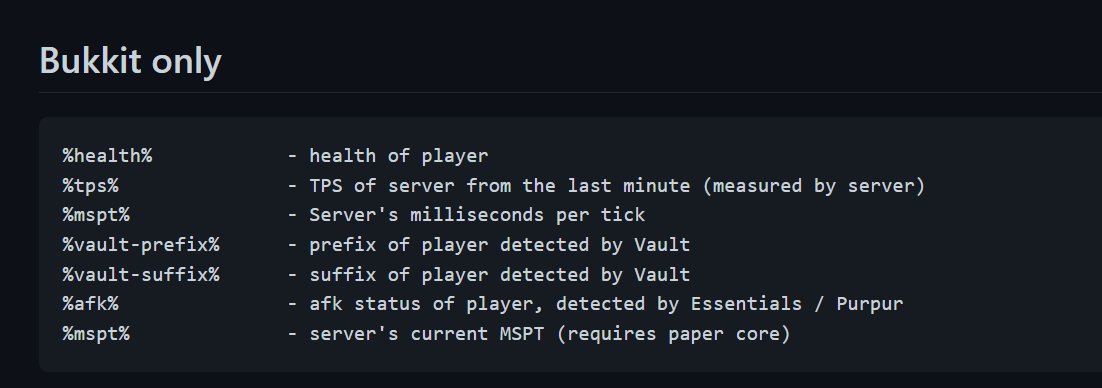
bukkit only tho
willow quiver
meager fox
bukkit only tho
just use %prefix%??
 fading elk
I can't find a plugin for Nukkit that does the chat prefixes for luckperms. Can anyone recommend me one?
hot jay
https://cloudburstmc.org/resources/gchat.156/ dont know if it still works or is updated, but this is one that ive seen people use before
fading elk
I already came across it but I think it has been taken offline because the page is no longer working
 tardy saffron
Hello, i have a question
there's a way to put gradient colors on my ranks?
i'm using 1.16.x
hot jay
yeah, but the format depends on whatever your chat plugin uses
tardy saffron
i'm using deluxechat
what plugin do u recommend?
ñ
ñ
no sé por qué la gente española cree que es chistoso decir Ñ
xd
damn she got banned?
 proud hound
yep
 spiral fossil
How can I solve error: "no operation allowed after connection closed"?
In my db the value mentioned in the docs is correct
 copper matrix
how comes when i use luckperms,everyone's skins turn into alex
meager fox
This is beyond confusing
How do they inherit perms and meta but not the group itself. Sure they dont directly, but indirectly through default if the context matches.
The tablist thing is something lp cant do anything about.
Player placeholder is not provided by lp but rather by plugins executin commands such as deluxemenus using %player_name% or cmi using [playerName]
hot jay
meager fox
This is beyond confusing
I agree, I couldn’t work out what was going on. They inherited the prefixes and (and apparently the permissions) but it doesn’t seem as if they are inheriting the group itself
meager fox
Are you going by primary group?
uneven nexus
if they used parent add <group> <context> it should still have something like
> default
> serverbooster (discordsrv:boosting=true)
Im not so sure that either parent info nor userinfo show groups inherited through other groups
uneven nexus
oh shit, you're right.
i misread the command.
yeah, if they inherit through another group, they don't get the group itself.
meager fox
Yesterday i had a case where user set up tracks to stack prefixes and they named the track in the config 'vip' while the editor had 'vips' and using userinfo with defajlt group showed no prefix present
Although default had one.
So im guessing the same goes for inheriting group a through group b
Instead of add on user yk
uneven nexus
Yeah
hot jay
uneven nexus
yeah, if they inherit through another group, they don't get the group itself.
Wait so your saying if they inherit the group through the context it won’t show in the user info command?
uneven nexus
if they inherit the group through another group it won't
hot jay
Not even parent info command
hot jay
Hmm, what about the primary group not changing, despite the booster having a higher weight
meager fox
Use parent info on the group, not the user. Shouöd show there
That one is indeed weird.
Is the context met tho?
hot jay
Well the prefixes were being applied so I assume so
meager fox
It wont change primary, group outside of the context
Hmm
Idk would have to see the whole setup ngl
uneven nexus
im gonna test that in a little bit. i would imagine that primary group doesn't get updated in a setup like that.
although, the commands wiki says that parent info should show all groups they inherit. doesn't say inherit directly
 hot jay
We have lots of people using this context setup and don’t have anybody complain, so I think there’s something wrong, but I’m not sure why
meager fox
I smell a negative permission
uneven nexus
@tawdry bobcat can you send an editor link? 
hot jay
I have one from discordsrv although they said they want it to be kept private
Cubicbitie, you ok with me sending it to evident?
meager fox
Nutley is he using lpb?
hot jay
I don’t think so, but I can’t tell you that for sure
meager fox
Aight. It could be something to do with that
 rustic current
so in the content are you able to make it so the players cant do something in a worldguard rg then if they aren't in the rg they can do it
uneven nexus
!extracontexts with this, you can set permissions to be added in certain worldguard regions. if you want it to be false in a region, you'd have to set it to true globally, but false with the region context
wanton stratusBOT
Add contexts not supported by stock LuckPerms.
LuckPerms wiki
rustic current
uneven nexus
!extracontexts with this, you can set permissions to be added in certain worldgu...
ok
 warm verge
why doesnt luck perms work with sponge forge? ive been looking around for an answer but cant find 1 so i came here
uneven nexus
it works fine, what's the problem?
warm verge
idk i put spongeforge and luck perms in the mods folder and luck perms just doesnt seem to be loading
uneven nexus
What version of mc?
warm verge
1.12.2
uneven nexus
and what LuckPerms version?
warm verge
LuckPerms-Sponge-5.4.14
    Minecraft: 1.12.2
    SpongeAPI: 7.4.0-5ea6215
    Sponge: 1.12.2-7.4.6
    SpongeForge: 1.12.2-2838-7.4.6
    Minecraft Forge: 14.23.5.2860
    JVM: 1.8.0_202/64-bit (Oracle Corporation)
    OS: Windows 10 (10.0/amd64)
```if this helpsThat's why. 5.4 dropped support for Sponge API version 7, and below. use the build linked in the pinned messages
warm verge
 uneven nexus
Yep
Default is already given to all players
Default group
No, default group
Doesn't change anything. default is the group given on join. add your prefix and permissions to default
warm verge
how can i give default group permission to use commands?
meager fox
Lol what is this conversation 😂
 night lark
I have a few questions. In game upon using /lp listgroups, I get my groups but when I open the editor, the only group that shows is the "default group". Question number two, I'm trying to add prefixes to my groups but it gives me the "You do not have the permission to use this command!".
 idle ridge
meager fox
night lark
I have a few questions. In game upon using /lp listgroups, I get my groups but w...
idle ridge
meager fox
night lark
I have a few questions. In game upon using /lp listgroups, I get my groups but w...
Luckperms does not print "no perms" messages. Make sure lp is your only permission manager
 sweet island
Whenever I use the /lp editor, every change I make it wants me to open a new editor, I get this is for safety reasons but can I disable it?
uneven nexus
You can update, and use websockets instead. otherwise, no
sweet island
websockets?
 covert rapids
hello, is there anyone here who can help me?
i changed my LP config storage method to yaml, im creating ranks rn, but i cant see the prefixes im placing either on chat, tab or scoreboard
anyone please?
 ornate igloo
have you sorted out the weight for them
sometimes a prefix from an inherited/parent group overrides it
covert rapids
i believe so, yes
so, for some reason, when i did the prefixes, none of them appear if i do /lp group name info
i have to use
/lp group name meta info , and there i can see ir
does it have to deal with that?
as well it says contextual data mode server, its that like normal?
ornate igloo
ohhh yeah it did the context thing for me too
its cause you did /lp group name meta setprefix prefix_name (weight number)
and it doesnt understand it so it puts the weight you put as "server=weight_number"
makes no sense
so I manually had to go remove the server context from the editor, /lp editor in-game
 hollow lily
I legit set it properly as my chat formattor

this is my chat formattor's code thing

and don't ask me to go ask in VaultChatFormatter's support, the support is more dead than someone's dad going to get milk
And I can set it perfectly in tab so I don't know why luckperm cant process the hex
covert rapids
ornate igloo
so I manually had to go remove the server context from the editor, /lp editor in...
so, i use yaml, so i dont have the lp editor, any idea how can i change that in yaml?
as well, what context has to be?
ornate igloo
covert rapids
so, i use yaml, so i dont have the lp editor, any idea how can i change that in ...
dont what context does really , read on the wiki I suppose
idk what yaml is either sorry
just talking from experience what ive done today so
sorry I cant help more than that 😦
covert rapids
thats fine tho ty
covert rapids
covert rapids
so, for some reason, when i did the prefixes, none of them appear if i do /lp gr...
anyone else can maybe help me out here?
hasty tree
covert rapids
so, i use yaml, so i dont have the lp editor, any idea how can i change that in ...
you absolutely can use the editor if you're using the yml storage type
covert rapids
well then im doing /lp editor but does not work
anyway what i want its just to know why i cnat see my prefixes haha
hasty tree
can't really help with the editor thing unless you provide more info
and as for prefixes, there is a good troubleshooting guide on the wiki
!chat
wanton stratusBOT
LuckPerms does not perform any chat/tablist formatting of its own!
LuckPerms only acts as the source for prefixes / suffixes, it doesn't actually apply them. You need an appropriately configured chat/tablist formatting plugin for them to be displayed. If the values appear correctly when you run /lp user <user> info, LuckPerms is doing its job!
FAQ answer: Prefix isn't showing?
List of chat/tablist formatting plugins that work with LuckPerms
hasty tree
first link
covert rapids
ok, and quick question
to have OP perms or like access to all plugins like, for admins or devs. can i use the "*" or is it different on yaml?
covert rapids
hasty tree
first link
ty
covert rapids
its coz another guy form other plugin "itemsadder" recommended me to change from h2 to yaml
coz some perms were not working.. and idk why coz perms were there and i as OP could use the items but other players didnt, any idea..?
hollow lily
hollow lily
I legit set it properly as my chat formattor
please I been at this for hours
covert rapids
hasty tree
yaml makes it easy to make errors
ok illl change again to yaml ty
hasty tree
changing the storage type isn't going to make permissions magically work lol
modern bison
hollow lily
And I can set it perfectly in tab so I don't know why luckperm cant process the ...
Luckperms does absolutely nothing with rendering hex formats
hasty tree
itemsadder guy has no idea what they're talking about
covert rapids
LOL good point lol
modern bison
modern bison
Luckperms does absolutely nothing with rendering hex formats
So yea, all we can do is tell you to ask their support or use a better chat plugin
hollow lily
modern bison
Luckperms does absolutely nothing with rendering hex formats
I know, I use VaultChatFormatter
I listed the code of it for hex
modern bison
Ok?
hollow lily
I tried all types of hex
modern bison
this is not a luckperms issue
Luckperms does not parse the hex, your chat plugin does
hollow lily
Ok so how can I fix
hasty tree
get a better plugin
modern bison
modern bison
So yea, all we can do is tell you to ask their support or use a better chat plug...
.
hollow lily
.-. ok but VCF is legit made by the owner of this thing
hollow lily
what plugin should I use (not essentials please)
wanton stratusBOT
LuckPerms does not perform any chat/tablist formatting of its own!
LuckPerms only acts as the source for prefixes / suffixes, it doesn't actually apply them. You need an appropriately configured chat/tablist formatting plugin for them to be displayed. If the values appear correctly when you run /lp user <user> info, LuckPerms is doing its job!
FAQ answer: Prefix isn't showing?
List of chat/tablist formatting plugins that work with LuckPerms
hollow lily
I don't want to install the whole essentials
hasty tree
2nd link, there's a list
covert rapids
do u know what could posibly causes the issue? that im able to see all items, since i have "all perms" and other peple cant?
hollow lily
hasty tree
2nd link, there's a list
which one is the simplist and lightweight
or just best in general
hasty tree
i don't run servers so i can't tell. i've only had experience with essentials and deluxechat
hollow lily
Is deluxechat good
hasty tree
it was ok. i tend to not recommend it since it's premium
hollow lily
oh
covert rapids
hasty tree
itemsadder guy has no idea what they're talking about
can u tell like, if i can see the items i want coz im OP in server, and i apply that same perm or other to a default rank, and they cant see/use the items, why does that happens? how can i tell if its an issue with lp or other plugin?
I did changed my self once again to the h2, and for some reason i can get 1 perm to work.. idk that to do coz it works for admins and me
wanton stratusBOT
LuckPerms provides a verbose command to help you find out what permissions a command/plugin is checking.
Read more
LuckPerms wiki
covert rapids
okay so, after i do that whats the next step?
hasty tree
you use the results to determine what is wrong
if it says "undefined" then you need to set that permission
covert rapids
well it spams my chat with stuff but i dont really see any alert
hasty tree
so use a filter
covert rapids
so, how can put a filter to find just the ittemsadder?
like this "ia.user.craft.*" its the only one whos not working
hasty tree
you just add the string you want to filter for after the command so if the permissions start with ia then you would do /lp verbose on ia
also please refrain from saying "not working" it really doesn't help :P describe what you expect to happen and the actual outcome
covert rapids
ty tho
 rocky zephyr
Hello, why can't I log in to the server if I have online-mode=false enabled?
wanton stratusBOT
Check out some of our frequently asked questions.
Read more
LuckPerms wiki
hasty tree
answer is on that page
 onyx glacier
hi
wanton stratusBOT
Hey AHHEUS! Please don't tag helpful/staff members directly.
rocky zephyr
hasty tree
you probably have authme installed
No, I don't have authme, the problem is that with online-mode=true enabled, I can log in without problems, with false I can't

 dry robin
great solution, dont run server in offline mode
rocky zephyr
dry robin
great solution, dont run server in offline mode
If my friends had a license, I wouldn't enable offline mode
foggy quartz
how can i make role colors like that
hasty tree
rocky zephyr
No, I don't have authme, the problem is that with online-mode=true enabled, I ca...
then you should read the error and share the console logs
 fathom hatch
I have a problem bcs I cant install it, I put .jar file in my plugins folder and it doesnt work idk why bcs my other plugins are working
fathom hatch
it says it cant create temporary file
 toxic wagon
fathom hatch
I have a problem bcs I cant install it, I put .jar file in my plugins folder and...
toxic wagon
fathom hatch
I have a problem bcs I cant install it, I put .jar file in my plugins folder and...
can't install it very descriptive.
- What is
it - Are there any errors? If so, Show us?
- Where are you trying to install "it"
fathom hatch
it is plugin luckperms
im putting it into plugins folder
and the errors are that luckperms cant create temporary file
toxic wagon
!paste your FULL startup log
wanton stratusBOT
Please use pastebin!
Seeing a paste of the problem makes everything so much easier! Use https://pastes.dev/ for easy pasting!
For console errors:
Pastebin any relevant segments of the console log. If it's a startup error, this includes the entire startup log!
Other errors:
Pastebin the entire LuckPerms config file (passwords removed) as well as any other relevant files!
foggy quartz
how do i give players with rank default perms to do permission.open.daily
toxic wagon
!usage
wanton stratusBOT
Here's a guide to help users understand and use LuckPerms for the first time.
Read more
LuckPerms wiki
 stuck fern
guys when i put luckperms in plugins file server didn't run
toxic wagon
!paste full startup log
wanton stratusBOT
Please use pastebin!
Seeing a paste of the problem makes everything so much easier! Use https://pastes.dev/ for easy pasting!
For console errors:
Pastebin any relevant segments of the console log. If it's a startup error, this includes the entire startup log!
Other errors:
Pastebin the entire LuckPerms config file (passwords removed) as well as any other relevant files!
toxic wagon
!paste the full log
wanton stratusBOT
Please use pastebin!
Seeing a paste of the problem makes everything so much easier! Use https://pastes.dev/ for easy pasting!
For console errors:
Pastebin any relevant segments of the console log. If it's a startup error, this includes the entire startup log!
Other errors:
Pastebin the entire LuckPerms config file (passwords removed) as well as any other relevant files!
foggy quartz
A easy to use Paste site for Minecraft Server logs.
toxic wagon
I said the FULL log
foggy quartz
hello i need help
meager fox
shoot
foggy quartz
i have velocity
and i will sync the plugins with the proxy
But this doesnt work....
foggy quartz
toxic wagon
I said the FULL log
A easy to use Paste site for Minecraft Server logs.
 uneven raft
hello i need help
i run velocity and i installed luckperms in velocity
and i did al the permission from groupmanager to luck perms
but for some reason i got only the default group to show
how do i fix this that is wil work the same as groupmanger but al over the servers that i run
cleary i dont know how it works
meager fox
you have luckperms only on velocity or also on your backend server(s)
uneven raft
i did not because that is not explainend
meager fox
you need lp on your backend server together with groupmanager AND the migration jar, migrate, and then delete migration jar and gm
!migrate
wanton stratusBOT
Learn about the process of migrating from another permission plugin.
Read more
LuckPerms wiki
uneven raft
good to know and how do i connect them with out the mysgl
uneven raft
that is velocity right?
meager fox
velocity is a proxy software just like bungeecord.
uneven raft
why can i not connect the the maingate(velocity) with out the mysql
meager fox
 uneven raft
i understant that part
meager fox
you can migrate things from gm to lp on your backend server and then punch it onto the proxy but if you update perms on backend or velocity, the updates wont go to all servers
uneven raft
i want the velocity the main database en the others need to get it from the main base
without the mysql
 uneven raft
thank you then lucky perm is not good for me or i need help with setup a mysql data base inside the network
i am running a not profit server so i cant pay every month 8 euro for a database
meager fox
if you have a vps or dedicated server, you can install mysql on it yourself
uneven raft
i tryed already and it wil not work for some reason i tryed it 10 times already and all 10 not work for some reason
watched 10 videos how to do it
not working
meager fox
you probably didnt open up in-server connections
i did that once
if you got some security like iptables for example and you block all connections from, to, and inside of the server then obv it cant connect
uneven raft
even i turned off the firewall then its wil not work
but thanks for your i wil keep working with groupmananger for now until i find a way
thank you allot for the info
foggy quartz
I have on the proxy luckperms and on all servers
but how i can set specific permissions on a server with contexts
wanton stratusBOT
You can set a permission or group on a per-world/per-server basis, through what we call "contexts".
Read more
LuckPerms wiki
foggy quartz
i have for example server-01 and server-02
should i make the value of server-02 for examplle
meager fox
as described in the wiki, you need to set the server name in the lp config
only then you can use that name as server context
 plush bluff
hey how cna i disable this? like i want this to be gone like when they type /lp it will show like unknown command message?

is it possible?
meager fox
need a command blocker for that
 viral patrol
Is there a placeholder that returns group's prefix, but specifically that group, not if the player has that group?
night lark
meager fox
Luckperms does not print "no perms" messages. Make sure lp is your only permissi...
...

that's what I get for trying to add a prefix /lp group ruling-empire-default meta setprefix '&b[Ruling Empire] &f' what did I do wrong?
night lark
Okay
meager fox
viral patrol
Is there a placeholder that returns group's prefix, but specifically that group,...
%luckperms_prefix_element_highest_from_group_<group>% try that (need papi and expansion for luckperms for this to work and obv the plugin you want to use this in needs to support it)
night lark
weird
 meager fox
you have the permission luckperms.* or op?
night lark
I have op
meager fox
using sponge by chance?
night lark
Paper
meager fox
any odd plugins installed like commandblockers or other permission plugins
night lark

 meager fox
ok now this is weird af
night lark
ye
meager fox
mind sending an editor link? maybe ill see something there
where did your groups go
open your editor yourself
you must have deleted the group you are trying to set a prefix for
but it will not auto-remove it from the track
so its present in the track but not in your group list, while it should
did you maybe think that once you add a group to a track that you can delete it from the main groups list?
meager fox
/lp listgroups please
night lark
 meager fox
wtf
night lark
weird innit
night lark
I don't have proxy I think
night lark
 meager fox
okay looks good, all up to date n stuff
what i dont like is the file size
a lil smol
meager fox
hmm thats interesting
we can try something. a happy go lucky try, might mess it up tho. do you still have your group manager folder?
night lark
no
viral patrol
meager fox
`%luckperms_prefix_element_highest_from_group_<group>% `try that (need papi and ...
Thats what I am using already, but it returns the prefix only if the player is in that group
meager fox
ouch
you wanna try anyway drewie? basically id like to try lp export and then wipe your storage and then use lp import to reimport from lp to lp
night lark
Sure
meager fox
it shouldnt fix it, but may does
just dont delete ur sql file
copy it to your pc while the server is off in case it messes it up
/lp export <some random filename> is the export command
then turn it off, grab the old sql file and keep it. wipe it from the server tho, start bback up and use /lp import <the random name>
night lark
okay
meager fox
i dont think this will do but its the only idea i have
meager fox
viral patrol
Thats what I am using already, but it returns the prefix only if the player is i...
interesting. i literally tried this a few minutes ago since i thought this would happen to verifyx im not telling you bs and it works for me
well, i used papi parse on default using that placeholder while in the owner group
do you have inheritance throughout your groups? my owner group inherits from defaault, maybe thats why?
viral patrol
I have multiple tracks, one for ranks and the other for tags. The goal is to display tags' prefixes in a gui menu so that players can purchase it if the like it. Every group that is on track tags doesn't inherit from any other
viral patrol
Np
meager fox
i think in that case its easier to just type out the prefixes, no?
sounds like you dont plan to change the tags ones
viral patrol
Yeah thats my plan as of now, but was just wondering if there is a way so that I dont have to change it in menus if I do change it in lp
meager fox
yea makes perfect sense
night lark
so I did /export blablabla and now I have to delete everything?
viral patrol
I was already changing prefixes for ranks so I had to change them in menus as well
meager fox
night lark
so I did /export blablabla and now I have to delete everything?
take the sql file onto your pc and delete it out of the server while the server is offline. do not delete the entire luckperms folder since your export sits in it and you need it to import again - all while server is off please. dont delete stuff during runtime
meager fox
viral patrol
I was already changing prefixes for ranks so I had to change them in menus as we...
any reason why you dont use deluxetags?
much easier for control, no weights needed, placeholders available etc
meager fox
yea but deluxemenus can obv run commands. so you could run cmd deluxetags player settag tagname on click instead of meta stuff from lp
or hand them the permission on click to use a tag in /tags menu
lp user player permission set deluxetags.tags.tagname either as standalone or in combination of setting it to the user at the same time as second command
also, why do i know all this shit xD
viral patrol
True, but I just thought I could do it with lp placeholders since that would mean one less plugin on the server
meager fox
true true. like i said it worked for me. im unsure if that is because my owner group inherits from the default group
when have you last updated the luckperms papi expansion?
i literally just got it fresh for that test
viral patrol
Everything is up to date
viral patrol
meager fox
true true. like i said it worked for me. im unsure if that is because my owner g...
And yes, that is bc of it
meager fox
tested that rn?
viral patrol
Tested it before
meager fox
interesting
yea so either you need inheritance so all users inherit at least the start of the track (can set prefixes to false btw so they dont get inherited) or type em out or deluxetags/alonsotags
btw youre right
removing default from owner inheritance returns empty
it makes sense. but at the same time thats shit
viral patrol
Yeah it does make sense, but would be could if there was another placeholder for this as well
Can I suggest it somewhere?
meager fox
i am actually talking to a staff member rn
got the placeholder github in front of my face rn xD
viral patrol
Awesome 😁
meager fox
i agree that this could indeed be very useful for flat display unrelated to user inheritance
night lark
man o man


I switched to h2 to hopefully avoid problems but the groups still don't show
 open pawn
help
I use a vehicle plug-in i don't know how to do it and i use luckperms and people can go in each others cars planes extra
meager fox
night lark
I switched to h2 to hopefully avoid problems but the groups still don't show
really got no idea how to fix this then but its for sure that having groups ingame but no in the editor is, as you noticed, a problem
 maiden vessel
how do i get luck perms to sync across my bungee?
wanton stratusBOT
If you run a BungeeCord network, learn how to correctly setup LuckPerms on all server instances (including Bungee).
Also read:
Syncing data between servers
LuckPerms wiki
night lark
meager fox
really got no idea how to fix this then but its for sure that having groups inga...
I finally managed to fix it
 meager fox
oh dear how did you do it?
 meager fox
why....
night lark
Why it was enabled?
meager fox
yes xD
night lark
no idea tbh
I was reading the config file and then I was like hm, idk what that is so I'll set it to false xD
meager fox
<.<
night lark
Thanks for the help though
 elder cape
Good Day everyone,
I'm new on this Discord and I tried to setup LuckPerms on my SpongeForge Server.
So far so good, but the problem is that no folder or files for the configuration are being generated in the config folder.
Could anybody help me why that could be?
I'm happily able to assist with logs or something else.
meager fox
i assume you are using the latest release from the website, right?
elder cape
Correct, I downloaded the version "LuckPerms-Sponge-5.4.14", and that even twice because I thought "well maybe my first download got corrupted"
elder cape
Thank you very much good sir, 1.12.2 ForgeSponge is still using Sponge API 7 🙂
spiral fossil
How can I solve error: "no operation allowed after connection closed"?
In my db the value mentioned in the docs is correct
meager fox

LuckPerms - A permissions plugin for Minecraft servers.
LuckPerms is a permissions plugin for Minecraft servers. It allows server admins to control what features players can use by creating groups and assigning permissions.
foggy quartz
Can i set permissions for a player with the console?
modern bison
Yes, just use the LP commands in console
 hollow raptor
I just tried to set permissions for a group for factions commands, added myself to it, deopped myself, and i cand use the commands (I used ex: factions.commands.join)
Am I supposed to deop myself? or is there something else I have to do?
meager fox
!testingperms
wanton stratusBOT
How-to test permissions
Small list of things for you to make sure when testing permissions:
1. Don't test as op, your players/general staff will most likely not have op
2. Make sure you don't have any special permissions (e.g. * or the same permission you are testing) on your user (/lp user <user> permission info)
3. Make sure your parent groups are the ones the target audience you are testing will have (if you are testing mod perms, don't have owner as parent)
4. Use verbose to see exactly what's going on, what permissions are being checked
Also read:
 dim zenith
I think an update on this would be good. As far as I can tell right now it's not possible to use IPv6 for LuckPerms. Neither by using direct forwarding via IPv6 nor via a domain.
 past aurora
how do i make it so people cant give ranks higher than them?
hot jay
past aurora
how do i make it so people cant give ranks higher than them?
!argbased
wanton stratusBOT
Fine tune exactly what users with permission to use LuckPerms can do.
LuckPerms wiki
past aurora
hot jay
!argbased
so i gave them this and it just says "running luckperms and the version"
 hot jay
ive never used arg based but im gonna assume that that is not all the permissions you need
they need all the permisisons there
uneven nexus
hot jay
ive never used arg based but im gonna assume that that is not all the permission...
im like.. 80 percent sure the wiki says that
meager fox
pretty much an exact example
past aurora
they have all these but can still go to and above manager

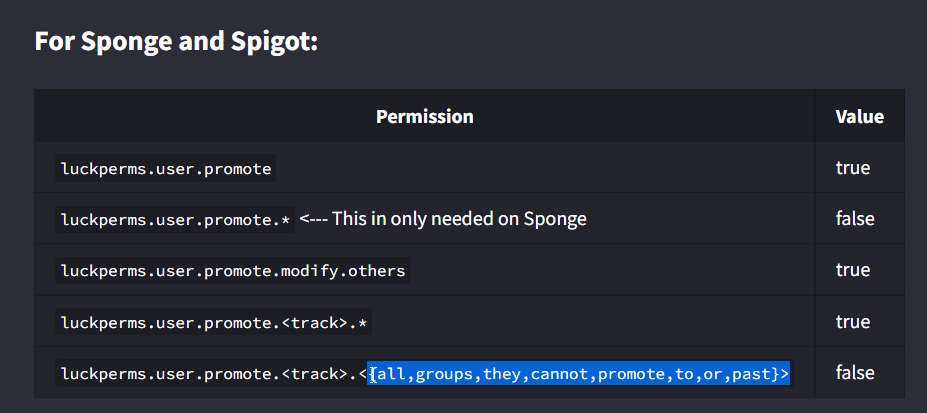 hot jay
^
meager fox
not just promote to x groups to true. wrong way around
 meager fox
https://i.imgur.com/q8WIoVx.png would you mind filling in the trackname
 past aurora
oh 
meager fox
also make sure they dont have stuff like luckperms.* additionally
 meager fox
the nodes are green. green means they were just now added and not applied yet
apply those changes

 meager fox
deop them
past aurora
they dont have op
 rare heron
the prefix doesn't work!
meager fox
make a verbose record then or use verbose command
hot jay
rare heron
the prefix doesn't work!
do you have a chat plugin?
meager fox
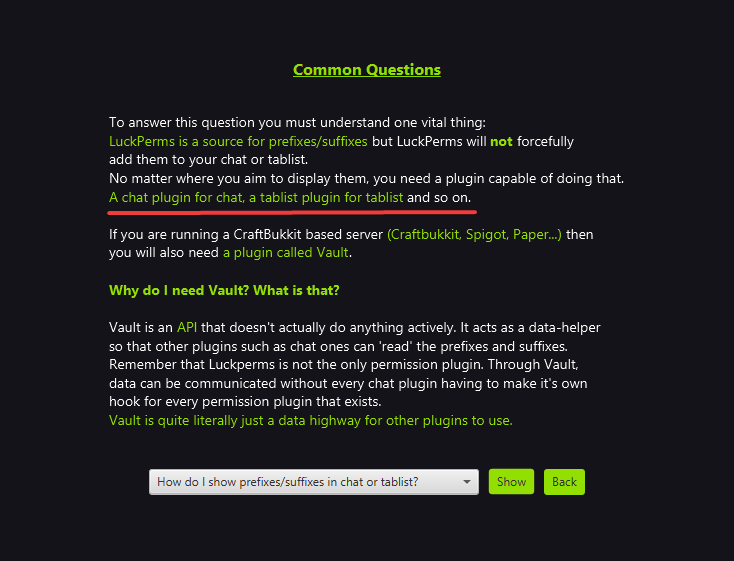 rare heron
i download LPC is not working
past aurora
is it not working because it has the * at the end of this one, so can still go above?
 meager fox
past aurora
is it not working because it has the * at the end of this one, so can still go a...
meager fox
past aurora
is it not working because it has the * at the end of this one, so can still go a...
that one is the one that allows promoting, but more specific perms will overwrite it, aka the promote ones you set to false
rare heron
@meager fox i ask you question answer yes , no
do you have chat plugin or not ???
meager fox
that will result in allowing promoting but not whatever you set to false
meager fox
rare heron
<@!905017828330045472> i ask you question answer yes , no
do you have chat plugi...
yes i have one
past aurora
meager fox
that one is the one that allows promoting, but more specific perms will overwrit...
hmm ok, i dont know what to do then because they can still go to and past manager
meager fox
like i said use verbose
rare heron
meager fox
yes i have one
name?
meager fox
past aurora
hmm ok, i dont know what to do then because they can still go to and past manage...
/lp verbose command <the users name> <the command>
preferably set them to the rank before manager
so they promote to manager
which is what you need to debug
meager fox
rare heron
name?
lpc
rare heron
doesn't work (lpc)
meager fox
rare heron
doesn't work (lpc)
do /lp user <yourname> info
obv fill in your name
does the prefix show there yes or no
past aurora
im probably being stupid but i dont understand, they are managers but i dont want them to be able to promote people to manager and above
but the perms dont work properly
meager fox
past aurora
im probably being stupid but i dont understand, they are managers but i dont wan...
verbose will FORCE the user to run a command
so
set a third player to the rank before manager
use /lp verbose command <manager guys name> lp user <dudes name that has rank before manager> promote
rare heron
prefix?
meager fox

you said prefix doesnt work
do the command i told you and look if it shows in the feedback from the command
rare heron
what is the command?
meager fox
meager fox
do /lp user <yourname> info
^
past aurora
meager fox
use /lp verbose command <manager guys name> lp user <dudes name that has rank be...
can still go above
meager fox
verbose will not fix things. verbose will force the user specified to run the command
then it prints to you a list of perms that were checked
show us the list
 past aurora
how you mean
meager fox
then let him promote the user again from whatever to manager
then use /lp verbose upload
past aurora
you want the link?
meager fox
yep
past aurora
LuckPerms - A permissions plugin for Minecraft servers.
LuckPerms is a permissions plugin for Minecraft servers. It allows server admins to control what features players can use by creating groups and assigning permissions.
meager fox
question
past aurora
yes
meager fox
did you enable argbased perms in your config
 meager fox
make a new verbose record
past aurora
ok
LuckPerms - A permissions plugin for Minecraft servers.
LuckPerms is a permissions plugin for Minecraft servers. It allows server admins to control what features players can use by creating groups and assigning permissions.
past aurora
yes
meager fox
anything past luckperms.user.promote isnt being checked
past aurora
so what do i do?
meager fox
id like to see your editor just to double check
past aurora
Send you the link to the editor?
meager fox
ye
past aurora
Ok one sec
LuckPerms - A permissions plugin for Minecraft servers.
LuckPerms is a permissions plugin for Minecraft servers. It allows server admins to control what features players can use by creating groups and assigning permissions.
past aurora
meager fox
looks just fine
So why does it let them go past manager when promoting others
meager fox
past aurora
now they cant promote at all
which is it
past aurora
I turned on argbased commands and then they couldn’t promote at all. But with it off they could promote all the way
meager fox
that is because with that setting you tell lp to use argbased
so even setting those perms it wont listen if you set it to false
you need that enabled
past aurora
so set that to true
 meager fox
but why they cant promote at all now i have no idea tbh. like i said anything after luckperms.user.promote isnt checked although you set https://i.imgur.com/K590Hvz.png to true and the ones you dont want to false, which, stated by the wiki, is correct
past aurora
so its just bugged?
meager fox
you can try something
past aurora
ok
meager fox
what if you set luckperms.user.promote.staff.developer to true?
can he then promote someone from whatever to developer?
meager fox
weird. really
past aurora
it just says that they dont have permission
meager fox
did you use plugman or /reload after you enabled argbased perms
past aurora
i did /lp reloadconfig
past aurora
lol
meager fox
are you sure your manager is using the promote command and not 'parent set' or 'parent add'
because that stuff shows up in the verbose recorder
for no reason
past aurora
yeah they are using promote
if i wanted them to be able to set parents but not certain ones how would i do that, maybe that would work instead of promote
meager fox
https://i.imgur.com/G2h5ZEl.png not sure if you can specify the groups themselves though

idk i gotta pass this one on. you have everything as the wiki states, you enabled argbased perms in the config and your manager dude is using the correct command
im outta ideas
past aurora
ok np, thank you for your help. Hopefully someone can figure it out haha
meager fox
let me know when you figured it out. im kinda interested to know what it was if you get it to work
meager fox
better not to
just bump your issue when it gets pushed up too far, thats fine. as long as youre not spamming or being pushy lol
usually staff reply whenever they can
past aurora
how do i bump it?
hot jay
what if you give the group the permissions luckperms.user.promote.usecontext.global and luckperms.usecontext.global?
past aurora
let me add them
meager fox
ill go kms 😂
hot jay
i didnt even read that, i just scrolled to the bottom of the verbose and looked at the undefined sections https://i.anutley.me/chrome_FI5VbzNpgH.png
 uneven nexus
 past aurora
@hot jay i love you
wanton stratusBOT
Hey LGL Lewis! Please don't tag helpful/staff members directly.
meager fox
LuckPerms - A permissions plugin for Minecraft servers.
LuckPerms is a permissions plugin for Minecraft servers. It allows server admins to control what features players can use by creating groups and assigning permissions.
hot jay
same permissions but demote instead of promote lol
past aurora
fairs
uneven nexus
Pfft, can just condense your other perms into luckperms.user.{promote,demote}.... then
past aurora
luckperms.user.{promote,demote}.staff.*
hot jay
uneven nexus
Pfft, can just condense your other perms into `luckperms.user.{promote,demote}.....
yeah good point tbf, otherwise theres going to be a lot of permissions
uneven nexus
I love shorthand/regex permissions
meager fox
but for demote, isnt it slightly different?
lets say the lowest group of the track staff
can they then demote below it
or does it go by that last group
and like, stop there, yk what i mean
its like items starting at index 0, not 1
java mind
uneven nexus
i dunno, never did much with arg based commands.
meager fox
me neither. deffo do some testing lewis lmao
past aurora
well luckperms.user.demote dont work
 alpine burrow
so in my server ive created all of the groups for my staff but it doesnt show them what commands they have on the server so most of them just dont use any at all so they arent even helpful im also not getting tab to show whos and apart of the staff like mod admin owner
meager fox
first of all, what commands get shown in chat when you just do / is not handled by luckperms but rather by each plugin for itself
seconly, you need a tablist plugin to show prefixes in tablist and even then, how, where, what shows is the tablist plugins ´job, or rather yours to configure in its config
alpine burrow
how would i set it to where if they use / it will only show them plugins they can use?
past aurora
ok next question, how do i make it so they cants demote people with a higher rank
coz managers can demote me
ocean dome
past aurora
coz managers can demote me
remove the permission from there group
past aurora
which permission
ocean dome
ocean dome
remove the permission from there group
ez
ocean dome
past aurora
which permission
demote permission
past aurora
i just spent ages getting them to be able to demote others
they need ot be able to demote
just not me
ocean dome
past aurora
i just spent ages getting them to be able to demote others
wht u want They can demote other but not u
ocean dome
past aurora
they need ot be able to demote
ummm then idk
past aurora
i want them to only be able to demote people with lower ranks than them
@meager fox hehe you know?
sorry for pong btw
ocean dome
past aurora
<@!905017828330045472> hehe you know?
yes he know but ig he is off
past aurora
oh
meager fox
I do usually grab my phone when pinged
past aurora
same haha
do you know how i can make them able to demote people but only the people with lower ranks
meager fox
I never done this mate 😂
ocean dome
hay my lp giving error when connecting to server. An database error occured
past aurora
is nutley lurking 👀
alpine burrow
ok i fixed the tab but now im still dont know how to make them see what commands each group has
past aurora
why dont you make a list of commands in your discord so they can always check without doing commands
hot jay
past aurora
is nutley lurking 👀
maybe
ocean dome
hot jay
maybe
help me too
hot jay
hot jay
maybe
in all honesty i have no clue how arg based permissions really work and my last piece of knowledge was a complete fluke
past aurora
hahaha fair e ough
hot jay
only thing i can suggest to you is to try verbose again and i may be able to pick something up from there
hot jay
ocean dome
help me too
you are gonna have to give me a bit more detail, "a database error occured" tells me next to nothing about what is wrong, bar that your database has an error. please share some logs / other information regarding your problem and then i may be able to help you
ocean dome
hot jay
you are gonna have to give me a bit more detail, "a database error occured" tell...
now it fixed i recreate the data base
alpine burrow
how do you add a prefix/suffix after you've already made the group?
hot jay
!prefix
wanton stratusBOT
You can set prefixes, suffixes and other meta data in LuckPerms for players and groups. Note that LuckPerms does not manage chat. You need to use another plugin to show prefixes/suffixes in chat.
LuckPerms wiki
alpine burrow
that didnt work in game or in console
hot jay
what command did you run?
did you get any errors / feedback in game or in console after running it?
ocean dome
I have now issue while running command /lp group iron meta setprefix &7Iro&fn]. and when i press enter it give error. There was an error whilst saving group data for iron (iron). Help me plzz
@meager fox
alpine burrow
im still dont know how to make them see what commands each group has does anyone know a plugin or a way to make it where they can only see the ones they can use
ocean dome
alpine burrow
im still dont know how to make them see what commands each group has does anyone...
wht u want to make
ocean dome
ocean dome
I have now issue while running command /lp group iron meta setprefix &7Iro&fn]. ...
nvm i fixed it again i set weight to 0 and now its not coming 🙂
ocean dome
ocean dome
nvm i fixed it again i set weight to 0 and now its not coming 🙂
lol it actually worked
ocean dome
alpine burrow
im still dont know how to make them see what commands each group has does anyone...
what problem u r getting
ocean dome
ocean dome
wht u want to make
or wht is your problem
foggy quartz
Hi im a sr mod on a server with luckperms and when i try using the commands nothing at all appears in chat, I have been given operator and none of the commands work
it worked a while back and then randomly stopped, my luckperms permission rank itself doesnt seem to be the issue
uneven nexus
can you run /version LuckPerms and send the version number
uneven nexus
are you on a forge client
foggy quartz
hold on let me check
uneven nexus
Also, why that old? are you running forge/spongeforge?
foggy quartz
yes TLauncher forgeoptifine 1.18.1
foggy quartz
uneven nexus
Also, why that old? are you running forge/spongeforge?
Asking the owner, not really sure if its a plugin issue or anything
uneven nexus
if you run /version it'll tell you what server software.
it's likely the issue from before. if you're on a bukkit based software, update your LuckPerms, or change your client
foggy quartz
I'll change my client, let me see if it works on the normal optifine
uneven nexus
As long as it's not forge, it should work
foggy quartz
okay tysm
ill tell you if i have any issues
i was running it on forge that might have been the odd change
worked!
 elfin saddle

 uneven nexus
oh shit, i forgot about that
 marsh cave
is there a way when a temp perm expires to execute command ?
meager fox
Not with lp
 lost delta
is there a way to copy over my per world perms for one world onto another?
meager fox
Uhhh just add another world context in the editor?
lost delta
i have dozens of perms setup for a specific world and im trying to create a duplicate world with the same perms
I didnt know if there was some sort of way to copy those perms over to the new world using the context of the old world
meager fox
Sure you can copy/clone perms but youd still have to change the world name in the context
Also you dont need to 'copy perms to a new world'. Your editor data is the same on your server, it doesnt have world tabs or anything like that. Sounds a bit like you think of it that way. But instead of cloning the perms, adding one world context would still be easier to existing nodes. And for that, i believe theres a bulk command
!bulk
wanton stratusBOT
Quickly update a large amount of user and group permissions by using the bulkupdate command.
Read more
LuckPerms wiki
meager fox
Just not sure if you can replace old context with the same old context + new world one
If you wanna do tests with bulk, get a backup first in case it backfires
lost delta
k thanks
 tough pier
I am having a problem while i try to assign a certain meta to default groups.
When I set a prefix and send 'lp group default info' it shows me none in the prefix section.
 meager fox
Do you by chance have prefix/meta stacking set up?
 meager fox
Default is not part of that track i assume
And therefore doesn't display
You could add another track where default is part of or use the 'highest not on track'
tough pier
What are the default settings of it?
wanton stratusBOT
Display multiple prefixes/suffixes alongside a player's name.
LuckPerms wiki
meager fox
As shown here
modern bison
give yourself permission to use the advancedcrates commands
modern bison
thats fine, the editor doesnt know all the permissions. you can look at the advancedcrates documentation to see the permissions
foggy quartz
modern bison
thats fine, the editor doesnt know all the permissions. you can look at the adva...
wait how do i get to the advancedcrates documentation?
modern bison
not sure, maybe they have a discord for help
foggy quartz
okay
alpine burrow
ocean dome
what problem u r getting
I can’t figure out a way to make each group be able to see what commands they own if you know another plug-in that coexists with it please tell me
foggy quartz
Hello, how can I add the command so that a group speaks in colors? something like that:

 dusky turtle
 floral jewel
can someone help me [Reason] : So When i put a command to my server in Luckperms editor It doesnt work For some reason Even People say its trash because of that error:( im on a mac btw
meager fox
What did you add to luckperms and how? Editor? Command? What permission?
floral jewel
meager fox
What did you add to luckperms and how? Editor? Command? What permission?
ill tell you waht
proud hound
make an imgur album or something - so many attachments is insanely spammy
or just send the link
floral jewel
 meager fox
Geez lol
proud hound
!editorsafety
wanton stratusBOT
It is safe to send an editor link in public.
Any changes made in the editor have to be applied using the /lp applyedits command - impossible unless the person with the link is also connected to the server and with the required in-game permissions to use LuckPerms commands. It's effectively just as safe to share an editor link as it would be to share a screenshot of your permissions or a pastebin of a configuration file. The editor doesn't contain any sensitive data (except perhaps player names).
More Information:
Concerns about the proprietary nature of your permissions setup?
Please, don't be. We're here to help, not steal your permissions setup. Additionally, permissions can be tested by players simply joining your server and seeing what they can do.
proud hound
Yeah, just send the link
floral jewel
LuckPerms - A permissions plugin for Minecraft servers.
LuckPerms is a permissions plugin for Minecraft servers. It allows server admins to control what features players can use by creating groups and assigning permissions.
?
meager fox
Ok so let me have one example what command doesnt work or do none work?
meager fox
Then i gotta ask if youre sure that luckperms is your only permission manager
floral jewel
yes it is
meager fox
Do you have groupmanager, powerranks?


 floral jewel
huh?
meager fox
Only bc the command is spawn doesnt mean the permission is just spawn
Usually perms are pluginname.something
floral jewel
so its spawn.spawn
meager fox
Okay, do you have a link to the plugins page? Spigot perhaps?
floral jewel
want to know the plugins i use
meager fox
Yes so i can point out the correct permission for you
You can also just look yourself
floral jewel
 meager fox
How are you so sure
floral jewel
im telling members to do ti
meager fox
Anyway, we can also do something else to debug it. /lp verbose command <player who cant use spawn> spawn
The feedback here should be a list of perms checked
floral jewel
oooh
meager fox
See something in the list that says 'undefined '?
meager fox
Possible
meager fox
What did it say when you did that verbose command
floral jewel
command execution complete
meager fox
And what else
meager fox
Whose name did you put into the verbose command
floral jewel
zaragaming1
meager fox
Theres no user by that name in your editor o.O
floral jewel
oh
meager fox
What groups does that user have then
floral jewel
default
meager fox
1000% sure?
floral jewel
yes
meager fox
The thing is this: you have the spawn permission in default. But you have users who have group friends. The friends group does not inherit from default, so they do not have the spawn permission
Thats why im asking. None of your other groups have the spawn permission nor inherit from default
floral jewel
then how do i make them inherit from default
meager fox
Go to your friends group in the editor. Next to the group name in the main window is a plus button.
Hit that, select default and apply it. Thats how you can build inheritance ladders
Owner gets from admin, admin from mod, mod from helper and so on in the order you want. So in my example, owner gets all of thd below groups perms so i dont have to add every permission to every group
floral jewel
done
meager fox
Its possible that when doing that, your prefixes get messy because you dont have a proper weight on some
Just letting you know in case
Anyway, if you now have friends group inherit from default, someone in that group should be able to go to spawn, granted you did set one
meager fox
Yea then something must be wrong. Either the permission is incorrect or the user just doesnt inherit it
 leaden sapphire
Is there any placeholder that doesn't return with an s at the end of the number? Example: %luckperms_expiry_time_essentials.fly% with 60 seconds remaining would output as 60s instead of just 60. With the s, these can't be used in the Math expansion placeholders.
 night topaz
Trying to set Luck perms up on a Bungee Network First time i've ever done something like this but not the first time using Luck perms so if someone could help that would be amazing followed 2 tutorials and just keep getting lost
toxic wagon
!bungee
wanton stratusBOT
If you run a BungeeCord network, learn how to correctly setup LuckPerms on all server instances (including Bungee).
Also read:
Syncing data between servers
LuckPerms wiki
toxic wagon
Read both pages
toxic wagon
What part are you having trouble with?
night topaz
The whole thing
toxic wagon
You need the have Luckperms-Bungee on the bungee server,
Then you need to have the normal LP version on all the other servers,
Then you need to connect them all to the same remote database so you can properly sync data between servers.
!context Then you can make use of contexts to do per-server groups and/or permissions
wanton stratusBOT
You can set a permission or group on a per-world/per-server basis, through what we call "contexts".
Read more
LuckPerms wiki
 cunning zinc
is it a security problem if i accidentally pasted the /lp trusteditor command with the code it had in to a chat message?
hasty tree
It can only be ran on your server I believe
 bold vale
hey anyone here ?
is it possible to have luckperms bungee and all server has differretn perms but we give rank from proxy they get on all server ?
 little sphinx
bold vale
is it possible to have luckperms bungee and all server has differretn perms but ...
little sphinx
bold vale
is it possible to have luckperms bungee and all server has differretn perms but ...
!context
wanton stratusBOT
You can set a permission or group on a per-world/per-server basis, through what we call "contexts".
Read more
LuckPerms wiki
 vale pilot
Hello
i have a big problem, I use mysql connection for luckperms, and from the table of players i deleted all user records, but server is still running and when i do /lp editor i find the list with players but only their uuid


what can i do now ?:(
vale pilot
please
toxic wagon
rare heron
The prefix not working
!formatting
wanton stratusBOT
LuckPerms does not perform any chat/tablist formatting of its own!
LuckPerms only acts as the source for prefixes / suffixes, it doesn't actually apply them. You need an appropriately configured chat/tablist formatting plugin for them to be displayed. If the values appear correctly when you run /lp user <user> info, LuckPerms is doing its job!
FAQ answer: Prefix isn't showing?
List of chat/tablist formatting plugins that work with LuckPerms
toxic wagon
vale pilot
i have a big problem, I use mysql connection for luckperms, and from the table o...
You mean, you removed data from the database while the server was still running??
vale pilot
Yes
toxic wagon
That is the best way to corrupt data
Stop your server fully, Then start it again and see if it fixes.
 tame plank
Hey guys, I am trying to use command signs to let a player choose a rank, is the a luckperms command that can be used to give them the rank and therefore the permissions
rare heron
Can you recommend me prefix plugin but not essentialsEx!
 quasi elbow
i have problem why the plugin no have prefixes ?
i don`t like plugin essentials
rare heron
Yes the plugin is sheep
quasi elbow
i have problem why the plugin no have prefixes ?
i don`t like plugin essentials
rare heron
No prefix
Please give me plugin
Pleasee givr me sloutionnn
Nowww
Give me! Prefix plugin
Nowww
Right nowww
Please
Noww
toxic wagon
rare heron
Can you recommend me prefix plugin but not essentialsEx!
Firstly stop spamming
rare heron
Ok
toxic wagon
Secondly, EssentialsX works fine.
rare heron
No I don’t like it
toxic wagon
!moss If you need help with EssentialsX ask here
wanton stratusBOT
Essentials
Make sure you are using EssentialsX and Vault for prefixes. For any other issues with Essentials, you should seek support in either #general or the official EssentialsX support Discord.
EssentialsX Discord
quasi elbow
i have problem why the plugin no have prefixes ?
i don`t like plugin essentials
toxic wagon
!meta There is a list on the bottom of this page for other chat plugins
wanton stratusBOT
You can set prefixes, suffixes and other meta data in LuckPerms for players and groups. Note that LuckPerms does not manage chat. You need to use another plugin to show prefixes/suffixes in chat.
LuckPerms wiki
toxic wagon
quasi elbow
i have problem why the plugin no have prefixes ?
i don`t like plugin essentials
!formatting
wanton stratusBOT
LuckPerms does not perform any chat/tablist formatting of its own!
LuckPerms only acts as the source for prefixes / suffixes, it doesn't actually apply them. You need an appropriately configured chat/tablist formatting plugin for them to be displayed. If the values appear correctly when you run /lp user <user> info, LuckPerms is doing its job!
FAQ answer: Prefix isn't showing?
List of chat/tablist formatting plugins that work with LuckPerms
rare heron
EssentialsEx what do you think my server version 1.5.2???
quasi elbow
@toxic wagon i want discord Bungeechat plugin
wanton stratusBOT
Hey ! aBdullah~! Please don't tag helpful/staff members directly.
toxic wagon
rare heron
EssentialsEx what do you think my server version 1.5.2???
This is Luckperms support. Not EssentialsX Support
toxic wagon
quasi elbow
<@!267605008936206346> i want discord Bungeechat plugin
And?
rare heron
Not my business i want another plugin prefix
quasi elbow
can you givee me link server discord for this plugin ?
toxic wagon
quasi elbow
can you givee me link server discord for this plugin ?
No, This is luckperms support. Google that plugin and find the link
toxic wagon
rare heron
Not my business i want another plugin prefix
!meta There is a list at the bottom of this page.
wanton stratusBOT
You can set prefixes, suffixes and other meta data in LuckPerms for players and groups. Note that LuckPerms does not manage chat. You need to use another plugin to show prefixes/suffixes in chat.
LuckPerms wiki
rare heron
Ok i downlod lpc not working i download 100 chat color prefix and the prefix not working
toxic wagon
rare heron
Ok i downlod lpc not working i download 100 chat color prefix and the prefix not...
Does the prefix show in /lp user <name> info
rare heron
Ik but still not working