#support-1
1 messages · Page 1392 of 1
 foggy quartz
well 1
 uneven nexus
are you self hosting the database, or is it through a host?
foggy quartz
self hosting
uneven nexus
Then you'll have to either increase the connection limit, or change the amount of connections LuckPerms uses in the config.
foggy quartz
uneven nexus
Then you'll have to either increase the connection limit, or change the amount o...
Where can i change the amount of connections
am in the config rn
 thorny crater
i found a fix
uneven nexus
maximum-pool-size
thorny crater
if u use lpc + essentials + essentials chat + vaults
foggy quartz
uneven nexus
maximum-pool-size
thank
thorny crater
chat perms work fine
uneven nexus
but redundancy
 meager fox
evident
uneven nexus

meager fox
you up for a java mess?
uneven nexus
Always
meager fox
im being dumb rn <.<
foggy quartz
uneven nexus
maximum-pool-size
wait so do i keep increase till it work?
meager fox
decrease
foggy quartz
wait what
meager fox
'too many connections'
uneven nexus
increasing it will make the connections increase
foggy quartz
am being dumb rn
meager fox
so whatcha do to fix 'too many'? increase? 😂
uneven nexus
Possibly. what are you thinking it does?
foggy quartz
meager fox
so whatcha do to fix 'too many'? increase? 😂
increase it capacity that what i think
meager fox
that would be done in the db
allow more
or decrease incoming from the source aka lp
uneven nexus
No, LP itself is fine. there's not a problem with it.
You should honestly increase the amount of connections your Database accepts. LP uses 10 by default for a reason.
 winter ember
OH is there a command that people can do to see what they have access to?
or would that require another plugin?
foggy quartz
So i decrease maximum-pool-size to 0.01 it still don't work
uneven nexus
how do you plan on getting .01 connections
foggy quartz
uneven nexus
how do you plan on getting .01 connections
so i keep decrease it from 10 to 1 it still don't work
winter ember
ive set /help to be a command and people that should be able to use it but they cant
ive done /lp group default permission set minecraft.command.help
other commands have worked but not this
meager fox
if you have essentials installed, it has its own help command and most likely overwrites the bukkit one
winter ember
ah ok
meager fox
you can check permissions with this /lp verbose command <username who cant do a command> <the actual command> so for example /lp verbose command zeromaniac /help this is not a 'fix' per say but it will spit out what lp checks for permission when that user defined runs the command defined
winter ember
ok and is there a command that people can do to see what they have access to or will that require a new plugin?
meager fox
thats something luckperms doesnt do. even the chat suggestions when you start with / isnt handled by luckperms. the plugins themselves define to add those or not, or to check for a perm and then add them if they have it - many plugins just dont do these checks and plain out literally add everything to command suggestions. very irritating imo
 cunning tendon
anyone knows why luckperms turned pvp on?
winter ember
meager fox
thats something luckperms doesnt do. even the chat suggestions when you start wi...
ok, do you know if it will be added in the furture?
meager fox
its out of scope for luckperms really
 nocturne chasm
cunning tendon
anyone knows why luckperms turned pvp on?
nocturne chasm
cunning tendon
anyone knows why luckperms turned pvp on?
LuckPerms doesn't do anything related to PvP
winter ember
ah ok
cunning tendon
nocturne chasm
LuckPerms doesn't do anything related to PvP
then why when I added lp, pvp got on?
 atomic veldt
Good morning
How can I make all the rank prefixes that the player gets?
Example: [Admin] [Vip] [Default] nickname > message
The same on tab.
Example: [Admin] [Vip] [Default] nickname
nocturne chasm
!stacking
 wanton stratusBOT
Display multiple prefixes/suffixes alongside a player's name.
 LuckPerms wiki
 blazing shard
jesus, luckperms has a lot of default commands. is there a config option to turn off the /permissions//perms//perm commands?
fabric doesn't have a built-in way to hide commands and https://github.com/LoganDark/fabric-command-hider doesn't work on real servers yet because it depends on an unreleased version of the mod loader

GitHub
Contribute to LoganDark/fabric-command-hider development by creating an account on GitHub.
nocturne chasm
no
by default they're not able to use any luckperms command anyway (besides see the version)
blazing shard
nocturne chasm
by default they're not able to use any luckperms command anyway (besides see the...
not really my main concern (although command hider was implemented to completely hide LP's existence)
was just wondering about all the extra unnecessary commands LP adds lol
they're marked as deprecated but still no option to remove... maybe I should PR it
cunning tendon
cunning tendon
then why when I added lp, pvp got on?
?
wanton stratusBOT
LuckPerms provides a verbose command to help you find out what permissions a command/plugin is checking.
Read more
LuckPerms wiki
 karmic matrix
i fixed luckperms not showing vanilla commands
 mild otter
how'd you fix it?
karmic matrix
i changed the fabric mod json to the 0.1 of permissions api, then i put that into meta-inf/jars and updated the archive. i also went into the minecraft command permissions jar and also permissions api and adjusted the fabric json accordingly
luckperms wasnt picking up the fabric permissions api properly from minecraft command permissions api
if that makes sense lol
https://github.com/CrashUmm/LuckPermsFabricFix uploaded files so you can look
GitHub
Contribute to CrashUmm/LuckPermsFabricFix development by creating an account on GitHub.
wanton stratusBOT
Hey Turtle_man145! Please don't tag helpful/staff members directly.
foggy quartz
ok
meager fox
!ask
wanton stratusBOT
Please ask your question!
Please ask the question you have. Don't ask to ask, or ask to DM someone. There are people here to help you, but we need to know what to help you with, so please just ask the question you want to in as much detail as possible!
Or, try here first:
Why shouldn't I ask to ask?
foggy quartz
mild otter
how'd you fix it?
hi can you help me
mild otter
wanton stratus
Hey Turtle_man145! Please don't tag helpful/staff members directly.
please
 modern bison
.
mild otter
Don't ping people randomly, and read what clippy has said
You haven't given any detail at all
foggy quartz
my rank doesnt show well on minecraft
 meager fox
!tab
wanton stratusBOT
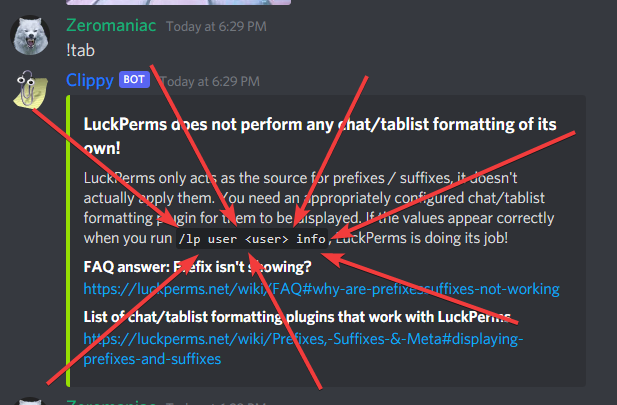
LuckPerms does not perform any chat/tablist formatting of its own!
LuckPerms only acts as the source for prefixes / suffixes, it doesn't actually apply them. You need an appropriately configured chat/tablist formatting plugin for them to be displayed. If the values appear correctly when you run /lp user <user> info, LuckPerms is doing its job!
FAQ answer: Prefix isn't showing?
List of chat/tablist formatting plugins that work with LuckPerms
meager fox
i know embeds are shit to read from a bot but it even tells you a command to check if its correct and if it iss, tells you what is the problem
so please read that above so staff dont have to literally type out the exact same info for you
foggy quartz
no but its a problem with luckperms not the tab
meager fox
did you use the command to check your prefix in there
foggy quartz
i am not sure what to put in prefixs place
meager fox
that makes no sense. first you say its luckperms fault, now you say you arent even sure what to put for a prefix. which is it?
use the command clippy lists and check if it displays there the way you want to. if not, feel free to ask 'how do i edit a prefix'
wanton stratusBOT
Sorry! I do not understand the command clippy
Type !help for a list of commands
foggy quartz
how do i do it
meager fox
 foggy quartz
Is there a way to transfer my data from a server to another?
wanton stratusBOT
If you wish to change your storage type (e.g. to YAML or MySQL) you may need to follow these instructions to ensure your groups and permissions are migrated to the new storage type.
Read more about the Storage types
LuckPerms wiki
foggy quartz
It will be on both server right?
meager fox
this will transfer data from one server to another but it will not automagically sync when you make changes to one setup and apply to the other too, if you mean that
this is like a 'move perms once' kinda thing
foggy quartz
Yeah no need to sync just want to transfer everything
meager fox
yea then thats what you need :)
 north relic
wanton stratus
north relic
wanton stratus
I just moved the LuckPerms folder from the old server to the new server and it worked 
meager fox
luckperms bungee only handles proxy permissions, so lets say if you have bungee plugins and need to set permissions for it, then you can do that with it
 meager fox
you probably want to set the weight higher and perhaps add a prefix
really up to you though
foggy quartz
what do i add in prefix numbers or
meager fox
any prefix that your chat or tablist plugins can display. lets say you use hex color codes to color the prefix but your tablist plugin doesnt support it, then it wont display the color
so it really depends what server version youre on (lower than 1.16 cant do hex color codes) and what your chat/tablist supports
most support flat color codes though such as &4Owner (&4 here is red)
meager fox
like normal color codes
foggy quartz
then is there cooler red colors
meager fox
&4 &6 &f and so on
again, if your server is 1.16+ and you have a plugin that can read hex, you can use hex too
meager fox
https://rgb.birdflop.com/ this is a cool site to help create pretty stuff
let me explain what weights do so you know what you should do here
so lets say you have admin and default group. and lets imagine you set admins weight to 0 and default to 100
and now imagine you add a permission to default and set it to 'False', denying the permission, but at the same time you add the very exact same perm to admin in 'true' trying to allow it
what happens is that admins will not be able to do the command. why not? because default has a higher weight, so whats set in there takes priority
hope that makes sense. its literally about what is allowed if a user has more than one group
 meager fox
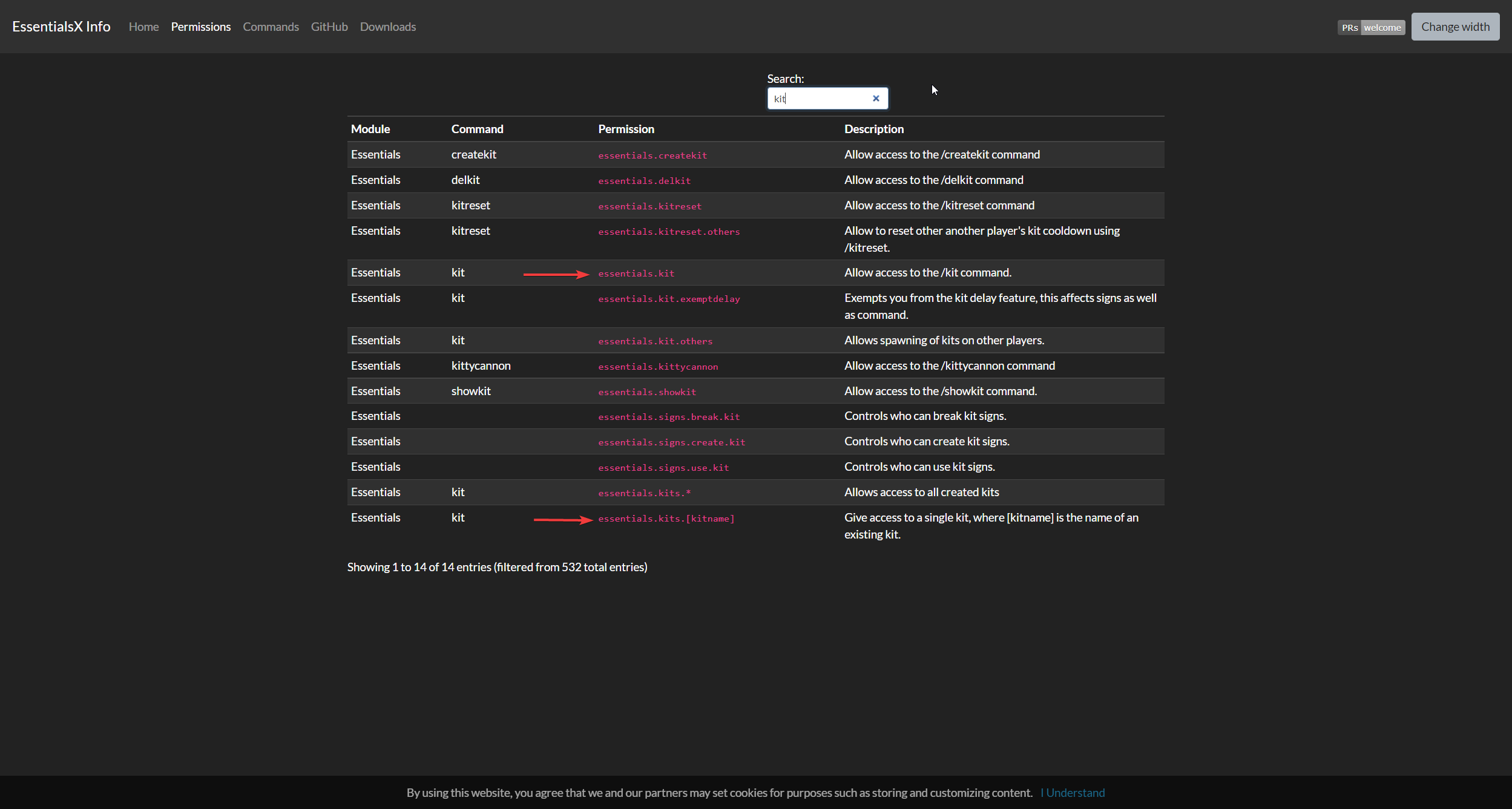
kits have two permissions
 fallen trout
what are they
 fallen trout
ok i fixed it
but theres another problem
in the kit theres a key
after u get the key
u cant use it
idk why
meager fox
then you should look in their wiki what the permission is to use keys
fallen trout
no u dont understand
the key works
before u put it in the kit
and then when u do /kit and take it from the kit
it doesnt work
meager fox
aha
probably essentials has some kind of trouble handling the item (meaning converting it to just a tripwire hook)
meager fox
im not essentials expert, maybe ask them if 'custom items' from other plugins are supported in the kits
fallen trout
how
meager fox
!moss
wanton stratusBOT
Essentials
Make sure you are using EssentialsX and Vault for prefixes. For any other issues with Essentials, you should seek support in either #general or the official EssentialsX support Discord.
EssentialsX Discord
foggy quartz
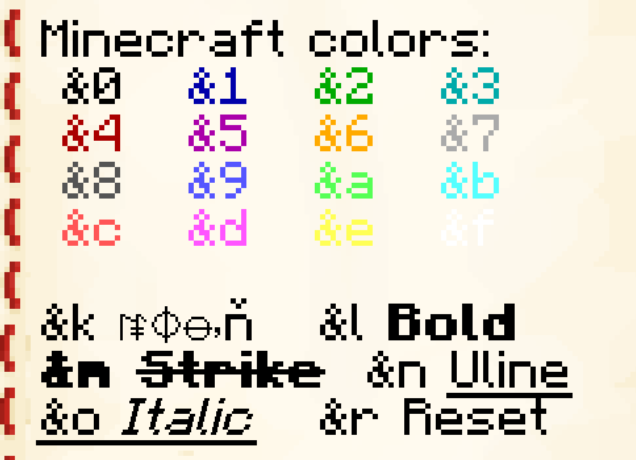
zeromaniac what color is purple for flat color code
meager fox
 foggy quartz
thanks
 lucid veldt
restarting it was corrected but it happened again after 26 minutes giving this error

 pastel oak
!tab
wanton stratusBOT
LuckPerms does not perform any chat/tablist formatting of its own!
LuckPerms only acts as the source for prefixes / suffixes, it doesn't actually apply them. You need an appropriately configured chat/tablist formatting plugin for them to be displayed. If the values appear correctly when you run /lp user <user> info, LuckPerms is doing its job!
FAQ answer: Prefix isn't showing?
List of chat/tablist formatting plugins that work with LuckPerms
lucid veldt
Every time I do /lp user (Nick) info
It goes like this
 cunning tendon
anyone knows why luckperms turned on pvp on my server?
uneven nexus
It didn’t.
IF your pvp is now enabled, it’s because you have a plugin doing something with a permission. That’s not LP’s fault.
cunning tendon
it got on only when I added lp tho @uneven nexus
 mental shoal
cunning tendon
it got on only when I added lp tho <@!412070526081695744>
mental shoal
cunning tendon
it got on only when I added lp tho <@!412070526081695744>
Luck Perms has nothing to do with PVP, just permission management. It was another plugin not LP
cunning tendon
I only have lp nucleous and griefdefender
 cursive musk
its normal that some plugin permissions doesnt show up in the editor?
cunning tendon
cunning tendon
I only have lp nucleous and griefdefender
pvp got on only after I added lp
uneven nexus
cursive musk
its normal that some plugin permissions doesnt show up in the editor?
Yes. Permissions will only show once they’re checked.
cunning tendon
mild otter
Look at GriefDefender
uhhhhhhhh
idk how could griefdefend turn on pvp in anyway?
cursive musk
uneven nexus
Yes. Permissions will only show once they’re checked.
so what do i do to check them?
uneven nexus
Dunno. It depends how the permissions are checked in the plugin. Usually running /minecraft:help will check them
mild otter
cunning tendon
idk how could griefdefend turn on pvp in anyway?
Because it controls PVP
read the docs
cursive musk
uneven nexus
Dunno. It depends how the permissions are checked in the plugin. Usually running...
nothing
uneven nexus
did you regenerate an editor session ?
uneven nexus
You don’t have to rely on the suggestions. You can manually key them in.
cursive musk
ok
cunning tendon
mild otter
Because it controls PVP
I tried running /cfg <group> entity-damage player false context[source=player, override=global] but it wont work
 steel rune
Would there be a way to make it so a user has a one time use permission?
foggy quartz
hello for some reason luckperms is preventing my server from starting
here is the error (the ips in this are not real i use minehut)
wanton stratusBOT
Please use https://pastes.dev to send files in the future. I have automatically uploaded message.txt for you: https://pastes.dev/5fwCCtF3lK

A paste containing 122 lines of plaintext.
 pine bloom
How do suffixes work exactly? I can't seem to get them to work using the groups and nothing really helped me in the wiki
steel rune
pine bloom
How do suffixes work exactly? I can't seem to get them to work using the groups ...
you know that like they dont do tab and chat format right
pine bloom
modern bison
what exactly about them isnt working
Well you see, they aren't showing
modern bison
luckperms wont format chat for you, so have you made sure to configure your chat plugin to do so?
modern bison
lpc is not made by luckperms
steel rune
lpc wiki or something
modern bison
we cannot help with it
pine bloom
E
steel rune
dont worry it happens
wanton stratusBOT
Hey BeLikeMike_! Please don't tag helpful/staff members directly.
steel rune
mb
modern bison
what
steel rune
would there be a way to make it so a user has a one time use permission?
modern bison
not natively
foggy quartz
foggy quartz
hello for some reason luckperms is preventing my server from starting
here is th...
could someone help
steel rune
modern bison
not natively
please elaborate
modern bison
there is probably some plugin out there that does it, but luckperms does not have that feature built in
steel rune
i see i see
steel rune
foggy quartz
hello for some reason luckperms is preventing my server from starting
here is th...
yeah make sure database configs are correct
or try to wipe your user data
not user data like
foggy quartz
it was working like 30 mins ago
foggy quartz
but its an issue for every single user
nocturne chasm
delete translations folder
 keen shore
as I grant temporary ranges to a user type I give vip for 1 day and the next day have the default range¿
 nocturne laurel
I'm running luckperms on fabric and luckperms is overriding vanilla teams used by my datapacks. How can I fix this?
nocturne chasm
luckperms doesn’t handle chat
 still kraken
I'm running LP 5.3.98 on minehut, and was able to set up some groups but now the /lp creategroup command is just gone
 mild otter
did you try typing it out manually
 nocturne laurel
nocturne chasm
luckperms doesn’t handle chat
nocturne laurel
nocturne chasm
luckperms doesn’t handle chat
...what? I know that, that's not what I asked
nocturne chasm
then how is lp overriding it
modern bison
still kraken
odd, can you send an editor link?
still kraken
Yeah 1 sec
still kraken
modern bison
odd, can you send an editor link?

LuckPerms - A permissions plugin for Minecraft servers.
LuckPerms is a permissions plugin for Minecraft servers. It allows server admins to control what features players can use by creating groups and assigning permissions.
modern bison
whats your ign?
 timber pagoda
Question, LuckPerms Is work With CraftBukkit ?
modern bison
yes
timber pagoda
Okay, Because usually I use the EXpermission but the problem I would like to know if it is possible for example to make a grade as Admin, Moderator, User with Luckperms?
modern bison
yes, you can make different groups in luckperms 🙂
are you using PermissionsEx right now?
timber pagoda
From what I've read the EXpermission is no longer the correct version. That's why I'm coming to you. To know if it will be functional with LuckPermission.
modern bison
ok
timber pagoda
I will test and come back to you if I have a problem. thanks you 🙂
modern bison
have an exquisite day!
 harsh adder
How do you set a rank to the default, I accidentally deleted the default role when I first started
 fringe elbow
uneven nexus
fringe elbow
uneven nexus
I’m pretty sure you can delete it, but it’ll just get re-created. Same as if it was renamed
foggy quartz
I'm new to LuckPerms, but I'm using it with CMI and it isn't showing the suffix, but it is showing the prefix? Running /lp user me meta info shows that the suffix I set exists and is read.
Prefixes set through groups do work though
steel rune
foggy quartz
I'm new to LuckPerms, but I'm using it with CMI and it isn't showing the suffix,...
uhhhh you have like any chat manager plugin
cuz like
!tab
wanton stratusBOT
LuckPerms does not perform any chat/tablist formatting of its own!
LuckPerms only acts as the source for prefixes / suffixes, it doesn't actually apply them. You need an appropriately configured chat/tablist formatting plugin for them to be displayed. If the values appear correctly when you run /lp user <user> info, LuckPerms is doing its job!
FAQ answer: Prefix isn't showing?
List of chat/tablist formatting plugins that work with LuckPerms
foggy quartz
yeah, cmi's chat manager is active, I'll see about formatting it once I have access
thanks!
steel rune
no problem
 gusty gyro
The "server" context doesn't work for me. I tried many times. How do I get it to work?
 toxic wagon
Did you add the server name to the LP config (the first setting)
gusty gyro
oh
no i did not lol
but that doesnt mess up my MYSQL database and how it syncs does it?
toxic wagon
Nope
gusty gyro
ok thank you
 hard mountain
Any way to bulk remove users from a group that they are temporarily assigned to without conflicting with users who are permanently assigned to that group?
toxic wagon
Not really.
If they only have it temp, then it will be removed once the temp timer runs out
foggy quartz
Quick question, it it possible to change the vault suffix to a custom placeholder?
toxic wagon
Depends on the plugin displaying the prefix/suffix
foggy quartz
Hmm, I mean just with like vault and Luckperms itself
toxic wagon
!formatting
wanton stratusBOT
LuckPerms does not perform any chat/tablist formatting of its own!
LuckPerms only acts as the source for prefixes / suffixes, it doesn't actually apply them. You need an appropriately configured chat/tablist formatting plugin for them to be displayed. If the values appear correctly when you run /lp user <user> info, LuckPerms is doing its job!
FAQ answer: Prefix isn't showing?
List of chat/tablist formatting plugins that work with LuckPerms
 green wraith
wanton stratusBOT
green wraith
wanton stratusBOT
Please use https://pastes.dev to send files in the future. I have automatically uploaded message.txt for you: https://pastes.dev/fkXfnUQeXS
A paste containing 70 lines of plaintext.
green wraith
I keep getting this error and I have zero clue why 
uneven nexus
Tech, i know you're gonna hate me :(
This is NOT a bug - please do not report it to LuckPerms.
if EngineHub says it's related to your jar, can you try reproducing on paper?
green wraith
uneven nexus
Tech, i know you're gonna hate me :(
Nah it's ok
I got redirected here from Syscraft as you saw
 flat parcel
Ultimately this is worldedit's end, as the error states this is not an error originating in LP, it's just displaying the symptoms
green wraith
flat parcel
Ultimately this is worldedit's end, as the error states this is not an error ori...
Oh is it, thank you 😍
Every piece of info helps
foggy quartz
whale tail!
green wraith
emily!
foggy quartz

uneven nexus
it's a deer
foggy quartz
wtf
green wraith
LMFAO
green wraith
uneven nexus
it's a deer
both wrong
uneven nexus
nop
green wraith
uneven nexus
nop
 flat parcel
green wraith
Every piece of info helps
flat parcel
green wraith
Every piece of info helps
Basically Worldgiard is making a permissions request in an improper way (Accessing an offline player from the main thread). If LP allowed it, it'd cause a (probably sizable) lag spike, which no one wants. Thus, LP blocks it, throws the error, and here we are. Technically there's an escape hatch config option to disable the warn (mentioned in the error), but then you get the aforementioned lag spikes.
foggy quartz
ok
green wraith
flat parcel
Basically Worldgiard is making a permissions request in an improper way (Accessi...
I don't seem to understand why, and if it goes away with paper it isn't much help to me as I run pufferfish for the sole reason of being able to not lag to death 
Oh also no one else seems to have the issue too, it's just odd, but like I said, very grateful for your help
 silver tapir
foggy quartz
according to my brain, I am right
silver tapir
foggy quartz
according to my brain, I am right
according to me, Emily is cute
uneven nexus
that would be accurate info
green wraith
@full herald shoo
wanton stratusBOT
Hey Technofied! Please don't tag helpful/staff members directly.
green wraith
wanton stratus
Hey Technofied! Please don't tag helpful/staff members directly.
dw, ex-moderator w/DC
I have the right now
flat parcel
Ok poking my head into enginehub, they're blaming whatever fork you're running. Try to reproduce on Paper, if fixed then talk to your fork, if not, enginehub
 flat parcel
I think they were saying the mappings were making it difficult to interpret
idk I don't speak worldguard ¯_(ツ)_/¯
green wraith
flat parcel
idk I don't speak worldguard ¯\_(ツ)_/¯
do you speak luckperms 👀
modern bison
.
toxic wagon
.
 radiant tangle
Hello, for some reason my LPB and LP isn't syncing. Could somebody help me please?
!bungee
wanton stratusBOT
If you run a BungeeCord network, learn how to correctly setup LuckPerms on all server instances (including Bungee).
Also read:
Syncing data between servers
LuckPerms wiki
 gritty berry
Hi, i'm new on luckperms and don't know much about but anyways i've been trying to connect to my sql database with lp but it gives me an error: "A database error occured whilst loading permissions data. Please try again later..."
 broken lotus
wanton stratusBOT
broken lotus
wanton stratusBOT
Please use https://pastes.dev to send files in the future. I have automatically uploaded message.txt for you: https://pastes.dev/oMoW80yoFb
A paste containing 37 lines of plaintext.
LuckPerms cannot connect to your MySQL server
Read More
Caused By
java.sql.SQLTransientConnectionException: luckperms-hikari - Connection is not available, request timed out after 9537ms.
https://pastes.dev/oMoW80yoFb | Sent by Clippy
 haughty ore
hey what can i do to fix this
 meager fox
cracked accounts cant join a premium server
north relic
meager fox
cracked accounts cant join a premium server
I've heard cracked servers are against mojangs rules or something
 warm canopy
Hello, is it possible to have a warning to warn that the temporary permission acquired will soon come to an end? /lp user/group <user|group> permission settemp <node> <true|false> <duration> [temporary modifier] [context...]
meager fox
not with luckperms. perhaps with another plugin
 broken prairie
For luckperms bungee, do I use server=hub for the context of hub, or is it something else?
meager fox
when using bungee, context works a bit differently. on the proxy, 'Server' already is the bungee, so the server context wont work. however you can use 'world=servername' (the proxy treats subservers as worlds)
broken lotus
wanton stratus
Please use <https://pastes.dev> to send files in the future. I have automaticall...
i nothing changed mysql work and connect but lackperms send error
 golden cedar
Hey! For some reason I can't place a new prefix for myself, it only appears when I remove all other prefixes (I have 2).
I think I did everything right, but it still doesn't work.
meager fox
keep in mind that if you have more than 1 prefix, lp will choose the highest weighted one for you as it does with groups and group prefixes
golden cedar
meager fox
keep in mind that if you have more than 1 prefix, lp will choose the highest wei...
Okay, but how can this be fixed? And do I understand correctly that I need to lose weights 🤔
I mean take the weight off the prefix.
Sorry for the weird questions, but I've really tried everything and don't even know how I can get my new prefix to show up. The rest (which I created a long time ago) are displayed without problems.
meager fox
you dont need to 'not set a weight'. you need to set the weight of your new prefix to a higher number than your old prefix
golden cedar
meager fox
you dont need to 'not set a weight'. you need to set the weight of your new pref...
Yes, the new prefix has more weight than the old one, but that doesn't help 😅
golden cedar
meager fox
okay then
Tablist.
 hot sand
Is there a way to set a context to all the permissions with one (or some) command?
meager fox
golden cedar
Tablist.
what does your tablist use for placeholder to display your prefix?
golden cedar
meager fox
what does your tablist use for placeholder to display your prefix?
Sorry, do you mean setting in config?
meager fox
yes
golden cedar

 hot sand
Is there a way to set a context to all the permissions with one (or some) comman...
hot sand
hot sand
Is there a way to set a context to all the permissions with one (or some) comman...
Found the way, it can be done with the editor
golden cedar
Oh
meager fox
tabprefix is what?
golden cedar
meager fox
tabprefix is what?

These are the lines that I configured, the rest is by default.
meager fox
okay. and now do /lp user <your name> info
golden cedar
meager fox
okay. and now do `/lp user <your name> info`
I can send it in your DM? 😅
meager fox
why? it shows nothing that you need to hide
golden cedar
[14:33:35 INFO]: [LP] - Status: Online
[14:33:35 INFO]: [LP] - Parent Groups:
[14:33:35 INFO]: [LP] > default
[14:33:35 INFO]: [LP] > sponsorq
[14:33:35 INFO]: [LP] - Contextual Data: (mode: active player)
[14:33:35 INFO]: [LP] Contexts: (dimension-type=overworld) (essentials:afk=false) (essentials:jailed=false) (essentials:muted=false) (essentials:vanished=false) (gamemode=survival) (world=world)
[14:33:35 INFO]: [LP] Prefix: ""
[14:33:35 INFO]: [LP] Suffix: None
[14:33:35 INFO]: [LP] Primary Group: sponsorq
[14:33:35 INFO]: [LP] Meta: (weight=6) (primarygroup=sponsorq)
golden cedar
I must say right away that I cannot display the prefix from the sponsorq group.
golden cedar
meager fox
is it some emoji or something
Yep
meager fox
does it display in tab?
golden cedar
meager fox
does it display in tab?
No, the sponsorq emoji is not displayed specifically, but the rest (emoticons of other groups) are displayed without problems.
😕
I set up sponsorq the same way as the rest of the old groups, but for some reason the prefix is not displayed and I still can't figure it out.
Very strange.
meager fox
I assume you are replacing this with some other plugin or resource pack since this appears to be a non unicode thing.
broken lotus
wanton stratus
Please use <https://pastes.dev> to send files in the future. I have automaticall...
HELP I error lackperms but this connected what do
 bitter pendant
lp is installed on my server but i cant use any commands.
its shown in the plugin list but nothing more
golden cedar
meager fox
I assume you are replacing this with some other plugin or resource pack since th...
Thank you for help! I figured out the problem, I just forgot to add a new group to Stack section 😄
Good luck.
broken lotus
broken lotus
HELP I error lackperms but this connected what do
@magic root
 dense flicker
Hey, having a small issue. I'm trying to set all player's accrued blocks from Grief Defender to 0 using Bulk Update. This is the command I'm currently trying to use;
/lp bulkupdate users delete "permission ~~ meta.griefdefender\.accrued-blocks.%"
It runs, however it says nothing changed for any users. Nothing changes for nodes or groups either, but I don't expect those to change. The exact permission I want to change, copied from the editor is;
meta.griefdefender\.accrued-blocks.10
With the 10 being the total blocks for that particular player. I assumed using a % sign would cover any number of blocks, as some players go up to 4 or 5 digits. I'm not sure what I'm doing wrong lol.
dense flicker
Nevermind, figured out the issue. In case others have the same issue, you need a second \ in the permission part of the command.
Example: "permission ~~ meta.griefdefender\\.accrued-blocks.%"
foggy quartz
I need to make it so that my luckperms syncs with my other server... or example, if a player in one server gets a rank they will also have it in the other...
meager fox
you need to connect both or all luckperms instances with some remote storage to do that, such as mysql
foggy quartz
Lol so we meet again... is there any way for me to just manually transfer the files from one server to the other because that’s what I need to do rn
But when I just replaced one folder with another it did not do anything
meager fox
!switch yes but keep in mind that adding a setup on top of what exists will just add to it and not replace it
wanton stratusBOT
If you wish to change your storage type (e.g. to YAML or MySQL) you may need to follow these instructions to ensure your groups and permissions are migrated to the new storage type.
Read more about the Storage types
LuckPerms wiki
foggy quartz
Ok, but right now I just want to take all of the groups from one server and copy them to another along with all of the player data and other stuff
How do i do only that
meager fox
if you want to replace it, then you should wipe the servers data first and then apply the other server's setup so instead of merging, you replace
foggy quartz
Yes, I want to replace… how do I wipe the data (I am guessing I just delete the lp folder) and then how do I transfer (or replace)
meager fox
its described in the link above. to keep your config intact, i suggest you dont delete the entire folder. if you use the default H2 storage method, your data will be in the .db file inside your lp folder. thats what you would yeet - ofc while your server is turned off to avoid storage issues. it will then generate an empty setup on starting the server again, onto which you can apply your previously gotten export
you should really start reading wikis
foggy quartz
So to confirm, turn server off, delete .db file, replace .db file with .db file I want… and then turn server on
meager fox
that could work, but doesnt have to
you clearly didnt read the page i had clippy send
foggy quartz
Which one?
 foggy quartz
Can I do /lp export —upload from my one server and then wipe my server that I want to sync and then do /lp import —upload
meager fox
yes, but the upload will expire after a few days. a physical export will stay on your disk forever
foggy quartz
I don’t need it for a long time… I just need it to transfer and sync the data from one server to the other so I don’t have to remake every group and permission
meager fox
and sync the data from one server to the other so I don’t have to remake every group and permission
doing this data transfer will not sync any future changes
its a one-time thing
foggy quartz
Yes I know I just need the data it already has… I will figure out the future data sync thing later
meager fox
if you have a database such as mysql, its really not hard
like 4 or 5 settings
¯_(ツ)_/¯
foggy quartz
I don’t have MySQL
meager fox
yeet
foggy quartz
if i am using luckperms on mysql, is it possible that in case of a streamer comes and brings 1000+ joins under an hour, it start to lose it thingies and gives error?
Would it be better to use it under sql in that case...
flat parcel
That kind of load is nothing for LP, some of the largest networks use LP with no problem.
Although yeah a remote DB i.e. SQL will probably perform better than a flatfile db i.e. the default H2
foggy quartz
ok, so another question is; is there any issues related to geysermc known, because without geysermc, luckperms works greatly and when i turn geyser on, it starts the error
wanton stratusBOT
Please use pastebin!
Seeing a paste of the problem makes everything so much easier! Use https://pastes.dev/ for easy pasting!
For console errors:
Pastebin any relevant segments of the console log. If it's a startup error, this includes the entire startup log!
Other errors:
Pastebin the entire LuckPerms config file (passwords removed) as well as any other relevant files!
foggy quartz
there are 2 errors i got, one of them is this, https://pastes.dev/CR4orqyEZq
A paste containing 2 lines of plaintext.
meager fox
perhaps due to https://i.imgur.com/mbhNDbb.png
 steel rune
luckperms is not giving me any message feedback
 hot jay
steel rune
luckperms is not giving me any message feedback
hot jay
steel rune
luckperms is not giving me any message feedback
try not using lunar, as its known for breaking chat
hot jay
i dont really know what you want me to say lol, it breaks chat
and they show no will to help fix it, we have reported at discordsrv to them a few times, and all they do is close the tickets
steel rune
hot jay
and they show no will to help fix it, we have reported at discordsrv to them a f...
yeah lunar helps 0
i acknowledge that
steel rune
hot jay
i dont really know what you want me to say lol, it breaks chat
it didn't work, well it works on the lobby server not on this one where i am
the permissions are working tho, ill tell you that
bungee instance is working tho

 dapper hollow
does anyone know good chat plugins?
steel rune
dapper hollow
does anyone know good chat plugins?
LPC
dapper hollow
thats what im using
but
the name
is the same color
as the prefix
and i dont want that
steel rune
¯_(ツ)_/¯
steel rune
was this supposed to be on the console in default
 nocturne chasm
show the full line
flat parcel
iirc some fork messes with the logger levels?
steel rune
nocturne chasm
show the full line
[luckperms-hikari housekeeper] DEBUG me.lucko.luckperms.lib.hikari.pool.HikariPool - luckperms-hikari - Pool stats (total=10, active=0, idle=10, waiting=0)
steel rune
 flat parcel
Honestly just send the full logs, I'm wondering if this is a weird fork or a plugin conflict
steel rune
flat parcel
Honestly just send the full logs, I'm wondering if this is a weird fork or a plu...
alright
flat parcel
!;aste
wanton stratusBOT
Please use pastebin!
Seeing a paste of the problem makes everything so much easier! Use https://pastes.dev/ for easy pasting!
For console errors:
Pastebin any relevant segments of the console log. If it's a startup error, this includes the entire startup log!
Other errors:
Pastebin the entire LuckPerms config file (passwords removed) as well as any other relevant files!
steel rune
i know
nocturne chasm
something is messing with log levels yes
or hikari is using a weird logging system
it’s logging to the info level
flat parcel
no hikari uses SLF4J like everything else under the sun
flat parcel
Full logs including startup please
steel rune
What
oh idk why it didnt send
i didn't check if startup was there my bad
there's no startup on my latest
ill restart the server
flat parcel
Yeah if the server's been running across midnight it splits the logs
steel rune
flat parcel
Yeah if the server's been running across midnight it splits the logs
A paste containing 1371 lines of plaintext.
here's a new one
it still doesn't work
flat parcel
!latest
wanton stratusBOT
Latest version
5.4.13
flat parcel
!update
wanton stratusBOT
You can download LuckPerms for Bukkit/Spigot/Paper, BungeeCord, Sponge, Fabric, Nukkit and Velocity.
Additional downloads
flat parcel
You're probably over a year out of date
dapper hollow
!usage
wanton stratusBOT
Here's a guide to help users understand and use LuckPerms for the first time.
Read more
LuckPerms wiki
 dapper hollow
they get that rank?
steel rune
no way
steel rune
so when a default joins the get the default and all the changes will be made on default
dapper hollow
it has a prefix
 quiet knoll
Hi every body
dapper hollow
hii
steel rune
flat parcel
You're probably over a year out of date
is there any way to make it so it updates auto?
quiet knoll
I have a little problem with lp mutliverse. Can i ask help to somebody ?
flat parcel
steel rune
is there any way to make it so it updates auto?
Nope, and that's not something that's planned either. Luck intentionally doesn't have LP call home in any way without user interaction.
In addition, auto-updating is a bad idea.
wanton stratusBOT
Please ask your question!
Please ask the question you have. Don't ask to ask, or ask to DM someone. There are people here to help you, but we need to know what to help you with, so please just ask the question you want to in as much detail as possible!
Or, try here first:
Why shouldn't I ask to ask?
steel rune
flat parcel
Nope, and that's not something that's planned either. Luck intentionally doesn't...
i see thank's for the heads up man
flat parcel
@dapper hollow check /lp user <who> info, see if the prefixx shows up as expected threre
steel rune
there's no problem on replacing the jars right?
flat parcel
yup to update just shut the server down, swap the LP jar with the new one, and start back up
flat parcel
90% of plugins, that's all that's needed to update
quiet knoll
I have a server with multiverse. I have two world : world ans farwest. I create a group with the permission multiverse.teleport.self.farwest but group's user can't tp to farwest because they don't have any of the required permission
flat parcel
!verbose there's probably other permissions that are being checked that you haven't given. You can use verbose mode to see what they are
wanton stratusBOT
LuckPerms provides a verbose command to help you find out what permissions a command/plugin is checking.
Read more
LuckPerms wiki
flat parcel
(alternatively, check Multiverse's permissions docs)
quiet knoll
thanks. I use verbose. Do u know signification of multverse.teleporte.self.e or multiverse.teleporte.self.ca
steel rune
flat parcel
90% of plugins, that's all that's needed to update

@flat parcel OKAY I HAVE A HUGE PROBLEM
wanton stratusBOT
Hey BeLikeMike_! Please don't tag helpful/staff members directly.
 modern bison
..
nocturne chasm
!bingee
wanton stratusBOT
If you run a BungeeCord network, learn how to correctly setup LuckPerms on all server instances (including Bungee).
Also read:
Syncing data between servers
LuckPerms wiki
nocturne chasm
err
meager fox
bingee xDDDD
nocturne chasm
!bungeecheck
wanton stratusBOT
Running a network and getting UUID mismatches?
Please double check that:
1. BungeeCord config.yml has ip_forward and online_mode set to true
2. All backend servers' spigot.yml has bungeecord set to true
3. All backend servers' server.properties have online-mode set to false
 nocturne chasm
wanton stratus
nocturne chasm
wanton stratus
this
dapper hollow
how do i check the priority
of a rank?
when i do /lp listgroups
it just shows this
 meager fox
all your groups have the same priority of 0
dapper hollow
but
when i do like
/lp creategroup banana 2 "prefix"
2
is the priority
isnt it?
or is it ont
not
meager fox
https://luckperms.net/wiki/Group-Commands#lp-group-group-setweight-weight setting group weight
https://luckperms.net/wiki/Meta-Commands#lp-usergroup-usergroup-meta-setprefix-priority-prefix-context setting a prefix with weight on the prefix (not the same as group weight)
LuckPerms - A permissions plugin for Minecraft servers.
LuckPerms is a permissions plugin for Minecraft servers. It allows server admins to control what features players can use by creating groups and assigning permissions.
LuckPerms - A permissions plugin for Minecraft servers.
LuckPerms is a permissions plugin for Minecraft servers. It allows server admins to control what features players can use by creating groups and assigning permissions.
https://luckperms.net/wiki/Meta-Commands#lp-usergroup-usergroup-meta-info checking a groups meta (under which prefix and suffix falls)
LuckPerms - A permissions plugin for Minecraft servers.
LuckPerms is a permissions plugin for Minecraft servers. It allows server admins to control what features players can use by creating groups and assigning permissions.
modern bison
15? what
broken lotus
nocturne chasm
this
thanks
 simple scaffold
Hey I was wondering where I could get older versions of luckperms
I have a bug on the latest one
That breaks some of my system (api etc)
modern bison
on ci.lucko.me you can see some of the most recent builds
might be best to file a bug report on github issues as well
dapper hollow
how come in the web editor when i add a permission to a rank it transfers to other ranks?
first rank

second rank
 meager fox
it... doesnt...
it will slide into the groups permissions based on what group you are currently viewing
mild otter
!ask
wanton stratusBOT
Please ask your question!
Please ask the question you have. Don't ask to ask, or ask to DM someone. There are people here to help you, but we need to know what to help you with, so please just ask the question you want to in as much detail as possible!
Or, try here first:
Why shouldn't I ask to ask?
meager fox
and vault?
you need vault plugin to add prefixes to chat with essentials
vault is an api
it doesnt actively do anything. its there for other plugins to talk to each other like lp -> essentials
essentials chat config
mild otter
Friendly reminder of #rules btw, we're volunteers with our own lives x)
And that's something to ask Aternos. But be aware they are a free server host, they have their limitations unfortunately
Clippy? Yes he is a good bot

No I am a samosa

If I was a bot I would have the bot tag
dapper hollow
i just linked my servers to a database, and only in my hub server it shows my prefix in chat
 dapper hollow
(essentials chat is installed on all servers and all same configs)

please help!!
modern bison
meager fox
probably missing vault
modern bison
yes
meager fox
vault works on almost anything really
dapper hollow
ah okay thanks!
wanton stratusBOT
Please use https://pastes.dev to send files in the future. I have automatically uploaded message.txt for you: https://pastes.dev/irOWEEIYOn
A paste containing 1 line of plaintext.
uneven nexus
why did you upload a file for a single message.
you're getting the message because either A. your disk is slow, or B. your connection to whatever DB you're using is not good.
are you running a mysql/mariadb/mongodb server for this?
foggy quartz
how do i link luckperms bungee and tab or do i need seperate spigot luckperms
@meager fox are these the files I need to delete?
 meager fox
i solve your problem if you solve mine. deal?
foggy quartz
meager fox
i solve your problem if you solve mine. deal?
? Are these the right files I have to delete is all?
I deleted them...
 meager lake
Can anyone tell me what could be causing this? at some point when a random player logs in the server just crashes, i have 3 logs like this https://pastebin.com/ju83wdXR
Pastebin
Pastebin.com is the number one paste tool since 2002. Pastebin is a website where you can store text online for a set period of time.
 sudden dust
why does de perm link not worko
dapper hollow
how come half the time i cant see peoples ranks?
like if someone leaves and rejoins
their rank from tab
is gon
e
i am using tab plugin
but their chat messages are still fine
nvm
i think i figured it out
:P


 wanton stratusBOT
Sorry! I do not understand the command easperms Did you mean testperms?
Type !help for a list of commands
nocturne chasm
!essperms
wanton stratusBOT
Sorry! I do not understand the command essperms Did you mean testperms?
Type !help for a list of commands
 broken harbor
nocturne chasm
there’s 2 different perms for kits
broken harbor
nocturne chasm
there’s 2 different perms for kits
:|
broken harbor
wanton stratus
Sorry! I do not understand the command `essperms` Did you mean `testperms`?
Type...
:|
nocturne chasm
!essentials
wanton stratusBOT
Essentials
Make sure you are using EssentialsX and Vault for prefixes. For any other issues with Essentials, you should seek support in either #general or the official EssentialsX support Discord.
EssentialsX Discord
nocturne chasm
ugh hold on
meager fox
 nocturne chasm
broken harbor
nocturne chasm
broken harbor
ok problem fixed
broken harbor
meager fox
thank you
modern bison
:|
broken harbor
:|
meager fox
We all know ppl want spoon feeding
 toxic nymph
Hey, I'm trying to integrate luckperms into my fabric mod so I can check custom permission before allowing them running commands. How do I make sure luckperms loads before my mod so I can use LuckPermsProvider.get()?
Ok for some reason it is not loaded into fabric system at all. Even I place the right jar into mods folder
Bruh luckperm is server side only. Not quite understand though
 indigo wyvern
Hey help how can i display The Ranks i made?
Cause it does not Display even though i have the rank and the prefix and everything set up
meager fox
!chat
wanton stratusBOT
LuckPerms does not perform any chat/tablist formatting of its own!
LuckPerms only acts as the source for prefixes / suffixes, it doesn't actually apply them. You need an appropriately configured chat/tablist formatting plugin for them to be displayed. If the values appear correctly when you run /lp user <user> info, LuckPerms is doing its job!
FAQ answer: Prefix isn't showing?
List of chat/tablist formatting plugins that work with LuckPerms
north relic
wanton stratus
Why can't luckperms devs make a plugin like "LuckTab" and "LuckChat" for that
steel rune
20.03 21:29:40 [Server] INFO 21:29:10.365 [luckperms-hikari housekeeper] DEBUG me.lucko.luckperms.lib.hikari.pool.HikariPool - luckperms-hikari - Fill pool skipped, pool is at sufficient level.
i can turn these off right?
steel rune
north relic
Why can't luckperms devs make a plugin like "LuckTab" and "LuckChat" for that
why don't you do it
 thin rose
.
meager fox
north relic
Why can't luckperms devs make a plugin like "LuckTab" and "LuckChat" for that
Why don't you just make it and give all rights to luck when done?
 sour monolith
Say I want to give someone an additional permission ontop of their current one
Such as
maxblock.25
And I want to give them maxblock.25 to equal 50
Does that work somehow?
meager fox
You mean in one swing change that permission from 25 to 50 or adding a second permission and have lp add them up automatically
 sour monolith
What're they?
meager fox
 sour monolith
xD
uneven nexus
Luck already made VaultChatFormatter
 rich heart
hello
how do i make people not able to use colorcodes on chat
people keep using the &...
to make message in chat
asked some people and people told me it is fixed with perms but idk how
anyone?
 stoic karma
Hey please can I have some help. So I want these commands to work on these 3 servers for these ranks but they do not, here is a screenshot

 tired quail
hi folks - I dont even know if this is a LP query, I have people on the 2nd rank, they get 2 sethomes set in essentials, but they can;t use them properly, if they set home <name> they cannot delete it as it states it doesnt exist, but they can use the home, I have no idea what to do to fix

 meager fox
rich heart
anyone?
meager fox
rich heart
anyone?
Theres most likely a permission to use them provided by your chat plugin. Consult their wiki, find the perm and if needed set it to false in lp
meager fox
stoic karma
Hey please can I have some help. So I want these commands to work on these 3 ser...
Did you set the server names in the configs and restarted?
meager fox
tired quail
hi folks - I dont even know if this is a LP query, I have people on the 2nd ran...
Iirc there is a permission called similar to essengials.sethome.multiple
Did you look here https://essinfo.xeya.me/permissions.html and also checked the config? I believe theres a homes by group section which explains it in the config
Not sure if it needs both conf + permission or if its either or. Best to ask essx saff tho
tired quail
ok thanks for quick reply
wanton stratusBOT
Essentials
Make sure you are using EssentialsX and Vault for prefixes. For any other issues with Essentials, you should seek support in either #general or the official EssentialsX support Discord.
EssentialsX Discord
rich heart
meager fox
Theres most likely a permission to use them provided by your chat plugin. Consul...
i dont use a chat plugin
and i asked on essentials discord
and they said it was luckerpsm thing
meager fox
Not exactly
stoic karma
meager fox
Did you set the server names in the configs and restarted?
Which configs?
meager fox
Lp configs, first setting "server:...."
Thats how lp understands context names. It comes from that setting
rich heart
zeromaniac u know how can i fix the color thing?
meager fox
Yea, set the permission to false from your chat plugin
rich heart
but what if i dont have a chat plugin
stoic karma
meager fox
Lp configs, first setting "server:...."
is this bungee lp config or per server?
rich heart
yea thats what i use
meager fox
Yea see
So u do have one
https://essinfo.xeya.me/permissions.html find the permission for the color codes here
meager fox
stoic karma
is this bungee lp config or per server?
One server name per each config
stoic karma
meager fox
One server name per each config
how does this explain the global commands not working though?
 meager fox
stoic karma
how does this explain the global commands not working though?
meager fox
stoic karma
how does this explain the global commands not working though?
I dont see global ones in the pic you sent. Only ones with server context
meager fox
rich heart
but not to deny it
Give the perm like you would normally, just add the word false to the end to make it negative
stoic karma
meager fox
I dont see global ones in the pic you sent. Only ones with server context
If you set context does it make a global perm become no global?
meager fox
stoic karma
If you set context does it make a global perm become no global?
Correct. If a context is set, it will only and i mean ONLY work if the context matches current circumstances. That is the whole point of context, to restrict stuff on a per server basis
rich heart
meager fox
Give the perm like you would normally, just add the word false to the end to mak...
oh nice
so i would do essentials.chat.color false?
stoic karma
meager fox
Correct. If a context is set, it will only and i mean ONLY work if the context m...
So adding 3 servers will only make it work on those 3 servers? Also is this correct in the config server = "origins"
meager fox
rich heart
so i would do essentials.chat.color false?
Yea. Dont quote me on the perm being correct. Im on mobile and pics are really tiny + i dont use essentials
meager fox
stoic karma
So adding 3 servers will only make it work on those 3 servers? Also is this corr...
That is correct. The setting does not need quotes. It will look like this:
server: origins
Lets also keep in mind that to use multiple contexts, you need to have a remote storage such as mysql
If you use h2, then server a doesnt even know server b exists aka your setup not being synced
Considering you have at least 3 contexts here, i assume you know/have that
stoic karma
meager fox
Considering you have at least 3 contexts here, i assume you know/have that
Yeah I do have that. However apparently I cannot put it to server: origins because the servers are on sponge. So with the servers being defined and the context set I am baffled why no perms work
meager fox
I see. I use paper so the config for sponge ive never seen
I guess just follow the format then
You can try a test permission without any context at all, that will make it global, so on all servers. If even that doesn't work despite you having the group you added this test perm to, then perhaps you have other software also handling permissions, which obv interfere in lp working
If you give contexts a try, remember to restart. That might also do it
 meager fox
Sir, this is luckperms support
rich heart
oh yea but the command is linked with lukperms
like how can i set and unset a suffix with a console command on luckperms
meager fox
The exact same way as you would as a player. Your command here doesnt start with 'lp' though.
Also, keep in mind that you will need to set the suffix weight higher than any other suffixes the user may have so it takes priority over already existing ones. You may be better off using a tags plugin such as deluxetags or alonsotags for this though as i foresee issues with users ending up with a ton of suffixes after a while
meager fox
!commands
wanton stratusBOT
Find all of the available LuckPerms commands on the wiki.
Read more
General commands
User commands
Group commands
Permission commands
Parent commands
Meta commands
Track commands
Log commands
LuckPerms wiki
meager fox
Meta, yes basically
uneven nexus
Read what Zero told you to read.
uneven nexus
There are arguments before setsuffix that you completely disregarded.
 hasty tree
wat
meager fox
No
rich heart
dam
meager fox
Youre getting better though
rich heart
im looking really stupid lmao
 empty hinge
Pastebin
Pastebin.com is the number one paste tool since 2002. Pastebin is a website where you can store text online for a set period of time.
hi, anyone know how fix this error
uneven nexus
rich heart
im looking really stupid lmao
You’re so close. Setsuffix <weight> <suffix>
uneven nexus
Yes, you don’t need the . In there
uneven nexus
That’s only if you’re trying to define it as a node itself
uneven nexus
That’ll get you a suffix “tier3” with a weight of 101. Is that what you want?
hasty tree
you should consider adding it to a group, not a specific user
rich heart
uneven nexus
That’ll get you a suffix “tier3” with a weight of 101. Is that what you want?
i basically am working on a togglebale tier3 suffix
that theres a menu whre u can click and it runs a command by console that adds u the suffix
and another that removes it
meager fox
Consider not adding a million suffixes with lp but instead a tags plugin so you dont have to deal with a million suffix weights
Just saying
rich heart
yea but its only this one not more suffixes also to acess the menu u have ti have a special perm
meager fox
Fair
rich heart
so then
rich heart
/lp user [player] meta setsuffix 101 tier3 and /lp user [player] meta removesuffix 101 tier3
yea i know the suffix is another
this one
&r&#fb0000&o [&#fc3100&oT&#fc6100&o4&#fd9200&o]
im just saying tier3 to not have a long ass message
meager fox
Ok also fair
Just making sure you dont think you can link this to a suffix from a group called tier3
rich heart
nahnah
meager fox
You have no idea the things you get to see here lmao
rich heart
before i had it like this
- '[console] lp user %player_name% meta setsuffix 101 "&r&#fb0000&o [&#fc3100&oT&#fc6100&o1&#fd9200&o]"'
but it just stopped workin lol
i guess its the same im doin now
idk
meager fox
But yea generally correct. Also keep in mind the player placeholder comes from the plugin that launches this command
Whatever it is/uses
meager fox

rich heart
it wasnt the perm that wasnt working
the menu i was using to make players see a gui
its a deluxemenus menu i created
empty hinge
https://pastebin.com/sr6Xt9c3 pls help 😦
Pastebin
Pastebin.com is the number one paste tool since 2002. Pastebin is a website where you can store text online for a set period of time.
meager fox
 moment
rich heart
truely truely
meager fox
Dw tho, 2 weeks ago or so i screwed my hub up by pure accident
hasty tree
empty hinge
https://pastebin.com/sr6Xt9c3 pls help 😦
i'd probably check with essentials support
meager fox
Had to redo entire spawn build lmao
karmic matrix
Is minecraft-command-permissions mod broken?
meager fox
The fabric addon?
karmic matrix
Yes
meager fox
Not that i know, why?
meager fox
Show where?
karmic matrix
In the tablist when manually adding a permission and also the online editor
 sacred lichen
How do I setup Luckperms for Bungee
karmic matrix
The minecraft.command. permissions
rich heart
sacred lichen
How do I setup Luckperms for Bungee
search a tutorial on yt
meager fox
Have you tried just typing them out
rich heart
or read the wiki
karmic matrix
Yh it adds then to the list but they don't actually do anything, and don't work when I try the commands added
I have read it and it says to install minecraft command permissions, when running fabric, so I did that and I've read everything I can
meager fox
karmic matrix
I have read it and it says to install minecraft command permissions, when runnin...
Are you 100000% sure you
A: added the correct permission
B: are in the group you added it for (never trust prefixes. Check your groups with /lp user <name> info)
karmic matrix
10000000% sure
rich heart
eyo zero one thing i installed essentialsx chat but on luckperms the permissions doesnt autofill that uspposed to be?
karmic matrix
minecraft.command.kill
rich heart
rich heart
eyo zero one thing i installed essentialsx chat but on luckperms the permissions...
yea no just tested on adding essentials.chat.color false to an alt and it doesnt work they can still use color codes
i am so lost on how to fix that lmao i tried a lot of things
meager fox
karmic matrix
10000000% sure
Not sure then. If youre really sure i suggest reporting it on github then.
karmic matrix
OK ty
meager fox
rich heart
i am so lost on how to fix that lmao i tried a lot of things
You can try to verbose the action with the recorder to see which perms are being checked
!verbose
wanton stratusBOT
LuckPerms provides a verbose command to help you find out what permissions a command/plugin is checking.
Read more
LuckPerms wiki
meager fox
rich heart
so i do /verbose on
If you want a shit ton of spam sure
rich heart
meager fox
If you want a shit ton of spam sure
nah
meager fox
Use record and as filter your alts name
foggy quartz
zero plz help me in TAB server
meager fox
Then send a msg using color codes with your alt
Then use verbose upload
It gives you a link, we can view it here then
rich heart
i am not understanding, sorry first time i ever heard about verbose
meager fox
Step 1: breathe
rich heart
meager fox
Step 1: breathe
ok i know how to do that
meager fox
On your main account: /lp verbose record <alts name>
rich heart
ok
rich heart
ok i did all of that
meager fox
foggy quartz
zero plz help me in TAB server
Why? Lucifer is on it
meager fox
rich heart
ok i did all of that
It shouldve given you a link yea
rich heart
i got this, btw the alt os one of those random ones from thealtening dont mind the name lolol
LuckPerms - A permissions plugin for Minecraft servers.
LuckPerms is a permissions plugin for Minecraft servers. It allows server admins to control what features players can use by creating groups and assigning permissions.
meager fox
Good good, now breathe again, ill see if i can view this on mobile
rich heart
meager fox
Good good, now breathe again, ill see if i can view this on mobile
ok perfect i was satrting to get a lil red
foggy quartz
meager fox
Why? Lucifer is on it
nevermind he just started talking
meager fox
rich heart
ok perfect i was satrting to get a lil red
Open the link.
On the left you see a lil filter bar. Type in essentials.
Those are all the permissions checked. So i assume its essentials. msg.color but dont quote me on it.
You see it says 'undefined' as value. Undefined means you didnt set the permission. Not false but not true either. It is however possible that essentials adds this permission to all users by default totally outside of luckperms. Im not sure about that one though. Perhaps try setting that to false and do a test run
meager fox
Maybe
Im no essx perms guru. I know some of ots perms but by far not all. You want to disable color usage, so by pure logic, this one is my guess
Mostly, devs do a good job on naming permission so that you can kinda make sense of what its for
rich heart
I swear if that was it lmaoo
I just got off of pc tomorrow I'll test it
But if it works I'll absolutely pray to you every day
The thing is I seeing like essentials.msg gold
Essentials.msg purple
And tha with every color
Do I need to revoke every single color
meager fox
Essx is good at bundling "daddy permissions". I believe, again, by logic, that the .color perm is big daddy for all colors.
Meaning if dad says no, kids do what he says xD
foggy quartz
how do I make it so that everyones suffix is white?
 rich heart
meager fox
Meaning if dad says no, kids do what he says xD
rich heart
meager fox
Meaning if dad says no, kids do what he says xD
Lol
 meager fox
foggy quartz
how do I make it so that everyones suffix is white?
meager fox
foggy quartz
how do I make it so that everyones suffix is white?
There is no suffix present
Ye ye on mobile dude xD
Chill
Tbh ive never seen this debug msg
Did you enable debug-anything in the config before?
hasty tree
harmless
steel rune
hasty tree
harmless
harmless but annoying fo sho !
hasty tree
talk about first world problems
 onyx void
What am I doing wrong? Prefix is not showing up but it says that the group is added to my user.
 mild otter
!chat Please ensure you have a chat plugin + vault
wanton stratusBOT
LuckPerms does not perform any chat/tablist formatting of its own!
LuckPerms only acts as the source for prefixes / suffixes, it doesn't actually apply them. You need an appropriately configured chat/tablist formatting plugin for them to be displayed. If the values appear correctly when you run /lp user <user> info, LuckPerms is doing its job!
FAQ answer: Prefix isn't showing?
List of chat/tablist formatting plugins that work with LuckPerms
mild otter
And double check lp user info
onyx void
I have vault
mild otter
And a chat plugin?


 hazy heron
what permission do you add in lp to allow the group to open doors and chests
or each separately
 lost sentinel
hello, i would want to remove all commands but a select few from showing up in /, I tried setting * to false but i still see everything
empty hinge
[02:01:04 ERROR]: Could not load 'plugins/luckperms-migration-ultrapermissions.jar' in folder 'plugins'
org.bukkit.plugin.UnknownDependencyException: Unknown/missing dependency plugins: [UltraPermissions]. Please download and install these plugins to run 'luckperms-migration-ultrapermissions'.
at org.bukkit.plugin.SimplePluginManager.loadPlugins(SimplePluginManager.java:291) ~[paper-api-1.18.2-R0.1-SNAPSHOT.jar:?]
at org.bukkit.craftbukkit.v1_18_R2.CraftServer.loadPlugins(CraftServer.java:417) ~[paper-1.18.2.jar:git-Paper-260]
at net.minecraft.server.dedicated.DedicatedServer.initServer(DedicatedServer.java:288) ~[paper-1.18.2.jar:git-Paper-260]
at net.minecraft.server.MinecraftServer.runServer(MinecraftServer.java:1163) ~[paper-1.18.2.jar:git-Paper-260]
at net.minecraft.server.MinecraftServer.lambda$spin$0(MinecraftServer.java:315) ~[paper-1.18.2.jar:git-Paper-260]
at java.lang.Thread.run(Thread.java:833) ~[?:?]
modern bison
Did you read it
empty hinge
but i finish yesterday the migration
then i remove the plugins
idk why now i get this error
hazy heron
hazy heron
what permission do you add in lp to allow the group to open doors and chests
Help
hasty tree
hazy heron
what permission do you add in lp to allow the group to open doors and chests
it's up to whatever plugin you have that handles that restriction.
sour monolith
Anybody know if you can add or do math with permissions on Luckperms?
Such as block.limit.25 + block.limit.25 = block.limit.50
modern bison
No
hasty tree
no
lost sentinel
lost sentinel
hello, i would want to remove all commands but a select few from showing up in /...
.
hasty tree
lost sentinel
hello, i would want to remove all commands but a select few from showing up in /...
setting * to false is a bad idea.
most plugins don't default access to commands anyway.
the commands seen with tab-complete is not handled by luckperms.
sour monolith
Probs best to be a normal user with no added permissions, and set the default permissions you don't want players to have to false
That way like *READ THE WIKI said, you don't set * to false and mess anything up
 limpid bough
I got a crazy amount of these errors, anyone knows what might be the reason?
server: paper-1.17.1-408
plugins:
Chunky-1.2.153.jar
LuckPerms-Bukkit-5.3.74.jar
PlayTimes-1.4.5.jar
ProtocolLib.jar
tabtps-spigot-1.3.10.jar
vane-bedtime-1.3.2.jar
vane-core-1.3.2.jar
vane-enchantments-1.3.2.jar
vane-trifles-1.3.2.jar
Please use https://pastes.dev to send files in the future. I have automatically uploaded message.txt for you: https://pastes.dev/n0QtBibbUr
A paste containing 56 lines of plaintext.
 kindred raptor
I added color codes in prefix and it's showing text in the prefix's color how can I make it like it will show like default
 torpid bay
do luckperms support hex code colors?
mild otter
That's up to your chat plugin to support them
meager lake
Has anyone out there had a similar problem? https://github.com/LuckPerms/LuckPerms/issues/3346

GitHub
Description at some point when a player connects the server freezes and remains that way until restarted Reproduction Steps at some point when a player connects to the server Expected Behaviour tha...
torpid bay
i use Essentials