#support-1
1 messages · Page 1376 of 1
 uneven nexus
if your groups already parent default, it wouldn't really matter
 bronze shadow
thanks man
 modern bison

bronze shadow
clean, migrated, user friendly, and the support is immaculate
tested the issue myself and it isnt a repeating issue just for players that were already saved by pex
bronze shadow
modern bison
<:squint:461352661854453761>
Wanna go to dinner?
modern bison
no
bronze shadow
dang
i been using pex since 2014
thanks for the help transferring ive really not wanted to
uneven nexus
modern bison
no
what if i asked
bronze shadow
but seemed dumb
modern bison
yes
bronze shadow
DAMN
uneven nexus

 uneven nexus
Not a problem
 hearty rune
Hello I need help change a permission that was set as a perm to now changing it for our entire player base to be a temp perm
 proud hound
hearty rune
Hello I need help change a permission that was set as a perm to now changing it ...
proud hound
hearty rune
Hello I need help change a permission that was set as a perm to now changing it ...
this is the easiest way I can imagine you might do it.
- make a group "temppermgroup" or whatever you wanna call it
- add the temporary permission to that group
- use https://luckperms.net/wiki/Bulk-Editing to change all entries of
permission.nottempheretogroup.temppermgroup
then when the permission expires, you can use the group to add a new permission, leave it empty, or even delete it
hearty rune
@proud hound so I have a way for people to use /fly in the plot world. I want to change that to only 3 days that to me is confusing and the last time I did a bulk update that support here gave me I had to redo it all by hand is there a better way?
 wanton stratusBOT
Hey Gods! Please don't tag helpful/staff members directly.
 twilit stump
wanton stratusBOT
twilit stump
wanton stratusBOT
Please use https://pastes.dev to send files in the future. I have automatically uploaded message.txt for you: https://pastes.dev/RHUmnUCDh7

A paste containing 40 lines of plaintext.
twilit stump
How can i fix this issue when i start up my server?
proud hound
try deleting the locales folder
or translations
i forget what it's called exactly haha
twilit stump
yes thank you
proud hound
hearty rune
<@!347959633518002177> so I have a way for people to use /fly in the plot world....
I can't think of a better or a more elegant way. This shouldn't be a very difficult bulk edit to do, and I must say that every support member here insists you make a backup before running a bulkedit, and as always you should backup luckperms before making a bulkedit in this case as well
then if it fails, just restore from the backup and try again differently
hearty rune
how do I create a backup?
 foggy quartz
!switch minus changing anything in the config
wanton stratusBOT
If you wish to change your storage type (e.g. to YAML or MySQL) you may need to follow these instructions to ensure your groups and permissions are migrated to the new storage type.
Read more about the Storage types
 LuckPerms wiki
 toxic wagon
hearty rune
how do I create a backup?
toxic wagon
hearty rune
how do I create a backup?

LuckPerms - A permissions plugin for Minecraft servers.
LuckPerms is a permissions plugin for Minecraft servers. It allows server admins to control what features players can use by creating groups and assigning permissions.
 quick ravine
Do u host ur server on ur own pc?
 cunning zinc
No
 soft jasper
So wondering why I can't delete users from the Editor without them reappearing as UUIDs?
foggy quartz
use buklkedit to delete users, that should fix it
quick ravine
Hello,
I need some help with MySQL and LuckPerms.
I'm hosting the MC Server and the MySQL Server on my own pc.
Does anybody know where to get hostname, database name, username?
uneven nexus
it would be in whatever software you have the mysql server setup with
quick ravine
uneven nexus
it would be in whatever software you have the mysql server setup with
I have this one https://www.mysql.com/de/products/community/
 hybrid briar
I would like some clarification please.
I created a group, then added a node and set it to true and left no context so it would be "global"
However, what I would like to know is if this group just has everyone in the server added to it by default or not?
If not, how do I make it so that anyone who joins the server gets added to this group?
I need to know this so that I can ensure that nicknames persist for players with a nickname plugin I am using
foggy quartz
the only group luckperms will ever automatically give is the default group to players who are new or had their entire data wiped, basically as reassignment. however, lp is not responsible for nicknames though. if nicks are being kept or not is up to your chat plugin/nickname plugin
hybrid briar
yes I am aware.
kind of need to give players the permission though otherwise it won't keep their nicks
I'm definitely not just gonna op everybody who joins
foggy quartz
makes sense. then its best kept in default group
well, if you want nicks to be for everyone that is
hybrid briar
ok. and to clarify (because there doesn't seem to be a hyperlink that specifies what a node is) a node is the permission thing, for example haonick.keep right?
foggy quartz
yeps
hybrid briar
I assumed this from the beginning. ok cool
so I need to just do the perm thing I already did just for default
foggy quartz
you culd also say 'permission node' but we all are lazy lol
every user will have default, so it really depends on who you want to be able to set a nickname
everyone or only certain groupos above default
hybrid briar
well it's not giving everybody the ability to set a nickname, just making it so that the plugin keeps the nicknames after they leave/rejoin or the server restarts
foggy quartz
fair enough
foggy quartz
this is one of those cases where downward inheritance would come in handy
 foggy quartz
good luck xD
hybrid briar
gotta give people the ability to do /spawn to warp to the world hub
uneven nexus
instead of making a warp for it, just get the spawn module. it includes /spawn
foggy quartz
i dont think spawn is the same as warp
hybrid briar
I am also using multiverse
foggy quartz
what does that have to do with anything?
uneven nexus
that's fine. you can configure it right to work
uneven nexus
foggy quartz
what does that have to do with anything?
essx spawn and mv often battle for respawning stuff
foggy quartz
disable either one?
what did zero say again
if u got two plugins with same functions, prep to disable parts of either one
uneven nexus
yeah, which is why essx provides config features for that :D
foggy quartz
she beat me up for having two plugins having homes lmao
hybrid briar
I appreciate it but I don't think I need yet another plugin lol.
I'm just gonna use luckperms to give perms to all players to use a custom mvtp command that I set up with essx. so that way when someone does /spawn it actually does /mvtp spawn which is teleporting them to the world named "spawn"
foggy quartz
since when can essx alias commands of other plugins
uneven nexus
it can't
hybrid briar
thought I read in it's documentation that I could do custom commands with it.
uneven nexus
no, that's in commands.yml
a CraftBukkit feature
completely separate from EssentialsX
hybrid briar
ah well, I still need to mess with chat formatting for stuff too lol
guess you saved me a tiny bit of trouble there with the commands.yml thing
 supple wigeon
HI i made a databse and connected every server but in context it only popup "lobby" context
Update -
when i go to another server context popup
https://LunoXx.0-o.host/lunox/zEur6vQ5
 foggy quartz
jkust like permission suggestion, this isnt perfect
slap it up its face. if you know a context exists, type it in and force feed it
supple wigeon
foggy quartz
jkust like permission suggestion, this isnt perfect
Oh okay i thought it was myside fault
Thankyou for the support !
foggy quartz
nah. as long as your server names are set and the connection to your db looks fine without errors in the console on startup you should be good
supple wigeon
Oh thankyou soomuch !
foggy quartz
you can double check with /lp info to see if it says mysql
 open laurel
i can show rank in scorebord
foggy quartz
cool, me too
quick ravine
supple wigeon
HI i made a databse and connected every server but in context it only popup "lob...
hey I got a question, can I DM u?
 warm isle
Hello, I have a question, how can I make everyone have the default primary group?
foggy quartz
i dont think you really want to do that
warm isle
foggy quartz
i dont think you really want to do that
for? if I need it
supple wigeon
quick ravine
hey I got a question, can I DM u?
Sure
foggy quartz
why would you make default everyones primary group? that defeats the purtpose of having higher ranks than others. your primary group will always be the one with the highest group weight. let me give you an example of why default as porimary is a bad idea. lets imagine you have rank owner and rank default. owner has the * perm set to true and default has the * perm set to false. but you have both groups. so will you have the permission or not? if default has more group weight, you will not
 obsidian lintel
so i'm trying to set up permissions, is it possible to have someone be able to switch gamemodes but not go into creative? also how do i allow someone to tp?
i thought /lp group default permission set minecraft.command.tp true would work but it doesnt
foggy quartz
make sure you really want default perms to go over every other permission
warm isle
foggy quartz
why would you make default everyones primary group? that defeats the purtpose of...
I want everyone to have this
 foggy quartz
obsidian lintel
so i'm trying to set up permissions, is it possible to have someone be able to s...
foggy quartz
obsidian lintel
so i'm trying to set up permissions, is it possible to have someone be able to s...
it depends. with gamemodes, in bukkit there is only one permission for it. its all or none. plugins such as essentials do split gm perms into its 4 different types, allowing you to set specific ones to true but leave lets say creative to false. the same goes for the teleport thing. plugins take priority over bukkit perms usually, so perhaps you have a plugin overriding the bukkit tp command
foggy quartz
warm isle
I want everyone to have this
again, the primary group is always the one a user has with the highest group weight
obsidian lintel
foggy quartz
it depends. with gamemodes, in bukkit there is only one permission for it. its a...
thanks
warm isle
foggy quartz
again, the primary group is always the one a user has with the highest group wei...
is that you will see people before when they joined my server they already came with the default but not now and I need that when they enter they already have the default as before
foggy quartz
everyone who joins will get the default group. however if you used 'parent set' before, that removes default and sets the other group you specified. is that what you did and now they have other ranks but not the default one anymore?
warm isle
foggy quartz
everyone who joins will get the default group. however if you used 'parent set' ...
if that was used but they also used it before and nothing happened the default was not removed but suddenly it was removed from the new players
foggy quartz
so you are trying to tell me that you have users who have no group at all, not even default?
warm isle
foggy quartz
so you are trying to tell me that you have users who have no group at all, not e...
No, what I want to tell you is that for a month the new ones were assigned as always by the subs group, but now they don't have the default, not like before, the sub group added them, but the default was still like the screenshot I just sent you.
foggy quartz
i still dont get it
sorry, remember i have no idea about your setup
assigned by the sub group - that is confusing
warm isle
foggy quartz
i still dont get it
that basically before when you added them to the subs group they had subs and default as parent groups but now when I add them they only have the subs
warm isle
foggy quartz
so what command are you doing to add them to the sub group
I was always using the /lp user <user> parent set subs
warm isle
foggy quartz
that is the problem
I know but before I used that command and I still had the default as parent groups but not anymore
foggy quartz
when you use 'parent set', lp removes all other groups and sets only sub, so they loose default.
if you do 'parent add' instead, lp will add the sub on top of the default group, so they have both
quite impossible ngl
its been like that for as long as i can remember
maybe you used such an old lp version that this was a thing
but since 5.3 i cant recall that being so. there was always a difference between add and set
warm isle
foggy quartz
its been like that for as long as i can remember
well then the only option is that I have to put to everyone who enters /lp user <user> parent set default and also /lp user <user> parent add subs right?
foggy quartz
you can fix this way easier
why not make subs inherit perms from default so even if they only have the subs group, they also get perms from default
warm isle
foggy quartz
why not make subs inherit perms from default so even if they only have the subs ...
what I want to do is that all the users who entered the server or rather all the users of the subs group that do not have default parent groups have them
foggy quartz
,
lol i dropped my phone
yea like i said
if the sub group has default as parent, then ppl who only have subs group will get subs and default permissions
as if they have both groups
same thing
without needing to edit all your users
subs group gets perms from default. and users who are in subs group get both these sets. get it?
warm isle
foggy quartz
if the sub group has default as parent, then ppl who only have subs group will g...
and how can i do that? xd is that you see I am Spanish and I am translating what you tell me with the google translator xd and there are things that I do not understand
foggy quartz
ok no problem, ill explain
open your /lp editor
go to group subs
add a permission into the group like this group.default
now, if a user only has sub group, they get permissions from subs group but also from default. why? because sub group inherits permissions from default so the user does not need both groups anymore
save your edits and apply them and you're all done. all your sub people now also have default perms without needing the default group
makes sense hopefully
warm isle
foggy quartz
save your edits and apply them and you're all done. all your sub people now also...
ok and also because of what I want them to have as parent groups the default one is that in a world I have put players to count but for it to count everyone we need to have all the default for that
warm isle
foggy quartz
do you have a lot of players?
in the subs group there are 295 users
warm isle
foggy quartz
you can manually fix that if it isnt too many
What?
foggy quartz
ow that's a lot.
how does the counter work? can you add a statement to it with a placeholder?
such as 'inherits default' then count yes
warm isle
foggy quartz
how does the counter work? can you add a statement to it with a placeholder?
it is with the placeholder the world the variable is this %world_ players _<group> _<world>
warm isle
foggy quartz
such as 'inherits default' then count yes
??'
foggy quartz
you could use %luckperms_inherits_group_default% instead
it returns 'yes' if they inherit from default, so it would also count if they have subs and subs has default as parent
instead of the user having default directly
warm isle
foggy quartz
you could use `%luckperms_inherits_group_default%` instead
and it counts, I mean what I want to do is that when one enters the world I assign 1, the other enters and assigns 2 and so on
foggy quartz
hm
then if you need them to have default so badly, i guess you have to add default group to users who do not have it anymore because you used 'parent set' instead of parent add
warm isle
foggy quartz
hm
I am going to try
warm isle
foggy quartz
then if you need them to have default so badly, i guess you have to add default ...
so the other thing you told me works for that?
warm isle
foggy quartz
open your /lp editor
this
foggy quartz
what i described ther makes sub group inherit perms from default group. it does not add users to the default group
but you can do the same with users, yes
just instead of adding group.default to the sub group, add it to all users who need it. that will work
warm isle
foggy quartz
what i described ther makes sub group inherit perms from default group. it does ...
download the luckperms api
warm isle
foggy quartz
just instead of adding group.default to the sub group, add it to all users who n...
If this doesn't work I'll have to do it manually
foggy quartz
you will have to do that yes
warm isle
foggy quartz
what
I don't mean because the variable you told me didn't work I had to put /papi ecloud download luckperms
foggy quartz
easiest is to use the editor
oh, thats not an api
api is luckperms code
what you mean is papi expansion
warm isle
foggy quartz
api is luckperms code
well the variable you told me doesn't work
foggy quartz
did you add group.default to subs group?
warm isle
foggy quartz
did you add group.default to subs group?
now I do it download the placeholder and now I get a yes xd
foggy quartz
aha ok
now you can test the placeholder and if it works alright then use it in your counter
warm isle
foggy quartz
now you can test the placeholder and if it works alright then use it in your cou...
first I'm going to do what you told me and now I put the variable again
 foggy echo
anyone know how to fix it?
[Essentials] Permissions lag notice with (LuckPermsHandler). Response took 33.829272ms. Summary: Getting prefix for Meyer98_BR
warm isle
foggy quartz
now you can test the placeholder and if it works alright then use it in your cou...
it doesn't work but thanks
I will have to do it manually
 warm juniper
Can I set a context to a prefix so it only shows on 1 server?
And on the other server it uses another prefix
foggy quartz
yes
warm juniper
How?
I tried just setting the context to "server: survival" but then the prefix stopped working
warm juniper
Yes
foggy quartz
ok. have you named the servers in the config?
foggy quartz
the very first setting 😉
warm juniper
I have to do it in LuckPerm's config?
warm juniper
The name of the server, used for server specific permissions.
- When set to "global" this setting is effectively ignored.
- In all other cases, the value here is added to all players in a "server" context.
- See: https://luckperms.net/wiki/Context
server: hub
This?
server: hub was set to global before
foggy quartz
ye set it to a name you remember for this particular server
foggy quartz
i believe you need to restart
warm juniper
I mean, in my /lp editor LuckPerms now suggests my servers
hub and survival
But it's still not working. My name is still just yellow (from the essentials config) but the prefix doesn't show
foggy quartz
how did you add the context to the prefix
foggy quartz
in the editor?
warm juniper
Yes
foggy quartz
are you in said group and are you on the server the context should apply for?
foggy quartz
^^
warm juniper
So I guess the same works with setting the ranks context for a user instead of the prefix
Cause we have a group that you can only get on our survival server
foggy quartz
yea, you can also ofc use context in commands like so /lp user echo parent add whateverthehell server=hub
dont use a : in the command tho, that breaks the syntax
warm juniper
Okay
Thanks for the help!

Does it have to give me default in server=survival too?
It gave it to me after I gave myself (spiller+) with context server=survival
 weak void
how to make it so you can't enchant a custom item
 halcyon musk
weak void
how to make it so you can't enchant a custom item
halcyon musk
weak void
how to make it so you can't enchant a custom item
luckperms does not add custom items
ask whoever made the plugin you are using for them
weak void
halcyon musk
luckperms does not add custom items
yeah wrong server lol i thought i was typing in some other server
 calm summit

Hi, any clue why doing the /lp command would kick all my players from the server? haha
It seems to trigger the bungee plugin AutoReconnect because the players are kicked and are reconnected again a few seconds later by AutoReconnect, I'm a bit confused though
foggy quartz
are you using the plugin TAB by neznamy?
calm summit
foggy quartz
are you using the plugin TAB by neznamy?
Yes I am
foggy quartz
calm summit
foggy quartz
https://discord.com/channels/241667244927483904/241667244927483904/9206796586290...
Thank you!
 wise lance
I have a moderator who is having issues using perms. All perms look correct backend, but they can't use /msg or /vanish
quick ravine
Hey,
I set up LuckPerms on my Proxy and Backend Servers but nothings synced. I dont have any error messages
[16:50:03] [main/INFO]: Loaded plugin luckperms 5.3.98 by Luck
[16:50:04] [main/INFO]: Loaded 1 plugins
[16:50:04] [Velocity Async Event Executor - #0/INFO]: __
[16:50:04] [Velocity Async Event Executor - #0/INFO]: | |) LuckPerms v5.3.98
[16:50:04] [Velocity Async Event Executor - #0/INFO]: |_ | Running on Velocity - Velocity
[16:50:04] [Velocity Async Event Executor - #0/INFO]:
[16:50:04] [Velocity Async Event Executor - #0/INFO]: Loading configuration...
[16:50:04] [Velocity Async Event Executor - #0/INFO]: Loading storage provider... [MYSQL]
[16:50:04] [Velocity Async Event Executor - #0/INFO]: luckperms-hikari - Starting...
[16:50:04] [Velocity Async Event Executor - #0/INFO]: luckperms-hikari - Start completed.
[16:50:05] [Velocity Async Event Executor - #0/INFO]: Loading messaging service... [SQL]
[16:50:05] [Velocity Async Event Executor - #0/INFO]: Loading internal permission managers...
[16:50:05] [Velocity Async Event Executor - #0/INFO]: Performing initial data load...
[16:50:05] [Velocity Async Event Executor - #0/INFO]: Successfully enabled. (took 1444ms)
[16:50:05] [Netty NIO Boss #0/INFO]: Listening on /[0:0:0:0:0:0:0:0]:25577
[16:50:05] [main/INFO]: Done (3.17s)!
im using MySQL
 nocturne chasm
Screenshot /lp info and /lpv info @quick ravine
 humble fiber
https://bytebin.lucko.me/A6YncIUbc3
igot error when tried to install web editor
nocturne chasm
humble fiber
ok
quick ravine
nocturne chasm
Screenshot /lp info and /lpv info <@310826902006923264>
./lpv info
 nocturne chasm
from console

 nocturne chasm
do lpv on your proxy server, but your paper server is set to h2 not MySQL
quick ravine
ah gimme a min
quick ravine
nocturne chasm
do lpv on your proxy server, but your paper server is set to h2 not MySQL
it now works, i forgot to change the config in the backend servers
thanks!
wise lance
My moderator hasn’t got access to the perms that are listed under his role
 mild otter
!verbose Use this to check what perms LP is looking for
wanton stratusBOT
LuckPerms provides a verbose command to help you find out what permissions a command/plugin is checking.
Read more
LuckPerms wiki
foggy quartz
Always I use /lp editor I get this error.
wanton stratusBOT
Please use https://pastes.dev to send files in the future. I have automatically uploaded message.txt for you: https://pastes.dev/KrZBBQnwOG
A paste containing 37 lines of plaintext.
 supple gate
can i use LP for mohist ?
 strong sail
How fast chose a permission on editor?
 flat parcel
supple gate
can i use LP for mohist ?
flat parcel
supple gate
can i use LP for mohist ?
!thermos
wanton stratusBOT
Installing LuckPerms on a Cauldron, Thermos and any other Forge + Bukkit server software may require additional steps.
LuckPerms wiki
flat parcel
strong sail
How fast chose a permission on editor?
what
flat parcel
foggy quartz
Always I use **/lp editor** I get this error.
Looks like a possible network or JRE issue. What's the output of /lp info?
 mental shoal
Hey
Is there any way I can automatically change in herited group for all donator as I'd like to change the rank from MVP to Diamond but they inherit permissions group.mvp but I want this to be group.diamond and there's around 500 people this needs changing for so it would be almost impossible to change this manually
flat parcel
!bulk
wanton stratusBOT
Quickly update a large amount of user and group permissions by using the bulkupdate command.
Read more
LuckPerms wiki
foggy quartz
 uneven nexus
You never set the server name in the config, so your server context isn’t going to work.
foggy quartz
uneven nexus
You never set the server name in the config, so your server context isn’t going ...
If so, do I change here?

 keen plover
hola, porque cuando pongo el prefijo de mi rango no sale en el chat?

puse el prefijo pero es como que no sale
y ya tengo el rango
uneven nexus
foggy quartz
If so, do I change here?
Yes
foggy quartz
uneven nexus
Yes
I put the name of the server that I put to the bungeecord then?
uneven nexus
You would put lobby on your lobby server. You put bungeecord on your bungeecord server.
foggy quartz
Okay
 radiant sedge
That just sounded like that one joke about programming:
Head developer: You said you fixed the bug, so where's the code?
Junior programmer: It's gone with the bug
modern bison
@foggy quartz did you give the player the permission node that verbose said?
You need to actually give them the permission node
Verbose just shows you which one they need for a command
“Node” just means the permission thing
Like “gamemode.creative”
!usage read this guide to learn the basics like that
wanton stratusBOT
Here's a guide to help users understand and use LuckPerms for the first time.
Read more
LuckPerms wiki
uneven nexus
Your plugin should provide docs as well
 gusty gyro
sorry for late response but, I used the verbose and all that it says is "minecraft.command.function". Technically this is correct but I don't want to allow my players to use every function command, I only want them to use one. How would I do that?
radiant sedge
Does the config(or prefixes) also accepts characters other than the basic 256 ones from ASCII table? let's say chinese characters
modern bison
no
 spiral escarp
damn
modern bison
yea, no
im actually curious why youre on such an old version if you dont mind me asking
havent heard of anyone using older than 1.7.10 for a long time
spiral escarp
because i prefer them more
nocturne chasm
?
 hasty tree
have fun using a version with no support lol
 lunar hinge
spiral escarp
i mean 1.3.2
lunar hinge
spiral escarp
i mean 1.3.2
Besure to prepare against logj4
modern bison
lunar hinge
Besure to prepare against logj4
lol
spiral escarp
lunar hinge
Besure to prepare against logj4
log4j isnt on 1.3.2
it was added in 1.7
 vernal mulch
Is there someone who can help me with this puzzle? I don't get why it's acting out. I have two players, player A has group.mod and group.king while player B has only group.king. How come that player A does not have access to chatcolor.gui while player B does?

 cerulean olive
I've read the wiki and im still confused on Prefix stacking.. I cannot seem to get more than one Prefix to show in chat.
cerulean olive
vernal mulch
Is there someone who can help me with this puzzle? I don't get why it's acting o...
Does player B have direct access to the permission node itself and not through a group and is there a different group that is using chatcolor.gui that player b may have?
vernal mulch
not, both players dont have any direct permission nodes, it's the exact setup i have here :/
cerulean olive
Might be because your mod group weighs more? Have you tried parent groups?
vernal mulch
oh yeah they're parented in the same order
 sick breach
Would it make sense to add a server context to permissions for plugins what only exist on one server (in a network) to reduce the overall node map size per server (for check lookups) or would it make no diffrence?
 hidden summit
@hasty tree sorry for the ping do i need VaultChatFormatter? for luckperms
wanton stratusBOT
Hey KrakenKiller22! Please don't tag helpful/staff members directly.
hidden summit
oh shoot
hasty tree
sorry for ping but does it anyway 
hidden summit
hasty tree
sorry for ping but does it anyway <:PINGu:363603060620263424>
i dont know what does VaultChatformater does
uneven nexus
It’s a chat formatting plugin. Read the spigot page.
hidden summit
uneven nexus
It’s a chat formatting plugin. Read the spigot page.
ok sorry
sorry for disturbance tho
can someone help me for a sec
How to copy the roles from other server?
hasty tree
do you mean like you're migrating from one server to another, or you want them to sync with each other
hidden summit
hasty tree
do you mean like you're migrating from one server to another, or you want them t...
copy their perms?
hasty tree
hidden summit
copy their perms?
this doesn't answer my question
for what purpose do you want to copy the permissions
hidden summit
hasty tree
for what purpose do you want to copy the permissions
yesh from other server that i created and shared from my friends
uneven nexus
are you just trying to move a current permission set, OR are you trying to synchronize the two servers permissions?
hidden summit
yesh or im just getting dumb and dont understand so yesh
hasty tree
it's not a yes or no question lol
uneven nexus
run /lp export file on your old server, copy file.json.gz to your new servers luckperms folder, run /lp import file
hidden summit
ok thx sorry for truoble
 calm compass
I have a problem, i cant respawn in my bed
 wanton cedar
hello I have this problem, my prefix does not work and when I want to save the changes I get this error 😦
wanton stratusBOT
Please use https://pastes.dev to send files in the future. I have automatically uploaded message.txt for you: https://pastes.dev/bEIZhneF9E
A paste containing 49 lines of plaintext.
radiant sedge
is there any command to retrieve all the existing nodes?
permission nodes
because there's a command called "wastebin" (/wastebin) and I don't know which is its main node
hasty tree
radiant sedge
because there's a command called "wastebin" (`/wastebin`) and I don't know which...
!verbose
wanton stratusBOT
LuckPerms provides a verbose command to help you find out what permissions a command/plugin is checking.
Read more
LuckPerms wiki
radiant sedge
Thanks!
huh. so typing /luckperms verbose off is spamming me my chat, but typing /wastebin or /[mod_general_name] wastebin doesn't trigger anything
are there chances that the permission is available by default to everyone?
so it isn't detected by LP?
foggy quartz
unlikely. verbose should still spit out the permission if done right. try to deop yourself, remove any wildcard permissions or use an alt, then in console, since this is a command, you could try /lp verbose command <yourname> /wastebin
 iron snow
i was using aternos host first now i am changing the host so should i set all perms again in new host or any command to copy and paste
foggy quartz
you can take your setup to the new server if you want
iron snow
foggy quartz
you can take your setup to the new server if you want
how??
foggy quartz
!switch basically the same procedure as switching storages. i believe from aternos you cant download files so youd have to use the web import
wanton stratusBOT
If you wish to change your storage type (e.g. to YAML or MySQL) you may need to follow these instructions to ensure your groups and permissions are migrated to the new storage type.
Read more about the Storage types
LuckPerms wiki
foggy quartz
i was typing, patience lol
iron snow
lol
 quiet ether
is this for paper mc?
 flat parcel
Spigot, Paper, etc
quiet ether
flat parcel
> Spigot, Paper, etc
like fucky
flat parcel

quiet ether
flat parcel
<:think11:791888809989373952>
ah spelling mistake
 wise laurel
How do I check/add player's role?
I can't understand the documentation
Like the custom collection framework
foggy quartz
Can LuckPerms do rank with a space? Example: [Good Owner]
foggy quartz
wise laurel
How do I check/add player's role?
/lp user <name> info
foggy quartz
foggy quartz
Can LuckPerms do rank with a space? Example: [Good Owner]
Yes, surround the prefix in the command with "
Thank you!
 swift plank
Can someone tell me if there is a option to give a certain player immunity to checks of cheats
foggy quartz
that is a question you should ask your anti cheat
if it adds a permission for it, then yea ofc you can add that to your staff or certain people
swift plank
We had light anti cheat plugin but its removed now.
I dont really know many anti cheat plugins
foggy quartz
ive used aac and i gotta say the config is confusing af. thats one reason why i switched to vulcan. it comes with a discord integration and configuring is easy and understandable, not some weird formulas nobody understands.
but in the end, its your choice. and possibilities depend on that plugin you choose
swift plank
I need to do that
swift plank
swift plank
Can someone tell me if there is a option to give a certain player immunity to ch...
^
foggy quartz
foggy quartz
if it adds a permission for it, then yea ofc you can add that to your staff or c...
^
swift plank
idk bout it lol-
foggy quartz
look up in their documentation if there is a bypass permission or maybe its a config option where you need to add players names
you wont get around looking it up on their wiki, bc i wont do it for you
swift plank
hm
 dusky portal
Hi! Is LuckPerms compatible with SpongeForge or does it need Sponge Vanilla? I'm using spongeforge and when I put the luckperms jar in the mods folder and run the server it says "FML has found a non-mod file LuckPerms-Sponge-5.3.103.jar in your mods directory" and doesn't load it
foggy quartz
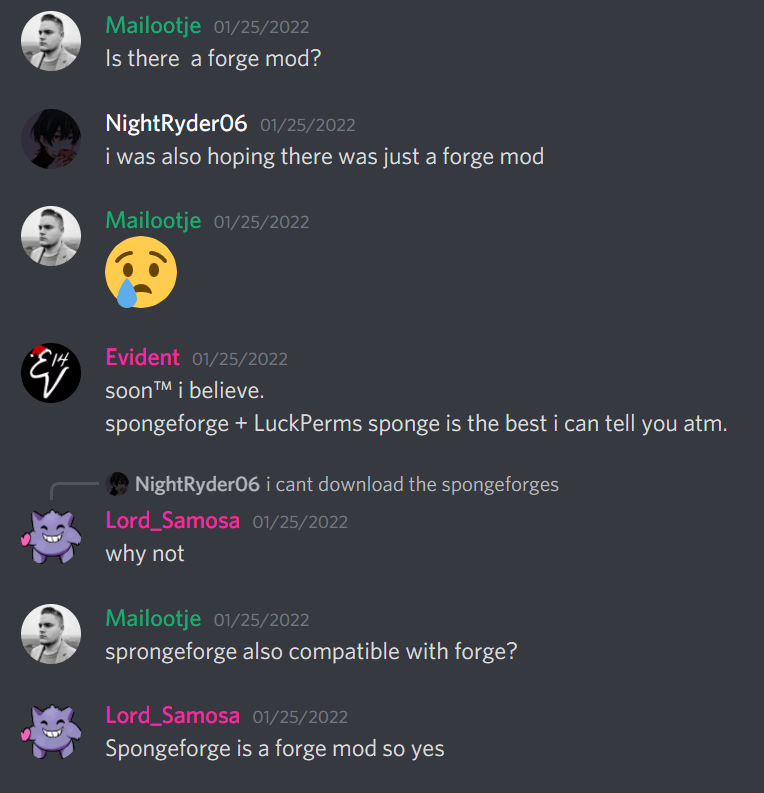

GitHub
I am trying to create a Pixelmon server for me and my friends, but LuckPerms isn't being recognized as a mod when the server is launching. I have tried different versions but all of them do...
dusky portal
Oki, thanks!
foggy quartz
maybe you accidentally made the same mistake as this guy^
dusky portal
I mean I am running pixelmon so highly likely, thanks Echo
foggy quartz
heres another of the exact same case https://i.imgur.com/vvrp8Rj.png
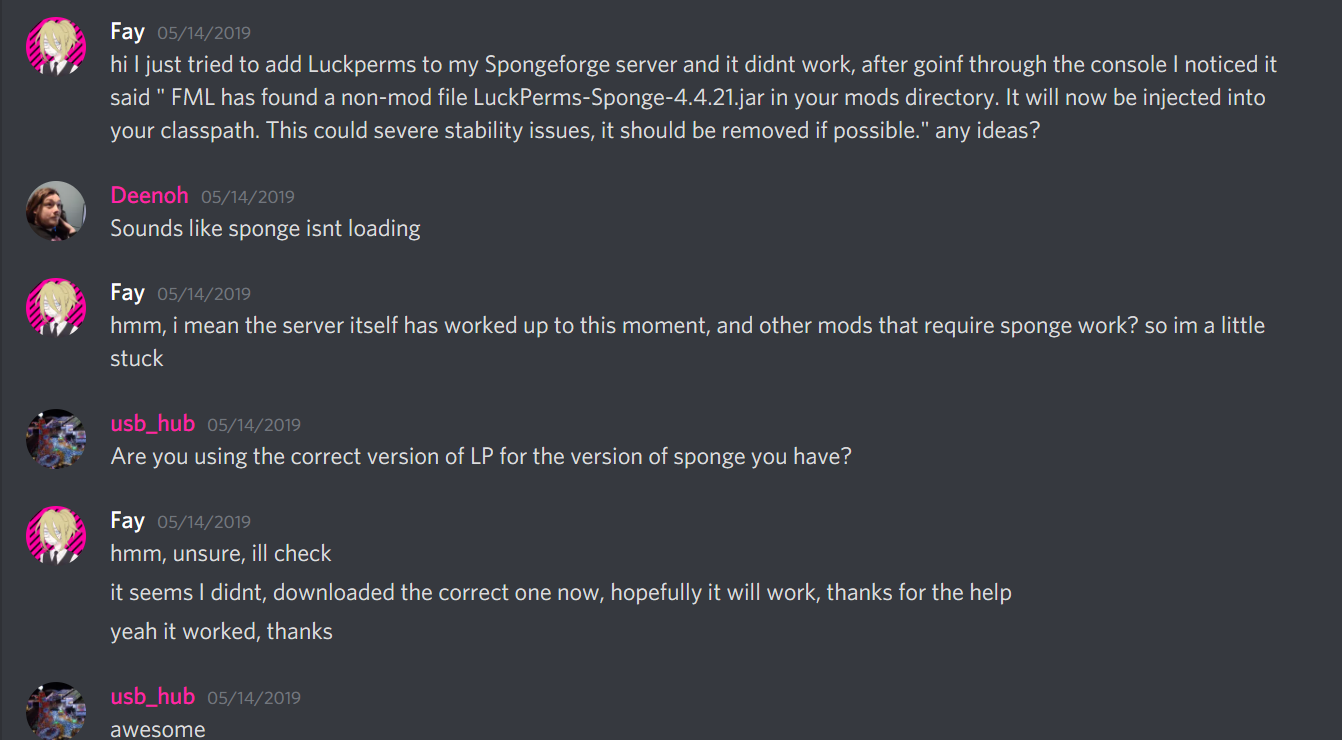
or this https://i.imgur.com/tP9g37L.png
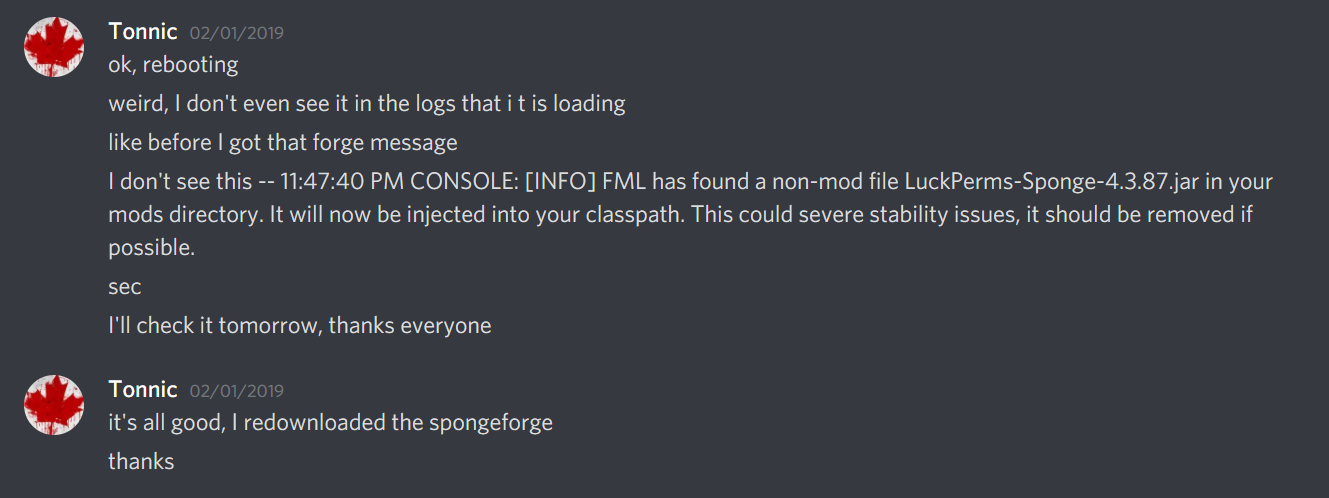
xD
one problem, many fixes lol
dusky portal
So:
-Spongeforge is definitely in mods folder and works as Nucleus shows up in the console (only thing I have in my mods folder are spongeforge, Pixelmon, Nucleus and LuckPerms)
-I'm using the version on the website when I click download > Sponge (so unless I'm small brain and there should be a Spongeforge specific download somewhere?)
foggy quartz
all i know of is a sponge version
dusky portal
 foggy quartz
@mild otter perhaps available? (i know clippy will yell at me, but samosa is the mods dude)
wanton stratusBOT
Hey Echo! Please don't tag helpful/staff members directly.
mild otter
Try this one? https://ci.lucko.me/job/LuckPerms/1399/
dusky portal
Yeah that one works, cheers Echo and Samosa!
mild otter
Aye this is the build before API 8 was merged
foggy quartz
stuff i couldnt have known thanks samosa
dusky portal
I think it works at least? I don't see "[LuckPerms] Loading configuration..." but I see this so I'm assuming it's all good
 foggy quartz
looks good
 devout bramble
hi, im getting errors in my console
https://pastes.dev/eCMu9ly12N
A paste containing 110 lines of plaintext.
wanton stratusBOT
Please use https://pastes.dev to send files in the future. I have automatically uploaded message.txt for you: https://pastes.dev/qcZjsJLmX0
A paste containing 110 lines of plaintext.
foggy quartz
There's something wrong with mysql table stuff. try this:
2. Stop the server and uuh for now I'll keep it simple: change the table-prefix setting in LP config to something different than the current value: LP will generate new tables on the database so will essentially be a "new setup" (the current tables will still be there though)
3.1. Start the server and run /lp import <file name> (the same file name as the exported one)
3.2. Check the console for any errors while importing```
then go at it again, it may or may not fix it. i just searched up your error in discord and it seems this helped users in the past keen cave
So i run a waterfall proxy and i have 4 servers on it
3 of em i would like them to use the same permisisons for the default group
and 1 of them i want it to use diffrent permissions
how would i do that?
foggy quartz
add all permissions to the default group and set some of the perms to specific server contexts 🙂
keen cave
how would i set the contex though
foggy quartz
!context
wanton stratusBOT
You can set a permission or group on a per-world/per-server basis, through what we call "contexts".
Read more
LuckPerms wiki
keen cave
so i basically set this to like the server name

and /lp group defaut permission set permission.permission true server=ServerName
foggy quartz
^correct
remember that for bungee permissions, the server context works a bit differently
keen cave
whats diffrent?
foggy quartz
so for normal permission that do not target the bungee, such as essentials etc, server=servername works. but in bungee, since the bungee already is the server, youd need to use world=servername.
keen cave
interesting
foggy quartz
ive never needed it tbh. i assign bungee perms in the files and use lp on all backends and thats it lmao
keen cave
so if i set thje server name as "TerraPlusPlus"
The command for gamemode would be
./lp group default permission set minecraft.command.gamemode true world=TerraPlusPlus
if im right
foggy quartz
minecraft.command.gamemode is not a bungee permission
keen cave
waitz
keen cave
wait if i only want it to apply to a sepcfic backend server
./lp group default permission set minecraft.command.gamemode true server=TerraPlusPlus
foggy quartz
alright. ye that would work like that
foggy quartz
you have all groups in your setup which is shared so you cant make a group tthat only exists in one server. if you think about it, how would you do that if all servers use the same database, right?
But you can give users a group in server context
same way as usual, only add context like you did above
keen cave
thx
foggy quartz
!chat this embed has the answer
wanton stratusBOT
LuckPerms does not perform any chat/tablist formatting of its own!
LuckPerms only acts as the source for prefixes / suffixes, it doesn't actually apply them. You need an appropriately configured chat/tablist formatting plugin for them to be displayed. If the values appear correctly when you run /lp user <user> info, LuckPerms is doing its job!
FAQ answer: Prefix isn't showing?
List of chat/tablist formatting plugins that work with LuckPerms
 drowsy gust
thx
 dull crest
Is not this a luckperm bug? all other permissions I set is no issue to use only luckperm self have problem to detect luckperms own permission.
So if i´m not op I can´t access lp on one of the servers even if I have right permission.
flat parcel
send a /lp editor link, name of affected player & LP commands, and /lp info from console on the affected server
 soft thunder
How do I move everything on my skyblock server over to "skyblock" context
flat parcel
!bulk
wanton stratusBOT
Quickly update a large amount of user and group permissions by using the bulkupdate command.
Read more
LuckPerms wiki
soft thunder
/lp bulkupdate all update server skyblock "server == global"
radiant sedge
foggy quartz
unlikely. verbose should still spit out the permission if done right. try to deo...
I'll check it out this night
dull crest
flat parcel
send a `/lp editor` link, name of affected player & LP commands, and `/lp info` ...
LuckPerms - A permissions plugin for Minecraft servers.
LuckPerms is a permissions plugin for Minecraft servers. It allows server admins to control what features players can use by creating groups and assigning permissions.
Pastebin
Pastebin.com is the number one paste tool since 2002. Pastebin is a website where you can store text online for a set period of time.
and no commands works from lp because it not recognise permissions for luckperms.
flat parcel
Was the /lp editor taken on the server that isn't working, or a different one?
dull crest
yes
flat parcel
...yes to which?
flat parcel
And this is a network setup, right?
dull crest
yes but every server have own db
flat parcel
not our recommended setup but you do you
Could I get the output of /pl on the affected server please
dull crest
flat parcel
*not our recommended setup but you do you*
is some work to set it up right and i not need so many perms on that server.
dull crest
flat parcel
Could I get the output of `/pl` on the affected server please
[18:18:17] [Server thread/INFO]: broken_arrow1 issued server command: /plugins
[18:18:30] [Server thread/INFO]: Plugins (10): BungeeTabListPlus, DeluxeHub, DeluxeMenus, eZProtector, LuckPerms, PlaceholderAPI, ViaBackwards, ViaVersion, WorldEdit, WorldGuard
dull crest
flat parcel
And what is outputed when you run a LP command?

and when enter the command is only the text in chat you will see.
it will not say you not have permissions
flat parcel
Ok something's either completely broken, I'm an idiot who missed something, or I'm getting incorrect info
/lp user <you> permission check <some LP permission i.e. luckperms.editor>, does it output true or false?
dull crest
alright I think i not give you incorrect info
soft thunder
If I have multiple servers connected to one mysql database, would the use of contexts be the best way of setting up different ranks for different servers (Hub, realm 1, realm 2).
flat parcel
Aber, fresh eyes on broken-arrow's issue would be nice, not sure if I'm being a moron or not
soft thunder
modern bison
provided you setup the server name value in each servers lp config
So I would just define the context, server: realm1 (And then change this for each realm)
and then going forward I would just use
/luckperms user ign parents add rank1 true realm1
dull crest
flat parcel
`/lp user <you> permission check <some LP permission i.e. luckperms.editor>`, do...
Pastebin
Pastebin.com is the number one paste tool since 2002. Pastebin is a website where you can store text online for a set period of time.
soft thunder
Does luckperms have a bulkupdate copy feature?
I want to setup a "donator" rank on my hub (Context hub)
If the user has a donator rank on the skyblock server then give them the donator rank on the hub
flat parcel
hmm
soft thunder
I know how to do this automaticlly but need to update the existing users
flat parcel
I think the best way to do that would be to create a new internal group which inherits donator on the appropriate servers (so adding them to the one group gives them donator wherever that new group does), then could bulkupdate to move people to inheriting that new group globally
i.e. ```
lp creategroup donator
lp creategroup donator-internal
lp group donator-internal parent add donator skyblock
lp group donator-internal parent add donator hub
lp user <who> parent add donator-internal

dull crest
dull crest
https://pastebin.com/MXps9nfd
and this i run with out op ofc. I don´t know what I can do (I know it have work in the past). Don´t know if the db get corrupted and I need redo it. Try on GitHub but he close it with out look on the issue properly.
wanton stratusBOT
Please use pastebin!
Seeing a paste of the problem makes everything so much easier! Use https://pastes.dev/ for easy pasting!
For console errors:
Pastebin any relevant segments of the console log. If it's a startup error, this includes the entire startup log!
Other errors:
Pastebin the entire LuckPerms config file (passwords removed) as well as any other relevant files!
soft thunder
flat parcel
I think the best way to do that would be to create a new internal group which in...
Would this work for limited time ranks? And I'm not sure if I understand the final command, I would need to give every donator the parent group or just add an inheritance to the donator rank on my skyblock server?
dull crest
flat parcel
!paste full logs ig
A paste containing 207 lines of plaintext.
flat parcel
Unrelated but FYI
[18:09:17] [Server thread/WARN]: YOU ARE RUNNING THIS SERVER AS AN ADMINISTRATIVE OR ROOT USER. THIS IS NOT ADVISED.
[18:09:17] [Server thread/WARN]: YOU ARE OPENING YOURSELF UP TO POTENTIAL RISKS WHEN DOING THIS.
[18:09:17] [Server thread/WARN]: FOR MORE INFORMATION, SEE https://madelinemiller.dev/blog/root-minecraft-server/

When running a public Minecraft server, it's vital to understand the main security risks. Giving a server too much access to your machine can allow hackers or other malicious actors to do substantially more damage.
dull crest
flat parcel
Unrelated but FYI
> [18:09:17] [Server thread/WARN]: YOU ARE RUNNING THIS SERVER...
yeah is running thru a console panel and it start and stop from cronjob so I can´t do so much about that.
Is only way if the crontab shall have access to the panel to run command, i try with normal account but that never worked.
soft thunder
LP doesn't seem to like two servers being connected to 1 mysql db. I am trying to run /lp editor
Pastebin
Pastebin.com is the number one paste tool since 2002. Pastebin is a website where you can store text online for a set period of time.
wanton stratusBOT
You can download LuckPerms for Bukkit/Spigot/Paper, BungeeCord, Sponge, Fabric, Nukkit and Velocity.
Additional downloads
flat parcel
Broken-arrow: I'm running out of ideas for wtf could be causing this, you try updating too pls
soft thunder
I have created the hub group and inherited all of my donator ranks, how would I give everyone with a donator rank the hub group?
And would it be possible to remove the hub group once the rank expires on the skyblock realm
lp user <who> parent add donator-internal isn't a viable option as I have 100+ users with donator ranks
flat parcel
!bulk
wanton stratusBOT
Quickly update a large amount of user and group permissions by using the bulkupdate command.
Read more
LuckPerms wiki
soft thunder
Bulk update replaces/deletes right
I would want to do
Where group.donator = true add group.donator-internal
dull crest
flat parcel
Broken-arrow: I'm running out of ideas for wtf could be causing this, you try up...
alright will try that 🙂
I update both bungee and server (was pretty old bungee version) but that not change anything.
So guess I need want and hope on replay on the closed github issue then.
sick breach
sick breach
Would it make sense to add a server context to permissions for plugins what only...
Never mind, I rearranged my default group now and made it inherit a default group for each server where the inherit group.default_server_… node has a server context for the specific server. So my main default group is now much slimmer and easier to read.
 marsh cave
hello
i need an advice
so im planning to make seasonal ranks with lifetime ranks
how is the best way to do this
also when im reseting a season how to remove only the seasonal ranks (all are same but for season)
my plan was to make for lifetime regular like lp user player parent set Rank
for season lp user Player parent addtemp Rank 999d
and to use like bulk update to remove only ranks with times somehow
what u think
sick breach
addtemp 999d does not add a season it adds almost 3 years and if you want it auto removed addtemp will do it automatically (Luckperms).
marsh cave
yea but i need to separate the seasonal ranks from lifetime
and addtemp is my only way i guess
soft thunder
Add a time?
soft thunder
Or create another group that inherits from the main group and then use bulkupdate when the time comes
So
Donator (main group)
DonatorTemp (Inherits from Donator)
marsh cave
hmm
yea i guess
that can solve it
so if i have 6 premium ranks
i need to make another 6 with temps
that gets the things from the ranks
sick breach
Group: shitpickle
Create group: shitpickle_season
Add shitpickle as parent to shitpickle_season and than give shitpickle_season to players with season rank
Than you can remove it whenever you want without touching the original group/rank
modern bison
very interesting name
 stable badge
im searching for the argument based permissions.
(For example only seeing specific groups on /lp user {username} parent info) but can't find it anymore.
 ebon crow
Hello everyone !
I wanted to know, how to add someone to a group with a command without needed to go to the LP Pannel please
stable badge
./lp user {username} parent add {Groupname}
@ebon crow
ebon crow
Thanks man appreciate you
 dense wharf
What Should I Do When I Have a PaperMC Server But I Can't Find LuckPerms Which Is Compatible With PaperMC What Should I Do?
sick breach
- Using less capital letters
- Downloading the Spigot/Bukkit version
Especially the 1. point is important
 untold ore
Hello! I have a question:
I have 4 groups. I want those 4 groups to have different permissions, I already set the Default inside the others so they link.
But, How can I make other join the groups without doing it myself? I tried via Command blocks, adding "@p" to an existing chain I already have. But It seems to not be working. Any help? Thank you.
 fierce nimbus
Hey guys, this is not really about luck perms but is there a way to make op commands broadcast to only specific ops, like if player1 and player2 are op, I want only player two to get the admin command broadcast.
That is what I mean with "admin command broadcast":

 teal anchor
Any way to give a crate key on a specific world, im using a voting plugin that gives rewards, btw i have multiverse inventorys
stable badge
fierce nimbus
Hey guys, this is not really about luck perms but is there a way to make op comm...
Setting minecraft.admin.command_feedback and bukkit.broadcast.scradmin false for those who should not see it with op should work
wise laurel
foggy quartz
`/lp user <name> info`
In plugin I meant sorry
I need a way to get player's role and set their role
(I'm making an rankup system using lp and vault)
 near cargo
Is there a way to use a permissions.yml file instead of using the web editor to make all of my permissions?
or am I forced to use the web editor to set up permissions
it's looking like the latter
modern bison
you can set the storage type if you'd prefer to use YML, but often this is not recommended because its easy to screw them up by accident
near cargo
ah okay
Things sure are different now days
I think the last time I actually set up permissions for a server was like 7 or 8 years ago
I should probably just learn how to use the web editor
foggy quartz
Any idea why server keeps lagging? https://timin.gs/?id=3b787445fc3d4af898e7dc4c9bb485f5#regions
near cargo
thanks for the help my dude
 dull plaza
Hello everyone, I'm currently trying to save ressources on my server, which is running using velocity and 5 paper servers. So we have migrating some part to mongodb, but we still have a MariaDB. We are currently on Mariadb for luckperms, with like 4000 users register inside, and my question is do you know if there is an interest to migrate to mongodb for luckperms database ? or if the migration will be a really minor improvement
uneven nexus
MongoDB is already a supported type
or are you asking if there'd be any performance difference using mongo over maria
nocturne chasm
!switch
uneven nexus
or are you asking if there'd be any performance difference using mongo over maria
or are you asking if there'd be any performance difference using mongo over maria
dull plaza
Yes exactly, I want to know if migrating from mariadb to mongodb will be a gain of performance or not
 limpid star
my permishen dont work
 snow lantern
anyone else noticing a very slow shutdown/close for lp with the latest bukkit version?
 nova steeple
Ayo I just had someone backdoor into our server and they got access to LP somehow and it allowed them to give themselves perms
modern bison
ok?
if someone found a way to get op, luckperms can do nothing about that
!bungeecheck best to run through this list and make sure everything is in check
wanton stratusBOT
Running a network and getting UUID mismatches?
Please double check that:
1. BungeeCord config.yml has ip_forward and online_mode set to true
2. All backend servers' spigot.yml has bungeecord set to true
3. All backend servers' server.properties have online-mode set to false
 still spade
does luck perms work with All the mods 7
foggy quartz
if i want to give all permissions to a role, do i have to go into the lp editor and select every single permission or is there an easier way to do it?
 toxic socket
how to make ranks buyable
in luckperms plz tell
ping me plz if someone help me ;-;
 trail glade
O.o You don't? It's a permission system. You need something else to give them a rank AFTER they buy the rank
toxic socket
trail glade
O.o You don't? It's a permission system. You need something else to give them a ...
got it
toxic socket
trail glade
O.o You don't? It's a permission system. You need something else to give them a ...
do i know the something else
xD cuz idk
trail glade
Depends on what you mean by "Buy"
toxic socket
trail glade
Depends on what you mean by "Buy"
?
uneven nexus
Their response is perfectly reasonable.
'buy' means obtain for a price. whether that's by virtual, or physical currency is what they're asking
but, it's not something LP does. you need another plugin to do it.
toxic socket
uneven nexus
but, it's not something LP does. you need another plugin to do it.
please please can u tell me whats that plugin
 lunar nest
uneven nexus
<#308232296753004556>, ask about setting up a store
lunar nest
uneven nexus
<#308232296753004556>, ask about setting up a store
This is an interesting question and I also interested...
 upbeat thorn
Sorry if this is answered somewhere - haven't been able to find anything (already been in the worldguard discord and was sent here) - is there a way to configure perms using flags or similar so that a player is given permissions/added to a group with permissions for entering a region? And then removed for leaving? Eg. Allowing access to /shop but only in a defined space. Thanks
I'm seeing plenty on how to deny/allow groups to enter/exit a region or do things in said region, but not a way to add/remove from groups for entering the region
 manic shuttle
hey is there any way that i can set lockperms to lock down all major perms in a specific survival world on a multiverse?
i got a server with a few friends thats been primarily creative based with a few plugins like worldedit and stuff, and we all have admin to use everything (had the serv er up for 2 years without issue) however we just made a survival world and weve run into a lot of issues already where worldedit wont allow you to use a wooden pick normally and stuff like change gamemode and stuff is all still enabled across the server
wanted to know how much of a vanilla experience i can make it on the survival world in perticular
toxic wagon
manic shuttle
hey is there any way that i can set lockperms to lock down all major perms in a ...
!context
wanton stratusBOT
You can set a permission or group on a per-world/per-server basis, through what we call "contexts".
Read more
LuckPerms wiki
 short lily
Is there a placeholder to get the group name without the color ?
 slender grove
idk whats happening but when ever i assign a role perms like default role gets the /spawn perm i try it out with the rank and without op and it doesn't work whats going on?
toxic wagon
short lily
Is there a placeholder to get the group name without the color ?
If you have a displayname set for the group, then no.
toxic wagon
slender grove
idk whats happening but when ever i assign a role perms like default role gets t...
What does /lp verbose command me /spawn show when not opped and only in default group
slender grove
just [LP] Running Luckperms v5.3.98
foggy quartz
use verbose in the console
slender grove
if this isn't to much
[09:06:15 INFO]: [LP] Forcing Console to execute command spawn and reporting all checks made....
[09:06:15 INFO]: /sts reload - Reloads the plugin
[09:06:15 INFO]: /sts setup - Open the gui setup.
[09:06:15 INFO]: /sts togglespawn [player/all] - Toggle on/off the spawn use for other players.
[09:06:15 INFO]: /sts stopalltask - Stop all current teleport task.
[09:06:15 INFO]: /sts bukkitspawn [player] - Teleport the player to the bukkit spawn.
[09:06:15 INFO]: /setspawn - Set the spawn location.
[09:06:15 INFO]: /setspawn [-cost:] - Set the spawn location by cost.
[09:06:15 INFO]: /setspawn [-group:groupName,groupName2] - Set the spawn location for the given group(s).
[09:06:15 INFO]: /setspawn [-group:groupNames] [-cost:] - Set the spawn location for the given group(s) with cost.
[09:06:15 INFO]: /deletespawn - Delete the spawn location.
[09:06:15 INFO]: /delspawn [-group:groupName] - Delete the spawn location for the given group.
[09:06:15 INFO]: /spawn - Teleports yourself to the spawn location.
[09:06:15 INFO]: /spawn [player/all] - Teleports the specified player to the spawn location.
[09:06:15 INFO]: /spawn <player> <world> - Teleports the player to the given world spawn.
[09:06:15 INFO]: /sts importessentialsspawn [group] - Imports the Essentials spawn to the plugin configuration.
[09:06:15 INFO]: /sts joinspawn <join/first> <set/remove/teleport> - Setting join spawn.
[09:06:15 INFO]: [LP] The command execution completed, but no permission checks were made.
[09:06:15 INFO]: [LP] This might be because the plugin runs commands in the background (async). You can still use verbose manually to detect checks made like this.
foggy quartz
[LP] Forcing Console to execute command spawn and reporting all checks made....
not what i meant. lmao. use it in console, but put your player name instead of 'me' xD
sorry i was unclear, didnt see that 'me' was suggested
the idea is to force your player to run the command via verbose so lp tells you what comes back for the permissions
toxic wagon
slender grove
if this isn't to much
[09:06:15 INFO]: [LP] Forcing Console to execute command ...
Do /lp verbose command <players name> /spawn
slender grove
just did it
[09:15:50 INFO]: [LP] Forcing nevolja1234 to execute command spawn and reporting all checks made....
[09:15:50 INFO]: [LP] The command execution completed, but no permission checks were made.
[09:15:50 INFO]: [LP] This might be because the plugin runs commands in the background (async). You can still use verbose manually to detect checks made like this.
toxic wagon
slender grove
just did it
[09:15:50 INFO]: [LP] Forcing nevolja1234 to execute command spawn ...
Please show me the output from /plugins
slender grove
it just shows all the plugins
toxic wagon
I said show me
 toxic wagon
From console...
foggy quartz
again, just use console
slender grove
there
 slender grove
idk either way it didn't work
toxic wagon
Remove UltraPermissions
slender grove
lemme delete it
foggy quartz
nothing will work as long as you have two permission plugins
you add stuff to one, like lp, and uperms says 'no u dont have perms' or vice versa
what did you expect tbh
slender grove
thank you i guess just stupid lmao
 shrewd lagoon
hello i need help for a every new player got a prefix Member
instead i set it on manually
its a small server for my friends thats all thank you
foggy quartz
shrewd lagoon
hello i need help for a every new player got a prefix Member
wait, you set a prefix for everyone separately when they join?
shrewd lagoon
yes
foggy quartz
oh god why
shrewd lagoon
because i dont know how to make it automatically
foggy quartz
okay
so, you have to know that every player who joins automatically gets the group called default from luckperms
shrewd lagoon
i dont understand the advanced stuff and i onlly know the basic and some common snese
foggy quartz
so you can just set the member prefix to that group
shrewd lagoon
foggy quartz
so, you have to know that every player who joins automatically gets the group ca...
yes
i did
but there is no prefix on it
foggy quartz
?
no i mean give the default group the prefix
not to players
players will then get the group
and also the prefix from the group
toxic wagon
!chat
wanton stratusBOT
LuckPerms does not perform any chat/tablist formatting of its own!
LuckPerms only acts as the source for prefixes / suffixes, it doesn't actually apply them. You need an appropriately configured chat/tablist formatting plugin for them to be displayed. If the values appear correctly when you run /lp user <user> info, LuckPerms is doing its job!
FAQ answer: Prefix isn't showing?
List of chat/tablist formatting plugins that work with LuckPerms
shrewd lagoon
yes i did that ,but first time join there is no prefix on their names
about that i use vault and essentials
toxic wagon
!moss
wanton stratusBOT
Essentials
Make sure you are using EssentialsX and Vault for prefixes. For any other issues with Essentials, you should seek support in either #general or the official EssentialsX support Discord.
EssentialsX Discord
foggy quartz
do you have essentialschat installed tho
its a separate jar, an addon to format chat
shrewd lagoon
i do have the ess chat too
foggy quartz
okay. lets test something tho
toxic wagon
shrewd lagoon
i do have the ess chat too
Does the prefix show in /lp user <name> info
foggy quartz
lets see if userinfo shows it
shrewd lagoon
toxic wagon
Does the prefix show in `/lp user <name> info`
yes it does
foggy quartz
then its a chat issue
shrewd lagoon
it doesnt show the default prefix
toxic wagon
!moss ask here
wanton stratusBOT
Essentials
Make sure you are using EssentialsX and Vault for prefixes. For any other issues with Essentials, you should seek support in either #general or the official EssentialsX support Discord.
EssentialsX Discord
foggy quartz
^
shrewd lagoon
ok thanks
 forest palm
hey,
When i use Luck Perms whit Bungeecord and the Storige on a MySL Datebase,, how can Value work whit thet
How can i set thet up???
 mystic talon
wanton stratusBOT
mystic talon
wanton stratusBOT
Please use https://pastes.dev to send files in the future. I have automatically uploaded message.txt for you: https://pastes.dev/ZRzr4Hco16
A paste containing 40 lines of plaintext.
mystic talon
how do i fix this?
 glass carbon
how do you make it so anyone can access a command for a plugin because I have a lifesteal plugin but the /lwithdrawl command isnt public
mild otter
Add the permission node for that command to the default group
If you don't know the perm node, look up that plugins documentation or use verbose
!verbose
wanton stratusBOT
LuckPerms provides a verbose command to help you find out what permissions a command/plugin is checking.
Read more
LuckPerms wiki
glass carbon
Im sorry im not the best at coding ive only really just started so I dont know what to do
is there like a video or something that just shows you what command you want and then the rank someone needs for said command to work sorry
wanton stratusBOT
YouTube Tutorial
If you would like a video tutorial for setting up LuckPerms, try:
https://www.youtube.com/watch?v=l4anE2wOLdc
wanton stratusBOT
Here's a guide to help users understand and use LuckPerms for the first time.
Read more
LuckPerms wiki
mild otter
glass carbon
how do you make it so anyone can access a command for a plugin because I have a ...
You need to read the documentation for this life steal plugin ^ and see what permission there is for this exact command
Then give that permission to the default group
The tutorial and usage page will tell you how to add a permission to a group
glass carbon
okay thank you ill look through all of this thanks
 dreamy sphinx
Hi, can someone help me with this?
java.io.IOException: User limit of inotify instances reached or too many open files
untold ore
Hello! How can I add people to my groups without having to write it every time
I have scoreboard teams, could I make it work with that? Or with the command block.
 honest rune
hi, ever since ive had luckperms on my server, ive been unable to place command blocks. i do have OP and creative but it isnt allowing me to place them or edit exsisting ones. can i fix this?
mild otter
Might be best asking in https://discord.gg/PAGT2fu
 remote glade
hey i need some help with this plugin, never works for me
id love to know why i get this message saying im not authorized to use anything
 hot jay
by not working i assume you mean you gave yourself permission for something, yet it still doesnt let you use the command?
remote glade
yes exactly. i followed the guide on the website
flat parcel
show the output of /pl please
remote glade
you are not authorized to use /lp
this is what is says, nothing else, not even in the console
flat parcel
Have you given yourself perms to use LP?
remote glade
hm im not sure, i did what the wiki said, then it told me to enter the /lp command after setting up the admin group
shouldnt i be able to use all commands considering im OP
also i thought lp user <your username> permission set luckperms.* true
would give me full access to the commands?
mild otter
flat parcel
show the output of `/pl` please
this plz
remote glade
i thought i did, i dont know what you mean there was no output in the console when entered the command in game, all it said was "you are not authorized to use /lp"
remote glade
it the same
mild otter
Can you do it in console
remote glade
yes, it shows the version
mild otter
Can you show me
remote glade
like screenshot?
remote glade
 foggy quartz
mild otter
``/pl`` not ``/lp``
foggy quartz
mild otter
``/pl`` not ``/lp``
^
remote glade
sorry one sec
 flat parcel
Have you tried LP again since getting rid of powerranks, since that would 100% cause that
remote glade
yes i did, i restarted the server, it still doesnt work
that's when i came here, cause i was lost
would it be ServerTools ?
mild otter
Their page doesn't mention handling perms, and they have a screenshot with both LP and server tools
might not be that
Perhaps there's something in the logs?
!paste
wanton stratusBOT
Please use pastebin!
Seeing a paste of the problem makes everything so much easier! Use https://pastes.dev/ for easy pasting!
For console errors:
Pastebin any relevant segments of the console log. If it's a startup error, this includes the entire startup log!
Other errors:
Pastebin the entire LuckPerms config file (passwords removed) as well as any other relevant files!
Please use https://pastes.dev to send files in the future. I have automatically uploaded latest.log for you: https://pastes.dev/dSM852vS5b
A paste containing 1101 lines of log.
flat parcel
I mean amongst the fucky color codes (thank you windows + Spigot), I see you setting minecraft.command.lp, which is not the permission for LP usage
remote glade
okay
flat parcel
!usage
wanton stratusBOT
Here's a guide to help users understand and use LuckPerms for the first time.
Read more
LuckPerms wiki
remote glade
ill search the correct one and see if it works
foggy quartz
luckperms.*
 wintry flame
if i lost all my data n stuff but still have a .sql database is it possible to get my permissions that were set up etc. back somehow? with that? and if so how do i go about it
idk how to reuse that database lol
flat parcel
uh afaik .sql is a text file containing SQL instructions, not a database
foggy quartz

Stack Overflow
I have a .sql file with an export from phpMyAdmin. I want to import it into a different server using the command line.
I have a Windows Server 2008 R2 installation. I placed the .sql file on the C...
remote glade
still didnt let me use /lp in game
flat parcel
What does it output if you do /lp? Just "This server is running LP v5.3.###"?
If so, please grab a /lp editor link from console, send it here, and say your username
remote glade
if i do it in game, it says im not authorized, if i do it in console it works
flat parcel
yup that's why I said to do it in console
 glad hinge
Hello its possible to solve problem with NULL?
I mean bug with NULL nickname
that you can do anything on server without permissions
flat parcel
wdym null nickname
glad hinge
When you set your nickname to NULL
you can do everything
I mean give yourself OP
and destroy entire server
flat parcel
LP does not have a concept of nicknames. Can I get logs?
I'm extremely doubtful this is LP's end
!paste
wanton stratusBOT
Please use pastebin!
Seeing a paste of the problem makes everything so much easier! Use https://pastes.dev/ for easy pasting!
For console errors:
Pastebin any relevant segments of the console log. If it's a startup error, this includes the entire startup log!
Other errors:
Pastebin the entire LuckPerms config file (passwords removed) as well as any other relevant files!
flat parcel
also can you get me a /lp editor link plsl
glad hinge
Yea sure
flat parcel
and I need logs too
remote glade
LuckPerms - A permissions plugin for Minecraft servers.
LuckPerms is a permissions plugin for Minecraft servers. It allows server admins to control what features players can use by creating groups and assigning permissions.
i still cant figure out why i cant give myself permissions
flat parcel
Can you show what happens when you try to use a LP command>?
 flat parcel
That's the normal output of /lp.
When you try to do LP actions on your MC client but it doesn't work, what is the output
remote glade
wanton stratusBOT
Please use https://pastes.dev to send files in the future. I have automatically uploaded latest.log for you: https://pastes.dev/LVgFnSfwzB
A paste containing 768 lines of log.
remote glade
in game it says in red text, you are not authorized to use /lp
foggy quartz
thats not the output lp would give you
something else is blocking it
just to make double sure, you did restart the server after removing powerranks and didnt use /reload, right?
remote glade
i've restarted it multiple times now, ill send a screenshot ingame
foggy quartz
did you try removing server tools, restart, and use lp commands ingame then?
 remote glade
okay i will see if its servertools
foggy quartz
thats what i said...
foggy quartz
'activate' how what
flat parcel
seems like language barrier
 stray dove
hmm never mind
remote glade
i wasnt ignoring sorry, someone said it's unlikely that servertools would interfere, so i didnt try it
guess what
foggy quartz
hm?
remote glade
it was server tools
foggy quartz
figured
foggy quartz
it may not officially be a permission manager but i guess it has command restrictions
remote glade
yes you are exactly right, it was literally blocking the /lp and /pl command
so annoying
 lusty pendant
How would I bulk remove a certain suffix from a user? Is that possible?
flat parcel
What do you mean? Like 1 user has many suffixes? Many users have 1 suffix?
 bold kelp
Hi, we are using lucky perms on a pixelmon server with redprotect, we have our spawn redprotected so no one can break blocks but we need to enable to use of doors to non members, when we give access to allow-door/allow-doors we still get a you do not have permission to use this command in game. And we have confirmed we are adding it to the correct group that I am in.
flat parcel
!verbose and Luckperms, no y 😉
wanton stratusBOT
LuckPerms provides a verbose command to help you find out what permissions a command/plugin is checking.
Read more
LuckPerms wiki
 lavish halo
What happens if you decrease the maximum-lifetime value to 5000?
lavish halo
modern bison
why do you ask?
I get the Failed to validate connection error. And I have already set the maximum-lifetime value to 18750, but I still get this error.
lusty pendant
flat parcel
What do you mean? Like 1 user has many suffixes? Many users have 1 suffix?
Sorry for the late reply, many users having 1 suffix
flat parcel
!bulk
wanton stratusBOT
Quickly update a large amount of user and group permissions by using the bulkupdate command.
Read more
LuckPerms wiki
honest rune
honest rune
hi, ever since ive had luckperms on my server, ive been unable to place command ...
Still wondering if anyone knows how i can fix this
mild otter
!verbose Use this to see if you have a permission blocking it
wanton stratusBOT
LuckPerms provides a verbose command to help you find out what permissions a command/plugin is checking.
Read more
LuckPerms wiki
honest rune
Im unable to use verbos to see if it is blocking command block placement
Im able to give it to myself with commands i just cant place, edit or break them
In creative mode with op
 timid gale
wanton stratusBOT
timid gale
wanton stratusBOT
Please use https://pastes.dev to send files in the future. I have automatically uploaded message.txt for you: https://pastes.dev/FOCymSUOeh
A paste containing 151 lines of plaintext.
timid gale
timid gale
anyone can help me?
 tawny spruce
anyone can help me?
proud hound
timid gale
anyone can help me?
first, update LP from https://luckperms.net
then, ensure your database connection is not being closed either from the database end or another plugin
LuckPerms - A permissions plugin for Minecraft servers.
LuckPerms is a permissions plugin for Minecraft servers. It allows server admins to control what features players can use by creating groups and assigning permissions.
proud hound
tawny spruce
anyone can help me?
only if you ask a question!
tawny spruce
Developer prison told me to ask you some questions about server errors
sorry my english is not good
remote glade
i got a new problem
i dont know if this is related to luckperms but i can't use /spawn
 muted marten
Hey anyone can help me? When i start my server He closes with LuckPerms
mild otter
Are you using AuthMe?
mild otter
honest rune
Im unable to use verbos to see if it is blocking command block placement
why can't you use verbose
muted marten
mild otter
Are you using AuthMe?
ye
mild otter
LuckPerms - A permissions plugin for Minecraft servers.
LuckPerms is a permissions plugin for Minecraft servers. It allows server admins to control what features players can use by creating groups and assigning permissions.
muted marten
mild otter
https://luckperms.net/wiki/FAQ#when-i-install-luckperms-my-server-shuts-down
Thanks
tawny spruce

my newbie register but it show me like this
welcome %prison_ranks_tag% {player} to the server

can u help me ? please
this my lp editor

 modern bison
after a server restart?
 modern bison
!paste alright, please shut it down, and send the logs/latest.log file:
wanton stratusBOT
Please use pastebin!
Seeing a paste of the problem makes everything so much easier! Use https://pastes.dev/ for easy pasting!
For console errors:
Pastebin any relevant segments of the console log. If it's a startup error, this includes the entire startup log!
Other errors:
Pastebin the entire LuckPerms config file (passwords removed) as well as any other relevant files!
modern bison
dang, a looooot of your plugins are very broken
 frozen pawn
Fr??
modern bison
do you not see the hundreds of lines of errors?
frozen pawn
ye 😦
are the jars broken or all config files?
Any idea on how to fix?
I see it starts up and load plugins?
Cassie bounce dont matter
I got a back up?
But idk what is broken
how can i fix it?
 mortal forum
how to rename a group
radiant sedge
Hello, what's the page which you guys use to share long texts? I wanna send something to a friend, but I don't really want to spam him
 native crater
Hello, we have 3 servers connected with a bungee cord, we decided to add mysql for the authme plugin, when we did this and started the servers on 1 server, all the settings disappeared, and on the other 2 everything remained the same
 wet ore
Hello, can you tell me what is the command to give time ranges?
frozen pawn
i fixed it using a backups of plugins
upbeat thorn
For some reason some permissions from plugins aren't showing in Luckperms Web editor?
I've added some permissions from a plugin in the past - they show in the editor. but if i try and add the same permission again its not in the drop down window of suggestions
mild otter
Have you tried typing them in? The perms that show up are merely suggestions, LP does not know every permission for all your plugins
upbeat thorn
okay just wanted to confirm they would still be added
upbeat thorn
weird that they showed up as a suggestion previously but no longer do
mild otter
You could type "potato tomato" and LP would go ya sure
It's up to you to know your plugins perms
nova steeple
Is there a command to view how many players fall under a certain role?
uneven nexus
/lp group <group> listmembers will show you the users in it
nova steeple
Sick thank you
 wise axle
upbeat thorn
weird that they showed up as a suggestion previously but no longer do
wise axle
upbeat thorn
weird that they showed up as a suggestion previously but no longer do
If you have typed that permission before on that server for another group or such it would come up.
 dull garden
Is there a place to get 5.3.99? Unfortunately the builds only go back to 5.3.100
 dusky turtle
  - Trigger: net.luckperms.api.event.user.track.UserPromoteEvent
    Channel: matrix
    Embed:
      Color: "#ff0000"
      Title:
        Text: "{username} promotion"
        Url: ""
      Author:
        ImageUrl: ""
        Name: " {date}"
      Footer:
        Text: "{TrackAction.PROMOTION} promote "
i wanna make alert from discord srv but i need event for it sir ._. can help ?
i need event and expresion for it sir
hasty tree
i have no idea what this is
dusky turtle
em i need event and expresion to check player if player promoted
 eternal perch
I can't put a group in default. That is to say that when they enter the server for the first time they are automatically placed in the default group
 lofty bane
I need the dark red colorcode :/ so i can update the owner rank everything i try is NOT working and im starting to get kinda irritated :/
wanton stratusBOT
Learn how to use the LuckPerms API in your project.
Read more
Example usages
Read the Javadoc
LuckPerms wiki
hasty tree
eternal perch
I can't put a group in default. That is to say that when they enter the server f...
add the group as a parent to default
hasty tree
lofty bane
I need the dark red colorcode :/ so i can update the owner rank everything i try...
eternal perch
hasty tree
add the group as a parent to default
I just don't get it.
Could you tell me what the command would be like?
That is, I want a group called Villager to be the default every time people enter for the first time. what should i write?
hasty tree
!default
wanton stratusBOT
LuckPerms provides a group that every player is added to upon joining the server, called default. You can use multiple methods to change the default group or change the name of it.
LuckPerms wiki
hasty tree
scroll down to "configure inheritance"
eternal perch
I have the problem that by default they do not enter the default group. I don't know if I explain myself. Right now when people enter the server it doesn't put you in any group.
 digital gulch
so what shows if you do /lp user (new player) parent info?
eternal perch
.Drablu19 is not a valid username/uuid.
This name does not recognize me, but it happens to me with more people
hasty tree
eternal perch
I have the problem that by default they do not enter the default group. I don't ...
you should explain more about what you are expecting, and what is the current outcome (screenshots are very useful)
hasty tree
eternal perch
This name does not recognize me, but it happens to me with more people
you need to change the config setting allow-invalid-usernames


 digital gulch
mmm, piracy, my favorite
 hazy hinge
Bedrock support isn't piracy
 keen swallow
I have updated to 5.4.1 and now when player joins this error comes.....https://pastebin.com/FjvY7vfg
Pastebin
Pastebin.com is the number one paste tool since 2002. Pastebin is a website where you can store text online for a set period of time.
toxic wagon
!libsdir
wanton stratusBOT
LuckPerms dependencies
LuckPerms requires several libraries in order to operate. If you're getting a startup error such as NoClassDefFoundError, ClassNotFoundException or "Unable to load dependency...", stop your server, delete the /plugins/LuckPerms/libs/ directory and start it up again.
keen swallow
toxic wagon
!libsdir
Thanks, looks good
 violet iron
bonjour comment on fait pour desativé le trusteditor merci
 earnest token
Hey
I had a vds with mysql storage in which I had three luckperms databases for my three servers. The other day I bought a new vds, installed mysql and pma there, then transferred all three luckperms databases from the old vds to the new one. The problem is that the list of groups has been preserved, but the players have lost their privileges! what to do? is it possible to restore them to their groups?
native crater
Hello, we have 3 servers connected with a bungee cord, we decided to add mysql for the authme plugin, when we did this and started the servers on 1 server, all the settings disappeared, and on the other 2 everything remained the same
wise axle
native crater
Hello, we have 3 servers connected with a bungee cord, we decided to add mysql f...
What settings disappeared??
wise axle
Did you use a mySQL database for luckperms before?
As in before you added it for auth me
native crater
wise axle
Did you use a mySQL database for luckperms before?
no
wise axle
I don’t see how setting up a database for authme would have had any impact on lp
native crater
There is another incompatibility here, lp is on the servers, and authme is in the lobby
And everything was gone from only 1 server
foggy quartz
did you add mysql to luckperms as well? that would very well explain it
foggy quartz
earnest token
Hey
I had a vds with mysql storage in which I had three luckperms databases for...
i assume you made a sql dump and imported that. you could try a whole different approach. that would include purging your new database, let lp re-make an empty one, do /lp export <filename> on the old server, grab the zipped file out of that old servers lp folder, put it into the new servers lp folder, and do /lp import <filename> on the new server. maybe that works better
earnest token
I will try it, thanks
upbeat thorn
I'm having a server breaking issue with luckperms and worldguard conflicting (i think?). When doing the following: /rg flag <rg> block-place deny
/rg flag <rg> block-place -g nonmembers
/rg addmember <rg> g:<group> its causing a loop of errors
[22:42:18] [Paper Watchdog Thread/ERROR]: ------------------------------
[22:42:18] [Paper Watchdog Thread/ERROR]: --- DO NOT REPORT THIS TO PAPER -
Im simply trying to allow a group permission to place/break in a non-place/break area. It either crashes immediately or after a /rg info
upbeat thorn
22:54:14] [ServerMain/INFO]: Environment: authHost='https://authserver.mojang.com', accountsHost='https://api.mojang.com', sessionHost='https://sessio
foggy quartz
performing a permission check results in context lookups, which calls extra contexts, which performs a permission check...
and you get a loop (stack overflow error)
looks like that 'problem'
upbeat thorn
is it a matter of disabling something in extracontext to fix the issue or is removing the plugin the only option
wanton stratusBOT
Please use https://pastes.dev to send files in the future. I have automatically uploaded message.txt for you: https://pastes.dev/fgrKFKpvUc
A paste containing 397 lines of plaintext.
LuckPerms cannot connect to your MySQL server
Read More
Caused By
java.sql.SQLTransientConnectionException: luckperms-hikari - Connection is not available, request timed out after 5000ms.
https://pastes.dev/fgrKFKpvUc | Sent by Clippy
 dusty shell
dusty shell
dusty shell
 foggy quartz
upbeat thorn
Im simply trying to allow a group permission to place/break in a non-place/break...
foggy quartz
upbeat thorn
Im simply trying to allow a group permission to place/break in a non-place/break...
basically what i believe you should do is assign users the group in context <region so and so> and that group can break/place blocks. dont make extracontexts look up the permission for the group which calls extracontexts, which calls the group that calls the permission which calls extracontexts.... you get the idea
why use extra context if you use wg flags anyway lel
upbeat thorn
So heres the sitch: i've been extra context to enable a shop within my spawn but not outside. I have it checking if youre in a region to allow or deny shop access. I have that extra context as economyshop.gui with the context of worldguard.region:<region>. What ive gathered from your message is i should be continuing on that train of though and transfer permission nodes into each group for building with a region check again instead of using the worldguard flag system. What im curious is how you would implement my shop idea without using extra context at all
foggy quartz
same way, add the shop permissions into a group. such as "shopgroup" and make that group be inherited from default in context region:whatever. so users have the group through default, but it i8s only active when the context is applicable, so in the region
or separate the group entirely, which is more tedious but ultimately up to taste
you could even use the plugin conditional events to add and remove groups or permissions when entering or leaving a region, coordinate, pressure plate and more. i personally prefer that over using extra contexts since its more flexible and not tied to lp
timid gale
proud hound
first, update LP from https://luckperms.net
then, ensure your database connecti...
i manualy modify my database
i delete all user
and after i have this error
ah sorry
it resolve
foggy quartz
it tells you the fix for this actually
1.) dont use craftbukkit. its old af, has holes everywhere, let me just not get into details on this one.... use paper or spigot instead
2.) if you have online-mode set to false, then change it to true
i know it will work 😂
 little sphinx
use the spigot one
paper and spigot uses the same api
paper is just an enhancement of spigot
upbeat thorn
foggy quartz
same way, add the shop permissions into a group. such as "shopgroup" and make th...
Holy hell - worked out the permissions trail. Worldguard and Luckperms were conflicting. Luckperms is now primary for permissions, worldguard just allows the context of the permissions through regions. Groups in worldguard were messing with groups in luckperms. So in other words, all perms were configured in luckperms, and set as allowed by default for worldguard so it was luckperms making the decisions without any group flags - the extra context is what allowed this so im glad i had it and have abled to keep it
All working perfectly now
In the context of my server - a shop can only be accessed in spawn, players can pick a faction which opens up more parts of the shop and gives them permission to a faction specific lot to build on
little sphinx
yes
 oak harbor
i dont remember much about luckperms how do i use it
mild otter
!usage Highly recommend you read this