#support-1
1 messages · Page 1364 of 1
 stoic cave
 stoic cave
Yes but why yoh telling
 tawdry spade
nvm
 uneven nexus
No
uneven nexus
!tab
 wanton stratusBOT
LuckPerms does not perform any chat/tablist formatting of its own!
LuckPerms only acts as the source for prefixes / suffixes, it doesn't actually apply them. You need an appropriately configured chat/tablist formatting plugin for them to be displayed. If the values appear correctly when you run /lp user <user> info, LuckPerms is doing its job!
FAQ answer: Prefix isn't showing?
List of chat/tablist formatting plugins that work with LuckPerms
uneven nexus
i'd suggest TAB by NEZNAMY
stoic cave
But is this plugin usin the ranks i created in lp?
uneven nexus
if you set it up correctly, sure
stoic cave
Nice
tawdry spade
stoic cave
But is this plugin usin the ranks i created in lp?
lol
stoic cave
Thank u :)
uneven nexus
tawdry spade
lol
what's funny?
tawdry spade
like this
stoic cave
What lol
tawdry spade
 stoic cave
?
 uneven nexus
you don't have to do that.
you can set it up for _Default_ and use %luckperms_prefix%
 eternal robin
When doing regex permissions, where do you put "R=" ? Is it:
lp group xxx permission set R=blahblah false
uneven nexus
yes
tawdry spade
I just evaded taxes
uneven nexus
ok
tawdry spade
around 100k$
stoic cave
@uneven nexus https://www.spigotmc.org/resources/tab-bukkitbridge.83966/ this one?

SpigotMC - High Performance Minecraft
wanton stratusBOT
Hey 𝐒𝐢𝐫𝐐𝐮𝐚𝐧𝐢! Please don't tag helpful/staff members directly.
tawdry spade
No
uneven nexus
no, that's just the bridge for a proxy
tawdry spade

MC-Market
Can't afford the plugin? Or just want to test the plugin out before purchasing? You can try the plugin for free on the free page or github releases.
However, keep in mind you will not receive any support if you didn't buy the plugin...
uneven nexus
uneven nexus
it's always been free, but ok
stoic cave
So wich link should i use
 uneven nexus
considering they linked the premium one, use the one i sent
uneven nexus
there is legit no difference. you pay for support.
tawdry spade
ya
tawdry spade
last month is premiumm
not free
I must paid 10.00 EUR for only support
i just buy 3 week
 ruby fractal
!help
wanton stratusBOT
Why should you choose LuckPerms? Read here to find out.
Read more
 LuckPerms wiki
ruby fractal
LuckPerms wiki
ruby fractal
!help
wanton stratusBOT
Available commands
!advanced
!api
!argumentbased
!ask
!bulkupdate
!bungee
!bungeecheck
!cauldron
!colours
!commandequivalents
!commands
!config
!context
!cookbook
!default
!downloads
!editor
!editorsafety
!errors
!essentials
!extensions
!extracontexts
!faq
!formatting
!hack
!helpchat
!inheritance
!install
!libsdir
!locale
!meta
!migration
!notworking
!nowildcard
!offline
!pasteit
!permissions
!placeholders
!selfhosting
!stacking
!storage
!suggestions
!switchstorage
!sync
!testingperms
!tracks
!translationprogress
!translations
!tutorial
!upgrade
!usage
!userinfo
!verbose
!version
!weight
!whyluckperms
!wiki
ruby fractal
!cauldron
wanton stratusBOT
Installing LuckPerms on a Cauldron, Thermos and any other Forge + Bukkit server software may require additional steps.
LuckPerms wiki
 rancid lantern
hi, is there a way i can override a op persission for a plugin? because i set a certain permission to true for everyone but when i'm an op it's still false
(btw this permission is negating a certain feature, so when it's true the functionality is disabled)
(also it's important to mention that i'm new to luckperms)
 cyan crystal
How can I copy and paste all ranks and perms between 2 servers
because im not using bungeecord
 hasty tree
cyan crystal
How can I copy and paste all ranks and perms between 2 servers
because im not us...
hasty tree
cyan crystal
How can I copy and paste all ranks and perms between 2 servers
because im not us...
are you wanting to sync them?
cyan crystal
yes
hasty tree
!sync
wanton stratusBOT
To sync data between servers, you need to connect each LuckPerms plugin to the same database (for example MySQL) and set up a messaging service.
LuckPerms wiki
wanton stratusBOT
Hey VadumShcherbyk! Please don't tag helpful/staff members directly.
 modern bison

hasty tree
get banned by dyno, son
uneven nexus

 stuck hatch
Is there a way I can assign a player to a group using console commands?
like make them click a sign for example and then they get added to the group
hasty tree
stuck hatch
Is there a way I can assign a player to a group using console commands?
!commands
wanton stratusBOT
Find all of the available LuckPerms commands on the wiki.
Read more
General commands
User commands
Group commands
Permission commands
Parent commands
Meta commands
Track commands
Log commands
LuckPerms wiki
hasty tree
stuck hatch
like make them click a sign for example and then they get added to the group
you need a plugin which handles this type of thing
stuck hatch
I use ultracustomizer to handle the gui stuff, but then i can add a console command to set a group but luckperms user {user} parent set member doesnt work because {user} isnt a valid username or UUID
 lethal flower
Hey just wondering if you could help me
uneven nexus
stuck hatch
I use ultracustomizer to handle the gui stuff, but then i can add a console comm...
then this isn't the correct placeholder
lethal flower
im trying to make luckperms work with /nick essentials but it isnt working
uneven nexus
can you give more information? "isnt working" doesn't really help much
lethal flower
k 2 sec
stuck hatch
I cant seem to find a placeholder for user/player
lethal flower
 lethal flower
uneven nexus
can you give more information? "isnt working" doesn't really help much
lethal flower
uneven nexus
can you give more information? "isnt working" doesn't really help much
here
uneven nexus
stuck hatch
I cant seem to find a placeholder for user/player
you should contact their support.
uneven nexus
lethal flower
What does this have to do with LuckPerms?
uneven nexus
LPC is not associated with LuckPerms.
lethal flower
o
uneven nexus
PlaceholderAPI also has nothing to do with it.
the plugin you have running the command (the sign plugin, or whatever you're using) has to provide the placeholder.
stuck hatch
I get this as console output though
 uneven nexus
then it's not the right placeholder.
stuck hatch
alright
uneven nexus
!commands > Permission Commands
wanton stratusBOT
Find all of the available LuckPerms commands on the wiki.
Read more
General commands
User commands
Group commands
Permission commands
Parent commands
Meta commands
Track commands
Log commands
LuckPerms wiki
 valid crane
uneven nexus
!commands > Permission Commands
valid crane
uneven nexus
!commands > Permission Commands
what is track?
wanton stratusBOT
Tracks provide a method for you to promote/demote players along a track (or ladder) of groups.
Read more
LuckPerms wiki
valid crane
thanks READ THE WIKI
 topaz ether
Hey how can i expire any temp perms of a player?
hasty tree
topaz ether
Hey how can i expire any temp perms of a player?
there is no method available to do this, but you could easily open an editor session for that player, sort their permissions by expiry then delete them
 foggy quartz
When I try to do /litebans:tempmute (player name) (amount of time for the mute) it says this

is there any way to fix this?
hello?
 spring kelp
Trying to use %luckperms_prefix% placeholder in KiteBoard Scoreboard put the prefix is cutting off?

The ) is missing
Then for this, there's some odd squiggly line

Anyone know why this is?
Nevermind it's too many characters
spring kelp
Hmm that's a rip not sure how I can shorten it to look dbetter lol
uneven nexus
what about a diff plugin?
spring kelp
For scoreboards?
uneven nexus
Yeah
spring kelp
I could but this is the best one I think for 1.8
 worldly grove
Hi, in bungee server the plugin dont load the ranks
 snow pine
When editiong files how do you leave a note insude it tgats not read as part of the file
snow pine
Ok and thats same for all plug ins?
uneven nexus
its the same for all yaml files.
it doesn't matter the plugin, if its yml it's the same
snow pine
Ok good
 hasty tree
fix what? doesn't sound like an LP issue
spring kelp
Not sure what issue I'm having then, Figured since LP handles the prefix I'd come here
uneven nexus
if it shows up fine in /lp user <your user> info, LP should be functioning correctly.
spring kelp
So is my issue, just a minecraft issue?
hasty tree
you haven't actually said what the issue is though
uneven nexus
or whatever plugin is doing your tab list formatting
hasty tree
oh you did nvm
context matters lol
what evident said, screenshot /lp user <user> info
spring kelp
That is fine
And my bad, that's not tab
That's my display name over my character.
Screenshot wasn't a full screenshot
uneven nexus
Ah, mb.
i assumed it was tab because of the lunar logo
honestly, it could even be a client issue.
i'd double check it on a vanilla client before making adjustments
spring kelp
Ah kk
spring kelp
Yeah on vanilla client it looks the same
Not sure what I could even adjust, not sure what my issue is really
 summer meteor
I was wondering how I'd change the order in which ranks appeared on the tablist
I know weight sets priority but I'm asking like how you'd get owner at the top and default at the bottom on the tablist
uneven nexus
That’s on your tab formatting plugin.
rancid lantern
rancid lantern
hi, is there a way i can override a op persission for a plugin? because i set a ...
Is there a chance I could get an answer to my question?
 upper sigil
Is there a way to see who has a certain permission?
 glacial helm
how would i add delay to /home?
hasty tree
upper sigil
Is there a way to see who has a certain permission?
/lp search should do it
upper sigil
Thank you!
hasty tree
editor also has searching capabilities
hasty tree
glacial helm
how would i add delay to /home?
like a cooldown? not with luckperms, you need a cooldown plugin
summer meteor
uneven nexus
That’s on your tab formatting plugin.
Ah okay thanks
 dusky palm
quick question, I have all permissions disabled in default using a wildcard. in a group with a higher weight, if I enable the permission node clicksort.sort, will that enable clicksort.sort.* too? or do I need to add both as enabled like shown

in other words, is this clicksort.sort.* unnecessary
foggy quartz
depends, do you want clicksort.* to be active there in the next higher group or not
basically, you really dont need to use * in false in the default group. 90% of plugins dont even give permissions to everyone by default. however, lets also remember that more specific permissions will overwrite less specific permissions
dusky palm
I figured. I'm likely being unnecessarily cautious of that 10% in case I miss an edge-case. Anyway, just wanted to confirm that enabling a node does not enable the children of the node. Thanks for the help!
foggy quartz
enabling a node does not enable the children of the node
well, this is the case though... i think we misunderstood each other
Example: Group default has * set to false
Group admin (higher weight) has clicksort.sort.* set to true. this means that any and all child permissions under clicksort.sort.<all here> will be enabled with it (for admin). Usually this is the case but then also, some devs do weird stuff with wildcards. try to use as little wildcards as possible just to be safe
https://luckperms.net/wiki/Advanced-Setup#permission-calculation Here is the page where all this is explained

LuckPerms - A permissions plugin for Minecraft servers.
LuckPerms is a permissions plugin for Minecraft servers. It allows server admins to control what features players can use by creating groups and assigning permissions.
dusky palm
but does clicksort.sort act like clicksort.sort.*? would enabling the node "clicksort.sort" also enable "clicksort.sort.a"
foggy quartz
clicksort.sort is one permission that does not enable anything under it, only a standalone one. so whatever this node does, only this one command for it will be possible.
on the other hand, clicksort.sort.* will enable all child permissions of clicksort.sort.a and b and c and whatever else exists. The difference here is the *
- = daddy permissions who takes all his children to school
dusky palm
I get how the wildcard works, I just wasnt sure if the base node for a permission enabled the children too
foggy quartz
nono. only if you add the *. a base node will otherwise act like a standalone
nothing to worry about 🙂
dusky palm
ty for help!
 uneven nexus
!update
wanton stratusBOT
You can download LuckPerms for Bukkit/Spigot/Paper, BungeeCord, Sponge, Fabric, Nukkit and Velocity.
Additional downloads
 shadow elm
[12:06:12 ERROR]: [LuckPerms] [STDERR] SLF4J: No SLF4J providers were found.
Hi, how to fix this error?
 ebon granite
How to change colors of the ranks and to add custom labels
 south oar
!formatting
wanton stratusBOT
LuckPerms does not perform any chat/tablist formatting of its own!
LuckPerms only acts as the source for prefixes / suffixes, it doesn't actually apply them. You need an appropriately configured chat/tablist formatting plugin for them to be displayed. If the values appear correctly when you run /lp user <user> info, LuckPerms is doing its job!
FAQ answer: Prefix isn't showing?
List of chat/tablist formatting plugins that work with LuckPerms
 tribal bluff
does /lp user ... parent add ...
works with bedrock users? (Example: /lp user *Player1 parent add test)
 mild otter
LP works with invalid usernames, you'll need to enable that in the config tho
tribal bluff
kk ty
 astral tree
ive dowlonaded it for fabric would that mean i need to put it in mods file. sorry im new to this stuff
mild otter
mods folder
astral tree
Thank you!
 buoyant heath
Hello, how to make force language in luckperms?
 kind oriole
Hey! how do i connect Luckperms and LuckpermsBungee to the same database? 🙂
south oar
!sql
wanton stratusBOT
Sorry! I do not understand the command sql
Type !help for a list of commands
south oar
kind oriole
Hey! how do i connect Luckperms and LuckpermsBungee to the same database? 🙂
https://luckperms.net/wiki/Network-Installation this should tell you what you need for that
LuckPerms - A permissions plugin for Minecraft servers.
LuckPerms is a permissions plugin for Minecraft servers. It allows server admins to control what features players can use by creating groups and assigning permissions.
 silent pawn
Hey! How to fix it? This player on the server rn
 foggy quartz
this is not an error message from luckperms to begin with
 rustic glen
Hello, I have the inconvenience that the Luckperms plugin does not work for me... In the console it does not show any information... Not one of the commands works
rustic glen
south oar
https://luckperms.net/wiki/Network-Installation this should tell you what you ne...
@wintry swallow
 wintry swallow
rustic glen
<@!737880313493061712>
wintry swallow
rustic glen
<@!737880313493061712>
as in not luckpermsbungee but the software bungee
rustic glen
a
south oar
non-luckperms support should be requested in #general, or on bungeecord's support channels
wintry swallow
south oar
non-luckperms support should be requested in <#308232296753004556>, or on bungee...
where is numgee cord support
south oar
I don't know, I don't use bungeecord. googling it would be your best bet
wintry swallow
south oar
I don't know, I don't use bungeecord. googling it would be your best bet
i tried
but nothin worked
 tropic gulch
Hi, why do i get this error?
[15:35:17 INFO]: [LP] The changes received from the web editor were not made in a session started on this server!
[15:35:17 INFO]: [LP] Are you sure you're running the /lp applyedits command in the right place?
[15:35:17 INFO]: [LP] To ignore this warning and apply the changes anyway, run: /lp applyedits CkRs630vbS --force
foggy quartz
its not even an error and reading it would help you understand whats happening here and how you can fix it
tropic gulch
okey
 flat lynx
ok so is there a way i could have everyone who joins automatically be part of a group?
because i didn't rlly think ab it beforehand and then made a new group, added all the perms manually, instead of just adding it to the default group. could i copy those perms of group 'user' to default somehow if i can't add people automatically?
glacial helm
hasty tree
like a cooldown? not with luckperms, you need a cooldown plugin
i found a way to add to add delay to tpa with essentials, but they dont seem to have a home delay option, ill see if i can find a plugin. thanks!
 flat parcel
flat lynx
ok so is there a way i could have everyone who joins automatically be part of a ...
flat parcel
flat lynx
ok so is there a way i could have everyone who joins automatically be part of a ...
Yup. You can either move the permissions over, or make the new group a parent of default (/lp group default parent add <other group>), which will make default inherit all it's permissions
default is the only group LP can/will add people to automatically
!default for more info
wanton stratusBOT
LuckPerms provides a group that every player is added to upon joining the server, called default. You can use multiple methods to change the default group or change the name of it.
LuckPerms wiki
flat lynx
thanks :)
 fringe laurel
Hey, I'm op on my server but I cant change my gamemode after I installed luckperms. What can I do to change my gamemode?
flat parcel
Sponge?
fringe laurel
Spigot
buoyant heath
Hello, how to make force language in luckperms?
flat parcel
odd, just adding LP shouldn't have affected your ability to do anything if you're opped on bukkit-based, but anyways. Give permission to change gamemode
flat parcel
buoyant heath
Hello, how to make force language in luckperms?
Change your client's language.
buoyant heath
flat parcel
Change your client's language.
Yes, I know. But I want change plugin language to always be language which I set. It's possible?
flat parcel
not that I'm aware of
fringe laurel
flat parcel
odd, just adding LP shouldn't have affected your ability to do anything if you'r...
It doesn't worked, I still cant change my gamemode. (I gave me all gamemode permissions)
flat parcel
!verbose
wanton stratusBOT
LuckPerms provides a verbose command to help you find out what permissions a command/plugin is checking.
Read more
LuckPerms wiki
fringe laurel
I tested this before I send the ticket in this channel and it also doesn't works :(
fringe laurel
fringe laurel
I tested this before I send the ticket in this channel and it also doesn't works...
Do you know how I can fix this?
 wicked ivy
I have a bungee server but i have a rankup system and i want to separate the perms so i have on all servers owner accept on my survival server i have the bungee version of luckperms
flat parcel
!context
wanton stratusBOT
You can set a permission or group on a per-world/per-server basis, through what we call "contexts".
Read more
LuckPerms wiki
 alpine snow
Hello! I'm syncing my servers with MySQL, but on my survival servers i want to allow permissions like selling, /sethome, /tpa, etc. Is it possible to have some ranks/permissions only sync to one or specified servers? Thanks!
flat parcel
See the message before yours
wicked ivy
But i want to set a group specify for my skyblock
glacial helm
how do i disable end crystals/enderchests
modern bison
Not natively with luckperms
You’ll need another plugin to add permission checks to those things
Then deny the permission with luckperms
foggy quartz
how do i change permission for normal players for command?
flat parcel
!usage
wanton stratusBOT
Here's a guide to help users understand and use LuckPerms for the first time.
Read more
LuckPerms wiki
foggy quartz
i readed it
and stil
dont know how
can i get command for it?
/lp group default permission set coreprotect true
good command?
for it
?
still dont work
any help?
pls
 obsidian mural
is there a way when i give a player rank on one of the bungeecord sub servers for him to get that rank on every server connected to the bungee cord
and that way is not mysql
bcz i don't have that
 sudden dust
 foggy quartz
hi how i give all essentials default perm to a rank ?
wicked ivy
not working

 hot jay
!chat
wanton stratusBOT
LuckPerms does not perform any chat/tablist formatting of its own!
LuckPerms only acts as the source for prefixes / suffixes, it doesn't actually apply them. You need an appropriately configured chat/tablist formatting plugin for them to be displayed. If the values appear correctly when you run /lp user <user> info, LuckPerms is doing its job!
FAQ answer: Prefix isn't showing?
List of chat/tablist formatting plugins that work with LuckPerms
wicked ivy
i have essentials
hot jay
do you have vault?
hot jay
show the output of /lp user Tduck1 meta info
wicked ivy
 wanton stratusBOT
LuckPerms does not perform any chat/tablist formatting of its own!
LuckPerms only acts as the source for prefixes / suffixes, it doesn't actually apply them. You need an appropriately configured chat/tablist formatting plugin for them to be displayed. If the values appear correctly when you run /lp user <user> info, LuckPerms is doing its job!
FAQ answer: Prefix isn't showing?
List of chat/tablist formatting plugins that work with LuckPerms
wanton stratusBOT
Essentials
Make sure you are using EssentialsX and Vault for prefixes. For any other issues with Essentials, you should seek support in either #general or the official EssentialsX support Discord.
EssentialsX Discord
wicked ivy
oke
obsidian mural
obsidian mural
is there a way when i give a player rank on one of the bungeecord sub servers fo...
bruh
hot jay
not without syncing your servers to a db, no
uneven nexus
a permission manager for bungeecord permissions..?
hot jay
a plugin used to manage bungee permissions
obsidian mural
oh bruh
wicked ivy
what i have
uneven nexus
what?
wicked ivy
but on my test server its working fine but on my main server not
uneven nexus
contact EssentialsX support.
wicked ivy
i dont use that

 wicked ivy
 uneven nexus
Okay, it's still not a LuckPerms issue.
wicked ivy

ruby fractal
!help
wanton stratusBOT
Available commands
!advanced
!api
!argumentbased
!ask
!bulkupdate
!bungee
!bungeecheck
!cauldron
!colours
!commandequivalents
!commands
!config
!context
!cookbook
!default
!downloads
!editor
!editorsafety
!errors
!essentials
!extensions
!extracontexts
!faq
!formatting
!hack
!helpchat
!inheritance
!install
!libsdir
!locale
!meta
!migration
!notworking
!nowildcard
!offline
!pasteit
!permissions
!placeholders
!selfhosting
!stacking
!storage
!suggestions
!switchstorage
!sync
!testingperms
!tracks
!translationprogress
!translations
!tutorial
!upgrade
!usage
!userinfo
!verbose
!version
!weight
!whyluckperms
!wiki
ruby fractal
!tutorial
wanton stratusBOT
YouTube Tutorial
If you would like a video tutorial for setting up LuckPerms, try:
https://www.youtube.com/watch?v=l4anE2wOLdc
 royal flume
Hi
If i already have a luckperms database, and i need import more ranks and permission from a file, i lose all my data of old database?
 flat parcel
That's for sure not LP
flat parcel
Maybe? Doubt it's EssX, but possible
foggy quartz
ok thanks
uneven nexus
it's possible it's essentialsx. they added something to tab complete displaynames.
foggy quartz
how i romeve it @uneven nexus
wanton stratusBOT
Hey Panda0897! Please don't tag helpful/staff members directly.
uneven nexus
look at the config.
buoyant heath
Hello, can I change language for all players? I mean, disable minecraft language and do only one language.
wicked ivy
When i install my luckperms on bungee do i have to install it to on my spigot servers
uneven nexus
do you want to manage permissions for your spigot servers?
wicked ivy
But with bungee it does not work with vault and the prefixses
wicked ivy
uneven nexus
do you want to manage permissions for your spigot servers?
I can only add perms i canot add prefixses
uneven nexus
you absolutely can.
wicked ivy
But with bungee luckperms prefix and sufix are not working
uneven nexus
because you're relying on LuckPerms Bungee to relay the information to your spigot servers. you should read how a network setup should be done.
!network
wanton stratusBOT
If you run a BungeeCord network, learn how to correctly setup LuckPerms on all server instances (including Bungee).
Also read:
Syncing data between servers
LuckPerms wiki
wicked ivy
uneven nexus
because you're relying on LuckPerms Bungee to relay the information to your spig...
Do i have to install luckperms on my spigot servers to with mysql data base
 restive tangle
Is it possible to give someone permission to change others permissions for just one server? Or do I need separate databases?
uneven nexus
wicked ivy
Do i have to install luckperms on my spigot servers to with mysql data base
Yes
wicked ivy
Oke thx
uneven nexus
restive tangle
Is it possible to give someone permission to change others permissions for just ...
can you clarify a little bit?
where does the "for just one server" come in? do you want the players permissions to only work on 1 server, or do you want the person to be able to change permissions, and be limited to 1 server?
restive tangle
I am hosting servers for friends. I want them to be able to change perms on their servers, but not each others.
On the same bungee
uneven nexus
do the permissions have to sync across the entire network?
restive tangle
I'd like them too, we have a common hub and I'd like prefixes and such to sync.
uneven nexus
you can apply their luckperms permissions with a context, but unless the permissions/groups are added with a context, they'll be global.
restive tangle
Ok I see. Ty.
alpine snow
flat parcel
See the message before yours
sorry about that, thanks though
 reef wyvern
how can i link RealScoreboard with luckperms ?
 fossil ferry
reef wyvern
how can i link RealScoreboard with luckperms ?
fossil ferry
reef wyvern
how can i link RealScoreboard with luckperms ?
What do you mean connect? I assume you mean that the range appears, right?
 fossil ferry
occupies %luckperms_prefix%

 fossil ferry

 full kettle
Im loosing my shit
I dont understand why by default players cant use kits
and ive add the permission to everyone under OP
"you still do not have access to that command."
modern bison
Are you applying the changes
full kettle
yup
modern bison
And it shows the nodes you added in chat?
modern bison
Thanks

 wanton stratusBOT
LuckPerms provides a verbose command to help you find out what permissions a command/plugin is checking.
Read more
LuckPerms wiki
modern bison
“/lp verbose command <a players username> <kit command that isn’t working>” then screenshot
full kettle
 modern bison
Can you send an “/lp editor” link?
full kettle
DMd u
modern bison
!editorsafety fyi
wanton stratusBOT
It is safe to send an editor link in public.
Any changes made in the editor have to be applied using the /lp applyedits command - impossible unless the person with the link is also connected to the server and with the required in-game permissions to use LuckPerms commands. It's effectively just as safe to share an editor link as it would be to share a screenshot of your permissions or a pastebin of a configuration file. The editor doesn't contain any sensitive data (except perhaps player names).
More Information:
Concerns about the proprietary nature of your permissions setup?
Please, don't be. We're here to help, not steal your permissions setup. Additionally, permissions can be tested by players simply joining your server and seeing what they can do.
 full kettle
I know
I did kit
Still didn't work
./kits in game shows you the list of kits available
 modern bison
Is essentials.kit still in the default group permission list
 full kettle
 full kettle
Ok so kit starter works
But whats with the red things
Thank you 😂 I've expanded my knowledge
modern bison
It’s set to false
full kettle
modern bison
It’s set to false
Thanks for the help
 quiet pivot
hello, I would like to know if LuckPerms itself has the function of appearing the prefix of a group above the player's head below Nick in the case....?
If not, is there a compatible plugin that does this?
hasty tree
name tag plugin
quiet pivot
Thanks
 meager phoenix
I downloaded the Simple Economy plugin but no one else in my smp has perms to use /pay etc. how can I give them those perms without giving them OP powers?
flat parcel
!usage
wanton stratusBOT
Here's a guide to help users understand and use LuckPerms for the first time.
Read more
LuckPerms wiki
meager phoenix
where do I find the node for me to allow others to use /pay /deposit /withdraw etc.?
flat parcel
!verbose or consult your plugin's documentation
wanton stratusBOT
LuckPerms provides a verbose command to help you find out what permissions a command/plugin is checking.
Read more
LuckPerms wiki
 turbid iron
@here can someone tell my how can i add rank names to my server i've done the prefix thing but name dosent appear
modern bison
..
turbid iron
i am new man
wanton stratusBOT
You can set prefixes, suffixes and other meta data in LuckPerms for players and groups. Note that LuckPerms does not manage chat. You need to use another plugin to show prefixes/suffixes in chat.
LuckPerms wiki
turbid iron
I read that already bruh
turbid iron
oh welp i am dumb and havent done that i thought luckperms does that by itself or essentials core installs chat plugin altogether but now its fixed ! thx
snow pine
Is there a list of conditions and correct format that luckperms can use when giving permissions
 urban furnace
Default rank is not showing

 little sphinx
urban furnace
Default rank is not showing
little sphinx
urban furnace
Default rank is not showing
that screenshots doesnt explain how default rank is not work
which part exactly is not working?
hasty tree
!chat
wanton stratusBOT
LuckPerms does not perform any chat/tablist formatting of its own!
LuckPerms only acts as the source for prefixes / suffixes, it doesn't actually apply them. You need an appropriately configured chat/tablist formatting plugin for them to be displayed. If the values appear correctly when you run /lp user <user> info, LuckPerms is doing its job!
FAQ answer: Prefix isn't showing?
List of chat/tablist formatting plugins that work with LuckPerms
 wanton stratusBOT
Hey Rohan Gamer! Please don't tag helpful/staff members directly.
little sphinx
urban furnace
Can I add lpc plugin
that is up to you
lpc isnt developed by or associated to LuckPerms
but if its a plugin you need, then add it lol
urban furnace
Essentials chat?
little sphinx
if you are talking about adding prefix in chat, that is a possible option, yes
 versed plaza
Hello i downloaded this with sponge forge and got it but i dont know how to make my self a admin every time i type/admin it says i have no permision
right now i am just using it on lan server i want to change it to a server soon but just want to make shur it works but i cant find out how to make myself admin
blood / GriefPrevention Is also installed for version 1.12.2.
 civic adder
Hello! I have an issue with luckperms multi prefixes calculation on the bungee:Datas are sync between the two


I need to use the prefix in a bungee plugin
versed plaza
Hello i downloaded this with sponge forge and got it but i dont know how to make my self a admin every time i type/admin it says i have no permision
right now i am just using it on lan server i want to change it to a server soon but just want to make shur it works but i cant find out how to make myself admin
blood / GriefPrevention Is also installed for version 1.12.2.
south oar
versed plaza
Hello i downloaded this with sponge forge and got it but i dont know how to make...
!verbose to work out the permission nodes or look at those plugins' pages to see what permission nodes each command uses
wanton stratusBOT
LuckPerms provides a verbose command to help you find out what permissions a command/plugin is checking.
Read more
LuckPerms wiki
 warped cloak
hey, my server always get this warning spam, and I did what it says in wiki already, I set the maximum-lifetime from 1800000 to 450000 and it still doesnt fix the problem

 faint lynx
is there a easyer way to use /lp verbose? atm i want to have /lp verbose on to see the specific permission a player is missing but im getting spammed with alot of others stuff too
mild otter
!verbose
wanton stratusBOT
LuckPerms provides a verbose command to help you find out what permissions a command/plugin is checking.
Read more
LuckPerms wiki
mild otter
Yes you can filter / record a specific command
faint lynx
aha, if it does not show the specified permission, in my case im trying to know what permission allows players to break specific blocks in a region
atm it only showed worldguard.region.bypass. as only option
 quick magnet
luckperms makes it so i cant join the server

it says this when i try to join
and when i disable luckperms it joins just fine
 weak stirrup
hello what is the name of the authorization of bungeecord for /server Lg LeoBenKai
?
quick magnet
***ERROR [LuckPerms] Player connection was re-allowed for *** what does this mean
weak stirrup
hello what is the name of the authorization of bungeecord for /server Lg LeoBenKai
 finite knoll
Hi how can i disable command form custom plugin that doesn't have any permission level set. Currently normal player can open full custom world selector and can go to any world.
modern bison
 unborn idol
how to set the spanish?
unborn idol
how to set the spanish?
Luckperms will use the same locale as each client, so set your client to use Spanish
 warm gorge
how do i make my ranks look like that were they have a background
 modern bison
Resource pack probs
modern bison
finite knoll
Hi how can i disable command form custom plugin that doesn't have any permission...
!verbose Use verbose to check what permission it is checking (if any) and set it to false. If it isn’t checking any permissions, contact the dev of the plugin
wanton stratusBOT
LuckPerms provides a verbose command to help you find out what permissions a command/plugin is checking.
Read more
LuckPerms wiki
unborn idol
modern bison
Luckperms will use the same locale as each client, so set your client to use Spa...

i am on spanish on lunarclient
mild otter
I don't see any LP stuff on there

 rain kraken
Greetings! I am having a bit of an issue getting the nodes correct for promotions along a track. Maybe someone here can help steer me in the right direction?
Here's a synopsis of what I am trying to do:
- I have set-up a track called
verify.
- The groups in this track aredefault --> member --> vip.
- I want my moderators to be able to promote users fromdefaulttomember.
- I only want admins to be able to promote from
membertovip. I do not want moderators to be able to do this.
The wiki has a pretty detailed explanation as to which nodes I should be adding (I referenced https://luckperms.net/wiki/Argument-based-command-permissions#for-sponge-and-spigot). I have configured moderator permissions as follows:
Node (Value)
=============================
luckperms.user.promote (True)
luckperms.user.promote.modify.others (True)
luckperms.user.promote.verify.* (True)
luckperms.user.promote.verify.{vip} (False)
Indeed, this configuration does allow moderators to promote users from default to member, but does not restrict them from promoting users from member to vip. I have (unsuccessfully) attempted different variations/exclusions of these nodes and have hit a wall on how to resolve the issue.
Things I have already checked/considered:
- I have verified that my server is using LuckPerms v5.3.98.
- I have tried making separate tracks to get around this issue, but theluckperms.user.promotenode in the moderator permissions seems to bypass any restrictions I place. It is my understanding that these nodes are necessary for a moderator to use the/lp user Username promote verifycommand.
- I am still open to the idea of using separate tracks if I can figure out how to restrict certain groups from promoting/demoting along that track all together.
Please let me know if any additional information or clarification is needed. Any help is appreciated! 🙂
LuckPerms - A permissions plugin for Minecraft servers.
LuckPerms is a permissions plugin for Minecraft servers. It allows server admins to control what features players can use by creating groups and assigning permissions.
flat parcel
rain kraken
Greetings! I am having a bit of an issue getting the nodes correct for promotion...
Just to check, have you actually enabled argument-based permissions in the config? If not, LP will just check the luckperms.user.promote etc nodes.
(I'm assuming not because I know you need more permissions than that for arg-based, so it shouldn't be working for anyone currently)
rain kraken
flat parcel
Just to check, have you actually enabled argument-based permissions in the confi...
I don't believe so. Would I need to do this via the FTP or set a context in the web permission editor?
flat parcel
Config file, so yeah SFTP / your server's panel. I believe that option requires a restart to take effect.
rain kraken
flat parcel
Config file, so yeah SFTP / your server's panel. I believe that option requires ...
I will try this now. Will let you know if it works.
flat parcel
Once you get it working you'll probably find you no longer can use the command. Check the wiki to ensure you have all the needed permissions. Verbose mode is also an easy way to find what you've missed (!verbose for a link to the wiki page on it)
rain kraken
!verbose
wanton stratusBOT
LuckPerms provides a verbose command to help you find out what permissions a command/plugin is checking.
Read more
LuckPerms wiki
unborn idol
who can help me to set the languaje of LuckPerms to Spanish
modern bison
have you tried with the vanilla launcher?
it might be an issue with the different launcher you were using when you sent screenshots
 chrome perch
if i do /lp creategroup admin it just says this
 hot jay
that means you do not have permission for that command
rain kraken
flat parcel
Once you get it working you'll probably find you no longer can use the command. ...
Question regarding verbose. I looked at the documentation (thank you for that link, by the way). You were correct that /lp user Username promote verify no longer works for moderators now that argument-based permissions has been set to true. I called verbose in-game using the following invocations:
>> /lp verbose on
>> /lp verbose command [ModUsername] lp user [Username] promote verify
The output of the second invocation I listed above is:
>> [LP] The command execution completed, but no permission checks were made.
It also tells me that I can use verbose manually to detect checks made like this (?). I dont think I understand how to set the filter up correctly.
Update: I think I figured the verbose thing out. I couldn't use /lp verbose command (...) but this (https://github.com/LuckPerms/LuckPerms/issues/1042) was a good work-around.
GitHub
Hello, First of all, I have to tell you that I am new to this plugin and to this universe. I have read the wiki, and tried to set it up for the first time today. I have a spigot minecraft 1.12.2 se...
rain kraken
chrome perch
if i do /lp creategroup admin it just says this
Give yourself the node luckperms.creategroup and make sure the value is set to true.
chrome perch
hot jay
that means you do not have permission for that command
i did: lp user MyUsername permission set luckperms.* true
rain kraken
chrome perch
i did: lp user MyUsername permission set luckperms.* true
You can also give yourself the permission * which will kind of act like server operator, barring any nodes you set to false in parent groups.
unborn idol
modern bison
have you tried with the vanilla launcher?
i need to use LunarClient
modern bison
can you at least try with the vanilla launcher once?
unborn idol
i am no premium
 deft pewter
 magic moon
how do i automatically give my players the user role when they join my mc server in luckperms
mild otter
!default there's already one ^^
wanton stratusBOT
LuckPerms provides a group that every player is added to upon joining the server, called default. You can use multiple methods to change the default group or change the name of it.
LuckPerms wiki
magic moon
Ok thanks
wanton stratusBOT
Sorry! I do not understand the command id
Type !help for a list of commands
wanton stratusBOT
Available commands
!advanced
!api
!argumentbased
!ask
!bulkupdate
!bungee
!bungeecheck
!cauldron
!colours
!commandequivalents
!commands
!config
!context
!cookbook
!default
!downloads
!editor
!editorsafety
!errors
!essentials
!extensions
!extracontexts
!faq
!formatting
!hack
!helpchat
!inheritance
!install
!libsdir
!locale
!meta
!migration
!notworking
!nowildcard
!offline
!pasteit
!permissions
!placeholders
!selfhosting
!stacking
!storage
!suggestions
!switchstorage
!sync
!testingperms
!tracks
!translationprogress
!translations
!tutorial
!upgrade
!usage
!userinfo
!verbose
!version
!weight
!whyluckperms
!wiki
 fair canyon
Is there a way to setup luckperms so that when a player joins for the first time they get assigned the role member but only on first join so that an admin can remove the role from that player for moderation purposes and not have it reassigned upon rejoin
flat parcel
Not with LP alone, but this feels like XY problem. What's the end goal?
hot jay
^^ but it could probably be achieved pretty easily using extra contexts for the has joined before context
fair canyon
on my server i want people who join to have access to world edit and gamemode by default but i want to be able to remove permission for people who might abuse the permissions and not have the role reassigned upon rejoin
chrome perch
how can i add commands from other mods like carpet?
 stray helm
is there a way to make a groups weight lower but the prefix weight higher? so on tab it shows the bigger weighted prefix?
as for example I have weight.5 and separately prefix.50.[prefix]
flat parcel
Yeah that's fine? What's the problem?
(Keep in mind LP is not responsible for how other plugins order things like tab)
stray helm
Tab list shows the higher rank not the prefix so im assuming i might be using an incorrect placeholder on my TAB config
I am using %vault-prefix% assume it should be %luckperms_prefix%
flat parcel
Sanity check, /lp user <who> info, see if the prefix shown there is the one you expected, and the same one TAB is displaying
stray helm
so prefix and suffix is what should be expected but tab only showing the suffix correctly
flat parcel
if LP's showing as expected, then the issue lies somewhere in TAB's domain. In the past they've had some silly group overrides for prefixes, make sure that's not the case, etc
stray helm
ok great thanks as i tried with the LP placeholder and nothing changes so will nudge them see what they say thanks
buoyant heath
Hello, can I change language of plugin for all players?
 sonic hornet
Hello, can someone help me with my problem? I have created kits with essentials and I want to set permissions to a group of LuckPerms so that I can claim it from that group, but I set the permissions and I get this:
 flat parcel
!paste the error from console
wanton stratusBOT
Please use pastebin!
Seeing a paste of the problem makes everything so much easier! Use https://pastes.dev/ for easy pasting!
For console errors:
Pastebin any relevant segments of the console log. If it's a startup error, this includes the entire startup log!
Other errors:
Pastebin the entire LuckPerms config file (passwords removed) as well as any other relevant files!

 elfin egret
should be sorted! my bad
flat parcel
did you reboot bytebin or something?
elfin egret
deployed a bad update
flat parcel
whoops
 spice patio
Tysm ❤️
fair canyon
fair canyon
on my server i want people who join to have access to world edit and gamemode by...
soo is this possible?
 viral perch
can i get support for bungeeguard here? because Luck is the dev
bungeeguard is not doing anything on atomspigot
are there any known problems with atomspigot?
modern bison
atomspigot is a fork of nachospigot which is a fork of tacospigot
dear lord im not surprised it doesnt work
modern bison
viral perch
can i get support for bungeeguard here? because Luck is the dev
https://discord.gg/Rnbpc7s this is usually where we send people for support for his other plugins
viral perch
ok thanks
viral perch
modern bison
dear lord im not surprised it doesnt work
xD
 chilly rover
[23:27:31 WARN]: [LuckPerms] Error loading locale file: he_IL.properties
java.lang.IllegalArgumentException: Invalid key (and 629 more)
at me.lucko.luckperms.lib.adventure.translation.TranslationRegistry.registerAll(TranslationRegistry.java:216) ~[?:?]
at me.lucko.luckperms.lib.adventure.translation.TranslationRegistry.registerAll(TranslationRegistry.java:179) ~[?:?]
at me.lucko.luckperms.common.locale.TranslationManager.loadCustomTranslationFile(TranslationManager.java:161) ~[?:?]
at me.lucko.luckperms.common.locale.TranslationManager.loadCustom(TranslationManager.java:125) ~[?:?]
at me.lucko.luckperms.common.locale.TranslationManager.reload(TranslationManager.java:92) ~[?:?]
at me.lucko.luckperms.common.plugin.AbstractLuckPermsPlugin.load(AbstractLuckPermsPlugin.java:111) ~[?:?]
at me.lucko.luckperms.bukkit.LPBukkitBootstrap.onLoad(LPBukkitBootstrap.java:150) ~[?:?]
at me.lucko.luckperms.bukkit.loader.BukkitLoaderPlugin.onLoad(BukkitLoaderPlugin.java:46) ~[LuckPerms-Bukkit-5.3.47.jar:?]
at org.bukkit.craftbukkit.v1_17_R1.CraftServer.loadPlugins(CraftServer.java:425) ~[patched_1.17.1.jar:git-Purpur-1428]
at net.minecraft.server.dedicated.DedicatedServer.initServer(DedicatedServer.java:322) ~[patched_1.17.1.jar:git-Purpur-1428]
at net.minecraft.server.MinecraftServer.runServer(MinecraftServer.java:1233) ~[patched_1.17.1.jar:git-Purpur-1428]
at net.minecraft.server.MinecraftServer.lambda$spin$0(MinecraftServer.java:322) ~[patched_1.17.1.jar:git-Purpur-1428]
at java.lang.Thread.run(Thread.java:833) ~[?:?]
what does this mean>
uneven nexus
!update
wanton stratusBOT
You can download LuckPerms for Bukkit/Spigot/Paper, BungeeCord, Sponge, Fabric, Nukkit and Velocity.
Additional downloads
 uneven nexus
Yes, you need to download an updated jar, and replace your current one
 steady tendon
hello! I am trying to set a groups display name to Owner but in the tab menu it has been crossed out. It only applied for this rank and no others
I am using [Animated Tab] - Tablist
foggy quartz
may i get help?
modern bison
ask a question
foggy quartz
how add prefix to player?
modern bison
!prefix
wanton stratusBOT
You can set prefixes, suffixes and other meta data in LuckPerms for players and groups. Note that LuckPerms does not manage chat. You need to use another plugin to show prefixes/suffixes in chat.
LuckPerms wiki
 nocturne chasm
!chat
wanton stratusBOT
LuckPerms does not perform any chat/tablist formatting of its own!
LuckPerms only acts as the source for prefixes / suffixes, it doesn't actually apply them. You need an appropriately configured chat/tablist formatting plugin for them to be displayed. If the values appear correctly when you run /lp user <user> info, LuckPerms is doing its job!
FAQ answer: Prefix isn't showing?
List of chat/tablist formatting plugins that work with LuckPerms
foggy quartz
how give prefix to player i should say srry had two kid yelling in my ear lol
 sweet herald
Hey folks, anyone able to explain what the heck is going on here? o.O
 uneven nexus
what part are you confused on
sweet herald
Says I don't have permission and that those permission nodes are undefined. So I go and define them with /lp user, and it still doesn't work.
so I've run:
lp verbose command me maintenance
lp user __jake permission set maintenance.admin true
lp user __jake permission set maintenance.command true
lp verbose command me maintenance
can you send your /lp editor link please
sweet herald
gimme a sec
uneven nexus
oh that's weird
sweet herald
just paste it in here?
uneven nexus
yea
sweet herald
LuckPerms - A permissions plugin for Minecraft servers.
LuckPerms is a permissions plugin for Minecraft servers. It allows server admins to control what features players can use by creating groups and assigning permissions.
 sweet herald
nope
still says undefined
although heres the thing
if i run lbp, it says no permission
uneven nexus
just for the sake of trying, try removing the shorthand perm, leaving the individual permissions, save your changes and try again
sweet herald
if i run JUST lp, its fine
but running the command still moans theres no permission
uneven nexus
is your lpb synced to the same remote db as your lp?
sweet herald
should be
lemme check
just confirm, the db connection info should the same on bungee and the world, right?
uneven nexus
yeah
 knotty raptor
Someone know how to setup LuckPerms un Bungeecord?
uneven nexus
you can also run /lp info and /lp(b/v) info to see if they're connected
the b and v is for bungee or velocity
knotty raptor
Someone know how to setup LuckPerms un Bungeecord?
flat parcel
!bungee
wanton stratusBOT
If you run a BungeeCord network, learn how to correctly setup LuckPerms on all server instances (including Bungee).
Also read:
Syncing data between servers
LuckPerms wiki
knotty raptor
thx
sweet herald
ok. there's some kind of discrepancy here
connection info is the same
sec, lemme get a console out
This is the server:
[02:27:12 INFO]: __Jake issued server command: /lp info
[02:28:26 INFO]: [LP] Running LuckPerms v5.3.86 by Luck.
[02:28:26 INFO]: [LP] -  Platform: Bukkit
[02:28:26 INFO]: [LP] -  Server Brand: Paper
[02:28:26 INFO]: [LP] -  Server Version:
[02:28:26 INFO]: [LP]      git-Paper-134 (MC: 1.18.1) - 1.18.1-R0.1-SNAPSHOT
[02:28:26 INFO]: [LP] -  Storage:
[02:28:26 INFO]: [LP]      Type: MariaDB
[02:28:26 INFO]: [LP]      Ping: 51ms
[02:28:26 INFO]: [LP]      Connected: true
[02:28:26 INFO]: [LP] -  Extensions:
[02:28:26 INFO]: [LP]      None
[02:28:26 INFO]: [LP] -  Messaging: Sql
[02:28:26 INFO]: [LP] -  Instance:
[02:28:26 INFO]: [LP]      Static contexts: (server=lobby)
[02:28:26 INFO]: [LP]      Online Players: 1 (2 unique)
[02:28:26 INFO]: [LP]      Uptime: 1h 22m 16s
[02:28:26 INFO]: [LP]      Local Data: 1 users, 17 groups, 3 track
This is bungee
lpb info
[02:28:48 INFO]: [LP] Running LuckPerms v5.3.89 by Luck.
[02:28:48 INFO]: [LP] -  Platform: BungeeCord
[02:28:48 INFO]: [LP] -  Server Brand: Waterfall
[02:28:48 INFO]: [LP] -  Server Version:
[02:28:48 INFO]: [LP]      git:Waterfall-Bootstrap:1.18-R0.1-SNAPSHOT:adabf32:474
[02:28:48 INFO]: [LP] -  Storage:
[02:28:48 INFO]: [LP]      Type: MariaDB
[02:28:48 INFO]: [LP]      Ping: 51ms
[02:28:48 INFO]: [LP]      Connected: true
[02:28:48 INFO]: [LP] -  Extensions:
[02:28:48 INFO]: [LP]      None
[02:28:48 INFO]: [LP] -  Messaging: PluginMessage
[02:28:48 INFO]: [LP] -  Instance:
[02:28:48 INFO]: [LP]      Static contexts: (server=bungee)
[02:28:48 INFO]: [LP]      Online Players: 2 (6 unique)
[02:28:48 INFO]: [LP]      Uptime: 1w 1d 2h
[02:28:48 INFO]: [LP]      Local Data: 2 users, 14 groups, 2 tracks
is your messaging service set to auto on bungee and your backend?
uneven nexus
on which one? bungee, backend or both?
uneven nexus
its using sql, so i'd imagine it's auto
sweet herald
ah shit... i think i know whats happened.
uneven nexus
i'd update your bungee to also be auto, just to keep it consistent.
uneven nexus
yeah
sweet herald
yeah rebooted and that seems to work
what i dont understand (unless im stupid) is the config seems to indicate i'm supposed to use pluginmsg?
#   => pluginmsg Uses the plugin messaging channels to communicate with the proxy.
#                LuckPerms must be installed on your proxy & all connected servers backend servers.
#                Won't work if you have more than one proxy.
well, if only 1 of them is using plugin messaging, it's not exactly going to work out well.
uneven nexus
at least if it's set to auto, LuckPerms can decide what to use
sweet herald
but really, should it be auto or pluginmsg?
uneven nexus
i'd leave it auto
foggy quartz
Is there anyway I can add a tag to someones name on tab with luckperms?
flat parcel
!tab
wanton stratusBOT
LuckPerms does not perform any chat/tablist formatting of its own!
LuckPerms only acts as the source for prefixes / suffixes, it doesn't actually apply them. You need an appropriately configured chat/tablist formatting plugin for them to be displayed. If the values appear correctly when you run /lp user <user> info, LuckPerms is doing its job!
FAQ answer: Prefix isn't showing?
List of chat/tablist formatting plugins that work with LuckPerms
foggy quartz
TAB doesn't work with 1.18.1 does it?
uneven nexus
yes it does
hasty tree
foggy quartz
is there a spigot download for it?
GitHub
"That" TAB plugin. Contribute to NEZNAMY/TAB development by creating an account on GitHub.
foggy quartz
hasty tree
https://github.com/NEZNAMY/TAB
thamls
thanks*
when we do /tab nothing gets sent into chat
uneven nexus
you should ask their support
flat parcel
we aren't TAB support, but sounds like you haven't installed it
 violet merlin
@proud sonnet
 proud sonnet
yeah im here
i hope ppl can help me with this problem i have. I want to make 2 groups. 1 for event participants and 1 for admins. I wanna make it so that all event participants can be given invis for events but the admins are able to see all invis ppl
is there a way to do this?
wanton stratusBOT
Learn how to use LuckPerms and all of its features by reading the wiki.
Read more
LuckPerms wiki
uneven nexus
that would require another plugin that allows for that. You can make the groups with LuckPerms, and apply the permissions, but LuckPerms itself is not in charge of making players invis, or making permissions for players to see others
proud sonnet
uneven nexus
that would require another plugin that allows for that. You can make the groups ...
do u have any suggestions for that?
 toxic wagon
A vanish plugin would make sense
proud sonnet
is it possible to vanish everybody using essentialsX but still give admins vanish player's visiblity
uneven nexus
you actually could use that. if you give the silentjoin permission (doesn't send a message, and auto-vanishes the player) to the event group, you could give the permission to your admin group to see vanished players.
it would have to be done before they join the server though
uneven nexus
violet merlin
dont ping anyone, wait for support
I just want to say that i appreciate this
toxic wagon
uneven nexus
*I just want to say that i appreciate this*
Pings someone, but said don't ping anyone
uneven nexus
well with the context, im guessing it's their friend, and they're guiding them.
violet merlin
uneven nexus
well with the context, im guessing it's their friend, and they're guiding them.
yah
proud sonnet
uneven nexus
well with the context, im guessing it's their friend, and they're guiding them.
yeah
proud sonnet
uneven nexus
you actually could use that. if you give the silentjoin permission (doesn't send...
essentialsx has that permission?
ok thanks
can i also have nested permissions? like if i have mutliple teams and i want them to see each other (not other teams). sort of like how /team has a seeFriendlyInvisibles setting
uneven nexus
i think that one might be out of the scope of what EssentialsX's vanish perm does.
toxic wagon
proud sonnet
essentialsx has that permission?

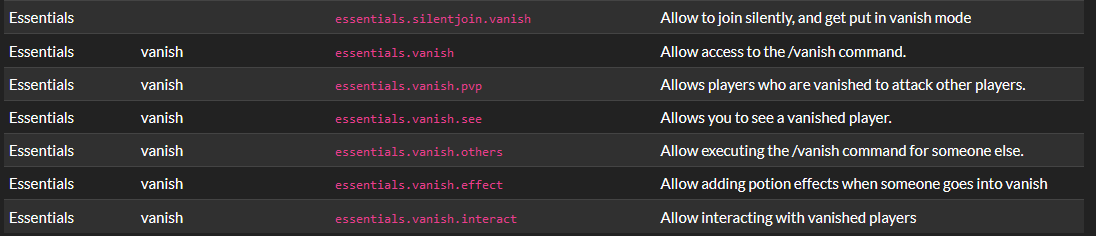
If you want anything beyond those permissions, you'll need a seperate vanish plugin
proud sonnet
toxic wagon
https://i.imgur.com/F9mCNJT.png
these seem to be it
thank u soooo much
is essentials.vanish.see configurable to only see configured roles? i'll try it out for sure
yeah
uneven nexus
no, lowest is 1
proud sonnet
i guess i used an outdated tutorial
uneven nexus
well, you can go lower than 1, but 1 is lower than 100
 shadow hamlet
Whenever console gives my player a rank, say at weight 2, the player with an existing premium rank of 88 gets set to the rank with the weight of 2. Any ideas?
uneven nexus
can you send your /lp editor link?
shadow hamlet
Mind if I DM it?
uneven nexus
!editorsafety
wanton stratusBOT
It is safe to send an editor link in public.
Any changes made in the editor have to be applied using the /lp applyedits command - impossible unless the person with the link is also connected to the server and with the required in-game permissions to use LuckPerms commands. It's effectively just as safe to share an editor link as it would be to share a screenshot of your permissions or a pastebin of a configuration file. The editor doesn't contain any sensitive data (except perhaps player names).
More Information:
Concerns about the proprietary nature of your permissions setup?
Please, don't be. We're here to help, not steal your permissions setup. Additionally, permissions can be tested by players simply joining your server and seeing what they can do.
uneven nexus
however, if you really want to, sure
shadow hamlet
👍
uneven nexus
shadow hamlet
Whenever console gives my player a rank, say at weight 2, the player with an exi...
im slightly confused by this.
can you give an example, and/or logs?
shadow hamlet
Momentarily
toxic wagon
!meta
wanton stratusBOT
You can set prefixes, suffixes and other meta data in LuckPerms for players and groups. Note that LuckPerms does not manage chat. You need to use another plugin to show prefixes/suffixes in chat.
LuckPerms wiki
proud sonnet
urban furnace
Only for java player
you can set up groups for java and bedrock players but you will need to know which client is which
urban furnace
How
toxic wagon
urban furnace
Only for java player
Are you meaning only show prefixes for java players? Or setting prefixes for only java players?
proud sonnet
read the documentation of the cross platform software you're running
warped cloak
i already cut my maxlifetime to maximum-lifetime: 450000
and i still get this warning spam...PLEASE HELP
 urban furnace
I just want in name
Like java player will automatically changes to jv[Player name]
And for pe[player name]
toxic wagon
Then you'd need a way to identify the java and pe players, then set them to a group based on whether they are java or pe
 twilit owl
Uhm how to assign the default rank to all new and old players?
toxic wagon
Well new players automatically get default rank
toxic wagon
IF they don't already have a group, they will already have default
twilit owl
I had to manually assign my group to default that's why
toxic wagon
If a player does not have a group, they will get default.
 nimble snow
Setting up a waterfall server network
I want luckperms to be able to manage permissions across all servers on the network...
how would I do that?
flat parcel
!bungee
wanton stratusBOT
If you run a BungeeCord network, learn how to correctly setup LuckPerms on all server instances (including Bungee).
Also read:
Syncing data between servers
LuckPerms wiki
nimble snow
thanks
twilit owl
also uhm is there a way i can execute a one time command ?
im trying to use this as a rank system and when a player ranks up id like to give them $ but i cant add it in the kit cause they will use it everytime
flat parcel
LP doesn't support it, since in 99% of times, a permission check can fire hundreds of times before the command is even ran due to tab complete.
twilit owl
so it would be better if i paid manually ?
flat parcel
I'd suggest either hooking into the rankup plugin directly (I'd expect it to have the ability to run a command on rankup i.e. give $), or in some way giving them a 1-use "voucher" to give them the money (bunch of plugins that add that)
twilit owl
oh okay ty!
nimble snow
okay so... if all of my servers (using waterfall) use luckperms to the same postgres db, if i update the config in one it will update to every other?
uneven nexus
config? no
nimble snow
I meant the permission configs
toxic wagon
permission configs?
nimble snow
just realized i need to set hte messaging service config
uneven nexus
if the messaging service is setup correctly, the permissions will be synced, yes
nimble snow
toxic wagon
permission configs?
perms
uneven nexus
nimble snow
*just realized i need to set hte messaging service config*
you can leave it to auto
nimble snow
ah thanks
im doing this all by hand lol
so if I want to add more servers, all I need to do for luckperms is make sure their database config is set to the psql-db and all is good?
twilit owl
uhhh i spawned a wither how do i disable the boss bar lol
flat parcel
not something LP would be doing
 solid sage
cant use the /lp applyedits "nefkjwhfwkf" cmd
nimble snow
solid sage
cant use the /lp applyedits "nefkjwhfwkf" cmd
make sure you have the permission for it!
flat parcel
why can't you use it? is it a no permissions issue, or is it giving an error about the editor session not being created on that server, in which case read the message
solid sage
i am op
foggy quartz
that still doesnt answer the question. remember we cant see your screen
 tulip island
hey im new to using this plugin, and im not very good with console stuff, how do i give myself all op commands
foggy quartz
spigot, paper, fabric, sponge server?
foggy quartz
iirc sponge doesnt have op as soon as a permission plugin is installed, so youd want to give yourself the * permission (yes, seriously just a star), however i'd be cvareful with wildcards as they can be funky as hell
tulip island
okay thanks
i follow most of the getting started and i made the admin role
so can i give that all permissions
and the suser that have that can use all commands
also im confused about the star
do i just put it in the consle
ive given myself luckperms
flat parcel
* is a permission, however we recommend against giving it (@foggy quartz).
tulip island
okay
foggy quartz
no need to tag. that is why i said "id be careful with wildcards as they can be funky as hell" - please read what i said
tulip island
how do i give myself *
flat parcel
We encourage people to give people permissions for the commands they need explicitly instead of using wildcards, since many permissions can cause unexpected behaviour, however we also understand people are lazy. Generally wildcards for plugin-specific stuff is ok i.e. luckperms.* vs *
flat parcel
tulip island
how do i give myself *
!usage
wanton stratusBOT
Here's a guide to help users understand and use LuckPerms for the first time.
Read more
LuckPerms wiki
tulip island
i've used the command lp user <your username> permission set luckperms.* true and made the admin group
i'm trying to figure out why i cant use any commands in minecraft itself like /gamemode
flat parcel
luckperms.* will only affect luckperms commands. you'll need to give permission for other commands as well.
tulip island
how would i do that
foggy quartz
every plugin introduces their own perms
luckperms will handle them, but what they are is different per each single plugin
usually spigot/wikis list perms for server software, plugins and so forth
tulip island
GriefPrevention uses LuckPerms wich GriefPrevention was the plugin i was going to use and Luckperms is a little to compelx for my simple mind, i may use a idffrent plugin
but thank you for you're help and support
im just kind stupid and lazy
foggy quartz
it is quite simple if you give it a chance and read just the usage guide with all your attention there
tulip island
ill give it a try
is there a list with all the minecraft.command.<command name> commands?
foggy quartz
flat parcel
For vanilla commands, it's minecraft.command.<command name>. Plugins will have their own permisisons
foggy quartz
is that even a thing on sponge tho?
tulip island
it is
flat parcel
oop are you on sponge?
tulip island
yes
foggy quartz
i got no idea how sponge or forge works - so im out at this point. ask lp related questions, ok, but that? uhhh yea no
uneven nexus
I think sponge has perms, fabric doesn’t
tulip island
yeah, im just really stupid and not very good with code or console, im gonna figure somthing out, but thank you very much.
nimble snow
So i noticed an issue, luckperms isnt letting me run waterfall commands
foggy quartz
the real question is if you have lp bungee on your proxy then and if you added permissions to lpb
uneven nexus
LuckPerms Bungee is still required for a proxy, to manage permissions
nimble snow
yeah they are all on the same config
and is on waterfall as well as the purpur servers
foggy quartz
servers cannot 'be on the same config'
uneven nexus
can you run /lpb verbose command <your mc name> <waterfall cmd that doesn't work> from console.
little sphinx
nimble snow
So i noticed an issue, luckperms isnt letting me run waterfall commands
waterfall commands have their own permissions, you may have just not set them yet
nimble snow
 little sphinx
and wdym by "same config", you mean all are connected to the same sql database or?
nimble snow
pretty sure they are set
nimble snow
little sphinx
and wdym by "same config", you mean all are connected to the same sql database o...
yes
little sphinx
show /lpb info and /lp info
 uneven nexus
no messaging service 
nimble snow
its set to auto in the config
nimble snow
little sphinx
also `/lpb info` from your waterfall console
one second, forgot to give the dockercompose tty

would setting the messaging-service config to sql work for postgres?
nimble snow
little sphinx
also `/lpb info` from your waterfall console
sent
little sphinx
i suggest fix the messaging service first
nimble snow
yeah, thats what Im looking at to fix
little sphinx
have you set it to sql?
foggy quartz
you managed to establish a connection to your db. youre already way further than most users. dont think you can actually fuck up anything beyond this point
nimble snow
I know my way around docker lol
foggy quartz
search the discord for mysql errors. its petrifying
uneven nexus
that's not really relevant to setting up your configs correctly
nimble snow
okay setting to sql didnt work... gonna try pluginmsg
nimble snow
uneven nexus
that's not really relevant to setting up your configs correctly
it sorta is for the hostname of the database!
lol
gotta set that container_name otherwise it might just get scrambled!
seeing if pluginmsg fixes it!
already to good start!

YAY

shit...
how do I grant a user access to all MC command
modern bison
uneven nexus
all commands, or all /minecraft: commands ?
toxic wagon
!nowildcard
wanton stratusBOT
Wildcard issues
Some plugins are created in a way which results in odd behaviour when the root '*' wildcard is used.
More information:
foggy quartz
 nimble snow
uneven nexus
all commands, or all `/minecraft:` commands ?
nimble snow
uneven nexus
all commands, or all `/minecraft:` commands ?
well considering luckperms has stopped syncing....
(i dont have access to lp despite having the luckperms permission node markd)
foggy quartz
do you run in offline mode or do you have login/auth plugins or any sort?
nimble snow
I use purpur which I enable bungee mode in and it works,
foggy quartz
that was legit not my question
nimble snow
bungeecord: true
i legit set this
foggy quartz
!bungeecheck if you insist
wanton stratusBOT
Running a network and getting UUID mismatches?
Please double check that:
1. BungeeCord config.yml has ip_forward and online_mode set to true
2. All backend servers' spigot.yml has bungeecord set to true
3. All backend servers' server.properties have online-mode set to false
nimble snow
waterfall/bungee requires servers to run in offline mode
foggy quartz
i know
nimble snow
wanton stratus
Already checked all of that and followed the steps on the setup pages
foggy quartz
good
now to my question
ill ask again
do you have any auth or login plugin installed on any of your servers
nimble snow
No I do not have any extra auth plugins
server is not public yet,
unless you count geyser/floodgate as another auth thing but that isnt relevent at this moment to my knowledge
foggy quartz
are you sure the node given is correct
nimble snow
 foggy quartz
incorrect
nimble snow
huh?
foggy quartz
change it to luckperms.*
nimble snow
odd that works on fabric
uneven nexus
permissions are multiple sections.
it's usually in the format of <plugin>.<command>.<sub command>
uneven nexus
you asked that literally 10 seconds ago, be patient ;-;
foggy quartz
Its judt 2 messages
Thats similar
set the node for that command to 'false' for default group
nimble snow
why
 uneven nexus
have you actually ran the command, or are you basing it not working on the autocomplete
nimble snow
foggy quartz
essentials perhaps?
only on the redemption server, vanilla (which is where I am atm) has no such plugin
oh now its working... think it just took a second
but yeah essentials is overriding it on the redemption server
uneven nexus
foggy quartz
foggy quartz
set the node for that command to 'false' for default group
Ik
But which command
toxic wagon
The command you want to disable...
toxic wagon
Then set the permission to false for it
foggy quartz
So is it bukkit.command.help
Will that disable the whole thing
it is, unless you have a plugin for it
try to set it to false in default, then test it
nimble snow
foggy quartz
essentials perhaps?
Got essential, what do I do about it
foggy quartz
open google
search for "essentials permissions"
go to their official website
they have a glorious list of perms there
even a search function at the top. so search there for "help" and the node will come up
uneven nexus
its even in the pins 
toxic wagon
foggy quartz
why yall spoon feeding now AFTER i explained the whole way there
nimble snow
for essentials x,
i got plain ol essentials by the looks of it
uneven nexus
what mc version are you on?
nimble snow
1.18
uneven nexus
you have essentialsx
nimble snow
k
uneven nexus
old essentials doesn't support anything after like 1.8
foggy quartz
Does /lp applyedits destroy ur server
Like can it destroy the server if u use the command too much
uneven nexus
no..?
foggy quartz
if you use the same editor all the time, sure
but it tells you everywhere not to do that lmao
foggy quartz
define "destroy" - imo that includes permissions being fucked up hard
foggy quartz
foggy quartz
if you use the same editor all the time, sure
I did a different permission
But it said its the same thing
But as long as i dont do the force command
It wont break the server
uneven nexus
you should be generating a new editor session every time you applyedits.
uneven nexus
the message tells you that
toxic wagon
Yes
foggy quartz
bro, did you even read the message or did you straight out freak out from the message color alone
Oke thanks
uneven nexus
foggy quartz
bro, did you even read the message or did you straight out freak out from the me...
you'd be surprised how many don't read the message
foggy quartz
thats sickening
no wonder zero quit
Also everytime i do permission why is it gone
When i reset page
because youre not supposed to refresh the page
uneven nexus
No.
depending on how fast you're actually doing it, you might get ratelimited by bytebin, but it's not going to break your server
foggy quartz
Whats a bytebin
toxic wagon
It's what is used for the Luckperms Web Stuff
foggy quartz
Mk imma start working on my server noe
R any of u guys good builders
A professional
toxic wagon
Nope, and this isn't the place to recruit people
foggy quartz
Where do i recruit poeple
toxic wagon
If you wish to request or offer development/art/building/administration services, please do so at http://www.spigotmc.org/forums/services-recruitment-v2.54/
foggy quartz
Oh
toxic wagon
That or in the HelpChat discord as they have request channels
uneven nexus
toxic wagon
If you wish to request or offer development/art/building/administration services...
im going to guess my moss notif is from you
toxic wagon
uneven nexus
*im going to guess my moss notif is from you*
😉
uneven nexus
lmao
 spring canyon
Anyone got a good video tutorial?
foggy quartz
!tut
wanton stratusBOT
YouTube Tutorial
If you would like a video tutorial for setting up LuckPerms, try:
https://www.youtube.com/watch?v=l4anE2wOLdc
civic adder
Hello I have trouble with multiprefix calculation on the bungee, any toughts? (it's ok on the bukkit with same config)
 uneven nexus
Have you restarted your proxy since making the changes to the config, for stacking?
little sphinx
civic adder
Hello I have trouble with multiprefix calculation on the bungee, any toughts? (i...
also if you use contexts, contexts calculation cause permissions to apply differently on different servers
civic adder
yes i have restarted, what do you mean about context? i did not changed the default value: context-satisfy-mode: at-least-one-value-per-key and my context.json file is default
toxic wagon
!context
wanton stratusBOT
You can set a permission or group on a per-world/per-server basis, through what we call "contexts".
Read more
LuckPerms wiki
civic adder
i didn't set any contexts on my prefixes
foggy quartz
are all instances actually connected to the same db
unforunately you cut off the info command a lot
nvm thats a different info one, mb
civic adder
it's on mysql + redis activated
foggy quartz
it may help to see /lp info & /lpb info ngl


 uneven nexus
i mean, they're going to be different unless you only have 1 proxy, and 1 backend.
civic adder
ho no it's normal players not all on the same bukkit
foggy quartz
interesting
civic adder
so idk why the prefix on bungee is incomplete
foggy quartz
is it possible that you added the prefix that is seen to be missing from the vipgold group Before you added the proxy to the db
civic adder
the proxy was there from the beginning, and i only do /lpd editor and commands, never /lp editor or /lp commands
foggy quartz
something about this case doesnt feel right