#support-1
1 messages · Page 1263 of 1
 wanton stratusBOT
You can download LuckPerms for Bukkit/Spigot/Paper, BungeeCord, Sponge, Fabric, Nukkit and Velocity.
Additional downloads
 foggy quartz
c:
 mild otter
c:
 nocturne chasm
c drive
 amber locust
Thanks!
 round tendon
https://paste.tws.gg/?f8fa044006731b8d#8Ti1zN69qNxbS6UsT3BoqnvV1gmunQqz9xXe49BQSch help pls based gods
TWS Paste
Visit this link to see the note. Giving the URL to anyone allows them to access the note, too.
foggy quartz
restart
round tendon
cool thanks 10/10 help
 velvet oak
Hey guys, I recently purchased a Setup and the chat isn't showing my prefix
it shows it in /lp user tablol info
foggy quartz
Do you have Vault installed?
 covert crater
Hey, I'm redoing all of my LuckPerm groups. Seeing if that solves my earlier problem, as I had each individual group with its own perms instead of parenting them off the Defauly and scaling from there.
But I have noticed a small issue. I tried giving each Rank and weight for their prefix (Admin/Senior Staff/Staff/Trial Staff/Etc), But I changed the default prefix to "Player"
Now, when I add players into a group, it still just says player on the Tab list (TAB Plugin) and I can't figure out, for the life of me, how to fix this issue now.
Also, while I am listed as Admin from Tab (How my prefix stayed was due to me NOT deleting the Admin group) Now, when I type in chat, it comes up as "Player" for my prefix instead of the "Admin" prefix set by my group.
Anyone got any ideas?
Should just be /lp import (Name of file) I think
 sage thicket
Can anyone tell me how to disable command feed back in chat?
I did gamerule edit but its still showing up for everyone
 little sphinx
sage thicket
Can anyone tell me how to disable command feed back in chat?
little sphinx
sage thicket
Can anyone tell me how to disable command feed back in chat?
lp doesnt control that
 wraith wing
how do I set a database for bungee that is not remote
foggy quartz
you don't
you need a mysql/mariadb/mongodb/postgresql database to share data between servers
if you for whatever reason can't or don't want to use those, then you don't
foggy quartz
All of those are free solutions, you can install it on the vps/dedi if you run your network on them
If you are running your server on shared hosting then usually they provide them with the plan
wraith wing
foggy quartz
All of those are free solutions, you can install it on the vps/dedi if you run y...
link?
wraith wing
thanks
 fiery sierra
Hiii, a fast way to duplicate groups? like, same perms etc
im trying to make single groups for each server context
like; survival admin, skyblock admin, etc
so they need almost same perms
nocturne chasm
Clone
fiery sierra
where is this option?^^
nocturne chasm
/lp group <group> clone <newname>
fiery sierra
ty
 sturdy zephyr
Is there any easy ways to add context to existing permissions?
I tried exporting the file, adding the context in there, but when I imported it back nothing changed
 frozen beacon
can I combine coreprotect and luckperms database?
 mossy iron
Can anyone still help please? Can’t give perms per server only globally
foggy quartz
mossy iron
Can anyone still help please? Can’t give perms per server only globally
Did you set the server setting in each LP config?
mossy iron
foggy quartz
Did you set the server setting in each LP config?
Wdym? This is what I done:
Lp export (survival server)
Linked lp for bungee, lobby uhc and survival with MySQL
Went back to survival, and imported, tried to change some perms to survival server only
Have I done something wrong?
foggy quartz
That is correct procedure but it doesn't answer my question
mossy iron
Sorry, what do I have to do in each of the configs?
mossy iron
I’ll take a look in 30 minutes when I’m at my pc 😊
I need to change this to the server name?

 stone remnant
can any1 tell me the command to set the rank
 high basin
!commands
wanton stratusBOT
Find all of the available LuckPerms commands on the wiki.
Read more
General commands
User commands
Group commands
Permission commands
Parent commands
Meta commands
Track commands
Log commands
 LuckPerms wiki
 stone tartan
Hello there! I have a little error, could anyone can help me? Thank you so much 🙂
 little sphinx
!update
wanton stratusBOT
You can download LuckPerms for Bukkit/Spigot/Paper, BungeeCord, Sponge, Fabric, Nukkit and Velocity.
Additional downloads
stone tartan
I confirm that I have a fresh version downloaded 5 minutes ago, I'll redownload and check if it fix that error, thanks
Nope, it did not fix my error
By reading the log, I assume that an error with Java. So I'll say more information,
I am running Java 16, the last version, with waterfall 1.17 (and the last version of the plugin).
All is up to date
wanton stratusBOT
Please use pastebin!
Seeing a paste of the problem makes everything so much easier! Use https://paste.lucko.me/ for easy pasting!
For console errors:
Pastebin any relevant segments of the console log. If it's a startup error, this includes the entire startup log!
Other errors:
Pastebin the entire LuckPerms config file (passwords removed) as well as any other relevant files!
stone tartan
Hmmh.. I'll try to reboot my server, I did not do that after installing java 16.
I'll past the logs 🙂
 little sphinx
stone tartan
https://paste.lucko.me/VtlyTtZMPc
little sphinx
stone tartan
https://paste.lucko.me/VtlyTtZMPc
lol are you using the bukkit version on a bungeecord server?
yea you are
little sphinx
😅
 vale nymph
y'as des développeur français qui connaissent bien ?
 regal schooner
German:
Was muss ich machen wenn ich 2. Root Server habe und auf einem die Datenbank was muss ich dann als Host auf dem anderen Server eingeben?
English:
What do I have to do if I have a second root server and what do I enter on a database as a host on the other server?
wanton stratusBOT
If you wish to change your storage type (e.g. to YAML or MySQL) you may need to follow these instructions to ensure your groups and permissions are migrated to the new storage type.
Read more about the Storage types
LuckPerms wiki
regal schooner
foggy quartz
Um beide server zu synchronisieren müssen beide die gleiche db ansteuern.
Ja aber wie Funktionier das
Hab Ip:Port eingegeben aber hat nicht geklappt
foggy quartz
Du hast also 2 server die du syncen willst, richtig?
regal schooner
Ja hab 2 Server und auf beiden möchte ich Luckperms mit derselben Datenbank Verbinden
foggy quartz
Ok, dann folge einfach dem link von clippy. Du musst auf beiden servern /lp export <dateiname> machen. Dann beide server stoppen, beide auf mysql stellen, starten und dann von beiden importieren.
regal schooner
Welchen dateiname die Config?
foggy quartz
Nein. Wenn du /lp export machst, macht luckperms eine zip datei mit allen daten. Du kannst sie benennen wie du lustig bist. Das ist nur für dich, dass du den namen von der datei weisst, die du hinterher wieder in mysql importierst, mehr ist das nicht. Sei dir aber im klaren, dass du eventuell context hinzufügen musst, je nach dem, ob du zwei separate rang-linien hast oder ob alles quasi eh schon fast gleich ist
Um context zu nutzen, musst du einfach nur den namen des servers in die jeweilige config von luckperms eingeben. Zeile 34 in der config glaub ich.
regal schooner
Hä also ich komm jetzt nicht so ganz mit
Nochmal:
Ich hoste meinen Minecraft Server auf 2 unterschiedlichen VServern
Auf einem von den beiden ist die Datenbank
Auf dem anderen gebe ich bei adress IP:Port ein und die Datenbank daten aber sie Conecten sich nicht
Server 1 Mit Datenbank

Server 2 ohne Datenbank

Beide storage-method: MySQL
Aber es funktioniert nicht
foggy quartz
Hast du einen mysql eintrag gemacht der 'perms' heisst? Luckperms versucht gerade in eine datenbank zu schreiben die so heißt, die musst du aber erst in mysql erstellen.
 foggy quartz
Ok, das ist schon mal was.
In der konsole auf server2, sagt luckperms da dass es nicht auf mysql zugreifen kann?
foggy quartz
Ich glaube zu wissen, was das problem ist.
Da dein server1 und sql auf der selben maschine ist, darf dieser server auf deine db zugreifen
 foggy quartz
Auf was ist deine mysql bind-adresse eingestellt?
foggy quartz
Ok hier ist das problem
Es sieht so aus, als würde deine db nur auf localhöst 'zuhören' und alles andere was auf die db zugreifen will, quasi in die luft jagen
regal schooner
Ok und wie löse ich das Problem?
foggy quartz
mysql hat also eine bind-adresse, die besagt, wo die db zuhört und connections zulässt
regal schooner
Aber ich kann von meinem PC aus auch auf die Datenbank zugreifen
foggy quartz
Wahrscheinlich ist das von deinem host so eingestellt
regal schooner
Ok
 radiant shoal
Is there anyway I can make + in different color like in hypixel (ability to choose the + color)
regal schooner
Und was muss ich jetzt machen also mit dieser Bind adresse
Oder wo trage ich die ein
foggy quartz
Die bind adresse sollte auf 0.0.0.0 stehen und ist in deiner mysql config zu finden.
regal schooner
Ok
vale nymph
Module 'Core' production: java.util.ServiceConfigurationError: javax.annotation.processing.Processor: Provider me.lucko.helper.plugin.ap.PluginProcessor not found
problem when build with intellij
regal schooner
foggy quartz
Die bind adresse sollte auf 0.0.0.0 stehen und ist in deiner mysql config zu fin...
Hat funktioniert Vielen Dank 🙂
foggy quartz
Gerne, viel spaß damit :)
 foggy quartz
!bulk
wanton stratusBOT
Quickly update a large amount of user and group permissions by using the bulkupdate command.
Read more
LuckPerms wiki
 prisma pivot
/lp bulkupdate all delete "permission == essentials.fly" ?
 warm venture
How to remove this on the LuckPerms editor? Every time I remove it, it still goes back

Like every time I save it, it's still the same ;w;
 pale mural
hey, can anyone tell me what the issue is?
[05:31:18] [luckperms-scheduler-worker-20/WARN]: java.sql.SQLTransientConnectionException: luckperms-hikari - Connection is not available, request timed out after 9320ms.
[05:31:32] [luckperms-scheduler-worker-20/WARN]: at me.lucko.luckperms.lib.hikari.pool.HikariPool.createTimeoutException(HikariPool.java:696)
[05:31:37] [luckperms-scheduler-worker-20/WARN]: at me.lucko.luckperms.lib.hikari.pool.HikariPool.getConnection(HikariPool.java:197)
[05:31:38] [luckperms-scheduler-worker-20/WARN]: at me.lucko.luckperms.lib.hikari.pool.HikariPool.getConnection(HikariPool.java:162)
[05:31:38] [luckperms-scheduler-worker-20/WARN]: at me.lucko.luckperms.lib.hikari.HikariDataSource.getConnection(HikariDataSource.java:100)
[05:31:38] [luckperms-scheduler-worker-20/WARN]: at me.lucko.luckperms.common.storage.implementation.sql.connection.hikari.HikariConnectionFactory.getConnection(HikariConnectionFactory.java:174)
[05:31:38] [luckperms-scheduler-worker-20/WARN]: at me.lucko.luckperms.common.messaging.sql.SqlMessenger.getConnection(SqlMessenger.java:85)
[05:31:38] [luckperms-scheduler-worker-20/WARN]: at me.lucko.luckperms.common.messaging.sql.AbstractSqlMessenger.pollMessages(AbstractSqlMessenger.java:115)
[05:31:38] [luckperms-scheduler-worker-20/WARN]: at me.lucko.luckperms.common.plugin.scheduler.AbstractJavaScheduler$ErrorReportingRunnable.run(AbstractJavaScheduler.java:124)
[05:31:38] [luckperms-scheduler-worker-20/WARN]: at java.util.concurrent.ThreadPoolExecutor.runWorker(ThreadPoolExecutor.java:1149)
[05:31:38] [luckperms-scheduler-worker-20/WARN]: at java.util.concurrent.ThreadPoolExecutor$Worker.run(ThreadPoolExecutor.java:624)
[05:31:38] [luckperms-scheduler-worker-20/WARN]: at java.lang.Thread.run(Thread.java:748)
foggy quartz
!errors
wanton stratusBOT
Here's a page with some common storage system errors.
LuckPerms wiki
pale mural
my mysql data base?
that's really odd.. the server is working, its connected and i left it working all night and it started spamming
can a mysql be inactive or something?
yeah, i read that but couldnt believe it 😄 cuz its really odd
ovh
dedicated server
pale mural
nope, no game panel
using putty
console
- filezilla
dunno, never done anything else (except filezilla + putty)
wdym
8gb ram 2.6 ghz
im paying 15 euro
😄
little sphinx
suggested before, but like not something expect to happen anything soon. You can just use the search bar at the top of the editor webpage to pinpoint the perms you are looking for
pale mural
check kimsufi
little sphinx
if you only want to see perms of one group, you probably can do /lp group <group> editor
pale mural
prices arent that bad
 maiden crescent
pale mural
can a mysql be inactive or something?
maiden crescent
pale mural
can a mysql be inactive or something?
I run my own mysql server as well, it does not just go inactive all of a sudden
little sphinx
99% a config issue with your ip routing between the mc server and sql db
usually nothing to do with luckperms as well
unless you typo your address then...
pale mural
ig i need to look into it
thanks
and kragleh, ovh/kimsufi is probably one of the best dedi servers that cannot be taken down so even if you pay 3 euro, doesnt really matter
 bleak monolith
Hello, I'm having a problem with prefix stacking, I found a tutorial on the wiki to stack prefixes, and done exactly the same config on my server, but it still doesn't work. Could someone help me ? ty
I dont have EssentialX
I use Luckperm to do my ranks
What should I use ?
Chat format = Multichat
Sure
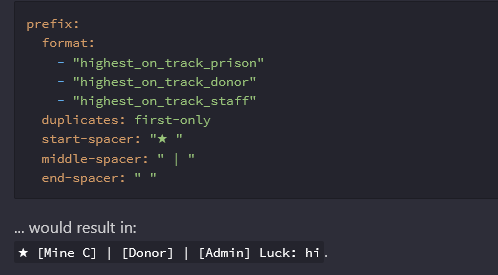
I want this
To work as it's written
It doesn't
In game it only shows 1 rank
:/
Nobody already had this issue ?
foggy quartz
If this works or not heavily depends on your chat/tab plugin configuration
Remember that luckperms itself is a permissions plugin. Not a chat or tab formatter
 kindred crane
I'm getting this error in server console:
foggy quartz
!paste
wanton stratusBOT
Please use pastebin!
Seeing a paste of the problem makes everything so much easier! Use https://paste.lucko.me/ for easy pasting!
For console errors:
Pastebin any relevant segments of the console log. If it's a startup error, this includes the entire startup log!
Other errors:
Pastebin the entire LuckPerms config file (passwords removed) as well as any other relevant files!
foggy quartz
pls no spam
kindred crane
A easy to use Paste site for Minecraft Server logs.
foggy quartz
thx xD
kindred crane
Yep, I saw the word luckperms in it so I'm reporting it here. Not sure what it means.
kindred crane
kindred crane
https://mcpaste.io/0c5f66785ec9a001
I got this error as well right after that:
A easy to use Paste site for Minecraft Server logs.
kindred crane
kindred crane
https://mcpaste.io/a7d1f48b8f3c465e
And then an entirely different error after that.
A easy to use Paste site for Minecraft Server logs.
foggy quartz
I had a similar issue when i switched to 1.17.1 actually
Totally unrelated plugins came up in that message. For me, it stopped when I yeeted the plugin leaderheads
It most likely only mentions luckperms here because due to the error, lp can't operate correctly. I suggest you check your timings report. Leaderheads had shown up for me there, hence how i figured to try and disable it
kindred crane
Alright.
 pure zodiac
Ahoy, so basically i am trying to make staff list plugin which showcases users from a particular rank.
No idea where this null came from.

Is the error from my side or something wrong with lp?
 narrow owl
Hello, I would like help, I try to start the console with the LuckPerms plugin and it does not start without it, everything works fine but that plugin is necessary that I can do it and download it directly from the Mohist and espigot page.
is for version 1.16.5
foggy quartz
Hey, i have a Bungeecord Server with a Cloud named "TimoCloud". I Have Luckperms on the Proxy but the Proxy doesent find any Servers on the Network.
And when he doesent find any Servers, then i cant use the "Contexts" with world=Lobby
Can anyone help me?
 strong meadow
hello
bro u can help me ?
nicee
im fine and u
?

prefix
double
idk why
chat-ex

i dont understand
k 1 sec
foggy quartz
It probably has a setting just like essentials to automatically add prefixes and suffixes, which can result in doubles
strong meadow
i dont think that
cuz i delete lp
and redownload it
and i restart or perms
and its the same problem
k xd
1 min
and ty for helping me
but u need the config of chat-ex or lp ?
nice joke xd
sorry .-.
k 1 sec

here u go bro
so ?
its hurtsme xd
how i can cure it ?
doctor

i love u doctor
its done
❤️
 drifting summit
question, i downloaded luckperms on my bungee (only) and its not loading, wt do i do?
narrow owl
Hello, I would like help, I try to start the console with the LuckPerms plugin and it does not start, it stays loading, without it everything works fine but that plugin is necessary that I can download it directly from the Mohist page and it does not work with other versions and it is not for version 1.16.5 the console goes bn but when trying to include that plugin it does not start, please help
 narrow owl
I already use the normal versions of spigot and it doesn't work
mild otter
!latest
wanton stratusBOT
Latest version
5.3.51
mild otter
!update please. See if that does it
wanton stratusBOT
You can download LuckPerms for Bukkit/Spigot/Paper, BungeeCord, Sponge, Fabric, Nukkit and Velocity.
Additional downloads
wanton stratusBOT
Latest version
5.3.51
 eager anvil
Hey so im running a modded 1.16.5 server with mohist jar and luckperms is working great but for some reason when i hook it up to the MySQL database the chat in game stops working. it will show messages you send in discord SRV but not in chat or console however messages from server console and discord SRV display in game it also shows if you /say and send a message. any idea what the issue is?
please @ me
 severe girder
eager anvil
Hey so im running a modded 1.16.5 server with mohist jar and luckperms is workin...
severe girder
eager anvil
Hey so im running a modded 1.16.5 server with mohist jar and luckperms is workin...
i suggest stop using mohist
first
and the issue u have is tick lag
ur server is basicaly lag at that time

GitHub
Minecraft server optimization guide. Contribute to YouHaveTrouble/minecraft-optimization development by creating an account on GitHub.
hope this will help u
though once again i strongly suggest you stop using mohist
 slate coyote
nocturne chasm
Update
slate coyote
nocturne chasm
Update
thanks
severe girder
severe girder
i suggest stop using mohist
furthermore make sure u install vault for luckperm to work
 fringe vessel
i have a luck perms export file. is there any way to import it into my new server?
nocturne chasm
/lp import
fringe vessel
I put the file into the luckperms folder
its called import.yml
but when I do /lp import import.yml, it doesnt work
 worthy tiger
how can i add the /rtp command betterrtp into the permissions
 split shoal
Hello !
Is there a way for a perm like limit.4, to execute a command to edit the number ?
thanks
 raw creek
hey dose anyone know why i get this error? https://hastebin.com/egovehujuh.properties
wanton stratusBOT
LuckPerms cannot connect to your MySQL server
Read More
Caused By
java.sql.SQLTransientConnectionException: luckperms-hikari - Connection is not available, request timed out after 5000ms.
https://hastebin.com/egovehujuh.properties | Sent by Rehan
raw creek
grant is not a command
same error
i think its ssl
so i want to disable it
but no where in the config dose it say data: pool-settings: # This setting allows you to define extra properties for connections. properties: useUnicode: true characterEncoding: utf8 useSSL: false verifyServerCertificate: false
do i remove the #
ill do that and update you
wanton stratusBOT
LuckPerms cannot connect to your MySQL server
Read More
Caused By
java.sql.SQLTransientConnectionException: luckperms-hikari - Connection is not available, request timed out after 5000ms.
https://hastebin.com/dubufoyobe.properties | Sent by Rehan
 late bay
Hello, I would like to ask you a question. How can I rename an already created group and is it possible to do this?
I tried to find it in the editor, but I didn't succeed, could you tell me which keys can be pressed?
what
there were messages here, after all
late bay
aww
raw creek
late bay
aww
lp group group rename
mild otter

LuckPerms - A permissions plugin for Minecraft servers.
LuckPerms is a permissions plugin for Minecraft servers. It allows server admins to control what features players can use by creating groups and assigning permissions.
worthy tiger
whats the essentials spawn permission
raw creek
raw creek
still https://hastebin.com/dubufoyobe.properties
can i have some help please?
mild otter
worthy tiger
whats the essentials spawn permission
check pins for EssX perms
(not sure on the error there)
worthy tiger
ive tried to put it in the permissions but it doesnt show
late bay
raw creek
lp group group rename
Thank you very much
mild otter
what do you mean by doesn't show
worthy tiger
as one of the options
mild otter
Did you actually type it out?
LP can merely suggest things, but it does not know every single perm for all your plugins and mods
actually try typing it out
worthy tiger
oh i see
raw creek
wanton stratusBOT
LuckPerms cannot connect to your MySQL server
Read More
Caused By
java.sql.SQLTransientConnectionException: luckperms-hikari - Connection is not available, request timed out after 5000ms.
https://hastebin.com/awezamegem.properties | Sent by Rehan
raw creek
but i fixed that-
nocturne chasm
Read the page
worthy tiger
what permission can i add so players can use betterrtp /rtp command
wanton stratusBOT
LuckPerms provides a verbose command to help you find out what permissions a command/plugin is checking.
Read more
LuckPerms wiki
foggy quartz
is it possible for me to sell permissions for limited time ex. if someone buys WorldEdit for an hour it will add the perm but then remove it after the times up
 reef seal
does anyone know how to allow all commands at once in lp editor?
foggy quartz
reef seal
**does anyone know how to allow all commands at once in lp editor?**
lp help
foggy quartz
I have no idea what your trying to say
the command is lp help it shows all the commands
reef seal
foggy quartz
the command is lp help it shows all the commands
like, I have no permission, so I wanted to put all the permissions in the Admin position, but there are many and it takes a lot of work to select everything

is there any way to select everything at once?
foggy quartz
reef seal
**like, I have no permission, so I wanted to put all the permissions in the Admi...
you want them to have access to everything on the server?
reef seal
its like that
reef seal
foggy quartz
you want them to have access to everything on the server?
with an role
foggy quartz
reef seal
with an role
its just *
reef seal
?
foggy quartz
reef seal
?
the permission is just *
reef seal
sorry. im not understanding
foggy quartz
Delete everything you selected and for the permission just put * then hit add and save it
 worthy tiger
what is a good tab plugin that supports Luck perms
 wet roost
how to add track to user?
 amber mountain
Need help troubleshooting an issue: I have permissions in a group called plotperms that I give by using the command /lp group default parent add plotperms <server> <world> so they have access to those permissions in that specific server and world context. However, it doesn't appear to be working. If I add the group as a parent to a specific user it does work. This worked in the past and I'm curious if I'm missing something simple.
Added github issue at https://github.com/lucko/LuckPerms/issues/3106
 frosty stump
Hello! Is there a way to remove all the players from a group?
foggy quartz
worthy tiger
what is a good tab plugin that supports Luck perms
!tab
any of the ones listed in the second link
wanton stratusBOT
LuckPerms does not perform any chat/tablist formatting of its own!
LuckPerms only acts as the source for prefixes / suffixes, it doesn't actually apply them. You need an appropriately configured chat/tablist formatting plugin for them to be displayed. If the values appear correctly when you run /lp user <user> info, LuckPerms is doing its job!
FAQ answer: Prefix isn't showing?
List of chat/tablist formatting plugins that work with LuckPerms
foggy quartz
wet roost
how can i fix this
There is nothing to "fix", but I think you are misunderstanding the concept of tracks and groups
!usage You should really read the usage guide to understand how groups work
wanton stratusBOT
Here's a guide to help users understand and use LuckPerms for the first time.
Read more
LuckPerms wiki
foggy quartz
frosty stump
Hello! Is there a way to remove all the players from a group?
lp bulkupdate users delete "permission == group.<group>"
 worthy plover
How can I see my LP version? Does it autosearch for new version on startup?
foggy quartz
/lp will show the version and no it doesn't
worthy plover
okk thx
foggy quartz
amber mountain
Need help troubleshooting an issue: I have permissions in a group called `plotp...
run and screenshot the following commands:
lp user <user> info
lp group default info
lp info
lp user <user> permission check plots.auto
frosty stump
foggy quartz
`lp bulkupdate users delete "permission == group.<group>"`
Thanks!
amber mountain
lp user braceyourself07 info result: https://brdv.coffee/storage/uploads/4/CXHiErHIhe5m.png
lp group default info result: https://brdv.coffee/storage/uploads/4/ibODrxngd9LF.png
lp info result: https://brdv.coffee/storage/uploads/4/jJHM8f0Wbjg0.png
lp user braceyourself07 permission check plots.auto result: https://brdv.coffee/storage/uploads/4/6wSVGTvpWO2k.png
foggy quartz
looks like it's evaluating properly to me
amber mountain
same
So that indicates the glitch is with the plotsquared plugin in how it evaluates group context?
foggy quartz
p2 doesn't really evaluate group contexts (or if it does, I'm not aware of it), contexts is a construct made up by LP so unless it interfaces with LP directly there is no reason for it to concern them too
worthy tiger
foggy quartz
!tab
any of the ones listed in the second link
is the Tab the same as Tablist
foggy quartz
idk what that means
amber mountain
That's what I understood, but if this is true https://brdv.coffee/storage/uploads/4/EVNsJ34buTey.png then the command should work.
foggy quartz
it evaluates to true yes
if you were to change for example default parent add plotperms server=whatever (not applicable) it would evaluate to undefined
amber mountain
If I add /lp user braceyourself07 parent add plotperms then it works perfectly, also /lp group default parent add plotperms works perfectly.
But not when I add the server or server and world contexts.
But I do not wish for all players to have that perm group globally, hence the need to limit it to a specific context.
foggy quartz
Well, permission check results in the correct evaluation
amber mountain
Which results in my confusion 
foggy quartz
If P2 is going out of their way to scan permissions, that is outside of LPs scope and entirely up to them
amber mountain
I don't know if they are.
amber mountain
This setup works with LP 5.3.51 on another network, let me try downgrading.
worthy tiger
foggy quartz
idk what that means
in the second list it shows two plugins named Tab but im just wondering if that plugin is the same plugin as TabList
foggy quartz
There is one named TAB and another one named Tab
I personally don't know any "TabList" one
amber mountain
Well, using the same version as the P2 and LP plugins on the network where the perm does work still results in the same issue. I'll keep poking at it to see what I can find.
foggy quartz
I mean
Based on what I've asked (and gonna test myself rn) the issue does not rely in LP
Have you asked P2 about it?
worthy tiger
foggy quartz
There is one named TAB and another one named Tab
ive searched for the Tab plugin but havent been able to find it
amber mountain
It worked. I deleted /LuckPerms/config.yml and had it generate a fresh one.
Not sure how that related to the context issue, but it works now ¯_(ツ)_/¯
foggy quartz
Then you probably had touched something you shouldn't have :d
amber mountain
That's the weird part, because I'm usually pretty good at that.
Well, I'm happy to admit it as long as it works.
amber mountain
Thanks for indulging me.
foggy quartz
yw
 earnest raven
how would i go about setting up a cooldown for specific comamnds?
in this case /pokeheal on a pixelmon server with a 10 minute cooldown
mild otter
LP doesn't do cooldowns
If you're running sponge (which I assume you are with Pixelmon), then CommandUtils plugin might help
 gray drift
Permission nodes for things we certainly have have just kinda disappeared out of the “press enter to select” area. Namely pixelextras and prism nodes. Any idea how to fix?
gray drift
Like I don’t know how to explain this but the nodes are just… missing from luckperms. They weren’t a few days ago.
 fickle nymph
Hey, having problems getting my perms from total economy and even my basic commands like /help to work.
I made a owner group and give it all commands, put myself in it and was still incapable.
I am using Bisecthosting, and Spongeforge and Nucleus with LuckPerms on my RLCraft server, and I’m trying all I can to get these plugins to work ;-;
Trying to get this over with ASAP to progress on out
foggy quartz
gray drift
Permission nodes for things we certainly have have just kinda disappeared out of...
You can still type them in manually
Don't fully rely on the suggestions because they are nothing more than that, mere suggestions
It is strongly recommended you go find the documentation/wiki for whichever plugin you want to add perms for and find the list of permissions they (should) provide
foggy quartz
fickle nymph
Hey, having problems getting my perms from total economy and even my basic comma...
I made a owner group and give it all commands, put myself in it and was still incapable
how did you do those 2 things exactly?
gray drift
Yeah that makes sense. I was just curious if something was broken, given that both plugins had shown in the suggestions area a couple of days ago
fickle nymph
I used the luckperms url, and manually clicked all the boxes/commands after creating the group
And I just added my profile to the group
foggy quartz
gray drift
Yeah that makes sense. I was just curious if something was broken, given that bo...
Eh the list of suggested commands may vary from time to time, it's a list of "known" permissions since startup, but how that happens then again depends on various game events
fickle nymph
It was mostly nucleus perms and my eagle faction perms but no total econ or normal perms.
foggy quartz
Okay how about this, run in the console and screenshot lp verbose command <player> /help (I say /help just as an example I guess)
fickle nymph
Hmm, I’ll have to recreate the group because I deleted it... is there a way to select all the commands?
foggy quartz
I mean if you want every permission you can just use a global/root wildcard *
fickle nymph
And the * would be the group?
Cuz I gotta make roles and stuff ;-; can’t have everybody having everything
foggy quartz
fickle nymph
And the * would be the group?
what?
fickle nymph
When I run /root wildcard in my console would that give to all?
foggy quartz
uh
fickle nymph
I’m like really inexperienced lol
foggy quartz
it's not a command
fickle nymph
Oh.
foggy quartz
I say "global/root wildcard" to use global and root interchangeably
fickle nymph
Imma go to the LP url ;-; I’m sorry bear with me
foggy quartz
* is the global wildcard aka root wildcard
fickle nymph
Hrmmm, alright
So, under my permissions, should I be able to see the commands for total economy and my normal perms? Like /help?
fickle nymph

Gotta list of like 200 perms here, I believe it should include my total Econ, permission nodes I guess it’s called. But I can’t find that.
fickle nymph
But that’s not it....
Wait... so I can just write in pay?
Holllddd the phone.
So would I go into my config file and directly pull that command I’m assuming?
foggy quartz
the permission for a command is not the command name itself
idk about nucleus or sponge in general but for example /fly on EssentialsX is essentials.fly
but it wildly varies from mod to mod and command to command
fickle nymph
So I’m trying to transfer these commands, could I potentially copy and paste em?
 fickle nymph
Oh.
It’s just a balance program, I think it is just ran by messages...
Thank you, I think this resolved it
i was wrong....
fickle nymph
Hey, so I came across a board that says Package and import labeled under commands
foggy quartz
what?
fickle nymph
public static CommandSpec commandSpec() {
return CommandSpec.builder()
.description(Text.of("Pay another player"))
.permission("totaleconomy.command.pay")
.executor(new PayCommand())
.arguments(
GenericArguments.player(Text.of("player")),
GenericArguments.string(Text.of("amount")),
GenericArguments.optional(GenericArguments.string(Text.of("currencyName")))
).build();
this is what the file is showing, what all would i need to implement into my permission node?
foggy quartz
yes that is how uh.. inheritances work
!usage All of that is explained in here and more
wanton stratusBOT
Here's a guide to help users understand and use LuckPerms for the first time.
Read more
LuckPerms wiki
fickle nymph
i'm assuming what i found was right?
foggy quartz
Well idk where you got that from
but
if it's correct, then you would have to add totaleconomy.command.pay to your permissions
i guess
fickle nymph
Omg it worked ;-; thank you
 viral pulsar
Bungeecord placeholders dont work? prefix doesnt show or anything.
foggy quartz
Had a question with luckperms, does anyone know if you can make certain ranks just use bungeecord?
wanton stratusBOT
LuckPerms does not perform any chat/tablist formatting of its own!
LuckPerms only acts as the source for prefixes / suffixes, it doesn't actually apply them. You need an appropriately configured chat/tablist formatting plugin for them to be displayed. If the values appear correctly when you run /lp user <user> info, LuckPerms is doing its job!
FAQ answer: Prefix isn't showing?
List of chat/tablist formatting plugins that work with LuckPerms
viral pulsar
It's like, the placeholders don't work either. Do i need to enable something?
foggy quartz
 proud hound
wdym, just use bungeecord?
proud hound
wdym, just use bungeecord?
Larry, I just want staff ranks to use bungeecord though... and I don't want it to give players same ranks on factions/skyblock..
proud hound
then give them the rank with context
context is how you determine where things like ranks, perms, and meta apply
!context
wanton stratusBOT
You can set a permission or group on a per-world/per-server basis, through what we call "contexts".
Read more
LuckPerms wiki
foggy quartz
proud hound
context is how you determine where things like ranks, perms, and meta apply
okay thanks 
wet roost
help
 viral pulsar
- The placeholder at the right side doesn't work
- The prefixes don't show up with Vault + EssentialsChat + PAPI installed.
 proud hound
viral pulsar
1. The placeholder at the right side doesn't work
2. The prefixes don't show up ...
proud hound
viral pulsar
1. The placeholder at the right side doesn't work
2. The prefixes don't show up ...
that's gonna be entirely up to essentialschat and your scoreboard plugin - as the embed i linked ya says, if the user info command confirms the prefix is there, LP is doing its job completely. It's up to the other plugins to retrieve that info and display it
have you downloaded the luckperms expansion for PAPI?
viral pulsar
yeah
proud hound
/papi ecloud download luckperms and then /papi reload will do that
viral pulsar
It works fine with LuckPerms on the actual server, not bungee
proud hound
bungee is just a proxy
viral pulsar
but switching to bungee apparently ruined it
proud hound
bungee isn't a thing you can switch to? it's something you connect to a server through
if you have multiple servers linked by a bungee proxy, you need to sync up
!bungee
wanton stratusBOT
If you run a BungeeCord network, learn how to correctly setup LuckPerms on all server instances (including Bungee).
Also read:
Syncing data between servers
LuckPerms wiki
proud hound
follow both of those links 😄
viral pulsar
I'm on about the Bungee plugins folder, I installed LuckPerms into it to have global ranks
I use bungee to manage my other servers
proud hound
yeah that's not all you have to do
you also need to follow the things i linked
and you also need luckperms on the backend
as the link I just pulled up also describes
you have embeds enabled, right? I could also plaintext link them if you prefer
viral pulsar
yeah i do have them enabled, I have everything enabled like bungeecord: true.
Everything was fine with original LuckPerms on the each individual servers but adding luckperms bungee into my bungee plugins and removing the other luckperms from the individuals doesn't seem like the other plugins on the seperate servers are seeing it
proud hound
adding luckperms bungee into my bungee plugins and removing the other luckperms from the individuals
you don't remove it from the individuals, i just said that :p
viral pulsar
will the bungee overrwite?
proud hound
LP on the bungee manages permissions for bungee commands, like /server and /send
viral pulsar
ohh
proud hound
you link them all up under one single database to have global controllable permissions
and then to make things per-server, you use contexts
 proud hound
versions should match, and they should all be connected to the exact same database, but yes
viral pulsar
okay thanks
 ruby ore
Is there a way you can use luckperms to give bungee/waterfall permissions?
 open mirage
!downloads get luckperms for bungee as well
wanton stratusBOT
You can download LuckPerms for Bukkit/Spigot/Paper, BungeeCord, Sponge, Fabric, Nukkit and Velocity.
Additional downloads
wet roost
hw ocreate prefix?
how can i do like tracking player on the server to see the rank when m ogtab?
oo
when i wanna open tab so i can see the prefix
how can i do that?
im kinda new to luckperms
like i wanna setup server ranks for my friends
nope
on pebblehost
not tab plugins
its on ur keyboard
tab to see player online
yep
okok
im gonna try
is it support 1.16.5?
okok imma try
that
thx dude im very appreciate it that plugins I have been search for long
time
okok
but now im confused on making prefix on luckperms
wet roost
how to create a prefix staff rank and ingame rank?
 frozen hinge
i hi
i want to make my ranks prefix show above my head
and also show the rank for eg
in f5
[OWNER]<NAME>
and the name
should be coloured
in the rank colour
is it possible
wet roost
hmm maybe its not possible
wet roost
frozen hinge
i have managed to add the ranks in tab
How can you do that?
frozen hinge
In its config
frozen hinge
frozen hinge
but i want to add them in f5
it is
ive checked a setup
its 100% possible
and its simple i just dont know
wet roost
frozen hinge
In its config
whre I can't find that in config
wet roost
so on tab? not on luckperms?
wet roost
this?
 frozen hinge
i want to make my ranks prefix show above my head
and also show the rank for eg
and the name
should be coloured
in the rank colour
is it possible
Yep
Sort them
wet roost
ohhhh
wet roost
that what i think last 1 hour ago
frozen hinge
xD
wet roost
ye im got store and im almost got my own website
frozen hinge
ok
wet roost
only setup stuff in it
frozen hinge
@little sphinx i want to make my ranks prefix show above my head
and also show the rank for eg
and the name
should be coloured
in the rank colour
wanton stratusBOT
Hey TechyGamer! Please don't tag helpful/staff members directly.
frozen hinge
%luckperm_prefix%
wet roost
yep papi
frozen hinge
im pretty sure
wet roost
is it for me?
wet roost
lmao im just help all the plugins for my friend
frozen hinge
that name thing
wet roost
I think the prefix on f5 its like a client someone use it?
frozen hinge
i use lunar client
frozen hinge
how to setup the name thing krag
unlimited-nametag-prefix-suffix-mode:
enabled: true
modify-npc-names: false
use-marker-tag-for-1-8-x-clients: false
disable-on-boats: true
is this?
 agile kraken
Hi i would like to ask can luckperms sell permission ? Ex:if player want to use /sit command they click a npc and purchase the permission . Is that possible ?
wet roost
I dont think so
foggy quartz
You need to use a third party plugin for that, such as shop, but said third party needs to support commands.
wet roost
its just permission
foggy quartz
Techy who even said he meant real money eh
frozen hinge
Xd
wet roost
ye
foggy quartz
Anyway, technically possible yes, even with just one perm
frozen hinge
it is possible
agile kraken
Okay noted with thanks 😊
wet roost
how to create prefix ingame rank?
foggy quartz
!meta
wanton stratusBOT
You can set prefixes, suffixes and other meta data in LuckPerms for players and groups. Note that LuckPerms does not manage chat. You need to use another plugin to show prefixes/suffixes in chat.
LuckPerms wiki
wet roost
isnt its /lp editor?
 eager rivet
Hello.
foggy quartz
You can do that via command or editor, both ways work
wet roost
foggy quartz
You can do that via command or editor, both ways work
its show OwnerName its not Owner Name
like its doesnt have space
eager rivet
Can someone answer me. If I want to use luck perms on every spigot server (bungeecord network), that mean I must / I had to install bungee version, if I don't install the bungee version on bungee server, other spigot servers that installed luck perms like hub server won't able work properly?
foggy quartz
eager rivet
Can someone answer me. If I want to use luck perms on every spigot server (bunge...
You do not need lpbungee to sync servers, I don't have the bungee one either. Lpbungee handles bungee commands, so if you plan to work with those a lot, you should get it, if not, then no need really.
wet roost
how can i get space like Owner Name?
 eager rivet
foggy quartz
You do not need lpbungee to sync servers, I don't have the bungee one either. Lp...
eager rivet
foggy quartz
You do not need lpbungee to sync servers, I don't have the bungee one either. Lp...
Thanks for the answer 
foggy quartz
wet roost
how can i get space like Owner Name?
#general message The formatting is done in your chat plugin.
 foggy quartz
!commands
wanton stratusBOT
Find all of the available LuckPerms commands on the wiki.
Read more
General commands
User commands
Group commands
Permission commands
Parent commands
Meta commands
Track commands
Log commands
LuckPerms wiki
 worn rover
 mild otter
Screenshot /plugins
 eager furnace
 gray moss
wanton stratusBOT
gray moss
wanton stratusBOT
Hey ItzCreeper! Please don't tag helpful/staff members directly.
foggy quartz
!ask
wanton stratusBOT
Please ask your question!
Please ask the question you have. Don't ask to ask, or ask to DM someone. There are people here to help you, but we need to know what to help you with, so please just ask the question you want to in as much detail as possible!
Or, try here first:
Why shouldn't I ask to ask?
 timber dove
where can ask some question?
nocturne chasm
!ask
wanton stratusBOT
Please ask your question!
Please ask the question you have. Don't ask to ask, or ask to DM someone. There are people here to help you, but we need to know what to help you with, so please just ask the question you want to in as much detail as possible!
Or, try here first:
Why shouldn't I ask to ask?
timber dove
!ask
wanton stratusBOT
Please ask your question!
Please ask the question you have. Don't ask to ask, or ask to DM someone. There are people here to help you, but we need to know what to help you with, so please just ask the question you want to in as much detail as possible!
Or, try here first:
Why shouldn't I ask to ask?
timber dove
Excuse me, how to disable the "plugin" this command with luckperm?
nocturne chasm
What?
timber dove
sorry, my english isn't good
I mean is I don't want player to use plugin this command
nocturne chasm
They cant unless they have perms
timber dove
But I test from my server
I don't have op and else permissions
I can use plugin command either
 wanton stratusBOT
LuckPerms provides a verbose command to help you find out what permissions a command/plugin is checking.
Read more
LuckPerms wiki
timber dove
ok i try
 old plank
Hey, I have been having an issue with my server and turns out the issue was caused by pex conflicting with another plugin so I am trying to switch to luckperms now, but it isnt even loading
 nocturne chasm
!Paste logs/latest.log
wanton stratusBOT
Please use pastebin!
Seeing a paste of the problem makes everything so much easier! Use https://paste.lucko.me/ for easy pasting!
For console errors:
Pastebin any relevant segments of the console log. If it's a startup error, this includes the entire startup log!
Other errors:
Pastebin the entire LuckPerms config file (passwords removed) as well as any other relevant files!
 slim dune
wanton stratusBOT
slim dune
wanton stratusBOT
Please use https://paste.lucko.me to send files in the future. I have automatically uploaded latest.log for you: https://paste.lucko.me/JURDtc6LHP
nocturne chasm
!libsdir
wanton stratusBOT
LuckPerms dependencies
LuckPerms requires several libraries in order to operate. If you're getting a startup error such as NoClassDefFoundError, ClassNotFoundException or "Unable to load dependency...", stop your server, delete the /plugins/LuckPerms/libs/ directory and start it up again.
slim dune
wanton stratus
Still same issue
 rose berry
Hi, im using the editor and i set some essentials permission (i.e) in the context server:vanilla, now i have to add them in the context server:kitpvp, i selected them (15 pex) and did the things, without ticking the "replace" button, but it replace anyway the previous context
 echo mantle
Error when using luckperms
wanton stratusBOT
Please use https://paste.lucko.me to send files in the future. I have automatically uploaded message.txt for you: https://paste.lucko.me/YFBsEKm4Vb
 quaint whale
Is there a guide out there for syncing permissions between servers on a network? Also when setting up permissions for a network is it possible to give someone a group like moderator and then make that group have different roles depending on what server they are on?
little sphinx
!sync
wanton stratusBOT
To sync data between servers, you need to connect each LuckPerms plugin to the same database (for example MySQL) and set up a messaging service.
LuckPerms wiki
little sphinx
!context
wanton stratusBOT
You can set a permission or group on a per-world/per-server basis, through what we call "contexts".
Read more
LuckPerms wiki
quaint whale
thank you 
so, on one of my servers I already have a bunch of permission nodes stored in a database. is there a way I can export those and import them into the main database I am planning on using
for all my servers?
rose berry
rose berry
Hi, im using the editor and i set some essentials permission (i.e) in the contex...
pls help?
little sphinx
quaint whale
so, on one of my servers I already have a bunch of permission nodes stored in a ...
if they are connected to the same database, there shouldnt be an need to
quaint whale
little sphinx
if they are connected to the same database, there shouldnt be an need to
I mean, is there a way to transfer my old nodes to another server's database
wanton stratusBOT
If you wish to change your storage type (e.g. to YAML or MySQL) you may need to follow these instructions to ensure your groups and permissions are migrated to the new storage type.
Read more about the Storage types
LuckPerms wiki
quaint whale
ok, now one last question
is there a way I can apply a context to a bunch of permission nodes at once?
in the editor that is
 slim gull
why is it that my prefixes show in chat when i type but not on the tab menu anyone know how to fix it??
 sonic ibex
I'm trying to add gradients to prefixes but it doesn't show the gradients it just shows the raw code.
quaint whale
so I set contexts for all my survival permissions to server=survival for both the group permission nodes and all the users
and for some reason the players on my server still show up as default
idk why
I even did a network sync
and both the proxy server and my survival server are pointed at the same database :/

this is what it looks like when I bring up user info for one of them
foggy quartz
sonic ibex
I'm trying to add gradients to prefixes but it doesn't show the gradients it jus...
Try this: https://rgb.birdflop.com/
Keep in mind that to use hex, your chat/tab plugin(s) need to support hex, as well as the same hex format. Some plugins use #rrggbb, others use §, mixing two can cause trouble of either or the other not displaying it correctly
quaint whale
the verified rank should be giving them a V prefix, but it shows up as G for guest
:/
sonic ibex
foggy quartz
Try this: https://rgb.birdflop.com/
Keep in mind that to use hex, your chat/tab ...
I was using that exact website and it didn't work
Does EssentialsChat not support hex?
sonic ibex
I am on the latest version.
Of EssentialsXChat

This is what I put in for the editor.
And it shows as the raw code and not actual color.
Server is running on 1.16.5
@foggy quartz
Wait I'm actually using LuckPermsChat
foggy quartz
guys when i start my server authme crashes only when i put luckperms plugin
wanton stratusBOT
Check out some of our frequently asked questions.
Read more
LuckPerms wiki
foggy quartz
ok thank you
sonic ibex
So I am using luckperms chat and hex isn't working
When I put in hex it just uses regular default color codes
proud hound
LPC isn't run or written by us 😔
sonic ibex
Oh,.
proud hound
they just took the name
sonic ibex
Ah
proud hound
I'd find out whatever support channel they provide and ask there, or you could try #general - someone here may know too
 terse inlet
how can i remove the random users on the database
proud hound
what determines if a user is random
terse inlet
these
 proud hound
the only people that get saved to the database are those with some permission other than default group
terse inlet
none of them are online and they dont have special perms
proud hound
do you run an offline mode server?
terse inlet
no
proud hound
you can run lp user <uuid> clear iirc
terse inlet
ill try that thanks
proud hound
when you restart the server and open a new editor they should be gone
 rare bobcat
Hey does anyone know how to make the prefix and suffix show up when using tab or when someone joins?
quaint whale
rare bobcat
Hey does anyone know how to make the prefix and suffix show up when using tab or...
sounds like something you need to set up in the config for your plugin that handles the tab and join messages
there should be placeholders for the prefix in there somewhere
and you need to add that into the config
rare bobcat
quaint whale
sounds like something you need to set up in the config for your plugin that hand...
I dont have any join or tab plugins
quaint whale
you don't run a custom tablist?
quaint whale
well, then you're going to need a plugin that edits that to display prefixes then
I am unaware if there is any other way to do it without placeholders
mild otter
!tab
wanton stratusBOT
LuckPerms does not perform any chat/tablist formatting of its own!
LuckPerms only acts as the source for prefixes / suffixes, it doesn't actually apply them. You need an appropriately configured chat/tablist formatting plugin for them to be displayed. If the values appear correctly when you run /lp user <user> info, LuckPerms is doing its job!
FAQ answer: Prefix isn't showing?
List of chat/tablist formatting plugins that work with LuckPerms
sonic ibex
Yea I literally cannot get HEX codes to work
nocturne chasm
What mc version
sonic ibex

1.16.5
I'm trying to make a green to light green gradient
And it just does not work
sonic ibex
sonic ibex
It des this... random color codes.
nocturne chasm
Which client & server version
 nocturne chasm
Client version?
fickle nymph
Hey, so I got a problem. I can’t find the /help permission /kill and anything related to my RLCraft commands...
nocturne chasm
!verbose
wanton stratusBOT
LuckPerms provides a verbose command to help you find out what permissions a command/plugin is checking.
Read more
LuckPerms wiki
sonic ibex
nocturne chasm
Client version?
Wdym?
nocturne chasm
Hmm, make sure your plugin supports it
fickle nymph
 sonic ibex
nocturne chasm
Hmm, make sure your plugin supports it
sonic ibex
nocturne chasm
Hmm, make sure your plugin supports it
Im using LuckPermsChat and LuckPerms.
LPC says is supports it.
nocturne chasm
¯\_(ツ)_/¯
fickle nymph
I love you.
sonic ibex
 wanton stratusBOT
Hey Niccckk! Please don't tag helpful/staff members directly.
sonic ibex
sonic ibex
powercas
foggy quartz
How do i create ranks with luck perms i have grant+
 prisma depot
Hello, I am resetting My Minecraft server But I dont Feel like spending a week Putting All the ranks Back in so do you know if there is a way to save what I have and then restore it after my server reset? *I will delete and download the plugin again
foggy quartz
Just save stuff with /lp export aye
maiden crescent
And load stuff back in with /lp import
foggy quartz
foggy quartz
How do i create ranks with luck perms i have grant+
You do not need any granting plugin to apply ranks to users unless you want to automate the process via a third party plugin
!commands
wanton stratusBOT
Find all of the available LuckPerms commands on the wiki.
Read more
General commands
User commands
Group commands
Permission commands
Parent commands
Meta commands
Track commands
Log commands
LuckPerms wiki
foggy quartz
^user commands, basically 'add a parent' to a user
 solar lake
Im having issues getting the prefix to actually show up, is there a certian way I need to do it>
foggy quartz
!chat
wanton stratusBOT
LuckPerms does not perform any chat/tablist formatting of its own!
LuckPerms only acts as the source for prefixes / suffixes, it doesn't actually apply them. You need an appropriately configured chat/tablist formatting plugin for them to be displayed. If the values appear correctly when you run /lp user <user> info, LuckPerms is doing its job!
FAQ answer: Prefix isn't showing?
List of chat/tablist formatting plugins that work with LuckPerms
foggy quartz
Hello, I use Crackshot. Crackshot instructs us to remove permissions by default if we want to limit players from being able to craft certain items, which I do want.
https://github.com/Shampaggon/CrackShot/wiki/Frequently-Asked-Questions#permissions

GitHub
CrackShot plugin for Minecraft. Contribute to Shampaggon/CrackShot development by creating an account on GitHub.
solar lake
Im dumb thxs
foggy quartz
I've tried so far to add
-crackshot.use.all
-crackshot.craft.all
-crackshot.buy.all
Set them to true or false
Then
crackshot.use.all
crackshot.craft.all
crackshot.buy.all
Set them to both
Then tried all possible combinations of using all of these

Am I doing something wrong in luckperms or is this a problem with Crackshot?
foggy quartz
foggy quartz
I am aware. As I said, by default those permission are on and Crackshot instructs us to add
-crackshot.use.all
-crackshot.craft.all
-crackshot.buy.all
As per the link I provided in my first message
But it doesn't have an effect
 cinder spruce
When I run the server, I keep getting warnings
Establishing SSL connection without server's identity verification is not recommended. According to MySQL 5.5.45+, 5.6.26+ and 5.7.6+ requirements SSL connection must be established by default if explicit option isn't set. For compliance with existing applications not using SSL the verifyServerCertificate property is set to 'false'. You need either to explicitly disable SSL by setting useSSL=false, or set useSSL=true and provide truststore for server certificate verification.

Those are wrong
Also remember that you are probably opped and have bypass
I've tried that too.
!verbose
wanton stratusBOT
LuckPerms provides a verbose command to help you find out what permissions a command/plugin is checking.
Read more
LuckPerms wiki
cinder spruce
cinder spruce
When I run the server, I keep getting warnings
```
Establishing SSL connection ...
How can I solve it?
foggy quartz
foggy quartz
^See what else is being checked with verbose maybe that helps
Found the problem, thanks
It's with Crackshot documentation
I'll report it on their github
split shoal
split shoal
Hello !
Is there a way for a perm like limit.4, to execute a command to edit the...
Can you help pls ?
foggy quartz
That made little sense o.o
proud hound
split shoal
Can you help pls ?
not with luckperms, you'd need another plugin
split shoal
proud hound
not with luckperms, you'd need another plugin
can you give a name pls ?
proud hound
no idea
 broken forge
Does luckperms support the OfflinePlayer object?
 orchid sleet
Spanish pls
broken forge
orchid sleet
Spanish pls
No estaba respondiendo a tu pregunta, lo siento
orchid sleet
Ah
 half palm
How can I create a group that only allows these 3 commands: /ban /kick and /pardon?
mild otter
!usage
wanton stratusBOT
Here's a guide to help users understand and use LuckPerms for the first time.
Read more
LuckPerms wiki
mild otter
!commands
wanton stratusBOT
Find all of the available LuckPerms commands on the wiki.
Read more
General commands
User commands
Group commands
Permission commands
Parent commands
Meta commands
Track commands
Log commands
LuckPerms wiki
mild otter
Recommend you read through that first link, and check the commands in the 2nd
broken forge
half palm
How can I create a group that only allows these 3 commands: /ban /kick and /pard...
do you mean in addition to the permissions they would already have or being able to only use those commands?
half palm
broken forge
do you mean in addition to the permissions they would already have or being able...
Only being able to use those!
 olive haven
Como faço um banco de dados do luckperms
broken forge
half palm
Only being able to use those!
you should be able to just add the permissions to the group using /lp group (whatever) permission set (permission)
olive haven
olive haven
Como faço um banco de dados do luckperms
Em
half palm
broken forge
you should be able to just add the permissions to the group using /lp group (wha...
Ok, thanks a lot!
broken forge
half palm
Ok, thanks a lot!
no worries man, have a good one
foggy quartz
What have i come back to
broken forge
foggy quartz
What have i come back to
hell
half palm
broken forge
no worries man, have a good one
Wait, so, sorry I'm still confused and just realised this was the issue I was having, it only comes up as /lp group <default>. Could you explain how to format (for example) just a /ban command group? Or do you have to put all 3 in one command or seperate commands to add them all to the same group
broken forge
half palm
Wait, so, sorry I'm still confused and just realised this was the issue I was ha...
ohhh okay
you need to create the group first
do /lp creategroup (groupname)
half palm
Ok, thats done.
broken forge
then try to run the other command again
you should be able to select that group now
half palm
broken forge
you should be able to select that group now
Ok. Then after I select that group, a bunch of options come up I'm not sure which one I need?
broken forge
half palm
Ok. Then after I select that group, a bunch of options come up I'm not sure whic...
is it a public server? i'm willing to hop on and help you out if you'd like
foggy quartz
🥣
half palm
broken forge
is it a public server? i'm willing to hop on and help you out if you'd like
It is. I can DM you the IP
broken forge
half palm
It is. I can DM you the IP
sounds good
 foggy quartz
that would be so dope wouldnt it
mild otter
if only
rose berry
rose berry
Hi, im using the editor and i set some essentials permission (i.e) in the contex...
bump - help
orchid sleet
Necesito ayuda para conectar una database
foggy quartz
so i had luckperms fully configed and ready in one server.. but i need to move to a new one
so is there anyway for me to transfar the data like perms from one server to another
!switch
wanton stratusBOT
If you wish to change your storage type (e.g. to YAML or MySQL) you may need to follow these instructions to ensure your groups and permissions are migrated to the new storage type.
Read more about the Storage types
LuckPerms wiki
foggy quartz
orchid sleet
Necesito ayuda para conectar una database
What kind of help?
worthy tiger
im trying to get the group prefixes to show on tablist but its not working
foggy quartz
Do you have a plugin to get the group prefixes to show on tablist?
worthy tiger
yes i do
foggy quartz
foggy quartz
!switch
i didnt understand.. like i dont wanna change the storage type.. i wanna send the data from one server to another
foggy quartz
foggy quartz
export import aye
yess
sorry i should have said that lol
Yea, is described on that page how to safely get data from one place to another
foggy quartz
foggy quartz
Yea, is described on that page how to safely get data from one place to another
so if i have one server called.. A and another called B
Run export upload on the src server... and then run import upload on the dest server?
foggy quartz
Who else lol
rose berry
idk
foggy quartz
foggy quartz
Run export upload on the src server... and then run import upload on the dest se...
so now just paste it to the dest server?

Uh it wasn't exactly what I was hinting but yes
Copy the file to the dest server LP folder and run lp import upload


 rose berry
it's only a my problem? lol
foggy quartz
Well I can't test right now but I don't think that's what should happen
rose berry
foggy quartz
Well I can't test right now but I don't think that's what should happen
i tried even tick the Replace button, it doesnt change. Always replace
foggy quartz
More specifically it's replacing the one with the same context key
If you try and add new contexts, replace will remove the existing ones though
rose berry
yes you're right, i just tried adding a "world" context and it add it. Ever an issue i think, should i post it on github?
foggy quartz
Yes
orchid sleet
Helppp
 queen hull
Is there anyway to limit which groups a user has permission to add/set to players?
foggy quartz
LuckPerms - A permissions plugin for Minecraft servers.
LuckPerms is a permissions plugin for Minecraft servers. It allows server admins to control what features players can use by creating groups and assigning permissions.
rose berry
Just a question. If i update luckperms in 1 server, but i forget to update that in another, what will happen? Expecially if it has editor features/fix ecc
foggy quartz
Nothing much really, each LP works entirely independent from others on a network, they don't know of each other's existence
It may not work as expected if for example some things regarding storage or messaging are changed
But regardless, it's 100% suggested to update all of them (not necessarily at one go but still do them all)
rose berry
yes, thanks.
orchid sleet
help how I connect a database does not work or throw me error
foggy quartz
orchid sleet
help how I connect a database does not work or throw me error
Please grab your latest server log (found in logs/latest.log) and put it on https://paste.lucko.me/
Make sure to send the link to the logs to this channel.
foggy quartz
sonic ibex
This happens when I do /lp editor.... help.
Looks like an issue with Essentials and jails, ask them about it https://discord.gg/PHpuzZS
rose berry
Can someone help me with prefix too? I've checked previous cases here on discord but... i can't figure out where is the problem. Well, i've set the prefix in LP and if i do /lp user <user> info /or the group info it shows the prefix, they have weight and specific context, they dont show up in chat (I've essentialchat) and /vault-info output is ok, it see luckperms for chat, it just show the default group in essential group-formating and it doesnt show the default prefix too.
orchid sleet
nocturne chasm
and add ur address there
What?
 iron oyster
How to set-up different permissions in a server?
I've read the wiki but it's confusing for me
 frosty ginkgo

 fresh token
/papi ecloud download LuckPerms
foggy quartz
And papi reload after
rose berry
rose berry
Can someone help me with prefix too? I've checked previous cases here on discord...
pls
foggy quartz
ccp 🥶
foggy quartz
rose berry
Can someone help me with prefix too? I've checked previous cases here on discord...
screenshot /ess version please
rose berry
EssentialsChat should be fine, am i wrong? but it doesnt work
foggy quartz
essxchat works fine
rose berry
foggy quartz
screenshot `/ess version` please
I'm trying on my hub that is using essential 2.x - snapshot (it doesnt even say the version with the command but just "Essential by teamcity" but my Vanilla is using the last essential (just downloaded and upgraded)
foggy quartz
"Essential by teamcity" sounds like either not the official one or an old af version
rose berry
restart the server same for me, the db have to recognize that server is... that server, or did you forget to update the Server: in the the file of the single server?
foggy quartz
and by "old af" I mean ages old
rose berry
foggy quartz
"Essential by teamcity" sounds like either not the official one or an old af ver...
it'is, but in my vanilla same problem and it's the latest
just downloaded 2m ago
foggy quartz
does it also output that too?
rose berry
it say the last .-. 2.18.2.0
foggy quartz
okay then run the command and screenshot the output please
rose berry
ok
foggy quartz
did you set the server setting in the LP config?


 rose berry
this is another server too
rose berry
rose berry
this is another server too
i have founder but not the chat format i should have
 foggy quartz
and the prefix shows in lp user info right?
rose berry
foggy quartz
and the prefix shows in lp user info right?
yes... but even in chat it's there "Founder"

i should have different chat formatting
not gray
and not < > light-green, it's like im default group
how should I put different chat output for groups
foggy quartz
hm screenshot lp user info please
foggy quartz
rose berry
also do all lowercase for the group names there
rose berry
 rose berry
foggy quartz
also do all lowercase for the group names there
rose berry
foggy quartz
also do all lowercase for the group names there
done. Nothing changed
rose berry
just saying nothing happened xD