#support-1
1 messages · Page 104 of 1
 merry ember
 silk olive
zero the hero help me 🤣🤣
 fossil torrent
link for download luckperms 1.7.10 ?
merry ember
User Authenticator #1/ERROR [Minecraft/]: Could not pass event AsyncPlayerPreLoginEvent to LuckPerms v5.4.89
 rose raven
merry ember
User Authenticator #1/ERROR [Minecraft/]: Could not pass event AsyncPlayerPreLog...
rose raven
merry ember
User Authenticator #1/ERROR [Minecraft/]: Could not pass event AsyncPlayerPreLog...
That tells us nothing.
!paste
 wanton stratusBOT
Please use pastebin!
Seeing a paste of the problem makes everything so much easier! Use https://pastes.dev/ for easy pasting!
For console errors:
Pastebin any relevant segments of the console log. If it's a startup error, this includes the entire startup log!
Other errors:
Pastebin the entire LuckPerms config file (passwords removed) as well as any other relevant files!
fossil torrent
??
rose raven
fossil torrent
??
It's kind of annoying, don't you think, replying on my message just to ping me for nothing.
rose raven
You should be able to find a 1.7.10 download fro LuckPerms on the spigot page.
 wanton stratusBOT
LuckPerms dependencies
LuckPerms requires several libraries in order to operate. If you're getting a startup error such as NoClassDefFoundError, ClassNotFoundException or "Unable to load dependency...", stop your server, delete the /plugins/LuckPerms/libs/ directory and start it up again.
fossil torrent
rose raven
You should be able to find a 1.7.10 download fro LuckPerms on the spigot page.
...
not work .. :c
rose raven
fossil torrent
not work .. :c
Download a jar from the bottom of the list where all the outdated versions are.
merry ember
Pastebin
Pastebin.com is the number one paste tool since 2002. Pastebin is a website where you can store text online for a set period of time.
 idle moth


 meager fox
Use {PREFIX} and {NICKNAME}. It's the displayname shit thasts doing it
rose raven
Since you're using {DISPLAYNAME}, format your prefix in a way that it leaves a blank.
Example &8[&aUsuario&8] &r <-- LuckPerms prefix.
meager fox
or that
rose raven
Feel free to do so. Grab a new jar and restart.
 slim meadow
hi, is lp supported on 1.20.1 or its going to be supported soon?
slim meadow
rose raven
https://discord.com/channels/241667244927483904/283655728139468803/1117404209688...
where do i report an issue?
rose raven
slim meadow
where do i report an issue?
slim meadow
okay it was my old config
 swift fractal
can anyone help?
 nocturne chasm
#luckperms-api but, restart your ide
 junior turtle
I am using contexts to give access to permissions, however they arent updated. the contexts are using discord SRV:role_id
rose raven
The context is discordsrv:role_id=<id> when used ingame. What are you using?
junior turtle
rose raven
The context is discordsrv:role_id=<id> when used ingame. What are you using?
wdym what am i using?
 uneven nexus
what is the exact context you used, and please disable ping on replies.
junior turtle
 uneven nexus
run /lp user <some user> info and send a full screenshot of what it outputs.
junior turtle
 uneven nexus
okay, try /lp user <that same user> permission check essentials.enderchest and send a full screenshot of that?
junior turtle
 uneven nexus
that's the same screenshot as last time.
 rose raven
User is not considered as a discord server booster.
junior turtle
its the role id for this one
theres two conditions to get access to the permissions
uneven nexus
it should only have to satisfy one of those contexts for it to work though, no?
yeah, that's what i thought
rose raven
They've added 2 contexts. So both should be satisfied.
uneven nexus
I don't believe that's true, i'll look into that..
i'm like 90 percent sure it only has to satisfy one.
rose raven
You sure?
uneven nexus
No, that's why i said i'll test it xd
rose raven
I can give it a try.
meager fox
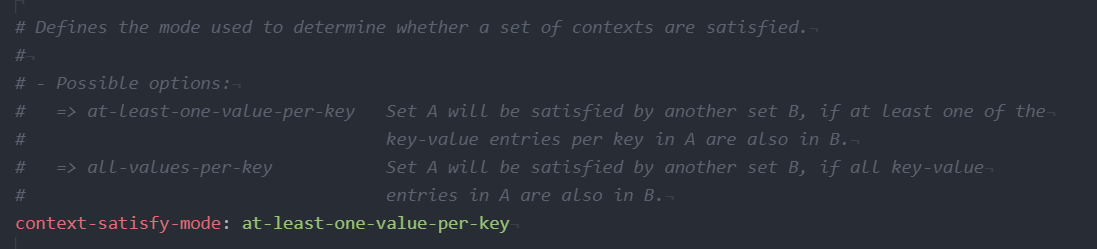
at-least-one-value-per-key
silk olive
Hey evident can u help me ?
 golden belfry
Hello, I am looking for some help. I want to get a previous version of sponge for 1.16.5. Specifically looking for version 5.4.52.
uneven nexus
meager fox
at-least-one-value-per-key
so what're you saying then, since there are 2 different contexts being used, it has to satisfy both? 
uneven nexus
silk olive
Hey evident can u help me ?
!ask
wanton stratusBOT
Please ask your question!
Please ask the question you have. Don't ask to ask, or ask to DM someone. There are people here to help you, but we need to know what to help you with, so please just ask the question you want to in as much detail as possible!
Or, try here first:
Why shouldn't I ask to ask?
silk olive
I have already ask my question bro :/
uneven nexus
golden belfry
Hello, I am looking for some help. I want to get a previous version of sponge fo...
why that specific version?
uneven nexus
silk olive
I have already ask my question bro :/
i didn't see it, ask again.
meager fox
If there are two keys, (two different context types) either one needs to be satisfied. If you use two different keys, such as world and server context, both need to be true. If, lets say you have 2 times server and one world, either one of server and world needs to be true
uneven nexus
interesting, i don't remember that being the case.
surely that's configurable though, right?
rose raven
By default, all contexts need to be satisfied from my testing, Evident.
golden belfry
uneven nexus
why that specific version?
I am trying to setup this permission/commands to a minecraft server
meager fox
!advanced
wanton stratusBOT
Discover some of the more advanced concepts of LuckPerms, such as permission calculation, shorthand permissions and more.
 LuckPerms wiki
silk olive
LuckPerms wiki
silk olive
Evident, I would like to assign a rank to a player when he passes over a pressure plate. I tried with a command block with /lp user @p parent add [rank] and its dont work ...
Zero say me : yes, i told you. theres some setting for vanilla selectors in the luckperms config
golden belfry
the video i am following uses that specific version, I tried the newer one but it does not work
uneven nexus
golden belfry
I am trying to setup this permission/commands to a minecraft server
Yeah, i understand that.
Why do you specifically want version 5.4.52
uneven nexus
silk olive
Zero say me : yes, i told you. theres some setting for vanilla selectors in the ...
okay, what do you need me for then
silk olive
 rose raven
silk olive
Zero say me : yes, i told you. theres some setting for vanilla selectors in the ...
rose raven
silk olive
Zero say me : yes, i told you. theres some setting for vanilla selectors in the ...
resolve-command-selectors: true in your config.
silk olive
How can i do that with luckperms and command block ?
silk olive
rose raven
`resolve-command-selectors: true` in your config.
yes i do this
uneven nexus
golden belfry
the video i am following uses that specific version, I tried the newer one but i...
"does not work" gives no useful information, what isn't working?
meager fox
 uneven nexus
oh, that's... the actual value. got it.
meager fox
yeah



 glacial onyx
Hi, I'm trying to install LuckPerms on a SpongeForge server with Pixelmon installed but I am unable to load the mod. The details are below:
Forge Version: 1.16.5-36.2.34
Pixelmon Version: 1.16.5-9.1.5
SpongeForge Version: 1.16.5-36.2.1-8.0.0-RC905

Any help would be greatly appreciated, thank you!
uneven nexus
!paste send the full log please
wanton stratusBOT
Please use pastebin!
Seeing a paste of the problem makes everything so much easier! Use https://pastes.dev/ for easy pasting!
For console errors:
Pastebin any relevant segments of the console log. If it's a startup error, this includes the entire startup log!
Other errors:
Pastebin the entire LuckPerms config file (passwords removed) as well as any other relevant files!
glacial onyx

A paste containing 392 lines of plaintext.
wanton stratusBOT
Using Sponge on 1.12.2?
LuckPerms no longer releases updates for API 7 of Sponge, which is what the 1.12.2 version of Sponge uses. However you can still download the last version of LuckPerms that supported API 7 from Ore.
Ore Download Page:
uneven nexus
ignore the 1.12.2 part
glacial onyx
Got it, I'll try it out. Thanks!
meager fox
So you lied to me then
uneven nexus
i may be wrong, i think this is api version 8.
ModLauncher 8.1.3+8.1.3+main-8.1.x.c94d18ec
rose raven
An angry Zero has appeared
uneven nexus
she appears from nowhere to call me out on my shit 
glacial onyx
The webpage does say API 7
 meager fox
suck it
uneven nexus
yeah, that build is, but i think 1.16.5 is saying it's 8
rose raven
meager fox
*suck it*
Language!!
rose raven
What?
 silk salmon
Hi guys! I'm trying to get roles in my server to work using luckperms, but I'm having some troubles getting the roles to actually seem to apply the changes... I can successfully give people the roles, but the colors or suffixes of the roles are not applied, for example - anyone know why this might be?
rose raven
You mean prefixes not showing? Where? Chat, Tab?
silk olive
rose raven
What?
my question ...
silk salmon
rose raven
You mean prefixes not showing? Where? Chat, Tab?
Both places!
rose raven
silk olive
my question ...
Ask again please.
rose raven
silk salmon
Both places!
Are you using a plugin for chat, and one for the tablist formatting? 
silk salmon
Hmm I've got the EssentialX and the EssentialXChat
and am trying to setup permissions with that as well, but that's been giving me some trouble as well xD
rose raven
But, have you got Vault installed as well?
silk salmon
Ooh I do not
silk salmon
Will install vault right now! So that should be the missing puzzle piece to making the roles work? :))
uneven nexus
silk olive
my question ...
if the command block isn't resolving the command selector, there's nothing LP can do about it. use an external plugin to solve this issue.
silk salmon
Thanks so much for the link!!
rose raven
silk salmon
Will install vault right now! So that should be the missing puzzle piece to maki...
Right.
 uneven nexus
!moss this isn't essx support :P
wanton stratusBOT
Essentials
Make sure you are using EssentialsX and Vault for prefixes. For any other issues with Essentials, you should seek support in either #general or the official EssentialsX support Discord.
EssentialsX Discord
silk salmon
ahh true true, apologies :))
uneven nexus
all good, i'll answer you when you go there anyways xd
silk salmon
xDD
glacial onyx
No luck with the older version of LuckPerms. The server starts but shows up as a vanilla server and my Minecraft will timeout and crash if I try to join the server
https://pastes.dev/MaepsCIHUm
A paste containing 930 lines of plaintext.
 deep viper
How can I see who and how many users are there on a specific group?
silk olive
uneven nexus
if the command block isn't resolving the command selector, there's nothing LP ca...
mh okay :/
glacial onyx
glacial onyx
No luck with the older version of LuckPerms. The server starts but shows up as a...
Relevant section in the log
 rose raven
/lp group <group> listmembers
deep viper
Thanks
rose raven
glacial onyx
Relevant section in the log
Use an updated version then.
glacial onyx
More recent version of LuckPerm brings me back to my original problem
silk olive
uneven nexus
if the command block isn't resolving the command selector, there's nothing LP ca...
Do u know a plugin in 1.18.2
uneven nexus
no
 modern bison
uneven nexus
no
modern bison
uneven nexus
no
why
 modern bison

silk olive
Xd nobody can help me , im dead
uneven nexus
it's not a LP problem.
uneven nexus
if you say so.
silk olive
Bruh
 sullen rock
Is there something wiser than granting myself * then adding deny permissions for shit I don't want
But not as time consuming as going thru and granting every single perm
meager fox
It may make more sense to not grant * and just set stuff to true
sullen rock
there's a lot of perms, and im doing a small smp server for friends
laziness is speaking here. i'd do it right if i was making smth public ofc
meager fox
Well, it is work. But you dont need to duplicate permissions, not even in different groups if you use inheritance. Thats one shortcut
sullen rock
ig
just a pain. esp when not all perms are listed, i.e. subpermisions in the 4th level
meager fox
Listed?
 sullen rock
yeah im having to do that for the user role
sullen rock
ty
wish i could autofill the default permissions
i.e. set one role as "Has all the op permissions", one as "Has all the default user permissions", then tweak it manually after it's populated the lists
meager fox
Then how would you define default permissions
sullen rock
i just mean like
they already have the permissions
i wish you could just bulk put them in the editor
all the perms they already have
then i could just set the ones to "false" i dont want them to have
meager fox
Wdym all the ones they already have
sullen rock
Plugin developers set permissions as "default" or "op" or "none"
Hence people can use commands they've not been specifically given access to
meager fox
Yea and?
sullen rock
I wish I could add all those "default" permissions, with one button, to the editor
Nothing changes
But it means I can just set the ones I don't want them to have to false
meager fox
I was gonna say thatd do nothing
meager fox
Yea theres no such thing tho and wont be
sullen rock
and that's sad.
meager fox
Imagine not having the editor suggestions either tho
meager fox
The website alone makes it better already. So yea, eh
meager fox
Plugin.ymls lol
sullen rock
i coulda sworn pex was the new kid on the block @ some point
but i was a lil baby so prob forgor
uneven nexus
sullen rock
But it means I can just set the ones I don't want them to have to false
can you not just use this https://github.com/LuckPerms/LuckPerms/blob/master/bukkit/src/main/resources/config.yml#L550, and then just use the permissions you want ?
i mean, they give perms for some reason but it's better than setting everything to false, and going from there.
uneven nexus
that's not what i mean.
sullen rock
I do
Just still means I have to seek out the ones I wanna set to false in each plugin's wiki
It'd be nice if I could tell it to actually add them to the editor for real, so I can just search through the list in the editor and remove the ones I don't want
i.e. if the editor had an "import bukkit default permissions" button
and an "import bukkit default OP permissions" button
which added them all to a group, so you can modify it however you want
also, it doesn't help for OP permissions
hence my dodgy "use * and remove the bad things"
 unborn breach
Wait I think I got this backwards
I don't want to execute a command for velocity luckperms for a player to have a permission only on a server
I want a group on a server to have access to proxy commands
 last zinc
for placeholders, i'm looking to ge the %luckperms_prefix% but strip the color codes... .
currently
%luckperms_prefix% = &7[&4OP&7]
is there an easy way to get something like
%luckperms_prefix_stripped% = [OP]
wanton stratusBOT
You can set prefixes, suffixes and other meta data in LuckPerms for players and groups. Note that LuckPerms does not manage chat. You need to use another plugin to show prefixes/suffixes in chat.
LuckPerms wiki
 olive tapir
why is luckperms not allowing me to use mod commands when the nodes are correct
 west compass
Hey double checking
/lp group <groupname> permission playervaults.amount.10 true
Would this set the permission to the group??
modern bison
permission set <permission>
west compass
I don't need the true or false at the end?
modern bison
i believe it will default to true if it's not provided
west compass
Sweat 🙂
uneven nexus
sweat?
modern bison
 uneven nexus
banger movie
west compass
modern bison
`permission set <permission>`
Is it possible to do
Permission edit <permission>
modern bison
what's your use case
rose raven
No. You can edit your perms via the editor.
west compass
uneven nexus
sweat? <:tHONK:633721285423267845>
It's English slang for awesome/great lol
uneven nexus
no, sweat is perspiration, the stuff you do when exercising. sweet is what you're looking for :P
 devout marsh
bit confused with the bulk update syntaxt. How would I do it where i add a constraint for all perms that do not have a constraint?
Ie, I just merge imported data from server B into a database configured for server A. all of server A perms have the right constraint set to only be on server A. Now all of server B perms have no constraints, and I want to add the constraint to all non constraint perms to only be on server A
would it be like...
lp bulkupdate all update "server != serverB" "server == serverA" ?
unborn breach
unborn breach
Wait I think I got this backwards
bump help
unborn breach
unborn breach
bump help
is this even possible
 hasty tree
we've told you it's possible, use the world context
unborn breach
I said I don't want to execute a proxy (velocity) luckperms command to set the permission for the group/user to be able to use the proxy command, I want to set it on the actual server and I want the proxy to detect that the player has the permission in that server's luckperms, and that world context doesn't seem to mean the same thing.
hasty tree
you are over complicating this lol
servers have no concept of what a proxy is, what commands they can run or what permissions they use
you have to set this at the proxy level
however you set the group for this server, you should also add the world=<server> context
and add the permission you're trying to add to that group
unborn breach
hasty tree
servers have no concept of what a proxy is, what commands they can run or what p...
right but I thought the luckperms plugins would communicate these permissions
hasty tree
if you are using a single database to store all permissions, then yes
unborn breach
via pluginmessagingchannel
 foggy quartz
how do i give someone a group without needing to go into /lp editor
hasty tree
!commands
wanton stratusBOT
Find all of the available LuckPerms commands on the wiki.
Read more
General commands
User commands
Group commands
Permission commands
Parent commands
Meta commands
Track commands
Log commands
LuckPerms wiki
hasty tree
see parent commands
 vale moth
i need help
i wanna make a prisoner rank that can do nothing with no perms but still /hub or anything works how can i fix that??
 toxic wagon
Then just only give them permissions for what you're wanting to have.
vale moth
just nothing
vale moth
toxic wagon
Then just only give them permissions for what you're wanting to have.
so if i give them 1 premission then they get nothing for the rest?
i want them to have no premission to nothing
toxic wagon
If you give them 1 permission, they will have 1 permission
Unless there is a plugin that provides commands or features without permissions, or with permissions by default. But generally. They only get what you give them
vale moth
toxic wagon
Unless there is a plugin that provides commands or features without permissions,...
yk any plugins that do this??
toxic wagon
Lots.
toxic wagon
!moss Why not ask them
wanton stratusBOT
Essentials
Make sure you are using EssentialsX and Vault for prefixes. For any other issues with Essentials, you should seek support in either #general or the official EssentialsX support Discord.
EssentialsX Discord
vale moth
alr ty
 fathom pine
Is their a way to change max connections in mysql
I forgot how to do it LP needs more connections
vale moth
@toxic wagon srry for ping but how do i turn off that plugins provide premissions
wanton stratusBOT
Hey jobro_07! Please don't tag helpful/staff members directly.
vale moth
wanton stratus
Hey jobro_07! Please don't tag helpful/staff members directly.
alr alr
i wont do it again
toxic wagon
vale moth
<@267605008936206346> srry for ping but how do i turn off that plugins provide p...
You can set permissions to false if you don't want players getting it.
vale moth
toxic wagon
You can set permissions to false if you don't want players getting it.
can i have the command??
or a tut on yt or smth
toxic wagon
!command under permission commands
wanton stratusBOT
Find all of the available LuckPerms commands on the wiki.
Read more
General commands
User commands
Group commands
Permission commands
Parent commands
Meta commands
Track commands
Log commands
LuckPerms wiki
toxic wagon
It's literally under the permission commands section
vale moth
Parent commands ??
toxic wagon
permission commands
toxic wagon

LuckPerms - A permissions plugin for Minecraft servers.
LuckPerms is a permissions plugin for Minecraft servers. It allows server admins to control what features players can use by creating groups and assigning permissions.
vale moth
alr ty so much
vale moth
toxic wagon
https://luckperms.net/wiki/Permission-Commands#lp-usergroup-usergroup-permission...
it wont work i setted exit via tp on the region of jail i truned exitviatp i turned that off but it just wont work /hub keep tping me to the hub with /lp group prisoners permission unset *
omega can i dm u rq cuz i gtg to school and i need ur help rq
 keen prawn
There's a way to keep adding temp parents, increasing the amount of time?
For example, run /lp user <user> parent addtemp donor 1d , (the user get 1 day in donor) and later I run the command: /lp user rocketiz parent addtemp donor 15d, it jumps straight to 16 days?
Rn, I'm using it to add donor ranks, and they don't add the amount if the player already have the rank
 rose raven
Use /lp user rocketiz parent addtemp donor 15d accumulate to add duration.
keen prawn
rose raven
Use `/lp user rocketiz parent addtemp donor 15d accumulate` to add duration.
thank u Dark 
 iron seal
i want to allow players to tp themselves using citizens2 plugin but, I tried using lp editor to allow players to use commands but then they can literally /op themselves, what do i do?
rose raven
How did you manage to grant /op to players? How does your editor look like? What permissions have you granted? Have you checked Citizens' documentation and/or asked their support on how to execute the tp command when interacting with their NPCs?
iron seal
No like, when I allowed players to use minecraft.commands, they can just op themselves even without being opped
iron seal
rose raven
How did you manage to grant `/op` to players? How does your editor look like? Wh...
i havent asked their support yet
rose raven
What minecraft.commands have you assigned? Is minecraft.command.op one of them? 
Run this for me and send a screenshot of the output.
/lp group default permission check minecraft.command.op
iron seal
i didnt add that
i just allowed
minecraft.command
i couldnt add any other specifications
rose raven
There's no actual minecraft.command permission node. It needs to be followed by the actual minecraft command.
minecraft.command.<command> - example minecraft.command.ban
!editorsafety Can you share your editor link please? I'm really curious.
wanton stratusBOT
It is safe to send an editor link in public.
Any changes made in the editor have to be applied using the /lp applyedits command - impossible unless the person with the link is also connected to the server and with the required in-game permissions to use LuckPerms commands. It's effectively just as safe to share an editor link as it would be to share a screenshot of your permissions or a pastebin of a configuration file. The editor doesn't contain any sensitive data (except perhaps player names).
More Information:
Concerns about the proprietary nature of your permissions setup?
Please, don't be. We're here to help, not steal your permissions setup. Additionally, permissions can be tested by players simply joining your server and seeing what they can do.
iron seal
LuckPerms - A permissions plugin for Minecraft servers.
LuckPerms is a permissions plugin for Minecraft servers. It allows server admins to control what features players can use by creating groups and assigning permissions.
rose raven
There's no minecraft.command permission assigned to the default group. How are your players actually accessing /op?
Are they already operators? Are you using any other plugins that could be causing this by any chance?
rose raven
No such permission to be found on the editor you've sent whatsoever? How are players accessing /op? Can we get a plugins list? (/pl and screenshot)
iron seal

but at the same time
i want the npcs on citizens2 to be able to tp the player and the player not being able to tp themselves anywhere
if not that will be broken
rose raven
Last but not least, can you try to use /lp verbose command <user> /op on one of your players that are non op and report back with a screenshot?
You should be using /npc cmd add -o tp on your NPC's command i'm pretty sure. However that's not LuckPerms related.
rose raven
I know it works. But what about /op. I'm waiting for a screenshot.
You mentioned at the start that your players could use /op.
 rose raven
minecraft.command does not deny access to false.
iron seal
just now
rose raven
But, either way, your players shouldn't be able to op themselves.
wanton stratusBOT
Hey Cookie_! Please don't tag helpful/staff members directly.
rose raven
You're welcome. 
 dapper delta
is there a way to change all the perms that was set to server=gamemode 1 be change to server=gamemode2
rose raven
!bulk
wanton stratusBOT
Quickly update a large amount of user and group permissions by using the bulkupdate command.
Read more
LuckPerms wiki
 strange raptor
hi i need help when i type prefix.2.&7[VIP] in vip rank it does not show in game that he is a vip????
rose raven
Are you using a chat plugin?
strange raptor
what is chat plugin?
rose raven
LuckPerms does not format the chat on its own. You need something to format your chat and display your prefixes, suffixes.
!chat Second link has some suggestions. You may want to have a look.
wanton stratusBOT
LuckPerms does not perform any chat/tablist formatting of its own!
LuckPerms only acts as the source for prefixes / suffixes, it doesn't actually apply them. You need an appropriately configured chat/tablist formatting plugin for them to be displayed. If the values appear correctly when you run /lp user <user> info, LuckPerms is doing its job!
FAQ answer: Prefix isn't showing?
List of chat/tablist formatting plugins that work with LuckPerms
strange raptor
rose raven
LuckPerms does not format the chat on its own. You need something to format your...
Ok i understand now thank you
 bitter anchor
[<t:1687338866:T> WARN] luckperms-hikari - Failed to validate connection me.lucko.luckperms.lib.mysql.cj.jdbc.ConnectionImpl@752de1be (No operations allowed after connection closed.). Possibly consider using a shorter maxLifetime value.
[<t:1687338866:T> WARN] java.sql.SQLTransientConnectionException: luckperms-hikari - Connection is not available, request timed out after 5031ms.
[<t:1687338866:T> WARN] at me.lucko.luckperms.lib.hikari.pool.HikariPool.createTimeoutException(HikariPool.java:696)
[<t:1687338866:T> WARN] at me.lucko.luckperms.lib.hikari.pool.HikariPool.getConnection(HikariPool.java:197)
[<t:1687338866:T> WARN] at me.lucko.luckperms.lib.hikari.pool.HikariPool.getConnection(HikariPool.java:162)
[<t:1687338866:T> WARN] at me.lucko.luckperms.lib.hikari.HikariDataSource.getConnection(HikariDataSource.java:100)
[<t:1687338866:T> WARN] at me.lucko.luckperms.common.storage.implementation.sql.connection.hikari.HikariConnectionFactory.getConnection(HikariConnectionFactory.java:175)
[<t:1687338866:T> WARN] at me.lucko.luckperms.common.messaging.sql.SqlMessenger.getConnection(SqlMessenger.java:84)
[<t:1687338866:T> WARN] at me.lucko.luckperms.common.messaging.sql.AbstractSqlMessenger.pollMessages(AbstractSqlMessenger.java:114)
[<t:1687338866:T> WARN] at java.base/java.util.concurrent.ForkJoinTask$RunnableExecuteAction.exec(Unknown Source)
[<t:1687338866:T> WARN] at java.base/java.util.concurrent.ForkJoinTask.doExec(Unknown Source)
[<t:1687338866:T> WARN] at java.base/java.util.concurrent.ForkJoinPool$WorkQueue.topLevelExec(Unknown Source)
[<t:1687338866:T> WARN] at java.base/java.util.concurrent.ForkJoinPool.scan(Unknown Source)
[<t:1687338866:T> WARN] at java.base/java.util.concurrent.ForkJoinPool.runWorker(Unknown Source)
[<t:1687338866:T> WARN] at java.base/java.util.concurrent.ForkJoinWorkerThread.run(Unknown Source)
[<t:1687338866:T> WARN] Caused by: java.sql.SQLNonTransientConnectionException: No operations allowed after connection closed.
bitter anchor
bitter anchor
[<t:1687338866:T> WARN] luckperms-hikari - Failed to validate connection me.luck...
Somehow there was something defective. But the database works fine. This error simply occurs spontaneously. PaperMc 1.20
rose raven
Possibly consider using a shorter maxLifetime value.
bitter anchor
I haven't changed anything in the settings except to insert my sql data
rose raven
Ok. Reduce your maximum-lifetime: value in your config and see if that fixes it.
bitter anchor
Ok thanks
 topaz ether
Hey how do i remove all users from the luckperms plugin that have groups without having to delete groups?
rose raven
topaz ether
Hey how do i remove all users from the luckperms plugin that have groups without...
!bulk /lp bulkupdate users delete
wanton stratusBOT
Quickly update a large amount of user and group permissions by using the bulkupdate command.
Read more
LuckPerms wiki
strange raptor
hi i have a problem when i type essentials i cant find any command?
like essentials.fly
rose raven
essentials.fly is not a command. What is it that you cannot find and where? What are you trying to do?
topaz ether
nvm figured it out
strange raptor
i typed in minecraft chat /lp editor and then opened the link and started customazing ranks and then i went in (add permission) and when i typed essensials i could not find any permission
 quick river
I'm scripting the addition of a few permissions to players when they vote using CommandHelper. It unfortunately adds a ton of text to console and admin's chat logs. Is there a way to add permissions silently?
rose raven
strange raptor
i typed in minecraft chat /lp editor and then opened the link and started custom...
Don't fully rely on the permission showing up, they're just suggestions. You can manually type out your permission node.
rose raven
quick river
I'm scripting the addition of a few permissions to players when they vote using ...
/lp log notify off in-game (per player), or check your config to fully disable broadcasts, or use regex filters to block certain notifications.
quick river
I was really hoping to only stop the notification for those particular commands
something like -s at the end
quick river
Thanks
rose raven
Using a plugin that manages the tablist format. LuckPerms does not touch the tab.
strange raptor
rose raven
Don't fully rely on the permission showing up, they're just suggestions. You can...
I typed essentials.fly manually and then i went to the server and typed /fly and it didn't work
rose raven
strange raptor
I typed essentials.fly manually and then i went to the server and typed /fly and...
/lp verbose command <user> fly and send a screenshot of the output here. "Didn't work' isn't very descriptive. What message did you get after using the command?
strange raptor
 rose raven
Did you just copy paste the command i gave you?
You're meant to replace <user> with the user you want to force the command on.
strange raptor
yep i replaceed <user> with my name
rose raven
/lp verbose command k12 fly will force online player k12 to run the /fly command and return all permissions checked. It will help us investigate for missing/undefined permissions.
Send me the exact command you typed, or try to use a proper format.
strange raptor
oh i didnt type fly at the end
rose raven
Please do, and report back with a screenshot showing the output.
 sullen basin
rose raven
Using a plugin that manages the tablist format. LuckPerms does not touch the tab...
sullen basin
rose raven
Using a plugin that manages the tablist format. LuckPerms does not touch the tab...
which plugin?
rose raven
sullen basin
which plugin?
One that formats the tablist. Turn off pings on replies please, no need to ping.
!tab Second link below should have some suggestions.
wanton stratusBOT
LuckPerms does not perform any chat/tablist formatting of its own!
LuckPerms only acts as the source for prefixes / suffixes, it doesn't actually apply them. You need an appropriately configured chat/tablist formatting plugin for them to be displayed. If the values appear correctly when you run /lp user <user> info, LuckPerms is doing its job!
FAQ answer: Prefix isn't showing?
List of chat/tablist formatting plugins that work with LuckPerms
strange raptor
 rose raven
strange raptor
rose raven
strange raptor
Can i see your plugins list? 😄
strange raptor
of course
 strange raptor
 rose raven
sullen basin
with
rose raven
sullen basin
with
No, this is LuckPerms support. Not NametagEdit support. You should consult their documentation and/or reach out to their support.
The permission node is essentials.fly, not essential.fly.
Still waiting for the plugins list screenshot. 😅
 rose raven
But, you don't have Essentials installed? ⁉️
strange raptor
how can i download it??
rose raven
strange raptor
ok i will install it and try it
rose raven
Well, sure. If you want the permission we entered to make sense and work, you need to have installed the respective plugin.
strange raptor
can you send the (respective plugin)
rose raven
strange raptor
can you send the (respective plugin)
Pretty sure i just did. The official downloads page is few messages above. Install the latest EssentialsX jar and drop that bad boy into your plugins folder. Easy enough, right? 😅
strange raptor
oh sorry ok my english is not that good i download it and put it in plugin folder
and it worked
thanks very much sorry i took a lot from your time
rose raven
No worries.
foggy quartz
[LP] default had prefix '[Member] ' set at a priority of 1 in context global. prefix isnt showing in chat
wanton stratusBOT
LuckPerms does not perform any chat/tablist formatting of its own!
LuckPerms only acts as the source for prefixes / suffixes, it doesn't actually apply them. You need an appropriately configured chat/tablist formatting plugin for them to be displayed. If the values appear correctly when you run /lp user <user> info, LuckPerms is doing its job!
FAQ answer: Prefix isn't showing?
List of chat/tablist formatting plugins that work with LuckPerms
foggy quartz
ok
foggy quartz
Is there a way to allow for a user to be able to set certain groups. i.e. from the default rank they can set themselves to be team1 or team2, but they can't set themselves as teamowner or serverowner.
rose raven
foggy quartz
Is there a way to allow for a user to be able to set certain groups. i.e. from t...
!argbased
wanton stratusBOT
Fine tune exactly what users with permission to use LuckPerms can do.
LuckPerms wiki
 spark dock
any way to remove a specific permission from all user ?
rose raven
!bulk
wanton stratusBOT
Quickly update a large amount of user and group permissions by using the bulkupdate command.
Read more
LuckPerms wiki
rose raven
Right.
spark dock
thanks 
rose raven
Feel free to take a quick backup using /lp export if you feel uncertain.
There's no undo button when performing bulk edits.
I've learned this the hard way.
spark dock
rose raven
Feel free to take a quick backup using `/lp export` if you feel uncertain.
does this apply to database as well ?
rose raven
It exports your database to a compressed file inside your LuckPerms folder.
Easy to restore back using /lp import.
 hot sand
Using velocity: Couldn't pass ProxyInitializeEvent to luckperms
java.lang.NoClassDefFoundError: me/lucko/luckperms/lib/caffeine/cache/Caffeine
full error: https://pastebin.com/AEFYR1mA
Pastebin
Pastebin.com is the number one paste tool since 2002. Pastebin is a website where you can store text online for a set period of time.
rose raven
!libs
wanton stratusBOT
LuckPerms dependencies
LuckPerms requires several libraries in order to operate. If you're getting a startup error such as NoClassDefFoundError, ClassNotFoundException or "Unable to load dependency...", stop your server, delete the /plugins/LuckPerms/libs/ directory and start it up again.
hot sand
ah... it was so simple
 oblique hamlet
Good afternoon, my friend made a server build and gave it to me and made a binding to luckperms by MariyBD, I have this file, how can I make an h2 database from it
 oblique hamlet
Good afternoon, my friend made a server build and gave it to me and made a bindi...
oblique hamlet
oblique hamlet
Good afternoon, my friend made a server build and gave it to me and made a bindi...
pls help
 hearty dagger
oblique hamlet
pls help
hearty dagger
oblique hamlet
pls help
if you have your configuration set to H2 you can import the MariaDB file with /lp import
foggy quartz
how do i change the prefix of LP from [LP]
modern bison
the messages are not editable
oblique hamlet
hearty dagger
if you have your configuration set to H2 you can import the MariaDB file with /l...
thanks bro
foggy quartz
modern bison
the messages are not editable
why
 sterile dragon
Is there a way to give group to nearest player with commandblock?
foggy quartz
how do i get the players prefix and put it into a leaderboard
ex &b&lRank: &7PREFIX HERE
rose raven
foggy quartz
how do i get the players prefix and put it into a leaderboard
!placeholders
wanton stratusBOT
Display data such as user prefixes and groups from LuckPerms in other plugins.
Read more
LuckPerms wiki
 sharp marlin
nocturne chasm
sharp marlin
nocturne chasm
!bedrock
wanton stratusBOT
Using Geyser?
If you're having issues with permissions for bedrock players, or it's telling you that a bedrock player's name is invalid, try setting allow-invalid-usernames to true in the LuckPerms config.
 crimson sky
Hi! I'm on Fabric 1.19.3 and using version 5.4.71. However, the latest version that is available to download on curseforge and modrinth is 5.4.66. Why is that? Is .71 somehow unstable or something like that?
 oak wave
Is there a way to disable signs editing on a 1.20 server?
nocturne chasm
not every release gets pushed to modrinth & curseforge
nocturne chasm
oak wave
Is there a way to disable signs editing on a 1.20 server?
with a plugin, probably
oak wave
do you know any?
nocturne chasm
no
foggy quartz
anyone know how to make a custom welcome message but with your prefix?
Broadcast "&b[&c+&b] %luckperms_prefix%"
please help me
 warped kestrel
Is there a event for rank expiring while user is offline?
warped kestrel
That means the event is fired if the player joins
 zenith carbon
How can I give a range temporarily?
 halcyon musk
!commands parent > addtemp
wanton stratusBOT
Find all of the available LuckPerms commands on the wiki.
Read more
General commands
User commands
Group commands
Permission commands
Parent commands
Meta commands
Track commands
Log commands
LuckPerms wiki
rose raven
!ask
wanton stratusBOT
Please ask your question!
Please ask the question you have. Don't ask to ask, or ask to DM someone. There are people here to help you, but we need to know what to help you with, so please just ask the question you want to in as much detail as possible!
Or, try here first:
Why shouldn't I ask to ask?
 hollow cloud
!ask what is this
wanton stratusBOT
Please ask your question!
Please ask the question you have. Don't ask to ask, or ask to DM someone. There are people here to help you, but we need to know what to help you with, so please just ask the question you want to in as much detail as possible!
Or, try here first:
Why shouldn't I ask to ask?
 rose raven
You won't every receive "quick help" if you don't say anything.
Have you checked your logs?
hollow cloud
 wanton stratusBOT
Please use pastebin!
Seeing a paste of the problem makes everything so much easier! Use https://pastes.dev/ for easy pasting!
For console errors:
Pastebin any relevant segments of the console log. If it's a startup error, this includes the entire startup log!
Other errors:
Pastebin the entire LuckPerms config file (passwords removed) as well as any other relevant files!
zenith carbon
halcyon musk
!commands parent > addtemp
How do I have to set the time to be 2 hours?
wanton stratusBOT
Please use pastebin!
Seeing a paste of the problem makes everything so much easier! Use https://pastes.dev/ for easy pasting!
For console errors:
Pastebin any relevant segments of the console log. If it's a startup error, this includes the entire startup log!
Other errors:
Pastebin the entire LuckPerms config file (passwords removed) as well as any other relevant files!
hollow cloud
A paste containing 25 lines of plaintext.
rose raven
zenith carbon
How do I have to set the time to be 2 hours?
Use the 2d argument as your duration.
 restive stag
hollow cloud
https://pastes.dev/nikJTJaesP
restive stag
hollow cloud
https://pastes.dev/nikJTJaesP
This is just a warn does a function doenst work?
hollow cloud
nobody can join the server
rose raven
Paste your full logs please. (your latest.log)
restive stag
Did you found it?
hollow cloud
rose raven
Paste your full logs please. (your latest.log)
A paste containing 11 lines of plaintext.
nocturne chasm
that's still not the full log
but, use paper (https://papermc.io/downloads/paper)

PaperMC
Download Paper, our Minecraft server software offering unrivaled performance and stability.
modern bison
 hollow cloud
WELL USE PAPER i'm not that professional and i dont even know what that is
nocturne chasm

 rose tartan
Hello, I need to know.. If I have server on 1 node for example.. Server hosting in Miami and 2nd hosting in Dubai.. Can I connect these 2 together? If yes is somewhere good tutorial?
uneven nexus
!tut
wanton stratusBOT
YouTube Tutorial
If you would like a video tutorial for setting up LuckPerms, try:
https://www.youtube.com/watch?v=l4anE2wOLdc
If you run a BungeeCord network, learn how to correctly setup LuckPerms on all server instances (including Bungee).
Also read:
Syncing data between servers
LuckPerms wiki
uneven nexus
both of these are good for setting up LuckPerms, and i believe that the video includes external databases.
Keep in mind, you will have extremely severe latency issues for one of those servers, and may result in permissions being loaded slow.
rose tartan
Okay, good thank you
 upper kernel
Does anyone know a plugin which adds support for vault contexts?
Or playerpoints plugin, contexts?
I'm making a cosmetic menu where I want players with a specific balance/points to activate cosmetics. I don't want players to buy the cosmetic with their balance, I want players to gain access by having the set amount.
 sour minnow
Hey guys I got LP set up and working great but it is still showing all the commands to my players and then if they try to use them it blocks it. Can I change it where only the commands they have permission to use show up in the chat?
rose tartan
uneven nexus
Keep in mind, you will have extremely severe latency issues for one of those ser...
You mean the group asign ot when player type some command it wiľ take time ?
rose tartan
sour minnow
Hey guys I got LP set up and working great but it is still showing all the comma...
I think youll need other plugin on that
rose raven
LuckPerms does not block commands nor does it filter tab completion of other plugins.
rose tartan
Can you say me how he meant it? DarkLaw?
hollow cloud
How do i give someone a rank?
rose raven
Use a tab complete filter plugin such as:
rose raven
hollow cloud
How do i give someone a rank?
!usage
wanton stratusBOT
Here's a guide to help users understand and use LuckPerms for the first time.
Read more
LuckPerms wiki
sour minnow
Awesome Ill take a look thanks
rose tartan
Can i know what is the big latency means? Is the latency of asigning groups ? Or command functions or?
halcyon musk
rose tartan
Can i know what is the big latency means? Is the latency of asigning groups ? Or...
and may result in permissions being loaded slow.
 hot trout
hey, i dont know if this is an essentials or a luckperms problem, but default players in my server no longer have a delay when tpa'ing to each other
rose raven
Try using something like /lp group default permission check essentials.teleport.timer.bypass.
hot trout
 rose raven
Add the . in between. Forgot to add it initially.
It's essentials.teleport.timer.bypass.
hot trout
 rose raven
What command are your players using for teleportation? Are you sure EssentialsX handling the command?
!verbose
wanton stratusBOT
LuckPerms provides a verbose command to help you find out what permissions a command/plugin is checking.
Read more
LuckPerms wiki
hot trout
rose raven
What command are your players using for teleportation? Are you sure EssentialsX ...
/tpa it's a command from essentials i'm pretty sure
rose raven
/lp verbose record <user> & essentials where <user> is an online player in your server that has the default group. The command will start recording all permissions that satisfy the filter, essentially (see what i did there), narrowing it down to essentials permissions only. Once your player is done using /tpa, type /lp verbose paste to receive a verbose link with the permissions recorded.
hot trout
LuckPerms - A permissions plugin for Minecraft servers.
LuckPerms is a permissions plugin for Minecraft servers. It allows server admins to control what features players can use by creating groups and assigning permissions.
rose raven
Have you set teleportation delay cooldowns in your Essentials config?
rose raven
Can't find any permission nodes related to the tp cooldown/delay in your verbose link.
Mind if i dig through your editor link?
hot trout
LuckPerms - A permissions plugin for Minecraft servers.
LuckPerms is a permissions plugin for Minecraft servers. It allows server admins to control what features players can use by creating groups and assigning permissions.
rose raven
Based on the link provided, only players that inherit from the rubyminer group should be exempt from teleportation delay, not default group players.

Feels like it's not LuckPerms related at this point, but more towards the Essentials side.
!moss We can move to the Essentials server if you don't mind.
wanton stratusBOT
Essentials
Make sure you are using EssentialsX and Vault for prefixes. For any other issues with Essentials, you should seek support in either #general or the official EssentialsX support Discord.
EssentialsX Discord
hot trout
alright, thank you for your time
hollow cloud
guys how to change that, nickname has the saame color as prefix
 rose raven
Reset your format adding &r at the end of your prefix, or modify your chat format.
 carmine cypress
is it possible to evaluate placeholders in the context section? eg perm is only true while %placeholder% is > 10?
 gritty pond

 rose raven
!tab
wanton stratusBOT
LuckPerms does not perform any chat/tablist formatting of its own!
LuckPerms only acts as the source for prefixes / suffixes, it doesn't actually apply them. You need an appropriately configured chat/tablist formatting plugin for them to be displayed. If the values appear correctly when you run /lp user <user> info, LuckPerms is doing its job!
FAQ answer: Prefix isn't showing?
List of chat/tablist formatting plugins that work with LuckPerms
rose raven
What's not working?
 leaden sapphire
Any idea what would be causing these lag spikes? https://spark.lucko.me/429VRUsW4M

spark is a performance profiler for Minecraft clients, servers, and proxies.
Seems to be coming from LuckPerms, but unsure if that's just from something else.
 dense musk
Impossible to set the plugin in fr_FR. Can someone help me? I followed the instructions in the documentation, but I just can't manage to do it 😦
 ebon wedge
hollow cloud
guys how to change that, nickname has the saame color as prefix
ebon wedge
hollow cloud
guys how to change that, nickname has the saame color as prefix
&6[Gracz] &f
 sour kestrel
When I updated to 1.20.1 all permissions been deleted. Is there a way for me to keep all permission to the new update
rose raven
Updating your jar wouldn't do that. Have you checked your logs? You shouldn't be losing any data through updates.
rose raven
 foggy spire
How to make rank items like if u right click it u will get the rank
foggy spire
How to make rank items like if u right click it u will get the rank
Right click what, where? Care to explain more?
LuckPerms does not add anything on its own by right clicking. You would require an additional plugin to trigger the LuckPerms command.
sour kestrel
rose raven
Updating your jar wouldn't do that. Have you checked your logs? You shouldn't be...
I just restored my backup and lost the logs
rose raven
What do the logs have to do with LuckPerms data? What storage method are you using? Have you tried to import your database using /lp export?
 native crater
Hello, I connected my lp to the common database mariadb in config lpv specified server: velocity and in config lp bukkit specified server lobby, but in the end I do in the settings lpv right and assign it a context server: velocity, because the plugin is on Velocity, but it does not work for some reason...


lpv config

 flat parcel
Was that verbose taken on the backend server or the proxy?
native crater
flat parcel
Was that verbose taken on the backend server or the proxy?
what exactly did the command do?
or logging is enabled
flat parcel
All verbose does is print out permission checks as they are made, and their result
I'm asking if you ran it on the backend server or on the proxy
 flat parcel
oh I'm dumb, forgot to check the other obvious problem. In the editor screenshot, you haven't saved. Have you saved from the editor?
 flat parcel
Could I get the output of /lpv user <affected user> info when you expect that permission to work please
native crater
new link
 native crater
flat parcel
Could I get the output of `/lpv user <affected user> info` when you expect that ...
native crater
flat parcel
Could I get the output of `/lpv user <affected user> info` when you expect that ...
proxy or backend server?
flat parcel
Proxy, since as I understand it this permission check is being fired on the proxy, correct?
native crater
[08:15:26] [luckperms-command-executor/INFO]: §7[§b§lL§3§lP§7]§r §b§l>§b Информация о пользователе: §fi_ectb_grut
[08:15:26] [luckperms-command-executor/INFO]: §7[§b§lL§3§lP§7]§r §f- §3UUID: §f81bf9b86-d705-397f-8e14-13fb341b7879
[08:15:26] [luckperms-command-executor/INFO]: §7[§b§lL§3§lP§7]§r §7    (тип: §8офлайн§7)
[08:15:26] [luckperms-command-executor/INFO]: §7[§b§lL§3§lP§7]§r §f- §3Статус: §aОнлайн
[08:15:26] [luckperms-command-executor/INFO]: §7[§b§lL§3§lP§7]§r §f- §aРодительские группы:
[08:15:26] [luckperms-command-executor/INFO]: §7[§b§lL§3§lP§7]§r §3    >§r §fdefault§r
[08:15:26] [luckperms-command-executor/INFO]: §7[§b§lL§3§lP§7]§r §f-§r §aКонтекстные данные: §7(режим: §2активный игрок§7)
[08:15:26] [luckperms-command-executor/INFO]: §7[§b§lL§3§lP§7]§r §3    Контексты: §8(§7server=§fvelocity§8)§3 §8(§7world=§flobby§8)
[08:15:26] [luckperms-command-executor/INFO]: §7[§b§lL§3§lP§7]§r §3    Префикс: §bнет
[08:15:26] [luckperms-command-executor/INFO]: §7[§b§lL§3§lP§7]§r §3    Суффикс: §bнет
[08:15:26] [luckperms-command-executor/INFO]: §7[§b§lL§3§lP§7]§r §3    Основная группа: §fdefault
[08:15:26] [luckperms-command-executor/INFO]: §7[§b§lL§3§lP§7]§r §3    Мета: §8(§7primarygroup=§fdefault§8)
[08:15:26] [LuckPerms - Task Executor #25/INFO]: §7[§b§lL§3§lP§7]§r §3VB§r §3§l>§r §ai_ectb_grut§7 - §bmeta: §aprefix§7 - null
[08:15:26] [LuckPerms - Task Executor #25/INFO]: §7[§b§lL§3§lP§7]§r §3VB§r §3§l>§r §ai_ectb_grut§7 - §bmeta: §asuffix§7 - null
[08:15:26] [LuckPerms - Task Executor #25/INFO]: §7[§b§lL§3§lP§7]§r §3VB§r §3§l>§r §ai_ectb_grut§7 - §bmeta: §aprimarygroup§7 - default
yes, its proxy plugin
By the way, I tried putting server: global in lpv config, and in lpv editor do not add anything to the contexts, ie make them global, but my resolution still does not work(
lpbukkit = lobby

lpv = velocity

identical databases
Ping me after the answer, please. @flat parcel
wanton stratusBOT
Hey i_ectb_grut! Please don't tag helpful/staff members directly.
native crater
help me please 😦
 modest kayak
what should i do for luckperms if i have a waterfall group servers?
i asked but i lost the url that bot gave to me d:
so i have to ask again
meager fox
Can you not just search for your own past messages
 eager swallow
How can I set a group that only can give specify group to others I have tried luckperms.user.parent.set.moderator and I have enabled argument based commend permisions but it still does not work
meager fox
You should use verbose to get an exact permission report and see what is missing
!verbose
wanton stratusBOT
LuckPerms provides a verbose command to help you find out what permissions a command/plugin is checking.
Read more
LuckPerms wiki
meager fox
I suggest "record" rather than on/off, which is super spammy
modest kayak
meager fox
Can you not just search for your own past messages
i am a new for discord d:
how can i search my past message...?
meager fox
https://i.imgur.com/14JjcaB.png top right in discord is always a search bar

search from: and add your name and tag
modest kayak
thx i am on trying
maybe it was too old...I reset my computer recently d:

do you have the relative URL about a group server..?
wanton stratusBOT
If you run a BungeeCord network, learn how to correctly setup LuckPerms on all server instances (including Bungee).
Also read:
Syncing data between servers
LuckPerms wiki
modest kayak
Yes it is!
thank you!
 crisp mirage
how to disable/hide this comand
 meager fox
Get a plugin that hides commands on the proxy
native crater
native crater
yes, its proxy plugin
@meager fox I remember you helped me with this in general can you help me now? I apologize for the ping if anything.
meager fox
I didn't read any of your previous conversation with _11 so eh
native crater
meager fox
I didn't read any of your previous conversation with _11 so eh
not much there)
native crater
native crater
Hello, I connected my lp to the common database mariadb in config lpv specified ...
it's a start
meager fox
Have you tried not adding any context?
If you only have 1 proxy anyway, and no-context defaults back to 'global', then why bother with context to begin with
native crater
meager fox
Have you tried not adding any context?
yes
But it still didn't help
I even tried putting server:global in all luckperms configs (velocity,bukkit)
Even that didn't help.
meager fox
Does the affected user you tested this with have their groups in a server context by chance
 meager fox
Do not trust that
native crater
all permissions
 meager fox
Always look ingame, never fiddle inside the database
native crater
I'm just too lazy to turn on the server to go into the lpv editor)
meager fox
I wanna see an editor link anyway
native crater
But if you need it, I can turn it on.
meager fox
A fresh one, not from 6 hours ago ;)
We may need to run verbose anyway, so thatd be good
native crater
meager fox
I wanna see an editor link anyway
Do you need a link or a screenshot?
meager fox
When is that permission triggered, do you know? Is it on join? Or is it a command permission?
A link please
native crater
meager fox
When is that permission triggered, do you know? Is it on join? Or is it a comman...
command.
native crater
meager fox
A link please
I'll send you a personal message now run the server
meager fox
Okay
In case anyone cares to know, issue solved, was https://i.imgur.com/YFsW5Nq.png (left original, right user) ^^
 eager swallow
How can I use verbose to find permission for lp user parent set moderator ?
meager fox
As console: /lp verbose record username
The other player now has to try to run that command - yes it will fail again, but we want that.
As console: /lp verbose paste
Inside the given link you will see all permission checks made from the moment you enabled verbose until you did the paste command. You will have to apply some logic in reading the report.
modest kayak
in this step, this step says
if i have a multiple server, i am supposed to do something.
I want to know is waterfall servers a multiple servers?
I have fabric server and spigot server within the waterfall network.
And there all in one host server, which is my computer.
 native crater
meager fox
As console: /lp verbose record `username`
The other player now has to try to run...
native crater
meager fox
As console: /lp verbose record `username`
The other player now has to try to run...
I texted you
meager fox
Give me a minute to go grab my breakfast that just got done :)
native crater
okay
modest kayak
okie
 main cobalt
Hi LuckPerms, I have a problem with the prefix of a certain player. It seems that I can't remove their prefix, but this issue only occurs with this particular player. When I try it with other users, there is no problem. I'm using a plugin called 'Tab' by NEZNAMY.
I have already cleared the player's data on LuckPerms and set their group to "Resident," but their rank still displays as "Guardian."


 native crater
modest kayak
in this step, this step says
if i have a multiple server, i am supposed to do so...
native crater
modest kayak
in this step, this step says
if i have a multiple server, i am supposed to do so...
Do you want to link servers together or do you want each server to have separate permissions and groups without using contexts?
modest kayak
i want them to be together
native crater
main cobalt
Hi LuckPerms, I have a problem with the prefix of a certain player. It seems tha...
tab config?
native crater
modest kayak
i want them to be together
then you need to connect them to a common mysql-mariadb database and select sql in the transfer style
this

or pluginmsg
main cobalt
native crater
tab config?
Pastebin
Pastebin.com is the number one paste tool since 2002. Pastebin is a website where you can store text online for a set period of time.
native crater
native crater
then you need to connect them to a common mysql-mariadb database and select sql ...
Here is how you want to do through a database or not, but if no database, then more than 1 proxy will not connect.
native crater
main cobalt
https://pastebin.com/b43UhwqL
one moment
modest kayak
in the wiki it says that i need to have something like "Database Name", "Username" "password"
but all my servers are in my computer, i don't have those things
what should i input in those?
 native crater
main cobalt
https://pastebin.com/b43UhwqL
native crater
main cobalt
https://pastebin.com/b43UhwqL
Sorry, I don't think I can help you with this, I don't know how the new tab works with its new configs(
native crater
modest kayak
in the wiki it says that i need to have something like "Database Name", "Usernam...
you have to install mariadb or mysql on your pc, but you can do without it, you need to put on one proxy LuckPerms (Proxy Version) and on your backend (game server) need to put Luckperms Bukkit Version, and set in their configs pluginmsg as the data transfer type.
modest kayak
okie. Is my understand right:
I need to install Luckperms on waterfall (the proxy server) and gaming server (Fabric and Spigot server) .Then set the storage from H2 to MySQL
are they right?
eager swallow
I have found the same permission with verbose what I have tried use before but I can not specify what group can give a group to players
luckperms.user.parent.set.moderator
I would like admins only can give moderator group to players
meager fox
Did you get a recording? Can we see it?
eager swallow
Yes
LuckPerms - A permissions plugin for Minecraft servers.
LuckPerms is a permissions plugin for Minecraft servers. It allows server admins to control what features players can use by creating groups and assigning permissions.
modest kayak
end
meager fox
If you want a player to be able to use player set in ANY way shape or form (no matter what group to give), then you need to enable the base as well before it actually goes to check for 'moderator' https://i.imgur.com/MpG8QYf.png
 eager swallow
And after I enabled it how can I make for just moderators ?
That admin only can give moderators group
modest kayak
native crater
you have to install mariadb or mysql on your pc, but you can do without it, you ...
Is my understand right:
I need to install Luckperms on waterfall (the proxy server) and gaming server (Fabric and Spigot server) .Then set the storage from H2 to MySQL
are they right?
meager fox
You would set ...parent.set.* to false (* = any group) and parent.set.moderator to true. More specific permissions overwrite less specific ones, so the 'moderator' in true overwrites '*' being false.
eager swallow
I have done it but it is still not good
LuckPerms - A permissions plugin for Minecraft servers.
LuckPerms is a permissions plugin for Minecraft servers. It allows server admins to control what features players can use by creating groups and assigning permissions.
Now I have permission to use ./lp user parent set but I can not give any groups
meager fox
Like i said, you will have to apply some basic logic

There will always be one permission more that is odd
Apply logic. "Could it be that this is what is missing?"
Do it again and again and again.
eager swallow
Yes I have tried modifiy my self
meager fox
Then it makes sense that this is whats missing now :)
So add that, do another verbose report and see whats next
Sorry this is so inconvenient to set up, but argbase is.... a bit messy xD
By the way, if you want the person to modify others. use ... .others and not .self because with 'self', he can set himself to mod. And 'parent set' will remove his admin
LOOOL
Imagine downranking yourself and bein stuck there
eager swallow
I have tried again but something still wrong
LuckPerms - A permissions plugin for Minecraft servers.
LuckPerms is a permissions plugin for Minecraft servers. It allows server admins to control what features players can use by creating groups and assigning permissions.
meager fox
 eager swallow
Now it works thank you
meager fox
Keep in mind you gave .self - remember to maybe change that to others for the above mentioned reasons
eager swallow
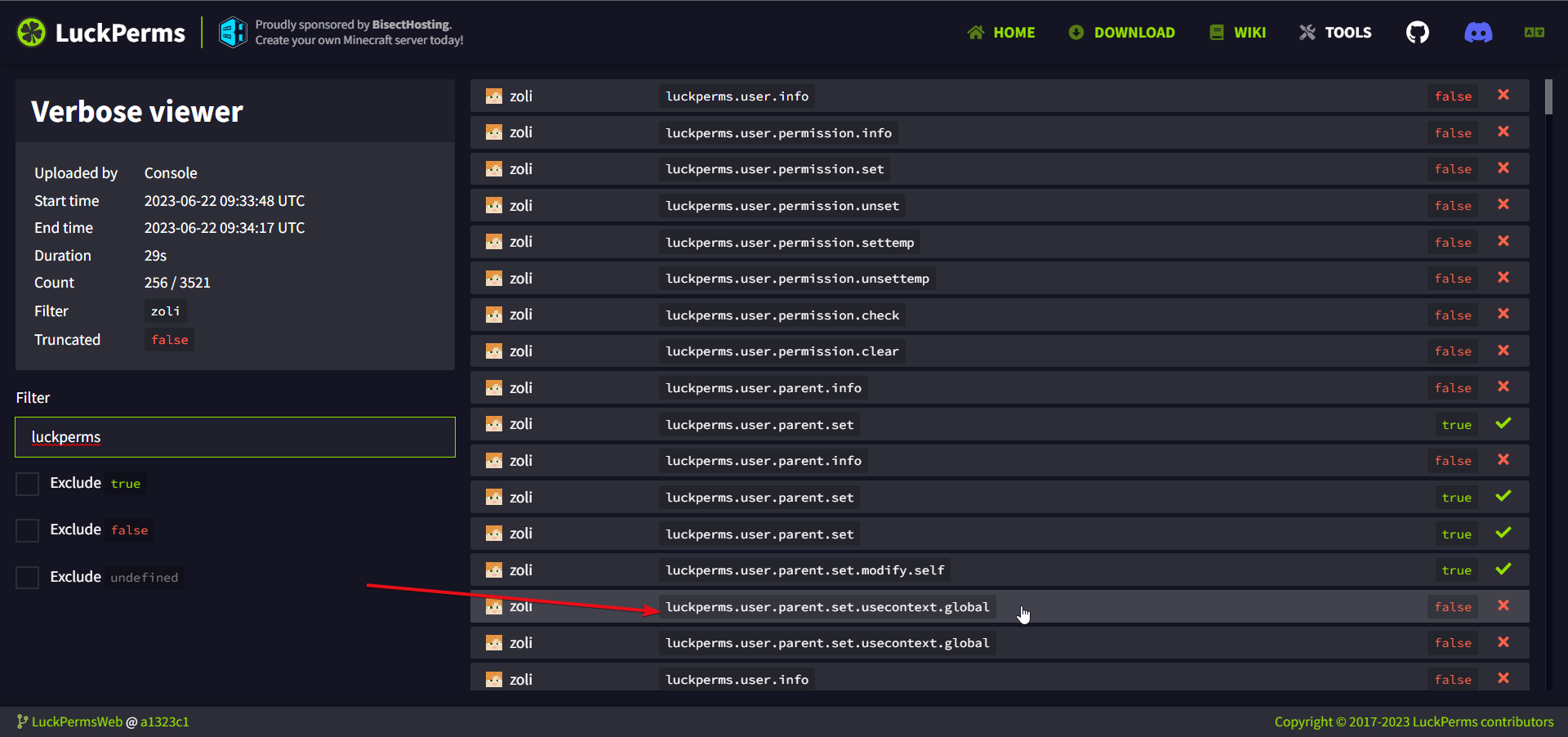
Otherwise what does luckperms.user.parent.set.usecontext.global do ?
meager fox
So they cant set mod to themselves and be stuck lol
Contexts are used to specify a world or server in a network. 'global' just means the given group/permission applies everywhere and the user is not forced to use a certain context
eager swallow
An other question how can I make in Luckperms Chat plugin the opped players name be displayed red ?
meager fox
No idea, Luckperms Chat is, despite the name, not affiliated with the Luckperms project. So you'd have to ask them. Personally I'd just use group formats rather than relying on op status. Not much difference ther anyway
foggy spire
rose raven
Right click what, where? Care to explain more?
LuckPerms does not add anything...
yeah can u provide me some plugins
when u right click a specific item, the console runs a command which gives the rank to the player
rose raven
foggy spire
yeah can u provide me some plugins
No clue, no.
foggy spire
okay
 undone tinsel
Hey I've just updated to 1.20.1 and updated the luck perms jar to the latest edition but all of my permissions have been reset. Is there a way to migrate permissions between versions of luck perms?
rose raven
Unless you have a proper backup to restore from, there's no actual way.
meager fox
They shouldnt be gone if you didnt delete the folder
rose raven
Why did your perms get reset though?
undone tinsel
I'm not sure but once the server was running I checked the luck perms editor and it had been reset to default
 halcyon temple
Hello, who can tell you how to solve this problem?
A person buys a lot of suffixes from us and such errors begin
 undone tinsel
I rolled back the luckperms folder to the 1.19.4 version that was working but no dice
rose raven
halcyon temple
Hello, who can tell you how to solve this problem?
A person buys a lot of suffix...
LuckPerms has an anti spam mechanism to block certain known exploits of the past.
halcyon temple
rose raven
LuckPerms has an anti spam mechanism to block certain known exploits of the past...
Can this be turned off ?
meager fox
you want exploits?
rose raven
Don't there's a config setting for it, however, you should configure your buyable suffixes in a way that players do not spam.
halcyon temple
We have to manually give players their privileges because luckperms does not want to
rose raven
No, just use a proper system to assign suffixes. One that does not cause spam.
 devout hemlock
https://mclo.gs/HqBBE0U do i have to do something about it?
(cant get the logs b4 as all of this flooded the console)
meager fox
your mysql times out
devout hemlock
meager fox
your mysql times out
anything i can do about it
meager fox
Possibly consider using a shorter maxLifetime value.
or investigate your mysql connection. thats past luckperms support tho
i once helped a guy, he set his db to pull an automatic backup while luckperms was using the database and running
he got this also, and oho- no shit it didnt like that lmao. so you see it could have a number of reasons
meager fox
eh?
 lilac steeple
I'm trying to run a command like that: /lp user @p permission set brewery.user true
but the @p doesn't work, is there a way to do something like that with LP?
basically I want the player to get this permission after completing a quest
rose raven
Set resolve-command-selectors: true in your config.
lilac steeple
rose raven
Set `resolve-command-selectors: true` in your config.
still getting this: An unexpected error occurred trying to execute that command
rose raven
Are you trying to execute the LuckPerms command via Command Block?
rose raven
Ask FTBQuests what they use to target the player.
lilac steeple
it's @p
rose raven
It's up each plugin to support the @p, `%player%, etc.
lilac steeple
works with other commands
rose raven
Hm.
rose raven
Yeah, MyCommand is great. Glad you got it working. 
 dire shard
my lp is messing up my essentialsX eco
all groups except the default group when sending money through essentialsX sends only $6 no matter what amout trying to be sent
uneven nexus
It’s not LP
dire shard
?
dire shard
uneven nexus
It’s not LP
whats not LP
uneven nexus
Your issue, is not caused by LuckPerms.
dire shard
but it works fine when im in default group and not ones i have created
and i have deleated all other none required plugins
devout hemlock
how much should i change the maximum lifetime of luckperms to?
(bungeecord - waterfall proxied server)
 lament nest
Hey i am getting errors when ever i start the server
luckperms cound not connect with mysql
may i open a ticket for it
meager fox
!paste your entire latest.log please. there is no ticket system, we provide support as we go here
wanton stratusBOT
Please use pastebin!
Seeing a paste of the problem makes everything so much easier! Use https://pastes.dev/ for easy pasting!
For console errors:
Pastebin any relevant segments of the console log. If it's a startup error, this includes the entire startup log!
Other errors:
Pastebin the entire LuckPerms config file (passwords removed) as well as any other relevant files!
rose raven
lament nest
may i open a ticket for it
There's no ticket system, just ask here providing a paste of your startup logs.
lament nest
meager fox
!paste your entire latest.log please. there is no ticket system, we provide supp...
how
i can send this
wanton stratusBOT
Please use https://pastes.dev to send files in the future. I have automatically uploaded console_Luckperms.txt for you: https://pastes.dev/HgKZv9rgUR
A paste containing 269 lines of plaintext.
LuckPerms cannot connect to your MySQL server
Read More
Caused By
java.sql.SQLTransientConnectionException: luckperms-hikari - Connection is not available, request timed out after 5001ms.
https://pastes.dev/HgKZv9rgUR | Sent by Clippy
lament nest
@meager fox https://pastes.dev/Y8OqFCcwDd
A paste containing 527 lines of plaintext.
wanton stratusBOT
LuckPerms cannot connect to your MySQL server
Read More
Caused By
java.sql.SQLTransientConnectionException: luckperms-hikari - Connection is not available, request timed out after 5001ms.
https://pastes.dev/Y8OqFCcwDd | Sent by atharv_gaming
rose raven
Clippy has already responded to you, no need to tag other members.
lament nest
rose raven
Clippy has already responded to you, no need to tag other members.
bro but i can't find the error by that
i seems that everything is correct by my side
and the rest any professional need to find out the issue
rose raven
That's not the case actually. We cannot provide any support regarding your MySQL setup. It's on your side, not a LuckPerms issue. Follow the instructions on how to connect your database to LuckPerms. The link above provides some known storage system errors which may come in handy.
lament nest
rose raven
That's not the case actually. We cannot provide any support regarding your MySQL...
wht mai i do then
i can't understand what is the issue
because same problem coming with authme also
rose raven
Yeah. Therefore, it's related to your database configuration and how you're connecting it to the plugins.
Ask your database provider, if you're not hosting it yourself.
lament nest
rose raven
Yeah. Therefore, it's related to your database configuration and how you're conn...
bro pls can you giude me how to create server on mysql and connect to luckperms because i am new to this thing
 dense rampart
group 'default' has bukkit.* (false) and priority 0
group 'vip' has default parent group and priority 1
group 'owner' has * (true) and priority 20
player has 'vip' and 'owner' groups, but why he doesnt have bukkit.command.version if he has '*' with higher priority?
 lament nest
rose raven
Ask your database provider, if you're not hosting it yourself.
lament nest
rose raven
Ask your database provider, if you're not hosting it yourself.
i am hosting my MYSQL database myself
rose raven
 lament nest
rose raven
https://tenor.com/view/disable-the-ping-replies-ping-replies-dont-ping-me-warn-g...
lament nest
rose raven
https://tenor.com/view/disable-the-ping-replies-ping-replies-dont-ping-me-warn-g...
ok
lol sry
native crater
Hello, to migrate from an h2 database to mariadb I understand I initially need to run the command /luckperms export <file>, then change the database type to mariadb and run the command /luckperms import <file>?
rose raven
!switch
wanton stratusBOT
If you wish to change your storage type (e.g. to YAML or MySQL) you may need to follow these instructions to ensure your groups and permissions are migrated to the new storage type.
Read more about the Storage types
LuckPerms wiki
native crater
thank
lament nest
native crater
Hello, to migrate from an h2 database to mariadb I understand I initially need t...
hmm but i am using mysql
not maria db
meager fox
What did you reply to him for o.O
 ancient anchor
I got the plugin voucher im going to use so when people right click paper it runs a command, How would i get started on timelimited permisions like how some servers have a voucher for 24hours of flight, How would i give a permision for a specific ammount of time and then remove it, and how would you go about giving it to the player who uses the paper.
rose raven
!commands parent section
wanton stratusBOT
Find all of the available LuckPerms commands on the wiki.
Read more
General commands
User commands
Group commands
Permission commands
Parent commands
Meta commands
Track commands
Log commands
LuckPerms wiki
meager fox
Personally i use cmi's tempfly. The permission to use /fly usually doesnt do what you want. Remember this is to toggle fly state. So what if the player has it turned on when it runs out?
Thats something luckperms will not handle, its how fly perms work usually.
ancient anchor
I only gave /fly as a example i just need to right click a voucher to give a temporary permission thats all
/fly vouchers are on every server so it was the easiest for me to explain
rose raven
Use permssion settemp. ^
meager fox
Fair.
ancient anchor
Wouldnt set temp effect a whole group or is it possible to do for indivuals?
meager fox
It can be used on players directly
ancient anchor
I can't see that command do you know it im sorry
addtemp <group> <duration> [temporary modifier] [context...] is what i see
ancient anchor
i see and now i think maybe the last step, usually id do this
/lp user Snelfs permission settemp If i was to get a voucher to do it does @s work instead of a name?
meager fox
Your voucher plugin will provide a player selector
Some plugins use papis %player_name%, but it will mention in its docs what it supports
zenith carbon
Good afternoon.
I have a problem with the command lp user USER parent addtemp RANK 1h, it turns out to be executed but it doesn't give the range to the user.
sullen rock
Is there any way to hide permissions in the web ui dropdown that have already been granted through inheritance
meager fox
zenith carbon
Good afternoon.
I have a problem with the command `lp user USER parent addtemp ...
How do you know it didnt?
zenith carbon
meager fox
How do you know it didnt?
Because it is not placing the range or the prefix of said range.
meager fox
You shouldnt trust prefixes. You can have a group, but get the prefix of another group.
See /lp user USER info. Do they have the correct group? (ignore prefixes rn)
 zenith carbon
How can I solve the prefix thing?
meager fox
Check your prefix weights
zenith carbon
meager fox
How would i know, you have to tell me
Yes, the range is being applied.
rose raven
!weight
wanton stratusBOT
LuckPerms allows you to set weights in order to determine the priority of certain nodes, like permissions and even prefixes. A higher weight number is a higher priority.
Read more
LuckPerms wiki
meager fox
It's easiest done in the editor
zenith carbon
How much closer to 0 less weight?
meager fox
The number in the middle of the prefix node is the weight
zenith carbon
@meager fox @rose raven Fixed. Thank you
wanton stratusBOT
Hey eltitojet! Please don't tag helpful/staff members directly.
rose raven
Sweet!
ancient anchor
Hey how do i get my rank prefix to show in chat i know i have it because my plugin picks up on it but its not being displayed
meager fox
you need a chat plugin for that
ancient anchor
Does essentials not have a built in one?
meager fox
dont forget vault also
ancient anchor
dw i got that
meager fox
it doesnt have placeholder api support so it relies on that
ancient anchor
ic
Honestly this might sound stupid but i cant see Essentialschat plugin online just EssentialsX maybe
can you send it me if you dont mind
meager fox
The essential plugin for Spigot servers.
meager fox
ew
ancient anchor
Ik
meager fox
are you stuck on 1.8?
ancient anchor
i usually use essentialsX
1.16.5
I had a issue when installing essentialsX so i just added essentials
il try it again
 ancient anchor
haha il try install it then 1sec
hold up if i switch over is all my /homes goin to get deleted
proberly right
and all permisions i set up on essentials
ancient anchor
hm
meager fox
thats a question for essentials staff tho
ancient anchor
im wondering about the /homes haha worried bout that cus alot of people will get mad
yep
 heavy pollen
Hey :) short question. When I use this on fabric as fabric mod - the minecraft permissions for commands like /tp /time set etc. don´t show up. Am I missing something?
meager fox
yes you are. fabric is the only server software i know of that does not bring vanilla permissions out of the box
GitHub
Registers vanilla Minecraft commands in Fabric Permission API with structure "minecraft.command." - lucko/minecraft-command-permissions-fabric
this mod fixes that
rose raven
!moss Redirect your EssentialX concerns/questions to the M.O.S.S. discord server below.
wanton stratusBOT
Essentials
Make sure you are using EssentialsX and Vault for prefixes. For any other issues with Essentials, you should seek support in either #general or the official EssentialsX support Discord.
EssentialsX Discord
heavy pollen
meager fox
yes you are. fabric is the only server software i know of that does not bring va...
thank you :))
is there a "worldguard" option for fabric for 1.19+ ? just searched a bit and only found flan and something in development
meager fox
you mean such mod for fabric?
heavy pollen
yes. I used hybrid servers before for forge - but not to convinced about doing so. So I´m looking for something that is comparable to worldguard. Something that disables e.g. block destruction via luckperms globally
ancient anchor
also can you help me allow my higher ranks have all the privledges of the ranks beneath it?
rose raven
!inheritance
wanton stratusBOT
Learn about inheritance.
LuckPerms wiki
ancient anchor
i know its inheritance i just couldnt get it working
meager fox
That is called inheritance. If you use the editor, you can easily (below the name) add a group using the green plus button
 hoary flower
pleasure*
meager fox
xD thanks como
hoary flower
im sure your a pleaser too 😂
heavy pollen
hoary flower
I use a mod called flan 😄
and flan overs this features? that´s the one I found when googling it :)
hoary flower
Flan has all the features youd need yeah
except a command to give a user the golden hoe to claim stuff
meager fox
sad lol
heres an example btw https://i.imgur.com/6xQcCTN.png
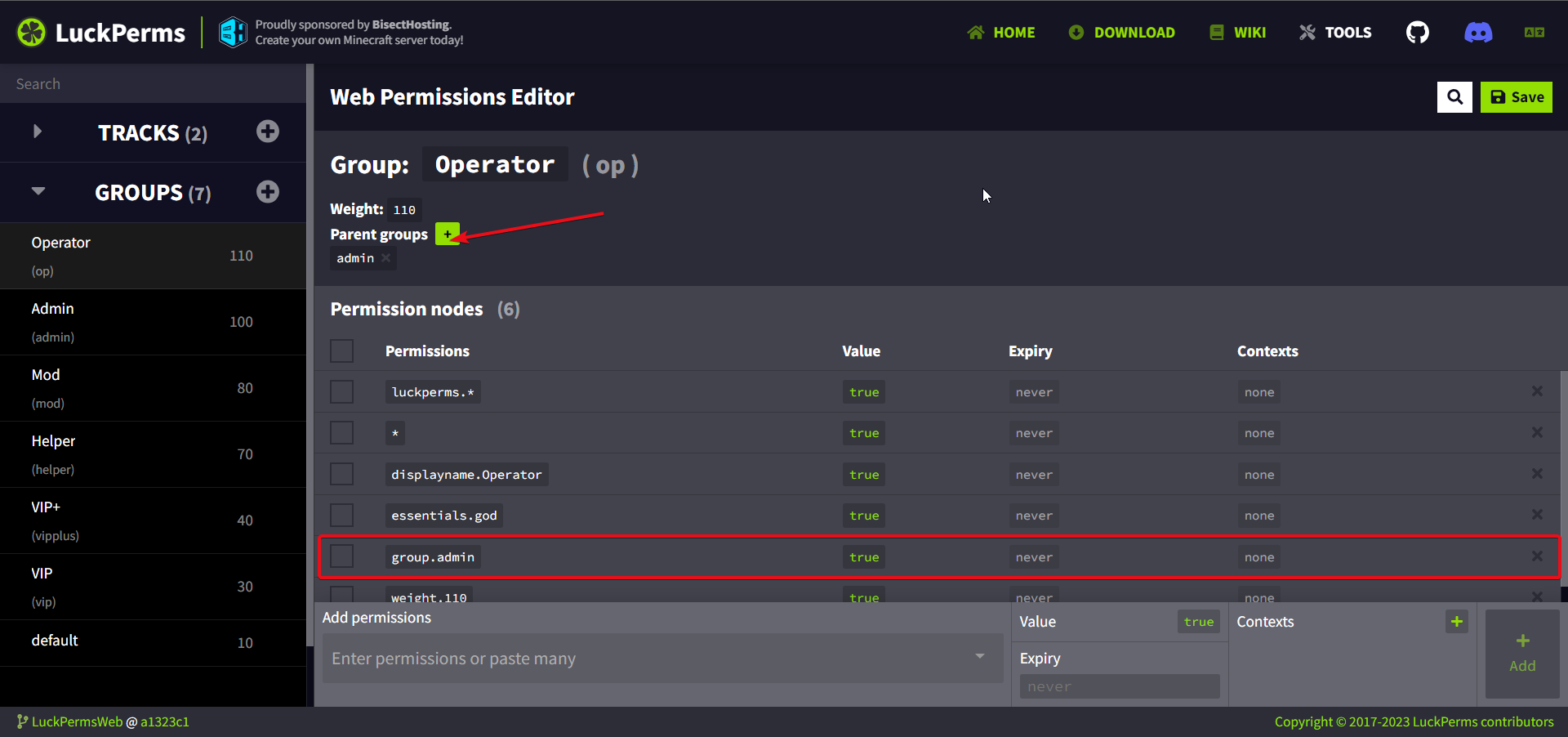


higher groups should have lower ones in their list, not the other way around or youll have a problem lol
heavy pollen
hoary flower
Flan has all the features youd need yeah
perfect, thank you :)
hoary flower
if you have any questions about what you need specifically it might be easier to ask
as I never used worldgaurd as im kinda new to server stuff
meager fox
^regardless, you knew a mod. i didnt. so yea, thanks ^_^
 robust cairn
Does anyone know how to use serversigns with luckperms?
rose raven
robust cairn
Does anyone know how to use serversigns with luckperms?
This is not the proper channel/place to ask for non LuckPerms related questions. You may choose to repost on #general or just conduct the plugin's documentation/support team.
(i've already responded to you on #support-2 by the way)
wanton stratusBOT
LuckPerms cannot connect to your MySQL server
Read More
Caused By
java.sql.SQLTransientConnectionException: luckperms-hikari - Connection is not available, request timed out after 5000ms.
https://pastebin.com/YeHF7km2 | Sent by 4zy_
rose raven
Could be numerous of things, clipply's response (click the link) should covers the most. Make sure you're using the right database credentials in your config and that your remote database is properly configured.
Doesn't seem like that's the case. Double check. You may find some pinned message on the #support-1 and #support-2 channels useful.
heavy pollen
hoary flower
if you have any questions about what you need specifically it might be easier to...
so just installed flan now - what would be the command to disable block placement for group x globally - not just inside a claim
native crater
Hello, I understand how to move the database lp h2 in mariadb but I understand this only works with 1 server, what do I do if I want to connect two databases h2 from different servers into a single database mariadb
rose raven
You can't actually merge 2 h2 databases into your single MariaDB.
uneven nexus
You’d have to export each individually, switch to your remote db, and then import the file you exported. Not really any different than normal, but keep in mind the weight factor
native crater
uneven nexus
You’d have to export each individually, switch to your remote db, and then impor...
So I just need to export the 2 files separately?
That's it?
uneven nexus
yeah, it's not complicated.
it would be the exact same as if you were only doing 1 server, but for both
native crater
uneven nexus
yeah, it's not complicated.
Okay, and you're sure there won't be errors if, for example, there are two identical players?
uneven nexus
it's just going to merge permissions.
meager fox
Importing 2 setups into one server will cause a merge
Both setups default group perms will merge, user perms from both setups merge if they differ also
native crater
Okay, I have one more question. I'll describe it in more detail in a moment.
meager fox
Same name groups as well iirc
native crater
I have 2 different game servers on each of these servers have the same type (with the same group name) That is, I used to have LP on one proxy but on x2 database without interacting with each other and for example if a player bought a donate for example god on the 1 server then on the 2 has the same - I don't know how luckperms can connect database for example if there's player with goddonat and his nickname is Test1 and on the 2nd server there is the same group but player doesn't have goddonat there, will lacperms automatically configure lp user Test1 parent add god1 server=game1? And will not give the privilege on the server game2
native crater
meager fox
Same name groups as well iirc
What do you think?
 rare shell
I have disabled the minecraft.command.trigger command for the default group of users using luckperms, but now not even OPs can use the command, how can I fix this? I don't want to create an op group
rose raven
Remove the default group from any op user, as it will override the operator status or just set it back to true on their group (which should be higher in weight).
Aren't your OP players player already inside an admin group? You would be able to set minecraft.command.trigger true on there.
meager fox
It will not auto-fill contexts if thats what youre asking
native crater
How do I do what I want, or is it impossible?
meager fox
Honestly i dont get all of what you said
So you have 2 server setups, both having the same groups but they were not synced using mysql
And you want some permissions to only apply to one server and some to the other, but not cross
Yet you still want to merge them into 1 mysl
uneven nexus
meager fox
It will not auto-fill contexts if thats what youre asking
I think there is a config setting to automatically apply a context if none is specified though
meager fox
uneven nexus
I *think* there is a config setting to automatically apply a context if none is ...
Yes but that doesnt go for when you do lp import
native crater
meager fox
And you want some permissions to only apply to one server and some to the other,...
Look I have two servers backend 1 game and 2 game, on these two servers donates have identical groups but if a player buys a donate on a game server number 1 on the server number 2 it will be without donates, if I connect the database of server 1 and connect it to the same database as on server 2 then donates get to be on two game servers how do I make the migration donates remained only on the first game server where the player bought donates?
native crater
meager fox
Yet you still want to merge them into 1 mysl
yes!
meager fox
Okay i get it
So for both servers, you will have to go over your permissions and apply server context to everything you want to cap to that specific server. I suggest taking a backup before doing that just in case. Bulkedit will help you edit group memberships from your current context "global" or "none" to use server=x. Youll have to prepare them both before merging and make sure that any command run by other plugins adds the server context from now on. You can already set the server name in the config of each server and do that while both servers run even because applying cpntext that is always true doesnt do anything to the permissions
!bulk is easier to update group memberships to context
wanton stratusBOT
Quickly update a large amount of user and group permissions by using the bulkupdate command.
Read more
LuckPerms wiki
meager fox
Everything else id actually do by hand in the editor (you can mass select nodes and apply context to a hell ton at the same time)
native crater
I don't understand what I'm supposed to do.
meager fox
Go to game 1 and add context game 1
Go to game 2 and add context game 2
Then merge
Dont forget to set the name game 1 in luckperms config on the server game 1
Do the same for game 2
native crater
meager fox
Go to game 1 and add context game 1
how to do it? Specify server: game1 in the configuration or what?
 supple parrot
hello all, after i installed my database luckperms gives me the following error when i try to edit a user can you help me?
wanton stratusBOT
Please use https://pastes.dev to send files in the future. I have automatically uploaded LOG.txt for you: https://pastes.dev/xOeVDgXwgL
A paste containing 85 lines of plaintext.
meager fox
In your config of luckperms it is the very very very first setting
server: global
Set that to some name
native crater
meager fox
In your config of luckperms it is the very very very first setting
Well I need to put there server: game1 then prescribe lp export <file> also do the same with the 2nd server and already these files to connect to the database?
meager fox
Correct. It is easier to add contexts before importing to mysql because afterwards, you will not know anymore what permission is from what server
Also, set group memberships to context
Like you said, everyone who has donator now in 1 server needs to get context or theyll have it in both servers after
native crater
meager fox
Also, set group memberships to context
didn't get it
native crater
supple parrot
hello all, after i installed my database luckperms gives me the following error ...
LuckPerms - A permissions plugin for Minecraft servers.
LuckPerms is a permissions plugin for Minecraft servers. It allows server admins to control what features players can use by creating groups and assigning permissions.
meager fox
Which part
supple parrot
native crater
check this https://luckperms.net/wiki/Storage-system-errors
None of the issues highlighted in the wiki you sent me are what are giving me an error
native crater
meager fox
Also, set group memberships to context
this
That's what I don't understand.
native crater
supple parrot
None of the issues highlighted in the wiki you sent me are what are giving me an...
Try clearing the database and creating a new one according to the log you have something wrong with the table
meager fox
native crater
this
Like you said, if i buy donator on game 1 now and you add both setups to mysql, then i will have that group on both servers
Makes sense so far?
supple parrot
native crater
Try clearing the database and creating a new one according to the log you have s...
ok, but so I have to reconfigure everything from scratch right?
 silk olive
henlo:
when using placeholders, say I wanted to get the expiration time of a temporary perm. Would I do, for example: %luckperms_expiry_time_my.perm.here%?
meager fox
Yep
silk olive
sweet, thank you 🙂
native crater
meager fox
Makes sense so far?
what do you mean it makes a difference? No such a thing should not be on the contrary, I want if a player bought a donation on the server game1 and I joined the database in mariadb donation remained only on the server game1 and the server game2 would not be reissued.
meager fox
I assume that is a translation mistake
What you said is exactly what i mean
Game1 permission stay on game1.
So example: i have donator group on your server right now on game1. You did not use context right? No context means it is global. It os on my user directly group.donator. Before you add game1 setup to mysql, you need to add context game1 to my donator group
native crater
meager fox
So example: i have donator group on your server right now on game1. You did not ...
I will not need to reassign all players to the group and use in the command /lp user TestUser parent add donator donator server=game1? And just in lp webeditor make all groups with context game=1?
wanton stratusBOT
Quickly update a large amount of user and group permissions by using the bulkupdate command.
Read more
LuckPerms wiki