
#support-1
1 messages · Page 96 of 1
 full tendon
 flat parcel
Found it. For some reason, address, database, username, and password are all indented 2 spaces less than they should be
God I hate yaml
 uneven nexus
Yaml is amazing
flat parcel
oh and same with table-prefix, mongodb-connection-prefix, and mongodb-connection-uri
it's honestly such a pain, and compounding the issue is every damn devops product under the sun uses yaml
full tendon
restarting
 in 'reader', line 34, column 1:
    server: event
    ^
expected <block end>, but found '<block mapping start>'
 in 'reader', line 113, column 5:
maximum-pool-size: 10```probably missed indenting a line

 flat parcel
Nope
it's just the stuff under the data section that indentation seems to be screwed up for
full tendon
 uneven nexus
those go in 2 spaces
flat parcel
Data should not be indented
uneven nexus
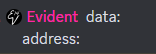
data:
address:
full tendon
flat parcel
Found it. For some reason, address, database, username, and password are all ind...
.
should i indent it 4 spaces?
flat parcel
compact mode go brr https://f.u11.io/OefCVM
 uneven nexus
He said 2 less than they should be
uneven nexus
2
full tendon
2 spaces less than they should be in that config that i sent him before (which were indented twice)
so now that i have no indents, i should put 4 spaces
uneven nexus
they need to be indented 2 spaces off of “data”
uneven nexus
flat parcel
~~compact mode go brr~~ https://f.u11.io/OefCVM
Skill issue
flat parcel
imagine not using compact mode
flat parcel
yup
full tendon
just realized the luckperms console error was bigger than i thought
uneven nexus
that’s probably just the yaml library. They’re never nice
flat parcel
Yeah simpleyaml spits out the most useless errors ever
All it reliably does is give you the rough area
uneven nexus
Usually snakeyml does too.
flat parcel
oh that's what I meant, couldn't remember the lib name
full tendon
A paste containing 706 lines of plaintext.
uneven nexus
That looks like it’s indented fine from what I see on mobile
flat parcel
❌
full tendon
✅
flat parcel
Ok lemme  Everything from L93 to L171 needs to have 4 spaces before it. L146-L149 needs to have 8 spaces, not 4
uneven nexus
flat parcel
Ok lemme <:blobspoonfeed:352922139562606602> Everything from L93 to L171 needs ...
??
full tendon
so i was right
uneven nexus
where are you getting that from
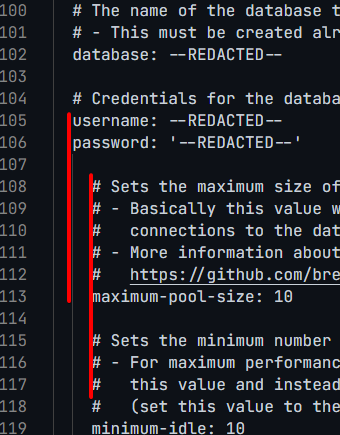 uneven nexus
full tendon
uneven nexus
full tendon
A paste containing 706 lines of plaintext.
uneven nexus
no.
data has 0 spaces, address gets 2
flat parcel
yeah...now I've made it worse. Bear with me for a moment
flat parcel
full tendon
https://pastes.dev/0m8Ibd75bS
This one was almost correct. At some point you deleted line 107, which should be pool-settings (2 spaces before)
uneven nexus
data:

  # Define the address and port for the database.
  # - The standard DB engine port is used by default
  #   (MySQL: 3306, PostgreSQL: 5432, MongoDB: 27017)
  # - Specify as "host:port" if differs
  address: --REDACTED--

  # The name of the database to store LuckPerms data in.
  # - This must be created already. Don't worry about this setting if you're using MongoDB.
  database: --REDACTED--

  # Credentials for the database.
  username: --REDACTED--
  password: '--REDACTED--'
your formatting for the credentials should look exactly like this.
flat parcel
so sorry, I'm tired and didn't realize a line was missing so blindly had you fix the yaml, which would have caused different problems
full tendon
hows this
 flat parcel
So sorry again for accidentally making stuff worse temporarily. I apparently don't have the config as well memorized as I thought I did
full tendon
ur fine
flat parcel
(and thanks evident for pointing out my derp lol, it might have taken me a while to catch that)
uneven nexus
All good, happens to the best of us
 quiet mica
How do i let others use a command that they dont have permissions for
 hasty tree
...add the permission?
quiet mica
How
hasty tree
!usage
 wanton stratusBOT
Here's a guide to help users understand and use LuckPerms for the first time.
Read more
 LuckPerms wiki
 charred yew
guys help me
whenever im making a rank with colour and giivng it to myself
im not getting the colour
and rank
only permissions
 rose drift
Hello! So my server has bedrock support so all my bedrock players have a dot before their name. But for some reason when i try to use /lp user .USER promote normal it says ".USER is not a valid username/uuid" Any idea how to fix it?
charred yew
rose drift
Hello! So my server has bedrock support so all my bedrock players have a dot bef...
try wtihout dot
rose drift
I tried it says "A user for USER could not be found"
charred yew
rose drift
I tried it says "A user for USER could not be found"
then try their uuid
rose drift
It says its not a valid uuid
charred yew
breh
rose drift
Also how are you giving yourself the color? You using a prefix or?
rose drift
Oh alright
rose drift
rose drift
Hello! So my server has bedrock support so all my bedrock players have a dot bef...
So does anyone know about this then?
 foggy quartz
HI, does LuckPerms suppor Hex Colors?
hasty tree
foggy quartz
HI, does LuckPerms suppor Hex Colors?
your chat/tab/scoreboard plugin is the one that needs to support it. LP simply supplies the prefix/suffix, so doesn't need to support formatting them.
foggy quartz
Thanks
rose drift
rose drift
Hello! So my server has bedrock support so all my bedrock players have a dot bef...
Anyone knows anything about this?
 meager fox
!geyser
wanton stratusBOT
Using Geyser?
If you're having issues with permissions for bedrock players, or it's telling you that a bedrock player's name is invalid, try setting allow-invalid-usernames to true in the LuckPerms config.
 hallow jackal
I want anyone to make me ranks. Helper, Admin, Head Admin, Co owner, owner.
Helper
/gamemode
/gmc
/gmsp
/gms
Admin
/gamemode
/gmc
/gmsp
/gms
/ban
/unban
Head admin
/gamemode
/gmc
/gmsp
/gms
/ban
/unban
/enderchest
/einvsee
Co owner
/gamemode
/gmc
/gmsp
/gms
/ban
/unban
/enderchest
/einvsee
Owner
/gamemode
/gmc
/gmsp
/gms
/ban
/unban
/enderchest
/einvsee
He makes me the ranks
meager fox
That is not how it works at all.
Also, #rules state to not hire here. Besides, what would you do if you need changes? Will you just bug someone for their lifetime because you don't know how to set up luckperms?
hallow jackal
May be
Only for once
I want him to give me powers for some ranks only
I don't speak English.
So use the translation and you probably won't understand
meager fox
Regardless, please do not attempt to hire here. Not for devs, not once, not at all.

 astral tundra
I will define to skyblock servers from what config
common luckperms when you make them all the same name?
astral tundra
help me
 calm mica
Hello everyone i doo need some helpiboo
 rose raven
!ask
wanton stratusBOT
Please ask your question!
Please ask the question you have. Don't ask to ask, or ask to DM someone. There are people here to help you, but we need to know what to help you with, so please just ask the question you want to in as much detail as possible!
Or, try here first:
Why shouldn't I ask to ask?
calm mica
i gave the admin group in my server the permission luckperms.user.parent.add..... sadly he is able to give HIMSELF the owner group
which is very unfortunate and i do not want that
rose raven
!argbased
wanton stratusBOT
Fine tune exactly what users with permission to use LuckPerms can do.
LuckPerms wiki
calm mica
oh nice thanks
 supple fiber
hi
can someone help me?
i want to make permision for players to have /kit start and /spawn i have essentials
someone?
wanton stratusBOT
Here's a guide to help users understand and use LuckPerms for the first time.
Read more
LuckPerms wiki
 echo mauve
supple fiber
can someone help me?
i want to make permision for players to have /kit start and...
echo mauve
supple fiber
can someone help me?
i want to make permision for players to have /kit start and...
You could set in the lp config the data be stored in yaml file so it is editable and manually put essential nodes for kits inside it and spawn too
supple fiber
how?
rose raven
!verbose Verbose will help you understand what permissions are being checked when using /spawn and /kit starter commands.
wanton stratusBOT
LuckPerms provides a verbose command to help you find out what permissions a command/plugin is checking.
Read more
LuckPerms wiki
rose raven
You can use the website below to browse the EssentialsX permissions database.

What is it that you don't understand exactly? What part of it?
 echo mauve
supple fiber
how?
echo mauve
supple fiber
how?
It's a bit of a pain to get lp to work with essentials since essentials has so many damn nodes its mostly tedious but you can open the yaml file in atom
 supple fiber
this?
 rose raven
It's a matter of time, not a painful experience/process.
supple fiber
i want just my players to have acces to spawn and kit start
flat parcel
!usage
wanton stratusBOT
Here's a guide to help users understand and use LuckPerms for the first time.
Read more
LuckPerms wiki
rose raven
#support-1 message You can find the permissions nodes required from the permissions database, as mentioned above.
supple fiber
i put it there and my players say he can t do /spawn
echo mauve
rose raven
It's a matter of time, not a painful experience/process.
Yeah they do have dozens of perms it makes it scary I loved doing it in yaml though I am more of a like looking at it all at once person than doing it through command line
flat parcel
!editor that's what the editor is for 🙂
wanton stratusBOT
LuckPerms offers an easy to use, powerful Web Editor, with which you can add, delete and change permissions of groups and players.
Read more
LuckPerms wiki
rose raven
supple fiber
i put it there and my players say he can t do /spawn
!verbose
wanton stratusBOT
LuckPerms provides a verbose command to help you find out what permissions a command/plugin is checking.
Read more
LuckPerms wiki
echo mauve
wanton stratus
I love this!!
flat parcel
Yup, widely touted as our best feature. Given we have that, we also discourage the usage of the YAML storage backend, since it's slower and more error-prone (due to humans editing it)
 north terrace
trying to setup prefixes per world and per world default groups to get added to once they enter that world and only have that worlds permissions allowed to use
flat parcel
!context
wanton stratusBOT
You can set a permission or group on a per-world/per-server basis, through what we call "contexts".
Read more
LuckPerms wiki
flat parcel
For per-world default groups, LP only ever has the one default group, default. Add the desired default group for each world as a parent of default with the appropiate world context
north terrace
I know but it makes no sense cause i have contexts setup yet it still overrides
flat parcel
So what are you expecting to happen, and what are you observing is actually happening?
north terrace
 flat parcel
supple fiber
the commands work but appear in red on the chat
flat parcel
supple fiber
the commands work but appear in red on the chat
LP doesn't affect that (for anything other than LP's own /lp etc commands). Talk to the plugin providing the commands
north terrace
literally have it setup correctly but dosnt work and dosnt make sense on what to do
flat parcel
Doesn't work in what way?
(and could I get the editor link please, not just a screenshot?)
!editorsafety
wanton stratusBOT
It is safe to send an editor link in public.
Any changes made in the editor have to be applied using the /lp applyedits command - impossible unless the person with the link is also connected to the server and with the required in-game permissions to use LuckPerms commands. It's effectively just as safe to share an editor link as it would be to share a screenshot of your permissions or a pastebin of a configuration file. The editor doesn't contain any sensitive data (except perhaps player names).
More Information:
Concerns about the proprietary nature of your permissions setup?
Please, don't be. We're here to help, not steal your permissions setup. Additionally, permissions can be tested by players simply joining your server and seeing what they can do.
north terrace
like in my factions world the prefix defined in my chat manager plugin doesnt get used
flat parcel
oh
north terrace
it also isnt giving them per group per world specific permissions its giving them all them
flat parcel
Generally, the normal setup is LP manages prefixes, and other plugins simply display it
flat parcel
north terrace
it also isnt giving them per group per world specific permissions its giving the...
Let's see the output of /lp user <affected user> permission check <affected permission> please
north terrace
but im tired of having luck perms mess with it
supple fiber
an example i write in the chat /kit starter it s appear with red but it s working i want to be like a normal command and don t appear with red
north terrace

LuckPerms - A permissions plugin for Minecraft servers.
LuckPerms is a permissions plugin for Minecraft servers. It allows server admins to control what features players can use by creating groups and assigning permissions.
flat parcel
eh I suppose that's valid
First, assuming you're on a bukkit-based platform, do you have the plugin Vault installed?
north terrace
mhm
flat parcel
Don't repost Black_Simple
supple fiber
ok...
flat parcel
supple fiber
an example i write in the chat /kit starter it s appear with red but it s workin...
Hero: If you do have vault, then could I see /lp user <affected user> info for an affected user please
 flat parcel
I'm guessing in the other plugin managing prefixes, it's set to give some prefix for one of those 3 groups you inherit? if so, which one?
north terrace
per group has their own prefix
literally dont understand why there isnt a way to set a group to default for a world with luck perms
flat parcel
!default for why
wanton stratusBOT
LuckPerms provides a group that every player is added to upon joining the server, called default. You can use multiple methods to change the default group or change the name of it.
LuckPerms wiki
flat parcel
(it's also not a common usecase, most servers that have multiple gamemodes have them seperated on multiple servers across a network)
north terrace
That because they got mad stakcs and buy multiple servers
flat parcel
anyways for the prefix issue at hand, is the plugin set to give the prefix for primary group membersv, or one of the others
north terrace
all of them
flat parcel
and is it giving you the wrong prefix or no prefix?
north terrace
wrong prefix wrong world
 flat parcel
I see you made a change to your parents, could I get /lp user <you> info again pls just to confirm something
flat parcel
Yes I see that, but I'm making sure that the contexts and primary group are being evaluated correctly
north terrace
 flat parcel
Ok as far as LP is concerned, your primary group is membersv. If the other plugin is assigning the wrong prefix for that, that's not something on our end.
The other possibility is the other plugin is looking directly at the LP data, and is seeing the uncontextual parent of memberfac, though again, that's not on our end
If the prefixes were managed by LP I'd be able to be of more help
north terrace
it is though caus ei havent set that to the primary group
flat parcel
Primary group defaults to automatically be determined by the highest weighted group a user inherits
!weight
wanton stratusBOT
LuckPerms allows you to set weights in order to determine the priority of certain nodes, like permissions and even prefixes. A higher weight number is a higher priority.
Read more
LuckPerms wiki
north terrace
so how does it take priority if all groups are weighted 0
specifically did it that way so it would still work per world
flat parcel
iirc a contextual parent whos contexts are met takes presedence over a non-contextual parent
north terrace
each group has the context specified to their respective world so?
calm mica
i dont get it, i have the permission luckperms.user.parent.add , luckperms.user.parent.add.spieler , luckperms.user.parent.add.default , luckperms.user.parent.modify.others , luckperms.user.modify.others added and its not letting me use the parent add command...
(yes argument based command permissions is set to true)
calm mica
calm mica
i gave the admin group in my server the permission luckperms.user.parent.add.......
still this topic
meager fox
Did you try verbose yet?
 meager fox
Is this inside extra contexts?
foggy quartz
yes !
calm mica
meager fox
Did you try verbose yet?
verbose? luckperms has its own verbose?
meager fox
foggy quartz
yes !
meager fox
calm mica
verbose? luckperms has its own verbose?
!verbose yea
wanton stratusBOT
LuckPerms provides a verbose command to help you find out what permissions a command/plugin is checking.
Read more
LuckPerms wiki
foggy quartz
I want to give permission via a context to display one of the 2 prefixes of my choice, to do this I need a placeholder that tells me whether or not I have the permission
meager fox
That placeholder is fine to use, just not in extracontext as luck explained
performing a permission check results in context lookups, which calls extra contexts, which performs a permission check... resulting in an infinite loop -> stack overflow
foggy quartz
%player_has_permission_<perm>%
I will try with this
..uh not good idea
same loop
I'll use luckperms' metadata , Thx for the support !
 dusty escarp
What's the difference between %luckperms_prefix% and %vault_prefix%
uneven nexus
one is provided by luckperms, the other is provided by vault
meager fox
How does someone come up with such a question
 meager fox
The supporter name is the displayname node which you can just get rid of
 woven tangle
How do I get rid of that?
meager fox
Or change it?
Its the node inside the group displayname.supporter
Find it in its permissions.
woven tangle
Omg I can't believe I missed that. Tysm!
meager fox
Dw, we all blind. I didn't see that your pic was from the editor first, hence initially thinking you need to legot rename the group
Zero 1 : 1 Jeen
woven tangle
Now I need to win
foggy quartz
Hello how can i change the order of the tab depending to the rank that has the user ?
rose raven
!tab It's up to your tab plugin to sort the tablist.
wanton stratusBOT
LuckPerms does not perform any chat/tablist formatting of its own!
LuckPerms only acts as the source for prefixes / suffixes, it doesn't actually apply them. You need an appropriately configured chat/tablist formatting plugin for them to be displayed. If the values appear correctly when you run /lp user <user> info, LuckPerms is doing its job!
FAQ answer: Prefix isn't showing?
List of chat/tablist formatting plugins that work with LuckPerms
 versed pike
help this message has been sent 19k times in my console and i dont understand it
- [Mon 20:01:37 ERROR Minecraft] Could not pass event EntityDamageEvent to WorldGuard v7.0.8-beta-01+cbb2ba7
me.lucko.luckperms.bukkit.vault.ServerThreadLookupException: A Vault API request has been made on the main server thread that LuckPerms cannot safely respond to.
This is NOT a bug - please do not report it to LuckPerms.
Instead, please carefully read the information given below.
LuckPerms cannot respond to the request because to do so:
- it needs to lookup user data for '3f1a67e8-99c6-4e92-ac9c-f9557de93259' (an offline player) from the database
Performing this lookup on the main server thread would cause your server to lag.
There are two solutions to this problem:
  a) Ask the author of the plugin making the request to perform Vault calls for
     offline players "asynchronously" (using the scheduler). Additionally, prefer
     using the methods that accept 'Player' or 'OfflinePlayer' instead of usernames.
     You should be able to identify the plugin making the request in the trace below.
  b) As a server admin, you can disable this exception by setting 'vault-unsafe-lookups'
     to true in the LuckPerms configuration file. However, please use this only as
     a last resort.
    at me.lucko.luckperms.bukkit.vault.LuckPermsVaultPermission.lookupUser(LuckPermsVaultPermission.java:156)
    at me.lucko.luckperms.bukkit.vault.LuckPermsVaultPermission.userHasPermission(LuckPermsVaultPermission.java:175)
    at me.lucko.luckperms.bukkit.vault.AbstractVaultPermission.playerHas(AbstractVaultPermission.java:151)
    at worldedit-bukkit-7.3.0-SNAPSHOT-dist.jar//com.sk89q.wepif.VaultResolver.hasPermission(VaultResolver.java:100)
    at worldedit-bukkit-7.3.0-SNAPSHOT-dist.jar//com.sk89q.wepif.PermissionsResolverManager.hasPermission(PermissionsResolverManager.java:170)
    at worldguard-bukkit-7.0.8-beta-01-dist.jar//com.sk89q.worldguard.bukkit.WorldGuardPlugin.hasPermission(WorldGuardPlugin.java:361)
at worldguard-bukkit-7.0.8-beta-01-dist.jar//com.sk89q.worldgu```but it says it's luckperms
uneven nexus
this is not a bug, do not report it to LuckPerms
versed pike
oh i didn't see that
foggy quartz
rose raven
!tab It's up to your tab plugin to sort the tablist.
But for example I want to people Who have the prefix of owner go Up and mod down
 rose raven
Configure your tab plugin to sort the tab this way then. LuckPerms does not format it at all.
foggy quartz
Thank you
woven tangle
foggy quartz
But for example I want to people Who have the prefix of owner go Up and mod down
Is the owner role weight higher then the mod one?
 brisk spear
Hello. Is there a way to pass all the players to a group at once?
rose raven
Not really.
brisk spear
I need to change all the players, about 500 of the group in which they are at default, I understand why you say that it is impossible.
rose raven
To update large amount of entries, we use bulk editing, however it does not allow for mass additions. There's no easy way of adding multiple users to a single group.
brisk spear
How can they be edited in bulk?
rose raven
!bulk Bulk updates allow for deleting or updating only.
wanton stratusBOT
Quickly update a large amount of user and group permissions by using the bulkupdate command.
Read more
LuckPerms wiki
 crude quarry
How can I configure the "Contexts" feature on a Fabric server to allow the use of the WorldEdit mod only in the creative world and not in the survival world?
Is it even possible because I can't get it to work
Worlds:
Minecraft:overworld
Minecraft:the_end
Minecraft:the_nether
my_data_pack:flat -(creative world)
Mods:
LuckPerms-Fabric
MultiWorld-Fabric
DimensionalInventories
rose raven
crude quarry
How can I configure the "Contexts" feature on a Fabric server to allow the use o...
!contexts
wanton stratusBOT
You can set a permission or group on a per-world/per-server basis, through what we call "contexts".
Read more
LuckPerms wiki
crude quarry
did try that but it didn't seem to work
rose raven
What did you try that did not work? Can you elaborate?
crude quarry
 rose raven
Do you have a world named "overworld"?
crude quarry
isn't that the default world
rose raven
I think you would be better off using dimension-type=overworld as your context.
crude quarry
hmm
rose raven
We wouldn't know how your worlds are named. By default, they should be named as "world", "world_nether" and "world_the_end". At least on the software i'm familiar with, Bukkit.
crude quarry
 rose raven
Could you send the output of /lp user <user> info please?
 crude quarry
rose raven
Could you send the output of `/lp user <user> info` please?
crude quarry
rose raven
Could you send the output of `/lp user <user> info` please?
sure
rose raven
my_data_pack:flat is not a valid dimension-type context by the way.
More info on https://luckperms.net/wiki/Context.
crude quarry
 crude quarry
rose raven
`my_data_pack:flat` is not a valid **dimension-type** context by the way.
More...
crude quarry
rose raven
`my_data_pack:flat` is not a valid **dimension-type** context by the way.
More...
I made it myself
just started with commands and json
might not look correct but the world works as intended
rose raven
Alright.
crude quarry
idk I can't figure it out
 bleak sentinel
Hey, I made a backup of my server plugins before I reset my server. Now when I add the luckperms plugin folder back into the server all of my luckperms data is gone. Can anyone help?
uneven nexus
were you using a remote database before?
bleak sentinel
I think so idk I was hosting my server off of heavynode, then I downloaded the plugin files onto my computer.
Now when I reupload luckperms its messed up
uneven nexus
check your LuckPerms config, see what "storage-method" is set to in your backup
should give you a hint as to what you used
flat parcel
If it's set to MySQL, unless you still have access to the database it's configured for, your LP data is gone
bleak sentinel
says h2
flat parcel
...huh, aight
uneven nexus
do you have a luckperms.h2.db in your luckperms folder that's more than like 1kb
flat parcel
(or something to that effect, iirc there's a .mv in there too)
bleak sentinel
o yea i got a couple of them
bleak sentinel
 uneven nexus

flat parcel
Check console for errors pls
uneven nexus
ill go yell at rodrigo 
uneven nexus
what version of lp are you using
honestly, that .sql file might have your perms in it
bleak sentinel
5.4.79
flat parcel
!latest
wanton stratusBOT
Latest version
5.4.79
bleak sentinel
should i delete the other .dbs?
uneven nexus
i wouldn't delete them, just move them to another folder.
do you know how to open sql files
bleak sentinel
uneven nexus
do you know how to open sql files
nope
uneven nexus
would you mind dming me that .sql file at the top of your screenshot? i'm interested to see what's in it
bleak sentinel
sure 1 sec
uneven nexus
well, it has permissions
 bleak sentinel
those are some of the perms we had before is there more of them?
uneven nexus
oh yeah, a lot
your h2.mv.db is most likely what actually has your permissions.
it's a similar size to this db dump
bleak sentinel
ah ok should i move the other .dbs and restart?
uneven nexus
yeah, keep this one, and move the rest to another folder.
 bleak sentinel
including the .sql?
uneven nexus
sure, doesn't matter much
 drifting walrus
@rose raven here's the complete output from my server's startup
wanton stratusBOT
Hey Sudeste! Please don't tag helpful/staff members directly.
Please use https://pastes.dev to send files in the future. I have automatically uploaded serverstart.log for you: https://pastes.dev/LkB5UVORPm
A paste containing 944 lines of log.
drifting walrus
my bad
rose raven
!libs
wanton stratusBOT
LuckPerms dependencies
LuckPerms requires several libraries in order to operate. If you're getting a startup error such as NoClassDefFoundError, ClassNotFoundException or "Unable to load dependency...", stop your server, delete the /plugins/LuckPerms/libs/ directory and start it up again.
drifting walrus
i guess my server is having trouble downloading external files
since other plugins fail in the same step
 halcyon musk
well then you should figure out why thats happening
 verbal sluice
when I run /lp editor from a storage connected server, it will show the plugins and permissions available for that server, however it will also show the permissions groups etc set across the whole bungee network
correct?
flat parcel
Yes, permission suggestions only know about the local instance. However, all actual LP data is stored in the central backend storage
 vale wadi
Hi, how can i disable * permission?
rose raven
There should be a relevant setting for that in the config.
 marble thorn
How do I add like a permission or information that gives color to the group? I'm trying to modify player tags with placeholders like: "%luckperms_prefix% %player_displayname%"
I already am using my prefix for the tag and it's a separate row from the playername
meager fox
Sounds like you might want to look at the meta system but not sure. I'd need an example of what you want to do.
marble thorn
I'm using meta now. I think this will work
I added meta.username-color.#F4F5F6 and will set "%luckperms_meta_username-color% %player_displayname% no the player tag config
hopefully it works
meager fox
It will if your chat plugin supports that format as well as is papi compatible
marble thorn
I'm using TAB by neznamy
meager fox
Should work then.
marble thorn
yep, works! Thanks

 floral nest
heyy, can someone help me?
im using luckperms to giv my server members permission to sethome, but not working
meager fox
You'll have to provide much more information than just that
uneven nexus
Guess not
 main jewel
Hello, I have a question
How can i linked a role from Discord to luckperms
I mean when I give someone this role It will give him the rank automatically
meager fox
DiscordSRV has such a function.
wanton stratusBOT
Available commands
!advanced
!api
!argumentbased
!ask
!bedrock
!bulkupdate
!bungee
!bungeecheck
!cauldron
!colours
!commandequivalents
!commands
!config
!context
!cookbook
!default
!downloads
!editor
!editorsafety
!errors
!essentials
!extensions
!extracontexts
!faq
!forgepermissions
!formatting
!hack
!helpchat
!inheritance
!install
!libsdir
!locale
!meta
!migration
!notworking
!nowildcard
!offline
!pasteit
!permissions
!placeholders
!reload
!selfhosting
!spongeseven
!stacking
!storage
!suggestions
!switchstorage
!sync
!testingperms
!tracks
!translationprogress
!translations
!tutorial
!upgrade
!usage
!userinfo
!velocitycheck
!verbose
!version
!weight
!whyluckperms
!wiki
 ivory smelt
!hack
wanton stratusBOT
Has LuckPerms been exploited/hacked?
Most certainly: no. In most cases a 'LuckPerms exploit' is a simple case of human error, which can be avoided easily. Look below for some tips to be on the safe side.
Don't give random people full ( * ) permissions / admin permissions
While this should be obvious, a lot of times a exploit can be traced back to faulty permission settings. You should always take your time with permissions and read the plugin documentations. In 99% of all cases the plugins have documentations explaining each permission, in the rare case that the plugin you are using does not have a documentation, you could still:
A: Ask the plugin developer for help
B: Use LuckPerms verbose functionality ( !verbose )
C: Select a different plugin with proper documentation.
Do not run your server/network in offline mode
If you are running your server or network in offline mode, hackers have it really easy to steal your, or any other admins identity. While the server is in offline mode, certain checks ( which exist to prevent exactly this ), are being skipped, and the server does not verify if the person joining actually is the person they claim to be. While there may be plugins which increase the security of offline mode servers by adding things such as admin codes, you should just switch it to online to prevent the issue in the first place.
Do not download plugins from shady websites / sent by friends
You should never put anything on your server which has not been downloaded by yourself from official sources. Plugins can be infected with malware which injects itself into all other plugins, and thus is hard to remove. While it may look like a plugin has been hacked, you most certainly downloaded a modified version of it and it is not the plugin authors fault. In case your server has been infected by such malware:
- Stop the server
- Delete all plugins in your plugins folder, and just to be safe also the server jar file
- Re-Download all plugins and server jar files from official websites such as SpigotMC or official plugin websites ( luckperms.net for example ).
- Check if there have been any modifications to the permission system and remove unknown users and wrong permissions.
if you follow these steps you should have a clean server by the end, without exploits.
meager fox
Luckperms gets commands fully formed. Having that said, whatever sends the command must replace the player placeholder with a proper player name before LP gets it.
 brave ore
Will luckperms always have 10 connections, or will this range depending on the active player count?
 meager fox
You can set this in the config, but it will be 10 and stay 10 if it's launched with 10. Keep in mind also that there may be a reason that it's using 10.
brave ore
meager fox
You can set this in the config, but it will be 10 and stay 10 if it's launched w...
My connection limit is set to 160, so I wouldn't be happy if luckperms took them all
Thanks though!
 bold stirrup
Hello! I need some help 😄 , so I would like to display a glyph as the rank prefix, but It just won't work. I used %oraxen_(glyphid)% , but it wont work for some reason. Someone can give me some help please? 😅
 meager fox
How is that not correct?
You need to explain everything you did. Did you add the placeholder into the luckperms prefix? Or via tablist format? Or elsewhere? How is it wrong? I see some image, is that not a prefix? Is it from a different rank? Is it not a prefix at all?
bold stirrup
So I use oraxen , I added the glyph there , it works very well in chat.
You can see in the picture that the %oraxen_glyphid% is there , I use a tablist plugin , but my main Issue is that on the chat it won't display. I believe I can fix the tablist thats not the main Issue the chat prefix is the problem

 meager fox
So what is returned when you use /lp user <you> info?
Are oraxens placeholders provided/listed as papi expansion?
/papi list would tell you iirc
bold stirrup
Yes It does
meager fox
Okay so then what chat plugin are you using?
bold stirrup
essentials
meager fox
There is your problem then.
Keep in mind luckperms will NEVER parse ANY placeholder, it wont even apply color codes to prefixes. So in the end, it is the chat plugins job to parse stuff in chat right, tablist plugins do it in tablist and so on. The same goes here. Sadly, essentials chat does NOT support placeholder api
bold stirrup
Oh I see, thank you for your time and help I appriciate it! 🙏
meager fox
No worries. If you go looking for a new chat plugin now, see if their page mentions "nested placeholders" support. That is what you are doing. %luckperms_prefix% entails the oraxen placeholder. Not every plugin likes this.
bold stirrup
Okey cool thanks 
main jewel
!chat
wanton stratusBOT
LuckPerms does not perform any chat/tablist formatting of its own!
LuckPerms only acts as the source for prefixes / suffixes, it doesn't actually apply them. You need an appropriately configured chat/tablist formatting plugin for them to be displayed. If the values appear correctly when you run /lp user <user> info, LuckPerms is doing its job!
FAQ answer: Prefix isn't showing?
List of chat/tablist formatting plugins that work with LuckPerms
 vale karma
what chat plugins are there for nukkit that work with luckperms?
 pale crow
Okay so in my luckperms editor i have given all the people that has the group mod the permission:staff and then in my TAB plugin (https://github.com/NEZNAMY/TAB) and this plugin supports luckperms, then in the tab plugin i have created a custom layout where the condition is condition: "permission:staff" but this condition dosn't happen when i have mod, but only happens when i have op, why?
rose raven
Contact TAB support for the proper way of doing it and permission to use. Alternatively, you can use /lp verbose, or just send your editor link here so we can look into it together.
!editorsafety
wanton stratusBOT
It is safe to send an editor link in public.
Any changes made in the editor have to be applied using the /lp applyedits command - impossible unless the person with the link is also connected to the server and with the required in-game permissions to use LuckPerms commands. It's effectively just as safe to share an editor link as it would be to share a screenshot of your permissions or a pastebin of a configuration file. The editor doesn't contain any sensitive data (except perhaps player names).
More Information:
Concerns about the proprietary nature of your permissions setup?
Please, don't be. We're here to help, not steal your permissions setup. Additionally, permissions can be tested by players simply joining your server and seeing what they can do.
 winter remnant
My server host had a problem where all servers were without power for a short time. Since then, my Luckperms no longer works properly. I guess since then there are connection problems or what would you say can be the reason?
rose raven
Noticed 2 things in particular, check with your host in regards to network connectivity and re-generate the libraries folder. Reference below.
java.lang.Error: java.net.ConnectException: Connection timed out
java.lang.NoClassDefFoundError: me/lucko/luckperms/lib/adventure/platform/bungeecord/BungeeAudiences
!libs
wanton stratusBOT
LuckPerms dependencies
LuckPerms requires several libraries in order to operate. If you're getting a startup error such as NoClassDefFoundError, ClassNotFoundException or "Unable to load dependency...", stop your server, delete the /plugins/LuckPerms/libs/ directory and start it up again.
winter remnant
Tried ping luckperms.net and got no response. Working fine from my pc at home. The hoster said all should work again. I guess I'll have to contact them again
rose raven
Yes, seems like an issue on their end. Make sure you stop your server, delete the current libs folder inside the LuckPerms folder and restart.
 agile vigil
I just made the content of files in translations folder like this:

but the command feedback like this still happens:

how to remove it?
 grim stone
how do i give a player a rank? what is the command i cant find it
rose raven
Don't post the same message on multiple channels at a time. You've already got a response on #general by the way. ^
 still parrot
I need help to configurate luckperm in database
rose raven
Alright. Can you be a bit more specific?
agile vigil
agile vigil
how to remove it?
I solved it with skript plugin XD
I made console type the command, not player
charred yew
hi guys. my luckperms not working
rose raven
What about it is not working?
charred yew
its not showing in /plugins
uneven nexus
!paste send your startup log
wanton stratusBOT
Please use pastebin!
Seeing a paste of the problem makes everything so much easier! Use https://pastes.dev/ for easy pasting!
For console errors:
Pastebin any relevant segments of the console log. If it's a startup error, this includes the entire startup log!
Other errors:
Pastebin the entire LuckPerms config file (passwords removed) as well as any other relevant files!
charred yew
uneven nexus
!paste send your startup log
Ok
acctaully nvm, i forgot to add luckperms 
uneven nexus

charred yew
uneven nexus
<:bruh:1099418314146594876>
how do we setup database in it
and databse links one server ranks to other server ranks right?
rose raven
!network
wanton stratusBOT
If you run a BungeeCord network, learn how to correctly setup LuckPerms on all server instances (including Bungee).
Also read:
Syncing data between servers
LuckPerms wiki
charred yew
rose raven
!network
i dont use luckperms bungee
meager fox
Luckperms bungee has nothing to do with syncing
meager fox
Are you trying to insult me
charred yew
meager fox
Are you trying to insult me
dont you know wallibear
meager fox
What does it even matter what i look like
rose raven
Stay on topic, xFarhan_. Do you have a remote database to use for database syncing?
charred yew
rose raven
Stay on topic, xFarhan_. Do you have a remote database to use for database synci...
yes
i already have database
and its setup'ed on other servers of mine like survival
just gotta setup in survival
i mean lifesteal
😅😅😅
rose raven
!sync
wanton stratusBOT
To sync data between servers, you need to connect each LuckPerms plugin to the same database (for example MySQL) and set up a messaging service.
LuckPerms wiki
charred yew
rose raven
!sync
do i just copy survival's luckperms config.yml and paste it to lifesteal's luckperms config.yml?
rose raven
No.
charred yew
damn, i gotta read the full documention?
rose raven
Just copy your storage credentials.
charred yew
what line to what line
meager fox
Id say it depends
If you have groups and user data on lifesteal, you might wanna get an export of that, then switch to mysql and then add that export so your lifesteal stuff is there too
charred yew
i just made the server and added the luckperms rn lol
i dont have any group and userdata
rose raven
Even better.
meager fox
That makes it easy
charred yew
so what do i do
meager fox
rose raven
Just copy your storage credentials.
^
rose raven
Under storage-method:
uneven nexus
If that’s the lines your db info is on, sure
meager fox
Jeez
charred yew
not under `# +----------------------------------------------------------------------------------------------+ #
| |
| STORAGE SETTINGS |
| |
| Controls which storage method LuckPerms will use to store data. |
| |
+----------------------------------------------------------------------------------------------+
`?
rose raven
Same thing innit.
uneven nexus
you guys have fun, I wish I could be here for this.
charred yew
meager fox
Its funny, innit
no its not funny
meager fox
¯_(ツ)_/¯
rose raven
Okay, so, did you connect both your Survival and Lifesteal's LuckPerms instances to the same remote database?
 native pollen
I cant connect my LuckPerms with my database? How can I look if its active?
rose raven
Ask your provider/host and check your server logs.
uneven nexus
hands?
meager fox
Feet?
uneven nexus
knees?
 boreal parcel
like this is owner rank and under need to be chatmod under youtuber under mvp under vip under player
 uneven nexus
it this supposed to be in tab?
boreal parcel
yes
uneven nexus
LP doesn't sort tab.
ask your tab plugins support
read the message literally right above yours
gl then, you're on your own
rose raven
We are not tab script support. What did you expect?
uneven nexus
🤣
it's not
like i said before.
no he didn't.
LP has never sorted tab, probably never will.
it's a permission manager, not a tab plugin.
you need an external feature to sort your tablist.
meager fox
He might have used data from LuckPerms to sort the list, meaning the logic for it still lies outside of lp.
 meager fox
No.
rose raven
Your tab plugin can. Read the messages up above. ^
meager fox
GitHub
"That" TAB plugin. Contribute to NEZNAMY/TAB development by creating an account on GitHub.
How was anyone supposed to know that you two work together lol
meager fox
Maybe skript can. But then luckperms support would be the wrong place to ask.
Thats a you problem then.
 timid turret
Hi how can i fix the Problem that the Contexts servers arent working
rose raven
timid turret
Hi how can i fix the Problem that the Contexts servers arent working
Have you changed your server: setting in your LuckPerms config to match the one used on the server context?
timid turret
definitely yes
rose raven
What's the context used and mind if you send a screenshot of your /lp info?
timid turret
 rose raven
I'm assuming you used server=lobby on a permission. What made you think that it did not work?
timid turret
Im not English what exactly do you mean by using server=lobby on a permission
rose raven
You mentioned that the server contexts are not working. What makes you think that? Did you define the server=lobby context, for example, on a permission and it did not apply?
timid turret
i have this and i can type in every single server /alert

 bright oxide
Hello, how can I fix this? I dont want people without the permission to see these commands: (down left)
 uneven nexus
timid turret
i have this and i can type in every single server /alert
uneven nexus
timid turret
i have this and i can type in every single server /alert
Show the output of /lpb info when you’re on your lobby server
uneven nexus
bright oxide
Hello, how can I fix this? I dont want people without the permission to see thes...
LuckPerms doesn’t control that, unless they’re behind a permission.
bright oxide
uneven nexus
LuckPerms doesn’t control that, unless they’re behind a permission.
wdum?
 uneven nexus
LuckPerms doesn’t modify tab completion. It’s up to that plugin to properly add tab completion
uneven nexus
timid turret
You did not set your server names in the LP config properly.
bright oxide
uneven nexus
LuckPerms doesn’t modify tab completion. It’s up to that plugin to properly add ...
is there something I can do about it?
uneven nexus
Not with LuckPerms
 vale canopy
hey i want to use the %luckperms_group_expiry_time% in my plugin but i can't bc i downloaded the files of papi and the rank is working so i see it my scoreboard but the expiry time is not showing only the placeholder what problem?
 timid turret
thats my luckperms lobby config file
 uneven nexus
Show /lp info
vale canopy
uneven nexus
Show /lp info
me?
uneven nexus
No
vale canopy
ok
timid turret
 uneven nexus
Oh duh, use world for the backend server context with proxy permissions
 honest light
vale canopy
hey i want to use the ``%luckperms_group_expiry_time%`` in my plugin but i can't...
honest light
vale canopy
hey i want to use the ``%luckperms_group_expiry_time%`` in my plugin but i can't...
did you /papi ecloud download LuckPerms
timid turret
uneven nexus
Oh duh, use world for the backend server context with proxy permissions
xD what exactly do you mean by that?
uneven nexus
Change this to world: lobby
LPB and LPs context system is slightly different for where the permission originated from
 vale canopy
honest light
did you /papi ecloud download LuckPerms
vale canopy
honest light
did you /papi ecloud download LuckPerms
yessir
i did it again but nothin
honest light
did you reload placeholderapi?
 uneven nexus
can you /Papi parse me (that placeholder)
timid turret
uneven nexus
Change this to world: lobby
LPB and LPs context system is slightly different f...
THANK U for Time and Help(it works), but i wanna know is it my fault did i set one setting wrong or is it just the bungeecord version of luckperms
uneven nexus
1s, I’ll explain it
vale canopy
yea


 uneven nexus
You need to specify what you want to get the expiry time of…
uneven nexus
timid turret
THANK U for Time and Help(it works), but i wanna know is it my fault did i set o...
LuckPermsBukkit has a “world” and a “server” context which resolves to what it should. The world, and the server.
Instead of introducing a whole new context system with LuckPerms Bungee, “world” now resolves to each backend, and “server” resolves to each proxy. This is for those who run multi-proxy setups.
meager fox
^^
vale canopy
and i can't use the more modes?
example i dont need the group name
bc i want to my scoreboard
timid turret
uneven nexus
LuckPermsBukkit has a “world” and a “server” context which resolves to what it s...
Ah i understand now but what if i wanted to have a backend in my proxy with overworld and netherworld each one with different permissions?
uneven nexus
You would use LuckPerms bukkit’s contexts, world and server as they normally are.
bright oxide
uneven nexus
You would use LuckPerms bukkit’s contexts, world and server as they normally are...
I have a role I created called evo
I gave it to myself
it says I have it
but it's not showing up on the chat
or next to my main
why?
I set a prefix btw
uneven nexus
why are you again pinging me on a random message just to ping
bright oxide
my bad my bad
timid turret
uneven nexus
You would use LuckPerms bukkit’s contexts, world and server as they normally are...
but i can only use them if i dont use bungeecord version
uneven nexus
No, you can use both of them. LPB controls permission checks on your proxy, and LPBukkit controls permission checks on your backend
uneven nexus
“?”?
honest light
?
vale canopy
i cant to example I'll skip it
timid turret
I´ll come back to this Support Channel if i need this. xD have a good Evening @uneven nexus
wanton stratusBOT
Hey Jauni! Please don't tag helpful/staff members directly.
uneven nexus
You too
 urban nest
@honest light ???
honest light
??? @urban nest
vale canopy
honest light
```/papi parse me %luckperms_group_expiry_time_(the group name)%```
example only the placeholder and i dont need to wrote the group name
uneven nexus
Hey @urban nest! Please don't tag helpful/staff members directly.
honest light
yes do not tag me i am owner
uneven nexus
vale canopy
example only the placeholder and i dont need to wrote the group name
That’s not possible. You need to get an expiry time of something
Otherwise the placeholder is useless
 wheat orbit
Hey I'm currently getting this error
https://hastebin.com/share/mofatayuja.ruby
Code:
    private String getPrefix(Player p){
        CachedMetaData metaData = CraftValleyCore.luckPerms.getPlayerAdapter(Player.class).getMetaData(p);
        return metaData.getPrefix();
    }

    @EventHandler
    public void onChat(AsyncPlayerChatEvent e) {
        Player p = e.getPlayer();
        String prefix = getPrefix(p);
        if (prefix == null) {
            prefix = "";
        }
        e.setFormat(MessageUtil.Colorize(prefix + ChatColor.GRAY + "%s" + ": " + "%s"));
    }

Hastebin is a free web-based pastebin service for storing and sharing text and code snippets with anyone. Get started now.
I don't really know why
uneven nexus
bright oxide
How can I make the chat messages the same color as the rank?
rose raven
bright oxide
How can I make the chat messages the same color as the rank?
Change your chat plugin's format to match the color of the prefix you've set on LuckPerms.
bright oxide
rose raven
Change your chat plugin's format to match the color of the prefix you've set on ...
essentialschat?
rose raven
bright oxide
essentialschat?
Yes.
rose raven
Let's move this conversation on the M.O.S.S. server.
bright oxide
rose raven
Let's move this conversation on the M.O.S.S. server.
alr
 split atlas
Are contexts boolean?
Can I use !hub as a context for world where permission is denied?
split atlas
I want to set permission true for any context of not this world.
Saves time.
Can you have multiple values?
rose raven
Sure thing.
rose raven
Yes, you can use multiple contexts at a time.
split atlas
Would still like for the permission handler to accept boolean operators in front of the permissions context.
rose raven
If you want to negate a permission on a specific world, just set that permission to false on that world using world=negatedworld context where negatedworld is the world you want to deny the perm.
rose raven
Then negate any permissions you want to negate on that one world.
/lp group default permission set essentials.spawn false world=testworld would deny the said permission on the world named "testworld".
split atlas
What I'm suggesting rules out more work in the future.
meager fox
Its only 1 permission more than a inversion
meager fox
Then make it and open a pull request.
split atlas
Fair enough.
rose raven
!suggestions
wanton stratusBOT
Suggestions and Bug Reports
If you would like to request a feature for LuckPerms, or report a bug, feel free to open an issue on GitHub!
Issue Tracker:
meager fox
Dark won't write the suggestion for you
split atlas
Baha
meager fox
¯_(ツ)_/¯
 dense cradle
hi so on my server if u click a npc it executes a warp command to teleport that player to a place, how do I make it so EVERY player has acces to /warp?
meager fox
Add the permission for that to the default group, as default is what everyone gets on login
bright oxide
how do I make my default role being the lowest one?
 rose raven
!weight
wanton stratusBOT
LuckPerms allows you to set weights in order to determine the priority of certain nodes, like permissions and even prefixes. A higher weight number is a higher priority.
Read more
LuckPerms wiki
 mental sail
Hey is there a command in game to list all the groups?
rose raven
/lp listgroups
mental sail
Ty
 vernal coral
rose raven
vernal coral
rose raven
!ask
wanton stratusBOT
Please ask your question!
Please ask the question you have. Don't ask to ask, or ask to DM someone. There are people here to help you, but we need to know what to help you with, so please just ask the question you want to in as much detail as possible!
Or, try here first:
Why shouldn't I ask to ask?
 rough yew
oh thank you i will try this
 unkempt temple
bright oxide
how do I make my default role being the lowest one?
unkempt temple
bright oxide
how do I make my default role being the lowest one?
Use weight.
bright oxide
ye
unkempt temple
for all your roles
 fringe shore
how would I
give a user access to a command
rank*
how do I grant a user access to a specific rank
flat parcel
Like give a user access to modify a group? add/remove that group as a user's parent? Something else?
fringe shore
I'm making a discord bot for a server and I don't know exactly how luck perms works, I need to make it so that you have one rank if you have a role, so just giving user a rank (group I'm guessing) if they have a role, I just need to grant a role
 tall wadi
May I ask, I use mysql for storage, and I run 2 servers with the same server name in config.yml, is there any problem?
 azure loom
how to add permission to player luckperm
hasty tree
tall wadi
May I ask, I use mysql for storage, and I run 2 servers with the same server nam...
no, it just means that any contexts applied with that server name will apply to both servers. it's a legit use case 👌
though if you want to separate permissions for both servers, you will need to rename one
tall wadi
hasty tree
no, it just means that any contexts applied with that server name will apply to ...
Great, because I run cross-server so no need to separate permissions, thanks for the answer
 nimble hill
can i get help with this?
the /mute command isnt working with luckperms. im trying to give Jr-Mod permission to use the command but it isnt working. any ideas?
the image i replied to was the verbos thing
it doesnt come up with any perms that relate to mute at all
 verbal mica
Hey, I'm getting a giant error thrown at me, and I'm not sure how to fix it. I think it's breaking other plugins as well.
flat parcel
nimble hill
it doesnt come up with any perms that relate to mute at all
What platform are you on? i.e. Bukkit/Paper, Forge, Fabric, Sponge, etc?
flat parcel
verbal mica
Hey, I'm getting a giant error thrown at me, and I'm not sure how to fix it. I t...
!paste the error pls
wanton stratusBOT
Please use pastebin!
Seeing a paste of the problem makes everything so much easier! Use https://pastes.dev/ for easy pasting!
For console errors:
Pastebin any relevant segments of the console log. If it's a startup error, this includes the entire startup log!
Other errors:
Pastebin the entire LuckPerms config file (passwords removed) as well as any other relevant files!
nimble hill
flat parcel
What platform are you on? i.e. Bukkit/Paper, Forge, Fabric, Sponge, etc?
spigot
verbal mica
So when a new player joins, this starts spamming, and I'm not sure who to go to. Essentials, you guys, or DiscordSRV..
https://pastes.dev/ibQRPamjVm
A paste containing 768 lines of plaintext.
flat parcel
Yeah, that's a bit of a messy error. Generally (but not always), the plugin that appears higher up on the big list of at <classpath lines is the one responsible, as is this case. This error's on Essentials' end
verbal mica
That's what I thought, I'll go back to them..
They just told me all plugins were malformed and to reinstall them.
verbal mica
[07:25:02 WARN]: [LuckPerms] An exception was thrown by com.earth2me.essentials.perm.impl.LuckPermsHandler$CombinedCalculator whilst calculating the context of subject CraftPlayer{name=*Firewolf7866021}
 woeful gorge
Is there any way I can use an entity selector with assigning a lp permission
/lp user @s permission set flan.command.group true for example
Trying to make a redeemable item that gives a player a permission but ran into this roadblock
Found it :D
hasty tree
enable resolve-command-selector in the config, for anyone wondering.
(just noticed this isn't on the wiki, we should probably fix that)
meager fox
A few settings are missing from there iirc
But then how fool proof are you trying to make it. Someone who wants to find out uses ctrl + f here in discord and possibly in the config. The smart ones will live on.
uneven nexus
hasty tree
(just noticed this isn't on the wiki, we should probably fix that)
Pr or sh- well you might actually. Nevermind
 robust peak
can someone tell me why i can't use /lp user commands ?

any of that info, parent, etc
meager fox
Did you join your server since installing luckperms?
robust peak
yes the message i posted up there is right after installing luck perm on the serv
so i didn't touch any config file for the plugin and i don't know if i need to
meager fox
The config is good as it comes for 90% of users really.
Can you find yourself in the editor while being online? (offline users who only have the basic default group do not get shown in the editor, so that's why you must be online)
robust peak
you mean when i'm on the server ? in the config file for the plugin ? or in a online editor ?
robust peak
the command did nothing
meager fox
You do not have permission to edit luckperms yet. LP has no way whatsoever of knowing that you are the server owner
So for right now, use the console or op yourself first so it knows
robust peak
i see, i'm already op on my server
robust peak
i don't know if it can help but i'm using Mohist for Mods and plugins server
meager fox
Eugh
robust peak
and i think it's bukkit
meager fox
Then I am not surprised that you get trouble. Sorry, but to me, using mohist is worse than pirating the game with cracked stuff. It just screams trouble.
robust peak
ok i see but i couldn't find a mix with mod and plugins for 1.19.2
ok so if the problem is the mohist maybe i'll change that
meager fox
Mods and plugins work very different in terms of loading and working with the player object.
We often see that players who die ingame or change world lose their permission data because of this (only relogs fix this, which gets annoying). On the other side, if you went to their support, they will defend their stuff and try to rip me in half for having my own opinion. So ultimately, you have to make up your mind about it. There is a reason why mohist and magma arent popular. This is why
robust peak
i see thank you for telling me that
i saw that luckperm have a forge edition do you think i can use it like if it's was the plugin ? or it's completely different ?
 meager fox
If you favor the plugin side in hybrids, the mods will suffer, if you favor the mods side in hybrids, the plugins will suffer.
If you want proper support and properly working software, you should stick with one system which has a structure devs can follow rather than mixing both sugar and salt
robust peak
if i stick to mod side, can i use this forge version of luck perm ?
meager fox
If your server version matches, sure.
Know that the forge version isn't really backwards compatible due to
!forgeperms
wanton stratusBOT
Why not make LuckPerms work on older versions of Forge?
Forge added the Permissions API only recently in 1.18. That API is what allowed a native Forge version of LuckPerms to be made, however that API does not currently exist on older versions of Forge, and is unlikely to be backported. Without the Permissions API existing on older versions of Forge, it is impossible to make LuckPerms work on those versions of Forge natively.
Is there any other option?
There is a Sponge version of LuckPerms! You can add SpongeForge and the Sponge version of LuckPerms to use LuckPerms on older Forge versions.
robust peak
i see, again thank you very much for helping me and for your precious time
meager fox
Don't worry. You gave me a reason to not do html tables right now (i hate them), so thank you xD
meager fox
"order" - WHERE?
In tablist, in the editor, in some other plugin ~~~
So then what tablist plugin are you guys using?

GitHub
"That" TAB plugin. Contribute to NEZNAMY/TAB development by creating an account on GitHub.
This doesnt help?
TAB's documentation :P
At least youre honest. Just do what it says in "Enabling" and then find the section of group names
-scoreboard-teams:
  sorting-types:
    - "GROUPS:owner,admin,mod,any,other,group,by,name,here,default"
That's literally it :P
bright oxide
Is there a tutorial on how to make your rank prefix show above your name?
meager fox
Yes and no. Pretty sure you'd find something on youtube. Do you have a plugin for that picked out yet?
meager fox
TAB by neznamy (link above) is my favorite
bright oxide
damn w
meager fox
It has tablist and above name features
bright oxide
meager fox
TAB by neznamy (link above) is my favorite
Yeah I downloaded that
But look
The tap doesn’t work
meager fox
I'm looking
bright oxide
Like the only available command is /tab
Nothing else
I can’t do /tab help
Or anything
Why?
meager fox
Are you opped?
bright oxide
I have the plug in installed
bright oxide
meager fox
Are you opped?
Yeah
meager fox
What version do you have of it?
bright oxide
The newest one ig
meager fox
Whats your server version and software?
meager fox
Paper?
bright oxide
Yes
meager fox
Can you in console use /tab version?
meager fox
Rip
bright oxide
Is tbat*
That*
I downloaded it from a random website since I couldn’t find the download button on the official website
meager fox
Depends when that is. I'm about to wrap up here, kinda getting tired of html for today lul
That's not good
bright oxide
meager fox
Depends when that is. I'm about to wrap up here, kinda getting tired of html for...
At 1 pm est
bright oxide
meager fox
That's not good
Idk how to download it on the officisl website
i can’t find any download link
meager fox
https://github.com/NEZNAMY/TAB/releases Get this one installed later and try with this one
GitHub
"That" TAB plugin. Contribute to NEZNAMY/TAB development by creating an account on GitHub.
I suggest you delete files as well, just to be sure you dont get stuck with funky yaml
meager fox
Yes. TAB 3.3.2.jar
meager fox
This is the original page. Or as original as it gets
 meager fox
Yes that one
bright oxide
Hopefully this would solve the issue
Maybe it’s because I downloaded it from a sketchy website
meager fox
If you got your version from a random website, it sounds likely this will fix it. The version before this one just added 1.19.4 support. So i wouldnt be surprised if your version was either buggy or didnt have full support for that mc version yet
 sick echo
Hello. How long permission can be? And how many dots can be in the permission? I am creating my own permissions and now I have 4 dots and 4 words
uneven nexus
i don’t believe there’s any actual limit on that. You might start running into issues with databases, but those are 256 char limits by default I think.
You definitely shouldn’t be exceeding 256 characters
sick echo
thanks a lot!
 wicked kindle
im having alot of errors with my server it is somethink to do with luckperms does anyone know how to help my server keeps on restarting
meager fox
Post a paste link of your startup log.
wicked kindle
A easy to use Paste site for Minecraft Server logs.
meager fox
Where is the startup?
This is just in the middle somewehere and the end. We gotta see where it loads plugins yada yada from the very start
 hollow carbon
Hi! i just got luckperms and im trying to setup essentials discord but i can't figure it out. I pasted the essentials perm from the wiki to luckperms editor but it doesn't seem to be working. any help?
 meager fox
Are you sure thats the only permission required for what you want?
rose raven
What makes a custom permission different from a regular permission?
 steel barn
idk but i still wanna know how i can do that cmd
wanton stratusBOT
Find all of the available LuckPerms commands on the wiki.
Read more
General commands
User commands
Group commands
Permission commands
Parent commands
Meta commands
Track commands
Log commands
LuckPerms wiki
steel barn
so if i do /lp group permission set event.player true it works?
rose raven
No, you're missing the actual group you want to assign the event.player permission to.
/lp group <group> permission set <permission> <true/false> is what you want to use in most cases.
 silk mist
Hello, Do we have an ETA on a 1.20 Release or will the previous version work?
Thanks in advance and sorry if this has already been asked.
 eager pivot
Hi I'm having a problem. When I do /lp user <user> info I can see they have a prefix but in chat and TAB I cannot see it. Can someone help me to fix it?
rose raven
eager pivot
Hi I'm having a problem. When I do /lp user <user> info I can see they have a pr...
!chat
wanton stratusBOT
LuckPerms does not perform any chat/tablist formatting of its own!
LuckPerms only acts as the source for prefixes / suffixes, it doesn't actually apply them. You need an appropriately configured chat/tablist formatting plugin for them to be displayed. If the values appear correctly when you run /lp user <user> info, LuckPerms is doing its job!
FAQ answer: Prefix isn't showing?
List of chat/tablist formatting plugins that work with LuckPerms
rose raven
Same applies for the tablist. You will have to use a plugin to format it.
The second link on the embed above has some recommendations which you may find helpful.
meager fox
^_^
 scenic tide
Hey, I am looking to remove meta.playtimelevels from all of my players, however there is a different permission for each level, is there any way to bulkupdate all of them starting with meta.playtimelevels and not having to go through each numbered level?
 wanton stratusBOT
Quickly update a large amount of user and group permissions by using the bulkupdate command.
Read more
LuckPerms wiki
scenic tide
Ive looked into it but I cannot find how I can delete everything starting with the stem of the permission
uneven nexus
/lp bulkupdate users delete "permission ~~ meta.playtimelevels.*" ?
untested, i pretty well pulled that from my ass.
scenic tide
Ah thank you
uneven nexus
make sure you backup before using please

 uneven nexus
oh, my apologies
scenic tide
no worries
uneven nexus
/lp bulkupdate users delete "permission ~~ meta.playtimelevels.%"
scenic tide
just need to find something thatkll work
uneven nexus
it's a % not *
scenic tide
sick thanks
 eager pivot
rose raven
!chat
eager pivot
rose raven
!chat
i got the chat fixed but now having issues with tab.. in tab the prefix looksjust like &c nothing else
meager fox
Sounds like your tablist plugin has a different formatting rule than your chat. Same thing applies though - if another plugin cant display a prefix right, thats on them, not luckperms.
 timid ruin
Hey is there a 1.16.5 version of luckperms that runs with arclight?
uneven nexus
use the latest bukkit release
rose raven
To the plugins folder it goes.
timid ruin
Sweeeeet Muchly appreciated
bright oxide
Why is he helper? he doesnt have the rank, he has admin


and me too
I also have helper even though I dont have the rank
 uneven nexus
admin probably inherits helper, and doesn't have a prefix to override it.
you haven't given any useful info, so it's all speculation
bright oxide
uneven nexus
you haven't given any useful info, so it's all speculation
how can I
rose raven
Instead of sending screenshots of segments of your editor, you may as well give as the full link.
!editorsafety
wanton stratusBOT
It is safe to send an editor link in public.
Any changes made in the editor have to be applied using the /lp applyedits command - impossible unless the person with the link is also connected to the server and with the required in-game permissions to use LuckPerms commands. It's effectively just as safe to share an editor link as it would be to share a screenshot of your permissions or a pastebin of a configuration file. The editor doesn't contain any sensitive data (except perhaps player names).
More Information:
Concerns about the proprietary nature of your permissions setup?
Please, don't be. We're here to help, not steal your permissions setup. Additionally, permissions can be tested by players simply joining your server and seeing what they can do.
rose raven
/lp editor and paste the link here. It's safe to share.
bright oxide
alr
LuckPerms - A permissions plugin for Minecraft servers.
LuckPerms is a permissions plugin for Minecraft servers. It allows server admins to control what features players can use by creating groups and assigning permissions.
gere
here
timid ruin
Anyone good with servers and okay/ open to calling me? Somethings gone very wrong and I have no idea what?
uneven nexus
!ask
wanton stratusBOT
Please ask your question!
Please ask the question you have. Don't ask to ask, or ask to DM someone. There are people here to help you, but we need to know what to help you with, so please just ask the question you want to in as much detail as possible!
Or, try here first:
Why shouldn't I ask to ask?
rose raven
timid ruin
Anyone good with servers and okay/ open to calling me? Somethings gone very wron...
Would be best off asking on #general if not LuckPerms related.
timid ruin
okay sweet
bright oxide

uneven nexus
bright oxide
https://luckperms.net/editor/giqoOKeCPg
admin has a prefix weight of 10, and helper has a prefix weight of 20.
for some reason
bright oxide
uneven nexus
admin has a prefix weight of 10, and helper has a prefix weight of 20.
for some...
oh
bright oxide
uneven nexus
admin has a prefix weight of 10, and helper has a prefix weight of 20.
for some...
wait what

it's in order?
uneven nexus
prefix weight
bright oxide
so what is the command to fix it
rose raven
In regards to the tablist, it's really up to TAB. The way you configure it. You may want to use the tab.group.<group> permissions for your sorting.
uneven nexus
open the editor, click the node, fix the weight, save it
bright oxide
uneven nexus
open the editor, click the node, fix the weight, save it
I just dont get it, it's the weight prefix set to 620 for helper?
oh
wait
hold on
OHH
rose raven

 meager fox
Group weight != prefix weight
eager pivot
Having a problem with tab and dont know what to do
 meager fox
As with chat, you must use a plugin to display prefixes in tab
eager pivot
i downloaded vault and chat got fixed automatically but it didnt do the same with tab when downloading nametagedit
meager fox
You probably have essentials chat, which hard relies on vaults presence, so secondarily, installing vault "fixed that"
I dont think nametag edit has a tablist feature though
eager pivot
but can i make them work with eachother or i have to find another way around ? i mean luckperms and nametagedit
meager fox
If you want a tablist and nametags, i can recommend TAB by neznamy. It has both features
 shy solstice
is it normal that when i do commands it doesn't work (forge version)
 rose raven
!usage
wanton stratusBOT
Here's a guide to help users understand and use LuckPerms for the first time.
Read more
LuckPerms wiki
shy solstice
rose raven
!usage
?
rose raven
You don't have permission to use LuckPerms commands. As stated on chat, you need to run /luckperms user Turbo5000 permission set luckperms.* true from console to grant yourself access.
You're, also, few versions behind. May want to update your jar real quick.
shy solstice
rose raven
You don't have permission to use LuckPerms commands. As stated on chat, you need...
but i'm op anyway
rose raven
!latest
wanton stratusBOT
Latest version
5.4.79
shy solstice
rose raven
!latest
ok i understand all command this is in the consol ty
nimble hill
nimble hill
spigot
So what do I do?
rose raven
nimble hill
So what do I do?
Repost your issue please.
shy solstice
Why i don't see my prefix

 uneven nexus
!chat
wanton stratusBOT
LuckPerms does not perform any chat/tablist formatting of its own!
LuckPerms only acts as the source for prefixes / suffixes, it doesn't actually apply them. You need an appropriately configured chat/tablist formatting plugin for them to be displayed. If the values appear correctly when you run /lp user <user> info, LuckPerms is doing its job!
FAQ answer: Prefix isn't showing?
List of chat/tablist formatting plugins that work with LuckPerms
shy solstice
uneven nexus
!chat
If i don't have essential x this isn't work ?
uneven nexus
that's not what it says.
shy solstice
uneven nexus
that's not what it says.
but i can't install plugin chat like essentialxchat because i'm on forge
uneven nexus
Then find a mod that does it
shy solstice
uneven nexus
Then find a mod that does it
do you know one
uneven nexus
no
 worn venture
I created a new rank on my luckperms and it doesnt have priority in tab
worn venture
uneven nexus
LP does not sort tab
I added it under primary group finding list
is there any advice. ik lp doesnt configure it.
rose raven
worn venture
is there any advice. ik lp doesnt configure it.
The advice would be to check your tab plugin's documentation and reach out to their support. 😀
nimble hill
rose raven
Repost your issue please.
The mute perm isn’t working. We use advancedban plug-in and the perm isn’t working for anyone.
This is what happened when we tried the verbos thing
Like 20 times
rose raven
Try to use /lp verbose command <user> /mute to see any permissions checked when forcing the mute command and send a screenshot here.
nimble hill
That’s what we did, and it showed up with no perms. We got told to do it manually and that screenshot is what popped up
rose raven
Yeah. There's no way that's the full thing. You can use filters on verbose too.
@nimble hill is AdvancedBan installed on your proxy by any chance? 
nimble hill
Can you explain what that means?
hasty tree
is it a bungee plugin
nimble hill
Other perms from advancedban work perfectly
Like the /kick perm works
It’s just the mute that doesn’t
uneven nexus
well you did run tempmute, not mute.
are you sure you had the right permission
halcyon musk
rose raven
Try to use `/lp verbose command <user> /mute` to see any permissions checked whe...
^
nimble hill
Both mute and temp mute are added as perms and neither work
uneven nexus
then just do this, and show the full uncropped message#support-1 message
hasty tree
can you please show output of the commands the people are telling you to run
nimble hill
 hasty tree
rose raven
<@743008392548712489> is AdvancedBan installed on your proxy by any chance? <:ma...
hasty tree
rose raven
<@743008392548712489> is AdvancedBan installed on your proxy by any chance? <:ma...
what about this
nimble hill
i still dont know what that means
hasty tree
hasty tree
is it a bungee plugin
.
nimble hill
how do i check?
hasty tree
check your plugins folder in bungeecord
assuming you are running a network... i couldn't see any evidence that you are
nimble hill
is there a bungeecord plugins folder on spigot servers?
the server is on minehut if that makes a difference
nimble hill
hasty tree
assuming you are running a network... i couldn't see any evidence that you are
i dont see aa folder called bungeecord plugins
hasty tree
ignore the question then it's not relevant to you
run /lp verbose record <username>
then get that user to run the command
then /lp verbose upload
and send the link please
nimble hill
my minecraft randomly decided to update for itll be a minute
nimble hill
hasty tree
run `/lp verbose record <username>`
then get that user to run the command
then ...
LuckPerms - A permissions plugin for Minecraft servers.
LuckPerms is a permissions plugin for Minecraft servers. It allows server admins to control what features players can use by creating groups and assigning permissions.
halcyon musk
this is likely your issue
 hasty tree
bingo
nimble hill
how do i fix that?
 plucky estuary
Hey, Can anyone tell me about how can i do multiple suffix? I tried searching on yt and wiki can't really find anything except Suffix Stacking, which I didn't really understand.
nimble hill
halcyon musk
this is likely your issue
how do i fix that
halcyon musk
plucky estuary
Hey, Can anyone tell me about how can i do multiple suffix? I tried searching on...
!stacking
wanton stratusBOT
Display multiple prefixes/suffixes alongside a player's name.
LuckPerms wiki
plucky estuary
yes but i didn't understand it :>
like where am i suppose to put it?
config.yml?
nimble hill
halcyon musk
!stacking
what do i do to fix this?
plucky estuary
plucky estuary
config.yml?
nvm found it on config.yml i will do some testing, thanks for the help
hasty tree
nimble hill
how do i fix that?
verbose is telling you that a permission check is either false or undefined, hence why the command is not allowed
ab.mute.perma is probably what you need to add
but also looks like you may need to add commanddefender.allow./mute
highly recommend looking into the documentation of both of these plugins
nimble hill
hasty tree
`ab.mute.perma` is probably what you need to add
so do you know what those perms would be?
hasty tree
i'm not a permission encyclopaedia ... either use verbose mode or check the plugin docs
hollow carbon
meager fox
Are you sure thats the only permission required for what you want?
I dont want the staff one but this is all I see. i dont know what else to tr

try*
meager fox
hollow carbon
I dont want the staff one but this is all I see. i dont know what else to tr
!moss - consider that:
1.) the people who own the plugin youre working with can tell you whether thats the only permission
2.) they can also answer any further questions about that feature
3.) they can help you debug other issues with essentials
We here really can not. We can help you with assigning permissions, group stuff and prefixes/suffixes to a certain extent but I personally don't use essentials. I asked you whether that was the only permission because it is often the case that 2 or more are needed for the same thing. Let's also not forget that this "not working" could be attributed to a simple configuration error or a version mismatch of the modules but then again, essentials staff will be able to help better in this case.
wanton stratusBOT
Essentials
Make sure you are using EssentialsX and Vault for prefixes. For any other issues with Essentials, you should seek support in either #general or the official EssentialsX support Discord.
EssentialsX Discord
grim stone
hi so every time some one logs of then logs back in for some reason they get forced to spawn and not ware they logged of is their a fix
meager fox
Ask the plugin support of whatever handles your spawn?
 molten hollow
This issue happens..
 molten hollow
meager fox
Can I have the file and try myself?
molten hollow
meager fox
Can I have the file and try myself?
Folder?
meager fox
The h2.db file, not the whole folder
molten hollow
ok, a second.
molten hollow
meager fox
The h2.db file, not the whole folder
which one?
 meager fox
the last one. check the file size, it should be the biggest one
molten hollow
biggest one is the 2nd one tho-
meager fox
ill take the 2nd and last one then lol
molten hollow