#dusk-modding
1 messages · Page 90 of 1
 gritty forge
that would be insaneee
I love adding candles as like a sign that the cult has taken over
and it blends in so well with the cultists and wendigos and ahh
 crimson patrol
could make some brush candles
gritty forge
 gritty forge
nah fuck that shi
crimson patrol
i could make a waterfall with func doors
just have 30 func doors swapping positions very fast
in the same place
gritty forge
also
why can't we place duke brother bosses?
also
why are the fish textures totally fucked
they have the boneball texture
oh and chompers model is not aligned with its hitbox
gritty forge
omg
I just had another fucking cool idea for my map
might put it in the upcoming update for black industrial misery too
(I'm updating it mostly to lightproxy pickups)
 alpine depot
oh my god skade i want to play this map so badly agagagagaghkytsfefe
this is so sick
 last talon
screenshots looks pretty good
gritty forge
Im just really making sure the map has those final proper touches
and ofc the updated lighting
which will take the longest
gameplay is done
 muted glacier
So ive finally got around to messing with lighting, but one of the entities in my window is Quake's wall torch. But when placed into the editor and tested, the torch isnt visible. Is there a Dusk texture that its supposed to be replaced by? Because the light itself is present, just no torch.
gritty forge
my guess is no
unless it's the dusk torch that it gets replaced by, in which case the torch may be flipped?
probably not though
 crisp raven
muted glacier
So ive finally got around to messing with lighting, but one of the entities in m...
crisp raven
muted glacier
So ive finally got around to messing with lighting, but one of the entities in m...
The only light entity that works in Dusk is the default light
muted glacier
Okay. That makes sense. I just wasnt sure. Thanks
gritty forge
Can’t wait for flicketing lights and particles
I know I say that like
once every week
But

muted glacier
Whens that going to be a thing??
gritty forge
when the new SDK comes
daily dusk mapping tip #6: never ever ever ever do this

it's off grid, it's messy and it will easily fuck up your compiling
if you need curves go watch dumptruck_ds's tutorials on curves
++ if you ABSOLUTELY 100% POSITIVELY need to do this awfulness, you should probably optimize it
- make a convex curve brush of it. this curve is concave and brushes are convex
you can do this by getting the little boundary box it makes when it's selected, take the corner that's empty, put a little post here with the same height and ctrl j that shit
put it on the grid you want with edit -> snap vertices to grid and then make an arch out of it
muted glacier
Love watching some dumptruck_ds. Hes like the only one i know with in depth mapping tutorials
 honest stag
gritty forge
daily dusk mapping tip #6: never ever ever ever do this
honest stag
gritty forge
daily dusk mapping tip #6: never ever ever ever do this
How do you even achieve that lmao
Like actually how the fuck do you manage that instead of just watching the dunptruck ds tutorial on arches
gritty forge
 honest stag
gritty forge
why can't we place duke brother bosses?
honest stag
gritty forge
why can't we place duke brother bosses?
I feel like they aren't actual entities, but rather default mages modified in dusk
gritty forge
if anybody's up for the challenge of doing it properly without making qbsp tear its hair out
gritty forge
oh god
oh fuck
i cant even use rmb to move my camera around
this is cursed
THE CAMERA IS STUCK
IT HAS CURSED MY TRENCHBROOM
gritty forge
trenchbroom is literally stuck
honest stag
that's odd, it's perfectly fine on me shitty laptop
gritty forge

i cant move my camera on any other maps
i gotta restart my pc
thanks gauntlet.map
honest stag
ok honestly? It's not the worst thing ever
since it's just a bunch of triangle brushes
i guess it could be worse
gritty forge
epic gamer trick: use _phong 1 on every func_detail and func_group you have in your map to double ur compiling time

honest stag
does qbsp actually take long for you?
gritty forge
no
 frigid cypress
Just curious, will the full SDK have support for endless mode maps?
honest stag
i dont see why not
muted glacier
Another dumb question for the lads/laddies. How would I go about this: A trigger that upon being touched/walked over causes a specific entity to become visible/hidden depending on trigger state. Like, standing on a specific spot on the ground causes a wall to become hidden, revealing a button behind it that can then be shot, but if the play steps off the spot, the wall becomes visible again.
honest stag
Cant think of Amy way to do that
any*
You could always make a triggerable door tho
 devout forum
So i hate myself and kinda want to teach myself modding for the first time with dusk where do i find resources for teaching myself? Or are yall just really smart and know how to mod good already.
crisp raven
devout forum
So i hate myself and kinda want to teach myself modding for the first time with ...
What kind of mods are you interested in making exactly?
I would recommend reading through the pinned messages
honest stag
Just keep in mind that currently our modding capabilities are limited to custom maps, custom models (enemies only), sound replacements, texture replacements
devout forum
just wanna make some levels/maps
see if i can duskify some quake maps for eventual duskworld play
i figure by the time im good enough to actually make decent maps the sdk will be fully released
oh yeah pins
duh
gritty forge
i swear when mr mega meaty releases E1M1.map there's gonna be so many stupid e1m1 twists
"e1m1 but upside down"
"e1m1 but its all rats"
"e1m1 but it is giant"
whats that 1 doom 2 wad that "remixes" doom 2's levels and turns them into fucking giant labyrinths
maps of chaos?
yeah "e1m1 but maps of chaos"
 ripe bear
aren't they already giant labyrinths
gritty forge
big ol maze
speaking of maze i found a doom texture pack
could be good converted to dusk
unless quake palette massacres it
fuck you quake palette you party pooping asshat
Doomworld
A personal Package of Textures. Bricks, concrete, tiles, outdoors, vegetation, and much more. made this for personal use but it got to the point of being very big so people might want this resource, so here it is. Enjoy it and dont forget to put credit when using it, or dont, i wont really care. ...
this
honest stag
oh hey i ripped extremely similar textures from sven coop
lemme find the wad real quick
i used them in insomnia
any custom texture pack is so goddamn good
gritty forge
fax
honest stag
here's the wad3 i ripped from sven coop and converted into a quake wad
i heavily used both of those in insomnia to achieve that cool silent hill-ish look
or cry of fear-ish, however you look at it

 honest stag
u tired of unfinished buildings with grey textures at night yet?
well tough shit, here's an arch

i love these textures sooo much

literally weeks of progress

this will take me an eternity to make :(
also
utilize the textures to make some cool effects

plain wall? boring
wall with bricks sticking out? cool and pog
 bold orbit
Vrisk you need to calm down
you're making it impossible for us to compete with this pure fuckin gold man XD


 still raptor
DONT
still raptor
yeah lol
muted glacier
so i have a whole bunch of sky PNGs in my texture browser, but how do i go about changing the skybox? I watched dumptruck_ds's video about skyboxes and fog, but came away confused
 ancient depot
Skyboxes in DUSK don't quite work like Quake skyboxes, you assign properties on your worldspawn entity that make up the six sides of the skybox cube
You assign sky_up, sky_down, sky_left, sky_right, sky_back and sky_front to texture paths
eg, textures/my_skybox/up.png for sky_up
muted glacier
Okay. Ive been pulling my hair out all day over it, and i try to not bother people with questions here until im sure Im completely stuck
honest stag
they should be there by default for you to fill in if you have the fgd
i do hope you have the fgd @muted glacier
muted glacier
I have it, but i dont think i have the skybox world spawn properties. Let me re-add the FGD. Is it in pinned messages?
muted glacier
Yeah so im really dumb. I unzipped them, but apparently they didnt get added to the id1 folder. So, im confused as to where they ended up. That should solve my issues now i hope.
honest stag
you should see all dusk models in the entity tab if you installed it right
muted glacier
It says it doesnt have the models for the entities, just shows wire frames, but when placed in the level and tested, appear as dusk entities. And i couldnt get the texture paths for the skybox to work. My brain is fried from going through my pc today and organizing file structure.
honest stag
Whats your quake game path
the one that trenchbroom uses
Also
are you using the quake game preset or "generic"? @muted glacier
muted glacier
Pretty sure im using the quake 1 preset. Am i not supposed to?
honest stag
Its fine
So, does your quake game path have an id1 folder?
You can check the game path in edit->preferences
So like
Your quake game path is for example C:/lemon
So you put a folder named id1 inside of "lemon"
And dusk.pak goes there
muted glacier
So. Im dumb.
The i in id was capitalized in the pathing, but not in the folder its self. So dusk.pak was just being pathed to a folder that didnt exist.
ripe bear
are folders case sensitive? i genuinely didn't realise that lol
muted glacier
So I now have all of the quake entities in trenchbroom and have the properties
honest stag
i added descriptions to some of the default properies that may have quirks
for example, sky_right and sky_left are actually swapped
so sky_right has a texture of the left side of the cube
and vice versa
muted glacier
Okay. And for the value i put the file location of the png?
honest stag
relative you your mod folder yeah
so for example if your mod folder is named "coolmap", and inside of it you have a "textures" folder with a file named "coolsky_top"
then your sky_up property looks like this
sky_up | textures/coolsky_top.png
oh and btw all the default properties are far from being the only properties you can use
but they SHOULD suffice since you're just starting
muted glacier
Yeah i should be good for now. Mapping is fine, but holy hell figuring out world properties and stuff without people like you in the discord would be horrible.
honest stag
glad i could help
still raptor
Bro I want pizza
 honest stag
what now?
gritty forge
so I had to pay myself
bold orbit
honest stag
make that a func_breakable
gritty forge
made of flesh
gritty forge
h
gritty forge
sus
 honest stag
yea i do like it
honest stag
honestly big silet hill 3 vibes from your map

 alpine depot
god i need to play this so badly
muted glacier
holy moly. seeing stuff other people make makes me cringe when I look at my map so far 
honest stag
well it's never perfect when you start off
my first maps were actually awful
like AWFUL
and fullbright
muted glacier
everybodies maps look so neat and tidy. ive got outdoors terrain at the start of my map, which looks fine I guess, but its super sharp and messy out of view of the player.
which even if nobody else sees it, I know its there.
honest stag
landing
still raptor
theyve come a long way
honest stag
it was a fullbright map with absolutely fucked geometry, textures and functionality
it was also 40 seconds long
still raptor
yes it was
honest stag
so anything you make is a guarantee to be better
but then we have aqua whose first map is currently at 3k downloads as the highest rated custom dusk map lol
wish i was as much of a chad
crimson patrol
Aqua is probably god
honest stag
he's scaring me in the beer books server tho
 crimson patrol
Beer books? Is that the sdk server or smth
still raptor
its the secret society of dusk mappers
crimson patrol
Trenchbroom illuminati
honest stag
lmao
gritty forge
Black industrial misery was my first
though I had some previous experience with trenchbroom
Only for a basic quake map though
It was a bit of a tactical decision to make my first map a night map as I didn’t have to work too much on the lighting and could focus on geometry and gameplay
which was more imortant to me*
 sharp trail
damn
alpine depot
honest stag
but then we have aqua whose first map is currently at 3k downloads as the highes...
All In A Day's Work
 long anchor
honest stag
it was a fullbright map with absolutely fucked geometry, textures and functional...
long anchor
honest stag
it was a fullbright map with absolutely fucked geometry, textures and functional...
SPACE JUMP PAD PROGRAM
honest stag
hahaha god
i forgot about that
but that was the 2nd map
which honestly wasnt as awful as the first
but still very, very bad
long anchor
oh god why did i make this abomination
long anchor
i'm talking about retexture
honest stag
bror...
 honest stag
Was this actually the way you did lighting when i playtested
gritty forge
I'm shit with lighting and before I just used point lights and shitty fill lights
yes
honest stag
what the fuck
gritty forge
 gritty forge
hahahahhahaa
honest stag
you can light up a massive room with like 1-4 lights...
 honest stag
you know if i were you
i would just select all light entities and delete them
and just re-do the lighting
what the fuck
honest stag
ok good
gritty forge
I've said like 1000 times that I'm redoing it xD
alpine depot
gritty forge
trenchbroom privileges revoked
crimson patrol
Vriska do you recall that time I did this
 gritty forge
alpine depot
trenchbroom privileges revoked
gritty forge
alpine depot
trenchbroom privileges revoked
but I am redoing this
honest stag
i do remember that lol
i have that screenshot saved actually
it was the first thing i thought of
alpine depot
oh my GOD
honest stag
you havent seen that aqua?
honest stag
gritty forge
but I am redoing this
you can redo the lighting but
you can't undo what my eyes have seen
gritty forge
hahahaha
its so much worse if you see the whole room
I'm actually surprised I managed to make the light look even decent with this strategy
muted glacier
Im alittle behind but what the fuck. Skade, that first picture actually left me speechless. Whats your compile time with all those lights??
gritty forge
 honest stag
now show how it looks in trenchbroom
muted glacier

 worn umbra
yo tf thats sick
still raptor
this is incredible
ripe bear
sick as
alpine depot
not if I dethrone myself first
honest stag
king of the~~ hill ~~trenchbroom
the royal rumble
veven busts in out of nowhere with lower 2
crimson patrol
And in 6 years after I take the trenchbroom throne, mashed potato is gonna appear our of nowhere and make an episodes worth of content in 30 minutes
honest stag
i work on the map for 6 more months and realise i havent added a single enemy and was busy making the lighting and textures just right in 5 rooms
mashedpotato is chad ok
crimson patrol
Mashedpotato is probably god
gritty forge
It’s also about getting good shadows not just few light ents
And that kinda schtuff
muted glacier
Just had the joy of finding out i had accidentally bisected a cliff face multiple times, resulting in a compiling error saying that it couldnt handle 100000+ faces at once. So i deleted all of the cliffsides and started again, carefully and more efficient. Holy crap though, had me worried
gritty forge
which is why I avoid making natural and organic brushes for the most part
except for smaller details
and a huge setpiece in my arena
oop
gritty forge
I was making a master level version of it as a joke for april fools
but I couldnt be fucked to fix framerate after I added a million mages
Last room had big john with 1hp and behind him a rat with 100000 health
gritty forge
what map
crimson patrol
Never playd criadus
honest stag
One of those maps had an invincible rat basically
honest stag
Along with many other interesting design choices
a room where all the walls are invisible and you get 70 enemies thrown at you
and just the general insane amount of enemies in tight spaces
it was pretty funny i gotta say
They REALLY tried to make it bullshit but beatable
and it worked
Okay i read the updated page of the mod
i feel bad now
crisp raven
Looking for Playtesters
sharp trail
crisp raven
**Looking for Playtesters**
You can playtest my ASS
crisp raven
Some of the areas were a little tight
I would try expanding them
Let more enemies fit in
sharp trail
Maybe you should add a little more of MY ammo to it
Makes it feel like it's bigger than it actually is
crisp raven
You've lost me with the ammo metaphor
gritty forge
Im confused
 tranquil mulch
Sex jokes.
Not even funny ones.
gritty forge
Well I figured that part out
alpine depot
crisp raven
**Looking for Playtesters**
yeeees YEEEEEEES
gritty forge
btw
my map will be done by next week most likely
might have to get some final playtesting tho
gritty forge
is the out of bounds easter egg text thing even in the dusk wad
or transparent wad
the ur not supposed to be here
muted glacier
@gritty forge i feel like it is. Ive seen it, but it might not be in the transparent wad. I dont think the "do a flip" one is.
Also @crisp raven you still need a playtester? Id be able to later when I get on to do some mapping.
gritty forge
@muted glacier do a flip one is in the waf
wad
I used it instead
For now
@crimson patrol I’m glad! I’m also happy to say that the new map is several times better than the last, bith objectively in terms of deco and complexity/technicality/features but also in my own opinion in terms of aesthetics and how it builds on the lore of the maps since they connect. Although the map is a lot more close-quarters and linear and not as open as BIM
but I personally like both open and close(r) quarter maps
muted glacier
Ive got to talk more in other channels so I can get rat rank so i can share some progress screenshots
gritty forge
 honest stag
Nah its fun
muted glacier
I didnt know that. Thanks TBF. Ill share some tomorrow.
gritty forge
honest stag
Nah its fun
how
placing down monsters in encounters over and over & shooting them to death is fun
honest stag
I h a t e making the gameplay
its so tedious and always an afterthought to me
literally the very last thing i do
gritty forge
honest stag
I can sit there and bother with lighting and textures and brushwork all day long tho
Functionality is pretty fun too
As in doors and setpieces
Which is in part why i want to collab with someone
please dont make me do gameplay shit and ill do literally everything else
gritty forge
gameplay fun
gritty forge
bottom text
crimson patrol
Joke setup
Punchline
Additional punchline
Joke reinforcement
honest stag
death
muted glacier
Cant wait til after joke reinforcement kicks in.
honest stag
comically oversized map

 muted glacier
Holy shit
honest stag
ᵇˡᵒᵒᵈ ʰᵉʳᵉᵗᶦᶜ ˢᶦⁿⁿᵉʳ
crimson patrol
Maranax
muted glacier
Honestly, make tiny mage a boss. Invisible projectiles, 100k health.
And put it in a first level. Thats the bar for entry
honest stag
AAAAAAH IT BURNS IT BURNS
crimson patrol
 gritty forge
10000 dollars and I will upload crimson cesspool TODAY
honest stag
 gritty forge
so
was there a way to "lightproxy" brushes
basically adding a light color to a specific brush/texture only
honest stag
brushes cant be lightproxied
honest stag
ok so exactly what do you mean
a light that textures give off to surroundings?
or a specific brush having a specific color/light level?
gritty forge
second
honest stag
i think you can give a brush entity a _minlight
gritty forge
but I want to have it coloured
honest stag
try _mincolor with it as well as _minlight
or just _mincolor
i've never used either but they come to mind
 honest stag
dang hm
gritty forge
I'm positive there was a thing where you could link a texture with a key to a light or something
I'm sure I have seen it before
or like
a key on the light that makes it only target one texture which you specified
something like that
honest stag
i'm 99% positive you're talking about the thing where you can have a _surface property on a light that's linked to a texture
but that makes the texture EMIT light
gritty forge
oh yea
honest stag
as if it's a lamp lighting things around it
gritty forge
I want to try it
honest stag
it doesnt light up the brush itself
honest stag
there is a makewad tool in the pins
to use the _surface thing
have a light entity, give it whatever parameters you wanted for the emitted light
add a _surface property, put in the texture you used at the value
like, the texture name
i just deleted my entire fucking map and saved it lmao
accidental 2x click and delete
well that would have been a catastrophe if it werent for crtl+z
honest stag
you need a folder with .png images first
put makewad outside of it
put a palette.lmp along with the makewad
open cmd in that folder
then put makewad <in folder> <in palette> <out wad>
so how is it
did it work
gritty forge
@honest stag is it just the texture name or the textures path in folder as well
cause idrk what to type in
honest stag
wdym
for the makewad?
honest stag
honestly no idea
but i guess it wont hurt to try
honest stag
i don't knoiw if the { symbol will fuck it up
gritty forge
oh ok
honest stag
it works 100% with normal-named tex
 honest stag
yea
 honest stag
make a folder inside of here
and put the textures inside
then open cmd
type
makewad texturefolder palette.lmp wadname.wad (or just wadname im not sure havent used it in a while try both)
gritty forge
colors are fucked
honest stag
by the palette?
honest stag
shame
gritty forge
dfjfksdbjfk
ancient depot
(makewad is an internal tool that I just decided to make public because why not)
gritty forge
fair
honest stag
i used it to rip some wad3 stuff into quake wads, and looking at it im assuming it can do more
for example exactly what you're describing
like you can take the pixel that's supposed to be transparent and replace it with the quake trasnparency pixel
ancient depot
you CAN make transparent textures with it
honest stag
yeah
honest stag
you can find that pixel at the end of the quake palette
wally should show the palette so you can grab it from there
still raptor
well its not necessarily the quake palette
its just palette index 255
for example half life uses solid blue as its transparency index
but quake uses that sickly gross pink color
honest stag
yup
had to replace all that with the icky pink when i was ripping some good half life custom wads
wally kept crashing when i was using the "Replace pixel" thing or whatever it's called
honest stag
do i look rich
still raptor
and replace the index
☠️
i imagine Gimp has the same feature
ive just never used it for that purpose
honest stag
probably but it was easier for me to edit it in-wad and export as a quake wad immediately instead of having to unpack and pack back all that struff
gritty forge
just the door indicator textures with red yellow blue
and
the siigil texture but deep red and transparent
sigil*
gritty forge

 gritty forge
ouf
honest stag
i can still do it
gritty forge
gamr
honest stag
whoopsie it crashed
ofc
funny wally

im guessing im just dumb for trying to run that goddamn png
lemme re-do it to jpg
gritty forge
jpg has no transparency tho
honest stag
i understand it like this
quake only says "ok, make this transparent" when it sees a specific pixel index
which is that sickly pink on the palette
anytime it sees that pixel it does transparent shit
yeah....
i gues
 vast palm
@honest stag Does it work like the GE128 shader parameter in Quake 3?
Like one solid color gets treated as alpha
honest stag
i have absolutely 0 clue what you have said my guy lol
vast palm
Lol
still raptor
so
it works by not rendering index 255 in the palette
or yes i guess you could say 0 alpha
although you can use the renderamt parameter to also make things transparent
vast palm
Hmm
Never tried making Quake 1 maps so I'm trying to gather as much info as I can from here for now
I didn't know Quake 1 received more love than Quake 2 and 3 with regards to mapping and modding though
still raptor
yeah it got quite a bit
anyways, to visualize

in quake, its color 255 that represents transparent
you can generate whatever palette you want to use with dusk, you dont have to use quakes
but index 255 will always be transparent
and the format of the palette is very simple
just RGB values, one after the other, each component as 1 byte
for a total of 768 bytes (256*3)
still raptor
so for example
i have replaced every single color in the palette with hot pink

and ruined someone's map
honest stag
"they said goodnight" by branflakes
still raptor
i did that with a text editor, and nothing more
if you want to get fancy, you can use a hex editor etc

 still raptor
so using this, you can make small tweaks to the quake palette, or instantly convert the quake palette to work with half life transparency by simply editing index 255 to match
still raptor
well, its likely whatever texture you are using, is trying to use alpha transparency
still raptor
which will always render at full alpha
gritty forge
it lookls hella thicc and scuffed tho
honest stag
fuckin yogurt cult symbol
still raptor
i forget if we have added support for proper alpha textures
probably should if we havent
i think we did with half life stuff, i recall having to do something related to it to support PVK maps lol
honest stag
ok
hold the phone i'm calling the big guy
@alpine depot PLEASE MAN PLEASE HELP
he made some transparent stuff edits already
bold orbit
so
alpine depot
wha
ancient depot
tl;dr if the texture name starts with {, any pixels with palette index 255 (the last color) are made transparent
bold orbit
try saving the image as bmp instead of jpg so you don't get that stank compression that fucks the colors where the transparency should be
alpine depot
not sure if ive ever actually done transparent stuff
if anything i threw it into makewad and that worked?
dont recall though
gritty forge
so
honest stag
i distinctly remember you doing a bunch of transparent texture stuff
 gritty forge
actually
still raptor
 honest stag
i bet i can guess most of the maps anyway even by a screenshot with that palette
 tepid python
only reason why I didnt finish my multiplayer map yet is because I didnt feel like messing around with the color palette stuff
still raptor
the actual size upon downloading is 1.85kb weirdly
ancient depot
wtf
ancient depot
wonder why the hell it suddenly bloated
still raptor
i have no idea

but yes here is how that looks
so you can texture your level and use it as a lightmap debugger
actually pretty based
now, just for ease of use, i would probably encourage editing the final color to be the quake transparency color
so that if youre using a texture to make something see through it will work correctly
honest stag
still raptor
Nice makeshift superhot level
still raptor
oh right i forgot you arent reading textures for their indexed color
would make load times very slow comparatively lol
ancient depot
 still raptor
yeah that makes sense duh
ancient depot
(that's from the rewrite codebase but the logic is basically the same in the old one)
still raptor
because its a wad its preprocessed anyways
gritty forge
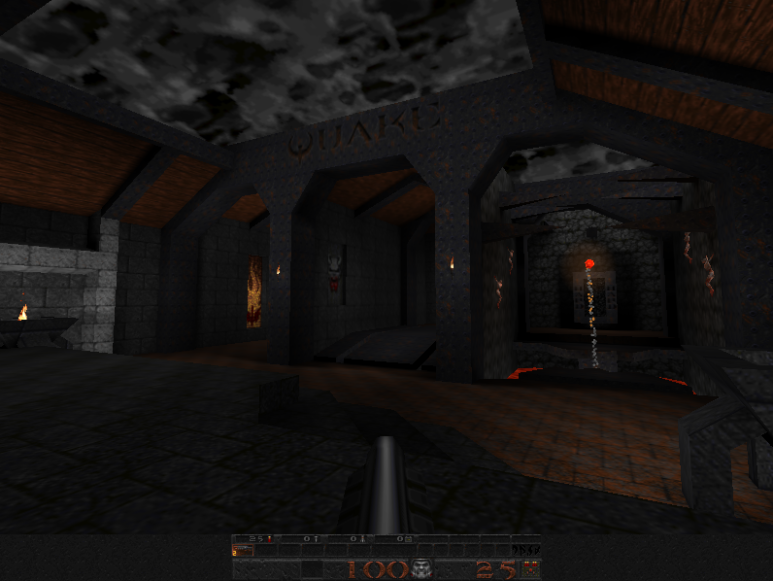
If you would like to give your map pack, mod or just change the quake experience visually you can update the 256 color palette. There are a few ways to do this, but I would like to talk about one v…
still raptor
a bit overkill
like we were saying, a simple hex editor is more than sufficient to get the job done
but honestly you could do a graphical palette creator/editor very easily and quickly
just need like a color picker UI
muted glacier
Cant wait until im done with the outdoor section of my map so I can finally do interiors. Lighting and decorating interiors sounds considerably more enjoyable than creating an outdoor environment/landscape. I ended up deleting my previously created landscape because it was causing light leaks all over the damn place, and I can make a better looking landscape anyway. That mess is what I have to look foward to when I get off work later.
gritty forge
slap every sunlight ericw's tools give you and forget about it 😎
muted glacier

 still raptor
damn looks great
crisp raven
Y'all wouldn't happen to know the RGB values for the blue door indicators in the DUSK campaign?
crisp raven
Yes an average would be most helpful
still raptor
but the specific tint is 0,97,255

which is applied to that texture
0061FF if you need the hex
still raptor
do you want the specifics for yellow and red?
crisp raven
Sure
crisp raven
Damn do you just know this stuff off the top of your head? 👀
still raptor
nah i have the editor open lmao
i was working on the switch port

so i can just check the materials lol
ancient depot
I should probably add pre-tinted variants in the update
still raptor
itd be easy enough
crisp raven
Thank you kindly Mr. _pts
muted glacier
Nooby question here: can i import stuff that I make in blender into trenchbroom? Cause I completely forgot that I had a online course for blender that I havent started, and was wondering if that would help at all with TB.
gritty forge
I don't think so
muted glacier
I didnt think so. Alas the poor Blender course will have to wait until I find a use for it, or until I get compelled to finish my Unreal Projects. Probably not gonna happen until an actual release for Unreal 5 comes out though.
still raptor
there was someone who was working on that as a concept
melding mesh data into the bsp compilation process
vast palm
muted glacier
I didnt think so. Alas the poor Blender course will have to wait until I find a ...

GitHub
.map exporter for Blender. Contribute to c-d-a/io_export_qmap development by creating an account on GitHub.
I never tried this myself but saw it some time ago
It should produce more accurate results if you export your geo as a v220/Valve map
Has anyone ever tried using GtkRadiant/NetRadiant to make Dusk maps?
muted glacier
@vast palm ill have to check that .map exporter out, and no, I think ive seen a Gtkradiant tutorial/spreadsheet online somewhere but never looked into it.
vast palm
I'm pretty experienced with Radiant so I wanted to avoid Trenchbroom at all costs 😅
still raptor
vast palm
I'm pretty experienced with Radiant so I wanted to avoid Trenchbroom at all cost...
you absolutely can use radiant
JACK, trenchbroom, radiant, etc etc
as long as you can export as one of the supported BSP versions, its all good
vast palm
@still raptor , that's great! I've been trying to configure it for about 10 minuets now
Guess I'll have to convert the FGD to a Radiant-compatible entity definition format though
still raptor
you can use valve 220 if you desire
and yeah, the FGD will be your biggest hurdle
we will eventually release an official one
but thats got no specific timeline
so the community made their own
vast palm
That's cool
Might write a parser/converter for FGD files for those that want to use Radiant then
still raptor
yeah i think that there are a lot of radiant users who were sorta forced to used TB or JACK when they were more comfortable with radiant
and we definitely dont want to inhibit easy of use in any way, so we're trying to support as many toolchains as we can
vast palm
Nice
NetRadiant seems to use an XML-based entity definition file so I guess I might be able to convert the FGD to it using a FGD parser
muted glacier
This probably doesnt look like much yet, but I ended up deleting my terrain and starting over, and It looks much better already. I saved some Before pictures, but Ill have to find them later. this version isnt plagued with light leak issues, and Im about halfway done with the shown area.
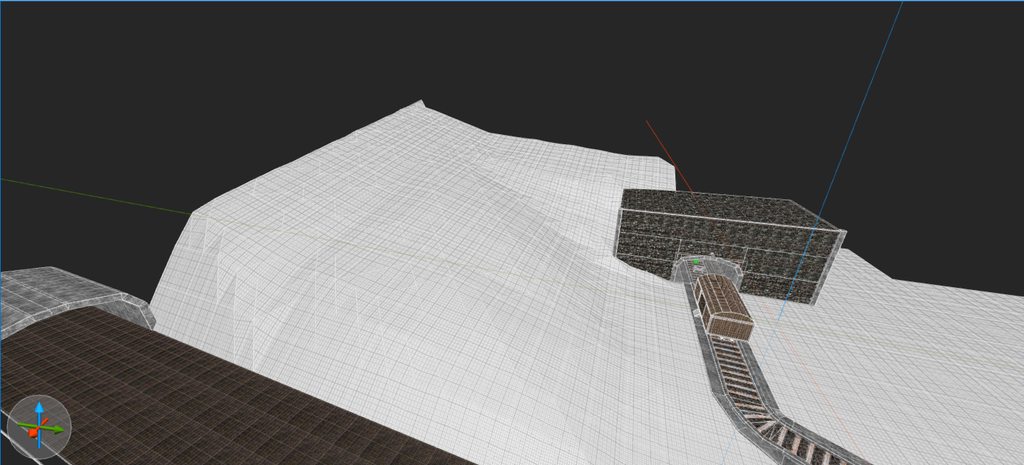
I have to move each point exactly where I want it, and theres about 900 points on the whole plain so its been time consuming, but it looks really good in game
crimson patrol
muted glacier
https://imgur.com/gallery/uCS7XOm
Woah that train thingy looks like my map
muted glacier
i havent looked at exporting from blender yet. and @crimson patrol whats your map? link it and ill play it
crimson patrol
Not finished (and won't be for the next decade) but the begginig area has a train
Benniging
Beginning
muted glacier
Oh lol. The trains really only at the start of mine if i stay according to my plan
still raptor
oh dang i like the train and snow
we should really give access to the snow and rain weather effects
crimson patrol
Just parent a fuckton of func details to func doors
And replace the frames per second measurement with seconds per frame
gritty forge
also
would it be possible to make it so that the new sdk applies proper lighting to models like vehicles and machines etc
not just a single even light color
crimson patrol
Yea pls
gritty forge
because in the campaign and duskworld things like forklifts have shading
crimson patrol
Thats why you should use my preset trees instead of dusk trees
gritty forge
oh and I just noticed that duskworld still has pumpkin mortars and sword has no sparkles
crimson patrol
Because its easier to light them up
gritty forge
and thats why I mostly make my own machines
still raptor
its a complicated issue
gritty forge
 still raptor
because those things are being placed as entities, they do not get lightmapped when you run your map through light.exe
still raptor
the base game doesnt use bsp
crimson patrol
still raptor
because those things are being placed as entities, they do not get lightmapped w...
Any potential fixes for that?
still raptor
there are a few
gritty forge
ah so its still an entity?
still raptor
in the base game , there isnt really an entity concept
theyre just gameobjects with attached meshes, which because they are static, happen to get lightmapped
gritty forge
oh ok
still raptor
we had a conversation in here earlier about the potential for a bsp post process which would insert external mesh data before light.exe is run
that way you could lightmap entities if you wanted
crimson patrol
Yippee
still raptor
but there are some technical hurdles to that
crimson patrol
That sounds painful to make
still raptor
another potential solution is when the project is open sourced, you could bake it in unity and provide the data that way
crimson patrol
That sounds jank
I would go for the first solution
still raptor
probably the quickest and easiest way to do it is just to replicate the geometry with brushes in trenchbroom
but thats manual effort
theyre both about equally jank
crimson patrol
Hey, you could skip the manual effort and use me preset trees
crimson patrol
And effort it was
It took like 2 weeks to make
And the cutouts require some turbojankery
gritty forge
and I aint fucking modelling a forklift myself
that sounds like torture lol
at least considering that I would have to match the existing textures with the model/brush I'm making
still raptor
yeah you would have to set the face offsets correctly
but the forklift is a pretty simple object overall lol
muted glacier
@crimson patrol i think i downloaded your trees that you made. Didnt read the text, placed one of the dead trees in my level, tried to compile and it crashed it lol.
But the rest of the trees look great
crimson patrol
Yea, tip for using my trees
Don't use the brush trees, use the cutouts
Like, don't use the brush trees ever
muted glacier
Why?
crimson patrol
It slows compiling by alot, and too many make the map uncompilable
The dead tree is broken
Even 1 breaks the compiler
muted glacier
Yeah. That happened to me. Any idea why?
honest stag
Bec there's a million small complex brushes
muted glacier
Makes sense.
crimson patrol
I think its because trenchbroom recognizes a group of brushes as one, and because the group has a fuckton of brushes it breaks the compiler
I could be wrong
Cutouts are the way of the future anyway
I have placed them in the hundreds and my map still compiles
Its great for scenery
muted glacier
crimson patrol
Just parent a fuckton of func details to func doors
On a different note, you said this. Could this be used to emulate rain?
honest stag
Bad idea tbh
crimson patrol
Not practical on an actual map, but possible
honest stag
wont even look that great
muted glacier
Okay. I wasnt thinking large scale, but kind of like a dripping faucet or waterfall.
gritty forge
If you made rain outside a window where you don’t actually walk outside it would work great
honest stag
muted glacier
Okay. I wasnt thinking large scale, but kind of like a dripping faucet or waterf...
Should be fine then
honest stag
gritty forge
<@!387223915606573056> did you figure out the yoghurt sigil problem
also sorry i havent responded - it was 1 am and i just fell asleep cuz i have 3 exams today
and no, i havent figured it out lol
gritty forge
oh ok np
muted glacier
1 am? Damn. Its 5 30 pm here.
honest stag
7-23 am right now
honest stag
pretty much to the north of china
gritty forge
wowie
muted glacier
Got some more done. Textured the cliffside, and experimented with grass terrain.

 honest stag
Nice, looks pretty good
gritty forge
the tri soup is real 
bold orbit
my mans fuckin triangled up
muted glacier
hey, can someone explain how to make my output BSP file a BSP2 file?
 gritty forge
muted glacier
hey, can someone explain how to make my output BSP file a BSP2 file?
gritty forge
muted glacier
hey, can someone explain how to make my output BSP file a BSP2 file?
how do you compile ur maps
cause I use cmd
and for that you do:
qbsp.exe -bsp2 <mapname>.map
muted glacier
oh. that worked. didnt realize it was that easy. thanks
crisp raven
Y'all don't use Necro's compiling GUI? 👀
gritty forge
ඞ
muted glacier
Download link has never worked for me for the GUI.
Unless im dumb, which might also be a possibility. Ive got a Compiler Gui that I found elsewhere, but whenever I try to launch Dusk through the GUI after it compiles, it doesnt work because it doesnt launch Dusk_SDK. But I can use it to make compiling easier. It also lets me output as -bsp2
honest stag
U dont have to relaunch dusk each time u want to reload the map
crimson patrol
Yea go into the modding menu and disable then re-enable the mod
honest stag
Dont need to do that either
Just start the map again from the menu
even while in the map
honest stag
crimson patrol
Yea go into the modding menu and disable then re-enable the mod
Have you been doing that the entire time
muted glacier
So I can have dusk running and after it compiles just select the map?? I learn more every day. That saves me so much time. What the fuck. I didnt ever think to leave it open because I figured it wouldnt immediately update in game
honest stag
Im a simple user , but from my understanding the map is loaded into memory
so it doesn't matter if you delete/replace the map file
cuz its loaded once
then when you select it from the menu again it loads the new version
So in short
the gui doesn't need to be set to game launch
i just use it to make the process run from a single hotkey
and adjust compile options on a single click
crimson patrol
honest stag
Have you been doing that the entire time
Wait so I didn't have to do that
 muted glacier
Thats dope. How do you know so much? Any previous games experience? Or have you just picked it up over time?
honest stag
i've just been here since day 1 of sdk launch and constantly pestered those around me (especially zombie) about all the same things you're asking right now
and after mapping for quite some time those things are burned into my memory
so i basically started from 0
even then im far from actually understanding anything, all of my knowledge is surface level lol
compared to Bread or any quake mod guy
ancient depot
honest stag
U dont have to relaunch dusk each time u want to reload the map
I'm not saying it'll come next update, but there's potential for it to be even more convenient in the rewrite due to how it's been written
The game can detect changes automatically, so theoretically you could have a completely empty mod folder, activate it in the menu, and as you start adding textures, models, etc, the game will notice and start loading them on the fly
I've prototyped it but it needs some tweaking before it gets added in proper
crimson patrol
Poge
honest stag
daaaaamn that's sick
honest stag
finally done with exams and shit
can't wait to pick mapping back up
gritty forge
Lessgo
got 1 more room, some minor tweaks left for my map
I also need to get the wad fixed somehow
then is done
muted glacier
Whats wrong with the wad?
long anchor
ancient depot
I've prototyped it but it needs some tweaking before it gets added in proper
you never cease to amaze me, man
gritty forge
so excited to release crimson cesspool soon
it's longer than a long base game map
which idk if that is good or bad but I think it's cool
 steep remnant
muted glacier
Unless im dumb, which might also be a possibility. Ive got a Compiler Gui that I...
steep remnant
muted glacier
Unless im dumb, which might also be a possibility. Ive got a Compiler Gui that I...

All the other guides on how to make maps for dusk are awful. This one will teach you how, and by the end of this guide you'll be set with a workshop of tools that'll let you make maps for dusk!...
steep remnant
Oh cool.
muted glacier
Thanks anyway @steep remnant !
steep remnant
👍
 slender geyser
Hey guys I got a question! How do I install Dusk texture packs, like how do I make them work?
honest stag
i'm assuming you're using trenchbroom?
or oh wait
you're talking about just texture mods right?
honest stag
ok so
first of all make sure you're on the SDK branch on steam
then go into the local files
navigate like this
SDK -> mnt -> local
and put your texture mod folder in there
slender geyser
mhm noted
honest stag
then open dusk, click "Modding" and enable the texture mod that you just installed
that should do it
slender geyser
thx chief
sharp trail
don't forget to go to #lfg-signup if you want to find players for duskworld as well
honest stag
What the FUCK are you doing here
GO BACK
SHOO
GO BACK TO #dusk-duskworld-dungeonsofdusk


 honest stag
fake
it's 21:43 right now
sharp trail
sorry i don't know about that i don't live on the end of the world like everyone else in this server
honest stag
Not yet
muted glacier
is it possible to make a wall that the player cant walk through, but can still shoot through?
for example, have an invisible wall that prevents players from falling off the map into the void, but still allowing them to shoot through it at enemies on a distant cliffside
muted glacier
okay Thanks!