#plugins
12 messages · Page 1 of 1 (latest)
 red chasm
 warm bough
red chasm
i have a fabric server so when i click on add-ons it just says eternal server er...
warm bough
red chasm
i have a fabric server so when i click on add-ons it just says eternal server er...
Do you want plugins or mods?
Because you would need a Paper server for plugins. Also, don’t use the addons menu. It’s old and doesn’t work.
 carmine archBOT
:warning: Addons
Addons are an older feature of Minehut using deprecated systems. This feature no longer functions as intended, and we are working on a brand new version of the page that will allow you to find plugins and addons that you can install on your server.
You can download plugins from other sources (see below).
- Login to your Minehut dashboard at https://app.minehut.com.
- Manage or activate your server.
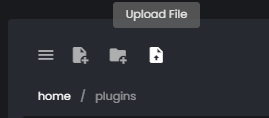
- Head over to the File Manager and navigate to the
pluginsdirectory. - Click the upload button (see image below) and select the file you would like to upload.
- Restart your server.
Some plugins require dependencies. Please make sure you read their resource page to see whether additional plugins are required.
Requested by wqaffle2 (1148257609623818252)

 dawn portal
you just need to download the files yourself and add them to the mods folder as waffle said
warm bough
The noob is correct.
warm bough
Respect
dawn portal
respect