#i need help

1 messages · Page 1 of 1 (latest)

tired vectorBOT
#

:warning: Addons

Addons are an older feature of Minehut using deprecated systems. This feature no longer functions as intended, and we are working on a brand new version of the page that will allow you to find plugins and addons that you can install on your server.

You can download plugins from other sources (see below).

  • Login to your Minehut dashboard at https://app.minehut.com.
  • Manage or activate your server.
  • Head over to the File Manager and navigate to the plugins directory.
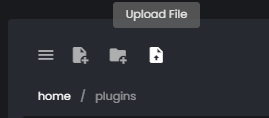
  • Click the upload button (see image below) and select the file you would like to upload.
  • Restart your server.

Some plugins require dependencies. Please make sure you read their resource page to see whether additional plugins are required.

daring ferry
#

were you using the addons tab or was it saying that when just uploading the jar file?

thin flax
#

the one from the plugin store that you have on your website "add-ons"

#

Can you help me if I can't continue with my project?

daring ferry