
#pebblehost
31 messages · Page 1 of 1 (latest)
 gusty ember
 hot berryBOT
 External Plan
The External plan allows you to host a single server, or a server network (using Velocity or Waterfall) outside of Minehut, and connect it to the Minehut proxies, which has some benefits like being displayed in the Minehut server list, and being able to advertise in the Minehut lobby. This plan is primarily for experienced users as you are hosting your own server, and Minehut support has a limited capability of helping you through the setup and maintenance.
While the External plan counts towards removing the daily 4 hour uptime limit, it is not the correct plan if you still intend to use Minehut's servers. If you purchased this plan as a mistake, simply change the plan to something else and you will be refunded for the remainder of the time.
Guide: https://gamersafer.notion.site/Minehut-External-Servers-Docs-c93113ba90924e3fb8d941348e59439c
GamerSafer Inc on Notion
The Minehut External Servers Docs provides a step-by-step guide on how to connect a Minecraft server to the Minehut network.
 leaden finch
@gusty ember
If this is still an issue
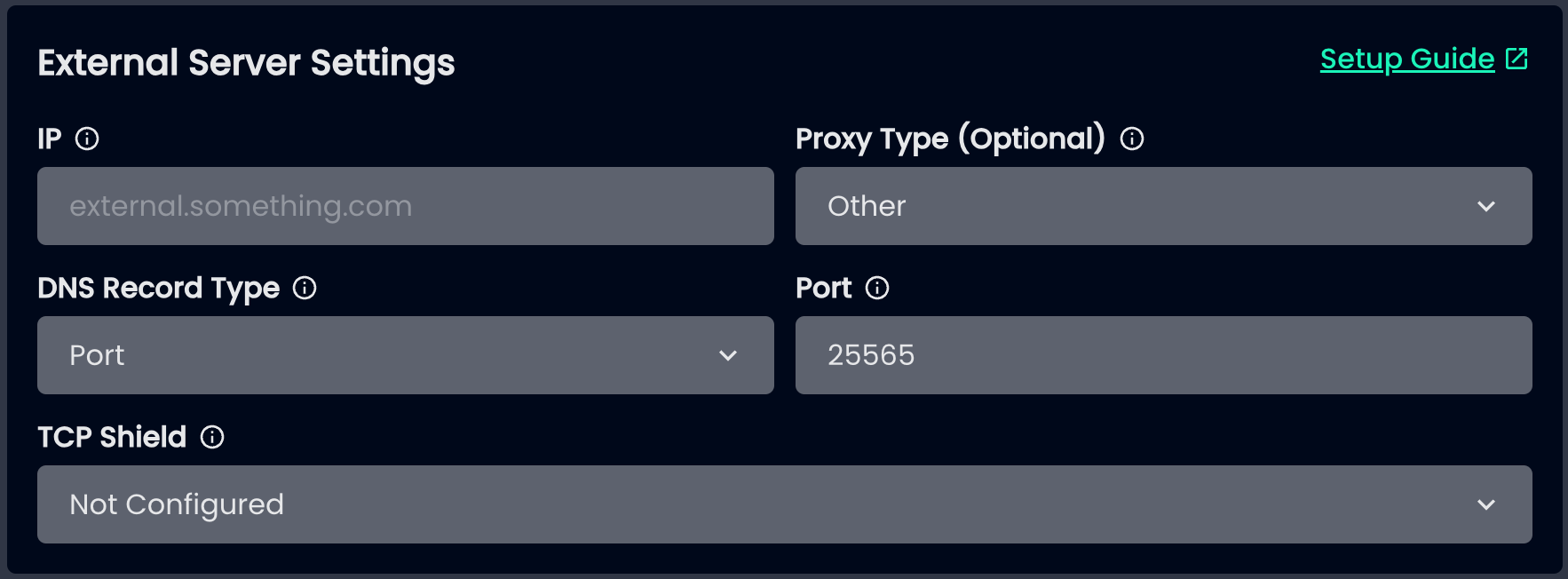
Send your startup flags, conflig/paper-global.yml, server.properties, and a SS of your MH External Server Settings
gusty ember
leaden finch
Send your startup flags, conflig/paper-global.yml, server.properties, and a SS o...
ensure-secure-profile: false doesnt allow players to join
gets a failed to verify username error on players joining
13.07 19:10:41 [Server] Startup[19:10:41 [ERROR]]: Username 'Volos_' tried to join with an invalid session
gusty ember

#Minecraft server properties
#Sat Jul 13 19:15:56 GMT 2024
allow-flight=false
allow-nether=false
broadcast-console-to-ops=true
broadcast-rcon-to-ops=true
debug=false
difficulty=peaceful
enable-command-block=false
enable-jmx-monitoring=false
enable-query=false
enable-rcon=false
enable-status=true
enforce-secure-profile=true
enforce-whitelist=false
entity-broadcast-range-percentage=100
force-gamemode=false
function-permission-level=2
gamemode=survival
generate-structures=true
generator-settings={}
hardcore=false
hellworld=true
hide-online-players=true
initial-disabled-packs=
initial-enabled-packs=vanilla
level-name=world
level-seed=
level-type=default
log-ips=true
max-build-height=
max-chained-neighbor-updates=1000000
max-players=100
max-tick-time=60000
max-world-size=29999984
motd=§8§l§m----------§8§l[-§f §lVERTEX NETWORK§f §8§l-]§m----------§r\n§l §r §4§lPvP§f§l §k §9§lDuels§f§l §k §d§lKitMap§f§l §e §lEnchants
network-compression-threshold=256
online-mode=true
op-permission-level=4
player-idle-timeout=0
prevent-proxy-connections=false
pvp=true
query.port=25565
rate-limit=0
rcon.password=
rcon.port=25575
require-resource-pack=false
resource-pack=
resource-pack-prompt=
resource-pack-sha1=
server-ip=0.0.0.0
server-port=25565
simulation-distance=10
spawn-animals=true
spawn-monsters=true
spawn-npcs=true
spawn-protection=0
sync-chunk-writes=true
text-filtering-config=
texture-pack=
use-native-transport=true
view-distance=10
white-list=false
leaden finch
gusty ember
There is something wrong with this file
leaden finch
gusty ember
proxy?
hmm?
there's something wrong with the file
proxy is part of the name
 unreal dome
gusty ember
You're aware that by putting play.vertex-pvp.com here you won't be able to use it for players to join
I recommend simply putting the number IP of the server there
Then play. can still be linked to the .minehut.gg IP as a custom domain to your server
gusty ember
I think im a little confused on the setup apologies let me watcha. youtube video real quick as my tcpshield setup uses that ip for the public ip
unreal dome
I don't think tcpshield is really necessary at all if youre behind minehut, and also think pebble already has ddos prot
gusty ember
well its pebblehost protection
tcp shield
is their ddos protection
also i disable online-mode like it said but skins dont show and player data doesnt match
unreal dome
Online mode needs to be true for standalone paper servers though
gusty ember
Ok so when I add the startup to my server it just doesn’t allow me to connect with a failed to verify username
gusty ember
play.vertex-pvp.com my normal server IP
unreal dome
Did you already set that DNS up correctly