#Configuring external server
231 messages · Page 1 of 1 (latest)

 obsidian jungle
what external host are you using?
GamerSafer Inc on Notion
The Minehut External Servers Docs provides a step-by-step guide on how to connect a Minecraft server to the Minehut network.
Here's MH's external server guide just for reference
Try to follow this and lmn if you run into any issues
 vagrant condor
obsidian jungle
https://gamersafer.notion.site/Minehut-External-Servers-Docs-c93113ba90924e3fb8d...
yeah, this is what I've been following
vagrant condor
obsidian jungle
what external host are you using?
Oracle cloud VPS
I can access the server on my own though
It works as fine as long as I don't add the -Dmojang.sessionserver=https://api.minehut.com/mitm/proxy/session/minecraft/hasJoined flag in my start.sh and enable the haproxy-protocol
obsidian jungle
Ok full disclosure I’ve never actually went through these steps myself and only have worked on servers that have done this
You’re using a standalone paper server right?
enforce-secure-profile needs to be false
vagrant condor
obsidian jungle
You’re using a standalone paper server right?
No, I was trying to set up a velocity proxy
since we're going to do an hub and stuff like that
vagrant condor
obsidian jungle
enforce-secure-profile needs to be false
does it have to be false even if you're using a proxy connection?
obsidian jungle
No
vagrant condor
hum
obsidian jungle
Your MH server plan is external right?
vagrant condor
now I'm trying to set up a standalone paper server
but still can't manage to make it work
vagrant condor
obsidian jungle
Your MH server plan is external right?
yeah
obsidian jungle
What’s the error?
 obsidian jungle
Could you send your flags here?
vagrant condor
obsidian jungle
What’s the error?
it says I need to enable bungeecord to join the server, if I enable it, it says that the server is in a bad state
vagrant condor
obsidian jungle
Could you send your flags here?
sure thing
java -Dminecraft.api.auth.host=https://authserver.mojang.com/ -Dminecraft.api.account.host=https://api.mojang.com/ -Dminecraft.api.services.host=https://api.minecraftservices.com/ -Dminecraft.api.session.host=https://api.minehut.com/mitm/proxy -Xms20480M -Xmx20480M -jar server.jar nogui
obsidian jungle
vagrant condor
```java -Dminecraft.api.auth.host=https://authserver.mojang.com/ -Dminecraft.api...
looks good
enforce-secure-profile is false right?
in server.properties
vagrant condor
yes
obsidian jungle
paper-global.yml has proxy-protocol to true
obsidian jungle
you're using tcpshield?
vagrant condor
no
obsidian jungle
then set it to true
obsidian jungle
vagrant condor
bungeecord: false, right?
?
vagrant condor
in spigot.yml
obsidian jungle
if that's the default value then yes
bungeecord doesn't work with mh's external server plan
vagrant condor
obsidian jungle
bungeecord doesn't work with mh's external server plan
yeah I know
and it was disabled before
but I received an error telling me to enable it
anyways

now I get this error
obsidian jungle
yea don't enable it
vagrant condor
alr, it's disabled
vagrant condor
vagrant condor
but this is what happened after enabling proxy-protocol
obsidian jungle
make sure you've done all of this - https://docs.papermc.io/velocity/player-information-forwarding#configuring-modern-forwarding-for-paper

How to configure information forwarding on Velocity.
vagrant condor
obsidian jungle
make sure you've done all of this - https://docs.papermc.io/velocity/player-info...
but I'm not using velocity anymore
let me try to use the proxy method again
obsidian jungle
vagrant condor
but I'm not using velocity anymore
💀
Must be an issue with your mh external server
obsidian jungle
did you not switch the proxy type to other?
vagrant condor
yeah I did
vagrant condor
obsidian jungle
make sure you've done all of this - https://docs.papermc.io/velocity/player-info...
and this is the guide to follow if I'm using velocity
which I'm not anymore
obsidian jungle
@knotty canyon
Please help 💀
vagrant condor
ok I'm trying again with velocity and a paper server
 knotty canyon
try one or both of the following
Set the server back to free plan. it will automatically refund you any remaining credits. start the server for a few minutes. hibernate the server. then set it to the external plan and reconfigure. If there is some internal issue, this may reset to default settings.
Set the server back to free plan. It will automatically refund you any remaining credits. Pick another server on your account and get the external plan on that one and reconfigure. I've seen this issue where very rarely, the external plan does not work on specific servers most likely do to it being an old legacy server.
vagrant condor
knotty canyon
try one or both of the following
Set the server back to free plan. it will aut...
ok
it kinda worked
but kinda not
I don't get any error from MH but I still can't access ther server
I'm getting timed out
this is what the console has to say
 knotty canyon
whats your server name?
knotty canyon
does your server have any sort of firewall?
knotty canyon
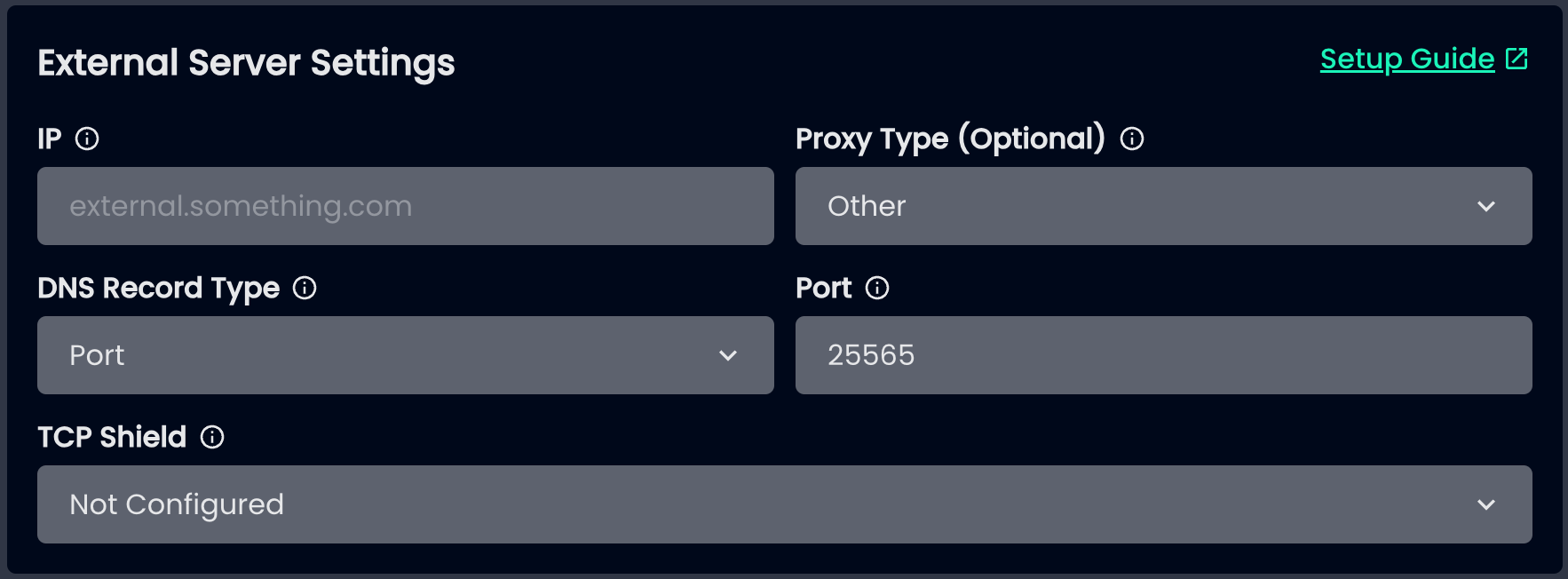
can you send me an image of your settings on the minehut panel
you can DM it to me if you dont want to send it publicly
 knotty canyon
does that domain have an srv record or is it an A record
knotty canyon
just put the numerical ip there. since players wont be able to join through that ip anymore
vagrant condor
ok

btw, my paper console doesn't show anything when I try to join
so I think that the proxy isn't sending me there
knotty canyon
so the proxy is showing something atleast?
vagrant condor
yes
vagrant condor
vagrant condor
this is what the console has to say
this
knotty canyon
are you using modern forwarding?
knotty canyon
does the proxy work fine without any of the minehut settings?
vagrant condor
let me try to remove it and restart everything
HANG ON
I just realised that my start.sh of the paper server was:
java -Dminecraft.api.auth.host=https://authserver.mojang.com/ -Dminecraft.api.account.host=https://api.mojang.com/ -Dminecraft.api.services.host=https://api.minecraftservices.com/ -Dminecraft.api.session.host=https://api.minehut.com/mitm/proxy -Xms20480M -Xmx20480M -jar server.jar nogui
I forgot to change it
this might be the reason
knotty canyon
yeah the paper server isnt supposed to have the flags when using a proxy
only the proxy needs it
vagrant condor
yep
let me try to restart it
didn't change at all :(
I'm gonna cry
ok let me try to enter without MH settings
hum
doesn't seem to be working
knotty canyon
get it working without the minehut settings first and then add the minehut stuff afterwards
knotty canyon
vagrant condor
I think its an issue with how you added the subserver. rather than using the local ip, use the direct numerical ip with port
vagrant condor
let me try
but it was working before
[01:39:00 INFO]: [connected player] ToXer04 (/146.241.67.99:54810) has connected
[01:39:05 ERROR]: [connected player] ToXer04 (/146.241.67.99:54810): unable to connect to server astrorealm
io.netty.channel.ConnectTimeoutException: connection timed out after 5000 ms: /204.216.223.10:25566
at io.netty.channel.epoll.AbstractEpollChannel$AbstractEpollUnsafe$2.run(AbstractEpollChannel.java:613) ~[Velocity.jar:3.3.0-SNAPSHOT (git-be678840-b378)]
at io.netty.util.concurrent.PromiseTask.runTask(PromiseTask.java:98) ~[Velocity.jar:3.3.0-SNAPSHOT (git-be678840-b378)]
at io.netty.util.concurrent.ScheduledFutureTask.run(ScheduledFutureTask.java:153) ~[Velocity.jar:3.3.0-SNAPSHOT (git-be678840-b378)]
at io.netty.util.concurrent.AbstractEventExecutor.runTask(AbstractEventExecutor.java:173) ~[Velocity.jar:3.3.0-SNAPSHOT (git-be678840-b378)]
at io.netty.util.concurrent.AbstractEventExecutor.safeExecute(AbstractEventExecutor.java:166) ~[Velocity.jar:3.3.0-SNAPSHOT (git-be678840-b378)]
at io.netty.util.concurrent.SingleThreadEventExecutor.runAllTasks(SingleThreadEventExecutor.java:470) ~[Velocity.jar:3.3.0-SNAPSHOT (git-be678840-b378)]
at io.netty.channel.epoll.EpollEventLoop.run(EpollEventLoop.java:416) ~[Velocity.jar:3.3.0-SNAPSHOT (git-be678840-b378)]
at io.netty.util.concurrent.SingleThreadEventExecutor$4.run(SingleThreadEventExecutor.java:997) ~[Velocity.jar:3.3.0-SNAPSHOT (git-be678840-b378)]
at io.netty.util.internal.ThreadExecutorMap$2.run(ThreadExecutorMap.java:74) ~[Velocity.jar:3.3.0-SNAPSHOT (git-be678840-b378)]
at io.netty.util.concurrent.FastThreadLocalRunnable.run(FastThreadLocalRunnable.java:30) ~[Velocity.jar:3.3.0-SNAPSHOT (git-be678840-b378)]
at java.base/java.lang.Thread.run(Thread.java:1570) [?:?]
[01:39:05 INFO]: [connected player] ToXer04 (/146.241.67.99:54810) has disconnected: Unable to connect you to astrorealm. Please try again later.
I see
the port 25566 is closed for some reason
I opened it and still doesn't work ._.
ok that's it
RECAP
I removed the proxy and I'm trying to upload on MH a standalone paper server
it's working fine but as soon as I try to upload it to MH with these settings it doesn't work anymore

I get this error

and if I try to access with the direct ip: 204.216.223.10:25565 I get this error

with the same ip it was working perfectly before
vagrant condor
vagrant condor
I get this error
I can't follow this guide because:
- The url doesn't exist anymore
- I can't use this guide 'cause it requires velocity (which I don't have)
NVM IT WORKS
kinda
I'm getting these errors in the console and I think they're related to the flags on the wiki, could you look into that?
also, really important, the itemsadder resourcepack doesn't work
I don't receive the request to install it and even if I try to install it manually, it doesn't load the textures
it was working before so it has to be related to MH
 tropic plover
afaik, itemsadder defaults to a pack hosting website that minehut blocks
I think there's a fix but idk it
vagrant condor
tropic plover
afaik, itemsadder defaults to a pack hosting website that minehut blocks
I'm using self host option
I mean, the resource pack is hosted and updated real time on the server
all the files are stored in a folder there, so local access
vagrant condor
hey guys, any help with items adders self hosting feature?
 drowsy bane
vagrant condor
hey guys, any help with items adders self hosting feature?
i am also having this same issue, would be nice to find a fix.
vagrant condor
drowsy bane
i am also having this same issue, would be nice to find a fix.
Yeah exactly
I’ve read that a lot of people are having troubles with this, I think it might be of help for a lot
 idle siren
i was told you cant do self hosting you have to use an external host
the list of external hosts and instructions are on that setup instruction guide
drowsy bane
idle siren
the list of external hosts and instructions are on that setup instruction guide
theres 4, and they all suck
apart from maybe github
idle siren
unfortunatly those are the ones Minehut allows
drowsy bane
ive made a feedback request to whitelist lobfile, but no ones messaged in there
idle siren
there recovering from that massive downtime right now.
i too am about to link an external proxy. Linking direct was to messy
vagrant condor
Yeah, I’m using GitHub and it works fine
But self host would be awesome
Since rn every time you make a change you have to reupload it
With self host you can skip a step
drowsy bane
vagrant condor
Since rn every time you make a change you have to reupload it
do you have to download the pack everytime you join the server?
for me you have to
knotty canyon
vagrant condor
With self host you can skip a step
the reason Minehut doesn't allow self host is cause Minehut hashes the ips of all players who join through Minehut. so servers never know the real ip of players. Texturepacks have a behavior where the client itself makes a request to the link specified to download it. So what people did once was put an ip grabber there. And when the client made a request to download the pack, the ip gets left there. Normally this isn't an issue on regular servers cause they already know your real ip. but not on Minehut. so they made it only Minehut links or certain whitelisted links are allowed. but it would be cool if more links were whitelisted. if you know of any safe links that to not tell the link creator ips of users, let me know and I'll pass it to a dev.
vagrant condor
drowsy bane
do you have to download the pack everytime you join the server?
Yeah
drowsy bane
knotty canyon
the reason Minehut doesn't allow self host is cause Minehut hashes the ips of al...
ItemsAdder has an option to use LobFile, it'd be cool if that were added.
vagrant condor
But I had that same problem before, I thought it was how itemsadder manages resource packs
drowsy bane
also tarna, do you know why we have to download the pack everytime we join the server?
is it because minehut's lobby has a pack
or what
vagrant condor
knotty canyon
the reason Minehut doesn't allow self host is cause Minehut hashes the ips of al...
Alr, I see, thank you very much for making this clear
knotty canyon
drowsy bane
is it because minehut's lobby has a pack
yeah probably. when players join through the lobby and have accepeted the pack there, they would have to redownload the pack when joining a player server. but if you direct connect, it shouldn't be an issue
knotty canyon
drowsy bane
ItemsAdder has an option to use LobFile, it'd be cool if that were added.
can you send an example of what the links look like
knotty canyon
drowsy bane
is that what u mean by direct
I mean like if a player joins through the direct ip like server.minehut.gg or a custom domain going through there
knotty canyon
drowsy bane
no, still have to download it
I actually think thats normal isnt it? when you leave a server, the pack gets unloaded and you have to reget it when joining back. the only time you dont have to redownload it is when you are switching between servers of the same proxy.
knotty canyon
drowsy bane
https://lobfile.com/file/QrgPcEFb.zip
ill show this to a dev on Monday but probably wont be added for a while as they are working on big changes
drowsy bane
knotty canyon
I actually think thats normal isnt it? when you leave a server, the pack gets un...
when you download a pack, it stays in your downloads folder (in .minecraft) and can be applied again once joining without redownloading (if the same pack is still applied to the server of course)
knotty canyon
it doesnt seem to do that for a server I just tried it on thats not through Minehut
drowsy bane
what server did you join
drowsy bane
knotty canyon
it doesnt seem to do that for a server I just tried it on thats not through Mine...
expected behaviour: notice how it doesnt redownload the pack but applies it directly
oh ffs
here
knotty canyon
drowsy bane
here
the server I did it on had a hub with no pack and one of their servers had a pack. so maybe that made a difference
probably similar to why it does that on MInehut
drowsy bane
then shouldnt the minehut pack also redownload??
knotty canyon
drowsy bane
then shouldnt the minehut pack also redownload??
for me, it seemed to work fine. i joined minehut. downloaded minehut pack. joined that server, downloaded that pack. went back to minehut lobby. didnt have to redownload. and joined that server again and it didnt redownload
actually nvm, it did seem to redownload, it did it super fast that I didn't notice.
so im not sure
drowsy bane
actually, it seems like theres an error in console when a minehut player joins
knotty canyon
what is it?
drowsy bane
happened for all the times you joined
to me it seems like minehut is sending the wrong packets?
knotty canyon
minehut doesnt modify any packets for resource packs. all they do is intercept it, check if its coming from one of the allowed sources. and if it is, let it pass through. if not, block it
atleast thats my understanding
do you use any plugin to send the pack or just the link in server.properties
drowsy bane
could this be an itemsadder issue? i use no-host in the plugin, and host the pack in github, and like put the link in server.properties but my pack comes from ItemsAdder
 drowsy bane
i imagine this would be fixed if minehut supported LobFile or one of the external hosts
 knotty canyon
isnt external-host the one you are supposed to be using?
and put the github link there
drowsy bane
i dont know, the wiki doesnt say anything about it, they only list DropBox, Google Drive and OneDrive
but i can try
i tried it and got this error upon joining
 knotty canyon
that just seems to be a regular lost connection message
drowsy bane
hm that could just be an itemsadder issue
i tried joining not through minehut and i get the same error
knotty canyon
yeah just revert back to how you had it before then
drowsy bane
that error when joining is weird though (no-host)
im not sure if thats an itemsadder issue or a minehut issue
vagrant condor
hello @knotty canyon sorry for disturbing you, could I ask you a question in dm?
knotty canyon
vagrant condor
hello <@299693860240752650> sorry for disturbing you, could I ask you a question...
sure
drowsy bane
knotty canyon
yeah just revert back to how you had it before then
do you have any update on whether lobfile will be whitelisted or not?
 waxen adder
drowsy bane
drowsy bane
do you have any update on whether lobfile will be whitelisted or not?
@knotty canyon
knotty canyon
I do not have any updates on that yet, sorry
knotty canyon
@drowsy bane it should be added now
drowsy bane
knotty canyon
<@1188869687078047836> it should be added now
oh my god thank the lord
this also fixed the downloading the pack every join issue :)
ty