#problem with my 24/7 server

206 messages · Page 1 of 1 (latest)

minor sinew
#

hey does any one know how to fix servers that crash after 10 mins or so that is a 24/7 server? i had recently bought the feature where your server is online all the time and ever since then the server has been crashing or going offline after a few minutes and i have to constantly restart it or start it up again
i also lose some progress within the server as well
here is the part of the console/log when the server started having issues and crashed or something

/home/minecraft/signal/start_cmd: line 1: 21540 Killed /opt/java/17/bin/java -Xmx${SERVER_RAM} -XX:+ParallelRefProcEnabled -XX:MaxGCPauseMillis=200 -XX:+UnlockExperimentalVMOptions -XX:+DisableExplicitGC -XX:+AlwaysPreTouch -XX:G1NewSizePercent=30 -XX:G1MaxNewSizePercent=40 -XX:G1HeapRegionSize=8M -XX:G1ReservePercent=20 -XX:G1HeapWastePercent=5 -XX:G1MixedGCCountTarget=4 -XX:InitiatingHeapOccupancyPercent=15 -XX:G1MixedGCLiveThresholdPercent=90 -XX:G1RSetUpdatingPauseTimePercent=5 -XX:SurvivorRatio=32 -XX:+PerfDisableSharedMem -XX:MaxTenuringThreshold=1 -DIReallyKnowWhatIAmDoingISwear -Djline.terminal=jline.UnsupportedTerminal -Dlog4j2.formatMsgNoLookups=true -jar server.jar

tawny condor
#

out of ram or your have done some other stuff to get that error

#

the other stuff can be that you have downgraded your serverversion

minor sinew
#

does disk space help with the issue at all?

tawny condor
#

disk? no

minor sinew
#

dang cause i bought disk space to try fixing it

tawny condor
#

it has to do with to little ram, or you have done something that makes it crash

minor sinew
#

so what do u mean by downgraded server version?

hidden dragon
#

it cannot be since the server crashes just every 10 minutes or so

#

it's 100% server ram

#

basically you need more ram

#

aka ugprade your plan with more gigs of ram

#

or delete some plugins, worlds, or limit the size of your world

minor sinew
#

hmm

tawny condor
minor sinew
#

oh makes sense

tawny condor
minor sinew
#

ok well what if i just upgrade the max players thing in server specs

#

will that help

tawny condor
#

what??

#

noo

minor sinew
#

oh sorry i did not mean that

tawny condor
#

dont upgrade random stuff inhope of it working

minor sinew
#

ok

tawny condor
#

if you really want to upgrade something upgrade the server ram

minor sinew
#

if i upgrade ram to 2GB do u think it will be enough

#

i have it at 1 GB rn

tawny condor
#

depends on how many plugins and players the server going to have

#

1gb isnt enough for 20+ plugins and 10+ players

minor sinew
#

ok let me see how many plugins i have real quick

#

ok i have 12 plugins and i usally have below like 7 players

tawny condor
#

then it depends on how powerhungry the plugins are

#

but 7 players can be a problem if all of them is loading many chuncks or doing something massive to excide the 1gb ram you have

minor sinew
#

well the world border is shrunk all the way down to 200 and is it is a flat world

tawny condor
#

and the plugins?

minor sinew
#

ok so i have skript,essentials,worldedit,worldguard,essentialschat,luckperms,holographic displays,openinv,vualt,shopkeepers

tawny condor
#

seems to be fine, but skript can be heavy if you scripts is poorly made

minor sinew
#

yeah out of all plugins i would think that skript would be the biggest problem

tawny condor
#

skript isnt a big problem and can fine run on 1 gb of ram, but it can be a problem if the dev cant skript

minor sinew
#

what do you mean by if the dev cant skript?

tawny condor
#

idk who on your server is the one using skript, but if they make poorly skripts that is performance heavy it can be a big problem

minor sinew
#

oh i see

#

well what if i have a skript that has 578 lines of skript?

tawny condor
#

that is alot of lines

minor sinew
#

yeah

tawny condor
#

so if its hardcoded and super bad coded its probably what used the most ram on your server

minor sinew
#

so if its was super bad coded when a reload it and it suggests things that could be better coded or skripted could that be a sign??

#

like reload the skript in game

tawny condor
minor sinew
#

ok

#

cool thank you

#

i have a few other skripts but there not super big like the one i have

#

how would oyu like me to send u the skript?

#

does copy and pasting it work for u?

tawny condor
#

just send it here

#

yes

minor sinew
#

ok

tawny condor
#

just format it

#

!format

uncut dewBOT
# tawny condor !format

:technologist: Code Blocks

To make it easier for others to read your code, it is asked that you send it in a code block. On Discord, you can simply send this:

```
Code here
```

minor sinew
#

...

tawny condor
#

igtg so i will take a look at it later

minor sinew
#

ok cool

#

does that work?

tawny condor
# minor sinew

oh wow i see that you have not learned that you can use multiple if statements in 1 event

#

you dont need 300 simular events to check something

minor sinew
#

oh

tawny condor
#

and you dont need to cancel each slot click event

#

you can just cancel click event on the whole inv

minor sinew
#

can u give example?

tawny condor
#
on inventory click:
    if name of event-inventory is "&b&lShop":
              cancel event
              if index of event-slot = 11:
                    set {_gui} to a new chest inventory with 3 rows named "&b&lSkillsets"
                    set slot 10 of {_gui} to redstone named "&c&lMax Health | T1" with lore "&bCost: &9$32"
                    set slot 11 of {_gui} to golden pickaxe named "&6&lHaste" with lore "&bCost: &9$20"
                    set slot 12 of {_gui} to black stained glass pane named " "
                    set slot 13 of {_gui} to light blue stained glass pane named "&bMore Skillsets Coming Soon!"
                    set slot 14 of {_gui} to black stained glass pane named " "
                    set slot 15 of {_gui} to black stained glass pane named " "
                    set slot 16 of {_gui} to black stained glass pane named " "
                    open {_gui} to player
minor sinew
#

what lines are you showing me that u edit?

#

did u swap skript lines 4 and 3

tawny condor
#

i just copyed something from your code so idk, but now just do that
just do this for the rest

on inventory click:
    if name of event-inventory is "&b&lShop":
            cancel event
            if index of event-slot = 10:
                if player's balance is greater than or equal to 32:
                    execute console command "effect give %player% minecraft:health_boost 10000 -1 true"
                    execute console command "economy take %player% 32"
                else:
                    send "&cSorry You Don't Have Enough!"
            if index of event-slot = 11:
                set {_gui} to a new chest inventory with 3 rows named "&b&lSkillsets"
                set slot 10 of {_gui} to redstone named "&c&lMax Health | T1" with lore "&bCost: &9$32"
                set slot 11 of {_gui} to golden pickaxe named "&6&lHaste" with lore "&bCost: &9$20"
                set slot 12 of {_gui} to black stained glass pane named " "
                set slot 13 of {_gui} to light blue stained glass pane named "&bMore Skillsets Coming Soon!"
                set slot 14 of {_gui} to black stained glass pane named " "
                set slot 15 of {_gui} to black stained glass pane named " "
                set slot 16 of {_gui} to black stained glass pane named " "
                open {_gui} to player
minor sinew
#

oh i see so instead of doing on inventory click:
if name of event-inventory is "&b&lShop":
cancel event
if index of event-slot = 10:

#

for all of them i can just do

#

on inventory click:
if name of event-inventory is "&b&lShop":
cancel event
if index of event-slot = 10:

#

and then

#

if index of event-slot = 11:

#

does that make sense?

#

what im saying?

#

so if i do this do u think that it will help benefit my server?

tawny condor
#
  1. the code will look alot cleaner and easier to edit.
  2. it will improve parsing time.
  3. it will help benefit your server since you dont have 300 of the same event.
minor sinew
#

ok so it could probally or mostly likely solve my problem

tawny condor
#

not solve it 100% but most likely help, yes

minor sinew
#

cool

#

is there anything else that could be crashing my server?

#

that u know i could solve?

tawny condor
#

do you have other skripts that you have made that you want me to fix

minor sinew
#

im i do have some they are just not as long

#

if not pretty short but yeah

tawny condor
#

i can easly make a server crash with 3 lines of code so the lenght dosnt really matter but how its coded

minor sinew
#

ok

#

...

#

...
every 20 seconds:
loop all players:
if {%loop-player%.random} = true:
give loop-player a random element of all items
wait 1 tick

command /gen:
trigger:
if {%player%.random} = true:
set {%player%.random} to false
message "&c&lYou have disabled Gen" to player
else:
set {%player%.random} to true
message "&a&lYou have enabled Gen" to player
...

tawny condor
#

periodical events and looping does not really mix well with eachother, but since your server has less than 10 players and the periodical event runs every 20 seconds its fine

#

but a example of a bad way is

every tick:
  loop all offline players:
    #some code

this i a bad way since it will overlap and perhaps slow your server down drasticly and crash

minor sinew
#

hmm

#

so is there a better way to word my skript that i just sent?

tawny condor
#
on join:
  while player is online:
    wait 20 seconds
    give player a random element of all items
minor sinew
#

ok so should i replace all that top half with that

#

but also keep the on command /gen: part

minor sinew
#

ok

#

also im working on the first skript i sent u and want to see if this is fine

#

and fixing it up

#

one sec

#

...
on inventory click:
if name of event-inventory is "&b&lSkillsets":
if index of event-slot = 10:
cancel event
if player's balance is greater than or equal to 32:
execute console command "effect give %player% minecraft:health_boost 10000 0 true"
execute console command "economy take %player% 32"
else:
send "&cSorry You Don't Have Enough!"

    if index of event-slot = 11:
        cancel event
        if player's balance is greater than or equal to 20:
            execute console command "effect give %player% minecraft:haste 10000 0 true"
            execute console command "economy take %player% 20"
        else:
            send "&cSorry You Don't Have Enough!"

    if index of event-slot = 12:
        cancel event

    if index of event-slot = 13:
        cancel event

    if index of event-slot = 14:
        cancel event

    if index of event-slot = 15:
        cancel event

    if index of event-slot = 16:
        cancel event

on inventory click:
if name of event-inventory is "&b&lShop":
if index of event-slot = 0:
cancel event
...

tawny condor
#

you need to format it

#

you are using wrong symbols

minor sinew
#

wrong symbols?

tawny condor
#

`that one not .

minor sinew
#

that one not where?

#

oh u mean like...

tawny condor
minor sinew
#

oh i was using that just in the chat

tawny condor
#

yeah use this symbol `

#

so it actually becomes a codebox

minor sinew
#

oh

#

ok so.. there is nothing wrong with my skript edit right there

tawny condor
#

you sent your code like this

...
#code
...
which dosnt change anything

but send it like this

#code

which makes it easy to read
the symbol is a `

minor sinew
#

ok so like this....

#

'
#code
on inventory click:
if name of event-inventory is "&b&lSkillsets":
if index of event-slot = 10:
cancel event
if player's balance is greater than or equal to 32:
execute console command "effect give %player% minecraft:health_boost 10000 0 true"
execute console command "economy take %player% 32"
else:
send "&cSorry You Don't Have Enough!"

    if index of event-slot = 11:
        cancel event
        if player's balance is greater than or equal to 20:
            execute console command "effect give %player% minecraft:haste 10000 0 true"
            execute console command "economy take %player% 20"
        else:
            send "&cSorry You Don't Have Enough!"

    if index of event-slot = 12:
        cancel event

    if index of event-slot = 13:
        cancel event

    if index of event-slot = 14:
        cancel event

    if index of event-slot = 15:
        cancel event

    if index of event-slot = 16:
        cancel event

on inventory click:
if name of event-inventory is "&b&lShop":
if index of event-slot = 0:
cancel event
,

tawny condor
#

just copy my symbol `

#

and paste it 3 times before and 3 times after the code

minor sinew
#
#code
on inventory click:
    if name of event-inventory is "&b&lSkillsets":
      cancel event
      if index of event-slot = 10:
      if player's balance is greater than or equal to 32:
      execute console command "effect give %player% minecraft:health_boost 10000 0 true"
      execute console command "economy take %player% 32"
      else:
      send "&cSorry You Don't Have Enough!"

      if index of event-slot = 11:
      if player's balance is greater than or equal to 20:
      execute console command "effect give %player% minecraft:haste 10000 0 true"
                execute console command "economy take %player% 20"
      else:
      send "&cSorry You Don't Have Enough!"

on inventory click:
     if name of event-inventory is "&b&lShop":
        if index of event-slot = 0:
            cancel event
tawny condor
#

you dont need to inculde the #code thats just a comment

minor sinew
#

oh

#

ok

tawny condor
minor sinew
#

ok one sec

#

ok just edited it again...

#

better?

tawny condor
#

now you have 5 empty if state ments just remove those

#

and now you are canceling all on inv click so indent line 3

minor sinew
#

ok

#

how bout that?

tawny condor
#

everything after the cancel event shoulnt be indented

minor sinew
#

is that good?

tawny condor
#

no

#

read it again

#

your code

minor sinew
#

ok are we talking about the bottom being fixed too?

tawny condor
#

no you just made your code unusable

minor sinew
#

lol

tawny condor
#

you unidented everything
i said you should do this

on jump
  if x = y:
    cancel event
      if y = z:
        #code

to this

on jump
  if x = y:
    cancel event
    if y = z:
      #code

but you did this

on jump
  if x = y:
  cancel event
  if y = z:
  #code
minor sinew
#

oh so do the top one

on jump
if x = y:
cancel event
if y = z:
#code

tawny condor
#

no

minor sinew
#

oh i see now

#

so the if y = z: under neath the cancel the event should not be indented

tawny condor
#

yes

minor sinew
#

oh so should that apply for everything under that as well bc thats what i did

tawny condor
#

you should only indent the code under if you have : at the end of a line

minor sinew
#

oh makes sense

tawny condor
#

you can read this so it maybe makes a little more sense

#

!indent

uncut dewBOT
# tawny condor !indent

In skript, you need to maintain consistent indentation, meaning you cannot indent 1 line 5 spaces, and the next 7 spaces. Usually it’s recommended you use tabs, however.

A good rule of thumb is to always indent the subsequent line whenever the previous statement ends with a :, an exception to this is in command statements with items before the trigger such as permission: or aliases:

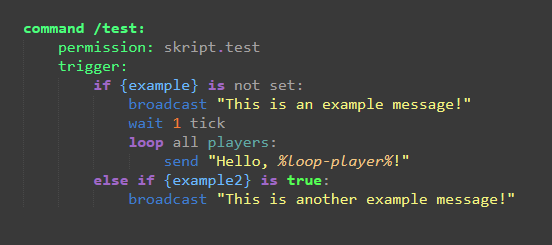
With conditional statements and loops, any code that is indented within the statement will be run as a part of the statement, other code will not be run within the statement. Here is an example of proper indentation:

https://i.imgur.com/PbfZ12M.png

minor sinew
#
on inventory click:
    if name of event-inventory is "&b&lSkillsets":
      cancel event
      if index of event-slot = 10:
        if player's balance is greater than or equal to 32:
          execute console command "effect give %player% minecraft:health_boost 10000 0 true"
          execute console command "economy take %player% 32"
        else:
          send "&cSorry You Don't Have Enough!"

      if index of event-slot = 11:
        if player's balance is greater than or equal to 20:
          execute console command "effect give %player% minecraft:haste 10000 0 true"
          execute console command "economy take %player% 20"
        else:
          send "&cSorry You Don't Have Enough!"

    if name of event-inventory is "&b&lShop":
        if index of event-slot = 0:
            cancel event
#

so is this much better?

tawny condor
#

you can remove the #code

minor sinew
#

ok

tawny condor
#

and the else statement needs to be unindented to be on the same horizontal line as the if statement

minor sinew
#

better?

tawny condor
#

no wrong if statement

#

good

minor sinew
#

yay

tawny condor
#

so not remove the second on inv click event and line the if name of inventory statement is in horizontal line as the other if name of inventory,,

minor sinew
#

im confused on what you just said sorry 🙂

tawny condor
minor sinew
#

ok

tawny condor
#

i gtg again, so i will help you later

minor sinew
#

ok

#
on inventory click:
    if name of event-inventory is "&b&lSkillsets":
      cancel event
      if index of event-slot = 10:
        if player's balance is greater than or equal to 32:
          apply potion of health boost of tier 1 to player for 999 days
          execute console command "economy take %player% 32"
        else:
          send "&cSorry You Don't Have Enough!"

      if index of event-slot = 11:
        if player's balance is greater than or equal to 20:
          apply potion of haste of tier 1 to player for 999 days
          execute console command "economy take %player% 20"
        else:
          send "&cSorry You Don't Have Enough!"

    if name of event-inventory is "&b&lShop":
        if index of event-slot = 0:
            cancel event
#

now i get what u mean

tawny condor
minor sinew
#

thx

minor sinew
#

@tawny condor do u still wanna see my other skripts?

tawny condor
#

sure, if you want me to fix them too

minor sinew
#

ok

#
command /spawn:
    trigger:
        send "&cBeing Teleported In 3 Seconds..."
        wait 3 seconds
        teleport player to {spawn}

command /setspawn:
    permission: op
    permission message: "&cHey, You Can't Use This!"
    trigger:
        set {spawn} to location of player
        send "&2Spawn Has Been Set!" to player
tawny condor
minor sinew
#

cool

#

i have 2 more 🙂

tawny condor
#

ok

minor sinew
#
on join:
  set join message to "&7[&a+&7] &f%player%"
on first join:
  set join message to "&bWelcome &7[&a+&7] &f%player% &bTo The Server!"
on quit:
  set quit message to "&7[&c-&7] &f%player%"
tawny condor
#

its fine, but you can also use on first join to save yourself 1 line of code

minor sinew
#

oh ok might as well lol

#

hows that?

tawny condor
#

good

minor sinew
#

alright well imma just wait a few mins and see if still have problems and let u know

tawny condor
#

ok

minor sinew
#

so thanks for the help so far birb_huh

tawny condor
#

np

minor sinew
#

so far it has been good i will contact u in the future if i need u thanks for all ur help

#

it seems as tho it is fix so yeah!

minor sinew
#

hey im still having problems should i just upgrade my ram

tawny condor
#

send the error

minor sinew
#

ok one sec

minor sinew
#
/home/minecraft/signal/start_cmd: line 1: 575652 Killed                  /opt/java/17/bin/java -Xmx${SERVER_RAM} -XX:+ParallelRefProcEnabled -XX:MaxGCPauseMillis=200 -XX:+UnlockExperimentalVMOptions -XX:+DisableExplicitGC -XX:+AlwaysPreTouch -XX:G1NewSizePercent=30 -XX:G1MaxNewSizePercent=40 -XX:G1HeapRegionSize=8M -XX:G1ReservePercent=20 -XX:G1HeapWastePercent=5 -XX:G1MixedGCCountTarget=4 -XX:InitiatingHeapOccupancyPercent=15 -XX:G1MixedGCLiveThresholdPercent=90 -XX:G1RSetUpdatingPauseTimePercent=5 -XX:SurvivorRatio=32 -XX:+PerfDisableSharedMem -XX:MaxTenuringThreshold=1 -DIReallyKnowWhatIAmDoingISwear -Djline.terminal=jline.UnsupportedTerminal -Dlog4j2.formatMsgNoLookups=true -jar server.jar
hidden dragon
#

you're running out of ram or it's crashing at startup if it happens everytime you start

minor sinew
#

how do i fix crashing tho??

tawny condor
#

fix ram problem

minor sinew
#

ok so upgrade ram then?

#

ok well thx