#I need help
75 messages · Page 1 of 1 (latest)
 storm shard
if event-block is dirt:
if {multi::%player's uuid%} = 1:
cancel drops
drop 2 dirt at event-location``` red pagoda
remove on break of stone:
?
cancel drops
?
what happens
but i dont understand what u just said
on death of <entity>:
broadcast
broadcast message
and stop pinging
 gentle wasp
give attacker
not player
you can add attacker is a player:
and remove the <zombie>
do it just zombie
yes
give attacker diamond sword of (enchant)
without the ()
i suggest you reading the docs
go to skripthub
you have anything you need there
just go there and search enchant it will show you all the things that contains or related to enchant
its really usefull
no problem let me know if you need anything else
type attacker correctly
bruh what is this
!space
!tab
how i do this
why did you skip so many lines>
?
and you just did what i told you to not do
give ATTACKER
not player
or it doesn't matter here
idk
anyways
  attacker is a player:
    cancel drops
give attacker rotten flesh named "zombie flesh"```use this
no problem
gentle wasp
wdym?
dont use the _
show me the full script
send it here
ahh?
so dont copy scripts you dont undrstand from the internet
so many things are wrong
the first line
no event
what player
you skip lines
no spaces or tabs
because its not related to anything
please go watch tutorials
youtube
or event at skripthub
you have minehut skript series
and fun stuff
and many more
just search it up
 unborn helmBOT
 merry cape
!format
merry cape
!format
Code Blocks
To make it easier for others to read your code, it is asked that you send it in a code block. On Discord, you can simply send this:
```
Code here
```
 undone vector
ur missing the trigger: in tokentoggle command
undone vector
indent properly
 fair ocean
!indent
unborn helmBOT
fair ocean
!indent
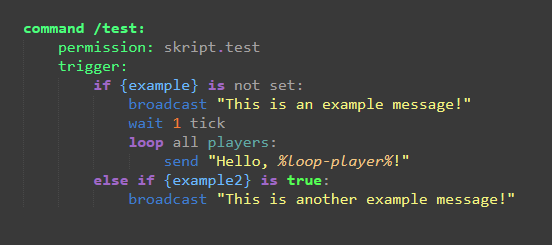
In skript, you need to maintain consistent indentation, meaning you cannot indent 1 line 5 spaces, and the next 7 spaces. Usually it’s recommended you use tabs, however.
A good rule of thumb is to always indent the subsequent line whenever the previous statement ends with a :, an exception to this is in command statements with items before the trigger such as permission: or aliases:
With conditional statements and loops, any code that is indented within the statement will be run as a part of the statement, other code will not be run within the statement. Here is an example of proper indentation: