#gui help
31 messages · Page 1 of 1 (latest)
 sour estuary

 magic garnet
Show current code
sour estuary
command /punish <offline player>:
permission: op
permission message: &4You're not allowed to run this command
trigger:
open chest inventory with 3 rows named "&7Punish Player" to player
wait 1 tick
set slot 11 of player's current inventory to yellow wool named "&eMute" with lore "&7Click for reasons"
set slot 15 of player's current inventory to red wool named "&4Ban" with lore "&7Click for reasons"
on inventory click:
if name of event-inventory is "&7Punish Player":
cancel event
magic garnet
!format
 sacred tokenBOT
Code Blocks
To make it easier for others to read your code, it is asked that you send it in a code block. On Discord, you can simply send this:
```
Code here
```
 Requested by Simpleton#9302
magic garnet
Requested by Simpleton#9302
magic garnet
Indentation
sour estuary
?
magic garnet
!indent
sacred tokenBOT
Indentation in Skript
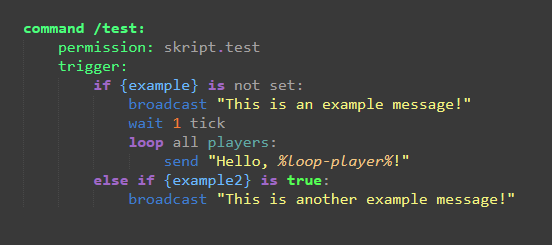
In skript, you need to maintain consistent indentation, meaning you cannot indent 1 line 5 spaces, and the next 7 spaces. Usually it’s recommended you use tabs, however.
A good rule of thumb is to always indent the subsequent line whenever the previous statement ends with a :, an exception to this is in command statements with items before the trigger such as permission: or aliases:
With conditional statements and loops, any code that is indented within the statement will be run as a part of the statement, other code will not be run within the statement. Here is an example of proper indentation:
 Requested by Simpleton#9302
magic garnet
Requested by Simpleton#9302
magic garnet
Have you tested your code
magic garnet
sour estuary
command /punish <offline player>:
permission: op
permission message: &4You'r...
Guarantee this does not work
magic garnet
You have a command without a trigger or code and you have code for the second command which you are missing name [args] and a colon
sour estuary
works fine still?
magic garnet
sour estuary
command /punish <offline player>:
permission: op
permission message: &4You'r...
If your code works then it isn't this code
magic garnet
Same way you create a gui any other way
magic garnet
    Permission: op
    Trigger:
        Set x to a new chest inventory named "Punish %arg-1%"
        Set slots here
        Set metadata value "pun" of player to x
        Open x to player
On inventory click:
    If event-inventory = metadata value "pun" of player
        If name of event-slot is "Mute":
Put code for creating new gui here```thanks