
#Clickable text error
126 messages · Page 1 of 1 (latest)
 uncut ermine
 gleaming pine
uncut ermine
So with this line of code, a chat appears with a clickable text running /spectat...
gleaming pine
uncut ermine
So with this line of code, a chat appears with a clickable text running /spectat...
send formatted
 robust lionBOT
Code Blocks
To make it easier for others to read your code, it is asked that you send it in a code block. On Discord, you can simply send this:
```
Code here
```
 Requested by GamingwithNP#0860
Indentation in Skript
In skript, you need to maintain consistent indentation, meaning you cannot indent 1 line 5 spaces, and the next 7 spaces. Usually it’s recommended you use tabs, however.
A good rule of thumb is to always indent the subsequent line whenever the previous statement ends with a :, an exception to this is in command statements with items before the trigger such as permission: or aliases:
With conditional statements and loops, any code that is indented within the statement will be run as a part of the statement, other code will not be run within the statement. Here is an example of proper indentation:
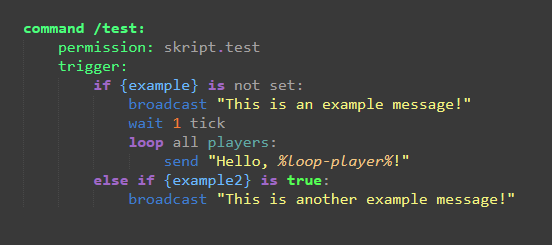 Requested by GamingwithNP#0860
uncut ermine
Requested by GamingwithNP#0860
uncut ermine
Oh my bad!
command /report <player>:
    trigger:
        send "&c&l%player% &7reported &c%arg-1%&c! <command:/spectate %arg-1%>&4[Click Here]<reset>" to {staffList::*}


command /spectate <player>:
    trigger:
        if {staffmode::%player's uuid%} is not set:
            execute player command "/staffmode"
        teleport player to arg-1
        send "&aNow spectating &2%arg-1%&a!" to player
So on line 3 with the %% around arg-1 in the command part this happens now:
 gleaming pine
send formatted
uncut ermine
wtf is formatted?
 cedar terrace
uncut ermine
wtf is formatted?
cedar terrace
uncut ermine
wtf is formatted?
!format
robust lionBOT
Code Blocks
To make it easier for others to read your code, it is asked that you send it in a code block. On Discord, you can simply send this:
```
Code here
```
Requested by GamingwithNP#0860
cedar terrace
idk
uncut ermine
those dots don't work for me
uncut ermine
yeah they do, but I already sent that
    trigger:
        send "&c&l%player% &7reported &c%arg-1%&c! <command:/spectate %arg-1%>&4[Click Here]<reset>" to {staffList::*}


command /spectate <player>:
    trigger:
        if {staffmode::%player's uuid%} is not set:
            execute player command "/staffmode"
        teleport player to arg-1
send "&aNow spectating &2%arg-1%&a!" to player``` tepid cobalt
uncut ermine
```command /report <player>:
trigger:
send "&c&l%player% &7reported ...
tepid cobalt
uncut ermine
```command /report <player>:
trigger:
send "&c&l%player% &7reported ...
colin meant send formatted "text here"
uncut ermine
 silent sleet
Try removing the Slash?
silent sleet
Try removing the Slash?
Nothing changes
uncut ermine
silent sleet
And try using another command like /spawn
For smth like /warp map it works fine
tepid cobalt
don't use execute player/console commands
replace it with the code that /staffmode runs
uncut ermine
Changed it, unfortunately doesn't fix the problem, same issue
silent sleet
Ohhh
Got it
You are trying to use a command that is defined after
Move the /spectate above
@uncut ermine
uncut ermine
Still the same issue
uncut ermine
Also the same problem
I think the problem is in this partsend "&c&l%player% &7reported &c%arg-1%&c! <command:/spectate %arg-1%>&4[Click Here]<reset>" to player
Cus with the %% around arg-1 this part will be sent as regular text.<command:/spectate %arg-1%>But without the %% the command doesn't recognise arg-1 as player, but as text, so the player will not be recognised
silent sleet
Try /spectate (your IGN)
Like /spectate xef5000
See if this works
If it does, the problem is from the %arg-1%
uncut ermine
Yeah it works with my username, so the problem is with %arg-1%, but I rly wouldn't know how to fix this :p
silent sleet
Try <command:/spectate player-argument>
uncut ermine
Doesn't recognise the player
silent sleet
Screenshot?
 uncut ermine
Then this happens and the text is no longer clickable
 silent sleet
Bruhhhhhhhhhhhhhh
silent sleet
uncut ermine
Then this happens and the text is no longer clickable
Reason why skript is bad :
I understand the problem
But it's dumb
Try adding spaces?
Between >[
And :/
And OmeGerroe >
tepid cobalt
send formatted " "
silent sleet
<command: /spectate %player-argument% > [Click here]
silent sleet
uncut ermine
Then this happens and the text is no longer clickable
At least now it detects the player
uncut ermine
It still sends as regular unclickable text tho :/
silent sleet
Yep..
silent sleet
silent sleet
```<command: /spectate %player-argument% > [Click here]```
Even this?
uncut ermine
Yep even with that
uncut ermine
Strange right? xD
silent sleet
send "<command/spectate %player-argument%>clickhere"```Try this
To see if second message works
Maybe it's having a hard time making parts of text clickable
uncut ermine
second message also comes as regular text
silent sleet

skUnity Forums
Working:
send "%player's display name% &9&l» &r%message%" to loop-player
Not Working:
%player% %message% this args add to...
Yo same problem as you
json("%loop-player%", "%player's display name% &9&l» &r%message%||ttp:&cClick to report &a%player%&c.||cmd:/chatreport %player% %message%")
uncut ermine
brother what you mean by formatted
my guy is trying to help me and you keep complaining about formatted
 uncut ermine
we use ` , who tf cares
tepid cobalt
i don't think you understand
silent sleet
Ok so json("%targets%", "text||ttp:your tooltip||cmd:/example")
tepid cobalt
send formatted "<tooltip:Hover omg!>Hover over me!<reset>"
silent sleet
json("%targets%", "&c&l%player%&r &7reported &c%player-argument%||ttp:your tooltip||cmd:/example")
json("%targets%", "&c&l%player%&r &7reported &c%player-argument%||ttp:Click to Spectate||cmd:/spectate %player-argument%")

skUnity Forums
The addon was made in 2017 for 1.11
💀
Only similar case Found on the internet
tepid cobalt
silent sleet
Gl with that, skript is just bad :/
you're bad
silent sleet
You can try making a function that passes all arguments maybe
silent sleet
tepid cobalt
you're bad
If you can help, go ahead caus i'd like to see what's the solution
tepid cobalt
tepid cobalt
`send formatted ""`
.
tepid cobalt
tepid cobalt
`send formatted " "`
.
tepid cobalt
tepid cobalt
colin meant `send formatted "text here"`
.
silent sleet
uncut ermine
yeah they do, but I already sent that
Actually you're onto something. Add 'formatted'
uncut ermine
I tried formatted already
silent sleet

skUnity Forums
Can someone show me how to make a link clickable to open the website (use example website as discord.gg) and execute commands clicking text in chat...
uncut ermine
Text is fine, tho it is still not clickable
uncut ermine
tepid cobalt
.
maybe if you elaborate a bit instead of 2 words it'd be a little clearer
tepid cobalt
uncut ermine
I tried formatted already
No you didn't
uncut ermine
Yes I did??
tepid cobalt
Send code
uncut ermine
send formatted "<command: /spectate %arg-1% >&4[Click here]" to player
silent sleet
To player
tepid cobalt
behind??