#Update: Main error now "Bind Parameters must not contain undefined error" problem.

238 messages · Page 1 of 1 (latest)

quick ginkgo
#

I'm working with this NextJS code here to try to submit data to my MySQL database:

import mysql from "mysql2/promise";

export default async function handler(req, res) {
  const dbconnection = await mysql.createConnection({
      host: "localhost",
      database: "onlinestore",
      port: 3306,
      user: "root",
      password: "Jennister123!",
  });
  try {
    var products = req.body;
    const values = [
      products,
    ];
    const query = `INSERT INTO games (ProductID, ProductName, ProductDescription, ProductImage, ProductPrice, DateWhenAdded) VALUES ("${values}")`
    console.log(values);
    const[data] = await dbconnection.execute(query, values);
    console.log(query);
    console.log(data);
    dbconnection.end();
    data.forEach((games) => {
        games.ProductImage = "data:image/webp;base64," + games.ProductImage.toString('base64');
    }
    );
    data.forEach((games) => {
        var d = new Date(games.DateWhenAdded);
        var now = moment(d).format('l');
        console.log(now);
    }
    );
    res.status(200).json({ games: data });

} catch (error) {
    res.status(500).json({ error: error.message });
}
}

And I'm using this form to do so (newgame.html):

<!DOCTYPE html>
<html lang = "en">
<head>
<title>
New Game Addition
</title>
</head>
<body>
<form method="post" action="/api/newgame" enctype="multipart/form-data">
    <input type="number" id = "ProductID" name="ProductID" placeholder="Product ID"> <br />
    <input type="text" id = "ProductName" name="ProductName" placeholder="Name of Product."> <br />
    <input type="text" id = "ProductDescription" name="ProductDescription" placeholder="Describe the Product."> <br />
    <input type="file" id = "ProductImage" name="ProductImage" placeholder="Put in Image"> <br />
    <input type="number" step="0.01" id = "ProductPrice" name="ProductPrice" placeholder="0.00"> <br />
    <input type="date" id = "DateWhenAdded" name="DateWhenAdded" placeholder="01/01/2001"> <br />
    <input type="submit" name="submit" value="SUBMIT">
</form>
</body>
</html>

However, I'm getting the "You have an error in your SQL syntax" error, and I can't seem to understand why that is. I tried different ways of writing the code down before and changing the values, including editing the query, but then that would leave me with other different errors I'm unsure of how to fix. How can I fix this?

open helm
#
VALUES ("${values})

This appears to be missing a closing quote.

quick ginkgo
#

Well I did fix that and it's obviously still not working. Edited the post as well.

quick ginkgo
#

I learned recently about a tool called "multiparty", but I'm unsure of the implementation and how it can help me fix the issue.

frozen stratus
#

In insert you have 6 columns but in values you're inserting single string?

#

It would help if you posted query and values from console logs

quick ginkgo
#

I’ll get back to what you said in the morning, because I need to sleep. Daylight savings sucks. I’ll show you the console logs in the morning okay?

open helm
#
const query = `INSERT INTO games (ProductID, ProductName, ProductDescription, ProductImage, ProductPrice, DateWhenAdded) VALUES (${values})`

But values is an array that has to be converted into a string in which each element is surrounded by its own quotes.

quick ginkgo
#

It’s okay ChooKing. Well now we’re all awake anyway. I’ll edit that portion of code.

quick ginkgo
open helm
quick ginkgo
#

You mean the elements within the query statement?

open helm
#

The easiest approach may be to use array destructuring to separate out all the items into individual variables and insert those as a separate values.

quick ginkgo
#

You mean something like this?

    var products = req.body;
    var ProductID = products.ProductID;
    var ProductName = products.ProductName;
    var ProductDescription = products.ProductDescription;
    var ProductImage = products.ProductImage;
    var ProductPrice = products.ProductPrice;
    var DateWhenAdded = products.DateWhenAdded;
    const values = [
      products,
    ];
#

And then putting in those vars instead of "products"?

open helm
quick ginkgo
#

But if I do that, then my "const[data]" has to change as well. Can you show me what you mean then in code?

open helm
#
const query = `INSERT INTO games (ProductID, ProductName, ProductDescription, ProductImage, ProductPrice, DateWhenAdded) VALUES (${ProductID}, "${ProductName}","${ProductDescription}","${ProductImage}",${ProductPrice},"${DateWhenAdded}")`
open helm
quick ginkgo
#

When I try this:

    var products = req.body;
    var ProductID = products.ProductID;
    var ProductName = products.ProductName;
    var ProductDescription = products.ProductDescription;
    var ProductImage = products.ProductImage;
    var ProductPrice = products.ProductPrice;
    var DateWhenAdded = products.DateWhenAdded;
    const values = [
      ProductID,
      ProductName,
      ProductDescription,
      ProductImage,
      ProductPrice,
      DateWhenAdded,
    ];
    
    
    const query = `INSERT INTO games (ProductID, ProductName, ProductDescription, ProductImage, ProductPrice, DateWhenAdded) VALUES (${ProductID}, "${ProductName}","${ProductDescription}","${ProductImage}",${ProductPrice},"${DateWhenAdded}")`
    console.log(query);

The console.log(query returns this:

INSERT INTO games (ProductID, ProductName, ProductDescription, ProductImage, ProductPrice, DateWhenAdded) VALUES (undefined, "undefined","undefined","undefined",undefined,"undefined")
#

It's returning undefined for everything.

open helm
quick ginkgo
#

The value of products is the "req.body". If I were to put in "console.log(products)", I get some crazy data like this:

image gibberish before this code.
------WebKitFormBoundaryKSyH4USAy9oAYusl
Content-Disposition: form-data; name="ProductPrice"

15.00
------WebKitFormBoundaryKSyH4USAy9oAYusl
Content-Disposition: form-data; name="DateWhenAdded"

2021-09-23
------WebKitFormBoundaryKSyH4USAy9oAYusl
Content-Disposition: form-data; name="submit"

SUBMIT
------WebKitFormBoundaryKSyH4USAy9oAYusl--
#

Basically all the stuff I submitted to my form. But it looks weird, as if it's not even parsed yet.

#

Wish I knew what was going on. Doing console.log(products) prints all of that out. But then when I do console.log(products.ProductID), it's undefined.

open helm
#

Check the values of req.body.ProductPrice and req.body.DateWhenAdded

quick ginkgo
#

Would I console.log it? Like this?

console.log(req.body.ProductPrice)
quick ginkgo
#

Undefined.

#

When I added all of that code you told me to input as well a that stuff in the array, I now have this error:

{"error":"Bind parameters must not contain undefined. To pass SQL NULL specify JS null"}
#

With all that stuff in the values array, and then calling it in the query.

open helm
quick ginkgo
#

So basically, this is the main issue? Not the SQL Syntax? That was a secondary error?

quick ginkgo
#

Well of course I agree. But the Bind parameters must not contain undefined is the main problem. I don't understand why the form data isn't coming in.

open helm
quick ginkgo
#

Postman? Do I have to add it to my code or something?

open helm
quick ginkgo
#

Okay, so once I download Postman, I use it on my "newgame.js" API?

quick ginkgo
#

I never used postman before though. How can I use it to check my newgame.js?

open helm
quick ginkgo
#

So I send a get request to my url that has my API data? For me it's:

http://localhost:3000/api/newgame
quick ginkgo
#

Alright, I'll change that then to post.

#

Alright, it shows me the error that I saw before.

"error": "Bind parameters must not contain undefined. To pass SQL NULL specify JS null"
open helm
quick ginkgo
#

You mean put things in the Query params?

open helm
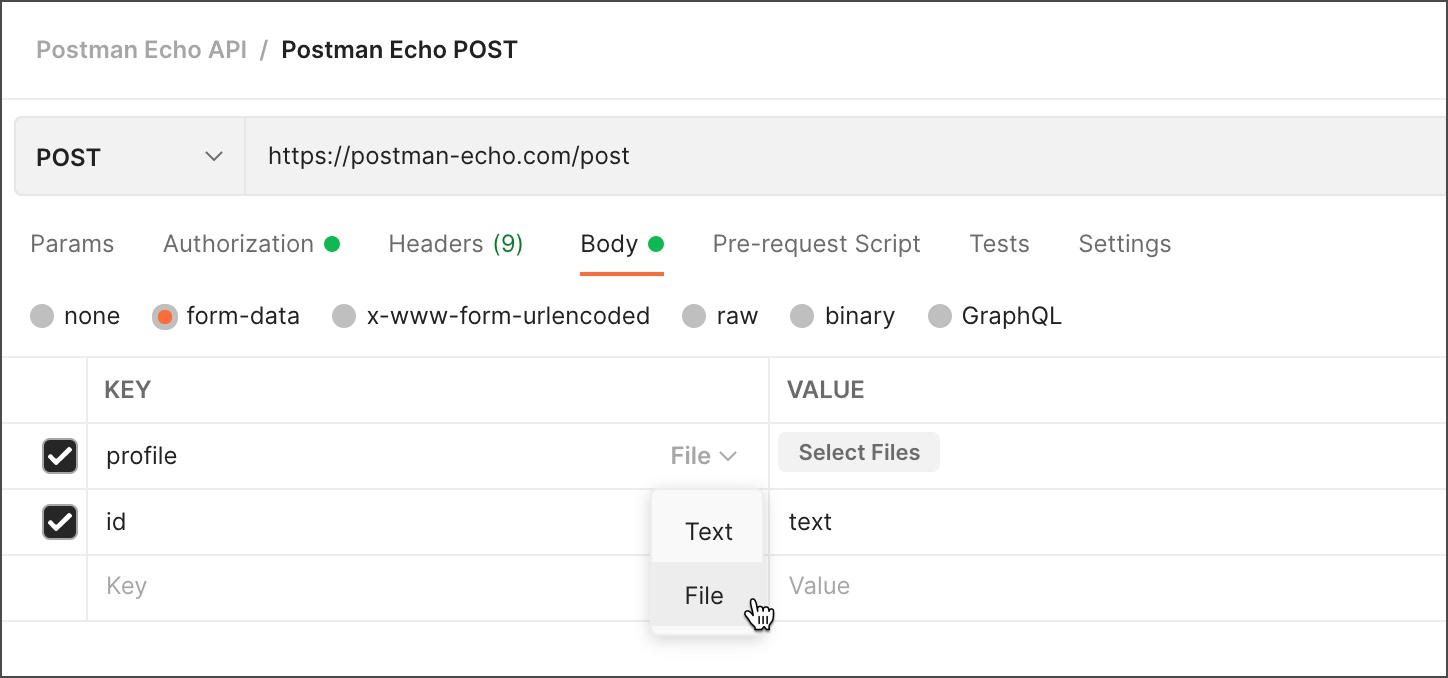
#

But keep it on Text and not File like in the image

quick ginkgo
#

Ahh I see. Okay. But the thing is... ProductImage is a file.

open helm
quick ginkgo
#

Alright.

#

Alright, I'll try that and see what happens.

#

What about if it's a date with "/" like the "DateWhenAdded"?

#

So I send this request?

open helm
quick ginkgo
#

But wait should I put that stuff in the description? Not value?

open helm
quick ginkgo
#

Okay.

#

Same error pops up even with that data in there.

{
    "error": "Bind parameters must not contain undefined. To pass SQL NULL specify JS null"
}
open helm
quick ginkgo
#

You mean this:

const[data] = await dbconnection.execute(query, values);
#

Comment that out?

quick ginkgo
#

Okay. Let's see.

#

It just tells me "data is not defined" because I have stuff that has "data" in it.

open helm
#

Does it log any values?

quick ginkgo
#

No, because the data actually has the values in it.

#

Do you think my form being a "multipart/form-data" might be causing any issues?

open helm
quick ginkgo
#

With the data thing commented out?

open helm
quick ginkgo
#

Okay.

open helm
quick ginkgo
#

Well thing is I am including a file though. That's the thing.

open helm
#

You could try this without a file as a test.

#

But log req.body.ProductPrice first

quick ginkgo
#

Okay.

#

Still undefined.

open helm
quick ginkgo
#

Okay, so maybe make a separate form, and database that has no file in it, and edit my API?

open helm
quick ginkgo
#

Okay.

open helm
#

The goal is to get req.body.ProductPrice or any other form data to appear in a console log. I know you are still focused on the end goal of getting the query to work, but the current obstacle is we have no data to put into the database.

quick ginkgo
#

So do I edit the query to exclude "ProductImage"? And also from my array too?

open helm
quick ginkgo
#

Okay, so I ran console.log(req.body.ProductPrice) excluding the ProductImage, but I'm still getting undefined unfortunately. Hey, are you good for my sharing my screen to show what's happening?

quick ginkgo
#

Okay. But anyway, still undefined.

open helm
quick ginkgo
#

I don't really have any sort of middleware set up actually. For this one, how would I go about that?

open helm
quick ginkgo
#

Ooh, I see. Well I don't have any sort of middleware code in this one. I would've named it as such.

open helm
#

In that case, I don't know why it isn't working.

quick ginkgo
#

And the strange thing is when I put in console.log(products), the whole form data does show up.

#

Like if you remember all that code I showed you.

quick ginkgo
#

I hope someone else can help me.

quick ginkgo
#

Doing this:

    var products = req.body;
    var ProductID = products.ProductID;
    var ProductName = products.ProductName;
    var ProductDescription = products.ProductDescription;
    var ProductImage = products.ProductImage;
    var ProductPrice = products.ProductPrice;
    var DateWhenAdded = products.DateWhenAdded;
    const values = [
      ProductID,
      ProductName,
      ProductDescription,
      ProductImage,
      ProductPrice,
      DateWhenAdded,
    ];
    
    const query = `INSERT INTO games (ProductID, ProductName, ProductDescription, ProductImage, ProductPrice, DateWhenAdded) VALUES ("${ProductID}", "${ProductName}", "${ProductDescription}", "${ProductImage}", "${ProductPrice}", "${DateWhenAdded}")`
    console.log(values)
    console.log(query);

Ends up giving this response in my console.

[ undefined, undefined, undefined, undefined, undefined, undefined ]

INSERT INTO games (ProductID, ProductName, ProductDescription, ProductImage, ProductPrice, DateWhenAdded) VALUES ("undefined", "undefined", "undefined", "undefined", "undefined", "undefined")

It's as if it's just not reading my form data.

#

Update: Main error now "Bind Parameters must not contain undefined error" problem.

quick ginkgo
#

I’ll keep this open for someone else who can help me.

quick ginkgo
#

Hey @open helm, I ran this template from multiparty (newgametest.js):

import multiparty from "multiparty"

export default async function _(req, res) {
  const form = new multiparty.Form()
  const data = await new Promise((resolve, reject) => {
    form.parse(req, function (err, fields, files) {
      if (err) reject({ err })
      resolve({ fields, files })
    })
  })

  console.log(`Form data: `, data)

  return res.status(200).json({ data })
}

export const config = {
  api: {
    bodyParser: false,
  },
}

And this appeared on Postman.

{
    "data": {
        "fields": {
            "ProductID": [
                "4"
            ],
            "ProductName": [
                "Chutes and Ladders"
            ],
            "ProductDescription": [
                "A fun family game with slides and ladders"
            ],
            "ProductPrice": [
                "15.00"
            ],
            "DateWhenAdded": [
                "09/03/2021"
            ]
        },
        "files": {
            "ProductImage": [
                {
                    "fieldName": "ProductImage",
                    "originalFilename": "ChutesandLadders.jpg",
                    "path": "C:\\Users\\misty\\AppData\\Local\\Temp\\sK5bzl7LCA0uJWX6Dv7Bx24v.jpg",
                    "headers": {
                        "content-disposition": "form-data; name=\"ProductImage\"; filename=\"ChutesandLadders.jpg\"",
                        "content-type": "image/jpeg"
                    },
                    "size": 160628
                }
            ]
        }
    }
}

Now I want to figure out how to add my database in it as well as running my "INSERT INTO" query.

open helm
quick ginkgo
#

Well I'm working on a new thing, and got this so far.

import mysql from "mysql2/promise";
import multiparty from "multiparty";

export default async function handler(req, res) {
  const dbconnection = await mysql.createConnection({
      host: "localhost",
      database: "onlinestore",
      port: 3306,
      user: "root",
      password: "Jennister123!",
  });
  try {
    const form = new multiparty.Form()
    const data = await new Promise((resolve, reject) => {
      form.parse(req, function (err, fields, files) {
        if (err) reject({ err })
        resolve({ fields, files })
      })
    })
    const query = `INSERT INTO games (ProductID, ProductName, ProductDescription, ProductImage, ProductPrice, DateWhenAdded) VALUES ("${data.fields.ProductID}", "${data.fields.ProductName}","${data.fields.ProductDescription}","${data.fields.ProductImage}","${data.fields.ProductPrice}","${data.fields.DateWhenAdded}")`
    console.log(data.fields.ProductID + " " + data.fields.ProductName);
    await dbconnection.execute(query, data);
    dbconnection.end();
    
    
    data.forEach((games) => {
        games.ProductImage = "data:image/webp;base64," + games.ProductImage.toString('base64');
    }
    );
    data.forEach((games) => {
        var d = new Date(games.DateWhenAdded);
        var now = moment(d).format('l');
        console.log(now);
    }
    );
    res.status(200).json({ games: data });
    

} catch (error) {
    res.status(500).json({ error: error.message });
}
}
export const config = {
  api: {
    bodyParser: false,
  }
}
#

But this error appears:

{"error":"Bind parameters must be array if namedPlaceholders parameter is not enabled"}
#

Do I need to edit my query to put in something like "req.body.data.fields.ProductID?"?

#

Well actually if I do that it'll be undefined, oops.

open helm
#

It should be able to use the whole array.

quick ginkgo
#

Like this?

const query = `INSERT INTO games (ProductID, ProductName, ProductDescription, ProductImage, ProductPrice, DateWhenAdded) VALUES ("${req.body.data.fields}")`
quick ginkgo
#

{"error":"Cannot read properties of undefined (reading 'data')"}

open helm
#

Console log req.body.data.fields

quick ginkgo
#

Well when I do console.log(data.fields), I get this. ProductImage is undefined however.

{
  ProductID: [ '4' ],
  ProductName: [ 'Chutes and Ladders' ],
  ProductDescription: [ 'A fun family game with chutes and ladders with everyone.' ],   
  ProductPrice: [ '15.00' ],
  DateWhenAdded: [ '2021-09-23' ],
  submit: [ 'SUBMIT' ]
}
open helm
#

Also, I forgot that you are using execute. You need placeholders.

const query = "INSERT INTO games (ProductID, ProductName, ProductDescription, ProductImage, ProductPrice, DateWhenAdded) VALUES(?,?,?,?,?,?)";
await dbconnection.execute(query, data.fields);
quick ginkgo
#

Let me try that.

#

When I ran this:

    const form = new multiparty.Form()
    const data = await new Promise((resolve, reject) => {
      form.parse(req, function (err, fields, files) {
        if (err) reject({ err })
        resolve({ fields, files })
      })
    })
    const query = "INSERT INTO games (ProductID, ProductName, ProductDescription, ProductImage, ProductPrice, DateWhenAdded) VALUES(?,?,?,?,?,?)";
    console.log(data);
    await dbconnection.execute(query, data.fields);
   
    dbconnection.end();

It doesn't work. I get this error again.

{"error":"Bind parameters must be array if namedPlaceholders parameter is not enabled"}
#

When I do console.log(data) though, I can see everything that was parsed, including the file.

open helm
quick ginkgo
#

Yeah, it's an object.

open helm
quick ginkgo
#

How do I do that? What code is missing to get this to work?

open helm
quick ginkgo
#

I know. I'll type them all out. I write this out in my query right? ProductImage is not in fields though. Because when I did console.log(data), this popped up:

{
  fields: {
    ProductID: [ '4' ],
    ProductName: [ 'Chutes and Ladders' ],
    ProductDescription: [ 'A fun family game with chutes and ladders with everyone.' ], 
    ProductPrice: [ '15.00' ],
    DateWhenAdded: [ '2021-09-23' ],
    submit: [ 'SUBMIT' ]
  },
  files: { ProductImage: [ [Object] ] }
}
#

So it would be data.ProductImage.

open helm
quick ginkgo
#

Alright then.

#

Like this?

    const query = "INSERT INTO games (ProductID, ProductName, ProductDescription, ProductImage, ProductPrice, DateWhenAdded) VALUES(?,?,?,?,?,?)";
    const values=[data.fields.ProductID, data.fields.ProductName, data.fields.ProductDescription, data.files.ProductImage, data.fields.ProductPrice, data.fields.DateWhenAdded]
    await dbconnection.execute(query, values);
quick ginkgo
#

Okay I'm gonna try it.

#

Okay. now this error popped up.

{"error":"Incorrect integer value: '[\"4\"]' for column 'ProductID' at row 1"}
open helm
quick ginkgo
#

Like this?

const values=[parseInt(data.fields.ProductID), data.fields.ProductName, data.fields.ProductDescription, data.files.ProductImage, data.fields.ProductPrice, data.fields.DateWhenAdded]
quick ginkgo
#

Think I might have to do it for ProductPrice too. lol

{"error":"Incorrect decimal value: '[\"15.00\"]' for column 'ProductPrice' at row 1"}
open helm
quick ginkgo
#

Got it.

#

Uhh...

{"error":"Incorrect date value: '[\"2021-09-23\"]' for column 'DateWhenAdded' at row 1"}
#

parseDate?

#

Nope I tried that. No such thing as a parseDate. What's the parse for a date?

open helm
quick ginkgo
#

I changed that to YYYY-MM-DD.

#

So I don't have to worry about the hours, minutes and seconds.

#

I even made sure it appeared as such on MySQL Workbench so I don't have to worry about it. I used DATE, not DATETIME.

#

So knowing that, how do I parse the yyyy-mm-dd?

open helm
quick ginkgo
#

Yes. But like before, those slashes are in the way and they gotta go.

open helm
quick ginkgo
#

This.

[ '2021-09-23' ]
#

But the error on Chrome says this:

{"error":"Incorrect date value: '[\"2021-09-23\"]' for column 'DateWhenAdded' at row 1"}
open helm
#

Try data.fields.DateWhenAdded[0] in the array

quick ginkgo
#

You mean in the console.log, or within my values?

open helm
#

Include the [0] to get the first element out of the array

#

DateWhenAdded is an array of 1 element

quick ginkgo
#

Nope. It breaks it.

{"error":"data.forEach is not a function"}
open helm
#

I'm referring to both data.forEach(). Comment those out. We are trying to get the database insert to work first.

quick ginkgo
#

It worked... The picture may not be there, but it worked.

#

I wanna get rid of those square brackets though.

open helm
#

OK. The next thing is to figure out why modifying the value array prevents data.forEach() from working.

open helm
quick ginkgo
#

Alright.

#

Okay that takes care of that. Now I need to figure out what's going on with the Image.

open helm
quick ginkgo
#

Damn. Well the thing is on MySQL, I have to store it as that.

open helm
#

I recommend making a separate post to ask about storing the image in the database, if you must store it that way.

quick ginkgo
#

Alright.

#

Well at least it's almost done. I think this'll do for now.

#

Well I actually got something churning if you want to help me a bit. I edited the query a little bit, and this is the output in the browser:

{"games":{"fields":{"ProductID":["4"],"ProductName":["Chutes and Ladders"],"ProductDescription":["A fun family game with chutes and ladders with everyone."],"ProductPrice":["15.00"],"DateWhenAdded":["2021-09-03"],"submit":["SUBMIT"]},"files":{"ProductImage":[{"fieldName":"ProductImage","originalFilename":"ChutesandLadders.jpg","path":"C:\\Users\\misty\\AppData\\Local\\Temp\\fsjmVMgZv7uPmuXjlOo-nSru.jpg","headers":{"content-disposition":"form-data; name=\"ProductImage\"; filename=\"ChutesandLadders.jpg\"","content-type":"image/jpeg"},"size":160628}]}}}
#

Seems like I have to put it in an array again huh?

#

Thing is data.fields/data.files is an object, not a function. That’s why foreach isn’t working.

open helm
# quick ginkgo Well I actually got something churning if you want to help me a bit. I edited th...

I'm not sure if you realize that this is only the metadata for the image file and doesn't actually contain any binary data from the image. If your server is set up correctly, the actual image file will get uploaded as an ordinary file into a designated upload folder. If you want to store this metadata, you have two options. You can incorporate it into the array of values like before, but you will need to add columns to your database for each piece of metadata. The other option is to use JSON.stringify() on the object and store all the metadata as a single string.

open helm
quick ginkgo
#

So values.forEach and then out that previous code in there?

open helm
quick ginkgo
#

Well my original code. That had data.forEach().

open helm
quick ginkgo
#

So this?

        values.forEach((games) => {
            games.ProductImage = "data:image/webp;base64," + games.ProductImage.toString('base64');
        }
open helm
#

There was another one too.

quick ginkgo
#

That one I don't need for this one thankfully.

#

I just needed it for the Select statement.

#

Nope. @open helm

{"error":"Cannot read properties of undefined (reading 'toString')"}
#

Adding that in there breaks it.

open helm
quick ginkgo
#

No it doesn't seem defined.

open helm
#

Disregard.

#

I just realized it's in the function.

quick ginkgo
#

Yeah it's the function itself.

#

It's complaining about the "toString".

open helm
#

Try a console log of games.ProductImage inside this function.

quick ginkgo
#

Within the values.forEach(games)?

open helm
#

I just realized why it doesn't work.

quick ginkgo
#

Nope it doesn't work.

#

You're right about that.

open helm
#

You have to access it by array index instead of dot notation, which was for the object.

quick ginkgo
#

Okay, so how do I fix it then?

open helm
#

Count the position in the array for where ProductImage is located.

quick ginkgo
#

Which is [0]?

open helm
#

games[3]

#
values.forEach((games) => {
  games[3] = "data:image/webp;base64," + games[3].toString('base64');
}
quick ginkgo
#

Oooh, so that's where it is. Lemme try that.

#

Nope. It's still complaining.

{"error":"Cannot read properties of undefined (reading 'toString')"}
#

Because it's trying to read "toString".

open helm
#

Console log games[3] inside the forEach

#

I just realized, it's not an array of array

#

You don't need a forEach() at all.

quick ginkgo
#

I don't? How does this work then?

open helm
#

Just take that line of code inside the forEach and use it on its own.

#

It's not a 2 dimensional array and you aren't doing something to every element. You are only doing something to one element of a one dimensional array.

quick ginkgo
#

So this?

    const query = "INSERT INTO games (ProductID, ProductName, ProductDescription, ProductImage, ProductPrice, DateWhenAdded) VALUES(?,?,?,?,?,?)";
    const values=[parseInt(data.fields.ProductID), data.fields.ProductName[0], data.fields.ProductDescription[0], data.files.ProductImage.toString('base64'), parseFloat(data.fields.ProductPrice), data.fields.DateWhenAdded[0]]

    await dbconnection.execute(query, values);
    games[3] = "data:image/webp;base64," + games[3].toString('base64');
    dbconnection.end();
open helm
#

No

#

Change games back to values

quick ginkgo
#

Oh I have to change games to values.

#

Yeah.

#

I tried this.

    const query = "INSERT INTO games (ProductID, ProductName, ProductDescription, ProductImage, ProductPrice, DateWhenAdded) VALUES(?,?,?,?,?,?)";
    const values=[parseInt(data.fields.ProductID), data.fields.ProductName[0], data.fields.ProductDescription[0], data.files.ProductImage, parseFloat(data.fields.ProductPrice), data.fields.DateWhenAdded[0]]
    values[3] = "data:image/webp;base64," + values[3].toString('base64');
    await dbconnection.execute(query, values);
    dbconnection.end();

No error, but no image either.

open helm
quick ginkgo
#

Alright.

#

Welp. This popped up after the console.log.

data:image/webp;base64,[object Object]
open helm
#

Try:

values[3] = JSON.stringify(values[3]);
#

Actually it would be better to just encode JSON.stringify(data.files.ProductImage) in the array.

quick ginkgo
#

Okay.

#

Okay this is what the console.log spit out too.

[{"fieldName":"ProductImage","originalFilename":"ChutesandLadders.jpg","path":"C:\\Users\\misty\\AppData\\Local\\Temp\\LjVgcU6pAQlO6yMMsnpVtowx.jpg","headers":{"content-disposition":"form-data; name=\"ProductImage\"; filename=\"ChutesandLadders.jpg\"","content-type":"image/jpeg"},"size":160628}]
#

And no image.

open helm
#

If your server is set up properly, the image will be an ordinary file that appears in your designated uploads folder.

quick ginkgo
#

It is set up right because the images do display on my database when I did the "SELECT".

open helm
quick ginkgo
#

I'm retrieving the binary data. Remember this that I showed?

        data.forEach((games) => {
            games.ProductImage = "data:image/webp;base64," + games.ProductImage.toString('base64');
        }
        );

This is getting the binary data and displaying it as an image.

#

This is from my Select query.

open helm