#support-en
1 messages · Page 430 of 1
 scarlet salmon
 viral sundial
#warn @scarlet salmon repeating the same question in another support channel
 lean badgerBOT
viral sundial
#warn <@537285741689176064> repeating the same question in another support chann...
lean badgerBOT
viral sundial
#warn <@537285741689176064> repeating the same question in another support chann...
:white_check_mark: **@wahib warned! **
scarlet salmon
😂
scarlet salmon
viral sundial
<#608047244276531245>
im jus joke
 merry marlin
Hello
viral sundial
hey, how may i help you?
 rigid oriole
 native geyser
mentioning once is enough
native geyser
mentioning once is enough
Alright...so when I send welcome messages through Probot on my server, I want terms like #573048353458356234 and #verify to be blue....but it isn't putting an automatic blue link on it. You may have to join my server if you still don't understand...
merry marlin
viral sundial
hey, how may i help you?
How can I fix this
 native geyser
rigid oriole
Alright...so when I send welcome messages through Probot on my server, I want te...
native geyser
rigid oriole
Alright...so when I send welcome messages through Probot on my server, I want te...
check the pinned messages to see the variables to use in order to make it clickable
viral sundial
merry marlin
How can I fix this
enable the leveling system
via https://probot.io/dashboard
ProBot
Welcome images, moderation, leveling, reaction roles, logs, high quality music and many many more!
rigid oriole
native geyser
check the pinned messages to see the variables to use in order to make it clicka...
where are the pinned messages can you post the link
merry marlin
viral sundial
enable the leveling system
via https://probot.io/dashboard
Ok 1 sec
viral sundial
take your time
native geyser
rigid oriole
where are the pinned messages can you post the link
in this channel
rigid oriole
native geyser
in this channel
oh...i don't understand wdym by pinned messages...where do i click
rigid oriole
native geyser
check this message
alright...
rigid oriole
native geyser
check this message
wait so how do you get the channel ID, is it just the name of the channel?
or is it a number
merry marlin
viral sundial
take your time
Thank you 😊
native geyser
rigid oriole
or is it a number
its a number
go to discord settings -> enable developer mode
then right click on the channel and click on copy id
or you can simply do \#channel
viral sundial
merry marlin
Thank you 😊
you're welcome
 pale mural
There is a big mistake in /vip
 sullen prism
pale mural
There is a big mistake in /vip
sullen prism
pale mural
There is a big mistake in /vip
It’s premium command
pale mural
 native geyser
which language?
pale mural
French
native geyser
pale mural
@crude estuary
please use #chat-en if you don't have any more probot related questions
rigid oriole
native geyser
please use <#608047244276531245> if you don't have any more probot related quest...
sure
 distant estuary
yo im having trouble with the bot
i copy my message link to use the reaction command but says the link is invalid
native geyser
can you provide screenshots please
 crude estuary
pale mural
crude estuary
pale mural
C'est une ancienne traduction qui n'a pas encore été modifiée, merci
distant estuary
native geyser
can you provide screenshots please
here:

i did what it says via getting the link
native geyser
well thats not probot
distant estuary
its cause i changed the name
pale mural
crude estuary
C'est une ancienne traduction qui n'a pas encore été modifiée, merci<:takeoff:94...
D acc
native geyser
distant estuary
its cause i changed the name
it has a different profile picture too and its a completely different and verified bot, it is not probot
 nocturne flax
J'aime bien le bot
native geyser
nocturne flax
J'aime bien le bot
#support-int
crude estuary
nocturne flax
J'aime bien le bot
Merci pour votre avis, vous pouvez le partagé en #573053418017521664
crude estuary
pale mural
C est normal que les membres peuvent pas faire /rank aussi
Il faut démarrer le système de niveau
Et posez vos questions en #support-int
 pastel cliff
Hi
 odd flicker
I added ProBot to my server a while ago. I am able to use the hashtag commands to play music, however I have been unable to use the slash commands to play music and also other commands the bot is able to perform. Any suggestions?
viral sundial
pastel cliff
Hi
hey, how may i help you?
viral sundial
odd flicker
I added ProBot to my server a while ago. I am able to use the hashtag commands t...
what does the bot reply with when you use slash commands?
odd flicker
viral sundial
what does the bot reply with when you use slash commands?
I don't get any response when I use the slash commands
viral sundial
do they appear in a list when you type / only?
odd flicker
they do not
I have other bots on the server and those slash commands appear in a list, but none for ProBot
viral sundial
could you kick probot and re invite it using > https://probot.io/invite
Discord
Discord is the easiest way to communicate over voice, video, and text. Chat, hang out, and stay close with your friends and communities.
odd flicker
I can try that, thank you
viral sundial
you're welcome
viral sundial
could you send a screenshot of the welcomer settings?
 viral sundial
could you invite me to your server in DMs?
 winged crow
Hey!
I've been trying to edit embedded messages without success today
Is there any issues going on?
viral sundial
hey, make sure that every selected element is filled up
pastel cliff
viral sundial
hey, how may i help you?
Yes pls
viral sundial
could you show me a screenshot from the embed editor?
winged crow
Sure
pastel cliff
I want to add emoji to my server from my phone
winged crow
 viral sundial
pastel cliff
I want to add emoji to my server from my phone
viral sundial
pastel cliff
I want to add emoji to my server from my phone
that isn't really a probot-related question
you may ask it in #chat-en
winged crow
I've edited it in the past, just wanted to add one more line, but nothing seems to work, not removing, nor adding anything new
It properly sends new messages, but refuses to update them
 high geode
winged crow
I've edited it in the past, just wanted to add one more line, but nothing seems ...
high geode
winged crow
I've edited it in the past, just wanted to add one more line, but nothing seems ...
Ohhh
viral sundial
winged crow
I've edited it in the past, just wanted to add one more line, but nothing seems ...
was the embed me message sent by another version of probot?
for example prime and now you're using the public version?
winged crow
I've never used any paid version that I know of no, just the base one
Have not edited this particular message in a few months, but even sending a new one does not help since it wont edit that one either
I've tried upgrading the bot's permissions to even admin, which isnt something I like doing, but even that didnt enable him to propely function
high geode
Ik whats wrong

just edit your message and when your done, click Edit Sent Message
thats it
winged crow
That's what I've been doing
Saved changes, edited message, the save goes through, the edit does not
viral sundial
@high geode please do not interfere
high geode
ok
viral sundial
@winged crow could you send an invite to your server in DMs?
winged crow
Sure
viral sundial
@high geode done
 hollow current
Hey <@&675070424748654593>!
Does ProBot have a reaction log?
viral sundial
no
hollow current
Meaning someone reacts with a reaction and the bot logs that and says who reacted
Oh
Do you know of a bot that does by anychance?
viral sundial
feel free to suggest that on #573053418017521664
viral sundial
hollow current
Do you know of a bot that does by anychance?
sadly no, and it's not allowed to talk about other bots here
hollow current
viral sundial
sadly no, and it's not allowed to talk about other bots here
Got it!
viral sundial

 cosmic wharf
i need help setting up
native geyser
setting up what exactly?
cosmic wharf
the cheats im really stuck keep getting errors all the time
native geyser
please make sure your question is about probot
winged crow
Credit where credit is due, thanks to @viral sundial for helping figure out why embedded messages were not updating
Turns out adding more fields than just name and content allows the update to go properly through
viral sundial
❤️
cosmic wharf
how do i set a controller for the cheats
viral sundial
is that a probot-related question?
 odd pier
Hello… :) I was just enquiring about something. I think I’m just being a bit silly but the roles in reaction roles aren’t appearing? Probot is above every single role and has administrator. 😅

 frozen pilot
odd pier
Hello… :) I was just enquiring about something. I think I’m just being a bit sil...
frozen pilot
odd pier
Hello… :) I was just enquiring about something. I think I’m just being a bit sil...
Drag the bots role above other roles
odd pier
 frozen pilot
okay refresh the page
 odd pier
I tried but they haven’t appeared
I think I did something wrong but idk what, I’ve never had this problem before
 wide cargo
how can I check the difference between ProBot and ProBot Prime?
frozen pilot
odd pier
I think I did something wrong but idk what, I’ve never had this problem before
send me ur server let me check
frozen pilot
wide cargo
how can I check the difference between ProBot and ProBot Prime?
ProBot
Welcome images, moderation, leveling, reaction roles, logs, high quality music and many many more!
nocturne flax
hi, i just started using probot, can anyone help me get reaction roles set up?
 quaint sentinel
@nocturne flax
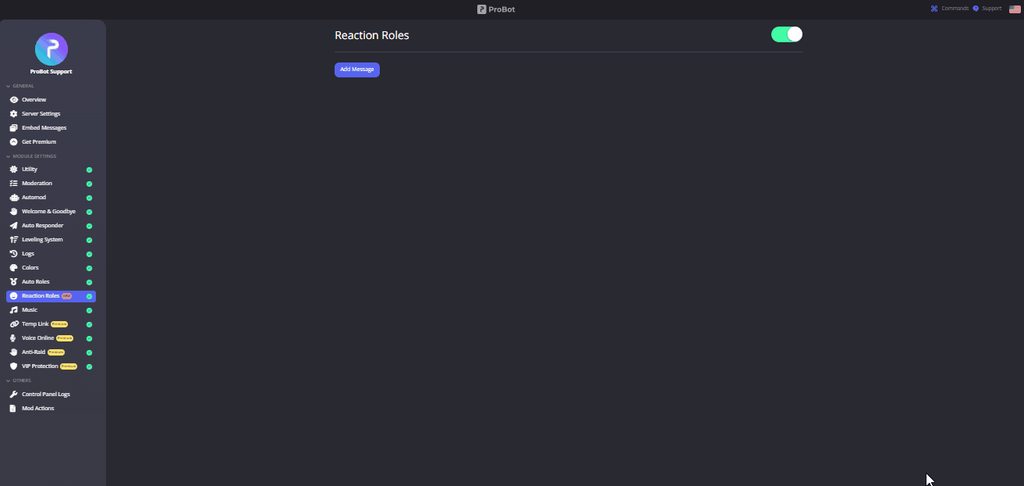
**  How do I set up reaction roles?**
1 - Go to the dashboard https://probot.io/dashboard then select your server.
2 - Select "Reaction Roles"
3 - Click on "Add Message", then select an embed. You can manage these embeds by clicking on the "Embed Messages" button.
4 - Click on "Choose a message", and then select a message where the selected embed was sent.
To add a reaction role, click on "Add Reaction".
There are 3 different types of a reaction role message:
- Switch - Upon reacting, you will get the role, and upon removing the reaction, the role will be removed as well.
- Give - Upon reacting, you will get the role, and upon removing the reaction, the role won't be removed.
- Take - Upon reacting, the role will be removed from you, and upon removing the reaction, you won't get it back.

 cosmic wharf
failed to map drivers
frozen pilot
nocturne flax
when i click choose a message, nothing pops up
quaint sentinel
nocturne flax
when i click choose a message, nothing pops up
have you selected the embed message?

 quaint sentinel
you should send the embed message first.
click on send new message and send it, so you can select it.
nocturne flax
what does it mean by probot should be in a role with higher pos
just drag probot role to top or?
quaint sentinel
nocturne flax
what does it mean by probot should be in a role with higher pos
yep drag it above other roles.
so all the roles can appear in reaction roles.
nocturne flax
awesome, got it. thank you v much
quaint sentinel
yw.

 fathom meadow
<@&675070424748654593>
fathom meadow
nocturne flax
need help yet again, can't find these emojis for the reaction roles?
did you search them?
nocturne flax
yeah like they're all just the mobile phone reacts
 fathom meadow
You need to add those emojis from your server settings
fathom meadow
fathom meadow
You need to add those emojis from your server settings
.
so they will be shown in reaction roles section
 south geode
fathom meadow
so they will be shown in reaction roles section
south geode
fathom meadow
so they will be shown in reaction roles section
Hi bro
fathom meadow
Hi , how may I help you?
nocturne flax
hmmm
south geode
fathom meadow
Hi , how may I help you?
As a friend
fathom meadow
Ask right away please
south geode
fathom meadow
Ask right away please
Will you be friends with me
 brave trout
how know tax probot
fathom meadow
<@&675070424748654593>
fathom meadow
brave trout
how know tax probot
Write on google : pbtax.xyz
 fossil gazelle
Hello, is it normal that I can no longer put playlists with probot?
fathom meadow
fossil gazelle
Hello, is it normal that I can no longer put playlists with probot?
hello , use #play pl playlist url
fossil gazelle
how do you write the command for me to copy paste
fathom meadow
hmm?
fossil gazelle
the only command I have to start music is play
So when I put the YouTube link for the playlist it only puts the first
fathom meadow
fossil gazelle
the only command I have to start music is play
you can use #play to play a single or multiple song(s) from the queue , but if you want to play a playlist you can use #play pl
fathom meadow
fossil gazelle
So when I put the YouTube link for the playlist it only puts the first
you need to put a youtube playlist not a youtube video .
fossil gazelle
play pl I'm not I have to add them?
fathom meadow
copy and paste the playlist url
fossil gazelle
it doesn't work, only put the first one
fathom meadow
does the bot reply ?
fossil gazelle
give me a playlist for you I'll try with yours maybe mine doesn't work
I like! Added to the ProQueue (03:12)!
fathom meadow
fossil gazelle
give me a playlist for you I'll try with yours maybe mine doesn't work
i actually don't have informations about the youtube playlist links , so you do need to make it by yourself , sorry .
fossil gazelle
fathom meadow
i actually don't have informations about the youtube playlist links , so you do ...
the youtube mixes already done do not work?
fathom meadow
no they work
fossil gazelle
I can't get the mixes already done I just created a playlist quickly it works it must be the youtube mixes that don't work
385 Songs of Music Added to ProQueue!
thank you for your time you have helped me a lot
fathom meadow
fossil gazelle
385 Songs of Music Added to ProQueue!
great it looks working now
you're welcome
fossil gazelle

 vital kraken
Hey! I've been scanning through the messages trying to find answers but no matter what I cannot get the welcome messages to come through to my server. I've set up the message but when people come into my server the message doesn't pop up and I can't figure out what I'm doing wrong.
 fathom meadow
<@&675070424748654593>
 rotund hornet
Hi guys
 untold flume
.
rotund hornet
Can i ask something
untold flume
@vital kraken make sure your bot has permissions
Do the following:
Enable welcome image
select (send to a channel)
Save then disable welcome image then save @vital kraken
@rotund hornet sure what's your question
cosmic wharf
can some help me
rotund hornet
why my voice level and chat level doesnt increase on some servers
But everyone except me can leveling up
@untold flume can you help me with that problems
fathom meadow
<@&675070424748654593> .
vital kraken
untold flume
<@885659292718477343> make sure your bot has permissions
Do the following:
Enabl...
that worked thank you!
untold flume
.
 split needle
rotund hornet
why my voice level and chat level doesnt increase on some servers
split needle
rotund hornet
why my voice level and chat level doesnt increase on some servers
Ask them about no xp channels/roles because not every server the same
untold flume
@vital kraken yw
split needle
cosmic wharf
can some help me
It's better to just tell your problem
rotund hornet
split needle
Ask them about no xp channels/roles because not every server the same
How
split needle
Just ask one of the admin in that server
It's a per server setting so we can not do anything with it
rotund hornet
Oh ok
 celest bear
Test
untold flume
?
 graceful heart
how much xp does it take to level up under probot? Is it customizable, and if so, is there a default?
rotund hornet
split needle
Just ask one of the admin in that server
It's a per server setting so we can not...
Thanks for the help
I waste my 1 week 2 days listening to the jockie bot song and only increasing 1 level
 brave cove
hello, were can i see the list of perks of the premium plan? <@&675070424748654593>
 topaz siren
Is there a way to replace a role upon receiving a new one? like is there a role reaction that grants one role and then it automatically removes the old one?
untold flume
.
It's not customizable , use #rank / profile depends on what you're looking for to see how much level do you need to rank up @graceful heart
graceful heart
untold flume
It's not customizable , use #rank / profile depends on what you're looking for t...
would it be possible to know the specific values of xp needed for every level?
untold flume
@brave cove https://probot.io/premium
ProBot
Welcome images, moderation, leveling, reaction roles, logs, high quality music and many many more!
@graceful heart no actually
untold flume
topaz siren
Is there a way to replace a role upon receiving a new one? like is there a role ...
Nope
brave cove
untold flume
<@725133394824003685> https://probot.io/premium
thanks
untold flume
yw
topaz siren
darn, thanks though
untold flume
yw
graceful heart
untold flume
<@759817970683215912> no actually
thank you for the quick reply :D
untold flume
you're welcome
 pallid zephyr
If I get probot prime do I remove regular probot from my server or leave it in?
 wheat timber
#help rep
lean badgerBOT
wheat timber
#help rep
**Command: rep**
Award someone a reputation point. Can only be used once every 24 hours.
**Usage:**
#rep [user]
**Examples:**
#rep
#rep @wheat timber
#rep 157605500488384512
 humble eagle
 quasi moss
hi i need help with the rection
quasi moss
hi i need help with the rection
you just asked in #support-ar dont repeat
quasi moss
humble eagle
you just asked in <#743365286132056094> dont repeat
sorry for that
humble eagle
np ..
 true sluice
<@&675070424748654593>
Hello, it looks like level rewards aren’t working on my server. The ProBot’s role is above the reward roles and the bot has a second role that has administrative permissions. I’m on mobile at the moment but here’s a screenshot of the rewards.

 manic dust
hey, i meet some problems with probot, is there anyone could help me?
help!!
is there someone meet problems at leveling systems like me?
 merry linden
hello support team
i need help to probot and commands
Help me pls
manic dust
i click into the add role reward button but it shows error. this is the first time during the time i use it.
merry linden
Hello
I need help to probot commands
Help me!!
Yes
Just!!!!
My prefix probot in my server is op!
Thank you so much (:
Good bye 
true sluice
true sluice
<@&675070424748654593>
Hello, it looks like level rewards aren’t working on my ...
Nvm I figured it out. It’s because I have it set to reach a certain level in both text and voice channels before you get the role. I need to separate it so that members can get the role either way.
No problem, I figured it out in the end 🙂
 random hawk
can anyone help me figure out why auto roles aren't working?
maybe im just not understanding how it's supposed to work
split needle
random hawk
can anyone help me figure out why auto roles aren't working?
make sure:
the role is not higher than probot role
the role is not having any managing permission
if your server have membership screen enabled, the bot will wait for the members to pass that first
 soft vortex
How I check ping
nocturne flax
Need help editing embed sent message. Seems to not be updating within the server?
split needle
nocturne flax
Need help editing embed sent message. Seems to not be updating within the server...
are you trying to update an embed with only message content?
nocturne flax
yes
split needle
then it's having issue right now. it has been fixed but not been deployed until next restart
 split needle
for now, either add something to the embed part, or resend it
nocturne flax
if i resend it, do people lose roles and have to re-do them?
nocturne flax
idk if this is a probot question or not, but is there a way to make it so that when people choose a role it doesn't automatically change their color to that role's color or something?
split needle
it's not related to the bot, but for that, you'll either need to clear their colors, or having a higher role with color to override
for more information, you can search up roles and permissions online and find an article by discord
nocturne flax
okay ty for your help
random hawk
split needle
make sure:
the role is not higher than probot role
the role is not having any ma...
it was higher than the probot role, that's what did it, thank you
 mighty scroll
Halloo, I'm just wondering on where i can find all the list of the features by Probot? Ty
split needle
mighty scroll
Halloo, I'm just wondering on where i can find all the list of the features by P...
you can see them on the site https://probot.io
for commands, https://probot.io/commands
for server features, https://probot.io/dashboard
mighty scroll
split needle
you can see them on the site https://probot.io
for commands, https://probot.io/c...
Ohh okie, Tysm and have a great day!!
 loud knot
Hey everyone is it possible to play a spotify playlist instead of having to individually play loads of songs if so link a spotify playlist
split needle
loud knot
Hey everyone is it possible to play a spotify playlist instead of having to indi...
for now, the bot is not yet supported spotify
you can play playlists on youtube (#play pl <link) and soundcloud (#play <link>) for now
loud knot
ok thankyou
 split needle
 willow lotus
can you try with a link to the song?
 formal condor
Hello
 coarse viper
formal condor
Hello
coarse viper
formal condor
Hello
Hi
 summer snow
Okay so is there anyway i can change the prefix?
split needle
#prefix newprefix
untold flume
Nope
 slate wharf
Hi
native geyser
 placid patio
Idk the commands
placid patio
Idk the commands
ProBot
Welcome images, moderation, leveling, reaction roles, logs, high quality music and many many more!
native geyser
slate wharf
Hi
how can i help you?
slate wharf
I have a problem and so many people also suffer from it, the problem is that I have been active for five days for only one level , the bot gives xp but very low quantity, because of this problem I didn't open the discord for maybe 6 month's , that's my problem.
@native geyser
native geyser
xp gain is randomized so cant really do anything about it
 floral umbra
Hi
coarse viper
Hii
native geyser
no its not
nocturne flax
Hey, is there a way I can get credits instead of voting and daily reward?
native geyser
nope currently these are the only ways
nocturne flax
OK ty
native geyser
yw
split needle
when the update includes it release
 hot summit
Hi!
I've set some Autoresponders - and used "[userName]" - but got the General Username instead of the Server-Username - Is there a way to change that?
 minor hawk
How can i remove a level from a user
native geyser
https://probot.io/dashboard -> select your server -> welcomer
ProBot
Welcome images, moderation, leveling, reaction roles, logs, high quality music and many many more!
native geyser
hot summit
Hi!
I've set some Autoresponders - and used "[userName]" - but got the General U...
not possible
native geyser
minor hawk
How can i remove a level from a user
you cant remove a level or two you can only completely reset
#help reset
lean badgerBOT
native geyser
#help reset
**Command: reset**
Reset text/voice/invites/limits xp points for all or specific member.
**Usage:**
#reset [text / voice / invites / limits] [all / user]
**Examples:**
#reset text all
#reset voice all
#reset invites all
#reset text @Dramex
#reset limits @Dramex
 tacit vale
How can i purge messages
native geyser
 toxic locust
Where can i find premium perks?
toxic locust
Where can i find premium perks?
you can see the perks on https://probot.io/premium
ProBot
Welcome images, moderation, leveling, reaction roles, logs, high quality music and many many more!
native geyser
tacit vale
How can i purge messages
/clear
tacit vale
And just put the amount?
native geyser
the bot shows the rest
native geyser
yw
 paper carbon
how do i make probot in a voice channel to play music
 cosmic elk
<@&675070424748654593>
viral sundial
paper carbon
how do i make probot in a voice channel to play music
/play
you can put the image's link in the message and this is the only way
https://cdn.discordapp.com/attachments/664941916722429986/994235717221879838/179_20220706163143.png
yw
 fallen night
guys how to make that the members cant make comands
coarse viper
fallen night
guys how to make that the members cant make comands
You want to make them cant use any pro bot commands?
fallen night
coarse viper
You want to make them cant use any pro bot commands?
yes
like the /play command
coarse viper
You can disable commands for roles from https://probot.io/dashboard @fallen night
ProBot
Welcome images, moderation, leveling, reaction roles, logs, high quality music and many many more!
fallen night
ok ty
 forest geyser
Yoo
coarse viper
fallen night
ok ty
Your Welcome ! Have a gr8 day 😇
coarse viper
forest geyser
Yoo
Heyy
forest geyser
what is up
coarse viper
forest geyser
what is up
I'm ok, also this is support channel, we can chat on #chat-en
fallen night
coarse viper
Your Welcome ! Have a gr8 day 😇
ty'
forest geyser
coarse viper
I'm ok, also this is support channel, we can chat on <#608047244276531245>
o sry
I seemed that it is general chat
coarse viper
forest geyser
I seemed that it is general chat
 lone hazel
Hello please how can i add a video or photo with the auto responder
coarse viper
lone hazel
Hello please how can i add a video or photo with the auto responder
Try putting image link
lone hazel
Thzbk you
 worn cobalt
Hello
coarse viper
lone hazel
Thzbk you
You'r Welcome !!
coarse viper
worn cobalt
Hello
Hi, Welcome
This is a support channel, those kind of things are a reason for a punishment
@worn cobalt
 proven silo
I'm sorry how I ping a role?
quaint sentinel
proven silo
I'm sorry how I ping a role?
<@&role_id>
proven silo
Is there a way to change Probot's pfp and nickname?
native geyser
only with premium tier 2
 tepid smelt
How to add logs to your Discord channel
native geyser
https://probot.io/dashboard -> select your server -> logs module
ProBot
Welcome images, moderation, leveling, reaction roles, logs, high quality music and many many more!
tepid smelt
thanks
native geyser
yw
quaint sentinel
I assume it doesn't send the welcome message, right?.
Since you don't have a message text set, please change the send option to a channel and select a channel.
Normally yes, if you did try it and still doesn't work then try to change your welcome image.
aight 👍.
yw.
 blazing jasper
I paid for the premium version of probot but it won't give me access to the premium features and there no way to invite the bot?
coarse viper
blazing jasper
I paid for the premium version of probot but it won't give me access to the prem...
Try kicking all pro bots from your server and re-add
blazing jasper
I can't. When I click the premium features it still shows the option to buy
 lean badgerBOT
quaint sentinel
#warn <@971579883115405352> read channel topic carefully please.
lean badgerBOT
quaint sentinel
#warn <@971579883115405352> read channel topic carefully please.
:white_check_mark: **@scarlet witch🛑 warned! **
quaint sentinel
also if there is a support member helping don't interfere or tell him to go.
he can help whenever he want even if you are helping.
blazing jasper
Is there a step I am missing @quaint sentinel ?
quaint sentinel
coarse viper
Try kicking all pro bots from your server and re-add
@blazing jasper
blazing jasper
quaint sentinel
<@740740823125065919>
kicked probot and readded. I still don't see a way to add the premium bot or have access to those premium panels
coarse viper
blazing jasper
kicked probot and readded. I still don't see a way to add the premium bot or hav...
Have you added premium bot?
blazing jasper
coarse viper
Have you added premium bot?
I do not see a way to add this?
coarse viper
blazing jasper
I do not see a way to add this?
https://probot.io/premium/manage  Click invite button
ProBot
Welcome images, moderation, leveling, reaction roles, logs, high quality music and many many more!
 autumn merlin
A
 spare osprey
sullen prism
For send credits use: #credits @ user <amount>
spare osprey
sullen prism
For send credits use: #credits @ user <amount>
thank usm ❤️
blazing jasper
coarse viper
https://probot.io/premium/manage <:ok:994244301896826970> Click invite button
Thank you!
sullen prism
spare osprey
thank usm ❤️
Yw
coarse viper
blazing jasper
Thank you!
Your welcome bud 🙂
coarse viper
Yes
 last quest
Probot models please @coarse viper
coarse viper
last quest
Probot models please <@949666677535150131>
What do you mean?
coarse viper
Are you asking what perks you get when you buy premium?
coarse viper
last quest
Thank for your time
Np
 sharp flare

 coarse viper
@sharp flare On which event you are having this problem?
The video has copyright so you cant use it.
 tame pecan
Hello, how l can whitelisted only tenor gifs links for a specific role?
frozen pilot
tame pecan
Hello, how l can whitelisted only tenor gifs links for a specific role?
https://probot.io/dashboard > auto mod > links > whitelisted links
ProBot
Welcome images, moderation, leveling, reaction roles, logs, high quality music and many many more!
tame pecan
frozen pilot
https://probot.io/dashboard > auto mod > links > whitelisted links
yes l already have set up the Disabled Roles
if l add whitelisted link as tenor
tenor links will only whitelisted who the specific roles or for everyone ?
 restive prism
Does this bot do reaction roles?
frozen pilot
tame pecan
yes l already have set up the Disabled Roles
if l add whitelisted link as tenor
...
yes
you can add the enabled roles
or disabled roles
tame pecan
frozen pilot
or disabled roles
alright, thanks for help !
frozen pilot
yw 
nocturne flax
Hello I was wondering what's pro bot prime ?
Because when I opened on mutual servers it says just one which got me confused if it's real or not
coarse viper
nocturne flax
Hello I was wondering what's pro bot prime ?
Its a paid premium
version of pro bot
You have more perks with premium
nocturne flax
Yes i know but it just showed one server that has that bot
Which got me thinking if it's privite bot or not
coarse viper
Privite
 indigo shell
can we reset probot leveling system?
nocturne flax
 coarse viper
indigo shell
can we reset probot leveling system?
coarse viper
indigo shell
can we reset probot leveling system?
#help reset
lean badgerBOT
coarse viper
#help reset
**Command: reset**
Reset text/voice/invites/limits xp points for all or specific member.
**Usage:**
#reset [text / voice / invites / limits] [all / user]
**Examples:**
#reset text all
#reset voice all
#reset invites all
#reset text @Dramex
#reset limits @Dramex
nocturne flax
@coarse viper there is two probots in the same server
coarse viper
nocturne flax
<@949666677535150131> there is two probots in the same server
That's fake Pro Bot
 near the "Bot" word
coarse viper
nocturne flax
near the "Bot" word
coarse viper
nocturne flax
.
nocturne flax
Yeah i could even send u the server link if u want
coarse viper
frozen pilot
If you don't want ur server to be damaged get rid of that bot.
He just reports, not owner of the server
nocturne flax
Yes am not the owner of that server
frozen pilot
oh alr
nocturne flax
Great i won a fake Giveaway 👌
nocturne flax
coarse viper
Can you send me a invite link of the server?
No worry's dms or in here ?
coarse viper
nocturne flax
No worry's dms or in here ?
Dm's
nocturne flax
coarse viper
Dm's
Alright
 unique pine
Reaction roles doesn't give the option to give a certain role, therefore, useless.

 slender musk
unique pine
Reaction roles doesn't give the option to give a certain role, therefore, useles...
slender musk
unique pine
Reaction roles doesn't give the option to give a certain role, therefore, useles...
Press "Add Reaction" & then select the role
Can anyone help me with this?
 unique pine
slender musk
Press "Add Reaction" & then select the role
unique pine
slender musk
Press "Add Reaction" & then select the role
Thanks, it wasn't very clear.
slender musk
unique pine
Thanks, it wasn't very clear.
Should look like this

I'm also struggling haha
native geyser
slender musk
Can anyone help me with this?
Are emojis the issue or what exactly I should be looking here?
slender musk
native geyser
Are emojis the issue or what exactly I should be looking here?
The emojis don't show up on the message
native geyser
Do they exist in your server
slender musk
Yes
native geyser
Can you make sure those ids belong to the ones in the server and have not been gotten from another server
native geyser
Invite me in dms please so I can check it out
slender musk
sure
native geyser
fixed ✅
 stiff galleon
I also have a problem w self roles lmao
native geyser
what is the issue you're having
stiff galleon
well when i want to add the roles they dont..show up?
native geyser
go to your server settings -> roles -> drag the bots role above other roles
native geyser
yw
 mighty burrow
Hi
native geyser
hi how can i help you?
mighty burrow
native geyser
hi how can i help you?
Nth ty for asking iam here just for a chat
native geyser
yup
 fading warren
Happens to me every time i try to add the bot
 coarse viper
fading warren
Happens to me every time i try to add the bot
coarse viper
fading warren
Happens to me every time i try to add the bot
Are you writing the 2FA code right?
fading warren
im just trying to add the bot to my server and i have to complete a captcha
coarse viper
fading warren
im just trying to add the bot to my server and i have to complete a captcha
You need to write your 2FA code
fading warren
i mean i have it refresh every few seconds on google auth
coarse viper
fading warren
i mean i have it refresh every few seconds on google auth

Try using one from here
fading warren
for some unknown reason i had to remove 2fa
coarse viper
fading warren
for some unknown reason i had to remove 2fa
If you want to remove, you can. But for your security you better have it. To get a 2FA code you can use Google Auth app or you can click on View Backup Codes button which is in your account settings.
stiff galleon
oh btw, after the roles are ready, how do i send the self role message?シ︎
native geyser
stiff galleon
oh btw, after the roles are ready, how do i send the self role message?シ︎
you're supposed to send it first by creating it from embed messages module
stiff galleon
oh, thx again :)
native geyser
yw
tame pecan
hello, l set up the whitelisted roles and links for make some specific roles
but who have one of the specific role can also post not whitelisted links
like youtube ...etc
@native geyser
coarse viper
tame pecan
<@324937717441888256>
Don't ping admins please ! @frozen pilot will help you
native geyser
its okay
tame pecan
coarse viper
Don't ping admins please ! <@467733205605416970> will help you
dude l pinged the admin because l see him who is responding
native geyser
tame pecan
hello, l set up the whitelisted roles and links for make some specific roles
but...
is that role added as one of the enabled or disabled roles?
also dont worry about pinging me
it would also be great if i can see your automod settings
tame pecan
native geyser
is that role added as one of the enabled or disabled roles?
umm l can see only the disabled roles
thanks ok wait l will send
alright here you go ruru
 native geyser
the reason why people with any of those roles can post any link they want is because you added those roles as disabled roles, which means links automod is going to ignore people with one of those roles
tame pecan
native geyser
the reason why people with any of those roles can post any link they want is bec...
hmm
but if l remove this roles from the disabled roles no one can longer can send tenor links
but btw you say something about enabled role but l can see only the disabled roles
native geyser
any role that is not in disabled roles section counts as an enabled role, can you try as www.tenor.com please
tame pecan
native geyser
any role that is not in disabled roles section counts as an enabled role, can yo...
ok l will change that very quick
native geyser
let me know please
tame pecan
native geyser
let me know please
alright l did some test and still can post other links
wanna give you try ?
native geyser
did you remove those roles from disabled roles section?
tame pecan
native geyser
did you remove those roles from disabled roles section?
no l did not
native geyser
thats the reason why people can send other links
tame pecan
umm but if l whitelisted tenor links and l remove the disabled roles
will everyone can send tenor links?
native geyser
yes
tame pecan
umm in the room settings perm "embed links" if everyone don't have this perm will not enable to send tenor links ?
l mean will not show the gif
native geyser
yes thats discord permission though and has nothing to do with probot
tame pecan
umm not only ProBot l check it all bots
alright sorry for your troubles with me lol, thanks for help
native geyser
no worries ^^
 somber zinc
native geyser
no worries ^^
somber zinc
native geyser
no worries ^^
Can you take a look at dm
native geyser
if you have a question please ask here
somber zinc
native geyser
if you have a question please ask here
When will I be able to recover the information of a blocked account?
💔😔
native geyser
if you mean profile stats then i dont know since profile transfer is disabled and we dont have an information about when its gonna be enabled again
 quaint flint
Hi! I was wondering, does this mean that I can use like my own bot token to get its own name and pp etc to link it with probot?
 native geyser
you cant link other bots with probot though what it means is you get a new probot that you can change its username and profile picture of
 jagged dawn
How do I set up Reaction Roles?
quaint flint
okay, ty
native geyser
yw
native geyser
jagged dawn
How do I set up Reaction Roles?
-
from embed messages section create an embed message and send it to your server (the message you'll have to select in step 2 basically)
-
from reaction roles section select the embed message you just sent
-
add reactions
-
add roles by clicking on the plus signs right next to the reactions you added
ProBot
Welcome images, moderation, leveling, reaction roles, logs, high quality music and many many more!
jagged dawn
Thank you!
 misty quiver
Why doesn't it say the user's name? <@&675070424748654593>
 coarse viper
misty quiver
Why doesn't it say the user's name? <@&675070424748654593>
coarse viper
misty quiver
Why doesn't it say the user's name? <@&675070424748654593>
User may be deleted their account
misty quiver
coarse viper
User may be deleted their account
no i tried it on my second account. and was not deleted
coarse viper
misty quiver
no i tried it on my second account. and was not deleted
@native geyser
native geyser
misty quiver
no i tried it on my second account. and was not deleted
does probot share any servers with that account?
misty quiver
native geyser
does probot share any servers with that account?
In what sense does it share? Where can I see it?
native geyser
get on the account click on the bots profile and check mutual servers
misty quiver
native geyser
get on the account click on the bots profile and check mutual servers
I am not understanding, do you mean the authorized apps oppre the servers where they are inside with the probot?
native geyser
check this on that account
 misty quiver
native geyser
check this on that account
misty quiver
native geyser
check this on that account
there is nothing more
 native geyser
are you on your alt account
misty quiver
native geyser
are you on your alt account
No, with this account I'm writing to you it's the main one
native geyser
is your alt account in any servers that has probot in it?
misty quiver
native geyser
is your alt account in any servers that has probot in it?
Only in mine
native geyser
is it still the same if you refresh the page? also what was the action you took
misty quiver
native geyser
is it still the same if you refresh the page? also what was the action you took
Yes, if I update the page it is always the same. I was putting that the probot when I do "#ban" deletes the message but then I thought about it and I put everything normal, after having reported for safety this happened.
native geyser
so you banned the account and the account is not in the server anymore?
misty quiver
native geyser
so you banned the account and the account is not in the server anymore?
No, the account can re-enter the server, but when it is banned, the ban appears over time without the user's name.
If I'm bothering you, we can take care of it tomorrow.
native geyser
It's only happening when the account is not in the server correct?
If yes it's because the bot can't get the user details due to not sharing any servers with the account
misty quiver
native geyser
If yes it's because the bot can't get the user details due to not sharing any se...
how do i get them to collect the data?
native geyser
The bot needs to share a server with the account
misty quiver
native geyser
The bot needs to share a server with the account
Should I invite the probot to a server?
native geyser
That said user and probot have to be in a server together so the bot can get its data
misty quiver
native geyser
That said user and probot have to be in a server together so the bot can get its...
So if I go inside your server and then get banned, does it work?
native geyser
Yes
misty quiver
okay thanks
native geyser
Yw
minor hawk
i enable the option "remove with higher reward" and the previous role doesnt come off
native geyser
Both rewards need to belong to the same group (voice only, text only, both text & voice etc.)
untold flume
@vital kestrel well yeah , but not in the public version

ProBot
Welcome images, moderation, leveling, reaction roles, logs, high quality music and many many more!
 vital kestrel
okey thanks
untold flume
yw
 vague granite
So my premium sub for Probot has run out along with my custom bot, but now whenever I want to use any other commands it refuses to do anything
<@&675070424748654593>
fathom meadow
<@&675070424748654593>
split needle
vague granite
So my premium sub for Probot has run out along with my custom bot, but now whene...
Can you try kicking the premium out and use the commands again?
vague granite
split needle
Can you try kicking the premium out and use the commands again?
I tried but to no avail
vital kestrel
how to create muted role?
vague granite
It still says that there's another bot for the server
Is it safe to kick and re-invite probot without losing the leaderboards scores?
split needle
Then kick the free bot out aswell then invite it back to your server
split needle
vital kestrel
how to create muted role?
The bot will create one when you use mute command
split needle
vague granite
Is it safe to kick and re-invite probot without losing the leaderboards scores?
Yes
vital kestrel
split needle
The bot will create one when you use mute command
he create always
but
it didnt work
split needle
Then that's about your server's permission settings with other roles
vague granite
It worked! Thanks a lot
split needle
Try kick both free and premium bots out, and invite only the premium back in using #vip move botnum with botnum is the premium number of the bot (not tag number)
 fossil ledge
Hi, I'm getting an error "There is another bot being used for this server" when using / commands. we kicked the free ProBot to replace it with the Premium ProBot. How do I get back to being able to use the / commands?
 keen bear
split needle
Try kick both free and premium bots out, and invite only the premium back in usi...
keen bear
split needle
Try kick both free and premium bots out, and invite only the premium back in usi...
im a little confused haha
split needle
fossil ledge
Hi, I'm getting an error "There is another bot being used for this server" when ...
Try thing above
split needle
If you remember, or still know the premium number of your subscription, use that number in the vip move command in anywhere that have the bot
keen bear
split needle
If you remember, or still know the premium number of your subscription, use that...
where can I find the number?
split needle
You can either find it in the bot's name when you haven't changed it, or on the role goes with it if you manage to remember, or just click on invite it from the site to know the number, but inviting from there usually will not work so just take the numbers and use that instead
keen bear
split needle
You can either find it in the bot's name when you haven't changed it, or on the ...
yea you lost me again 😅
is there a doc I can read or a video?
split needle
Amma get a pic in a sec
keen bear
split needle
Amma get a pic in a sec
thx
split needle
This is when you click on invite from the site https://probot.io/premium/manage
Copy the numbers on there next to the premium name then use it as #vip move number

ProBot
Welcome images, moderation, leveling, reaction roles, logs, high quality music and many many more!
keen bear
split needle
This is when you click on invite from the site https://probot.io/premium/manage
...
doesnt do anything
 split needle
Use the command in where have the bot, like this server
 tawny crater
How do you enable the spoiler effect on images when creating an embed message?
keen bear
split needle
Use the command in where have the bot, like this server
use the command in this server?
 spring lava
split needle
Use the command in where have the bot, like this server
spring lava
split needle
Use the command in where have the bot, like this server
Can i say how it works ?
split needle
tawny crater
How do you enable the spoiler effect on images when creating an embed message?
You can rename the image to SPOILER_*.png and that should work as I know
split needle
keen bear
use the command in this server?
Yes
Try it in #commands
split needle
spring lava
Can i say how it works ?
What?
keen bear
split needle
Yes
Try it in <#771147667660996618>
dashboard still says this

but premium bot was added
split needle
keen bear
dashboard still says this
Kick it and try again ig
 coarse warren
under "embed messages" im trying to edit an already existing message on my serve. when i hit save it says "success" but the server doesn't reflect the change. Could I get some help?
keen bear
split needle
Kick it and try again ig
kick the premium bot?
split needle
coarse warren
under "embed messages" im trying to edit an already existing message on my serve...
Are you trying to edit the content part of the embed? If then it's having an issue which has been fixed but not yet arrive until next deployment
split needle
keen bear
kick the premium bot?
Yes
coarse warren
split needle
Are you trying to edit the content part of the embed? If then it's having an iss...
yes. okay thanks. Is there a work around for now/ and when is the next release?
split needle
You can either add another element to the embed to force update it, or resending it which is not what most people want
About the next deployment, we have no infomation about it
coarse warren
okay no worries. thanks!
tawny crater
split needle
You can rename the image to SPOILER_*.png and that should work as I know
Doesn't seem to be working


 split needle
Maybe the host changed the image's name by itself so there's no other way
tawny crater
ya seems that way.
sullen prism
 gilded cipher
hey
gilded cipher
hey
Hi
sullen prism
gilded cipher
can i get help pls
Sure
sullen prism
ProBot
Welcome images, moderation, leveling, reaction roles, logs, high quality music and many many more!
Check bot permission
keen bear
split needle
Yes
Im unable to tag roles with the embeds is that normal?
gilded cipher
 sullen prism
gilded cipher
sullen prism
gilded cipher
Ok
gilded cipher
the links there are in this list are the only that work
AND discord links
but i didnt want discord links
sullen prism
gilded cipher
the links there are in this list are the only that work
Delete all link from here and try again
gilded cipher
i try
sullen prism
And some links working yes ?
split needle
keen bear
Im unable to tag roles with the embeds is that normal?
You may use the format <@&id> for tagging a role
The id here is the id number of the role. You can get the full format by putting a \ right before the role on the chat and send it (be sure no one is having the role tho)
Also roles will not be mentioned on bot's messages as how developer set it to
gilded cipher
sullen prism
And some links working yes ?
only cdn discordapp com works
but i dont whitelisted it
sullen prism
gilded cipher
but i dont whitelisted it
Yes
split needle
gilded cipher
but i dont whitelisted it
Are you testing the automod by yourself?
gilded cipher
split needle
Are you testing the automod by yourself?
noooo
a friend of mine without permissions
sullen prism
gilded cipher
a friend of mine without permissions
Enable anti discord invites
And try again
 split needle
Are you having the whole automod module enabled or not?
split needle
I mean the whole module, not other sections of it
split needle
Are you having any ignored role or channel in the whole automod setting? Those are at the end of the automod window
gilded cipher
no
anti links are working
and without whitelist it blocking every link
BUT
discord links are allowed
idk
can it be that discord links are trusted with probot?
 rain coyote
yo how to create verification for server?
keen bear
split needle
You may use the format <@&id> for tagging a role
The id here is the id number of...
thanks!
 split needle
rain coyote
yo how to create verification for server?
split needle
rain coyote
yo how to create verification for server?
the highest verification this bot can provide is with reaction roles
go to https://probot.io/dashboard, select your server, go to embed messages module to create and send embed messages for the reaction roles to where you want. Then go to reaction role module to setup the feature on the sent embed messages.
Notice: Be sure the Probot✨ role is higher than other roles. Embed message should not have any blank element (better to remove them if not using).
just use /play command
for more commands go to https://probot.io/commands and select music section
ProBot
Welcome images, moderation, leveling, reaction roles, logs, high quality music and many many more!
split needle
gilded cipher
<@453088549739167745>
send me an invite to your server in dm
rain coyote
split needle
the highest verification this bot can provide is with reaction roles
go to https...
So many steps
I just started on this server
split needle
I can send you a video of setting that up if you want
split needle
 rain coyote
@split needle do I have to be on pc
split needle
no
the steps should be the same on mobile view
split needle
have you made and sent an embed message yet?
keen bear
@split needle trying to setup reaction roles but no roles are showing up

 weak flint
how to get commands for music? play loop skip?
split needle
keen bear
<@453088549739167745> trying to setup reaction roles but no roles are showing up
move the premium role higher in your server role setting and refresh the site
split needle
weak flint
how to get commands for music? play loop skip?
just use those command like you just asked
weak flint
didnt work lol
split needle
how were you tried to use them?
split needle
can you make sure the commands and the module of it is enabled on the site?
 ivory yew
Anyone have a promo code ?
split needle
none
ivory yew
😕
weak flint
nvm, I fixed it
keen bear
split needle
move the premium role higher in your server role setting and refresh the site
for links in the automod section what are disabled channels? does that mean no links? or are they whitelisted channels?
split needle
whitelisted channels
keen bear
split needle
whitelisted channels
okay thanks
keen bear
split needle
whitelisted channels
last question, is there a section for timed messages?
split needle
not yet
keen bear
and for twitter posts? @split needle
split needle
soon will be included
keen bear
split needle
soon will be included
thx
nocturne flax
Hi, the probot dashboard is still loading in my pc until now 
 fringe sparrow
When setting up a welcome message, how can I just have the link without showing the page to which the link leads?
split needle
nocturne flax
Hi, the probot dashboard is still loading in my pc until now <:sad:9503814298948...
is it now?
split needle
fringe sparrow
When setting up a welcome message, how can I just have the link without showing ...
put each link between a pair of <>
nocturne flax
split needle
is it now?
Yes, I checked it right now too
Im in the dashboard site and it keeps loading
split needle
can you try accessing the site on another browser?
nocturne flax
Unfortunately, it has the same issue
 pearl pecan
What is Probot for?
 rose atlas
How do I do this

 oak glen
Ilimited embed messages?


 wise urchin
what is log
split needle
nocturne flax
Unfortunately, it has the same issue
then I have no idea what would be the case
can you try again after like a day? maybe check your internet connection as well
split needle
pearl pecan
What is Probot for?
for some utility and moderation purposes
split needle
rose atlas
How do I do this
go to https://probot.io/dashboard, select your server, go to embed messages module to create and send embed messages for the reaction roles to where you want. Then go to reaction role module to setup the feature on the sent embed messages.
Notice: Be sure the Probot✨ role is higher than other roles. Embed message should not have any blank element (better to remove them if not using).
split needle
oak glen
Ilimited embed messages?
unlimited, unless you reach text limit on the embed messages
split needle
nocturne flax
the roles that my friend made on their server won't pop up
move the probot role higher in your server role setting
nocturne flax
alr thanks
split needle
wise urchin
what is log
it records activities in your server and post them in a set channel
nocturne flax
split needle
then I have no idea what would be the case
can you try again after like a day? m...
Thx for answering, I appreciate it a lot! And on the other side, I can still use probot dashboard in my phone.
fringe sparrow
split needle
put each link between a pair of <>
thank you
nocturne flax
now i can't put the message in the right channel
split needle
have you send the message from the embed messages module yet?
split needle
from the embed messages module, not from reaction roles module
nocturne flax
thats what im doing
split needle
so can the bot see and send messages in the wanted channels?
nocturne flax
yeah
split needle
can you try refreshing the site and check again?
 rancid bluff
How do you make pro bot welcome people when they join your server
 exotic charm
dùng lệnh nào để buff xp cấp độ
split needle
rancid bluff
How do you make pro bot welcome people when they join your server
go to https://probot.io/dashboard, select your server on the left, go to welcome & goodbye module to set up the thing
split needle
exotic charm
dùng lệnh nào để buff xp cấp độ
#support-int
fringe sparrow
How can I change the font of the welcome message and how can I click on the words in the welcome message to go directly to a particular channel?
coarse viper
fringe sparrow
How can I change the font of the welcome message and how can I click on the word...
The font is not customizable for now.
coarse viper
fringe sparrow
How can I change the font of the welcome message and how can I click on the word...
Also you can add text to your welcome channel  <#channel_id> so when people click it, they will directly go to the channel.
fringe sparrow
thanks very much
coarse viper
fringe sparrow
thanks very much
Your Welcome, have a nice day 🙂
misty quiver
I was trying to access the internet page of the probot and it tells me this: <@&675070424748654593>
 coarse viper
misty quiver
I was trying to access the internet page of the probot and it tells me this: <@&...
coarse viper
misty quiver
I was trying to access the internet page of the probot and it tells me this: <@&...
Try refreshing your page
misty quiver
coarse viper
Try refreshing your page
now works, sorry for disturbing
coarse viper
misty quiver
now works, sorry for disturbing
No worries 👼🏻
misty quiver
native geyser
That said user and probot have to be in a server together so the bot can get its...
I have now checked with the "#ban" command even if my second account is on another server absolutely nothing changes, the user name does not appear to change.
<@&675070424748654593> Hi, sorry if I disturb, last night I encountered a problem, when I do the "#ban" command on my second account and it is banned it does not collect user information on the site. I was told that I had to have another server where the probot was but even if I am there, absolutely nothing changes. To make you better understand this happens:

 desert flower
Bot not working on my server
split needle
misty quiver
<@&675070424748654593> Hi, sorry if I disturb, last night I encountered a proble...
it means the bot have no other way to contact the banned user (no more mutual server with the banned user), it will show like that, just like how discord show invalid-user on your side when you see mentions of users you have never seen
split needle
desert flower
Bot not working on my server
need better explanation
misty quiver
split needle
it means the bot have no other way to contact the banned user (no more mutual se...
ah, so it can't be solved?
split needle
no on our side
misty quiver
split needle
no on our side
Ah okay, thx
 smoky helm
Hi how I can change the prefix of Probot please ?
coarse viper
smoky helm
Hi how I can change the prefix of Probot please ?
https://probot.io/dashboard Click on server which you want to change prefix on Server Settings | You can change here.
ProBot
Welcome images, moderation, leveling, reaction roles, logs, high quality music and many many more!
smoky helm
coarse viper
https://probot.io/dashboard <:nex_okk:982289571704373258> Click on server which ...
Hi @coarse viper, thank you for your answer.
coarse viper
smoky helm
Hi <@949666677535150131>, thank you for your answer.
Your welcome !
Have a great day !! 😇
smoky helm
coarse viper
Have a great day !! 😇
You too !

coarse viper
smoky helm
You too !<a:check:736686101644967946> <:Pwease:910241550225801258>
Awee, thanks!! 
 vagrant current
hi here , how can i disable delete message when it have alot of same litters?
nocturne flax
@coarse viper well done the "Fake bot" has been removed , thanks

I don't why they didn't disable mentioning everyone in that server , so i abused it and mentioned everyone to tell them it was fake bot ❤️
 proven silo
How do I ping a person ?
native geyser
 iron lagoon
how to make em respon as a emote instead of text?
iron lagoon
how to make em respon as a emote instead of text?
1)go to your discord servers chat
-
-if you're on mobile discord use the emoji you want to add use in between `` symbols https://imgur.com/F2ckAUV
-if you're on pc use your emoji and put \ before it and send it https://imgur.com/XjCo32W
-
copy the message you just sent and paste it on dashboard

 native geyser
proven silo
How do I ping a person ?
native geyser
proven silo
How do I ping a person ?
check the pinned messages to see the variables
iron lagoon
native geyser
1)go to your discord servers chat
2)
-if you're on mobile discord use the ...
solved! ty so much
native geyser
yw
 wanton dirge
<@&675070424748654593> hello
is the administrator permission compulsory for dashboard settings as we use it for embeds and i don't want to give all staff admin
thanks
native geyser
yes to access dashboard admin permission is needed
wanton dirge
ok thank you very much
native geyser
yw
 coarse viper
 misty quarry
Log off from your other devices
nocturne flax
my account is one month old i cant transfer some helper here told me you need it to be 1 month old to transfer
coarse viper
nocturne flax
my account is one month old i cant transfer some helper here told me you need it...
What are you trying to transfer?
coarse viper
@nocturne flax Can you try now at #commands ?
I see you have reached 1 month couple hours ago, wait a bit for bot refresh
nocturne flax
ok
 karmic bison
@coarse viper سلام داش یه سوال چرا تو سرورم فقط من میتونم کامند بزنم بقیه ممبر ها نمیتونن؟
coarse viper
karmic bison
<@949666677535150131> سلام داش یه سوال چرا تو سرورم فقط من میتونم کامند بزنم بقی...
#support-ar
coarse viper
#support-int
karmic bison
coarse viper
<#711904748256624730>
انلاین نیس ساپورت ایرانی
karmic bison
coarse viper
Dont speak other language here
What?
coarse viper
karmic bison
What?
No other languages on this channel
nocturne flax
this is english only chat support
karmic bison
coarse viper
No other languages on this channel
Ok
 torpid basin
native geyser
torpid basin
native geyser
Nope
 wooden bone
 ember pebble
hello
coarse viper
Hi
ember pebble
can i know how to reset points for voice and text?
coarse viper
ember pebble
can i know how to reset points for voice and text?
#help reset
lean badgerBOT
coarse viper
#help reset
**Command: reset**
Reset text/voice/invites/limits xp points for all or specific member.
**Usage:**
#reset [text / voice / invites / limits] [all / user]
**Examples:**
#reset text all
#reset voice all
#reset invites all
#reset text @Dramex
#reset limits @Dramex
ember pebble
coarse viper
#help reset
thank u
 tropic prism
#user
tropic prism
viral sundial
<#771147667660996618>
dose nott work 😂
viral sundial
it does
tropic prism
ya ya ya its a delay sorry
viral sundial
no worries
viral sundial
hey,how may i help you?
nocturne flax
how can i claim the rep ?
viral sundial
the rep command is currently disabled
viral sundial
you're welcome
 muted hare
how do i vote probot
viral sundial

Top.gg
Spice up your Discord experience with our diverse range of Discord Bots and Servers as well as other spaces to discover DAOs.
muted hare
thanks
viral sundial
yw
 glossy cosmos
#play babe came home 2 valentines
 void zinc
Good morning support, I have a question.
viral sundial
Good morning, how may i help you?
void zinc
I added the bot, then purchased tier 2, but my control panel is still locking the premium versions behind a paywall.
viral sundial
did you invite the premium version to the server?
void zinc
I did. I have two bots currently in there. One is the premium.
viral sundial
could you manually kick the premium out of the server
void zinc
Done
viral sundial
then use this command in this channel
#vip move
botNumber
void zinc
#vip move botNumber
lean badgerBOT
void zinc
#vip move 5803
:rolling_eyes: - You must be the owner of this bot.
viral sundial
the bot's number is the one that appears when you try to invite the bot, for example
premium123 in this case the number of this premium is 123
void zinc
#vip move 3025
lean badgerBOT
void zinc
#vip move 3025
:rolling_eyes: - Please allow the bot to send direct messages.
viral sundial
sure
void zinc
Thanks for your help 13. You are a saint!
viral sundial
void zinc
Thanks for your help 13. You are a saint!
anytime ^^
void zinc
Ah, so it breaks it if you kick the free version of the bot, so you gotta have both
viral sundial
@void zinc no you will just need to re-kick and re-invite the premium
after you kick the public version
void zinc
I'm sorry I'm a moron.
viral sundial
you're not 🙂 .
void zinc
Thank you, although I feel like it! Because, whenever I kick the free version, my web panel (probot.io) goes blank and says the server needs setup. Even though I already have the premium bot in there. I don't mind having both, just my OCD on only wanting one lol
viral sundial
void zinc
Thank you, although I feel like it! Because, whenever I kick the free version, m...
when you invite the public version after inviting the premium version it causes the dashboard to crash and gives you the error "server needs setup"
if you wish to solve it you'll need to kick the public version and the premium one and re-invite the premium after that using the vip move command as i just showed you..
void zinc
ok disregard everything. 🙂
I figured it out.
Please, someone give you a pay raise for putting up with me!
viral sundial
glad that i could help
 upbeat siren
how do you make it so not only the admins can play music
viral sundial
https://probot.io/dashboard click on your server's icon and on the music section click on the edit button that is next to the play command and remove the disabled/enabled roles
ProBot
Welcome images, moderation, leveling, reaction roles, logs, high quality music and many many more!
nocturne flax
im an admin of my server but it wont let me use the commands
also the colour list is empty
viral sundial
nocturne flax
im an admin of my server but it wont let me use the commands
try using them with the slash command instead of the prefix
viral sundial
nocturne flax
also the colour list is empty
#1 ~ 👉 Go to server settings , and go to Roles.
#2 ~ 👉 Add Numbered Roles Like The picture down.
#3 ~ 👉 Save and go out.
1: http://prntscr.com/q7vlg7
2: http://prntscr.com/q7vmlw
3: http://prntscr.com/q7vms2
Now you are ready to use this colors.
nocturne flax
ive been using /commands
upbeat siren
viral sundial
https://probot.io/dashboard click on your server's icon and on the music section...
theres none, theres only dj roles
do i delete those, or just give dj to the standard role that everyone has
viral sundial
nocturne flax
ive been using /commands
what does the bot say?
viral sundial
upbeat siren
do i delete those, or just give dj to the standard role that everyone has
just delete the dj role
nocturne flax
bot says nothing lol
viral sundial
screenshot?
upbeat siren
viral sundial
just delete the dj role
thanks
viral sundial
you're welcome
nocturne flax
 viral sundial
do probot slash commands appear to you at all when you type the slash only?
nocturne flax
yes
viral sundial
head to https://probot.io/dashboard and make sure that the colors module is enabled as well as the command itself
ProBot
Welcome images, moderation, leveling, reaction roles, logs, high quality music and many many more!
nocturne flax
got it!! thanks!
viral sundial
you're welcome
 velvet gust
Hello can someone help me autoroles doesn't for me can someone help me?
coarse viper
velvet gust
Hello can someone help me autoroles doesn't for me can someone help me?
Have you setted up auto rol system on dashboard?
velvet gust
coarse viper
Have you setted up auto rol system on dashboard?
Yes
coarse viper
velvet gust
Yes
Can you send me a screen shot ?
velvet gust
coarse viper
Can you send me a screen shot ?
 coarse viper
velvet gust
coarse viper
velvet gust
So bot is not giving the role?
velvet gust
coarse viper
So bot is not giving the role?
Yes,it doesn't work
coarse viper
Check these Check if the Member role has administrator permissions. Check if the bot has giving role permissions Check if bot's role is above the member role.
velvet gust
coarse viper
Check these <:nex_okk:982289571704373258> Check if the **Member** role has admin...
I dont understand the "check if bot role is above the member role"
coarse viper
velvet gust
I dont understand the "check if bot role is above the member role"
You need to put ProBot role higher then Member role
velvet gust
coarse viper
You need to put ProBot role higher then Member role
Done i will just message you again if it doesn't work and thanks for replying
coarse viper
velvet gust
Done i will just message you again if it doesn't work and thanks for replying
Okay
Your Welcome
 hollow quest
hey guys is there anyway else to get probot credits except for daily?
viral sundial
hollow quest
hey guys is there anyway else to get probot credits except for daily?
Top.gg
Spice up your Discord experience with our diverse range of Discord Bots and Servers as well as other spaces to discover DAOs.
 brittle axle
How do I set the bot up to play music?
viral sundial
brittle axle
How do I set the bot up to play music?
/play
brittle axle
viral sundial
/play
Does it leave the VC by itself or is there a command I am supposed to use?
brittle axle
Oh okay thank you
viral sundial
you're welcome
 somber crypt
Eyy how to activate logs in my server ?
native geyser
https://probot.io/dashboard -> select your server -> logs module
ProBot
Welcome images, moderation, leveling, reaction roles, logs, high quality music and many many more!
somber crypt
Okey thanks
native geyser
yw
 jade juniper
Good day, you can add a list of exception channels in the audit, my channel is clogged with changes in server statistics.
native geyser
not possible unfortunately
 bitter dome
hi i added money to account balance and it ate my money i have the paypal transaction but i dont have the 10$ in my account balance yet
native geyser
bitter dome
hi i added money to account balance and it ate my money i have the paypal transa...
it hasn't automatically renewed your bot has it?
bitter dome
text even came thru on my phone from paypal showing it went thru
not yet ive refreshed and logged in and out
jade juniper
native geyser
not possible unfortunately
Thanks
native geyser
bitter dome
text even came thru on my phone from paypal showing it went thru
the verification can sometimes take a bit of time can you wait around 30 minutes and let me know if you still dont have the balance so i can contact devs
bitter dome
ok ill give it a chance to catch up
i dm'd u the transaction ID so its on record
i have 5 days to renew so its not a huge rush...just dont want any gap in service 😄
thank you @native geyser for talking to me
native geyser
you're welcome ^^
 native geyser
glad to hear that ^^
 solemn portal
Hello
I lost access to probot and I can't get my degree anymore because it got me a security degree, can you place an order with me on the bot server?
<@&675070424748654593>
native geyser
Not possible
solemn portal
I want a hidden command to give me admin does not exist? @native geyser
native geyser
No
solemn portal
oh ok
solemn portal
native geyser
No
I have proof that it was my server if you can do something
native geyser
i already told you that we cant do anything about it
solemn portal
ok , thanks
native geyser
np
 daring creek
Hey guys, how do you make the bot auto disconnect when a songs over?
coarse viper
daring creek
Hey guys, how do you make the bot auto disconnect when a songs over?
There isn't a spesific command for that
@daring creek But probot will leave the channel after a small period when song ends.
daring creek
Awesome, thanks!
coarse viper
daring creek
Awesome, thanks!
Your Welcome !! 😊
 zealous umbra
yo
how do i make teh bot only work in 1 channel
like he can work in gen chat i dont want him to
??
coarse viper
Yes you can
zealous umbra
howww
coarse viper
https://probot.io/dashboard Your server Moderation Click edit for each command and disable for channels you want.
ProBot
Welcome images, moderation, leveling, reaction roles, logs, high quality music and many many more!
coarse viper
Module Settings
coarse viper
zealous umbra
found it
👍🏿
coarse viper
zealous umbra
dose that men who are the ppl that an play it?
Can you write it more clear?
zealous umbra
never mind i found it out
but
how do i set it up so if someone spams they get warned
coarse viper
zealous umbra
how do i set it up so if someone spams they get warned
Auto Moderation
zealous umbra
how can i set it up

 nocturne flax
helo
native geyser
hi how can i help you?
coarse viper
nocturne flax
helo
Hi
nocturne flax
coarse viper
Hi
oh sorry I thinked that was a chat en
 gentle flame
helo
coarse viper
nocturne flax
oh sorry I thinked that was a chat en
No problem !! 🙂
coarse viper
gentle flame
helo
Hi, how can we help you?
gentle flame
oh sorry I thinked that was a chat en
coarse viper
gentle flame
oh sorry I thinked that was a chat en
Okay
zealous umbra
the auto mod sisnt working
coarse viper
zealous umbra
the auto mod sisnt working
Can you send me a screenshot from your dashboard?
 coarse viper
zealous umbra
coarse viper
zealous umbra
So what's the issue?
coarse viper
Is probots role above their role?
zealous umbra
no idea
coarse viper
zealous umbra
no idea
Check
zealous umbra
how do i check