#support-en
1 messages · Page 412 of 1
 native geyser
 real crane
who is this bot owner
 fathom meadow
<@&675070424748654593> ..
 fossil mauve
<@&675070424748654593>
 split needle
real crane
who is this bot owner
split needle
real crane
who is this bot owner
Dramex
split needle
fossil mauve
<@&675070424748654593>
avoid double ping
fossil mauve
split needle
avoid double ping
ok sorry
split needle
real crane
<@157605500488384512>
also don't ping developers like that if you have no actually reason to
 reef laurel
i want to move my vip bot to another server the server doesn't exist anymore how do i do that and where can i find the bot number?
split needle
reef laurel
i want to move my vip bot to another server the server doesn't exist anymore how...
you might be able to see it when attemping to invite it from the site, at the Oauth2 site
reef laurel
split needle
you might be able to see it when attemping to invite it from the site, at the Oa...
the problem is the bot keeps disappearing from the server by itself
split needle
yes ik so using that invite button to get the bot number then use that number to use the vip move command instead of inviting it from the site directly
reef laurel
how can i invite the bot if i don't see the bot?
split needle
when attemping to invite the bot via the site, you see this screen. the numbers showing up after the bot name (even after you changed its name) is the bot number. use that number in the vip move command
example: #vip move 1996
 reef laurel
thx
fathom meadow
Let me say that user just asked a question probably , Then after 5 minutes from user's question .. There is someone mentioned Support [English] .. Then after 1 or 2 minutes am I free to mention again or just helping people from the someone's mention?
@split needle
<@&675070424748654593> ..
Nvm I got it
fathom meadow
fathom meadow
<@&675070424748654593> ..
Sorry for pinging
split needle
 pliant nest
Uhm how do you purge ? <@&675070424748654593>
pliant nest
Uhm how do you purge ? <@&675070424748654593>
/clear
get /daily and vote on top.gg
there's no command
just go onto the top.gg site and find the bot to vote
or https://top.gg/bot/probot/vote

Top.gg
Spice up your Discord experience with our diverse range of Discord Bots and Servers as well as other spaces to discover DAOs.
 dreamy nebula
Having issue where on the welcome image upon member join the text only appears if a bot joins but not members
 ebon bay
<@&675070424748654593>..
ebon bay
dreamy nebula
Having issue where on the welcome image upon member join the text only appears i...
can you show me your welcomer settings
dreamy nebula
Just from the dashboard?
ebon bay
dreamy nebula
Just from the dashboard?
yes
dreamy nebula

 ebon bay
dreamy nebula
ebon bay
dreamy nebula
what is shows when somebody joins the server?
dreamy nebula

Had to censor it
The avatar works fine, and the text shows up if I invite a bot but when members join no text
Sorry if this isn't what you ment
 normal kiln
<@&675070424748654593> is there a way to allow someone access to the dashboard
native geyser
only people with admin perms can access dashboard
native geyser
dreamy nebula
The avatar works fine, and the text shows up if I invite a bot but when members ...
no text on the image or?
dreamy nebula
 native geyser
on image, i see
dreamy nebula
Now it doesn't work for bot or members
native geyser
do you have discords 'accept the rules to continue' feature enabled?
native geyser
i'll take that as a no 😅, can you make some changes with the text size / location etc and let me know if you still encounter the same issue
if you do i'll contact devs to see if there is an issue
dreamy nebula
I'll try
dreamy nebula
native geyser
do you have discords 'accept the rules to continue' feature enabled?
Can you only set this in desktop version?
native geyser
no you should be able to do it on mobile as well
dreamy nebula
Is that the thing that sometimes I see when joining another server? I would like to know how to add that to my own
native geyser
oh no i wasn't asking you to enable that discord feature, i asked you to make some changes on the text on welcomer image to see if it would do any difference
 grand citrus
HELP
native geyser
you can ask your question right away
dreamy nebula
Okay I moved them and resaved and invited a bot, it's working now. Why do you think this happened?
grand citrus
when i am setting auto reacts role it wont show all roles
dreamy nebula
native geyser
oh no i wasn't asking you to enable that discord feature, i asked you to make so...
I was asking how to enable it lol
native geyser
dreamy nebula
Okay I moved them and resaved and invited a bot, it's working now. Why do you th...
not sure actually i need to ask devs
native geyser
grand citrus
when i am setting auto reacts role it wont show all roles
drag the bots role above other roles
dreamy nebula
native geyser
not sure actually i need to ask devs
Well now I know how to fix it.
grand citrus
ok mi will try
native geyser
dreamy nebula
I was asking how to enable it lol
its a discord thing not probot therefore im not really sure though i do believe you need a community server for it
dreamy nebula
Ah that would make sense thanks
native geyser
yw
native geyser
you can only increase it by increasing the default image quality apart from that no
dreamy nebula
Alright thank you for the help
native geyser
no worries
native geyser
yes?
native geyser
- please type without spamming
- is this even about probot?
grand citrus
native geyser
drag the bots role above other roles
OMG it works thx you so much
native geyser
yw
 spark birch
hi i purchased premium and have added the bot to my server but i cannot access the premium features
fathom meadow
<@&675070424748654593> ..
 cedar goblet
^ as he said above no admins can access the features but the probot premium
"premium2827" is in fact active in our discord. We tried to have him run the /vip whitelist @ command for us but it would not work. The command doesnt seem to be recognized. In fact none of the /vip commands seem to work. (refering to Jbrov's message)
native geyser
hi, let the bot owner do the following please
- kick both bots
- in this servers #commands channel type the following: #vip move 2827
- reinvite the bot by using the link the owner will get in dms
cedar goblet
native geyser
hi, let the bot owner do the following please
1) kick both bots
2) in this serve...
thank you!
cedar goblet
native geyser
hi, let the bot owner do the following please
1) kick both bots
2) in this serve...
question, will this lead us to have to redo all settings for our server?
native geyser
nope all dashboard settings are saved
cedar goblet
native geyser
nope all dashboard settings are saved
thank heavens lol
native geyser
you might need to re-do the bot role settings though
cedar goblet
perfect thank you so much!
 raven spruce
How to add the bot to the discord server?
native geyser
Discord
Discord is the easiest way to communicate over voice, video, and text. Chat, hang out, and stay close with your friends and communities.
 strange cradle
may i know why time ended before the actual time?
 fathom meadow
<@&675070424748654593> ..
native geyser
strange cradle
may i know why time ended before the actual time?
bots time zone is utc + 0
 nocturne flax
how do i make reaction roles limit reacts to only 1 role in a message
There are 3 platforms: pc, ps and xb. People are selecting multiple, but I only want them to be able to have one at a time
native geyser
on reaction roles tab set this to 1

 snow kelp
Hello all! Does anyone know if it's possible to reset the user levels with ProBot?
native geyser
snow kelp
Hello all! Does anyone know if it's possible to reset the user levels with ProBo...
#help reset
 lean badgerBOT
native geyser
#help reset
lean badgerBOT
native geyser
#help reset
**Command: reset**
Reset text/voice/invites/limits xp points for all or specific member.
**Usage:**
#reset [text / voice / invites / limits] [all / user]
**Examples:**
#reset text all
#reset voice all
#reset invites all
#reset text @Dramex
#reset limits @Dramex
 stoic sigil
alr sorry
native geyser
no worries
strange cradle
native geyser
bots time zone is utc + 0
but if i type ( 4h ) it should be four hours mute right ?
native geyser
yes it should but keep in mind that in logs it shows with the bots time zone not yours
you can check discords audit log too, one more thing, discord requires people to be in voice calls to get vmuted/vunmuted
strange cradle
native geyser
yes it should but keep in mind that in logs it shows with the bots time zone not...
yeah i know but thats not my problem^^
the bot ended up the mute after only an hour from my message
native geyser
that is not supposed to happen ig, let me contact devs and ask them to check if there are any issues
strange cradle
native geyser
that is not supposed to happen ig, let me contact devs and ask them to check if ...
i appreciate that so much
thanks mate <3
native geyser
no worries, apologies
 uncut delta
I want to know all the commands of the Kaif robot?
uncut delta
native geyser
hi, please use only one support channel
I'm English
native geyser
probot related questions only please
native geyser
uncut delta
I'm English
use only one support channel please ^^
 uncut delta
A bird in the sport @native geyser
native geyser
i cant understand you so please use your languages support channel
snow kelp
native geyser
#help reset
Thank you
native geyser
yw
native geyser
you can see it on https://probot.io/premium
ProBot
Welcome images, moderation, leveling, reaction roles, logs, high quality music and many many more!
nocturne flax
How do I make it that, the bot doesn’t give me level roles?
native geyser
please use only one support channel -> #support-ar
nocturne flax
native geyser
please use only one support channel -> <#743365286132056094>
K answer me
nocturne flax
native geyser
^
Ok I want English
native geyser
you're still currently using that channel so please ^^
native geyser
you already got your answer there
nocturne flax
native geyser
you already got your answer there
Ok thanks I made the suggestion. If I leave the server does the suggestion get deleted
native geyser
no it does not
 crude bough
so my probot isnt searching for music rn
crude bough
is it the same as search?
native geyser
yes though it plays the first result
to make sure you can put the songs link afterwards
crude bough
thankss
 stoic bear
Hello
How to change the language of the robot?
 frozen pilot
/setlang language:
native geyser
yes
native geyser
/setlang : Persian
 undone moon
my bot is not searching for the songs
ps help
help @quasi flint
<@&675070424748654593>
 rocky beacon
Hi
undone moon
hi
rocky beacon
How i can be supporter
undone moon
the bot is not searchin for the songs it lags at searchin for ** and it freeze
native geyser
undone moon
my bot is not searching for the songs
general issue will be fixed
native geyser
rocky beacon
How i can be supporter
currently not looking for more poeple
rocky beacon
native geyser
currently not looking for more poeple
Ok
 viscid crag
Hola gringos
frozen pilot
Hola #support-es
viscid crag
Yo quiero hablar por aca
frozen pilot
#support-es por favor
viscid crag
Bueno 😔👍
frozen pilot

 sullen prism
 unique ice
Help?
unique ice
Help?
Send ss

 sullen prism
Ok wait...
sullen prism
Ok .... 
 junior orbit
Is the bot's speaking ability down at the moment? it did not respond to #np and after I reseted it hasn't stopped looking for the music
 sullen prism
unique ice
Ty
sullen prism
unique ice
Ty
Yw
sullen prism
unique ice
That was the fasted support i’ve ever gotten
Ok , but go to #chat-en if you don’t want help
unique ice
Sorry
junior orbit
sullen prism
Ok , but go to <#608047244276531245> if you don’t want help
I do though, would be appreciatted for some help 
sullen prism
junior orbit
Is the bot's speaking ability down at the moment? it did not respond to #np and ...
Try kick and add bot
junior orbit
from the VC?
sullen prism
From server
junior orbit
1 Sec then
sullen prism
Ok
junior orbit
Yea it's alright now, in the middle of the music it just stopped speaking out of the blue
sullen prism
junior orbit
Yea it's alright now, in the middle of the music it just stopped speaking out of...
So working now ?
sullen prism
Ok, so have a nice day
sullen prism
junior orbit
How do I give the credit thing here?
#credits @ User ( amount)
junior orbit
No no, I meant the points sorry
junior orbit
I guess nothing else, thanks
sullen prism
junior orbit
I guess nothing else, thanks
Ok , yw, have a nice day
 bitter mauve
so uhm, is there a way to like. Loop queues or smth? and not just one song
Or is that not a feature quite yet
sullen prism
bitter mauve
so uhm, is there a way to like. Loop queues or smth? and not just one song
Hmm 🤔 I think no
You can’t loop queue
sullen prism
bitter mauve
Or is that not a feature quite yet
but you can suggest it in #573053418017521664
bitter mauve
sullen prism
but you can suggest it in <#573053418017521664>
ah, imma prolly suggest spotify capability too while at it tbh
sullen prism
In dashboard https://probot.io
ProBot
Welcome images, moderation, leveling, reaction roles, logs, high quality music and many many more!
bitter mauve
cause it doesnt seem to really be spotify compatible
sullen prism
bitter mauve
cause it doesnt seem to really be spotify compatible
Yep
Ok so wait...
So go to #support-int
We have Iran support
Send your question in #support-int
sullen prism
 jagged reef
Idk how to set up probot
jagged reef
Idk how to set up probot
Hi
sullen prism
I know
jagged reef
sullen prism
I know
So? How do i?
sullen prism
I ping our persian support
sullen prism
jagged reef
So? How do i?
How can i help you ?
jagged reef
Ty
sullen prism
jagged reef
Ty
Yw
 jagged grove
Hello, how do I get the probot to work in my discord server
sullen prism
jagged grove
Hello, how do I get the probot to work in my discord server
ProBot
Welcome images, moderation, leveling, reaction roles, logs, high quality music and many many more!
And next go to dashboard https://probot.io/dashboard
ProBot
Welcome images, moderation, leveling, reaction roles, logs, high quality music and many many more!
jagged grove
I already have in my server ^-^
sullen prism
sullen prism
And next go to dashboard https://probot.io/dashboard
So ...
#help (for all info)
Commands be in website
 dense citrus
Hello, I want to ask can I transfer credits from my blocked account to this account, thanks in advance
sullen prism
dense citrus
Hello, I want to ask can I transfer credits from my blocked account to this acco...
No , you can’t
dense citrus
Why ?
native geyser
because profile transfer is not open
sullen prism
native geyser
because profile transfer is not open
Yep
jagged grove
sullen prism
So ...
Okay
jagged grove
sullen prism
\#help (for all info)
Alright
sullen prism
jagged grove
Alright
Done ?
 topaz igloo
I bought the premium but it's not allowing me to use premium features. What do I do? I can provide proof with paypal.
sullen prism
topaz igloo
I bought the premium but it's not allowing me to use premium features. What do I...
ProBot
Welcome images, moderation, leveling, reaction roles, logs, high quality music and many many more!
And touch invite
Hi , can i help you ?
Ok np
But go to #chat-en
topaz igloo
sullen prism
And touch invite
Got it, thank you
sullen prism
topaz igloo
Got it, thank you
Yw
 proper lion
any way to reset the leveling system
 quaint sentinel
proper lion
any way to reset the leveling system
quaint sentinel
proper lion
any way to reset the leveling system
#help reset
lean badgerBOT
quaint sentinel
#help reset
**Command: reset**
Reset text/voice/invites/limits xp points for all or specific member.
**Usage:**
#reset [text / voice / invites / limits] [all / user]
**Examples:**
#reset text all
#reset voice all
#reset invites all
#reset text @Dramex
#reset limits @Dramex
 light imp
how to create a leveling system/leaderboard ?
quaint sentinel
light imp
how to create a leveling system/leaderboard ?
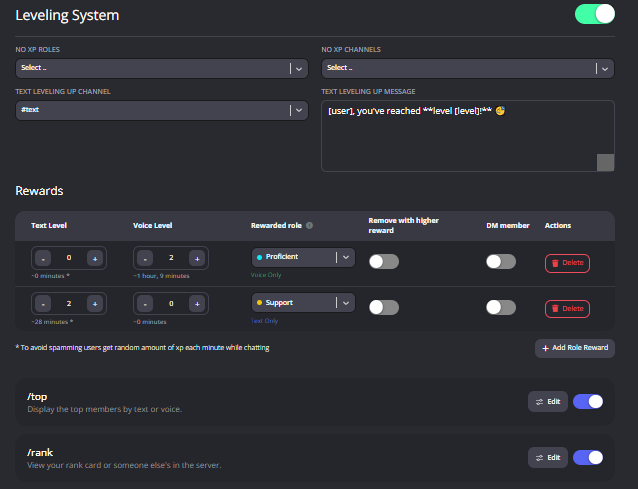
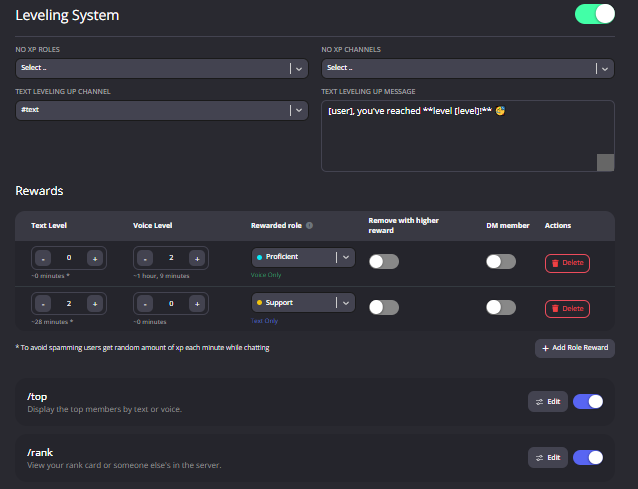
**Enabling the leveling system  **
**
How to activate
1 ~https://probot.io/dashboard login to your account and select your server
2 ~on the left side click on "Leveling system"
3 ~press "add role reward" and set the required level to get the role
change the settings as you want and this is it ..

ProBot
Welcome images, moderation, leveling, reaction roles, logs, high quality music and many many more!
 proper lion
light imp
how to create a leveling system/leaderboard ?
proper lion
light imp
how to create a leveling system/leaderboard ?
turn voice level to 0
 reef ice
Does the Auto Role feature take effect when a new person agrees to the default Membership screening/agreeing to server rules?
proper lion
quaint sentinel
#help reset
i’m not seeing the leveling reset
quaint sentinel
proper lion
turn voice level to 0
no need to interfere, I'm already here to help.
quaint sentinel
proper lion
i’m not seeing the leveling reset
does the bot reply?
proper lion
i didn’t try
quaint sentinel
reef ice
Does the Auto Role feature take effect when a new person agrees to the default M...
yes, if you have that settings enabled in your server settings it'll require them to accept first then they will have the role assigned
proper lion
bc i don’t know which command to use
reef ice
quaint sentinel
yes, if you have that settings enabled in your server settings it'll require the...
Great! Thank you!
quaint sentinel
lean badger
It's easy, like it says above. #reset text all will reset all text level for all users.
when you replace text with voice it'll reset voice level for all users.
you can either reset everyone's level or specific user by just changing all to user mention @
@proper lion ^
quaint sentinel
reef ice
Great! Thank you!
yw
quaint sentinel
It is actually, as it says in command description
Reset text/voice/invites/limits xp points for all or specific member
proper lion
ya but it says nothing about what ur resetting
it doesn’t mention levels anywhere
in that description
so idk what it’s talking about
quaint sentinel
I mean it's obvious, text = text level
voice = voice level
proper lion
what u just said is obvious
what it says is not
just saying 🤷♀️
ty for the help tho
quaint sentinel
Well most people understand it clearly without having problem, but others face some problem understanding what's the usage of commands and that's why we're here. Hope everything is clear and OK now.
quaint sentinel
proper lion
ty for the help tho
you're welcome
proper lion
idk seems ambiguous to me
u explained it better than the description
also i don’t even really understand the leveling system
what does 3 hours of text xp even mean
quaint sentinel
proper lion
what does 3 hours of text xp even mean
Where's that?
you mean the time under the level box?
quaint sentinel
That's the estimated time to reach that level
proper lion
whatever the time says per level
ya but what does it mean exactly
just for example 3 hours of what
light imp
how to make roles?
quaint sentinel
If you are new and you want to reach level 1 in chat, the estimated time to reach that level is 7 minutes. It means that you should be active for 7 minutes straight in chat to reach that level. @proper lion
 proper lion
so sending a msg a min?
quaint sentinel
Not exactly
quaint sentinel
light imp
how to make roles?
roles for what?
light imp
quaint sentinel
roles for what?
for verification like @verified @unverified
quaint sentinel
Oh, probot doesn't create roles for you, you'll have to create them manually.
 coarse charm
hey i was wondering if somneone could help me out. I paid for premium and was charged but i have no access to premium features
reef ice
I'm trying to clear chat messages from one specific channel, but the /clear command isn't working. I can specify /clear 50 or filter by user with an amount, but I keep getting "0 messages deleted."
 lunar quarry
<@&675070424748654593> ...
quaint sentinel
coarse charm
hey i was wondering if somneone could help me out. I paid for premium and was ch...
kick the premium bot abs reinvite it.
lunar quarry
reef ice
I'm trying to clear chat messages from one specific channel, but the /clear comm...
@quaint sentinel...
lunar quarry
coarse charm
the issue is persisting
<@&675070424748654593>...
 eternal tartan
Halo
lunar quarry
coarse charm
the issue is persisting
do you have 2 probots in your server?
lunar quarry
eternal tartan
Halo
** Hey, how can i help you? **
coarse charm
no i only use 1
lunar quarry
coarse charm
no i only use 1
kick him and re invite him again
then drag probot role above other roles
then try to manage your bot from here
https://probot.io/premium/manage
lunar quarry
coarse charm
is there a way to enable 24/7?
what is it?
explain more please..
coarse charm
is there a way to enable the 24/7 mode for the bot so it doesn't leave voice channels
when i type in the slash command it doesnt work
lunar quarry
try the normal prefix
lunar quarry
** anytime  **
**
reef ice
Still need assistance on this: #support-en message
lunar quarry
reef ice
I'm trying to clear chat messages from one specific channel, but the /clear comm...
Messages that are two weeks old cannot be deleted.
reef ice
lunar quarry
Messages that are two weeks old cannot be deleted.
That explains it then. Thank you!
lunar quarry
you're welcome 
 cunning bane
dashboard
lunar quarry
cunning bane
dashboard
<@&675070424748654593> ^
fathom meadow
<@&675070424748654593> ..
split needle
cunning bane
dashboard
ProBot
Welcome images, moderation, leveling, reaction roles, logs, high quality music and many many more!
 normal plank
how do u play music and if so and you use youtube?
lunar quarry
normal plank
how do u play music and if so and you use youtube?
<@&675070424748654593> ^
quaint sentinel
normal plank
how do u play music and if so and you use youtube?
#play link
we only support SoundCloud and YouTube.
normal plank
oh ok
quaint sentinel
lunar quarry
<@&675070424748654593> ^
I mean you see me typing, you don't have to mention
lunar quarry
quaint sentinel
I mean you see me typing, you don't have to mention
hm, i didn't, sorry.
quaint sentinel
I doubt you did.
lunar quarry
quaint sentinel
I doubt you did.
i didnt.
im focusing on my timer to mention :p
#chat-en
quaint sentinel
lunar quarry
i didnt.
im focusing on my timer to mention :p
<#608047244276531245>
I'm pretty sure you did see me typing but you still mentioned, do not do this again. You're just disturbing our staff team while I was typing in here.
 little knoll
<@&675070424748654593>
I’m having trouble with the color commands. I use the command for the list but it just shows me nothing. I don’t know if I’m just missing something but I’m confused and need help
split needle
little knoll
<@&675070424748654593>
I’m having trouble with the color commands. I use the com...
Make the color roles and name them as only number, set them at lower place than the probot role and you're done
little knoll
Ohh! Thank you
 distant wave
How do I know who can use the bot commands in my server?
split needle
Members have access to use all the command except for moderation commands which can only be used by user with administrative permission and users with the mod role set on the dashboard
distant wave
Thanks :)
reef ice
Do emojis not display in the body of an embed when setting up an embed for Reaction Roles? The reactions work just fine for assigning roles. I just wanted the emojis to show in the embed instead of text between colons (eg. :emoji: )
 fiery socket
hey, how do i remove someone from the level leaderboard?
 fervent snow
sup chat, why isnt my server showing on the dashboard?
split needle
reef ice
Do emojis not display in the body of an embed when setting up an embed for React...
you'll need to get their full id to use in the embed messages
split needle
fiery socket
hey, how do i remove someone from the level leaderboard?
use #reset command with the user id
if the user is already left the server, I don't think it's possible
split needle
fervent snow
sup chat, why isnt my server showing on the dashboard?
you need manage server permission to see the server on the dashboard and administrative permission to access its settings
reef ice
split needle
you'll need to get their full id to use in the embed messages
How do I find the full ID?
split needle
reef ice
How do I find the full ID?
on mobile, on the chat, put 2 ` on both side of a custom emoji then send it to the chat, then copy and use the result you got
 fast niche
how do i ping a role in the embed? i just tried copying ID and putting it the message but didnt work
split needle
fast niche
how do i ping a role in the embed? i just tried copying ID and putting it the me...
<@&id>
fast niche
i tried that, when i posted the embed it just came up with "@numbers"
split needle
missing &
reef ice
split needle
on mobile, on the chat, put 2 ` on both side of a custom emoji then send it to t...
So the text between the colons like it is in this screenshot? If so, that's how I typed each emoji in the embed.

 light drift
Anyone having issues using !search and it not working?
fast niche
fast niche
nope didn't work
so managed to post it, it has done it but it didn't ping
split needle
reef ice
So the text between the colons like it is in this screenshot? If so, that's how...
I mean to get the id, do like this `:emoji:` on the chat and send it to get the emoji id
split needle
light drift
Anyone having issues using !search and it not working?
known issue
split needle
fast niche
so managed to post it, it has done it but it didn't ping
intended to avoid abuse
split needle
may be it was everyone or here ping?
split needle
then not sure
fast niche
dam
split needle
it can not ping roles other than everyone and here
fast niche
hm
reef ice
split needle
I mean to get the id, do like this \`:emoji:\` on the chat and send it to get th...
I'm sorry, I still don't understand. All I'm getting is this.
 split needle
oh you're on desktop
then use \ at the start of the emoji instead
like this \:emoji:
result would be like this !pro2
reef ice
Apologies. I should have clarified earlier.
reef ice
split needle
then use \ at the start of the emoji instead
like this \\:emoji:
Perfect! The ID code popped up after doing that. Thank you!
 ashen nest
How to reset server ranking
split needle
ashen nest
How to reset server ranking
#help reset
lean badgerBOT
split needle
#help reset
**Command: reset**
Reset text/voice/invites/limits xp points for all or specific member.
**Usage:**
#reset [text / voice / invites / limits] [all / user]
**Examples:**
#reset text all
#reset voice all
#reset invites all
#reset text @Dramex
#reset limits @Dramex
ashen nest
💟
 coarse shoal
How do I make welcome and goodbye messages?
 lost peak
Why when I play lucid dreams there's a tropical beat?
split needle
coarse shoal
How do I make welcome and goodbye messages?
go to https://probot.io/dashboard, select your server on the left, find the welcome & goodbye module and set up them in there
split needle
lost peak
Why when I play lucid dreams there's a tropical beat?
does it really related to this bot? search results are not anything about the bot so make sure you make it more clear when finding a song to play
lost peak
K
 hoary pewter
How can I check who's on no. 6?
 split needle
hoary pewter
How can I check who's on no. 6?
split needle
hoary pewter
How can I check who's on no. 6?
#top <num>
oh that does not work
either top text num
or top voice num
split needle
#help top
lean badgerBOT
split needle
#help top
**Command: top**
Displays the most active members on the server
**Usage:**
#top
#top (day / week / month)
#top (text / voice/ invites) (page number)
#top (text / voice) (role)
**Examples:**
#top day
#top week
#top month
#top text day
#top voice week 2
#top invites
#top text @Members
split needle
the second usage line
hoary pewter
#top ? What next
hoary pewter
Oh let me try
split needle
use slash command would be easier to fill up things
hoary pewter
@split needle it works ty for help ! Have a amazing day man
 hazy gull
How to reset leveling system
split needle
#help reset
lean badgerBOT
split needle
#help reset
**Command: reset**
Reset text/voice/invites/limits xp points for all or specific member.
**Usage:**
#reset [text / voice / invites / limits] [all / user]
**Examples:**
#reset text all
#reset voice all
#reset invites all
#reset text @Dramex
#reset limits @Dramex
 royal harness
new user, just added this to my discord, tryed to buy VIP to adjust volume, apparently Ive bought 3 years worth of subscriptions at this point but still am prompted to activate premium, whats goin on?
split needle
royal harness
new user, just added this to my discord, tryed to buy VIP to adjust volume, appa...
have you invited the subscription into your server yet?
royal harness
hmm, perhaps not. lemme check
is there some way I can adjust the bots music volume so it doesnt automatically deafen new people? adding the premium to my server did the trick
split needle
the auto deafen thing is not a bot's thing
perhaps you did something to the channel permission or user voice state
royal harness
no not auto deafen, just that its volume defaults to 100 volume, can I make it default to 15 for example
deafen was a bad word to use, sorry
so it doesnt come in so loud for any new people
split needle
that should be a serverwide setting, users can adjust user volume on bot's profile instead
royal harness
so there's no way for me to cap its volume, each user has to reduce it individually?
split needle
I mean once using the command, the bot will keep that volume for the whole server, meaning it will reduce the volume output from itself.
if users got loud sounds from it, probably their audio output setting or else, not the bot
royal harness
ok got it, thank you very much
 mystic plinth
The roles I've made are not showing up in the options of which role to give when clicked in the self-role embed I'm currently editing. Any reason why?

 split needle
mystic plinth
The roles I've made are not showing up in the options of which role to give when...
split needle
mystic plinth
The roles I've made are not showing up in the options of which role to give when...
Make sure the probot role is higher than those roles then refresh the site
royal harness
so, Ive got ProBot and ProBot Prime on my server now, im not able to access the /volume in ProBot Prime as it tells me "❌ There is another bot being used for this server"
do I delete Probot now that I have Probot prime?
split needle
Kick both bots out and reinvite only the prime back in
coarse shoal
split needle
go to https://probot.io/dashboard, select your server on the left, find the welc...
Thank you! Do you know how to make reaction roles?
split needle
coarse shoal
Thank you! Do you know how to make reaction roles?
go to https://probot.io/dashboard, select your server, go to embed messages module to create and send embed messages for the reaction roles to where you want. Then go to reaction role module to setup the feature on the sent embed messages.
Notice: Be sure the Probot✨ role is higher than other roles. Embed message should not have any blank element (better to remove them if not using).
coarse shoal
Thank you
 wise tartan
hi can i know when the leaderboards for daily, weekly and monthly get reset
native geyser
every day / week / month utc + 0
wise tartan
ouh okay tq
native geyser
yw
 teal geyser
Guys how do only dj role can use this bot
native geyser
https://probot.io/dashboard -> select your server -> music module -> set a dj role
ProBot
Welcome images, moderation, leveling, reaction roles, logs, high quality music and many many more!
teal geyser
How
native geyser
get on that page and you'll see the location where it says 'dj role'
native geyser
invite your bot from https://probot.io/premium/manage
ProBot
Welcome images, moderation, leveling, reaction roles, logs, high quality music and many many more!
 supple cloud
oh, i see.
thanks
 nimble linden
hello babes
native geyser
can i help you?
native geyser
check the pinned messages to see all the variables
 novel socket
Ok 👌 ty
native geyser
yw
novel socket
How can we use the <@user_id> commands?
native geyser
replace user_id with the id number of the person you want to mention
to mention you for example it'll be @novel socket
novel socket
Ohhh
I thought that it will tell the id of the user that i will mention..
Can we do that?
native geyser
nope
distant wave
what does enabled roles and disabled roles mean?

 empty ibex
<@&675070424748654593> ^
native geyser
distant wave
what does enabled roles and disabled roles mean?
enabled roles make it so that only people with those roles can use those commands, and disabled roles makes it so that people with those roles can NOT use those commands
distant wave
thanks :)
native geyser
normally leaving those empty allows everyone to use those commands but moderation commands require extra permissions
distant wave
ok
 gilded gulch
Hello!
Tell me, please, I have the autoresponder function turned on and there are a lot of answers, about 200, how can I delete everything at once?
Recently added templates feature, I want to use it.
native geyser
the only way to delete all is to reset settings on dashboard -> server settings, however this will reset everything and you can not un-do it
native geyser
#1 ~ 👉 Go to server settings, Roles.
#2 ~ 👉 Add Numbered Roles Like The picture down.
#3 ~ 👉 Save and go out.
https://i8.ae/7hM2w
Now you are ready to use this colors.
/colors
Shows the colors list
/color number
Choose/change your color in server.
to remove your current color: /color 0
 gilded gulch
native geyser
the only way to delete all is to reset settings on dashboard -> server settings,...
gilded gulch
native geyser
the only way to delete all is to reset settings on dashboard -> server settings,...
Thanks
native geyser
yw
 cursive tide
hello
can i get my credits from my old acc who was banned by discord ?
@light elbow
native geyser
profile transfer is not open
cursive tide
native geyser
profile transfer is not open
when pls
native geyser
i dont have any information about that sorry
cursive tide
native geyser
i dont have any information about that sorry
okey tnx
native geyser
np
nocturne flax
any ideea?
 native geyser
nocturne flax
any ideea?
native geyser
nocturne flax
any ideea?
- make sure its the correct server
- turn it off -> save -> turn it on -> save
- let me know if its still the same
nocturne flax
same
 untold arch
<@&675070424748654593>
native geyser
nocturne flax
same
invite me in dms please
native geyser
untold arch
<@&675070424748654593>
yes?
nocturne flax
native geyser
invite me in dms please
ok
untold arch
native geyser
yes?
I just want to help the guy sorry
 plain swallow
hello
native geyser
hi how can i help you?
native geyser
daily: https://probot.io/daily
vote: https://top.gg/bot/probot/vote
ProBot
Welcome images, moderation, leveling, reaction roles, logs, high quality music and many many more!
Top.gg
Spice up your Discord experience with our diverse range of Discord Bots and Servers as well as other spaces to discover DAOs.
plain swallow
ik
i mean trading
what is lagel to trade for credit
cuz daily and vote r too slow
native geyser
trading isn't supported by nor us neither discord
plain swallow
sad :(
 deep sierra
nocturne flax
any ideea?
deep sierra
nocturne flax
any ideea?
That actully /roles on the right not /role
Role on the moderation section
Also double check if moderation module is enabled 👍🏻
native geyser
its fixed 
native geyser
yes?
nocturne flax
So basically
Everyone single
Week
We are like 600 staff
And over 100
People are in the voice
And we want to unblacklist this guy YUNS he have like 11.1mil and can you please remove him in blacklist because he like it took like 1 year to get 11.1milon credit every 24hour 2500 credit and because we are 600 staff and we send him credit because we are first kurdish server over 180k member and he such good person because he is always Givaway staff like nitro tiktok account Netflix and everything if you want any proof i will show you
native geyser
blacklists are not meant to be removed i told him multiple times
please tell him to stop sending people to me regarding the same thing
native geyser
people are supposed to stop misbehaving when they get the punishment they deserved for their actions do you agree with me?
 vestal radish
I want to create a message. I need to specify the user, with which variable can this be done? Or where can I see all the bot variables?
native geyser
how so
native geyser
vestal radish
I want to create a message. I need to specify the user, with which variable can ...
a certain user or?
vestal radish
yes
native geyser
nocturne flax
Some people are
we did investigate and checked his actions for a while so its not only because of some people x)
nocturne flax
To black list him
native geyser
vestal radish
yes
<@User_id>
native geyser
did you know that someone from his so called staff also came to us with solid proof?
nocturne flax
List
native geyser
i appreciate it if you type without spamming
native geyser
the point of blacklisting him is to stop him from breaking our rules
nocturne flax
So hes such nice guy
And every week
He always Givaway 1mil
And lots of staff
If he brake the rule again
Disable he account
native geyser
i got enough proof and i wont be unblacklisting him due to his actions and this situation is not open to discussion therefore if you dont have anything related to the bot please dont use this channel thank you
split needle
@nocturne flax once blacklist is taken, there is no second chance, stop with it
vestal radish
It doesn't help, it looks like this
 split needle
And stop sending messages in multiple messages, have them all in one message
nocturne flax
split needle
<@456226577798135808> once blacklist is taken, there is no second chance, stop w...
If he did again disable hes acc
native geyser
he told me the same before i got the second report so if i were you i wouldn't promise on other peoples behalf especially if that person is known for scamming and breaking our rules
anything else?
native geyser
vestal radish
It doesn't help, it looks like this
can you show me what you typed on dashboard please
native geyser
not our problem
split needle
nocturne flax
If he did again disable hes acc
We have mo power to disable one's account as we are not discord employees, blacklist is the highest we can do to a user
 soft hemlock
@native geyser hi
native geyser
he should've listened when i verbally warned him and his team
native geyser
play what
nocturne flax
So can you give him second chnce
vestal radish
native geyser
can you show me what you typed on dashboard please
1 minute
native geyser
nocturne flax
So can you give him second chnce
i did long ago and he did the same thing, not giving a third chance no
split needle
#mute 952606723967971418 don't want to listen to single answer, keeps it long while already answered multiple times + sending messages in multiple lines/messages
lean badgerBOT
split needle
#mute 952606723967971418 don't want to listen to single answer, keeps it long wh...
:white_check_mark: @! KP | NINJA muted from the text! :zipper_mouth:
native geyser
and my answer will not change now i appreciate if you guys stop invading the server for the same issue i'm tired of giving the same exact answer to all of you
vestal radish
Everything worked out. Thanks
native geyser
yw
split needle
You should try to read and understand our messages, don't take it too long as many people already came to us to ask for his unblacklist but how many people come, we will not give him the second chance. Go make an announcement in that server that he is officialy blacklisted permanently. No more chances for him.
split needle
 grizzled nest
Can any one help me
grizzled nest
Can any one help me
Just tell your problem
grizzled nest
I think its same problem as that
grizzled nest
split needle
You should try to read and understand our messages, don't take it too long as ma...
.
native geyser
are you here on behalf of Yuns?
split needle
Then no
Stop with it
native geyser
if yes there is nothing to talk about try understanding what no means
grizzled nest
So can you just show me one proof hes
Not listen to your rules
native geyser
with respect, no since its not your business
grizzled nest
Like what he did
native geyser
he himself knows it, we know it, its enough
native geyser
and as i mentioned above this situation is not open to discussion therefore its much appreciated if you stop repeating things
native geyser
grizzled nest
How i can change you awsner no to yes
you cant
native geyser
then stop being here thank you
grizzled nest
For proof hes such nice perosn
split needle
We are staffs, not stuffs
You can not use things or speeches to buy or trade us. We do that as our responsisbility, not for fun
split needle
Amd being nice is not a valid reason to unblacklist someone
grizzled nest
Why
native geyser
#mute @grizzled nest stop repeating the same things thank you
lean badgerBOT
native geyser
#mute <@916659173834506271> stop repeating the same things thank you
:white_check_mark: @FRS๏ SCOTTx1 muted from the text! :zipper_mouth:
split needle
Also that kind of giving away breaks tiktok tos, which is not a good thing either
From now on, any issue regarding unblacklisting that guy will result in a ban, no further reason about it, we had enough
 hardy lagoon
How can I get json files for my server warnings?
split needle
hardy lagoon
How can I get json files for my server warnings?
Not a feature
If you want it to be one, feel free to suggest it in #573053418017521664
 tidal shale
Hello
split needle
tidal shale
Hello
tidal shale
no i have a favor
split needle
then just ask it instead of greeting
split needle
vote
lean badgerBOT
@split needle https://top.gg/bot/probot/vote
Top.gg
Spice up your Discord experience with our diverse range of Discord Bots and Servers as well as other spaces to discover DAOs.
tidal shale
thank you
 meager gazelle
someone can help me I write / help and nn writes anything

native geyser
elaborate please
 kind wyvern
Is there a refund process? Meant to pay for the monthly and payed for the annual 
 unborn cargo
I have a question about the ProBot
How you get xp or like will u get xp when u spamm or sum
fathom meadow
<@&675070424748654593> ..
Yes ..
@kind wyvern
You have to be active in text channels to get text xp while you have to stay in a voice channel to get voice xp and every 1 - 2 minutes probot gives a random number of xp according to your active ..
@unborn cargo
 heavy bane
Plz tell me economy commands of probot
kind wyvern
How would I refund?
native geyser
kind wyvern
Is there a refund process? Meant to pay for the monthly and payed for the annual...
hi, i'll talk to devs on behalf of you
fathom meadow
kind wyvern
How would I refund?
What is the way did you pay for?
native geyser
heavy bane
Plz tell me economy commands of probot
/credits
^ only economy command
heavy bane
native geyser
> /credits
^ only economy command
o
kind wyvern
@native geyser thank you!
native geyser
can you dm me your payment method please
native geyser
ProBot
Welcome images, moderation, leveling, reaction roles, logs, high quality music and many many more!
native geyser
native geyser
can you dm me your payment method please
@kind wyvern
unborn cargo
fathom meadow
You have to be active in text channels to get text xp while you have to stay in ...
O nice thanks
fathom meadow
you're welcome
 raven crest
I have been posting imagines through embed on my premium membership. All embeds work fine except for one... image size and embed layoy are identical to all other... just this one will not work and not sure why. I have tried to edit the image and start from scratch but it just won't work

Any suggestions? It's just the 1 embed imagine and nothing I do seems to resolve the issue of imagine not loading
native geyser
is it the same on discords pc version?
 stiff ice
Ban command not working. Any suggestion
native geyser
what is the bot replying with when you use /ban
stiff ice
Cant not ban said person
native geyser
- give the bot ban members permission
- drag its role above other roles
raven crest
native geyser
is it the same on discords pc version?
image just wont load
stiff ice
you mean like admin?
native geyser
raven crest
image just wont load
if its being sent properly then its not a bot related issue, in that case probably about discord mobile being weird
native geyser
stiff ice
you mean like admin?
i mean in role order
raven crest
native geyser
if its being sent properly then its not a bot related issue, in that case probab...
im using my laptop to send it.
not working via PC or mobile
tried both
native geyser
can you send me the image in dms please
stiff ice
native geyser
i mean in role order
im still confused sorry
native geyser
discord role hierarchy, apart from server owner nobody can ban people with equal or higher role in role order
stiff ice
i gave it admin it has the same stuff as owner
 cinder wasp
Hello there i just want to know if its possible to change the profile picture of probot in my discord server
native geyser
stiff ice
i gave it admin it has the same stuff as owner
is the bots highest role above the highest role of the person who you're trying to ban?
native geyser
cinder wasp
Hello there i just want to know if its possible to change the profile picture of...
it is but only with premium tier 2
cinder wasp
native geyser
it is but only with premium tier 2
Good to know thank you
stiff ice
native geyser
is the bots highest role above the highest role of the person who you're trying ...
ok ill try that
native geyser
yw yw
stiff ice
native geyser
is the bots highest role above the highest role of the person who you're trying ...
ok that works. How does the auto mod work? i tried to set it blocks words but people can still type it
native geyser
can i see your dashboard settings
stiff ice
like in a pickture?
stiff ice
ok nevermind that issues is fixed thanks
native geyser
alrighty
 tidal forge
hi can i ask how can i remove some songs from queue?
native geyser
currently using /skip when the song starts playing is the only way to remove
stiff ice
native geyser
yes
how to unmute from the autobot?
tidal forge
alright mate thanks
native geyser
yw
stiff ice
Link are still coming through how do i block them?
native geyser
does the bot have permissions to manage messages?
stiff ice
native geyser
does the bot have permissions to manage messages?
the bot has everything and i didnt turn much
native geyser
you mean on embeds?
native geyser
stiff ice
the bot has everything and i didnt turn much
i see, can i see your automod settings then please
stiff ice
 native geyser
stiff ice
native geyser
stiff ice
dashboard settings seem to be alright if the bot settings are okay too then it should work unless the tester has admin perms
probot automod ignores people with admin perms
if this is not related to the bot use #chat-en please, if you're asking how to do it on probot then its the same as you do on discord
 solemn roost
how make color roles?
native geyser
#1 ~ 👉 Go to server settings, Roles.
#2 ~ 👉 Add Numbered Roles Like The picture down.
#3 ~ 👉 Save and go out.
https://i8.ae/7hM2w
Now you are ready to use this colors.
/colors
Shows the colors list
/color number
Choose/change your color in server.
to remove your current color: /color 0
solemn roost
thx
native geyser
yw
stiff ice
how much it is to buy premium? cant find it anywhere
native geyser
you can see it on https://probot.io/premium
ProBot
Welcome images, moderation, leveling, reaction roles, logs, high quality music and many many more!
stiff ice
native geyser
you can see it on https://probot.io/premium
may i dm?
native geyser
ask the bot related questions here please
stiff ice
ok how do i purchese the enterprise pack?
native geyser
you'll be contacting devs via email regarding the features you want though the pricing starts from 1.5k$ a year
stiff ice
alrighty thanks ill do that
stiff ice
5 grand for a year?
native geyser
yes
stiff ice
Why so much if i may ask?
native geyser
its a custom bot almost from scratch while they also need to constantly work on the main bot too i do believe this is the reason why
native geyser
yes?
 native geyser
that means you're blacklisted from vote due to using multiple accounts
 distant sierra
I use only 2 this and other one
nocturne flax
distant sierra
I use only 2 this and other one
That's still multiple
 noble prism
how do you make reaction roles?
native geyser
nocturne flax
That's still multiple
exactly, and please let me do the answering part
native geyser
noble prism
how do you make reaction roles?
-
from embed messages section create an embed message and send it to your server (the message you'll have to select in step 2 basically)
-
from reaction roles section select the embed message you just sent
-
add reactions
-
add roles by clicking on the plus signs right next to the reactions you added
ProBot
Welcome images, moderation, leveling, reaction roles, logs, high quality music and many many more!
 fringe path
How do you embed a message to select on the dashboard for roles
native geyser
yes?
native geyser
native geyser
https://probot.io/dashboard
1) from embed messages section create an embed mess...
@fringe path
 iron cloud
how do i make embeds i forgot where the menu is
i cant find the embed section
nvm found it
nocturne flax
native geyser
yes?
one guy is steal probot cash
native geyser
elaborate please
please use #chat-en if you dont have any probot related questions
 zinc rampart
#credit @native geyser
zinc rampart
Hi
native geyser
yes?
 rancid path
hi so i have an embeded message but for some reason it's not sendin any reason why that might be ?
 normal sage
Hi can someone tell me haw i can make the bot type welcom in an chanel i chose
normal sage
Ok thx
 strong fox
normal sage
Ok thx
strong fox
normal sage
Ok thx
Welcome ♥️♥️
 spring ether
rancid path
hi so i have an embeded message but for some reason it's not sendin any reason w...
spring ether
rancid path
hi so i have an embeded message but for some reason it's not sendin any reason w...
make sure to fill every selected element
rancid path
spring ether
make sure to fill every selected element
thank youu worked like a charm
 late granite
hi so i want the bot to have music channels its restricted to, how do you do that
native geyser
thats only possible with default discord permissions there is no way to limit it otherwise
spring ether
rancid path
thank youu worked like a charm
yw habibi
 crisp trail
can someone explain this how he got 1.0b?!!
 fathom meadow
<@&675070424748654593> ..
quaint sentinel
 ashen hull
i want to make welcome text red can anybody help me with that
ashen hull
i want to make welcome text red can anybody help me with that
you can't actually.
quaint sentinel
crisp trail
can someone explain this how he got 1.0b?!!
go ask him
crisp trail
he dont respond...
quaint sentinel
well, it's not our business. if he got 1 billion illegal and by breaking our rules we'll BlackList him immediately don't worry.
quaint sentinel
it breaks the discord rules, you can report the server to discord.
crisp trail
hm
quaint sentinel
Just to clarify, in case anyone in that server or in general offers credits for real currency, feel free to report him in @spring ether dms.
crisp trail
alright thanks.
quaint sentinel
yw
 kind delta
How do u make it so probot talk in one specific server
ebon bay
kind delta
How do u make it so probot talk in one specific server
<@&675070424748654593> ..
quaint sentinel
#warn @fathom meadow annoying
lean badgerBOT
quaint sentinel
#warn <@763878134570549259> annoying
:white_check_mark: **@Maklord warned! **
fathom meadow
quaint sentinel
#warn <@763878134570549259> annoying
Accidentally sorry
 elfin flower
Hey guys, i have a problem. When i try to create a reaction role, it doesnt display any roles i can add to the Icon
fathom meadow
Please remove some warns I am afraid from getting muted again 😔
- sorry I will not do it again ever
quaint sentinel
kind delta
How do u make it so probot talk in one specific server
there's not feature like that unfortunately, keep in mind that in normal bot if it stays in the same voice channel for a while it'll leave by itself.
quaint sentinel
elfin flower
Hey guys, i have a problem. When i try to create a reaction role, it doesnt disp...
move probot role higher
kind delta
Ah ok but I can’t figure out how to make it greet someone
elfin flower
quaint sentinel
move probot role higher
He is already at the highest role with all permissions
 quaint sentinel
elfin flower
He is already at the highest role with all permissions
quaint sentinel
elfin flower
He is already at the highest role with all permissions
refresh the page then and try again.
 sharp scroll
Dashboard link
elfin flower
quaint sentinel
refresh the page then and try again.
Ah thanks had to completely close the page, refreshing didnt help
quaint sentinel
kind delta
Ah ok but I can’t figure out how to make it greet someone
Head to the dashboard and then select your server, after that click on Welcome & Goodbye section and just customize the greeting message and the image if you want to.
ashen hull
.anas thx for the answer
quaint sentinel
elfin flower
Ah thanks had to completely close the page, refreshing didnt help
oh alright, yw.
quaint sentinel
sharp scroll
Dashboard link
ProBot
Welcome images, moderation, leveling, reaction roles, logs, high quality music and many many more!
sharp scroll
Thanks
quaint sentinel
sharp scroll
Thanks
yw
normal kiln
I'm setting up music for my server and it doesn't play. The bot doesn't join the vc and I have given it admin perms
quaint sentinel
ashen hull
.anas thx for the answer
yw
 junior sentinel
@
quaint sentinel
normal kiln
I'm setting up music for my server and it doesn't play. The bot doesn't join the...
have you tried stopping it and playing it again?
junior sentinel
I want to be support
elfin flower
Is it possible to add an emoji inside an embed?
quaint sentinel
junior sentinel
I want to be support
we're not looking for new support member atm.
normal kiln
quaint sentinel
have you tried stopping it and playing it again?
Hold on I may have forgotten to give my self the dj role. Sorry.
quaint sentinel
normal kiln
Hold on I may have forgotten to give my self the dj role. Sorry.
All good.
junior sentinel
quaint sentinel
we're not looking for new support member atm.
There is some special rools
quaint sentinel
junior sentinel
There is some special rools
wdym?
 fierce knoll
How do i play a song in my server when i play one it says your not in voice channel
How?
junior sentinel
quaint sentinel
wdym?
Rolls buy for credit here
quaint sentinel
fierce knoll
How do i play a song in my server when i play one it says your not in voice chan...
you should join a voice channel first, then you can play music with #play
quaint sentinel
junior sentinel
Rolls buy for credit here
We don't have any roles for sale.
quaint sentinel
fierce knoll
How?
A short guide might help you, once you successfully create a voice channel type #play song name/link in any chat.
elfin flower
Is it not possible to add an emoji inside an embeded message?
quaint sentinel
Keep in mind that probot support only YouTube & SoundCloud
quaint sentinel
elfin flower
Is it not possible to add an emoji inside an embeded message?
It is possible actually.
elfin flower
quaint sentinel
It is possible actually.
Can you tell me the secret? 
quaint sentinel
elfin flower
Can you tell me the secret? <:peppo:885666920597172254>
Sure
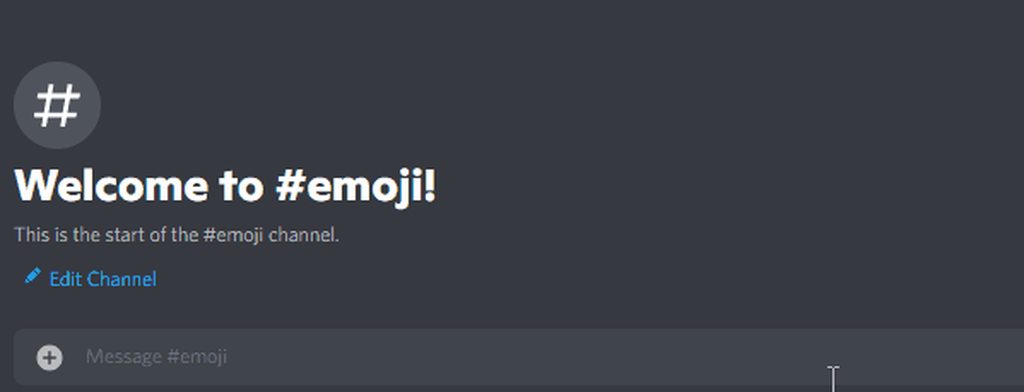
That's the secret :
How do i ping a emoji via probot:
\:emoji_name:- (only type \ before pinging the emoji without space)
:emoji_name:- (type ` once before & after pinging the emoji)
do note, you must have this emoji in your server and in-case it was animated you've to call someone whose discord nitro in order to have access to ping the emoji and get its id.
 elfin flower
quaint sentinel
Sure <:Ruru:818884137187409951>
elfin flower
quaint sentinel
Sure <:Ruru:818884137187409951>
Thanks man!
quaint sentinel
yw
ashen hull
im new for this bot so how dose auto role work i cant figure it out
quaint sentinel
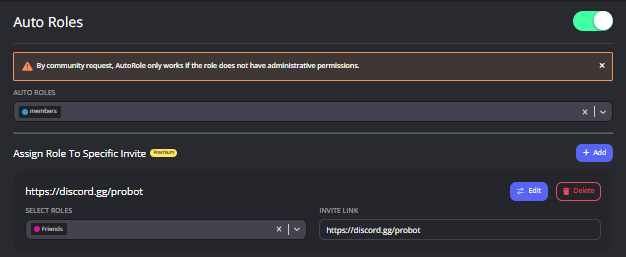
It basically assign a specific role you select or roles, to new joined server members.
** How to enable auto roles? **
1 - enter https://probot.io/dashboard
2 - make sure to be logged in, open your server's control panel from the left side, enter Auto Roles section
set the role, saves changes.
Note: make sure probot's role isn't below the auto role (from server settings) for not facing issues.
@ashen hull ^
ashen hull
thx its probably lower than auto role so its not working
quaint sentinel
yeah, probot should be higher than the role you specified.
 void minnow
Hello can anyone help me ?
I am facing some new problems with probot the original version every time i search for a song it still search and still searching over and over and dont play any media or a song ?? I tested all servers same problem?
native geyser
void minnow
Hello can anyone help me ?
I am facing some new problems with probot the origina...
general issue will be fixed
native geyser
strong fox
In pro bot?
read the channel description please
strong fox
native geyser
read the channel description please
Okay
void minnow
native geyser
general issue will be fixed
Ok thank you
normal kiln
I can't figure out how react roles work can someone walk me through it
native geyser
-
from embed messages section create an embed message and send it to your server (the message you'll have to select in step 2 basically)
-
from reaction roles section select the embed message you just sent
-
add reactions
-
add roles by clicking on the plus signs right next to the reactions you added
ProBot
Welcome images, moderation, leveling, reaction roles, logs, high quality music and many many more!
normal kiln
native geyser
https://probot.io/dashboard
1) from embed messages section create an embed mess...
Thx
native geyser
yw
 tawdry mango
How to get credits
crisp trail
tawdry mango
How to get credits
you can get from voting and daily
ebon bay
crisp trail
you can get from voting and daily
please follow channel topic rules
tawdry mango
crisp trail
you can get from voting and daily
Okay thank you
native geyser
 hasty sorrel
Why my voting is refus
fathom meadow
<@&675070424748654593> ..
ebon bay
hasty sorrel
Why my voting is refus
<@&675070424748654593>..
native geyser
hasty sorrel
Why my voting is refus
what is the error message you're getting
also guys please avoid double mention
nocturne flax
#credit
normal kiln
native geyser
https://probot.io/dashboard
1) from embed messages section create an embed mess...
I did everything but the roles won't show up when I search them. Probot is in a higher position than the roles. I am not the server owner but do have admin access. Could emojis in the roles cause this?
fathom meadow
native geyser
also guys please avoid double mention
Ok but am I able to help if another one mentioned instead of me?
nocturne flax
#credit
native geyser
normal kiln
I did everything but the roles won't show up when I search them. Probot is in a ...
no its about the role order
native geyser
nocturne flax
#credit
fathom meadow
fathom meadow
Ok but am I able to help if another one mentioned instead of me?
@native geyser
normal kiln
native geyser
no its about the role order
Probot is as high as I can get it with my access and it is well above the roles I'm trying add
native geyser
there might be a discord glitch try the following:
- make a change in the order
- save
- drag the bots role above all the way up
- save again
native geyser
fathom meadow
<@324937717441888256>
#chat-en please
normal kiln
native geyser
there might be a discord glitch try the following:
1) make a change in the order...
That fixed it tysm
native geyser
yw
 tight mural
does probot give text xp for Chinese, and how is text xp calculated?
native geyser
yes it does and the xp gain is randomized
 stone tree
the probot in my server gets stuck on "...searching" whenever i search a song
how do i fix that?
stone tree
thank you
native geyser
yw
 sharp depot
Hi, I am trying to setup the leveling system but it is not adding roles to people when they level
probot is above their roles
and above the level roles
native geyser
- make sure the bot has manage roles permission
- make sure the reward roles do not have any kind of manage permissions
sharp depot
native geyser
1) make sure the bot has manage roles permission
2) make sure the reward roles d...
probot has manage roles
the reward roles do not have any manage permissions
native geyser
is it set to voice only?
sharp depot
how do i see that?
oh
i see
no its voice and text
the level roles do have change nickname, im not sure if that counts as a manage perm
native geyser
change nickname of the others? its not supposed to count but you can give it a try by removing that perm and sending a message in chat
sharp depot
nah not others just their own
native geyser
thats not an issue
sharp depot
yeah
it announces that people have reached a level but its just not giving them the role
probot has admin
native geyser
they reached both of the target levels right?
native geyser
np ^^
 main inlet
hi
 thorn lichen
<@&675070424748654593>
So I'm setting up Moderation in a new server and I'm on the ban command. Quick question-- When it says says ACTION IF TIME ISN'T SPECIFIED, how do I make it infinite? The only way I want to be able to get unbanned is by being approved by me (Head Admin)
||finally moving all my moderation stuff from Dyno to ProBot||
 native geyser
thorn lichen
<@&675070424748654593>
So I'm setting up Moderation in a new server and I'm on t...
native geyser
thorn lichen
<@&675070424748654593>
So I'm setting up Moderation in a new server and I'm on t...
probot doesnt have infinite ban so you can make it couple years it should do the trick
native geyser
main inlet
hi
yes?
main inlet
native geyser
yes?
how to be in the support team
native geyser
currently we're not looking for more people
thorn lichen
native geyser
probot doesnt have infinite ban so you can make it couple years it should do the...
ig. thx
main inlet
native geyser
currently we're not looking for more people
did you have a role that you want people in it
?
thorn lichen
This should work. No year option
 native geyser
main inlet
did you have a role that you want people in it
native geyser
main inlet
did you have a role that you want people in it
nope
native geyser
thorn lichen
This should work. No year option
yup
 strange gorge
Can embeds use animated emojis? I want to use it for reaction roles
Because I tried using <a:emojiname:id> and <:emojiname:ID> and neither of those work
native geyser
strange gorge
Because I tried using <a:emojiname:id> and <:emojiname:ID> and neither of those ...
those are supposed to work make sure the emojis are in the server
strange gorge
Okok, they should be in the server, when I type them in the embed thing this is what I see
 native geyser
i do believe you got the wrong id
strange gorge
So I don't have nitro, how would I get it?
native geyser
you can ask someone with nitro to get it for you
strange gorge
Okok, ty!
native geyser
no worries
strange gorge
It worked! Thank you so much for the help!
native geyser
yw ^^
jagged grove
Ok I think I have the probot setup in my server correctly, but I might be a boomer for this, the question is can some one help me make sure I got the roles correctly placed for probot in my discord server?
Like as in ss/screenshot
 untold flume
@jagged grove "the bot's role should be above other roles" this should be fine
jagged grove
Alright, I'm just trying to make sure, bczs some times when I have all the bot commands on, and I do the / command, it gives me a error
untold flume
Can you picture me that error?@jagged grove
jagged grove
Sure
Idk but I think I made it not happen more, I can't find the right command, but this part here confused me, do I need to add or remove to role for this

 arctic tendon
<@&675070424748654593> ..!
arctic tendon
jagged grove
Idk but I think I made it not happen more, I can't find the right command, but t...
do you want to use the command #points in this channel ?
-@jagged grove
jagged grove
Sure
 split needle
@arctic tendon check channel description
This is not support ar
arctic tendon
I tried to help him.
split needle
No one ask you to
Check the channel description
arctic tendon
The rules say I can help !
split needle
jagged grove
Idk but I think I made it not happen more, I can't find the right command, but t...
Go to the command setting on the dashboard and remove enabled/disabled channels
#warn @arctic tendon not reading channel topic properly
lean badgerBOT
split needle
#warn <@555449265338712074> not reading channel topic properly
:white_check_mark: **@Explosion. warned! **
split needle
I said this is not support ar, and read the channel topic/description again to avoid further punishments
arctic tendon
I think u should read
 jagged grove
split needle
Go to the command setting on the dashboard and remove enabled/disabled channels
jagged grove
split needle
Go to the command setting on the dashboard and remove enabled/disabled channels
Alright
split needle
arctic tendon
I think u should read
And?
You mentioned after only 4 minutes, and started to answer after just 3 minutes
You're the one should read it
#mute @arctic tendon 1d not properly read channel topic
lean badgerBOT
split needle
#mute <@555449265338712074> 1d not properly read channel topic
:white_check_mark: @Explosion. muted from the text! :zipper_mouth:
 void carbon
How do I earn coins?
 north kernel
How do I change role color
Or user color
Hello?
I need help
🗿
<@&675070424748654593>
I need help with changing role color or user color for their name.
 fallow rivet
역할 색상을 변경하는 방법 ??
 icy shale
So..I made my own bot and it works. But when I added new code to its main file, it appears to not have updated itself accordingly. Does anyone know how I can update the bot so that it accepts its new code?
split needle
north kernel
I need help with changing role color or user color for their name.
Change the color roles' name to only number, and set them lower than the probot role and you're done
Use /colors to see the available color roles
split needle
fallow rivet
역할 색상을 변경하는 방법 ??
#support-int
split needle
icy shale
So..I made my own bot and it works. But when I added new code to its main file, ...
Not related to this bot
This is not bot dev support
fallow rivet
split needle
<#711904748256624730>
감사합니다
icy shale
split needle
Not related to this bot
This is not bot dev support
Was hoping someone would know
split needle
icy shale
Was hoping someone would know
Don't expect that in the wrong place
 spring quiver
where can i find more info about this section?

 quiet coral
Hello
I do not see all the roles when I go to probot dashboard for leveling system
@native geyser
Why?
@near canopy
 floral veldt
hello, can someone explan me, what i doing wrong
 split needle
spring quiver
where can i find more info about this section?
split needle
spring quiver
where can i find more info about this section?
there's not yet a doc about them but I can explain them here
Temp link
use to limit your members' invite rate to avoid potential raids from them by restrict invite creation to using commands. with this, you can set an invite to only last for how long, or how many use till their expiration, all can be controlled by the administrators
Voice online
use to show how many users are in voice channels on a category's name
Anti-raid
like its name, it prevent raids from happen by detecting join rate in a short time to take action against them
Protection
the second layer of the protecting system of this bot (after temp link), it can help you prevent potential raids by restricting certain permission for roles, or limiting which role can have admin or not. it can also prevent suspicious bots from getting into your server
quiet coral
quiet coral
Hello
I do not see all the roles when I go to probot dashboard for **leveling s...
@split needle
 earnest juniper
ok better already
split needle
quiet coral
Hello
I do not see all the roles when I go to probot dashboard for **leveling s...
make sure the probot role is higher than other roles
and next time mention the support role, don't mention individual which including other language supporters
and I can read, no need to redirect me to your message
split needle
floral veldt
hello, can someone explan me, what i doing wrong
if the emojis exist and are default emojis, they will be rendered correctly in the app. on the site, they might not be added yet or are missing
quiet coral
Oh sorry thank you for supporting me
@split needle
floral veldt
split needle
if the emojis exist and are default emojis, they will be rendered correctly in t...
Ah, okay i see. thanks for helping ^^
spring quiver
split needle
there's not yet a doc about them but I can explain them here
> Temp link
use to ...
Ok thanks
 vocal night