
#support-en
1 messages · Page 393 of 1
 fickle crow
 coral quartz
drag probots role above other roles
 quaint venture
1 - there are xp roles. What's an xp channel?
 fathom meadow
quaint venture
1 - there are xp roles. What's an xp channel?
fathom meadow
quaint venture
1 - there are xp roles. What's an xp channel?
Remove the xp roles..
, Xp channels are channels where if you wrote a lot you get text xp
quaint venture
Ignore text xp, we don't have it enabled on our server
And remove xp roles from what? The server, members, or probot?
coral quartz
cqn i see your leveling system settings? @quaint venture
fathom meadow
1 - ok..
2 - remove xp roles if you want everyone to get xp
fathom meadow
coral quartz
cqn i see your leveling system settings? <@317773170088345600>
Please I answered him
coral quartz
tyt
quaint venture

 fathom meadow
@quaint venture and the members didn't get roles so?
quaint venture
Some do, some don't
coral quartz
they need to chat to get the roles @quaint venture
quaint venture
I think D is right, only those who have a ProBot lvl 1 in texting (even if no role is applied) can get vc roles
Strange
fathom meadow
If they write in xp channel that you selected they will get xp and the role reward
fathom meadow
quaint venture
I think D is right, only those who have a ProBot lvl 1 in texting (even if no ro...
Not right
quaint venture
That's incredibly inconvenient. We'll probably change bots then
Ty for the help anyways
fathom meadow
Yw
 rich coral
hello how can i merge levels???
coral quartz
#help reset
 lean badgerBOT
coral quartz
#help reset
lean badgerBOT
coral quartz
#help reset
**Command: reset**
Reset text/voice/invites/limits xp points for all or specific member.
**Usage:**
#reset [text / voice / invites / limits] [all / user]
**Examples:**
#reset text all
#reset voice all
#reset invites all
#reset text @Dramex
#reset limits @Dramex
fathom meadow
rich coral
hello how can i merge levels???
Not possible ..
fathom meadow
coral quartz
<@763878134570549259> thanks for clarification

quaint venture
update: you were right D. Literally sending 1 message makes #rank work, and applies vc roles
on a separate note
are the ProBot xp levels different to the xp levels set by the owner?
coral quartz
no
 wanton vault
What are the image requirements when uploading it to the welcome message?
coral quartz
not larger than 3mb
wanton vault
thank you!
coral quartz
np
 native geyser
do not forget to mention the support role please!
fathom meadow
@native geyser i want to ask you question please
native geyser
yes?
fathom meadow
When I am starting to help user, I should mention @support [English] first after 5 minutes, Then wait 5 minutes again, If no one replied to user's question so I am free to help.. Can I help everyone then or I must make mention everytime ?
coral quartz
do i have to even if there's already a mention? @native geyser
rich coral
coral quartz
you mean giving levels? <@689486075084800059>
like if someone got banned and stuff and he got a new account and he wants me to take his old rank and put it on his new account
could that work?
coral quartz
not possible
native geyser
well its more of a common sense thing
mentioning for every individual can turn out to be really bothering
and mentioning once will not give subscription to answer everyone for the rest of the day or something so depending on the time just mention if you think busy support members might have gotten free time now
15-20 minutes maybe? still depends though
fathom meadow
Ok
coral quartz
native geyser
15-20 minutes maybe? still depends though
alright so 20 minutes will be is that ok?
fathom meadow
Thanks you so much and congratulations 6M 
native geyser
ty
native geyser
coral quartz
alright so 20 minutes will be is that ok?
around that should be alright, again as i mentioned it still depends on the situation
coral quartz
thank you my sister
native geyser
yw
 night dirge
hey! I had probot free before in my server, and i want to upgrade to premium. I invited the premium bot to the server however do i need to remove the old free one? how do I "upgrade" it?
native geyser
you need to purchase a subscription on https://probot.io/premium
Welcome images, moderation, leveling, reaction roles, logs, high quality music and many many more!
 rich burrow
What is the command to make it so only certain role can use pro or
night dirge
I purchased a subscription and added the premium bot to the server, but do I uninstall the free one? leave both?
fathom meadow
rich burrow
What is the command to make it so only certain role can use pro or
<@&675070424748654593> ..
fathom meadow
rich burrow
What is the command to make it so only certain role can use pro or
You mean to be able to access dashboard or use specific commands?
coral quartz
night dirge
I purchased a subscription and added the premium bot to the server, but do I uni...
not really, but if you try to use any command and it doesn't work and you tried the same command with / and the bot reply was "there is another bot being used" you'll have to kick both versions and re invite the premium one
 winter hamlet

 frozen pilot
How do i ping a emoji via probot:
:emoji_name: - if using pc (only type \ before pinging the emoji without space)
:emoji_name: - if using mobile (type ` once before & after pinging the emoji)
 pc: https://giphy.com/gifs/q5W7yUieL3GcMySnBD mobile: https://giphy.com/gifs/LpTvp2nqfRADi3UZKF
pc: https://giphy.com/gifs/q5W7yUieL3GcMySnBD mobile: https://giphy.com/gifs/LpTvp2nqfRADi3UZKF
do note, you must have this emoji in your server and in-case it was animated you've to call someone whose discord nitro in order to have access to ping the emoji and get its id.

 icy shale
 floral tusk
How can i have all the commands ?
 somber garnet
What is the command for Lycra no point in making a fuss about my music being tampered
 sick bone
<@&675070424748654593> ^
frozen pilot
floral tusk
How can i have all the commands ?
Welcome images, moderation, leveling, reaction roles, logs, high quality music and many many more!

 somber finch
Why does it say I dont have access to the commands like "play" and "search" Do I need a role set that has the commands?
frozen pilot
 drowsy axle
Please help 🙏
drowsy axle
Please help 🙏
- from embed messages section create an embed message and send it to your server (the message you have to select basically)
- from reaction roles section select the embed message you just sent
- add a reaction
- add roles by clicking on the plus signs right next to the reactions you added
Welcome images, moderation, leveling, reaction roles, logs, high quality music and many many more!
frozen pilot
somber finch
Why does it say I dont have access to the commands like "play" and "search" Do I...
if the admin on the server has set a dj role this is normal
drowsy axle
frozen pilot
https://probot.io/dashboard
1) from embed messages section create an embed messa...

it won't let it attach
frozen pilot
drag the bots role above other roles and try again
drowsy axle
frozen pilot
drag the bots role above other roles and try again
ABSOLUTE LEGEND! I was sulking for like an hour on this -.-
 velvet fern
Hello so my welcome message wont work can u tell me if theres maintenance
or some settings whivh i maybe didnt saw
frozen pilot
velvet fern
Hello so my welcome message wont work can u tell me if theres maintenance
no reload the image and try again
velvet fern
k
 keen vortex
Hello can someone explain how to give my friends permission to use #play?
velvet fern
So o tried to test with my 2. axc but the welcome message isnt sending
And idk why the bot have admin and the dashboard have right settings
So what can i do?
frozen pilot
keen vortex
Hello can someone explain how to give my friends permission to use #play?
https://probot.io/dashboard > music > edit > enabled roles
Welcome images, moderation, leveling, reaction roles, logs, high quality music and many many more!
frozen pilot
velvet fern
So what can i do?
try a different photo if it works reduce the size of the photo u are using
drowsy axle
Can I not use internal emojis in a role react embed? <@&675070424748654593>
frozen pilot
u can
:emoji_name: - if using pc (only type \ before pinging the emoji without space)
:emoji_name: - if using mobile (type ` once before & after pinging the emoji)
pc: https://giphy.com/gifs/q5W7yUieL3GcMySnBD mobile: https://giphy.com/gifs/LpTvp2nqfRADi3UZKF
do note, you must have this emoji in your server and in-case it was animated you've to call someone whose discord nitro in order to have access to ping the emoji and get its id

 velvet fern
so in changed the picture but it wonr send so iz also dont send the welcome message but probot have admin
drowsy axle
frozen pilot
:emoji_name: - if using pc (only type \ before pinging the emoji without space) ...
very confused, it's not working
frozen pilot
drowsy axle
very confused, it's not working
Normal emoji sending : :Pwease:
with id : \:Pwease: 👉 !Pwease
drowsy axle
I did that
frozen pilot
paste this into embed message
drowsy axle
frozen pilot
Normal emoji sending : `:Pwease:`
with id : `\:Pwease:` 👉 \<:Pwease:9102415502...
Do I use the long number then?
frozen pilot
yes
drowsy axle
omg thank you haha
frozen pilot

drowsy axle
I'm just legit dumb
frozen pilot
no you are not 😂
 nocturne flax
Hey I was wondering if this bot has music playing capabilities? Example: "/play (instert youtube video link here)"
I know there have been music bots getting shut down because of legal reasons or some reason like that and Im in search of one still up and running
frozen pilot
yes our music module is working
nocturne flax
yesss.. thank you
frozen pilot
yw 
 mint badger
Hello, I have a problem with the probot vote it does not give me the credits and it tells me that I made a
 frozen pilot
mint badger
frozen pilot
mint badger
i reported
 fickle talon
Hello. I've noticed a potential bug. That or I am not understanding how to use this portion of the bot.
When I try to change the color of a role, if the role is in the top spot, it will not let me change it.
I get the following error.
I've been fiddling with it for a while. And I noticed that if I add a role to the ProBot, it allows me to change the color - just not the top role's color that is either assigned to ProBot or that is in the discord server itself.

 dense axle
fickle talon
Hello. I've noticed a potential bug. That or I am not understanding how to use t...
dense axle
fickle talon
Hello. I've noticed a potential bug. That or I am not understanding how to use t...
Because bot can't edit higher roles
 knotty edge
Hey!
I've got a problem and I can't resolve it myself. So the bot doesn't log when a moderator command gets used. (Both with prefix commands and "/" integration commands)
fickle talon
dense axle
Because bot can't edit higher roles
Ooo... so I just need to move the bot on the highest possible role maybe.
dense axle
fickle talon
Ooo... so I just need to move the bot on the highest possible role maybe.
Yes , exactly
fickle talon
dense axle
Yes , exactly
Thanks a lot! 🙂 I love it when the solutions are simple... hahah.
dense axle
fickle talon
Thanks a lot! 🙂 I love it when the solutions are simple... hahah.
You are welcome ☺️ 😂 🥰
 tired anchor
Hi!
I've input few roles in the moderation section and activated the !role command. I'm able to do it as an admin, but anyone in the roles that I've added to the "Mod Roles" have no reaction from the bot.

Do you know why that would happen ?
fathom meadow
knotty edge
Hey!
I've got a problem and I can't resolve it myself. So the bot doesn't log wh...
<@&675070424748654593> ..
fathom meadow
knotty edge
Hey!
I've got a problem and I can't resolve it myself. So the bot doesn't log wh...
Try by / and send screenshot ..
@dense axle please can you see channel topic?
dense axle
fathom meadow
<@742525131980800050> please can you see channel topic?
Ok Thx
fathom meadow
👍🏻
 naive kernel
Hey with the reward roles they don’t work I have all the perms setup and it’s at the highest above other roles and I’ve reached the level idk y it isn’t working
dense axle
tired anchor
Hi!
I've input few roles in the moderation section and activated the !role comm...
<@&675070424748654593> .
 mellow falcon
hello, I'm trying to create reaction role thingy, but in dashboard it doesn't show any roles i can assign to reaction emoji D:
fathom meadow
Drag probot role above all roles
naive kernel
fathom meadow
Drag probot role above all roles
I have
fathom meadow
fathom meadow
Drag probot role above all roles
@mellow falcon
mellow falcon
oh thank you ❤️
fathom meadow
@naive kernel make sure the users reach the required levels in both voice & text
fathom meadow
mellow falcon
oh thank you ❤️
yw
naive kernel
fathom meadow
<@795142397800742962> make sure the users reach the required levels in both voic...
I have reached the required level for some of the rewards and I made it text only
knotty edge
fathom meadow
Try by `/` and send screenshot ..
When I ban my alt it's working fine, and it appears in the ban log, but doesn't in the command log.


(Sorry for the bot's language 😅 )
fathom meadow
@knotty edge go to dashboard > your server > logs > ban logs.. And select the command-log channel there
Welcome images, moderation, leveling, reaction roles, logs, high quality music and many many more!
@naive kernel send your server at dm
knotty edge
fathom meadow
<@533685288552235021> go to dashboard > your server > logs > ban logs.. And sele...
It's already configured 😅
 fathom meadow
tired anchor
Hi!
I've input few roles in the moderation section and activated the !role comm...
fathom meadow
tired anchor
Hi!
I've input few roles in the moderation section and activated the !role comm...
Try /mute or any moderation command but by slash command and send screenshot
fathom meadow
knotty edge
It's already configured 😅
Can you choose another channel instead of command-log channel?
dense axle
tired anchor
Hi!
I've input few roles in the moderation section and activated the !role comm...
Try to put this role in every command on enabled roles

 acoustic crest
can pro bot play playists from spotify
fathom meadow
No..
knotty edge
fathom meadow
Try `/mute` or any moderation command but by slash command and send screenshot
Now it's set to the config channel, but nothing


 fathom meadow
Send your server at dm
knotty edge
Okay
tired anchor
dense axle
Try to put this role in every command on enabled roles
I've done that, but it didn't allow this specific role. Still no reaction from the bot.
fathom meadow
fathom meadow
Try `/mute` or any moderation command but by slash command and send screenshot
@tired anchor
 split needle
knotty edge
Now it's set to the config channel, but nothing
split needle
knotty edge
Now it's set to the config channel, but nothing
Mod command used log is not yet done to work
tired anchor
fathom meadow
<@98468592420421632>
I've tried and this works, I get some reaction with / commands with that mod role.
 dense axle
tired anchor
I've done that, but it didn't allow this specific role. Still no reaction from t...
dense axle
tired anchor
I've done that, but it didn't allow this specific role. Still no reaction from t...
Send Screenshots of enabled channel
split needle
tired anchor
I've done that, but it didn't allow this specific role. Still no reaction from t...
Can you make sure the commands and module are enabled?
knotty edge
split needle
Mod command used log is not yet done to work
Ohh.. Any information about when will it work properly?
split needle
No said time
knotty edge
Oh.. Thanks anyways
tired anchor
split needle
Can you make sure the commands and module are enabled?
Yes, Moderation is Enabled and the command I'm trying to use is enabled.

 fathom meadow
cheyman#8099 done
 orchid falcon
is there a way to shuffle a queue?
split needle
tired anchor
Yes, Moderation is Enabled and the command I'm trying to use is enabled.
Remove all the enabled and disabled roles
Those can be clashing each
split needle
orchid falcon
is there a way to shuffle a queue?
No
orchid falcon
split needle
No
damn :c
are you guys currently working on a way to add it or is it something you guys arent intending to put in ?
tired anchor
split needle
Remove all the enabled and disabled roles
Those can be clashing each
This was the case.
tired anchor
split needle
Remove all the enabled and disabled roles
Those can be clashing each
Thank you for your help @fathom meadow too! ❤️
FYI, if the user has the one of the "Disabled Roles", he can't use the bot. I thought this was disabling the ability to add the group in the "Disabled Roles". But it remove the ability of using the command.
split needle
That's why I said those can be clashing each
tired anchor
Is there a way to limit what role they can give If I dont want the user with this role to add any "mod" role to anyone ?
split needle
No
split needle
orchid falcon
are you guys currently working on a way to add it or is it something you guys ar...
Will be a feature in the next update
tired anchor
Ooh that's good to know! Ty!
fathom meadow
split needle
Mod command used log is not yet done to work
Oh I thought he was talking about logs module, Sorry for that ..
 empty bane
Is there a max level to the leveling system? 🤔
Tryna plan out the role rewards
Pls ping in response 🫀
frozen pilot
empty bane
Is there a max level to the leveling system? 🤔
Tryna plan out the role rewards
100

empty bane
That was fast, thank you 
frozen pilot
yw
 green chasm
hey
i have a problem
p
#profile
can someone or supporter go to #commands ?
and look my profile
everything is 0
and i cant send credits
pls help
fathom meadow
<@&675070424748654593> ..
 viral sundial
@green chasm didnt you just get your answer in #support-ar ?
green chasm
viral sundial
<@485468197940756495> didnt you just get your answer in <#743365286132056094> ?
no
green chasm
viral sundial
you're blacklisted
how do I get rid of it?
viral sundial
you can't
green chasm
viral sundial
you can't
There is no solution ??
 prime cobalt
hi so when i #role all @ role it says no role found
 sick gale
hello, i want to know if it is possible to increase text xp to a specific member on my server
because my idea is to increase xp to each member who boosted the server as "thank you"
so they can level up a bit faster
fathom meadow
<@&675070424748654593> ..
 versed radish
how do I add roles to every reaction for reaction roles?
fathom meadow
sick gale
hello, i want to know if it is possible to increase text xp to a specific member...
Not Possible ..
sick gale
fathom meadow
Not Possible ..
oh i see.. thanks for the reply 🙂
fathom meadow
yw ..
versed radish
when I click the plus next to the reaction (on the website in reaction roles) I cant select a role
split needle
versed radish
when I click the plus next to the reaction (on the website in reaction roles) I ...
Move the probot role higher in your server role list
versed radish
it works now thx
 shell drift
how do I set up # colors
 shy cedar
How does one make roles for leveling up?
nocturne flax
shell drift
how do I set up # colors
How to create colors:
To do your "Colors List" you've to create numbered roles ascendengly, which means you've to create roles as the image below explains.
colors roles only works with exact numbers, they can't have mod permissions otherwise it won't work. dragging these roles above your moderators roles position is not recommended as they'll have the access through it to higher position roles.
nocturne flax
shy cedar
How does one make roles for leveling up?
https://probot.io/dashboard, select your server on the left, go to leveling system
shy cedar
Ah OK thanks mate
nocturne flax
yw
versed radish
how do I edit an already send embed?
when I go to embeds on the website I only see new embed 2 times and when I click on edit sent embeds and select one I still cant edit it
fathom meadow
<@&675070424748654593> ..
versed radish
wdym?
versed radish
I couldnt edit it
and I didnt send it after not editing too
I cant select the send embeds. I can only make new ones
 violet wind
I'm currently setting up reaction roles for my server, but when I try to add the role to the reaction, it doesn't show the role on the options list. How 2 fix . com
fathom meadow
versed radish
I cant select the send embeds. I can only make new ones
The bot saves the data of your embed message.. So it already exists ..
versed radish
violet wind
I'm currently setting up reaction roles for my server, but when I try to add the...
move the bot role higher on your bot list
violet wind
versed radish
move the bot role higher on your bot list
Alr thanks
fathom meadow
And you didn't give it name, so its name is New Embed ..
versed radish
yea I know I already send 2 embeds but I cant edit them
fathom meadow
Did you try to click on edit button?
versed radish
I can only select new embed on the left
fathom meadow
Send your server at DM to see your problem ..
versed radish
when I go on new embed and edit I can select 1 of the 2 embeds and when I try to edit it it says success
fathom meadow
versed radish
when I go on new embed and edit I can select 1 of the 2 embeds and when I try to...
So it already edited the embed message, So you are able to resend the message ..
versed radish
I had no chance to edit it
when I clicked the button it says success but nothing changed
 daring reef
@deep sierra hey brother my account has been black listed why? Can you help me?
violet wind
violet wind
I'm currently setting up reaction roles for my server, but when I try to add the...
still doesn't work, despite it being above the roles
fathom meadow
daring reef
<@157605500488384512> hey brother my account has been black listed why? Can you ...
Blacklist reasons :
buying/selling our currency
spamming
credits/level farming with alt accounts etc
breaking our rules ig
Did you do anything from these things?
daring reef
i don’t know i can’t remember
fathom meadow
@violet wind drag the probot role above all roles + refresh the website and try again ..
daring reef
but i didn’t do any thing
violet wind
Oh I gotta refresh the websiteeeeeeeeeeeeeeeee alr
fathom meadow
daring reef
but i didn’t do any thing
Might you did something from them and you can't remember ..
@real meadow --> #support-int ..
 real meadow
Merci
daring reef
fathom meadow
Might you did something from them and you can't remember ..
Maybe i selled cowonsy probot
fathom meadow
This is the reason ..
daring reef
Can you help me
fathom meadow
daring reef
Can you help me
Sorry I can't do anything related to blacklist ..
Fase#8995 done 
shell drift
nocturne flax
How to create colors:
To do your "Colors List" you've to create numbered roles a...
Thanks!
nocturne flax
yw
 unreal path
Is it allowed to trade probot for shit and if so, what are some good and trusted servers for that
fathom meadow
<@&675070424748654593> ..
 fierce wagon
<@&675070424748654593> ..
fathom meadow
Only one mention please!
 unreal yacht
هيجي ادمن يحط عليك اجري @fathom meadow
fathom meadow
@unreal path trade is not allowed ..
fathom meadow
unreal yacht
هيجي ادمن يحط عليك اجري <@763878134570549259>
#chat-ar ..
unreal yacht
fathom meadow
<#773641798371246100> ..
شكلك متقمص الشخصيه 🙂🤦🏻♂️
fathom meadow
@unreal yacht --> #chat-ar ..
unreal yacht
مبراحه يعم بشخشخ معاك شوي 🙂
unreal path
Yeaaaaah I expected that
fathom meadow
Last warn .. @unreal yacht
unreal yacht
خلاص اسيبك بقى في مود السبورت و اتكل انا
fathom meadow
👍🏻 ..
unreal path
I think he’s going
fathom meadow
umm ..
unreal path
fathom meadow
umm ..
Hm?
 sudden bolt
I can't receive my daily
fierce wagon
sudden bolt
I can't receive my daily
did you get any error messages?
fierce wagon
 azure thicket
my pro bot automod isnt working ]
azure thicket
my pro bot automod isnt working ]
-make sure to move your probot role higher
-dont its not work for some ppl they have admin perm so dont try it on your self or any admin
 fierce wagon
 weak ocean
-make sure to move your probot role higher
fierce wagon
can you take pic of it
weak ocean
 weak ocean
i have everything checked for its role
 fierce wagon
yw
weak ocean
weirdly confusing
fierce wagon
weak ocean
weirdly confusing
wdym
weak ocean
it’s confusing to do it by yourself without help
fierce wagon
oh thanks
 vernal olive
Any way I can add xp to a user?
nocturne flax
vernal olive
Any way I can add xp to a user?
no you can not
vernal olive
Too bad
nocturne flax
:)
azure thicket
@fierce wagon no, as if when i test it like for example i spam a word, it doesnt warn me
fierce wagon
azure thicket
<@405486627407003650> no, as if when i test it like for example i spam a word, i...
bec: your the owner right?
fierce wagon
it wont warn you cuz your owner
 cerulean forge
Was able to only claim daily gift from 1 acc
When i try on my 2nd account it gives an error

 twin quartz
Hey I had issue where all of a sudden ProBot went offline on my server?

We were using it to listen to music
 turbid heath
twin quartz
Hey I had issue where all of a sudden ProBot went offline on my server?
turbid heath
twin quartz
Hey I had issue where all of a sudden ProBot went offline on my server?
Same
 sterile kraken
me also
fierce wagon
cerulean forge
Was able to only claim daily gift from 1 acc
When i try on my 2nd account it gi...
Log out from your other accounts then restart your internet router and try again after 24 hours
azure thicket
hey i had an issue where whenever i tried playing a song. it says application didnt respond
 graceful forge
twin quartz
Hey I had issue where all of a sudden ProBot went offline on my server?
graceful forge
twin quartz
Hey I had issue where all of a sudden ProBot went offline on my server?
same
fierce wagon
sterile kraken
me also
also what?
fierce wagon
azure thicket
hey i had an issue where whenever i tried playing a song. it says application di...
its puplic problem just wait it will fixed soon
fierce wagon
graceful forge
same
its puplic problem just wait it will fixed soon
azure thicket
ok
 floral templeBOT
 Looks like the internet has dropped, recovering ...
 All Systems Operational
 empty sinew
how to send emojis in embed messages?? (server emotes)
 empty sinew
thanks
fierce wagon
yw
empty sinew
does it not work on animated??
azure thicket
<@&675070424748654593> my friend wants to play music but the /play doesnt work for him
his a moderator
 tiny imp
Is it possible to give players experience? For the chat system?
fierce wagon
azure thicket
can somoene help me
yes how i can help u
tiny imp
tiny imp
Is it possible to give players experience? For the chat system?
<@&675070424748654593>
fierce wagon
azure thicket
<@&675070424748654593> my friend wants to play music but the /play doesnt work ...
what is the bot replying with when you try to play music
tiny imp
Yes
fierce wagon
no you cant
 soft island
Isn’t there a level system with Pro bot though
fierce wagon
azure thicket
the command doesnt work
dont reply anything?
fierce wagon
soft island
Isn’t there a level system with Pro bot though
yes there is
fierce wagon
soft island
What’s the difference between pro bot and pro bot prime?
#664737031414480896 you can see all types of probot here and there benfits ...
soft island
K cool thx
fierce wagon
yw
fierce wagon
azure thicket
the command doesnt work
disconnected reconnected it i wish thats works
 analog aspen
About the remove with higher reward, does it refer to the order of roles in the probot dashboard or in the server's role setting?
fierce wagon
analog aspen
About the remove with higher reward, does it refer to the order of roles in the ...
no from srv settings
 analog aspen
What I mean to ask is the hierarchy of roles that will be rewarded
fierce wagon
analog aspen
About the remove with higher reward, does it refer to the order of roles in the ...
do you mean the order of roles?
analog aspen
yes
fierce wagon
where would be in dashboard or srv setting
analog aspen
I was asking if the roles should be ordered in ascending order in leveling system tab of the probot dashboard or in the roles tab of the server's setting
fierce wagon
from server setting and from dashboard just select the role
analog aspen
ok thanks
fierce wagon
yw
 dusky obsidian
hi
i added reaction roles on my discord server
role limit is infinite
but it doesn't give every reaction role
fierce wagon
dusky obsidian
but it doesn't give every reaction role
dym when you press on the reaction you dont get the role?
if you mean that
try
-make sure to move your probot role higher
dusky obsidian
fierce wagon
dym when you press on the reaction you dont get the role?
it works for only one reaction role
it doesn't give the other reaction roles
and the limit for every role is infinite
split needle
@dusky obsidian what is your problem?
 wind anvil
how to make pro bot show who joined the server in the right category?
split needle
wind anvil
how to make pro bot show who joined the server in the right category?
There should be a box for you to select the channel for them
wind anvil
ok
dusky obsidian
split needle
<@430725107170672650> what is your problem?

it only works for german
split needle
Can I see the reaction roles panel?
dusky obsidian
i went to dashboard to check if the other roles' limit was 1 or smt
split needle
On the dashboard

 split needle
Set them all to 1 panel
Click the add reaction to add more
What you did confused the system so only one working for the same message
dusky obsidian
k it's done now
dusky obsidian
split needle
What you did confused the system so only one working for the same message
idk
this is my first time adding reaction roles to a server
thx for the help
split needle
Not too worry if it's too confused
They're trying to make it more understandable now
dusky obsidian
it's not confused actually
just didn't know i could add more than one reaction in one panel
didn't see the add reaction after i added one reaction
i thought one panel was for one role only
split needle
If it was like that then it would take ages to set up a full 20 reactions message
 prime oasis
Does anyone have any info on the 'reputation' command? of when it is reactivated.
 split needle
No infomation
split needle
 sly aspen
How can i block chanels
sly aspen
How can i block chanels
block channels?
sly aspen
Yeah
split needle
what do you mean by that?
sly aspen
split needle
what do you mean by that?
To block a discord's server one Chanel
E. G to make it imposibile to send text on rule or anyonther chanel
split needle
you can use /lock though it's a basic permission setting which can be found online
sly aspen
THX werry much
 random summit
Hi, can you tag a channel in the welcome message? I tried the usual # and it doesn't work
split needle
get the channel id number and use it as <#id>
you can simply get the whole thing by putting a \ before the channel mention on chat and send to get the result
random summit
Thanks!
 turbid minnow
can i transfer my xp's to my second account?
split needle
no
turbid minnow

 neon python
In the leveling system tab would no xp roles no xp channel mean users can not earn xp with a certain role or on a certain channel?
fathom meadow
<@&675070424748654593> ..
@neon python means the specific roles that can earn xp *
neon python
fathom meadow
<@704712055839784960> means the specific roles that can earn xp *
Ah okay thank you :)
fathom meadow
yw
nocturne flax
Are you going to disable regular commands?
split needle
check if you're disabling them yourself or not
 winged cove
how do i remove the bot
split needle
just kick it manually
 quiet field
hey the bots currently offline in my server and has been since yesterday
 sweet epoch
Mine just went dead
quiet field
just came back online for me
split needle
lemme ask
sweet epoch
Still dead over here. Noticed that 'prime bot' is active here, and not the other
Back for me
split needle
yea since prime is a paid version which is running on a more stable host
split needle
go to https://probot.io/dashboard, select your server, go to embed messages module to create and send embed messages for the reaction roles to where you want. Then go to reaction role module to setup the feature on the sent embed messages.
Notice: Be sure the Probot✨ role is higher than other roles. Embed message should not have any blank element (better to remove them if not using).
Welcome images, moderation, leveling, reaction roles, logs, high quality music and many many more!
 crude loom
Hey people, I am having an issue where ProBot is not showing the welcome message in the general chat. I have it enabled and everything looks correct, but it won't show the welcome messages.
 split needle
crude loom
Hey people, I am having an issue where ProBot is not showing the welcome message...
split needle
crude loom
Hey people, I am having an issue where ProBot is not showing the welcome message...
do you having image enabled now or before?
crude loom
The image is from right now.
It was enabled, I disabled it early yesterday, then enabled it again last night. I can see on Invite Tracker bot that people are rapidly coming in, but then ProBot doesn't display anything.
split needle
can I also see the image settings? need to see only the background tab
crude loom
Oh! Yes, those are diabled... 1 sec. Sorry.

I just didn't include it in the ss, because it was turned off, sorry about that.
split needle
then try this
enable the image again, set it to send to a channel other than where the message is being sent to, then save changes, disable the image and save again
 fathom quarry
when someone has a chance could i have help with getting dashboard to display server info like members and online members
split needle
fathom quarry
when someone has a chance could i have help with getting dashboard to display se...
the total member should working fine. only the online member count is not working for now
fathom quarry
both read 0 atm
crude loom
My total numbers is working.
fathom quarry
i feel like this would be a great moment to add i have no friends joke but i do have people in the server
crude loom
Just to help.
 fathom quarry
yeah mine says 0
fathom quarry
is there a role or position or permission the bot should have?
crude loom
@split needle I changed those settings... nothing has happened yet.. I'll wait a little to see if it just take a moment to catch up 🙂 this bot is amazing btw!!!
split needle
fathom quarry
is there a role or position or permission the bot should have?
admin will cover all if you have not changed any permission of the bot since inviting it
crude loom
@fathom quarry Yes. There is a default role created and assigned when bot joins.
split needle
crude loom
<@454892251676540928> Yes. There is a default role created and assigned when bot...
you should stop answering if I'm here
fathom quarry
after admin permission. ill give it time though
 split needle
it's more like an issue from our end since I have checked it myself and only an amount of server have it showing, the rest is not
fathom quarry
ok, well ill just hang out and let yall know if it starts working
daring reef
my account has been black listed why? Did you have any Evidence!
split needle
daring reef
my account has been black listed why? Did you have any Evidence!
selling credit
seem like you already had an answer long ago
and we will not blacklisting anyone without proof and I'm not who do that thing
daring reef
But i didn’t do any thing
 fair walrus

How to solve this problem
Transferring credits from new account has been temporary disabled
?
@silent tartan
native geyser
wait till your account is at least a month old
daring reef
split needle
selling/buying credits with real money
Did you have any evidence
split needle
I'm not who blacklisted you but we will not blacklist anyone without proof
Plus you told yourself that you bought credits in message history

 toxic flame
Hi, when I add a new reaction to the reaction roles and then press the '+' I can't add any roles, (Edit: They are not displayed)
nocturne flax
Guys can I make the bot react to any message that's sent in a channel?
native geyser
not possible
native geyser
toxic flame
Hi, when I add a new reaction to the reaction roles and then press the '+' I can...
drag the bots role above other roles
toxic flame
OMG, thank you I was stupid
nocturne flax
native geyser
not possible
Thanks
native geyser
yw yw
 coarse crane
Hello .. I have a problem for about 8/12 months and maybe more than that .. from a year ago I knew about the daily thing and the credits thing .. I tried to do /daily and tried to collect my daily and it never worked and kept giving me this error thing .. I know that's a black list .. but I didn't do anything to get blacklisted .. no one else on my wifi using discord .. I never had multiple accounts since 3 days ago to check if the problem from my acc or it's something wrong with the daily servers and in my new account it actually collected 2999 credit .. I just want to know why did I get black listed without making any mistakes? I've never used probot before knowing about credits .. and when I started using it it never gave me my daily and kept showing this ..

 fleet bane
hi, how does this lvling actually work? how long time does it in real time to get from lvl 1 - 2. And what is required. And how much time would it take from lvl 1-100?
 fathom meadow
<@&675070424748654593> ..
coarse crane
Anyone here can help me?!
fathom meadow
Please wait ..
Blacklist reasons
Buying/selling our currency
spamming
credits/level farming with alt accounts etc
breaking our rules ig@coarse crane
Did you do anything from these and you couldn't remember?
fathom meadow
fleet bane
hi, how does this lvling actually work? how long time does it in real time to ge...
Hi 👋 , This time given is approximately and not the real time.. When a user write between 1 - 2 minutes he gets xp randomly .. And when he reaches the required level he gets a role ..
coarse crane
fathom meadow
Did you do anything from these and you couldn't remember?
Nope I've never done anything like that .. when I started using probot .. first thing I've tried was the daily collect and it didn't work since that day .. it never worked *
fleet bane
fathom meadow
Hi 👋 , This time given is approximately and not the real time.. When a user wri...
Ok thanks. So what would it take to get from lvl 1-10 or lvl 1-100?
fathom meadow
coarse crane
Nope I've never done anything like that .. when I started using probot .. first ...
Hmm, Better to contact @RJ or @Ruru about your problem and they might help you ..
coarse crane
fathom meadow
Hmm, Better to contact @RJ or @Ruru about your problem and they might help you ...
How can I contact them ..?
fathom meadow
fleet bane
Ok thanks. So what would it take to get from lvl 1-10 or lvl 1-100?
It depends on the xp you get, and getting xp is not constant
fleet bane
fathom meadow
It depends on the xp you get, and getting xp is not constant
ok how much xp is it? ish
fathom meadow
coarse crane
How can I contact them ..?
Contact them at private ..
 vast gyro
is there a doc available on how to set up reaction roles? sorry i dont mean to bother yall are busy oof
coarse crane
fathom meadow
Contact them at private ..
Thanks alot ♥️
fathom meadow
fleet bane
ok how much xp is it? ish
Idk,, you will know from the command /rank
daring reef
split needle
I'm not who blacklisted you but we will not blacklist anyone without proof
Plus ...
Check its not me some one make acc with my name!
fathom meadow
vast gyro
is there a doc available on how to set up reaction roles? sorry i dont mean to b...
How do I set up reaction roles:
1- head to the dashboard https://probot.io/dashboard then select your server.
2- enter "Reaction Roles" module
3- Click "Add Message", then select an embed. You can manage these embeds by heading to "Embed Messages" module.
4- Click "Choose a message", and then select the referred embed message where the selected embed was sent.
start adding reaction roles by clicking "Add Reaction". there would be a (+) button where you can select the role referred to this reaction.
Welcome images, moderation, leveling, reaction roles, logs, high quality music and many many more!
 knotty wedge
The question is why when I create a command for an autoresponder and add a gif, it only throws a link to the gif when using the command
native geyser
thats how its supposed to work
the link will turn into a gif if the bot has embed permissions
native geyser
yw
coarse crane
@native geyser can u help me?!
fathom meadow
fathom meadow
Hmm, Better to contact @RJ or @Ruru about your problem and they might help you ...
@native geyser he want to know the reason of his blacklist
native geyser
not blacklisted
native geyser
your account is not blacklisted
coarse crane
native geyser
your account is not blacklisted
Great 😂♥️.. now how can I fix this problem?
 native geyser
try logging off and logging back in
coarse crane
Already tried that like 60 times and didn't work 😞
coarse crane
native geyser
try logging off and logging back in
Can u Text or mention me to fix that when u be free 😅?
nocturne flax
<@&675070424748654593>
nocturne flax
 stuck gazelle
how to change prefix in pro bot
stuck gazelle
how to change prefix in pro bot
#prefix new prefix
nocturne flax
nocturne flax
R there lvl system in pro bot
yes
 fervent moon
I want to know why the members cant play music eg when one of my member writes !play (music name) it dosent play but when i write the same command it works why that
nocturne flax
Go to https://probot.io/dashboard select your server, go to music section make sure from DJ Roles up the page
@fervent moon
fervent moon
ok
nocturne flax
#chat-en for chatting , and check the rules #573048353458356234
paramaxil work
Whats your first language?
@low yew
umm
France
Soryy trans *
 mortal summit
fervent moon
I want to know why the members cant play music eg when one of my member writes !...
mortal summit
fervent moon
I want to know why the members cant play music eg when one of my member writes !...
Go to music section, Add a DJ role, save settings, then remove it and save settings again
mortal summit
nocturne flax
helo https://cdn.discordapp.com/attachments/905045708892143616/96643251412415695...
#chat-en please
nocturne flax
ok sory
 timber plume
is the bot down today?
ive never had problems and it won't play anything for me today?
coarse crane
native geyser
general issue, reported to devs
What about my problem?!
native geyser
can you ask in #support-ar please cause im not sure of the solution, as far as i know relogging should've fixed it
coarse crane
native geyser
can you ask in <#743365286132056094> please cause im not sure of the solution, a...
I already did and they've done nothing to me .. one told me he will talk with the developers and the other said there's no solution for that problem 😅.. how can I talk with someone who can really fix it to me?
native geyser
if they told you that they'll contact devs they must have sent them a message already you can ask them about it
coarse crane
Okay , sorry for interrupting u, n thanks for your time
native geyser
no worries
 frail forum
Command play doesn’t work
fickle crow
What is type?
 native slate
frail forum
Command play doesn’t work
native slate
frail forum
Command play doesn’t work
general issue, reported to devs
native geyser
what type?
fickle crow
 native geyser
text mute / voice mute

 polar mountain
hello
fathom meadow
polar mountain
mt /play doesnt work
<@&675070424748654593> ..
native geyser
fickle crow
does not disappear
follow the bots message ig
 native geyser
polar mountain
just says searching the entire timw
native geyser
polar mountain
just says searching the entire timw
general issue being fixed
native geyser
polar mountain
hello
how can i help you
native geyser
i just replied to you
polar mountain
so i just wait
native geyser
yes
 toxic rock
does the probot rank system show hours in voice channels?
 honest otter
Hi my automod doesn't work
fathom meadow
<@&675070424748654593> ..
mortal summit
toxic rock
does the probot rank system show hours in voice channels?
Yes
mortal summit
honest otter
Hi my automod doesn't work
Automod is bypassed by users who have administrative permissions
mortal summit
 safe glade
#credit
honest otter
mortal summit
Automod is bypassed by users who have administrative permissions
safe glade
#credit
honest otter
mortal summit
Automod is bypassed by users who have administrative permissions
Ik that
I got a friend who has no perms
and it didn't work
mortal summit
Please send a screenshot of your automod module configuration
honest otter
 mortal summit
Ok, please make sure ProBot has the appropiate permissions
honest otter
 mortal summit
ProBot requires the "Manage Messages" permission for the automod module to work.
honest otter
Oh okay
honest otter
mortal summit
ProBot requires the "Manage Messages" permission for the automod module to work.
Still isn't working
mortal summit
Ok, is the Utility module enabled?
 lapis rock
Generally speaking, how long does it take the average user to reach level 100?
honest otter
Yes
mortal summit
lapis rock
Generally speaking, how long does it take the average user to reach level 100?
An estimate is displayed in the Levelling System module when adding a level reward.
 mortal summit
honest otter
Yes
mortal summit
honest otter
Yes
Do you have any ignored roles/channels configured?
honest otter
mortal summit
Do you have any ignored roles/channels configured?
Yes but not the role and channel hes typing in
toxic rock
mortal summit
Yes
where does the bot show hours in voice? I only see rank and xp
mortal summit
toxic rock
where does the bot show hours in voice? I only see rank and xp
In the id card
#help rank
lean badgerBOT
mortal summit
#help rank
**Command: rank**
View your rank card or someone else's in the server.
**Aliases:**
#id
**Usage:**
#rank (user)
**Examples:**
#rank
#rank @mortal summit
lapis rock
mortal summit
An estimate is displayed in the Levelling System module when adding a level rewa...
It says 2 months, which is 1460 hours, but does that mean that you get to level 100 by chatting for 1460 hours, or does that mean "just be generally active in the server, a few hours a day for 2 months and you'll reach level 100"
mortal summit
lapis rock
It says 2 months, which is 1460 hours, but does that mean that you get to level ...
I don't know.
 solid bison
Yo anyone know how to create a join log on a server?
toxic rock
mortal summit
In the id card
only shows xp. In the bubble isn't that like my xp until ranking up as well? Don't see hours
 mortal summit
honest otter
Yes but not the role and channel hes typing in
mortal summit
honest otter
Yes but not the role and channel hes typing in
Whichever automod setting are you testing, go to the cogwheel icon and make sure there are no disabled channels/roles there and try again.
mortal summit
solid bison
Yo anyone know how to create a join log on a server?
How do I enable logs:
- head directly to the dashboard https://probot.io/dashboard
- log into your discord account, select your server through clicking its avatar on the left
- enter "Logs" module, enable the ones you wanna use in your server and select every channel where you want it to log onto right below every log name.
do note; to determine the user who banned/did whatever action you must have an prime/premium bot in your server.
you can simply click "Apply To All" thing under "update server" log in order to apply this log settings to all the rest logs including enable/disable and logging channel.
Welcome images, moderation, leveling, reaction roles, logs, high quality music and many many more!
 lapis rock
mortal summit
I don't know.
lapis rock
mortal summit
I don't know.
Figured it out, it means u need to be active for 1460 hours
nocturne flax
Hi all is it possible to tie Probot rewards/ranking system to our token so that based on levels they can win either or token or gain access to a free award from our award store?
lapis rock
ty
mortal summit
toxic rock
only shows xp. In the bubble isn't that like my xp until ranking up as well? Don...
Only XP viewing is possible, but you can suggest the other feature in #573053418017521664.
toxic rock
mortal summit
Only XP viewing is possible, but you can suggest the other feature in <#57305341...
thanks!!
mortal summit
nocturne flax
Hi all is it possible to tie Probot rewards/ranking system to our token so that ...
You can use Levelling System to grant them a role after a certain level of text/voice activity, and you can integrate the granted roles into your system.
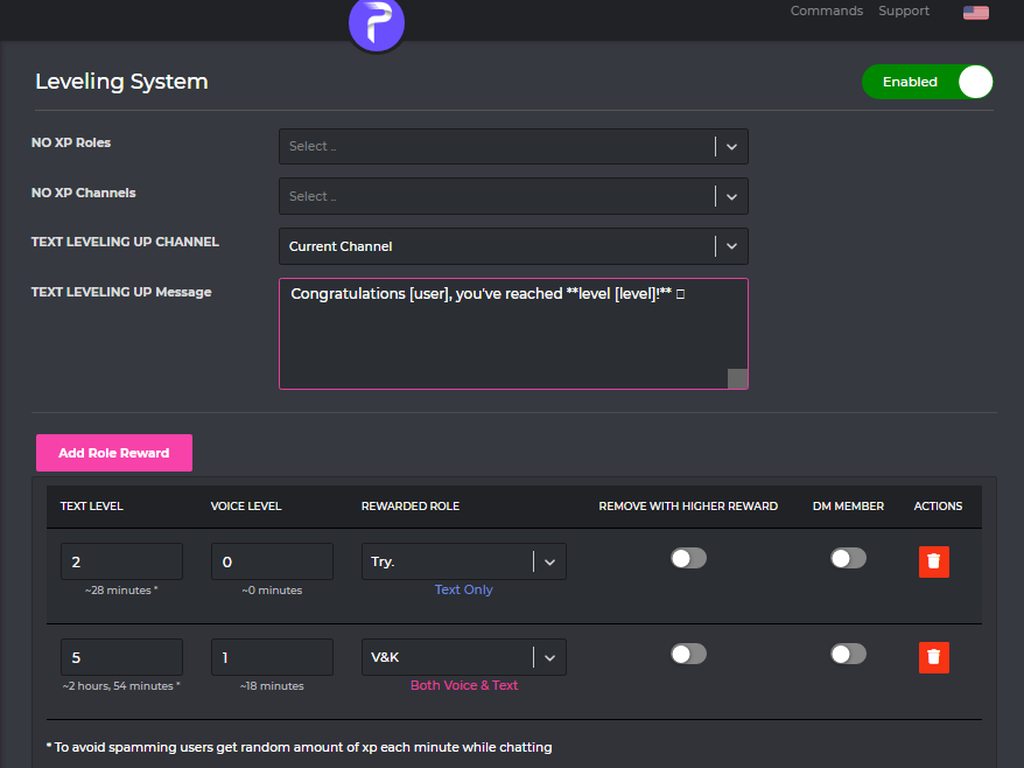
Enabling the leveling system :683978393049759823:
How to activate
1 - https://probot.io/dashboard login to your account and select your server
2 - On the left side click on "Leveling system"
3 - Press "add role reward" and set the required level to get the role
change the settings as you want and this is it ..
Welcome images, moderation, leveling, reaction roles, logs, high quality music and many many more!
 nocturne flax
mortal summit
You can use Levelling System to grant them a role after a certain level of text/...
nocturne flax
mortal summit
You can use Levelling System to grant them a role after a certain level of text/...
Amazing, thank you Robert, now when it says "Add Role Reward" is that limited to anything or can we set up a discord "community" vault that PRoBot can pull from when a rank has been acheived?
mortal summit
nocturne flax
Amazing, thank you Robert, now when it says "Add Role Reward" is that limited to...
You can only grant roles.
honest otter
mortal summit
Whichever automod setting are you testing, go to the cogwheel icon and make sure...
Still Not Working
mortal summit
Is the Moderation module enabled?
honest otter
yes
mortal summit
Try to reinvite the bot
 sick sandal
yo can someone help me with my server? im using Probot
mortal summit
sick sandal
yo can someone help me with my server? im using Probot
How can I help you?
sick sandal
I dont know how to do anything and im trying to build my own server that can hold thousands of people
mortal summit
This channel is for ProBot support only. And I need to know what you want to do, in order to help you.
sick sandal
Like when someone first comes into my server that they need to do a check list of things to agree to kinda like what I have had to do to get into here
mortal summit
That is a Discord feature, not a ProBot feature. As I said, I can only help you with ProBot.
honest otter
mortal summit
Try to reinvite the bot
still doesn't work
mortal summit
Try to REMOVE all ignored channels/roles and try again
mortal summit
Send a screenshot of the permissions of your everyone role
 wicked pollen
clear doesnt work in my server
 mortal summit
wicked pollen
clear doesnt work in my server
mortal summit
wicked pollen
clear doesnt work in my server
Make sure ProBot has Manage Messages or Administrator permission


 fathom meadow
honest otter
fathom meadow
honest otter
@mortal summit ^^
mortal summit
honest otter
<@579324767216336923>
Is it just one automod setting or all automod settings that don't work?
mortal summit
fathom meadow
<@579324767216336923> ^^
Avoid unnecessary pinging
 hybrid magnet
Hello, how can i display my reaction role in a channel? (:
fathom meadow
K
hybrid magnet
i've created the embed and the reaction role, is there a command to display them?
frozen pilot
hybrid magnet
i've created the embed and the reaction role, is there a command to display them...
- from embed messages section create an embed message and send it to your server (the message you have to select basically)
- from reaction roles section select the embed message you just sent
- add a reaction
- add roles by clicking on the plus signs right next to the reactions you added
Welcome images, moderation, leveling, reaction roles, logs, high quality music and many many more!
hybrid magnet
got it thanks 🙂
honest otter
mortal summit
Is it just one automod setting or all automod settings that don't work?
Its just one setting the Mass role one
wicked pollen
bot cant delete messages which is sending before adding bot
how can ı solve this problem
mortal summit
honest otter
Its just one setting the Mass role one
The mentions must be entirely different to be detected by the automod setting.
honest otter
mortal summit
The mentions must be entirely different to be detected by the automod setting.
?
frozen pilot
honest otter
?
can you show me the undeleted message
 frozen pilot
honest otter
the first one was with the @ everyone mention on
and the other with it off
frozen pilot
honest otter
the first one was with the @ everyone mention on
and the other with it off
mass mention :
@frozen pilot @frozen pilot @frozen pilot @frozen pilot @frozen pilot @frozen pilot @frozen pilot @frozen pilot @frozen pilot @frozen pilot
like
honest otter
oh
honest otter
frozen pilot
mass mention :
<@467733205605416970> <@467733205605416970> <@467733205605416970>...
Its still not working


 hot condor
I ned help how to do reaction rules
 atomic abyss
It doesn’t show member role on reaction role feature
mortal summit
atomic abyss
It doesn’t show member role on reaction role feature
Can you explain the issue?
mortal summit
hot condor
I ned help how to do reaction rules
How do I set up reaction roles:
1- head to the dashboard https://probot.io/dashboard then select your server.
2- enter "Reaction Roles" module
3- Click "Add Message", then select an embed. You can manage these embeds by heading to "Embed Messages" module.
4- Click "Choose a message", and then select the referred embed message where the selected embed was sent.
start adding reaction roles by clicking "Add Reaction". there would be a (+) button where you can select the role referred to this reaction.
Welcome images, moderation, leveling, reaction roles, logs, high quality music and many many more!

 hot condor
mortal summit
**How do I set up reaction roles:**
1- head to the dashboard https://probot.io/d...
hot condor
mortal summit
**How do I set up reaction roles:**
1- head to the dashboard https://probot.io/d...
ty
mortal summit
atomic abyss
Drag ProBot's role higher in the roles list.
atomic abyss
It is
mortal summit
Refresh the page
mortal summit
ProBot's role needs to be above the roles you want to grant.
atomic abyss
mortal summit
ProBot's role needs to be above the roles you want to grant.
It is

Even with another browser it doesn’t work
 outer rapids
What is the claim gift command ?
fathom meadow
<@&675070424748654593> .. 
lapis rock
How do the reaction roles work? It wont let me select a message
fathom meadow
outer rapids
What is the claim gift command ?
No command ..
fathom meadow
lapis rock
How do the reaction roles work? It wont let me select a message
How so, What did you click on ..
 fathom meadow
@lapis rock Because you didn't create embed message ..
 gloomy glen
Heyyo
fathom meadow
@gloomy glen Can I help you?
 unkempt monolith
Hello, in order to enable xp being gained in private and public threads, will just enabling manage threads permission work?
(ping when replying please)
unkempt monolith
No problem, but I am not sure if I understand that. So, it does support xp in threads?
fathom meadow
yes ..
unkempt monolith
Would a moderator be kind enough to confirm, since checking it shows it is not granting xp.
@gloomy lion
fathom meadow
I can help you ..
Go to dashboard --> choose your server --> click on leveling system --> remove every xp channel / roles selected and enable utility module at dashboard ..
Welcome images, moderation, leveling, reaction roles, logs, high quality music and many many more!
 gloomy lion
unkempt monolith
Hello, in order to enable xp being gained in private and public threads, will ju...
gloomy lion
unkempt monolith
Hello, in order to enable xp being gained in private and public threads, will ju...
Yes you can gained xp in threads channels
unkempt monolith
gloomy lion
Yes you can gained xp in threads channels
Is this confirmed? Does that require a specific permission since it does not seem to be working at the moment, and does it work for private threads too?
 queen cave
i input my credit card for prem however the payment is not working
gloomy lion
unkempt monolith
Is this confirmed? Does that require a specific permission since it does not see...
yes it's confirmed, and it works in all threads public, private
fathom meadow
queen cave
hi
<@&675070424748654593> ..
queen cave
fathom meadow
<@&675070424748654593> ..
hi
is Premium required for the emoji reaction roles?
frozen pilot
queen cave
is Premium required for the emoji reaction roles?
no
queen cave
frozen pilot
no
 split needle
That's for multiple roles per reaction
queen cave
I can't even add one role
split needle
You can only have 1 role per reaction for free version of the bot
And what you trying to do is add more than 1 for the same reaction
 split needle
No
You can still have up to 20 reactions as discord limit
And to add roles to them, tap on the + button after the added reaction instead of the first reaction's
split needle
Make sure the probot role is higher than them in your server
queen cave
 split needle
And I don't see the probot role in there
queen cave
its in there at the bottom
split needle
And that's the problem why no role show up for selecting
queen cave
split needle
And that's the problem why no role show up for selecting
Great thank you, I updated it and I was able to assign the roles. When the user clicks on the news emoji (3rd one), how do I add the @upper tulips tag to the News role so the alert will go to them whenever someone uses the @upper tulips tag?

 split needle
queen cave
Great thank you, I updated it and I was able to assign the roles. When the user ...
split needle
queen cave
Great thank you, I updated it and I was able to assign the roles. When the user ...
You mean add more reaction? If so click on the add reaction button
queen cave
Yes - so that one msg will have 10 unique emoji assigned per number.
Are you Vietnamese?
split needle
queen cave
Are you Vietnamese?
Yea
If you want to ask for help in vietnamese, you can do so in #support-int
queen cave
oh no, i can't type only speak
 graceful sentinel
when will the weekly lb renew
 mortal timber
Is it possible that the text leveling is stuck?
Lot of people talk but nobody got any level
sick bone
<@&675070424748654593>
 civic perch
Hiiiiiiiiiiiiiii
queen cave
split needle
Yea
If you want to ask for help in vietnamese, you can do so in <#71190474825662...
Can you assist with the previous request? #support-en message
fathom meadow
graceful sentinel
when will the weekly lb renew
Elaborate please
fathom meadow
mortal timber
Lot of people talk but nobody got any level
1 - Enable utility module
2 - remove xp channels / roles from leveling system
@civic perch #support-int
split needle
civic perch
Se eu quiser fdp
split needle
graceful sentinel
when will the weekly lb renew
Every monday at 0 am gmt
split needle
split needle
You mean add more reaction? If so click on the add reaction button
@queen cave
fathom meadow
split needle
Every monday at 0 am gmt
I think it is Sunday not Monday
split needle
#mute @civic perch 1d non-language
lean badgerBOT
split needle
#mute <@931172513935937557> 1d non-language
:white_check_mark: @Veia do Opala muted from the text! :zipper_mouth:
split needle
Check and enable moderation module
 last kernel
split needle
Check and enable moderation module
last kernel
split needle
Check and enable moderation module
thx
 errant crane
I just added probot and probot premium to my server and it says "Another bot is being used for this server" when i try and change the volume of the bot
queen cave
split needle
<@786467431198490635>
Yes 10 reactions/emoji but 1 embed msg each number correspond to a specific @nocturne flax name.
 charred granite
hello i dont know how to make my friends use music commands i with the bot can i know how?
<@&675070424748654593>
 untold flume
Use /play @charred granite
@errant crane kick both versions then reinvite the premium version only
charred granite
untold flume
Use /play <@184826787149250560>
i did use /play but it says to them you not allowed to use this command
untold flume
Go to the dashboard > select your server > go to music module > check if there's a dj role also edit (#play) command and see if there are any disabled/enabled roles/channels
charred granite
untold flume
Go to the dashboard > select your server > go to music module > check if there's...
i enable it in my music channle
untold flume
then let him use that music command in that channel other than that it won't work in any other channel if he was trying to use that command in another channel
charred granite
untold flume
then let him use that music command in that channel other than that it won't wor...
oh okay i fx it thanks
untold flume
You're welcome
 untold flume
Go to the dashboard > select your server > go to music module > edit #play command and add enabled channels
nocturne flax
Hello, I had a premium bot and it disappeared somehow, what happened?
untold flume
Did it leave your server?
nocturne flax
untold flume
Did it leave your server?
It left my server and disappeared from my premium bots
just gone
untold flume
Like disappeared? https://probot.io/premium
Welcome images, moderation, leveling, reaction roles, logs, high quality music and many many more!
 untold flume
That's weird can you contact Ruru#0666 regarding that?
nocturne flax
Okay
 hybrid nexus
what do u mean by bad vote request
untold flume
It means you've been blacklisted for using multiple accounts
hybrid nexus
for how much time
untold flume
For good
hybrid nexus
can i recover my acc
untold flume
Nope
hybrid nexus
ok thx for info
untold flume
yw
 ebon coral
How to setup for rank & level up info
 light saffron
how do i talk as probot?
untold flume
ebon coral
How to setup for rank & level up info
Like what exactly?
untold flume
light saffron
how do i talk as probot?
Wdym?

 pale marlin
@sullen prism how to assign mute role ?
pale marlin
pale marlin
<@823254853295669268> how to assign mute role ?
@uncut seal
pale marlin
pale marlin
<@823254853295669268> how to assign mute role ?
@gloomy lion
fathom meadow
<@&675070424748654593> ..
pale marlin
pale marlin
<@823254853295669268> how to assign mute role ?
<@&675070424748654593>
fathom meadow
pale marlin
<@823254853295669268> how to assign mute role ?
By /mute
It will exist
split needle
light saffron
how do i talk as probot?
You can use embed message feature of the bot
split needle
pale marlin
<@823254853295669268> how to assign mute role ?
You can't. Only with the role created by the bot
queen cave
queen cave
Yes 10 reactions/emoji but 1 embed msg each number correspond to a specific <@45...
hi @split needle
split needle
queen cave
Yes 10 reactions/emoji but 1 embed msg each number correspond to a specific <@45...
I can't seem to understand you
pale marlin
split needle
You can't. Only with the role created by the bot
so now what i have to do
split needle
pale marlin
so now what i have to do
Nothing
Just use mute command and the bot will just create a role named "muted"
pale marlin
split needle
Nothing
Just use mute command and the bot will just create a role named "muted"
no its not making na
split needle
And once you change that role's name, it'll no longer work on that role
split needle
pale marlin
no its not making na
Missing permission?
queen cave
split needle
I can't seem to understand you
how do I add the reaction button to recognize the @nocturne flax?
pale marlin
split needle
Missing permission?
got admin
split needle
queen cave
how do I add the reaction button to recognize the <@456226577798135808>?
The + button next to the added reaction
And you can stop mentioning someone random while asking now
split needle
pale marlin
got admin
The bot?
pale marlin
split needle
The bot?
yep
split needle
Check the audit log to see if the bot did created any role
pale marlin
split needle
Check the audit log to see if the bot did created any role
it just creating webhooks
 eternal wolf
Is playing a spotify playlist possible
split needle
no for now
queen cave
split needle
The + button next to the added reaction
And you can stop mentioning someone rand...
The button says premium only
 split needle
queen cave
The button says premium only
split needle
queen cave
The button says premium only
as said you can only add 1 role per reaction for free version of the bot
to add more reactions, click on the add reaction button
queen cave
split needle
as said you can only add 1 role per reaction for free version of the bot
to add ...
Ok, going to try prem for a month to see if it works
split needle
so you're really trying to get multiple roles for one reaction?
also you just need prime is enough
queen cave
split needle
so you're really trying to get multiple roles for one reaction?
Yes, want to sent out 1 message and have the users click a number (@ ) that correspond to the person/category. I will then create 10 different roles for them to subscribe to those alerts. This is pretty common in discords
I didn't know, u said premium and I just paid for premium, NOT prime
split needle
because they will be renamed soon from prime and premium to tiered premium
so in future term, you're having premium tier 2 which has more feature than the premium tier 1
queen cave
let me see if this works, if not will explore other bots
split needle
sure
also reload your dashboard after inviting premium to see if the premium features are unlocked yet or not
queen cave
split needle
also reload your dashboard after inviting premium to see if the premium features...
no it doesn't work. I logged out and logged back into probot and I still ge the same "premium only" msg next to the + sign
 split needle
you need to invite the premium into your server first
can you see the number on the premium's name? use that number with this command: #vip move number
and use the dm'ed link to get the bot into your server
queen cave
wait I have 2 discords, 1 im testing, and 1 for the users. Can it be applied to both?
split needle
no but you can test it in test server first before making changes in the main server
queen cave
ok
split needle
we may have multiple server subscription in the future if they ever think of that
queen cave
split needle
we may have multiple server subscription in the future if they ever think of tha...
it's part of my server now but I see a error msg
 split needle
queen cave
it's part of my server now but I see a error msg
split needle
queen cave
it's part of my server now but I see a error msg
that's not really an error message, just an alert that the role is a system role. you can freely change its name, color, permission and position like normal roles, just not able to delete it
so can you check on the dashboard of your server if premium features are showing up or not?
queen cave
queen cave
it's part of my server now but I see a error msg
now I don't see the prem only msg next to the reaction, but I can't add the @ next to it
split needle
yea because the bot working now is the premium, simply just move the premium role higher
queen cave
it brings up popup box to add more roles
 queen cave
split needle
yea as said a paid feature
queen cave
split needle
yea as said a paid feature
do you understand what I am trying to accomplish here?
split needle
isn't that's what you asked?
 faint finch
How Bot Discovery Worked For Free
split needle
faint finch
How Bot Discovery Worked For Free
?
faint finch
split needle
?
I grill
split needle
go back to #chat-ar or #support-ar
faint finch
Okay
queen cave
split needle
isn't that's what you asked?
I want to add a @ news next to this role. So when users who click on the highlighted newspaper emoji, it will automatically assign them the "News" role and whenever I use the @ News hashtag, it will include them. Does that make sense?

 split needle
and I said long ago before you bought the premium, click on the add reaction button on there to add more reactions
this button
 queen cave
split needle
and I said long ago before you bought the premium, click on the add reaction but...
queen cave
split needle
and I said long ago before you bought the premium, click on the add reaction but...
Yes I did and it brings more emoijis which is NOT what I want. I said I want to assign the hashtag @ NEWS to that role
split needle
then you already added the role you want to the reaction?
the News in green curved box on there is the News role you just assigned
queen cave
split needle
then you already added the role you want to the reaction?
Yes, the "News" role is new. How do I assign the @ news tag to that role?
split needle
if they get the role, then you can just ping that role whenever you want and they will get the ping
the role is actually being assigned
and what you use to tag people, or ping them is the role, not anything else
queen cave
split needle
and what you use to tag people, or ping them is the role, not anything else
where's the connection? how does NEWS role know to ping @ news?
split needle
because you ping people using the roles, like how people did with the support english role in here
like this

that's how discord designed
queen cave
split needle
that's how discord designed
ok got it, so it's automatic
split needle
it's an intended feature actually
queen cave
split needle
it's an intended feature actually
sorry ok let me try with my test id
 coarse sable
@split needle hello, ive sent you a dm, i need help with a couple of things
split needle
I don't offer support in dm
coarse sable
Oh
Alright
I need assistance with a welcoming message and a role that applies itslef to every user upon joining
Would that be possible? @split needle
split needle
go to http://probot.io/dashboard, select your server on the left,
- for welcomer, go to the welcomer module and set up the feature in there
- for auto role assigning, go to auto roles module and add the role(s) you wanted to be given by the bot inside the box
Welcome images, moderation, leveling, reaction roles, logs, high quality music and many many more!
queen cave
split needle
it's an intended feature actually
Great it works. I added myself and got the alert but when I unclicked the emoiji, it removed me from that role, but I still received the alert.
split needle
slow discord
refreshing your client would refresh the mention message or just wait for a while
queen cave
within 24 hours refresh?
split needle
actually no need to
queen cave
split needle
actually no need to
ok the current embed message template doesn't reflect the UI message. For instance I accidently the wrong reaction and it still appears at the bottom of the msg that that the users see but I dont see it in the template. Is that a bug?
split needle
you mean the added reactions on the message?
queen cave
split needle
you mean the added reactions on the message?
First screen is what users see, but the template doesn’t have the first two emoji

 split needle
those might be added by you or members
you can just manually remove them by right click on the message - reactions and remove them
or just remove all and the reactions will be added back after you save the changes from the dashboard
nocturne flax
I want to report someone who is trading in Credits!
split needle
you can report that to @native geyser or @spring ether
nocturne flax
In dms?
split needle
yea
nocturne flax
Ok
queen cave
split needle
those might be added by you or members
you can just manually remove them by righ...
thank you, I think I got it. So going forward, if I want this on my discord, I just need the Prime Server access?
split needle
queen cave
thank you, I think I got it. So going forward, if I want this on my discord, I j...
if you mean the single role reaction role then no need any paid version of the bot unless you want to have multiple roles given with one reaction
you first need to create and send an embed message with the bot
queen cave
split needle
you first need to create and send an embed message with the bot
Yeah single role with one reaction within 1 embed msg I guess I didn't need the prem
split needle
queen cave
Yeah single role with one reaction within 1 embed msg I guess I didn't need the ...
yea
queen cave
split needle
yea
since I have prem, any special features it provide?
split needle
you can customize its appearance like change its avatar, user name and custom status. it also comes with all prime features like more variables for welcomer message and auto responder, along side with 4 more modules are protection, antiraid, voice online and temporary invite link. for premium additional features, 3 more logs (kicked user, user moved and disconnected from voice channels) and repeated messages in auto mod. more feature for them may be added in the future
 severe edge
Is there a specific way to set up the bot into a specific channel? Im tryin to set it up where it can play music in the VC channels and cant seem to figure out how.
split needle
severe edge
Is there a specific way to set up the bot into a specific channel? Im tryin to s...
just enable the module and they should just work, no further set up needed
severe edge
split needle
just enable the module and they should just work, no further set up needed
when i do the !join cmd in the channel it really enable it.
severe edge
split needle
to get the bot to join the channel, use play command
oh my thank you sm ❤️
split needle
 sacred storm
how can i change my probot avatar
sacred storm
how can i change my probot avatar
- get premium
split needle
which background?
sacred storm
when i write #profile
split needle
sacred storm
when i write #profile
then change that on https://probot.io/bgs but you can only change with the presets on there
Welcome images, moderation, leveling, reaction roles, logs, high quality music and many many more!
 gloomy tree
Hello. After a while Probot stopped giving members automatic rank on join. how do i fix this?
split needle
gloomy tree
Hello. After a while Probot stopped giving members automatic rank on join. how d...
make sure the probot role is higher than the role you set and that role has no managing permission
gloomy tree
split needle
make sure the probot role is higher than the role you set and that role has no m...
so administration perm should be disabled then?
split needle
from the role that you want the bot to give yes
gloomy tree
split needle
from the role that you want the bot to give yes
the roles for autorank dont have any perms.. it worked before but suddenly stopped working to give.
split needle
so is that role lower than the probot role now?
gloomy tree
split needle
so is that role lower than the probot role now?
what you mean by lower. the rank it should be given that worked before dont have any perms different from the "online" rank. its just a namechange so we have them in section of names only.
split needle
I mean in position
have you ever changed role position in your server before when the bot stopped giving auto roles?
gloomy tree
split needle
I mean in position
have you ever changed role position in your server before whe...
wait i think im dumb, you mean the pos of how you guyes here have the "probot" on the online list?
split needle
no, in the server role list
position on the member list usually helpless if one at lower place has a higher role than the one on the top of member list
like this
 gloomy tree
split needle
no, in the server role list
gloomy tree
split needle
no, in the server role list
ive changed pos so the probot is lined above everyoneelse now. that might be it.
Thanks for the help.
 ionic ridge
Hi, I can't modify my XP/rank as I own the server
split needle
ionic ridge
Hi, I can't modify my XP/rank as I own the server
yea you can't as it's not a feature
ionic ridge
split needle
yea you can't as it's not a feature
It seems so obvious to add this module, since some people have spent a lot of time with another ranking bot, they would like to transfer their rank to Probot
split needle
yea ik and they're going to implement it in the new update
ionic ridge
it avoids losing its rank stupidly, especially if the users are active for months
ionic ridge
split needle
yea ik and they're going to implement it in the new update
oh nice
 stray grove
how can i unblock pro bot profanity¿
queen cave
split needle
you can customize its appearance like change its avatar, user name and custom st...
Sorry I'm back. When I add the gif image to the embed msg, the preview shows the image, however when the msg is sent to the channel, it's blank.

 split needle
queen cave
Sorry I'm back. When I add the gif image to the embed msg, the preview shows the...
split needle
queen cave
Sorry I'm back. When I add the gif image to the embed msg, the preview shows the...
seem like it's too big to be rendered correctly
try reduce the gif's size and try again or use an external media host if you still want to keep the size
split needle
stray grove
how can i unblock pro bot profanity¿
what?
queen cave
split needle
seem like it's too big to be rendered correctly
try reduce the gif's size and tr...
Ok, the same image worked on a diff bot
split needle
queen cave
Ok, the same image worked on a diff bot
because there's a limitation from our media host that images/gifs that are bigger than 3 Mb will not be rendered
 flat sapphire
hello
in the auto responder when i put a link it does not show up in blue like this
bit.ly/rickRoll
hello ?
helllllo
split needle
flat sapphire
in the auto responder when i put a link it does not show up in blue like this
b...
discord's thing
you should include the full link with https:// so the link can be rendered
flat sapphire
oooooooooh ok ty
also i have another question
how to remove the command cooldown
hello
split needle
@queen cave you should use the direct link instead
use the share feature to get the direct link
