#support-en
1 messages · Page 375 of 1
 clever socket

 urban cove
Will i get more exp if i send Emojis , stickers or Gif's than sending text's ?
 quaint sentinel
The one you used is for the auto responder
 tardy anchor
quaint sentinel
<@366858275905339392> [user.name] for leveling system
tardy anchor
quaint sentinel
<@366858275905339392> [user.name] for leveling system
ok- user.name not userName?
quaint sentinel
urban cove
Will i get more exp if i send Emojis , stickers or Gif's than sending text's ?
nope
quaint sentinel
tardy anchor
ok- user.name not userName?
yep
tardy anchor
thank you.
quaint sentinel
uw
urban cove
quaint sentinel
nope
So is there any way to get more exp
quaint sentinel
by being active
quaint sentinel
are you talking about the #rank level?
urban cove
Yes
quaint sentinel
@tardy anchor read the channels description please
urban cove
I heard its random exp per minute
quaint sentinel
Well, it depends on your activity. The given xp is random, just be more active and you'll level-up
quaint sentinel
urban cove
I heard its random exp per minute
yep
urban cove
quaint sentinel
Well, it depends on your activity. The given xp is random, just be more active a...
Thank You
quaint sentinel
yw
tardy anchor
quaint sentinel
yep
also is there a way to view all the variables somewhere?
I see the welcome msg ones but nothing else
quaint sentinel
Welcomer:
[user]
[server]
[userName]
[memberCount]
[inviter] (Premium)
[inviterName] (Premium)
[invites] (Premium)
Auto Responder:
[user]
[userName]
[invites] (premium)
__Leveling System: __
[user]
[level]
[user.name]
[user.tag]
tardy anchor
what does user.tag do
quaint sentinel
@tardy anchor ^ These are all the variables you can use for each feature, it's clear ig from the variable name. If you have any further question about any variable feel free to ask
quaint sentinel
tardy anchor
what does user.tag do
It sends the user name+tag without mentioning them
! 𝐔𝐍 ٠ Anas#4288
tardy anchor
ah okay. tysm
quaint sentinel
yww
tardy anchor
One more question about lvling sorry--how do i make level roles replace the autorole that is given to new members?
quaint sentinel
Well, technically it won't give them the role once they join the server. They should be active a bit so they can get it. Since adding 0 to the level requirement isn't available, the minimum is 1.
So Basically, just add the role you want and add 1 for text or voice depends on your preference. And that's it!
tardy anchor
Autorole gives them it when they join though
It just doesn't go away when they get lvl reward roles
quaint sentinel
Unfortunately you can't do that
quaint sentinel
Yeah sure, feel free to suggest it here #573053418017521664!
tardy anchor
👍
 ember tendon
Hey, I want to set up leveling in my server, but I'm not sure how.
<@&675070424748654593>
quaint sentinel
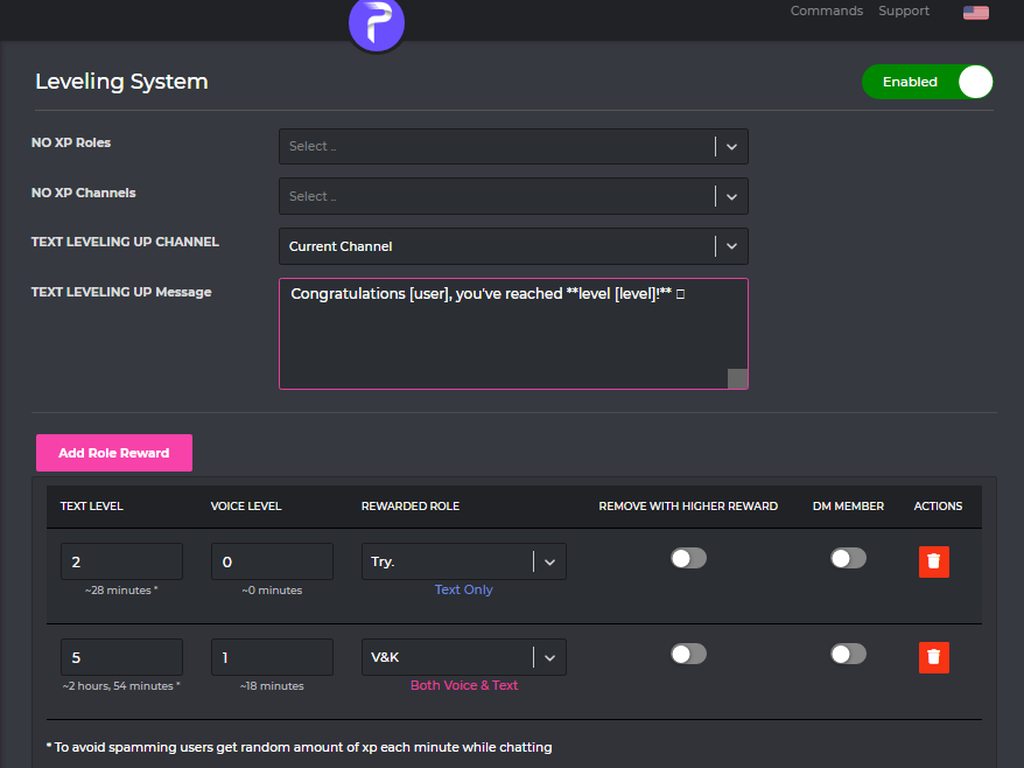
Enabling the leveling system
How to activate
1 - https://probot.io/dashboard login to your account and select your server
2 - On the left side click on "Leveling system"
3 - Press "add role reward" and set the required level to get the role
change the settings as you want and this is it ..
https://imgur.com/a/hk54tM4
@ember tendon
Welcome images, moderation, leveling, reaction roles, logs, high quality music and many many more!
 ember tendon
ok, thanks!
quaint sentinel
yw
 sullen bramble
Why is This happening

 rancid snow
hello, is rep command disabled ?
quaint sentinel
rancid snow
hello, is rep command disabled ?
yes
quaint sentinel
sullen bramble
Why is This happening
Blacklist from voting. The reason for this is that you're voting from multiple accounts
rancid snow
quaint sentinel
yes
is it buggy or something, or it will be part of premium?
sullen bramble
quaint sentinel
Blacklist from voting. The reason for this is that you're voting from multiple a...
thats not true tho, im using this account only
quaint sentinel
rancid snow
is it buggy or something, or it will be part of premium?
I don't have any information about the reasons behind that. Also, I don't think that it'll be a premium only command
quaint sentinel
sullen bramble
thats not true tho, im using this account only
you sure about that?
rancid snow
quaint sentinel
I don't have any information about the reasons behind that. Also, I don't think ...
ohhh, okay thank you for helping, i hope it's fixed soon 🙂
quaint sentinel
yw
sullen bramble
quaint sentinel
you sure about that?
Yes i only have This account
quaint sentinel
This error won't happen for no reason, the main reason for that is using multiple accounts for voting. Is there anyone on your same IP votes for the bot?
sullen bramble
Yesterday i voted from my home's wifi and im 100% sure no one from my family even use discord
quaint sentinel
Alright, gonna send your ID to the developers. They'll check it out
sullen bramble
Ok thanks
quaint sentinel
yw
 faint sable
So to bring back my question about the bot ban command. When it soft bans someone does it keep them in the server so I could hard ban them, or should I just not use the ban/kick command and just do it though discord?
Reason why I'm wanting to use these commands is so I can keep a log of people we've banned/kicked from the server in a marked channel and not have to go through all the discord settings or audit logs to find when the member got banned and what was their crime
 sweet bluff
My level is stuck,, however the other member still can leveling up :(
 idle arch
<@&675070424748654593> ^
 untold flume
@faint sable https://probot.io/dashboard > select your server > logs > member banned section
Welcome images, moderation, leveling, reaction roles, logs, high quality music and many many more!
@sweet bluff can you check your no-xp roles/channels https://probot.io/dashboard
Welcome images, moderation, leveling, reaction roles, logs, high quality music and many many more!
sweet bluff
untold flume
<@463673252951228426> can you check your no-xp roles/channels https://probot.io/...
Yes i do,, but i dont get more exp,, and the other still can increase their exp,,
Stuck on only me
sweet bluff
Yes,, Bot the only one
 oblique halo
Hey I spoke to someone about this issue on my server with the welcomer the other day but no fix was found
 untold flume
Are you sure you don't have any of them? @sweet bluff
@oblique halo change the welcome background
sweet bluff
untold flume
Are you sure you don't have any of them? <@463673252951228426>
Of course,, thats why im here
oblique halo
untold flume
<@594243304045150234> change the welcome background
Edward it was you I spoke to im pretty sure
untold flume
@sweet bluff send me your server in dms please with admin perms so i can check it
oblique halo
I already tried that remember
sweet bluff
Im stuck when i get lvl 8 on my channel
oblique halo
you gave me a couple other images to try and it was still broken
and then kinda just left me with no answer 😂
untold flume
@oblique halo hmm send me your server in dms with admin perms
oblique halo
you already have my server
untold flume
i'll try something
oblique halo
we spoke in dms
untold flume
Alright
 nocturne flax
Greetings !
How do I level up ?
untold flume
send text messages
nocturne flax
How many?
untold flume
1 is enough to earn xp points but there's a 2 minutes cooldown between each message
nocturne flax
Ok thanks
untold flume
yw
sweet bluff
Oh nvm @untold flume that acc is have bot roles accidentally,, sorry my bad
untold flume
alright
 icy shard
Hey I have a problem with the pro bot, can I ask here?
 split needle
icy shard
Hey I have a problem with the pro bot, can I ask here?
split needle
icy shard
Hey I have a problem with the pro bot, can I ask here?
yes this is what this place is for
icy shard
ok thanks, If I want to add roles for the reaction roles, I see only 2 from 28, but by the automatic roles I see them all
split needle
move the probot role higher in server role list
the bot just missing permision with those roles but developers didn't make change to it in the auto role yet
clever socket
<@&675070424748654593> ^
split needle
icy shard
but It doesnt work
that will never enough if other roles are higher
icy shard
I dont have Higher roles
split needle
you need the Probot role higher than other roles that you want to set as reaction roles
icy shard
ok, I dont had it that high in Dc and The role from discord doesnt worked, but now it works, Thanks (and sorry for my bad English)
 sage loom
when i mute someone the bot mute that person normaly but won t automaticly unmute
sage loom
sage loom
when i mute someone the bot mute that person normaly but won t automaticly unmut...
<@&675070424748654593>
sage loom
 split needle
sage loom
when i mute someone the bot mute that person normaly but won t automaticly unmut...
split needle
sage loom
when i mute someone the bot mute that person normaly but won t automaticly unmut...
the bot's timer is kinda slower than normal
that's not a normal thing but it's been like that
sage loom
split needle
the bot's timer is kinda slower than normal
like days?
split needle
no
it should be after about 12 minutes if you muted that user for 10 mins
also make sure the probot role is higher than other roles if the bot wasn't auto unmute for longer
sage loom
split needle
also make sure the probot role is higher than other roles if the bot wasn't auto...
it is
and it has the administrator permision too
split needle
split needle
it should be after about 12 minutes if you muted that user for 10 mins
then this
 hollow pier
Can this bot record voice in vc??
hollow pier
hollow pier
Can this bot record voice in vc??
.
split needle
no
 native geyser
hi, currently no
 odd perch
ty
native geyser
yw
 wise blaze
Hi 👋 Do we agree that the textual and vocal level is the same? Just the vocal one which requires more time to gain xp but it is cumulative with the textual one?
 native geyser
they're different than each other and to make the bot give the role you don't need to set both target levels to the same level
members require to reach both anyway
wise blaze
🤔 what is the purpose of the premium voice online feature ?
clever socket
<@&675070424748654593> ^
split needle
wise blaze
🤔 what is the purpose of the premium voice online feature ?
tells how much members are in voice channels
an example can be seen at general category name
 split needle
wise blaze
humm voice online feature is weird
split needle
wise blaze
humm voice online feature is weird
yes it works like that
and it will not update constantly or discord will ban it for reaching rate limit
 rugged dune
:((
 long pond

 clever socket
<@&675070424748654593> ^
 fathom meadow
<@&675070424748654593> ..
split needle
I don't remember there was a global level reset except the one when increasing the level cap
 oak barn
Hello, it looks like the leveling system is not working for me on my server. i setup that they need Text level 1 to get a role (no voice) but noone is getting exp while chatting
 quaint goblet
I'm sorry but I don't know ;—;
native geyser
oak barn
Hello, it looks like the leveling system is not working for me on my server. i s...
on dashboard enable utility module
quaint goblet
sorry, I was looking for a way to make sure that when you put a certain reaction to a message, the person who posted it is given a certain role, can someone help me? (sorry ignorance and bad english, I hope you understand what I mean)
Example:
 native geyser
to set reaction roles:
https://probot.io/dashboard
- from embed messages section create an embed message and send it to your server (the message you have to select basically)
- from reaction roles section select the embed message you just sent
- add a reaction
- add roles by clicking on the plus signs right next to the reactions you added
Welcome images, moderation, leveling, reaction roles, logs, high quality music and many many more!
quaint goblet
Thank you
oak barn
native geyser
on dashboard enable utility module
ah, its that easy? lemme check
native geyser
alrighty
oak barn
holy, youre right, thanks god rj ❤️ have a good day
native geyser
likewise ^^
 patent terrace
Does anyone know how to increase XP ?
patent terrace
Oh ok
 supple cloak
native geyser
supple cloak
native geyser
hello, using /skip when the song starts playing is the only way at the moment
native geyser
yw
 ocean crater
How to delete?
native geyser
delete what
ocean crater
The message in you server
clever socket
<@&675070424748654593> ^
fathom meadow
<@&675070424748654593> ..
native geyser
ocean crater
The message in you server
/clear
 twin verge
Hi
ocean crater
native geyser
> /clear
Thx
untold flume
@twin verge how can i help you?
twin verge
untold flume
<@573573644081561611> how can i help you?
No I found the problem sorry
untold flume
Alright
 ashen fossil
how do i send a role reaction message from the box to a channel in my server?
 open tartan
Is 24/7 music playback enabled for prime or only for premium?
native geyser
ashen fossil
how do i send a role reaction message from the box to a channel in my server?
dashboard -> embed messages module
native geyser
open tartan
Is 24/7 music playback enabled for prime or only for premium?
both
ashen fossil
native geyser
dashboard -> embed messages module
i dont see the embed module, i do see the embed message maker tho, i tried send the message through there and no roles were added
native geyser
ashen fossil
i dont see the embed module, i do see the embed message maker tho, i tried send ...
yeah thats what you're looking for, can i see a screenshot of your reaction role settings (reaction roles module basically)
ashen fossil
native geyser
yeah thats what you're looking for, can i see a screenshot of your reaction role...
yeah jus a sec
ashen fossil
native geyser
yeah thats what you're looking for, can i see a screenshot of your reaction role...

 native geyser
select the message you've sent
 ashen fossil
oh
native geyser
since the embed can be sent multiple times we require the users to select the exact message that was sent as well
ashen fossil
🙏 arigato
native geyser
you're welcome
open tartan
Is there a way to import a playlist to probot, through spotify or youtube maybe?
native geyser
you can use youtube playlists but for now we do not support spotify
for youtube playlists use:
#play pl link
open tartan
perfect, thanks
native geyser
yw
 mortal tapir
hi i was just wondering why my bot cuts out while playing music?
<@&675070424748654593>
 wary mountain
hello, I wanted to know if #role can be used to give a specific role to all members who are already on the server
fathom meadow
mortal tapir
hi i was just wondering why my bot cuts out while playing music?
<@&675070424748654593> ..
clever socket
mortal tapir
hi i was just wondering why my bot cuts out while playing music?
it happens due to music overload, changing between regions might help
fathom meadow
@clever socket please check server topic
clever socket
wary mountain
hello, I wanted to know if #role can be used to give a specific role to all memb...
#role all +(role id or name)
@nocturne flax how can i help you?
mortal tapir
how would i change regions
clever socket
mortal tapir
how would i change regions
vc channel settings > channel override
fathom meadow
mortal tapir
hi i was just wondering why my bot cuts out while playing music?
Try changing between voice channel region util it gets better ..
mortal tapir
k thx
fathom meadow
wary mountain
hello, I wanted to know if #role can be used to give a specific role to all memb...
/role multiple
Can you say your question please?
fathom meadow
mortal tapir
how would i change regions
From voice channel settings
wary mountain
fathom meadow
`/role multiple`
Thank you very much
fathom meadow
yw
nocturne flax
how can i make the bot sends messages like #664737031414480896
clever socket
 **How do i create "Embed Message" **
1 - go to https://probot.io/dashboard and select your server
2 - click on "Embed Messages" then click on "Compose"
3 - customize your embed message
Welcome images, moderation, leveling, reaction roles, logs, high quality music and many many more!
 fathom meadow
nocturne flax
how can i make the bot sends messages like <#664737031414480896>
fathom meadow
nocturne flax
how can i make the bot sends messages like <#664737031414480896>
How To Create Embed Message
1 - Get To Dashboard : https://probot.io/dashboard
2 - Get To Your Server
3 - Click On Embed Message
4 - Click On " Compose "
5 - Create Your Embed Message
✅
nocturne flax
clever socket
<:sparkles:736686100613038182> **How do i create "Embed Message" **
1 - go to ...
ok
fathom meadow
fathom meadow
**How To Create Embed Message**
1 - Get To Dashboard : https://probot.io/dashbo...
@nocturne flax
This is easier
nocturne flax
if i created one can i edit it?
clever socket
yes, just go into the message, make the changes, click on saved changes then edit sent message
fathom meadow
nocturne flax
if i created one can i edit it?
Yes
nocturne flax
alright thank you guys
fathom meadow
yw
quaint sentinel
native geyser
- from embed messages section create an embed message and send it to your server (the message you have to select basically)
- from reaction roles section select the embed message you just sent
- add a reaction
- add roles by clicking on the plus signs right next to the reactions you added
Welcome images, moderation, leveling, reaction roles, logs, high quality music and many many more!
nocturne flax
thanks and sorry for bothering you
native geyser
no worries
 deep bay
Yo can i ask if like, i add new roles for lvl 10 and lvl 15, but someone already has lvl 25, do they get the new roles that i added for lvl 10 and lvl 15?
native geyser
- they need to reach both text and voice target level requirements
- if you haven't enabled 'remove with higher role' option for lvl 10 and 15 rewards then yes they do
nocturne flax
@native geyser how can I make ProBot delete the msg and warn the member? If I don't want them to type Specific words.
native geyser
https://probot.io/dashboard -> select your server -> automod module -> bad words feature
Welcome images, moderation, leveling, reaction roles, logs, high quality music and many many more!
nocturne flax
ok ty
deep bay
native geyser
1) they need to reach **both** text and voice target level requirements
2) if yo...
Ohh, ye but they reached both of em already , theyre lvl 25, if i add new roles for lvl 15, for example "lvl 15 advanced member" , does the person who had 25 lvls before the new roles were created, obtain the newly added role?
native geyser
i see, upon sending a message and gaining some text xp (no need for text levels just some xp is enough) they will get the roles
deep bay
OHHH
deep bay
native geyser
i see, upon sending a message and gaining some text xp (no need for text levels ...
THANK YOUUU
This bot is awesome

 dense cargo
where i report a bug?
native geyser
you can report here
dense cargo
native geyser
you can report here
ok , i can send a embed without adminstrator role
native geyser
hm how so
dense cargo
native geyser
hm how so
you have a test server?
native geyser
are you able to record maybe so that i can show it to devs
native geyser
oh you've already had admin before, i see
dense cargo
he remove it
native geyser
yeah but to be there at the first place you need admin
dense cargo
wait i will record a big screen
dense cargo
native geyser
yeah but to be there at the first place you need admin
yeah i was have
native geyser
no need, i personally do not think that causes that much issues but i'll contact to devs regardless
dense cargo
native geyser
no need, i personally do not think that causes that much issues but i'll contact...
ok ty
native geyser
ty too
dense cargo
np
nocturne flax
hi i want to ask a question
fathom meadow
 steel delta
2000 v-bucks =10000 credits
steel delta
2000 v-bucks =10000 credits
<@&675070424748654593> ..
nocturne flax
can i move someone's reaction to other reaction with the bot?
native geyser
nocturne flax
can i move someone's reaction to other reaction with the bot?
nope not possible
 true anchor
native geyser
true anchor
native geyser
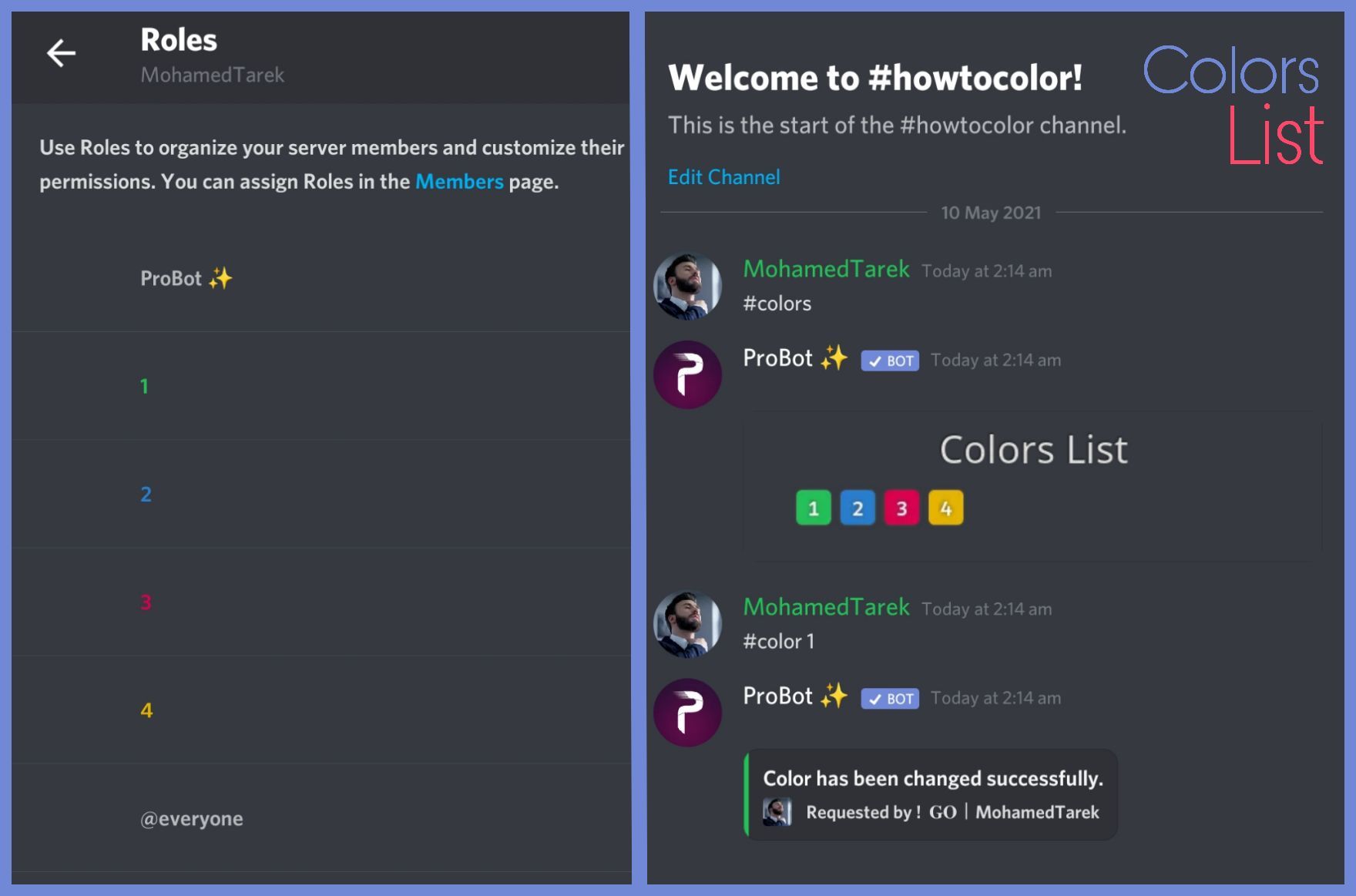
#1 ~ 👉 Go to server settings, Roles.
#2 ~ 👉 Add Numbered Roles Like The picture down.
#3 ~ 👉 Save and go out.
https://i8.ae/7hM2w
Now you are ready to use this colors.
/colors
Shows the colors list
/color number
Choose/change your color in server.
to remove your current color: /color 0

 snow oyster
Hello
I have a Question
How can i make a leave channel with Probot
I went to his settings
But i cant find it
I am doing this with my Mobile
native geyser
we dont have a custom leave message feature
 north bison
Hi,
we have an issue with the rank images. For many user's they just appear as a broken link...
Is there something we can do to fix that? Or is there some limit for that command?
 clever socket
<@&675070424748654593> ^
untold flume
@north bison it happens to users who are new to the bot it fixes itself as they gain xp or they can try changing their pfps
north bison
untold flume
<@785141780647378946> it happens to users who are new to the bot it fixes itself...
okay thanks for the info.
untold flume
yw
 bleak iron
native geyser
bleak iron
native geyser
Welcome images, moderation, leveling, reaction roles, logs, high quality music and many many more!
 mild flicker
native geyser
hi, for chatting use <#608047244276531245> instead please
mild flicker
native geyser
hi, for chatting use <#608047244276531245> instead please
okay, I'm sorry:)
nocturne flax
<@&675070424748654593>
native geyser
yes?
 spring ether
#mute @nocturne flax
 lean badgerBOT
spring ether
#mute <@456226577798135808>
lean badgerBOT
spring ether
#mute <@456226577798135808>
:white_check_mark: @دڵ خۆش muted from the text! :zipper_mouth:
 severe rose
Hi,
what does that mean please ?

"role position"
what does it do ?
<@&675070424748654593> ?
idle arch
<@&675070424748654593> ^
clever socket
severe rose
<@&675070424748654593> ?
hi, that means you can't use the same role twice
 urban onyx
How do you loop songs?
severe rose
clever socket
hi, that means you can't use the same role twice
My goal was to keep it from level 5 to level 9
native geyser
/repeat
urban onyx
okay
native geyser
clever socket
hi, that means you can't use the same role twice
actually you can use it twice
urban onyx
Thanks!
native geyser
the role will be given when you reach either
severe rose
severe rose
My goal was to keep it from level 5 to level 9
is it possible ?
native geyser
yes if you dont set anything between them
severe rose
and
clever socket
@native geyser 😶
severe rose
native geyser
yes if you dont set anything between them
can't i set the first one to "not remove with higher reward?"
native geyser
clever socket
<@324937717441888256> 😶
its its both, text only or voice only you cant
native geyser
severe rose
can't i set the first one to "not remove with higher reward?"
then it will never be removed
native geyser
then it might work i cant guarantee without seeing your dashboard settings
severe rose
native geyser
then it might work i cant guarantee without seeing your dashboard settings

currently
fathom meadow
severe rose
<@&675070424748654593> ..
fathom meadow
severe rose
What was your problem please
severe rose
fathom meadow
What was your problem please
I was wondering if I could keep a role from a certain level to another one, let's say from level 5 to 9, add other roles at like level 6, 7 and 8 and then when user reaches level 10, the role is removed from the user
 faint haven
Hi all, Probot seems to be working in most areas, but I've noticed that it is not logging to the channel that was designated for that purpose
It has the right to view that channel and send messages there. Anything I'm missing?
fathom meadow
severe rose
I was wondering if I could keep a role from a certain level to another one, let'...
You mean.. If user reached level 10 .. You need his roles be removed??
severe rose
the role he got when he reached level 5
 shadow path
Hello
fathom meadow
@faint haven do you mean embed message??
fathom meadow
severe rose
the role he got when he reached level 5
You need it be removed when he reaches level 10 so..
fathom meadow
shadow path
Hello
Hello, can I help you?
faint haven
fathom meadow
<@897124436229107802> do you mean embed message??
No, I don't think so at least. I mean the "Logs" settings
severe rose
fathom meadow
You need it be removed when he reaches level 10 so..
yeah but the user also gets roles by leveling up, at level 6,7 and 8
fathom meadow
faint haven
No, I don't think so at least. I mean the "Logs" settings
It doesn't send any logs??
faint haven
@fathom meadow I've designated a channel, and set it as the target for logs in the probot settings site
It doesn't appear to, no
fathom meadow
@nocturne flax say your problem right away
fathom meadow
severe rose
yeah but the user also gets roles by leveling up, at level 6,7 and 8
You can then..
shadow path
Ооо
severe rose
fathom meadow
You can then..
okay
shadow path
Русские есть XD
severe rose
thanks
fathom meadow
faint haven
It doesn't appear to, no
Check the logs is enabled or not.. https://probot.io/dashboard
fathom meadow
severe rose
thanks
yw..
faint haven
fathom meadow
Check the logs is enabled or not.. https://probot.io/dashboard
@fathom meadow Enabled
Confirmed
fathom meadow
faint haven
<@!763878134570549259> Enabled
Send your server in dms
faint haven
fathom meadow
Send your server in dms
You mean an invite or the name?
fathom meadow
Ok..
clever socket
on dashboard, select your server, auto responder
clever socket
on dashboard, select your server, leveling system
Welcome images, moderation, leveling, reaction roles, logs, high quality music and many many more!
 stiff marten
Ok ty
clever socket
np
fathom meadow
@faint haven Done..
clever socket
nocturne flax
can i give my self xp some how?
no, the only way is being active
fathom meadow
You can reset it only
urban onyx
How do I un-repeat something?
fathom meadow
@urban onyx music??
nocturne flax
clever socket
no, the only way is being active
even on my own server?
clever socket
urban onyx
How do I un-repeat something?
/repeat
urban onyx
yes
fathom meadow
urban onyx
yes
/repeat
clever socket
nocturne flax
even on my own server?
yes..
urban onyx
thanks
nocturne flax
dangit
fathom meadow
👍🏻..
nocturne flax
is there a feature in probot that when someone click on reaction the bot will give him roles?
clever socket
How do I set up reaction roles:
1- head to the dashboard https://probot.io/dashboard then select your server.
2- enter "Reaction Roles" module
3- Click "Add Message", then select an embed. You can manage these embeds by heading to "Embed Messages" module.
4- Click "Choose a message", and then select the referred embed message where the selected embed was sent.
start adding reaction roles by clicking "Add Reaction". there would be a (+) button where you can select the role referred to this reaction.
Welcome images, moderation, leveling, reaction roles, logs, high quality music and many many more!
 fathom meadow
nocturne flax
is there a feature in probot that when someone click on reaction the bot will gi...
fathom meadow
nocturne flax
is there a feature in probot that when someone click on reaction the bot will gi...
Yes..
How to enable the reaction-roles
1 - https://probot.io/dashboard --> Login , select your server
2 - Reaction Roles , Add New Message
3 - edit the settings :
1- [Embeds : The Embed message that you created (already)]
2- [Choose a message : The Embed Message that you (already sent)]
3- [Add Reaction] = Select the emoji , The role
4 - Choose btw (Toggle or Give or Take)
Toggle : This type adds/removes the roles depending on whether the user has the roles.
Give : This type adds the roles whenever a reaction is added/removed.
Take : This type removes the roles whenever a reaction is added/removed.
@nocturne flax
You must select embed message first also.
nocturne flax
clever socket
<:sparkles:736686100613038182> **How do I set up reaction roles:**
1- head to th...
alright I'll tell you if i struggle with something thanks
 uneven ore
hello, when i try to add an auto response, it won't add it and just spins like this
 fathom meadow
uneven ore
hello, when i try to add an auto response, it won't add it and just spins like t...
fathom meadow
uneven ore
hello, when i try to add an auto response, it won't add it and just spins like t...
Some lags..
It will work..
uneven ore
do i reload or just wait? it's been a few minutes now
clever socket
try from different browser
fathom meadow
But try to get out from the page and it might be worked
fathom meadow
uneven ore
do i reload or just wait? it's been a few minutes now
Try after a few hours
uneven ore
update: i opened in another browser and it showed as already there, so i reloaded and it was 🤷♂️
thanks :)))
fathom meadow
uneven ore
update: i opened in another browser and it showed as already there, so i reloade...
yw
quaint sentinel
.
uneven ore
also, when I add a trigger to the auto responder, it doesn't work if the trigger is a part of a sentence, only when it's on it's own. is there a way to change this?
quaint sentinel
In the next update, it will trigger the auto responder even if it was in a full sentence.
For now, it only trigger when it sent alone. Just wait till the developers finish the update 
uneven ore
okay cool, are there usual updates or is it just when ever it happens?
quaint sentinel
it just whenever it happens
uneven ore
okay nice thanks
quaint sentinel
yw
 glacial hatch
Thanks for the answer! I also have noticed that the dashboard is not showing online members, here you can see it shows 0 even though 22 are online, are you aware of this, too?
 clever socket
<@&675070424748654593>
clever socket
glacial hatch
Thanks for the answer! I also have noticed that the dashboard is not showing onl...
yes they are aware of it, thanks
faint haven
Silly question: This server's terms and conditions process is totally different from the reaction roles offered by probot itself for that purpose... where did it come from?
 ionic cypress
How do I get my server emojis in my embed description?
clever socket
<@&675070424748654593> ^
split needle
faint haven
Silly question: This server's terms and conditions process is totally different ...
What?
split needle
ionic cypress
How do I get my server emojis in my embed description?
Put a \ before the emoji on discord, send it to get the full id and use that on bot's messages
Make the color roles and name them as only numbers and put them lower than the probot role
 nova rivet
Can I transfer probot ownership to another discord account?
quaint sentinel
nova rivet
Can I transfer probot ownership to another discord account?
#vip transfer bot_number @user
nova rivet
quaint sentinel
#vip transfer ``bot_number`` @user
where do i post that? and get my bot number?
got the bot number
quaint sentinel
The user is in your server right?
nova rivet
yes
 cyan adder
does this command work for people who left th server
 quaint sentinel
yes, use their ID instead.
cyan adder
thanks
quaint sentinel
yw
 lusty mantle
Hello how do I make probot only use vc leveling instead of text leveling
 rapid river
So i gave my managers mod actions

but they keep getting "administrator access required"
split needle
rapid river
but they keep getting "administrator access required"
You need admin permision to access the dashboard while the mod roles set in there only allow them to use mod commands
split needle
lusty mantle
Hello how do I make probot only use vc leveling instead of text leveling
Just have both working is the best solution but disable the text level up message channel to avoid the bot announces text level
For reward roles, set the text level box to 0 so the bot will only give rewards based on voice level
rapid river
split needle
You need admin permision to access the dashboard while the mod roles set in ther...
so i have to click the admin perm on discord?
split needle
Yea
rapid river
 split needle
Yea that
Enable it and your managers will be able to access the dashboard
 frigid fractal
Hey Guys
Question, can I undo some deleted messages/images from ProBot?, a friend of mine did /clear on my server and he deleted very important messages. Any way to get them back?
split needle
frigid fractal
Hey Guys
Question, can I undo some deleted messages/images from ProBot?, a frien...
No
clever socket
<@&675070424748654593> ^
split needle
 fierce silo
How to add poll
fierce silo
How to add poll
not actualy a feature
 tepid oar
Hello
 fleet lily
<@&675070424748654593> ..
split needle
tepid oar
Hello
 cerulean mesa
Question, I am setting up a bad words automod but when i go back to my server to check it, it isnt working
what can I do?
fleet lily
<@&675070424748654593> ...
split needle
cerulean mesa
what can I do?
don't test the thing by yourself or with one account having administrative permision
cerulean mesa
So a general member should help to test
split needle
yea
tepid oar
Help me
fleet lily
<@&675070424748654593> ..
 sick fossil
I want to make ProBot commands in my server Admin Only. How do I do that?
<@&675070424748654593>
untold flume
https://probot.io/dashboard > select your server > add an enabled role for every single command @sick fossil
Welcome images, moderation, leveling, reaction roles, logs, high quality music and many many more!
sick fossil
untold flume
https://probot.io/dashboard > select your server > add an enabled role for every...
How do I do that
Role settings?
Ohh the link
Srry
untold flume
no worries
 dawn sluice
How to make playlist
fleet lily
<@&675070424748654593> ..
fleet lily
dawn sluice
How to make playlist
U Can Just Start The Song You Like By #Play Then U can Just Add More Songs They Well Automatically Start After The previous Song.
 viral sundial
fleet lily
U Can Just Start The Song You Like By ``#Play`` Then U can Just Add More Songs T...
viral sundial
fleet lily
U Can Just Start The Song You Like By ``#Play`` Then U can Just Add More Songs T...
or you can just do
#play pl [playlist link]
in order to play a youtube playlist
@dawn sluice
 sly fog
Hello can someone tell me what probot credits are? you can select it instead of paypal (probot premium)
native geyser
hi, thats the bots currency, you can use it to purchase the paid versions of the bot and customize your rank and profile cards
https://probot.io/bgs
https://probot.io/id
https://probot.io/badges
Welcome images, moderation, leveling, reaction roles, logs, high quality music and many many more!
Welcome images, moderation, leveling, reaction roles, logs, high quality music and many many more!
Welcome images, moderation, leveling, reaction roles, logs, high quality music and many many more!
native geyser
you cant
native geyser
i assume you mean on https://probot.io/premium
Welcome images, moderation, leveling, reaction roles, logs, high quality music and many many more!
it doesn't mean you can purchase credits with real money, it means you can purchase the paid versions by using credits
native geyser
/credits
or
/profile
sly fog
aaah thank u ❤️
native geyser
you're welcome
nocturne flax
Hello can someone help me with the muted role?
when i mute someone he can talk is there someone they wanna help me with it
clever socket
<@&675070424748654593> ^
fleet lily
<@&675070424748654593>..
split needle
nocturne flax
when i mute someone he can talk is there someone they wanna help me with it
make sure one of the role in channel permision setting has "send messages" as  because that will override the muted role no matter what
split needle
fleet lily
<@&675070424748654593>..
don't repeat ping after ping
@magic raptorgo to #commands
 brave stump
hi
native geyser
brave stump
hi
how can i help you?
nocturne flax
split needle
make sure one of the role in channel permision setting has "send messages" as <:...
i have that can u check ur pm maybe?
 timid roost
How I add discord logs
nocturne flax
<@&675070424748654593> . 
fathom meadow
timid roost
How I add discord logs
<@&675070424748654593> ..
native geyser
timid roost
How I add discord logs
https://probot.io/dashboard -> select your server -> logs
Welcome images, moderation, leveling, reaction roles, logs, high quality music and many many more!
nocturne flax
hi, can i play a playlist with the bot?
native geyser
#play pl
link
nocturne flax
native geyser
> #play pl `link`
oh ty and if i want to repeat it the whole playlist will be repeated right?
clever socket
<@&675070424748654593> ^
fleet lily
<@&675070424748654593> ^^
native geyser
nocturne flax
oh ty and if i want to repeat it the whole playlist will be repeated right?
nope only the current song
native geyser
no its just not a feature yet
nocturne flax
oh got it thanks
native geyser
yw
 fading bough
native geyser
fading bough
native geyser
Welcome images, moderation, leveling, reaction roles, logs, high quality music and many many more!
 hollow hazel
what u can buy with ur probot cash
fleet lily
<@&675070424748654593> ^^
 rugged solstice
<@&675070424748654593> Hi I'd like to know how to restrict ProBot in certain text and voice channels.
hollow hazel
hollow hazel
what u can buy with ur probot cash
<@&675070424748654593>
clever socket
hollow hazel
what u can buy with ur probot cash
**ProBot currency is global, however. you can use this currency in any server to run giveaways, trade it with your friends, etc.. but since trading some items is disallowed by discord and is breaking the discord ToS, we're not responsible for any scams happens to you! this is up to you.. cause of this, we are offering limited ways where you can safely use the currency.
1 ~ custom your #profile background
2 ~ custom your #profile badges
3 ~ custom your #rank background
4 ~ subscribe to paid version of probot**
https://probot.io/premium (note: the cheapest will cost you 375,000 monthly)
#664737031414480896 for more informations.
in case you had any suitable ideas for the credits usages, we're absolutely glad to hear you by #573053418017521664
Welcome images, moderation, leveling, reaction roles, logs, high quality music and many many more!
Welcome images, moderation, leveling, reaction roles, logs, high quality music and many many more!
Welcome images, moderation, leveling, reaction roles, logs, high quality music and many many more!
Welcome images, moderation, leveling, reaction roles, logs, high quality music and many many more!
clever socket
rugged solstice
<@&675070424748654593> Hi I'd like to know how to restrict ProBot in certain tex...
on dashboard, select your server, choose the command, add enabled/disabled channels
for voice channels you need to remove it's permission from roles settings
rugged solstice
Oh ok, thank you very much ^^
clever socket
np 👌
 fair hearth
I have a prime but it doesn't seem to working for reaction roles. It was working before but it stopped. All the logging seems to work though
split needle
fair hearth
I have a prime but it doesn't seem to working for reaction roles. It was working...
Make sure the probot prime role is higher than the roles set in reactions
fair hearth
It is. Am I supposed to have both normal bot & the prime bot in my server?
split needle
Just prime is enough
And the role is probot prime, not just probot for your current subcription
fair hearth
split needle
Just prime is enough
And the role is probot prime, not just probot for your curr...
kicking the regular bot fixed it
split needle
 grizzled arch
Giveaway Credit BlackList <@!453088549739167745>
grizzled arch
Giveaway Credit BlackList <@!453088549739167745>
No
grizzled arch
split needle
No
Ok Thanks
 fickle bay
Guys how to remove song on queue?
clever socket
<@&675070424748654593> ^
fleet lily
<@&675070424748654593> ^^
clever socket
fickle bay
Guys how to remove song on queue?
the only way atm is /skip when the song is playing
check channel description please
 still aspen
fleet lily
fickle bay
Guys how to remove song on queue?
still aspen
fleet lily
fickle bay
Guys how to remove song on queue?
By Typing #stop
clever socket
fleet lily
By Typing ``#stop``
🤦♂️
fickle bay
Ohh I thought I can remove some song from queue 😂
fleet lily
<@&675070424748654593> ^^
fleet lily
 hushed kite
i have a problem in the credits system
hushed kite
i have a problem in the credits system
What's Your Problem So i can Help u
hushed kite
the credit system didnt work it shows me an error
fleet lily
hushed kite
the credit system didnt work it shows me an error
I guess Your account Have to be at least 1month So You Can send and receive Credits
fleet lily
 jaunty surge
help help
jaunty surge
help help
<@&675070424748654593> ^^
 jovial tulip
ayy
clever socket
jaunty surge
is probot pr will be for free ?
no
clever socket
jovial tulip
ayy
can i help you?
nocturne flax
can i make the bot so it's don't leave the voice channel?
clever socket
yes, in paid versions
nocturne flax
hmm and how can i buy it and what's the prices?
clever socket
check #664737031414480896
untold flume

 fleet lily
<@&675070424748654593> ^^
native geyser
 gritty lion
dont mention the role just write its name
 native geyser
because of the | you have in the name it got messed up, you can try /role command as well, the bot will show what you have to do next
gritty lion
we used the role id
 fathom sedge
 meager steppe
How do you set the automod Bad Words category to only filter certain words (as in not the bot's defaults)?
clever socket
<@&675070424748654593> ^
clever socket
meager steppe
How do you set the automod Bad Words category to only filter certain words (as i...


 warm flax
wich font does the bot use on the welcome?
clever socket
The message is default discord thing but you can get some custom unicode fonts from online sites to use on the message like your username
and it may work and may not
untold flume
@nocturne flax you forgot somethin didn't you? Check the channel's description
 tacit pelican
untold flume
<@456226577798135808> you forgot somethin didn't you? Check the channel's descri...
tacit pelican
untold flume
<@456226577798135808> you forgot somethin didn't you? Check the channel's descri...
how many autoresponders can u have?
clever socket
<@&675070424748654593> ^
untold flume
@tacit pelican unlimited
untold flume
Yes , how can i help you?
nocturne flax
Why when i type #colors the bot send "the module of this command isn't enanled" @untold flume
I want to make membres choose their name's colors
untold flume
Go to https://probot.io/dashboard > select your server > enable color module
Welcome images, moderation, leveling, reaction roles, logs, high quality music and many many more!
nocturne flax
Thank you very mutch @untold flume
untold flume
yw
nocturne flax
How can i add the colors and their numbers @untold flume
Like this

How can i put the colors and add this pic @untold flume
untold flume
@nocturne flax To do your "Colors List" you've to create numbered roles ascendengly, which means you've to create roles as the image below explains.
colors roles only works with exact numbers, they can't have mod permissions otherwise it won't work. dragging these roles above your moderators roles position is not recommended as they'll have the access through it to higher position roles.
the image below shows how to correctly use the commands as how does it effect your nickname.
 tacit pelican
untold flume
<@835197342298669066> unlimited
tacit pelican
untold flume
<@835197342298669066> unlimited
Ah wow, ty!
Also, how can I blacklist a role from being picked up on logs
Like their actions aren’t sent in logs
nocturne flax
Bit how can i make a pic like this. It makes automaticly @untold flume
tacit pelican
tacit pelican
Like their actions aren’t sent in logs
<@&675070424748654593>
untold flume
@tacit pelican not a feature yet
untold flume
untold flume
Go to https://probot.io/dashboard > select your server > enable color module
@nocturne flax go to color module and change the list's background from there
tacit pelican
untold flume
<@835197342298669066> not a feature yet
Alright
Also how can I make it so it says who made the role in action logs
Or can u not do that
untold flume
You can but only with paid versions
tacit pelican
untold flume
You can but only with paid versions
Can u link the premium
untold flume
you have to purchase it in order to get it https://probot.io/premium
Welcome images, moderation, leveling, reaction roles, logs, high quality music and many many more!
tacit pelican
What features do I get w premium, I can’t seem to see it there @untold flume
untold flume
 potent bough
The warnings command doesnt work
untold flume
doesn't respond?
potent bough
it doesnt even know the command
untold flume
#warnings @untold flume
potent bough
?

 untold flume
Can you make sure the command is enabled?
potent bough
Sorry it wansnt enabled 😂
untold flume
alright
 buoyant orbit
.
nocturne flax
hi, its normal ?
 native geyser
yes
 burnt scaffold
Why I can't use some roles in the reaction-role menu? (Ping me)
native geyser
drag the bots role above other roles
 clever socket
<@&675070424748654593> ^
fleet lily
<@&675070424748654593> ^^
clever socket
 finite fractal
devs are aware of it and working on a fix
 nova iron
hello I would need help with the automatic roles you get when you level up

his doesn't work and I don't understand why, someone could help me please
clever socket
<@&675070424748654593>
 hard moon
How,do,I make the bot leave a vc
clever socket
nova iron
hello I would need help with the automatic roles you get when you level up
did they reached both Targeted levels?
clever socket
hard moon
How,do,I make the bot leave a vc
/stop
hard moon
Ok
untold flume
@native harness only possible with premium version
nova iron
clever socket
did they reached **both** Targeted levels?
yes
 native harness
untold flume
<@507731968914489347> only possible with premium version
native harness
untold flume
<@507731968914489347> only possible with premium version
thank you
untold flume
@nova iron drag the bot's role above other roles
nova iron
clever socket
did they reached **both** Targeted levels?
but in this case if there is only the vocal level or the written level
nova iron
untold flume
<@568147083421548556> drag the bot's role above other roles
do you mean on the site or on the discord?
untold flume
discord
nova iron
it is done
nova iron
untold flume
discord
I don't have the impression that it works
untold flume
it should work let them send text messages and they will get their roles
Also make sure your bot has permissions to assign roles
nova iron
untold flume
Also make sure your bot has permissions to assign roles
ok ok thank you very much
untold flume
yw
 fringe iris
 tawny chasm
Hello everyone, i was setting up probot on my server for auto response, and I feel that the trigger is strict on the word, meaning that it doesn't response when the trigger word is in a sentence. Is there a way to add like a regular expression to setup this ? thanks
fleet lily
<@&675070424748654593> ^^
clever socket
tawny chasm
Hello everyone, i was setting up probot on my server for auto response, and I fe...
it only trigger when it sent alone.
(atm)
fleet lily
tawny chasm
Hello everyone, i was setting up probot on my server for auto response, and I fe...
U can Just add '' or ( ) To the trigger Word
tawny chasm
Thank you! trying this rn
clever socket
fleet lily
U can Just add '' or ( ) To the trigger Word
that's won't work
tawny chasm
Indeed it doesn't, could be a great feature !
clever socket
just wait till the devs finish the update
tawny chasm
Ok! still thank you 🙏
quaint sentinel
.
warm flax
how do I change the welcome msg?
tacit pelican

<@&675070424748654593>
for autoresponder, is enabled roles the roles it'll trigger for?
and disabled roles, wont trigger for them

i put a role i have here, and its still responding when i use the trigger
 fresh surge
Help me i have problem

When I enter my number, I do not receive the code
@quaint sentinel
fresh surge
They don't ask for an email, they ask for a phone number
When I enter my number, I do not receive the code
quaint sentinel
@fresh surge #chat-ar please
tacit pelican
quaint sentinel
<@888228728814063647> <#773641798371246100> please

can i get help on this pls?
clever socket
<@&675070424748654593> ^
warm flax
creating the embed how do I put the sentence below or make a second one?
clever socket
tacit pelican
if you have administrator it'll work ..
clever socket
warm flax
creating the embed how do I put the sentence below or make a second one?
you can check the preview
tacit pelican
clever socket
if you have administrator it'll work ..
what will work?
it will still trigger if ur admin?
clever socket
yes
clever socket
if a server member has disabled roles he can't use it
only enabled roles and admins
tacit pelican
clever socket
if a server member has disabled roles he can't use it
can u re-word this
rapid river
I stretched it all the way to show the name but it keeps cutting it in the welcome message

 fossil birch
trying to setup reaction roles but all my roles are missing
split needle
rapid river
I stretched it all the way to show the name but it keeps cutting it in the welco...
Make the name box wider instead of taller
split needle
fossil birch
trying to setup reaction roles but all my roles are missing
Make sure the probot role is higher than the roles you want to make reaction roles
 lost valve
Probot isn't giving people the properly set up roles for voice level up, nor is it displaying when they level up in our levels channel
it's working fine for text level ups and roles though
any ideas as to why?
fossil birch
ok i got that working now. Would be nice if i could put a description of what each emoji means in the message.
lost valve
split needle
Make sure the probot role is higher than the roles you want to make reaction rol...
would you please be able to help with my issue 🥺
nocturne flax
im kind of lost on how to set up reaction roles
clever socket
<@&675070424748654593> ^
 rare horizon
Hola
clever socket
lost valve
would you please be able to help with my issue 🥺
drag probots role above other roles and make sure he has enough permissions
clever socket
nocturne flax
im kind of lost on how to set up reaction roles
How do I set up reaction roles:
1- head to the dashboard https://probot.io/dashboard then select your server.
2- enter "Reaction Roles" module
3- Click "Add Message", then select an embed. You can manage these embeds by heading to "Embed Messages" module.
4- Click "Choose a message", and then select the referred embed message where the selected embed was sent.
start adding reaction roles by clicking "Add Reaction". there would be a (+) button where you can select the role referred to this reaction.
Welcome images, moderation, leveling, reaction roles, logs, high quality music and many many more!
clever socket
rare horizon
Hola
#support-es / #chat-es
lost valve
clever socket
drag probots role above other roles and make sure he has enough permissions
I've done that already, and now it works with text level roles. Still does nothing for voice level roles
clever socket
can i see your settings?
 dapper pike
is it possible to play spotify playlists with the bot?
clever socket
dapper pike
is it possible to play spotify playlists with the bot?
no, only YouTube and SoundCloud are supported atm
also for playlist command
#play pl (link)
 ebon condor
Can a bot's message be this bot's command?
 iron carbon
What are mute violation counts in pro bot?
 charred talon
Hmmm
lost valve
clever socket
can i see your settings?
what do you mean exactly
 restive belfry
how i make a welcome?

 serene sigil
<@&675070424748654593> ^
 severe hawk
Type #colors
The bot will send photo showing you your colors in the server
Then .. choose the color by typing #color ( color number)
@stiff marten -
lean badgerBOT
**Command: colors**
Lists you all the available colors.
**Usage:**
#colors
**Examples:**
#colors
serene sigil
restive belfry
how i make a welcome?
you can go to
the dashboard > choose ur server > choose Welcomer
and make it on and choose ur data to set
stiff marten
severe hawk
Type ` #colors `
The bot will send photo showing you your colors in the server
...
It just says color list do i need to add colors to it?
stiff marten
Ok
 proven tulip
hi how to change levelling settings?for example i want to give a person level 2 if he chat 50 msgs
or if he chat 1 hour
idle arch
<@&675070424748654593> ^
severe hawk
proven tulip
hi how to change levelling settings?for example i want to give a person level 2 ...


 idle arch
@severe hawk the rules!
severe hawk
#chat-ar
split needle
@severe hawk check channel topic
split needle
proven tulip
hi how to change levelling settings?for example i want to give a person level 2 ...
Not possible to adjust the level
#ban 838583523803267072 1m msg cleaning
lean badgerBOT
split needle
#ban 838583523803267072 1m msg cleaning
:white_check_mark: hecker banned from the server! :airplane:
split needle
ebon condor
Can a bot's message be this bot's command?
No
proven tulip
i cannot adjust default level settings?
split needle
No
You can only add reward roles for each level but not how a member can reach a level
split needle
iron carbon
What are mute violation counts in pro bot?
The amount of warn made by the bot until that user get a mute automaticaly
proven tulip
ok thanks for your help
iron carbon
split needle
The amount of warn made by the bot until that user get a mute automaticaly
Oh okay, thanks for your help
proven tulip
if i choose text level 1 hour.does that mean user have to chat for 1 hour all together?
clever socket
<@&675070424748654593>
split needle
proven tulip
if i choose text level 1 hour.does that mean user have to chat for 1 hour all to...
That's just the estimate time, not the exact time
Because not sure about the bot's cooldown for xp gaining and xp rate is random for text level
proven tulip
ok
stiff marten
Where do I change the speed on which you get xp
If you can can you ping me, I need to do somethings in the server.
clever socket
<@&675070424748654593>
split needle
stiff marten
Where do I change the speed on which you get xp
you can't
 naive snow
Hello, My bot only sees a few roles under selection of react-emoji emblem. Why is that hapenning?
<@&675070424748654593>
 light elbow
Put probot's role above all of the roles
 shadow sequoia
hello can i ask why /clear showing deleting and stocked.
shadow sequoia
shadow sequoia
hello can i ask why /clear showing deleting and stocked.

like this
no response
clever socket
<@&675070424748654593> ^
split needle
shadow sequoia
try use the normal prefix instead
 safe phoenix
im tryna use probot for autrole (members and bots) how can i do this instead of applying everyone (including bots) to my member role?
split needle
safe phoenix
im tryna use probot for autrole (members and bots) how can i do this instead of ...
go to https://probot.io/dashboard, select server on the left, go to auto role module and add roles there
make sure the probot role is higher than the added role(s) and that(those) role(s) should not have any managing permision
Welcome images, moderation, leveling, reaction roles, logs, high quality music and many many more!
split needle
yea my bad
I wrote the link wrong
safe phoenix
your good
ok but im trying to add an autorole for the bot
not the members
i already did that
split needle
for now you can't specify for bots and users
both new joined/added users/bots will get the same auto roles
shadow sequoia
split needle
try use the normal prefix instead
i can't use # only available / only why?
split needle
shadow sequoia
i can't use # only available / only why?
could you check the bot's prefix in your server?
do @stone cloud help
safe phoenix
is there another bot you recommend for that because i did that before but i could not remember the bot i used. all i remember is i used probot in my old server.
split needle
safe phoenix
is there another bot you recommend for that because i did that before but i coul...
we don't talk about other bots in here
 deep flax
How to create temporary voice channels?
split needle
deep flax
How to create temporary voice channels?
go to the dashboard and make sure the temp channel module is enabled. then go to your server, use /temp on command and the bot will set up a category for it
note that you are not allowed to change anything that the bot created except the temp voice channels or it may break the feature entirely
shadow sequoia
split needle
could you check the bot's prefix in your server?
do <@!282859044593598464> help

but no working with #
split needle
shadow sequoia
can you go to the dashboard and check the command's setting?
besure the moderation module and the command itself are enabled
 split needle
the command and module, not the prefix setting
 deep flax
split needle
go to the dashboard and make sure the temp channel module is enabled. then go to...
deep flax
split needle
go to the dashboard and make sure the temp channel module is enabled. then go to...
I can change the name of the category that creates "Temporary Channels"?
split needle
deep flax
I can change the name of the category that creates "Temporary Channels"?
not even that
 split needle
have you actualy checked the moderation module or just wandered around the utility module?
split needle
shadow sequoia
but clear is not
send me an invite to your server in dm
I'll need admin permision to check the things
split needle
 opaque pier
I need help
opaque pier
I need help
better tell your problem
opaque pier
split needle
better tell your problem
So when i try to lock a channel with probot it don't lock?
split needle
opaque pier
So when i try to lock a channel with probot it don't lock?
it does lock
other roles in that channel's permision setting are overriding the everyone role. check that
in channel's permision setting, set the "send messages" permision of the roles your members could get to 
you can set it as for anyrole you want to bypass the lock/mute
opaque pier
split needle
it does lock
other roles in that channel's permision setting are overriding the ...
So like verify role send messages only?
split needle
opaque pier
So like verify role send messages only?
if that's the only role with that permision set as allowed yes
opaque pier
split needle
if that's the only role with that permision set as allowed yes
Which perm do it suppose to have for it to lock the channel?
Can you join
And i give you a high rank role
split needle
only see channel permision is enough
other permisions just set them as
opaque pier
split needle
only see channel permision is enough
other permisions just set them as <:default...
Can you join my server and help me i give you a high rank it not waiting
split needle
send in dm
opaque pier
 split needle
send in dm
split needle
split needle
send in dm
.
opaque pier
split needle
.
Thank you so much i really appreciate it
 snow trench
any way to make the bot respond if its pinged?
split needle
snow trench
any way to make the bot respond if its pinged?
for now, no
snow trench
ah ok. maybe in the future development? 😉 very happy so far with prem. much love.
 olive hare
hi everyone, @wanton gazelle dmed me and he said that he got muted one month ago and he still muted
<@&675070424748654593> sorry for ping but it's been 6 minutes
fleet lily
<@&675070424748654593> ^^
split needle
olive hare
hi everyone, <@!277602877952753668> dmed me and he said that he got muted one mo...
the mute is 3 months
olive hare
split needle
the mute is 3 months
oh ok I'll tell him
olive hare
split needle
I already told him
he say that he's sorry and he didn't meant to do that, he is asking for unmute

 full fox
hi, is able probot to respond on other bot commands? i mean i made own bot, when i trigger he puts line !play and link to yt music but probot does not respond that
split needle
full fox
hi, is able probot to respond on other bot commands? i mean i made own bot, when...
no
full fox
even if probot type this command as autoresponder?
split needle
not even that
the bot ignores other bots to trigger itself to prevent chaining and features abusing
full fox
okay thanks
olive hare
@split needle
 split needle
I'm not gonna continue with it since it is not a question about the bot. you can stop with it now
that user already have a clone in this server already
olive hare
👍
 terse slate
How can i send crédit
fleet lily
<@&675070424748654593> ^^
 nimble yoke
Hello, what is a band?
split needle
terse slate
How can i send crédit
#help credits
lean badgerBOT
split needle
#help credits
**Command: credits**
Shows your or someone's balance or transfer credits for someone
**Aliases:**
#credit
**Usage:**
#credits
#credits [user]
#credits [user] [amount]
#credits [user] [amount] (reason)
**Examples:**
#credits
#credits @split needle
#credits @split needle 15000
#credits @split needle 15000 Hello
split needle
nimble yoke
Hello, what is a band?
what?
nocturne flax
how do I play music on this bot
split needle
nocturne flax
how do I play music on this bot
make sure the music module is enabled on the dashboard of your server then use /play to start adding songs
more commands can be found on https://probot.io/commands
Welcome images, moderation, leveling, reaction roles, logs, high quality music and many many more!
 crystal zephyr
My server has 199 roles, how do I see the next page by doing /roles?
It says to see all roles in use to do /roles, but there's more then 61 roles in use (I counted all that are shown)
How do I see the other 132 in use via the / command?
fleet lily
<@&675070424748654593> ^^
split needle
crystal zephyr
My server has 199 roles, how do I see the next page by doing /roles?
The bot will show all the roles in multiple messages if the list is too long
Check if you made any restriction to the bot in that channel (cooldown) if you have disabled its administrative permision
crystal zephyr
split needle
The bot will show all the roles in multiple messages if the list is too long
Che...


Shouldn't have such issues
No cooldown either
 split needle
Send me an invite to your server in dm
split needle
Check your privacy setting and allow members to dm you
split needle
 sullen dome
ijust boosted the server
sullen dome
ijust boosted the server
 spiral pier

Please anyone could help me?
I have around 500k and I can't do a thing with it, since i ain't allowed to send coins
native geyser
you still have 2 weeks and 15 minutes to transfer credits, unfortunately we can't do anything about it
 clear pivot
Hi I have a question I understand that the bot can not dribble letters with the spotify
split needle
clear pivot
Hi I have a question I understand that the bot can not dribble letters with the ...
what?
clear pivot
bot can’t play songs with spotify
split needle
currently spotify is not supported
clear pivot
danke
nocturne flax
With probot you can see how much money a player has received in one day as well as an audit log just about money and if so where if no with which bot does it work ?
fleet lily
<@&675070424748654593> ^^
split needle
nocturne flax
With probot you can see how much money a player has received in one day as well ...
not this bot's feature
nocturne flax
split needle
not this bot's feature
could you please tell me who does this?
split needle
nocturne flax
could you please tell me who does this?
what?
 delicate marsh
Hello. How is the issuance of roles for reactions configured?
split needle
delicate marsh
Hello. How is the issuance of roles for reactions configured?
go to https://probot.io/dashboard, select your server, go to embed messages module to create and send embed messages for the reaction roles to where you want. Then go to reaction role module to setup the feature on the sent embed messages.
Notice: Be sure the Probot✨ role is higher than other roles. Embed message should not have any blank element (better to remove them if not using).
Welcome images, moderation, leveling, reaction roles, logs, high quality music and many many more!
nocturne flax
split needle
what?
which bot can do that or is there no bot that has such a function
split needle
nocturne flax
which bot can do that or is there no bot that has such a function
we're not talking about other bots in here
#573048353458356234
delicate marsh
split needle
go to https://probot.io/dashboard, select your server, go to embed messages modu...
👍
split needle
nocturne flax
how do i change prefix
#prefix <new prefix>
 topaz herald
#573053418017521664 is for writing your suggestion for the bot right?
split needle
topaz herald
<#573053418017521664> is for writing your suggestion for the bot right?
yes
topaz herald
k thanks
 hidden solar
Hey i´ve got a problem
my Probot won´t give a auto role
split needle
hidden solar
Hey i´ve got a problem
my Probot won´t give a auto role
make sure the probot role is higher than the roles set as auto roles
also if your server has member ship screen enabled, the new join members must pass that first before getting the roles assigned
olive hare
hi again, do you have any welcome images that i can use?
or i need to make a one by myself
spring ether
https://probot.media/mq6nrbKqQb.png
https://probot.media/V1TanJhGjE.png
https://probot.media/XoryO4bSE6.png
https://probot.media/BQ1FOgtp2e.png
https://probot.media/tg5iZy3xjU.png





@olive hare ^^
olive hare
thank you, have a great day ruru
 dull quiver
Hi ^_^ So I've been using ProBot without many issues for quite while now, on community discords and private discords. But today one of my private discords doesn't seem to respond to the bot anymore. I didn't change anything on the permissions and ProBot has previously successfully send messages in those channels, so I have no idea what's going on. I made a new embedded message and tried to press "send new message" on different channels. It says "success" but the message doesn't appear anywhere.
untold flume
@dull quiver can you make sure that you filled every selected element?
dull quiver
Hmm maybe "Field 1" needs a title, let me check
untold flume
Alright
dull quiver
Oh pff - it was a very easy fix but it worked haha 😄 thanks, sorry for the inconvenience!
untold flume
yw
 storm flower
Hello, my account is 30 days and i still cant transfer credits

 young garnet
Hey there! I was wondering if there are currently any known issues with the levelling system? My server doesn't seem to getting any levels for texting
storm flower
storm flower
Hello, my account is 30 days and i still cant transfer credits
<@&675070424748654593>
finite fractal
clever socket
devs are aware of it and working on a fix
Thank you:)
fleet lily
<@&675070424748654593> ^^
finite fractal
fleet lily
<@&675070424748654593> ^^<:panime:620307908042817536>
one thing what is transfer credits?
safe phoenix
how to make reaction roles with probot?
embeds are very confusing and hard to work with
i dont fucking understand how the hell you make reaction roles out of this
someone please help me😭
embeds are cool but i dont understand
untold flume
@storm flower give me your account id
@young garnet is utility module enabled?
@safe phoenix How do I set up reaction roles:
1- head to the dashboard https://probot.io/dashboard then select your server.
2- enter "Reaction Roles" module
3- Click "Add Message", then select an embed. You can manage these embeds by heading to "Embed Messages" module.
4- Click "Choose a message", and then select the referred embed message where the selected embed was sent.
start adding reaction roles by clicking "Add Reaction". there would be a (+) button where you can select the role referred to this reaction.
Welcome images, moderation, leveling, reaction roles, logs, high quality music and many many more!

@finite fractal ProBot currency is global, however. you can use this currency in any server to run giveaways, trade it with your friends, etc.. but since trading some items is disallowed by discord and is breaking the discord ToS, we're not responsible for any scams happens to you! this is up to you.. cause of this, we are offering limited ways where you can safely use the currency.
1 } ~ custom your #profile background
2 } ~ custom your #profile badges
3 } ~ custom your #rank background
4 } ~ subscribe to paid version of probot
https://probot.io/premium (note: the cheapest will cost you 375,000 monthly)
#664737031414480896 for more informations.
in case you had any suitable ideas for the credits usages, we're absolutely glad to hear you by #suggestions
Welcome images, moderation, leveling, reaction roles, logs, high quality music and many many more!
Welcome images, moderation, leveling, reaction roles, logs, high quality music and many many more!
Welcome images, moderation, leveling, reaction roles, logs, high quality music and many many more!
Welcome images, moderation, leveling, reaction roles, logs, high quality music and many many more!
 untold sand
@finite moth
untold flume
untold flume
<@830549911870373888> **ProBot currency is global, however. you can use this cur...
And you can transfer those credits to whoever you want
@untold sand how can i help you?
untold sand
untold flume
<@896885502345637888> how can i help you?
؟
untold flume
#support-ar you're in the wrong channel mate ..
safe phoenix
@untold flume my bad i didnt see that when it told me to make a module which would have been way more difficult
i do not understand the add message (the second section)
untold flume
you need to make an embed first
Then send it to your server so it can appear in that section
safe phoenix
how?
untold flume
@safe phoenix
 untold flume
There's a section underneath called send new message click on it choose a channel and send it after making sure you've filled every selected element
safe phoenix
ok
untold flume
@crystal zephyr i already told them though read the channel description
safe phoenix
oh
young garnet
young garnet
Hey there! I was wondering if there are currently any known issues with the leve...
@untold flume hmm yes it is actually and configured as follows -






 untold flume
@young garnet not the leveling system module , utility module
@finite fractal can you try changing your browser?
finite fractal
untold flume
<@830549911870373888> can you try changing your browser?
kk
but currently probot errors are 506 errors so who knows
untold flume
@finite fractal can you provide a screenshot?
young garnet
untold flume
<@611236655072018452> not the leveling system module , utility module
Oh, I see, that is a prerequisite, apologies - I was not aware! Let me test it now with that enabled
untold flume
alright