#support-en
1 messages · Page 363 of 1
 somber cipher
 real crane
Probot market
 untold flume
https://probot.io/premium @real crane
Welcome images, moderation, leveling, reaction roles, logs, high quality music and many many more!
@somber cipher do you have the image enabled?
somber cipher
no sorry
untold flume
does your bot have the required permissions?
untold flume
@somber cipher can you try enabling it and try using one of these images provided below
https://imgur.com/0r1bwq0
https://imgur.com/J2Z9yr0
https://imgur.com/jeRTDPp
https://imgur.com/hirr3wh
https://imgur.com/cy0YTGj




 restive bronze
Went I use my own prefix command to play it, its doesn’t work anymore
untold flume
Doesn't respond or what exactly?
somber cipher
untold flume
<@560164151981506604> can you try enabling it and try using one of these images ...
I tried, it doesn't work
restive bronze
Yes doesn’t respond
untold flume
@nocturne flax change the region to something suits your country
@restive bronze can you try using this command with / and tell me the bots answer
@nocturne flax from the channel settings
restive bronze
The bot use to joined my voice channel after I play the song
untold flume
@somber cipher send me your server in dms with admin perms
restive bronze
Okay
untold flume
untold flume
<@456226577798135808> from the channel settings
@nocturne flax
restive bronze
untold flume
<@915430531829731368> can you try using this command with / and tell me the bots...
All way bottom

 barren raft
Is it possible to pull all warnings I have on probot and download them to be able to add them to my self hosted bot?
untold flume
you can't download warnings @barren raft
@restive bronze do you have any disabled/enabled roles/channels?
or maybe a dj role?
barren raft
So I would have to just start over ifni wanna use my own warn system?
untold flume
yeah
restive bronze
I haven’t touch anything since I listen last time, it was weeks ago
untold flume
@restive bronze send me your server in dms
restive bronze
Okay
untold flume
@nocturne flax from your channel settings
@nocturne flax are you using discord on pc or on mobile?
Right click your vc > edit channel > region override @nocturne flax
Yeah something suits your country
restive bronze
Thank you @untold flume you have 5 ⭐️ from us
 last kernel
Ñ
untold flume
you're welcome @restive bronze
@somber cipher done ✅
@last kernel how can i help you?
last kernel
Ñ😁
restive bronze
May I ask what was the issue problem?
untold flume
Your prefix it wasn't . i just changed it
untold flume
last kernel
Ñ😁
untold flume
restive bronze
What was the prefix
Dh or somethin like that
untold flume
Need anything else?
restive bronze
Nope that’ll be all for today mate thanks and much appreciated!!!
untold flume
you're welcome 😁
 idle moth
Hello is the youtube together function still not working?
 hard timber
<@&675070424748654593>
 split needle
idle moth
Hello is the youtube together function still not working?
split needle
idle moth
Hello is the youtube together function still not working?
It's depends on server now, we have no control on it
idle moth
mmm is there a function you have to enable for it to work?
I keep getting this message "Failed to launch activity
This server doesn't have access to the requested activity"
split needle
No clue
But iirc, discord says it'll be out for some servers
That'll be from discord itself
 fallow patrol
Hi! I am wondering how the logs are supposed to work? <@&675070424748654593>
 runic turtle
Hey there, thanks for the awesome bot!
I had a look but couldn't find the option. Is it possible to change the avatar/name of the probot bot?
hard timber
<@&675070424748654593>
hard timber
runic turtle
Hey there, thanks for the awesome bot!
I had a look but couldn't find the option...
you need premium version #664737031414480896
 tranquil yoke
Hi
 potent tundra
hello my server welcomer isnt working, Here's my message its attempting to send.
Welcome [user] To **[server]**!

**[server]** Now Has **[memberCount]** Member's!
doesnt show any errors or anythign
 nocturne flax
<@&675070424748654593>
 opaque wagon
https://probot.io/dashboard -> Select your server -> Welcomer @potent tundra
 opaque wagon
@potent tundra
Try To Turn It Off
potent tundra
okay
nocturne flax
potent tundra
okay
can you send what appers when someone joins?
potent tundra
potent tundra
hello my server welcomer isnt working, Here's my message its attempting to send....
..
nocturne flax
yes but i mean when.some1 joins
what does it say
or it just doesnt send anything
nocturne flax
can you send a pic of what it sens
potent tundra
 nocturne flax
so i can know what is the problem
potent tundra
i made sure bot has perms & access to type
but it still doesnt work
its above all roles, Has permission to type in #welcome channel
opaque wagon
To solve the problem of not sending a welcome message / picture:
#1 - Make sure the welcome feature is enabled
#2 - Choose another Channel to put the welcome in
#3 - Make sure that the robot has sufficient permissions to write the welcome message
#4 - Make sure the photo is less than 8 megabytes, then remove the photo and put it back
#5 - Make sure that “Send to Channel (#Channel)” is not enabled in the greeting picture feature if youc are using the send message feature as well, and set it to “With the welcome message” or “Before the welcome message
@potent tundra
potent tundra
okay
that might be the issue
i uploaded a img but dont have it selected
so it might try that
opaque wagon
Okay.
potent tundra
Oh! enabling the picture sends it but if i disable it it doesnt send anything at all what???
do i have to send the welcome message with the image or no?
Okay i disabled the image sending and it now works
Guess it was a glitch
 rich plaza
Eyo, was wondering if anyone could help me. Added the ProBot to server and got most things working. Trying to set up a reaction roles for user to read rules and react to post to get role assigned to access the server. Unfortunatenate when i click an emote and go to assign a role to it, no roles populate the dropdown. Wondering if anyone has a solution for this Much appreciated. Heres a screenshot for more context
 potent tundra
@rich plaza i fixed it by putting the ProBot role above all roles
split needle
rich plaza
Move the probot role higher in your server role list
split needle
@potent tundra check channel topic
rich plaza
Thank for th ehelp that worked!
 stoic drift
Hi, using Premium ProBot and when I went to my server dashboard it had me invite ProBot. Now ProBot is taking precedence over my Premium. Does the dashboard on the website not control the Premium Bot, only free ProBot?
opaque wagon
stoic drift
Hi, using Premium ProBot and when I went to my server dashboard it had me invite...
The dashboard is For all Versions Of Probot
stoic drift
opaque wagon
The dashboard is For all Versions Of Probot
Ok, but when I try to use it it is forcing me to invite the free version.


Do I have to have ProBot free in server first, then invite the Premium Bot?
opaque wagon
stoic drift
Do I have to have ProBot free in server first, then invite the Premium Bot?
No , Not necessary.
stoic drift
opaque wagon
No , Not necessary.
Then why is it doing that? LoL! I can usually figure these things out but this one has me perplexed.
opaque wagon
stoic drift
Then why is it doing that? LoL! I can usually figure these things out but this o...
Try Command #vip Move (Bot Number) You well Receive Link For Premium Invite
stoic drift
opaque wagon
Try Command `#vip Move (Bot Number)` You well Receive Link For Premium Invite
I have the premium in my server already though
opaque wagon
stoic drift
I have the premium in my server already though
Ok try To Kick Premium Bot And Add It Again
stoic drift
opaque wagon
Ok try To Kick Premium Bot And Add It Again
ok one sec
stoic drift
opaque wagon
Ok try To Kick Premium Bot And Add It Again
Should I invite it from this screen?
 opaque wagon
Yes
opaque wagon
opaque wagon
Try Command `#vip Move (Bot Number)` You well Receive Link For Premium Invite
Or from this
stoic drift
opaque wagon
Or from this
Ok cool, that worked. I don't know how LoL! But thank you.
opaque wagon
stoic drift
Ok cool, that worked. I don't know how LoL! But thank you.
**At any time, you're Welcome  **
**


 wanton gazelle
<@&675070424748654593> ^
wanton gazelle
 rugged moth
Why do I get this message?
rugged moth
Why do I get this message?
make sure the Probot has the required permissions
rugged moth
Others in the server can use but me
wanton gazelle
can you try with # command?
rugged moth
What command do I try?
wanton gazelle
the command you were trying to use 
rugged moth
Oh okay
Yeah I can't use it
I tried to use play
I mean stop
Yeah I can't use it
wanton gazelle
do you have permission to use it?
nocturne flax
How to increase bot reply delete time for !rank to 10 sec
wanton gazelle
you can't
nocturne flax
Ok thanks but 5 sec is too short
rugged moth
wanton gazelle
do you have permission to use it?
What does that mean?
I used to be able to use commands
I can't use them today idk why
 graceful crater
Anyone knows how to fix this issue ?
 potent tundra
i can see reaction emojis and my alt can but my friend cant, I've resent it & made sure its done right not he still cant see it
is it a perms thing?
untold flume
@rugged moth which commands?
@graceful crater you've been blacklisted for using multiple accounts
@light pulsar how can i help you?
untold flume
potent tundra
is it a perms thing?
Yes
 barren rune
<@&675070424748654593> Hello Probot stopped being online in my server for a few days when it was online in other servers, we kicked the bot and reinvited with all the same perms. We use Probot for our reaction roles and embeded messages. We deleted the old ones and added new ones but when people react it still doesn't add the role. How can we fix this?
potent tundra
untold flume
Yes
Edward what perm do i have to fix?
i looked thru them and the only ones i see are where they can add new emojis not react to current ones
untold flume
@barren rune drag the bots role above other roles
barren rune
untold flume
<@698667082262380654> drag the bots role above other roles
It is above all other roles except staff roles. The same as it was before it messed up.
We had no problems before that
untold flume
@potent tundra send me your server in dms
@barren rune do reaction roles have any administrator permissions?
potent tundra
ok
barren rune
untold flume
<@698667082262380654> do reaction roles have any administrator permissions?
What do you mean? The reaction roles have their own permissions
Since we don't want all users to have admin perms
untold flume
do your reaction roles have any of these following permissions ?
administrator
ban members
kick members
manage server
manage channels
manage roles
 toxic spoke
how do I make it so probot keeps track of logs
barren rune
No because that is not how they work. These are reaction roles for members of our server. Not staff
untold flume
@toxic spoke head to the dashboard > select your server > logs module
toxic spoke
k thanks
untold flume
@barren rune have you tried remaking it?
untold flume
toxic spoke
k thanks
You're welcome
nocturne flax
Hey
barren rune
untold flume
<@698667082262380654> have you tried remaking it?
Yes we kicked the bot. Deleted all of the embed messages and reaction roles
We tried adding new embed messages and reactions roles to new channels
Still not working
untold flume
@barren rune send me your server in dms with admin perms
@nocturne flax hey how can i help you?
nocturne flax
The server I'm in is dying
untold flume
Wdym
 chilly prawn
untold flume
<@698667082262380654> send me your server in dms with admin perms
chilly prawn
untold flume
<@698667082262380654> send me your server in dms with admin perms
Permission to DM you with link to the server she's speaking of?
 light pulsar
untold flume
<@940827770274062428> how can i help you?
light pulsar
untold flume
<@940827770274062428> how can i help you?
How to add react roles
untold flume
@light pulsar How do I set up reaction roles:
1- head to the dashboard https://probot.io/dashboard then select your server.
2- enter "Reaction Roles" module
3- Click "Add Message", then select an embed. You can manage these embeds by heading to "Embed Messages" module.
4- Click "Choose a message", and then select the referred embed message where the selected embed was sent.
start adding reaction roles by clicking "Add Reaction". there would be a (+) button where you can select the role referred to this reaction.

Welcome images, moderation, leveling, reaction roles, logs, high quality music and many many more!

@chilly prawn an invite to her server
chilly prawn
untold flume
<@764654638606843906> an invite to her server
Yes. It's ours.
light pulsar
untold flume
<@940827770274062428> **How do I set up reaction roles:**
1- head to the dashboa...
Thanks
barren rune
untold flume
<@698667082262380654> send me your server in dms with admin perms
@chilly prawn Is co-owner of server
light pulsar
untold flume
<@940827770274062428> yw
Problem
chilly prawn
@untold flume You should have admin permissions within the server.
light pulsar
untold flume
<@940827770274062428> yw
Help!!!
untold flume
@light pulsarwhat is it?
light pulsar
<@&675070424748654593>
light pulsar
untold flume
<@940827770274062428>what is it?
I can add roles idk why?
 willow jetty
hi
untold flume
Wdym? Can you provide a screenshot?@light pulsar
@willow jetty hi how can i help you?
 untold flume
@light pulsar have you sent an embed message to your server?
light pulsar
Nope
graceful crater
untold flume
<@821298027582717952> you've been blacklisted for using multiple accounts
but this is my first account i dont have another
untold flume
@light pulsar you need to send an embed message to your server first
@graceful crater send me a screenshot of your transactions please
graceful crater
which one ?
untold flume
Welcome images, moderation, leveling, reaction roles, logs, high quality music and many many more!
light pulsar
What do we need to put in choose a message
 untold flume
<@940827770274062428> you need to send an embed message to your server first
untold flume
untold flume
<@940827770274062428> you need to send an embed message to your server first
@light pulsar
@graceful crater give me your account id
graceful crater
3mk#5545
graceful crater
untold flume
<@821298027582717952> give me your account id
do you mean the user id?
light pulsar
Knda work
 lime crypt
Hi, does anyone know why only the server owner can play songs while rest cant
graceful crater
thanks but my cousin has the same name as mine can this lead to the same problem ?
 cobalt depot
Is there a give exp option
cobalt depot
Ok
untold flume
@graceful crater you're welcome , no
graceful crater
untold flume
<@821298027582717952> you're welcome , no
ok thank you for the help and have a nice day
cobalt depot
You must have dj role?
untold flume
@lime crypt head to the dashboard > select your server > music module > edit #play command > check your enabled/disabled roles/channels as well as your dj roles
@graceful crater likewise
untold flume
cobalt depot
You must have dj role?
?
cobalt depot
No I was replying to warm kaze's problem
 pine saffron
Its Probot can delete role ?
untold flume
@cobalt depot i already answered him and read the channel description please
@pine saffron no
pine saffron
untold flume
<@886272045762117652> no
got it , thx
 robust pivot
hi the leveling system is not giving the role rewards
cobalt depot
What is the additional points ?
 mental mural
Help
lime crypt
untold flume
<@368816524821004308> head to the dashboard > select your server > music module ...
thank you!
mental mural
how to do something like this

help
please
what variables should I specify to display channels
split needle
mental mural
what variables should I specify to display channels
<#channelid>
cobalt depot
The level reward is not working
split needle
cobalt depot
The level reward is not working
Make sure
- The probot role is higher than other roles
- The bot have permision to assign roles
- Your members reached both level requirements if you set them to both text and voice
cobalt depot
How do I set to only text
 sterile dew
I give pro bot command to give role but he do not respond how can I fix it
split needle
cobalt depot
How do I set to only text
Set voice to 0
split needle
At where you set the level roles
cobalt depot
Ok thanks
split needle
sterile dew
I give pro bot command to give role but he do not respond how can I fix it
If you set the probot role as enabled role for the command then remove it
That box means only users with set role(s) can use the command
sterile dew
Ok thx
mental mural
split needle
<#channelid>
Is id the name of the channel ?
split needle
Id number
Like this [#support-en](/guild/224308865427046402/channel/664941916722429986/) for this channel
mental mural
where can I find idi on my phone ?
split needle
Just do like this \#channel and send to chat
mental mural
It's not clear I'm stupid
can this be done directly in the disscord or on the website ?
split needle
On discord
split needle
split needle
Id number
Like this \<#664941916722429986> for this channel
Like what I just did in this message
split needle
split needle
Just do like this \\#channel and send to chat
.
mental mural
It's hard to understand I'm Russian
split needle
mental mural
It's hard to understand I'm Russian
barren rune
I just had a support member help with the bot but now my embed messages don't have a title when I add?


But I put titles in the dashboard
<@&675070424748654593>
 nocturne jay
Hello, I can't choose a chat to choose a role, what do I need to do to make them appear?

<@&675070424748654593>
rugged moth
untold flume
<@657552343302275074> which commands?
I used play sorry for replying late I went out
wanton gazelle
nocturne jay
Hello, I can't choose a chat to choose a role, what do I need to do to make them...
did you sent the embed?
nocturne jay
wanton gazelle
did you sent the embed?
What message and how?
wanton gazelle
the embed message you've created, you should sent it
nocturne jay
wanton gazelle
the embed message you've created, you should sent it
Understood thanks, it worked
nocturne flax
pro bot automatically gets disconnected from the server
wanton gazelle
barren rune
But I put titles in the dashboard
you didn't
wanton gazelle
nocturne flax
pro bot automatically gets disconnected from the server
from a voice channel or it goes offline?
nocturne flax
from voice channel
wanton gazelle
nocturne flax
from voice channel
did the song ended?
nocturne flax
no
wanton gazelle
check logs because it won't disconnect by itself
nocturne flax
wanton gazelle
check logs because it won't disconnect by itself
no one disconnected it
it did the same thing like 2 or 3 times
wanton gazelle
invite me to your server in dm
nocturne flax
sur
wanton gazelle
UNHURTSPINE2020#١١٩٨ fixed 
nocturne flax
how can i report fake bots which acting it's probot
wanton gazelle
you can't , just don't use them and always look for the verified mark
nocturne flax
wanton gazelle
you can't , just don't use them and always look for the verified mark
ok sorry for wasting ur time
wanton gazelle
nope , you're welcome
wanton gazelle
do you have reaction roles or auto roles?
 indigo pivot
iv tried both
wanton gazelle
does the bot role higher than the other roles?
indigo pivot
its ontop of the list if thats what you mean
wanton gazelle
does it has a manage roles , manage user permissions?
indigo pivot
it has administrative permissions
wanton gazelle
can i see your auto role settings for the https://probot.io/dashboard
Welcome images, moderation, leveling, reaction roles, logs, high quality music and many many more!
indigo pivot
what do you mean exactly
wanton gazelle
https://probot.io/dashboard > select your server > auto roles
Welcome images, moderation, leveling, reaction roles, logs, high quality music and many many more!
and send screenshot
indigo pivot
 split needle
H
Does your server have welcome screen enabled? @indigo pivot
And btw you want to setup auto role or reaction roles?
Those 2 are different things
indigo pivot
im new to this sorry what is a welcome screen like where a message is sent to the sever saying hi?
split needle
Welcome screen is a discord feature for servers have community mode enabled
indigo pivot
then yes
split needle
For bot, we have welcome message instead
If then your problem is that welcome screen
The new joined members must pass the welcome screen first before getting the bot assign them the roles
If they don't, no role will be given to them to avoid joining requirements bypassing
indigo pivot
so like the verification thing?
split needle
Seem like that but from discord itself
But looking at the list role you set for auto role and you said you have set up the embed thinggy, I think you're refereing to reaction roles instead
Which have nothing to do with this auto roles
indigo pivot
ok so reaction roles is they click the emoji and the role is givin right?
split needle
Yea
indigo pivot
ok thats what i was tryin to setup
split needle
Then after finish making an embed message, send it to where you want, then do to reaction roles module to set up them to the sent embeds
indigo pivot
i did that
split needle
So the bot does not give the roles?
indigo pivot
nope
split needle
Have you set the roles to the reactions yet?
indigo pivot
im pretty sure
split needle
Can I see a screenshot of the rr pannel?
indigo pivot
and its toggled
 split needle
Alright send me an invite to your server in dm
 little gulch
ihave suggetin for bot
add no media role
= member cant send pic video
and if membeer sends link probot will delete it
 native geyser
you can easily disable attach media/embed permissions via role permissions therefore i dont know if this is actually required
little gulch
native geyser
you can easily disable attach media/embed permissions via role permissions there...
but they can send links
native geyser
we have automod feature that deletes links
 vivid slate
Hello, can I be in support bot?
native geyser
hi, i dont think we're looking for more people but you can still talk to Hazel#0666 regarding that in dm's
little gulch
native geyser
we have automod feature that deletes links
iknow

but there is no enabled roles
vivid slate
Thank
native geyser
yw
native geyser
little gulch
but there is no enabled roles
its enabled for all roles by default
little gulch
native geyser
its enabled for all roles by default
but ijust need enable for no media role
native geyser
then simply disable it for other roles
little gulch
105 roles 
 little gulch
😂 Thanks, I really needed it
native geyser
yw

 devout loom
how do you remove the setting of caps in probot. Because message get deleted due to caps?
native geyser
https://probot.io/dashboard -> select your server -> automod
Welcome images, moderation, leveling, reaction roles, logs, high quality music and many many more!
 native geyser
then there is something else deleting the message
 native geyser
yup it got deleted but it doesn't show who deleted it
devout loom
it automatically got deleted
native geyser
you can check discords audit log to see who deleted it
 native geyser
instead of guessing which bot it is you can simply check discords audit log to see who really did it
 quartz magnet
when will max rank cap be upped or removed..? been max rank for the past 6 months now..
 native geyser
i dont have any information regarding that, sorry
runic turtle
Hey guys, I bought a premium-bot, but is it possible to let him do the embeded messages?
native geyser
yes, it'll take over public bot when you invite
 lean pumice
hello, is it possible to add custom emojis to the reaction plugin on probot? in the description part?
native geyser
lean pumice
hello, is it possible to add custom emojis to the reaction plugin on probot? in ...
to add custom emojis on embeds
1)go to your discord servers chat
2)
if you're on mobile discord use the emoji you want to add use on embed in between `` symbols https://imgur.com/F2ckAUV
if you're on pc use your emoji and put \ before it and send it https://imgur.com/XjCo32W
3) copy the sent message and paste it on dashboard


elaborate please
lean pumice
native geyser
to add custom emojis on embeds
1)go to your discord servers chat
2)
if you're on...
ty
native geyser
yw
elaborate
explain whats happening exactly
what does it reply with when you use /play
i know that it doesnt join, i need you to tell the me the bots response to the command
runic turtle
native geyser
yes, it'll take over public bot when you invite
oh yes, it worked. But is it possible somehow to edit already posted embeded messages with the new premium-bot? I have a probot embeded message with 1k+ reactions and I don't want to lose those if possible 😦
 merry halo
hi
native geyser
runic turtle
oh yes, it worked. But is it possible somehow to edit already posted embeded mes...
not possible since it has been posted with the old bot, being count as different users
runic turtle
ok thx
merry halo
can i ask for favor from people?
lean pumice
native geyser
to add custom emojis on embeds
1)go to your discord servers chat
2)
if you're on...
do i need nitro to do this? doesnt seem to be working tried on mobile and desktop
native geyser
can you also try kicking and reinviting the bot
native geyser
lean pumice
do i need nitro to do this? doesnt seem to be working tried on mobile and deskto...
are you trying this on an animated emoji?
lean pumice
native geyser
are you trying this on an animated emoji?
no
native geyser
then no you do not need nitro
!pro2
^this is basicallt the format you'll be having
then copy it and paste it on dashboard
lean pumice
native geyser
\<:pro2:601463478108160020>
^this is basicallt the format you'll be having
when i send this in chat it just sends the emoji

with a slash
 austere raven
hi
native geyser
austere raven
hi
hi how can i help you?
austere raven
I have black list how can i remove it?
native geyser
as i see one of the servers you've been in gotten blacklisted along with its servers therefore i apologize i cant do anything, try to talk to contact Dramex
austere raven
He does not answer me
native geyser
then i'll try to contact him but i cant guarantee a reply
austere raven
تمام شكرا thx
native geyser
yw
weird, in dms please send me an invite to your server so i can report the issue to developers
lean pumice
native geyser
then copy it and paste it on dashboard
sorry for all the questions but is there a way to @ everyone on the "embed"?
split needle
lean pumice
sorry for all the questions but is there a way to @ everyone on the "embed"?
Just add @everyone
lean pumice
split needle
Just add `@everyone`
kk tyty
 onyx salmon
do i need to put all the roles i dont need in the disabled roles part?

because it saves a lot of time if there's another way
<@&675070424748654593>
 glad cave
Is reaction roles a paid feature or free feature?
onyx salmon
free
wanton gazelle
onyx salmon
do i need to put all the roles i dont need in the disabled roles part?
since you've put an enabled roles there's no need for it
wanton gazelle
glad cave
Is reaction roles a paid feature or free feature?
it's a free feature
onyx salmon
alright cheers
onyx salmon
wanton gazelle
please read channel topic <:panime:620307908042817536>
oh sorry
i shou;dve waited 5 mins
my bad
glad cave
Alright it's working thanks.
wanton gazelle
yw
nocturne flax
Hello everyone. Please let me know if I can get the [memberCount] parameter of the invitation image.
 wanton gazelle
yes
wanton gazelle
nocturne flax
Hello everyone. Please let me know if I can get the [memberCount] parameter of t...
you can't use it in the image.. you should put it in the welcome message
nocturne flax
wanton gazelle
you can't use it in the image.. you should put it in the welcome message
Strangely, usually the methods of working with Canvas make it possible to output data directly to the image.
Okay, thanks for the reply. <3
wanton gazelle
yw
 twin pasture
wanton gazelle
for anything that isn't probot-related please go to <#608047244276531245>
twin pasture
wanton gazelle
for anything that isn't probot-related please go to <#608047244276531245>
Did you telling me?
@wanton gazelle
onyx salmon
is there an automated strike system that i can implement into my server? e.g 6 warns = 3 week mute, stuff like that
wanton gazelle
onyx salmon
is there an automated strike system that i can implement into my server? e.g 6 w...
no unfortunately
 fathom meadow
<@&675070424748654593> ..
wanton gazelle
fathom meadow
<@&675070424748654593> ..
say your question right away please
fathom meadow
wanton gazelle
say your question right away please
I just need to help
wanton gazelle
wanton gazelle
say your question right away please
^^
fathom meadow
- I don't need your instructions
wanton gazelle
wdym?
 wheat elbow
Hello, maybe this is a question many people have asked. What bothers me is why in my dashboard, the number of online members is always displayed as 0. My server has about 10k members. After refreshing and restarting several times, the number of online members cannot be displayed normally.
split needle
wheat elbow
Hello, maybe this is a question many people have asked. What bothers me is why i...
It wasn't working for a while now
wheat elbow
will it be fixed in the near future?
split needle
No clue
wheat elbow
OK thanks.
 last cipher
Hello
When i try to play a song
it just says interaction failed
i didnt put a link i just typed something
split needle
Check and enable the command/module on the dashboard
last cipher
where is the dashboard
split needle
Welcome images, moderation, leveling, reaction roles, logs, high quality music and many many more!
last cipher
thank you
 drowsy laurel
Should I notify this server if I know this bot is used on a server used for scamming people, or is that something you leave for discord support itself to handle eventually?
split needle
drowsy laurel
Should I notify this server if I know this bot is used on a server used for scam...
You can report that to discord support if it's about discord tos and related stuffs
We usualy don't handle things like that with our bot
drowsy laurel
Ah okay, some bots employ a server blacklist feature, so I'm asking in the chance that exists in yours
 spiral forge
Hello, I have a big problem with your BOT on all the discord servers that have it.
When I send a message to another channel, on other discords, the bot warns me for "bad word" when I just say things that are NOT AT ALL offensive, insulting or anything. Your bot hates me, you'll have to see if you haven't blacklisted me and explain to me!!!
split needle
spiral forge
Hello, I have a big problem with your BOT on all the discord servers that have i...
Ask that server's admin what they marked as badword
Those are not set by us as default
As default setting for badword auto mod, the badword list is completly blank
spiral forge
split needle
Ask that server's admin what they marked as badword
Those are not set by us as d...
But I won't bother asking twenty different people who use your bot! It happens to me on more than twenty Discord, you have to stop making fun of the world.
split needle
We aren't?
If we do, you'll still getting warned in this server
And also we have no controll on other server bot settings as it's against discord developer guidelines
 quasi glen
split needle
We aren't?
quasi glen
split needle
We aren't?
Yo ban me permission???
split needle
#chat-ar
nocturne flax
are my rewrd roles organized well ? or it's the other way around, help pls

 paper cargo
is there a way to make auto response work when someone @ the bot?
fathom meadow
paper cargo
is there a way to make auto response work when someone @ the bot?
<@&675070424748654593> ..
split needle
nocturne flax
are my rewrd roles organized well ? or it's the other way around, help pls
You forgot to set levek requirements
Otherwise, it's your choice
split needle
paper cargo
is there a way to make auto response work when someone @ the bot?
No for now
nocturne flax
split needle
You forgot to set levek requirements
Otherwise, it's your choice
do you mean "remove role with highter reward" ?
split needle
The level requirements on the left (text/voice level column)
nocturne flax
split needle
The level requirements on the left (text/voice level column)
thank you so much i totally forgot abt it
 pastel pond
When doing the reaction roles I put the emoji I want but it won’t bring up the drop down menu when I press the + button
like it’s just blank
I have the roles on the server I need it on aswell
untold flume
@pastel pond drag the bot's role above other roles
pastel pond
Cheers mate 👌
split needle
 timid portal
May i please know what is credits??
timid portal
May i please know what is credits??
A bot currency use to purchase things in the bot
split needle
You can gain credits on https://probot.io/daily everyday and vote on https://top.gg/bot/probot/vote once after every 12 hours (?)
You can use them to buy /profile and /rank backgrounds and even prime/premium bot subcriptions
Welcome images, moderation, leveling, reaction roles, logs, high quality music and many many more!
 nocturne flax
hello i have a question how do i delete probot dm messages
the messages that probot sends how do i disable the messages that the bot sends
 fallow garden
Hello, My Reaction Roles are not updating. Pro Bot has all accesses is above all users it will manage and it seems to have stopped working.
untold flume
@nocturne flax you can't delete/disable them
@fallow garden is it not assigning the roles?
nocturne flax
ok thank you
untold flume
You're welcome
fallow garden
no but i just thought of something. If I have text and voice limits set must the user achieve both before the role is assigned?
fallow garden
ok, so if i remove voice requirement will the roles update in the future for those that have achieved the text requirement?
 patent girder
welcome to brixton im in the party with barbies and drillas
patent girder
nvm i listening to brixton bullies
fallow garden
You are Amazing @untold flume TY soooo Much!!!
fallow garden
Been looking at this for a long time lol
untold flume

patent girder
BYE
 covert river
i have an issue where the probot lowers his volume to 0 when nobody in the channel talks, but other people still able to listen to probot music normally. anybody came across this issue ?
nocturne flax
how can i request for lyric
split needle
covert river
i have an issue where the probot lowers his volume to 0 when nobody in the chann...
Have you checked the bot's user volume on your side?
split needle
nocturne flax
how can i request for lyric
You can't
covert river
the volume is fine on the bot, everyone listens normally except me. 5 seconds after nobody talks on the channel, the bot lowers volume to 0, music volume back up when someone talks again

 torpid talon
Is there an issue with embed messages atm? I can't get one to send in a channel
 serene delta
serene delta
serene delta
<@&675070424748654593>
cobalt depot
Can I remove someone's points
untold flume
#points @cobalt depot 0
@torpid talon fill every selected element
@serene delta type the command without mentioning that user
serene delta
untold flume
<@784494308405411871> type the command without mentioning that user
doesn't work :/
 untold flume
You forgot to type all
split needle
@serene delta enable moderation module on the dashboard
 native turtle
Hello, the bot is offline on my server, is this normal ?
 untold flume
@native turtle try kicking and reinviting it
native turtle
untold flume
<@404314981736382464> try kicking and reinviting it
I will not lose anything?
untold flume
Nope
native turtle
Even the embeds?
untold flume
yes
torpid talon
untold flume
<@278726082616623117> fill every selected element
Thank you!! :]
nocturne flax
Hey i have a question. The bot does not play any music. How can I solve it ?
 terse geyser
possible that all can play song request?

 muted stratus
<@&675070424748654593> Probst is playing music but I can't hear it. The bot is not muted it was playing music just fine but now it stopped
 cloud whale
What do I have music in more cigarettes with breaks? how was it stuttering
 quaint sentinel
nocturne flax
Hey i have a question. The bot does not play any music. How can I solve it ?
quaint sentinel
nocturne flax
Hey i have a question. The bot does not play any music. How can I solve it ?
Have you tried to change the channels region?
quaint sentinel
cloud whale
is this a normal response?
Nope, the normal ping is between 60-100. As far as I can see, there's an overload that's why it's high a bit now.
quaint sentinel
cloud whale
What do I have music in more cigarettes with breaks? how was it stuttering
try to change the channels region
quaint sentinel
muted stratus
<@&675070424748654593> Probst is playing music but I can't hear it. The bot is n...
try to /stop then /play
 wise rock
<@&675070424748654593> I have three embed messages for all my color roles, but I only want members to be able to choose one! How do i do this considering i have all the options within three separate embeds?
nocturne flax
quaint sentinel
Have you tried to change the channels region?
How does that work ?
quaint sentinel
wise rock
<@&675070424748654593> I have three embed messages for all my color roles, but I...
you'll find something called " Roles Limit Per User" scroll it to 1 and save.
nocturne flax
quaint sentinel
try to /stop then /play
It is the same problem as TheUnquiet´s
quaint sentinel
nocturne flax
How does that work ?
from your voice channel settings, press on edit and you'll find " Region Override"
wise rock
quaint sentinel
you'll find something called " Roles Limit Per User" scroll it to 1 and save.
I have but it's not working because i have three separate embeds
quaint sentinel
Well, then just select the color embed
wise rock
quaint sentinel
Well, then just select the color embed
all three ARE color embeds
quaint sentinel
can i see it please
nocturne flax
quaint sentinel
from your voice channel settings, press on edit and you'll find " Region Overrid...
Did it, it does not change
quaint sentinel
invite me to your server please, in dms
wise rock
ok
 tidal vector
Is there any way to have probot push posts about new youtube videos on a certain channel?
native geyser
currently no but in the future will be
 graceful sentinel
How do I change the bot command?
Or like type c
And it shows credits
Or c @mention 'amount'
native geyser
https://probot.io/dashboard -> select your server -> depending on the command utility/moderation/music module -> edit the commands -> add aliases
Welcome images, moderation, leveling, reaction roles, logs, high quality music and many many more!
graceful sentinel
Another thing
So uhmm
I want it to put an image or something like that when I type something
native geyser
https://probot.io/dashboard -> select your server -> autoresponder
Welcome images, moderation, leveling, reaction roles, logs, high quality music and many many more!
you can add the images link as a response
untold flume
@nocturne flax ?
native geyser
graceful sentinel
How about if I want to add an animated gif
again, use the link
graceful sentinel
Link of the gif?
native geyser
yes
graceful sentinel
One last question
native geyser
hi 👋 only the person who created their own channel can edit it
graceful sentinel
How do I make it so that when I type ANY message in a certain channel it auto posts a gif/image
native geyser
what is this supposed to mean exactly
native geyser
graceful sentinel
How do I make it so that when I type ANY message in a certain channel it auto po...
thats not possible but feel free to suggest it in #573053418017521664
 minor mortar
what is the problem ?
probot can't play music
graceful sentinel
native geyser
thats not possible but feel free to suggest it in <#573053418017521664>
It happens tho in a server I'm in
native geyser
minor mortar
what is the problem ?
probot can't play music
elaborate please
native geyser
weird, let me contact to devs about it
oh its because of the permissions they have, im not sure if its possible but again i need to talk to devs about it
untold flume
<#ChannelID> @graceful sentinel
graceful sentinel
Alr thnx
untold flume
you're welcome
merry halo
hi
untold flume
Hi how can i help you?@merry halo
merry halo
my friend's discord got locked
untold flume
is that probot-related question?
merry halo
untold flume
is that probot-related question?
no
he just needs a phone number
i'm looking for someone who can help
give him a code
merry halo
his account is locked
untold flume
untold flume
Ask in <#608047244276531245> instead
.
nocturne flax
hi
 half narwhal
why is the bot lagging all the time?
when i listen to music it stops and plays stops and plays
untold flume
@nocturne flax hi , may i help you?
@half narwhal try switching between regions until the sound improves
half narwhal
how to do that??
nocturne flax
Nol я вас не понимаю
half narwhal
i will try it thanks
untold flume
You're welcome
 hexed cedar
Is there a way i can get the bot to give multiple roles on a certain level?
untold flume
@hexed cedar head to the dashboard > select your server > leveling system module
hexed cedar
Then?
untold flume
Enabling the leveling system
How to activate
1 - https://probot.io/dashboard login to your account and select your server
2 - On the left side click on "Leveling system"
3 - Press "add role reward" and set the required level to get the role
change the settings as you want and this is it ..
https://imgur.com/a/hk54tM4
@hexed cedar
Welcome images, moderation, leveling, reaction roles, logs, high quality music and many many more!
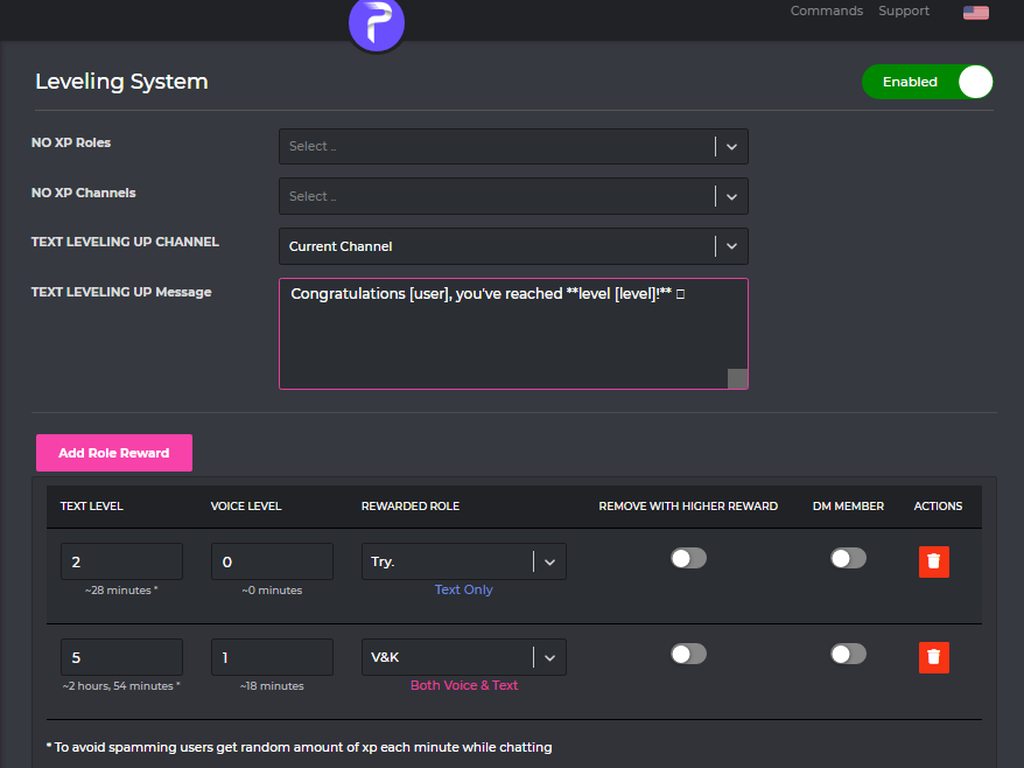 untold flume
then put multiple roles and add the same level for each one
half narwhal
yo @untold flume it didnt work with the regions thing.... is there any other way to fix that?
untold flume
@half narwhal i don't think so , it's an overload after all we can't do much about
half narwhal
alright thanks though
untold flume
you're welcome
 heady turtle
The bot says the music is in maintenance

 untold flume
@obsidian veldt no , but you can set the timer for 99 years or something like that
@heady turtle send me your server in dms
 obsidian veldt
untold flume
<@753181970087018527> no , but you can set the timer for 99 years or something l...
obsidian veldt
untold flume
<@753181970087018527> no , but you can set the timer for 99 years or something l...
i couldn't find the default timer. could you help me change that 👀
 untold flume
Head to the dashboard > select your server > moderation module > edit #ban command > @obsidian veldt

@heady dirge try changing your browser
 heady dirge
F I'm on a chromebook
untold flume
untold flume
Head to the dashboard > select your server > moderation module > edit #ban comma...
Or you can just ban them manually for 90 years #ban @untold flume 90y i doubt they'll try to join after 90 years
cloud whale
what's wrong with the bot? the delay of songs, the bot disappears, then sings, then does not plow ping here

it is impossible to listen to music intermittently, my regions are still the same
untold flume
@cloud whale It's due to music overload, a lot of people are using the bot
Wait a bit and it should get better
 solemn berry
question when using the option to moderate links how do i make it ignore gifs posted through discord
i want it to block anything that isnt a gif.
solemn berry
they were just talking about that above☝️
untold flume
@solemn berry add these gif links in the whitelist urls section
 tawdry barn
Yeah
solemn berry
do i just whitelist the link for tenor if i
ah so let say i jus white list tenor . com itself that mean any gif from there can be posted?
 limber oxide
Hey guys i connected the bot to my discord. I am currently trying to upload an embedded message, after i completed all of the required fields and press send to specific chat. The message never appeared on discord. Anyone have tips? or solution?
fathom meadow
limber oxide
Hey guys i connected the bot to my discord. I am currently trying to upload an e...
<@&675070424748654593> ..
native geyser
limber oxide
Hey guys i connected the bot to my discord. I am currently trying to upload an e...
can i see your embed settings please
 somber garnet
Eloo, I'm just making a verify role and was wondering if the Take option would be my best option pls ping me thank you
native geyser
depending on how you want to set it
if you give new people an autorole and want it to be removed then take / toggle
if you want people to get a role when they react then give / toggle
limber oxide
native geyser
can i see your embed settings please
how do i screen shot again lol, my button stopped working
somber garnet
The room should actually disappear after the role is given I am sure so it doesn't really matter I think sry drinking
limber oxide
left images, im on two moniters
native geyser
Yes, fill the field name as well and it should be alright
limber oxide
wow thanks alot
native geyser
Yw
native geyser
somber garnet
Okey
Then depending on your choice it should be give or toggle
somber garnet
Well I think the one that would take the role away if the member left would be best
 supple raptor
Is there a way in the description section of an embedded message to add a blank space between characters? Trying to space it like that but it doesn't show in the final sent message?

 turbid herald
Having trouble getting Pro bot to send embeds, it is new to the server and is being tested at the moment. We are attempting to setup a self assign roles embed and when we click "send new message" the bots dashboard says successful but when we check the text channel that was selected Pro bot hasn't posted anything.
nocturne flax
hello there!! is there a way i can create custom commands with probot? i'm new to the whole thing and i'm trying to understand it ^^
untold flume
@turbid herald fill every selected element
@nocturne flax no you can't create custom commands
turbid herald
untold flume
<@125240339194839040> fill every selected element
That got it, just had an empty description field for one of the "Field" categories in the embed.
nocturne flax
thank you for answering!!
turbid herald
thank you @untold flume
 amber plinth
is there voice support?
untold flume
@supple raptor I don't think so
@turbid herald you're welcome
@nocturne flax you're welcome
@amber plinth no , you can ask your question here
 untold flume
make sure the emoji exists in your server
 untold flume
@amber plinth it doesn't appear or what exactly?
amber plinth

 vivid owl
Why does this happen when mentioning a role in an embed?
 untold flume
@vivid owl have you tried mentioning it like this <@&RoleID>?
untold flume
you're welcome
nocturne flax
Hello
untold flume
Hi how can i help you?@nocturne flax
 real trail
Can probot give a specific role to everyone in the discord?
real trail
Perfect, cheers!
untold flume
 green heron
help ?
 untold flume
you've been blacklisted for using multiple accounts @green heron
 frigid heron
do i need premium for probot to tag a channel link in message?
untold flume
No , <#ChannelID> @frigid heron
frigid heron
untold flume
No , <#ChannelID> <@749235555711189083>
ok thanks let me give it try.
untold flume
You're welcome
 civic panther
Hey just wondering how to set up@the music command in a certain channel
fathom meadow
civic panther
Hey just wondering how to set up@the music command in a certain channel
<@&675070424748654593> ..
 viral sundial
civic panther
Hey just wondering how to set up@the music command in a certain channel
viral sundial
civic panther
Hey just wondering how to set up@the music command in a certain channel
https://probot.io/dashboard select your server, on the music commands section click on the edit button that is next to #play and select the an enabne channel
Welcome images, moderation, leveling, reaction roles, logs, high quality music and many many more!
 rain timber
green heron
help ?
rain timber
green heron
help ?
same probelm please help me with it
civic panther
I got it
 fathom meadow
rain timber
same probelm please help me with it
fathom meadow
rain timber
same probelm please help me with it
<@&675070424748654593> ..
native geyser
rain timber
suspicious activity, being checked
rain timber
native geyser
suspicious activity, being checked
when i can do it normal without any probelms
native geyser
dont know when exactly, sorry
 raw pewter
What does the NO xp role mean?
fathom meadow
raw pewter
What does the NO xp role mean?
<@&675070424748654593>
native geyser
raw pewter
What does the NO xp role mean?
it means those roles will stop you from gaining xp
nocturne flax
Best way to get credits boys?
fathom meadow
nocturne flax
Best way to get credits boys?
<@&675070424748654593> ..
fathom meadow
nocturne flax
Best way to get credits boys?
How to get Credits  ??
??
Use :
/daily
#daily
- the bot will send you the website to get credits
Or :
From voting to the bot
/daily : you will get from 400 to 3000 credits
vote : you will get from 500 to 2600 credits
 halcyon crater
<@&675070424748654593>
Help
The website is not working for me
It's says "Host Error"

 hushed steeple
halcyon crater
The website is not working for me
hushed steeple
halcyon crater
The website is not working for me
<@&675070424748654593>
nocturne flax
Auto roles and leveling system aren't working?
I added my lowest role to auto roles and leveling to see if either would work. In leveling I put it as 0 text and 0 voice but people who get past the welcome screen and also agree to the rules, and post in text are not getting the role assigned
<@&675070424748654593>
 oak escarp
Trying to set up reaction roles for the first time. Doesn't show the list of roles on my server when trying to assign roles to a reaction emoji <@&675070424748654593>
 tropic cosmos
whats the join msg command <@&675070424748654593>
split needle
halcyon crater
The website is not working for me
Can you try again now?
split needle
nocturne flax
Auto roles and leveling system aren't working?
I added my lowest role to auto ro...
Is the probot role high enough? Is that role having any managing permision?
split needle
oak escarp
Trying to set up reaction roles for the first time. Doesn't show the list of rol...
Move the probot role higher in your server role list
split needle
tropic cosmos
whats the join msg command <@&675070424748654593>
There's no command to set up it
Go to https://probot.io/dashboard, select your server on the left, go to welcomer and setup the feature there
Welcome images, moderation, leveling, reaction roles, logs, high quality music and many many more!
nocturne flax
When I use the rank command it doesn't show the right username, instead in the rank photo it shows "-Virtual", thought my profile picture is correct
split needle
nocturne flax
When I use the rank command it doesn't show the right username, instead in the r...
Try change your usename and change back after a while
nocturne flax
split needle
Is the probot role high enough? Is that role having any managing permision?
Yes probot has admin permission. The role that I need it to give does not have managing permissions
split needle
Beside having admin perm, does the probot role higher than that role and your members' roles?
nocturne flax
the welcomer aspect of the bot isn't working
 sand hawk
anyone know a fix to the choppy music? it plays for 2-3 seconds and then cuts out and repeats the loop
of cuttting in and out
 unkempt sun
split needle
unkempt sun
split needle
 regal pivot
How can get credit
regal pivot
How can get credit
Get /daily and vote on top.gg
split needle
nocturne flax
the welcomer aspect of the bot isn't working
Can I see your full settings?
@unkempt sun @sand hawk try change channel region to europe or somewhere near that, use stop command to refresh the player and add songs again
@tardy mulch #chat-en
nocturne flax
split needle
Can I see your full settings?
 split needle
Do you have image enabled?
nocturne flax
No I don’t
split needle

nocturne flax
split needle
Do you have image enabled?
 split needle
Try enable it, set it to send to a channel different from the message and save, then disable image
nocturne flax
Alright I did it
 pallid token
 merry maple
Hi , the probot in my discord is lagging and keeps have interruptions in sound. any suggestions?
split needle
merry maple
Hi , the probot in my discord is lagging and keeps have interruptions in sound. ...
Try change channel region to europe or somewhere near that, use stop command to refresh the player and add songs again
merry maple
how do i change region?
split needle
Voice channel setting - region
 worn ridge
I need transfer profile @split needle
merry maple
the bot is stil skipping after a region change
untold flume
@tight axle how so? is it repeating the login part?
@worn ridge profile transfer is now closed
@merry maple try stoping-replaying the song
 tight axle
when i attempt to access the dashboard the website shows this

even on a different browser same issue
tight axle
same issue after clearing cache
also did the same on a different browser (ie chrome and opera gx)
merry maple
untold flume
<@375267283930447873> try stoping-replaying the song
i did. still skiping 😦 srry to be a bother.not sure whyy.
untold flume
@tight axle i assume it's a connection issue , because the dashboard works fine with me at least , wait a bit and it should get back to normal again
@merry maple try switching between regions
tight axle
untold flume
<@255227711453134859> i assume it's a connection issue , because the dashboard w...
noted, thanks for the help
untold flume
you're welcome
somber garnet
Hi I made a verification role but I was wondering what toggle would be best to take the role away when a member leaves pls ping me thank you
untold flume
@somber garnet ahh actually it's a discord feature , when someone leaves your server all of his roles will be removed
So you don't have to bother yourself with these things
merry maple
untold flume
<@375267283930447873> try switching between regions
i did in the chanel specfic perm. region changes and still having the pause issues
untold flume
@merry maple i think it's due to music overload , alot of people are using the bot , wait a bit and it should get better
 neon sable
Is the ProBot dashboard well adapted for smartphone and tablet??
split needle
neon sable
Is the ProBot dashboard well adapted for smartphone and tablet??
Yes but not overraly
It'll be better on next update of the site which is in beta rn
neon sable
For smartphone and tablet??
 neon sable
👍
nocturne flax
How many reactions we get with free version?
 hollow veldt
is there a more complete list of variables to use, or is this it?
[user] Mentions the new member
[userName] New member name without mentioning
[memberCount] Amount of members reached
[server] Server name
[inviter] Mentions the Inviter Premium
[inviterName] Inviter name without mentioning Premium
[invites] User's invite counter Premium
split needle
nocturne flax
How many reactions we get with free version?
20 max as discord default per pannel and unlimited pannel? But still 1 role per react
split needle
hollow veldt
is there a more complete list of variables to use, or is this it?
[user] Mention...
Only those
You may see some more in pins
hollow veldt
split needle
Only those
You may see some more in pins
thank you!!
nocturne flax
split needle
20 max as discord default per pannel and unlimited pannel? But still 1 role per ...
So. I can have 20 reaction roles embeds, but only one role per reaction?
split needle
Yea
nocturne flax
nocturne flax
So. I can have 20 reaction roles embeds, but only one role per reaction?
Whoops o meant one role per embed.
split needle
For multiple role per reaction, you'll need prime for it
For free plan then max 20 as max 20 reactions per message 
nocturne flax
How many messages am I allowed.
split needle
split needle
20 max as discord default per pannel and unlimited pannel? But still 1 role per ...
Unlimited as said as pannel
nocturne flax
Ok cool.
 rich glade
x Bad top.gg Vote Request, please try again later, if this issue continues please reach out
What this ?
 frail plank
The probot in my friends server isnt playing/keeps stopping. Is there anyway to fix it? its been happening for a few hours
 frank herald
is the probot panel server down?
 last trench
How do i get reaction roles to work? and how long would it take for it to take affect?

 vivid vigil
nvm I got it, moved the ProBot role above every other role
 split needle
rich glade
x Bad top.gg Vote Request, please try again later, if this issue continues pleas...
split needle
rich glade
x Bad top.gg Vote Request, please try again later, if this issue continues pleas...
Sent your id to check
split needle
frail plank
The probot in my friends server isnt playing/keeps stopping. Is there anyway to ...
Overload issue
Nothing can be done much
Maybe try again a while later
split needle
last trench
How do i get reaction roles to work? and how long would it take for it to take a...
To setup reaction roles, go to https://probot.io/dashboard, select your server, go to embed messages module to create and send embed messages for the reaction roles to where you want. Then go to reaction role module to setup the feature on the sent embed messages.
Notice: Be sure the Probot✨ role is higher than other roles. Embed message should not have any blank element (better to remove them if not using).
It should work right after you save changes unless you did something wrong
Welcome images, moderation, leveling, reaction roles, logs, high quality music and many many more!
Will report this to developer
@frank herald @nocturne flax
rich glade
split needle
Sent your id to check
942134376735584319
split needle
I already got it
I mean I sent it for developers to check
last trench
Thanks so much, i managed to figure it out after a while 
 weak oar
Hi, I'm trying to add reaction roles but can't search for roles to link them to the emoji. Any ideas what I'm doing wrong?
Also, I'd love to be able to have them select one emoji but get given two roles. Is that possible?
fathom meadow
@nocturne flax
Did you try to use the
/temp time
you can choose the time to delete the voice channel by seconds
nocturne flax
fathom meadow
<@456226577798135808>
Did you try to use the
/temp time
you can choose the ti...
ok ty
fathom meadow
yw
nocturne flax
 fathom meadow
weak oar
Hi, I'm trying to add reaction roles but can't search for roles to link them to ...
fathom meadow
weak oar
Hi, I'm trying to add reaction roles but can't search for roles to link them to ...
<@&675070424748654593> ..
@weak oar Drag probot role up
fathom meadow
nocturne flax
Try another browser
weak oar
fathom meadow
<@625175968507756584> Drag probot role up
Do you mean like this:
 fathom meadow
Exactly
weak oar
(ignore all my tabs open 😆 )
fathom meadow
The roles also didn't exist?
weak oar
Nah, the roles were on the server, but not showing up on the probot dashboard. But now they are! Thankyou for such an easy fix 🥰
I don't suppose you know if it's possible to add two roles from the one emoji?
oh, I'm an idiot
I think I can see that I can now if I get premium.
fathom meadow
weak oar
I don't suppose you know if it's possible to add two roles from the one emoji?
Actually you can't
native geyser
weak oar
I don't suppose you know if it's possible to add two roles from the one emoji?
it is with only premium though
fathom meadow
@native geyser I did what you told me.. I mentioned support and started to help people after 20 minutes.. I am so happy
 median pilot
Hi guys, I'm trying to use probot for the leveling system. But the bot doesnt give the rol to the members when they level up. I'm also using reaction roles, and this works just fine. Any ideas?

The role of the probot is placed at the top and I even gave it admin permissions
 fathom meadow
median pilot
Hi guys, I'm trying to use probot for the leveling system. But the bot doesnt gi...
fathom meadow
median pilot
Hi guys, I'm trying to use probot for the leveling system. But the bot doesnt gi...
<@&675070424748654593> ..
native geyser
median pilot
Hi guys, I'm trying to use probot for the leveling system. But the bot doesnt gi...
make sure your members reached both of the target levels
native geyser
make sure the bots role is above other roles
nocturne flax
native geyser
make sure the bots role is above other roles
probot role is the highest role in the server
native geyser
make sure the autorole doesnt have any manage perms
nocturne flax
native geyser
make sure the autorole doesnt have any manage perms
there is no admin permission in the members role
even sending embeds
 sour wharf
How to stop repeat the song?
native geyser
/repeat
native geyser
yw
median pilot
native geyser
make sure your members reached both of the target levels
oh it is both? So it's not or first hit text lvl, because my members are not using voice
native geyser
nope its both, you can disable voice by making the target level 0
median pilot
native geyser
nope its both, you can disable voice by making the target level 0
thanks a lot, this will probably fix it
native geyser
yw
 drifting vessel
@untold flume i need saving my account becuse no any hackers hack my account
 leaden fulcrum
<@&675070424748654593> I have a problem in my server. For some reason the levels don't work for certain people. I tried fixing it, but I have no idea how to. Any ideas?
nocturne flax
Guys is this only my problem or you have it too i cant go to dashboard
untold flume
@leaden fulcrum check your no-xp roles/channels and make sure to enable utility module
@nocturne flax how so?
nocturne flax
Like i cant even go to web
leaden fulcrum
untold flume
<@658231034424590336> check your no-xp roles/channels and make sure to enable ut...
How do I enable utility module?
untold flume
@nocturne flax try changing your browser
untold flume
from the dashboard https://probot.io/dashboard @leaden fulcrum
Welcome images, moderation, leveling, reaction roles, logs, high quality music and many many more!
@nocturne flax try another one
Or try clearing the cache
leaden fulcrum
untold flume
from the dashboard https://probot.io/dashboard <@658231034424590336>
I have it enabled and no xp roles are set
But it still doesn't work
Well it works for some people, but for others it doesn't
untold flume
send me your server in dms with admin perms please
leaden fulcrum
Alright
nocturne flax
Wait cant it be something with my location were i live ?
Cuz i live in czech and i had this problem several times
I also cleared cache and tried and it didnt work
untold flume
maybe turning on vpn?@nocturne flax
untold flume
Idrk since it's not a probot related question that I can't answer, the dashboard is working fine and we haven't detected any issues with it. @nocturne flax
you can ask how to fix it in #chat-en instead
nocturne flax
Okay imma try that
 silver bough
How to make the bot disconnect?
untold flume
/stop @silver bough
silver bough
untold flume
> /stop <@685480220873982001>
Oh..use /,i see..i use #dc,no wonder it wont dc..tq:3
untold flume

 tacit pelican
does probot auto leave vc after a certain amount of time
untold flume
@nocturne flax wait a bit and it should get back to normal again
@tacit pelican yes
if there's nothing playing
native geyser
can you elaborate please
 cobalt pine
native geyser
can you elaborate please
cobalt pine
native geyser
can you elaborate please
i added bot to the server
from top gg link
but then i was redirected to this page
native geyser
Discord
Discord is the easiest way to communicate over voice, video, and text. Chat, hang out, and stay close with your friends and communities.

 native geyser
try https://probot.io/invite
native geyser
native geyser
try https://probot.io/invite
kick the bot and reinvite from here
cobalt pine
🥲
untold flume
@left vector profile transfer is closed
 left vector
untold flume
<@921960313132318750> profile transfer is closed
left vector
untold flume
<@921960313132318750> profile transfer is closed
There is no way to talk to an admin who can transfer it?
untold flume
No
untold flume
We can't do much about it , the only way is to wait
left vector
untold flume
We can't do much about it , the only way is to wait
How long do I have to wait?
untold flume
We don't know , no eta
left vector
untold flume
We don't know , no eta
Approximately? A month, two months, what?
untold flume
untold flume
We don't know , no eta
As i said , I don't know
left vector
untold flume
As i said , I don't know
Ok thanks
untold flume
You're welcome
 wise blaze
Yop, Probot has an anti bot/raid system with captcha or something when someone enters the server?
 silent geyser
I have a Discord server and I have a second account. I forgot the password to which it was installed, and my second account is with me on the server, so I mistakenly gave my second account the Honor to the server, meaning the crown sign. I hope you give me a solution.
native geyser
this is probot support not discord support, sorry