#support-en
1 messages · Page 348 of 1
 nocturne flax
Role
On my server
@quaint sentinel
Help
Having a weird issue - Trying to use embeds to create a list of rules and the preview on the website has the .gif playing flawlessly - however, once the embed is sent to the server, the gif immediately breaks soon as you hover over it. Any idea how I can go about fixing this?
<@&675070424748654593>
 split needle
nocturne flax
How do i set autorol
split needle
nocturne flax
How do i set autorol
On the dashboard, find the auto roles module and add roles there
split needle
nocturne flax
Having a weird issue - Trying to use embeds to create a list of rules and the pr...
Is the gif bigger than 3Mb?
If so try upload it to another media hosting service (like imgur) and get the link to replace with the one on there
nocturne flax
It is larger than 3MB, yes. They are ~4.5mb each
nocturne flax
split needle
Is the gif bigger than 3Mb?
If so try upload it to another media hosting service...
Using an imgur link doesn't work either, unfortunately
split needle
I mean replace it in the url box of the image
And prefer getting the direct link (which starts with i.imgur.com)
nocturne flax
Uploading a gif isn't giving me an i.imgur.com link, just imgur.com/a/xxxxxx
split needle
Tap onto the gif and tap the share button will give you the direct link
nocturne flax
Doing that breaks it from the start
split needle
Can you dm me the link of the gif?
 dire socket
<@&675070424748654593> I am having issues using the top and rank command in my server and they are enabled and I dont see why they aint working
split needle
dire socket
<@&675070424748654593> I am having issues using the top and rank command in my s...
Check them in both leveling system and utility module also
dire socket
I feel stupid lol thank you'
 valid badger
How do i make probot give a role to who joins
 untold flume
@valid badger head to the dashboard > select your server > autoroles module
nocturne flax
How do I designate a channel for probot to use for music commands
 primal goblet
help plz
how to set up the bot? on which website?
split needle
nocturne flax
How do I designate a channel for probot to use for music commands
Set enabled channel for every music command on the dashboard is the only way for now
nocturne flax
reset exp text kiểu gì ?
split needle
primal goblet
help plz
how to set up the bot? on which website?
Welcome images, moderation, leveling, reaction roles, logs, high quality music and many many more!
split needle
nocturne flax
reset exp text kiểu gì ?
#support-int
 sullen flower
Welcomer
nocturne flax
Hello
how can i mention room in another server ?
I mean mention room in another server in my server
split needle
nocturne flax
how can i mention room in another server ?
I mean mention room in another server...
Get that channel's id and use as <#id>
Users not in that server having that channel will see it as #invalid-channel until they join the server
You can simply get a channel id by mentioning it on chat and put a back slash before it
Ex: \#support-en = [#support-en](/guild/224308865427046402/channel/664941916722429986/)
nocturne flax
thanks @split needle
 wooden timber
What can I do with it?
 split needle
No
You can only add each single word for now
split needle
wooden timber
What can I do with it?
Buy profile/rank card backgrounds and prime/premium bots
wooden timber
As much as I can buy a prime bot?
split needle
wooden timber
As much as I can buy a prime bot?
Yea but 375k credits for 1 month of prime which is $2 dashboard balance
 lethal gyro
How can I remove or reset xp from a user who has been banned?
 native geyser
#reset text
user ID number
#reset voiceuser ID number
 rotund yew
Is there some documentation on how exactly the leveling system works?
 jovial wadi
can anyone help me figure out the "moderation" tab for ProBot?
 tulip island
How can i warn the server host with probot?
 wanton gazelle
<@&675070424748654593>
native geyser
rotund yew
Is there some documentation on how exactly the leveling system works?
you get xp once every minute for text, once every 2 minutes for voice and the amount you get is randomized for both, only devs know the gap
native geyser
jovial wadi
can anyone help me figure out the "moderation" tab for ProBot?
sure what are you struggling with
native geyser
tulip island
How can i warn the server host with probot?
/warn
tulip island
i tried that it wont let me
native geyser
what is the answer you're getting
rotund yew
native geyser
you get xp once every minute for text, once every 2 minutes for voice and the am...
What are the “times” underneath
 native geyser
rotund yew
What are the “times” underneath
native geyser
rotund yew
What are the “times” underneath
it shows roughly how long it takes to get to that level
 reef kayak
my friend cant use probot commands until i give them admin powers how do i fix?
native geyser
reef kayak
my friend cant use probot commands until i give them admin powers how do i fix?
which exact commands is your friend having troubles with using
tulip island
native geyser
what is the answer you're getting
it says i cant warn them
native geyser
tulip island
it says i cant warn them
in order to warn your highest role has to be above their highest role
native geyser
reef kayak
playing music
i see, on dashboard do you have any dj roles set?
reef kayak
i do not see anything about dj roles in my overview
native geyser
not set or you can not find the location?
reef kayak
i cant find it
native geyser
https://probot.io/dashboard -> select your server -> music module
Welcome images, moderation, leveling, reaction roles, logs, high quality music and many many more!
reef kayak
OHH and i just put in the roles im allowing to use music in "dj roles"?
native geyser
yes, if you dont set anything everyone will be able to use music commands
reef kayak
gotcha thank you so much i appreciate it
native geyser
yw
jovial wadi
native geyser
sure what are you struggling with
I seem to have set everything up, but he says that he does not see (

 lean badgerBOT
native geyser
#help mute
lean badgerBOT
native geyser
#help mute
**Command: mute**
Mute a member from text/voice channels so they cannot type.
**Usage:**
#mute [user] (time ends with m,h,d,mo,y) (reason)
**Examples:**
#mute @native geyser 1m Spamming
#mute @native geyser 1h
#mute @native geyser 1d
#mute @native geyser 1mo
#mute @native geyser 1y
jovial wadi
native geyser
its supposed to be like this
#mute `@mention` `time`
thx
native geyser
yw
 civic igloo
How do you make a react role command
native geyser
you cant set it with commands
to set it:
https://probot.io/dashboard
- from embed messages section create an embed message and send it to your server (the message you have to select basically)
- from reaction roles section select the embed message you just sent
- add a reaction
- add roles
Welcome images, moderation, leveling, reaction roles, logs, high quality music and many many more!
native geyser
yw
jovial wadi
native geyser
yw
how to send +rep?
native geyser
rep command is temporarily disabled for everyone
 warm olive
How to Give Levels Or Xp Members Manually
native geyser
currently its not possible to do so
 west kelp
https://pbtax.xyz you can use this website to calculate tax

Calculate probot tax fast and easy
 native beacon
west kelp
https://pbtax.xyz you can use this website to calculate tax
native beacon
west kelp
https://pbtax.xyz you can use this website to calculate tax
no I just need the formula and I couldn't figure it out from this site
west kelp
it's 5% of the original amount
native beacon
west kelp
it's 5% of the original amount
but 5% of 100,000 is 105,000... not 105,264 😵💫

sorry for too much questions
west kelp
then maybe the tax is 5.5% or something with a decimel, im not sure
native beacon
okay, thank you
 molten pulsar
whats the xp rate of pro bot leveling system?
west kelp
yw
west kelp
molten pulsar
whats the xp rate of pro bot leveling system?
each 2 minutes you get text xp, and staying in a voice channel gives you voice xp every 2 minutes
west kelp
yw
 graceful pawn
hello there
is it premium or lv100 is the highest since it doesn't let type higher number than 100?

because this way after 5 months user can't have goal to a higher level
untold flume
@graceful pawn level 100 is the highest
graceful pawn
thank you
untold flume
yw
nocturne flax
what to do when the bot does not rank for the level
untold flume
@nocturne flax you mean it doesn't give xp?
nocturne flax
can some command add a level?
untold flume
@nocturne flax for now no
nocturne flax
okey thx
untold flume
yw
 dry ingot
Hi is there an issue with music feature in bot atm? It's not replying my request or playing the music that I asked to do. Other commands are working as intended except music feature.
west kelp
Does the bot reply or?
dry ingot
Bot never reply the music request
west kelp
Make sure the music module is enabled in the dashboard
dry ingot

It's enabled. Also it joins the channel where I connected in but bot times out after 30secs without playing anything
nocturne flax
untold flume
<@456226577798135808> you mean it doesn't give xp?
Gives xp but does not rank for e.g. level 5, and does not rank for that level 5
untold flume
@nocturne flax i didn't understand wdym by it doesn't rank can you provide a screenshot or something?
dry ingot
west kelp
Make sure the music module is enabled in the dashboard
I guess it's fixed, and was issue with mine. I guess yt short link doesn't take it
 sonic swift
How can I contribute in probot Hindi lang
untold flume
@sonic swift dm Ruru#0666
 old lotus
help
 untold flume
@old lotus fnr already answered you so please use one support channel
old lotus
untold flume
<@926452163155202078> fnr already answered you so please use one support channel...
that didn't work
i did what he said
but still the same problem
untold flume
Did you take your daily from any other accounts?@old lotus
old lotus
untold flume
Did you take your daily from any other accounts?<@926452163155202078>
no this is my only account
my older account died long time ago
and i wasn't using probot then
untold flume
@old lotus have you tried logging out from your other accounts and changing your browser?
old lotus
untold flume
<@926452163155202078> have you tried logging out from your other accounts and ch...
let me change my browser and try again
old lotus
untold flume
<@926452163155202078> have you tried logging out from your other accounts and ch...
nothing changed
same problem
untold flume
@old lotus maybe restarting your internet router would help
old lotus
untold flume
<@926452163155202078> maybe restarting your internet router would help
nope
didn't
i wanna know where the problem is
untold flume
@old lotus i see probably you've been blacklisted from the daily gift and since you speak the same language as no comment report in his dms please and see his answer
old lotus
untold flume
<@926452163155202078> i see probably you've been blacklisted from the daily gift...
why i've been blacklisted
what did i do
my first time i wanted to take a daily
it showed me this

makes no sense
untold flume
@old lotus have you tried claiming it with another account? Since it's the first time
old lotus
untold flume
<@926452163155202078> have you tried claiming it with another account? Since it'...
nope
untold flume
try using another one
 rapid widget
how do i check when i have joined discord
i know there is a command with probot but i forgot it
untold flume
/user
I assume you mean this command
rapid widget
yes thank you
untold flume
yw
untold flume
Where exactly here or in your server?
untold flume
yw
rapid widget
and one more thing
is there a way i can see exact date i joined discord
and not just years?
untold flume
Click on the date and it will show you the exact thing you're looking for probably
rapid widget
Yees thank you
untold flume
yw
old lotus
untold flume
try using another one
why am i blacklisted
untold flume
@old lotus it didn't work?
old lotus
nope
old lotus
untold flume
<@926452163155202078> it didn't work?
can u contact the owners bcz of this problem ??
untold flume
untold flume
<@926452163155202078> i see probably you've been blacklisted from the daily gift...
Well i think the only way is to follow my instructions above and i will try contacting the owners for you
old lotus
untold flume
Well i think the only way is to follow my instructions above and i will try cont...
thank u
i tried all
of that
untold flume
old lotus
thank u
yw and i meant the reporting thing
untold flume
hm?
 novel swan

novel swan
by
 silver vault
<@&336913504051265537> some one posting links here
 frozen pilot
done
native geyser
already taken care of, thanks
 reef field
Why i’am blacklested?
 lime heart
@tender obsidian @nocturne flax The person who is using 18+ photos
reef field
@untold flume why i’am blacklested?
 fathom meadow
reef field
Why i’am blacklested?
fathom meadow
reef field
Why i’am blacklested?
<@&675070424748654593> 💔
west kelp
reef field
<@852923979437834291> why i’am blacklested?
Selling credits
reef field
west kelp
Selling credits
Nope brother I don’t sell any credits
west kelp
Well you can talk to an admin if you have proof you're innocent
reef field
west kelp
Well you can talk to an admin if you have proof you're innocent
Pls Evidence
reef field
west kelp
Well you can talk to an admin if you have proof you're innocent
I have a Evidence
west kelp
Then DM an admin
reef field
west kelp
Then DM an admin
Admin dm is locked
 native geyser
i'm unable to find a discord bot named fastpay
but an application that allows you to send money to people does exist
either way the person who has been checking the reports do know what it is.
 neon sable
Doubt, can you translate the ProBot??
native geyser
into which language?
native geyser
i am the translator team head manager so yes i do know how to translate the bot into new languages, however we can not always find natives who are willing to translate the bot into their own language
neon sable
So the translator is kind of complex to translate into another language because it comes out the result of the translation not correct but correct!
native geyser
sorry i dont know what i should understand from this
neon sable
It's like this, when developers use translators to put the translation on the website or in the bot and the natives see that this translation is not correct 100%
nocturne flax
hi how can ı open music with the bot on speak channeşl
west kelp
Use /play song name
native geyser
neon sable
It's like this, when developers use translators to put the translation on the we...
we get natives to translate the bot, if its as you say for your language that means the translators we had wanted to make it easier for themselves apparently
 sinful zinc
I have a youtube video link only channel in my server, but members with low roles can still send normal messages? How can I fix this?
sinful zinc
Yes, and yes.
west kelp
Invite me to your server
sinful zinc
ok
neon sable
native geyser
we get natives to translate the bot, if its as you say for your language that me...
Using Crowdin??
native geyser
yes
neon sable
I understand. this crowdin is very simple because there they translate well review by natives more thanks a lot I just sent this subject just to clear my doubt ok.
west kelp
Fixed
 fossil blaze
how to change background in #rank ?
native geyser
Welcome images, moderation, leveling, reaction roles, logs, high quality music and many many more!
fossil blaze
there is no type on the server when you write the #rank command there how to change it?
native geyser
only via this website
 native geyser
Welcome images, moderation, leveling, reaction roles, logs, high quality music and many many more!
here
on website
 tall kite
Hello, I have a slite issue with reaction roles, so I created an embed, did everything although I don't see any of the current embed message that I sent here, I already refreshed yet still it only shows this ⤵️ (those are my previous reaction role messages and it did work, although it doesn't work for me now)

I figured it out!
It works now thanks anyway.
untold flume
@tall kite to send an embed message you have to fill every selected element that's mostly your issue and yw
 split lake
Does probot have a word filter? and if so can it use regex? or does it already use some sort of built in regex?
untold flume
@split lake you can use the automod module for that but i really didn't understand the regex something
nocturne flax
How he say to everyone that join my dc „hey“ ?
split lake
untold flume
<@236195385415172106> you can use the automod module for that but i really didn'...

for instance i can use \s to find whitespace
 untold flume
@split lake I don't really know about the programming stuffs you can ask the developers instead
split lake
it's not even really programming.... it's just scripting....
untold flume
nocturne flax
How he say to everyone that join my dc „hey“ ?
wdym? Is that even a Probot-related question?
split lake
but alright
untold flume
@split lake well sorry i don't know about these things
untold flume
In their dms maybe
nocturne flax
Is there a reason why the leveling system would stop working?
untold flume
@split lake I don't think contacting them will result in getting banned
@nocturne flax stop working? How so
nocturne flax
Nobody's getting exp
untold flume
is your utility module enabled?
nocturne flax
Yes, it is
 sonic sigil
I wont buy credit where.?
untold flume
Do you have any no xp-roles/channels @nocturne flax
@sonic sigil you can't buy or sell credits it's against our rules actually
nocturne flax
untold flume
Do you have any no xp-roles/channels <@456226577798135808>
I've got a no-xp role, but there's no no-XP channel at the moment
Is that a problem? Just asking
untold flume
yeah users with this role will not be able to gain xp
 knotty lark
Всём ку
knotty lark
Ок
nocturne flax
untold flume
yeah users with this role will not be able to gain xp
Hmmm, it makes sense
untold flume
@nocturne flax how can i help you?
split lake
untold flume
<@236195385415172106> I don't think contacting them will result in getting banne...
btw who are the devs?
untold flume
Users with contributors role probably
split lake
hmm
 slim mason
uh probot is skipping real bad right now, or is it just me
west kelp
it's due to music overload, try changing the region to russia
slim mason
oh, how?
 pearl bluff
quick question, does the bot count levels for threads as well??
west kelp
yes
pearl bluff
oh, so people typing in threads counts for their level
west kelp
@slim mason you should change it from the voice channel's settings ^^ my bad
 strong shale
for auto responders, is there a way you can delete the messages after some time
untold flume
@strong shale nope
untold flume
You can suggest it here #573053418017521664
nocturne flax
what is the command for the bot to leave the channel?
untold flume
@nocturne flax you mean to leave the voice channel?
nocturne flax
yes
untold flume
/stop
nocturne flax
oke thank you ❤️ i'm from Poland 🙂
untold flume
yw
 strange olive
i keep getting application did not respond when trying to do slash commands
 hearty kelp
does ProBot have reaction roles using buttons instead of reactions?
untold flume
strange olive
i keep getting application did not respond when trying to do slash commands
Have you tried using the command with the default prefix? #
@hearty kelp using buttons? I didn't get it wdym
hearty kelp
Buttons, instead of reactions.
untold flume
nope
 strange olive
untold flume
Have you tried using the command with the default prefix? #
strange olive
untold flume
Have you tried using the command with the default prefix? #
yes thats working
untold flume
Nope not yet but you can suggest that here #573053418017521664 @hearty kelp
untold flume
strange olive
yes thats working
It might be a bug or something wait a bit and it will fix itself probably using the default prefix is the only way for now
strange olive
untold flume
It might be a bug or something wait a bit and it will fix itself probably using ...
oki
nocturne flax
Hello,How do i make probot delete a command from (#cmd/#bot-cmd) when command is used
west kelp
in the settings in the dashboard, set it so the command is deleted after it's used
you have to do it for each command tho
nocturne flax
But i have other bots command not just probot command
west kelp
what's the issue
nocturne flax
So like anyone type in that chat it get deleted after like 5 sec or something
west kelp
well probot can only delete its commands
nocturne flax
Oh okay thank you,
west kelp
you're welcome
nocturne flax
how do i make the bot leave vc
 acoustic sundial
Hey
acoustic sundial
How do i make a giveaway on my discord server
west kelp
You can't make a giveaway via ProBot
west kelp
Yw
acoustic sundial
I just wanted to do a giveaway for my friends
I thought if i add probot it will work
Can i give u a rep or something?
Like a thanks
west kelp
ProBot doesn't have that feature - you can suggest it at #573053418017521664
acoustic sundial
Ty
reef field
@west kelp
west kelp
acoustic sundial
Can i give u a rep or something?
Not really, but consider it given, I appreciate it
west kelp
reef field
<@!659633074400788490>
?
nocturne flax
hey
west kelp
Hello, how may I help you
nocturne flax
My English is bad I am italian but, what are the command for show me the server roles?
reef field
west kelp
?
But i dont know selling credit band
west kelp
nocturne flax
My English is bad I am italian but, what are the command for show me the server ...
Use /roles
nocturne flax
thx bro
west kelp
Yw
west kelp
reef field
But i dont know selling credit band
Stop asking to unblacklist, there is literal evidence that you were selling and you won't be unblacklisted
reef field
west kelp
Stop asking to unblacklist, there is literal evidence that you were selling and ...
I’m again selling credit??
Nope
 long portal
hi i have a pro bot but can you send me the link to change sever
reef field
If i’m again selling credit thats band me no deviation
west kelp
Change server of?
reef field
west kelp
Change server of?
Pls answer
long portal
so i need to put probot into another server
nocturne flax
west kelp
Stop asking to unblacklist, there is literal evidence that you were selling and ...
Is the anime person in your profile from sword art online?
west kelp
Discord
Discord is the easiest way to communicate over voice, video, and text. Chat, hang out, and stay close with your friends and communities.
Welcome images, moderation, leveling, reaction roles, logs, high quality music and many many more!
long portal
thx
west kelp
Yw
 solar crater
how does the levelling system work with probot?
west kelp
You get text xp everytime you send a message (2m cooldown)
You get voice xp every 2 minutes you stay in a voice channel.
The amount is random
solar crater
west kelp
You get text xp everytime you send a message (2m cooldown)
You get voice xp ever...
what is the amount you can get? Like min-max
and can you change it to be a 1m cooldown?
west kelp
We don't know the exact amount, but it's not big, probably like 10-20
west kelp
solar crater
and can you change it to be a 1m cooldown?
No and you can't change the XP amount
solar crater
west kelp
No and you can't change the XP amount
ok thanks
west kelp
Yw
west kelp
I already did
reef field
west kelp
I already did
Where is
solar crater
if I set it like this will the level only be awarded if your that level in voice channels?
 reef field
west kelp
I already did
reef field
west kelp
I already did
Bro
west kelp
Yeah
solar crater
for the welcome image can it be a GIF?
 half wren
.
solar crater
west kelp
Nope
ok thanks
lean badgerBOT
:white_check_mark: **@Namikaze minato warned! **
reef field
Why?
west kelp
What's your question exactly
 weary void
Hey question, how do I get the bot to send welcome messages and pictures? I read through the commands and cant find it
west kelp
https://probot.io/dashboard -> Select your server -> Welcomer
Welcome images, moderation, leveling, reaction roles, logs, high quality music and many many more!
weary void
Ok thank you
west kelp
You're welcome
untold flume
Ask it right away@toxic crypt
 toxic crypt
soo
i just added the bot to my server for my admins. I edited all my text channels so that the muted role cant send messages. Is there a way, so that the Bot removes the old "member" role and adds the "Muted" Role?
untold flume
@toxic crypt it doesn't remove the old role and it can't remove it
untold flume
By using /mute
toxic crypt
yes and /mute adds the "Muted" role am i right? I edited my "chat" Channel so that the "Muted" Role cantz send msgs
untold flume
@toxic crypt it doesn't work?
toxic crypt
but since the User has the old role it can still write messages anyway
untold flume
That's not possible go to your channel settings then permissions then click on your members role and send me a screenshot of its settings please
toxic crypt
It is a normal role with normal settings so that the role can write msg
autorole
brb
untold flume
toxic crypt
It is a normal role with normal settings so that the role can write msg
it shouldn't be able to send messages if you have enabled this permission for them then even if they're muted they will still be able to talk
toxic crypt
ok. So imagine one User has the default autorole „User“ and does something stupid so i /mute him. He then gets the „Muted“ role but can still write in that chat where i disabled sending messages for muted users. He can send it because of the „User“ role i think
untold flume
@toxic crypt yep that's what im trying to say the issue is not from our bot it's from your roles permissions
toxic crypt
ok so what do I need to change in the settings then?
untold flume
send messages permission must be in the middle on the / thing do it on each roles @toxic crypt
toxic crypt
ok i‘ll try it
 hasty moss
Where is Kurdish Chat or General chat?
nocturne flax
is it possible to reset everyones points in my server?
west kelp
Use #reset
nocturne flax
Thanks!
nocturne flax
west kelp
Use #reset
That command doesnt exist.
 wind fable
Hi...I'm attempting to rep a member in our server and I get this message: "Rep is disabled temporarily."
west kelp
nocturne flax
That command doesnt exist.
It does, make sure the moderation module is enabled
west kelp
wind fable
Hi...I'm attempting to rep a member in our server and I get this message: "Rep i...
Yes
It's disabled
wind fable
Hmmm...wonder why.
 tacit scroll
How is it I get more money
 quaint sentinel
tacit scroll
How is it I get more money
quaint sentinel
tacit scroll
How is it I get more money
you mean credits?
 azure tide
How do you change the prefix?
west kelp
#prefix [new prefix]
azure tide
west kelp
> #prefix [new prefix]
It’s not working for me
west kelp
Enable moderation module
azure tide
how do I do that?
west kelp
https://probot.io/dashboard -> Select your server -> Moderation
Welcome images, moderation, leveling, reaction roles, logs, high quality music and many many more!
Enable it
azure tide
Ty
 lament sinew
!help
 bronze timber
Hi
I was just wondering how chat exp works for this bot
I looked on the website but couldn't find any information
<@&675070424748654593>
 leaden hearth
Hi how do I set up pro bot to tell me who left my server
 novel summit
Hello, how can I tag a channel in the embed message?
split needle
bronze timber
Hi
I was just wondering how chat exp works for this bot
You get xp every 2 minutes while chatting or staying in a voice channel
split needle
leaden hearth
Hi how do I set up pro bot to tell me who left my server
https://probot.io/dashboard, select your server on the left side, go to logs module and setup member left log
Welcome images, moderation, leveling, reaction roles, logs, high quality music and many many more!
split needle
novel summit
Hello, how can I tag a channel in the embed message?
Get the channel id and use as <#id> in bot's messages
To get channel id, put a \ right before a channel mention on the chat and send it then copy the result to use
nocturne flax
Hi, ProBot is down?
 little iron
Rep Will he come back?
split needle
nocturne flax
Hi, ProBot is down?
No?
split needle
little iron
Rep Will he come back?
Don't know
nocturne flax
split needle
No?
probot is offline in one server where i am
 boreal pilot
Hola
 toxic ore
Hi I removed a embed so I could update it with reaction roles I have set and when I try to send message to the correct channel its not sending?
toxic ore
or is the feature broke at the moment? i kicked the bot and reinvited and i think its sleeping lol

 night dome
Hey my Probot is getting the error the application did not respond
 uncut cosmos
Is the bot offline??
night dome
yeah
uncut cosmos
Oh nooooo
night dome
might be Probye
 obsidian estuary
why probot is offline
 high violet
Probot is offline in my server
toxic ore
Okay so it wasnt me i was like what am i doing wrong lol
night dome
any ideas @thorny burrow
split needle
Seem like it's being offline in many servers so I've reported it to dramex so he could look into it
@nocturne flax @tame cloak @obsidian estuary @night dome @uncut cosmos @high violet
There's no custom command in the bot yet
high violet
Okay
toxic ore
Thank you Lurker
split needle
toxic ore
Hi I removed a embed so I could update it with reaction roles I have set and whe...
Make sure there's no element left as blank
toxic ore
I didnt i doubled check just in case 🙂
uncut cosmos
split needle
Seem like it's being offline in many servers so I've reported it to dramex so he...
Thank u!
 clever compass
Sorry, my ProBot Bot is offline suddenly. I do not know th reason. How can I put it online again?
 tame cloak
obsidian estuary
U THAI ?
tame cloak
obsidian estuary
U THAI ?
Yes
obsidian estuary
hmmm
 dawn abyss
hello
 tight idol
Hello, probot is offline in a couple of my servers and it is also not allowing me to edit commands or view the control pannel on the website
 mossy bear
mine is offline too
tight idol
Whenever i add the bot to a new server, it gives me a pop up saying "this sever requires set up" but it does not allow me to progress past that screen
nocturne flax
Bruh why is the bot down
clever compass
Yet the Probot is still online and function normally at my another server
The Probot is offline suddenly 20 min ago in my production server
nocturne flax
Yeah my welcome msg have stopped for more than 5 hrs
It's annoying without probot
<@&675070424748654593> fix it asap pls
 coarse sparrow
Tis off in a few of the server's I'm in, but is running fine in one, tis very strange
nocturne flax
Yeah my welcome msg has instructions for new members without it, it's a total mess
 livid dew
Probot is offline in one of my server. But it is online in another server.
untold flume
split needle
Seem like it's being offline in many servers so I've reported it to dramex so he...
.
 untold plume
My probot is offline ..?
west kelp
split needle
Seem like it's being offline in many servers so I've reported it to dramex so he...
.
untold plume
 livid dew
its offline on this server also
untold plume
.
nocturne flax
Thanks the bot is back online in my server.
 still juniper
fathom meadow
untold plume
This is oflline
still juniper
fathom meadow
untold plume
This is oflline
<@&675070424748654593>
native beacon
untold plume
is this a webhook?
 stone granite
native beacon
is this a webhook?
stone granite
native beacon
is this a webhook?
Its not
if it is it will not show server friends
or chat
native beacon
the tag is #0000
stone granite
it could be a verified bot
thats why
wait it is
Oh wait a min
thsts us
sus
native beacon
that's not possible if its not a webhook
 urban quarry
Is it possible to stop the bot to ping the user when they are leveled up ??
<@&675070424748654593>
native beacon
urban quarry
Is it possible to stop the bot to ping the user when they are leveled up ??
I think you can edit the level up message in the dashboard
 smoky mantle
how do i make a Reaction role and add it to a specific channel
native geyser
smoky mantle
how do i make a Reaction role and add it to a specific channel
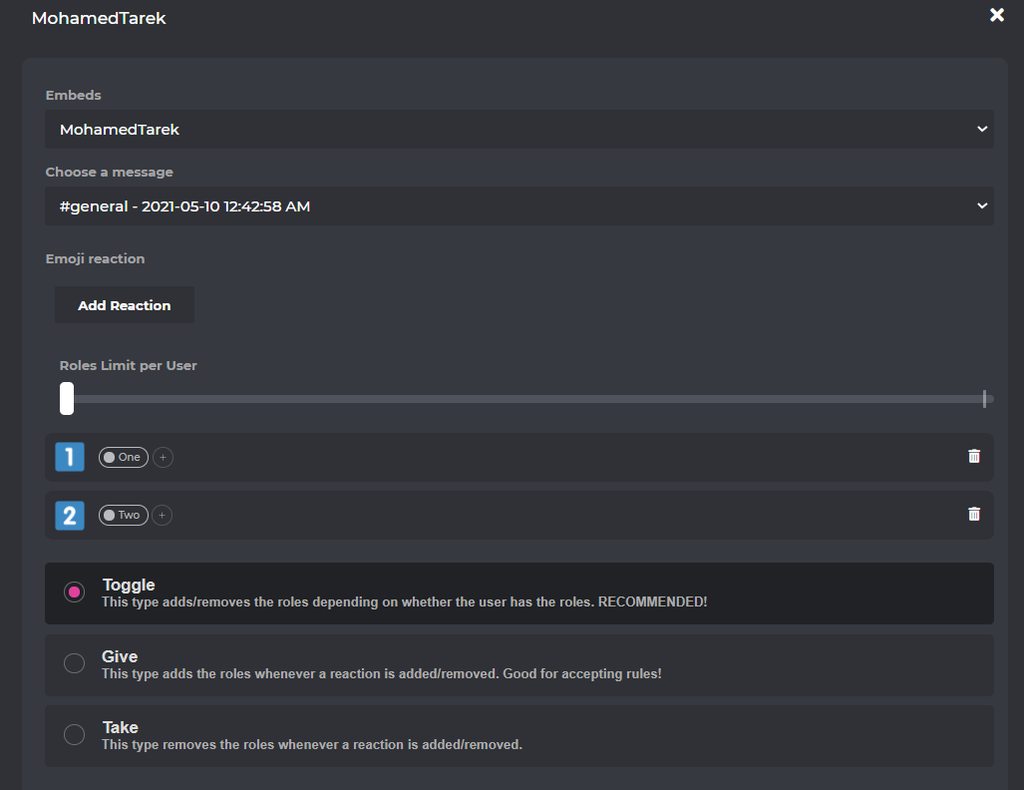
- from embed messages section create an embed message and send it to your server (the message you have to select basically)
- from reaction roles section select the embed message you just sent
- add a reaction
- add roles
Welcome images, moderation, leveling, reaction roles, logs, high quality music and many many more!
native geyser
urban quarry
Is it possible to stop the bot to ping the user when they are leveled up ??
https://probot.io/dashboard -> select your server -> leveling system module
Welcome images, moderation, leveling, reaction roles, logs, high quality music and many many more!
urban quarry
native geyser
https://probot.io/dashboard -> select your server -> leveling system module
After that sir??
native geyser
you'll see a section saying 'level up message'
urban quarry
Yes
native geyser
you can simply remove the [user] variable or turn it off (however i dont think it is possible to make the bot only write their name without mentioning ın leveling up messages)
urban quarry
Thanks
native geyser
yw
 stone laurel
when i type in a role for the reaction roles it doesn't show up
native geyser
in your servers role list drag the bots role above other roles
stone laurel
oh i forgot thanks
native geyser
yw
native geyser
there isn't no, which step did you not understand
smoky mantle
The Part where i combine the roles and reactions
native geyser
smoky mantle
The Part where i combine the roles and reactions
after you create and send an embed message on reaction roles module click on add reaction and add a reaction -> then click on the plus sign and attach a role

 thick narwhal
I don't know if it should be like that but on my discord server we have reaction roles and the bot does not broadcast them and in the bot settings everything is fine and I don't know if it's my fault or bot
[09:08]
<@&675070424748654593>
native geyser
make sure the bots role is above other roles
thick narwhal
have administrative rights
smoky mantle
native geyser
make sure the bots role is above other roles
its above the role but it doesnt show
native geyser
thick narwhal
have administrative rights
in role order its role has to be above other roles admin perms isn't enough in this case
native geyser
smoky mantle
its above the role but it doesnt show
make a change in the role order -> save -> move it all the way up again -> save -> refresh the website
discord might be bugged sometimes happens
thick narwhal
native geyser
in role order its role has to be above other roles admin perms isn't enough in t...
okey
smoky mantle
native geyser
make a change in the role order -> save -> move it all the way up again -> save ...
alright i got it
how do i make the role react.
thick narwhal
like that ?
 smoky mantle
like put it in the channel
native geyser
thick narwhal
like that ?
yes
native geyser
smoky mantle
like put it in the channel
first step, on dashboard from embed messages module create and send an embed message
thick narwhal
ok, let's see if it works
smoky mantle
is there a way to toggle which channel it goes to
native geyser
yes upon clicking 'send message' button
smoky mantle
this is my screen rn
 native geyser
as i mentioned above, embed messages module to create a message
 native geyser
https://probot.io/dashboard
1) from embed messages section create an embed messa...
native geyser
native geyser
https://probot.io/dashboard
1) from embed messages section create an embed messa...
^
thick narwhal
and thx ❤️
split needle
 main heath
<@!324937717441888256> can i get Your Help Please ?
main heath
<@!324937717441888256> can i get Your Help Please ?
You can just ask it rn
main heath
Oh i just want to transfer Credit from my Old account I lost it ""2 Factor Codes """ .
split needle
Oh then account info transfering is closed but idk if they still do for credits
main heath
split needle
Oh then account info transfering is closed but idk if they still do for credits
i just need credits That's All
split needle
 agile token
with the welcomer, how do you ping a group ?
agile token
with the welcomer, how do you ping a group ?
Use the role's id and use as <@&id>
But it will not actualy mention the role
split needle
main heath
i just need credits That's All
@native geyser
native geyser
agile token
with the welcomer, how do you ping a group ?
<@&role id>
native geyser
main heath
i just need credits That's All
hello, profile transfer is not open therefore we can not transfer i'm sorry
main heath
native geyser
hello, profile transfer is not open therefore we can not transfer i'm sorry
not the profile Just Credits Because It's Not Mine
native geyser
i know we're not able to just transfer the credits
native geyser
wait until transfer requests are open
native geyser
i dont have any information about that
main heath
Okay Im sorry for Wasting your Time @native geyser
native geyser
no worries
main heath
Thanks
native geyser
yw
west kelp
@empty root how can I help you
 empty root
west kelp
<@754023643671035954> how can I help you
empty root
west kelp
<@754023643671035954> how can I help you
#top doesn’t work on my server
west kelp
Does #rank work?
west kelp
In the dashboard make sure both the leveling system and utility are enabled
 night lynx
Are koi mujhe probot ke moderation ke log karna batado
west kelp
#support-int
empty root
west kelp
In the dashboard make sure both the leveling system and utility are enabled
It’s on but it doesn’t work
night lynx
Abe lawde bata de
west kelp
empty root
It’s on but it doesn’t work
Are the commands enabled?
empty root
Yeah
west kelp
west kelp
In the dashboard make sure both the leveling system and utility are enabled
.
Well try disabling then enabling
west kelp
You're welcome
lean badgerBOT
west kelp
#help reset
**Command: reset**
Reset text/voice/invites xp points for all or specific members.
**Usage:**
#reset [text / voice / invites) [all / user]
**Examples:**
#reset text all
#reset voice all
#reset invites all
#reset text @Dramex
 fair spade
west kelp
#help reset
fair spade
west kelp
#help reset
Admin only feature?
west kelp
Yes
west kelp
Yw
west kelp
Use /warn_remove
 thick void
ty
west kelp
Yw
 frail plinth
how do i use this?

 austere relic
how come I can't add roles here
 native geyser
drag the bots role above other roles
native geyser
frail plinth
how do i use this?
you select a channel and the bot does the rest
frail plinth
native geyser
you select a channel and the bot does the rest
but it doesn't work
native geyser
doesn't it show right next to the channel like this?
 austere relic
Ah it worked but how do I now send it in my discord server?
 urban steeple
HI, I have question about Emocji spam (automod) How many emoji is spam ? (Can I change this ?)
frail plinth
native geyser
doesn't it show right next to the channel like this?
no
 halcyon parrot
hi how do i set the welcomer?
austere relic
why isn't this specific emote not working? Its a emote I added to the server myself

 spring ether
austere relic
why isn't this specific emote not working? Its a emote I added to the server mys...
spring ether
austere relic
why isn't this specific emote not working? Its a emote I added to the server mys...
\:emojiname:
spring ether
halcyon parrot
hi how do i set the welcomer?
1 - enter https://probot.io/dashboard
2 - make sure to login, then open your server's control panel by the left side, enter Welcomer section
3 - enable the welcoming ways you'd like(image/message) and customize them freely and simply!
also make sure to select the correct channel to welcome in, save changes before leaving the site.
Welcome images, moderation, leveling, reaction roles, logs, high quality music and many many more!
austere relic
putting a \ in front of it doesn't work
 minor rampart
hey, could i have some help. I am trying to create react role, but when i try to add roles nothing is coming up.
halcyon parrot
spring ether
1 - enter https://probot.io/dashboard
2 - make sure to login, then open your ser...
Ty
west kelp
minor rampart
hey, could i have some help. I am trying to create react role, but when i try to...
put the probot role at the top of the roles list
 gaunt dragon
Hi everyone, I have a problem updating my embed messages. I wanted to change something this morning, but nothing happens to the message in discord. The permissions should be set correctly.
Is there a problem sending/updating messages via the dashboard?
west kelp
make sure all of the fields are filled
austere relic
minor rampart
hey, could i have some help. I am trying to create react role, but when i try to...
I had this problem too. You need to make sure the ProBot role is placed above all other roles
minor rampart
okay thank you it worked👍
west kelp
austere relic
putting a \ in front of it doesn't work
How do i ping a emoji via probot:
\:emoji_name:- if using pc (only type \ before pinging the emoji without space)
:emoji_name:- if using mobile (type ` once before & after pinging the emoji)
pc: https://giphy.com/gifs/q5W7yUieL3GcMySnBD
do note, you must have this emoji in your server and in-case it was animated you've to call someone whose discord nitro in order to have access to ping the emoji and get its id.

 west kelp
minor rampart
okay thank you it worked👍
west kelp
minor rampart
okay thank you it worked👍
you're welcome
gaunt dragon
gaunt dragon
Hi everyone, I have a problem updating my embed messages. I wanted to change som...
<@&675070424748654593>
west kelp
west kelp
make sure all of the fields are filled
.
gaunt dragon
west kelp
.
oh, that reply was for me.... 😅
thank you, but that doesn't work
actually, to clarify for myself, does the ProBot role need these permissions or is it sufficient to have a different role with the same permissions?
west kelp
permissions would be better
gaunt dragon
for which role?
west kelp
ProBot
gaunt dragon
okay, I'll try that then
 hardy beacon
gaunt dragon
Hi everyone, I have a problem updating my embed messages. I wanted to change som...
hardy beacon
gaunt dragon
Hi everyone, I have a problem updating my embed messages. I wanted to change som...
i have the same problem, it doesn't post or update previously working messages
gaunt dragon
right.. 😓
it does not work as expected.. the problem still persists: Cannot send or update previous messages..
hardy beacon
for me it happened after manually deleting one of its messages, no clue if its related tho
gaunt dragon
basically Send new message and Edit sent message does nothing at all, except for the "Success" message
it actually can send messages, as a result of some command, to the channel in question, but embeds don't seem work
 fluid crater
Hello,
My level system does not put the roles according to the level, possible to help
minor rampart
hey, how do i change the name and pfp of probot in my server?
west kelp
gaunt dragon
it actually can send messages, as a result of some command, to the channel in qu...
was the emebd sent a while ago?
old lotus
when i take the daily it says to me WRONG TOKEN
west kelp
minor rampart
hey, how do i change the name and pfp of probot in my server?
you need probot premium for that
old lotus
why is that
gaunt dragon
west kelp
was the emebd sent a while ago?
it was sent yesterday in the evening
hardy beacon
west kelp
was the emebd sent a while ago?
i have the same problem, it cant modify nor send new embeds
 frail spindle
I can’t hear music with the bot anymore
gaunt dragon
gaunt dragon
it was sent yesterday in the evening
to be specific: 2022-01-25 10:56 pm CET
frail spindle
frail spindle
I can’t hear music with the bot anymore
Hello @brittle viper
untold flume
#help credits
lean badgerBOT
untold flume
#help credits
**Command: credits**
Shows your or someone's balance or transfer credits for someone
**Aliases:**
#credit
**Usage:**
#credits
#credits [user]
#credits [user] [amount]
#credits [user] [amount] (reason)
**Examples:**
#credits
#credits @untold flume
#credits @untold flume 15000
#credits @untold flume 15000 Hello
untold flume
old lotus
when i take the daily it says to me WRONG TOKEN
try logging out from your other accounts
 formal siren
Yeah but what can i do with crédits?
untold flume
hardy beacon
i have the same problem, it cant modify nor send new embeds
Fill every selected element so it can send it
@formal siren ProBot currency is global, however. you can use this currency in any server to run giveaways, trade it with your friends, etc.. but since trading some items is disallowed by discord and is breaking the discord ToS, we're not responsible for any scams happens to you! this is up to you.. cause of this, we are offering limited ways where you can safely use the currency.
1 } ~ custom your #profile background
2 } ~ custom your #profile badges
3 } ~ custom your #rank background
4 } ~ subscribe to paid version of probot
https://probot.io/premium (note: the cheapest will cost you 375,000 monthly)
#664737031414480896 for more informations.
in case you had any suitable ideas for the credits usages, we're absolutely glad to hear you by #suggestions
Welcome images, moderation, leveling, reaction roles, logs, high quality music and many many more!
Welcome images, moderation, leveling, reaction roles, logs, high quality music and many many more!
Welcome images, moderation, leveling, reaction roles, logs, high quality music and many many more!
Welcome images, moderation, leveling, reaction roles, logs, high quality music and many many more!
frail spindle
untold flume
<@926256169192923156> try stoping and replaying the song
It got a bugg. After I moved it to another room and brang it back I heared sound again. It worked but the sound didn’t came but afterwards I did it it came
untold flume
Glad to hear that
hardy beacon
untold flume
Fill every selected element so it can send it
ive filled everything, as i said it worked before. doesnt send if i create a new embed either
untold flume
@hardy beacon send me a screenshot of your settings
gaunt dragon
same here... the bot has all the required permissions, but it still won't send or update messages
untold flume
@gaunt dragon have you tried filling every selected field?
gaunt dragon
yes, I have
untold flume
here
gaunt dragon
those are the settings for the ProBot ✨ role


 untold flume
@hardy beacon i see try using the description section instead of the message content
@gaunt dragon send me a screenshot of your embed message settings
hardy beacon
untold flume
<@164726123220041728> i see try using the description section instead of the mes...
oh, you are right.
One more question, how can i make it use the server emojis? :emojiname: doesnt work
gaunt dragon
untold flume
<@224251763216220160> send me a screenshot of your embed message settings
 untold flume
hardy beacon
oh, you are right.
One more question, how can i make it use the server emojis? ...
untold flume
hardy beacon
oh, you are right.
One more question, how can i make it use the server emojis? ...
Put \ before the emoji and it will show you an id use it instead of the emoji name
gaunt dragon
gaunt dragon
I did not change any of those settings after I sent that message..
untold flume
@gaunt dragon i see try changing the color
gaunt dragon
untold flume
<@224251763216220160> i see try changing the color
the color box actually is buggy and always shows the white block..
and that does nothing
untold flume
Try using another section instead of the message content one
i think the message content section is the issue here
hardy beacon
untold flume
Put \ before the emoji and it will show you an id use it instead of the emoji na...
thank you for everything
untold flume
yw
gaunt dragon
untold flume
i think the message content section is the issue here
why is that? it did work before
untold flume
I think it got bugged or something
gaunt dragon
untold flume
I think it got bugged or something
it's a text length problem, isn't it? What is the maximum length?
split needle
2000(?) character
gaunt dragon
well, it works with 2115 chars, but not with 2117 chars (including line break chars)
just the message content, that is
untold flume
👍
 dusty timber
How do i vote for pro bot
 merry bronze
hi
 dusty timber
untold flume
<@869311407848587294> https://top.gg/bot/probot/vote
dusty timber
untold flume
<@869311407848587294> https://top.gg/bot/probot/vote
thanks ☺️
untold flume
yw☺️
 turbid minnow
can i transfer my xp's to my second account?
untold flume
Nope
nocturne flax
hi,how bot giving exp, 1 min = 1-100 exp?
untold flume
@nocturne flax 10-30
nocturne flax
ok
reef field
@untold flume
untold flume
Yes?
formal siren
untold flume
<@463235010070052864> **ProBot currency is global, however. you can use this cur...
Thanks you
reef field
untold flume
Yes?
I don’t know selling credit ban
untold flume
formal siren
Thanks you
yw
untold flume
reef field
I don’t know selling credit ban
You know now
reef field
untold flume
You know now
Yep
untold flume
And I can't unblacklist you anyway so please don't repeat your request
 fathom brook
I can copy sever?
reef field
untold flume
And I can't unblacklist you anyway so please don't repeat your request
Bro who can?
untold flume
fathom brook
I can copy sever?
This bot doesn't have such feature
untold flume
reef field
Bro who can?
No one and it will not be removed
reef field
untold flume
No one and it will not be removed
Very sad thank’s bro
untold flume
yw
 broken tendon
hello anyone there ?
reef field
untold flume
yw
?
broken tendon
can we increase level with commands
untold flume
@broken tendon no
untold flume
reef field
?
It means You're welcome
broken tendon
;-;
untold flume
@broken tendon for now at least
 dusty holly
👀
reef field
untold flume
It means You're welcome
Oh ty
broken tendon
untold flume
They will add it soon i guess
nice
dusty holly
untold flume
<@793422844331687946> how can i help you?
✖️.
 viscid basin
I need help, people with the moderator role cannot use mod commands, they are already here
 untold flume
@viscid basin send me your server in dms I'll check it out
viscid basin
Ok
 primal trail
Probot premium is down, I'm assuming?
untold flume
Yes wait a bit and it should be back to normal as soon as possible
 gritty ruin
Who can help me pls i can make reaction role
untold flume
How do I set up reaction roles:
1- head to the dashboard https://probot.io/dashboard then select your server.
2- enter "Reaction Roles" module
3- Click "Add Message", then select an embed. You can manage these embeds by heading to "Embed Messages" module.
4- Click "Choose a message", and then select the referred embed message where the selected embed was sent.
start adding reaction roles by clicking "Add Reaction". there would be a (+) button where you can select the role referred to this reaction.
Welcome images, moderation, leveling, reaction roles, logs, high quality music and many many more!
 gritty ruin
I dont have reaction roles module
untold flume
You can find it here https://probot.io/dashboard after selecting your server from the left side
Welcome images, moderation, leveling, reaction roles, logs, high quality music and many many more!
 last smelt
hay the pro bot prime is offline why ??
untold flume
@last smelt i think you've already asked your question here #support-ar right?
And sasoky answered you
last smelt
untold flume
<@808737335062954084> i think you've already asked your question here <#74336528...
IM SORYY I DON SEE IT
untold flume
No worries
 azure tide
Hello, I would like to set the ban command so that you can enter #ban @ 1,2,3 etc. but it doesn't save my configuration
untold flume
For ex :
#ban @ 1mo (reason) is the right way @azure tide
You can't change it maybe its name only
azure tide
untold flume
<@349251450972405761> where exactly?
Can i send you a screen over pm ?
 charred oxide
Is there something I'm missing with the AutoRole feature?
I have:
- Set the role I want it to be in the dashboard
- Probot has all the permissions on the server it needs
- It's above the role it's supposed to assign in the hierarchy
Regardless I can't get it to auto-assign a role...
untold flume
@azure tide send it in here
@charred oxide does your autorole have administrator permissions?
charred oxide
untold flume
<@467691281905352726> does your autorole have administrator permissions?
no - its literally a base role made up on the server for new people to have a 'title'
azure tide
I mean if you then enter #ban @ 4 he will be banned for ads doesn't that work?
 untold flume
@charred oxide do you have the welcome screen feature enabled?
charred oxide
yes welcomer is enabled
untold flume
@azure tide oh i got it now head to the dashboard > select your server > moderation module > depending on the command (warn , mute , ban ) click on the edit button to create a list
@charred oxide i mean the welcome screen thing the discord feature do you have it enabled?
charred oxide
untold flume
<@467691281905352726> i mean the welcome screen thing the discord feature do you...
No, it's not set up as a community server on discord at the moment
untold flume
@charred oxide try changing the role
 untold flume
@azure tide Send me your server in dms
charred oxide
untold flume
<@467691281905352726> try changing the role
Do you mean try setting up the autorole to do a different role to see if's an issue with that role?
untold flume
Yep
charred oxide
untold flume
Yep
okay - will see if it works next time someone else joins, but is there any known clashes that would stop it from assigning a role (apart from admin)?
untold flume
@charred oxide not really
These are the only fixes so far
Make sure from your probots role position
Make sure that your autorole doesn't have administrator permissions
Turning off the welcome screen feature
Changing the autorole
charred oxide
okay
i've set it up to a test role so will see if that works next time someone joins
thanks for your help @untold flume
 buoyant pilot
is there a way that the probot can play a spotify playlist
untold flume
Nope
buoyant pilot
ok
 onyx cairn
How to add exp voice?
west kelp
not possible
split needle
onyx cairn
1h = ? Exp 
split needle
Text: 10-40 xp/2 minutes
Voice: ~10 xp/2 minutes
onyx cairn
split needle
<#664737031414480896>
Ong lam staff app kieu gi z??
primal trail
untold flume
Yes wait a bit and it should be back to normal as soon as possible
Thanks for the reply.
solar crater
how do you disable text levels but keep voice levels?
west kelp
put all the text channels in the Disabled Channels section
solar crater
ok thanks
west kelp
yw
solar crater
can you make it so in the logs it says which person did the action?
like who deleted a channel for example
and what are the differences between between the 2 bots?
 ancient acorn
how do we put rules with Probot please
 jaunty panther
هبخبحيحيحيحبحقخبنبنيخفنفنبميمثمفنبنبتذهيتتدقبرتهقث لررصثتبدخردصبثاخهزدبصثاتخر بصيتقثب. رتسخصثبخرت. ثبضنرتد صثبرن. صثنرتصسب. صيرنبخد و دصثب
untold flume
these are the differences #664737031414480896 and yes you can do it but it doesn't show you the causer it only works with paid versions and i recommend the premium version
@ancient acorn like the rules in #573048353458356234 ?
@jaunty panther ?
untold flume
untold flume
these are the differences <#664737031414480896> and yes you can do it but it doe...
@solar crater
solar crater
untold flume
<@377890000282583041>
thanks
ancient acorn
untold flume
<@855101995106959380> like the rules in <#573048353458356234> ?
kind of put rules like that with the bot
 untold flume
solar crater
thanks
untold flume
solar crater
thanks
yw
solar crater
what does
``- Voice Online.
- Link feature`` mean?
untold flume
@ancient acorn head to the dashboard > select your server > embed messages module create and send an embed message to your server
ancient acorn
thanks boy
untold flume
@solar crater What's temporary link?
it helps you to customize the invite links created by your server members where invite link age and uses limit and creation cooldown etc is moderated according to your site settings.
How to activate it
- head https://probot.io/dashboard
- select your server through clicking its avatar on the left
- enter "temp link" module
- set your settings, ensure to make the selected "Link invite default channel" visible for everyone to avoid encountering any issues.
Welcome images, moderation, leveling, reaction roles, logs, high quality music and many many more!
✨ **what's voice online? **
- voice online function helps in changing a specific voice channel or a category's name into the total amount of members connected to your server's voice channels.
how can i use it?
- head to the dashboard https://probot.io/dashboard
- select your server through clicking its avatar on the left
- enter "voice online" module
where it says "text"; type the new channel/category name including the 00 where you want it to mention the total amount.
select the voice channel or category by "Channel", if you wanna make it ignore specific voice channels use "hidden channels" and "no bots" to ignore bots.
Welcome images, moderation, leveling, reaction roles, logs, high quality music and many many more!
untold flume
ancient acorn
thanks boy
yw
azure tide
Small question, is it possible to remove the message "👋 Welcome to lalala:" from the Welcome function ?
west kelp
azure tide
Small question, is it possible to remove the message "👋 Welcome to lalala:" fro...
yes
west kelp
old lotus
when can i
1-2 months
 novel comet
west kelp
yes
novel comet
west kelp
yes
Hi
west kelp
after your account was created
 novel comet
Auto Responder don't work
azure tide
west kelp
yes
How ?
west kelp
wait a bit
west kelp
azure tide
How ?
you want to change the probot welcome message right
old lotus
west kelp
wait a bit
an extra month ??
west kelp
old lotus
an extra month ??
if you're active it can be less than a month
azure tide
Yes alr done but i have a message on the top "👋 Welcome to lalala:"
I want to remove the "👋 Welcome to lalala:"
novel comet
Auto Responder Doesn’t work
west kelp
show me where
old lotus
west kelp
if you're active it can be less than a month
im 24/24 h in discord
west kelp
novel comet
Auto Responder Doesn’t work
how so
old lotus
lol

 west kelp
do other triggers work?
novel comet
west kelp
do other triggers work?
Yup
I try to delete it
And do other one
But still
west kelp
what's the response?
novel comet
west kelp
what's the response?
The godfather 1
west kelp
try changing it to "the godfather 1"
novel comet
With " ?
west kelp
no
 candid plover
novel comet
azure tide
candid plover
novel comet
azure tide
What does the colors function ?
west kelp
lets you make it so people can select colors from a list
azure tide
Okay but how i can remove the "👋 Welcome to lalala:"
west kelp
where exactly is it?
west kelp
go to the dashboard then go to the welcomer module and change the message from there
azure tide
I have it but this message is not in it
 deep moon
How to change # in commands to !
 oak trail
<@&675070424748654593>
native geyser
deep moon
How to change # in commands to !
#prefix !
old lotus
native geyser
> #prefix !
when i take my daily in the browser it says to me "Wrong token"
can you help me ?
native geyser
log off and log back in and try again please
 mortal wolf
hello i want help here cuz ar support not onliny
is #youtube cmd been shutdows? i try it and its doesn't work
azure tide
Can you give yourself rank xp ?
untold flume
Nope
mortal wolf
untold flume
<@709735623573110894> yeah you can't use this command anymore
ok thanks for help
old lotus
native geyser
log off and log back in and try again please
did not work i have a video record if u want to see
agile token
I have a problem.
reaction roles people dont get given a role any longer while it worked in the past
<@&675070424748654593>
fathom meadow
azure tide
How i can test if the ranks works 😄 ?
<@&675070424748654593> ..
untold flume
mortal wolf
ok thanks for help
yw
quaint sentinel
@agile token drag the bots role above other roles again
and make sure it isn't below the reaction role
agile token
i figured out how to solve it
toxic crypt
untold flume
yw
hellooo
quaint sentinel
Alrighty
toxic crypt
do you remember me?
agile token
choose a message was not set
toxic crypt
untold flume
yw
it worked thank you for your help yesterday tho
 lofty schooner
<@&675070424748654593> I want to renew my probot, I missed the last payment...is it possible to get the same bot that I got last time? So the name remains changed on the server of the old messages?
quaint sentinel
yeah it is, go ahead and renew it from here https://probot.io/premium
Welcome images, moderation, leveling, reaction roles, logs, high quality music and many many more!
lofty schooner
When I went there, I didn't see it to renew...so I hit "add bot" Now I have a new bot there
before was bot premium2222 now its premium 2210
So now the old msgs look like this
 quaint sentinel
lofty schooner
quaint sentinel
lofty schooner
Sorry to hear that! It seems that your bot was given to someone else, our system works like that and unfortunately you should buy a new one instead. Some bots takes time till it given to someone and i thought your bot would stay, but sadly it didn't.
lofty schooner
😦 I see, do you know how long since lapse payment the bot stays before it leaves?
No way to edit the name of the old msgs I guess
?
seems a bit unfair since the only reason I got premium bot is for the name customization. What is the difference to have just a prime server?
quaint sentinel
lofty schooner
😦 I see, do you know how long since lapse payment the bot stays before it leave...
I'm not sure about that since the system do the trick and gives the bot automatically
lofty schooner
ah that makes sense
quaint sentinel
lofty schooner
No way to edit the name of the old msgs I guess
unfortunately no..
quaint sentinel
lofty schooner
seems a bit unfair since the only reason I got premium bot is for the name custo...
I can understand the situation you in, and I would really like to be helpful, but like i said the system does all the premium bot things, keep in mind that you can add balance and renew before your bot gets expired!
lofty schooner
okay I will remember nxt time
what is the difference between having a prime server and a prime bot?
quaint sentinel
There's no prime-bot, we call it prime-server. It just gives you a link and authorize the bot to your server.
I can provide you the differences between the Prime-servers and premium-bot if you want tho
lofty schooner
yes thank you
quaint sentinel
yw
lofty schooner
premium bot can be used on more than one server?
native geyser
nope only one
 olive lantern
Can someone help i setted prefix to? But its not work it work only if i do with # or /
west kelp
you can check it in overview at the dashboard
west kelp
yeah it could be laggy
nocturne flax
<@&675070424748654593> My friend is having this issue with the bot. Any chance we can get some help?
 native geyser
discord is having issues at the moment its not about the bot
nocturne flax
Okay ill let him now
 fossil vine
What was the problem yesterday?
 arctic hatch
Is there a way to shuffle songs in the queue?
fathom meadow
arctic hatch
Is there a way to shuffle songs in the queue?
<@&675070424748654593> ..
native geyser
arctic hatch
Is there a way to shuffle songs in the queue?
currently no but will be in the future
native geyser
fossil vine
What was the problem yesterday?
api issue
native geyser
there is a cloudflare issue going on which is affecting discord therefore affecting bots as well
 fossil jolt
cool
fluid crater
Hello,
My level system does not put the roles according to the level, possible to help
native geyser
hi, drag the bots role above other roles
fluid crater
It already does but still nothing.
 upbeat matrix
How do I get the reaction roles to work?
 fathom meadow
upbeat matrix
How do I get the reaction roles to work?
fathom meadow
upbeat matrix
How do I get the reaction roles to work?
<@&675070424748654593> ..
 fervent pasture
i just joined the server i didnt know that, thanks for the help mate
fathom meadow
Just wait for support Team to respond and help you 
quaint sentinel
fervent pasture
hello, probot cant find any songs i play from spotify
👋🏻, The bot do not support Spotify unfortunately. It only supports YouTube & SoundCloud
fervent pasture
my friend uses this bot on his server and it supports spotify somehow
upbeat matrix
fathom meadow
<@&675070424748654593> ..
Ah, thanks
quaint sentinel
upbeat matrix
How do I get the reaction roles to work?
How do I set up reaction roles:
1- head to the dashboard https://probot.io/dashboard then select your server.
2- enter "Reaction Roles" module
3- Click "Add Message", then select an embed. You can manage these embeds by heading to "Embed Messages" module.
4- Click "Choose a message", and then select the referred embed message where the selected embed was sent.
start adding reaction roles by clicking "Add Reaction". there would be a (+) button where you can select the role referred to this reaction.
Welcome images, moderation, leveling, reaction roles, logs, high quality music and many many more!
quaint sentinel
fervent pasture
my friend uses this bot on his server and it supports spotify somehow
nope, not possible.
fervent pasture
he might be wrong, i've asked him to screenshot me proof
upbeat matrix
quaint sentinel
**How do I set up reaction roles:**
1- head to the dashboard https://probot.io/d...
I did all that, but it doesn't show me the roles I have, and even if I add the reaction, it doesn't give the role
quaint sentinel
He's obviously wrong, because the bot won't play any music from Spotify. Once you try a Spotify play link it will reply same as the one you got.
quaint sentinel
upbeat matrix
I did all that, but it doesn't show me the roles I have, and even if I add the r...
drag the bots role above other roles
then refresh the page, and the roles shall appear
upbeat matrix
quaint sentinel
drag the bots role above other roles
Ok, thank you very much
It works now lol
quaint sentinel
yw
fervent pasture
okay it doesnt work, that's weird.. thanks anyway
quaint sentinel
yw
fluid crater
fluid crater
Hello,
My level system does not put the roles according to the level, possible ...
.
untold flume
@fluid crater is your probots role above the other roles?
and does your bot have the required permissions?
fluid crater
untold flume
<@217334897163894785> is your probots role above the other roles?
It must be at the top of the roles that we want to put? He has the permission
untold flume
@fluid crater can i see your leveling system module settings?
 oak kite
...
untold flume
@oak kite how can i help you?
oak kite
I wanted to find out how I could use probot in my server so kinda like enable him
fluid crater
untold flume
<@217334897163894785> can i see your leveling system module settings?
On the panel?
untold flume
https://probot.io/invite by inviting him to your server probably @oak kite
Discord
Discord is the easiest way to communicate over voice, video, and text. Chat, hang out, and stay close with your friends and communities.
@fluid crater yes
fluid crater
untold flume
<@217334897163894785> yes
 untold flume
@fluid crater So they don't receive their roles?
fluid crater
untold flume
<@217334897163894785> So they don't receive their roles?
Yes
untold flume
Send me your server in dms I'll check it out