#support-en
1 messages · Page 346 of 1
 nocturne flax
this probot not working
 somber garnet
Okidokie what is the Take I don't understand that one
 split needle
Better wait for support instead of asking random people to help you
somber garnet
@nocturne flax are you using a security bot?
split needle
somber garnet
Okidokie what is the Take I don't understand that one
Like if the user have that role, the bot will only take it away once they react to it
split needle
somber garnet
<@456226577798135808> are you using a security bot?
Better not try to answer
split needle
nocturne flax
this probot not working
What do you mean by not working now?
split needle
Check audit log of the server?
split needle
Send a screenshot of it?
split needle
Search for snipping tool on your pc, take the area you want, press Ctrl C to copy the image after taking and Ctrl P in here to paste the image
 indigo shell
nocturne flax
i don know how to screenshot in pc
indigo shell
nocturne flax
i don know how to screenshot in pc
win+shift+s
nocturne flax
wait i have my brother phone
 silver glacier
is it possible to add probot into multiple voice channels?
split needle
silver glacier
is it possible to add probot into multiple voice channels?
No
The bot is only once in each server
split needle
Make it into 1 message
 sudden trout
Then how to reply from @stone cloud
split needle
And what you wanna know is auto responder
split needle
Go to https://probot.io/dashboard, select your server on the left side, go to auto responder module and setup the thing there
Welcome images, moderation, leveling, reaction roles, logs, high quality music and many many more!
nocturne flax
how to send to other server?
split needle
Ctrl P
 nocturne flax
hhmm but the name on that are probot
nocturne flax
it i just set it back then thanks for the help lurker
made another to test it first
somber garnet
@split needle it not letting me make any more reactions
split needle
Click the add reaction button above it
If you've reached 20 reactions then it'll stop you from adding more since discord limited it
 split needle
You should choose 1 to apply the reaction role
somber garnet
I'm already using them I got like 2 more Embeds to do
split needle
Oh also were you using add message for another reaction role pannel or you were just edit a single one?
somber garnet
Gosh mmm, I done a lot of editing
Should I refresh the page
I not actually used the rules one I think it was on by default
split needle
Every embed messages you've created in the embed message module will be included in there
somber garnet
Okey
split needle
So like you were just editing one reaction role pannel?
somber garnet
Yes
split needle
Alright then now save this one if you're done and tap on add message to redo the other reaction roles again
split needle
Reaction roles
somber garnet
Still coming up with only these is this normal
 somber garnet
Just ignore and add reactions
somber garnet
Oooo, will it come up new because I don't really wanna add more I can't
split needle
It'll let you select the already sent ones so dw
somber garnet
Okey
split needle
There'll be another box come up after choosing the embed
somber garnet
Gosh I was panicking over nothing jeee thank you done it
It all new
It feels like it 2 in 1
Asking me to pick message

 west kelp
Put the probot role at the top of the roles list
 scenic matrix
thanks
 untold flume
#help credits
 lean badgerBOT
untold flume
#help credits
lean badgerBOT
untold flume
#help credits
**Command: credits**
Shows your or someone's balance or transfer credits for someone
**Aliases:**
#credit
**Usage:**
#credits
#credits [user]
#credits [user] [amount]
#credits [user] [amount] (reason)
**Examples:**
#credits
#credits @untold flume
#credits @untold flume 15000
#credits @untold flume 15000 Hello
 untold flume
https://probot.io/id
https://probot.io/bgs
https://probot.io/premium @tame mountain
Welcome images, moderation, leveling, reaction roles, logs, high quality music and many many more!
Welcome images, moderation, leveling, reaction roles, logs, high quality music and many many more!
Welcome images, moderation, leveling, reaction roles, logs, high quality music and many many more!
 tame mountain
untold flume
https://probot.io/id
https://probot.io/bgs
https://probot.io/premium <@910392357...
tame mountain
untold flume
https://probot.io/id
https://probot.io/bgs
https://probot.io/premium <@910392357...
thanks
untold flume
yw
somber garnet
Hi again last question this morning to make a Embedded welcome message do I follow the same kinda steps as reaction roles pls ping me thank you
untold flume
@somber garnet no you don't the welcomer module has its own settings you don't have to make another embed message for it
somber garnet
Okey
 hollow vault
Hello,
What is the difference between "serveurs prime" "bots premium" ?
untold flume
You can find the differences here #664737031414480896
hollow vault
untold flume
You can find the differences here <#664737031414480896>
thx
untold flume
yw
hollow vault
untold flume
yw
to have the bot 24/7 in voice is ProBot Premium?
untold flume
And prime as well
hollow vault
ok ! 👍
 dusk lodge
How I can restart a top
 narrow crane
<@&675070424748654593>
narrow crane
dusk lodge
How I can restart a top
#reset text all
If you won’t voice
#reset voice all
Like that.
 crystal oak
Hey, I don't really understand what to select here on the "select a message" section.

 native geyser
it is to select the message the reactions will be applied on
 delicate vector
Hi
narrow crane
nocturne flax
How to add ProBot to VC
To your voice chat?
nocturne flax
YES
narrow crane
Only use #play
nocturne flax
narrow crane
To your voice chat?
IN MY DISCORD SERVER
crystal oak
native geyser
it is to select the message the reactions will be applied on
How do I make a message?
 native geyser
narrow crane
Only use #play
native geyser
narrow crane
Only use #play
read the channel description please
native geyser
crystal oak
How do I make a message?
on dashboard -> embed messages module
crystal oak
native geyser
on dashboard -> embed messages module
Alrighty, thanks.
native geyser
yw
narrow crane
native geyser
read the channel description please
ok np
 modest forge
Can i get level with commands
untold flume
@modest forge for now no you can't gain or give xp using specific commands
 quasi garnet
hey the #top voice cmd how is the exp calculated ?
untold flume
Every 2 minutes you gain xp and the amount is randomised @quasi garnet
 tawdry spear
Hello, can you explain me what is the feature to make own bot
untold flume
@tawdry spear you can't make your own bot with probot
 torn kayak
Please give me a list of commands for this bot - I want to add it to my server. Or where to look at them?
tawdry spear
untold flume
<@509765051435974692> you can't make your own bot with probot
Ass hole so how can you change the name of the bot???
You must have the additional bot on witch you change the name
Or the name will change everywhere of the main bot
untold flume
torn kayak
Please give me a list of commands for this bot - I want to add it to my server. ...
Welcome images, moderation, leveling, reaction roles, logs, high quality music and many many more!
@tawdry spear watch your language!
#help vip
lean badgerBOT
untold flume
#help vip
**Command: vip**
Displays info about your premium bot.
**Usage:**
#vip
#vip move (bot's number)
#vip transfer (bot's number) [user]
#vip restart
#vip avatar [avatar link]
#vip username [new name]
#vip status [new status]
#vip whitelist (user)
**Examples:**
#vip
#vip move
#vip move 1000
#vip transfer 1000 @Dramex
#vip restart
#vip avatar http://i8.ae/sN6XG
#vip username SystemBot
#vip status SystemBot
tawdry spear
Nu i hâte idiots
untold flume
These are all the commands..
untold flume
tawdry spear
Nu i hâte idiots
#chat-int ..
tawdry spear
What is the premium bot
Is it a secondary bot?
Or it’s additional things on the main?
untold flume
It's a paid version with more features
 tacit patrol
why i can't login in to probot dashboard help !!!
untold flume
You must buy it first then you can invite it to your server and you don't have to add a second bot @tawdry spear
untold flume
tacit patrol
why i can't login in to probot dashboard help !!!
How so?
tawdry spear
untold flume
You must buy it first then you can invite it to your server and you don't have t...
So what to invite if the boy is already here
Ass hole
The main bot just upgrades???
tacit patrol
it display again and again after i try to login

 tawdry spear
tacit patrol
it display again and again after i try to login
tawdry spear
tacit patrol
it display again and again after i try to login
Your pc is too old
Omg 1970 pc
From world war 2
tacit patrol
tawdry spear
Omg 1970 pc
 yes
yes
tawdry spear
Pls buy you a new pc it’s cheap
untold flume
@tawdry spear for the last time watch your language and don't use this Channel for chatting
@tacit patrol try changing your browser
tawdry spear
untold flume
<@509765051435974692> for the last time watch your language and don't use this C...
I ask questions about the premium feature
tacit patrol
tawdry spear
Pls buy you a new pc it’s cheap
i can update to win 10 but i prefer to use win 7
tacit patrol
untold flume
<@378847451895037955> try changing your browser
okay
tawdry spear
tacit patrol
i can update to win 10 but i prefer to use win 7
It’s not windows 7 your pc
untold flume
Our paid versions have their own servers for better performance
torn kayak
untold flume
https://probot.io/commands
Thanks, pal👍
tawdry spear
untold flume
<@378847451895037955> try changing your browser
Changing the computer
untold flume
tawdry spear
I ask questions about the premium feature
What's your question?
untold flume
tawdry spear
Changing the computer
Don't use this channel for chatting..
tacit patrol
tawdry spear
It’s not windows 7 your pc
its windows 7 but i remake it :))
untold flume
torn kayak
Thanks, pal👍
yw
tacit patrol
for smoother
untold flume
tacit patrol
its windows 7 but i remake it :))
As i said try changing your browser
tacit patrol
untold flume
As i said try changing your browser
i'm doing it right now
untold flume
take your time
tawdry spear
Change pc not the browser
native geyser
tawdry spear
Change pc not the browser
if you do not have a question regarding the bot please stop using this channel, that is an issue related to internet connection not computer
tacit patrol
untold flume
As i said try changing your browser
it doesn't work with chrome, i tried changing account but still the same
tawdry spear
native geyser
if you do not have a question regarding the bot please stop using this channel, ...
Nobody wanted to reply to my question and the staff said bull shit
native geyser
tacit patrol
it doesn't work with chrome, i tried changing account but still the same
clear your cache
reset your ip
its not an issue related to probot its about internet connection
native geyser
tawdry spear
Nobody wanted to reply to my question and the staff said bull shit
what is your question again?
tacit patrol
native geyser
clear your cache
reset your ip
its not an issue related to probot its about inte...
oka
tawdry spear
If I buy premium, does I need to add a new premium bot, or the Probot that is already here will upgrade his self?
tawdry spear
Does I need to make a token for that?
native geyser
no you'll get a new complete bot for yourself you just need to invite it
tawdry spear
native geyser
no you'll get a new complete bot for yourself you just need to invite it
So who create the token for that bot?
It’s automatic by which apis
User apis?
native geyser
i dont really know the details
tawdry spear
Bcs it’s against the TOS of discord
native geyser
all i know is you don't need to do anything other than inviting the bot
tawdry spear
Well so it’s against the TOS of discord
tacit patrol
Do people still access the dashboard normally?
native geyser
tacit patrol
Do people still access the dashboard normally?
yup
tacit patrol
native geyser
yup

tawdry spear
tacit patrol
Do people still access the dashboard normally?
Pls buy a new pc
tacit patrol
native geyser
yup
can you give me the link to the dashboard?
tacit patrol
tawdry spear
Pls buy a new pc
 im student and my family poor
native geyser
tacit patrol
can you give me the link to the dashboard?
Welcome images, moderation, leveling, reaction roles, logs, high quality music and many many more!
tacit patrol
native geyser
https://probot.io/dashboard
thanks
native geyser
tawdry spear
Pls buy a new pc
as i mentioned above please do not use this channel unless you have any further questions
native geyser
tacit patrol
thanks
yw
tacit patrol
hmmm it work with my phone but the pc isn't :(
native geyser
few possible fixes are:
using a different browser
clearing cache
resetting your ip
as i mentioned its not about probot therefore i cant not give you a certain fix i apologize
tacit patrol
 lavish otter
tacit patrol
hmmm it work with my phone but the pc isn't :(
lavish otter
tacit patrol
hmmm it work with my phone but the pc isn't :(
Press cntrl + f5 to reset cache on the website alone 🙂
tacit patrol
lavish otter
Press cntrl + f5 to reset cache on the website alone 🙂
oh
lavish otter
And if this doesn't work try doing a network reset
tacit patrol
lavish otter
Press cntrl + f5 to reset cache on the website alone 🙂
didn't work
tacit patrol
lavish otter
And if this doesn't work try doing a network reset
using cmd right ?
lavish otter
lavish otter
And if this doesn't work try doing a network reset
Bewary this will remove all the logged in current wifi networks

 rich steeple
Vote
native geyser
rich steeple
Vote
#commands please
 daring fjord
untold flume
daring fjord
untold flume
https://probot.io/dashboard @daring fjord
Welcome images, moderation, leveling, reaction roles, logs, high quality music and many many more!
 spring peak
Кто из русских есть в английском чате, чтобы помочь мне?
Who of the Russians is there in the English chat to help me?
 faint garden
spring peak
untold flume
<@249963710934810624> <#711904748256624730>
faint garden
spring peak
untold flume
<@249963710934810624> <#711904748256624730>
Thanks
 mortal moth
probot isnt reaction anymore to any commands - further the reaction role changes did not apply within the discord server. Any idea?
native geyser
check the perms and make sure you selected the right message
 pulsar delta
hi i only wan't to ask how many accounts i can have on discord
pulsar delta
sorry
 strange valve
Hello
mortal moth
@native geyser permissions fine, the correct message is choosen.
 stoic marsh
my bot keeps buffering music
strange valve
I bought 5$ from website , but I'm click on accept pay twice , and the website pay 750k + 750k and give me 10$
I need just 5 !
<@&675070424748654593> 
native geyser
mortal moth
<@!324937717441888256> permissions fine, the correct message is choosen.
can you make sure the bots role is above the roles you want the bot to give
native geyser
stoic marsh
my bot keeps buffering music
how often is it happening
stoic marsh
very often, one song take twice as long to play and kind of ruins it
native geyser
strange valve
I bought 5$ from website , but I'm click on accept pay twice , and the website p...
hi, please use only one support channel
#support-ar
native geyser
stoic marsh
very often, one song take twice as long to play and kind of ruins it
i see, can you provide me these in dms please
your server id
an invite link to your server
 leaden turret
native geyser
leaden turret
native geyser
read the server name again please, by paying more attention
 inner dagger
Reasons for the blacklist
native geyser
breaking our rules ig
buying/selling our currency
spamming
credits/level farming with alt accounts etc
 gentle pebble
Hey, I'm sure this has been asked a million times but I couldn't find an answer by searching keywords sooo... is it possible to turn off voice xp so you get roles from just text levels?
native geyser
- for reward roles make the voice target levels 0
- to disable voice xp gain add all voice channels as no-xp channels
gentle pebble
ohhh
i feel dumb now lmao
i was looking for a feature to turn it off
so i didnt consider jsut blocking the channels
thanks
native geyser
yw
 pure iris
my bot is speaking a different language
like
the one in support-ar
o
its speaking arabic
thats it
didnt recognise it
west kelp
use #setlang en
 tidal pivot
How do i repeat the whole queue and not just 1 song
west kelp
not possible
tidal pivot
Oh
 echo wren
hello every body
native geyser
echo wren
hello every body
hi can i help you?
native geyser
you can check #573048403429425162 to learn how to use probot
echo wren
okay thank you so much
native geyser
yw
 fierce wagon
<@&675070424748654593> ..
 quaint sentinel
nocturne flax
how do i clear the queue
quaint sentinel
nocturne flax
how do i clear the queue
/stop
nocturne flax
thx
quaint sentinel
yw
strange valve
native geyser
hi, please use only one support channel
<#743365286132056094>
I want use this 🙂
 inner elbow
Куда мне писат Я русский
 rugged fox
Hello, I need an assist
untold flume
strange valve
I want use this 🙂
As ruru said to you use only one support channel and wait for fnr response
untold flume
inner elbow
Куда мне писат Я русский
#support-int / #chat-int
@rugged fox hey , how can i help you?
rugged fox
I have automod enabled but it is triggering mutes on one event even when I have mute violation set to 3+
@native geyser
rugged fox
untold flume
did you save changes?<@274655721327689730>
yes and even tried changing and saving again
untold flume
Can you send me your server in dms? I'll check it out
rugged fox
untold flume
Can you send me your server in dms? I'll check it out
Who are you?
untold flume
ig

 storm willow
@untold flume hello
untold flume
@storm willow hi , how can i help you?
storm willow
untold flume
<@487678056815919124> hi , how can i help you?
Level Transfer When will it be available?
untold flume
storm willow
Level Transfer When will it be available?
No eta unfortunately
untold flume
yw
 lime helm
Ok quick question :
Can i have Probot to assign a role to someone once they post a message to a specific channel ?
 clever night
embedded messages not sending?
lime helm
Even better, can i have Probot to swap roles instead of adding one
lime helm
clever night
embedded messages not sending?
i beg your pardon ?
untold flume
@lime helm no actually you can't do these things with probot
@clever night fill every selected field
nocturne flax
isn't using curses in names is not allowed here?
lime helm
untold flume
<@727449598909612093> no actually you can't do these things with probot
aw ... ok, thanks anyway
untold flume
nocturne flax
isn't using curses in names is not allowed here?
Yes
untold flume
lime helm
aw ... ok, thanks anyway
yw
 night thorn
So for some reason in the reaction roles it isn't showing the roles I can assign for the emote and I have the roles in the server
 untold flume
@night thorn drag probots role above the other roles
night thorn
untold flume
<@375383215961145349> drag probots role above the other roles
That worked thanks!!
untold flume
yw
nocturne flax
Does the bot have any commands or section that can make staff applications? For example, it dms the user some questions, and once they submit, I get the answers in a channel?
untold flume
@nocturne flax no actually but feel free to suggest that here #573053418017521664
 untold flume
 polar falcon
how can i reset `welcomer` config ?
polar falcon
how can i reset `welcomer` config ?
You can't reset it
polar falcon
untold flume
You can't reset it
so how i can fix it ? 😐
untold flume
@polar falcon try using these coordinates


 polar falcon
oh tnx
untold flume
yw
untold flume
 old glacier
HELP MY PRO BOT NOW SPEAKS SPANISH AND WONT WORK IT KEEPS LEAVING VC AND ALSO BEFORE THIS IT KEPT PLAYING CPR BY CUPCAKE AND I COULD NOT STOP IT... IM NOT JOKING SOMEONE HELP
<@&675070424748654593>
untold flume
@old glacier use /setlang to change its language and /stop to stop music
old glacier
the first on thanks but we tried using stop
its done now but wont play anything
it just keepos leaving and joining
untold flume
Have you tried kicking and reinviting it?
 old glacier
@vernal orbit was with me
ok
i will let you know what happens

i cant type in my server
...
ok i can now
my friend helped me
but it wont get removed
if you allow @vernal orbit to type he can tell you more on what happened
untold flume
old glacier
but it wont get removed
it won't get removed? What exactly

 earnest hornet
Does probot have an option where you can set any command outside of the intended channel to be autoremoved?
untold flume
@old glacier wait a bit and it should be fixed
untold flume
@earnest hornet no unfortunately
untold flume
old glacier
ok also plz ignore the name we changed probot to
No worries
earnest hornet
Ahh. Bummer, thanks ☺️
old glacier
thx
untold flume
yw
untold flume
earnest hornet
Ahh. Bummer, thanks ☺️
yw
 sage mountain
Good luck on your journey @old glacier
old glacier
thx
native geyser
 summer lark
Hiii
summer lark
Hiii
hi can i help you?
native geyser
if its related to probot just ask away please
fierce wagon
<@&675070424748654593> :).
summer lark
Um ok
 thick bane
Hello, when i tell ProBot to play something on my Server it has problems loading songs or playing them stable or something like this. It sounds like it is lagging. Is this because of my connection?
untold flume
thick bane
Hello, when i tell ProBot to play something on my Server it has problems loading...
Send your server invite and id to ruru in dms and describe your issue
 nimble sage
Hello, where can report a bug?
untold flume
nimble sage
Hello, where can report a bug?
Dm Ruru#0666
 dim maple
In the leveling system with Probot, is there a way for probot to not ping ppl that level up??? But still see their username or whatever(?)
 pale wraith
for some reason the welcomer plugin isn't working
nimble sage
untold flume
Dm Ruru#0666
Thanks
untold flume
nimble sage
Thanks
yw
untold flume
pale wraith
for some reason the welcomer plugin isn't working
How so?
pale wraith
like whenever some joins it doesn't send the welcoming message
dim maple
untold flume
<@323630356601503744> [user.name]
And this doesn't ping them???
untold flume
pale wraith
like whenever some joins it doesn't send the welcoming message
Make sure that your welcoming background is not bigger than 3mb its format has to be either png or jpg
untold flume
dim maple
And this doesn't ping them???
yep
pale wraith
untold flume
Make sure that your welcoming background is not bigger than 3mb its format has t...
nah there aint no images, mate, only a message
untold flume
pale wraith
nah there aint no images, mate, only a message
Try changing the welcome room and make sure that your bot has the required permissions
pale wraith
already did, and they have the administrator permission
untold flume
pale wraith
already did, and they have the administrator permission
Send me your server in dms with admin perms I'll check it out
pale wraith
alright
 broken lynx
I cant add reaction roles. Bot has all perms but i cant see the roles to add to the roles

i already waited like 30mins
refreshed it
fierce wagon
<@&675070424748654593> ..
untold flume
@broken lynx drag probots role above the other roles
and then refresh your page
@fierce wagon and for more information you have to wait for 5 minutes before mentioning the support role
untold flume
yw
 prisma mason
is it possible to write a playlist for the probot to automatically play and forward?
@untold flume
untold flume
prisma mason
is it possible to write a playlist for the probot to automatically play and forw...
you can play playlist by using this command #play pl (link) but you can't forward to a specific song
prisma mason
oh why can't we just create a playlist there and then the probot plays this song all the way to the next one?
 carmine cove
sooo- im trynna play a song, but i keep getting this:
 untold flume
prisma mason
oh why can't we just create a playlist there and then the probot plays this song...
untold flume
prisma mason
oh why can't we just create a playlist there and then the probot plays this song...
That's how it works but you can't forward to a specific song you want to listen to
@carmine cove have you tried using this command with the default prefix? #
prisma mason
untold flume
That's how it works but you can't forward to a specific song you want to listen ...
oh i know thank you bro have a nice day
untold flume
yw
untold flume
@carmine cove ? I didn't get it what are you trying to say?
 warm nimbus
ProBot is acting weird today
untold flume
warm nimbus
ProBot is acting weird today
How so
warm nimbus
I am trying to play some music, and every song keeps cutting in and out
carmine cove
untold flume
<@674004769144176641> ? I didn't get it what are you trying to say?
im trying to play music in a voice channel, and i have a text channel for the commands. however that message pops up each time
untold flume
@warm nimbus send your server invite link and id to Ruru#0666 in dms and describe your issue
untold flume
carmine cove
im trying to play music in a voice channel, and i have a text channel for the co...
What message? Can you provide a screenshot
 untold flume
@carmine cove try using this command with the default prefix #
carmine cove
k
its working! the only thing is th emusic cuts out sometimes- othe rthan that thanks
untold flume
untold flume
<@357624456971288588> send your server invite link and id to Ruru#0666 in dms an...
@carmine cove
And you are welcome
nocturne flax
Hi. Someone can help ME please ?
untold flume
How can i help you?
nocturne flax
How can I create The playlist directly on discord? Or how can I do play song by a song without Write aways /search
untold flume
@nocturne flax you mean how to play playlists with our bot?
nocturne flax
Not sure
I search one song on /search, after this song is done , doesnt play another song
untold flume
I think your question is not a Probot-related question you can ask here #chat-en instead
 frigid sky

untold flume
@frigid sky how can i help you?
untold flume
nocturne flax
I search one song on /search, after this song is done , doesnt play another song
oh you have to play another song
or you can easily play a whole playlist
nocturne flax
So I need to Write again The command ?
untold flume
But if you mean that you want to repeat a specific song you can use /repeat command
 opal swan
hi guys, did you experience lag in using probot for listening music?
untold flume
untold flume
<@357624456971288588> send your server invite link and id to Ruru#0666 in dms an...
@opal swan
nocturne flax
I dont want to repeat, I just want to play another / next song without write some commands
opal swan
I mean it is like the bot blocks itself for buffering
 untold flume
@nocturne flax probot only supports YouTube music videos and soundcloud playlists
untold flume
opal swan
I mean it is like the bot blocks itself for buffering
I mentioned you above ^
untold flume
nocturne flax
I dont want to repeat, I just want to play another / next song without write so...
And probot will play the next song automatically anyway
nocturne flax
Doesnt.. I play from YouTube, I search one song and after The song is end , probot stop automatically
Dont play another song
untold flume
@nocturne flax you have to play another song not only once for ex :
#play test then #play test2
After the test song ends he will play the test2 song automatically
untold flume
yw
nocturne flax
Hv a nice night
 restive summit
hi
quaint sentinel
hey, how can I help you?
 jade temple
how to loop queue?
untold flume
@jade temple you can't
untold flume

 glacial herald
 untold flume
@glacial herald you have to create and send an embed message to your server and then it will appear in there
glacial herald
thx
untold flume
yw and please next time use one support channel
nocturne flax
Hello
yo
how can i use say command
I have questions for admins support😅
I saw someone using it
but idk how he does it
untold flume
nocturne flax
I have questions for admins support😅
Are they regarding to the bot?
@nocturne flax say command? Like what exactly
nocturne flax
untold flume
Are they regarding to the bot?
Yes and No, it's more about programming, a Little question
untold flume
nocturne flax
Yes and No, it's more about programming, a Little question
I see you can ask them in their dms this channel is only for Probot-related questions
@nocturne flax no we don't have such this feature but we do have the autoresponder feature
nocturne flax
Ok, IM sorry
untold flume
No worries
 white sedge
sorry
untold flume
No worries
 slim oriole
السلام عليكم
 wind urchin
slim oriole
السلام عليكم
wind urchin
slim oriole
السلام عليكم
Another support channel
 dusky crystal
how do i loop song ?
 opaque hill
Hi how do I get the reaction role thing to actually add a role when I use it on a server?
dusky crystal
how do I loop song
wind urchin
dusky crystal
how do I loop song
Use command: #repeat
 pulsar badge
….
dusky crystal
thx
pulsar badge
ليه تتكلمون انقليزي
wind urchin
dusky crystal
thx
Yw
 mental sand
for the leveling, does a user need to reach the requirement in both text and voice to level up? or do they just need to hit one of the two xp levels
pulsar badge
😕
broken lynx
When i type .colors it doesn't show anything
quaint sentinel
mental sand
for the leveling, does a user need to reach the requirement in both text and voi...
it depends on what you select, you can either select text only or voice only
wind urchin
broken lynx
When i type .colors it doesn't show anything
The prefix is #
quaint sentinel
pulsar badge
ليه تتكلمون انقليزي
use #chat-ar instead please
quaint sentinel
broken lynx
When i type .colors it doesn't show anything
have you added any colors yet?
broken lynx
wind urchin
The prefix is #
i changed it.
wind urchin
broken lynx
i changed it.
Ok
broken lynx
quaint sentinel
have you added any colors yet?
where do i add them i didnt think ab that haha
quaint sentinel
@broken lynx To do your "Colors List" you've to create numbered roles ascendengly, which means you've to create roles as the image below explains.
colors roles only works with exact numbers, they can't have mod permissions otherwise it won't work. dragging these roles above your moderators roles position is not recommended as they'll have the access through it to higher position roles.
the image below shows how to correctly use the commands as how does it effect your nickname.

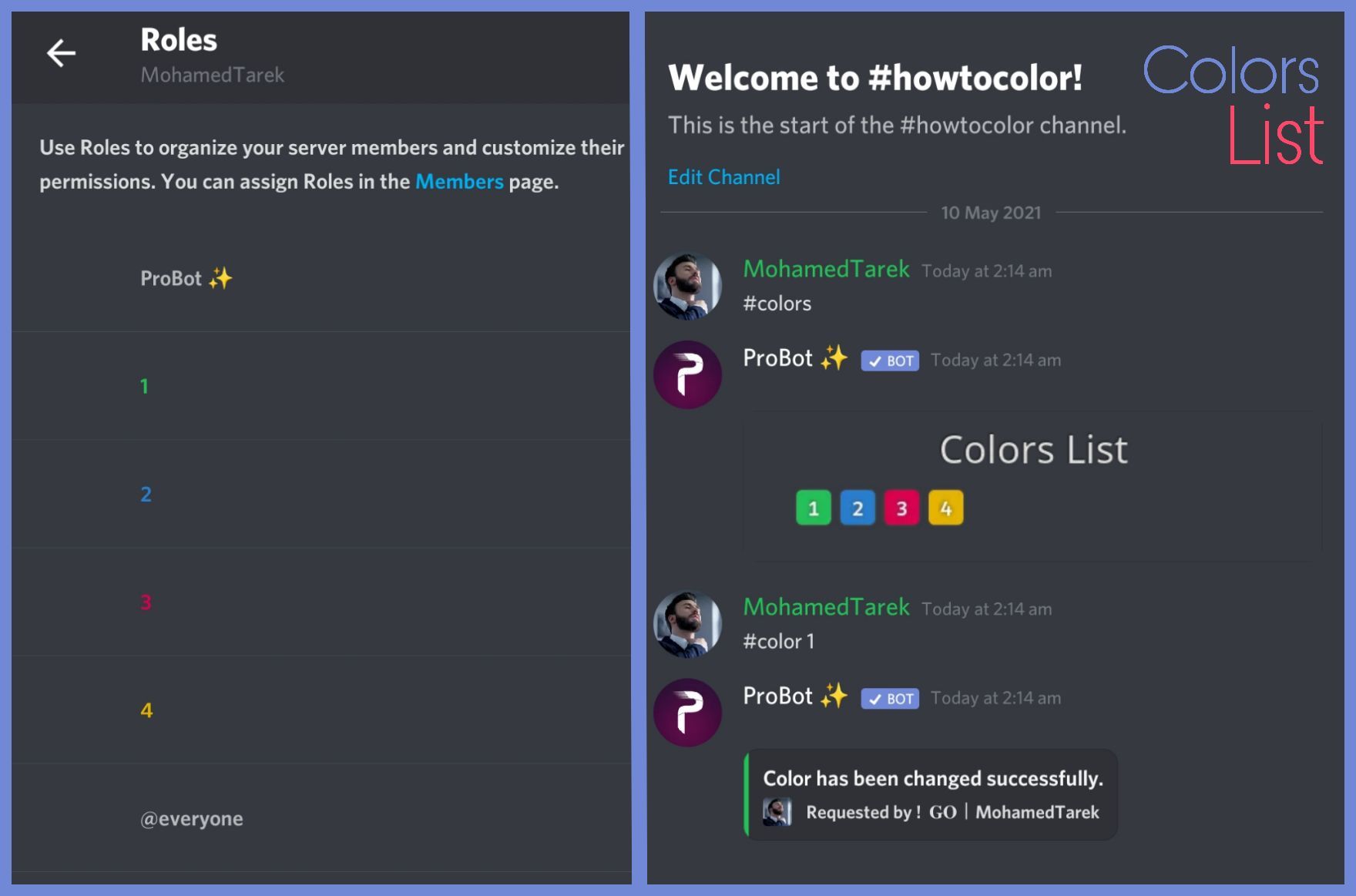
after you do that, it will appear for ya.
broken lynx
Okey thanks ❤️
quaint sentinel
yw
nocturne flax
Hi…I have a question
ProBot is giving out a specific role when someone joins my server. How do I get ProBot to not do that?😅
wind urchin
You must to go https://probot.io/dashboard -> autorole
Welcome images, moderation, leveling, reaction roles, logs, high quality music and many many more!
@nocturne flax
nocturne flax
Oh thank you!
wind urchin
Yw
 hollow gyro
Could anybody lend me a hand? If a new member joins the server how am I able to have pro bot auto give them a role? (I’ve set up everything else just fine)
Like I know where to go
I’m just unsure how to make it work
 thorn lotus
hollow gyro
Could anybody lend me a hand? If a new member joins the server how am I able to ...
thorn lotus
hollow gyro
Could anybody lend me a hand? If a new member joins the server how am I able to ...
#support-en message This guy right above you just mentioned how to do it xD
hollow gyro
Yea yea! I see, but I have my role I would like ProBot give them and it’s not working. Not working as in not giving the member the role when they join.
broken lynx
when i type .role (i changed the prefix) .role guy @role it says role not found
hollow gyro
thorn lotus
https://discord.com/channels/224308865427046402/664941916722429986/9345774542097...
Oh my god nvm I’m such an idiot… I just forgot to “save changes”. I apologize
 golden jolt
Hello, my friends try to make join the bot music but they can't (it doesn't react to them). Im the only one tha is able to make him join because i'm the only admin of the server. Does anyone know how to fix it ?
thorn lotus
hollow gyro
Oh my god nvm I’m such an idiot… I just forgot to “save changes”. I apologize
haha awesome, well done, I did that a few times too xD
wind urchin
golden jolt
Hello, my friends try to make join the bot music but they can't (it doesn't reac...
Tell him, he must go to https://probot.io/dashboard -> Music
And switch on this function
Welcome images, moderation, leveling, reaction roles, logs, high quality music and many many more!
broken lynx
thor could you check my problem?
wind urchin
broken lynx
thor could you check my problem?
I think you from Poland, if you are, go to #support-int
golden jolt
wind urchin
Tell him, he must go to https://probot.io/dashboard -> Music
And switch on this...
okay thank for your help!
wind urchin
Yw
native geyser
broken lynx
when i type .role (i changed the prefix) .role guy @role it says role not found
do not mention the role just type its name
broken lynx
Thanks Thor already solved it for me.
somber garnet
Hi the reward role is level 5 can I make the text level above 5 pls ping me thank thank you
native geyser
yes you can by simply setting the target level to the level you desire (100 is max)
 twilit knoll
howdy <@&675070424748654593>! i was having trouble having it to where the roles appear when i set up reaction roles and i was wondering if there was any way to fix this?
 kind bay
How to create Temporary voice channels?
native geyser
twilit knoll
howdy <@&675070424748654593>! i was having trouble having it to where the roles ...
drag the bots role above other roles
native geyser
kind bay
How to create Temporary voice channels?
#help temp
lean badgerBOT
native geyser
#help temp
**Command: temp**
Makes a temporary channel.
**Usage:**
#temp on
#temp off
#temp time [duration]
#temp max [limit]
**Examples:**
#temp on
#temp off
#temp time 5
#temp max 1
kind bay
native geyser
#help temp
Thx
 sly torrent
Hey! Trying to send an embed in my server. I'm getting the "Success" notification pop up in my dashboard but the message won't send. I've given ProBot's roles permission to send messages in that channel.
native geyser
make sure to fill every selected element
sly torrent
It's all filled but it still doesn't send anything. I have the name filled out and I'm using message content, which is also filled out.
native geyser
can i see your settings please
sly torrent
For the embed?
native geyser
yes
twilit knoll
native geyser
drag the bots role above other roles
thank you so much :)
native geyser
yw
sly torrent
is it okay to send a screenshot here?
i blotted out anything i don't want seen public
native geyser
it is okay to send here, if you have private stuff you can send in dms too
sly torrent
(for context i'm trying to make a rules channel)
 native geyser
oh it does look long, can you make sure it doesn't contain more than discords limit
somber garnet
Just seen the text
native geyser
hm?
somber garnet
To my question
 tame wing
hello, I bought a premium one, how should I set it up?
tacit patrol
I somehow managed to access the dashboard after I woke up this morning. Thank you for supporting me yesterday :3
native geyser
somber garnet
To my question
so you got your answer?
sly torrent
native geyser
oh it does look long, can you make sure it doesn't contain more than discords li...
i was able to copy, paste, and send it manually
native geyser
tame wing
hello, I bought a premium one, how should I set it up?
#vip move
bot number
use this command then invite the bot via the link you get in dms
let me know if you don't know your bot number
sly torrent
sly torrent
i was able to copy, paste, and send it manually
i'd prefer to send via probot since i want other admins to be able to edit it if need be
native geyser
sly torrent
i was able to copy, paste, and send it manually
then it should able to send, can you create a new embed with the same settings
sly torrent
native geyser
then it should able to send, can you create a new embed with the same settings
okay i tried doing that, and it didn't work. i then tried setting it to description (instead of content) with a title, and that did send, but it cut off. i then tried adding a title to the original message and it didn't send.
native geyser
thats weird can you give me the entire text in dms so i can test it in my test server
native geyser
solved ✅
 serene iris
Does anyone know how to get the reaction role thing to work with the embed?
 tacit lagoon
What time do the daily stats reset? It seems to reset at around 2-3:30 PM PST, but I can't tell
native geyser
serene iris
Does anyone know how to get the reaction role thing to work with the embed?
- from embed messages section create an embed message and send it to your server (the message you have to select basically)
- from reaction roles section select the embed message you just sent
- add a reaction
- add roles
Welcome images, moderation, leveling, reaction roles, logs, high quality music and many many more!
native geyser
tacit lagoon
What time do the daily stats reset? It seems to reset at around 2-3:30 PM PST, b...
12am utc+0
native geyser
nocturne flax
Bot doesn't give levelling roles
drag the bots role above other roles
nocturne flax
native geyser
drag the bots role above other roles
it is already
native geyser
can you make sure people reached both of the target levels
nocturne flax
and it has all the permissions


I created it separately for both sound and text, so it needs to be delivered regardless of written or sound.
@native geyser
native geyser
make sure those reward roles do not contain any of those following permissions
administrator
ban members
kick members
manage server
manage channels
manage roles
 ivory vine
good morning - noob question im sorry... Why cant other members of my discord #play music besides myself and other admins? what setting am i missing?

thats one of the members as an example the bot wont allow him to play the music
but allows me
nocturne flax
native geyser
make sure those reward roles do **not** contain any of those following permissio...
I checked, it's ok
Why does not work
native geyser
ivory vine
thats one of the members as an example the bot wont allow him to play the music
https://probot.io/dashboard -> select your server -> music module -> remove the dj role
Welcome images, moderation, leveling, reaction roles, logs, high quality music and many many more!
native geyser
nocturne flax
I checked, it's ok
on dashboard do you have utility module enabled?
 nocturne flax
native geyser
i meant utility system
nocturne flax
native geyser
i meant utility system
what is turkish?
 nocturne flax
closed
native geyser
turn it on thats why its not working
native geyser
yes in couple of minutes it'll start working
ivory vine
native geyser
https://probot.io/dashboard -> select your server -> music module -> remove the ...
this didnt solve the problem 😦
native geyser
edit the play command and remove the enabled/disabled roles that are set there
 alpine fern
how do i make so the bot send a message with all my rules ?
native geyser
https://probot.io/dashboard -> select your server -> embed messages module
Welcome images, moderation, leveling, reaction roles, logs, high quality music and many many more!
alpine fern
how do i make my rule message have that black contour like in this server ?

 quaint sentinel
Use DESCRIPTION field instead.
alpine fern
okay i'll try rn
quaint sentinel
ok
quaint sentinel
yw
 tired verge
my music is slowing down, what could it be?
it is having interruptions and after a few seconds it starts playing again
split needle
tired verge
it is having interruptions and after a few seconds it starts playing again
Try use /stop to refresh the player than add song again
 cunning vigil
Hello ! Anyone know how the text level system work? Like what is the range of the random exp amount? How does the bot consider someone "talking" and someone "spamming"?
split needle
cunning vigil
Hello ! Anyone know how the text level system work? Like what is the range of th...
Xp amount per 2 minutes cooldown:
Text: 10 - 40
Voice: ~10
It has a cool down to count xp so spamming will be useless
cunning vigil
Ok, that's what I thought. But I created a channel where people have to count from 1 to 5000 so that they can get exp faster, put a 2min slow mode, and it looks like they didn't get very much exp. It has nothing to do with the length of the message?
split needle
No
The xp rate is randomized
And the bot's timer is somewhat dumb so it might need a longer cooldown in real time
cunning vigil
ok
does it give exp for only one message ? Or does it only give after a other message after the cooldown ?
split needle
Give to only 1 message after the cooldown
cunning vigil
ok thanks ! will try to put a longer slow mode then
 unkempt compass
How does the VC experience work? Is it how much u talk or how much u stay in a VC?
split needle
How long you stay in a vc
restive summit
hi, i want help with:
What is probot credits, what is it used for?
 indigo zealot
is there a way to listen to restricted age videos?
serene iris
native geyser
https://probot.io/dashboard
1) from embed messages section create an embed messa...
Couldn't find the role. Also I have another question, We are doing a level system to get a role and the levels for the voice chat says 0/infinity. Is that supposed to happen?
carmine cove
im tryna do reactions roles- its adding the reactions, but not the roles-
cunning vigil
well it look like the bot isn't giving any exp, i've been sending message for the last 15min (1 message every 3min) and i didn't got any exp (no NO XP roles enable, the channel is not on the NO XP Channels list)
(and the leveling system is enabled)
any idea why ?
untold flume
@restive summit hey
ProBot currency is global, however. you can use this currency in any server to run giveaways, trade it with your friends, etc.. but since trading some items is disallowed by discord and is breaking the discord ToS, we're not responsible for any scams happens to you! this is up to you.. cause of this, we are offering limited ways where you can safely use the currency.
1 } ~ custom your #profile background
2 } ~ custom your #profile badges
3 } ~ custom your #rank background
4 } ~ subscribe to paid version of probot
https://probot.io/premium (note: the cheapest will cost you 375,000 monthly)
#664737031414480896 for more informations.
in case you had any suitable ideas for the credits usages, we're absolutely glad to hear you by #573053418017521664
Welcome images, moderation, leveling, reaction roles, logs, high quality music and many many more!
Welcome images, moderation, leveling, reaction roles, logs, high quality music and many many more!
Welcome images, moderation, leveling, reaction roles, logs, high quality music and many many more!
Welcome images, moderation, leveling, reaction roles, logs, high quality music and many many more!
@indigo zealot as far as i know yas you can try playing one
indigo zealot
I did and tried but it says u cant
untold flume
@serene iris what roles / do you have any no xp roles/channels? Dj roles maybe
@carmine cove there's a + mark next to the reaction mark you can add roles from there
@indigo zealot are they banned or something like that?
@cunning vigil is your utility module enabled?
cunning vigil
it is
indigo zealot
Yea it keeps saying Unable to play this track
carmine cove
untold flume
<@674004769144176641> there's a + mark next to the reaction mark you can add rol...
the roles arent showing up. and when i type them in, only the first thing i typed shows up for all the emojis/roles
indigo zealot
But it used to say you couldnt bec of age restriction
untold flume
@indigo zealot try playing it with its link or playing another one
cunning vigil
only the commands rank, top, user, server, rep, roll and ping are enable
untold flume
@carmine cove drag probots role above the other roles
@cunning vigil can you provide a screenshot of your dashboard settings?
cunning vigil
 untold flume
@indigo zealot have you tried playing another video?
@cunning vigil select your server
cunning vigil
 carmine cove
its not working-
untold flume
@cunning vigil does your bot have permissions?
indigo zealot
untold flume
<@480758813729751048> have you tried playing another video?
There is no video similar to it
cunning vigil
yeah, admin rights
untold flume
@carmine cove have you tried refreshing the page?
@cunning vigil send me your server in dms with admin permissions
indigo zealot
U want to see if u can do it?
untold flume
@indigo zealot as far as i can see you can't play these type of videos any more
untold flume
split needle
And we don't do auto spam with bot
 high badger
Does probot support named links on custom embeds?
I will redirect people to messages at embed
split needle
high badger
Does probot support named links on custom embeds?
If you mean hyperlinks then it's a discord's default thing for embed
high badger
I mean the blue text which redirects you to a website or message (dashroad)[ht t ps://probot.io]
Something like this. Idk the meaning of hyperlinks
split needle
Yea that's hyperlinks
high badger
Thank you!
 nocturne compass
help the probot website cannot detect any role s in my discord server
 finite fractal
How many ways can pob give roles on.
finite fractal
nocturne compass
help the probot website cannot detect any role s in my discord server
Refresh
nocturne compass
I did still nothing
finite fractal
Then you close all your fans and open it agian. Make sure you are on the right server
split needle
nocturne compass
help the probot website cannot detect any role s in my discord server
Move the probot role higher in your server role list
finite fractal
split needle
Move the probot role higher in your server role list
Smart👏
split needle
finite fractal
How many ways can pob give roles on.
Auto role
Reaction roles
Role command
Mute (muted role)
And read the channel topic (description)
finite fractal
So there is role command? Will that mean members can get it by triggering the command? Or only owner?
split needle
Only admins and whoever have a role with enough permision with the command
#help role
lean badgerBOT
split needle
#help role
**Command: role**
Add/remove a role(s) for a user.
**Usage:**
#role [user] (+/-)[roles names separated by comma]
#role all (+/-)[role name]
**Examples:**
#role @split needle Admin
#role all members
#role bots System
#role humans members
finite fractal
Sad.
finite fractal
split needle
Only admins and whoever have a role with enough permision with the command
thanks
 flat sparrow
is there a command to search lyrics?
split needle
flat sparrow
is there a command to search lyrics?
For now no
You can suggest it
tame wing
hello, I would like to know how to use Prime Serverst and Premium Bots.

 quasi condor
tame wing
hello, I would like to know how to use Prime Serverst and Premium Bots.
quasi condor
tame wing
hello, I would like to know how to use Prime Serverst and Premium Bots.
<@&675070424748654593> ^ ^ we need support team here
split needle
tame wing
hello, I would like to know how to use Prime Serverst and Premium Bots.
Prime server is prime bot @lean badger
Premium bot is premium bot
Just click on the invite button to add them to servers you want and only 1 can work on 1 server for 1 subcription
tame wing
split needle
Prime server is prime bot <@567703512763334685>
Premium bot is premium bot
Just...
I have invited Premium Bots, how do I configure it?
split needle
Just go to your server setting page on the left side
If the bot has been located, there will be some new modules with the (VIP) tag next to them
tame wing
I don't know which panel this is.
 split needle
Refresh the site and check again maybe
tame wing
Nothing has changed.
 split needle
Is that premium bot in your server now?
tame wing
 split needle
That's just prime it seem
Try kick both bots, and then add the prime again. Or the premium instead
nocturne flax
hi guys
split needle
nocturne flax
hi guys
If you don't have any question about the bot now then head to #chat-en instead for chatting
nocturne flax
split needle
If you don't have any question about the bot now then head to <#6080472442765312...
i have a question
ok
the bot in a server i manage isnt updating levels althought its online and responsive
tame wing
split needle
Try kick both bots, and then add the prime again. Or the premium instead
ty!,Works fine now.
 split needle
nocturne flax
the bot in a server i manage isnt updating levels althought its online and respo...
split needle
nocturne flax
the bot in a server i manage isnt updating levels althought its online and respo...
Check and enable the utility module on the dashboard
nocturne flax
split needle
Check and enable the utility module on the dashboard
ok
nocturne flax
nocturne flax
how do i kick probot from
<@&675070424748654593>
west kelp
nocturne flax
how do i kick probot from
use /stop
 tiny forge
Hi, I have a problem with the robot, well, everything works ok except for greeting it, as if it is not doing anything, it is turned on and set correctly but it does not do what it should, i.e. does not greet
native geyser
can i see your welcomer settings please
tiny forge

 tulip widget
the bot isnt rewarding roles after people reach the required level, any fixes?
 fathom meadow
tulip widget
the bot isnt rewarding roles after people reach the required level, any fixes?
fathom meadow
tulip widget
the bot isnt rewarding roles after people reach the required level, any fixes?
<@&675070424748654593>
fathom meadow
tulip widget
the bot isnt rewarding roles after people reach the required level, any fixes?
Show me your settings in the level page
 fathom meadow
@tulip widget first make the roles can be mentioned by everyone and can be appear between roles
tulip widget
oki
fathom meadow
yw
split needle
fathom meadow
<@328392451003777036> first make the roles can be mentioned by everyone and can ...
Thi does nothing
fathom meadow
Why
split needle
tulip widget
the bot isnt rewarding roles after people reach the required level, any fixes?
Make sure the probot role is higher than other roles that your members could get
tulip widget
oh ok
fathom meadow
split needle
Make sure the probot role is higher than other roles that your members could get
I thought he already did that but ok 
split needle
Is it the probot role or the *bots* role?
tulip widget
both?
split needle
You only need to make the <@&692974405311135764> role higher
wind urchin
 elder pier
could u help us please(
elder pier
could u help us please(
yes?
elder pier
look,when we use comand $RANK we get a picture with our rank
wind urchin
yes
elder pier
but some user get link png exept picture
wind urchin
elder pier
but some user get link png exept picture
@split needle
split needle
New users to the bot
Tell them to interact more for a while and try the command again
wind urchin
yes?
 void kestrel
 wind urchin
void kestrel
Unmute command doesn’t work
wind urchin
void kestrel
Unmute command doesn’t work
you must set probot role highter
than muted @void kestrel
split needle
Just do what he said
Move the probot role higher 👍
wind urchin
yes
void kestrel
The mute command is
 somber garnet
Gm I dont understand how the colour chart works it just an Embed saying color list with nothing else
wind urchin
void kestrel
The mute command is
move probot role highter
split needle
somber garnet
Gm I dont understand how the colour chart works it just an Embed saying color li...
You're supposed to make colour roles with their name as number in your server and the bot will add them to the list automaticaly
Something like this
https://i.imgur.com/uUSoLgu.png
https://i.imgur.com/BCrLcvK.png

 void kestrel
wind urchin
move probot role highter
void kestrel
wind urchin
move probot role highter
I did as you said
wind urchin
void kestrel
I did as you said
@split needle
split needle
void kestrel
I did as you said
Move the role, not enabling move member permision
somber garnet
Ooo i did it with coloured fire reactions
split needle
Depend on what you want
If you want to have it as simple as possible, use color command
If you want to have the color roles with proper names, just use reaction role
split needle
 .
.
somber garnet
@split needle sry last question honest I got 2 rooms for colour everyone and level 10 can I use the basic style for everyone
Without it interfering
split needle
Maybe set the lvl 10 colour roles to higher place than the public color roles?
There's no way to make them not interfering if they're from 2 different rr pannels
somber garnet
Okidokie
nocturne flax
how to make probot say something like this?
 split needle
nocturne flax
how to make probot say something like this?
split needle
nocturne flax
how to make probot say something like this?
Embed message
Go to https://probot.io/dashboard, select your server on the left side, go to embed messages module and make them there
Welcome images, moderation, leveling, reaction roles, logs, high quality music and many many more!
 last marsh
Hello, I don't get exp on voice channel, how to change it?
untold flume
@last marsh hey , do you have any no-xp roles/channels?
 rose timber
hellow
how to get auto role ?
with out
web site
with command
untold flume
Head to the dashboard > select your server > autorole module > select a role @rose timber
rose timber
untold flume
Head to the dashboard > select your server > autorole module > select a role <@6...
with command
for member server
@untold flume
untold flume
@rose timber you mean how to give a role to a member?
If so use
#role @ (role name)
last marsh
untold flume
<@416613824498499585> hey , do you have any no-xp roles/channels?
okay, i check it and i have special role
thanks
untold flume
yw
 low raptor
Hello
untold flume
Hey , how can i help you?
untold flume
@low raptor doesn't show anything? How so what does the bot respond with or it doesn't respond at all?
 main steppe
I can't get Welcomer to do anything
untold flume
@main steppe it doesn't send the welcome image or what exactly?
main steppe
It doesn't send anything, I tried only message and both, neither worked
The bot has an Admin role and the channel isn't restricting it in any way
untold flume
Have you tried changing the welcoming background?
main steppe
Well, the text alone doesn't work
As for the image, it doesn't seem to be accepting it but that's a different problem
untold flume
Have you tried changing the welcome channel?
main steppe
yes
untold flume
And try using one of these images after changing the welcome channel
https://imgur.com/0r1bwq0
https://imgur.com/J2Z9yr0
https://imgur.com/jeRTDPp
https://imgur.com/hirr3wh
https://imgur.com/cy0YTGj




And tell if it works out
main steppe
Yes, it works now, thank you
I'll try to use a custom image now
Do you know what resolution wouldn't cause a problem?
 molten pilot
Hey how to keep pro bots' rank off?
untold flume
the image size has to 8mb maximum and its format has to be either png or jpg @main steppe and yw
main steppe
Ok, thank you!
untold flume
@molten pilot rank off? Like disabling the command or what exactly
nocturne flax
boys how i can see all commands?
main steppe
I first tried a 22mb file :)
untold flume
main steppe
Ok, thank you!
yw
molten pilot
untold flume
<@745455579576664074> rank off? Like disabling the command or what exactly
yes disable
untold flume
nocturne flax
boys how i can see all commands?
via this link https://probot.io/commands
Welcome images, moderation, leveling, reaction roles, logs, high quality music and many many more!
@molten pilot head to the dashboard > select your server > depending on the command you want to disable > disable it by clicking on the button next to the command
molten pilot
kk
nocturne flax
@untold flume thank u!
untold flume
yw
 untold flume
@novel summit drag probots role above the other roles
 soft sinew

 novel summit
untold flume
<@417171105606926347> drag probots role above the other roles
novel summit
untold flume
<@417171105606926347> drag probots role above the other roles
thanks
novel summit
untold flume
<@417171105606926347> drag probots role above the other roles
How/where do I add the reaction message to a channel?
untold flume
novel summit
How/where do I add the reaction message to a channel?
The reaction message is the embed message actually you can manage your embed message and send it to your server in the embed massages module
@nocturne flax hey , you can read the channel description
nocturne flax
untold flume
<@456226577798135808> hey , you can read the channel description
ah sorry wrong
untold flume
no worries
nocturne flax
untold flume
no worries
how can i be probot supporter
untold flume
dm Hazel#0666 but i think that we're not looking for new staff members
nocturne flax
untold flume
dm Hazel#0666 but i think that we're not looking for new staff members
ok please unmute @nocturne flax
untold flume
I can't actually he has to wait until the duration runs out
nocturne flax
he is muted without duration
untold flume
I don't think that's possible because we have a mute list
 untold flume
I don't think that's possible because we have a mute list
untold flume
untold flume
I don't think that's possible because we have a mute list
That's how the mute list works it doesn't show you the duration
nocturne flax
ah okey thnx
untold flume
yw
main steppe
I can't see the username in the welcomer editor, could this be because of the image?
untold flume
untold flume
<@741239951353708576> try using these coordinates
@main steppe
somber garnet
Eloo, can I edit my rank card pls ping me thank you
untold flume
@somber garnet only changing its background
somber garnet
Okey idk know
untold flume
@somber garnet check this link
https://probot.io/id
Welcome images, moderation, leveling, reaction roles, logs, high quality music and many many more!
somber garnet
Okidokie
main steppe
By setting the text adn voice level to 0, does it become a role you get when you join the server?


 untold flume
@main steppe nope they won't get it it should be at least level 1
@worldly vigil <&role_id>
split needle
untold flume
<@436545214254153729> <&role_id>
<@&id>
 worldly vigil
ok thx
worldly vigil
split needle
<@&id>
this one works thx
split needle
 ivory oxide
You canot lap lap
ivory oxide
You canot lap lap
?
 rose raft
Чо
 fickle reef
I want to be a translator
 vestal jewel
Hello
Is there a way to look at the months worth of activity rather than all time?
 wooden sail
hello i have been using pro bot for an hour and when music is playing it seems to lag every few seconds, any recommendations?
split needle
fickle reef
I want to be a translator
Contact @native geyser in dm
split needle
vestal jewel
Hello
Is there a way to look at the months worth of activity rather than all tim...
#top month
split needle
wooden sail
hello i have been using pro bot for an hour and when music is playing it seems t...
Try use /stop to refresh the player then add song again
If still not fix, try change the channel region to europe or somewhere near that
If still not fix, dm me your server invite and id (if possible) in dm
wooden sail
split needle
Try use /stop to refresh the player then add song again
If still not fix, try ch...
ok thank you ill let u know what happens
 edgy ingot
i am just wondering, when will ProBot add like the twitter, instagram, youtube notification features ? so for example if someone posts or starts to stream on youtube or posts on instagram or twitter it will send a message and ping a role into a certain channel on the discord server? i cant find a bot anywhere that does this other than mee6 which we no longer use so it would be really cool if probot did that lol
split needle
edgy ingot
i am just wondering, when will ProBot add like the twitter, instagram, youtube n...
The feature will be added in next update but don't know when
And I think you can make it to mention a role when there's a new upload of anything
edgy ingot
split needle
The feature will be added in next update but don't know when
And I think you can...
i am confused by what you mean with the "And I think you can make it to mention a role when there's a new upload of anything" is this already a feature? or is that gonna be 1 of the features when the next update happens?
 glass rover
how do i get more money
edgy ingot
ah ok, i hope it comes soon :D
split needle
glass rover
how do i get more money
Money what?
glass rover
im sorry i meant credits
glass rover
is there any other way or is that it
split needle
Only those 2
glass rover
alr ty
main steppe
How does the level rewarding system work. If you a level is set to tier 2 chat and tier 1 voice, that would mean that you need to reach both of those to progress, correct?
split needle
main steppe
How does the level rewarding system work. If you a level is set to tier 2 chat a...
Yea
main steppe
Alright. I asked since it's been brought to my attention that some people will have 50 hours of voice activity and 30 minutes of chat and others the exact opposite. This makes the levelling system quite hard to balance
 graceful pawn
i think it depends on
big servers have many leveling roles and what happens when a user reaches the top level role?
in this case you can turn off vc level for first 5 level and turn it on for higher levels
this way they need to participate more in more things to get more levels
and i stopped using mee6 and all is probot for me it's leveling system is really better
the thing is it would be really great if we could add levels and xps manually to a user
untold flume
@graceful pawn for now you can't add levels and xps but in the future they might add this feature
graceful pawn
thank you
untold flume
yw
nocturne flax
Hi
untold flume
Hey , how can i help you?
nocturne flax
No want problem
untold flume
@nocturne flax what's your problem again?
nocturne flax
Hahahaha I'm kidding Many
nocturne flax
nocturne flax
Hahahaha I'm kidding Many
@untold flume.
I'm sorry brother
Yes kidding @untold flume
nocturne flax
you yes speak Arabic ?
@untold flume
 night lynx
Abe probot ka owner kon hai
untold flume
@nocturne flax for the last time please do not use this channel for chatting
untold flume
night lynx
Abe probot ka owner kon hai
#support-int / #chat-int
nocturne flax
hm , probot seems to be struggling with music from yt on my end
untold flume
@nocturne flax send an invite link to your server to Ruru#0666 in dms and your server id and describe your issue
glass rover
my friend made it so whenever he says a word the bot says a word like if i say yes the bot says no so how does this happen
graceful pawn
it's auto responder option you can make auto responders via dashboard
glass rover
how 0.0
graceful pawn
go to your probot dashboard and then your server setting
at the left block you can see this option
 nocturne flax
Is there some documentation for the features anywhere? For instance, how exactly the word filters work? (Does it ban after 3 times mute or what?)
It says "number of mute digressions"... so it bans after 3 mutes, or mutes after the word came up 3 times?
untold flume
@graceful pawn read the channel description please
@nocturne flax you mean the mute violations count?
nocturne flax
I'm in the Automod section.
So I wanted to, say, mute bad words.
When I select mute user and then go to settings, it says "number of mute digressions" ... and then what?
The number doesn't make sense to me.
Number of mute digressions.. until something happens? If yes, what?
Or is it number of digressions (the words used) until the user is muted?
Ah, it says "Mute Violations Count"
Sorry, translated that wrong (switched to the English UI now)
But yes, still not clear what that means exactly. The user is muted when $number times a word was used?
untold flume
@strange roost yep that's how it works let's say that he said a bad word 3 times the first one he'll get warned and his message will be deleted if you put this action on of course the second one the bot will delete his message the third one it will mute him that will happen if you put the mute violations count on 3 for example
nocturne flax
And if I only have the "mute member" action on, and say the counter on 3, then nothing would happen until count 3?
(And if I have all three actions on and set the count to 6 - is the message deleted after the first infraction, or at the third? Or is it like..
- Delete
- Delete
- Warn
- Warn
- Warn
- Mute
untold flume
@nocturne flax the bot will delete all of his messages and he'll mute him from the first time if you put the mute action on
nocturne flax
Or is it delete & warn for any message up to the number set, after which he is muted?
Ah, I see. Thanks.
untold flume
yw
 brisk coyote
Hii, a question.. im trying to use the Reaction Roles Function but when i add a emoji and try to link to a Role of the server... it does not show any option to choose. any ideas why this happen?
untold flume
@brisk coyote it doesn't show any option to choose what exactly? A role?