#support-en
1 messages · Page 345 of 1
 nocturne flax
 wispy jungle
nocturne flax
Somebody can help me ?
wispy jungle
nocturne flax
Somebody can help me ?
what is the Problem?
nocturne flax
I don't hear the music
The command it's ok, but no music
(sorry if I don't speak English very well ...)
 last jasper
hey im trying to listen to music with the bot but everytime that i give it a playlist link instead of making a new queue plays the old one
wispy jungle
Have Problem again with the Embed in combination with reaction roles. He dosent work
wispy jungle
wispy jungle
Have Problem again with the Embed in combination with reaction roles. He dosent ...
Okay i´m stupid.. Forget link the message xD
wispy jungle
nocturne flax
The command it's ok, but no music
The Bot have the Permissions at your Discord Server?
nocturne flax
Yes, is admin
wispy jungle
nocturne flax
Yes, is admin
you set the dj roles at the Web Interface?
last jasper
last jasper
hey im trying to listen to music with the bot but everytime that i give it a pla...
<@&675070424748654593>
wispy jungle
nocturne flax
I gonna to do that
do it
and than search the Youtube libary with (prefix)search (video or link) but without ( and )
nocturne flax
It's done, but it still doesn't work...
last jasper
nocturne flax
It's done, but it still doesn't work...
have you tride changing the vc region or the bitrate
nocturne flax
How do that ?
last jasper
go to vc settings and there is a option for changing the bitrate and region
you have to have a high rank role to change these options
nocturne flax
I can't find...
nocturne flax
last jasper
you have to have a high rank role to change these options
it's my server, so no problems
last jasper
nocturne flax
I can't find...
thats wierd :/
when you hover your mouse over the vc name it should pop up
like this

you can expriment with diffrent regions and bitrates
 last jasper
try kicking the bot and then inviting it again
nocturne flax
Yes I just did it
last jasper
thats wierd :/
well unfortunately i cant help you anymore than that
sorry about that
 rough glen
When I try to play music it says the music is undergoing maintenance
rough glen
@last jasper do you know why not say music is undergoing maintenance and won’t play music
last jasper
rough glen
<@745511337664184320> do you know why not say music is undergoing maintenance an...
no sorry thats the first time i heard such a error
rough glen
Oh
last jasper
the support here is not the greatest ://///
 last jasper
rough glen
last jasper
rough glen
i never saw somthing like that
rough glen
Ok nvm mind then
 dense spire
Can I use the probot with the cooler prof pic In my server
 unkempt falcon
hello, is there a way to make existing channel temp channel?
nocturne flax
How can I clear level ranking
 thick sail
when i get probot prime. should i then delete probot or just keep it??
 fierce palm
who can help me I would like to cancel Probot but I don't know where to do this
 olive dome
@
unkempt falcon
fierce palm
who can help me I would like to cancel Probot but I don't know where to do this
cancel what? try a dashboard
fierce palm
payment
fierce palm
unkempt falcon
cancel what? try a dashboard
I tried but nothing says cancel
nocturne flax
I use a channel in my server to display the leaderboard and stuff with the /top command but for some reason it is extremely laggy on mobile and partially laggy on pc, only when viewing that particular channel where the leaderboard gets posted frequently. Is it because the server icon appears in the top left? My server icon is a gif.
If anyone support or otherwise knows how to fix it can at least confirm the issue @ me ^^
 dim vale
Reaction Roles, trying to set it up, and it isn't working.
reactions are added to message, but whenever I select the reactions, no roles are given
The bot has permissions to give roles (Administrator) and the role is below the bot's role
<@&675070424748654593>
nocturne flax
<@&675070424748654593> hi, does ProBot ever use logging webhooks not associated with the ProBot bot application? right now I am matching log webhooks by name and would prefer to match by application_id instead
 agile token
hello
my auto response doesnt activate when other people say something,
only when I say something
<@&675070424748654593>
 normal summit
Is there an online FAQ or QA page for Probot? This is the first bot I have tried to use for my server and I am not quite sure what questions I need to ask...
 tough tree
how to reset everyone's rank?
<@&675070424748654593>
 split needle
tough tree
how to reset everyone's rank?
<@&675070424748654593>
split needle
tough tree
how to reset everyone's rank?
<@&675070424748654593>
#help reset
split needle
normal summit
Is there an online FAQ or QA page for Probot? This is the first bot I have tried...
There's not a faq or a documentary about it for now but you can ask us here about what you wanna know
split needle
agile token
my auto response doesnt activate when other people say something,
only when I s...
Check enabled/disabled roles box
tough tree
split needle
#help reset
ohk thanks
split needle
nocturne flax
<@&675070424748654593> hi, does ProBot ever use logging webhooks not associated ...
It'll just create its own webhooks but you can change those
nocturne flax
oke
split needle
dim vale
reactions are added to message, but whenever I select the reactions, no roles ar...
Have you added roles to the reactions on the dashboard yet?
split needle
nocturne flax
I use a channel in my server to display the leaderboard and stuff with the /top ...
Could be the server icon
Discord is weird with these kind of stuff
split needle
fierce palm
I tried but nothing says cancel
On the premium page, there's an auto renew option, just disable it and the bot will work until out of subcription
split needle
nocturne flax
How can I clear level ranking
#help reset
 lean badgerBOT
split needle
#help reset
lean badgerBOT
split needle
#help reset
**Command: reset**
Reset text/voice/invites xp points for all or specific members.
**Usage:**
#reset [text / voice / invites) [all / user]
**Examples:**
#reset text all
#reset voice all
#reset invites all
#reset text @Dramex
split needle
 red jewel
yo why are none of my commands working on probot
red jewel
yo why are none of my commands working on probot
Really that none of the commands work?
split needle
dense spire
Can I use the probot with the cooler prof pic In my server
Needs premium
unkempt falcon
split needle
No
tysm ❤️
split needle
rough glen
Ok nvm mind then
Send me your server invite and id (if possible) in dm
normal summit
split needle
There's not a faq or a documentary about it for now but you can ask us here abou...
Thank you. I honestly don't know where to start or what questions to ask. Was hoping for a FAQ to see if I could figure out what I needed to ask about. This is my first experience with a Discord Bot and I am a bit lost.
rough glen
split needle
Send me your server invite and id (if possible) in dm
Wdym bye id
split needle
Then just send server invite
I'll get the id myself
rough glen
I sent it
dim vale
split needle
Have you added roles to the reactions on the dashboard yet?
Yes I have 6 roles with emojis added to the reaction roles tab
rough glen
split needle
Then just send server invite
I'll get the id myself
I sent it
dim vale
It loaded all 6 reactions onto the message but when I add a reaction to it, it doesn’t add any roles
 normal summit
For the Reaction Roles, is is possible to edit an already posted message from ProBot when I add or remove roles?
split needle
dim vale
It loaded all 6 reactions onto the message but when I add a reaction to it, it d...
Then how about the bot's role possition with yours?
split needle
normal summit
For the Reaction Roles, is is possible to edit an already posted message from Pr...
Yes, just edit them from the embed messages module
dim vale
split needle
Then how about the bot's role possition with yours?
Does it matter if the user has admin?
split needle
No
Only thing that matter is the probot role is lower than your highest role
split needle
Move to highest place so it could also cover you as owner
The bot works dependently on its own role rather than other roles you give it
split needle
Atleast it makes the bot work
Just don't turn enable hoisting for the probot role
dim vale
split needle
Atleast it makes the bot work
Just don't turn enable hoisting for the probot rol...
Ok well I’m still not getting roles
split needle
dim vale
Ok well I’m still not getting roles
Send me an invite to your server in dm
I might need admin perm to check things
dim vale
Alright it’s a school thing so just temporarily
 tawny rampart
Hi can you change the font of the welcome message?
split needle
tawny rampart
Hi can you change the font of the welcome message?
The message is default discord thing but you can get some custom unicode fonts from online sites to use on the message like your username
normal summit
split needle
Yes, just edit them from the embed messages module
When I select the message to edit, it is not editing the text of the message, where the roles are specified.
split needle
Can I see the embed editor?
normal summit
Shall I post a screen shot?
split needle
Yea
 jagged hedge
Hi, my # commands won’t work, anything I’m doing wrong?
normal summit
split needle
Yea

I hit edit sent message, select the message, and I get a success message. but the message does not change.
 split needle
normal summit
I hit edit sent message, select the message, and I get a success message. but th...
split needle
normal summit
I hit edit sent message, select the message, and I get a success message. but th...
How was the previous message before editing?
split needle
jagged hedge
Using slash command work?
normal summit
split needle
How was the previous message before editing?
there were less listed Reactions. Is there a cap to the number of Reaction role assignments?
split needle
normal summit
there were less listed Reactions. Is there a cap to the number of Reaction role ...
So it was just the same on message content?
normal summit
split needle
So it was just the same on message content?
the text at the top was the same. the list of reactions was edited.
split needle
Not sure if that reached the limit yet
Maybe move them to description and put an invisible character in content?
You can use ** ** as one
 limpid sparrow
Hello! I have the snowflake checker enabled on my landing pad. However, this is what the people's names look like upon entry. It doesn't allow me to click on them and assign them roles or message them. How can I fix this?
 split needle
limpid sparrow
Hello! I have the snowflake checker enabled on my landing pad. However, this is ...
split needle
limpid sparrow
Hello! I have the snowflake checker enabled on my landing pad. However, this is ...
You haven't cached them yet (discord behavior)
Go load them first
limpid sparrow
split needle
You haven't cached them yet (discord behavior)
Go load them first
How do I do this?
split needle
And this behavior usualy happen on embed message
Just like try to find them in member list or go somewhere in the server to find that user
limpid sparrow
Ugh I was afraid someone would say that. Thanks though.
It's hard with hundreds/thousands of members. Q_Q
normal summit
split needle
Not sure if that reached the limit yet
Maybe move them to description and put an...
So, as I said, I am very new to this bot thing. I had changed the role on the bot and that role did not have permission to post messages. Sorry for wasting your time.
 deft lodge
I required administration perms to edit probot on the dash don’t I?
 ruby notch
good evening folks. got a bit of a problem; i've changed the target channel for probot's welcomer and it has completely ceased functioning. it has admin perms so that shouldn't be an issue, and i don't see anything else that would get in the way. some advice would be greatly appreciated
 gray hill
How do I check ProBot’s permissions?
ruby notch
gray hill
How do I check ProBot’s permissions?
check its roles and see which boxes are ticked. it should have its own probot role by default
 shadow sphinx
Á
 vale fern
why the music is under maintanence
nocturne flax
Á
gray hill
ruby notch
check its roles and see which boxes are ticked. it should have its own probot ro...
ありがとう
shadow sphinx
gray hill
ありがとう
Ç
gray hill
Ñ
shadow sphinx
Į
gray hill
Bueno ya, no haga bromas en el chat de support ósea
shadow sphinx
Jajajj si mejor me voy
 obsidian condor
helloo pro bot isn't giving roles when members reach a voice chat milestone
<@&675070424748654593>
 wraith plinth
how do i make it so when you can only do a music command/it will only listen to a music command in a certain channel? <@&675070424748654593>
 quaint sentinel
obsidian condor
helloo pro bot isn't giving roles when members reach a voice chat milestone
quaint sentinel
obsidian condor
helloo pro bot isn't giving roles when members reach a voice chat milestone
Let them type anything in chat, and they'll get the level role.
quaint sentinel
wraith plinth
how do i make it so when you can only do a music command/it will only listen to ...
Head to the dashboard (https://probot.io/dashboard) - > Select Your Server - > Music - > And add Enabled channel for each command
Welcome images, moderation, leveling, reaction roles, logs, high quality music and many many more!
obsidian condor
quaint sentinel
Let them type anything in chat, and they'll get the level role.
4 members got the milestone and none of them received it i gave the bot admin just to make sure and it still doesnt do it
quaint sentinel
Have you told them to do what i said to you tho?
nocturne flax
Hello friends... I am having an issue getting the bot to play music in a server, i have tested the bot in another server and it works fine. I am unsure where to look?
quaint sentinel
have you tried changing the rooms region?
obsidian condor
quaint sentinel
Have you told them to do what i said to you tho?
They are active both in chat and voice chat
quaint sentinel
can i see your level system settings please?
wraith plinth
quaint sentinel
Head to the dashboard (https://probot.io/dashboard) - > Select Your Server - > M...
Thank you so much!
obsidian condor
quaint sentinel
can i see your level system settings please?
do i dm them or post them here?
split needle
Make sure the probot role is higher, you have the roles added to the reactions on the dashboard, the roles in reaction roles don't have any managing permision
@obsidian condor maybe check and make sure the probot role is higher than other roles
split needle
Then post the ss here


 split needle
Can I see the role list in your server?
And do your members have text xp?
obsidian condor
No i havent setup text xp rewards only voice chat
 inner pike
split needle
Make sure the probot role is higher, you have the roles added to the reactions o...
inner pike
split needle
Make sure the probot role is higher, you have the roles added to the reactions o...
We havent changed anything fro probot role hierachy, yet the reaction roles stopped working
Probot custom bot is above all the role reaction
split needle
obsidian condor
No i havent setup text xp rewards only voice chat
I mean are they have any or just 0/max?
@inner pike send me an invite to your server in dm
obsidian condor
split needle
I mean are they have any or just 0/max?
ohh they have text xp

i got warned for posting a link of my role list
i'll dm it to you
split needle
obsidian condor
i got warned for posting a link of my role list
You can just directly post the video instead
This server increases file limit to 100Mb (lvl 3 boost perk)
obsidian condor
split needle
obsidian condor
Are the high level members have any role higher than the probot role?
obsidian condor
Nope, probot is higher than all staff positions or any other role except admins
should i try kicking and reinviting probot?
obsidian condor
2 members have the voice 5 role because i gave it manually
since they didnt receive it
and the 3rd person to get level 5 didnt receive it yet
split needle
 tropic pulsar
how to make admins only play songs
tropic pulsar
how to make admins only play songs
Set admin role as dj role
split needle
Save and you're done
 digital mist
Terribly sorry if a link popped up here from me at any time I have been hacked and have been dealing with that
tropic pulsar
split needle
Save and you're done
wait everyone else can still use the bot tho
split needle
Then check and remove the enabled roles in every music command setting (edit)
tropic pulsar
how do i do that 💀
 runic parrot
what do points do
obsidian condor
@split needle it worked!!
Thank you lurker for the help
big rep to inubashiri ❤️
split needle
runic parrot
what do points do
Fun point counting for event/game in your server
Reported to dev so just wait tho
Your premium owner also asked about it
 light phoenix
I put a song up on queue and nothings playing on my friends server, is there something wrong?
 clear hearth
Same thing - Trying to play music on prime bot and get nothing.
 bright gull
I really want to use this bot in my server but I'm kinda lost in how it works. Anyone know some basic tips I could start with?
Also I'm trying to navigate everything on mobile.
 warped tide
how can I restore warn?
 tidal raven
<@&675070424748654593>
 sleek yoke
<@&675070424748654593> When i try to set up reaction roles, Probot can not see the roles i have on my server. I click Add reaction, i pick an Emoji then when i click the little plus sign next to the emoji a search box pops up but no roles are listed and nothing happens it i manually type a role. I have refreshed the page, no luck
split needle
sleek yoke
<@&675070424748654593> When i try to set up reaction roles, Probot can not see t...
Move the probot role to higher place in your server role list and refresh the site again
split needle
warped tide
how can I restore warn?
Not possible after remove warns
split needle
bright gull
I really want to use this bot in my server but I'm kinda lost in how it works. A...
You can start from making changes on the dashboard
Go to https://probot.io/dashboard, select your server on the left side and start there
Welcome images, moderation, leveling, reaction roles, logs, high quality music and many many more!
@light phoenix @clear hearth send me your server invites and ids (if possible) in dm
sleek yoke
split needle
Move the probot role to higher place in your server role list and refresh the si...
I just tried that, it only sees one role, one that was created after inviting Probot, all roles that were created prior to inviting still are not present.
split needle
sleek yoke
I just tried that, it only sees one role, one that was created after inviting Pr...
Yea do what I said properly
The probot role, not other roles you gave it
sleek yoke
split needle
Yea do what I said properly
Oh you mean like actually drag the role higher, got ya, misunderstood.
that worked, thanks.
premium only for more than one react... dang.
split needle
sleek yoke
premium only for more than one react... dang.
Premium only for more than 1 role per react
Add more reaction by the button above it
sleek yoke
oh awesome, i see
 noble mural
probot only doesnt work for me in my friends server
 tawdry spear
How much does probot earns?
ruby notch
ruby notch
good evening folks. got a bit of a problem; i've changed the target channel for ...
Okay so I'm a dummy who forgot to ping when asking a question. I'll fix that with a quick bump 😅 <@&675070424748654593>
nocturne flax
Hello, does the bot skip some of the chatlog messages or is it constant?
 nova raven
How to make probot welcome new users?
split needle
noble mural
probot only doesnt work for me in my friends server
What not working exactly?
split needle
 digital viper
Not sure how to set up role reactions in the server
digital viper
Not sure how to set up role reactions in the server
go to https://probot.io/dashboard, select your server, go to embed messages module to create and send embed messages for the reaction roles to where you want. Then go to reaction role module to setup the feature on the sent embed messages.
Notice: Be sure the Probot✨ role is higher than other roles. Embed message should not have any blank element (better to remove them if not using).
Welcome images, moderation, leveling, reaction roles, logs, high quality music and many many more!
split needle
ruby notch
good evening folks. got a bit of a problem; i've changed the target channel for ...
Maybe check the image if you're using it
Mind sending a screenshot of the welcomer settings?
split needle
nocturne flax
Hello, does the bot skip some of the chatlog messages or is it constant?
It record almost all chat log if they were deleted or edited (sometime it couldn't log because that was a bulk delete or too many updates in the same time
 winged depot
what is the command to repeat whole queue ?
split needle
nova raven
How to make probot welcome new users?
Go to https://probot.io/dashboard, select your server on the left, go to welcomer module and setup the feature here
Welcome images, moderation, leveling, reaction roles, logs, high quality music and many many more!
split needle
winged depot
what is the command to repeat whole queue ?
Not a thing yet
winged depot
i see .. ok tq
nocturne flax
split needle
It record almost all chat log if they were deleted or edited (sometime it couldn...
does it log better with the premium version?
split needle
Just same
ruby notch
split needle
Maybe check the image if you're using it
Mind sending a screenshot of the welcom...
it was working for literally months until i changed the target channel, and now it won't work no matter what i do with it, including changing it back to the original channel. it will work if i set it to send a DM but that isn't how i want it set up
 split needle
ruby notch
it was working for literally months until i changed the target channel, and now ...
split needle
ruby notch
it was working for literally months until i changed the target channel, and now ...
Then try this
Enable image, set the image to send with text message, save, disable image and save again
nocturne flax
split needle
Just same
we had chatlog from someone leaving the voice channel but didnt log him/her joining, why did this occur? Or is it the same reasoning?
is there way to improve the chat log functionality? Maybe by removing some of the logged stuff from the settings?
split needle
Not sure but it sometime act up like that
 blazing lily
hello, why cant my friends play music
?
for me it works
but when my friends use the command
it doesnt work
ruby notch
split needle
Then try this
Enable image, set the image to send with text message, save, disab...
well i'll be... that worked! specifically i had to set it to send the image before the message, but it is actually fixed. thanks a lot!
 proud dawn
Hello, I've had the problem for days that the Prime Bot isn't posting anything on my server or is generally not responding, what could be the reason. Both bots are on the server. <@&675070424748654593>
 warped socket
How do u get credits? <@&675070424748654593>
split needle
blazing lily
hello, why cant my friends play music
Try go to the dashboard, in music module, add a random role as dj role, save, then remove it and save again
split needle
proud dawn
Hello, I've had the problem for days that the Prime Bot isn't posting anything o...
Maybe try now?
split needle
warped socket
How do u get credits? <@&675070424748654593>
Get /daily or vote for the bot on top.gg
 buoyant nova
How can I give a bot permission to clear the chat
 spring ether
buoyant nova
How can I give a bot permission to clear the chat
spring ether
buoyant nova
How can I give a bot permission to clear the chat
Give the bot administrator permission
buoyant nova
spring ether
Give the bot administrator permission
Okay, thx
spring ether
yw
spring ether
 wraith glade
So can anyone guide me with reaction roles?
wraith glade
So can anyone guide me with reaction roles?
1- head to the dashboard https://probot.io/dashboard then select your server.
2- enter "Reaction Roles" module
3- Click "Add Message", then select an embed. You can manage these embeds by heading to "Embed Messages" module.
4- Click "Choose a message", and then select the referred embed message where the selected embed was sent.
start adding reaction roles by clicking "Add Reaction". there would be a (+) button where you can select the role referred to this reaction.

Welcome images, moderation, leveling, reaction roles, logs, high quality music and many many more!


 winter viper
I want a Japanese chat
 olive gale
im not able to get how to do reaction roles

 spring ether
winter viper
I want a Japanese chat
spring ether
winter viper
I want a Japanese chat
u can use #chat-int
spring ether
olive gale
im not able to get how to do reaction roles
1- head to the dashboard https://probot.io/dashboard then select your server.
2- enter "Reaction Roles" module
3- Click "Add Message", then select an embed. You can manage these embeds by heading to "Embed Messages" module.
4- Click "Choose a message", and then select the referred embed message where the selected embed was sent.
start adding reaction roles by clicking "Add Reaction". there would be a (+) button where you can select the role referred to this reaction.
Welcome images, moderation, leveling, reaction roles, logs, high quality music and many many more!
 twin pasture
 spring ether
 alpine sandal
dm me ur server
winter viper
spring ether
u can use <#743366318509654068>
thx
spring ether
yw
olive gale
what to do to show which channel pro bot should send it in
 spring ether
olive gale
what to do to show which channel pro bot should send it in
spring ether
olive gale
what to do to show which channel pro bot should send it in

u need to make embed message first and send it
 untold flume
@olive gale to undo what exactly
@nocturne flax what does it show you when you try to use this command?
nocturne flax
it says interaction failed
untold flume
Head to the dashboard > select your server > make sure that your utility and leveling system modules are enabled after that go to #rank command settings of course after checking if it's enabled (click on the edit button next to it) and make sure from your enabled/disabled roles/channels @nocturne flax
nocturne flax
i'm using it in here
olive gale
untold flume
<@856379323523268638> to undo what exactly
so i forgot to make embed message first and now its only showing reaction roles..i was told to create an embed message but when i click reaction roles only this 🔻 is coming
 nocturne flax
untold flume
<@456226577798135808> have you tried using it in <#771147667660996618> channel?
nocturne flax
untold flume
<@456226577798135808> have you tried using it in <#771147667660996618> channel?
yep
untold flume
@olive gale u need to send the embed message to your server first and if it's not sending it make sure to fill every selected field and change the color if you didn't change it
@nocturne flax alright I'll check it out
 verbal dirge
Bot isn't taking commands 🤔
nocturne flax
the bot is ded
 wraith mica
verbal dirge
Bot isn't taking commands 🤔
wraith mica
verbal dirge
Bot isn't taking commands 🤔
hm
 fringe sand
 odd fiber
<@&675070424748654593>
Not sure if I’m doing this right but,
Trying to use the bot for music- so I do #play (playlist link) - for Spotify - and it says “not found”? I’ve tried multiple playlists from spotify* however none are working. Any idea what’s up? ^^;
It has done this every time

 misty creek
hello!
i am using Probot Prime but the Prime commend is not working.. What should I do?
proud dawn
split needle
Maybe try now?
every now and then it doesn't work and hmm
 prisma summit
misty creek
i am using Probot Prime but the Prime commend is not working.. What should I do?
prisma summit
misty creek
i am using Probot Prime but the Prime commend is not working.. What should I do?
few minutes, and it will back normal
 dry ingot
Yeah bot seems to be down for couple hours again
misty creek
oh, is there something going on?
I just checked your Prime bot, but the commend is working here
dry ingot
Mine is not logging stuff since 2 hrs
prisma summit
misty creek
I just checked your Prime bot, but the commend is working here
Shards are different I think.
misty creek
I see it's global bug
nocturne flax
Tell me how to create your own team
untold flume
@nocturne flax @verbal dirge you two mean here right?
@odd fiber probot doesn't support Spotify
@misty creek how so?
untold flume
proud dawn
every now and then it doesn't work and hmm
What's not working?
untold flume
dry ingot
Mine is not logging stuff since 2 hrs
Stuff like what?
proud dawn
untold flume
What's not working?
yes ist not working
untold flume
nocturne flax
Tell me how to create your own team
Wdym?
untold flume
proud dawn
yes ist not working
I think it's a general issue and they are working on a fix please wait a bit and try again later
proud dawn
untold flume
I think it's a general issue and they are working on a fix please wait a bit and...
ok could you let me know when it is possible
 craggy cape
Хе
untold flume
@proud dawn no eta sorry
untold flume
craggy cape
Хе
How can i help you?
dry ingot
I guess have to wait till it gets fixed again
untold flume
@verbal dirge which commands exactly?
verbal dirge
untold flume
<@797565186177237002> which commands exactly?
voice move and ping and all cmds not responding
dry ingot
General logging is down as well
untold flume
All cmds? Does #help command work?
untold flume
dry ingot
General logging is down as well
How so?
craggy cape
@untold flume не спасиб
untold flume
craggy cape
<@852923979437834291> не спасиб
#support-int / #chat-int
craggy cape
Угу
untold flume
@dry ingot it's not replying to the commands?
dry ingot
Any commands or logging features
untold flume
untold flume
All cmds? Does #help command work?
And what version do you have?
nocturne flax
Hello
untold flume
Hey , how can i help you?
nocturne flax
i need to put an embed message on server.
i made the message, and i do not know how to make it appear on my server, in the channel i mentioned
could you help with an info, please?
untold flume
Click on "send new message" button
nocturne flax
thank you so much ☺️
untold flume
yw
untold flume
@desert kayak what's your problem?
untold flume
How do I set up reaction roles:
1- head to the dashboard https://probot.io/dashboard then select your server.
2- enter "Reaction Roles" module
3- Click "Add Message", then select an embed. You can manage these embeds by heading to "Embed Messages" module.
4- Click "Choose a message", and then select the referred embed message where the selected embed was sent.
start adding reaction roles by clicking "Add Reaction". there would be a (+) button where you can select the role referred to this reaction.
Welcome images, moderation, leveling, reaction roles, logs, high quality music and many many more!
 desert kayak
untold flume
**How do I set up reaction roles:**
1- head to the dashboard https://probot.io/d...
desert kayak
untold flume
**How do I set up reaction roles:**
1- head to the dashboard https://probot.io/d...
I did that
But ther problem is whenever i click on "chosse a message"
"It show's unexpected gateway"
"try again"
untold flume
Can you provide a screenshot?
 untold flume
Have you sent your embed massage to your server?
desert kayak
no
untold flume
Then send it and it will appear
desert kayak
I will try
untold flume
There's a button named "send new message" in embed messages module after creating your embed message send it to your server
untold flume
go to embed messages module and you'll find it there
desert kayak
ok
desert kayak
untold flume
go to embed messages module and you'll find it there
Thank you, i appreciate your work! I successfully setuped "reactions roles"


 vast basin
hi, i have problems with the functionality "clear". On my test server i can delete all message in channel. However in a other servrer, i have the role administrator and probot delete 0 messages
 west kelp
if the messages are older than 2 weeks then the bot won't be able to delete them
vast basin
oh thx i don't know this specificity. it's possible to allow probot to clear message older than 2 weeks?
west kelp
unfortunately no
vast basin
😢 that's too bad. Thanks for your help, else i will be crazy because i don't know why that make this 😆
west kelp
you're welcome, I think it's because of Discord, not ProBot
vast basin
yes i think too, i will search an other mean
 pine saffron
Hello there ! its Probot can change user nickname ?
If can whats the command ?
vast basin
bye bye and thx for all
west kelp
Use /setnick user: user new_nick: new nickname
pine saffron
west kelp
Use /setnick user: `user` new_nick: `new nickname`
ok thx a lot !
west kelp
yw
pine saffron
its probot can auto change nickname with who have the specify roles ?
west kelp
no
pine saffron
ok thanks
 worn lark
hi my probot music commands are not working?
quaint sentinel
worn lark
hi my probot music commands are not working?
All of them?
worn lark
it it just says this 'Music is under maintenance, please contact us at the support server'
quaint sentinel
Invite me to your server please, in dms
worn lark
will do
 graceful thorn
 quaint anchor
untold flume
quaint sentinel
Invite me to your server please, in dms
quaint anchor
untold flume
quaint sentinel
Invite me to your server please, in dms
@! 𝐑𝐢𝐬𝐞#0820
@nocturne flax how can i help you?
nocturne flax
Who’s helping me out?
I’m new and I want to access bot 🤖
untold flume
@nocturne flax have you invited it to your server?
nocturne flax
nocturne flax
Who’s helping me out?
I’m new and I want to access bot 🤖
Who teach me, cause am seeing nothing
nocturne flax
untold flume
<@456226577798135808> have you invited it to your server?
Yes bro,
I did it
untold flume
You can control it via this link https://probot.io/dashboard
Welcome images, moderation, leveling, reaction roles, logs, high quality music and many many more!
nocturne flax
untold flume
<@456226577798135808> yw
So which bot it good for OTP codes
untold flume
I don't really know much about these things you can ask here instead #chat-en since this channel is only for Probot-related question
 plucky plume
Hello!! i add the auto moderation Only image channel and i keep can send docs and text over there.
can someone help me please?
split needle
plucky plume
Hello!! i add the auto moderation Only image channel and i keep can send docs an...
You're server admin/owner so bot ignores you
 wanton harbor
hi, so i have welcome image in my server and my question is can i make the bot send a image with a text if i can, how ?
plucky plume
split needle
You're server admin/owner so bot ignores you
Thanks!
split needle
wanton harbor
hi, so i have welcome image in my server and my question is can i make the bot s...
There is the image section right under the welcome message. Enable it and start editing
nocturne flax
can i set a "image only channel" ?
wanton harbor
split needle
There is the image section right under the welcome message. Enable it and start ...
in the welcomer section ?
misty creek
untold flume
<@627665531469692958> how so?
oh I thought few users claimed bot is not working
split needle
wanton harbor
in the welcomer section ?
Yes
split needle
nocturne flax
can i set a "image only channel" ?
Go to the dashboard, in automod module, at the end of it
untold flume
@misty creek it was a general issue nothing to worry about now
misty creek
oh great
let me go and try the Prime now
thank you
still not working

I have bot but Pre fix not recognized
I have Mee6 Prime bot
untold flume
Go to your server settings > roles section > enable use application commands permission for probots role @misty creek
misty creek
untold flume
Go to your server settings > roles section > enable use application commands per...
still not showing up
nocturne flax
how do i make certain rules use commands such as warn?
wanton harbor
split needle
There is the image section right under the welcome message. Enable it and start ...
i dont think that u understand me but i mean i want the bot send an a image with text
when someone joins the server
nocturne flax
<@&675070424748654593>
west kelp
 nova prism
Uh the music is laggy
nova prism
Uh the music is laggy
Try changing server region to russia
nocturne flax
nocturne flax
how do i make certain rules use commands such as warn?
@west kelp
nocturne flax
nocturne flax
how do i make certain rules use commands such as warn?
..
west kelp
Go to the warn comnand's settings and add that role to Enabled Roles
nocturne flax
if i add that to the /role will ppl who has access to it will be able to give themselves a higher role ?
west kelp
No because you can't access the role command in the dashboard
west kelp
Admin
nocturne flax
the role command
west kelp
Either admin or manage roles I'm not really sure to be honest
 crystal thorn
how do i play a spotify playlist?
 exotic fern
how can i give my OP/OWNER on a member
split needle
crystal thorn
how do i play a spotify playlist?
Not supported
split needle
exotic fern
how can i give my OP/OWNER on a member
General discord question -> google
crystal thorn
thanks
exotic fern
ok... nice sup thx
split needle
 half edge
How do you change prefix
half edge
How do you change prefix
#prefix <new prefix>
nocturne flax
What are the variables associated with levelling?
split needle
nocturne flax
What are the variables associated with levelling?
As I remember [user] [level] [user.name]
split needle
Yea
nocturne flax
okay cool ty
nocturne flax
What should I do as I gave the bot in the settings that, for example, for the 5th level, the range member who pushed the 5th level would give a range and this bot is not suitable for me?
 patent saffron
Help please, kick and ban not working properly for modarators(
 west kelp
put the probot role at the top of the roles list
west kelp
nocturne flax
What should I do as I gave the bot in the settings that, for example, for the 5t...
i dont understand sorry
 zealous vector
Ola
 timber helm
the menu link please ^^
west kelp
Welcome images, moderation, leveling, reaction roles, logs, high quality music and many many more!
timber helm
west kelp
https://probot.io/dashboard
ty
west kelp
yw
 lethal ingot
how do i make a color role? and change it channel?
patent saffron
west kelp
put the probot role at the top of the roles list
its mean make probot admin role? sorry
west kelp
lethal ingot
how do i make a color role? and change it channel?
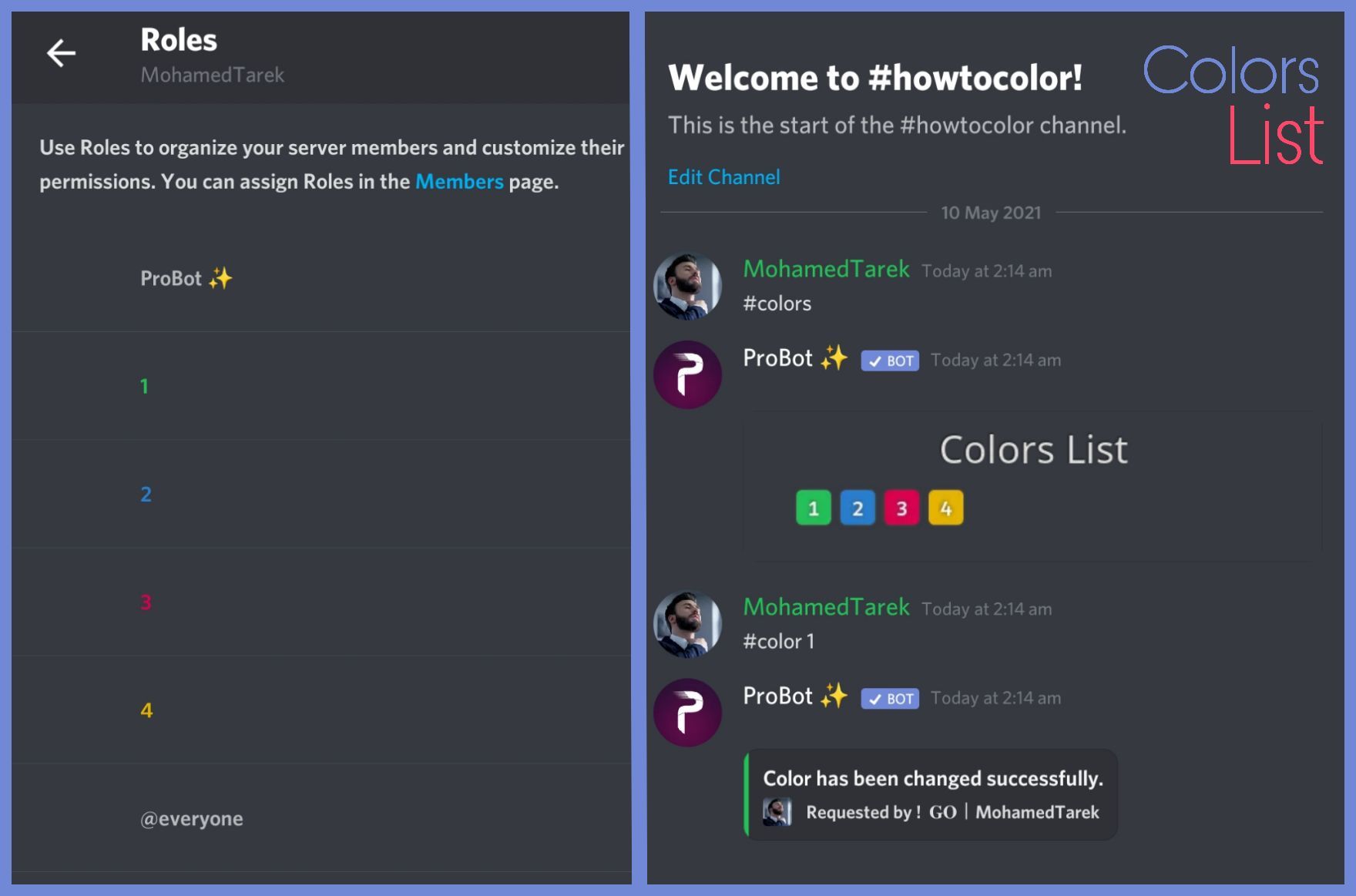
To do your "Colors List" you've to create numbered roles ascendengly, which means you've to create roles as the image below explains.
colors roles only works with exact numbers, they can't have mod permissions otherwise it won't work. dragging these roles above your moderators roles position is not recommended as they'll have the access through it to higher position roles.
the image below shows how to correctly use the commands as how does it effect your nickname.
 west kelp
patent saffron
its mean make probot admin role? sorry
west kelp
patent saffron
its mean make probot admin role? sorry
drag the probot role at the top
lethal ingot
ok
patent saffron
west kelp
drag the probot role at the top
ty, i will try
lethal ingot
tysm
lethal ingot
west kelp
To do your "Colors List" you've to create numbered roles ascendengly, which mean...
its nottttttttt working
west kelp
how exactly is it not working
lethal ingot
its not doing anything
west kelp
try enabling utility mode in the dashboard
lethal ingot
nope
west kelp
is the colors command enabled
wanton harbor
hi i just have question is there any double xp event that probot can do ?
lethal ingot
west kelp
is the colors command enabled
yes
nocturne flax
Hello, I have been trying for hours to find the command for anyone who comes in to give his name to the welcome,who can help me;
west kelp
wanton harbor
hi i just have question is there any double xp event that probot can do ?
no
west kelp
nocturne flax
Hello, I have been trying for hours to find the command for anyone who comes in ...
[user] with mention
[userName] without mention
nocturne flax
west kelp
i dont understand sorry
I mean that I set a bot in the panel that if someone hits level 5, the bot will automatically give him a rank for level 5 and a member from my server has level 5 and the bot still does not rank
nocturne flax
west kelp
[user] with mention
[userName] without mention
Without
 sly tartan
why music bot lagging
west kelp
lethal ingot
yes
Invite me to your server
west kelp
nocturne flax
I mean that I set a bot in the panel that if someone hits level 5, the bot will ...
Make sure probot has admin and make sure that they reached both required levels
lethal ingot
west kelp
Invite me to your server
nope
west kelp
sly tartan
why music bot lagging
Try changing server region to russia
west kelp
lethal ingot
nope
Okay
nocturne flax
west kelp
[user] with mention
[userName] without mention
Without mention
west kelp
Then it's [userName]
sly tartan
where can i change server region
nocturne flax
Emm has no Greek assistant because I am Greek and I do not know English well
west kelp
sly tartan
where can i change server region
In server settings, overview
nocturne flax
nocturne flax
Emm has no Greek assistant because I am Greek and I do not know English well
;
west kelp
nocturne flax
Emm has no Greek assistant because I am Greek and I do not know English well
I don't think we have greek support sorry
nocturne flax
A ok bye
 scenic yew
I was wondering how come probot only listens to my commands and not other peoples commands
scenic yew
its prolly your connection
 runic arrow
no its every single day 😄
 narrow vine
Hello, can you help me to launch the robot?
scenic yew
go watch a youtube video they'll help you
narrow vine
scenic yew
go watch a youtube video they'll help you
YouTube link?
 merry meadow
scenic yew
merry meadow
scenic yew
<@&675070424748654593>
split needle
scenic yew
I was wondering how come probot only listens to my commands and not other people...
Go to the dashboard, in music module of your server, add a random role as dj role, save, and then remove it and save again. That should fix
split needle
runic arrow
hey pro bot is lagging
Try change the channel region to europe or somewhere in there
scenic yew
tnx
split needle
narrow vine
Hello, can you help me to launch the robot?
Wdym?
 nocturne bear
how are you?
 somber garnet
Hi can I do birthday announcements on pro pls ping me thank you
 floral tendon
can someone tell me how to properly use the repeat function on a whole queue? it always repeats the same song for me :/
 faint verge
Hello, I wanted to know why the bot, when playing music, is interrupted for a second, sometimes for minutes
west kelp
somber garnet
Hi can I do birthday announcements on pro pls ping me thank you
not possible
west kelp
floral tendon
can someone tell me how to properly use the repeat function on a whole queue? it...
that's how it works
west kelp
faint verge
Hello, I wanted to know why the bot, when playing music, is interrupted for a se...
music overload we can't do much about it, try changing the server region to russia
 rotund frigate
how do i clear everything written in chat rather than only like 1 msg?
faint verge
@west kelp this happens on a russian server
west kelp
rotund frigate
how do i clear everything written in chat rather than only like 1 msg?
use /clear number_of_messages: number to delete
floral tendon
west kelp
that's how it works
wait, so the only way repeat function works is for one song? you cannot repeat a song list/queue?
rotund frigate
west kelp
use /clear number_of_messages: `number to delete`
if i do like 10000 it still only deletes one
does it have to be the exact number?
west kelp
floral tendon
wait, so the only way repeat function works is for one song? you cannot repeat a...
yes
 tawdry pasture
Do moderation commands have permissions set by default or do I need to specifically add roles that can use them?
west kelp
they're set by default
west kelp
rotund frigate
if i do like 10000 it still only deletes one
try using #clear
lean badgerBOT
**Command: clear**
Cleans messages from a channel.
**Usage:**
#clear (number of messages)
#clear bots (number of messages)
#clear [user] (number of messages)
**Examples:**
#clear 1000
#clear bots 10
#clear @west kelp 10
tawdry pasture
what roles have access? I have administrator role so I would imagine I can use all the commands
west kelp
yes, you can set mod roles in the dashboard, they would have access to every moderation command
west kelp
you're welcome
somber garnet
Okey thank you think I suggested it 😬
untold flume
Hi
How do I set up reaction roles:
1- head to the dashboard https://probot.io/dashboard then select your server.
2- enter "Reaction Roles" module
3- Click "Add Message", then select an embed. You can manage these embeds by heading to "Embed Messages" module.
4- Click "Choose a message", and then select the referred embed message where the selected embed was sent.
start adding reaction roles by clicking "Add Reaction". there would be a (+) button where you can select the role referred to this reaction.
Welcome images, moderation, leveling, reaction roles, logs, high quality music and many many more!
 pale swallow
thank you
untold flume
yw
pale swallow
here im confused on one thing
the thing under embeds
the choose a message
i dont know how to get anything in there
untold flume
@pale swallow u need to send an embed message to your server first
You can manage these messages in the embed messages module
 untold flume
On the left side there's a module called embed messages from there you can manage an embed message and send it to your server after that it will appear in there
untold flume
yw
 hallow goblet
how to see how mush time still to transfer credits?
nocturne flax
Hello
pale swallow
so now it should just send these messages at random?
untold flume
@pale swallow no when trying to send it it should show you what channel you want to send it in
 indigo zealot
Is it just me or does the bot just randomly lag
 dapper depot
how can i set a log channel ?
indigo zealot
I removed it then added it again and but it keeps lagging
untold flume
@dapper depot head to the dashboard > select your server > logs module
indigo zealot
Like example it just stops like u kno talking
Then it sometimes speeds up the song
untold flume
indigo zealot
I removed it then added it again and but it keeps lagging
You mean the music feature? Or there's a delay with the commands?
indigo zealot
Yea the music
dapper depot
untold flume
<@853312580030431273> head to the dashboard > select your server > logs module
there is a one command to set log channel ?
untold flume
I see it's probably an overload try changing the region to Brazil or russia @indigo zealot
untold flume
dapper depot
there is a one command to set log channel ?
Nope Unfortunately
untold flume
indigo zealot
Like it just lags like it stops for a while then starts afajn
From your vc settings
 slim basin
XD
untold flume
slim basin
XD
Hmm?
pale swallow
untold flume
<@908537544436768848> no when trying to send it it should show you what channel ...
so i have to manually send them
untold flume
Yep
slim basin
untold flume
Hmm?
necesito aYUDA
pale swallow
ooooooof
untold flume
slim basin
necesito aYUDA
#support-int / #chat-int
indigo zealot
Pues vete al español
 narrow prairie
How to disconnect the bot from vc
 frozen pilot
narrow prairie
How to disconnect the bot from vc
frozen pilot
narrow prairie
How to disconnect the bot from vc
#stop
narrow prairie
Ty
frozen pilot
Yw
untold flume
indigo zealot
Pues vete al español
#support-es / #chat-es
indigo zealot
he was the one that wanted it not me lol
untold flume
I see please don't use this channel for chatting 
indigo zealot
F
 wind urchin
<@&675070424748654593>
untold flume
untold flume
I see it's probably an overload try changing the region to Brazil or russia <@48...
@nocturne flax
untold flume
@vivid thorn
/Profile
It's an overload after all we can't do much about , many users use music commands at the same time
 vivid thorn
okey TY
untold flume
yw
@nocturne flax i see send an invite and your server id to him in dms and he should fix it for ya
vivid thorn
untold flume
<@401947675815051267>
> /Profile

some command can show profile like this ?
i not see this in Probot
okey ;-;
west kelp
no, we only have #user
 mild trail
btw whats wrong with the Probot's Music.. its soo laggy is there a problem with the bot?
west kelp
@mild trail DM your server invite to Fnr
nocturne flax
How do I set up the reaction roles?
west kelp
How do I set up reaction roles:
1- head to the dashboard https://probot.io/dashboard then select your server.
2- enter "Reaction Roles" module
3- Click "Add Message", then select an embed. You can manage these embeds by heading to "Embed Messages" module.
4- Click "Choose a message", and then select the referred embed message where the selected embed was sent.
start adding reaction roles by clicking "Add Reaction". there would be a (+) button where you can select the role referred to this reaction.
Welcome images, moderation, leveling, reaction roles, logs, high quality music and many many more!
mild trail
I send you the invite
nocturne flax
So I tried to do that, I pressed send message and it did not send.
The bot has administrator permissions + is above majority of the roles.
west kelp
make sure that all of the fields you selected are filled/not empty
nocturne flax
Where it asks choose a message, where do I puta message from?
 patent bough
Hello, you are fine. I brought the probot to my server, but other than clear command, other commands do not work. What should I do?
west kelp
nocturne flax
Where it asks choose a message, where do I puta message from?
from the Embeds section, you should create an embed that describes the reaction roles
west kelp
patent bough
Hello, you are fine. I brought the probot to my server, but other than clear com...
make sure probot has admin & check if all of the modules are enabled
patent bough
west kelp
make sure probot has admin & check if all of the modules are enabled
How can I see if it has the admin feature or not?
west kelp
from server settings
somber garnet
Hi can I send YouTube links to a channel please ping me thank you
west kelp
@somber garnet here?
somber garnet
No on my server via the bot
west kelp
like make the bot send youtube links?
somber garnet
Yeh
west kelp
well you can do that via autoresponder, make a trigger and then put the reply as a link
somber garnet
Trigger reply as the link then every time the Youtuber makes a clip I will receive it
west kelp
no, this feature isn't in the bot yet
 fringe harness
how can I see the Warn list from One Member ?
west kelp
fringe harness
how can I see the Warn list from One Member ?
use /warnings user: user
fringe harness
west kelp
use /warnings user: `user`
🧡
sleek yoke
<@&675070424748654593> is there a way with the ReactRoles to take away a role and add a different one? For instance, when people join my server they are assigned the "Hopeful" role which only allows them access to the Rules channel. When they react to the rules i would like "Hopeful" to be removed and "Member" to be given.
untold flume
@sleek yoke no unfortunately but you can do two reaction roles one for the hopful role and one for the member role i think that's the only way
untold flume
@somber garnet What's temporary link?
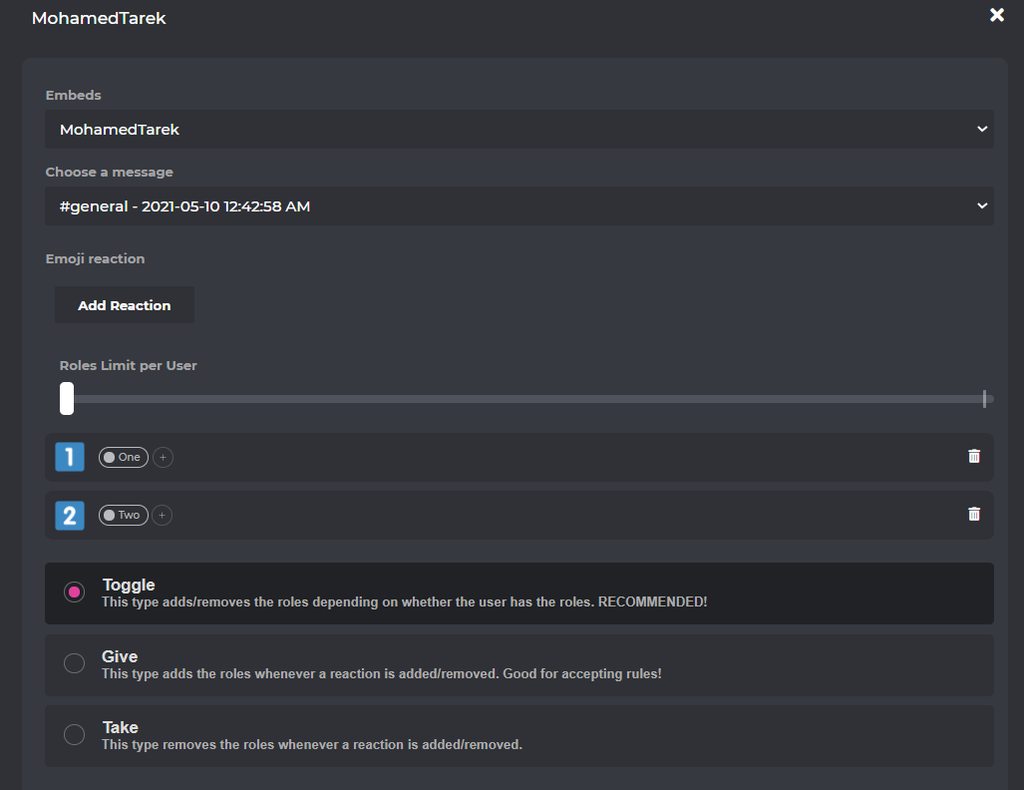
it helps you to customize the invite links created by your server members where invite link age and uses limit and creation cooldown etc is moderated according to your site settings.
How to activate it
- head https://probot.io/dashboard
- select your server through clicking its avatar on the left
- enter "temp link" module
- set your settings, ensure to make the selected "Link invite default channel" visible for everyone to avoid encountering any issues.
Welcome images, moderation, leveling, reaction roles, logs, high quality music and many many more!
 patent bough
@west kelp Why does it not work? I wanted to take the role of Lady from one, I am the role of admin, but it does not work, what should I do?
 untold flume
@patent bough make sure that your bot has the required permissions and drag its role above the other roles
patent bough
untold flume
<@925347070938873900> make sure that your bot has the required permissions and d...
It has all the capabilities and is at the bottom of the bot roll and above all the bot rolls inside the server
 calm crag
Hello, I have setup the roles I'd like my server members to react to in the "Reaction Roles" in the dashboard. Now how do I put that in my server so my members can react to the roles?
untold flume
How do I set up reaction roles:
1- head to the dashboard https://probot.io/dashboard then select your server.
2- enter "Reaction Roles" module
3- Click "Add Message", then select an embed. You can manage these embeds by heading to "Embed Messages" module.
4- Click "Choose a message", and then select the referred embed message where the selected embed was sent.
start adding reaction roles by clicking "Add Reaction". there would be a (+) button where you can select the role referred to this reaction.
Welcome images, moderation, leveling, reaction roles, logs, high quality music and many many more!
somber garnet
@untold flume thank you
untold flume
yw
 stray roost
i want report someone sell credits
calm crag
untold flume
**How do I set up reaction roles:**
1- head to the dashboard https://probot.io/d...
Thank you. So I have done this. So how does it show up in my discord?
In the "choose a message" section it doesn't show any options for me
untold flume
@calm crag u need to send an embed message to your server first
 unreal copper
Hi,
I have created server levelling and users are trying to do the #Rank command but they get a .png file which doesnt show anything, any help?
untold flume
@stray roost which language is the report going to be in
 untold flume
@unreal copper it happens to users who are new to probot it fixes itself as they gain xp
unreal copper
ahhhh thanks~!
untold flume
yw
nocturne flax
What Is REP ?
 prime escarp
hey so i added the bot into my server and me and some friends are listening to music and its just randomly pausing for short amounts of time?? how do i fix it?
untold flume
Reputation points shows how popular you are. @nocturne flax
@prime escarp send your server link to fnr in dms
nocturne flax
untold flume
Reputation points shows how popular you are. <@456226577798135808>
How To Get Rep ?
prime escarp
untold flume
<@522895557572820993> send your server link to fnr in dms
fnr?
prime escarp
sent
calm crag
untold flume
<@290695894821634048> u need to send an embed message to your server first
Thank you! This worked
untold flume
yw
prime escarp
yeah so i sent the friend request and fnr is not accepting/ havent seen it and the problem is persisting 😭
patent bough
What is Warn's Clearance Command?
 rocky nimbus
I have a problem with the bot. Every time we listen to music the bot just stops playing it out of nowhere and then starts playing again. How can i fix this?
untold flume
@prime escarp for now try changing the region to Brazil or russia it would get better and please wait patiently until fnr responds
@patent bough
/warn_remove input:warn id
nocturne flax
why is the bot and its support server so good overall?
untold flume
untold flume
<@522895557572820993> send your server link to fnr in dms
@rocky nimbus
@nocturne flax ask the devs maybe
stray roost
untold flume
<@421771025521573898> which language is the report going to be in
arabic
untold flume
Dm ! 𝐔𝐍 ٠ ℕo Ꮯomment☭🍁#0001
stray roost
no respond
untold flume
Wait for his response
stray roost
ok tnx anyway
untold flume
yw
odd fiber
What does the music support? Like, YT, SoundCloud, etc? Since it doesn’t support Spotify? ^^;
untold flume
@odd fiber youtube and soundcloud
odd fiber
Alright, thanks!
rocky nimbus
untold flume
<@594862560621363240>
what do i do after i sent it?
untold flume
@rocky nimbus just wait for his response
rocky nimbus
Alright, thank you
nocturne flax
ello
lean badgerBOT
:notes: Skipped 10 hours of shreksophone - @torpid ember
nocturne flax
how do i change the prefix
untold flume
@rocky nimbus yw
@nocturne flax
#prefix (new prefix)
@nocturne flax #commands please
nocturne flax
untold flume
<@456226577798135808>
#prefix (new prefix)
ty
untold flume
yw
somber garnet
Can I make two separate rooms for colour rooms like a room for levels 5 and a separate room for level 20
untold flume
@somber garnet you can add enabled/disabled roles/channels for this command i think these rooms would help you too
untold flume
yw
somber garnet
I can do it in the same room then just 2 separate embeds with reactions attached
 late crag
How do you make probot not laggy?
untold flume
Send your server link to Fnr#0017 in his dms and describe your issue
@late crag
late crag
Oh okay thanks!
somber garnet
I'm trying to make new reactions but the last ones won't go
somber garnet
I changed the time and day but these won't go

Roles
Trying to make new roles
That should be 1 role
nocturne flax
wc sry
untold flume
Np
somber garnet
And roles limit means the member can only pick that number of reactions roles
I got it on 1 so members can obviously only pick 1
tidal raven
Hello
tidal raven
I have ProBot Prime and I want to use #link to get a temp link
but when I type my command it doesnt send
what should I do?
 shrewd rune
hey! anyone know how to create rolls with probot?
untold flume
Have you tried changing the hypothetical channel? @tidal raven
@shrewd rune you can't create roles with probot
tidal raven
untold flume
Have you tried changing the hypothetical channel? <@820013802791370764>
What does hapothetical channel mean?
shrewd rune
untold flume
<@711527291263647756> you can't create roles with probot
roll
@untold flume create rolls not roles
untold flume
@tidal raven the channel you want your members to get their link in
@shrewd rune use #rolls and as far as i know you can't create new ones
shrewd rune
untold flume
<@711527291263647756> use #rolls and as far as i know you can't create new ones

this is French
untold flume
@shrewd rune do you want to change your bots language or what exactly?
shrewd rune
untold flume
<@711527291263647756> do you want to change your bots language or what exactly?
Sorry I did not understand
untold flume
What's your issue?
shrewd rune
untold flume
What's your issue?
I don't have a problem I just want to know if it's possible to create rolls
untold flume
untold flume
<@711527291263647756> use #rolls and as far as i know you can't create new ones
I said no it's not possible
shrewd rune
ok thank you for helping me
untold flume
@shrewd rune but you can add more numbers from default roll dice section

and you're welcome
shrewd rune
okay
shrewd rune
shrewd rune
it's just weird that here we see that auto roles have been created
untold flume
@shrewd rune i think it's the autoresponder feature
shrewd rune
ok I'll see
 marsh obsidian
oh no.
 fickle reef
How can i be a supporter?
untold flume
marsh obsidian
oh no.
How can i help you?
@fickle reef dm Hazel#0666 but i don't think that we're looking for more staff members
marsh obsidian
untold flume
How can i help you?
Hi hi! Is there a way I can transfer XP or current lvl to server members from one bot to probot? I just added ProBot to a server that I help manage, and were going to be using it's lvling system instead of mee6!
untold flume
@marsh obsidian unfortunately no you can't
marsh obsidian
Ahhh I see
untold flume
they'll have to start all over again
untold flume
yw
fickle reef
Thanks Saaz.!
untold flume
yw
marsh obsidian
ooo one more question if you dont mind
is there a way i can change the rewarded roles to just text?
instead of it being voice and text?
untold flume
Change the required voice level to 0
untold flume
yw
 toxic salmon
can i see probot ping?
untold flume
@toxic salmon yes you can
/Ping
 latent axle
Is there a way to block music commands from specific channels?
toxic salmon
untold flume
<@807393617759961109> yes you can
> /Ping
thx
latent axle
untold flume
<@336539227456012298> Yes by adding disabled channels via dashboard
Kk
But which section?
untold flume
After heading to the dashboard > go to music section > #play command settings (click on the edit button next to it) add disabled roles or you can just add dj roles it would be easier for you
latent axle
Oh alr.
somber garnet
@untold flume did you say I can make the reactions certain roles only I can't do it
I think it was the channel room you mean
Make the channel room level 10
 high slate

 dapper dew
hi
untold flume
Hello ، how can i help you?@dapper dew
dapper dew
untold flume
Hello ، how can i help you?<@872961502502592582>
You have a relationship in 2fa?
 olive lantern
Hej how can i have credits?
untold flume
@olive lantern hey
How to gain probot credits
How to gain probot credits
1 ~ **Daily Reward  **
**
1 - Enter https://probot.io/daily
2 - Click the gift box button , make sure you are not a robot and congrats.!
You can get credits every 24 hours, you will get [400 - 3000] credits
2 ~ **Voting for ProBot **
You can vote only once each 12 hours by The Vote Link , as you earn automatically from 300 / 2300 credits each voting!
3 ~ external ways to gain credits :
trading with your friends (not allowed here)
⚠️ - Warning!
- Trading is against Discord TOS
- Selling Probot credits for real money isn't allowed
Welcome images, moderation, leveling, reaction roles, logs, high quality music and many many more!
 dapper dew
There are people getting a lot of credits
untold flume
dapper dew
There are people getting a lot of credits
What's wrong with that?
dapper dew
Does if I do the things he will get in something?
dapper dew
untold flume
What's wrong with that?
Get 100K per day
untold flume
dapper dew
Does if I do the things he will get in something?
Things like what?
dapper dew
untold flume
Things like what?
There are people who get 100K today is this danger?
untold flume
More like trading things with credits? @dapper dew
dapper dew
untold flume
More like trading things with credits? <@872961502502592582>
Wait for the market I meet you
untold flume
mhm?
nocturne flax
In my server I have a reaction role for verification. Is there any possibility due to high traffic that the bot broke?
 velvet fern
hello guS i cant find the leveleing support of probot did they deleted it?
 fierce wagon
<@&675070424748654593> ..
fierce wagon
nocturne flax
In my server I have a reaction role for verification. Is there any possibility d...
do u mean bot are slow now?
 fathom meadow
velvet fern
hello guS i cant find the leveleing support of probot did they deleted it?
fathom meadow
velvet fern
hello guS i cant find the leveleing support of probot did they deleted it?
Nah just get to your server and get to your server then get to leveling system and edit it after enable it
nocturne flax
fierce wagon
do u mean bot are slow now?
I mean the reaction role doesnt give the role
fierce wagon
nocturne flax
I mean the reaction role doesnt give the role
Make sure the probot role is higher, you have the roles added to the reactions on the dashboard, the roles in reaction roles don't have any managing permision
nocturne flax
It is
fierce wagon
velvet fern
hello guS i cant find the leveleing support of probot did they deleted it?
?
 nocturne flax
It was working
fierce wagon
fierce wagon
Make sure the probot role is higher, you have the roles added to the reactions o...
check again
drag probot role above others
wraith plinth
How do i set it so pro bot can only play music in a certain voice channel? <@&675070424748654593>
fierce wagon
wraith plinth
How do i set it so pro bot can only play music in a certain voice channel? <@&67...
you cant
fierce wagon
wraith plinth
they im kciking pro bot
kicking?
nocturne flax
I still have an issue with my ProBot
It seems like its frozen on the reaction role part
fathom meadow
nocturne flax
I still have an issue with my ProBot
<@&675070424748654593> ^^
@nocturne flax Kick the bot and invite it again then make the roles can be mentioned by everyone then try to make the reaction roles
https://probot.io/invite
nocturne flax
fathom meadow
<@456226577798135808> Kick the bot and invite it again then make the roles can b...
The kick of the bot would make a huge mess. The bot got unstuck after 15 minutes of disabling anyone on using it
fathom meadow
nocturne flax
The kick of the bot would make a huge mess. The bot got unstuck after 15 minutes...
Np.. Invite the bot without kicking it then make every role can be mentioned by everyone
@edgy tide If not worked make the roles appeared online roles Because I will go
fathom meadow
wraith plinth
How do i set it so pro bot can only play music in a certain voice channel? <@&67...
Only in premium ^^
fathom meadow
 prisma wharf
How to set autorole i mean getting role from emoji
prisma wharf
How to set autorole i mean getting role from emoji
Mean reaction role?
prisma wharf
Yeah
fathom meadow
Get to dashboard > https://probot.io/dashboard > your server > reaction roles
But you have to create embed message first and send it to add the reaction on it
prisma wharf
Ok thanks
fathom meadow
yw
split needle
 crystal socket
How do I get different types of bots?
split needle
crystal socket
How do I get different types of bots?
What?
 neat portal
Pro Bot is making no soudn in my channel
nocturne flax
neat portal
Pro Bot is making no soudn in my channel
Did you mean sound ?
 lapis musk
guys help
on the panel
if i go to Reaction Roles
i create a new message
but when i press the plus botton
i dont see roles, literally zero role
 earnest forum
<@&675070424748654593> how do u get a emoji id?
nocturne flax
earnest forum
<@&675070424748654593> how do u get a emoji id?
Gust but a \ after emoji and you will get it .
nocturne flax
lapis musk
i dont see roles, literally zero role
Try refresh page, or kick bot and reinvite
earnest forum
Ok ty
nocturne flax
earnest forum
Ok ty
Welcome .
split needle
@nocturne flax read channel topic
split needle
lapis musk
but when i press the plus botton
Move the probot role highe in your server role list
nocturne flax
split needle
<@456226577798135808> read channel topic
?
split needle
earnest forum
<@&675070424748654593> how do u get a emoji id?
On the chat, put a backslash \ right before an emoji and send it to chat
earnest forum
split needle
On the chat, put a backslash \ right before an emoji and send it to chat
Ty too
split needle
half edge
<@&675070424748654593> I need help in my server with reaction roles
What is the problem?
lapis musk
split needle
Move the probot role highe in your server role list
Love you
split needle
nocturne flax
?
Read it
Don't question mark with me
nocturne flax
split needle
Read it
Don't question mark with me
Ok sorry .
split needle
go to https://probot.io/dashboard, select your server, go to embed messages module to create and send embed messages for the reaction roles to where you want. Then go to reaction role module to setup the feature on the sent embed messages.
Notice: Be sure the Probot✨ role is higher than other roles. Embed message should not have any blank element (better to remove them if not using).
Welcome images, moderation, leveling, reaction roles, logs, high quality music and many many more!
half edge
Thanks
 drifting trout

 digital prawn
Hello, I'm new,can anyone say me how to make bot for games?
split needle
nocturne flax
The React Role settings screen is not showing the roles in the drop down.
Move probot role higher
split needle
digital prawn
Hello, I'm new,can anyone say me how to make bot for games?
What?
 delicate bolt
split needle
delicate bolt
split needle
No
nocturne flax
split needle
Move probot role higher
ill try this thanks
nocturne flax
split needle
Move probot role higher
it worked, thank you!
 humble urchin
I have a problem with Not Working, granting a certain role for reaching the required level
split needle
humble urchin
I have a problem with Not Working, granting a certain role for reaching the requ...
Make sure
- The probot role is higher than other roles
- The bot have permision to assign roles
- Your members reached both level requirements if you set them to both text and voice
 cosmic marlin
Hello, I was wondering if there is an option to reset all xp levels? if reply, ping please
earnest forum
<@&675070424748654593> is there reaction roles for probot?
I mean
Can we do reacrion roles with probot
Like is there any?
split needle
cosmic marlin
Hello, I was wondering if there is an option to reset all xp levels? if reply, p...
Yes
#help reset
lean badgerBOT
split needle
#help reset
**Command: reset**
Reset text/voice/invites xp points for all or specific members.
**Usage:**
#reset [text / voice / invites) [all / user]
**Examples:**
#reset text all
#reset voice all
#reset invites all
#reset text @Dramex
cosmic marlin
thank youuu
nocturne flax
hallo can anyone made this probot work
i don know how to use it
i am newqw
new
split needle
nocturne flax
hallo can anyone made this probot work
Invite it to your server and it should work
split needle
Not really but yea. Usualy just have it added to your server and most things you need will just work
nocturne flax
i want made that probot give a roles but it does not give a role
split needle
Then go to https://probot.io/dashboard, login, select your server on the left side, go to auto role module on the left pannel and add the role you want here
Be sure that the <@&692974405311135764> role is higher than that role in your server so it could work
Welcome images, moderation, leveling, reaction roles, logs, high quality music and many many more!
split needle
On the site, go to embed messages module at the near top on the left pannel to create and send embed messages for the reaction roles to where you want. Then go to reaction role module bellow it some modules to setup the feature on the sent embed messages.
Notice: Be sure the Probot✨ role is higher than other roles. Embed message should not have any blank element (better to remove them if not using).
 compact cradle
Vote
 thorny kindle
hello, is anyone online now?
nocturne flax
hi nove
thorny kindle
Hello ma Queen. For some reason I can't send message with my probot for embeds
 thorny kindle
can I post a screenshot?
split needle
Sure
Prefer the one of the editor
thorny kindle
 split needle
Try use description if that send
You may reached character limit on content
But the description of the embed has higher limit than content
thorny kindle
Ok it worked with description! Thanks!!!
nocturne flax
Server owner account was banned, I read admins can email discord for ownership. Is there anyway to see if there's a co-owner or admin?
 blazing juniper
can we increase or decrease someone's level/rank?
split needle
nocturne flax
Server owner account was banned, I read admins can email discord for ownership. ...
This seem not related to this bot so prefer asking somewhere else like google
split needle
blazing juniper
can we increase or decrease someone's level/rank?
No for now
split needle
nocturne flax
how tomake them not auto but they have chooes the roles
Remove the role you added in auto role
blazing juniper
split needle
No for now
okay
nocturne flax
I think Probot was only thing with admin permissions
split needle
nocturne flax
what should i do next
Save and just that
split needle
nocturne flax
I think Probot was only thing with admin permissions
We have no control of the bot since it's against tos for using bot account or controling a bot
So asking us just useless in this case
nocturne flax
split needle
Save and just that
wait i don understand
split needle
nocturne flax
wait i don understand
Remove the role you added in auto role module, save the change and you're done
nocturne flax
split needle
We have no control of the bot since it's against tos for using bot account or co...
I was thinking admin can make other users admin too though? So is it possible to add an option to the bot to manage role to give admin to a user/
split needle
It may not if the role has admin perm is higher than the probot role, or is higher than your highest role, or a restiriction on roles with high perm to prevent server raid/nuke
If you want to assign that role to you or someone with the same role as you
nocturne flax
split needle
Remove the role you added in auto role module, save the change and you're done
where is it lurk and save what?
wraith glade
Yo
nocturne flax
hi mui
 shut anvil
Hello, I would like some help with the color function with pro bot
shut anvil
shut anvil
Hello, I would like some help with the color function with pro bot
<@&675070424748654593> My apologies I forgot to do the ping
nocturne flax
doryu u can help me?
somber garnet
Gd morning sry for silly question not 🤭 but is, Take in the reactions so a member can only pick one reaction in the list pls ping me thank you <@&675070424748654593>
I'm kinda guessing that is roles per user
fathom meadow
nocturne flax
doryu u can help me?
<@&675070424748654593>
somber garnet
This is English
fathom meadow
Yes
nocturne flax
maklord u can help me ?
fathom meadow
Say your question
nocturne flax
uh finaly
i need someone that can setup this probot on my server it an alliance server so becarefull
split needle
nocturne flax
where is it lurk and save what?
Where were you that time then?
split needle
wraith glade
To set up server
This is probot support, not general discord support