#support-en
1 messages · Page 335 of 1
 frozen pilot
 hybrid dock
ok
 tender phoenix
How do you work the Automod?
 native geyser
https://probot.io/dashboard -> select your server -> automod -> set it as you wish and make sure the bot has required perms
Welcome images, moderation, leveling, reaction roles, logs, high quality music and many many more!
 delicate viper
@native geyser any news on why the music function doesn't work?
native geyser
haven't been told anything specific
delicate viper
maybe my server is set up wrong
 little valley
i cant seem to get my reaction roles to work and neither is my auto role
native geyser
delicate viper
maybe my server is set up wrong
nope its not the issue
native geyser
little valley
i cant seem to get my reaction roles to work and neither is my auto role
elaborate what happens please
little valley
well with auto roles it was working to auto promote to the first rank beyond @ everyone but now it does nothing
with reaction roles i cant see any of my ranks from my discord when im trying to match a rank to an emoji
little valley
@native geyser well that did fix the auto role but still having no luck with reaction role
native geyser
have you refreshed your page afterwards
little valley
@native geyser that did it thank you i feel like an idiot now
native geyser
yw
 sweet portal
Hi, i have a problem with welcoming messages. When an user comes to my server i want a picture like these and their nicname below it. But sometimes it works and sometimes it doesnt. how can i fix this?
 native geyser
sweet portal
Hi, i have a problem with welcoming messages. When an user comes to my server i ...
native geyser
sweet portal
Hi, i have a problem with welcoming messages. When an user comes to my server i ...
must be a bug i'll talk to devs
its prime server not premium and no you dont need to pay for it
use #vip move bot number then invite the bot via the link you get in dms
you can use it in #commands
here in this channel
have you refreshed the page afterwards
kick premium
use the command again
invite the bot again
this should fix the issue
the bot uses a role named muted with default color if there is none it'll create its own role
if you want to change the perms yes if not just use the mute command the bot will create one
 nocturne flax
hey, is there a way to set up colour roles?
 lucid ember
Hi
nocturne flax
i have reaction roles set up in my server but they all want to pick their own colour
 desert crane
How do I set up react roles?
native geyser
nocturne flax
hey, is there a way to set up colour roles?
for /colors command or for reaction roles?
native geyser
lucid ember
Hi
how can i help you
native geyser
desert crane
How do I set up react roles?
- from embed messages section create an embed message and send it to your server (the message you have to select basically)
- from reaction roles section select the embed message you just sent
- add a reaction
- add roles
Welcome images, moderation, leveling, reaction roles, logs, high quality music and many many more!
desert crane
Thanks
native geyser
yw
native geyser
first you need to create a color list, to do so
#1 ~ 👉 Go to server settings, Roles.
#2 ~ 👉 Add Numbered Roles Like The picture down.
#3 ~ 👉 Save and go out.
https://i8.ae/7hM2w
Now you are ready to use this colors.
/colors
Shows the colors list
/color number
Choose/change your color in server.
to remove your current color: /color 0
 sweet portal
native geyser
must be a bug i'll talk to devs
sweet portal
native geyser
must be a bug i'll talk to devs
thank you
nocturne flax
so i have to make individual roles?
native geyser
yes
nocturne flax
i have so many lmao
native geyser
you need to name them with numbers
native geyser
/stop
 ruby idol
thanks
native geyser
yw
native geyser
yes
nocturne flax
Sorry for my bad english
native geyser
#1 ~ 👉 Go to server settings, Roles.
#2 ~ 👉 Add Numbered Roles Like The picture down.
#3 ~ 👉 Save and go out.
https://i8.ae/7hM2w
Now you are ready to use this colors.
/colors
Shows the colors list
/color number
Choose/change your color in server.
to remove your current color: /color 0
 strange nest
why does the music keep cutting out
 untold flume
<@&675070424748654593>
desert crane
How do we do colour roles aswell
 gray harbor
How to play music
 light elbow
gray harbor
How to play music
light elbow
gray harbor
How to play music
#play
untold flume
strange nest
why does the music keep cutting out
Try changing the region to Brazil then try /stop then /play
 warm basalt
how do i add another reason
 untold flume
 crude nimbus
how can i get money
crude nimbus
how can i get money
Vote : https://probot.io/vote
Daily : https://probot.io/daily
@warm basalt add a timer then add a new reason
warm basalt
thanks
untold flume
yw
crude nimbus
ty
untold flume
yw
 raven folio
What is the command to loop a queue?
untold flume
@raven folio you can't loop a queue only a single song
#loop / #repeat
desert crane
How do I make color roles display over the colors of other roles
desert crane
native geyser
https://probot.io/dashboard
1) from embed messages section create an embed messa...
@hollow rampart
How do I make the color roles appear over the colors of different roles
Noone
Ok
untold flume
@desert crane first you need to create a color list, to do so
#1 ~ Go to server settings, Roles.
#2 ~ Add Numbered Roles Like The picture down.
#3 ~ Save and go out.
https://i8.ae/7hM2w
Now you are ready to use this colors.
/colors
Shows the colors list
/color number
Choose/change your color in server.
to remove your current color: /color 0
untold flume
 hollow rampart
hey how do i make a react thing so they ahve to react to get a role
hollow rampart
hey how do i make a react thing so they ahve to react to get a role
- from embed messages section create an embed message and send it to your server (the message you have to select basically)
- from reaction roles section select the embed message you just sent
- add a reaction
- add roles
 river oracle
how to give my bot permision so I can use the set nick command
nocturne flax
<@&675070424748654593>
nocturne flax
river oracle
how to give my bot permision so I can use the set nick command
server setting > roles > probot > permisions > Manage Nicknames (On)

 old lily
Hello i wonder how i can pay with paypal
Because when i press PayPal it just disappears
nocturne flax
old lily
Hello i wonder how i can pay with paypal
Hello , Try from another browser
old lily
i tried many chrome,edge,opera
nocturne flax
old lily
i tried many chrome,edge,opera
What does it show you when you click on PayPal?
old lily
loading then nothing
nocturne flax
old lily
loading then nothing
Your PayPal is working ??
old lily
yes
nocturne flax
old lily
yes
try vpn
old lily
ok
river oracle
thank you
old lily
it didnt work
nocturne flax
river oracle
thank you
yw 
nocturne flax
old lily
it didnt work
Try another device, if it does not work, there is no other solution to the problem
old lily
okey can i use phone
nocturne flax
yup
 cyan zinc
I got a question about probot prime/premium, Im wondering i saw a server i was admin in and the Logs were saying who did what is that a probot'S feature? ad if its witch one between prime and premiums gives it?
 split needle
cyan zinc
I got a question about probot prime/premium, Im wondering i saw a server i was a...
split needle
cyan zinc
I got a question about probot prime/premium, Im wondering i saw a server i was a...
Premium
Or maybe prime also includes that
cyan zinc
okay bc before paying i want to make sure i dont pay too much for what i need ahaha
if anyone who owns prime and has the answer you cand tag me on plz! Big thanks to all !
nocturne flax
my probot is unable to join voice channels, even though i already set the permissions for it and it's role.
 dawn wadi
Is there a way to setup probot to play age restricted songs on youtube?
 brave monolith
BRUH
 languid fractal
 formal nacelle
uhm
anyone here

can someone fix this?
<@&675070424748654593>
this is so hard to edit or copy paste
nocturne flax
cyan zinc
if anyone who owns prime and has the answer you cand tag me on plz! Big thanks t...
Prime can do that too ..
 wild field
Y'all, how does the reaction roles work
What am I doing wrong
I did the embed, set up the message, picked the emotes, but it won't let me add a role to the emotes
 thorny burrow
Make sure that the role bot is higher than the roles you wan't to show.
wild field
ಥ_ಥ thank you, I'm dumb
thorny burrow
any time.
 strong condor
Is there a way to reset the Level on the bot?
 serene sigil
strong condor
Is there a way to reset the Level on the bot?
serene sigil
strong condor
Is there a way to reset the Level on the bot?
Global level in #profile command
Or in your server in #rank command?
serene sigil
formal nacelle
<@&675070424748654593>
There is mention her so i didn't mention again
Support team 
 umbral cedar

nocturne flax
Hi! Is this a bug? If the bot is set to delete the command, it still replies to it.
 serene sigil
nocturne flax
Hi! Is this a bug? If the bot is set to delete the command, it still replies to ...
serene sigil
nocturne flax
Hi! Is this a bug? If the bot is set to delete the command, it still replies to ...
Bot replied to it
Before it delete the command message
serene sigil
nocturne flax
Hi! Is this a bug? If the bot is set to delete the command, it still replies to ...
And discord make it like you see
serene sigil
nocturne flax
Yes but it should not.
No there isn't something wrong
serene sigil
nocturne flax
Why the bot unban people for the reason time ended?
The time of ban ended ?
nocturne flax
Yeee but I never ban with probot
And it for life the ban
I make no time
So It for ever
serene sigil
nocturne flax
And it for life the ban
This option for delete messages of user in this time
Not ban time for user
nocturne flax
serene sigil
No there isn't something wrong
But the bot should know that it's set up that the command is deleted. So it should not reply to it because it looks strange.
 lean wharf
I think when the bot ban it ban forever
serene sigil
nocturne flax
So It for ever
Make sure that You didn't ban anyone with probot
nocturne flax
I thinks I will remove probot from my server
 frosty harbor
<@&675070424748654593> ⚠️ ERROR FOUND..! ⚠️
 nocturne flax
And Make my own bot
serene sigil
nocturne flax
But the bot should know that it's set up that the command is deleted. So it shou...
It's ok , nothing strange
nocturne flax
 serene sigil
nocturne flax
serene sigil
nocturne flax
Yes
It's reply first
Then delete your message
serene sigil
nocturne flax
And Make my own bot
For chatting #chat-en
serene sigil
frosty harbor
<@&675070424748654593> ⚠️ **ERROR FOUND..!** ⚠️
When support team come will reply to you .
nocturne flax
serene sigil
Yes
It's reply first
Then delete your message
Can i make a suggestion to don't reply when the command invocation is set?
serene sigil
nocturne flax
Can i make a suggestion to don't reply when the command invocation is set?
Yes you can #573053418017521664
strong condor
serene sigil
Global level in #profile command
Or in your server in #rank command?
In #rank
serene sigil
strong condor
In #rank
**#reset text @user **
strong condor
Can i not reset all at once?
serene sigil
strong condor
Can i not reset all at once?
You can reset all or reset someone only
#reset all
#reset text @user
serene sigil
You are welcome
strong condor
Like 2 Level up systems on 1 server?
serene sigil
strong condor
Is there a way to make 2 categories?
For what?
strong condor
Event
serene sigil
Wait
strong condor
Like to sort out some people from maybe 1 categorie
split needle
You can't
serene sigil
You can set one channel for level System
split needle
You didn't event understand the question
serene sigil
split needle
You didn't event understand the question
#chat-en and tell me 🙂 🙂
split needle
@strong condor the bot don't have splited leveling for one type in a single server, only splited types (text and voice)
strong condor
split needle
<@888403402957156382> the bot don't have splited leveling for one type in a sing...
Ok, thanks :(
lean wharf
Hi
nocturne flax
What is the use of probot credits ?
split needle
nocturne flax
What is the use of probot credits ?
Use to purchase profile/rank card backgrounds or prime/premium bots
nocturne flax
split needle
Use to purchase profile/rank card backgrounds or prime/premium bots
Command ?
split needle
There's no command
https://probot.io/id
https://probot.io/bgs
https://probot.io/premium
Welcome images, moderation, leveling, reaction roles, logs, high quality music and many many more!
Welcome images, moderation, leveling, reaction roles, logs, high quality music and many many more!
Welcome images, moderation, leveling, reaction roles, logs, high quality music and many many more!
 knotty quiver
Whenever I use #lock, the channel gets locked and #unlock unlocks it, this is fine, but...
In case my Moderator who is not given Administrator permission uses it, the channel gets locked, but he also isn't having the permission to send messages. Then anyone with Administrator permission has to come to unlock the channel.
Is it a problem in settings, or ProBot doesn't supports that i.e. locking the people who are not Moderators.
split needle
knotty quiver
Whenever I use #lock, the channel gets locked and #unlock unlocks it, this is fi...
While locking a channel, it'll just disable permision to send messages in that channel for the everyone role
But you can still use the commands in other channel like #lock #channel
Or if you want them to directly use the command in that channel, just go to channel settings - permision, add the moderator role and allow it to send messages (you can do this in category setting if the channels are synced to the categories
 inner plaza
How I can active #role give? When I use this I becom a Massage that ProBot have not the permission for that. How and where I can active that?
split needle
inner plaza
How I can active #role give? When I use this I becom a Massage that ProBot have ...
Move the probot role higher in your server role list
inner plaza
split needle
Move the probot role higher in your server role list
Thanks 🙂
 hazy sage
Hi
Add ban on the website please
And let us costumize the ban channel
When we ban someone appear
native geyser
 faint saffron
 primal gazelle
hi guys, is there any way possible that instead of react roles, the bot uses buttons?
native geyser
<@&role id>
to see all the variables you can check the pinned messages in this channel
 mortal tangle
есть кто русский?
native geyser
#support-int
primal gazelle
can i mention a role on the footer segment of an embed?

 unique steeple
@native geyser hi , I have a question
If I bought pro bot prime from the dashboard
Then I sell it with less price is this legal or not?
If no why?
native geyser
primal gazelle
can i mention a role on the footer segment of an embed?
nope
native geyser
 undone aurora
Look about this
undone aurora
Look about this
check your discord settings and the bots embed permissions
native geyser
unique steeple
<@324937717441888256> hi , I have a question
If I bought pro bot prime from the...
prime and premiums services belong to us therefore selling them is illegal
unique steeple
Yes but I will buy it from you @native geyser
So technically you won't lose anything
native geyser
it doesn't change the fact that the services still belong to us
undone aurora
@native geyser Give me the important permissions to check
native geyser
undone aurora
<@324937717441888256> Give me the important permissions to check
attach embeds
unique steeple
Yes but why , it belongs to you and the team everyone know this but you will get benefit
undone aurora
native geyser
attach embeds
Ok
unique steeple
How much it cost in credit on the dashboard?
native geyser
i'm not making the rules i'm just telling them
any trading of our paid versions is not legal
unique steeple
unique steeple
How much it cost in credit on the dashboard?
...
unique steeple
native geyser
i'm not making the rules i'm just telling them
Hmm how making them this if you are the top role here?
native geyser
unique steeple
...
you can see it by trying to recharge your balance with credits
unique steeple
Oh okay
native geyser
unique steeple
Hmm how making them this if you are the top role here?
i'm not in developer team nor i'm the bots owner therefore i'm not making the rules
unique steeple
Anyway it's almost 300k I would sell it with 200k so you will get benefit and I almost get harmed did you get me ? @native geyser
unique steeple
native geyser
i'm not in developer team nor i'm the bots owner therefore i'm not making the ru...
Hmm who is the bot owner 🙃
native geyser
it wouldn't be logical for you to do that therefore i do believe there is more that you're not going to be telling me regarding that and i do believe it's going to be something illegal
native geyser
unique steeple
Hmm who is the bot owner 🙃
Dramex#0001
unique steeple
native geyser
it wouldn't be logical for you to do that therefore i do believe there is more t...
No I promise all is leagle
Do you want to hear the story ?
native geyser
then why are you so willing to lose credits 
unique steeple
unique steeple
Do you want to hear the story ?
..
native geyser
unique steeple
Do you want to hear the story ?
not really, as i said we are the one providing the service therefore selling our subscriptions is illegal.
unique steeple
Ok I have another question can I transfer credit from my other account how got banded ?
@native geyser
Banded Bec i puted my years by mistake 2 years old
native geyser
i didn't completely understand you but you're not supposed to be using multiple accounts to farm credits
unique steeple
Omg what did you understand @native geyser
native geyser
almost nothing
unique steeple
What farming credits!?
native geyser
what is your first language
unique steeple
Arabic but I prefer talking in english @native geyser
😁
Look anyway can I transfer credit from my other account who got banded?
@native geyser
native geyser
please use #support-ar then because i do not understand what you're trying to say
unique steeple
unique steeple
Look anyway can I transfer credit from my other account who got banded?
<@324937...
You didn't understand this?? @native geyser
native geyser
no i have no idea what you mean by 'how got banded'
unique steeple
Who got ban
unique steeple
native geyser
no i have no idea what you mean by 'how got banded'
Sorry keyboard mistake
native geyser
you're trying to transfer credits from an account that got banned?
is this what you're trying to say?
unique steeple
Exactly
 leaden zodiac
Тут есть русские вообще?
native geyser
leaden zodiac
Тут есть русские вообще?
#support-int
native geyser
unique steeple
Exactly
profile transfer is not open therefore you can not
leaden zodiac
Оу вы из Англии
unique steeple
перейти к #support-int пожалуйста
- @leaden zodiac
 brave tundra
I my server the mute command isn't working for moderation... Why?
native geyser
what happens when you use the command
 hollow folio
hi anybody know how to forbid someone to put on music
native geyser
https://probot.io/dashboard -> select your server -> music module -> edit play command -> add enabled/disabled roles
Welcome images, moderation, leveling, reaction roles, logs, high quality music and many many more!
hollow folio
ok fuck you
native geyser

nocturne flax
hi my dashbord leveling error still cant fix , when i click addrole , it just go to error page , i try refresh my page and try other wifi...

 dim current
Hello , our server top stats is not updated a long time yet , can anyone help me?

 native geyser
nocturne flax
native geyser
nocturne flax
which language are you using the dashboard in
native geyser
dim current
Hello , our server top stats is not updated a long time yet , can anyone help m...
do you have utility module enabled
dim current
native geyser
do you have utility module enabled
let me check ..
nocturne flax
native geyser
which language are you using the dashboard in
Chinese Traditional
native geyser
nocturne flax
Chinese Traditional
can you try in a different language and let me know if you're still getting the same error
dim current
@native geyser its in dashboard . right ?
nocturne flax
ok
native geyser
dim current
<@!324937717441888256> its in dashboard . right ?
yes
nocturne flax
oh...I think it fixed it , thanks a lot
 native geyser
yw
native geyser
dim current
its enabled
any no-xp roles or channels?
dim current
native geyser
any no-xp roles or channels?
where can i see this option ?
native geyser
leveling system module
dim current
its empty
 native geyser
then as people send messages and get xp it should update
dim current
oki ty
 rugged turret
 west kelp
nope
 warm maple
why probot doesn't allow me to login <@&675070424748654593>
nothing happened when i log in
 keen gate
please can someone help me it is not working probot in my discord server
warm maple
@everyone
native geyser
warm maple
why probot doesn't allow me to login <@&675070424748654593>
is it putting you back in the same page?
native geyser
keen gate
please can someone help me it is not working probot in my discord server
which exact feature
warm maple
native geyser
is it putting you back in the same page?
yep
keen gate
native geyser
which exact feature
Probot is on the server but it doesn't let me use it commands or send embers
native geyser
warm maple
yep
its an issue regarding your internet try the following:
clear your cache
try a different browser
restart your internet/router
warm maple
native geyser
its an issue regarding your internet try the following:
clear your cache
try a d...
wait
native geyser
keen gate
Probot is on the server but it doesn't let me use it commands or send embers
if you're trying the commands with slash commands can you show me the bots reply
keen gate
ok

Here and in the server but I don't get any commands and it doesn't even make me send ember
warm maple
native geyser
its an issue regarding your internet try the following:
clear your cache
try a d...
nothing work
native geyser
keen gate
Here and in the server but I don't get any commands and it doesn't even make me ...
for slash commands give the bot slash commands permission
for embeds make sure to fill every selected element and check the bots permissions
native geyser
warm maple
nothing work
sorry but i dont know its an issue outside of probot and these are the only possible fixes i know
nocturne flax
hey can you help me my main account got blacklist for no reason @native geyser
native geyser
nocturne flax
hey can you help me my main account got blacklist for no reason <@32493771744188...
user id?
nocturne flax
i dm dramex and he didn’t answer i 7 months ago
 keen gate
native geyser
for slash commands give the bot slash commands permission
for embeds make sure t...
keen gate
native geyser
for slash commands give the bot slash commands permission
for embeds make sure t...
Already done I verified that they had all the permissions but it does not change anything
nocturne flax
native geyser
user id?
here you go 608388769107935252
i wish that you could help me because its been 1 year i guess
 copper fern
my bot doesn't want to find commands, e.g. #top or #rank, I don't know what to do?
warm maple
ok good bye
native geyser
keen gate
Already done I verified that they had all the permissions but it does not change...
kick and reinvite the bot and test again please
warm maple
i m going to leave this server and bot
native geyser
nocturne flax
here you go 608388769107935252
Blacklist Reason:
Manual blacklist for server or for user
-- Found 15 old blacklists:
1 - Manual blacklist for server or for user
2 - Manual blacklist for server or for user
3 - Manual blacklist for server or for user
4 - Manual blacklist for server or for user
5 - Manual blacklist for server or for user
6 - Manual blacklist for server or for user
7 - Manual blacklist for server or for user
8 - Manual blacklist for server or for user
9 - Manual blacklist for server or for user
10 - Manual blacklist for server or for user
11 - Manual blacklist for server or for user
12 - Manual blacklist for server or for user
13 - Manual blacklist for server or for user
14 - Manual blacklist for server or for user
15 - Manual blacklist for server or for user
these are what i see, i do think you've been in some servers where people been breaking our rules, i personally can not do anything about it since im not able to get more information so please wait till dramex opens his dms and contact to him again
native geyser
copper fern
my bot doesn't want to find commands, e.g. #top or #rank, I don't know what to d...
does it not respond to those commands?
nocturne flax
native geyser
Blacklist Reason:
Manual blacklist for server or for user ...
alr tysm i appreciate your help
native geyser
yw
copper fern
native geyser
does it not respond to those commands?
yes
native geyser
try those commands with slash commands and tell me the bots response please
copper fern
ok
native geyser
#help removewarn
 lean badgerBOT
native geyser
#help removewarn
lean badgerBOT
native geyser
#help removewarn
**Command: removewarn**
Remove warnings for the server or user.
**Aliases:**
#warn_remove, #unwarn
**Usage:**
#removewarn [warnID]
#removewarn [user]
#removewarn all
**Examples:**
#removewarn 56323094912
#removewarn @Dramex
#removewarn all
copper fern
 native geyser
copper fern
native geyser
copper fern
https://probot.io/dashboard -> select your server -> turn utility and leveling system modules on
Welcome images, moderation, leveling, reaction roles, logs, high quality music and many many more!
copper fern
thank you
native geyser
yw
 lyric pilot
hello, I would like to know if there is a way to make probot ignore commands in certain channels?
native geyser
https://probot.io/dashboard -> select your server -> depending on the command utility/moderation/music module -> edit the command -> add enabled/disabled
Welcome images, moderation, leveling, reaction roles, logs, high quality music and many many more!
native geyser
https://probot.io/dashboard -> select your server -> autorole
Welcome images, moderation, leveling, reaction roles, logs, high quality music and many many more!
 lyric pilot
native geyser
https://probot.io/dashboard -> select your server -> depending on the command ut...
lyric pilot
native geyser
https://probot.io/dashboard -> select your server -> depending on the command ut...
great, is there a way to do it for all commands all at once?
native geyser
 rough python
oh you mean reaction roles not autoroles
https://probot.io/dashboard
- from embed messages section create an embed message and send it to your server (the message you have to select basically)
- from reaction roles section select the embed message you just sent
- add a reaction
- add roles
Welcome images, moderation, leveling, reaction roles, logs, high quality music and many many more!
native geyser
lyric pilot
great, is there a way to do it for all commands all at once?
no unfortunately
lyric pilot
native geyser
no unfortunately
okay, thanks!
 native geyser
rough python
native geyser
rough python
you need to create and send an embed message first
follow the instructions above
native geyser
yw
 split saffron
Hello
Why customer service in-game mlbb not replying my report
There are almost 4 days
native geyser
hello, this server has nothing to do with your game
split saffron
What this server for?
native geyser
probot as the name implies
 kind bay
Hello just wanted to ask am i able to manage when the #top week command starts?
kind bay
kind bay
Hello just wanted to ask am i able to manage when the #top week command starts?
Like if i want the bot to start counting xp from friday at 5 pm am i able to manage that?
native geyser
kind bay
Hello just wanted to ask am i able to manage when the #top week command starts?
nope
native geyser
split saffron
What you mean implies,can you give an example because that is probot.
its a discord bot, #573048403429425162
kind bay
native geyser
nope
Anyway when does the week start for the command?
native geyser
00:00am monday utc+0
split saffron
<@&675070424748654593> what game on your service
native geyser
no games
 latent temple
Hello I just want to know how do people get 1.2billion credits
It would take 1123 Years to get that much if they get 3k every time
 limber elm
Hey
Any clue why none of the reset commands are working for me- (#reset text all, #reset voice all) is there a certain perm/module im missing on the dashboard? I have admin perms and gave bot admin perms in the server to test it but it doesnt seem to react to the reset commands, xp system with roles has been working for a while, just wanted to reset the xp for new "season".
unique steeple
unique steeple
Can I apply for support here?
<@&675070424748654593> ...
native geyser
latent temple
Hello I just want to know how do people get 1.2billion credits
some people trade with them
however its against discord tos and we do not support it
also selling/buying credits for real money will result in blacklist
native geyser
unique steeple
Can I apply for support here?
we're not looking for more staff members for now
native geyser
limber elm
Hey
Any clue why none of the reset commands are working for me- (#reset text al...
moderation module on dashboard has to be enabled
yes we do
unique steeple
native geyser
we're not looking for more staff members for now
Ok if you needed any staff I would be the first to apply ❤️
limber elm
native geyser
moderation module on dashboard has to be enabled
tyvm :3
native geyser
yw
 north peak
Someone senior can send me a message in private I want to send a link and it does not give
nocturne flax
If i purchased probot prime with my credits, When i can start the timer to use it. like i want to let it in my account and i dont want to lose days too, Is that possible?
nocturne flax
nocturne flax
If i purchased probot prime with my credits, When i can start the timer to use i...
<@&675070424748654593>
untold flume
north peak
Someone senior can send me a message in private I want to send a link and it doe...
It's not a Probot-related question so please ask here #chat-en
untold flume
nocturne flax
If i purchased probot prime with my credits, When i can start the timer to use i...
It starts when you purchase it and you can't pause your subscription or something like that
nocturne flax
untold flume
It starts when you purchase it and you can't pause your subscription or somethin...
ok tysm
north peak
untold flume
It's not a Probot-related question so please ask here <#608047244276531245>
Mmm I want to translate the robot into Hebrew
untold flume
yw
 wraith heron
Hello
north peak
untold flume
Then wait for his response
Whose?
I want to ask him if he needs a translator
May I send it to him in private?
Do you need a translator into Hebrew?
untold flume
@north peak
latent temple
native geyser
some people trade with them
however its against discord tos and we do not suppor...
Wym buying credits u can fo that?
native geyser
some people do and end up getting blacklisted
north peak
untold flume
<@517077153494597634>
Can I send him a message in private or is it forbidden?
 autumn sinew
NM
 past wraith
why my friend can't use the bot to play music but me can use when my friend use command bot is not responding
i'm admin but my friend not. please help me
<@&675070424748654593>
nocturne flax
how to set up a messsage in the box?
untold flume
@past wraith head to the dashboard > select your server > music module > #play command settings check your enabled/disabled channels/roles
untold flume
nocturne flax
how to set up a messsage in the box?
Head to the dashboard > select your server > embed messages module
nocturne flax
untold flume
Head to the dashboard > select your server > embed messages module
done that part but cant figure out how to have in the server chat
untold flume
There's a section named send new message click on it and choose a channel
 quaint sentinel
nocturne flax
done that part but cant figure out how to have in the server chat
quaint sentinel
nocturne flax
done that part but cant figure out how to have in the server chat
How can I use embed messages:
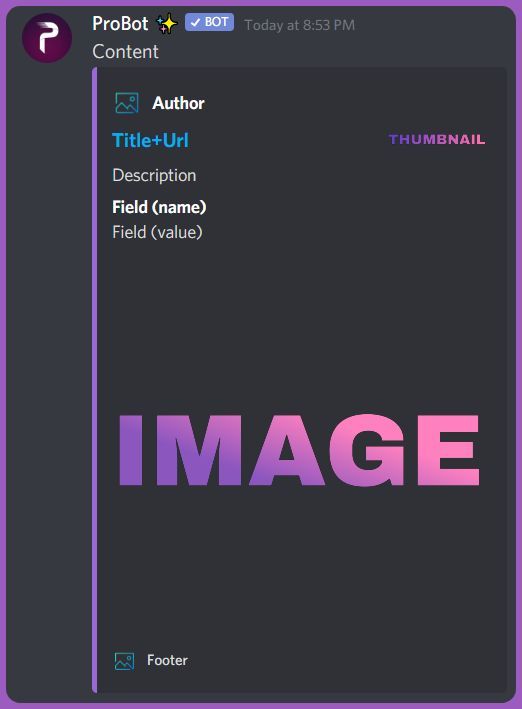
what are embed messages?
Embed messages represents a Discord Embed object. An Embed object is another component of Discord messages that can be used to present data with special formatting and structure.
An embed can contain the following components:
- Author, including link and avatar
- Title, including url (optional to do a hyperlink)
- Description
- Field(s), including name and value
- Thumbnail image
- Image
- Footer, including text and icon
- Color (sets the color of the left sidebar of the embed)
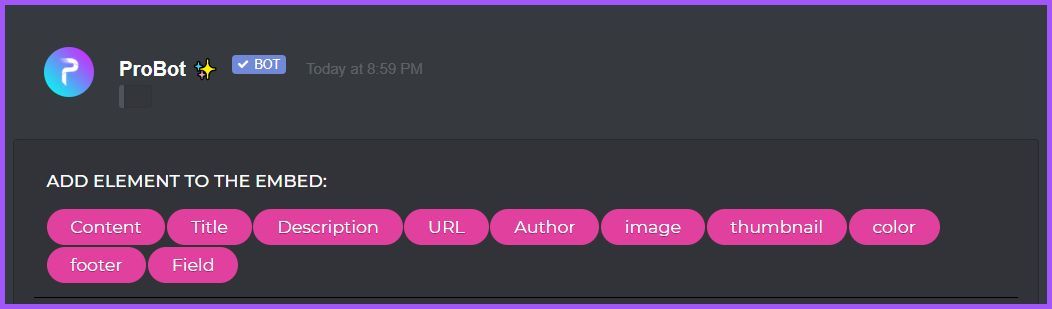
you can send an embed message by heading to the dashboard https://probot.io/dashboard - log into your account and enter your server dashboard using the left side bar, enter "embed messages" module and click "compose" then start moderating your embed message, send it via "send mew message" button at the bottom.
Welcome images, moderation, leveling, reaction roles, logs, high quality music and many many more!
past wraith
how to enabled ?? <@&675070424748654593>
 quaint sentinel
to enable what?
past wraith
enable some thing to make my friend to use music command
quaint sentinel
past wraith
how to enabled ?? <@&675070424748654593>
Click on edit for the -play command, and check if there's any enabled roles. If yes then just give your friend that role. If there's disabled roles there instead, then remove that role from your friend or from the panel.
 austere wren
The bot isn't unmuting people automatically?
untold flume
<@&675070424748654593>
untold flume
austere wren
The bot isn't unmuting people automatically?
It does when the timer runs out
 lofty ocean
How do I change the probot prefix?
untold flume
lofty ocean
How do I change the probot prefix?
#prefix (new prefix)
austere wren
untold flume
It does when the timer runs out
It hasn't been.
 inland thicket
whats this discord for?
untold flume
inland thicket
whats this discord for?
You can ask here #chat-en
untold flume
austere wren
It hasn't been.
Then you can just unmute them manually
/unmute
austere wren
untold flume
Then you can just unmute them manually
> /unmute
That's a bit inconvenient?
I don't want to have to manually unmute people.
untold flume
@austere wren well I'll try contacting the support team maybe it's a bug or something the devs should know about that
nocturne flax
how to play music?
untold flume
/play (link/name)
lofty ocean
Is there something wrong with the bot? The audio keeps going in and out for me and others in my server
 untold flume
<@&675070424748654593>
nocturne flax
austere wren
The bot isn't unmuting people automatically?
Hello, I think your problem is that you dont put the duration of mute in the right place, Or you dont put h = hour ,m = minute, s = second y = year.
And remember, The command is
#mute @mention {duration} 1m,1h,1y {reason}
And thanks.
nocturne flax
 white jackal
can i got this emoji?
white jackal
can i got this emoji?
You can ask about this in #chat-en
austere wren
I sorted it.
nocturne flax
austere wren
I sorted it.
And it dont work?
austere wren
No, I fixed it myself.
nocturne flax
austere wren
No, I fixed it myself.
Glad you fixed it.
untold flume
lofty ocean
Is there something wrong with the bot? The audio keeps going in and out for me a...
Try changing the region to Brazil then try /stop then /play
@nocturne flax please read the channel description
nocturne flax
untold flume
<@456226577798135808> please read the channel description
You already mentioned them.
untold flume
Yes but it hasn't been 5 minutes
nocturne flax
untold flume
Yes but it hasn't been 5 minutes
not a big deal <3, sorry for this tho.
 unique basin
How do you add the reaction roles into the channels?
 bronze void
^ I'm having a problem getting the embed message to send
Chose a channel for it and everything and it says "success" but message doesn't show up 🧍
quaint sentinel
How do I set up reaction roles:
1- head to the dashboard https://probot.io/dashboard then select your server.
2- enter "Reaction Roles" module
3- Click "Add Message", then select an embed. You can manage these embeds by heading to "Embed Messages" module.
4- Click "Choose a message", and then select the referred embed message where the selected embed was sent.
start adding reaction roles by clicking "Add Reaction". there would be a (+) button where you can select the role referred to this reaction.
https://imgur.com/368XQ9R
@unique basin
Welcome images, moderation, leveling, reaction roles, logs, high quality music and many many more!
 quaint sentinel
bronze void
Chose a channel for it and everything and it says "success" but message doesn't ...
quaint sentinel
bronze void
Chose a channel for it and everything and it says "success" but message doesn't ...
Make sure you fill everything
bronze void
This is what I have so far, do I actually need everything else?
 quaint sentinel
bronze void
This is what I have so far, do I actually need everything else?
quaint sentinel
bronze void
This is what I have so far, do I actually need everything else?
I see, does the bot have all the required permissions to send the message in the channel you specified?
bronze void
It should, the bot has administrative permissions for the entire server + I gave it every permission for that channel.
nocturne flax
can i turn off leveling for chat?
quaint sentinel
bronze void
It should, the bot has administrative permissions for the entire server + I gave...
send me your server via DMs please
 lethal cloud
Hii..how can i prevent my server members from sending messages in the photos chat?
@quaint sentinel
quaint sentinel
nocturne flax
can i turn off leveling for chat?
Unfortunately you can't.
quaint sentinel
lethal cloud
Hii..how can i prevent my server members from sending messages in the photos cha...
you can set that channel as a Only Images Channel, https://probot.io/dashboard ¬ Select your server ¬ Automod ¬ Add Only Images Channel
Welcome images, moderation, leveling, reaction roles, logs, high quality music and many many more!
 dapper gyro
hi there! may anyone help me out with regards to the automod?
I've setup the Spam (5messages/5 sec), i've set it to Mute the member, and when i have my alt spam, the bot doesn't add the Muted role
lethal cloud
also the admins without the administration permission will not be able to send messages in that chat right?
quaint sentinel
lethal cloud
also the admins without the administration permission will not be able to send m...
yep
quaint sentinel
dapper gyro
hi there! may anyone help me out with regards to the automod?
I've setup the Sp...
drag the bots role above the Muted role
quaint sentinel
bronze void
It should, the bot has administrative permissions for the entire server + I gave...
fixed ☑️
lethal cloud
@quaint sentinel thanks man i appreciate it ♥️
quaint sentinel
yw
quaint sentinel
 slim karma
whats the cmd for lyrics
slim karma
whats the cmd for lyrics
we don't have a command for that.
slim karma
could u recommend a bot for music then
nocturne flax
Hello, I just brought probot into my server yesterday and I’ve never used a leveling system before but i tried this time and it’s not changing the roles once leveled up. Any way I could get help with that?
quaint sentinel
slim karma
could u recommend a bot for music then
No
slim karma
ok then what's teh point
quaint sentinel
nocturne flax
Hello, I just brought probot into my server yesterday and I’ve never used a leve...
drag the bots role above other roles, also make sure they reached the required level you assigned
nocturne flax
quaint sentinel
drag the bots role above other roles, also make sure they reached the required l...
I have done that and that’s giving the auto role now but not updating roles on level up
quaint sentinel
slim karma
ok then what's teh point
can't recommend any other bots for ya, since this server is for probot only. you can suggest lyrics command in #573053418017521664 tho
quaint sentinel
nocturne flax
I have done that and that’s giving the auto role now but not updating roles on l...
Have they reached the required level?
nocturne flax
Yes
quaint sentinel
Can I see your leveling system settings please?
nocturne flax
Yeah, Im sure im doing something wrong let me take a screenshot
quaint sentinel
Well, as i can see you have Tooth King | Tooth Queen | Myuu as a NO-XP-ROLES, make sure users doesn't have any of these role. Also users should reach both chat and voice level, have they reached it both?
nocturne flax
my auto role is not listed on the role reward is it possible i need to set auto role (dentist) as level 0?
and yeah those are bots and the 2 server owners
nocturne flax
Thats what I was looking at Im guessing not I assumed you gained levels as a mix of voice and text and not 2 seperate levels
quaint sentinel
you can do that, by putting 0 in one of them. For example if you put 0 in voice and 1 in chat, it will give the user the assigned role once he reach level 1 in chat.
And the same thing for voice too ^
nocturne flax
Okay and once thats updated will it change the users who have already leveled up or is there a way to reset levels?
lean badgerBOT
quaint sentinel
#help reset
**Command: reset**
Reset text/voice/invites xp points for all or specific members.
**Usage:**
#reset [text / voice / invites) [all / user]
**Examples:**
#reset text all
#reset voice all
#reset invites all
#reset text @Dramex
nocturne flax
Okay Awesome Ill change that thank you so much
quaint sentinel
yw
nocturne flax
quaint sentinel
yw
Just to follow up I can have 2 role rewards that have the same position but one is voice 0 text 1 and the other voice 1 text 0 and either way they level up they will have that role reward?
quaint sentinel
nope you can't, it must be different role for each
nocturne flax
quaint sentinel
nope you can't, it must be different role for each
got it thanks
quaint sentinel
yw
dapper gyro
quaint sentinel
drag the bots role above the Muted role
okay, i did that, but it's still not muting my alt 😢
quaint sentinel
send me your server via DMs please
dapper gyro
quaint sentinel
send me your server via DMs please
sent! please help 😢 we've been raided so I want to set this up soon before it happens again
nocturne flax
how to clear messages
untold flume
<@&675070424748654593>
 atomic shoal
Hi, is there such a command or auto moderation thing. My point is that when someone does not speak, can they automatically throw him out
untold flume
 daring shadow
How to set welcome command?
daring shadow
How to set welcome command?
Head to the dashboard > select your server > welcomer module
untold flume
nocturne flax
how to clear messages
/clear
untold flume
atomic shoal
Hi, is there such a command or auto moderation thing. My point is that when some...
Unfortunately no this bot doesn't have such feature
daring shadow
Thanks
untold flume
yw
atomic shoal
or maybe you know a bot what can do that
untold flume
atomic shoal
or maybe you know a bot what can do that
You can ask here #chat-en
 waxen pagoda
is there a channel where i can use commands
north peak
Do you need translators?
<@&675070424748654593>
 rapid leaf
Hello all 🙂
I just wanna know how we can reset rank of member ?
serene sigil
untold flume
<@&675070424748654593>
Because this mention i will not mention again ^
serene sigil
rapid leaf
Hello all 🙂
I just wanna know how we can reset rank of member ?
#reset (text/voice) @user
rapid leaf
ex: #reset (text/voice) @rapid leaf ?
oh no its ok i understand, i have to do text and voice separately, thank you 😄
 sullen prism
hi
north peak
what are you talking about?
sullen prism
can i help
north peak
sullen prism
hi
Hi
 loud flare
In the auto responder, is it possible to make the trigger dynamic? For example if I want it to trigger on the word "Welcome!", but if I write "Welcome @loud flare " it doesn't trigger. Can I make it trigger every time someone writes "Welcome!" no matter what comes afterwards?
north peak
sullen prism
can i help
Who are you asking for?
sullen prism
all
north peak
Are you asking for help or giving help?
 spiral dust
Rep is disabled temporarily. ما هاذا
north peak
sullen prism
read my role
You're a cop
spiral dust
Yes
sullen prism
;-;
spiral dust
And me
north peak
I asked if you need translators and another question What do translators get?
sullen prism
my role is " proficient "
spiral dust
No.
north peak
sullen prism
my role is " proficient "
We're looking at you now
north peak
We check how much you ... froficient
I asked if you need translators and another question What do translators get?
@sullen prism
 nocturne agate
Hey
So I want probot to react only in specific channels and just watch over the whole server since xp points are with probot
But I can't figure out how
Can anyone help?
spiral dust
Hey pls help me
Rep is disabled temporarily.
Wat the problm
north peak
nocturne agate
Hey
So I want probot to react only in specific channels and just watch over the ...
Hmmm
north peak
nocturne agate
Hey
So I want probot to react only in specific channels and just watch over the ...
Okay so you can choose on the site which channels you want him to respond to and which not
nocturne agate
north peak
Okay so you can choose on the site which channels you want him to respond to and...
Ok thanks I'll look into it
spiral dust
No help
north peak
what do you need help with
spiral dust
Rep is disabled temporarily.
north peak
Who are you talking to?
spiral dust
هل تتكلم العربية
north peak
If you want you can go to #support-ar
spiral dust
Yas
north peak
go there
spiral dust
👍
nocturne agate
north peak
Okay so you can choose on the site which channels you want him to respond to and...
Ya but can you guide or send an ss of the option I have to check?
Like I can't find that😅
north peak
nocturne agate
Ya but can you guide or send an ss of the option I have to check?
Like I can't f...
Shall we talk in private?
nocturne agate
north peak
Shall we talk in private?
Ya
native geyser
read the channel description to see if you did or not
 drowsy creek
hello
I want make my auto respond bot to answer a certain word in any sentences
not just a sent word
example :
when make auto respond to "Hello" bot answer with "welcome"
but when someone send
"Hello everybody" bot not answer
I want answer to Hello in any sentences
lofty ocean
untold flume
Try changing the region to Brazil then try /stop then /play
How do I change the region?
nocturne flax
<@&675070424748654593>
native geyser
drowsy creek
hello
I want make my auto respond bot to answer a certain word in any sentences
...
currently its not possible
native geyser
lofty ocean
How do I change the region?
voice channel settings
lofty ocean
native geyser
voice channel settings
Awesome but the music is still laggy or acts like it's really quiet
So what do I do now?
untold flume
<@&675070424748654593>
@lofty ocean it's definitely an overload and they can't really do much about it since this bot is in over 4 million servers
nocturne flax
it's been 6 days and it still say the same Joined Discord Duration


i guess this is a premium feature
 magic knot
as there is no support chat in Portuguese I will use google translator , like in the video below I keep trying to login with my account but the site keeps coming back to the page asking me to login since literally I have done less than 2 seconds
untold flume
<@&675070424748654593>
 balmy quiver
how do i play playlists
untold flume
magic knot
as there is no support chat in Portuguese I will use google translator , like in...
Have you tried changing your browser?
untold flume
balmy quiver
how do i play playlists
#play pl (link)
Keep in mind this bot doesn't support Spotify playlists
untold flume
nocturne flax
it's been 6 days and it still say the same Joined Discord Duration
It might be a bug the devs should know about that I'll try contacting the support team
magic knot
untold flume
Have you tried changing your browser?
I will try
 split willow
How do I enable xp in a specific channel?
What’s the command for that?
Ive disabled it in one channel
Accidentally
 viral sundial
you can only do that via the dashboard https://probot.io/dashboard
Welcome images, moderation, leveling, reaction roles, logs, high quality music and many many more!
select your server, leveling system , disabled channels
split willow
Ty
viral sundial
yw
north peak
Do you need translators?
<@&675070424748654593>
sullen prism
spiral dust
I am not speak en
north peak
But that's a question
native geyser
north peak
Do you need translators?
<@&675070424748654593>
which language?
north peak
new
native geyser
new?
native geyser
need to check if we do need it
north peak
Okay
north peak
native geyser
need to check if we do need it
Tag me when you are given the answer
native geyser
alright
north peak
And can I ask another question?
Do you get anything for it? @native geyser
On the translation
native geyser
not much actually
 lusty pecan
Hey everyone, is there a way for me to refresh cache (or equivalent) on the Reaction Role component?
I am trying to assign a Joystick icon (Discord default emote) to the 'Gamer' role, but it no longer shows me any roles in the choice menu.

<@&675070424748654593> Thank you for your time in advance!
split needle
Move the probot role higher in your server role list
lusty pecan
That's awesome, I tried that and it seemed that Probot was placed lower on the list than I remember.
Fixed it and now it sees all roles. Thanks a lot!
 restive bronze
Hi I need help
This email already register can you see what’s the problem here can’t log in

 quaint sentinel
restive bronze
This email already register can you see what’s the problem here can’t log in
quaint sentinel
restive bronze
This email already register can you see what’s the problem here can’t log in
ask it in #chat-en instead please.
restive bronze
Okay thanks
quaint sentinel
yw
 granite hornet
In reaction rôle panel, no one of my role server appear, its normal bug?
 quaint sentinel
drag the bots role above other roles
granite hornet
quaint sentinel
drag the bots role above other roles
perfect, thanks
quaint sentinel
yw
 hardy hawk
<@&675070424748654593> Hi! I'm sorry you probably get this alot but how do you make reaction roles?
quaint sentinel
How do I set up reaction roles:
1- head to the dashboard https://probot.io/dashboard then select your server.
2- enter "Reaction Roles" module
3- Click "Add Message", then select an embed. You can manage these embeds by heading to "Embed Messages" module.
4- Click "Choose a message", and then select the referred embed message where the selected embed was sent.
start adding reaction roles by clicking "Add Reaction". there would be a (+) button where you can select the role referred to this reaction.
Welcome images, moderation, leveling, reaction roles, logs, high quality music and many many more!
 obsidian lotus
If I add premium, can I get your bot to work as one of my own? like with WhiteLabel or Token?
quaint sentinel
obsidian lotus
If I add premium, can I get your bot to work as one of my own? like with WhiteLa...
nope
quaint sentinel
ProBot Premium  :
:
1- All the typical prime features (9)
2- The possibility of changing the bot name & avatar & status
#vip username|#vip avatar|#vip status
3 - A stand-alone bot that runs on a separate server, to ensure better performance and higher speeds
4 - #vip transfer(bot's number)(user)
 obsidian lotus
 Thanks~!
quaint sentinel
yw
north peak
native geyser
not much actually
Premium?
Maybe you know what a translator gets? @quaint sentinel
north peak
And that's it?
west kelp
I think so, yes
north peak
Okay so what did you decide there? Regarding the Hebrew language?
west kelp
Ruru will decide that
 hollow ember
Hi! I need some help. I set up Auto Responder but can't edit the messages previously made. They don't show up.
hollow ember
yes
but i cant edit nor remove them
i can disable auto responder but i cant edit them. i can also make new onees
west kelp
If you delete all existing triggers does the bot still reply?
west kelp
Invite me to your server in DMs
hollow ember
west kelp
Invite me to your server in DMs
it seems to work now. human error. sorry for wasting your time
west kelp
Its fine, glad its working
 edgy ginkgo
hello
im and admin in a server and everything working fine but the autorole isnt working
i did all the permission gave the bot admin
and the role is there but i dont know hy isnt it working does the bot need to be invited and setup by the owner ?
nocturne flax
<@&675070424748654593>
split needle
edgy ginkgo
im and admin in a server and everything working fine but the autorole isnt worki...
The probot role should be higher than the auto role
edgy ginkgo
it is
split needle
Can I see a screenshot of your server role list?
edgy ginkgo
oh in order in roles ?
split needle
Yea
edgy ginkgo
oh ok ty soo much
 empty quest
hi! could some one help me please? c:
empty quest
the thing is that, something´s odd on the welcome section, i uploaded an image and configured it on a channel but it doesn´t come out when someone enter the server
 wild minnow
what is the last level a person can get, is it 64 or 100 ? <@&675070424748654593>
empty quest
i also, tried to create a new welcome channel and same thing happen
nocturne flax
how to make the pro bot leave the voice channel
please help
@sullen prism pomożesz?
split needle
empty quest
the thing is that, something´s odd on the welcome section, i uploaded an image a...
Can I see a screenshot of your welcomer settings?
split needle
wild minnow
what is the last level a person can get, is it 64 or 100 ? <@&675070424748654593...
100
split needle
nocturne flax
how to make the pro bot leave the voice channel
/stop
nocturne flax
Thanks
empty quest
split needle
Can I see a screenshot of your welcomer settings?
i´m sorry i already solve the problem, but thank you so much for your attention
 icy oriole
So any word on ProBot being able to more accurately see edits made? It still doesn't always list every change.
nocturne agate
split needle
\/stop
Hi
So I want that probot should only be able to react in two channels but is able to see msgs in every channel
But the thing is that it's getting administration permissions from somewhere (mostly because during invite probot asks you to sync account n stuff) so it's reacting in each and every channel
P.s. I removed the admin perms from its probot role but still doesn't work🥲
 lost tundra
How do I make the bot kick ppl and not alow them to send links
nocturne agate
nocturne agate
Hi
So I want that probot should only be able to react in two channels but is abl...
<@&675070424748654593> pls help🙏🏽
thorny burrow
nocturne agate
<@&675070424748654593> pls help🙏🏽
Reactions for what?
thorny burrow
lost tundra
How do I make the bot kick ppl and not alow them to send links
You can't kick people for sending links from the bot, but you can stop people sending them from the automod section
nocturne agate
thorny burrow
Reactions for what?
React in the sense that it can send messages in only two channels
One channel for moderation n one channel for rank up
lost tundra
thorny burrow
You can't kick people for sending links from the bot, but you can stop people se...
Not kick them for sending stuff I mean like for talking words and stuff
Is that auto?
nocturne agate
lost tundra
Not kick them for sending stuff I mean like for talking words and stuff
U can set it in the moderation tab on probot dashboard as far as I remember
 nocturne agate
thorny burrow
<@!757571502412660796> if you mean the bot responding,
nocturne agate
thorny burrow
<@!757571502412660796> if you mean the bot responding,
And where do I get this option😅🥲
thorny burrow
lost tundra
Is that auto?
No you should set them from the automod section
nocturne agate
thorny burrow
<@!757571502412660796> if you mean the bot responding,
This is exactly what I needed ig but where do I access this option from
thorny burrow
you should go for every command and set the enabled channel's
nocturne agate
thorny burrow
you should go for every command and set the enabled channel's
Thank you so much 🥳
thorny burrow
yw
thorny burrow
leaving the channel?
 azure ore
no music is lagging and I don't why
azure ore
how you change region?
thorny burrow
 thorny burrow
The channel settings
azure ore
It worked ty
 sand widget
hello!
hey i have a question how does the ban feture work?
cause i see it allowss to ban but it nrever says when its going to ban
is there a slah command or smt else?
 gleaming maple
every time i try to send my embed to a channel i made it wont send can anyone help
serene sigil
<@&675070424748654593>
serene sigil
sand widget
hey i have a question how does the ban feture work?
#ban @user (Time) (reason)
serene sigil
gleaming maple
every time i try to send my embed to a channel i made it wont send can anyone he...
Show me what do you do
gleaming maple
serene sigil
Show me what do you do
how do i show you
click here and then pick the room i want it sent to
 serene sigil
Probot has permissions to send in the channel you selected? @gleaming maple
gleaming maple
i did give it perms even put it all the way to the top
serene sigil
gleaming maple
i did give it perms even put it all the way to the top
Send me your server
gleaming maple
i know it has the roles cuz the commands work there
serene sigil
gleaming maple
i know it has the roles cuz the commands work there
Ok , send me your server to help
gleaming maple
do i need to do a command to start it up
serene sigil
No , all things from dashboard
 serene sigil
gleaming maple
every time i try to send my embed to a channel i made it wont send can anyone he...
serene sigil
gleaming maple
every time i try to send my embed to a channel i made it wont send can anyone he...
Done
serene sigil
gleaming maple
does anyone know of a server where probot is using this
Done
nocturne flax
Hello guys
serene sigil
nocturne flax
Hello guys
For chatting #chat-en
nocturne flax
serene sigil
For chatting <#608047244276531245>
Ok 😑 🤦♂️
 real ingot
Hi, anyone can help me, first wanna know this thing is possible? or not? and if possible then how?
so, my friend organizing valorant tournament, i wanna create one channel where solo player come and react to emoji which select rank and role, and after that, selected emoji role show on different channel/text channel with scripted message like "@ user has this rank and this role" and if possible show just grapgic/image where predefine graphic which show rank and role and user profile photo and name...
is it possible?
serene sigil
real ingot
Hi, anyone can help me, first wanna know this thing is possible? or not? and if ...
No it is impossible
But you can make a reaction roles
split needle
real ingot
Hi, anyone can help me, first wanna know this thing is possible? or not? and if ...
Can you shorten it?
Been reading it but have no idea what you really want
real ingot
split needle
Been reading it but have no idea what you really want
In simple,
react or click on role,
and that role open channel plus show custom graphics or message with username and that roles
split needle
real ingot
In simple,
react or click on role,
and that role open channel plus show custom g...
You can do reaction roles and with that opening existing channel for that user
But the custom image and message to include that user's avatar and name is not possible with the bot now
For reaction roles, go to https://probot.io/dashboard, select your server, go to embed messages module to create and send embed messages for the reaction roles to where you want. Then go to reaction role module to setup the feature on the sent embed messages.
Notice: Be sure the
Probot✨role is higher than other roles. Embed message should not have any blank element (better to remove them if not using).
About the roles open specific channel, you can google it set up roles for private channels
Welcome images, moderation, leveling, reaction roles, logs, high quality music and many many more!
real ingot
split needle
You can do reaction roles and with that opening existing channel for that user
B...
If you don't mind, can you guide me
 unique palm
We have lag in music any suggestions
 mystic spire
what does the warn command do except from sending a message to them?
is there like a thing where the warned person gets muted or kicked after several warnings?
 autumn apex
<@&336913504051265537> ^
frozen pilot
Ty
nocturne flax
Ayyy yo?
frozen pilot
#ban 894908827550502914 1y spam
lean badgerBOT
frozen pilot
#ban 894908827550502914 1y spam
:white_check_mark: Tuan banned from the server! :airplane:
nocturne flax
I have a question
frozen pilot
nocturne flax
I have a question
How can i help u
nocturne flax
How do I make the pro bot like make it say like ... please verify at #chat-ar ot smth. Using the welcome utility?
frozen pilot
nocturne flax
How do I make the pro bot like make it say like ... please verify at <#773641798...
https://probot.io/dashboard > select ur server > welcomer
Welcome images, moderation, leveling, reaction roles, logs, high quality music and many many more!
 nocturne flax
And?
 frozen pilot
Maybe
 silver mango
Hi Guys, I wanna ask about when ProBot go to sleep ?
frozen pilot
do u want channel mention?
nocturne flax
Yea-
frozen pilot
<#channel-id>
nocturne flax
With the <>not the [] ?
frozen pilot
<>
silver mango
When playlist end, How long Probot will sign out that room ?
frozen pilot
I'm not sure exactly how long it takes, I think a few minutes
silver mango
yah. I think it's 3 minutes
frozen pilot

 cloud yarrow
Hello, how much time it is required to be able to transfer credits for new accounts ?
@frozen pilot
frozen pilot
cloud yarrow
<@!467733205605416970>
i think 1 month or 3 month
frozen pilot

native geyser
yes it does
unique basin
quaint sentinel
**How do I set up reaction roles:**
1- head to the dashboard https://probot.io/d...
How do you put it into the channels
Cause I set it up but I don’t know how to start it and put it in the correct channel
nocturne flax
unique basin
How do you put it into the channels
there is a option in reaction-roles to choose channel
native geyser
its being attached to the embed message you sent so its basically in embed messages module
nocturne flax
my server not showing in dashboard
unique basin
nocturne flax
there is a option in reaction-roles to choose channel
Oh okay I found that but now I can’t add the role to the reaction thing
nocturne flax
oof
 nocturne flax
oof
nocturne flax
native geyser
its being attached to the embed message you sent so its basically in embed messa...
server not showing in dashboard
wth do i do?
unique basin
nocturne flax
server not showing in dashboard
Did you add it to ur server
nocturne flax
ya
nocturne flax
unique basin
How did you view your dash board
<@&675070424748654593> server wont show in dashboard
lol finally it did
untold flume
unique basin
Nothing comes up even the simple colours like red
Drag the bots role above the other roles
nocturne flax
i had to reinvite bot
unique basin
untold flume
Drag the bots role above the other roles
Oh okay thx
untold flume
yw
 tight crypt
<@&675070424748654593>
quaint sentinel
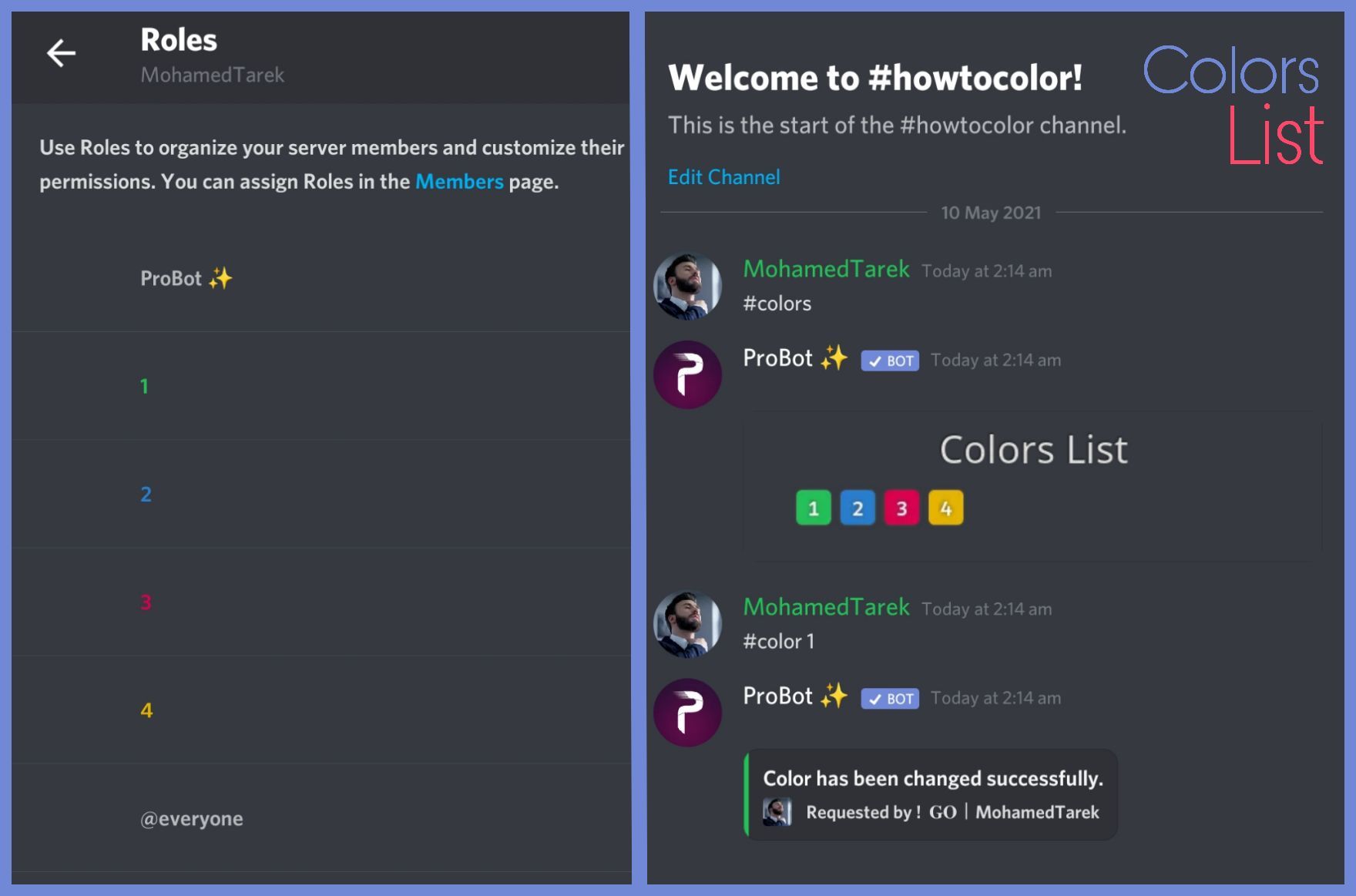
To do your "Colors List" you've to create numbered roles ascendengly, which means you've to create roles as the image below explains.
colors roles only works with exact numbers, they can't have mod permissions otherwise it won't work. dragging these roles above your moderators roles position is not recommended as they'll have the access through it to higher position roles.
the image below shows how to correctly use the commands as how does it effect your nickname.
@nocturne flax
 warm cape
hi everyone, does Probot do embed orders?
quaint sentinel
warm cape
hi everyone, does Probot do embed orders?
what are embed messages?
Embed messages represents a Discord Embed object. An Embed object is another component of Discord messages that can be used to present data with special formatting and structure.
An embed can contain the following components:
- Author, including link and avatar
- Title, including url (optional to do a hyperlink)
- Description
- Field(s), including name and value
- Thumbnail image
- Image
- Footer, including text and icon
- Color (sets the color of the left sidebar of the embed)
you can send an embed message by heading to the dashboard https://probot.io/dashboard - log into your account and enter your server dashboard using the left side bar, enter "embed messages" module and click "compose" then start moderating your embed message, send it via "send mew message" button at the bottom.
Welcome images, moderation, leveling, reaction roles, logs, high quality music and many many more!
warm cape
Thank you
quaint sentinel
yw
nocturne flax
quaint sentinel
To do your "Colors List" you've to create numbered roles ascendengly, which mean...
so i have to just make numbers like that?
quaint sentinel
yep
quaint sentinel
yw
nocturne flax
Does the bot count xp or add if someone is in afk channel?
nocturne flax
west kelp
Yes
Ok thnx.
west kelp
Yw
 hasty finch
I did a embed message and click send new message in a channel but when I check the channel there was no new message from probot
west kelp
Make sure that all of the fields aren't empty
 west kelp
Does probot have admin?
hasty finch
let me check
it work now
thanks for helping
is embed message better or just content
hasty finch
west kelp
Embed message is more clear
oh ok
 regal sorrel
anyone know how to change prefix
nocturne flax
<@&675070424748654593>
west kelp
regal sorrel
anyone know how to change prefix
#prefix [new prefix]
west kelp
Yes
mystic spire
what does the warn command do except from sending a message to them?
is there like a thing where the warned person gets muted or kicked after several warnings?
west kelp
You can do it so it punishes after a certain amount of violations via automod but no, warns wont do anything by themself
mystic spire
west kelp
You can do it so it punishes after a certain amount of violations via automod bu...
how do i do that
 mystic spire
ok thanks
west kelp
Yw
mystic spire
west kelp
Yw
where is it?

nvm
found it
can i only mute? @west kelp or can i like vmute or timeout
untold flume
<@&675070424748654593>
native geyser
mystic spire
can i only mute? <@!659633074400788490> or can i like vmute or timeout
Only text mute
nocturne flax
<@&675070424748654593>
west kelp
(?)
nocturne flax
 indigo pike
how do i get rid of song
indigo pike
how do i get rid of song
 plain oracle
how do i mute ppl?
quaint sentinel
#help mute
lean badgerBOT
quaint sentinel
#help mute
**Command: mute**
Mute a member from text/voice channels so they cannot type.
**Usage:**
#mute [user] (time ends with m,h,d,mo,y) (reason)
**Examples:**
#mute @quaint sentinel 1m Spamming
#mute @quaint sentinel 1h
#mute @quaint sentinel 1d
#mute @quaint sentinel 1mo
#mute @quaint sentinel 1y
plain oracle
oh thx
quaint sentinel
yw
nocturne flax
help
west kelp
How can I help you
 hazy lance
hi, how can i add slash commands with probot in my server?
west kelp
They should be enabled by default
hazy lance
they arent
nocturne flax
How can i access the map?
west kelp
Enable utility mode
west kelp
nocturne flax
How can i access the map?
What map
nocturne flax
to the game map
west kelp
Wrong server?
nocturne flax
ok, thanks
west kelp
@hazy lance the bot should have slash commands perms too
 silk roost
help please remove mute
west kelp
What do you mean
 wind hollow
Until when
 west kelp
We don't know
 ivory yarrow
How to reset top voice
west kelp
#help reset
lean badgerBOT
west kelp
#help reset
**Command: reset**
Reset text/voice/invites xp points for all or specific members.
**Usage:**
#reset [text / voice / invites) [all / user]
**Examples:**
#reset text all
#reset voice all
#reset invites all
#reset text @Dramex
 coral spruce
hi
west kelp
Hello how can I help you
 compact mulch
Is there a way to give myself some XP points?
quaint sentinel
nope
native geyser
Welcome images, moderation, leveling, reaction roles, logs, high quality music and many many more!
native geyser
real money or probot credits
native geyser
https://probot.io/premium -> recharge your balance by using credits
Welcome images, moderation, leveling, reaction roles, logs, high quality music and many many more!
 mellow cargo
Okayy
 edgy ingot
hi, just wondering if i buy a premium bot, how many servers can i add that premium bot to?
mellow cargo
But if real money how much is it
native geyser
edgy ingot
hi, just wondering if i buy a premium bot, how many servers can i add that premi...
only 1 but you can move the bot to another server if you'd like to
native geyser
mellow cargo
But if real money how much is it
you can see the details in #664737031414480896 channel
mellow cargo
native geyser
you can see the details in <#664737031414480896> channel
ok
Ty for supporting me
native geyser
edgy ingot
so whats the different between prime servers and premium bots
prime server is basically servers with prime bot, the difference between prime and premium is being able to change the bots username, avatar and status message, member kicked log, being able to attach multiple roles to one reaction in reaction roles module
mellow cargo
So example i have normal probot
And i get premium bot
Will the norm bot change to premium or i have to add premium bot
native geyser
you'll get a brand new bot that you need to invite
native geyser
yw yw
west kelp
Hello, how can I help you
west kelp
Go to the music module and go to every command's settings and put the main-chat channel in the Disabled Channels
nocturne flax
west kelp
Go to the music module and go to every command's settings and put the main-chat ...
okay thanks a lot
so i need to disable this button ?
 west kelp
No
nocturne flax
then?
west kelp
You see the commands right
nocturne flax
okay
west kelp
You're welcome
untold flume
<@&675070424748654593>
native geyser
if for real money yes it is illegal
 formal prawn
welcomer is not working for me
untold flume
<@&675070424748654593> ^
edgy ingot
ok so i am 1 of the discord admins of a discord server and the owner has just bought prime for the server. it added the prime bot to the server. but the probot is also added. how do we use the primebot and where is the panel for it to edit it etc? and do we still need the probot installed?
<@&675070424748654593>
untold flume
formal prawn
welcomer is not working for me
Can i see your welcomer settings?
They'll get blacklisted
formal prawn


It used to work, but suddenly nothing is being sent to the channel
I tried disabling/enabling
formal prawn
Okay
untold flume
edgy ingot
ok so i am 1 of the discord admins of a discord server and the owner has just bo...
The prime version will be automatically in used
edgy ingot
its not
it says when i do /help
there is another bot being used for this server
i dont have the free one installed i kicked that
 long steeple
My pro bot is being really glitchy and cutting out every word my internet is fine so a bit confused with what could be happening
untold flume
long steeple
My pro bot is being really glitchy and cutting out every word my internet is fin...
Well it's definitely an overload since this bot is in over 4 million servers try changing the region to Brazil then try /stop then /play
long steeple
Ok thx
untold flume
yw
formal prawn
Thanks, it worked by reuploading. The url got changed to probot.media so the previous URL was deprecated.
long steeple
untold flume
Well it's definitely an overload since this bot is in over 4 million servers try...
How do you change the region🥲
untold flume
formal prawn
Thanks, it worked by reuploading. The url got changed to probot.media so the pre...
yw
untold flume
long steeple
How do you change the region🥲
Vc settings