#support-en
1 messages · Page 331 of 1
 steady geyser
 untold flume
<@106919962722992128> can you please try changing the color?
untold flume
<@106919962722992128> can you please try changing the color?
yeah gimme a sec, it's currently yellow
untold flume
Yeah change it and check again if it works
 winter meteor
why i can play music with my probot
untold flume
winter meteor
why i can play music with my probot
You mean why I can't?
untold flume
Music is under maintenance
steady geyser
yeah, seems to be broken :\
untold flume
(At the main time)
 spring ether
=
steady geyser
?
spring ether
steady geyser
?
can i help ya?
spring ether
Make sure there's no empty fields
steady geyser
There aren't any empty field.
fields*
Okay
Wtf, If i delete the color it sends, but i've tried changing the color multiple tiems and it does nothing.
Wait
Nevermind, different embed
 native geyser
can i see a screenshot of your embed settings
native geyser
currently we do not have such feature
 nocturne flax
Wow
steady geyser
native geyser
can i see a screenshot of your embed settings
Look above,
native geyser
steady geyser
Look above,
can you also show me the preview
 native geyser
is there like an empty place with white color right below these?
steady geyser
i'll check
no
there is none

here is the bottom of the embed
it must be something with the embed's characters, i remade the whole embed, and the new embed won't send :\
native geyser
i see, i think the color doesnt have anything to be attached to therefore its causing it to not work, change the color if you see the line on the left changing the color then it'll work, if it doesnt change the color then remove the color option it should fix your issue
native geyser
steady geyser
it must be something with the embed's characters, i remade the whole embed, and ...
it might be the case too, 4000 characters is the limit for embeds
 dense sandal
hi, so we are having an issue with the bot in my server. We have banned a single person, and 27 minutes after he was banned, the bot unbanned him. so, we banned him again. and 27 minutes after that time, he was unbanned again. not sure why it’s doing this
native geyser
probot doesnt have hard ban, on https://probot.io/dashboard -> moderation module -> ban command there is an option asks you to select what the bot should do if you do not specify time while using the ban command
Welcome images, moderation, leveling, reaction roles, logs, high quality music and many many more!
 obtuse shuttle
why probot i was playing music and it just start laging pls fix that
 covert pollen
How do you use the probot music
 deft iris
Im having an issue with music with probot prime it says “Music is under maintenance, please contact us at the support server.” And its been like that for the last 12 hours
untold flume
<@&675070424748654593>
@deft iris @obtuse shuttle well as it says the music is under maintenance at the main time
@covert pollen
/play
song:name/link
but as i said music is under maintenance
nocturne flax
Hey
how to change from / to !
prefix
also ho i fix the constant lagging
like my song will play then pause then play a little bit after
 deep wolf
do you get more vc xp if you are unmuted vs being muted
 hidden flare
is the under maintenance thing an issue from discord? because there has been an issue with another bot within my server which is similar to this, asking to know if it can be fixed by u guys or its jus a "wait and see" thing
 quaint sentinel
It's from us, and our developers are working on it.
quaint sentinel
deep wolf
do you get more vc xp if you are unmuted vs being muted
Nope, all the same.
@nocturne flax You can't change the / commands prefix. But you can change the # one, by using #prefix !. When you type any command using ! it will work for ya.
quaint sentinel
nocturne flax
also ho i fix the constant lagging
We're working on a fix.
 barren obsidian
how does the credit system work?
quaint sentinel
@barren obsidian How to gain probot credits
How to gain probot credits
1 ~ **Daily Reward  **
**
1 - Enter https://probot.io/daily
2 - Click the gift box button , make sure you are not a robot and congrats.!
You can get credits every 24 hours, you will get [400 - 3000] credits
2 ~ **Voting for ProBot **
You can vote only once each 12 hours by The Vote Link , as you earn automatically from 300 / 2300 credits each voting!
3 ~ external ways to gain credits :
trading with your friends (not allowed here)
⚠️ - Warning!
- Trading is against Discord TOS
- Selling Probot credits for real money isn't allowed
Welcome images, moderation, leveling, reaction roles, logs, high quality music and many many more!

ProBot currency is global, however. you can use this currency in any server to run giveaways, trade it with your friends, etc.. but since trading some items is disallowed by discord and is breaking the discord ToS, we're not responsible for any scams happens to you! this is up to you.. cause of this, we are offering limited ways where you can safely use the currency.
1 } ~ custom your #profile background
2 } ~ custom your #profile badges
3 } ~ custom your #rank background
4 } ~ subscribe to paid version of probot
https://probot.io/premium (note: the cheapest will cost you 375,000 monthly)
#664737031414480896 for more informations.
in case you had any suitable ideas for the credits usages, we're absolutely glad to hear you by #573053418017521664
Welcome images, moderation, leveling, reaction roles, logs, high quality music and many many more!
Welcome images, moderation, leveling, reaction roles, logs, high quality music and many many more!
Welcome images, moderation, leveling, reaction roles, logs, high quality music and many many more!
Welcome images, moderation, leveling, reaction roles, logs, high quality music and many many more!
 young shale
 viral flicker
how do i make the bot show in the footer the date an embed was posted?
native geyser
there is no variable whatsoever for it so you just manually add the date
viral flicker
ok ty
native geyser
yw
 abstract tapir
Can't we create Reaction roles without embeds?
native geyser
nocturne flax
how to make the bot to asign a rank wit the !add command?
we dont have such command, have you added it as an alias by any chance?
native geyser
abstract tapir
Can't we create Reaction roles without embeds?
nope
 wind fable
Hi...How does the Auto Mod work? I ask because I have bad words setting on and I have mute violation count set to 3 in 1 day(s). Does this mean that if the member has 3 warnings in one day then they are muted?
native geyser
if they say one of the blocked words 3 times in 1 day they'll get muted
barren obsidian
quaint sentinel
<@550162321524260875> How to gain probot credits
**How to gain probot credits**
...
thank you mod mister! 😁
quaint sentinel
yw
wind fable
native geyser
if they say one of the blocked words 3 times in 1 day they'll get muted
ah gotcha...thanks
native geyser
yw
untold flume
<@&675070424748654593>
quaint sentinel
.
quaint sentinel
barren obsidian
is there a way to setup up specific colors in the dashboard?
You can't set colors on dashboard. You only can edit the colors image and the text.
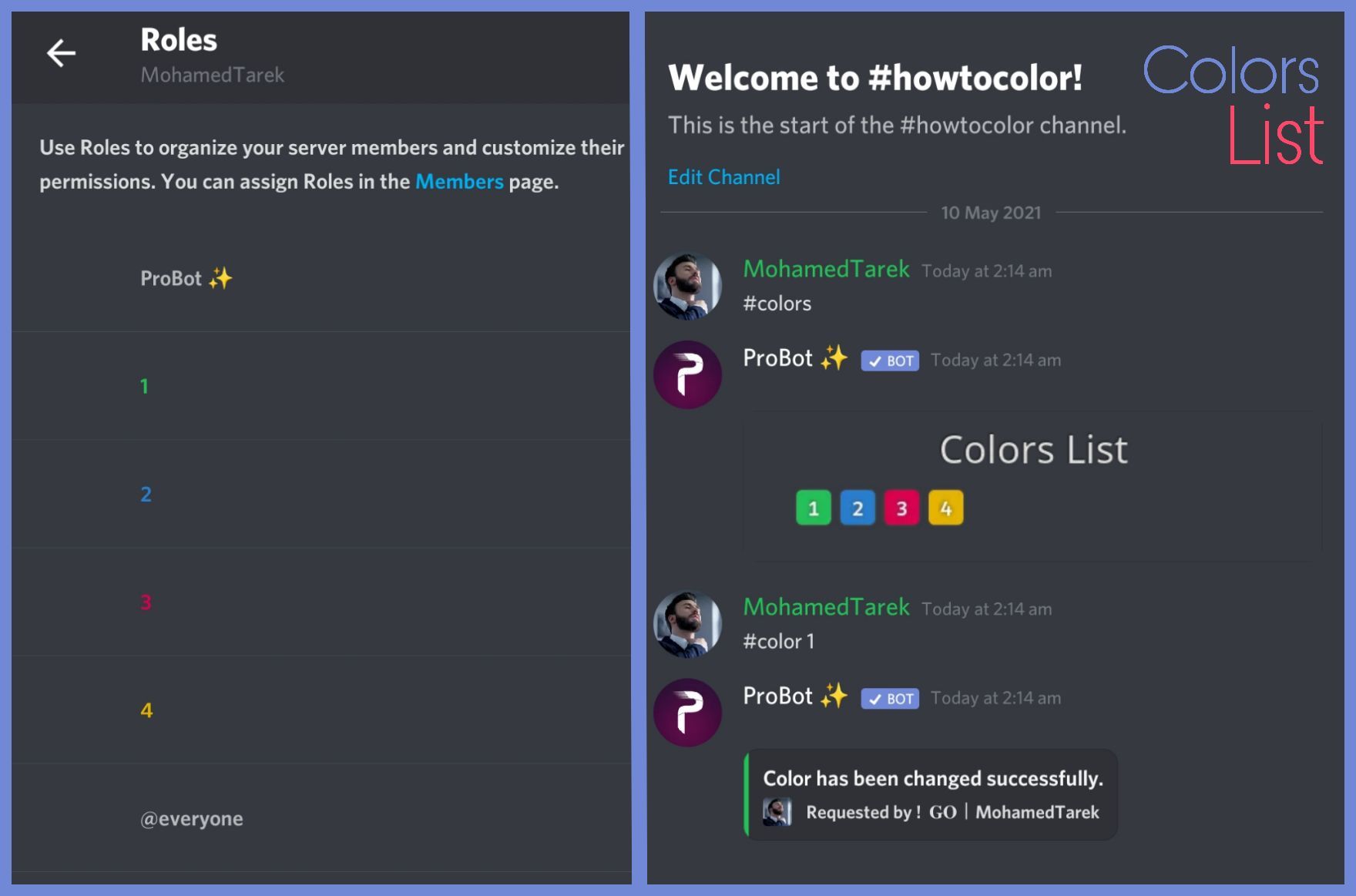
To do your "Colors List" you've to create numbered roles ascendengly, which means you've to create roles as the image below explains.
colors roles only works with exact numbers, they can't have mod permissions otherwise it won't work. dragging these roles above your moderators roles position is not recommended as they'll have the access through it to higher position roles.
the image below shows how to correctly use the commands as how does it effect your nickname.
https://imgur.com/WJN29y6
@barren obsidian
 main lodge
Hi i have a problem what i can do with probot credits?
quaint sentinel
ProBot currency is global, however. you can use this currency in any server to run giveaways, trade it with your friends, etc.. but since trading some items is disallowed by discord and is breaking the discord ToS, we're not responsible for any scams happens to you! this is up to you.. cause of this, we are offering limited ways where you can safely use the currency.
1 } ~ custom your #profile background
2 } ~ custom your #profile badges
3 } ~ custom your #rank background
4 } ~ subscribe to paid version of probot
https://probot.io/premium (note: the cheapest will cost you 375,000 monthly)
#664737031414480896 for more informations.
in case you had any suitable ideas for the credits usages, we're absolutely glad to hear you by #573053418017521664
Welcome images, moderation, leveling, reaction roles, logs, high quality music and many many more!
Welcome images, moderation, leveling, reaction roles, logs, high quality music and many many more!
Welcome images, moderation, leveling, reaction roles, logs, high quality music and many many more!
Welcome images, moderation, leveling, reaction roles, logs, high quality music and many many more!
main lodge
quaint sentinel
**ProBot currency is global, however. you can use this currency in any server to...
hi that backround costs dollrs i think
quaint sentinel
No, it's credits. :)
nocturne flax
My rank card shows my old username from 2017 (changed username not nickname) do I just have to reset my rank card or something?
Also I only got the bot bc it was the same name as my user. Prometheus rob robot, Pro.bot. I only say so bc it looks sussy
Hmm same issue when viewing logs too
Shows my old username and descrim
quaint sentinel
@nocturne flax Can you try to change your name or pfp?
 stark phoenix
can i make probot send a gif when someone gets banned
quaint sentinel
@nocturne flax Check it now.
stark phoenix
for example someone gets kicked or banned and it sends a funny gif
quaint sentinel
stark phoenix
can i make probot send a gif when someone gets banned
Nope
stark phoenix
:(
nocturne flax
quaint sentinel
<@456226577798135808> Check it now.
Interesting that worked. Thank you Anas for the quick response too!
quaint sentinel
Yw
 restive prairie
Is there a feature like ignored category for the automoderation ? i know there's ignored channels but i don't think there is ignored category, if someone know please let me know, thank you for reading and replying my message.
 wind urchin
restive prairie
Is there a feature like ignored category for the automoderation ? i know there's...
wind urchin
restive prairie
Is there a feature like ignored category for the automoderation ? i know there's...
No
restive prairie
So sad hope they will add it.
wind urchin
restive prairie
So sad hope they will add it.
:)
restive prairie
anyway thanks for answering me
wind urchin
restive prairie
anyway thanks for answering me
No problem
 dry frost
Is anyone here?
wind urchin
dry frost
Is anyone here?
Yes, how can i help you?
 autumn frigate

untold flume
<@&675070424748654593>
quaint sentinel
@dry frost To do your "Colors List" you've to create numbered roles ascendengly, which means you've to create roles as the image below explains.
colors roles only works with exact numbers, they can't have mod permissions otherwise it won't work. dragging these roles above your moderators roles position is not recommended as they'll have the access through it to higher position roles.
the image below shows how to correctly use the commands as how does it effect your nickname.
barren obsidian
👌
wind urchin
 hexed knot
Hi is it possible to set a rank with your bot?
hexed knot
Hi is it possible to set a rank with your bot?
You can only change a color.
hexed knot
wind urchin
You can only change a color.
ok thanks
wind urchin
hexed knot
ok thanks
Np
nocturne flax
If you set a level role does it require all previous level roles to be obtained first
 split needle
No
nocturne flax
So if I were to set a text role and then a voice role you'd be able to get the voice role without first getting the text role
split needle
Yea
 surreal pasture
can anybody tell me how long it will take for music server bot to be fixed?
<@&675070424748654593>
split needle
No eta
 tropic geyser
Hey, does anyone know if it's possible to give XP boosters, grant XP or manipulate the XP levelling system in anyway? I'm looking to host competitions and stuff within my Discord server that will earn people bonus XP or host double XP weekends etc. Is this a thing or a feature potentially coming in the near future?
split needle
Xp boost is not a feature yet not planned(?) so feel free to suggest it in #573053418017521664
tropic geyser
Okay perfect, thank you
 naive copper
I'm trying to add an Autorole to my server, but when I try to add Reaction Roles, the list of roles isn't showing up
 untold flume
<@&675070424748654593>
split needle
naive copper
I'm trying to add an Autorole to my server, but when I try to add Reaction Roles...
Move the probot role higher in your server role list
naive copper
It works now, thank you
 wispy arrow
 native geyser
you cant use prime and premium in the same server
native geyser
hm?
 red root
native geyser
hm?
red root
native geyser
hm?
Can you remove the mute
wind urchin
red root
Can you remove the mute
You don't have muted role
red root
wind urchin
You don't have muted role
Not on this account
native geyser
how am i supposed to understand which account you're talking about 
red root
native geyser
how am i supposed to understand which account you're talking about <:thinkDerp:4...
un mute 893656074652119091
<@&675070424748654593>
wind urchin
red root
<@&675070424748654593>
Wait
red root
ok
 reef laurel
I would like to use my premium bot on another server is this possible?
native geyser
#vip move
bot number
reef laurel
do I have to write this in here?
native geyser
in any server that has probot in it
reef laurel
the probot does not react to this
native geyser
can you show me what you typed
reef laurel
yes where should i show you this?
native geyser
here
reef laurel
#vip move 5100
 lean badgerBOT
reef laurel
#vip move 5100
lean badgerBOT
reef laurel
#vip move 5100
:rolling_eyes: - You must be the owner of this bot.
native geyser
wrong bot number apparently
reef laurel
where can i find my bot number?
reef laurel
would allegedly be the wrong bot number
native geyser
you can do it with the bots id number too
reef laurel
thx
native geyser
yw
naive copper
For the automod, if I set "Mute Member", is that seperate from the mute configuration?
native geyser
what do you mean exactly
naive copper
Sorry I was distracted
The Automod lets you decide if someone is muted. When you click the gear, there are two boxes that describe how the mute should work. Do these settings only apply if the automod mutes people?

 oak trail
<@&675070424748654593> 
native geyser
naive copper
The Automod lets you decide if someone is muted. When you click the gear, there ...
yes
nocturne flax
I Need Help My Credits Stolen
native geyser
 autumn frigate
native geyser
can i help you?
 past galleon
hi i would like to ask some assistance please
oak trail
<@&675070424748654593>
 crystal latch
<@&675070424748654593>
split needle
past galleon
hi i would like to ask some assistance please
We would like to know your problem than you waiting like this
split needle
crystal latch
<@&675070424748654593>
?
crystal latch
my bot says music is under maintenance and im not sure how to fix it
split needle
It'a under maintenance and is from our side. You can't really do anything
crystal latch
alright will there be a notification when its back running ?
split needle
Not sure
past galleon
oh isee, i am sorry.. @split needle
so it's not a problem, i just curious how does the leveling system works..
when i put 1 on the text levels, theres a note ~7 minuts for that
when i put 1 on the voice levels, there's a note ~18 minutes for that,
could you please explain to me what is the meaning for ~7minutes and the ~18 minutes ?
and when i turn both of them on, does probot adding the role based on level of either chat or voice which level reaching the level?
thank you
split needle
The time showing on there means the estimate time for users to reach to that level
And if you set the rewards for both, they'll be required to reach both levels to receive the roles
And edit message to ping doesn't help much so better include it in the message at first or ping later
past galleon
i want to make a level up role that can be achieved by completing level either via chat or voice, in this case i need to set 2 role reward, 1 for the chat, and 1 for the voice, i will set this role separately in leveling system but i will use for the same role.. is this correct method? @split needle
split needle
past galleon
i want to make a level up role that can be achieved by completing level either ...
From what I've know, it'll not work properly if you set same role for multiple rewards so it's better to have 2 set of reward roles
split needle
 finite linden
Thêm xp vào á
finite linden
Thêm xp vào á
#support-int
split needle
finite linden
How to add xp
Not possible
finite linden
Ko đc
split needle
Use english in here
For other languages, use #support-int instead
split needle
split needle
Not possible
And
finite linden

past galleon
how about ~7minutes and the ~18 minutes meaning in the leveling system? does it need 7minutes typing and 18minutes staying in voiceroom? but how do we measure 7minutes typing? i dont really understand.. @split needle but thanks for answering me
split needle
Like we have a cooldown for users to gain xp to prevent xp farming yea that'a how it work like what you think
 heavy tusk
why did the members leveling so freaking fast

 blazing umbra
Why when I play Spotify music keep come out not found
 finite moth
nocturne flax
My music bot is broken lol
finite moth
nocturne flax
My music bot is broken lol
do you mean probot ?
finite moth
nocturne flax
Aw
Does the robot respond to you?
nocturne flax
Yes but I want me to do /… I’m trying to set it so all we gotta do is tap !
finite moth
nocturne flax
Yes but I want me to do /… I’m trying to set it so all we gotta do is tap !
Sorry, but I don't understand your problem
nocturne flax
Ugh
finite moth
can you explain more ?
nocturne flax
Ok so u know how when u wanna play music u gotta do /add
finite moth
nocturne flax
Ok so u know how when u wanna play music u gotta do /add
Yes, you can use this command to play songs
#play
nocturne flax
finite moth
Yes, you can use this command to play songs
#play
How do I change the command to only use !
 mystic orchid
how do i allow people to use the # play command without giving them moderator role
 lyric yew
how do I add my reaction roles to my channel?
 upper pumice
how do i get the bot to join vc
lyric yew
upper pumice
how do i get the bot to join vc
(your comand) play
lyric yew
lyric yew
how do I add my reaction roles to my channel?
<@&675070424748654593>
split needle
@nocturne flax if you don't want to use slash command then you can just use its default prefix or change it from the dashboard (https://probot.io/dashboard) in the server setting tab
Welcome images, moderation, leveling, reaction roles, logs, high quality music and many many more!
split needle
lyric yew
how do I add my reaction roles to my channel?
You'll send the reaction role message from embed messages module
lyric yew
split needle
You'll send the reaction role message from embed messages module
can you give me an example?
split needle

For now the bot can only apply reaction roles on its own messages sent from embed messages feature
lyric yew
Thank you so much!
lyric yew
I don't understand
 abstract cairn
Có cách nào đổi lệnh bot ko
abstract cairn
abstract cairn
Có cách nào đổi lệnh bot ko
@split needle
abstract cairn
lyric yew
I don't understand
sorry i tagged the wrong person
lyric yew
it's fine
split needle
abstract cairn
Có cách nào đổi lệnh bot ko
#support-int
nocturne flax
How do I set a reaction role?
split needle
nocturne flax
How do I set a reaction role?
go to https://probot.io/dashboard, select your server, go to embed messages module to create and send embed messages for the reaction roles to where you want. Then go to reaction role module to setup the feature on the sent embed messages.
Notice: Be sure the Probot✨ role is higher than other roles. Embed message should not have any blank element (better to remove them if not using).
Welcome images, moderation, leveling, reaction roles, logs, high quality music and many many more!
nocturne flax
Ok thank you
lyric yew
how do I make it that reacting to rules opens the server?
split needle
lyric yew
how do I make it that reacting to rules opens the server?
For reaction roles, see above
About permision settings, you could google that
 hidden bronze
hi hi, just curious if there are any other variables we could use in the text leveling up messages besides [user] and [level]
 tranquil mantle
How to make Probot to speak romania
untold flume
<@&675070424748654593>
@hidden bronze hey,
[user.name] user name without mentioning
[user.tag] user name with his tag
untold flume
tranquil mantle
How to make Probot to speak romania
/setlang
language:Romanian
 agile kiln
Hello
I'm new to the bot.
May someone here help me with setting the bot up for ranks please?
untold flume
Hi ,
Head to the dashboard > select your server > leveling system module > make your own options @agile kiln
agile kiln
Thanks
untold flume
yw
untold flume
Glad to hear that
 proud viper
invite link ?
untold flume
https://probot.io/invite @proud viper
 cobalt jacinth
how time is counted? if I type:
/mute user:XYZ reason:X time:24h
will user XYZ will get muted for 24h? or it has to be written in seconds?
untold flume
m = minute , h = hour , d = day , w = week , mo = month , y = year @cobalt jacinth
cobalt jacinth
okey thank you
untold flume
yw
 mortal mortar
How do you do the reaction roles with pro bot?
untold flume
<@&675070424748654593>
split needle
mortal mortar
How do you do the reaction roles with pro bot?
go to https://probot.io/dashboard, select your server, go to embed messages module to create and send embed messages for the reaction roles to where you want. Then go to reaction role module to setup the feature on the sent embed messages.
Notice: Be sure the Probot✨ role is higher than other roles. Embed message should not have any blank element (better to remove them if not using).
Welcome images, moderation, leveling, reaction roles, logs, high quality music and many many more!
 vital briar
Hi,
What is wrong when #rank command doesn't return png image?
(sometimes happens)
native geyser
does it upload a file instead or what happens exactly
vital briar
yes, it uploads a file (rank.png) instead
native geyser
it happens when the user is new to probot, it fixes itself as they gain xp
vital briar
oh i see
thank you
native geyser
yw
heavy tusk
heavy tusk
why did the members leveling so freaking fast
someone
 daring reef
Hey
native geyser
daring reef
Hey
hey how can i help you?
 nova hare
hello there, i added ProBot around an hour ago to my server and was trying to set up reaction roles... everything worked fine except that when i add the reactions to apply the roles, i only see two roles for my server instead of the ca. 10
native geyser
hi, drag the bots role above other roles
nova hare
native geyser
hi, drag the bots role above other roles
Ah thank you, worked flawlessly
native geyser
yw
heavy tusk
role was not given 💀
 wind urchin
heavy tusk
role was not given 💀
wind urchin
heavy tusk
role was not given 💀
set role ProBot highter than this role
daring reef
🥲
 wind urchin
daring reef
🥲
wind urchin
daring reef
🥲
apparently you did something illegal
wind urchin
daring reef
Only I buy some credit
@native geyser
 obsidian holly
Hi
native geyser
daring reef
Only I buy some credit
selling and buying credits is against our rules
native geyser
obsidian holly
Hi
hi how can i help you?
obsidian holly
daring reef
Wlc
Tnx
daring reef
native geyser
selling and buying credits is against our rules
Oh sorry
obsidian holly
native geyser
hi how can i help you?
I want to get credits
daring reef
Can you kick in black list
obsidian holly
Is theres any giveaways here?
native geyser
obsidian holly
Is theres any giveaways here?
nope there is not
obsidian holly
native geyser
nope there is not
Bruh
native geyser
daring reef
Can you kick in black list
we're strictly against creating black markets using our currency therefore sorry we cant remove it
native geyser
obsidian holly
Bruh
this is a support server not a giveaway server so
obsidian holly
native geyser
this is a support server not a giveaway server so
Is theres a giveaway server
obsidian holly
Ok so bye
native geyser
daring reef
Only i buy credit 🥲🥱
and as i mentioned it is against our rules
native geyser
native geyser
we're strictly against creating black markets using our currency therefore sorry...
^
heavy tusk
wind urchin
set role ProBot highter than this role
Oh.
wind urchin
heavy tusk
Oh.
Is that working?
 daring reef
Um.
native geyser
heavy tusk
it was above the role the whole time
can you make sure you guys reached both of the target levels
native geyser
can i see your dashboard settings and rank card


 nocturne flax
c
heavy tusk
@native geyser
native geyser
on dashboard you have voice target levels set too but your voice level in your server is 0
heavy tusk
native geyser
on dashboard you have voice target levels set too but your voice level in your s...
bruh
how do i disable them
native geyser
@low bloom hi, just put the main domain without https://www., example: youtube.com
native geyser
heavy tusk
how do i disable them
make the target level 0
heavy tusk
ok
 low bloom
@native geyser cool, so it's basically doing a prefix match on the URL when doing its work?
native geyser
yup
low bloom
amazing, thank you
native geyser
yw
 thin imp
Hello everyone, I add this Probot to my server, but I didn't find how to change the prefix of the bot' command
 frozen pilot
thin imp
Hello everyone, I add this Probot to my server, but I didn't find how to change ...
frozen pilot
thin imp
Hello everyone, I add this Probot to my server, but I didn't find how to change ...
#prefix
newprefix
frozen pilot

quaint sentinel
@nocturne flax?
#chat-en please, if you don't have any questions related to Probot.
 vast path
can someone help me, i set up probot but for some reason its not welcoming people or giving them the auto role
quaint sentinel
Make sure probot has all the required permissions. Also drag the bots role above other roles.
vast path
ok il try that
quaint sentinel
Keep me posted.
vast path
quaint sentinel
Keep me posted.
so the auto role works now but the welcome part is still not sending
quaint sentinel
Can I see your welcome settings?
vast path
 quaint sentinel
Can you try to change the welcome channel, to another one.
vast path
it didnt change anything
quaint sentinel
Send me your server via DMs
vast path
sent
 last widget
Okay is there a way I can include multiple images via url into body of an embed? Like I'm creating a poll to choose one of the images, and I wnat to code the images into the embed
 dry urchin
@deep sierra
 ionic magnet
is europe removed from the vc's?
nocturne flax
<@&675070424748654593>
ionic magnet
i mean the region
quaint sentinel
last widget
Okay is there a way I can include multiple images via url into body of an embed?...
Unfortunately no.
quaint sentinel
ionic magnet
is europe removed from the vc's?
Ask it here instead please. #chat-en, since your question isn't probot-related
ionic magnet
what is the best region override for probot?
quaint sentinel
ionic magnet
what is the best region override for probot?
All the regions are the same for probot.
quaint sentinel
vast path
it didnt change anything
☑️
vast path
quaint sentinel
☑️

oak trail
@wind urchin#573053418017521664
 gusty tree
Who want to be my friend
wind urchin
gusty tree
Who want to be my friend
gusty tree
wind urchin
<#608047244276531245>
No
wind fable
native geyser
if they say one of the blocked words 3 times in 1 day they'll get muted
Update...The Auto mod worked in muting a member using bad words and warned 3 times...I'm thankful for this feature!
 zenith saffron
hi, why I can't mute anyboy on my serv, but my friend can
and my second account too
quaint sentinel
@zenith saffron Make sure you have permissions. if you do, then add your role as a enabled roles in the command settings. https://probot.io/dashboard
( Select your server - Moderation - #mute)
Welcome images, moderation, leveling, reaction roles, logs, high quality music and many many more!
zenith saffron
enabled roles isn't roles than add to the guys who is muted
quaint sentinel
zenith saffron
enabled roles isn't roles than add to the guys who is muted
Hmm?
zenith saffron
Are not the activated roles the ones added to the person who is muted?
sry for my english
quaint sentinel
zenith saffron
sry for my english
You can use #support-int instead. :)
zenith saffron
oh sry
 quaint sentinel
Have you tried changing the welcoming background?
 grave creek
no I havent
quaint sentinel
Can you try now please.
grave creek
is it a scaling issue cause the image is quite big
quaint sentinel
Yes, probot's image size limit is 5MB. And it looks like you've exceeded the limit, that's why probot can't send it
These are some images you can use,
https://imgur.com/0r1bwq0
https://imgur.com/J2Z9yr0
https://imgur.com/jeRTDPp
https://imgur.com/hirr3wh
https://imgur.com/cy0YTGj




@grave creek ^
grave creek
yeah my image is 80 mbs lol
but it looks really pixelated at 5 mbs, are you sure the max is 5 mb?
 quaint sentinel
grave creek
but it looks really pixelated at 5 mbs, are you sure the max is 5 mb?
quaint sentinel
grave creek
but it looks really pixelated at 5 mbs, are you sure the max is 5 mb?
Well, i just checked it and 8 is the max limit. Also we can't do anything about it since it's a thing from Discord itself.
quaint sentinel
Yw
wind fable
Interesting...A member stated he was muted (he violated the bad words option 3 times) yet in the mod actions, there is no record of it. 🤔
 oak trail
wind fable
oak trail
wind fable
<@&675070424748654593>
native geyser
wind fable
Interesting...A member stated he was muted (he violated the bad words option 3 t...
refresh the page also check the audit log too
native geyser
nocturne flax
How do i add pro bot to my server
Discord
Discord is the easiest way to communicate over voice, video, and text. Chat, hang out, and stay close with your friends and communities.
surreal pasture
is music server bot still under maintenance?
native geyser
nope
surreal pasture
its still breaking voice for me
native geyser
which version are you using
surreal pasture
ok thanks
native geyser
yw
native geyser
how so
 native geyser
i think its better if you ask in #support-ar because i dont know what that means
 fathom spear
ok ty
native geyser
yw
wind fable
native geyser
refresh the page also check the audit log too
Nothing 😦
native geyser
wind fable
Nothing 😦
you cant see anything on discords audit log regarding that?
wind fable
When you say "audit logs", are you referring to the logs option on the probot dashboard?
native geyser
server settings -> audit log
wind fable
okay...looking
surreal pasture
native geyser
let me talk to devs
its breaking voice worse than ever now every second
native geyser
surreal pasture
its breaking voice worse than ever now every second
i already updated devs regarding that
 surreal pasture
✨

 wind fable
native geyser
your discord server -> settings -> audit log
wind fable
native geyser
your discord server -> settings -> audit log
ah...gotcha
native geyser
have you seen anything regarding that members mute in there?
wind fable
native geyser
have you seen anything regarding that members mute in there?
I see this:
 native geyser
can you refresh the page and let me know if you can see the mute on dashboard
wind fable
still blank 😦
native geyser
are you able to see other manual mutes etc.?
wind fable
no, the same blank screen with no records of mutes
even if i go to Mod Actions and All...no mention of the member being muted...shows he was warned but
nothing about muted
native geyser
can you manually mute someone and see if it'll show there i want to see if its about automod mutes or mutes in general
wind fable
let me test
wind fable
native geyser
can you manually mute someone and see if it'll show there i want to see if its a...
manual mute worked
showed on the mod actions
native geyser
i see, i'll be reporting to devs
wind fable
thanks, Chief!
native geyser
yw
 minor mason
So i accidentally kick the bot from my server and Bring it back but the bot is not working anymore what should I do
native geyser
which exact feature?
nocturne flax
How to reset chat rank only?
quaint sentinel
#reset text all/@user
@nocturne flax
nocturne flax
ok
 steep dove
can you have more than one music chat <@&675070424748654593>
 astral mural
hello. I have list of bad words but i cant add it at all, only one word per one time. How i can add all list on one click?
<@&675070424748654593>
native geyser
steep dove
can you have more than one music chat <@&675070424748654593>
yes you can
native geyser
astral mural
hello. I have list of bad words but i cant add it at all, only one word per one ...
not possible unfortunately
steep dove
how can i add music to a chat
astral mural
steep dove
how can i add music to a chat
u should to write #play (or your prefix) [name of the song]
like this: #play lofi hiphop
 civic light
My ProBot embed don't appears, when I try to post it from dashboard. Can someone help?
native geyser
make sure to fill every selected element
civic light
native geyser
make sure to fill every selected element
Thanks! It worked!
native geyser
yw
civic light
:)
 willow mason
hey i try to play music but it connects and doesnt output sound
most of the commands dont work
untold flume
<@&675070424748654593>
 wicked ferry
When I search for a music track and get the list of 5 results, there are no reactions attached and choosing the reaction manually clears the search command but doesn't seem to play the track.
 rich zealot
i cant find the commands for react roles anywhere. i got them set up in my server and all of them work but one and i need the commands to fix it
quaint sentinel
wicked ferry
When I search for a music track and get the list of 5 results, there are no reac...
Send me your server via DMs, I'll check that.
How do I set up reaction roles:
1- head to the dashboard https://probot.io/dashboard then select your server.
2- enter "Reaction Roles" module
3- Click "Add Message", then select an embed. You can manage these embeds by heading to "Embed Messages" module.
4- Click "Choose a message", and then select the referred embed message where the selected embed was sent.
start adding reaction roles by clicking "Add Reaction". there would be a (+) button where you can select the role referred to this reaction.
@rich zealot
Welcome images, moderation, leveling, reaction roles, logs, high quality music and many many more!
 rich zealot
does the old way of setting them up work? because i already have everything set up and its just the one role that is the issue
quaint sentinel
If you still have the embed message, you can select it and add the reaction role again . Also make sure probot is above that roles.
willow mason
solved,lack of perms
rich zealot
is there anyway to do react roles with custom messages anymore?
quaint sentinel
willow mason
solved,lack of perms
👍🏻
quaint sentinel
rich zealot
is there anyway to do react roles with custom messages anymore?
Nope, it only works with embed messages.
rich zealot
dam it... well thank you anyways
quaint sentinel
Yw
quaint sentinel
nocturne flax
Hello Command #Color Not Work Please Help 🥺
Can you elaborate please?
nocturne flax
@quaint sentinel Not Work Command
quaint sentinel
Is it enabled on the dashboard?
nocturne flax
Yes🥺
quaint sentinel
Well, can you elaborate it more please?
nocturne flax
@quaint sentinel
Nothing happens when I Execute the command
quaint sentinel
Can I see your #color command settings?
nocturne flax
Yes
 scarlet narwhal
Hai 🙃
quaint sentinel
@scarlet narwhal How can I help you?
scarlet narwhal
quaint sentinel
<@593380242765381642> How can I help you?
I got blacklisted how to know the reason and if i can unlock it again?
quaint sentinel
The reason is selling credits, and you can appeal if the reason was unfair.
scarlet narwhal
quaint sentinel
The reason is selling credits, and you can appeal if the reason was unfair.
It was right but can i unlock it and never do that again ?
quaint sentinel
Nope
scarlet narwhal
How to appeal for that?
quaint sentinel
Can't give you that, cause as you said the reason was fair. No need to contact with them to ask for another chance, because we won't give ya.
scarlet narwhal
Your right 🤝… but dont you think i deserve another chance 😁
quaint sentinel
Well, you broke our rules, so no you don't deserve another chance.
scarlet narwhal
Your right 🤝 on that thank you for your time
quaint sentinel
Yw
 west kelp
what do you mean
 molten cypress
Hello, no one can write messages on my channel. Messages are deleted automatically. Where can I fix it?
west kelp
are they deleted by probot?
 pure meteor
i hate to intercede but auto roles and level roles aren't working properly in my server.
west kelp
how so
pure meteor
when people join, only one of the three autoroles are given
none of the roles contain admin perms, i've made sure that they're turned on, i've turned them on/off, and removed/re-added them, but nothing has worked for me
west kelp
put the probot role at the top of the roles list
west kelp
yw
 steady trout
Hello I just added the bot to my server and am working on setting up the auto roles when people joined I have it set up to have the manage roles permission and it is not giving out the role
Thusly I tried to use the reaction roles to do the same thing I get it to react and all of that to the embed but how do I get that reaction to give out the roles
molten cypress
west kelp
are they deleted by probot?
Yes
west kelp
can you go to audit log and check the reason?
 twin tangle
hi im trying to add my bot to my server, it says they are in but i dont see the icon. when i go to the website, it says "this server needs setup". so i click it, authorize, and it still says that same message.
west kelp
try from another browser
twin tangle
like wdym
west kelp
like something other than google
nocturne flax
how do you add colors to #colors
west kelp
create numbered roles like 1, 2, 3, 4, etc and give each one a color
nocturne flax
okay thank u!
 worthy fog
Turk varmi lan
twin tangle
west kelp
like something other than google
ok
oh i cant
cuz my only device is this
 quiet niche
Can you make pro bot spam things
quaint sentinel
quiet niche
Can you make pro bot spam things
Wdym?
quiet niche
Like can i make pro bot say no memes in general every 5 minutes or smthing
@quaint sentinel
quaint sentinel
Unfortunately we don't have such a thing like this, but feel free to suggest it here #573053418017521664
#mute 897925186899304558
lean badgerBOT
quaint sentinel
#mute 897925186899304558
:white_check_mark: @xue hua piao piao bei feng xiao muted from the text! :zipper_mouth:
quaint sentinel
@stiff pollen #support-ar / #chat-ar
 stiff pollen
quaint sentinel
<@924515063300231238> <#743365286132056094> / <#773641798371246100>
stiff pollen
quaint sentinel
<@924515063300231238> <#743365286132056094> / <#773641798371246100>
Why I speak English
quaint sentinel
?
stiff pollen
quaint sentinel
?
Win China Place
 boreal jackal
How do I make a welcome message?
quaint sentinel
1 - enter https://probot.io/dashboard
2 - make sure to login, then open your server's control panel by the left side, enter Welcomer section
3 - enable the welcoming ways you'd like(image/message) and customize them freely and simply!
also make sure to select the correct channel to welcome in, save changes before leaving the site.
@boreal jackal
Welcome images, moderation, leveling, reaction roles, logs, high quality music and many many more!
boreal jackal
oh thank you so much!
 viral galleon
is there any way to add probot to a group dm?
native geyser
nope
viral galleon
oh thanks
 wide swift
says administrator is required. i made a role with admin privilege's and gave it to the bot. refreshed the control panal page and its still says administrator is required
wut am i doing wrong?
quiet niche
Can i use pro bot to raid servers of over 100,000 people?
native geyser
wide swift
says administrator is required. i made a role with admin privilege's and gave i...
admin permissions is required for the user to access to that servers dashboard
native geyser
quiet niche
Can i use pro bot to raid servers of over 100,000 people?
nope
quiet niche
Thats a rip
wide swift
native geyser
admin permissions is required for the user to access to that servers dashboard
u mean i need to be admin on the server im trying to setup the bot for? cause i already am
native geyser
maybe you clicked on another server by accident also try refreshing the page
quaint sentinel
boreal jackal
oh thank you so much!
yw
 dim cliff
Hello! I use ProBot in two different servers, however, when used to play music in one of them, it is super laggy and cuts off sometimes. It doesn't happen in the other. Any fix for this?
 mental mesa
hey, when I try to reset levels nothing happens :/ How to make it work?
native geyser
dim cliff
Hello! I use ProBot in two different servers, however, when used to play music i...
server load devs are working on it
native geyser
mental mesa
hey, when I try to reset levels nothing happens :/ How to make it work?
on dashboard enable moderation module
native geyser
yw
 hybrid lance
how do i add @lean badger (probot prime)
dim cliff
native geyser
server load devs are working on it
Thank you!
native geyser
yw
native geyser
hybrid lance
how do i add <@!567703512763334685> (probot prime)
you need to purchase it on https://probot.io/premium
Welcome images, moderation, leveling, reaction roles, logs, high quality music and many many more!
 narrow salmon
How do you add a income to a role?
narrow salmon
<@&675070424748654593>
nocturne flax
and why doesn’t my probot play music without lagging or stopping
narrow salmon
<@&675070424748654593> how do you add a income to role
nocturne flax
How can I make this better
native geyser
narrow salmon
How do you add a income to a role?
what do you mean
native geyser
nocturne flax
How do I change prefix
#prefix !
native geyser
nocturne flax
and why doesn’t my probot play music without lagging or stopping
devs are working on it
narrow salmon
native geyser
what do you mean
I need to fix a role income
native geyser
elaborate please i dont know what you mean by 'income'
narrow salmon
Like a salary to a role
native geyser
with bots credits you mean?
narrow salmon
No when i RP on my discord i need a job role to get a salary so i add the income to the role
native geyser
what does this have to do with probot?
narrow salmon
You type it in and probot is gonna fix it but it dosnt
native geyser
i genuinely do not understand what you're talking about and i doubt we have such feature
narrow salmon
You do bc i have usel it befors but now its not working
native geyser
we do have a currency system and it is working fine yet it never had anything to do with adding income to a role
narrow salmon
Ok thanks for the help i guess
 agile wren
#vip move premium2427
lean badgerBOT
agile wren
#vip move premium2427
:rolling_eyes: - Wrong bot number.
agile wren
how can i find the bot number
native geyser
agile wren
#vip move premium2427
type #vip move 2427 in #commands channel
agile wren
native geyser
type `#vip move 2427` in <#771147667660996618> channel
ty so much
native geyser
yw
 zealous ingot
Hi, i wanna know if the bot can autoban after 5 warn like example
native geyser
not possible
zealous ingot
Shit
Alr
And can we have logs about all like nickname changed, pfp changed, edit message..
native geyser
for nickname changed and message edited yes, pfp changed no
native geyser
yw
native geyser
hm?
 gleaming yew
hello, I am creating a discord bot and I would like to know how to make so that the bot can put the @ of several people without pinging them (like probot with the #top)
split needle
gleaming yew
hello, I am creating a discord bot and I would like to know how to make so that ...
Not related to the bot in here
Prefer you to look it up on the internet
wind urchin
Nic się nie stało
nocturne flax
ej wie ktos jak zrobic tego bota zeby muzyka leciała bo nie wiem
 peak ridge
I would like to know how I put a description on the profile
native geyser
/title
 abstract iris
i accidentaly locked myself out of my dashboard by only giving premision to access it to another person
native geyser
the person who has access to dashboard needs to give you access
native geyser
server owner will always have access to dashboard
abstract iris
ok thank you
native geyser
yw
abstract iris
does there have to be an @ in front of the name cause he is entering my name and its not working
nocturne flax
How do i get the autoresponder to do pings? (E.G: @username for the trigger)
For both pinging users and rolws
Roles*
native geyser
to mention person who triggers it [user]
to mention a specific person every time <@hard forum id>
to mention roles <@&role id>
nocturne flax
Oh i have to put the id of the role/user? I cant just put their tag or name?
native geyser
nope
nocturne flax
Oof. That does explain a lot tho. Thanks a lot
native geyser
yw
abstract iris
alright one more question how do i set up the reaction rolls to send the message in my discord
native geyser
https://probot.io/dashboard -> select your server -> embed messages module
Welcome images, moderation, leveling, reaction roles, logs, high quality music and many many more!
abstract iris
i have done that but it doesnt add the message
when i click select a message there are no messages there
nocturne flax
native geyser
to mention person who triggers it [user]
to mention a specific person every time...
Do i need to include "id" at the end?
 hardy hatch
Is probot able to give roles with reactions? Or am I thinking of something else
peak ridge
is there any way I can give credit to someone?
 random grotto
Hi, why is probot crashing the music so hard?
nocturne flax
<@&675070424748654593>
split needle
hardy hatch
Is probot able to give roles with reactions? Or am I thinking of something else
Yes
Reaction roles is a feature of the bot
split needle
peak ridge
is there any way I can give credit to someone?
#help credit
lean badgerBOT
split needle
#help credit
**Command: credits**
Shows your or someone's balance or transfer credits for someone
**Aliases:**
#credit
**Usage:**
#credits
#credits [user]
#credits [user] [amount]
#credits [user] [amount] (reason)
**Examples:**
#credits
#credits @split needle
#credits @split needle 15000
#credits @split needle 15000 Hello
split needle
random grotto
Hi, why is probot crashing the music so hard?
Overloading due to people using it too much
random grotto
Oh...
split needle
nocturne flax
Do i need to include "id" at the end?
The id is required but not the role or role name
Ex: <@&399664004831903744>
peak ridge
split needle
#help credit
Thx
 violet marsh
<@&675070424748654593>
split needle
?
violet marsh
the music tyvm
nocturne flax
how do I play my spotify playlist on probot
 fading gale
Why won't my probot delete bad words? I have enabled it and made it suppose to delete the words.
split needle
nocturne flax
how do I play my spotify playlist on probot
Not supported
Only youtube playlists can be played for now
Use #play pl <link>
split needle
fading gale
Why won't my probot delete bad words? I have enabled it and made it suppose to d...
Have you added the words to blacklist?
Click/tap on the ⚙️ icon to see the settings
split needle
 wise pivot
how do I make the bot keep repeating the song?
wise pivot
how do I make the bot keep repeating the song?
/repeat
wise pivot
Ok
 rain lintel
#help
nocturne flax
Hello the reaction roles doesn’t work
oak trail
<@&675070424748654593>
 analog oasis
any idea why music keeps stopping every couple seconds?
 cosmic elbow
#rank
 agile jungle
nocturne flax
Hello the reaction roles doesn’t work
agile jungle
nocturne flax
Hello the reaction roles doesn’t work
Why
nocturne flax
agile jungle
Why
Umm I try to use the reaction roles but the option to assign the emote to the role doesn’t show me the roles I’m looking for
nocturne flax
I tried both
agile jungle
Or watch yt videos
nocturne flax
nocturne flax
I tried both
Go to ur server settings > Roles > drag the ProBot role above other roles
then refresh the page
Ok
quaint sentinel
nocturne flax
nocturne flax
Go to ur server settings > Roles > drag the ProBot role above other roles
Thanks man
 haughty spruce
How to change the bot prefix?
 patent mesa
hey im just trying to get probot to play music in a private server but ive never done this
what do i do
quaint sentinel
haughty spruce
How to change the bot prefix?
#prefix
new
quaint sentinel
patent mesa
hey im just trying to get probot to play music in a private server but ive never...
https://probot.io/invite invite the bot from this link.
Then #play music name/link
Discord
Discord is the easiest way to communicate over voice, video, and text. Chat, hang out, and stay close with your friends and communities.
nocturne flax
nocturne flax
Thanks man
yw
quaint sentinel
Unfortunately probot doesn't support Spotify. We do only support YouTube & SoundCloud playlists and music links.
@patent mesa
patent mesa
So i would just link the YouTube playlist link and it would work?
 candid stirrup
patent mesa
So i would just link the YouTube playlist link and it would work?
candid stirrup
patent mesa
So i would just link the YouTube playlist link and it would work?
Yes
quaint sentinel
patent mesa
So i would just link the YouTube playlist link and it would work?
Yep
@candid stirrup?
patent mesa
and is there a way to skip songs
candid stirrup
I just joined, but i had the answer
quaint sentinel
#skip
@patent mesa
patent mesa
I appreciate you thank you man
candid stirrup
quaint sentinel
<@579297549949599762> Read the rules please.
Ok i just did
Am, i have a question, what are the credits for?
quaint sentinel
ProBot currency is global, however. you can use this currency in any server to run giveaways, trade it with your friends, etc.. but since trading some items is disallowed by discord and is breaking the discord ToS, we're not responsible for any scams happens to you! this is up to you.. cause of this, we are offering limited ways where you can safely use the currency.
1 } ~ custom your #profile background
2 } ~ custom your #profile badges
3 } ~ custom your #rank background
4 } ~ subscribe to paid version of probot
https://probot.io/premium (note: the cheapest will cost you 375,000 monthly)
#664737031414480896 for more informations.
in case you had any suitable ideas for the credits usages, we're absolutely glad to hear you by #573053418017521664
Welcome images, moderation, leveling, reaction roles, logs, high quality music and many many more!
Welcome images, moderation, leveling, reaction roles, logs, high quality music and many many more!
Welcome images, moderation, leveling, reaction roles, logs, high quality music and many many more!
Welcome images, moderation, leveling, reaction roles, logs, high quality music and many many more!
candid stirrup
okok, thx 🙏
quaint sentinel
yw
quaint sentinel
wdym
quaint sentinel
Our developers are working on a fix.
patent mesa
okay thank you
quaint sentinel
yw
patent mesa
now it has stopped playing music all together?
quaint sentinel
Try to change the rooms region, then #stop - #play again.
quaint sentinel
Send me your server via DMs
patent mesa
done
quaint sentinel
patent mesa
done
:ballot_box_with_check:
 novel junco
Hi
I want to know why my another account got ban from the credits
874511778455879721 id
split needle
novel junco
I want to know why my another account got ban from the credits
Selling credits for real money
split needle
 halcyon glacier
How can I change the name of Probot in my server!
halcyon glacier
How can I change the name of Probot in my server!
You can change its nickname
But if you want to change its user name, you'll need to buy the premium version
split needle
Yes
Either use #prefix or change it from the dashboard
halcyon glacier
Ohk
Thanks a lot ❤️
Wait
When I use command it just reacts to it @split needle
What to do next!
split needle
If the ✅ then it's done
halcyon glacier
Oh
split needle
Try use the help command with the new prefix to see if it work
halcyon glacier
Ok
halcyon glacier
split needle
If the ✅ then it's done
It didn't came
split needle
Can I see a screen shot?
Of the prefix command
split needle
Send here
 split needle
Then you just reset the prefix to #
split needle
If you want to change it to . then do #prefix .
novel junco
split needle
Selling credits for real money
But I didn't do that
 muted forge
Can i change the xp level for my server?
native geyser
for now no its not possible
native geyser
its randomized
muted forge
why is probot not recording server member's messages?
nocturne flax
Hey does anyone know how to reset XP for the whole server?
untold flume
<@&675070424748654593>
native geyser
nocturne flax
Hey does anyone know how to reset XP for the whole server?
#help reset
lean badgerBOT
native geyser
#help reset
**Command: reset**
Reset text/voice/invites xp points for all or specific members.
**Usage:**
#reset [text / voice / invites) [all / user]
**Examples:**
#reset text all
#reset voice all
#reset invites all
#reset text @Dramex
native geyser
muted forge
why is probot not recording server member's messages?
how so
 keen musk
Hello, I wanted to know how can I level up with this bot?
muted forge
native geyser
how so
the bot has access to read the messages (not write though) in specific channels, but it is still not showing any new people in #top
native geyser
keen musk
Hello, I wanted to know how can I level up with this bot?
by being active, for text levels send text messages for voice level stay in a call
keen musk
native geyser
by being active, for text levels send text messages for voice level stay in a ca...
So, if I just keep texting meaningful sentences and stay in a voice call I can get xp?
native geyser
muted forge
the bot has access to read the messages (not write though) in specific channels,...
have you set those channels as no-xp channels?
native geyser
keen musk
So, if I just keep texting meaningful sentences and stay in a voice call I can g...
yes but it has cooldown, 1 minute for text 2 minutes for voice
muted forge
native geyser
have you set those channels as no-xp channels?
why no-xp? i want the bot to consider them as xp channels
native geyser
do you have utility module enabled?
keen musk
native geyser
yes but it has cooldown, 1 minute for text 2 minutes for voice
For a average 100 text and 1 hour in voice call, how much xp would I farm in a week?
I hate auto correct
nocturne flax
native geyser
#help reset
Thanks
muted forge
native geyser
do you have utility module enabled?
nope, is it necessary?
native geyser
keen musk
For a average 100 text and 1 hour in voice call, how much xp would I farm in a w...
the amount of xp gained is randomized therefore i can not tell
native geyser
muted forge
nope, is it necessary?
for text xp yes
muted forge
oo ty
native geyser
yw
muted forge
btw can i make the bot mod-only?
native geyser
yes by editing the commands and adding the mod role as enabled role
muted forge
uff a lot of headache lol
what if i disable all the commands in utility, will the bot still record text xp?
native geyser
yes just leave the module enabled
native geyser
you can see how much required for the next level by using /rank
 molten oak
Who can help me with stopping music?
For example, during listening to music, somehow it get stopped and renewed again
 zinc cape
I want a special sport
untold flume
<@&675070424748654593>
native geyser
molten oak
Who can help me with stopping music?
For example, during listening to music, som...
someone might have used /stop and /play maybe?
native geyser
zinc cape
I want a special sport
hm?
 fathom thistle
is there a way to make the bot play music only if u type in a certain chanel?
west kelp
fathom thistle
is there a way to make the bot play music only if u type in a certain chanel?
yes
fathom thistle
how?
west kelp
go to the music module and go to the play command settings and then add the channel you want to the Enabled Channels section
then save
fathom thistle
i dont think i know how to do that
west kelp
fathom thistle
i dont think i know how to do that
https://probot.io/dashboard -> Select your server -> Music
Welcome images, moderation, leveling, reaction roles, logs, high quality music and many many more!
fathom thistle
tysm
 vivid owl
hey everyone, i am currently admin of a server on a new account and the previous account i had is the one which is able to manage the server on probot's dashboard
i logged into probot on the new account to manage the discord server but i am unable to, is there a way to fix this?
do i need to have access to my old account?
untold flume
<@&675070424748654593>
 orchid zinc
Hi
How can I get nitro?
native geyser
vivid owl
hey everyone, i am currently admin of a server on a new account and the previous...
the new account needs admin perms
native geyser
orchid zinc
Hi
How can I get nitro?
google it maybe this has nothing to do with probot
vivid owl
native geyser
the new account needs admin perms
i have admin perms on the new account in the server
or do you mean on the bot?
native geyser
what kind of an error are you getting
native geyser
vivid owl
or do you mean on the bot?
no on the account
vivid owl
i can't access the dashboard even though i have admin perms
native geyser
elaborate please like what kind of a screen are you having
 native geyser
vivid owl
the server icon does not show up
native geyser
vivid owl
the server icon does not show up
refresh your page, if you really do have admin perms it'll show up
/play
read the channel description please
vivid owl
native geyser
refresh your page, if you really do have admin perms it'll show up
ok, ill try a few times
orchid zinc
native geyser
google it maybe this has nothing to do with probot
It means that I should search in Google??
native geyser
orchid zinc
It means that I should search in Google??
you can or you can simply check discord settings too
 orchid zinc
native geyser
you can or you can simply check discord settings too
orchid zinc
native geyser
you can or you can simply check discord settings too
Can you guide me please?
native geyser
discord settings -> discord nitro
orchid zinc
Thanks a lot
orchid zinc
native geyser
discord settings -> discord nitro
Where are you from sir?
native geyser
as i've mentioned before this channel is for probot related only so please use #chat-en if you dont have anything to ask regarding the bot
vivid owl
ah, it worked, thank you very much :)
native geyser
yw
orchid zinc
native geyser
as i've mentioned before this channel is for probot related only so please use <...
Where I can chat about your country?
 junior sedge
Hello i was wondering if you could add a feature that allows us to check a box on reaction rolls, and what it will do is the bot will check to see if the user that made the reaction is still in the server and if they are not it removes there reaction
and if the same could be added to poll votes
This would be usefull as many uses for reaction rolls and polls require relivent users
 dusky jungle
Hello quick question, are the Embed Messages Stuck?
junior sedge
im aware of a few issues with embeded messages myself where they will not remove data that you have already removed such as "descriptions", "titles" ect and they will re-apear in the online UI now that you mention that
I have also had issues where an event will still be in the data base even though its been deleted
native geyser
native geyser
dusky jungle
Hello quick question, are the `
Embed Messages` Stuck?
make sure to fill every selected element
junior sedge
native geyser
<#573053418017521664>
thanks
 wintry gyro
why im blacklist ?
dusky jungle
native geyser
make sure to fill every selected element
it is, actually i just want to remove the Message Content but i cant edit my embeds or send a new one too...
junior sedge
dusky jungle
it is, actually i just want to remove the `Message Content` but i cant edit my e...
Are you the owner of the server?
dusky jungle
Yes 100%
junior sedge
strange
dusky jungle
Bot in Highest Priority
junior sedge
Dose the bot have admin privs
native geyser
dusky jungle
it is, actually i just want to remove the `Message Content` but i cant edit my e...
can i see your settings please
dusky jungle
native geyser
can i see your settings please
What exact settings?
native geyser
junior sedge
Are you the owner of the server?
let me do the answering part please im here for a reason
native geyser
dusky jungle
What exact settings?
embed settings
dusky jungle
native geyser
let me do the answering part please im here for a reason
I cant because it would advertise my Patreon lol xD
native geyser
you can send in dms
 keen imp
everyone can help me?
split needle
#support-int for easier supporting in your native language if you're looking for help about the bot in here
keen imp
:<
 novel flicker
how i can use Line with probot ?
untold flume
<@&675070424748654593>
split needle
novel flicker
how i can use Line with probot ?
Line?
 drifting raven
Vote and daily
drifting raven
drifting raven
Vote and daily
Link
oak trail
<@&675070424748654593>
split needle
drifting raven
Vote and daily
Welcome images, moderation, leveling, reaction roles, logs, high quality music and many many more!
native geyser
/play
 shadow vessel
whats the Prefix
quaint sentinel
shadow vessel
whats the Prefix
/ or #
shadow vessel
okay thx
quaint sentinel
yw
nocturne flax

A have this message for changed color but color is not changed
What must i do
Pls help me
native geyser
in role settings drag that role above your highest role
nocturne flax
native geyser
in role settings drag that role above your highest role
Witch on?
Pro bot role?
native geyser
the color role
 naive meteor
how to add in logs all the punishments of the moderators?
there is Moderation Command Used, but there are no commands from moderators like "!mute 20m"
untold flume
<@&675070424748654593>
quaint sentinel
@naive meteor The Moderation Command Used log isn't working currently.
nocturne flax
Colors should not have managerial access
What is mean?
This message
Colors not change
nocturne flax
native geyser
the color role
I drag color roles to highest role but i now have this message
Colors should not have managerial access
native geyser
it means color roles shouldn't have any of these following permissions
administrator
ban members
kick members
manage server
manage channels
manage roles
 woeful sequoia
I want the link to this site
 native geyser
Welcome images, moderation, leveling, reaction roles, logs, high quality music and many many more!
woeful sequoia
native geyser
https://probot.io
I want the page with the picture
 strange fern
Hello how can i get Role here
@native geyser
nocturne flax
native geyser
it means color roles shouldn't have any of these following permissions
administr...
All of this is off but yet o have this message
What should i do
native geyser
woeful sequoia
I want the page with the picture
click on that link i gave you
native geyser
strange fern
Hello how can i get Role here
<@324937717441888256>
this is not a community server we're not giving roles here
native geyser
nocturne flax
All of this is off but yet o have this message
apparently you're missing something check all color roles
strange fern
native geyser
this is not a community server we're not giving roles here
Then how some ppl have suporter role ?
native geyser
oh you mean you want to apply for support
nocturne flax
native geyser
apparently you're missing something check all color roles
You can fix that for me?
native geyser
strange fern
Then how some ppl have suporter role ?
i dont think we're looking for ppl for English side but for Arabic side ask in #support-ar
native geyser
nocturne flax
You can fix that for me?
check your color roles permissions and disable those permissions for them
nocturne flax
native geyser
check your color roles permissions and disable those permissions for them
I do that but didn’t work yet
strange fern
native geyser
i dont think we're looking for ppl for English side but for Arabic side ask in <...
No iam not english iam kurdish ppl
But idk who asked that is why asked u 😇 coz i wanna just explain about that
nocturne flax
@native geyser 🥲👋
quaint sentinel
@nocturne flax How can I help you?
native geyser
nocturne flax
I do that but didn’t work yet
if you did it you dont get the error, have you checked all of your color roles?
native geyser
strange fern
No iam not english iam kurdish ppl
But idk who asked that is why asked u 😇 coz ...
explain about what exactly
strange fern
native geyser
explain about what exactly
I wanna be supporter for kurdish ppl like me we have so many staff and squad in discords
native geyser
talk to Hazel#0666 in dms
strange fern
native geyser
talk to Hazel#0666 in dms
Okey ty for help 😇
nocturne flax
native geyser
if you did it you dont get the error, have you checked **all** of your color rol...
Yes all of that
But didn’t work
native geyser
have you saved your changes because according to you it should work and im quite sure if i join the server to check i'll see that at least one of the roles will have one of the permissions
strange fern
@tender obsidian
How i can get this Role Here
@support
For kurdish ppl here 😇
nocturne flax
And i get thus message again
nocturne flax
native geyser
have you saved your changes because according to you it should work and im quite...
I send you link
native geyser
fixed ✅
 void summit
Hi <@&675070424748654593> when I am listening to some music, the audio cuts off for 2 seconds and continues to do it around every minute. Please advise what can be done
native geyser
devs are working on it
void summit
Oh ok. Do you have an estimated time frame when it will be fixed? Just asking @native geyser
native geyser
i dont unfortunately im sorry
void summit
Oh ok. Thats fine. Thank you 🙂 @native geyser
native geyser
yw
nocturne flax
Hi
 zinc compass
hello can anyone help me with something ?!
native geyser
hey you guys can ask your questions right away
zinc compass
native geyser
hey you guys can ask your questions right away
can we speak in private chat cause i know someone do some illegal things
 indigo scarab
I might just be missing where it says, or being oblivious, but how do I get/add the reaction role function?
native geyser
zinc compass
can we speak in private chat cause i know someone do some illegal things
sure
native geyser
indigo scarab
I might just be missing where it says, or being oblivious, but how do I get/add ...
- from embed messages section create an embed message and send it to your server (the message you have to select basically)
- from reaction roles section select the embed message you just sent
- add a reaction
- add roles
Welcome images, moderation, leveling, reaction roles, logs, high quality music and many many more!
indigo scarab
native geyser
https://probot.io/dashboard
1) from embed messages section create an embed messa...
Thanks!
native geyser
yw
nocturne flax
Hey. Im looking how to get this "frame"
Any ideas?
 quaint sentinel
what are embed messages?
Embed messages represents a Discord Embed object. An Embed object is another component of Discord messages that can be used to present data with special formatting and structure.
An embed can contain the following components:
- Author, including link and avatar
- Title, including url (optional to do a hyperlink)
- Description
- Field(s), including name and value
- Thumbnail image
- Image
- Footer, including text and icon
- Color (sets the color of the left sidebar of the embed)
you can send an embed message by heading to the dashboard https://probot.io/dashboard - log into your account and enter your server dashboard using the left side bar, enter "embed messages" module and click "compose" then start moderating your embed message, send it via "send mew message" button at the bottom.
@nocturne flax
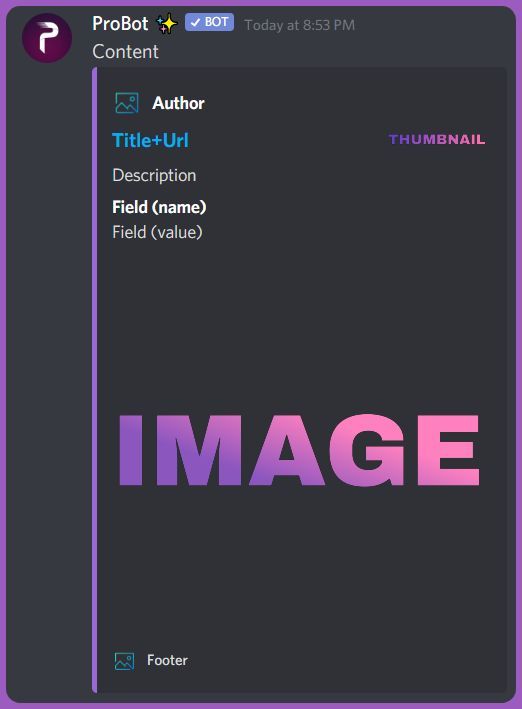
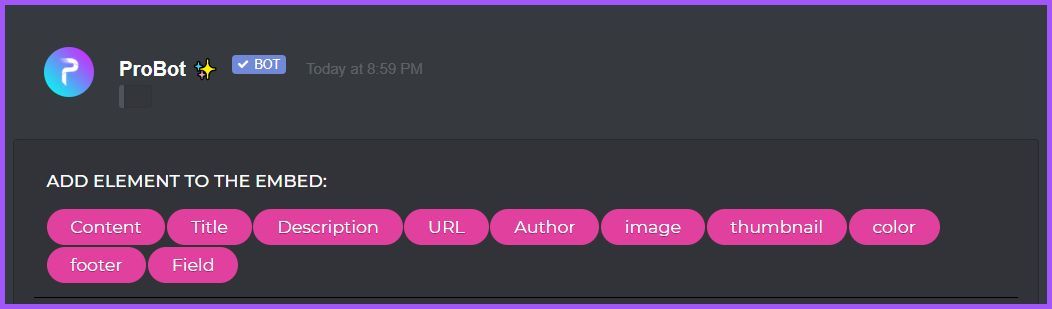
Welcome images, moderation, leveling, reaction roles, logs, high quality music and many many more!
nocturne flax
Yeah but i still can't figure out how to make frame 🤣
quaint sentinel
nocturne flax
Yeah but i still can't figure out how to make frame 🤣
Elaborate please, wdym by frame?
quaint sentinel
nocturne flax
Hey. Im looking how to get this "frame"
Any ideas?
As I can see here, you're talking about embed message. And I've given you the steps
nocturne flax
Can i dm you? xd
strange fern
@native geyser
I taget @tender obsidian
And didn't answer me
Have anyone else to ask ?!
quaint sentinel
Sure
quaint sentinel
nocturne flax
Can i dm you? xd
quaint sentinel
strange fern
<@324937717441888256>
I taget <@526037709081542688>
And didn't answer me
Have...
What's your problem?
nocturne flax
Is the bot able to replace the level roles?
strange fern
quaint sentinel
What's your problem?
I wanna get support Role here
For kurdish ppl
quaint sentinel
nocturne flax
Is the bot able to replace the level roles?
Elaborate please.
quaint sentinel
native geyser
talk to Hazel#0666 in dms
@strange fern
nocturne flax
quaint sentinel
Elaborate please.
?
quaint sentinel
In DMs
strange fern
quaint sentinel
<@800126902500458548>
I taged it but didn't answer still now
quaint sentinel
Message him in DMs :)
quaint sentinel
nocturne flax
?
You mean if it can remove the previous Leveling roles when someone reach the next one or what?
nocturne flax
Türkçe sohbet yok
quaint sentinel
nocturne flax
Türkçe sohbet yok