#support-en
1 messages · Page 329 of 1
 native geyser
native geyser
native geyser
you do realize that this server is for probot only right?
 ornate mason
no
native geyser
well, read the server name then please
ornate mason
Goteam Discord Server
native geyser
hm?
ornate mason
ok
 hardy finch
I need help with music
native geyser
what is the issue
 stoic fern
Hi! I have a problem with logs to ProBot. I connected them to the channels, and the bot does not give any logs from the server, it has all the permissions and nothing. Please help.
 native geyser
stoic fern
native geyser
stoic fern
you haven't enabled them 
native geyser
yw
 fallen comet
can you grant members the permission to use some commands but other ones dont (for example that everyone can use music commands but only admins can ban ppl) and if so how?
 west kelp
fallen comet
can you grant members the permission to use some commands but other ones dont (f...
west kelp
fallen comet
can you grant members the permission to use some commands but other ones dont (f...
When you edit a command you can change the disabled or enabled roles
fallen comet
i thought you can only change who the command affects with those settings
west kelp
fallen comet
i thought you can only change who the command affects with those settings
It's who can use them
fallen comet
ok now i figured it out ty 😂🤦♂️
 chilly bear
Hello there!
I got a question: Is there anyway to set up an embed level up message?
😭
Ok, thanks! I'm on it 
 split needle
 dusty edge
can i be mod
dusty edge
can i be mod
We're not looking for one
Plus this place is for questions about @lean badger, not anything else
dusty edge
ok
 nocturne flax
Hi. I have a quick question. I have tried using /lock and /mute but it doesn't work. It says the chat's been locked and the user's been muted, but everyone can still type. I don't get what could have gone wrong
 untold flume
<@&675070424748654593>
 indigo reef
<@&675070424748654593>
native geyser
nocturne flax
Hi. I have a quick question. I have tried using /lock and /mute but it doesn't w...
one of your role permissions send message permission is overriding it
set that roles send message permission on default
nocturne flax
native geyser
one of your role permissions send message permission is overriding it
I made sure that Probot's role is higher than the "member" role which I gave everyone yet it still doesn't work
This may sound really random, but could you please just have a quick look at the server to see what's gone wrong if that's alright?
native geyser
nocturne flax
I made sure that Probot's role is higher than the "member" role which I gave eve...
i mean its sitll a permission issue, set member roles send message permission on default
do the same for @everyone role too
nocturne flax
Alright I'll try that
It's still not working
I set both of those to default and they can still type
native geyser
maybe there is another role that is giving them permissions?
nocturne flax
This one guy who's being my test subject has like 6 roles. None of the roles have permission to send messages
I don't get it
native geyser
does he have admin
nocturne flax
Nope
native geyser
invite me in dms please i'll check it out in a bit
nocturne flax
Alright. Thanks
native geyser
fixed
 analog oak
What is the command to remove roles from someone
split needle
#help role
 lean badgerBOT
split needle
#help role
lean badgerBOT
split needle
#help role
**Command: role**
Add/remove a role(s) for a user.
**Usage:**
#role [user] (+/-)[roles names separated by comma]
#role all (+/-)[role name]
**Examples:**
#role @split needle Admin
#role all members
#role bots System
#role humans members
 hoary arrow
native geyser
hoary arrow
native geyser
hm?
 late umbra
im not able to use probot commands in any server i tried in my own private new one it still didnt work...
native geyser
which exact command
native geyser
what is the bot replying with

 half radish
Hello
native geyser
its updated and i already told you how you should do it 
untold flume
Bruh ruru It's been 5 minutes
 magic elm
hello
can i ask why probot doesn't work for all members
it load link instead named rank.png
with 13B size
<@&675070424748654593>
<@&675070381861634048>
<@&836705505731936257>
 light elbow
@magic elm Just wait and tell them to write something it will fix itself
and next time
PLEASE DO NOT PING EVERYONE
 junior sedge
Hay avid user of the bot but having issue getting it to recognise custom emojies in the descriptor for when i set up reaction rolls
its almost like the webpage wont detect cutom loaded emojies except when selecting them for rection rolls. as you can imagen this is a pain'
 split needle
junior sedge
its almost like the webpage wont detect cutom loaded emojies except when selecti...
split needle
junior sedge
its almost like the webpage wont detect cutom loaded emojies except when selecti...
Since the bot will not store custom emojis, they'll not show on preview
And also if you don't know, to use custom emojis on bot's messages, you'll need to use their full id but on the preview will still result as :emoji_name:
 vernal olive
Is reset command broken
split needle
vernal olive
Is reset command broken
No
Enable moderation module on the dashboard
split needle
Both need to be enabled btw
 nova sedge
how to make reaction role in a server ?
split needle
nova sedge
how to make reaction role in a server ?
go to https://probot.io/dashboard, select your server, go to embed messages module to create and send embed messages for the reaction roles to where you want. Then go to reaction role module to setup the feature on the sent embed messages.
Notice: Be sure the Probot✨ role is higher than other roles. Embed message should not have any blank element (better to remove them if not using).
Welcome images, moderation, leveling, reaction roles, logs, high quality music and many many more!
nova sedge
split needle
go to https://probot.io/dashboard, select your server, go to embed messages modu...
i cant find embedded messages module
split needle
Have you selected your server on the left side yet?
If you have then look at the left pannel, on the near top
nova sedge
split needle
Have you selected your server on the left side yet?
If you have then look at the...
in the site or the discord sever?
split needle
On the site
 neat sparrow
How to move a music up the queue?
split needle
neat sparrow
How to move a music up the queue?
Not possible now
Feel free to suggest
 wide dock
how to disconnect the bot
split needle
wide dock
how to disconnect the bot
/stop
wide dock
tnx ❤️
 icy oriole
So ran into the same issue again, the edit history isn't showing edits..... The guy doing it says it doesn't seem to show up when he edits from his phone. Any clue if that's a problem?
And... it didn't show the edit I just made either
Wait, did this bot go paid only?
untold flume
<@&675070424748654593>
native geyser
icy oriole
Wait, did this bot go paid only?
nope, as long as you have message edited log enabled properly and give the bot to see the message history it'll be logging it
icy oriole
native geyser
nope, as long as you have message edited log enabled properly and give the bot t...
So I do have it setup for it, am I missing something?

Message Edited is set to go to the text channel change-logs as you can see there, it is Enabled. But it's not doing it.
native geyser
 prime quest
Is there Probot site language Kurdish ?
prime quest
Is there Probot site language Kurdish ?
yes
prime quest
Can I have it?
native geyser
icy oriole
Message Edited is set to go to the text channel change-logs as you can see there...
check the bots perms and make sure it has send messages/attach embeds perms
native geyser
prime quest
Can I have it?
i mean all you gotta do is clicking on the flag symbol on the website and selecting your language
 rotund karma
THE BOTTTT
Bruhhh
@native geyser @native geyser @native geyser @native geyser
What happened
THE BOTTTT
native geyser
what about it? i also appreciate it if you just explain the situation instead of spamming
rotund karma
native geyser
what about it? i also appreciate it if you just explain the situation instead of...
HELPPP
Hellpp
DUDE
native geyser
- language!
- as i said stop spamming and explain me your issue
native geyser
see what
rotund karma
rotund karma
#profile
he doesn't answer
native geyser
you're using commands in the support channel, they're disabled here
so please simply explain me your issue
icy oriole
native geyser
check the bots perms and make sure it has send messages/attach embeds perms
Alright. I checked, I even made it an Admin to see if that did anything, it still does not show the Edit history
native geyser
rotund karma
<#771147667660996618>
prime is currently down, are you using free version in your server?
rotund karma
Yes
native geyser
icy oriole
Alright. I checked, I even made it an Admin to see if that did anything, it stil...
it will not show the old edits it'll just show new edits after you set it
native geyser
rotund karma
Yes
free has no issues
rotund karma
Thanks for help
native geyser
yes
icy oriole
native geyser
it will not show the old edits it'll just show new edits after you set it
I figured, which is why I tried editing after setting it to admin
rotund karma
Ok
icy oriole
it doesn't show the edit
native geyser
which version of the bot are you using?
icy oriole
Where is that listed? profile?
native geyser
i mean public version or prime version
icy oriole
public
native geyser
the server belongs to you right?
icy oriole
Yes, my server
icy oriole
it sort of worked when I first set it up. but stopped after
native geyser
i'd like to join your server and check it out if possible
 opaque canopy
<@&675070424748654593> is there a command to see the lyrics?
split needle
Nope
 scenic iron
what's the matter with the probot prime?
split needle
scenic iron
what's the matter with the probot prime?
Being offline probably
Trying to get it up atm
split needle
 foggy crater
Why the bot keeps lagging
foggy crater
Why the bot keeps lagging
Music?
If yes then overload
scenic iron
split needle
Being offline probably
Trying to get it up atm
ok and thx u
foggy crater
split needle
Music?
If yes then overload
Any solution?
split needle
No
But maybe it'll be resolved in next update hopefuly
 naive meteor
what is meant here?
 native geyser
over 5 messages in 5 seconds will be considered as spam and the bot will take actions that you select form the drop down menu
 crystal yew
does probot have a giveaway system
native geyser
no it doesnt
 cloud pond
I wanna blacklist some channels so members won't be able to play music there ... How can I do that? I've done it with other bots but I don't know how to do it with probot.
 dusty notch
Probot wont listen to my friends commands??
 tender obsidian
dusty notch
Probot wont listen to my friends commands??
tender obsidian
dusty notch
Probot wont listen to my friends commands??
moderation commands?
 bold aurora
How u can skip a song?
native geyser
/skip
bold aurora
native geyser
> /skip
Thanks
native geyser
bold aurora
native geyser
> /skip
It didn't work
native geyser
what is the bot replying with
native geyser
you did it like this and selected probots slash command right?
 cloud pond
I wanna blacklist some channels so members won't be able to play music there ......
cloud pond
cloud pond
I wanna blacklist some channels so members won't be able to play music there ......
@native geyser could you please help me as well? 🥲
bold aurora
native geyser
you did it like this and selected probots slash command right?
I don't get the pro bots slash command
native geyser
bold aurora
I don't get the pro bots slash command
what is the regular prefix you're using in the server
bold aurora
native geyser
what is the regular prefix you're using in the server
It's the other bot
native geyser
cloud pond
<@324937717441888256> could you please help me as well? 🥲
yes sorry,
https://probot.io/dashboard -> select your server -> music module -> edit play command -> add enabled/disabled channels (this is only for the command you cant limit the bot from joining different voice channels via dashboard)
Welcome images, moderation, leveling, reaction roles, logs, high quality music and many many more!
native geyser
bold aurora
#
try #skip
bold aurora
native geyser
try #skip
 native geyser
well there is your answer
native geyser
might have been bugged, try #stop then #play though it'll reset the entire queue
cloud pond
native geyser
yes sorry,
https://probot.io/dashboard -> select your server -> music module -> ...
 TNX ❤️
native geyser
yw yw
 dapper palm
Hello ,
 shut sun
I activated the Leveling System but you cant get Text Level or Xp i tested it and no one on my Discord got any XP
Only Xp for Speak you can get
Has anyone got solutions or the same experience?
untold flume
<@&675070424748654593>
shut sun
<@&675070424748654593>
native geyser
shut sun
I activated the Leveling System but you cant get Text Level or Xp i tested it an...
hi, on dashboard enable utility module
also the support role has been mentioned once no need to mention twice
shut sun
Ok sorry
shut sun
native geyser
hi, on dashboard enable utility module
What modul from up to down at what level is that because i have it on German and cant find it
native geyser
in English its called Utility, it has a sun symbol right next to it
you can change the language into English and just check for it too
shut sun
Ohh ok i found it and i will try it sorry for my poor choise of words my english is not so god
 modern geyser
does youtube work with the bot?
 halcyon hedge
rank showing only for some users
what this error ?? how to solve
 untold flume
<@&675070424748654593>
tender obsidian
modern geyser
does youtube work with the bot?
Yes youtube links / search is the main source in general
tender obsidian
halcyon hedge
rank showing only for some users
what this error ?? how to solve
When the users are new to Probot the the rank/profile sends as a .png
it fixes itself eventually
shut sun
When somone has the required Level for a role but he doenst get that role why?
native geyser
- drag the bots role above other roles
- make sure the bot has manage roles permission
- make sure your members reached both of the target levels
 ionic inlet
How do you make it so pro bot can Welcome people in welcome channel
shut sun
native geyser
1) drag the bots role above other roles
2) make sure the bot has manage roles pe...
thanks the bot was not above the other roles
native geyser
yw
native geyser
ionic inlet
How do you make it so pro bot can Welcome people in welcome channel
https://probot.io/dashboard -> select your server -> welcomer
Welcome images, moderation, leveling, reaction roles, logs, high quality music and many many more!
 wintry tangle
how do i take this off i forgot 😭 ?
 native geyser
wintry tangle
how do i take this off i forgot 😭 ?
native geyser
wintry tangle
how do i take this off i forgot 😭 ?
https://probot.io/dashboard -> select your server -> logs
Welcome images, moderation, leveling, reaction roles, logs, high quality music and many many more!
 twilit cargo
Can I assign users to xp, if so how?
native geyser
not possible for now
native geyser
we're not looking for mods
 worthy coyote
Hi, it seems i have set the autodelete of messages and replies with the music feature to really really short, i cant find the setting to change it, Where do i do that?
split needle
worthy coyote
Hi, it seems i have set the autodelete of messages and replies with the music fe...
Don't have both "auto delete command invocation message" and "delete respond with message deletion" enabled
 rigid kernel
How to disable xp from voice channels?
 small bay
Im tryna unnmute my friend and it says does not have permission to manage roles
Please help <@&336913504051265537>
nocturne flax
sorry
small bay
Oof
worthy coyote
split needle
Don't have both "auto delete command invocation message" and "delete respond wit...
i was looking for that, but where is that setting? on the web dashboard or a textline command?
native geyser
rigid kernel
How to disable xp from voice channels?
set those channels as no-xp channels
native geyser
small bay
Im tryna unnmute my friend and it says does not have permission to manage roles
drag the bots role above other roles
 native geyser
leveling system
native geyser
yw
worthy coyote
worthy coyote
i was looking for that, but where is that setting? on the web dashboard or a tex...
<@&336913504051265537>
split needle
worthy coyote
i was looking for that, but where is that setting? on the web dashboard or a tex...
In the command setting (edit) and avoid mentioning mod for support. Instead, mention support english role
split needle
 burnt lily
Am I allowed to get a refund?
burnt lily
Am I allowed to get a refund?
You can contact @native geyser and she'll ask dramex
worthy coyote
split needle
In the command setting (edit) and avoid mentioning mod for support. Instead, men...
sorry, i meant to @ support, my bad
 serene ravine
 nocturne flax
Hey so my dashboard isn't showing the "vip" or premium features even though it's in our server and up to date? And the regular Probot (not paid) bot is now posting certain auto messages instead of the Premium one

 compact quarry
 frigid torrent
Hello
 vagrant whale
nocturne flax
Hey so my dashboard isn't showing the "vip" or premium features even though it's...
vagrant whale
nocturne flax
Hey so my dashboard isn't showing the "vip" or premium features even though it's...
Hi, you may refresh the page or try to kick the bot and invite it back please
vagrant whale
 junior patio
But I didn't get anything
junior patio
But I didn't get anything
Can you show a screenshot of this please https://probot.io/transactions
And actually there is no doubt that isn’t working
nocturne flax
vagrant whale
Hi, you may refresh the page or try to kick the bot and invite it back please
Kick which one, I tried this with the free bot, do u have to Kick and re invite the premium one?
junior patio
There u go
 quasi rover
junior patio
He transferred as u see
quasi rover
junior patio
He transferred as u see
it sounds like you haven't seen the message yourself which could be a auto responder or embed message
junior patio
So it was fake
quasi rover
if you have your dms enabled you should have received a message saying the amount and sender etc
junior patio
quasi rover
if you have your dms enabled you should have received a message saying the amoun...
Yeah I understand
vagrant whale
nocturne flax
Kick which one, I tried this with the free bot, do u have to Kick and re invite ...
Yes sir try the premium
nocturne flax
vagrant whale
Yes sir try the premium
Received some assistance and issue resolved, thank you :)
vagrant whale
 vapid flare
Hello , Can i make when i left the server send a message in private
vapid flare
Hello , Can i make when i left the server send a message in private
Not possible, you can only set the logs when a user left the server and it will send the embed in a specific channel
vagrant whale
nocturne flax
Received some assistance and issue resolved, thank you :)
Yw, anytime
 wide lodge
If the bot auto posts levels, but #rank doesn’t work, do I have to turn on some option?
vagrant whale
wide lodge
If the bot auto posts levels, but #rank doesn’t work, do I have to turn on some ...
Yes check the dashboard and make sure the command #rank is enabled
wide lodge
Thanks! I totally didn’t even realize there was one lol what’s the command?
vagrant whale
wide lodge
Thanks! I totally didn’t even realize there was one lol what’s the command?
You can enable it here and also make sure it’s enabled in levelling system section aswell
 vagrant whale
wide lodge
Thanks! I totally didn’t even realize there was one lol what’s the command?
vagrant whale
wide lodge
Thanks! I totally didn’t even realize there was one lol what’s the command?
Use /rank please
wide lodge
vagrant whale
You can enable it here and also make sure it’s enabled in levelling system secti...
Thanks! When I go to dashboard it just seems to tell me my own user info (it’s installed on my server) is it only Premium that gets that dashboard in your screenshot?
Never mind
I’m dumb- got it thank you!
👍
vagrant whale
wide lodge
Thanks! When I go to dashboard it just seems to tell me my own user info (it’s i...
You can select the servers on your left side, thats fine you’re welcome
 wooden lotus
Hi there, I am trying to set up reaction roles on my server but nothing is appearing on the dropdown, can someone help? P.S. I already have several roles set up on the server but they're not appearing in the dropdown.

 orchid dew
wooden lotus
Hi there, I am trying to set up reaction roles on my server but nothing is appea...
orchid dew
wooden lotus
Hi there, I am trying to set up reaction roles on my server but nothing is appea...
Take up probot role above the role that you will setup with it
wooden lotus
@orchid dew thank you!! that worked
vapid flare
vagrant whale
Not possible, you can only set the logs when a user left the server and it will ...
ok , thank you for your better information
 buoyant escarp
xD
vagrant whale
vapid flare
ok , thank you for your better information
yw
 supple kernel
any way to reset xp only 1 user?
 iron nimbus
for music, what command do i use to see whats now playing?
 oak trail
supple kernel
any way to reset xp only 1 user?
oak trail
supple kernel
any way to reset xp only 1 user?
#reset text/voice @lean badger
supple kernel
oak trail
> #reset text/voice <@!567703512763334685>
must tag or can use id?
oak trail
supple kernel
must tag or can use id?
id and tag
supple kernel
deleted account
iron nimbus
it didnt work?
oak trail
iron nimbus
it didnt work?
please photo
supple kernel
oak trail
id and tag
ty
iron nimbus
 oak trail
try ;
#queue
oak trail
You can enable it here and also make sure it’s enabled in Dashboard
 iron nimbus
it is enabled?? so i edit something?
oak trail
link server in dm!
iron nimbus
i got it, ty!
oak trail
iron nimbus
i got it, ty!
 .
.
 junior holly
Hi, I'm new to the server, I don't know how it works and what can be done here, can someone explain to me?
 simple zenith
what is the solution to the problem ?
 vagrant whale
<@&675070424748654593>
split needle
junior holly
Hi, I'm new to the server, I don't know how it works and what can be done here, ...
This is a support server for @stone cloud
That's all
split needle
simple zenith
what is the solution to the problem ?
Logout on any other device you're using, refresh the page and try again
If still not work, you have to wait for a day
simple zenith
ok thanks
 gusty mural
Anyone have the formats for the moderation commands? Like how each one is to be typed out when used.
Nvm, got it
 autumn field

wide lodge
hey another dumb question.. how do you restrict members from using slash commands? Like if I want just mods to use them
nocturne flax
is there a way to disable server info command?
 late sage
How do I make welcomes with this bot?
untold flume
@wide lodge you can add disabled and enabled roles via dashboard
untold flume
nocturne flax
is there a way to disable server info command?
Disable the command via dashboard
untold flume
late sage
How do I make welcomes with this bot?
Hey , head to the dashboard > select your server > welcomer module
late sage
untold flume
Hey , head to the dashboard > select your server > welcomer module
And to customize?
untold flume
@late sage you customise a specific command or customise the welcomer module it selfs?
late sage
untold flume
<@447519821131677706> you customise a specific command or customise the welcomer...
Personalize the welcome...
untold flume
Yes you can customise it from the dashboard board just follow the instructions that i gave you
late sage
untold flume
Yes you can customise it from the dashboard board just follow the instructions t...
Oh, sorry haha
untold flume
Np
late sage

Help
Try to do the welcome thing, but when a person joins the message does not come out.
late sage
untold flume
To see or to type in that channel
Yes, It's an open channel
untold flume
@limpid crest use #chat-en instead please
@late sage send me your server in dms please
late sage
untold flume
<@447519821131677706> send me your server in dms please
Hey, I think I already have it, did you mean permissions?
Sorry, it's my first time doing this lol
untold flume
Yes make sure that your bot has permissions to type in that channel
split needle
@late sage chdck the image if using. It must be either a .png or .jpg file, other file types are not supported. And the image itself shouldn't be bigger than 3Mb (limit from our host, bypass this by using other media host but png or jpg is stil required)
late sage
split needle
<@447519821131677706> chdck the image if using. It must be either a .png or .jpg...
Oh, thanks...
 brittle chasm
How to make Probot rep the message?
nocturne flax
How can I ask the probot to greet newcomers?
split needle
brittle chasm
How to make Probot rep the message?
Go to https://probot.io/dashboard, select your server on the left, go to auto responder module and setup them here
For now the bot will only respond to the exact trigger word/phrase, we'll update it soon
Welcome images, moderation, leveling, reaction roles, logs, high quality music and many many more!
split needle
nocturne flax
How can I ask the probot to greet newcomers?
Go to https://probot.io/dashboard, select your server on the left side, go to welcomer module and setup the feature there
Welcome images, moderation, leveling, reaction roles, logs, high quality music and many many more!
nocturne flax
Kk th
late sage
@untold flume
Many, many thanks for the support, very kind, patient and attentive.
By god, they should give him a promotion. 🤣✨
untold flume
yw homie ❤️
gusty mural
Are there any limits to the Reaction Roles embed feature? As in like a certain number of reacts you can have per embed/just in total?
untold flume
<@&675070424748654593>
native geyser
gusty mural
Are there any limits to the Reaction Roles embed feature? As in like a certain n...
discord limit is the limit, it should be 20 reactions total
gusty mural
native geyser
discord limit is the limit, it should be 20 reactions total
Thank you Ruru, much appreciated!
native geyser
yw
 vernal topaz
hi, I have a question, how can I know who can use probot dashboard?
native geyser
only people with administrator permission can access the dashboard
vernal topaz
thank you
native geyser
yw
gusty mural
For Premium purchasing, is there a way to just set up a recurring payment? Or do I need to keep manually adding money to the "recharge" wallet?
native geyser
you need to recharge the website wallet
gusty mural
Ok sounds good thanks!
native geyser
yw
gusty mural
Last question: Do I need the original bot in the server with Prime, or just Prime?
native geyser
once you invite the prime you dont need the free bot
gusty mural
Excellent!
gusty mural
native geyser
once you invite the prime you dont need the free bot
I think that might be incorrect, because I can no longer access the dashboard without the free bot:

Prime is in the server:

Right side
native geyser
gusty mural
I think that might be incorrect, because I can no longer access the dashboard wi...
might have ben bugged ot
kick prime and invite it to another server
then kick prime from that server and invite it to your first server
how can i help you?
 cursive moon
#play cbd
native geyser
cursive moon
#play cbd
Discord
Discord is the easiest way to communicate over voice, video, and text. Chat, hang out, and stay close with your friends and communities.
cursive moon
ɿ(。・ɜ・)ɾⓌⓗⓐⓣ?
cursive moon
ɿ(。・ɜ・)ɾⓌⓗⓐⓣ?
gusty mural
native geyser
might have ben bugged ot
kick prime and invite it to another server
then kick pr...
Thank you, that worked!
native geyser
yw
cursive moon
(^^)
naive meteor
how open it?

 kindred lark
hiw i can add bot?
native geyser
Discord
Discord is the easiest way to communicate over voice, video, and text. Chat, hang out, and stay close with your friends and communities.
 snow trout
hello, how may I mention channels in embed messages?
alright I saw it in pinned message
native geyser
alrighty
snow trout
how should I add colors? to color list?
 quaint sentinel
To do your "Colors List" you've to create numbered roles ascendengly, which means you've to create roles as the image below explains.
colors roles only works with exact numbers, they can't have mod permissions otherwise it won't work. dragging these roles above your moderators roles position is not recommended as they'll have the access through it to higher position roles.
the image below shows how to correctly use the commands as how does it effect your nickname.

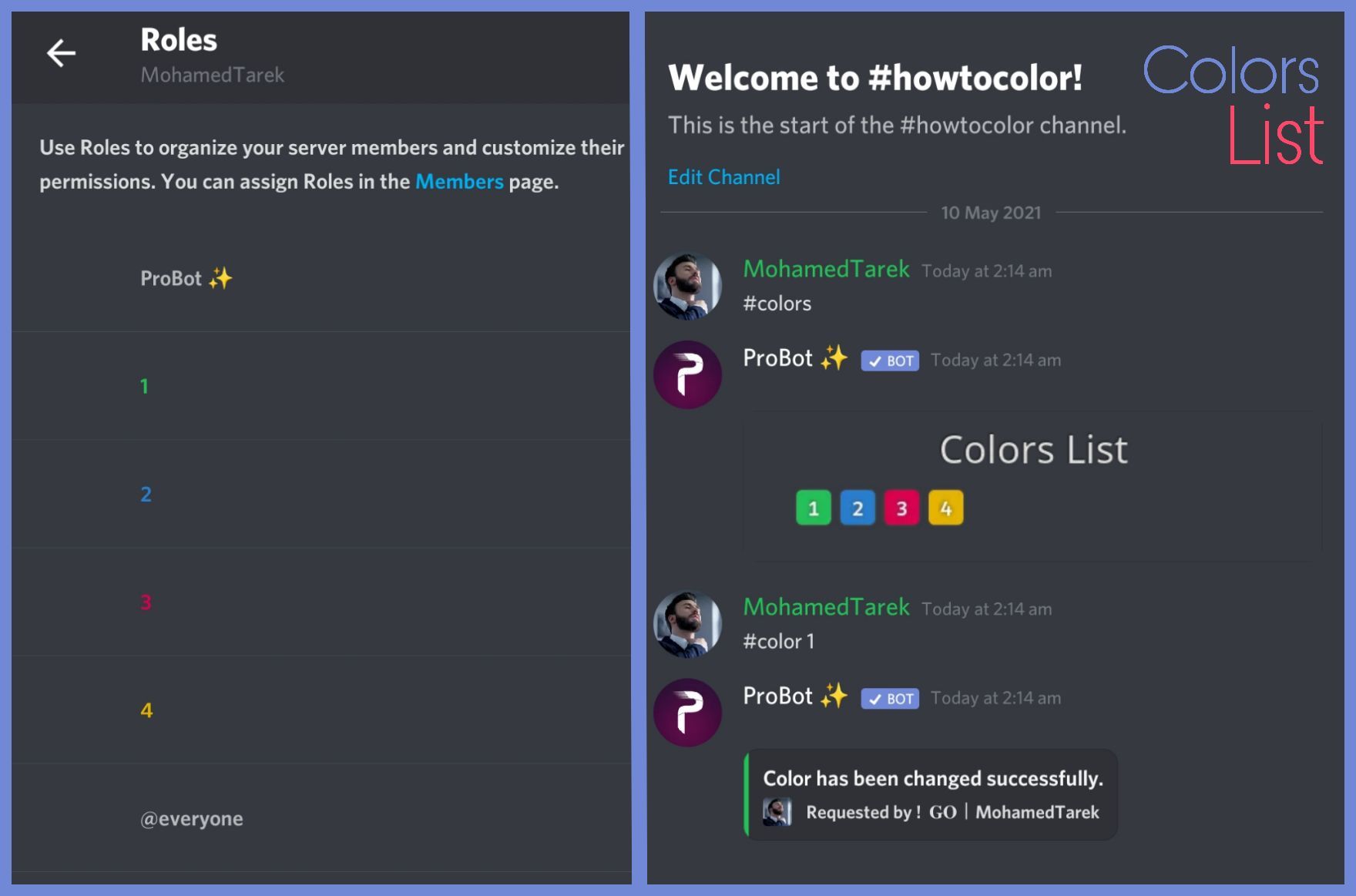
@snow trout ^
 spring aspen
what can I do with probot credits ?
quaint sentinel
ProBot currency is global, however. you can use this currency in any server to run giveaways, trade it with your friends, etc.. but since trading some items is disallowed by discord and is breaking the discord ToS, we're not responsible for any scams happens to you! this is up to you.. cause of this, we are offering limited ways where you can safely use the currency.
1 } ~ custom your #profile background
2 } ~ custom your #profile badges
3 } ~ custom your #rank background
4 } ~ subscribe to paid version of probot
https://probot.io/premium (note: the cheapest will cost you 375,000 monthly)
- #664737031414480896 for more informations.
in case you had any suitable ideas for the credits usages, we're absolutely glad to hear you by #573053418017521664
@spring aspen
Welcome images, moderation, leveling, reaction roles, logs, high quality music and many many more!
Welcome images, moderation, leveling, reaction roles, logs, high quality music and many many more!
Welcome images, moderation, leveling, reaction roles, logs, high quality music and many many more!
Welcome images, moderation, leveling, reaction roles, logs, high quality music and many many more!
#support-int / #chat-int
nocturne flax
hii
can i please get help fixing the color roles in my server?
can i invite u to my server and u fix it for us?
<@&675070424748654593>
spring aspen
quaint sentinel
ProBot currency is global, however. you can use this currency in any server to r...
I heard that ppl can trade with probot credits is that legal ?
 sweet portal
hi i have probot in my server and i want it to send welcome messages to the new incomers, i did all the settings in the dashboard but still not working
quaint sentinel
nocturne flax
can i please get help fixing the color roles in my server?
What's the problem?
quaint sentinel
spring aspen
I heard that ppl can trade with probot credits is that legal ?
Trading credits or selling credits for real money currencies is against our and Discord rules.
nocturne flax
so i rather somebody do it lol
quaint sentinel
Well, i can't do that for you lol
quaint sentinel
I know how to do it, but I'm here to help in case you have issues with our bot. I won't do it for you just because you don't want to do it by yourself.
nocturne flax
ok well tell me how to do it
quaint sentinel
To do your "Colors List" you've to create numbered roles ascendengly, which means you've to create roles as the image below explains.
colors roles only works with exact numbers, they can't have mod permissions otherwise it won't work. dragging these roles above your moderators roles position is not recommended as they'll have the access through it to higher position roles.
the image below shows how to correctly use the commands as how does it effect your nickname.
nocturne flax
so currently i set up some color roles
wait
they have to be numbered?
they cant have a name?
quaint sentinel
Nope they can't
nocturne flax
ah
quaint sentinel
sweet portal
hi i have probot in my server and i want it to send welcome messages to the new ...
Try to change the welcoming room and see if it works out
spring aspen
quaint sentinel
Trading credits or selling credits for real money currencies is against our and ...
Thank you for telling me that is there a document i can read all probot rules from, just to make sure not me or my server members violate any?
sweet portal
quaint sentinel
Try to change the welcoming room and see if it works out
still not working
quaint sentinel
sweet portal
still not working
Can I see your settings
quaint sentinel
spring aspen
Thank you for telling me that is there a document i can read all probot rules fr...
Unfortunately we don't have one. But feel free to ask whenever you want here.
 quaint sentinel
Have you tried changing the welcome background?
quaint sentinel
I see, can you try another background?
sweet portal
sweet portal
so i cant use this image?
quaint sentinel
sweet portal
so i cant use this image?
Unfortunately I don't think that you can. It's too big that's why probot can't send it. Due to the discord image upload limit.
quaint sentinel
Yw, you too.
native geyser
#mute 762258135049175043
lean badgerBOT
native geyser
#mute 762258135049175043
:white_check_mark: @Такси Грегори🚕 muted from the text! :zipper_mouth:
 inland oar
@native geyser how can I remove all the queue from the music ?
native geyser
/stop
nocturne flax
@quaint sentinel
inland oar
ty bro
nocturne flax
uknow when u choose ur color
how can i make it that the bot deletes the msg after?
quaint sentinel
nocturne flax
how can i make it that the bot deletes the msg after?
1- https://probot.io/dashboard Select your server
2- Then go to Colors Module
3- After that go to #colorsettings, and you will find it there.
Welcome images, moderation, leveling, reaction roles, logs, high quality music and many many more!
 unkempt flume
hey guys i want ask about how to check rank for specifi user
when i type to my specific user the rank is show not the target specific user
unkempt flume
thank you ser i try that
untold flume
yw
 split quail
hello i found a server where there were 3 step verification
so i first needed to click the first
then i saw all other channels
but i needed to click again 2x before server was usable
now they used your bot
and i don't understand how i can configure
such things for all my servers too
if you need the example i send invitation
split needle
split quail
such things for all my servers too
I think they might used reaction roles
go to https://probot.io/dashboard, select your server, go to embed messages module to create and send embed messages for the reaction roles to where you want. Then go to reaction role module to setup the feature on the sent embed messages.
Notice: Be sure the Probot✨ role is higher than other roles. Embed message should not have any blank element (better to remove them if not using).
Welcome images, moderation, leveling, reaction roles, logs, high quality music and many many more!
unkempt flume
untold flume
yw
oh i forget how to reset xp or hold the rank for specific user
untold flume
unkempt flume
oh i forget how to reset xp or hold the rank for specific user
#help reset
lean badgerBOT
untold flume
#help reset
**Command: reset**
Reset text/voice/invites xp points for all or specific members.
**Usage:**
#reset [text / voice / invites) [all / user]
**Examples:**
#reset text all
#reset voice all
#reset invites all
#reset text @Dramex
unkempt flume
I try this but the rank and xp my target user not reset
untold flume
Do #reset text @user then click on the tick mark reaction
 broken spruce
how do you make it to were it updates server members
untold flume
you mean how to assign a role to a member who just joined your server?@broken spruce
broken spruce
nvm i got it
 remote pine
Just came to ask — does ProBot support RR in threads?
 long granite
lurker could you please unban roadtopetabyte
i send the server link and you banned me
in the meanwhile

i just see this, i don't understand where i find it
and under commands is not too
untold flume
remote pine
Just came to ask — does ProBot support RR in threads?
Unfortunately it doesn't support it
remote pine
untold flume
Unfortunately it doesn't support it
Oh, terribly unfortunate. Thank you for the prompt response.
long granite
 untold flume
@remote pine feel free to suggest that here #573053418017521664
you haven't selected your server yet @split quail
lean badgerBOT
split needle
#unmute 802176323740237864 avoid posting invites next time
:white_check_mark: RoadToPetabyteAppleStyle unmuted!
untold flume
@split needle oh you came sorry for interrupting
split quail
so now where exactly i find this?
 split needle
Go to that link and continue what I said
split quail
i don't see any modul panel at all
 split needle
Select server on the left side
split quail
ok i found the error, the first one is not my server, but my account xD (same icon)
thanks
 modern jay
Can we make probot to censor unwanted mesages?
split needle
You can't make it censor messages as they're a type of messafes formating in discord
The best the bot can do is deleting messages containing words/phrases that you don't want/like to show up
split needle
Go to https://probot.io/dashboard, select your server on the left, go to automod module and setup the badwords one
Click on the ⚙️ icon to add bad words
Welcome images, moderation, leveling, reaction roles, logs, high quality music and many many more!
modern jay
THANK YOU SO MUCH...!!!
split needle
split quail
do you maybe have some yt vimeo tutorials
Not youtube but videos on imgur
https://i.imgur.com/9TJNyyw.gifv
https://i.imgur.com/iShPC37.gifv


Go to the link so you can pause them while following
nocturne flax
hi again

how do i send this msg to the channel?
where i want ppl to react in
nvm
i see someone asked the same
oak trail
<@&675070424748654593> ^
split needle
oak trail
<@&675070424748654593> ^
Wish you could read
 formal crown
Ok so I'm on mobile and the person who helped me out with setting it up is going to bed, my bot has given people warning for posting spam in spam channel, is there a way to fix it so it doesn't do that?
split needle
formal crown
Ok so I'm on mobile and the person who helped me out with setting it up is going...
Set ignored/disabled channel for the spam automod in the setting (⚙️)
oak trail
split needle
Wish you could read
 formal crown
@split needle thank you
split quail
this is what i see on their

this what i see on mine

in this step i connected to the verified1 role, but don't know if this is ok
 split needle
If you've added a role for the reaction then you're good with that
 marsh junco
how can I make it so the server is only available after accepting the rules?
I have done this
 split quail
and this once is done, so verification 1 channel is no more visible
 split needle
marsh junco
how can I make it so the server is only available after accepting the rules?
split needle
marsh junco
how can I make it so the server is only available after accepting the rules?
Then you just done it
The last job is to make change to role permisions
split needle
Google might help since it's a discord general thing
And yea if you want to add more than 1 role per reaction, you'll need the paid version of the bot
split needle
Head to https://probot.io/premium, first recharge money by clicking on the recharge button on the top right, then buy the subcription you wish to use bellow
Welcome images, moderation, leveling, reaction roles, logs, high quality music and many many more!
split quail
Lurker, in case could you check yourself why it doesn't work, i would pay you if needed
marsh junco
What's the difference between prime and premium?
split needle
split quail
Lurker, in case could you check yourself why it doesn't work, i would pay you if...
Have you added the role to the reactions yet?
marsh junco
nvm I'm not gonna get a subscription lol
split needle
marsh junco
What's the difference between prime and premium?
You can see in #664737031414480896
split quail
i did this

and putted the verif1 on the top of the roles, but under the other bot roles
split needle
Is it higher or lower than the probot role?
split quail
lower, roles are
 split quail
for the private channel is this (so i added your bot) but if i join from a not admin account, i still see all channels. now i switched by putting the probot to the top, over the owner, but still the same
 split needle
So what doesn't work?
The bot not giving role or?
split quail
what i don't see is this view "show only verification 1 channel", currently not visible at all
split needle
Oh then it's just about permisions
You can search it up on google since it's a general discord feature anyway
Search like setting up verification channels for discord servers and they should show about channel permisions
 hard parrot
Concordo
native geyser
you can ask your question right away
nocturne flax
i need help with like probot music only channel
native geyser
text or voice
native geyser
https://probot.io/dashboard -> select your server -> music module -> edit commands -> add enabled channels
Welcome images, moderation, leveling, reaction roles, logs, high quality music and many many more!
nocturne flax
and how to nullify the level of a person?
native geyser
#help reset
lean badgerBOT
native geyser
#help reset
**Command: reset**
Reset text/voice/invites xp points for all or specific members.
**Usage:**
#reset [text / voice / invites) [all / user]
**Examples:**
#reset text all
#reset voice all
#reset invites all
#reset text @Dramex
nocturne flax
Thx
native geyser
yw
 dusky trout
Does probotta have the ability to send auto messages at regular intervals
 tiny wharf
how do i change the prefix
native geyser
#prefix
new prefix
 sage oxide
Can I change my nickname in the dashboard or something? Because I changed it 1 month ago on discord..

 vagrant bobcat
Hello ! How Can I give permission to my friends to use the probot on my discord ?
 cyan canopy
can i get 100% refund on probot premium?
sage oxide
vagrant bobcat
Hello ! How Can I give permission to my friends to use the probot on my discord ...
there, put there moderation role and give him THIS moderation role
 vagrant bobcat
sage oxide
there, put there moderation role and give him THIS moderation role
vagrant bobcat
sage oxide
there, put there moderation role and give him THIS moderation role
thank you 🙂
untold flume
<@&675070424748654593>
quaint sentinel
sage oxide
Can I change my nickname in the dashboard or something? Because I changed it 1 m...
Can you log out then log in again
sage oxide
quaint sentinel
Can you log out then log in again
sure
quaint sentinel
cyan canopy
can i get 100% refund on probot premium?
Welcome images, moderation, leveling, reaction roles, logs, high quality music and many many more!
cyan canopy
Ty
quaint sentinel
yw
sage oxide
quaint sentinel
Can you log out then log in again
Doesn't work
quaint sentinel
sage oxide
there, put there moderation role and give him THIS moderation role
Also read the channel rules please.
sage oxide
quaint sentinel
Also read the channel rules please.
ok sorry bro
quaint sentinel
@sage oxide Try to change your Discord now, and log out then log in again and see if it works
sage oxide
quaint sentinel
<@832262201913901116> Try to change your Discord now, and log out then log in ag...
It worked, thanks for the help
quaint sentinel
Yw
nocturne flax
how to i post embeds... i clicked send new mssg and it dont work
native geyser
make sure to fill every selected element
 pseudo falcon
native geyser
pseudo falcon
native geyser
hi you can ask your question right away
nocturne flax
Is it just me who's probot is lagging like every other second😭
 dull crest
Timeout coming to @lean badger ?
 worldly sluice
Im french
untold flume
<@&675070424748654593>
 frozen perch
welcome msg are not being sent 😦 pls help
quaint sentinel
dull crest
Timeout coming to <@!567703512763334685> ?
We don't know for now. Feel free to suggest it here#573053418017521664
quaint sentinel
worldly sluice
Im french
#chat-int / #support-int
quaint sentinel
frozen perch
welcome msg are not being sent 😦 pls help
Does the bot have all the required permissions to send the welcome message? If so try to change the welcome room
quaint sentinel
nocturne flax
Is it just me who's probot is lagging like every other second😭
It's because of the overload.. Wait a few minutes and it should be fine
 knotty harbor
what can I do with the credits?
like is there a shop or smth?
quaint sentinel
ProBot currency is global, however. you can use this currency in any server to run giveaways, trade it with your friends, etc.. but since trading some items is disallowed by discord and is breaking the discord ToS, we're not responsible for any scams happens to you! this is up to you.. cause of this, we are offering limited ways where you can safely use the currency.
1 } ~ custom your #profile background
2 } ~ custom your #profile badges
3 } ~ custom your #rank background
4 } ~ subscribe to paid version of probot
https://probot.io/premium (note: the cheapest will cost you 375,000 monthly)
- #664737031414480896 for more informations.
in case you had any suitable ideas for the credits usages, we're absolutely glad to hear you by #573053418017521664
@knotty harbor
Welcome images, moderation, leveling, reaction roles, logs, high quality music and many many more!
Welcome images, moderation, leveling, reaction roles, logs, high quality music and many many more!
Welcome images, moderation, leveling, reaction roles, logs, high quality music and many many more!
Welcome images, moderation, leveling, reaction roles, logs, high quality music and many many more!
frozen perch
quaint sentinel
Does the bot have all the required permissions to send the welcome message? If s...
yes, tried
quaint sentinel
frozen perch
yes, tried
Do you have the welcome image on?
frozen perch
yes
quaint sentinel
Then try changing the welcome background and see if it works out.
frozen perch
its working wiithout any backhgrounf :
quaint sentinel
When you add the background it doesn't work right? @frozen perch
frozen perch
yes
quaint sentinel
It's a problem from the background itself, it might exceeded the Discord image upload limit. Try changing it to another one is smaller than the ones you've tried
frozen perch
ok
 sick locust
я хочу отправить сообщение от имени бота, и при этом отметить там роли администраторов моего сервера и нужный мне канал, как это сделать и возможно ли? @nocturne flax
 storm viper
<@&675070424748654593> So I am using the points role to assign points but when trying to filter by a role it does not work.... For example I am trying filter by a @Slytherin role but it show users that does not have the slytherin roll on the score board.
 untold flume
sick locust
я хочу отправить сообщение от имени бота, и при этом отметить там роли администр...
untold flume
sick locust
я хочу отправить сообщение от имени бота, и при этом отметить там роли администр...
Use #support-int instead
storm viper
then what is the point of the filter for points.... using /points there is a way to filter it or at least thats what it says....
 untold flume
storm viper
then what is the point of the filter for points.... using /points there is a way...
untold flume
storm viper
then what is the point of the filter for points.... using /points there is a way...
#help points
lean badgerBOT
untold flume
#help points
**Command: points**
A server based points that can be given by moderators.
**Usage:**
#points - see all points
#points [user] 1 - set the points of a user
#points [user] +1 - increase the points of a user
#points [user] -1 - decrease the points of a user
#points [user] 0 - reset the points of a user
#points reset - resets all points
#points [role name] - filters the points by a role
**Examples:**
#points @untold flume 1
#points @untold flume +1
#points @untold flume -1
#points @untold flume 0
#points reset
#points Admin
storm viper
untold flume
<@184521235240058881> oh now i got it
Didn't seem to work..
 untold flume
It worked?
storm viper
and when using the /points fliter: it requires a role
storm viper
untold flume
It worked?
no because the first few people on that list do not have Slytherin
untold flume
Yes put the role's name with out mentioning it
storm viper
It did not work
untold flume
@storm viper for real? Could you please check again because that's not possible
nocturne flax
storm viper
Didn't seem to work..
This picture I'm seeing it works
storm viper
untold flume
<@184521235240058881> for real? Could you please check again because that's not ...
This is the list of roles the first person on that list has

she does not have the Slytherin role
in fact the only Slytherin on that list are circled here
 untold flume
@storm viper well that's weird and maybe it's a bug wait for the support team they might help you
<@&675070424748654593> ^°
storm viper
I tried the other roles as well and it just shows everyone
nocturne flax
storm viper
she does not have the Slytherin role
I think your server have bad bug
nocturne flax
storm viper
I tried the other roles as well and it just shows everyone
Maybe this role have bug
storm viper
nocturne flax
I think your server have bad bug
I am going to wait for support...
nocturne flax
storm viper
I am going to wait for support...
Lovely
So don't worry about it
It's not important
storm viper
nocturne flax
Lovely
So don't worry about it
It's not important
I mean when I am running a Roleplaying server that I assign points and I want it to be easy for my players to see their house standings its kind of important to me.....
nocturne flax
storm viper
I mean when I am running a Roleplaying server that I assign points and I want it...
Well
Not important for me
 hidden flame
Guys, can someone explain to me how the reaction role function works? I created the embed and added the roles to give with each reaction, but now I don't know how to make it work on my server
quaint sentinel
hidden flame
Guys, can someone explain to me how the reaction role function works? I created ...
How do I set up reaction roles:
1- head to the dashboard https://probot.io/dashboard then select your server.
2- enter "Reaction Roles" module
3- Click "Add Message", then select an embed. You can manage these embeds by heading to "Embed Messages" module.
4- Click "Choose a message", and then select the referred embed message where the selected embed was sent.
start adding reaction roles by clicking "Add Reaction". there would be a (+) button where you can select the role referred to this reaction.
Welcome images, moderation, leveling, reaction roles, logs, high quality music and many many more!

@storm viper I'll let the developers know about that
nocturne flax
quaint sentinel
How do I set up reaction roles:
1- head to the dashboard https://probot.io/dashb...
Lovely but I'm going to explain it
quaint sentinel
Sorry?
nocturne flax
quaint sentinel
Sorry?
Nothing
Not important
hidden flame
quaint sentinel
How do I set up reaction roles:
1- head to the dashboard https://probot.io/dashb...
thx
storm viper
quaint sentinel
<@184521235240058881> I'll let the developers know about that
Thank you! Let me know if there is something on my end I need to do!
nocturne flax
quaint sentinel
Use <#608047244276531245> please
I don't need tips
Rajd him

Pls
Pls
storm viper
^uhhhh is that spam?
quaint sentinel
nocturne flax
I don't need tips
Well, I think you do need tips.
storm viper
quaint sentinel
Well, I think you do need tips.
agreed
nocturne flax
nocturne flax
Rajd him
What
Why you do this sending link to sub no
 frank swift
How does one set up the welcomer correctly
 mild saffron
Hello friends, what is a professional commando robot?
nocturne flax
quaint sentinel
Well, I think you do need tips.
I'm devil not using topics and roles
nocturne flax
mild saffron
Hello friends, what is a professional commando robot?
فارسی بگو
quaint sentinel
Last warning
mild saffron
nocturne flax
فارسی بگو
باش
nocturne flax
quaint sentinel
Last warning
So what your going to do
But let me help@mild saffron
mild saffron
کامند ند های پرو بات کجاست@nocturne flax
quaint sentinel
#mute @nocturne flax
lean badgerBOT
quaint sentinel
#mute <@456226577798135808>
:white_check_mark: @Lucifer morning star muted from the text! :zipper_mouth:
nocturne flax
mild saffron
کامند ند های پرو بات کجاست<@456226577798135808>
تو تنظیمات پرو بات 😂
mild saffron
nocturne flax
تو تنظیمات پرو بات 😂
اینجا نیست
quaint sentinel
frank swift
How does one set up the welcomer correctly
https://probot.io/dashboard
Select Your server - Welcomer Module - And add the welcome message and image if you want
Welcome images, moderation, leveling, reaction roles, logs, high quality music and many many more!
frank swift
I have them up but it’s not sending it
quaint sentinel
Do you have the welcome image on?

 quaint sentinel
Can you try to change the welcome background?
 gentle flax
Hello, what is benefit of premium?
quaint sentinel
@gentle flax - #664737031414480896
frank swift
That’s what I have but it’s not really sending it
quaint sentinel




Try one of these and see if it works out
frank swift
Ok got yea
gentle flax
@quaint sentinel thanks didnt saw that thread at all 😄
quaint sentinel
Yw
 jade cairn
Hello! I just added the ProBot to my server, but I'm the only one able to add songs to the queue; everyone in the server has the same permission. Can someone help me solve this, please? 🙂
quaint sentinel
jade cairn
Hello! I just added the ProBot to my server, but I'm the only one able to add so...
Can you check if there's any enabled /disabled roles on the #play command settings.
https://probot.io/dashboard - select your server - music module - #play
Welcome images, moderation, leveling, reaction roles, logs, high quality music and many many more!
jade cairn
quaint sentinel
Can you check if there's any enabled /disabled roles on the `#play` command sett...
That's it! I missed that part 😄 Thank you!
quaint sentinel
yw
quaint sentinel
Just upload one of the images I gave you and it will work
frank swift
Ok bet
quaint sentinel
frank swift
It's a problem from the background itself, it might exceeded the Discord image upload limit. ^
 split sorrel
When will we be able to rearrange the embeds in a certain order?!
quaint sentinel
frank swift
What’s the upload limit if u know
5 MB
native geyser
split sorrel
How does the color roles work?
#1 ~ 👉 Go to server settings, Roles.
#2 ~ 👉 Add Numbered Roles Like The picture down.
#3 ~ 👉 Save and go out.
https://i8.ae/7hM2w
Now you are ready to use this colors.
/colors
Shows the colors list
/color number
Choose/change your color in server.
to remove your current color: /color 0


 split sorrel
native geyser
#1 ~ 👉 Go to server settings, Roles.
#2 ~ 👉 Add Numbered Roles Like The pict...
split sorrel
native geyser
#1 ~ 👉 Go to server settings, Roles.
#2 ~ 👉 Add Numbered Roles Like The pict...
What about this
 native geyser
it is to edit the appearance of the color list
native geyser
sick locust
how to mark roles and channels in a message from a bot?
<#channel id>
split sorrel
Can they be words?
split sorrel
Dang
sick locust
thanks a lot!!! @native geyser
split sorrel
When will we be able to rearrange the embeds in a certain order?!
gusty mural
split sorrel
When will we be able to rearrange the embeds in a certain order?!
The channel description says to not repeat your question. Also, wanting a new feature wouldn't be a question for help with a bot problem. If you want a new feature, you suggest it to #573053418017521664
split sorrel
I wasn’t making a suggestion I was asking a question
gusty mural
You're asking when a new feature will happen. Which is not about your bot having problems/not working.
split sorrel
If it’s a problem I’m having then I’m allowed to ask it.
 glacial tiger
So... I'm trying to set up reaction roles and the list of roles is empty... am I doing something wrong? How do I fix this?
native geyser
drag the bots role above other roles
 remote briar
Is there no Japanese on this server?
native geyser
you mean japanese people or what exactly?
remote briar
I don't understand English just by translating and writing
 winter totem
hello I have a question
native geyser
you can ask it right away
remote briar
Is there a command that can change the bot to Japanese?
winter totem
native geyser
you can ask it right away
ended up in blacklist but he hasn't done anything how to fix it
 quiet vapor
vote
lean badgerBOT
@quiet vapor https://top.gg/bot/probot/vote
 remote briar
I don't understand English but I understand Japanese
native geyser
#setlang Japanese
remote briar
Thank you
native geyser
winter totem
ended up in blacklist but he hasn't done anything how to fix it
what ended up in blacklist?
yw
winter totem
native geyser
what ended up in blacklist?
my friend has ended up on the black list on the probo, you can fix it
native geyser
i can check the reason can you give me their id
winter totem
903246233462775849
winter totem
it's not true
winter totem
he is my bestfriend he cant do do that
native geyser
what if i say we do not blacklist without proper proof
winter totem
because if he did something like that, I would know
native geyser
apparently your friend hasn't told you about it or you're not being honest with me
winter totem
I just talked to him he said I did not
if he has done it, he will not do it again he has learned from his mistake
native geyser
i do not speak Kurdish but i have people to ask to, despite not speaking Kurdish i see credits, 1 million (for the amount) and 10$ fastpay, which is actually enough of a proof

so please be honest with me
winter totem
a month ago he was hacked, then people started using his account and started selling credit and owo cash
native geyser
when did your friend get his account back
winter totem
for 3 days ago
native geyser
and any solid proof regarding your friend getting hacked and getting the account back?
junior sedge
split needle
Since the bot will not store custom emojis, they'll not show on preview
And also...
tryed the full ID and the listed name neather work'
winter totem
ok i will send u some scenshot soon
but he said he apologized and that it should not happen again, and he should have more control over his account
native geyser
sorry but the last part doesn't really change anything
winter totem
can you forgive him?
he is very sorry about what he says you can get his password on discord if you do not believe in him
native geyser
i need solid proof.
junior sedge
Can anyone help me with this custome emoji issue
native geyser
junior sedge
Can anyone help me with this custome emoji issue
1)go to your discord servers chat
2)
if you're on mobile discord use the emoji you want to add use on embed in between `` symbols https://imgur.com/F2ckAUV
if you're on pc use your emoji and put \ before it and send it https://imgur.com/XjCo32W
3) copy the sent message and paste it on dashboard

 winter totem
how can we prove to you that he will not do it again, because he was not. and everyone makes mistakes one day to learn from their mistakes
native geyser
i mean if he really was hacked then show me a proof of him getting hacked a month ago and getting his account back 3 days ago, i do have a solid proof of him selling credits and you showing me a solid proof of what you said is the only way for us to remove the blacklist
winter totem
okay i will post some scren soon where people are threatening him that it will hack him
junior sedge
native geyser
1)go to your discord servers chat
2)
if you're on mobile discord use the emoji y...
thanks
native geyser
yw
native geyser
winter totem
okay i will post some scren soon where people are threatening him that it will h...
considering discord support, 2FA and some other security stuff exist i dont think its going to be that much of an issue if you're telling the truth
winter totem
why should I sit and lie to you when I can tell the truth?
I who have had discord for almost 2 years, I do not have 2 fac
@native geyser
native geyser
getting the blacklist removed is enough of a reason and i've actually had people lying to me bout it
winter totem
I'm saying it will not happen again, he said you can get his password to check him that he will not sell credit. the only thing he wants is to raise his level @native geyser
 unreal sparrow
quick question, i have probot at the top of my roles list. but it is not assigning level roles when someone hits the designated level, what is the fix for that?
native geyser
- so many people are blacklisted for the same reason and im sorry but saying 'it will not happen again' is not enough because i had people who said the same and yet they kept doing it
- from my perspective that account has been selling credits and it is proven but there is no solid proof regarding what you've been saying, show me the proof and we'll see
native geyser
unreal sparrow
quick question, i have probot at the top of my roles list. but it is not assigni...
can you make sure your members hit both of the target levels
unreal sparrow
native geyser
can you make sure your members hit both of the target levels
ahh yes, i forgot they level at different rates. that helps me configure this better, thank you ^_^
native geyser
yw ^^
winter totem
native geyser
1) so many people are blacklisted for the same reason and im sorry but saying 'i...
I understand for your part why you have become so harsh about it but if we do not have any proof that he has been hacked, what can we do then
native geyser
well if you do not have proof sorry but i cant do anything
also i dont think im being harsh for asking for proof i cant just go with words now can i
native geyser
yes?
winter totem
what not to do to avoid the blacklist
because I do not know much I want to know the rules
 tough laurel
hey i found a bug from bot
native geyser
winter totem
what not to do to avoid the blacklist
we're strictly against creating a black market getting our currency used so selling and buying credits is going to get resulted in blacklist, same goes for spamming
native geyser
tough laurel
hey i found a bug from bot
sure what is it
tough laurel
i cant unmute
and when i play music and i have speed wifi the music is teribile
like
is interupting
and it hears bad
native geyser
its not a bug its a known issue with music servers devs are working on fixing it
tough laurel
@native geyser do you speak Romania?
native geyser
i do not
tough laurel
sory i cant do that please check my permisions and commands
native geyser
- give the bot manage roles permission
- drag the bots role above other roles
tough laurel
 tough laurel
native geyser
1) give the bot manage roles permission
2) drag the bots role above other roles
tough laurel
native geyser
1) give the bot manage roles permission
2) drag the bots role above other roles
How???
i cant acces his permisions from the app
winter totem
but when will bi fix rep again
native geyser
native geyser
1) give the bot manage roles permission
2) drag the bots role above other roles
server settings -> roles -> click and hold on the role name called probot -> drag it all the way up
native geyser
winter totem
but when will bi fix rep again
we dont know
 heavy tusk
i dont understand this

what is it for, i wan't to find thats like u get 5 warn so u mute
and i dont understand this as well
 heavy tusk
and i dont understand this as well
heavy tusk
heavy tusk
and i dont understand this as well
like.. i want to set it to 1000 xp for role reward but i only can set to 100
native geyser
heavy tusk
i dont understand this
with this settings if they repeat the same behaviour 3 times in 1 day they'll get muted for 5 hours, you can edit it as you wish
native geyser
heavy tusk
like.. i want to set it to 1000 xp for role reward but i only can set to 100
100 is level not xp
 late tusk
do the commands have a cooldown, i need it for server security
native geyser
late tusk
do the commands have a cooldown, i need it for server security
yes they do
however it can not be edited
late tusk
native geyser
yes they do
where, how to set?
heavy tusk
native geyser
100 is level not xp
so what is it for
native geyser
late tusk
where, how to set?
its already automatically set
heavy tusk
heavy tusk
so what is it for
OHHHHHHHHHHHHHH
native geyser
heavy tusk
so what is it for
wdym
heavy tusk
yea i get it now lol thx XD
native geyser
oh alright yw
late tusk
native geyser
its already automatically set
how many sec?
native geyser
it depends on the commands, i do not know the exact duration for every single command but its around 20ish seconds for most commands
also the cooldown is individual
tough laurel
@native geyser this sv has the pro bot premium version??
tough laurel
oh ok
heavy tusk
native geyser
this server doesnt
can u set like how many warns till ban ?
cause.. i aint seeing non
native geyser
heavy tusk
can u set like how many warns till ban ?
this one

also we dont have ban we have mute instead
heavy tusk
oh
like
theres no ban thingy ?
like
i will be offline and
someone miss behave
they only get mute ok
but
after the mute they miss behave again
i want to ban em but im offline
does something helps with that ?
native geyser
we dont have ban but feel free to suggest it in #573053418017521664
 tired lintel
How do you get boosts
 cedar shore
I would like to ask about leveling.
I have set the rolls to be granted at text level 5 and voice level 0 in Rewards.
However, the rolls are not given to people who are level 5 or higher.
How do I get them to roll?
native geyser
make sure the bots role is above the reward roles
cedar shore
The order was at the bottom.
If I move it up, will it be granted?
Will it be granted if I am already above level 5 now?
native geyser
upon sending a message yes
cedar shore
i see thx!
native geyser
yw
 rose torrent
How do I use the role reaction?
 serene sigil
<@&675070424748654593> ^ 5m
oak trail
rose torrent
How do I use the role reaction?
How do I set up reaction roles:
1- head to the dashboard https://probot.io/dashboard then select your server.
2- enter "Reaction Roles" module
3- Click "Add Message", then select an embed. You can manage these embeds by heading to "Embed Messages" module.
4- Click "Choose a message", and then select the referred embed message where the selected embed was sent.
start adding reaction roles by clicking "Add Reaction". there would be a (+) button where you can select the role referred to this reaction..
 rose torrent
oak trail
How do I set up reaction roles:
1- head to the dashboard https://probot.io/dashb...
rose torrent
oak trail
How do I set up reaction roles:
1- head to the dashboard https://probot.io/dashb...
Ty
 cedar niche
e
 covert jacinth
Why does reaction roles give some roles but some not?
is there some permission rule im missing
serene sigil
covert jacinth
is there some permission rule im missing
is probot role above all roles ?
Make sure that
covert jacinth
yes
i have 2 roles, one isn't changed (permission-wise), the other is
and my guess is that there is some permission that makes it so it isnt givable by reaction roles
serene sigil
Is any role have a moderation permissions?
covert jacinth
yes
serene sigil
Try to remove the moderation permission from the role and try again
covert jacinth
eh, then the whole concept falls apart
serene sigil
Maybe @lean badger don't allow for that for security reasons
serene sigil
U r welcome
 supple river
Does Probot have say command by chance?
oak trail
supple river
Does Probot have say command by chance?
<@&675070424748654593>
split needle
supple river
Does Probot have say command by chance?
No
 lethal oyster
how do i set up voice level roles
oak trail
lethal oyster
how do i set up voice level roles
<@&675070424748654593>
untold flume
lethal oyster
how do i set up voice level roles
Head to the dashboard > select your server > leveling system module
 gleaming pumice
Do reaction roles support custom emojis?
oak trail
gleaming pumice
Do reaction roles support custom emojis?
<@&675070424748654593>
 eager light
dude
split needle
gleaming pumice
Do reaction roles support custom emojis?
Yes as long as they're in your server
split needle
What?
split needle
Yes but you will have to do it for every single command
Go to the command setting on the dashboard (edit button) and set either enabled channel or disabled channel
 ripe flame
oh ok
eager light
sorry im not making sense sometimes
 split needle
 acoustic ledge
I wonder that how to create hyperlink to server channel in DM ?
acoustic ledge
I wonder that how to create hyperlink to server channel in DM ?
Hyperlink is another thing
To mention a channel in bot's messages, get the channels' id numbers and use as <#id>
acoustic ledge
split needle
Hyperlink is another thing
To mention a channel in bot's messages, get the chann...
Thank you for your reply.Where I could get the channels' id numbers?
split needle
Go to app setting, in behavior(?), find and turn on developer mode, and then hold (mobile) or right click (desktop) to find the option to copy the id
Or just put a back slash before the channel mention on chat like this \#channel
Example: [#support-en](/guild/224308865427046402/channel/664941916722429986/)
acoustic ledge
let me try it!Thank u so much
nocturne flax
Think i might be stupid, created a embed message, press "Send message" in a specific channel, but the message never get sent?
quaint sentinel
nocturne flax
Think i might be stupid, created a embed message, press "Send message" in a spec...
Make sure there's no empty fields.
 idle moth
Hello, is there a reason why the #youtube function is not working currently? The error message I receive is "the server does not have access to the requested activity"
oak trail
idle moth
Hello, is there a reason why the #youtube function is not working currently? The...
<@&675070424748654593>
split needle
idle moth
Hello, is there a reason why the #youtube function is not working currently? The...
Discord 👍
The youtube together feature isn't from our bot but from Discord so we don't have any way to resolve that. Best we can do is provide a link to access the feature
 oak talon
heyyy
i need help,
What do you do with probot credits?
oak trail
<@&675070424748654593>
split needle
oak talon
heyyy
i need help,
What do you do with probot credits?
You can use it to buy profile/rank card background (https://probot.io/id https://probot.io/bgs) or buy prime/premium subcriptions (https://probot.io/premium)
Welcome images, moderation, leveling, reaction roles, logs, high quality music and many many more!
Welcome images, moderation, leveling, reaction roles, logs, high quality music and many many more!
Welcome images, moderation, leveling, reaction roles, logs, high quality music and many many more!
oak talon
THATS SO COOL!!!! THANKS!!!
nocturne flax
can the bot give someone xp
like I wanna give xp to this acc to check if leveling rewards work
 random surge
<@&675070424748654593> hi i cant write emoji in probot message
can i write in his message custom emoji and how
split needle
Use one of the way bellow to get emoji ids and use the results in bot's messages
https://i.imgur.com/dcO11Gs.gifv
https://i.imgur.com/m1D4vCh.gifv

 split needle
nocturne flax
can the bot give someone xp
split needle
nocturne flax
can the bot give someone xp
Not for now
 narrow saffron
Is there any way that the logs avoid a text channel? ... Because I always see messages deleted by the music bot that delete themselves in the logs ...
split needle
narrow saffron
Is there any way that the logs avoid a text channel? ... Because I always see me...
No but you can suggest it in #573053418017521664
 glacial echo
When I try to make a "reaction role" but once I have chosen the emoji I need, then there are no role choices? Can anyone explain this?
 split needle
glacial echo
When I try to make a "reaction role" but once I have chosen the emoji I need, th...
split needle
glacial echo
When I try to make a "reaction role" but once I have chosen the emoji I need, th...
Move the probot role higher in your server role list and refresh the site
random surge
split needle
Use one of the way bellow to get emoji ids and use the results in bot's messages...
thanks man
glacial echo
@split needle - Thank man! 😄
acoustic ledge
@split needle
hi
I couldn't find the channel number
help
could you show me some pics?
narrow saffron
split needle
No but you can suggest it in <#573053418017521664>
Thanks
split needle
acoustic ledge
could you show me some pics?
narrow saffron
Somewhere can I see the benefits of being premium?
light elbow
 calm oak
hey guys how do i disable xp on particular channels?
 quaint bridge
I'm having issues with reaction roles. I cannot for the life of me get the roles to appear in the dropdown on any browser (tried chrome, firefox, and edge)
west kelp
quaint bridge
I'm having issues with reaction roles. I cannot for the life of me get the roles...
put the probot role at the top of the roles list then refresh
 wheat oak
How dk i activate the slash commands on my server with probot?
nocturne flax
Invite Bot With Slash Commands Permission
In : https://probot.io/invite
wheat oak
Thx
nocturne flax
If You Need The Link D.m
 proper ledge
hey, I was wondering how the xp system works in text - is there a cap to avoid spamming, what actions give xp and so on. Is there somewhere where I can read on this?
nocturne flax
Wait.
wheat oak
nocturne flax
Wait.
Can i invite u to my server give u permjtions andnu set it up to have the /commands?
wheat oak
Ok let me try
nocturne flax
ok
nocturne flax
idk
wheat oak
Can i invite u to the server and u try?
nocturne flax
This Server?
split needle
@wheat oak just kick the bot out and reinvite it but don't untick the create slash command permision
wheat oak
Already done