#support-en
1 messages · Page 314 of 1
 agile wren
agile wren
agile wren
whats the command?
 grand adder
Hello I can’t use pro bot commands in my server none of them are working expect for #help
 split needle
grand adder
Hello I can’t use pro bot commands in my server none of them are working expect ...
split needle
grand adder
Hello I can’t use pro bot commands in my server none of them are working expect ...
Using slash commands work?
 nocturne flax
split needle
Using slash commands work?
nocturne flax
split needle
Using slash commands work?
chào bạn
grand adder
split needle
Using slash commands work?
Thanks really appreciate it
split needle
nocturne flax
chào bạn
#support-int #chat-int
 rugged fox
If we are expecting a large influx of new members, should we adjust the default Anti-Raid settings?
Also, can we change the name of the bot that DMs people our Welcomer?
 viral sundial
for the anti raid, i'd suggest turning it off when you're about to invite a lot of people at the same second
And changing the bot'a name is a premium feature
rugged fox
viral sundial
And changing the bot'a name is a premium feature
I have Premium, but the bot is still messaging people with some default name...I changed the role but it didn't help. Is there a command to rename with Welcomer bot?
rugged fox
viral sundial
for the anti raid, i'd suggest turning it off when you're about to invite a lot ...
OK so turn it off for now
grand adder
How to make pro bot post my new videos
viral sundial
rugged fox
I have Premium, but the bot is still messaging people with some default name...I...
Yes you can change the bot' name via
#vip username
....
viral sundial
rugged fox
OK so turn it off for now
Alright!
viral sundial
grand adder
How to make pro bot post my new videos
Not a thing yet
 azure mantle
quick question when using the mod commands how do you target them at a specific user?
rugged fox
viral sundial
Yes you can change the bot' name via
> #vip username `....`
worked like a charm ❤️
viral sundial
azure mantle
quick question when using the mod commands how do you target them at a specific ...
Mention the user after the command
For example #mute @azure mantle 1h
Here @azure mantle is the user who will muted
@rugged fox yw^^
azure mantle
ah okay thank you.
viral sundial
yw ^^
grand adder
Also one stupid question how to make one category upper then the other one
Nvm sir I found it
 viral sundial
change the prefix via https://probot.io/dashboard and try again
Welcome images, moderation, leveling, reaction roles, logs, high quality music and many many more!
 wispy anchor
viral sundial
change the prefix via https://probot.io/dashboard and try again
wispy anchor
viral sundial
change the prefix via https://probot.io/dashboard and try again
It is giving reply to Other commands But not to #rank And #top
viral sundial
oh, then enable the leveling system and try again
wispy anchor
viral sundial
oh, then enable the leveling system and try again
Thnx sir . Btw can u tell me how to reset all levels of all members ?
viral sundial
#help reset
 lean badgerBOT
viral sundial
#help reset
lean badgerBOT
viral sundial
#help reset
**Command: reset**
Reset text/voice/invites xp points for all or specific members.
**Usage:**
#reset [text / voice / invites) [all / user]
**Examples:**
#reset text all
#reset voice all
#reset invites all
#reset text @Dramex
viral sundial
@wispy anchor ^^
wispy anchor
Thnx sir ^^
viral sundial
yw
 viral sundial
Moderation commands are enabled?
wispy anchor
viral sundial
Moderation commands are enabled?
Thnx sir . for ur Precious time ❤️
viral sundial
anytime ^^
 rotund plume
how do make pro bot allow links?
 sterile ice
Sorry to interrupt, why didn’t the host’s robot automatically switch to the next song?
viral sundial
https://probot.io/dashboard, select ur server and on the automod section remove the actions for links @rotund plume
Welcome images, moderation, leveling, reaction roles, logs, high quality music and many many more!
@sterile ice how so?
 vivid barn
Im having some trouble getting the bot to verify people when they click the check mark, they get a dm saying the bot doesnt have enough roles to verify them. How do i get the bot to verify them?
 native geyser
can you show the dm message please
sterile ice
I don’t know,the robot just Repeat a song
vivid barn
this is the message they get

 warm panther
Hello
native geyser
sterile ice
I don’t know,the robot just Repeat a song
use /repeat
native geyser
vivid barn
this is the message they get
this server is for probot
native geyser
warm panther
Hello
hey how can i help you
sterile ice
native geyser
use /repeat
Thank you i go to test
vivid barn
native geyser
this server is for probot
it is probot that is used to verify but that bot sends the dm
 native geyser
only the message is from probot, it doesn't mean probot is the one supposed to give the role, according to your settings its yagpdb bot so you can ask in their support server
native geyser
have you by any chance set it up with that bot then kicked it maybe
because if it was probot you'd get a message from probot itself
 native jackal
hello!
what is the xp set for the leveling system?
and, is there anyway i can edit that xp amount?
thx
native geyser
the amount of xp gained is randomized and you can not edit it
warm panther
native geyser
hey how can i help you
Someone who is muted by a Probot who leaves the server and comes back to his mute is removed, has a solution?
native jackal
ok! so, what does this mean?

what is "7 minutes"
the amount of time needed while texting to get that role reward?
native geyser
warm panther
Someone who is muted by a Probot who leaves the server and comes back to his mut...
text mute or voice mute?
native geyser
native jackal
the amount of time needed while texting to get that role reward?
the amount of time (roughly) required to reach to that level from level 0
vivid barn
native geyser
have you by any chance set it up with that bot then kicked it maybe
i will have to ask the server owner as i’m trying to sort out the bot for him and i’ve only just got the server management role to help him
warm panther
native geyser
text mute or voice mute?
Is there a difference?
native geyser
vivid barn
i will have to ask the server owner as i’m trying to sort out the bot for him an...
alright
native geyser
warm panther
Is there a difference?
yes there is, because for text mute the bot will give the role back, for manual voice mute there is an option
 native jackal
native geyser
the amount of time (roughly) required to reach to that level from level 0
native jackal
native geyser
the amount of time (roughly) required to reach to that level from level 0
how is it calculated though? basically, how many messages is that, or, how many xp per message and what is the cooldown if there is one?
native geyser
native jackal
how is it calculated though? basically, how many messages is that, or, how many ...
for text you get xp once a minute
for voice once in 2 minutes
the amount you get is randomized and only devs know the gap
native jackal
ah, ok.
"get xp once a minute"
that answers it roughly.
vivid barn
native geyser
alright
thank you for your help
native jackal
Thanks for the help!
native geyser
yw, both of you
native jackal
i reckon itd be easier to have a faq set up, to answer minor questions such as these tbh
and not let us annoy you
sterile ice
native geyser
use /repeat
Thank for your help
native geyser
native jackal
i reckon itd be easier to have a faq set up, to answer minor questions such as t...
we might set up something like that for the future but no promises about when exactly its going to be a thing (if it will of course)
native geyser
sterile ice
Thank for your help
yw
warm panther
native geyser
yes there is, because for text mute the bot will give the role back, for manual ...
Thats for voice or text?
native geyser
voice
 finite fractal
how can i use the rr cmds
native geyser
- from embed messages section create an embed message and send it to your server
- from reaction roles section select the embed message you just sent
- add a reaction
- add roles
Welcome images, moderation, leveling, reaction roles, logs, high quality music and many many more!
finite fractal
ok
native geyser
you're not blacklisted?
 proven rampart
me black list in user d700m
D7ooM ོ#0007
is black list
in d700m
plz unblack list
you sbek abrabic ?
native geyser
#support-ar
 spring ether
#mute @proven rampart
lean badgerBOT
spring ether
#mute <@!912095031467331644>
:white_check_mark: @D700m ོ Bank muted from the text! :zipper_mouth:
 nocturne bear






spring ether
nocturne bear
<:hmmm:741276723961921607> <:up:736686101003239466> <:rita:670326437756010516> <...
can i help you ?
nocturne bear
@spring ether yes
 vapid harbor
bot not working in our server
nocturne flax
how can i unban without taking the id ??
nocturne flax
Can i unban From the official
vapid harbor
 frank berry
Try using
frank berry
Try using
thank you .
frank berry
vapid harbor
thank you .
no problem, i have the same problem. i still dont know how to change the prefix till now
 cold vortex
Hello friends I come from my dear country Vietnam
native geyser
cold vortex
Hello friends I come from my dear country Vietnam
hey do you have any probot related questions?
native geyser
 inland creek
How do i do self roles? if there are any
inland creek
How do i do self roles? if there are any
- from embed messages section create an embed message and send it to your server
- from reaction roles section select the embed message you just sent
- add a reaction
- add roles
Welcome images, moderation, leveling, reaction roles, logs, high quality music and many many more!
 carmine sphinx
vote
native geyser
carmine sphinx
vote
#commands please
 keen blade
Hi, the robot is not working
 twilit rampart
native geyser
keen blade
Hi, the robot is not working
twilit rampart
native geyser
keen blade
Hi, the robot is not working
which exact feature?
 wide niche
how to make the ban last forever?
native geyser
probot doesnt have hard ban but you can make the timer something like 10 years
i bet they'll try to join back when the time ends
wide niche
Isn't it easier to just make an eternal ban, without a timer and a limit?
native geyser
well since we dont have it you can not
wide niche
I wanted to propose such an idea, we would like to see such a function, it would be convenient, I apologize if I make it difficult for you
native geyser
wide niche
Thank you, I hope they will add my idea.
 wicked hearth
i want change prefix but i cant
native geyser
on dashboard?
wicked hearth
yes
native geyser
does it show the old one after you try to change?
wicked hearth
yes
native geyser
change the language as well while changing the prefix this should fix the issue, then you can change the language back
wicked hearth
ok tnx
native geyser
yw
 junior patio
native geyser
junior patio
native geyser
can you check its ping please
the public bot is kinda lagging atm it might be the cause for you too
wicked hearth
How to lower the robot ping
 brittle elk
wicked hearth
How to lower the robot ping
brittle elk
wicked hearth
How to lower the robot ping
just wait and it should go down
wicked hearth
hmm
 blazing citrus
he boy pls unblack list me plss
native geyser
you're not blacklisted
blazing citrus
native geyser
you're not blacklisted
iam black list is
872600007952433152
pls man
 limpid delta
Hi I need help with my proBot do you guys know where I can get help
brittle elk
blazing citrus
he boy pls unblack list me plss
No.12
brittle elk
limpid delta
Hi I need help with my proBot do you guys know where I can get help
here, what do u want sir?
blazing citrus
@native geyser pls
limpid delta
I have a ProBot I need help with it
brittle elk
limpid delta
I have a ProBot I need help with it
what is the problem sir?
limpid delta
It is not working right
brittle elk
limpid delta
It is not working right
like?
limpid delta
It will not play song
native geyser
blazing citrus
iam black list is
872600007952433152
pls man
oh i see, apparently you're manually blacklisted but i can not see the reason nor i can see who is responsible with it, since i'm not responsible with it i can not remove it so send a message to Dramex when he opens his dms
one more thing, please stop spamming regarding the same issue
blazing citrus
native geyser
oh i see, apparently you're manually blacklisted but i can not see the reason no...
ok
brittle elk
limpid delta
It will not play song
alright follow my step:
go to
https://probot.io/dashboard , click your server > music > add your member role in dj
Welcome images, moderation, leveling, reaction roles, logs, high quality music and many many more!
nocturne flax
Hello! Love the bot 😃
I have a weird issue with the Welcomer function. Here's the situation so far:
- The bot has basically all permissions set to allowed
- I have Welcomer enabled and a channel set for it
It still doesn't send a message when someone joins 😕
brittle elk
nocturne flax
Hello! Love the bot 😃
I have a weird issue with the Welcomer function. Here's...
maybe you havent made it enabled
or the probot role is under the admin roles etc
 prime siren
hello , how can i ping a roll in an embed ?
brittle elk
 nocturne flax
 nocturne flax
Yeah I have everything enabled, and Probot is at the top for roles
Let me try again
brittle elk
nocturne flax
well did someone join after you enabled the welcome
nocturne flax
Ofc
native geyser
prime siren
hello , how can i ping a roll in an embed ?
check the pinned messages
native geyser
nocturne flax
Ofc
hey do you have image enabled too?
limpid delta
Ok I bid now what
brittle elk
nocturne flax
Ofc
and the image should be smallerthan 3mb
nocturne flax
native geyser
hey do you have image enabled too?
Hi yeah I do does that interfere?
nocturne flax
brittle elk
and the image should be smallerthan 3mb
Ahh that may be it
brittle elk
nocturne flax
Ahh that may be it
ight!. use a random image for now and tell someone to rejoin and see
native geyser
nocturne flax
Hi yeah I do does that interfere?
its size should be smaller than 3mb and its format has to be either png or jpg, this might be causing problems for you
nocturne flax
Oki gonna try now
limpid delta
@nocturne flax I follow your steps now what I do
nocturne flax
Okay wrong mention I assume 😅
brittle elk
yea probs that too
limpid delta
I mean @brittle elk now do I do
brittle elk
limpid delta
I mean <@487229623810129922> now do I do
of what sir?
remind me of your issue please
limpid delta
The steps that you told me to do

 silver aurora
can someboy help me for chaning lvl setting on probot I wint 1 hour = 1 lvl bot bot set 7 minute = 1 lv
nocturne flax
@brittle elk @native geyser Tried changing the picture and it works now, thanks for the quick response! It was a .webp, not a .png like I thought 😛 Dumb mistake sorry
native geyser
glad to hear its working now ^^
brittle elk
nocturne flax
<@!487229623810129922> <@!324937717441888256> Tried changing the picture and it ...
no problem!
nocturne flax
❤️
native geyser
silver aurora
can someboy help me for chaning lvl setting on probot I wint 1 hour = 1 lvl bot ...
those settings can not be edited
silver aurora
native geyser
those settings can not be edited
ohh thank you
native geyser
yw
 brittle elk
yes?
nocturne flax
Would this allow someone to get that role with either that required text or voice level?
brittle elk
nocturne flax
Would this allow someone to get that role with either that required text or voic...
yes i think so.
nocturne flax
Great :D was just confused what "role position" meant :p
brittle elk
- To avoid spamming users get random amount of xp each minute while chatting, need this if u want people not to spam @nocturne flax
nocturne flax
First time moderating a moderately big server and trying to make it as seamless as possible
brittle elk
nocturne flax
First time moderating a moderately big server and trying to make it as seamless ...
goodluck with that!
nocturne flax
Thanks keep up the great work 😄 I'll probably ask more questions in the future
brittle elk
nocturne flax
Thanks keep up the great work 😄 I'll probably ask more questions in the future
ight!, no problem!
 delicate dirge
🤣🤣
delicate dirge
 cerulean ferry
i cant sent embed message
cerulean ferry
i cant sent embed message
Too bad
brittle elk
cerulean ferry
i cant sent embed message
might because the role is not higher
native geyser
#mute @delicate dirge
lean badgerBOT
native geyser
#mute <@!824815037239263262>
:white_check_mark: @ClearRobs muted from the text! :zipper_mouth:
cerulean ferry
i hav set bot Administrator role
brittle elk
cerulean ferry
i hav set bot Administrator role
make the role higher
you need to fill every selected element
@cerulean ferry
brittle elk
might be because of send message / attach embeds permission though
@cerulean ferry
cerulean ferry
hmmm
brittle elk
may i see a screenshot of ur dashboard @cerulean ferry
brittle elk
good job! glad to know it works 🙂 
brittle elk
cerulean ferry
thx
no problem!
 near trellis
The bot is lagging
brittle elk
just wait and it should go down
@near trellis yes got that problem, just wait some time and it should be working well again
near trellis
brittle elk
<@853068305736532010> yes got that problem, just wait some time and it should be...
Ok thanks
brittle elk
no problem! @near trellis
limpid delta
@brittle elk that fixed it thanks
brittle elk
limpid delta
<@487229623810129922> that fixed it thanks
no problem! glad it works fine! 😃
limpid delta
Have a great day and happy Thanksgiving
brittle elk
limpid delta
Have a great day and happy Thanksgiving
you too! and happy Thanksgiving to u too!
 stiff beacon
hello
i have question
why does probot dont work in my discord channel
when i type #play and name of song or link it dont do nothing
<@&675070424748654593>
 light elbow
stiff beacon
when i type #play and name of song or link it dont do nothing
light elbow
stiff beacon
when i type #play and name of song or link it dont do nothing
Does it reply with something?
light elbow
np you too
grand adder
@light elbow can you help me build my server
light elbow
grand adder
<@!524630645742370818> can you help me build my server
in this channel we're supposed to answer for probot related questions only
grand adder
I understand
 minor hawk
my probot just dont corespond to commands
 young hedge
minor hawk
my probot just dont corespond to commands
young hedge
minor hawk
my probot just dont corespond to commands
<@&675070424748654593> ^
grand adder
@light elbow every time I add pro bot it always give auto roles to members like level 20 and yet they just joined
 rustic steppe
hi guys when i do /setnick it says I couldn't update that user. Please check my permissions and role position.
how do i fix
 woven dawn
hi how do i disable ranking?
native geyser
minor hawk
my probot just dont corespond to commands
slash or regular prefix?
native geyser
grand adder
<@!524630645742370818> every time I add pro bot it always give auto roles to mem...
have they been in the server before?
native geyser
rustic steppe
hi guys when i do /setnick it says I couldn't update that user. Please check my ...
drag the bots role above other roles
native geyser
woven dawn
hi how do i disable ranking?
https://probot.io/dashboard -> select your server -> leveling system module
Welcome images, moderation, leveling, reaction roles, logs, high quality music and many many more!
rustic steppe
native geyser
drag the bots role above other roles
So i make the bot owner?
native geyser
rustic steppe
So i make the bot owner?
simply drag its role above other roles in the role order
wicked hearth
nocturne flax
But how do I set colours?
/setcolor role color
native geyser
nocturne flax
But how do I set colours?
#1 ~ 👉 Go to server settings, Roles.
#2 ~ 👉 Add Numbered Roles Like The picture down.
#3 ~ 👉 Save and go out.
https://i8.ae/7hM2w
Now you are ready to use this colors.
/colors
Shows the colors list
/color number
Choose/change your color in server.
to remove your current color: /color 0
 native geyser
wicked hearth
/setcolor role color
native geyser
wicked hearth
/setcolor role color
read the channel description please
nocturne flax
Thank you very much 💖💖
native geyser
yw
wicked hearth
native geyser
read the channel description please
I understand ❤️
#profile 233265440653180940
Where can I find this numbers?
grand adder
native geyser
have they been in the server before?
No never
native geyser
wicked hearth
#profile 233265440653180940
Where can I find this numbers?
enable developer mode on discord settings
grand adder
And no one is level 20 I’m my server
native geyser
grand adder
No never
then they should have no xp, the bot will not give them any level roles, can you make sure you haven't set it as an autorole?
or by another bot maybe
wicked hearth
native geyser
enable developer mode on discord settings
That is on but i cant do this
native geyser
click on peoples name and you'll see the 'copy id' option
wicked hearth
native geyser
click on peoples name and you'll see the 'copy id' option
I think I'm bug
native geyser

there is detailed explanation on google, since this topic is not related to probot you can just google it
wicked hearth
Nice
 blazing raven
Bebra
native geyser
blazing raven
Bebra
hm?
 wraith nymph
Hi Guys. Just letting you know tried for hours last night to invite the free bot, prime bot, then premium, do VIP change, then kick the free or prime bot, and the dashboard is removed.
So we ended up just leaving both free bot + premium.
If we can find out why would be appreciated.
 tardy relic
Yo yo, I’ve got probot premium on my server but it’s not got the VIP stuff on the dashboard?
native geyser
wraith nymph
Hi Guys. Just letting you know tried for hours last night to invite the free bot...
-invite prime to another server
-kick premium
-use #vip move command
-invite premium
native geyser
tardy relic
Yo yo, I’ve got probot premium on my server but it’s not got the VIP stuff on th...
a server you have admin in i assume?
native geyser
in your case
-kick premium
-tell the bot owner to use #vip move bot number
-invite premium via the link the bot owner gets in dms
tardy relic
I did that just now
native geyser
do you know how to get the bot number?
native geyser
for vip move command any kind of probot is required so yes (assuming the bot owner is not in this server)
tardy relic
Bot owner is in the server I’m on his account
I’ll get the free bot back onto the server and then kick and bring back vip bot?
native geyser
i see, then it can be done in here in #commands channel as well so you wont need to invite the free bot
tardy relic
So move the bot here?
native geyser
no just use the command here
then invite the bot to your server by using the link you get in dms
native geyser
yw
wraith nymph
Is there a way when referencing with the Auto Responder, a user? eg Send this user a DM for access.
I have the UserID.
split needle
wraith nymph
Is there a way when referencing with the Auto Responder, a user? eg Send this us...
Use that user id as <@id>
 forest oxide
music commands not working?
brittle elk
forest oxide
music commands not working?
what is ur problem sir?
brittle elk
forest oxide
ive tried to !play like 3 times no in my server and its not orking
use /play
forest oxide
my prefix is ! tho...
forest oxide
could i just change my prefix and change it back?
brittle elk
forest oxide
could i just change my prefix and change it back?
well yea, but aint sure if it will work
forest oxide
it did
forest oxide
im a tech genius XDDD
brittle elk
lol
forest oxide
thanks for the help tho i appreciate the intant response
brittle elk
glad to hear its working!
brittle elk
forest oxide
thanks for the help tho i appreciate the intant response
no problem!
forest oxide
yessir 👍 thanks so much
brittle elk
Enabling the leveling system 
How to activate
1 ~https://probot.io/dashboard login to your account and select your server
2 ~on the left side click on "Leveling system"
3 ~press "add role reward" and set the required level to get the role
change the settings as you want and this is it ..
Welcome images, moderation, leveling, reaction roles, logs, high quality music and many many more!
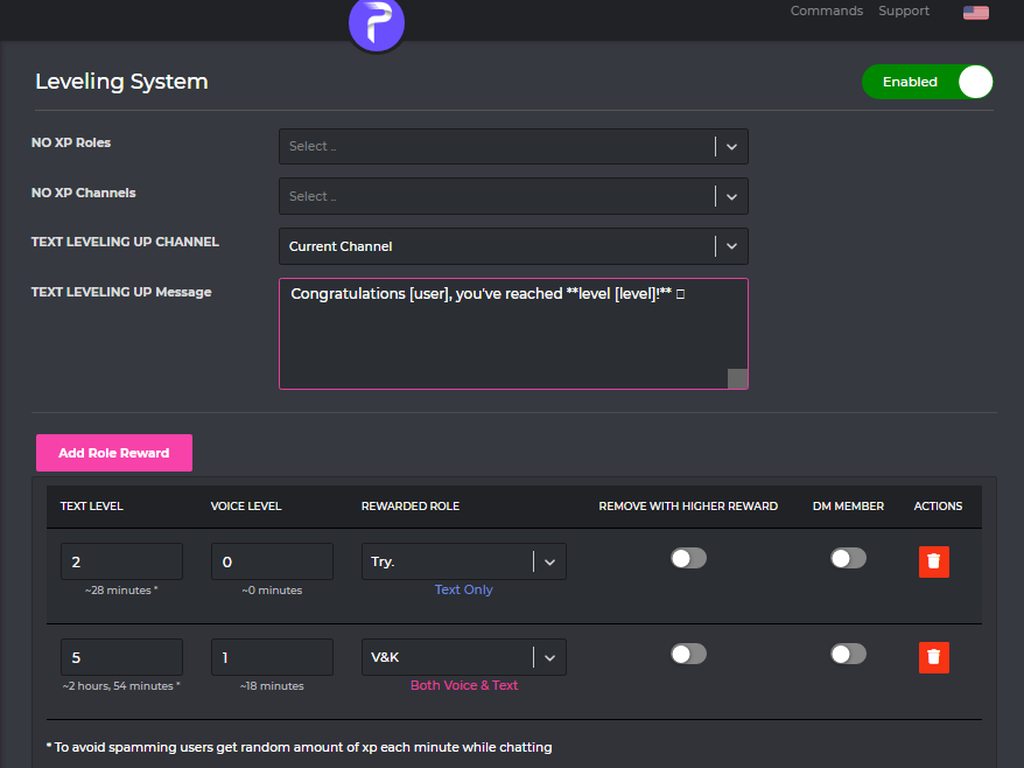
@white hare
 molten aurora
Hi, quick question, is there a way to embed an image to a message (to use it as a title not as an attachment)? I want to use this as the header (so to say) of my rules embeded message
 white hare
what does the minutes mean? with the ~
I don't understand what text levels means and what the ~7 minutes means
brittle elk
molten aurora
Hi, quick question, is there a way to embed an image to a message (to use it as ...
yes, by following this
what are embed messages?
Embed messages represents a Discord Embed object. An Embed object is another component of Discord messages that can be used to present data with special formatting and structure.
An embed can contain the following components:
- Author, including link and avatar
- Title, including url (optional to do a hyperlink)
- Description
- Field(s), including name and value
- Thumbnail image
- Image
- Footer, including text and icon
- Color (sets the color of the left sidebar of the embed)
:703162472063959061: https://imgur.com/6kb9zzD & https://imgur.com/JZgoOe9
you can send an embed message by heading to the dashboard https://probot.io/dashboard - log into your account and enter your server dashboard using the left side bar, enter "embed messages" module and click "compose" then start moderating your embed message, send it via "send mew message" button at the bottom.
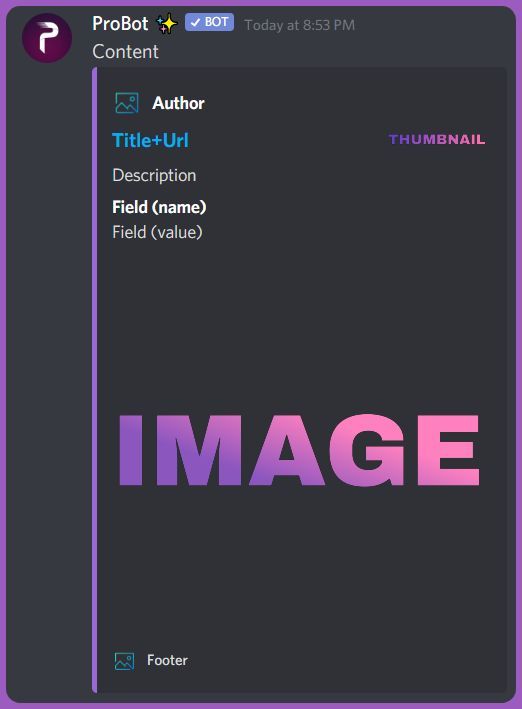
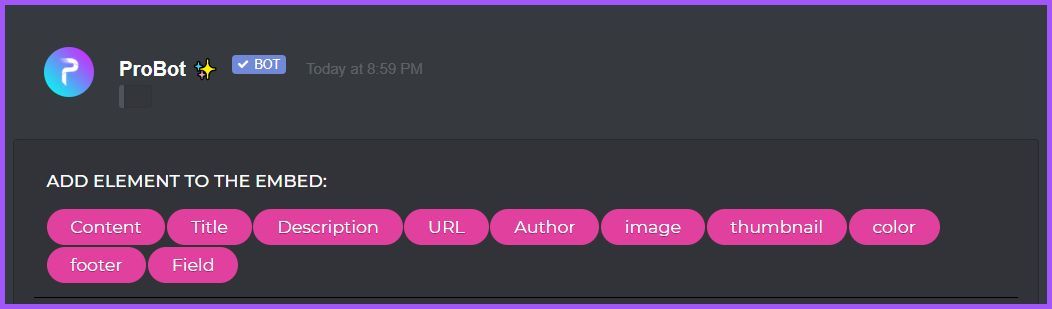
Welcome images, moderation, leveling, reaction roles, logs, high quality music and many many more!
@molten aurora
molten aurora
I meant to embed the image in there as sort of a title (marked with blue)
 brittle elk
u can by removing some parts of the embed up ^
white hare
what does the minutes mean? with the ~
[3:52 PM]
I don't understand what text levels means and what the ~7 minutes means
in leveling


There is no explanation
What does this mean?
No one here knows?
wispy anchor
white hare
The 7min means that if u will chat. Countinously then ur level will be 1 in 7min
 tall relic
why does proBot skips from one part of the song to another sometime?
tall relic
 ripe oracle
how do I get the bot out of the call?
ripe oracle
how do I get the bot out of the call?
#stop i think fak (sorry to who ever has their queue)
brittle elk
tall relic
why does proBot skips from one part of the song to another sometime?
might bc people got songs in the queue
brittle elk
ripe oracle
how do I get the bot out of the call?
#stop or /stop
tall relic
brittle elk
might bc people got songs in the queue
nah I always clear the queue before i start
brittle elk
tall relic
nah I always clear the queue before i start
hm
tall relic
and sometimes it just stops at some point of the song
(not randomly since its been pretty consistent at where it stops)
and the only solution I could find is to do #loop the un loop it when the song ends
nocturne flax
How do I apply for Support Team Member Position?
 vagrant jolt
Hello
 zenith owl
vagrant jolt
zenith owl
vagrant jolt
What is the credit for?
 fast thicket
how to reset level rank
split needle
tall relic
and the only solution I could find is to do #loop the un loop it when the song e...
Try use stop to refresh the player and try again
split needle
nocturne flax
How do I apply for Support Team Member Position?
Don't know if still in need but youbcan dm @native geyser
split needle
vagrant jolt
What is the credit for?
For purchase bot's things like profile/rank card backgrounds and prime/premium bots
split needle
fast thicket
how to reset level rank
#help reset
lean badgerBOT
split needle
#help reset
**Command: reset**
Reset text/voice/invites xp points for all or specific members.
**Usage:**
#reset [text / voice / invites) [all / user]
**Examples:**
#reset text all
#reset voice all
#reset invites all
#reset text @Dramex
split needle
nocturne flax
#play is not working what should i do?
Using slash command work?
Also next time mention the support en role instead of other language supporter
nocturne flax
split needle
Using slash command work?
Also next time mention the support en role instead of ...
K
 heady ginkgo
How can i lock a channel that i want it just for read?
I tried use #.lock but it didn’t work
nocturne flax
How to do that command where u just type a word or name and a pic of it appear
Oh nvm i found it lmao
Hoe do you cancel the music you requested
?
fast thicket
split needle
#help reset
Thank you
 past basin
Yes
 dusk vector
Hi, Can Probot Team Help me to get all users level(xp) on the server in one time? Maybe I need to premium or some donate, I can paid. My server has est.20k People that I can't use /rank to see everyone xp because It's waste of a much time!
may be a data can Export to file, Like CSV or TXT file
 rain owl
Can someone help me understand why probot is not giving text xp

 split needle
heady ginkgo
How can i lock a channel that i want it just for read?
split needle
heady ginkgo
How can i lock a channel that i want it just for read?
Does the bot respond to that command?
split needle
nocturne flax
Hoe do you cancel the music you requested
Wait until that song play and use skip
Currently there's no command to remove a song from queue
split needle
dusk vector
Hi, Can Probot Team Help me to get all users level(xp) on the server in one time...
You can use /top but it'll only show up to 10 users per page
There's no other way to get more user xp being shown on the same page
You can suggest it in #573053418017521664
split needle
rain owl
Can someone help me understand why probot is not giving text xp
Enable the utility module
dusk vector
split needle
You can use /top but it'll only show up to 10 users per page
There's no other wa...
Thanks
heady ginkgo
split needle
Does the bot respond to that command?
No
split needle
heady ginkgo
No
Make sure the moderation module is enabled on the dasboard
 sonic crescent
yeah nothing seems to be working
split needle
 devout wagon
we cant play music even with commands
devout wagon
we cant play music even with commands
Other commands work?
Using slash work?
devout wagon
we tried that too 😦
 versed mauve
past basin
Yes
versed mauve
past basin
Yes
How to use a bot to give a roll with a command
split needle
devout wagon
we tried that too 😦
Try do @stone cloud help
split needle
versed mauve
How to use a bot to give a roll with a command
#help role
lean badgerBOT
split needle
#help role
**Command: role**
Add/remove a role(s) for a user.
**Usage:**
#role [user] (+/-)[roles names separated by comma]
#role all (+/-)[role name]
**Examples:**
#role @split needle Admin
#role all members
#role bots System
#role humans members
versed mauve
not need confing in dashboard?
devout wagon
no still not working
versed mauve
i doo need #role +roll id (User ID)
but this is not need too config?
devout wagon
no commands are working but was okay yesterday
split needle
versed mauve
i doo need #role +roll id (User ID)
but this is not need too config?
#role <user id> +<role name>
versed mauve
split needle
#role <user id> +<role name>
ok tnx ❤️
versed mauve
split needle
#role <user id> +<role name>
💋
split needle
devout wagon
no commands are working but was okay yesterday
Can you check if the bot is online in your server?
devout wagon
yes
sonic crescent
didnt work
rain owl
split needle
Enable the utility module
Thanks! I have one question about the level system. If I select "REMOVE WITH HIGHER REWARD", will it remove a voice level role if text level role is a "higher reward"?
split needle
sonic crescent
didnt work
Send me an invite to your server in dm
I'll check
split needle
rain owl
Thanks! I have one question about the level system. If I select "**REMOVE WITH H...
No
It'll only remove itself when a higher reward is reached in the same section (text, voice, both)
rain owl
split needle
No
It'll only remove **itself** when a higher reward is reached in the same sect...
Thanks again. Very helpful 👍
sonic crescent
split needle
Send me an invite to your server in dm
I'll check
sent
 verbal mulch
WHy isnt my auto-responder working-
split needle
verbal mulch
WHy isnt my auto-responder working-
Try use a random slash command and check again
 native quail
do you guys know how much xp i get per message?
 untold flume
<@&675070424748654593>
@verbal mulch make sure that your bot can send massages / see the specific channel
@native quail the amount of xp gained is randomized
native quail
oh ok
verbal mulch
untold flume
<@728081959661600838> make sure that your bot can send massages / see the specif...
yea it can, it has admin
untold flume
then make sure that your auto responder module is enabled
And the disabled / enabled channels / roles
native quail
I have another questions... Can like the owner of the sever control what channel you type in gets xp?
untold flume
Not possible unfortunately@native quail
native quail
untold flume
Not possible unfortunately<@605144450884173825>
i meant channel lol
 native quail
ooooooof
untold flume
From your leveling system module No xp roles / no xp channels
native quail
kk thx
untold flume
yw
 half vortex
what are colors for probot. im getting confused on how to add it or how it works
and im making reaction roles for colors
so when i add what role im gonna give for reacting to that message
i cant see the color role "Blue"
it says role: but then nothing else
<@&675070424748654593>
 obsidian venture
Hello, I wanna ask about timer. I didn't find this option. Do you think to add it ? Because, I like your bot and it will be amazing if its possible to add timer whos to send automatic message's.
untold flume
As for the colors, just add the roles and color them in and drag your probot role all the way up above the other roles @half vortex
@obsidian venture feel free to suggest that here #573053418017521664
half vortex
untold flume
As for the colors, just add the roles and color them in and drag your probot rol...
i have roles with colors
so i just add probot role above them?
untold flume
Yeah to see your specific role in the dashboard
obsidian venture
Thank you Hamo
untold flume
yw
 patent sand
 vernal badge
.
untold flume
Someone kicked them @little breach
 little breach
Ahm . . . Is there a way to check that?
wraith nymph
Is there any way to add wildcards to the auto responder?
untold flume
Check your audit log @little breach
little breach
I checked audit logs and
wraith nymph
audit logs?
wraith nymph
I dont think thats meant for me.
little breach
Nothing there
untold flume
@little breach then try to reinvite your bot and check it again
little breach
I kicked Probot, but probot prime seems to have left of its own accord
Which is to say it's not functioning as intended.
untold flume
wraith nymph
Is there any way to add wildcards to the auto responder?
Not possible
@little breach can you picture that for me please?
Maybe there is a bot that is kicking your probot or a specific member with admin perms @little breach
little breach
First one is sorted by kicks, with a few members removed for identity reasons. Second one is sorted by "updated roles"
 half vortex
untold flume
Yeah to see your specific role in the dashboard
half vortex
untold flume
Yeah to see your specific role in the dashboard
ohh ok. ty
 steep cloud
Err is the bot down for now? It seems not response to the command (except for help command)
steep cloud
untold flume
<@239333118966890497> try using slash commands
Oh it works thx
 remote reef
Hey i have a question
the bot was still working yesterday. but if you enter #rank now nothing happens, the bot does not react to anything (except for Help )
 placid surge
remote reef
Hey i have a question
the bot was still working yesterday. but if you enter #ra...
placid surge
remote reef
Hey i have a question
the bot was still working yesterday. but if you enter #ra...
use slash commands /(command)
untold flume
steep cloud
Oh it works thx
yw
 wet pond
hi
untold flume
Hey how can I help you@wet pond
wet pond
probot not working good in my server 50% of the command not working the bot doesn't answer any message or command , you can say it's offline 70%
is there any way to make it works 100%
untold flume
@wet pondtry using / commands ..
and if you dont want to change the prefix from dashboard then save changes then return it like it was
 sour fern
Wtf probot
untold flume
sour fern
Wtf probot
whats your problem?
wet pond
oh ya slash commands works thx @untold flume 
untold flume
yw
sour fern
I cant mute/warn
untold flume
untold flume
<@!373321957208489984>try using / commands ..
.
sour fern
Ouu
 whole tundra
How can I turn the prefix of probot back since the bot won't work properly with the normal prefix for me
untold flume
whole tundra
How can I turn the prefix of probot back since the bot won't work properly with ...
go to your dashboard -> select your server -> server settings -> change the prefix
whole tundra
Ok thx so much
untold flume
yw
nocturne flax
it wont let me reset the prefix back yo "/"
to*
bruv
@west kelp
srry nvm i see
untold flume
untold flume
go to your dashboard -> select your server -> server settings -> change the pref...
@nocturne flax
 west kelp
nocturne flax
west kelp
nocturne flax
i saw it right after i mentioned u srry
untold flume
np
brittle elk
untold flume
go to your dashboard -> select your server -> server settings -> change the pref...
thanks for helping your fellow members! thats so nice of you <3
untold flume
thanks I really appreciate this compliment And I appreciate your exhausted work as a technical support @brittle elk
brittle elk
untold flume
thanks I really appreciate this compliment And I appreciate your exhausted work ...
aww thank you!
finite fractal
can probot add letters to your name if you react to a reaction?
west kelp
nope
finite fractal
OK
west kelp
it can only give roles upon reacting
finite fractal
west kelp
it can only give roles upon reacting
ok but ask the reactor if he/she can add it to react role?!
west kelp
 quasi nova
hey
is it probot thats sending message in my welcome channel with a reaction button like wave to say hi?
split needle
quasi nova
is it probot thats sending message in my welcome channel with a reaction button ...
Discord
quasi nova
split needle
Discord
How to remove??
Wasn’t there before for me is it a new update or something
quasi nova
quasi nova
is it probot thats sending message in my welcome channel with a reaction button ...
I don’t want that ^
Pro bot is all I need
 jovial mist
quasi nova
I don’t want that ^
jovial mist
quasi nova
I don’t want that ^
no
quasi nova
How to remove this!!?? I circled it
 split needle
If it's a discord thing, just find in server setting
split needle
Discord added it and make it enabled by default
 gloomy merlin
what happened to probot and how do i search songs now
half vortex
what is probot prime
untold flume
gloomy merlin
what happened to probot and how do i search songs now
#search [music name]
untold flume
half vortex
what is probot prime
its a paid version
untold flume
with more features
wicked hearth
How to become a member give automatically member role when everyone joins the server
native geyser
https://probot.io/dashboard -> select your server -> autorole
Welcome images, moderation, leveling, reaction roles, logs, high quality music and many many more!
 viral python
probot not working in my server since yesterday
native geyser
which exact feature?
native geyser
invite me in dms please so i can check it out and figure out the issue
nocturne flax
Hello agaiin
For enabling music commands to one specific channel does adding one channel disable all other channels?
 untold flume
nocturne flax
For enabling music commands to one specific channel does adding one channel disa...
untold flume
nocturne flax
For enabling music commands to one specific channel does adding one channel disa...
nope it wont
nocturne flax
untold flume
nope it wont
ahh oki
so what's the best way to make sure ppl don't use commands in random channels?
🤔
brittle elk
nocturne flax
so what's the best way to make sure ppl don't use commands in random channels?
by clicking ⬇️ and adding in the disable feature for every non wanted music channel
 uneven vortex
nocturne flax
Another question: is there anyway to prevent ProBot from connecting to certain vc's?
untold flume
@nocturne flaxnot possible
nocturne flax
untold flume
try using these Coordinates @nocturne flax
@nocturne flaxyeah try using these Coordinates
@nocturne flax
 orchid egret
I can't use # command in my server. What happened?
ah.. and can't use auto respond.
but / command still can.
untold flume
orchid egret
I can't use # command in my server. What happened?
change the prefix from the dashboard then return it like it was
untold flume
yw
 green pine
how do you add a exp booster
split needle
green pine
how do you add a exp booster
Not a feature
 primal quest
Hello, I have a problem with probot
Is there someone ablw to help me?
<@&675070424748654593>
native geyser
sure you can tell us about your issue right away
primal quest
Probot doesn't say hi anymore when someone enter in my server
native geyser
can i see your welcomer settings (a screenshot from your welcomer module)
primal quest
Yes, just a sec
primal quest
@native geyser
 native geyser
do you have image enabled?
primal quest
No, I did it but then I turned it off
native geyser
i see, do as i describe below please
-enable image
-select 'send to a text channel'
-then select the channel you set the welcomer text to be sent it
-save
-disable image
-save again
primal quest
yes
native geyser
this should fix your issue (assuming the bot has required permissions)
primal quest
it doesn't work
@native geyser do you want to come on a voice channel to make me show you how I do it? Maybe I wrong something
native geyser
just invite me to your server in dms please i'll check it out, there might be another issue thats stopping the bot from sending welcomer messages
primal quest
Invited @native geyser
 woven citrus
Hello, i try to make probot 2 things and i can.t figure it out:
- ban few words so that who is using x word will get muted and the message deleted (if i try to type one of those words, nothing happens)
- "top"command (doens.t work - nothing appears)
Can you help me please?
native geyser
woven citrus
Hello, i try to make probot 2 things and i can.t figure it out:
1. ban few words...
- have you set up the bad words? (automod doesn't work against admins so its normal that nothing happened when you tried)
-enable utility and leveling system modules
-enable the top command
-edit the top command and remove all enabled/disabled roles and channels that are set there
woven citrus
native geyser
1) have you set up the bad words? (automod doesn't work against admins so its no...
it worked man, thank you so much
brittle elk
maybe disable and enable again?
nocturne flax
Does this bot have moderation command and automod??
 honest sentinel
My server can't play probot. How to fix it?
native geyser
nocturne flax
Does this bot have moderation command and automod??
yes
native geyser
honest sentinel
My server can't play probot. How to fix it?
elaborate please
honest sentinel
native geyser
elaborate please
 brittle elk
@honest sentinel kick the bot and add it again
 hidden escarp
@brittle elk where is the premium bot
brittle elk
hidden escarp
<@487229623810129922> where is the premium bot
like buy it?
hidden escarp
No it doesnt working
brittle elk
hidden escarp
No it doesnt working
may i see the problem?
 brittle elk
hmm
honest sentinel
hidden escarp
Same
brittle elk
hidden escarp
tell them to use the / and the command name
ex: /help
hidden escarp
Ok
hidden escarp
brittle elk
tell them to use the ```/ and the command name```
ex: ```/help```
Not working
brittle elk
change the prefix @hidden escarp @honest sentinel
nocturne flax
Hello I'm trying to change my username for the bot
brittle elk
nocturne flax
Hello I'm trying to change my username for the bot
the premium?
if normal, you cant, premium you can
nocturne flax
Ok nvm
 lament rune
light elbow
lament rune
light elbow
Because we are not a nuke bot lmao. We are an offical discord bot which can't include that commands(against tos)
Can you send a screenshot from your welcomer module?
I am sorry to say that but we need you to reset all of your settings
Go to your server settings and in the top right you will see reset settings
It will reset all of the settings you set to the bot
We are not quite sure if it will fix your issue or not, you need to test for us.
Please do not mention names like that, thank you.
 radiant sapphire
Earlier today, the bot wasn't responding to the prefix put in place but was responding to "/" though...
Currently, it's responding to what was set in place but it's also responding to "/". I want it where the bot wouldn't respond to two prefixes and it would only respond to what was set in place in the dashboard
native geyser
deny the bots slash commands permission
radiant sapphire
I tried doing that and it's still responding
I've tried as well kicking the bot and reinviting... As well as changing the prefix to a new one and change it back
native geyser
slash commands is a discord thing and that permission is the only way to disable slash commands
radiant sapphire
Yes it's this one, right?
 native geyser
yes
nocturne flax
is there how I can change the amount of XP earned in /rank?
<@&675070424748654593>
native geyser
nope
native geyser
#prefix
new prefix
 south mesa
where report translate or bugs?
Points system ;/ take -50 bot request give 100 :E
 nocturne flax
help someone. my server is getting raided by a bot 😭
if any bot dev knows how to control a takeover bot join my server and stop it please
native geyser
south mesa
where report translate or bugs?
Points system ;/ take -50 bot request give 100 :...
variables dont have anything to do with translations, can you change the language and do the same and show me a screenshot of what it says please
native geyser
nocturne flax
if any bot dev knows how to control a takeover bot join my server and stop it pl...
nothing really we can do about it sorry
 wraith cypress
Help with music commands. Do I have to type the whole song and artist to play it?
Because it just plays songs that are just the same title not the one I want if I dont include everything
split needle
wraith cypress
Help with music commands. Do I have to type the whole song and artist to play it...
It's depend on the name you're searching since probot still use youtube as main searching source so having random youtube video included in searching is a normal thing
wraith cypress
Is there another way to search for a song example a link?
wraith cypress
Okay thanks
 wise wyvern
I can q up music, but nobody else can. I added the roles they have as DJ, but it still wont allow anyone else to play music. Any ideas?
brittle elk
wise wyvern
I can q up music, but nobody else can. I added the roles they have as DJ, but it...
may i see what they get?
like the bot not respond?
wise wyvern
they search for a youtube list, the list shows with picture etc but nothing. I copy and paste it and it plays for me
 tropic oak
M
brittle elk
please change your identity and dont copy the probot prime. @tropic oak
as some people will get confused sir.
nocturne flax
I need some help setting up Probot
brittle elk
which feature sir? @nocturne flax
nocturne flax
I don't know what it's called though it shows deleted messages and stuff in what's supposed to be a staff category
brittle elk
nocturne flax
I don't know what it's called though it shows deleted messages and stuff in what...
oh logs
nocturne flax
Yeah
brittle elk
ight, gimme 1 second sir
nocturne flax
Thx
brittle elk
How to enable logs:
How do I enable logs:
- head directly to the dashboard https://probot.io/dashboard
- log into your discord account, select your server through clicking its avatar on the left
- enter "Logs" module, enable the ones you wanna use in your server and select every channel where you want it to log onto right below every log name.
do note; to determine the user who banned/did whatever action you must have an prime/premium bot in your server.
you can simply click "Apply To All" thing under "update server" log in order to apply this log settings to all the rest logs including enable/disable and logging channel.
<
736686100839661690> https://giphy.com/gifs/9Sapu2ZuHfoHPvJh97
Welcome images, moderation, leveling, reaction roles, logs, high quality music and many many more!
 nocturne flax
Thanks
 molten linden
Oups sorry
brittle elk
molten linden
Oups sorry
its fine! ill help u there
nocturne flax
brittle elk
something else? <@456226577798135808>
No that's it
Thanks for your help!
brittle elk
@devout mural feedback/suggestions is helpful #573053418017521664
 late ginkgo
Hey, how do I secure the rules of the ROM in the direct welcome?
brittle elk
late ginkgo
Hey, how do I secure the rules of the ROM in the direct welcome?
wdym sir?
 rugged granite
Pardon me, requesting <@&675070424748654593>
 ashen condor
south mesa
native geyser
variables dont have anything to do with translations, can you change the languag...
ashen condor
south mesa
native geyser
variables dont have anything to do with translations, can you change the languag...
the guy has 150 points, I take 50 points from him and he writes that he got 100 points a little pointless. Should be writing you took 50 points. you have 100 points left.
 brittle pelican
why bot lags?
brittle pelican
get lost spierdalaj
south mesa
aha. no comment
 glass agate
Good evening! I have a problem, the #role command does not work, while the bot has all the rights.

<@&675070424748654593> help:(
 ivory osprey
Help do not ablan Spanish here
light elbow
ivory osprey
Help do not ablan Spanish here
-> #support-es
light elbow
glass agate
Good evening! I have a problem, the #role command does not work, while the bot ...
Is your moderation module enabled?
light elbow
 fallow salmon
how do you add roles
fallow salmon
how do you add roles
Which module
glass agate
@light elbow yes
light elbow
glass agate
<@524630645742370818> yes
send me an invite from dm and give admin perm
I'll try to fix it for you
glass agate
Okey
 hybrid lance
/help
light elbow
hybrid lance
/help
-> #commands
nocturne flax
@quaint mica
my bot dont know how to play music!
How do I add level to someone?
XP in the case
untold flume
<@&675070424748654593>
native geyser
nocturne flax
my bot dont know how to play music!
how so
native geyser
nocturne flax
XP in the case
you cant
native geyser
sure
 rocky nimbus
this is the first time i am using a bot and i have a question. how can i make it that the people on a server except me can use the bot to play music?
native geyser
unless you changed it everyone should be able to use the music commands
are they not able to use them?
 wanton pulsar
H
native geyser
there are two possible reasons
- a dj role might have been set, which make it so that only admins and people with dj role can use the music commands
- an enabled role for music command might have been added, it makes so that only ppl who has that enabled role can use the play command
to fix these -> https://probot.io/dashboard -> select your server -> music module
you'll see the dj role section right away
if there is nothing selected edit the play command and you'll see the section where it says 'enabled roles/disabled roles'
Welcome images, moderation, leveling, reaction roles, logs, high quality music and many many more!
wanton pulsar
I
rugged granite
Greetings support, my bot does not want to play music or join calls.
native geyser
wanton pulsar
H
how can i help you?
native geyser
rugged granite
Greetings support, my bot does not want to play music or join calls.
hello, do you get any error messages when you use the command?
native geyser
https://probot.io/dashboard -> select your server -> music module -> edit play command
then please tell me if there is any enabled/disabled roles or channels set
Welcome images, moderation, leveling, reaction roles, logs, high quality music and many many more!
rugged granite
I'll try.
rocky nimbus
native geyser
there are two possible reasons
1) a dj role might have been set, which make it s...
it works now thank you
native geyser
yw
untold flume
<@&675070424748654593>
 viscid path
hey, how i can see all levels from my server from the members
native geyser
reported to devs, they'll be checking
native geyser
viscid path
hey, how i can see all levels from my server from the members
there isn't a list but you can see the ranking with #top and the levels with #rank
yw
viscid path
native geyser
there isn't a list but you can see the ranking with #top and the levels with #ra...
wow, i need all members and their levels, not xp
🤦
native geyser
well you need to use #rank for everybody individually
viscid path
native geyser
well you need to use #rank for everybody individually
then i must ping everyone
native geyser
their user id can be used
viscid path
native geyser
their user id can be used
but this is so lot of work
native geyser
well currently there is no any other way
viscid path
native geyser
well currently there is no any other way
then does it like with mee6
...
native geyser
#573053418017521664 i guess
viscid path
native geyser
<#573053418017521664> i guess
...
 hardy pawn
<@&675070424748654593> I have a problem. ProBot doesn't delete messages with bad words in them. but in other circumpstances it deletes messages just fine
native geyser
automod doesn't work admins admins so make sure to have someone without admin perms to test it
hardy pawn
I know I did still doesnt work
native geyser
can you invite me to your server in dms please i'd like to check your dashboard settings
hardy pawn
uh sure
native geyser
fixed
 fast vine
hello whos know how to unrepeat/ repeat off the probot
native geyser
/repeat
 neat kelp
how to buy premium
bot for my server
also can i set custom picture
and name
and status ?
late ginkgo
Hi
nocturne flax
hello I have a question..regarding leveling system.. the minute feature means? 7 minutes the user has been in the server or 7 minutes of talking? :)
 opal silo
hey. The Bot doesn't response with the prefix. For example, if I write #top voice the bot will not response. But if I write /top voice the Bot response. Someone who can help me?
untold flume
<@&675070424748654593>
brittle elk
untold flume
<@&675070424748654593>
yes?
brittle elk
neat kelp
how to buy premium
ProBot Premium :
1- All the typical prime features (9)
2- The possibility of changing the bot name & avatar & status
#vip username|#vip avatar|#vip status
3 - A stand-alone bot that runs on a separate server, to ensure better performance and higher speeds
4 - #vip transfer(bot's number)(user)

Premium Prices 💰
9.99$ or 1,500,000c \
Monthly .
24.99$ or 3,750,000c \3 Months.
79.99$ or 12,000,000c \Yearly ..
to buy, head-over to: https://probot.io/premium
Welcome images, moderation, leveling, reaction roles, logs, high quality music and many many more!
untold flume
Just mentioning before helping but you came here
brittle elk
untold flume
Just mentioning before helping but you came here
:p
pls dont ping for no reason
Read channel description if you dont mind too! - @untold flume
untold flume
Yeah it says mention before helping
 brittle elk
opal silo
hey. The Bot doesn't response with the prefix. For example, if I write `#top voi...
brittle elk
opal silo
hey. The Bot doesn't response with the prefix. For example, if I write `#top voi...
oh, sometimes prefix bugs out and doesnt work, basically go to https://probot.io/dashboard > server u want to change the prefix > server configuration > prefix > and make it anything else than #, then change it back to #
Welcome images, moderation, leveling, reaction roles, logs, high quality music and many many more!
brittle elk
late ginkgo
Hi
hey
opal silo
brittle elk
oh, sometimes prefix bugs out and doesnt work, basically go to https://probot.io...
Thanks!
brittle elk
untold flume
Yeah it says mention before helping
kk
brittle elk
opal silo
Thanks!
no problem!, #573053418017521664 is helpful!
brittle elk
untold flume
Yeah it says mention before helping
so got any problems i could help ya?
neat kelp
@brittle elkwhats prime server ?
brittle elk
neat kelp
<@!487229623810129922>whats prime server ?
like premium but better
untold flume
brittle elk
so got any problems i could help ya?
Nope thanks for asking me
brittle elk
if im sure ...
brittle elk
untold flume
Nope thanks for asking me
ight!
ProBot Prime :
- Adjust your music volume.
- Inviter variable for the welcomer message.
- The accessibility to check the action executioner in the logs.
- Voice Online.
- Link feature.
- The possibility of unbanning everybody in your banned list on.
your server. - An advanced anti raid system which includes 12 features that being constantly updated.
- A stand-alone bot that runs on a separate server, to ensure better performance and higher speeds.
💰 Prime Prices :
- 2.5$ / Monthly
- 6.99$ / 3 Months
- 24.99$ / Yearly
🔷 ProBot Premium :
- All the typical prime features.
- The possibility of changing the name and avatar of the bot.
💰 Premium Prices :
- 9.99$ / Monthly
- 24.99$ / 3 Months
- 79.99$ / Yearly
To Order And Renew :
https://probot.io/premium
Welcome images, moderation, leveling, reaction roles, logs, high quality music and many many more!
brittle elk
brittle elk
ProBot Prime :
- Adjust your music volume.
- Inviter variable for the welcomer ...
@neat kelp
nocturne flax
Hi there is who scam me with 300k credit can any one help me
native geyser
we do not approve trading therefore we dont accept responsibility in such things
 dire lance
how does /mute work? i choose /mute and user @blahblahblah and time: x minutes but it does not work. how does it work?
 hardy shuttle
what is the command to change the prefix?
native geyser
dire lance
how does /mute work? i choose /mute and user @blahblahblah and time: x minutes b...
what does the bot reply with?
native geyser
hardy shuttle
what is the command to change the prefix?
#prefix
new prefix
hardy shuttle
ty
native geyser
yw
 lucid vale
Can i search a song lyrics using probot?
dire lance
that its not working
lucid vale
Ok
dire lance
it says it failed
i dont use it in english tho
so im not sure what the right translation would be
light elbow
lucid vale
Can i search a song lyrics using probot?
You can't
light elbow
dire lance
it says it failed
Then Your Moderation Module is possibly disabled/you entered wrong parameters
light elbow
hardy shuttle
its not responding to me xD
Change prefix to something else then change it back to #
lucid vale
light elbow
You can't
Ok
hardy shuttle
light elbow
Change prefix to something else then change it back to #
i typed the #prefix thing but it wont respond to it
light elbow
hardy shuttle
i typed the #prefix thing but it wont respond to it
then change it from the dashboard
https://probot.io/dashboard -> click to your server -> server settings
Welcome images, moderation, leveling, reaction roles, logs, high quality music and many many more!
 covert star
hi everyone, probot doesnt seem to work anymore
does not do anything when i type # play song
 viscid fjord
/vote
 compact cradle
vote
lean badgerBOT
@compact cradle https://top.gg/bot/probot/vote
viscid fjord
vote
lean badgerBOT
@viscid fjord https://top.gg/bot/probot/vote
nocturne flax
hello I have a question..regarding leveling system.. the minute feature means? 7 minutes the user has been in the server or 7 minutes of talking? :) how does it work?
I just need to understand the interval numbers
viral sundial
nocturne flax
hello I have a question..regarding leveling system.. the minute feature means? 7...
7m of being active
And it's not 100% correct
Because of the way thay exp is calculated
viral sundial
 scenic flume
Help.me
scenic flume
Help.me
how may i help you
scenic flume
I want to do reaction roles but I don't know how to
neat kelp
so i bought
premium
but it says
another bot is using those commands
when i try commands
viral sundial
scenic flume
I want to do reaction roles but I don't know how to
How to enable the reaction-roles
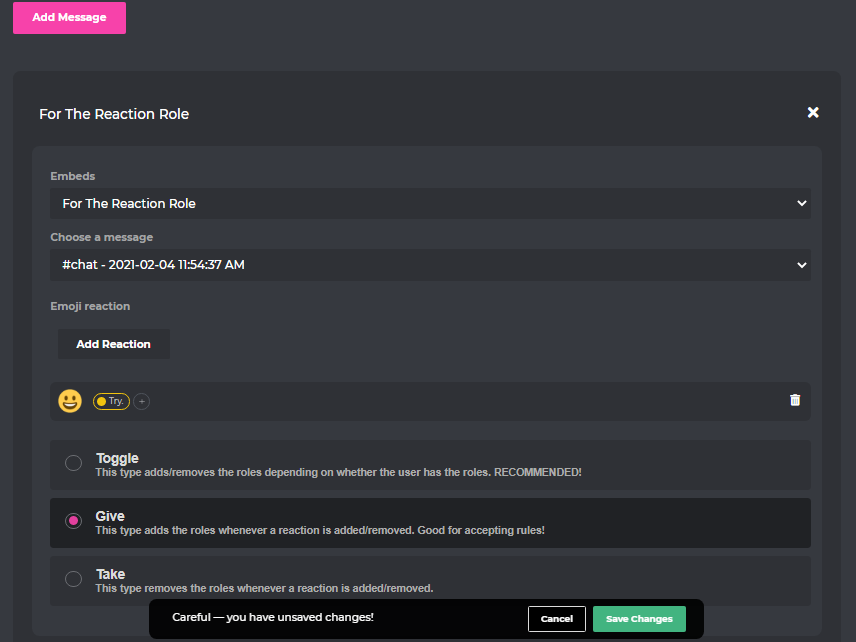
1 - https://probot.io/dashboard --> Login , select your server
2 - Reaction Roles , Add New Message
3 - edit the settings :
1- [Embeds : The Embed message that you created (already)]
2- [Choose a message : The Embed Message that you (already sent)]
3- [Add Reaction] = Select the emoji , The role
4 - Choose btw (Toggle or Give or Take)
Toggle : This type adds/removes the roles depending on whether the user has the roles.
Give : This type adds the roles whenever a reaction is added/removed.
Take : This type removes the roles whenever a reaction is added/removed.
Welcome images, moderation, leveling, reaction roles, logs, high quality music and many many more!
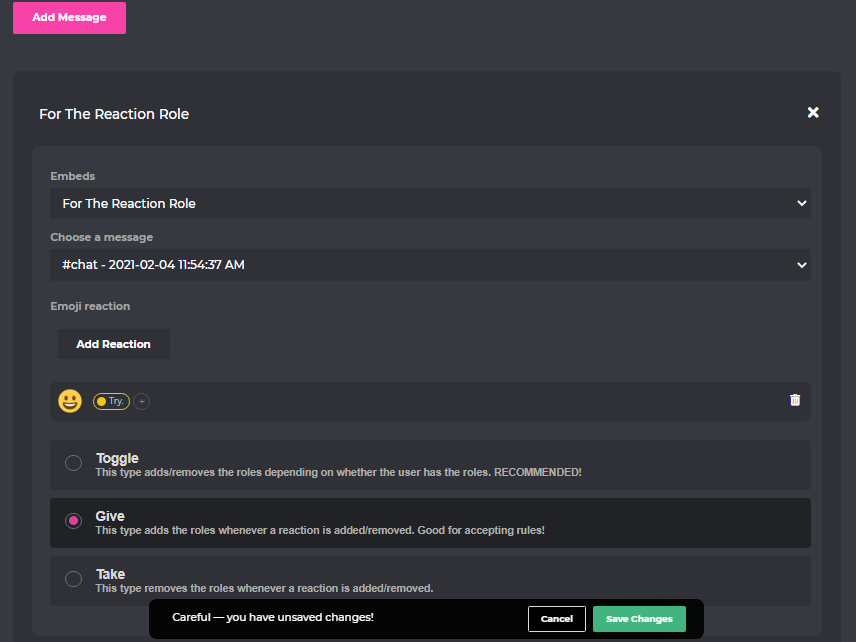 scenic flume
:(
viral sundial
neat kelp
when i try commands
Kick all the versions from your server then re invite the premium
scenic flume
IM JUST GONNA LEAVE THE SEVER YOU ARE JUST TRYING TO GET HELP ON THIS CHANNEL WHEN I WAS HERE FIRST
neat kelp
okey
viral sundial
scenic flume
IM JUST GONNA LEAVE THE SEVER YOU ARE JUST TRYING TO GET HELP ON THIS CHANNEL WH...
?
It's alright i can help ya both at the same time
viral sundial
viral sundial
__How to enable the reaction-roles__
1 - https://probot.io/dashboard --> Login ,...
@scenic flume
viral sundial
Sure
scenic flume
I.can't do.more then 1 reaction?
viral sundial
yes
scenic flume
So basically I would have to do more then 1 message for 3 reactions with no premium bot.
viral sundial
@scenic flume you can add 3 reactions on the same message
scenic flume
K
viral sundial
@stoic warren how may i help you?
 stoic warren
@viral sundial how to can stop probot perm on server
viral sundial
wdym?
viral sundial
yw
 umbral flower
Bot dont wanna work on my server
viral sundial
specific feature/command?
umbral flower
Command
viral sundial
which command
umbral flower
I try to do "#clear"
nocturne flax
viral sundial
7m of being active
can you go into detail please? active as in just online or talking in the group?
umbral flower
On my other server working but on one don't want i try to ban but don't working agin
brittle elk
umbral flower
I try to do "#clear"
do /clear
sometimes the prefix bugs out and doesnt work
viral sundial
nocturne flax
can you go into detail please? active as in just online or talking in the group?
Sending messages for sure
umbral flower
brittle elk
do ```/clear```
Now working thnx<3
viral sundial
and for voice level is when being connected to a voice channel
brittle elk
we will fix that as soon as possible, although there is a trick, by going to https://probot.io/dashboard > server u want to change the prefix > server configuration > change the prefix from # to anything, then change back @umbral flower
Welcome images, moderation, leveling, reaction roles, logs, high quality music and many many more!
brittle elk
umbral flower
Now working thnx<3
no problem!
 toxic totem
Hello???????
toxic totem
brittle elk
no problem!
Can you help me
brittle elk
toxic totem
How do i put probot in my vc and make it play music
#play or /play
toxic totem
Ok ty
brittle elk
no problem!
nocturne flax
viral sundial
and for voice level is when being connected to a voice channel
thanks very much
viral sundial
yw
nocturne flax
toxic totem
Hello???????
hi can I join and listen to
kidding have a good day guys

toxic totem
Its not in this server lol
toxic totem
nocturne flax
kidding have a good day guys
❤️❤️❤️
wraith nymph
We are using Probot to respond to common questions, but are asked differently. Is there a feature to add a ! to invoke a response? or add wild cards into the auto responder, so we dont need to create multiple triggers
wraith nymph
This is great thank you.
viral sundial
yw
 steady dragon
viral sundial
steady dragon
viral sundial
make sure to insert them without https://


 viral sundial
without www as well 
viral sundial
yw
green pine
split needle
Not a feature
i see thanks
 warm saddle
Is there anyway to block probot from receiving commands form a specific chat? ie. have probot ignore commands from #support-en , but receive the ones being sent on #support-ar

 lilac fjord
Hello
brittle elk
hey welcome, how can i help u today?
lilac fjord
The bot isnt working in my sever
brittle elk
like?
lilac fjord
Its doesnt repsond at all
brittle elk
maybe do /with the command u wanna use
lilac fjord
Wait i will try
warm saddle
brittle elk
yes by doing like this
Wonderful, ty!
brittle elk
lilac fjord
It does work
glad, hearing its working
brittle elk
lilac fjord
But why doesnt the commands work??
because sometimes the prefix is bugged
and doesnt respond
lilac fjord
Soo should i change it and put it back?
brittle elk
warm saddle
Wonderful, ty!
no problem! #573053418017521664 is helpful @lilac fjord @warm saddle
there is a trick, by going to https://probot.io/dashboard > server u want to change the prefix > server configuration > change the prefix from
#
to anything, then change back @lilac fjord
Welcome images, moderation, leveling, reaction roles, logs, high quality music and many many more!
lilac fjord
Ik but still thank you for the help❤️
brittle elk
lilac fjord
Ik but still thank you for the help❤️
no problem!
nocturne flax
Do you know how to set up the welcome bot?
brittle elk
nocturne flax
Do you know how to set up the welcome bot?
yes, follow this:
1 - enter https://probot.io/dashboard
2 - make sure to login, then open your server's control panel by the left side, enter Welcomer section
3 - enable the welcoming ways you'd like(image/message) and customize them freely and simply!
also make sure to select the correct channel to welcome in, save changes before leaving the site.
Welcome images, moderation, leveling, reaction roles, logs, high quality music and many many more!
nocturne flax
Thanks so much
brittle elk
nocturne flax
Thanks so much
no problem!
fast vine
whos know how to unrepeat/repeat off the probot
 pearl crag
Hi