#support-en
1 messages · Page 281 of 1
 native geyser
 plucky elk
#support-ar
native geyser
..
 thick mica
i need help with this

 fathom meadow
thick mica
i need help with this
fathom meadow
thick mica
i need help with this
<@&675070424748654593>
 split needle
thick mica
i need help with this
split needle
thick mica
i need help with this
Seem like an issue with the track itself
thick mica
split needle
Seem like an issue with the track itself
but it was working yesterday
split needle
Like region restriction
Or something
Try find a reupload of that track and try again
thick mica
split needle
Try find a reupload of that track and try again
alright
 zinc sentinel
in leveling, if i set say text 5 and voice 5, will it give a role when both are reached or will it combine both?
 polar flower
hi i just got the premium bot, but I dont know what the prime server is. anyone can shed some light? Is it like for promoting my discord server?
native geyser
zinc sentinel
in leveling, if i set say text 5 and voice 5, will it give a role when both are ...
both
native geyser
polar flower
hi i just got the premium bot, but I dont know what the prime server is. anyone ...
prime server is a server that has prime bot in it
zinc sentinel
native geyser
both
so if i have 3.5 text and 1.5 vc it will add up to 5 and give me right?
native geyser
they have to reach both seperately
zinc sentinel
oh
welp
is there a way both can be combined?
actually wait so if i get 5 text, and dont have 5 on vc, that will work right?
native geyser
you can disable either of them by making one of the targets 0 but there is no way of making like text 4 and voice 1 as 5 in either
zinc sentinel
zinc sentinel
actually wait so if i get 5 text, and dont have 5 on vc, that will work right?
and this one?
native geyser
no it wont
zinc sentinel
oh ok
native geyser
they need to reach both of the target levels as it says on dashboard
native geyser
 digital eagle
how to add song use probot?
 west kelp
#play [song name]
digital eagle
just write down the song name?
 hallow root
Hello, can I disable logs for specific voice channels?
native geyser
nope not possible
hallow root
@native geyser Thanks for info
polar flower
Isn't it possible to have two (or three) premium bots on the same server? I bought two, and when I'm trying to invite them both, the webpanel gets messed up, telling me to invite the free probot to my server
 potent vine
Hello! I'm just starting with ProBot. Are the commands available to everyone or only to the admins?
plucky elk
potent vine
Hello! I'm just starting with ProBot. Are the commands available to everyone or ...
<@&675070424748654593>
native geyser
polar flower
Isn't it possible to have two (or three) premium bots on the same server? I boug...
nope, 1 premium per 1 server, if you invite premium and try to invite prime afterwards only prime will work
native geyser
potent vine
Hello! I'm just starting with ProBot. Are the commands available to everyone or ...
for everyone but you can limit it
polar flower
native geyser
nope, 1 premium per 1 server, if you invite premium and try to invite **prime** ...
Well that should be written somewhere in the first place.. Are you planning to make available more probots than 1 in the future per server?
 olive adder
You can't reward people with seperate roles for seperate levels? (Voice/Text? Example: Voice level 5 rewards you with the "Voice Level 5" role and the other way around? I feel like the dashboard hints at it but doesn't tell me)
native geyser
polar flower
Well that should be written somewhere in the first place.. Are you planning to m...
not sure, though feel free to tell me if you'd like to merge two bots together to increase the duration
polar flower
native geyser
not sure, though feel free to tell me if you'd like to merge two bots together t...
yes please do so.
native geyser
polar flower
yes please do so.
can i have both of your bot numbers and tell me which one you'd like to get rid of for the other one
polar flower
moment please
native geyser
olive adder
You can't reward people with seperate roles for seperate levels? (Voice/Text? Ex...
can you explain more please , with a screenshot if possible
olive adder
native geyser
can you explain more please , with a screenshot if possible
This is just an example from the dashboard
 polar flower
#0246 and #0535. I'd like to keep #0535.
potent vine
native geyser
for everyone but you can limit it
Great! How do you limit it?
olive adder
It says "Both Voice & Text". What does that really mean? Both Voice and Text needs to be level 1 for instance to be rewarded the role? Or do you get the role once you're level 1 in one of them, both or them? And is it possible to seperate them?
native geyser
polar flower
#0246 and #0535. I'd like to keep #0535.
not the tags, i need the bot numbers, or their id numbers
native geyser
potent vine
Great! How do you limit it?
edit the commands and add enabled/disabled roles
polar flower
oh ok
native geyser
olive adder
It says "Both Voice & Text". What does that really mean? Both Voice and Text nee...
it means in order to get the role they need to reach both of the target levels, one is not enough
olive adder
So that if I have two roles. Role1 = Vc10+ & Role2 = Txt10+, can they seperately be given to the different types?
olive adder
native geyser
it means in order to get the role they need to reach **both** of the target leve...
Ok, can I split it somehow?
potent vine
native geyser
edit the commands and add enabled/disabled roles
Ok, thanks!
native geyser
olive adder
Ok, can I split it somehow?
yes you can, you need to create 2 separate reward system however, in one of them disable voice by making the target level 0, and in the other one do the same for text and set the same reward role for both
olive adder
native geyser
yes you can, you need to create 2 separate reward system however, in one of them...
ah, so I can set one of them to 0. I wasn't aware of that
native geyser
yes, it automatically disables it
olive adder
Ah, that made sense now that it was put to 0! That should be the automatic level in the dashboard 😅
I opened the dashboard and both was set to 1 and it made me expect it was the lowest level (like mee6)
native geyser
oh if you make both of them 0 they still need to send a message to get the role
olive adder
Short feedback; adjust that would probably be a good idea for morons like me that expect instead of try 😅
So that the levels in the dashboard start at 0
But that helps me out, I should be able to set this up now, thank you @native geyser
native geyser
i'll take to devs about adding a side note, you can also suggest it in #573053418017521664
olive adder
While I got your attention. Is there a cheatsheet to what commands ProBot can use in the responses @native geyser ? {mention} doesn't seem to work for ProBot
And it doesn't give me any recommendations
native geyser
olive adder
While I got your attention. Is there a cheatsheet to what commands ProBot can us...
check the pinned messages
 nocturne flax
@native geyser excuse me dose probot can have link on youtube i mean if i post or liveing on you tibe can the probot send discord with everyone.
olive adder
native geyser
check the pinned messages
Ah, thank you! 😊
native geyser
nocturne flax
<@324937717441888256> excuse me dose probot can have link on youtube i mean if i...
hello, no but it will be possible in the future
nocturne flax
@native geyser wich future?
native geyser
the opposite ot past future
nocturne flax
Okay thanks man
native geyser
yw
nocturne flax
How do I get ProBot to delete commands after usage?
polar flower
@native geyser
premium1955 ID: 669163035826454545
premium2657 ID: 712382046303158344
I'd like to keep the first one.
Also I've got a Probot Prime with ID: 567703512763334685. If I cannot use in the same server with a Premium bot, can you merge that as well?
fathom meadow
nocturne flax
How do I get ProBot to delete commands after usage?
<@&675070424748654593>
native geyser
polar flower
<@!324937717441888256>
premium1955 ID: 669163035826454545
premium2657 ID: 7123...
done, sorry dont have perms for prime
split needle
nocturne flax
How do I get ProBot to delete commands after usage?
Go to each command setting on the dashboard and enable delete bot's respond after 5 seconds
polar flower
thank you for your support man  when you'll have extra bots I'll purchase!
native geyser
i'll try to talk to devs about your prime bot, hopefully the response i'll get wont be that delayed
polar flower
native geyser
i'll try to talk to devs about your prime bot, hopefully the response i'll get w...
thanks once more
 zenith seal
hi
 plain salmon
zenith seal
hi
plain salmon
zenith seal
hi
how can i help you?
zenith seal
my welcome in probot is not working
i mean for the welcome, where you can put image when people join your server right? yeah that is not working.... i have tried on 2 server's that i am in. but the welcome image does not pop up
plain salmon
zenith seal
i mean for the welcome, where you can put image when people join your server rig...
may i have a screenshot of your settings please?
 native geyser
is your image bigger than 3mb
also make sure the image format is either png or jpg
native geyser
alrighty
zenith seal
it works! thanks @native geyser @plain salmon
native geyser
yw
 craggy wing
@native geyser how can i have only image channel
native geyser
https://probot.io/dashboard -> select your server -> automod
Welcome images, moderation, leveling, reaction roles, logs, high quality music and many many more!
hmm?
thats what im asking
#role @nocturne flax only
 lean badgerBOT
native geyser
#role <@456226577798135808> only
lean badgerBOT
native geyser
#role <@456226577798135808> only
:white_check_mark: Changed roles for DZTATICS-NOLIMITS, +Only Arabic
 thin raft
I asked earlier this morning and got no answer, but is there anyway to cut down this posting spam or make this channel just not alert people someone added probot to a discord I’m in and I was tasked with cutting the soan down…
 native geyser
not possible
 lament mural
oauth 2 not working

this is the console error
what should I do?
never mind i fixed it
clearing cache data
 vital pollen
Is there a way to disable exp in all channels except for a single one?
I mean without choosing all of the channels one by one in the bot's Dashboard
native geyser
not possible but feel free to suggest it in #573053418017521664
plucky elk
Is there a temporary date to respond to the Apply?
vital pollen
native geyser
not possible but feel free to suggest it in <#573053418017521664>
Thanks, but there isn't a limit to how many channels you can disable exp, right?
native geyser
nope there is not
native geyser
plucky elk
Is there a temporary date to respond to the Apply?
as soon as possible i can say
plucky elk
Ok , Thanks
 kind elm
native geyser
kind elm
native geyser
no worries
 radiant ether
Hello
plain salmon
radiant ether
Hello
can i help you?
 dull crest
Can I ask basic discord permission question ?
radiant ether
How are you?
plain salmon
radiant ether
How are you?
if you dont have any support questions please head to #chat-en
native geyser
dull crest
Can I ask basic discord permission question ?
also #chat-en or you can google it
 wintry swift
oml i still cant do music commands
fathom meadow
wintry swift
oml i still cant do music commands
<@&675070424748654593>
fathom meadow
wintry swift
oml i still cant do music commands
Check your commands setting
https://probot.io/dashboard
wintry swift
im not the owner
 storm heron

wintry swift
fathom meadow
Check your commands setting
https://probot.io/dashboard
what do i vheck on it
west kelp
wintry swift
what do i vheck on it
Is the music module enabled?
west kelp
You're an admin?
west kelp
can you login to the dashboard or?
 somber bloom
Anyone know how i can configure the bot to allow people to set their own role colors?
wintry swift
no
somber bloom
Tried creating multiple roles, color 1 color 2 etc but it still didn't work
west kelp
well I can't really help you or tell you the reason as to why exactly you can't use music commands
west kelp
somber bloom
Anyone know how i can configure the bot to allow people to set their own role c...
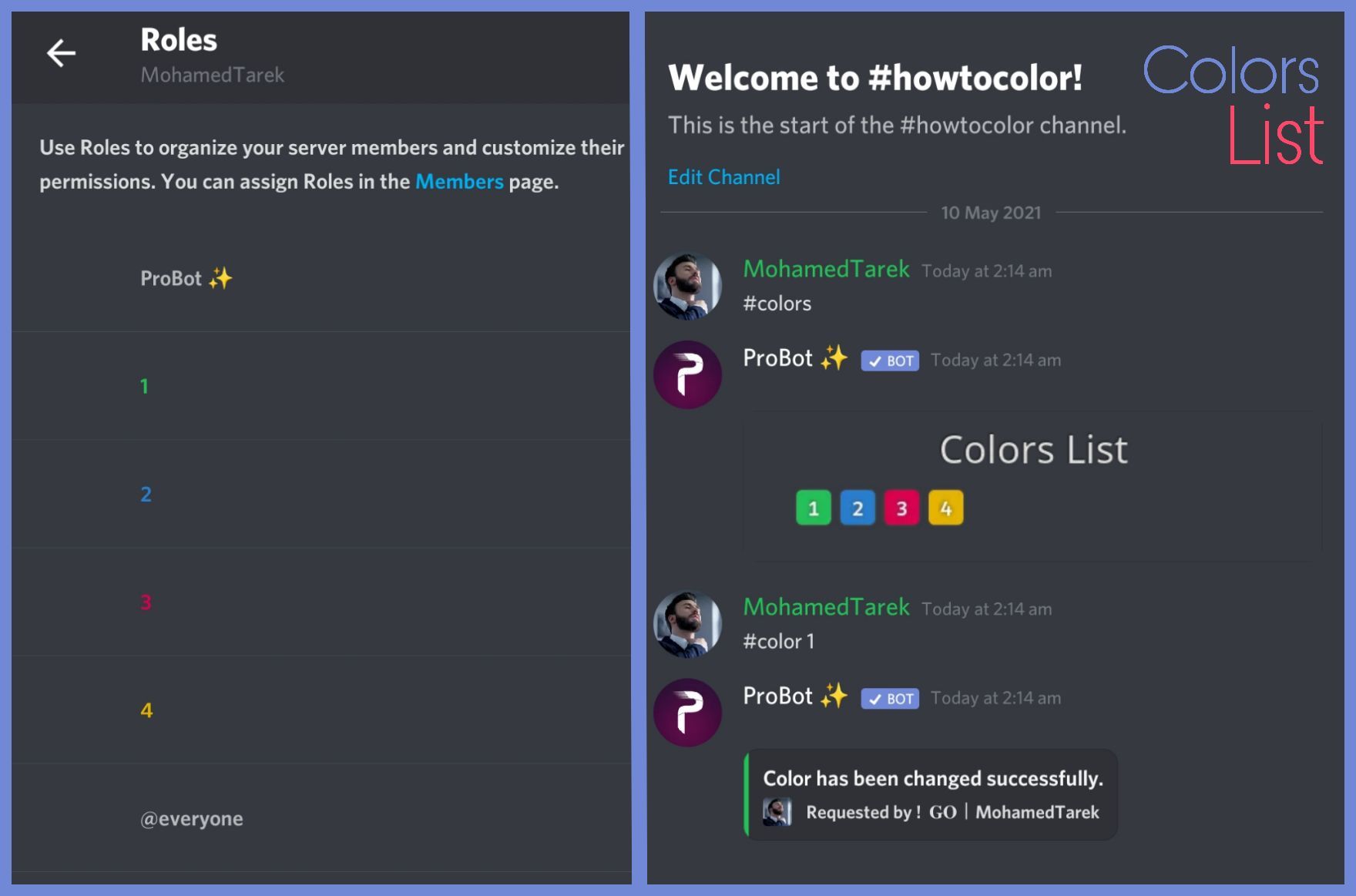
To do your "Colors List" you've to create numbered roles ascendengly, which means you've to create roles as the image below explains.
colors roles only works with exact numbers, they can't have mod permissions otherwise it won't work. dragging these roles above your moderators roles position is not recommended as they'll have the access through it to higher position roles.
the image below shows how to correctly use the commands as how does it effect your nickname.

 dense merlin
This person is a swindler and a pious person telling me to enter, I am a bot, the same as the pro bot, and I know these are the forms. The important thing is that he gave me 80,000 from his bot. He said, “Give me to them so that I know the bot is working. The important thing is that I transferred to it. Suddenly, the traditional bot went out and the original one with me 90000.”
<835404805064753202>
dense merlin
dense merlin
<835404805064753202>
This is id
@near canopy @Ruru#0666
@native geyser
nocturne flax
Hello, how can we disable the system of xp and levels of Probot ?
somber bloom
west kelp
To do your "Colors List" you've to create numbered roles ascendengly, which mean...
Ah nice, do you know if there's a way I can make it so if someone no longer has the server booster role, the color role will automatically be removed?
plain salmon
dense merlin
This person is a swindler and a pious person telling me to enter, I am a bot, th...
sorry were not reponsible with that just report the account to discord please ty :)
native geyser
nocturne flax
Hello, how can we disable the system of xp and levels of Probot ?
disable leveling system section on dashboard
nocturne flax
hello how do we get the bot to talk we speak for the bot?
native geyser
https://probot.io/dashboard -> select your server -> autoresponder or embed depending on what exactly you're lookng for
Welcome images, moderation, leveling, reaction roles, logs, high quality music and many many more!
native geyser
nocturne flax
Hi
hey how can i help you
nocturne flax
How do we do to speak for the bot? To make it interact
?
@native geyser no help thank you
native geyser
nocturne flax
How do we do to speak for the bot? To make it interact
i already answered you above
native geyser
nocturne flax
<@324937717441888256> no help thank you
then use the chat instead
native geyser
it is the official link
somber bloom
I keep getting this error message when I try to set a color for some reason

I have it set so only server boosters can use it, however I'm a server booster and it's not working

the colored roles don't have any perms on them
west kelp
the color role has admin/mod perms
somber bloom

It doesn't though
Maybe it's because I dragged them above certain roles that have more permissions
nocturne flax
@native geyser ok
west kelp
somber bloom
scroll down?


 west kelp
does it do that for every color role
somber bloom
yea...
I didn't give the roles any perms
I just created and numbered them
then dragged them to the very top
west kelp
you're welcome
plucky elk
I have made but changed the name & Tag of an account can I modify it in applying?
Me Moriano,#7212
<@&675070424748654593>
west kelp
plucky elk
I have made but changed the name & Tag of an account can I modify it in applyin...
as long as you put the right ID you should be fine I think
plucky elk
Ok , Thanks
 rancid swift
I have a very dumb question
How to find command list?
west kelp
rancid swift
I have a very dumb question
How to find command list?
Welcome images, moderation, leveling, reaction roles, logs, high quality music and many many more!
rancid swift
Thanks!
plucky elk
<@&675070424748654593>
west kelp
hm?
what do you mean?
you can't use credits to level up you can use it to buy cosmetics for the bot
 tender wasp
Hello, I have a prime and premium bot and the free version
but when I invited my premium probot to another server
It stopped working on the original server it was in
plucky elk
tender wasp
but when I invited my premium probot to another server
<@&675070424748654593>
native geyser
tender wasp
It stopped working on the original server it was in
you can only use the paid versions in one server
tender wasp
native geyser
you can only use the paid versions in one server
yeah but now how to fix the issue
native geyser
use #vip move bot number command in a server that has premium bot in it then invite the bot via the link you get in dms
plucky elk
plucky elk
I have made but changed the name & Tag of an account can I modify it in applyin...
I want to make sure
@native geyser
native geyser
plucky elk
I want to make sure
<@324937717441888256>
is this even related to probot? also im sorry i couldn't really understand your question
 bold narwhal
how do i use the money someone sent me sent me thru pro bot?
plain salmon
bold narwhal
how do i use the money someone sent me sent me thru pro bot?
Welcome images, moderation, leveling, reaction roles, logs, high quality music and many many more!
Welcome images, moderation, leveling, reaction roles, logs, high quality music and many many more!
Welcome images, moderation, leveling, reaction roles, logs, high quality music and many many more!
native geyser
tender wasp
still facing the same issue
does the bot still leave after you invite it
 regal lagoon
Hello. I've got a question. So I've made these embed messages and whenever I click send message it shows success but nothing shows up in my server like no message was ever sent?why and how do I fix this
tender wasp
native geyser
does the bot still leave after you invite it
the premium bot doesnt work now
native geyser
tender wasp
the premium bot doesnt work now
which bots do you have in the server
native geyser
regal lagoon
Hello. I've got a question. So I've made these embed messages and whenever I cli...
make sure to fill everything you've selected
 final finch
hi
regal lagoon
I only have embed name, title and description
And color
And I have everything set
plucky elk
regal lagoon
And I have everything set
<@&675070424748654593>
native geyser
regal lagoon
Nothings changed
can you show me a screenshot of all your settings please, including the preview, i believe color is the issue there
native geyser
final finch
hi
how can i help you
regal lagoon
Well even if I didn't have the color it still didn't send
Can I dm you or do I have to send it here?
native geyser
you can send here
 hoary rain
music is not working
regal lagoon
I don't really wanna send it here. 😅
hoary rain
it stutters
native geyser
alright then do it in dms
native geyser
hoary rain
it stutters
must be overload check the ping
 obsidian helm
hi - i'm trying to set up auto responder but every time i go to click on "add repsonse" it just spins but never adds anything
plain salmon
obsidian helm
hi - i'm trying to set up auto responder but every time i go to click on "add re...
did you try another browser ?
obsidian helm
plain salmon
did you try another browser ?
oh nope I assumed Chrome would be a supported browser
plain salmon
obsidian helm
oh nope I assumed Chrome would be a supported browser
it is, but it may cause some issues sometimes
please try to use another browser maybe it works then :)
obsidian helm
awesome that did work - thank you @plain salmon. Is there any way to have the auto-response mention a role?
plain salmon
obsidian helm
awesome that did work - thank you <@!596381619473088522>. Is there any way to h...
please look in the pinned messages on this channel
hoary rain
native geyser
must be overload check the ping
ping is 17
native geyser
then i believe its overload
obsidian helm
plain salmon
please look in the pinned messages on this channel
Ah perfect thanks so much
obsidian helm
plain salmon
please look in the pinned messages on this channel
sorry one last question on this - probot can't scan contents of an embed message right?
plain salmon
obsidian helm
sorry one last question on this - probot can't scan contents of an embed message...
No it cant
 amber jungle
@amber jungle
native geyser
amber jungle
<@880420495869243423>
can i help you?
 fluid smelt
I am very new to bots and to discord. I have tried to setup auto mod for “bad words” but they are still getting thru on the server. What am I doing wrong?
native geyser
- keep in mind that automod doesnt work against admins
- make sure the bot has perms to delete messages
fluid smelt
Oh…. That is it. I will have to change their roles. Thanks!
hoary rain
why is music not working
native geyser
native geyser
then i believe its overload
^
fluid smelt
Will pro bot go backwards in chat and delete messages with bad words or only new messages going forward?
native geyser
only new messages
fluid smelt
nocturne flax
hello i am struggling to use the mute command because i can mute a member with no roles but i cannot mute a member that has a role that isnt like even admin to anything just a casual member role for them
plain salmon
nocturne flax
hello i am struggling to use the mute command because i can mute a member with ...
is probots role above the roles of the casual members ?
nocturne flax
yes
its above even admins
i have given it the premissions of being able to mute and deafen people do i need to give it full admin for it to work
???
native geyser
what happens when you use the command
nocturne flax
it give them the mute role
but they still can talk
is it because i have a role that has the ability to talk into one of the categories
native geyser
yes it is
set that roles send message permission on default
if everyone role has it on denied set that one on default as well
native geyser
glad to hear that

 simple sandal
workin 👍
native geyser
glad to hear that
 nimble pivot
It is possible to ask a question outside the brobot, but I want to know, how did I become a support here?
?
anyone here?
<@&675070424748654593>
 slow lark
Yes!
nimble pivot
slow lark
Yes!
how i can be support here??
slow lark
Do you wish to apply for English support?
nimble pivot
no to Arabs support
But if I ask, they say enough, I ask about the method not about the number
@slow lark ؟
nimble pivot
thx pro you are the best
nocturne flax
any idea why the bot doesnt play spotify playlists?
 crimson ginkgo
Applying for Support?
fathom meadow
nocturne flax
any idea why the bot doesnt play spotify playlists?
<@&675070424748654593>
plucky elk
crimson ginkgo
Applying for Support?
https://probot.io/form
Go there to apply.
fathom meadow
nocturne flax
any idea why the bot doesnt play spotify playlists?
Try to use music link :
#p music link
nocturne flax
tried that with spotify link
fathom meadow
nocturne flax
tried that with spotify link
Check your channels settings https://probot.io/dashboard
nocturne flax
this is what i get
 native geyser
spotify isnt supported (yet)
nocturne flax
ah ty
fathom meadow
native geyser
spotify isnt supported (yet)
Only YouTube I think?
native geyser
youtube and soundcloud
fathom meadow
Oh yea
 high jetty
Can probot make people accept rules before letting people into the channel by agreeing to rules?
fathom meadow
high jetty
Can probot make people accept rules before letting people into the channel by ag...
<@&675070424748654593>
native geyser
high jetty
Can probot make people accept rules before letting people into the channel by ag...
yes with reaction roles, to set
https://probot.io/dashboard
- from embed messages section create an embed message and send it to your server
- from reaction roles section select the embed message you just sent
- add a reaction
- add roles
Welcome images, moderation, leveling, reaction roles, logs, high quality music and many many more!
 brazen bough
/help
native geyser
fathom meadow
<@&675070424748654593>
please wait for 5 minutes before pinging we're not robots to reply instantly
native geyser
brazen bough
/help
fathom meadow
native geyser
please wait for 5 minutes before pinging we're not robots to reply instantly
I wait 5 minutes and then I can mention and wait : ? Minutes?
Just ok I understood
native geyser
wait 5 minutes, mention, wait 5 minutes, answer
high jetty
native geyser
yes with reaction roles, to set
https://probot.io/dashboard
1) from embed messag...
but this requires manual addition of the roles right? or?
native geyser
they get the role automatically when they react
high jetty
Can I choose what channel it gets sent to?
native geyser
yes
 sleek fractal
How do I set the colors?
Because I'm not getting it
Do you have any kind of tutorial?
native geyser
#1 ~ 👉 Go to server settings, Roles.
#2 ~ 👉 Add Numbered Roles Like The picture down.
#3 ~ 👉 Save and go out.
https://i8.ae/7hM2w
Now you are ready to use this colors.
/colors
Shows the colors list
/color number
Choose/change your color in server.
to remove your current color: /color 0

 tranquil wren
hi guys i have a question, but i don't know if its with Probot..
how can i do something like this ? Its not a bot but ils look like (with "BOT")
native geyser
tranquil wren
how can i do something like this ? Its not a bot but ils look like (with "BOT")
you can use embed messages for it, https://probot.io/dashboard -> select your server -> embed messages section
Welcome images, moderation, leveling, reaction roles, logs, high quality music and many many more!
native geyser
you need premium to change the name and the picture
fathom meadow
tranquil wren
where can i see what i have with premium
<@&675070424748654593>
 gloomy owl
how do you buy things with the bot? i got $9500
native geyser
https://probot.io/bgs
https://probot.io/id
https://probot.io/badges
You can also recharge your balance on https://probot.io/premium to get the paid versions of the bot
Welcome images, moderation, leveling, reaction roles, logs, high quality music and many many more!
Welcome images, moderation, leveling, reaction roles, logs, high quality music and many many more!
Welcome images, moderation, leveling, reaction roles, logs, high quality music and many many more!
Welcome images, moderation, leveling, reaction roles, logs, high quality music and many many more!
gloomy owl
ty
native geyser
Yw
 burnt sentinel
hello can someone tell me how I can give all users a role?
<@&675070424748654593>
lean badgerBOT
**Command: role**
Add/remove a role(s) for a user.
**Usage:**
#role [user] (+/-)[roles names separated by comma]
#role all (+/-)[role name]
**Examples:**
#role @split needle Admin
#role all members
#role bots System
#role humans members
split needle
@burnt sentinel
burnt sentinel
thx ^^
 inland valley
 vagrant sandal
Can someone explain how probot calculates leveling <@&675070424748654593>
 woeful crystal
hey remember me I'm the guy from yesterday uh yea it's still not working
@slow lark
slow lark
Try clearing your browser Cache
woeful crystal
alright
...
why doesn't this workkkkkkkkkkkkkkkkkkk
😫
the same ui 🥲

@slow lark
(sorry if I'm pinging too much I'm sorry)
slow lark
Cookies? maybe
slow lark
is it an browser extension?
 limpid fjord
How can I have the username in the levelup message without pinging the user?
This
Congrats [user], you leveled up! You are now **Level [level]!**
Pings the user, is it possible to have the username there but without a mention?
slow lark
limpid fjord
How can I have the username in the levelup message without pinging the user?
Th...
[userName]
limpid fjord
Thanks
slow lark
Here is also some useful stuff
limpid fjord
Perfect, thanks
 slow lark
Please just tag <@&675070424748654593> Not individual Support Members.
slow lark
 deep narwhal
Hi i tired to start a song and the bot didn't get in
deep narwhal
Hi i tired to start a song and the bot didn't get in
Does the bot have permission to join the channel you wish for it to join?
deep narwhal
yes
slow lark
 unborn relic
the little plus next to the Blue A
slow lark
deep narwhal
yes
Can you show me the bots response?
nocturne flax
<@&675070424748654593> hi.. in react role in the site does not shows my server roles... why is that ?
 sick gazelle
so i am admin in my server
but when i go the website it says
"adminstrator is required"
<@&675070424748654593>
 hidden gale
My account took Ban from Discord..so now I want to get my credit and my level back. can i do that <@&675070424748654593>
unborn relic
slow lark
the little plus next to the Blue A
thks
 harsh heron
the rep is off for life or wath ?
nocturne flax
Good night, there's a problem, I'm publishing a message and the bot probot is deleting itself with her permission turned off, can anyone tell me what I can do?
<@&675070424748654593>
rancid swift
There a strange thing with a "Leaderboard"
I put this bot on a server, and now, I'm always first place on the board
 maiden pike
sick gazelle
so i am admin in my server
but when i go the website it says
"adminstrator is ...
maiden pike
sick gazelle
so i am admin in my server
but when i go the website it says
"adminstrator is ...
Under the role of administrator that you created, you need to activate the last option (adminstrator option)
split needle
nocturne flax
<@&675070424748654593> hi.. in react role in the site does not shows my server r...
Move the probot role higher in your server role list
split needle
sick gazelle
so i am admin in my server
but when i go the website it says
"adminstrator is ...
You may only have the role name, not the permision
Means you got fooled by the owner
split needle
hidden gale
My account took Ban from Discord..so now I want to get my credit and my level ba...
Profile transfering is closed for now but maybe try ask dramex about it
split needle
harsh heron
the rep is off for life or wath ?
There's no eta when will it open again so no one know
split needle
nocturne flax
Good night, there's a problem, I'm publishing a message and the bot probot is de...
I don't get what you mean by this
maiden pike
split needle
I don't get what you mean by this
I think he ment that the bot is deleting stuff without the permission to do so...
split needle
rancid swift
There a strange thing with a "Leaderboard"
I put this bot on a server, and now,...
That's normal
Your avatar on the dashboard is your own dashboard which you can do things like view top level global, top credits, your own credits and reps, purchase prime/premium or other things like profile, rank card, profile badges etc...
nocturne flax
help pls
rancid swift
Great pfp.
split needle
nocturne flax
help pls
Need to know what you need help with instead
rancid swift
split needle
?
Nah, nothing.
hidden gale
split needle
Dm him, not mention him
okay
 hybrid sail
Hello , what's your question ?
 still plover
I am using the website to create reaction roles,i have the roles created but i cannot assign the role to an emoji <@&675070424748654593>
 little forge
Hey All, just wondering if I can setup multiple users on the online Probot dashboard. (access to auto responder, welcomer)
little forge
little forge
Hey All, just wondering if I can setup multiple users on the online Probot dashb...
<@&675070424748654593>
 dusky reef
 desert oyster
can someone help me with this :[
 split needle
still plover
I am using the website to create reaction roles,i have the roles created but i c...
split needle
still plover
I am using the website to create reaction roles,i have the roles created but i c...
Click/tap the + icon next to the emoji to add role
If no role show up, move the probot role higher in your server role list
split needle
little forge
Hey All, just wondering if I can setup multiple users on the online Probot dashb...
Only users with administrator permision can access the dashboard
split needle
desert oyster
can someone help me with this :[
Maybe the track is unavailable in bot's host region
little forge
split needle
Only users with administrator permision can access the dashboard
Thanks for that, they are just to use the normal dashboard link?
split needle
Yea
 dense tendon
so... is there a reason Probot will say "success" when trying to send embed, but doesn't send
works in one channel, but not the other, with same perms
nvm
it was too long
but this is a problem, since probot doesn't tell me, just assumes the message was sent
nocturne flax
Just wondering why my rep command says temporarily disabled. Does it need certain permission to give rep points?
split needle
nocturne flax
Just wondering why my rep command says temporarily disabled. Does it need certai...
It's disabled
nocturne flax
I see thanks, any updates when it will come back around?
split needle
No unfortunaly
nocturne flax
Thanks anyways 🙂
 gritty shell
is the reaction role is not working?
 violet cliff
what is use of ProBot?
hybrid sail
<@&675070424748654593> ^
split needle
gritty shell
is the reaction role is not working?
What is not working exactly?
split needle
violet cliff
what is use of ProBot?
 jovial mist
violet cliff
what is use of ProBot?
jovial mist
violet cliff
what is use of ProBot?
Its a moderation / all rounder bot it can make reaction roles kick warn and ban members its easy to use and has easy setup
And much more
violet cliff
thanks
 tawny iris
How to change ProBot's language?
native geyser
/setlang
jovial mist
violet cliff
thanks
No problem 😊
 ornate minnow
@native geyser Excuse me for repeating myself! I'd like to link to this #🙌┊general channel, but it's not working. How do I set this up?
 native geyser
<#channel id>
 sly bane
hey i’m trying to get help on how to active my welcome messages i’ve set everything up but it doesn’t show when a new person arrives
and is there any command that allows me to test probot in the channel?
split needle
sly bane
hey i’m trying to get help on how to active my welcome messages i’ve set everyth...
Do you using image with text message or else?
olive adder
@native geyser hello again 
nocturne flax
how do I play a playlist from spotify on Probot?
olive adder
If I have levels set for text only, voice only and both. And I put on the "remove with higher reward" will they have 3x roles constantly then?
 split needle
nocturne flax
how do I play a playlist from spotify on Probot?
split needle
nocturne flax
how do I play a playlist from spotify on Probot?
Not possible to play spotify playlist
nocturne flax
ok
olive adder
nocturne flax
ok
Just use the discord-feature "Listen along"?
sly bane
split needle
Do you using image with text message or else?
i have it set as send to a channel the image
nocturne flax
#rank doesnt work and it’s turned on in the website
split needle
sly bane
i have it set as send to a channel the image
Can I see a screenshot of the settings?
olive adder
@split needle possibly you know
split needle
I'm waiting for the image to load
olive adder
about the question I just asked Ruru about
 split needle
olive adder
If I have levels set for text only, voice only and both. And I put on the "remov...
split needle
olive adder
If I have levels set for text only, voice only and both. And I put on the "remov...
So about this, I don't really get it but if you have the remove with higher rewards for them 3, they'll just work sepparatly (voice removes for voice, text removes for text, both removes for both)
olive adder
split needle
So about this, I don't really get it but if you have the remove with higher rewa...
Yeah, that's what I'm hoping 😅
split needle
nocturne flax
#rank doesnt work and it’s turned on in the website
Check in the leveling system also
olive adder
But the "both" wont remove the voice-only for example, right?
split needle
No they will not
olive adder
Ok, great
I just set it up. Is there a way I can sync the roles I just setup to the levels that are in the server, or should I reset the levels?
split needle
You can just use command to remove those roles from members and let the bot re-assign to them
If it's not doing that, just reset the level
Or you can do it right away if you wanted to restart it
olive adder
how do I make the bot re-assign them?
split needle
It'll do that once the member gain xp
olive adder
ah, ok 🙂
sly bane
split needle
Is that a still image or a gif?
i think i was a gif should i try changing it?
split needle
Yea change it
It only support png and jpg for now
sly bane
okay i’ll try that real quick
ornate minnow
native geyser
<#channel id>
Thanks!!
sly bane
i had a friend join and nothing showed up in the welcome channel
split needle
Oh then also try make the image to send with text message instead of to a channel
 hollow swallow
чо ты как чо ты
sly bane
split needle
Oh then also try make the image to send with text message instead of to a channe...
yeah it worked! thank you for the help!!
 compact sage
Where can I change the prefix
split needle
Either use prefix command or change it in the dashboard in server setting module
nocturne flax
split needle
I don't get what you mean by this
I meant, that I'm publishing a message but the pro bot deletes it, even with the option turned off, would you know how to help?
olive adder
Is there a way I can remove a specific role once they gain a level? 
As in, if I have a role automatically given to someone, let's say "Newcomer", how can I make the bot replace that role with Level 1 once they've interacted?
hybrid sail
<@&675070424748654593> ^
plain salmon
olive adder
Is there a way I can remove a specific role once they gain a level? <:hmm:761322...
It can only be done if they receive another role instead via leveling system
plain salmon
hybrid sail
<@&675070424748654593> ^
Can you please stop pinging the support after 3 minutes. Were humans too.. .-.
olive adder
plain salmon
It can only be done if they receive another role instead via leveling system
Hmm... And if I set level roles to level 0, it gives it on the first interaction they do, right?
plain salmon
olive adder
Hmm... And if I set level roles to level 0, it gives it on the first interaction...
yes correct,the first message they send will grant them the role
olive adder
plain salmon
It can only be done if they receive another role instead via leveling system
Wait, can I... Give it to everyone AND to level 1, so if they get level 5 it will be removed?
How does AutoRoles work? Is it like... syncronized on a timer, or automatically give role upon joining the server?
Because that can work as long as it doesn't try to give people the role after it's not rewarded anymore
plain salmon
olive adder
How does AutoRoles work? Is it like... syncronized on a timer, or automatically ...
AutoRoles is when someone joins the server they recieve the role
olive adder
plain salmon
AutoRoles is when someone joins the server they recieve the role
ok, thank you. That should work then
native geyser
do you have any questions regarding probot?
you can ask your question here, this is the purpose of the channel
sorry but we're not responsible with this kind of stuff
we're not responsible with misstrust and this kind of stuff

that is probot premium, so still probot
apparently
native geyser
native geyser
^
@regal moss please be funny in #chat-en instead
#mute @regal moss
lean badgerBOT
native geyser
#mute <@!840253491805028404>
:white_check_mark: @da_ac muted from the text! :zipper_mouth:
native geyser
being more careful in the future
 muted meteor
 harsh lintel
native geyser
harsh lintel
native geyser
Welcome images, moderation, leveling, reaction roles, logs, high quality music and many many more!
 lost bobcat
is there a way to make probot commands work in a on sever and not all text sever sever
native geyser
https://probot.io/dashboard -> select your server -> edit commands -> add enabled channels
Welcome images, moderation, leveling, reaction roles, logs, high quality music and many many more!
 flint ingot
hey, the leveling roles i configured with probot are not self-assigning, why?
native geyser
is the bots role above reward roles
nocturne flax
Hi. how can I change language?

 crude shadow
hello, is it possible to remove all levels from a server ?
 karmic hornet
how i can add emojis on probot webhook ?
plain salmon
crude shadow
hello, is it possible to remove all levels from a server ?
#reset text all
#reset voice all
crude shadow
thank you ^^
karmic hornet
karmic hornet
how i can add emojis on probot webhook ?
plain salmon
karmic hornet
-
First go to your discord server channel
if you're on pc type \ then use your emoji https://imgur.com/XjCo32W
if you're on mobile use your emoji between `` symbols https://imgur.com/F2ckAUV
copy the result and paste it on dashboard

 native geyser
not a command but we have embed messages feature on dashboard, basically makes you be able to send messages on behalf of the bot


 fathom meadow
woeful crystal
Hey <@!157605500488384512>, why is this happening
fathom meadow
woeful crystal
Hey <@!157605500488384512>, why is this happening
<@&675070424748654593>
native geyser
woeful crystal
Hey <@!157605500488384512>, why is this happening
what is the device you're using? also please dont mention the devs
woeful crystal
native geyser
what is the device you're using? also please dont mention the devs
oops sorry
woeful crystal
native geyser
what is the device you're using? also please dont mention the devs
pc
woeful crystal
native geyser
the browser you're using?
chrome
native geyser
native geyser
the reason might be the page not being fullscreen
i believe this is the reason
or you zoomed in
woeful crystal
alright
woeful crystal
native geyser
or you zoomed in
nope
plain salmon
woeful crystal
I zoomed in
zoom out
native geyser
dont zoom in zoom out instead
plain salmon
did you try using a different browser?
plain salmon
woeful crystal
it's still doing the thing
you refreshed the page too?
plain salmon
And you have your window on fullscreen?
plain salmon
maybe its a problem with your screen resolution. since it works completly fine for me on the website...
woeful crystal
what's your resolution
plain salmon
1920x1080
woeful crystal
mine too
plain salmon
but it doesnt matter since when i change the size of the window it still works..
native geyser
not sure its more of a screen issue rather than probot
check your monitor settings as well
nocturne flax
the probot already has admin and everything but not working
plain salmon
 autumn arch
I want to set muisc in probot for my server
autumn arch
I want to set muisc in probot for my server
#play (link)
split needle
Set dj role on the dashboard
fathom meadow
@split needle pro no updates for probot in future?
split needle
nocturne flax
the probot already has admin and everything but not working
What do you mean by not working?
split needle
Go to https://probot.io/dashboard, select your server, go to music module and add a dj role
After that, assign that role to anyone you want them to use music commands
Welcome images, moderation, leveling, reaction roles, logs, high quality music and many many more!
 tired token
hi
plain salmon
tired token
hi
can i help you?
 random dust
How to change prefix
west kelp
#prefix [new prefix]
random dust
Ok
nocturne flax
how do i make the bot say stuff?
native geyser
https://probot.io/dashboard -> select your server -> embed messages or autoresponder depending on what you're looking for
Welcome images, moderation, leveling, reaction roles, logs, high quality music and many many more!
can i help you @lethal glacier ?
nocturne flax
ty :D
native geyser
yw
 lethal glacier
native geyser
can i help you <@!840627983403188244> ?
lethal glacier
native geyser
can i help you <@!840627983403188244> ?
No
native geyser
then please dont send random messages in support channels
lethal glacier
native geyser
then please dont send random messages in support channels
Sorry
 tough dirge
Is there a way to prevent users from earning voice xp when they are the only person on the channel and/or are muted? (to prevent people form going afk just to get xp)
fathom meadow
nocturne flax
whats the fastest way to gain text Xp?
<@&675070424748654593>
native geyser
nocturne flax
whats the fastest way to gain text Xp?
the xp gain is randomized so there is no 'fastest way'
native geyser
tough dirge
Is there a way to prevent users from earning voice xp when they are the only per...
not possible
tough dirge
native geyser
not possible
All right, thank you
nocturne flax
native geyser
the xp gain is randomized so there is no 'fastest way'
oh how randomized is it?
btw do i get xp if im alone in chat too? or only when theres someone else in chat aswell
native geyser
nocturne flax
btw do i get xp if im alone in chat too? or only when theres someone else in cha...
you do
native geyser
nocturne flax
oh how randomized is it?
only devs know the gap
nocturne flax
okok
can u also reset a persons daily xp?
in my server
if they spammed for example
@native geyser
native geyser
not daily but you can completely
nocturne flax
oh ok
nocturne flax
nocturne flax
I meant, that I'm publishing a message but the pro bot deletes it, even with the...
exemple:

could someone help me, please?
<@&675070424748654593>
woeful crystal
native geyser
check your monitor settings as well
I did
wait
monitor settings...
yep everything
 shell nova
why probot is not working when i (co admin) give a warn commnd
it says u can't warn
but other co admins can warn by probot
native geyser
nocturne flax
could someone help me, please?
check the audit log to see who deleted the message
native geyser
shell nova
why probot is not working when i (co admin) give a warn commnd
your highest role is not high enough
tell your server owner to drag your role up
shell nova
i am a co admin..only i can't warn while other co admins can
native geyser
native geyser
your highest role is not high enough
^
native geyser
native geyser
tell your server owner to drag your role up
^
nocturne flax
woeful crystal
is there any other bot?
positive, but it's not another bot that is deleting the messages, it's the probot bot that is actually deleting
nocturne flax
native geyser
check the audit log to see who deleted the message
I already checked, it's not showing any bots that are erasing, oh I don't know
woeful crystal
nocturne flax
positive, but it's not another bot that is deleting the messages, it's the probo...
are you sure?
nocturne flax
woeful crystal
are you sure?
positive, the log on my server shows that it is deleting, but it does not specify the reason for deleting it
woeful crystal
hm
native geyser
nocturne flax
I already checked, it's not showing any bots that are erasing, oh I don't know
invite me in dms please
@woeful crystal im here for a reason
woeful crystal
oh
ok
so uh
I checked all my pc settings
and nothing seems to be the problem
native geyser
the website is fine so the problem is from your side, therefore i dont know how to solve it
 nocturne flax
native geyser
invite me in dms please
nocturne flax
native geyser
invite me in dms please
ok, i'm from brazil if you ask
zenith seal
hi i need help. my color roles does not work
although i have disabled administrative permission
native geyser
what does the bot reply with when you use the command
zenith seal
color should not has administrative permissions
 keen geyser
Why is there no leave command for ProBot?
native geyser
zenith seal
color should not has administrative permissions
these are the administrative permissions
administrator
ban members
kick members
manage server
manage channels
manage roles
native geyser
keen geyser
Why is there no leave command for ProBot?
because devs didn't make it a thing
zenith seal
the color roles work for my other server. but idk why it does not work for my gaming server
keen geyser
native geyser
because devs didn't make it a thing
personally they should
native geyser
it's being suggested and as far as i know its in the list but idk when they're gonna add it if they're gonna add it
zenith seal
native geyser
these are the administrative permissions
administrator
ban members
kick members
...
ohhh but i have already disable it
native geyser
apparently at least one of them is still enabled
keen geyser
Hmmmm it's like asking a person to leave but they don't have a command for it so they won't leave. damn-
I'm looking forward to many changes in the future
native geyser
keen geyser
Hmmmm it's like asking a person to leave but they don't have a command for it so...
wait you mean making the bot leave the voice chat
keen geyser
yes
native geyser
i was thinking you mean a command for leaving message
keen geyser
no
native geyser
/stop command is what you're looking for
zenith seal
hi, i have already cleared permission for each color role
but it still says the same thing...
native geyser
invite me in dms please
keen geyser
native geyser
> /stop command is what you're looking for
Cheers
ornate minnow
native geyser
<#channel id>
@native geyser Thank you very much. It's solved here! By the way, how do I submit a test post?
 surreal cloak
Hey all... Where can I find the documentation on the ProBot dashboard, how to use etc...??
I don't understand how the levelling system works or how to configure it... are there docs somewhere?
split needle
There's no documentation for them yet but will be in the future with no eta
For now you can ask us about your problems while using the bot
surreal cloak
split needle
There's no documentation for them yet but will be in the future with no eta
For ...
OK Thanks... Sorry if this sounds stupid... So how does the levelling system work? When I do /rank I get a card that has "LVL", "Rank" and "Total"... What are they and how are they calculated. Can I configure those somewhere???
 woven sun
split needle
woven sun
split needle
The bot will give you an amount of xp every 2 minutes (somehow bot's timer is a bit slow but end up in the correct date)
Lvl is your current level, rank is your possition in your server compare to other members and total is the total amount of xp you have
And you can't change the xp rate as well as xp requirment for each level
Also there seem like no way to caculate it correctly
surreal cloak
split needle
The bot will give you an amount of xp every 2 minutes (somehow bot's timer is a ...
Thanks! How do you increase a level. How would someone get to level 2?
split needle
For text, just send message (spam will not work) every 2 minutes
For voice, just need to stay in a voice channel
surreal cloak
Yeah but at what point do you get level 2? Like what is the criteria to reach level 2 or 3 or 4?
split needle
We don't know the amount
surreal cloak
Ah OK... so it is a hidden metric... at some point you just move up to level 2
split needle
Yea
surreal cloak
split needle
Yea
Do we know on average how much you have to text chat... Like if I wanted to award a role for someone who is VERY involved in the community chat, what level should I chose?I don't want to make it impossible to achieve, but also not too easy
split needle
I think level 10 is good enough
If you want higher, you can put it at 20
surreal cloak
split needle
I think level 10 is good enough
If you want higher, you can put it at 20
Thank you for the help, really helpful !
nocturne flax
Hi 👋
How can I make the bot to delete the temp voice when no body is in the temp voice that was created recently ?
 empty lark
aye yo i have a common issue but idk how to solve it
when i give the commands, it said that something broke when playing the music
 craggy oar
Hi, <:emoji:emoji_id> still doesnt not work in the levels message though
 pure night
@everyone go to general channel
 sullen flower
craggy oar
Hi, <:emoji:emoji_id> still doesnt not work in the levels message though
sullen flower
craggy oar
Hi, <:emoji:emoji_id> still doesnt not work in the levels message though
Make a new emoji id than replace it with the old one
sullen flower
empty lark
when i give the commands, it said that something broke when playing the music
try to write the song name not link
craggy oar
sullen flower
Make a new emoji id than replace it with the old one
how do I do that? cause we got the emoji from other sites/servers
as in we didnt create them ourselves from scratch
sullen flower
craggy oar
how do I do that? cause we got the emoji from other sites/servers
the bot must be in the server you got the emoji from
craggy oar
yes it is
sullen flower
what bot are you using ?
prime or normal one
the bot must be in both servers same type
empty lark
sullen flower
try to write the song name not link
i think it just some connection issues, it works normally now
sullen flower
empty lark
i think it just some connection issues, it works normally now
Maybe
sullen flower
nocturne flax
Hi 👋
How can I make the bot to delete the temp voice when no body is in the te...
 temp
temp
/temp on
/temp off
/temp max number:1
/temp time seconds:5
craggy oar
sullen flower
prime or normal one
normal
sullen flower
craggy oar
normal
then it must be normal in both servers
west kelp
craggy oar
sullen flower
then it must be normal in both servers
what about for those I got from like emoji websites?
sullen flower
@west kelp ANSWER + SORRY
 void tundra
how to set bot login and logout, help me
nocturne flax
I lost my old account it's level49
Is there a way to withdraw the level
@west kelp
void tundra
help me
 tough mortar
is there a way to say the name of the user without pinging them?
 sullen flower
@west kelp
west kelp
void tundra
how to set bot login and logout, help me
https://probot.io/dashboard -> Dashboard -> Welcomer
Welcome images, moderation, leveling, reaction roles, logs, high quality music and many many more!
west kelp
nocturne flax
Is there a way to withdraw the level
Nope
tough mortar
thx
void tundra
command set bot wecomel and out

 brisk talon
how does one add proper react roles using the embed tools given on the bots website?
@west kelp
craggy oar
west kelp
<@513016458096410656> can you explain to me your issue again
It's okay! Thank you both! I got it figured out haha @sullen flower @west kelp
sullen flower
 rain dust
why does not the bot join when i play music? he says that he is playing it
rain dust
why does not the bot join when i play music? he says that he is playing it
Disconnect the bot
sullen flower
craggy oar
It's okay! Thank you both! I got it figured out haha <@!576084515106062360> <@!6...
Np
brisk talon
nvm
 ornate flax
how to bye acc minecraft with credit
 tranquil kestrel
no
plain salmon
ornate flax
how to bye acc minecraft with credit
you cant
native geyser
 red cliff
bot can’t play music from youtube?
red cliff
bot can’t play music from youtube?
It can
ornate flax
native geyser
It can
can you tell me
native geyser
ornate flax
can you tell me
You do know that trading in discord is against discords tos and can get your account banned?
 empty sinew
native geyser
It can
empty sinew
native geyser
It can
oof youtube will be maddd they already banned rythem groove and others switch it to spotify or soundcloud lol
plain salmon
empty sinew
oof youtube will be maddd they already banned rythem groove and others switch it...
they didnt ban it
inform yourself before talking. :)
plain salmon
ornate flax
so how i can get mc acc
you need to buy it
nocturne flax
bruh this is probot support not minecraft
ornate flax
in tunisia we dont have this payment method so i cant
ok thank you so much for help me ❤️
 chrome cedar
hello
west kelp
hello how can i help you
chrome cedar
Your mother help me 😭 1m
English chwiya mok
I don't speak English very good
But
I speak darija good
Ta7iya l talg
@nocturne flax
nocturne flax
Tahiyz lberd
chrome cedar
Ok h tnx
nocturne flax
sullen flower
<:sparkles:736686100613038182> temp
/temp on
/temp off
/temp max number:1
/temp...
Thanks
Hi
I have question about /temp feature
So I enabled the feature
And make it after 5 sec it will delete the temp voice
So
My problem
Is
When it deletes the voice it don’t reset the permission from that voice that you join and the bot create you a temp vc
Like I want the bot to delete the channel but not add user to main vc that can’t join it
 spark bone
is anyone else having problems playing soundcloud songs?
west kelp
spark bone
is anyone else having problems playing soundcloud songs?
what's the issue exactly
spark bone
west kelp
what's the issue exactly
bot's not playing soundcloud links
 tame pumice
 drowsy comet
How do we get REP , is it given or acquired ??
 limber flume
Is there away so that I can automatically award roles when member reach a certain rank on text and vc?
drowsy comet
limber flume
Is there away so that I can automatically award roles when member reach a certai...
yes
limber flume
drowsy comet
yes
Is this premium feature?
limber flume
drowsy comet
free
Tysm will try the bot then
drowsy comet
search about it on youtube, it works with the normal probot @stone cloud
limber flume
drowsy comet
search about it on youtube, it works with the normal probot <@!28285904459359846...
Will do thanks again
drowsy comet
No problem <3
native geyser
probot doesnt support spotify (for now)
nocturne flax
Why did a member received 30 levels within 1 minute? I can't figure it out
 zealous gull
ok, just wanted to make sure, thanks
native geyser
nocturne flax
Why did a member received 30 levels within 1 minute? I can't figure it out
30 levels or 30xp?
nocturne flax
native geyser
30 levels or 30xp?
30 levels
native geyser
it isn't really possible 
nocturne flax
lemme send you screenshot
native geyser
yes please
nocturne flax
I just added the bot and set it up

 native geyser
levels do not get deleted when the bot gets kicked from the server
so they kept their previous levels
native geyser
yw
 fallow prairie
By default, do people level up based on activity in DMs too? Or only in public threads?
fathom meadow
fallow prairie
By default, do people level up based on activity in DMs too? Or only in public t...
<@&675070424748654593>
native geyser
fallow prairie
By default, do people level up based on activity in DMs too? Or only in public t...
only in the server
dms have nothing to do with the bot
fathom meadow
native geyser
dms have nothing to do with the bot
Only welcoming
And transfering credits
?
native geyser
we're talking about leveling system so i dont see a reason why i should be mentioning those
since they're not related to leveling and xp
fathom meadow
Ok
lost bobcat
what are probot credit on probot page
fathom meadow
lost bobcat
what are probot credit on probot page
<@&675070424748654593>
west kelp
lost bobcat
what are probot credit on probot page
They are probot's currency that you can purchase comsetics with
lost bobcat
west kelp
They are probot's currency that you can purchase comsetics with
thank you
nocturne flax
How can you lock an channel?
fathom meadow
nocturne flax
How can you lock an channel?
<@&675070424748654593>
fathom meadow
nocturne flax
How can you lock an channel?
Type : /lock
fathom meadow
 royal badge
<@&675070424748654593>
royal badge
<@&675070424748654593>
Hello.. No one from support team responded.. I can help you ..
 quaint lantern
How do you use the commands
 vocal dagger
/credits user: amount:
fathom meadow
quaint lantern
How do you use the commands
<@&675070424748654593>
quaint lantern
@fathom meadow
fathom meadow
?
quaint lantern
Nvm
fathom meadow
Bro wait for any one from support team respond you..
Only one minute and I can help u
 real sentinel
quaint lantern
How do you use the commands
real sentinel
quaint lantern
How do you use the commands
If you tag the bot and say help, he will give you a list of commands. To use a command, type the prefix # with the command you want to use.
quaint lantern
Thank youuu
nocturne flax
Hello, I am having some difficulty with the ProBot music function on our server. Some members with advanced roles are able to control the bot and play music while others with lower roles aren't. We've tried matching up the permissions, and even giving the lower roles all permissions and it seems like the only way to get around the issue is to give the lower roles full administrative access, which we really don't want to do for the server.
Can someone tell me what specific permissions are needed for a member to successfully execute the "play" music function with the pro bot? Have others had this problem and if so, what is the solution?
fathom meadow
nocturne flax
Hello, I am having some difficulty with the ProBot music function on our server...
<@&675070424748654593>
fathom meadow
nocturne flax
Hello, I am having some difficulty with the ProBot music function on our server...
Go to dashboard and check premmisions of users that can use music commands

 fathom meadow
 jaunty vector
theres any command can i role all ?
jaunty vector
theres any command can i role all ?
No
jaunty vector
alright thank you
fathom meadow
Your welcome
nocturne flax
fathom meadow
Go to dashboard and check premmisions of users that can use music commands
Oh wow...I had no idea it was designed like that. I will try it. Thank you so much!
fathom meadow
nocturne flax
Oh wow...I had no idea it was designed like that. I will try it. Thank you so ...
Your welcome bro ❤
 quasi prairie
how do i remove a song from the queue
slow lark
quasi prairie
how do i remove a song from the queue
You cant at the moment
Other then /skip
slow lark
No idea honestly, the more people that suggest it in #573053418017521664, the faster it will be added likely.
 shell forge
why is audio lagging
nocturne flax
hello guys im trying to set up reaction roles on my server but the web interface doesnt list the roles and im unable to add them by manually typing. it just doesnt find the roles how can i fix this problem?
fathom meadow
nocturne flax
hello guys im trying to set up reaction roles on my server but the web interface...
<@&675070424748654593>
fathom meadow
nocturne flax
hello guys im trying to set up reaction roles on my server but the web interface...
After choose a message from embed messages.. Click on this + to add a role..
https://probot.io/dashboard

 nocturne flax
fathom meadow
After choose a message from embed messages.. Click on this ```+``` to add a role...
nocturne flax
fathom meadow
After choose a message from embed messages.. Click on this ```+``` to add a role...
This is exactly what I'm doing but when I click the plus (+) button no role shows up even if I type the exact name of the role manually in the search bar.
like this it is all empty
 fathom meadow
Try new embed message..
nocturne flax
Tried on a different embed message... didn't work.
fathom meadow
Wait a minute..
fathom meadow
nocturne flax
Tried on a different embed message... didn't work.
Try to setup the bot again to the server
nocturne flax
Okay i'll give it a shot
fathom meadow
Ok
nocturne flax
Sorry it didn't work either. I deleted all the embeds and the messages, kicked the bot and re-invited and started from scratch but nothing changed
ive been using this bot for a while this is the first time im facing this problem
nocturne flax
i also checked if the bot has administrator permissions it is also given
nocturne flax
fathom meadow
Did you try to reset settings?
yeah I did
nocturne flax
Currently I'm the only one in the server and I'm, of course, the administrator sorry dont have anyone to try it for me
It's in preparation process
 noble crater
ñ
fathom meadow
nocturne flax
Currently I'm the only one in the server and I'm, of course, the administrator s...
Bro do you have a bot protection from other bots?
I mean a bot has anti protection
nocturne flax
ProBot is the only bot in the server right now 😄
split needle
nocturne flax
ProBot is the only bot in the server right now 😄
Move probot role higher
nocturne flax
split needle
Move probot role higher
OMG OF COURSE!!!
it can only see roles under it right?
split needle
More like only have perm on them
It can see all
nocturne flax
it works like a charm dude you are a genius
thank you so much i cant thank you enough
 clever swallow
I need help to make reaction roles
split needle
clever swallow
I need help to make reaction roles
go to https://probot.io/dashboard, select your server, go to embed messages module to create and send embed messages for the reaction roles to where you want. Then go to reaction role module to setup the feature on the sent embed messages.
Notice: Be sure the Probot✨ role is higher than other roles. Embed message should not have any blank element (better to remove them if not using).
Welcome images, moderation, leveling, reaction roles, logs, high quality music and many many more!
clever swallow
split needle
go to https://probot.io/dashboard, select your server, go to embed messages modu...
I did it but I won’t give me the role
split needle
Read it again properly
 quasi scroll
Hii, the welcomer stopped working a few months ago and I've not been able to figure out how to fix it on my server. The probot role is the highest and I've tried enabling/disabling the welcomer, reinviting the bot, and trying direct/channel welcomes but nothing seems to work ><
 nocturne flax
Hello! I just joined the server and I’m a little confused, could anyone tell me abt the bot commands info a little more and what all it can do? I’ve added Probot to the server but need to know his commands. I actually just started adding bots to my servers. I’m kinda new to some of them. But I know two music bots that I can work pretty good with.
nocturne flax
<@&675070424748654593> ^
nocturne flax
nocturne flax
Hello! I just joined the server and I’m a little confused, could anyone tell me ...
Nvm! I have figured things out! No need to answer the question
 split needle
quasi scroll
Hii, the welcomer stopped working a few months ago and I've not been able to fig...
split needle
quasi scroll
Hii, the welcomer stopped working a few months ago and I've not been able to fig...
Try reupload the welcome image if you have ever used it before
split needle
 vapid scarab
Is it broken atm?
vapid scarab
Is it broken atm?
Maybe host's restriction about region
vapid scarab
split needle
Maybe host's restriction about region
Tenchu..xD now its fix.. Working well now.
split needle
nocturne flax
For mentioning emojis and roles in bot's messages, use their id instead
Check pins
nocturne flax
split needle
For mentioning emojis and roles in bot's messages, use their id instead
Check pi...
what about the emojis?
split needle
In that same message but different
For default emojis, just use like normal
For custom emojis, take their full id to use by doing \:emoji: on chat and send it
 dense dock
So the bot keeps randomly pausing for a couple seconds in the middle of playing music from my youtube playlist. Any idea why?
nocturne flax
split needle
In that same message but different
For default emojis, just use like normal
For ...
emojis worked fine, role wont tag
:whitemonster:
<@A/N&891015411322196021>
this is how im entering it
split needle
For role, you can do the same to get their id to use
They usualy come up as <@&id>
split needle
dense dock
So the bot keeps randomly pausing for a couple seconds in the middle of playing ...
Overload
nocturne flax
ohh ok
dense dock
split needle
Overload
Ah yeah that's what I thought, figured I'd make sure it wasn't something I did, thanks
nocturne flax
worked!! ty ty
 glass torrent

 split needle
No
 tepid tree
im having trouble playing music using the bot in many servers,it joins the vc but doesnt play anything
quasi scroll
split needle
Try reupload the welcome image if you have ever used it before
That fixed it, thank you!
split needle
No
nocturne flax
okay
split needle
 feral musk
how to see the reason someone was banned
feral musk
how to see the reason someone was banned
There's mod log feature on server dashboard on the website
 round marsh
ty
feral musk
cheerz
split needle
tepid tree
im having trouble playing music using the bot in many servers,it joins the vc bu...
Check your and bot's voice status
 near bramble
Guys how do u set the command up on pro bot to have ban with out the slash
near bramble
split needle
Check your and bot's voice status
How can I set up pro bot to use just ban as a command in stead of /
split needle
Use its prefix #
split needle
It's a prefix, not slash command so it's not supposed to be shown up
 wet grail
How to put name of user in level up message instead of mention?
Like [user.name] has reached level [level]
Etv
native geyser
wet grail
How to put name of user in level up message instead of mention?
that variable isn't available for leveling system but will be added in the future
 split shore
Hey I have a question about the deleted message logs. Does it have to be enabled for each channel individually or can it be set to server wide?
native geyser
once enabled it'll log for the entire server
split shore
Oh I see! What does the drop down menu with the channels indicate then?
native geyser
the bot will send the log messages in those selected channels
split shore
Oh! Got it thanks!
native geyser
yw
split shore
Oh also one more question. I created an embedded message with reaction roles, and that worked great. But now I need to add a new role to the same enbed, and I can't seem to get that to work. I created the new role, and edited the embed to include it, but it doesn't show up in the message. What am I doing wrong here?
native geyser
split shore
Oh also one more question. I created an embedded message with reaction roles, an...
you did click on the plus button to add roles right?
and nothing appeared on the list
split shore
The role is added and I can manually assign it to members. And I put it on the list of reaction roles in the control panel.
native geyser
is the bots role above those roles? also check if the bot has manage roles perms or not
split shore
Yes and yes! Just checked.
native geyser
i see, do the roles have any of these permissions?
administrator
ban members
kick members
manage server
manage channels
manage roles
split shore
Nope! It's a basic pronoun role, only regular permissions.
native geyser
weird, invite me in dms please
 wooden timber
Hello. Is there an issue with XP system? Our members are not receiving anything, but staff is.
native geyser
there should be a no-xp role set in leveling system check it out please
wooden timber
 native geyser
is utility section enabled?