#support-en
1 messages · Page 276 of 1
 jovial bane
 native geyser
<@user id>
native geyser
yw
 native geyser
thats not the id number
to get the id number enable developer mode on discord settings
it looks like this: 420526566431391744(this is your id number btw)
native geyser
yw
 hybrid sail
<@&675070424748654593> , ^
 halcyon lintel
 clever fox
and my saldo stay still on 0
clever fox
and my saldo stay still on 0
What do you mean by saldo?
clever fox
i mean balance
clever fox
halcyon lintel
You bought balance and it didn't increase?
yes
halcyon lintel
Make sure that the payment was approved, if you are sure that it was accepted please contact higher staff to help you out.
clever fox
I checked my bank account and the money has gone out
halcyon lintel
Give it some time and refresh, if nothing appears then contact an admin to deal with your situation 👍
 thorny burrow
@clever fox Contact @native geyser
 runic flint
How do you get a custom greeting
native geyser
clever fox
I checked my bank account and the money has gone out
dm dramex please
native geyser
runic flint
How do you get a custom greeting
https://probot.io/dashboard -> select your server -> welcomer
Welcome images, moderation, leveling, reaction roles, logs, high quality music and many many more!
clever fox
@deep sierra
native geyser
send a dm message
clever fox
Ok
 toxic terrace
Hello, I just noticed that the level system of the bot on my server does not work ... in other words, a user does not get the role that was set at level X ... does anyone know why?
 split needle
Can I see a screenshot of the reward list on the dashboard?
toxic terrace
split needle
Can I see a screenshot of the reward list on the dashboard?
Sure wait

 split needle
Ok as like this, your members must reach both required text and voice level to get the reward roles
Meaning to get the starter role, they must be atleast level 1 in both text and voice
split needle
Yes if you don't mind the voice level
toxic terrace
I dont care about the voice Level ^^ thanks ☺️
 teal lion
Hi guys, I'm new to using Probot How to add a clickable channel in the welcomer message? I have copied the channel name and pasted it in the message, but the message is not clickable.
native geyser
<#channel id>
teal lion
native geyser
<#channel id>
How can I find channel Id, Is it the last path of url?
native geyser
in discord settings enable developer mode,
if you're on phone click and hold on the channels name
if you're on pc right click on the channels name
click on copy id
 red cliff
hello, what kind of platform probot support guys?
teal lion
native geyser
in discord settings enable developer mode,
if you're on phone click and hold on...
found it! thank you @native geyser
 gleaming shore
hello i have a question about music plugin
since that youtube is trying to take down music bots is probot going to change music platform and dont search in youtube or you have to remove it?
native geyser
if they ask us to remove it then we gotta remove it, we still do support soundcloud though
gleaming shore
oh
so we just have to wait for their action?
native geyser
yup
 stone eagle
@nocturne flax Bot ignores administrators
 shell forge
is it possible to loop queues?
native geyser
check the bots permissions please
@stone eagle please read the channel description
native geyser
shell forge
is it possible to loop queues?
not for now but it'll be added in the future
native geyser
yes
since you said the testing person doesn't have admin perms then the only remaining reason is the bot not having required permissions
shell forge
ok ty
native geyser
yw
it takes 5+ messages in 5 seconds as spam and starts deleting the ones after it
there is no automated ban option but feel free to suggest it in #573053418017521664
 little dove
Hi can you help my , i need to set password to dashboard on net for probot in my discord server.
Is that possible?
<@&675070424748654593>
native geyser
not possible
little dove
But can i dont give permission to someone
only for my to set permission
is that possible?
to my friends dont have permission to access them. But they are admins on my discord @native geyser
native geyser
only possible with paid versions
 nocturne flax
bot yd3m sex ?
native geyser
huh?
nocturne flax
bot supports sex ?
native geyser
no
nocturne flax
When does it support?
native geyser
it wont
if you don't have any more probot related questions please use #chat-en instead


 lean badgerBOT
nocturne flax
#mute <@456226577798135808>
lean badgerBOT
nocturne flax
#mute <@456226577798135808>
:white_check_mark: @! Pablo , OFF muted from the text! :zipper_mouth:
native geyser
native geyser
if you don't have any more probot related questions please use <#608047244276531...
you're free to hate it just don't fill the support channel for no reason
nocturne flax

native geyser

 pastel fox
I have been waiting for 10 hours and finally...
ahem How do I send embeds in a channel?
And how do I do reaction roles?
native geyser
pastel fox
I have been waiting for 10 hours and finally...
*ahem* How do I send embeds in a...
https://probot.io/dashboard -> select your server -> embed messages section
Welcome images, moderation, leveling, reaction roles, logs, high quality music and many many more!
native geyser
pastel fox
And how do I do reaction roles?<:Peeped:671044605801922610>
- from embed messages section create an embed message and send it to your server
- from reaction roles section select the embed message you just sent
- add a reaction
- add roles
Welcome images, moderation, leveling, reaction roles, logs, high quality music and many many more!
pastel fox
Ok tq
native geyser
yw
pastel fox
How do I embed server emojis?
native geyser
First go to your discord server channel
if you're on pc type \ then use your emoji https://imgur.com/XjCo32W
if you're on mobile use your emoji between `` symbols https://imgur.com/F2ckAUV
copy the result and paste it on dashboard

 pastel fox
I am stupid, where in the dashboard?
native geyser
depending on where you want to use it on, if embed then embed settings
pastel fox
native geyser
depending on where you want to use it on, if embed then embed settings
Umm ok... lemme try
 oblique berry
{wicked}
 copper tusk
.
native geyser
can i help you guys @copper tusk @oblique berry ?
copper tusk
native geyser
can i help you guys <@!792453054150082560> <@!584835914056859690> ?
تكلم الغة العربية
native geyser
#support-ar
pastel fox
native geyser
depending on where you want to use it on, if embed then embed settings
I can't get it, please help
native geyser
did you do as its shown in the gifs and get the format
pastel fox
native geyser
did you do as its shown in the gifs and get the format
I saw it, but I didn't understand, I can't get the part where the number id comes, and where to paste it.
native geyser
are you on pc now or on phone
pastel fox
native geyser
are you on pc now or on phone
pc
native geyser
go to your server
use the emoji you want to use on embed before sending add \ before it
example: !pro2
 native geyser
that is the id part, when you send it as i did it'll turn into this
copy this and paste it on embed

 native geyser
on wherever you want to use it
pastel fox
native geyser
on wherever you want to use it
SO I pasted it there, will it work?
native geyser
when its sent it'll turn into the emoji
if you want to test it just paste it in your chat
 native geyser
what is the emoji name you want to use on embed
pastel fox
native geyser
what is the emoji name you want to use on embed
pepe
native geyser
type \:pepe: in your server and send it
then copy the result
and paste it on dashboard
native geyser
it'll look like this https://imgur.com/XjCo32W
native geyser
yw
pastel fox
How do I add reaction roles? I got the adding emoji as a reaction but I can't get the part with giving them roles
native geyser
click on the plus button right next to the emoji
if nothing appear go to your discord server settings and drag the bots role above other roles
 fading island
Hello there!
I'd like to implement emoji roles, the idea is where users give emoji ✔ we will assign them a role.
But the bot on the dashboard can't detect the role.
Below are the screenshot
 fading island
Hello there!
I'd like to implement emoji roles, the idea is where users give em...
fading island
fading island
Hello there!
I'd like to implement emoji roles, the idea is where users give em...
here the available roles
 split needle
native geyser
if nothing appear go to your discord server settings and drag the bots role abov...
split needle
native geyser
if nothing appear go to your discord server settings and drag the bots role abov...
@fading island
 zinc wing
How i change prefix?
native geyser
#prefix
new prefix
zinc wing
Thanks bro
native geyser
yw
native geyser
if you have problems with names you can report them to discord, or ask us to rename in #chat-en
pastel fox
Does the bot provide colour system?
native geyser
yes,
#1 ~ 👉 Go to server settings, Roles.
#2 ~ 👉 Add Numbered Roles Like The picture down.
#3 ~ 👉 Save and go out.
https://i8.ae/7hM2w
Now you are ready to use this colors.
/colors
Shows the colors list
/color number
Choose/change your color in server.
to remove your current color: /color 0

 supple kernel
how to auto give role when member interact messges?
supple kernel
 quasi rover
reaction roles *
quasi rover
reaction roles *
but how to use
quasi rover
<@&675070424748654593> ^^
quasi rover
 lean grove
Hey i need some help can anybody tell me some commands
lean grove
Hey i need some help can anybody tell me some commands
https://probot.io/commands includes all probot commands
lean grove
Thanks man you are a life saver
quasi rover
supple kernel
but how to use
u can start by https://probot.io/dashboard - > embed messages
compose a embed message, i recommend u use "description" as a element for your embed message. Once u finish composing this message, send it anywhere
then head to the reaction roles section, click "new message" and choose the embed message you composed & sent into your server
below that, add the reaction, click the + sign which is located beside the reaction to add a role for it
and then save changes ofc
 bitter vault
native geyser
bitter vault
native geyser
hello do you have any questions regarding probot?
You can ask your question here, it's literally the servers purpose
Then why are you in this channel lol
supple kernel
quasi rover
below that, add the reaction, click the + sign which is located beside the react...
uh...
quasi rover
supple kernel
uh...
 split needle
pastel fox
split needle
pastel fox
Can this bot do something like opening a private channel for the user who reacted with emoji?
split needle
Not a feature yet
You can suggest it in #573053418017521664 a ticket feature
supple kernel
woa momiji i need u 🙂
split needle
#support-int
 vague anvil
Is there a way for the bot to @ everyone with a link to a twitch channel when that person is live?
 west kelp
nope
vague anvil
:(
 tight geyser
when I try to play a youtube vid through Pro Bot the audio keeps cutting out anyone know a fix?
 verbal nymph
my embed isn't sending in the dashboard
west kelp
make sure that all the fields are filled
clever fox
native geyser
dm dramex please
he don't react
native geyser
he's not online so i assume it's normal, please wait a bit
clever fox
ok
 rain oyster
Yawa
 vagrant ledge
The music keeps cutting out. How to fix?
 torpid valley
whats the symbol for the probot command?
split needle
vagrant ledge
The music keeps cutting out. How to fix?
Bot overloading
There's no fix than wait until it getting better
vagrant ledge
Thanks
split needle
torpid valley
whats the symbol for the probot command?
You can use slash command (/) but if you want the prefix, it's #
 frozen lake
Hi everyone, I wanted to setup the welcomer bot, but it doesnt work for me...
split needle
Can I see a screenshot of the settings?
frozen lake
 split needle
Only text?
 split needle
Make it to send with text message
Also if the image is bigger than 3Mb, use an external link instead since there's a problem with our media host
frozen lake
Now it works many thanks
 simple snow
Hey i have a problem,im trying to setup reaction roles. but it doesnt list the available roles for me to select.

I have roles set up, and in another screen it does list them
native geyser
drag the bots role above other roles
simple snow
THAAAANK you
 dense merlin
Hello
Hello, can you remove the band from my main account?
Hello
@native geyser
@umbral spruce
split needle
dense merlin
<@123057713482694658>
Don't mention random people (especialy developers/contributers)
And dm @deep sierra to ask for unblacklist
 odd temple
How to change color
nocturne flax
odd temple
How to change color
#help color
lean badgerBOT
nocturne flax
#help color
**Command: color**
Changes roles colors.
**Usage:**
#color [color's number]
**Examples:**
#color 15
 mighty gust
How I can get more credits?
odd temple
Thanksss
nocturne flax
odd temple
Thanksss
Yw ♡
nocturne flax
mighty gust
How I can get more credits?
Welcome images, moderation, leveling, reaction roles, logs, high quality music and many many more!
odd temple
How to know thw number of color ?
mighty gust
nocturne flax
https://top.gg/bot/probot/vote and https://probot.io/daily
that's it?
#colors
odd temple
#colors
mighty gust
🤔
nocturne flax
odd temple
How to know thw number of color ?
#1 ~ 👉 Go to server settings, Roles.
#2 ~ 👉 Add Numbered Roles Like The picture down.
#3 ~ 👉 Save and go out.
https://i8.ae/7hM2w
Now you are ready to use this colors.
/colors
Shows the colors list
/color number
Choose/change your color in server.
to remove your current color: /color 0
mighty gust
nocturne flax
#1 ~ 👉 Go to server settings, Roles.
#2 ~ 👉 Add Numbered Roles Like The pict...
Thanks a lot
I had the same question
nocturne flax
mighty gust
that's it?
Yes
odd temple
Thankss
mighty gust
Thank you
nocturne flax
Yw x2 ♡
nocturne flax
open the music module
 true prism
From dashboard?
nocturne flax
Welcome images, moderation, leveling, reaction roles, logs, high quality music and many many more!
Yes
true prism
Thanks,peace!
odd temple
Whats the command when removing music from queuw
nocturne flax
yo
1 question
how can i use
the color command
i added the colors
or color roles
and if i do #colors
it doesnt show any
and if i do #color
it wants a number

and i added color roles in the online dashboard
pls
 small yoke
 spice stream
Hi everyone, i need some help to create a custom commands for my discord. i would like to create a command (that everyone can use on the server) that rename the user in params and add a text like this "[SO]", an extra features add a role too. can someone help me?
 tight pivot
nocturne flax
and i added color roles in the online dashboard
tight pivot
nocturne flax
and i added color roles in the online dashboard
it should work.
are sure the roles names are Numbers with no further characters? if no, rename.
if yes make sure you save the settings in the dashboard.
nocturne flax
OH
i didnt know\
that they had to be numbers
and yes i saved the dashboard
tyyyy
tight pivot
odd temple
Whats the command when removing music from queuw
No command for that, feel free to suggest #573053418017521664
tight pivot
nocturne flax
tyyyy
Welcome
tight pivot
 dreamy pebble
Ya des fr ?
dreamy pebble
Ya des fr ?
#support-int
dreamy pebble
tight pivot
<#711904748256624730>
Oui j'ai compris ! Yes i have good
tight pivot
spice stream
Hi everyone, i need some help to create a custom commands for my discord. i woul...
Hello Azalom, your question should be Probot related. anyways, probot has a command to rename #setnick members with certain permissions can use it, i hope this is what you're looking for. plus yes there's a command to give role #role
if you need further features you can suggest #573053418017521664 .

 tight pivot
 maiden igloo
cagadas
maiden igloo
cagadas
May we help you in Probot?
frozen lake
Hi, I have a problem with the Auto Role Function.. It doesn't work
tight pivot
maiden igloo
bot insevible
i don't know, ping the English support
<@&675070424748654593>
maiden igloo
yo no ablo ingles
frozen lake
And I don't have any admin permission in my role
tight pivot
maiden igloo
yo no ablo ingles
Paste this <@&675070424748654593> here
frozen lake
somos en el ingles support
entonce tengo un problema con el auto role
no functiona
tight pivot
frozen lake
And I don't have any admin permission in my role
You should has a role to access the auto role functionality on the dashboard, remember probot should be able to give roles to the members who join, it should have manage roles permission at least.
frozen lake
yes it can
tight pivot
so what's the problem
frozen lake
New comer to don't have any role
tight pivot
frozen lake
yes it can
you said it can ...
frozen lake
I think so, the welcomer works
tight pivot
can you send me invite..?
frozen lake
tight pivot
you said it can ...
Probot have all access and permissions
frozen lake
tight pivot
can you send me invite..?
to my discord ?
quasi rover
The auto role u selected is having mod permissions such as manage messages, roles, nicknames etc
that's why it doesn't work
frozen lake
quasi rover
that's why it doesn't work
I check
nocturne flax
how can i get messages from when someone logs off the server? and how to put a picture in these messages
quasi rover
frozen lake
I check
make sure the role doesn't have any of the following perms
administrator
ban members
kick members
manage server
manage channels
manage roles
frozen lake
 frozen lake
quasi rover
make sure the role doesn't have any of the following perms
administrator
ban m...
frozen lake
quasi rover
make sure the role doesn't have any of the following perms
administrator
ban m...
don't have any of them
only have
create invit, send message
 gentle kelp
I have a react role in my server. Click on blue for blue and red for red, etc. but I don’t like how it shows who clicked on what. I just want it all to be one reaction
quasi rover
<@&675070424748654593> ^^
tight pivot
frozen lake
create invit, send message
Please double check the settings in the dashboard.
and if you provide screenshots would be better.
Are sure you saved the settings, are you sure you selected the correct role?
Plus make sure it's enabled, disable and enable again.

 proven aspen
@tight pivot are u helping ppl ?
tight pivot
Yes..
proven aspen
u dont have role
proven aspen
u think ur funny ?
u dont have role support
how u can support ppl
might ur support to them wrong
 vivid bane
Hey my friend was banned can he still use the bot?
 glad shale
tight pivot
.
glad shale
tight pivot
.
Read channel description.
tight pivot
frozen lake
create invit, send message
<@&336913504051265537> this got muted idk why i was helping him, maybe he sent alot of screenshots? @frozen lake
glad shale
vivid bane
Hey my friend was banned can he still use the bot?
Yes he can if he was unbanned too. 😅
tight pivot
glad shale
Read channel description.
I understand thank you.
glad shale
No it doesn't affects.
glad shale
tight pivot
I understand thank you.
👍
vivid bane
Ty
glad shale
vivid bane
Ty
Yw
glad shale
proven aspen
i want support <@&675070424748654593>
May i can help you? And please be more understandable he or she may have no roles but if he or she can help and knowin' how to fix problem he or she can help.
tight pivot
tight pivot
<@&336913504051265537> this got muted idk why i was helping him, maybe he sent a...
@gloomy lion
nocturne flax
Is it possible to change pro bots pic in your server?
 runic sphinx
nocturne flax
Is it possible to change pro bots pic in your server?
runic sphinx
nocturne flax
Is it possible to change pro bots pic in your server?
Nope, But in premium bots yes..
nocturne flax
What is premium bots?
native geyser
nocturne flax
Is it possible to change pro bots pic in your server?
yes with premium
nocturne flax
what're some cool things i can do with normal pro bot on the server?
native geyser
you can see all the features on https://probot.io and https://probot.io/dashboard
Welcome images, moderation, leveling, reaction roles, logs, high quality music and many many more!
Welcome images, moderation, leveling, reaction roles, logs, high quality music and many many more!
 raven shale
What perms does ProBot requires? Just for the leveling system
native geyser
manage roles
 lament fossil
how do I change the prefix?
 slow ibex
<@&675070424748654593> How do I change the command prefixes for ProBot? In my server, ProBot will not respond to slash commands and instead will only work if I use the command prefix, which I want to change
lament fossil
slow ibex
nevermind, i figured it out
lament fossil
@nocturne flax how do I change the prefix?
halcyon lintel
<@&675070424748654593> ^^
nocturne flax
Wait for English-language support
nocturne flax
As soon as they appear, you will receive an answer.
lament fossil
как префикс поменять
nocturne flax
lament fossil
мне помоги
тебе в #support-int
quasi rover
nocturne flax
Can we use Probot as a music bot?
YES, music commands can be found by https://probot.io/commands
nocturne flax
quasi rover
YES, music commands can be found by https://probot.io/commands
I meant to ask if the services were still acessible considering that music bots were being taken down.
quasi rover
so far youtube platform is supported, nobody knows about what's happening later however they can still use sound cloud as a music source in case YouTube did anything
nocturne flax
nocturne flax
I meant to ask if the services were still acessible considering that music bots ...
yes our music system is still active
nocturne flax
nocturne flax
yes our music system is still active
Thank you for the confirmation.
Yw 💝
 clever berry
my /clear command isnt working
ive just cleared fliter to a user and its cleared the whole of the channel (please ping when reply)
nocturne flax
if i use the onlyimage channels option from automod waht does the bot do exactly ? warns members ? just deleting the messages ? or changing perms..
halcyon lintel
clever berry
ive just cleared fliter to a user and its cleared the whole of the channel (plea...
Hey, make sure you specify the amount of the message you want to delete , #clear + number of messages.
halcyon lintel
nocturne flax
if i use the onlyimage channels option from automod waht does the bot do exactly...
it deletes the messages that does not contain a picture
nocturne flax
Sometimes the music that is being played it stops in between , why though ?
nocturne flax
halcyon lintel
it deletes the messages that does not contain a picture
other bots excluded or?
nocturne flax
nocturne flax
Sometimes the music that is being played it stops in between , why though ?
<@&675070424748654593>
 toxic sun
e
quasi rover
nocturne flax
other bots excluded or?
yes
quasi rover
nocturne flax
Sometimes the music that is being played it stops in between , why though ?
it's probably because of your ping however u can try switching between voice channel regions.
glad shale
toxic sun
e
How can i help you?
halcyon lintel
nocturne flax
other bots excluded or?
depends if the bot have permissions.
toxic sun
glad shale
How can i help you?
napim :]
nocturne flax
glad shale
How can i help you?
exuse me
glad shale
toxic sun
napim :]
 mossy siren
hello
i was buy background and i set it but not working
 fossil thicket
how can i turn off that the bot is gay?
native geyser
you turn it off the way you enable it
native geyser
mossy siren
hello
i was buy background and i set it but not working
for which one? id or profile?
 plain salmon
nocturne flax
hey how do i turn of dj mode
plain salmon
nocturne flax
hey how do i turn of dj mode
https:probot.io/dashboard -> select your server -> music section
mossy siren
native geyser
for which one? id or profile?
prof
native geyser
mossy siren
prof
did you equip it? and can you also tell me which one was it
mossy siren
native geyser
did you equip it? and can you also tell me which one was it
yes. forza
native geyser
i assume its already equipped and working, as i saw here in this server at least
 devout finch
hello is there any way to get the bot on a other dc acc?
mossy siren
native geyser
i assume its already equipped and working, as i saw here in this server at least
where?
 kind forge
Im having an issue where the bot keeps cutting out when playing music, does anyone know any fixes? Or is this just part of the bot?
 nova cipher
I setup the welcome messages for the bot, but whenever someone joins there is no welcome message
mossy siren
native geyser
i assume its already equipped and working, as i saw here in this server at least
 plain salmon
mossy siren
plain salmon
mossy siren
can you please try '#profile'
mossy siren
A OK XD thanks
plain salmon
kind forge
Im having an issue where the bot keeps cutting out when playing music, does anyo...
might be a problem with the server or the bot
plain salmon
nova cipher
I setup the welcome messages for the bot, but whenever someone joins there is no...
Do you have the imagine enable with the welcome message?
nova cipher
@plain salmon No i am just using the message part
kind forge
How would I be able to tell between the two and fix it?
plain salmon
nova cipher
<@!596381619473088522> No i am just using the message part
- enable image
- select 'send to a channel'
- pick the same channel as the text message
- save
- disable image
- save
native geyser
kind forge
How would I be able to tell between the two and fix it?
which two?
nova cipher
@plain salmon That worked! Thank you!
 kind forge
Sever issue and bot issue
native geyser
both of them are related to our side so there is nothing you can really do
kind forge
Sad
 bold reef
anyone know why sometimes the music cuts out and come back
nocturne flax
Hi
nocturne flax
bold reef
anyone know why sometimes the music cuts out and come back
It's because of lag
bold reef
so nothing i can do about it?
nocturne flax
bold reef
so nothing i can do about it?
No it's not the Bot problem
bold reef
okay thanks
 grizzled mist
Is there a config to make clear not remove anything pinned?
native geyser
not possible
grizzled mist
Like not possible in code overall or not in the config?
 runic birch
so i want to make a reaction role, i have the embed for it ready, i have saved, but when i press send message, it well doesnt send, probot is admin on my server so has all the permissions, does anyone know why this is happening?
gentle kelp
runic birch
so i want to make a reaction role, i have the embed for it ready, i have saved, ...
You need to send an Embed to a specific channel
And set that embed to that reaction role
native geyser
grizzled mist
Like not possible in code overall or not in the config?
not sure about the first part but you cant do the second part
@gentle kelp read the channel topic please
native geyser
runic birch
so i want to make a reaction role, i have the embed for it ready, i have saved, ...
make sure to fill everything
native geyser
- your answer isn't even what they're looking for
- support team exists for a reason
- you'll understand if you read the topic
runic birch
native geyser
make sure to fill everything
as in like the embed stuff, such as context, title, colour and that?
runic birch
oh yeah i have done that, ill check once more tho
native geyser
if you cant make it work show me a screenshot of your settings
runic birch
ah that all worked, i accidentally added one and didn't fill, i should have checked before asking, thanks so much for your help though
native geyser
yw
 heavy quest
Hey. I just want ask for something. I just add bot to my server. After configurate on site i invite bot to channel to play music. Unfortunately, when playing music, the bot can stop playing for a few seconds. Is it normal?
And, is it normal, that bot show me WHERE he play, instead of WHAT it play?
 native geyser
heavy quest
And, is it normal, that bot show me WHERE he play, instead of WHAT it play?
native geyser
heavy quest
And, is it normal, that bot show me WHERE he play, instead of WHAT it play?
might be translation issue let me check
@nocturne flax -> #support-int / #chat-int
heavy quest
It says "Shows the track that is currently playing by the bot"
 heavy quest
but it dosnt show what is playing 😦
native geyser
does the bot have embed permissions
 coarse salmon
what is voice online?
native geyser
it shows the amount of online ppl in voice calls
coarse salmon
cool thanks
native geyser
yw
coarse salmon
what is the point of that
plain salmon
coarse salmon
what is the point of that
well its helpful if you want to have stats and want to know how many ppl are in a voicecall on your server :)
heavy quest
native geyser
does the bot have embed permissions
You save my life. Thanks for help 🙂
coarse salmon
plain salmon
well its helpful if you want to have stats and want to know how many ppl are in ...

 granite crypt
how do you make probot like send the message of deleted messages
i did it in my other server a long time ago but now i dont know how to do it in another one
for example this

<@&675070424748654593>
native geyser
https://probot.io/dashboard -> select your server -> logs
Welcome images, moderation, leveling, reaction roles, logs, high quality music and many many more!
 still otter
how do i set my channel to have people get verified before joining
granite crypt
native geyser
https://probot.io/dashboard -> select your server -> logs
i enabled everything there, but when i delete a message it still doesnt show up
nvm
i did it
nocturne flax
Yo, for some reason the welcome message isn't working for me. It will send in a dm but not in the channel it's supposed to (Yes it has the perms to send messages in the channel)
 magic escarp
<@&675070424748654593> does probot music not support spotify playlists? Every song or playlist I try to play is not found. other music bots work fine
plain salmon
magic escarp
<@&675070424748654593> does probot music not support spotify playlists? Every so...
Probot doesnt have Spotify supported.
Only Youtube and Soundcloud
plain salmon
nocturne flax
Yo, for some reason the welcome message isn't working for me. It will send in a ...
- enable image
- select 'send to a channel'
- pick the same channel as the text message
- save
- disable image
- save
magic escarp
plain salmon
Probot doesnt have Spotify supported.
Only Youtube and Soundcloud
cool, thank you
 upper temple
Help setting up leveling system from scratch?
plain salmon
magic escarp
cool, thank you
Youtube playlists are supported tho with:
#play pl 'link'
nocturne flax
plain salmon
1) enable image
2) select 'send to a channel'
3) pick the same channel as the te...
Thank you, just decided to leave it in dms though
plain salmon
upper temple
Help setting up leveling system from scratch?
How to activate
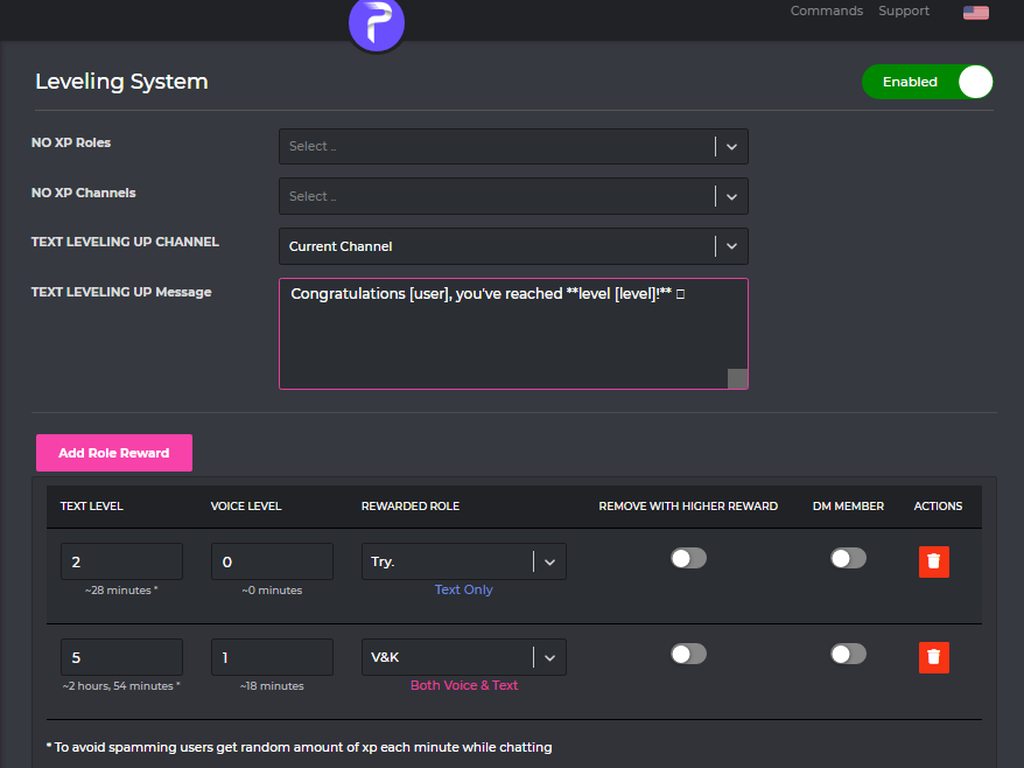
1 ~https://probot.io/dashboard login to your account and select your server
2 ~on the left side click on "Leveling system"
3 ~press "add role reward" and set the required level to get the role
change the settings as you want and this is it ..
:703162472063959061: https://imgur.com/a/hk54tM4
Welcome images, moderation, leveling, reaction roles, logs, high quality music and many many more!
 light ether
!invite
plain salmon
light ether
!invite
can i help you?
light ether
got it already! altough
how can i do #chat-ar <-- channels like this in welcome message/
light ether
plain salmon
can i help you?
btw fast support 😄
 mellow cloud
helo
@wild rock
@dreamy iris we're having a problem with our bot
it's not giving the roles for levels
@nocturne flax
@thorny burrow
@gloomy lion
@wicked linden
someone help us :((
quasi rover
u pinged all the Arabic support team and only mentioned 1 English support
while u could just ping <@&675070424748654593>
(no need to do it now tho)
mellow cloud
<@&675070424748654593>
quasi rover
-_-
quasi rover
stop spamming bruh
native geyser
please mention only once!
native geyser
can you please just explain me the issue
mellow cloud
mellow cloud
it's not giving the roles for levels
^
when people reach levels in my server
the bot doesn't give them the role
native geyser
make sure the bots role is above the reward roles
native geyser
yw
plain salmon
light ether
how can i do <#773641798371246100> <-- channels like this in welcome message/
<#channel id>
 vocal sand
Bro my pro bot doesnt work it doesnt mute lock channels etc
Its so annoying can someone help
I didnt set it up
Some1 else did idk how ro set up bots
 red basin
Yo like does probot shop for rankings and profiles can’t sell wallpapers when we buy em?
native geyser
vocal sand
Bro my pro bot doesnt work it doesnt mute lock channels etc
what does the bot reply with when you use the mute command
native geyser
red basin
Yo like does probot shop for rankings and profiles can’t sell wallpapers when we...
the stuff you see on dashboard are the only stuff but you can suggest your own ones on our reddit page, #816442755466788874
we can not let custom backgrounds since nsfw is a thing
native geyser
vocal sand
Muted from text specifically
but they can still type?
red basin
native geyser
the stuff you see on dashboard are the only stuff but you can suggest your own o...
Ik but we can’t sell the ones we already bought for custom backgrounds
native geyser
vocal sand
And send messages
go to your channel settings and for every role other than muted role set the send message permission on default (/) and let it stay on denied (❌) for muted role
native geyser
red basin
Ik but we can’t sell the ones we already bought for custom backgrounds
nope
red basin
native geyser
nope
Damn Alr thanks
native geyser
yw
nocturne flax
What quality should i have fr being an eng support here
light ether
plain salmon
<#channel id>
thanks! and emojis?
Also is there a way to do a test welcome message?
<@&675070424748654593>
native geyser
nocturne flax
What quality should i have fr being an eng support here
Speaking the language properly is the only thing we're looking for honestly, though bot knowledge is always a plus
native geyser
light ether
thanks! and emojis?
First go to your discord server channel
if you're on pc type \ then use your emoji https://imgur.com/XjCo32W
if you're on mobile use your emoji between `` symbols https://imgur.com/F2ckAUV
copy the result and paste it on dashboard
This is for custom emojis, for discord emojis just use them normally
light ether
native geyser
This is for custom emojis, for discord emojis just use them normally
so
for emojis
like 👍
native geyser
light ether
Also is there a way to do a test welcome message?
Inviting someone is the only way, you can invite an alt or a bot or I can join to test it
vocal sand
native geyser
go to your channel settings and for every role other than muted role set the sen...
So i got it working
Buttt
light ether
i need to do / 👍
vocal sand
It doesnt let me unmute
native geyser
light ether
like 👍
Just type normally, it's discords default emoji
vocal sand
The person i muted is still muted after being unmuted
nocturne flax
native geyser
Speaking the language properly is the only thing we're looking for honestly, tho...
Emm Sure i'm actually soon want to back to my main country for be an teacher for dat language
Wish you good luck y'all
❤️
light ether
but then like 👍 or like :thumbsup:
native geyser
vocal sand
The person i muted is still muted after being unmuted
Is the bot saying they have been u muted?
vocal sand
Wym that i muted them yes and that i unmuted them
native geyser
light ether
but then like 👍 or like ```:thumbsup:```
The second one
light ether
okay ty
nocturne flax
native geyser
Is the bot saying they have been u muted?
When you guys start accepting?
native geyser
vocal sand
Wym that i muted them yes and that i unmuted them
What I'd like to know is after using unmute command is the bot saying they have been unmuted but they can still send messages or do you get an error message instead
Or the bot just doesn't reply
plain salmon
nocturne flax
When you guys start accepting?
You will be informed if you applied for it
nocturne flax
plain salmon
You will be informed if you applied for it
Thanks cya
native geyser
nocturne flax
When you guys start accepting?
The application will stay open and those who passed it will receive an email after they submit, basically if you don't get an email you couldn't pass this one
vocal sand
native geyser
What I'd like to know is after using unmute command is the bot saying they have ...
That they have been unmuted
nocturne flax
native geyser
The application will stay open and those who passed it will receive an email aft...
Ya i just realize
vocal sand
And he doenst have the muted role
native geyser
vocal sand
And he doenst have the muted role
If your channel permissions are set as I described above then there shouldn't be any problems with that
vocal sand
Weird asf can you join and help please?
native geyser
Yes, invite me in dm's
light ether
native geyser
The second one
emojis from the server it self how do i do those
like: :chickenface:
light ether
okay so just / before it
native geyser
\ before it
light ether
okay
 native geyser
light ether
im doing somethign wrong i tink
native geyser
light ether
im doing somethign wrong i tink
As the mesaage says you're supposed to do it in your discord server, then copy the result and paste it on dashboard
light ether
thanks for your time ruru it works 😄
native geyser
You're welcome
 worn wagon
Hey I've been trying to get Probot to make new members of a server a certain role when they join, but struggling to get it to work.
Have removed it and added Probot again to the server, still not working (previously had been using MEE6, have removed it as well). Wanted to check if that is the functionality of the "Auto Roles" feature? And if there is anything I should be doing additionally to make it work?
Appreciate any help on the issue!
split needle
worn wagon
Hey I've been trying to get Probot to make new members of a server a certain rol...
Make sure the probot role is higher than those roles
worn wagon
split needle
Make sure the probot role is higher than those roles
Omg I'm such a dumb dumb haha, thank you!!
maiden igloo
alguien me reconstruye mi casa de minecraft
 flat rose
the youtube together thing broke again.. i keep clicking the link but it wont work
 arctic cairn
Is there a way to play an entire spotify playlist?
plain salmon
arctic cairn
Is there a way to play an entire spotify playlist?
only youtube and soundcloud playlist
command : #play pl 'link'
upper temple
plain salmon
> How to activate
`1 ~` https://probot.io/dashboard login to your account and se...
where i am having trouble is the no xp roles, no xp channels, and adding role rewards. in the role rewards it only lets me choose probot as rewarded role. any input on this? i would be happy to jump on a discord call if you have time tonight
 onyx idol
hi i am having trouble with level system. I have all my roles made and probot is above them all as an admin and can view all channels and manage roles. It sends the level up msg in the proper channel but its not assigning the level up reward roles when people reach the level milestones
arctic cairn
Is there a way to skip a whole playlist
quasi rover
<@&675070424748654593> ^^
quasi rover
arctic cairn
Is there a way to skip a whole playlist
you can use /stop, it clears the queue and disconnects so u can play a new playlist.
quasi rover
onyx idol
hi i am having trouble with level system. I have all my roles made and probot is...
are the roles having any mod permissions such as manage messages, nicknames, voice mute, etcetera?
quasi rover
upper temple
where i am having trouble is the no xp roles, no xp channels, and adding role re...
May you try changing probot's role position anywhere, by your server settings
if still, try clearing ur browser cache
 viscid crypt
hi, how do i make the automod in links work?
onyx idol
quasi rover
are the roles having any mod permissions such as manage messages, nicknames, voi...
@quasi rover the only perms the level roles have are read history send msg and voice perms
quasi rover
viscid crypt
hi, how do i make the automod in links work?
https://probot.io/dashboard - > Automod
 quasi rover
onyx idol
<@!451833165393428489> the only perms the level roles have are read history send...
quasi rover
onyx idol
<@!451833165393428489> the only perms the level roles have are read history send...
May u send me the server in dm? Won't ask for perms tho
viscid crypt
i've already done that, it wont delete the links. i think what im doing wrong is that i need to fill the "blacklist link" (?) but i tried that earlier and still nothing happened
 quasi rover
disabled channels means (ignore automod in these channels)
same for disabled roles
whoever has the verified, level 5 & 10 roles, their link messages will be ignored and not deleted
so u just remove all that, let someone without administrator permissions to try in #general
viscid crypt
ohh, okay thank youuu
quasi rover
No worries
 shadow birch
Hello, i have a Noob question. I always used the #clear Channel command but today i tried and the command dont clean all the channel, only my currently message asking for delete

am I doing something wrong? should I mess with some configuration? or add a number
quasi rover
bots can't reach messages longer than 14 days
shadow birch
Oooh make sense now
This time has something to do with the channel's permission?

I've already configured the bot on the channel
quasi rover
Is it having administrator permission?
 ornate minnow
Why is my user name not reflected in the [user] field here?
 quasi rover
don't add space, just [user]
shadow birch
quasi rover
Is it having administrator permission?
Yes
shadow birch
quasi rover
try using the slash command <@835557539210854421>
Okie perfect, so my general # that i set for be the prefix i can still use for another commands?
shadow birch
quasi rover
`/clear`
Worked now, thank you
quasi rover
u can change the # anytime tho
via #prefix new one
or via the dashboard https://probot.io/dashboard - > server settings
quasi rover
shadow birch
Okie perfect, so my general # that i set for be the prefix i can still use for a...
Both hashtag and slash will work on your server. but hashtag is not supported by us anymore, any new commands will be added to only slash.
#announcements
/repeat
ornate minnow
quasi rover
don't add space, just [user]
Oh!! Thank you here! I'll refer to it!
shadow birch
quasi rover
> Both hashtag and slash will work on your server. but hashtag is not supported ...
Thank you for the help
quasi rover
No worries
gentle kelp
I set up a color role. Is there any way to not have the react button go up when people click on it (I don’t want names to be shown)
quasi rover
of sure
quasi rover
gentle kelp
I set up a color role. Is there any way to not have the react button go up when ...
may u clarify how's the button going up?
i didn't get the exact meaning so
ohhh
well that's not a thing yet for reaction roles, but u can allow members to use #color 1 instead as example
and edit the #color command where it deletes the command usage & response after 5 seconds, if u wanted to
gentle kelp
quasi rover
and edit the #color command where it deletes the command usage & response after ...
thanks. dang so there is no way, it does that for other bots thats why
quasi rover
feel free to suggest it though
/play
u can find probot commands by https://probot.io/commands
No worries, glad to help
quasi rover
it's not probot side issue, it's either your Internet connection or channel region so try switching between your voice channel regions
 remote salmon
I can’t command anything idk why
Except /help
It doesnt react at all. Any ideas folks?
split needle
remote salmon
It doesnt react at all. Any ideas folks?
Check commands' availability on the dashboard
You might disabeld them or blacklisted the roles/channels that you're having/using commands in
remote salmon
k will try , thx
 still path
rainbow capitalism enjoyer — Today at 10:08 PM
how do i get more credits
i thought vote gives credits
but no change in it
split needle
still path
rainbow capitalism enjoyer — Today at 10:08 PM
how do i get more credits
i thoug...
Voting does give credits unless you voted on the wrong site or the site's api is broken
Another way to get credits is /daily
 deft shell
Hey! How to use the USER command to view information on other members? What should be written after the command?
native geyser
mention them or use their user id
native geyser
#clear
amount
 river veldt
Ok
native geyser
slash commands also work so you can also use /clear
deft shell
native geyser
mention them or use their user id
ty
native geyser
yw
native geyser
#mute
@mention5m
or just use /mute to see all the possibilities
split needle
Don't mention support role mutiple times
river veldt
Ok
split needle
Go to https://probot.io/dashboard, select your server, go to auto mod, in the badwords setting, add bad words in there
Welcome images, moderation, leveling, reaction roles, logs, high quality music and many many more!
river veldt
Ty
nocturne flax
plain salmon
https:probot.io/dashboard -> select your server -> music section
i did
it dont work
 dull crest
Can we deny/exlude someone from leveling system?
native geyser
yes, set a no-xp role and add the role to that person
dull crest
native geyser
yes, set a no-xp role and add the role to that person
Ok thanks
 torn vale
Hello everybody
I'm having trouble with the lockdown command
Can somebody tell me how to set it up?
split needle
torn vale
I'm having trouble with the lockdown command
Just use /lock
If members still can send messages after locking, check channel permision settings:
Set other roles (except muted role) their Send messages permision to default [/]
torn vale
split needle
Just use /lock
If members still can send messages after locking, check channel p...
So I would go to roles and create a separate role?
split needle
Just existing roles
But first: does the command actualy work? (Does the bot respond to the command?)
torn vale
Yes he responds to my command but when I go on my alt account or I have a mod test it they can still type
split needle
Then check the role permisions in channel setting, not server role setting
torn vale
So do I manage the @ everyone or do I manage the bot role?
split needle
Other roles existing in there
torn vale
Mk one sec every channel?
split needle
Yea
If you still have the channels synced to category, you can directly change it in the category setting
torn vale
split needle
Yea
If you still have the channels synced to category, you can directly change i...
Okay I'll look at the category settings for all of them
Do I look at the @ everyone
split needle
No need to since it's the role where the bot will change permision upon locking
 split needle
No
torn vale
split needle
No
See the thing is none of the categories have roles attached to them except muted
split needle
Then how about the channels?
I doubt they're all synced
torn vale
Whould it work if I deleted all the roles off the channels except @ eveyone
 jovial mist
Probot has been giving admin +all perms but cant kick a single member what do i do
split needle
torn vale
Whould it work if I deleted all the roles off the channels except @ eveyone
That would somehow work
The muted role will be added again once you use the command
jovial mist
I even shifted his role higher than mine in my server
split needle
jovial mist
Probot has been giving admin +all perms but cant kick a single member what do i ...
What does the bot respond?
torn vale
split needle
That would somehow work
The muted role will be added again once you use the comm...
I will be back in like 5 minutes
jovial mist
split needle
What does the bot respond?
My perms are not high enough to kick
split needle
jovial mist
My perms are not high enough to kick
Move the probot role, not the bots role
split needle
Weird thing
 sullen flower
Probot shop
native geyser
Welcome images, moderation, leveling, reaction roles, logs, high quality music and many many more!
Welcome images, moderation, leveling, reaction roles, logs, high quality music and many many more!
Welcome images, moderation, leveling, reaction roles, logs, high quality music and many many more!
Welcome images, moderation, leveling, reaction roles, logs, high quality music and many many more!
torn vale
split needle
That would somehow work
The muted role will be added again once you use the comm...
Okay it works!!
 vocal sun
How do i add #daily because I am confused
vocal sun
@native geyser How do I add the daily tab to my server and also add money to peoples account
native geyser
that tab exists on everyones dashboard
and you can not add money to anyones account you can just transfer from your own account
vocal sun
How do u do add that tab because when I try typing it, it comes up with "Daily has moved"
native geyser
you cant add it to your server its now on dashboard
when you use the command the bot already gives you the link
vocal sun
oh how do i add dashboard
native geyser
Welcome images, moderation, leveling, reaction roles, logs, high quality music and many many more!
vocal sun
I have added Credits but the daily one still doenst work
light ether
i got this setup

and ppl reached level 1 but didn't recveive thje role


<@&675070424748654593>
native geyser
vocal sun
I have added Credits but the daily one still doenst work
did you click on the link?
native geyser
light ether
and ppl reached level 1 but didn't recveive thje role
make sure the bots role is above the reward roles AND make sure the reward roles don't have any of the following permissions
administrator
ban members
kick members
manage server
manage channels
manage roles
vocal sun
native geyser
did you click on the link?
yes
native geyser
and what happend when you clicked on the claim daily button
 rough dove
Will probot shut down its music feature like groovy?
native geyser
youtube isnt our only music source so not sure what exactly would happen in the future
rough dove
Ohk
light ether
native geyser
make sure the bots role is above the reward roles AND make sure the reward roles...
thanks lemme try
 livid mulch
يوجد مبرمج mta هون ؟
split needle
jovial mist
What's the command for disconnecting him from vc
./stop
split needle
livid mulch
يوجد مبرمج mta هون ؟
#support-ar
jovial mist
split needle
./stop
Thanks buddy it was life saving
split needle
rough dove
Does the support team get paid?
Yes but no but actualy yes 
rough dove
split needle
Yes but no but actualy yes <:peppo:885666920597172254>
Eh 😅
jovial mist
split needle
Yes but no but actualy yes <:peppo:885666920597172254>
Yes'nt
nocturne flax
Howdy,
Is there any way I can set up automatic roles so that when I accept the rules, the reaction takes away the unverified rank and assigns the user rank?
rough dove
I am kind of confused with dj role setting
Also how to not let probot play in other vc channels like general vc
split needle
nocturne flax
Howdy,
Is there any way I can set up automatic roles so that when I accept the r...
Currently no but it will be updated soon
split needle
rough dove
Also how to not let probot play in other vc channels like general vc
Disable its adminsitrative permision and disallow it to join specific voice channels
About dj role, add the role that you choosed to be dj role in the dj role box and assign that role to whoever you want the bot to respond music commands to
rough dove
split needle
Disable its adminsitrative permision and disallow it to join specific voice chan...
So basically only dj can play , stop etc?
split needle
Yea
rough dove
split needle
Disable its adminsitrative permision and disallow it to join specific voice chan...
Can't disable admin perms ;-;
Cuz sometimes the server role system gets so complex that u have to edit each channel setting so probot can access it
So admin perm directly enables to access those channels
No other way?
rough dove
@split needle is there any way to invite a copy version of probot so I can make special settings for its music setting
Like disabling admin on the copy version
🤔
 left wave
hey guys, who knows how to set the Bot when i send a commands like "/play songs" and the Bot start to play the songs. Can It auto delete the command messages?
halcyon lintel
left wave
hey guys, who knows how to set the Bot when i send a commands like "/play songs"...
Head to the dashboard, then go to Music -> choose the command -> Edit -> Delete bot reply message after 5 seconds
left wave
ty
 leaden edge
I have an issue with Reaction Roles:
I have a working embed message for some gender identities (4, tbs.) – however, when I try to make the same message for a couple of other roles (with the same server & moderation priveleges), they don't appear in the list of roles assignable. Any ideas why this could be?
native geyser
drag the bots role above other roles
leaden edge
Perfect, many thanks!
native geyser
yw
 halcyon pasture
Hi
I can't get the bot to give me notifications of when someone enters vc for that v only
Channel
native geyser
make sure the bot has permissions to see that channel
native geyser
kick and reinvite the bot and try again please
halcyon pasture
Ehm
halcyon pasture
The bot works Very well the problem is that I would like him to mandass Just a message of when a person comes in for assistance
halcyon pasture
 daring plover
how can i use the reaction roles on the bot
daring plover
how can i use the reaction roles on the bot
Yes
split needle
daring plover
how can i use the reaction roles on the bot
go to https://probot.io/dashboard, select your server, go to embed messages module to create and send embed messages for the reaction roles to where you want. Then go to reaction role module to setup the feature on the sent embed messages.
Notice: Be sure the Probot✨ role is higher than other roles. Embed message should not have any blank element (better to remove them if not using).
Welcome images, moderation, leveling, reaction roles, logs, high quality music and many many more!
halcyon pasture
Thanks
 graceful island
hello, do you know if automod only works in public text channels? i want to test it but it seems to not work in private channels, is it right?
 grizzled beacon
<@&675070424748654593>
native geyser
graceful island
hello, do you know if automod only works in public text channels? i want to test...
it works in all channels, it just doesnt work against admins
graceful island
aaahhh okay thank you... what would be the best thing to test it myself? create a second discord account? 😄
ok got it, thnx for your help
 livid copper
Hi, is there any way to add xp to users? I am unable to find the command within settings
native geyser
livid copper
Hi, is there any way to add xp to users? I am unable to find the command within ...
not possible
livid copper
Thats unfortunate
 rough crown
Probot does not hand out roles that i want it to, my level roles are useless now and i spent 20 min making them.
native geyser
is the bots role above those level roles?
 worldly slate
hi why he do dosnt play the music
native geyser
what happens when you use try to play music?
rough crown
native geyser
is the bots role above those level roles?
oh thanks
 soft rover
Hi can i ask how can i play some music with Pro bot
native geyser
/play
name
worldly slate
native geyser
what happens when you use try to play music?
he dosnt play but he add the music to queue
native geyser
worldly slate
he dosnt play but he add the music to queue
give the bot permissions to join your channel
worldly slate
he is on but dont do music
native geyser
native geyser
give the bot permissions to join your channel
^
wait is the bot in your channel?
worldly slate
Probot ? ^^
native geyser
yes
nocturne flax
nocturne flax
#daily
 woeful crystal
Hello is there a limit on swear words detectors
 hidden marsh
How to remove bot on voice channel
woeful crystal
yea
 real sentinel
Might be retarded
woeful crystal
xD
real sentinel
sUpPoRt StAfF bTw
plain salmon
woeful crystal
Hello is there a limit on swear words detectors
no there is no limit
woeful crystal
oh cool, thanks!
nocturne flax
Hi. When setting up the automatic reply on trigger (@everyone) one can use system-values, like ‘{userName}’. When setting this feature, the reply end up not filling in the value, but the textual name of the field {userName} in this case. What am I doing wrong?
native geyser
its [userName] not {userName}
native geyser
on dashboard its as i showed
nocturne flax
I didn't read it right because the red on dark grey in the dashboard... 🙈 lol
my apologies
native geyser
no worries
 blazing kelp
hi guys, can anyone tell me what is a command word for queue loop all? I want to repeat all the queue but dont know the command word. thank you
split needle
blazing kelp
hi guys, can anyone tell me what is a command word for queue loop all? I want to...
There's only track loop
Queue loop will be added in next update
blazing kelp
thank you for your supporting
 willow fjord
Hi - Does anyone know why the bot keeps pausing while playing music? for 1-2sec it will just pause and then start again.
split needle
willow fjord
Hi - Does anyone know why the bot keeps pausing while playing music? for 1-2sec ...
Seem like an overload issue
Does it happen only in a specific time or the whole day?
willow fjord
it comes and goes, quite at random so far. I haven't noticed any real patterns
blazing kelp
i have a same issue, sometimes it paused for a while
split needle
Yea just an overloading issue after 2 big music bot being shut down
After that time, people found out probot about its music feature so the amount of servers using probot is increased but mainly for music and then it starting overloading with a less used feature
 split needle
Credits as reward
split needle
Purchase profile/rank card background and prime/premium bot (375000 credits = $2.5 on dashboard)
 quartz quarry
Ok
split needle
Maybe
But the best one without any sound problem being reported is premium
Prime still sometime getting sound cutting
fading island
Guys I just set up levelling system, how I can verify if it works?
 ornate minnow
@native geyser The welcome message was not automatically posted to the announcements channel. Is this a bug or a misconfiguration?
 native geyser
ornate minnow
<@!324937717441888256> The welcome message was not automatically posted to the a...
native geyser
ornate minnow
<@!324937717441888256> The welcome message was not automatically posted to the a...
do you have image enabled?
native geyser
fading island
Guys I just set up levelling system, how I can verify if it works?
if it works you get the role
fading island
native geyser
if it works you get the role
I see, but I don't want give them any role. I only want to notify them because they are engage within the channel
native geyser
as long as you have utility section enable along with leveling system section it'll work properly
fading island
native geyser
as long as you have utility section enable along with leveling system section it...
Does txt lvl up channel field is necessary?

Is it feasible to send them a DM?
native geyser
no its not
fading island
native geyser
no its not
for which question? 😁
native geyser
fading island
Does txt lvl up channel field is necessary?
for this
native geyser
fading island
Is it feasible to send them a DM?
and no
ornate minnow
@native geyser Will this automatically post to the announcements channel?
 fading island
native geyser
for this
fading island
native geyser
for this
So my setup is correct?
native geyser
ornate minnow
<@!324937717441888256> Will this automatically post to the announcements channel...
make sure your image format is either png pr jpg and your image is not bigger than 3mb
 native geyser
nope
native geyser
yw
ornate minnow
native geyser
make sure your image format is either png pr jpg and your image is not bigger th...
I think the image settings are fine. This image meets the requirements. How can I test post a welcome message?
Right now, I have to wait for new users to come in to test it.
native geyser
you can invite an alt or a bot, if you're not able to do neither of these rn you can invite me in dms and we can check it out
 radiant tree
Hi , is there any option for kick user after few warns ? in probot dashboard !
Or ban , doesn't matter
native geyser
/warnings
radiant tree
Ok thanks bro
native geyser
yw
 frozen herald
hi, is there a way to view previous credit transactions?
split needle
frozen herald
hi, is there a way to view previous credit transactions?
Go to https://probot.io/dashboard, login, look at the end of the left pannel and find transactions
Welcome images, moderation, leveling, reaction roles, logs, high quality music and many many more!
 charred sphinx
how do I set up the mute command? or does it work straight away
split needle
It'll work right after you use it
frozen herald
split needle
Go to https://probot.io/dashboard, login, look at the end of the left pannel and...
thank you so much ❤️
charred sphinx
split needle
It'll work right after you use it
awesome thank you
glad shale
nocturne flax
HOW THE FUCK DO I TUN OFF DJ MODE OMG
PLEASE don't swear and you talking about music system?
glad shale
https://probot.io/dashboard Select your server from left bar and disable it.
Welcome images, moderation, leveling, reaction roles, logs, high quality music and many many more!
glad shale
It named Music can you look there again?
nocturne flax
where abouts?
glad shale
And please calm down.
nocturne flax
answer me
glad shale
On the website select your server.


 rough dove
Probot deleting gifs for the issue Links
rough dove
rough dove
Probot deleting gifs for the issue Links
I also tried whitelisting tenor but didn't work
 iron silo
<@&675070424748654593>
halcyon lintel
 vagrant dove
how do i remove song from queue ?
vagrant dove
how do i remove song from queue ?
use #stop to stop the current song and clear the entire queue
torn vale
Hello everybody I just have a really quick small question
In the welcome message is there a way to mention channels
<@&675070424748654593>
west kelp
torn vale
In the welcome message is there a way to mention channels
Yes use <#channel_id>
torn vale
So I would do <#> and in the middle put the ID
halcyon lintel
torn vale
So I would do <#> and in the middle put the ID
<#id>
torn vale
Okay!
torn vale
halcyon lintel
`<#id>`
Like this or do I put ID in front of it!
 halcyon lintel
torn vale
Like this or do I put ID in front of it!
halcyon lintel
torn vale
Like this or do I put ID in front of it!
you are correct!
nocturne flax
west kelp
Yes use <#channel_id>
Can you do the same thing to mention channels in embed messages? Cuz I thought you could but it's not working for me
torn vale
halcyon lintel
you are correct!
Okay thank you so much
halcyon lintel
yw
west kelp
nocturne flax
Can you do the same thing to mention channels in embed messages? Cuz I thought y...
You can but they wont work in the title
nocturne flax
Oh my bad
 humble stream
@west kelp
plain salmon
humble stream
<@659633074400788490>
can I help you?
humble stream
plain salmon
can I help you?
no
humble stream
lol
 cloud kraken
when pro bot musci shutdown ?
 pure robin

 native geyser
please dont use this channel if you don't have questions regarding probot
 sturdy mortar
Ñ
native geyser
cloud kraken
when pro bot musci shutdown ?
for now it'll stay though we don't know till when
native geyser
sturdy mortar
Ñ
?