#support-en
1 messages · Page 265 of 1
 obtuse coyote
 rapid tapir

 hollow anchor
anybody here? pls <@&675070424748654593> (sorry for the ping)

I really need this information
 north hinge
<@&675070424748654593> ^
 hardy crown
Hey <@&675070424748654593> how do i get Pro Bot to give roles?
 split needle
 lilac turtle
sorry to bug but does this look right?
lilac turtle
sorry to bug but does this look right?
Yea
The only thing to make sure is the probot role should be higher than them
lilac turtle
thanks
split needle
hollow anchor
anybody here? pls <@&675070424748654593> (sorry for the ping)
So idk what you want us to explain
And if you're portuguese, you can ask our portuguese support in #support-int instead
split needle
hardy crown
Hey <@&675070424748654593> how do i get Pro Bot to give roles?
For giving roles to a whole in server, use /role give command
For giving roles to members upon joining, go to https://probot.io/dashboard, select your server on the left side, go to auto roles and select roles to give
Notice: Be sure the Probot role is higher than those roles so it could have enough permision on them
Welcome images, moderation, leveling, reaction roles, logs, high quality music and many many more!
hardy crown
Alright
lilac turtle
split needle
Yea
The only thing to make sure is the probot role should be higher than them
on more thing, do i have to do anything for the autoroles to work?
 split needle
lilac turtle
split needle
lilac turtle
Check about permisions
And if your server has welcome screen enabled, the member must pass that first to get the roles
lilac turtle
like rules? i did the welcome pare
split needle
 steep ermine
braw orgdou ma3adech bekri
steep ermine
braw orgdou ma3adech bekri
#support-ar
lilac turtle
do i need give premissions to the bot or the role?
split needle
Give atleast manage roles to the probot role
lilac turtle
thanks
 boreal rover
Rôle for m'y server
 fierce wagon
<@&675070424748654593> .
fierce wagon
boreal rover
Rôle for m'y server
Can you explain what you mean?.
 stoic breach
Hamburger
fierce wagon
stoic breach
Hamburger
can i help u?
stoic breach
yeah
Uh when i try to change the prefix of the bot, it changes the prefix but i got another bot with the same prefix and then they both got the same prefix and don‘t work.
fierce wagon
stoic breach
Uh when i try to change the prefix of the bot, it changes the prefix but i got a...
did u try to change one of them?
fierce wagon
so what the cmd u try?
 cyan dune
can someone help me make this thing work, half of the stuff doesn't work at all
fierce wagon
i will try to help u if u want.
 split needle
stoic breach
Uh when i try to change the prefix of the bot, it changes the prefix but i got a...
split needle
stoic breach
Uh when i try to change the prefix of the bot, it changes the prefix but i got a...
Go to the dashboard to change the prefix without worry about conflict with other bots
stoic breach
Okay
cyan dune
the bot is a full server admin
split needle
cyan dune
I type #colors and the color list is empty
You need to make color roles for it
cyan dune
how do I make color roles, where is that setting
cyan dune
ohhhh
Is there somewhere that has documentation on what the purpose of each of these things are? That way I don't have to ask you guys a million questions? I don't understand half of what this stuff is supposed to do. Like the Reaction Roles thing does nothing, there's no way to tell it what role to give it for each reaction
I would love to get this working and pay for premium
split needle
There will be a documentation soon but for now there' no eta on release date
cyan dune
I'm a programmer and I don't feel like creating all of this myself, it's easier just to pay someone else
but it looks great, I just can't figure anything out
You could make a user manual fairly quickly, just add to it little by little, but something is better than nothing for sure
you don't have to wait to complete the entire thing before you post it
split needle
Yea but idk what are they doing is the thing
We were just planned about it without any further infomation
cyan dune
How do I tell the reacton role what role to give for each reaction
split needle
There's a + button next to each reaction for adding roles
 split needle
And there's not quite an issue with it
If you don't see any role show up, just move the probot role higher
cyan dune
so for the colors thing I just make the colors roles at the top of my roles list so that the color overrides the member's real role color?
cyan dune
and if I don't set any permissions for those roles then it won't affect their real roles right?
split needle
No
cyan dune
ok. And you also just taught me that based on the location of the role the bot doesn't have authority to see certain things?
So I need to make sure it's all the way at the top even though it's a server admin?
split needle
Not actualy
Just not have permision on them
cyan dune
ohhh
split needle
The bot will still be able to see all roles
cyan dune
I made the bot a full server admin, easier for me to make him an owner with me lol
cyan dune
so this is correct?
 split needle
Yea
cyan dune
I moved all my bots to the top
the /rank command isn't working for any of my members who aren't server admin
maybe now it will
split needle
I mean you might set disabled roles for it
That means the bot will not respond to anyone having those roles when using the command
cyan dune
is there a global section where I can disable the ability to use it for an entire group for the whole bot
or just in individual commands themselves
Also, can I stop it from being available in certain channels, the entire bot with all of its functionality
split needle
Currently, you can only do that for each command
We'll add the abbility to disable a whole module for roles in the next uodate
cyan dune
for example, I don't want users to be able to execute any ProBot commands in the tip.cc channel
split needle
We'll also add that
cyan dune
I will. so far this seems like the best all around bot there is
Did you guys have to make your own website for the dashboard or is that something that Discord provides an area for you to create?
 cyan dune
wow, you guys did great
very important feature for the next update, something that NO other bot has. The ability to completely disable it from specific channels, meaning no command options even appear in that channel.
split needle
Yes
Sure will have that as each command setting already have that
cyan dune
Currently the only way to do that is NOT make the bot an admin and manually give it each permission it needs to function, which is a pain
otherwise the commands still show up in the channel even if the users can't use them
split needle
Yea ik
cyan dune
It would put you guys a step ahead of everyone else
split needle
But for slash commands, if they try to use them, the command will give an error output
cyan dune
yes
the goal would be for the commands to not show up at all
If a user can't use a command they shouldn't see it
split needle
Due to discord, slash command will alway show up even you disabled it in a channel
But to do something about that, we've made it into a personal interaction to tell the user that the command is disabled for channel
cyan dune
ohhhh cool
ok last question for today, what module do I need to enable for this?

and how do I make the ban PERMANENT. I don't want it to be temporary

@split needle
split needle
cyan dune
ok last question for today, what module do I need to enable for this?
Utility I think
split needle
cyan dune
and how do I make the ban PERMANENT. I don't want it to be temporary
You can set it for a long time instead
Idk why they set it to alway timed
 shut sail
 winter nimbus
Can I reset the ranks in a server?
 lean badgerBOT
**Command: reset**
Reset text/voice/invites xp points for all or specific members.
**Usage:**
#reset [text / voice / invites) [all / user]
**Examples:**
#reset text all
#reset voice all
#reset invites all
#reset text @Dramex
winter nimbus
u thxx
 stable snow
how come profile and rank are different? is profile global?
 nocturne flax
stable snow
how come profile and rank are different? is profile global?
nocturne flax
stable snow
how come profile and rank are different? is profile global?
Yes
stable snow
thanks. what does total mean here?
 nocturne flax
stable snow
thanks. what does total mean here?
nocturne flax
stable snow
thanks. what does total mean here?
all times are won by xp means
stable snow
none of this makes sense. i just want to see how much XP i have.

so it says i have 699xp in the global profile
what deos the 74/486 mean?
and then in the rank card, what does the 52/103 mean? and the total number?
 mental bay
Is there anyway to remove roles when mute?
mental bay
stable snow
what deos the 74/486 mean?
You need 486 xp to level up and 52/103 means that's your position in the server
stable snow
doesnt make sense because the server has 4 people and i would be at the top
mental bay
oh then I am wrong
split needle
stable snow
and then in the rank card, what does the 52/103 mean? and the total number?
Curent xp/required xp for leveling up
Total xp is total xp
split needle
mental bay
Is there anyway to remove roles when mute?
No
And next time, try not to help people without knowing anything
 slender pagoda
Hey ! I have a concern regarding the automod feature, it works well ! But, the warns are sent in the user's dms, some users have dms locked, for their privacy, because of that they don't receive the warning, and get muted, is there any possible way to send the warns in the channel where they're committing infractions? Thanks, please ping me if any one has a solution or response :3
nocturne flax
slender pagoda
Hey ! I have a concern regarding the automod feature, it works well ! But, the w...
currently, there is no such feature, but u can suggestion
slender pagoda
nocturne flax
currently, there is no such feature, but u can suggestion
Oh alright thanks !
nocturne flax
yw 💙
stable snow
split needle
Curent xp/required xp for leveling up
Total xp is total xp
this doesnt line up, because it says total xp: 699. total in the top right corner doesn't match anything else.
split needle
stable snow
this doesnt line up, because it says total xp: 699. total in the top right corne...
Total xp count from level 0
Xp showing on the bars only count for that level until next level
stable snow
but i'm only level 1
this is just all too confusing, im testing it to make sure my server users arent also confused
split needle
Level 0 to 1 needs 35 xp
stable snow
is there any command to just show how much xp you have?
split needle
Both rank and top will show your xp amount
split needle
stable snow
thanks. what does total mean here?
Also take 35 add 52 equal 87
stable snow
so i just used the rank command here, showing me as level 2 with 174 total xp, is that correct? i'm just confused as to how I have 699xp in my global profile
stable snow
yeah i get that. i have used probot on two servers - here and my own. they dont add up
split needle
They should tho
stable snow
is there a way to show every server you have used probot on? perhaps there is a server using it without me knowing
split needle
There isn't any but discord already provided a way
stable snow
i have 174 here and 42 on my own server so far.
split needle
Check mutual servers with the bot
 hard minnow
hi ! i have a problem with the bot i have set it up when i come to kick someone it deletes the messege i sent , sometimes it sends this " - I couldn't kick that user. Please check my permissions and role position "
stable snow
ok thanks. found one other server, which has 30 messages which wouldnt account for the xp
profile total: 863xp
this server: 174xp
own server: 42xp
other server: unknown (only 30 messages)
split needle
hard minnow
hi ! i have a problem with the bot i have set it up when i come to kick someone ...
The bot is missing permision on that user
Try move the probot role higher and check its permisions
split needle
stable snow
profile total: 863xp
this server: 174xp
own server: 42xp
other server: unknown (...
Xp on profile count differently from xp on server
That may not add up to anything after all
stable snow
i see. well i understand the rank card now, thanks
the total xp should be more prominent imo. maybe have it say 'total xp on this server'
split needle
Most people don't really care about it so maybe they don't mind it either
Feel free to suggest it in #573053418017521664
stable snow
would love to see a command that just has the bot post the amount of XP such as #xp command or something, instead of a full image card
leveling is one of the reasons i came to this bot, really want to avoid having multiple bots
split needle
Many use this bot for leveling because of voice leveling
That's why
hard minnow
split needle
The bot is missing permision on that user
Try move the probot role higher **and*...
i have tried to move it a role higher still dosent work
split needle
Really?
hard minnow
yes
split needle
The probot role, not other role
And move it higher means move it to make it higher than any role that your members could have
hard minnow
split needle
The probot role, not other role
ohh ima try , sorry
hard minnow
split needle
And move it higher means move it to make it higher than any role that your membe...
tysm it works now !
nocturne flax
<@&675070424748654593>
I would like to know how advanced is the mudic module on Probot that @split needle told me about ehile fixing a role issue on my server.
Since Discord support team for developers has, officially gone offline for the so called "hsck week" they're not verifying a music bot i want to get on my server. They may verify it after 7th of September
 nova grove
<@&675070424748654593> Can you make the bot auto respond to a mention?
 native geyser
nova grove
<@&675070424748654593> Can you make the bot auto respond to a mention?
native geyser
nova grove
<@&675070424748654593> Can you make the bot auto respond to a mention?
No
native geyser
nocturne flax
<@&675070424748654593>
I would like to know how advanced is the mudic module o...
Probot is a moderation bot so our music function is of course not as advanced as our moderation features, you can see what we have by checking the music commands on https://probot.io/commands and https://probot.io/dashboard music section
Welcome images, moderation, leveling, reaction roles, logs, high quality music and many many more!
Welcome images, moderation, leveling, reaction roles, logs, high quality music and many many more!
nova grove
native geyser
No
Alr thanks
native geyser
Yw
nocturne flax
@native geyser,i must admit that after viewing the commands, the mudic festuee can be compared as, equal to some good music botd out there. I judt hope sound quallity is flyent, smioth, with no lag, distortion, freezing up or silence gaps during playback.
nova grove
native geyser
Yw
Also,how to reset Probot xp?
native geyser
nova grove
Also,how to reset Probot xp?
#help reset
lean badgerBOT
native geyser
#help reset
**Command: reset**
Reset text/voice/invites xp points for all or specific members.
**Usage:**
#reset [text / voice / invites) [all / user]
**Examples:**
#reset text all
#reset voice all
#reset invites all
#reset text @Dramex
nova grove
Alr thanks
 lunar elbow
Can I buy something for the credit and if yes how to open shop? @west kelp
 west kelp
Yes
#rank backgrounds: https://probot.io/id
#profile backgrounds: https://probot.io/bgs
Badges for #profile: https://probot.io/badges
Welcome images, moderation, leveling, reaction roles, logs, high quality music and many many more!
Welcome images, moderation, leveling, reaction roles, logs, high quality music and many many more!
Welcome images, moderation, leveling, reaction roles, logs, high quality music and many many more!
 unreal slate
😡
lunar elbow
west kelp
No
So what are the credits for?
west kelp
Buying comseitcs for probot
lunar elbow
west kelp
Buying comseitcs for probot
How can I buy them?
unreal slate
can you use emojis from a discord server for reaction roles?
west kelp
You can't buy them, you have to earn them:
By #daily
And by voting at https://top.gg/bot/probot/vote
 unreal slate
never mind the emjoi loaded when i refreshed 🙂
 gloomy scarab
What’s the command to use logs?
west kelp
gloomy scarab
What’s the command to use logs?
https://probot.io/dashboard -> Select your server -> Logs
Welcome images, moderation, leveling, reaction roles, logs, high quality music and many many more!
lunar elbow
west kelp
You can't buy them, you have to earn them:
By #daily
And by voting at https://to...
No i mean how to buy the accessories for probot
west kelp
west kelp
Yes
#rank backgrounds: https://probot.io/id
#profile backgrounds: https://probot...
This
lunar elbow
west kelp
This
Thx
west kelp
Yw
 sharp coyote
Henlo
west kelp
Hello, how can I help you
sharp coyote
Nothing
sharp coyote
Ok, I forgot
west kelp
No worries
 molten drift
Hello, is there anyway to customize the #youtube feature?
native geyser
no
 candid tide
Hello is there anyway to recover deleted texts?
molten drift
native geyser
no
can I disable it?
native geyser
candid tide
Hello is there anyway to recover deleted texts?
no but you can set logs to see them
native geyser
molten drift
can I disable it?
with channel permissions yes
molten drift
cz someone just joiins in a voice chan and run it, then it becomes a youtube party lol 😅
candid tide
Aww sad :( my Minecraft pics are now gone, but Thank you anyway
native geyser
yw
molten drift
native geyser
with channel permissions yes
what do you mean by that?
native geyser
molten drift
cz someone just joiins in a voice chan and run it, then it becomes a youtube pa...
i see, you can also disable webhooks i believe that would fix it though this might cause some other features to not work as well
native geyser
molten drift
what do you mean by that?
you can disable the streaming permission of the bot
molten drift
native geyser
you can disable the streaming permission of the bot
ohhh thank you! will try that
 pastel magnet
native geyser
nocturne flax
pastel magnet
native geyser
nocturne flax
How do I reset the entire ranking?
native geyser
/reset text all
/reset voice all
nocturne flax
native geyser
> /reset text all
> /reset voice all
Thank u
native geyser
yw
 tame oak
hi support, is there anyway to change the role reward times? I think the jump between level 1 and level 2 is too big - I want users to hit level 2 at 10 minutes but can't see how to change that.
west kelp
Not possible, I'd suggest you increase the level requirement
tame oak
west kelp
Not possible, I'd suggest you increase the level requirement
ah ok, thanks
west kelp
You're welcome
stable snow
not probot specific - has anyone thought of using embed buttons instead of emojis (for roles)? i dont know the technical details of implementing a button, i just know it can be done.
the limitation would be having only one role per embed/message, but the benefit is having much larger 'traditional' style buttons (one to get role, one to remove role) or a single toggle button if that is possible.
 tawdry pollen
hello can me use probot to make statistic like this?
 native geyser
stable snow
not probot specific - has anyone thought of using embed buttons instead of emoji...
native geyser
tawdry pollen
hello can me use probot to make statistic like this?
native geyser
stable snow
not probot specific - has anyone thought of using embed buttons instead of emoji...
native geyser
tawdry pollen
hello can me use probot to make statistic like this?
nope
tawdry pollen
native geyser
nope
😢
stable snow
not really a suggestion, was hoping to discuss if someone knows more about the coding side of things or just experience with other bots. there's no general discussion channel on this server
 zealous quiver
link inv For bot :
 glad shale
zealous quiver
**link inv For bot :**
glad shale
zealous quiver
**link inv For bot :**

Discord
Discord is the easiest way to communicate over voice, video, and text. Chat, hang out, and stay close with your friends and communities.
zealous quiver
thx .@glad shale
glad shale
yw
 torn shale
can anyone tell me any solution about the black list on me ??
everytime I come and tell you , you say DM dramex .. DM whoever and they never respond to me !! 5 months without any responds ???? someone I know got out the blacklist within 4 days I'm waiting more than 5 months what am I supposed to do , I cant go to the probot site even to manage my server !
native geyser
the reason is massive messages per day (aka spam), the reason why we're telling you to message dramex is to see if he gives you a chance or not
torn shale
he didn't even respond with no !
nocturne flax
what does vip protection do exactly
west kelp
nocturne flax
what does vip protection do exactly
Prevents potential nukes
torn shale
ok ty for being useless for 5 months im not using the bot again :0
west kelp
Dramex is really busy, he wont tell you the reason as to why you got blacklisted if you DM him, he will only help you if you got unfairly blacklisted, which I assume you didn't, so there's nothing you can do
torn shale
so the blacklist is forever !
 near kestrel
First of all, I am a YouTuber and I want to know what is the benefit of the Prime robot and can I take it for a trial Second, what are its features? Thirdly, is it possible to remove the band from the main account from me because I remember my brother told me to let your channel go viral and look like it entered the server and put a link or cursing, I swear to God, the important world, I swear to God, I can do nothing, but remove the band from me, please
west kelp
near kestrel
First of all, I am a YouTuber and I want to know what is the benefit of the Prim...
Read the features in #664737031414480896
west kelp
near kestrel
First of all, I am a YouTuber and I want to know what is the benefit of the Prim...
You got blacklisted on your old account?
near kestrel
OK
near kestrel
west kelp
You got blacklisted on your old account?
Yes
near kestrel
west kelp
<@863810063785132052> انت عربي؟
What, but I speak English and professional English
near kestrel
west kelp
<@863810063785132052> انت عربي؟
Yes and yes and yes
west kelp
طيب اسال ب #support-ar
native geyser
you literally asked the same question in every support channel by using google translate please only use one support channel..:)
 ivory sandal
split needle
ivory sandal
split needle
#support-ar
 blazing mason
hey, how can I reset the bot? I changed the welcome image and stuff like that, but I don't know how to get the normal welcome message+picture
native geyser
on dashboard select your server -> server settings -> there is a reset button
blazing mason
ahh thank you very much 😄
native geyser
what does the bot reply with when you use the command
native geyser
make changes in the bots role order and save then drag the bots role all the way up and save again
 tulip phoenix
native geyser
make changes in the bots role order and save then drag the bots role all the way...
tulip phoenix
native geyser
make changes in the bots role order and save then drag the bots role all the way...
ok and can you tell me how to mute someone for time like i choose time
lean badgerBOT
native geyser
#help mute
**Command: mute**
Mute a member from text channels so they cannot type.
**Usage:**
#mute [user] (time ends with m,h,d,mo,y) (reason)
**Examples:**
#mute @native geyser 1m Spamming
#mute @native geyser 1h
#mute @native geyser 1d
#mute @native geyser 1mo
#mute @native geyser 1y
tulip phoenix
native geyser
you have to specify a time after using the command
thanks
native geyser
yw
split needle
No
 jovial wolf
alright thank u
 umbral galleon
hello
can i ask
??
the bot isn't working as a wolcomer on our server any ideas how to fix itt ?
other moderation such as logging and different kind of stuff works but the welcomer thing isn't working at all
west kelp
umbral galleon
the bot isn't working as a wolcomer on our server any ideas how to fix itt ?
Do you have an image?
umbral galleon
image of what ?
west kelp
In the welcomer

 west kelp
umbral galleon
it actually works before then suddenly stops
west kelp
umbral galleon
it actually works before then suddenly stops
Did you change the image
umbral galleon
i don't think soo
because even the dm thing that the bot would do doesn't work either
west kelp
Try changing the image
https://probot.media/mq6nrbKqQb.png
https://probot.media/V1TanJhGjE.png
https://probot.media/XoryO4bSE6.png
https://probot.media/BQ1FOgtp2e.png
https://probot.media/tg5iZy3xjU.png





 umbral galleon
okaay thanks
west kelp
You're welcome
 weak juniper
how do i change the prefix
west kelp
#prefix [new prefix]
weak juniper
THANKSSSS
west kelp
Yw
weak juniper
it didn’t work
glad shale
weak juniper
it didn’t work
Because it can change only # one.
weak juniper
wdym
glad shale
It can't change the / one.
west kelp
@weak juniper can you use #ban and #kick
You have to enable the moderation module for it to work
weak juniper
i’m confused
 vagrant dock
Hello everyone, tell me how to give the bot a command to play a song?
lean badgerBOT
**Command: play**
Add a song to queue and plays it.
**Aliases:**
#p, #resume, #شغل
**Usage:**
#play [song title] - plays the first result from Youtube
#play [URL] - plays the provided song, playlist, or stream
**Examples:**
#play Havana
#play https://www.youtube.com/watch?v=HCjNJDNzw8Y
split needle
weak juniper
i’m confused
Just go to https://probot.io/dashboard, select your server, go to overview and set prefix here
Welcome images, moderation, leveling, reaction roles, logs, high quality music and many many more!
 north peak
Why am I unable to create or update bot responses automatically?
Apparently Google Translation did not translate it correctly
 low scarab
Is there any admin of the discord free?
 scarlet parcel
hi, i'm not leveling up in my server while everyone else is... is mine broken or something bc it's staying at the same number-
 stray nacelle
Hi <@&675070424748654593> . How do i clear all the peoples warnings in a server? If not possible, then how can I do seperately?
 west kelp
low scarab
Is there any admin of the discord free?
west kelp
low scarab
Is there any admin of the discord free?
What do you need
west kelp
scarlet parcel
hi, i'm not leveling up in my server while everyone else is... is mine broken or...
Do you have a no xp role?
west kelp
stray nacelle
Hi <@&675070424748654593> . How do i clear all the peoples warnings in a server?...
Use /warn_remove
scarlet parcel
west kelp
Do you have a no xp role?
i do! it's just been at the same number for the past two days
west kelp
Yes that's why
 nova bane
<@&675070424748654593> how i can fix that
nova bane
nova bane
<@&675070424748654593> how i can fix that
@west kelp
native geyser
nocturne flax
hi can i know why did i get blacklissted
hello, apparently one of the servers you've been in got blacklisted, please talk to ROOKA#0009 in dms
west kelp
nova bane
<@!659633074400788490>
Log out of the daahboard on all devices
scarlet parcel
west kelp
Yes that's why
why what?
 iron warren
anyone knows "you cant use multiple devices" fix without changing wifi ip??
west kelp
scarlet parcel
why what?
You have a No XP Role, you dont gain xp
scarlet parcel
west kelp
You have a No XP Role, you dont gain xp
oml wait sorry, i don't tho
iron warren
iron warren
anyone knows "you cant use multiple devices" fix without changing wifi ip??
help
west kelp
iron warren
anyone knows "you cant use multiple devices" fix without changing wifi ip??
Log out of the dashboards on all devices
iron warren
log out then log in?
iron warren
west kelp
Log out of the dashboards on all devices
should i log out from all devices then log in or log out and log in from 1 device
 smoky rose
I enabled it and there are no leveling system
 west kelp
iron warren
should i log out from all devices then log in or log out and log in from 1 devic...
west kelp
iron warren
should i log out from all devices then log in or log out and log in from 1 devic...
Log in from 1 device
smoky rose
smoky rose
I enabled it and there are no leveling system
<@&675070424748654593>
west kelp
iron warren
its the same
Try using a VPN
iron warren
west kelp
Try using a VPN
i did with nord vpn its not allowed
west kelp
What's not allowed
west kelp
smoky rose
I enabled it and there are no leveling system
What do you mean?
You can view your rank with #rank
Leaderboard with #top
smoky rose
west kelp
You can view your rank with #rank
ok thank you 💜
west kelp
You're welcome
west kelp
I don't think it does?
iron warren
Try it yourself
iron warren
west kelp
I don't think it does?
Is there anything I can do?
 rare gorge
can I ask something
my nitro is running out but i wonder if i can get nitro for owo
Is there anyone who gives ?
native geyser
no and #573048353458356234
rare gorge
Do not trade or beg for credits, (rep)utation points, etc. This is not an association!
@native geyser is this the rule
I'm sorry
iron warren
anyone knows "you cant use multiple devices" fix without changing wifi ip??
rare gorge
iron warren
anyone knows "you cant use multiple devices" fix without changing wifi ip??
no
west kelp
@ivory sandal #support-ar
@iron warren as far as i know that's the only solution if logging out didn't work
iron warren
rare gorge
no
Im asking support thanks for replying but if you dont know dont answer
west kelp
rare gorge
Do not trade or beg for credits, (rep)utation points, etc. This is not an associ...
It is
rare gorge
iron warren
Im asking support thanks for replying but if you dont know dont answer
sorry bro
stable snow
Had issues earlier with updating 2 embeds. One kept keeping the Content block (bot message) and couldn't removed or edited. All edits on 2 embeds failed, I was selecting the correct post and had successfully edited them before.
Not sure why but to resolve this I made 2 whole new embeds and deleted the old ones + corresponding messages on the server. Not sure if this is a known issue but there is it.
west kelp
It could be bugged, and yes just simply creating a new one would usually fix embed issues
 misty pumice
Start
stable snow
is ruru a person? The embed I was targeting (and had multiple successful edits on) was about an hour old.
stable snow
Initially, the Content block kept showing up, so I just deleted it before sending the embed - no problem. Then I made an edit without seeing that the Content block had come back.
Further edits had no effect. Sorry no screenshots.
nocturne flax
hellp
west kelp
@nocturne flax how can I help you
nocturne flax
My account was hacked and the hacker violated the rules, the problem was solved, but the account is banned forever and the company refuses to restore it. I will leave PUBG if I do not restore my account
 deep patio
nocturne flax
My account was hacked and the hacker violated the rules, the problem was solved,...
deep patio
nocturne flax
My account was hacked and the hacker violated the rules, the problem was solved,...

 lean sundial
Hello... please someone help me to change the background of my profile please
native geyser
nocturne flax
My account was hacked and the hacker violated the rules, the problem was solved,...
how is this related to probot?
@deep patio ???
native geyser
lean sundial
Hello... please someone help me to change the background of my profile please
Welcome images, moderation, leveling, reaction roles, logs, high quality music and many many more!
nocturne flax
deep patio
Hecker
no
native geyser
are you guys aware that this is the bot support channel and unless you have a question regarding the bot you're not supposed to be here?
nocturne flax
native geyser
are you guys aware that this is the bot support channel and unless you have a qu...
It is better to shut up and not interfere
lean sundial
native geyser
https://probot.io/bgs
Thankyou so much
deep patio

native geyser
nocturne flax
It is better to shut up and not interfere
hmm?
native geyser
deep patio
<:hmmm:741276723961921607>
?
native geyser
lean sundial
Like except #daily
there is also https://top.gg/bot/probot/vote
lean sundial
Thanks 😃
native geyser
you're welcome
iron warren
native geyser
you're welcome
do you know why i cant claim daily credits?
native geyser
I cant say without knowing the error message
iron warren
anyone knows "you cant use multiple devices" fix without changing wifi ip??
you cant use multiple devices
thats what i get
native geyser
try relogging, if you used multiple accounts thats also a reason
 west kelp
They're separate backgrounds
lean sundial
How do i change it for my rank intetface please tell me
iron warren
native geyser
try relogging, if you used multiple accounts thats also a reason
i dont actually
west kelp
lean sundial
How do i change it for my rank intetface please tell me
Welcome images, moderation, leveling, reaction roles, logs, high quality music and many many more!
lean sundial
Thankyou
native geyser
iron warren
i dont actually
then changing ip is the only way to fix it
nocturne flax
can you change the pic of the bot?
instead of the P
native geyser
only with premium
native geyser
you have prime not premium
nocturne flax
oh
where is the option to upgrade to "premium" i dont see upgrade button
nvm
my bot still isnt giving out lvels
levels
west kelp
@nocturne flax does it have admin
And also is the probot role at the top of the roles list
 mental moth
is there any formatting to put images in embed description?
west kelp
Nope
mental moth
OK, thanks!
west kelp
You're welcome
 smoky stone
hello! question, how do i set up a welcome that has a certain image and has a certain message attached as well?
native geyser
https://probot.io/dashboard, select your server, welcomer section
Welcome images, moderation, leveling, reaction roles, logs, high quality music and many many more!
smoky stone
alr, ty!
native geyser
Yw
 analog sorrel
is the bot bugging for anyone?
Like I add a song into it and it just is stuck on a searching phase
But it wont play the song
Ive tried -stop and readding different songs
adding youtube links
just text
west kelp
Global issue
analog sorrel
weird
i came from groovy and i never experienced it before but then again ive never used anything else
is there any temp fix or is it just down
west kelp
We really don't know yet
 little surge
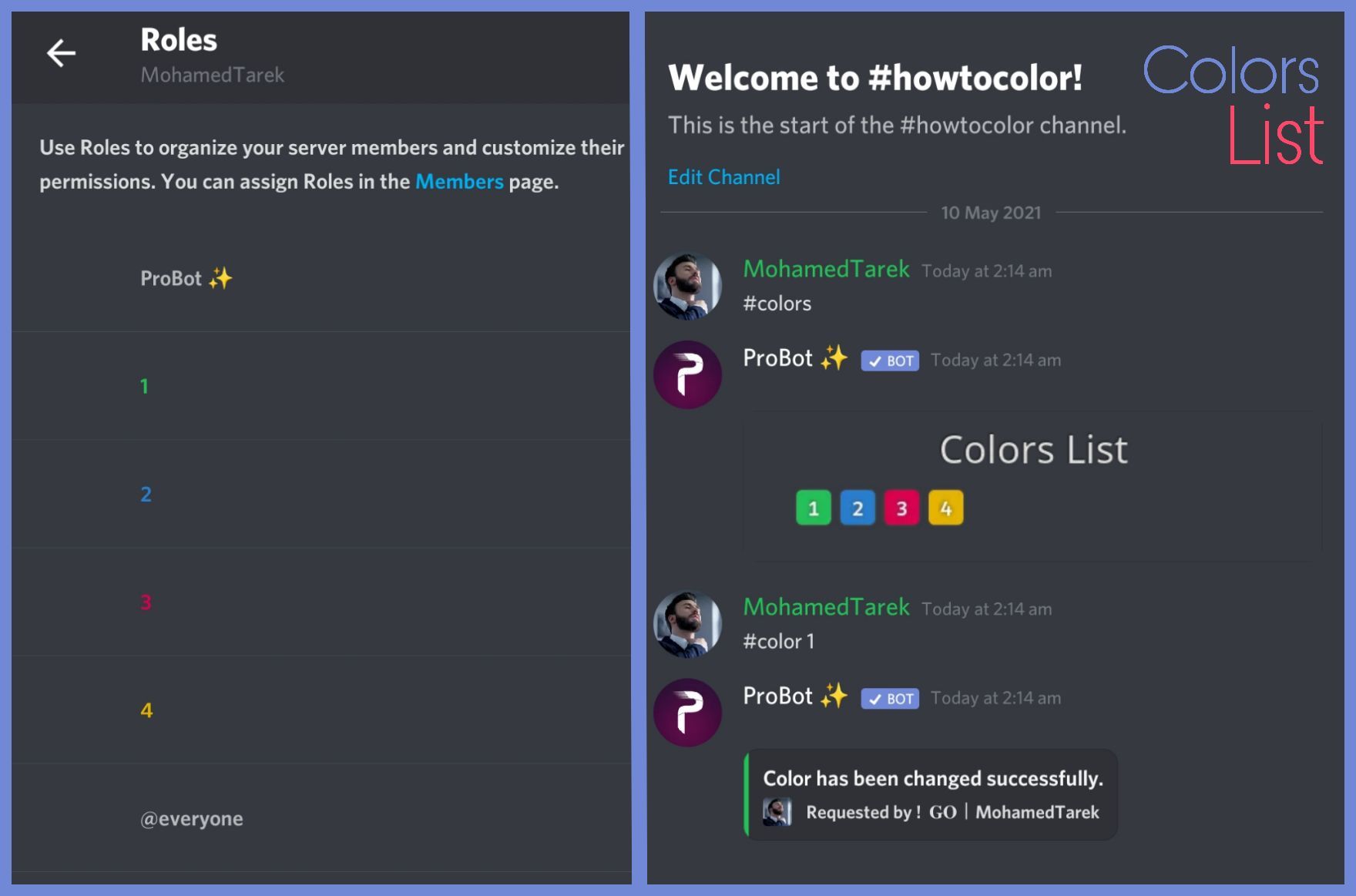
When I use the colors list command it just comes up blank, am I doing something wrong?
west kelp
How to create colors:
To do your "Colors List" you've to create numbered roles ascendengly, which means you've to create roles as the image below explains.
colors roles only works with exact numbers, they can't have mod permissions otherwise it won't work. dragging these roles above your moderators roles position is not recommended as they'll have the access through it to higher position roles.
the image below shows how to correctly use the commands as how does it effect your nickname.
:703162472063959061: https://imgur.com/WJN29y6
 little surge
Oh I see, thank you
west kelp
You're welcome
 west kelp
Both
 chrome sapphire
kk
west kelp
@chrome sapphire you can set it to only by putting 0
 vagrant gulch
Hello, I am trying to add probot to a discord as an admin. When I go to the server list, the server is there but then i cannot have the bot join as it says administrator needed.
west kelp
vagrant gulch
Hello, I am trying to add probot to a discord as an admin. When I go to the serv...
You need admin perms
Full admin perms
 steel phoenix
I have a question how I can check who have been muted?
vagrant gulch
west kelp
Full admin perms
As far as i know i do
 west kelp
Compmetely full perms
vagrant gulch
got it thank you
west kelp
You're welcome
west kelp
steel phoenix
I have a question how I can check who have been muted?
You can either check the logs or check who has the muted role
steel phoenix
A ok but I have other problem as well because I have banned my friend and I can not see this on the ban list
west kelp
What do you mean
 grizzled sierra
How do I set probot up to welcome people to the server
steel phoenix
west kelp
What do you mean
I have ban my friend from my server and I was trying to unban thim and he is not the
west kelp
grizzled sierra
How do I set probot up to welcome people to the server
https://probot.io/dashboard -> select your server -> Welcomer
Welcome images, moderation, leveling, reaction roles, logs, high quality music and many many more!
west kelp
steel phoenix
I have ban my friend from my server and I was trying to unban thim and he is not...
Not in the ban list? Then he isn't banned
steel phoenix
west kelp
Not in the ban list? Then he isn't banned
Yh but when I send to him the Inviting is seeing that he have ban
steel phoenix
Ok
 fluid quiver
how do i kick the bot out of voice chat when i listen to a song?
native geyser
/stop
steel phoenix
west kelp
That's not an issue from ProBot
 native geyser
Use the user ID
 fossil trench
im girl can i have a 10k credits or 20k pls
 mental folio
does anyone know why my welcomer isnt working
i have all the things enabled and turned on
nocturne flax
Hi, im in a server and when i post my ad, the bot says it has a bad word in it. i can DM someone the Ad so yous can have a look if yous wish.
north hinge
<@&675070424748654593> ^^
 sand moat
 solemn prawn
.
 autumn apex
mental folio
does anyone know why my welcomer isnt working
autumn apex
mental folio
does anyone know why my welcomer isnt working
try to re-upload the welcomer image.
autumn apex
nocturne flax
Hi, im in a server and when i post my ad, the bot says it has a bad word in it. ...
close delete message action from bad word in autmod or put your role above the bot or with adminstraitor
 viral sundial
 tacit epoch
<@&675070424748654593>
split needle
Yes
Go to https://probot.io/dashboard, select your server on the left and go to auto roles module to setup the feature
Welcome images, moderation, leveling, reaction roles, logs, high quality music and many many more!
 unreal egret
its not working
split needle
Make sure the probot role is higher or it will never have any permision on them
And also, if your server has welcome screen (discord feature) enabled, users must pass that first
unreal egret
thx
 obsidian cedar
<@&675070424748654593> I've tried to adjust the message for level up so it doesn't ping people but using [userName] doesn't work for some reason
obsidian cedar
Sad days.
I'd like to set levels and messages with pings for this as it's been a complaint on my server
thank you for your help
 toxic hound
Me also
 eternal crater
toxic hound
eternal crater
toxic hound
One server works, another doesn't.
Not showing a / command either.
Has all permissions, top of the list.
3 servers no / 2 servers good to go.
split needle
Check other roles' permision in channel/category setting
Set their "send messages" permision to default as [/] but leave it as disallowed [X] for the muted role
@toxic hound @nocturne flax
And about slash command, try kick and reinvite the bot (no setting will be reset)
If still not work, try change the bot's language using #setlang command
toxic hound
Well the channel was working before, I'll start kicking bots from servers.
toxic hound
split needle
And about slash command, try kick and reinvite the bot (no setting will be reset...
Thanks for you advice, I found it easier to turn off and on the Moderation part. Actually worked real fast as well. Just go from server to sever on the console. Quick and easy.
Thanks again for your advice. 💪
 loud carbon
Fard
 abstract crag
Can someone explain to me what "Mute Violations Count" means within the automoderation area?
split needle
abstract crag
Can someone explain to me what "Mute Violations Count" means within the automode...
After a set amount of warn from auto mod, that user will be muted
abstract crag
split needle
After a set amount of warn from auto mod, that user will be muted
Ok, thank you!
Thus, that is where I will set the duration repetitive offenses can occur, correct?
Is the mute performed permanent or does it expire after a certain period of time?
split needle
abstract crag
Ok, thank you!
Thus, that is where I will set the duration repetitive offenses...
Yes
And the mute will last as the set time right in that setting with "mute duration"
abstract crag
split needle
Yes
And the mute will last as the set time right in that setting with "mute dura...
Oh ok, I now completely understand. You can adjust how many offenses before you have the bot issue punishment. Completely makes sense and I overthought a bit. Thanks for clarifying!
 warm trail
why had not chinese surpport ???????
west kelp
No one had voluntereed to be support who is chinese yet
west kelp
Talk to @tender obsidian
warm trail
.
 stiff quarry
Hello
west kelp
Hello, how can I help you
stiff quarry
Is it possible to check how long a song has been going with pro bot
west kelp
Use #np
stiff quarry
Ok thx
@everyone suck a dick (exect glassykiller he’s awesome)
Also gas the Jews
And
west kelp
Um? What
west kelp
Don't talk here and we don't allow any type of discrimination
nocturne flax
Understandable
west kelp
So I'll mute you if you continue
stiff quarry
Who me
west kelp
west kelp
Use #np
?
 gaunt epoch
hello, how do i customize my personal global profile card?
stiff quarry
Btw mods I’m quickly breaking all the rules can you pls wait to kick me before
west kelp
gaunt epoch
hello, how do i customize my personal global profile card?
Hello
Buy one at https://probot.io/bgs
Welcome images, moderation, leveling, reaction roles, logs, high quality music and many many more!
gaunt epoch
west kelp
Hello
Buy one at https://probot.io/bgs
oh ok ty
west kelp
You're welcome
west kelp
In songs?
nocturne flax
Ok
 tight egret
i tried to fetch someone's level and this happened
 split needle
tight egret
i tried to fetch someone's level and this happened
split needle
tight egret
i tried to fetch someone's level and this happened
Tell them to active more with the bot or log into the dashboard and check again
split needle
lean sundial
How to play songs via probot
Be sure the music module is enabled on the dashboard
 lime escarp
<@&675070424748654593> my welcomer is not working?
split needle
lime escarp
<@&675070424748654593> my welcomer is not working?
Screenshots of the settings?
lime escarp
 split needle
Check bot's permisions in channel if you have disabled its administrator perm
lime escarp
split needle
Check bot's permisions in channel if you have disabled its administrator perm
Its on
split needle
Permisions on server, not the module on dashboard
 dreamy geyser
Hey i am facing problems to set up the bot
split needle
dreamy geyser
Hey i am facing problems to set up the bot
After read this, I have no clue what problem you're having
lime escarp
split needle
Permisions on server, not the module on dashboard
It has administrator perm.
split needle
lime escarp
It has administrator perm.
Send me an invite to your server in dm
 red basin
Hello
 crude nimbus
How does the bot get the new icon for a premium subscription? Nothing seems to have changed.
 verbal tiger
red basin
red basin
Is there a way to check leaderboards using probot rank?
@nocturne flax
red basin
red basin
Is there a way to check leaderboards using probot rank?
@near canopy
red basin
red basin
Is there a way to check leaderboards using probot rank?
@split needle
I’m like pinging the staff but no one answers
split needle
crude nimbus
How does the bot get the new icon for a premium subscription? Nothing seems to h...
You can either change it on the dashboard or use command
It may take a while to get changed
@red basin don't mention support invidualy
We have a role for you to mention instead of doing that
split needle
red basin
Is there a way to check leaderboards using probot rank?
And use /top
red basin
split needle
And use /top
Ok thank you
red basin
split needle
<@766807144431091722> don't mention support invidualy
We have a role for you to ...
Sry didn’t know
 serene gazelle
hi i am unable to setup reaction roles using the probot
i am making the embed and assigning the emojis and roles correctly in the reaction roles section on the website and they are showing up in discord as well (the reactions to the message) but when the server members react to their preferred roles its not reflecting on them and due to that many of our server members are unable to access certain regions of the server
note: i have put the bot above the roles that it needs to assign
kindly help
thankyou
nocturne flax
heyy I wanted to create some self roles that the Pro Bot then distributes. I'm standing on the hose a bit because I don't know how and where to set it.
native geyser
serene gazelle
hi i am unable to setup reaction roles using the probot
i am making the embed an...
Hey, do the roles have any of the following permissions?
administrator
ban members
kick members
manage server
manage channels
manage roles
native geyser
nocturne flax
heyy I wanted to create some self roles that the Pro Bot then distributes. I'm s...
- from embed messages section create an embed message and send it to your server
- from reaction roles section select the embed message you just sent
- add a reaction
- add roles
Welcome images, moderation, leveling, reaction roles, logs, high quality music and many many more!
native geyser
serene gazelle
the roles i'm trying to assign dont
The roles you're trying to assign shouldn't have any of those though the bot needs manage roles permission
So can you show me a screenshot from your reaction roles settings please
serene gazelle
1 sec
native geyser
 forest crag
selam
forest crag
selam
#support-tr / #chat-tr
 native geyser
I do have my dm's open for this server so you can send it directly
serene gazelle
no its not letting me:/
native geyser
Aight I accepted it you can send now
I do believe you had it closed and it was the reason why it didn't let you
nocturne flax
D:
 native geyser
nocturne flax
D:
native geyser
nocturne flax
D:
You have to create an embed message first
nocturne flax
ah okay
I have now entered the text where the reaction roles should go. However, the text is still there
 native geyser
Did you create and send an embed message?
nocturne flax
why the bot is not pinging even though i had the roles and i already checklist mention permission but it still?
<@&675070424748654593>
 split needle
We've disabled its abbility to mention roles
nocturne flax
split needle
We've disabled its abbility to mention roles
huh? so the bot can't mention roles?
split needle
No
nocturne flax
no? you mean the bot can't mention roles?
split needle
You can suggest change or update in #573053418017521664
split needle
nocturne flax
no? you mean the bot can't mention roles?
Yea it can't mention roles
split needle
Idk
Maybe to prevent abusing?
nocturne flax
split needle
Idk
Maybe to prevent abusing?
ok ty <3
 frosty latch
Hey ! How long does it take to apply the changes in probot? Like I added logs in a channel for using the moderation command but they don't appear
split needle
frosty latch
Hey ! How long does it take to apply the changes in probot? Like I added logs in...
That log is still in development so it'll not work
frosty latch
how about 'Auto-delete command invocation message'? I added also that and it doesn't delete it
split needle
Idk but there's some commands have it not working
Like mute iirc
It's a known bug also
frosty latch
I used warn
nocturne flax
native geyser
Did you create and send an embed message?
ye
native geyser
nocturne flax
ye
invite me in dms please
nocturne flax
okay
native geyser
i have my dms open so you can send it directly
 atomic gazelle
vote
native geyser
vote
lean badgerBOT
@native geyser https://top.gg/bot/probot/vote
 stable eagle
السلام عليكم
native geyser
#support-ar
split needle
tulip phoenix
is there a way to make a backgroud for a discord server that apear for all
Seem not related to probot
tulip phoenix
ohh ok i am sorry
nocturne flax
Air support?
 west kelp
@ruby onyx does #play work?
If it doesn't then enable the music module in the dashboard
 nocturne flax
hello ?
native geyser
hi?
 ruby onyx
why does this not work?
 native geyser
nocturne flax
The bot responds slowly why?
native geyser
nocturne flax
The bot responds slowly why?
check its ping
native geyser
ruby onyx
why does this not work?
check the dashboard and permissions
ruby onyx
the &top works
 obtuse apex
Why the mute doesnt work?
west kelp
@obtuse apex does the bot reply
obtuse apex
Yea
west kelp
What does it say?
obtuse apex
It says the user is muted from the text
west kelp
Okay, does the user have the muted role?
west kelp
Ok then the issue is with your permissions, the Muted role sets the permission to Send Messages as ❌ but another role is making it so they can send messages
To fix it go to the channel roles section and put every role's "Send Messages" perm to / except the Muted role keep it as ❌ that should fix it
Repeat it with every channel
obtuse apex
Ok
 empty ore
Is the auto-mod feature under-development? Because I am testing it out and it isn't working.!?
native geyser
it doesnt work against admins
nocturne flax
native geyser
hello, apparently one of the servers you've been in got blacklisted, please talk...
so u cant help me?
native geyser
i wouldnt ask you to talk to rooka if i was able to
 cloud nest
Is there an automatic reply in the pro bot
native geyser
yes, https://probot.io/dashboard -> select your server -> autoresponder
Welcome images, moderation, leveling, reaction roles, logs, high quality music and many many more!
 jagged oar
How do you add reaction role to an existing message?
native geyser
https://probot.io/dashboard -> select your server -> reaction roles section -> select the message -> click on add reaction button
Welcome images, moderation, leveling, reaction roles, logs, high quality music and many many more!
jagged oar
native geyser
https://probot.io/dashboard -> select your server -> reaction roles section -> s...
Where do I type in the message Id
 native geyser
jagged oar
Where do I type in the message Id
native geyser
jagged oar
Where do I type in the message Id
it only works with embed messages (the bots own messages basically) and you select them from here
 jagged oar
ok, that's a shame... thanks anyway
native geyser
yw
nocturne flax
hi! probot has premium version?
native geyser
yes it does, you can see the information about it in #664737031414480896 channel
nocturne flax
thank you, i will
native geyser
keep in mind though prime and premium are NOT the same
nocturne flax
ok, but if i buy premium or prime, can i change the profile image and the name of the bot?
native geyser
premium
nocturne flax
thanks, ruru.
native geyser
you're welcome
 mortal trellis
Hi
I have a problem with level roles

How do I make all of them just "Role Position"?
The problem is that when you get a Both role it does not remove the Position one
mortal trellis
Thanks @frank iris
 frank iris
mortal trellis
Thanks <@!752520880621617152>
frank iris
mortal trellis
Thanks <@!752520880621617152>
No worries, I never got why people hate pings so much..
mortal trellis

frank iris
mortal trellis
mortal trellis
I have a problem with level roles
BTW, do you know how to deal with that?
frank iris
I'm not sure
Maybe it's a premium feature?
@native geyser, are you online?
.. I guess not
native geyser
mortal trellis
How do I make all of them just "Role Position"?
Only text, only voice, both text and voice, role position, these all belong to different group so they won't remove each other's roles
native geyser
frank iris
Hello?
Hi?
frank iris
Great thanks a lot, I also had another question regarding the leveling system
native geyser
You can ask your question right away without waiting for anyone, when someone is available they'll read your message and answer as soon as possible
mortal trellis
Perfect, but which conditions does they have to have in order to get each rewarding type?
My Role Positions doesn't change
 frank iris
Amazing, I'm an Admin of a decently large server 1.5k members is there anyway I can export the level and the user rank of each user, if possible as JSON
mortal trellis
Still not changing even If I set both lvl things
native geyser
mortal trellis
Perfect, but which conditions does they have to have in order to get each reward...
Only text means you have to remove voice leveling by making the voice target levels 0, only voice is the same as only text but you have to disable text, both as the name says requires both text and voice, and role order happens when you use the same reward role for multiple targets
native geyser
frank iris
Amazing, I'm an Admin of a decently large server 1.5k members is there anyway I ...
That's not possible unfortunately but feel free to suggest it in #573053418017521664
mortal trellis
native geyser
Only text means you have to remove voice leveling by making the voice target lev...
I see, so, in order to have position roles I have to create a duplicated one
native geyser
Yes
frank iris
native geyser
That's not possible unfortunately but feel free to suggest it in <#5730534180175...
Great, I feel like it should be a pretty important feature, do you think I would be able to talk with a developer to see if they can directly export the data from the database for my server (I would expect the data to be stored in JSON anyway), I do need it pretty urgently
native geyser
frank iris
Great, I feel like it should be a pretty important feature, do you think I would...
You can dm @deep sierra though since he's currently offline I can't tell when you'll get a reply
frank iris
native geyser
You can dm <@157605500488384512> though since he's currently offline I can't tel...
Appreciate your help 🙏
native geyser
You're welcome, hope you get a reply soon
mortal trellis
Yup, It does work, thanks too for the help!
native geyser
Glad to help
 dim canopy
west kelp
dim canopy
west kelp
Use /play
west kelp
Does it reply with anything
 inland bronze
Hello, how to set prefix for ProBot?
west kelp
#prefix [new prefix]
inland bronze
why i cant set it tho
nocturne flax
what should i do ?
 west kelp
inland bronze
why i cant set it tho
west kelp
inland bronze
why i cant set it tho
Enable the moderation module
inland bronze
west kelp
Enable the moderation module
Aighttt thank youu
crude nimbus
How do I get my prime bot to show instead of Probot? Everything still shows probot instead of the prime bot
native geyser
kick and reinvite
 cerulean cedar
Hello, I'm from Thailand. I probably won't type in a very British accent. I apologize in advance.
Ask about the text about leveling up.
How do I need a message about audio channel level only?
I tried and couldn't
Maybe I'll introduce a level system that separates text and audio levels.
Updates are only at the message level.
Please tell me to fix it. Thank you.
And thank you for having Thai language to understand more.
native geyser
cerulean cedar
Hello, I'm from Thailand. I probably won't type in a very British accent. I apol...
only text levels have level up messages, voice levels dont so unfortunately you can not have voice level level-up channels but feel free to suggest it in #573053418017521664
cerulean cedar
native geyser
only text levels have level up messages, voice levels dont so unfortunately you ...
ok , thanks for the answer
native geyser
you're welcome
 sick aurora
can premium be available in multi server ?
split needle
sick aurora
can premium be available in multi server ?
Only 1
You can make a suggestion to make multiple server subcription
 sudden moat
Hi i need directions. My probot is suppose to auto switch a person into a role when they join my server and it is not working
west kelp
Make sure that probot has admin
Put the ProBot role at the top of the roles list
stable snow
quick question: do bot commands count towards XP or are they automatically excluded?
native geyser
since they're a message they do get count as well (if you dont set that channel as a no-xp channel
stable snow
i see, thanks. does this also include default bot commands, even if the evocation message is deleted?
 quaint lily
Hi my name is melina
 brazen arrow
what extras do you get with probot premium ?
native geyser
quaint lily
Hi my name is melina
Hey can I help you?
native geyser
stable snow
i see, thanks. does this also include default bot commands, even if the evocatio...
Any kind of message will get you xp (if you don't disable xp gain either for roles or for channels)
quaint lily
native geyser
Hey can I help you?
Hablo español no entender
native geyser
#chat-es
 scarlet monolith
Hi :)
viral sundial
hey,can i help you?
 lost galleon
Hey someone can try help me?
viral sundial
how may i help you
lost galleon
I have a question
In the bot we use ! p to put the song on but can we change it to - p?
Or maybe Spotify playlist it doesn't find them
viral sundial
sadly you can't play a song from spotify
and yes you can change the prefix of the command
#prefix
newPrefix
or you can just use the slash commands to play music
west kelp
@lost galleon you have to enable the moderation module
lost galleon
It's on
west kelp
Ok then go to your settings on the dashboard and change it from there
nocturne flax
#help
native geyser
make sure to fill everything
nocturne flax
i did 😳
native geyser
can i have a screenshot of your embed settings please 
 nocturne flax
native geyser
thats why its not working
nocturne flax
native geyser
thats why its not working
i want it to look like this
| dfghfersfgdrewtgdhfdrtdghfngfrstdgfb
|
|
|
| reaction roles lol
|
|
|
low res drawing 😳
native geyser
in the preview if you see that there is nothing written near the colored part that means there is nothing for the color to apply, which also means it wont send (just like now)
 steep berry
Hello, I want to provide an assistant with you, and I will help you a lot, but I am an Arab and I am not a foreigner
(Staff)
west kelp
The arabic team currently doesn't need more people
nocturne flax
can you put emjois from a server in embed message like
:hearts_cyan_animated: Cyan
<@&675070424748654593>
if it can add reaction as animated it should be able to send them right?

when i tryed it didn't send it just said :animated_emjois_your_useing:
west kelp
How do i ping a emoji via probot:
How do i ping a emoji via probot:
\:emoji_name:- if using pc (only type \ before pinging the emoji without space)
:emoji_name:- if using mobile (type ` once before & after pinging the emoji)
:703162472063959061: pc: https://giphy.com/gifs/q5W7yUieL3GcMySnBD
:703162472063959061: mobile: https://giphy.com/gifs/LpTvp2nqfRADi3UZKF
do note, you must have this emoji in your server and in-case it was animated you've to call someone whose discord nitro in order to have access to ping the emoji and get its id.

 nocturne flax
west kelp
How do i ping a emoji via probot:
**How do i ping a emoji via probot:**
> `\:em...
nocturne flax
west kelp
How do i ping a emoji via probot:
**How do i ping a emoji via probot:**
> `\:em...
🆗
ty
 west kelp
You're welcome
nocturne flax
but i am useing carl bot for emjoi but ill keep that in mind for the furture!!!!
 slate saddle
Is it possible for me to allow members to add themselves to certain roles WITHOUT using reaction roles?
e.g. Allowing normal members in @everyone to do /role give @me @gameRole?
I don't want to faff around thinking which emoji to assign to which role and making embed messages.
Only solution I can think of so far is to give a "roles" role to everyone that can use "Moderation" commands and then disable everything except the /role command and any admin roles on that command but that seems pretty risky
 mellow rampart
I enabled roll rewards, it used to give the roles i set it to, after i change the requirements. The bot no longer gives out the role, i've already set it. (tag me)
 orchid dew
<@&675070424748654593>
west kelp
Server settings like server region server icon and name i believe
nova bane
why i can do the daily
lilac turtle
hey, still cant get the bot to give the roles when people level. what am I doing wrong?

 wet canopy
hi guys my bot doont work i dont know why
someone can help me?
<@&675070424748654593>
native geyser
lilac turtle
hey, still cant get the bot to give the roles when people level. what am I doing...
Make sure your members reached both of the target levels
native geyser
wet canopy
hi guys my bot doont work i dont know why
Specify please
native geyser
nova bane
why i can do the daily
What is the error message you're getting
 wet canopy
welcomer and auto role dont sand message and dont give the role
native geyser
wet canopy
welcomer and auto role dont sand message and dont give the role
For autorole make sure the bord role is above the autorole, about welcomer do you have an image?
lilac turtle
native geyser
Make sure your members reached both of the target levels
so then just set voice to 0 if they arent using it?
nova bane
native geyser
Log off from other devices and accounts
i dont have other devices
lilac turtle
i see, thank you
native geyser
lilac turtle
so then just set voice to 0 if they arent using it?
Yes that will disable voice
Yw
native geyser
nova bane
i dont have other devices
Another account?
wet canopy
native geyser
For autorole make sure the bord role is above the autorole, about welcomer do yo...
if you come in general i can stream you my screen
native geyser
wet canopy
if you come in general i can stream you my screen
I cant atm
wet canopy
ok
native geyser
Though if you answer my questions properly we can fix your issue
wet canopy
i dont have img but i try with my second account and i dont know why when i join the server dont sand the message and dont give me the role
frosty latch
is there any further action on too many warns? or you can give unlimited warns and nothing will happen?
native geyser
wet canopy
i dont have img but i try with my second account and i dont know why when i join...
Follow this steps please
-Enable image function
-Select 'send to a text channel' and select the same channel as the text message channel
-save your changes
-disable image function
-save again
For autorole as i said above in your server role settings drag the bots role above other roles
native geyser
frosty latch
is there any further action on too many warns? or you can give unlimited warns a...
Only with automod warns
wet canopy
ok i try thanks
native geyser
Yw
nova bane
native geyser
Another account?
no
native geyser
Then try relogging please
native geyser
Check the bots permissions maybe it doesn't have permissions to send a message in that channel
native geyser
Can you show me a screenshot of your welcomer settings

 native geyser
Oh you said you didn't have an image
wet canopy
i have
native geyser
In this case the image has to be smaller than 3mb and either jpg or png as its format
As i can see it's format is gif so it won't work
native geyser
All variables are listed in the pinned message in this channel
wet canopy
ok thanks i go try
i have try whitout the img but he doesent work
anyway sorry for my bad english im italian im trying my best hahaha
@native geyser
wet canopy
native geyser
We have Italian support in <#711904748256624730> as well btw
are they online now?
native geyser
Yes
native geyser
native geyser
In this case the image has to be smaller than 3mb and either jpg or png as its f...
These are the requirements for the image
If these don't match then it won't work
native geyser
Enable it again, select 'send to a channel' and select that # 👋 - benvenuto channel
Save your changes and disable the image again
Don't forget to save again when you're done
wet canopy
the channel have to be public?
 waxen vale
Hello! How can I add reaction roles? I don't know if it's here but there's no roles appearing in this window. Thank you!
 west kelp
Hello
Put the probot role at the top of the roles list





 west kelp
Try refreshing
waxen vale
Not working, tho the roles do appear in the Auto Roles section

Just not in the Reaction Roles
west kelp
Give probot admin
nocturne flax
Is there a limit on reaction roles?
waxen vale
Probot has all the permissions it needs

Maybe it's my navigator? I'm using Safari
Nope, it won't work on FireFox either 😦
nocturne flax
How can I change a permission to a comand from administrator to helper access?
hello anyone?
@here
 heavy fjord
is there any command to see the banned people list ?
mention me please when you answer 
mellow rampart
I enabled roll rewards, it used to give the roles i set it to, after i change the requirements. The bot no longer gives out the role, i've already set it. (tag me)
quaint lily
Yo me voy adiós me fui y no me importa perrosss
autumn apex
<@&675070424748654593> ^^
split needle
nocturne flax
Is there a limit on reaction roles?
Only discord limit (20 reactions per message)
split needle
nocturne flax
How can I change a permission to a comand from administrator to helper access?
Go to command setting (edit button) and select enabled role (remember to include all other roles which are supposed to use the command)
split needle
heavy fjord
is there any command to see the banned people list ?
No
You can see ban list instead, it's a discord feature
heavy fjord
split needle
No
You can see ban list instead, it's a discord feature
ok ty
split needle
mellow rampart
I enabled roll rewards, it used to give the roles i set it to, after i change th...
Maybe you've somehow moved the probot role to lower place or you're just set the requirement for both text and voice
nocturne flax
I have pro bot in my server, but I have a question, what is the operation of the bot exactly
mellow rampart
split needle
Maybe you've somehow moved the probot role to lower place or you're just set the...
the probot has a robot role which is higher then everyone, and what do you mean by just set the requirement for both text and voice?
split needle
mellow rampart
the probot has a robot role which is higher then everyone, and what do you mean ...
Then maybe not the requirement
Move the probot role instead of that robot role you assigned to the bot
split needle
nocturne flax
I have pro bot in my server, but I have a question, what is the operation of the...
What are you asking exactly?
nocturne flax
split needle
What are you asking exactly?
What I can do with the bot in my server
mellow rampart
split needle
Then maybe not the requirement
Move the probot role instead of that robot role y...
Alright, ill give it a try. Though it worked last time before i changed the hourly requirements, after i changed them the bot no longer gave it so it might not have to do with the roles
split needle
nocturne flax
What I can do with the bot in my server
Mostly moderation jobs
There also some utility features like reaction roles, welcomer, auto roles and some other that can be found on the dashboard
nocturne flax
split needle
Mostly moderation jobs
There also some utility features like reaction roles, wel...
Thanks, you're so kind!
 candid linden
Hello i have a question about the welcome picture
I had it and worked perfectly with a picture i had now i changed it and when someone enter it doest work just appear the message without the picture
 gloomy lion
#ban @magic holly
lean badgerBOT
gloomy lion
#ban <@!534724343440211968>
:white_check_mark: exlr8phreak banned from the server! :airplane:
 stiff jewel
candid linden
he wasnt a suport?
stiff jewel
candid linden
he wasnt a suport?
Yes
candid linden
hahaha well good you banned it
yes can you help me with my problem on with the welcome picture?
viral sundial
.
viral sundial
candid linden
I had it and worked perfectly with a picture i had now i changed it and when som...
could you gimme a screenshot of the welcomer settings?
@stiff jewel can i help you?
 glacial bough
Can I make an embedded message show a channel link like #support-en that?
stable snow
Hello, is it possible to insert a username without the ping for level up notifications? the default [user] pings the person.
 stable snow
cheers
glacial bough
Can roles be mentioned in embedded messages?
viral sundial
yes, read the pinned message
 unborn pollen
support
lean badgerBOT
:rolling_eyes: - I can't find this command.
split needle
 simple tree
if i want to buy that one
simple tree
if i want to buy that one
Prime server is prime bot @lean badger
split needle
unborn pollen
support
This is not how you call support
To call support, first tell us your problem(s), and then mention the support english role and wait
simple tree
ok
nocturne flax
hello
 trail pulsar
is something wrong with the website? my roles aren't showing up
nocturne flax
i want to know that do probot have reaction roles ? if yes so whats the command?
split needle
trail pulsar
is something wrong with the website? my roles aren't showing up
Mive the probot role higher in your server role list
split needle
nocturne flax
i want to know that do probot have reaction roles ? if yes so whats the command?
Yes
go to https://probot.io/dashboard, select your server, go to embed messages module to create and send embed messages for the reaction roles to where you want. Then go to reaction role module to setup the feature on the sent embed messages.
Notice: Be sure the Probot✨ role is higher than other roles
Welcome images, moderation, leveling, reaction roles, logs, high quality music and many many more!
split needle
simple tree
what is diference between prime servers and premium bot ?
Prime server is prime bot
Other things you can check in #664737031414480896
trail pulsar
split needle
Mive the probot role higher in your server role list
thank you!!
 unborn moth
can i add xp to members?
split needle
No
unborn moth
split needle
No
Thanks
 azure hornet
top credits web
split needle
azure hornet
top credits web
Welcome images, moderation, leveling, reaction roles, logs, high quality music and many many more!
split needle
 lost cloud
Im unable to reset voice xp
lost cloud
Im unable to reset voice xp
Enable moderation module
And there's a role for you to call support instead of mentioning random people