#support-en
1 messages · Page 258 of 1
 north hinge
 minor snow
Well that aside, is there a way to enable the Rep command?

 faint radish
OH
minor snow
 west kelp
<@571908121275006988> nope
west kelp
<@571908121275006988> nope
Oh. I see
faint radish
Yes. Thank you
 dusky ibex
Why does the bot delete my messages automatically even when i am the owner of the server
faint radish
west kelp
<@510388816331276319> your issue is with custom emojis?
It is. I'm now trying shiraz solution. Why?
west kelp
dusky ibex
Why does the bot delete my messages automatically even when i am the owner of th...
Does it say that in the logs?
dusky ibex
west kelp
Does it say that in the logs?
Yep. It sure did.
west kelp
faint radish
It is. I'm now trying shiraz solution. Why?
You can select your server's emojis
dusky ibex
I wonder if its the wick or its just me typing too fast
But it said that Pro Bot deleted it
west kelp
Does the bot delete messages of other admins?
dusky ibex
Every
faint radish
west kelp
You can select your server's emojis
I can? How? I don't see them?
west kelp
Theyre in the ice flake icon

This one
@dusky ibex invite me to your server in DMs, please
faint radish
I don't have that icon
west kelp
Can you show me a screenshot
 west kelp
Ah, you're in a completely different page
faint radish
This is disboard
west kelp
To get a custom emoji
dusky ibex
west kelp
Can you show me a screenshot
Here i did it
west kelp
Yes hold on please
dusky ibex
👍
west kelp
@faint radish
How do i ping a emoji via probot:
How do i ping a emoji via probot:
\:emoji_name:- if using pc (only type \ before pinging the emoji without space)
:emoji_name:- if using mobile (type ` once before & after pinging the emoji)
pc: https://giphy.com/gifs/q5W7yUieL3GcMySnBD
do note, you must have this emoji in your server and in-case it was animated you've to call someone whose discord nitro in order to have access to ping the emoji and get its id.


Do that to get a custom emoji
dusky ibex
i never done that before but ay, i learnt something new today
faint radish
Yea it didn't seem to work for one emote. No numbers came up. Don't think that's your problem tho lol
faint radish
It doesn't give me the numbers
dusky ibex

dusky ibex
faint radish
It doesn't give me the numbers
Because its not valid
north hinge
@faint radish
dusky ibex
You have to do it in your own server lol
dusky ibex
faint radish
It comes up like that in my server
Maybe because you don't have-
faint radish
I do
faint radish
🥺
north hinge
north hinge
<@510388816331276319>
This will work for you
dusky ibex
**hmm im on pc yes it works
faint radish
Even with spaces it registers
dusky ibex
Yes it does
north hinge
how do you do it!
Photos of me
 runic narwhal
@Emad#0002
faint radish
I’ll try on my laptop
dusky ibex
what
north hinge
runic narwhal
@Emad#0002
north hinge
faint radish
I’ll try on my laptop
Okay!
dusky ibex
dies in typo
dusky ibex

faint radish
It was case sensitive this whole time. In case you guys wanted to know. I'm all sorted now. Thank you very much!!
💖
 steel coral
Hello
north hinge
I can help him before 5 minutes are up
west kelp
@steel coral ???
steel coral
Hola
north hinge
#support-es @steel coral
north hinge
I am very sorry
west kelp
Its fine
 plain pollen
hey guys just wondering
is there a way to increase my exp rate to test auto roles
in my own server
west kelp
Nope
west kelp
Yes
plain pollen
ah alright thank u
dusky ibex
Thanks
west kelp
You're welcome
 viral sundial
how may i help you?
 undone river
rly discord have a problem with #avatar !
viral sundial
you already got an answer in #support-ar,
when the bot uploads the image he doesn't upload it with the same quality
and yes it's a discord thing
undone river
viral sundial
you already got an answer in <#743365286132056094>,
when the bot uploads the ima...
thx bruh
haka lfarachat maychoufounich
viral sundial
#chat-ar
 grave shore
<@&675070424748654593>
viral sundial
?
grave shore
How can you make a welcome message with userinfo in it
viral sundial
you can use the logs
 viral sundial
you can use the welcomer to display the name of the user who joined the server, memberCount, server name, inviter name if paid version,etc ..
but you can use the logs to display the user information
for example when did he join discord
grave shore
how
viral sundial
grave shore
like this one
grave shore
Yes
viral sundial
grave shore
how
There is an easy way to enable ProBot Logs
1- the dashboard : " https://probot.io/dashboard " , select your server
2- click on "Logs"
3- then enable any Log you want + Choose the channel that probot 'll log the actions in.
Welcome images, moderation, leveling, reaction roles, logs, high quality music and many many more!
 viral sundial
you have to reset all the settings (not only logs) in order to do that
i would suggest leaving it disabled
 split needle
 subtle vigil
guys how do i amke the bot join my voice room?
subtle vigil
guys how do i amke the bot join my voice room?
Use /play and it should join
subtle vigil
split needle
Use /play and it should join
ok thanks
 pure bane
I need help with the mute in my server
@split needle can you help
yay
your herw
here
split needle
What's your problem than need help with it?
And there's a role for you to call support rather than pinging me
pure bane
ok, well i mute someone for 1 minute, after 1 minute they still mute
split needle
Bot's timer is not working well
It'll extent that to about 2m
pure bane
alr ill try 2 minutes
1 sec
been 3 mins
its obv like a server setting issue
do u know where i could fix it
NVR MIND
IT WORKS
 nocturne flax
Hey, so I can't seem to assign any roles to the reaction roles area, as all of the roles on the list I need don't show up. What should I do?
 split needle
nocturne flax
Hey, so I can't seem to assign any roles to the reaction roles area, as all of t...
split needle
nocturne flax
Hey, so I can't seem to assign any roles to the reaction roles area, as all of t...
Move the probot role higher in your server role list
nocturne flax
Oh, that worked. I thought it'd be fine with everything since I gave it a bot role which was higher than all of those, but I guess not. Thanks
 toxic hound
<@&675070424748654593>
I am an experienced user.
Probot does not seem to want to do any embeds.
 sand torrent
..
toxic hound
Make A Note
I got it. I was trying to set up a embed for language selection, I didn't need values as the name is good enough.
Without any values the bot will not send the embed with just a name in the field.
🤦♂️
north hinge
nocturne flax
Oh, that worked. I thought it'd be fine with everything since I gave it a bot ro...
north hinge
toxic hound
<@&675070424748654593>
I am an experienced user.
Probot does not seem to want ...
Give him all the required permissions
toxic hound
I'm experienced.
- The bot is at the top on the roles, will ALL permissions.
- The category I even gave all permissions.
- The channel i also added the bot with all permissions.
This issue is the embed requires a value and not just a name without a value.
It also will not post the embed if it has a value but not a name.
Although not mentioned, this is by design of how the embed works. @north hinge
Links are not allowed to be posted here. So yours was deleted.
I added values, and all have names, it posted fine with extra space i didn't want. By placing a .
It works as designed.
north hinge
If I expel the bot and re-add it
toxic hound
I have it on about 12 to 13 servers i built, but first time to need just a name and no value for an embed.
north hinge
https://probot.io/dashboard > Choose ur server > Leveling system >
Make sure the channel is not here .. NO XP CHANNELS!
@toxic hound Did you do as I told you?
toxic hound
toxic hound
I'm experienced.
1. The bot is at the top on the roles, will ALL permissions.
2....
@north hinge ☝️
north hinge
Log in to https://probot.io/dashboard
go to the Embed and pictures of me
 north hinge
down and pictures of me
 north hinge
@toxic hound Have you selected a channel to send to?
toxic hound
I have already sent it with the period i don't want, yes. It works.
north hinge
Click EDIT SENT MASSAGE
north hinge
toxic hound
I have already sent it with the period i don't want, yes. It works.
If it is not sent in the channel ?
toxic hound
Yes it is... It's ugly but yes.
 north hinge
You are doing Reaction Role ?
toxic hound
Yes.
north hinge
Reaction Roles explanation and how to set it up
How do I set up reaction roles?
1- Go to the dashboard https://probot.io/dashboard then select your server.
2- Select "Reaction Roles"
3- Click on "Add Message", then select an embed. You can manage these embeds by clicking on the "Embed Messages" button.
4- Click on "Choose a message", and then select a message where the selected embed was sent.
To add a reaction role, click on "Add Reaction".
There are 3 different types of a reaction role message:
- Switch - Upon reacting, you will get the role, and upon removing the reaction, the role will be removed as well.
- Give - Upon reacting, you will get the role, and upon removing the reaction, the role won't be removed.
- Take - Upon reacting, the role will be removed from you, and upon removing the reaction, you won't get it back.
Continue the explanation @toxic hound
toxic hound
I have done probably 15 to 20 of these. But never one without a value...
No value - no post .
No name no post
north hinge
You didn't do it right .. Just follow the instructions carefully and you will do it..


 north hinge
The same way I gave it to you .
toxic hound
I probably don't need to keep sending you ones i have done here.
ALL of these that i have done have values. i was trying to do one without values to save space.
north hinge
If you wait for support..
I was going to tell you to send me your private server but that's for support only
 hollow tide
Hey friends, what can we do with Credits?
toxic hound
Well, i have many servers, what one would you like to see or join ?
north hinge
I'm not allowed to do that.
toxic hound
I'm doing a server with 55 different languages, i know that a embed is limit 25, so i was trying to save space.
north hinge
hollow tide
Hey friends, what can we do with Credits?
what can we do with credits
- backgrounds #profile
- badges #profile
- #rank
- Buy a premium
@toxic hound
Wait for support
<@&675070424748654593>
split needle
toxic hound
I'm doing a server with 55 different languages, i know that a embed is limit 25,...
Actualy embed has its own limit in character count
You might have to split it into many embeds for about 3 - 4 languages per embed
 junior ingot
how to prevent the bot to check activity for a particular role for logs?
split needle
Not possible

 abstract rain
HI GUYS
split needle
 zealous inlet
when i want to get credit i see this eror
zealous inlet
when i want to get credit i see this eror
Try refresh the site
Also check if you have your accout on other devices and log them out (just on the browsers)
nocturne flax
hi
 weary briar
is there a form that i could reset the exp of a user?
west kelp
@weary briar hello, you can reset a user's xp with the #reset command
weary briar
west kelp
<@300819274417569793> hello, you can reset a user's xp with the #reset command
But it won't affect the entire server, right?
 lean badgerBOT
west kelp
#help reset
lean badgerBOT
west kelp
#help reset
**Command: reset**
Reset text/voice/invites xp points for all or specific members.
**Usage:**
#reset [text / voice / invites) [all / user]
**Examples:**
#reset text all
#reset voice all
#reset invites all
#reset text @Dramex
weary briar
west kelp
Nope
Thanks
west kelp
You're welcome
 hexed kraken
Hello I need help
I'm trying to reset the rank from everyone on my server but I can't, I've tried the command #reset but doesn't work!
 minor bone
hexed kraken
Hello I need help
minor bone
hexed kraken
Hello I need help
Hello .
minor bone
hexed kraken
I'm trying to reset the rank from everyone on my server but I can't, I've tried ...
#help reset
lean badgerBOT
minor bone
#help reset
**Command: reset**
Reset text/voice/invites xp points for all or specific members.
**Usage:**
#reset [text / voice / invites) [all / user]
**Examples:**
#reset text all
#reset voice all
#reset invites all
#reset text @Dramex
hexed kraken
Is not working
minor bone
Do you want to reset the rank of test or voice?
hexed kraken
text and voice
west kelp
@minor bone hello, please read the topic of this channel, you broke the rules
hexed kraken
from all the members
west kelp
@hexed kraken did the bot respond?
hexed kraken
no
minor bone
west kelp
<@797175680059441152> hello, please read the topic of this channel, you broke th...
Sorry but there's no one answer 😕
hexed kraken
don't say anything
west kelp
Go to https://probot.io/dashboard -> Select your server -> Moderation -> Enable it
Welcome images, moderation, leveling, reaction roles, logs, high quality music and many many more!
west kelp
minor bone
Sorry but there's no one answer 😕
It's fine, but you have to wait 5 minutes
minor bone
west kelp
It's fine, but you have to wait 5 minutes
Ok 👍
west kelp
You're welcome
 pearl warren
How u make reaction roles
west kelp
How do I set up reaction roles?
1- Go to the dashboard https://probot.io/dashboard then select your server.
2- Select "Reaction Roles"
3- Click on "Add Message", then select an embed. You can manage these embeds by clicking on the "Embed Messages" button.
4- Click on "Choose a message", and then select a message where the selected embed was sent.
To add a reaction role, click on "Add Reaction".
There are 3 different types of a reaction role message:
- Switch - Upon reacting, you will get the role, and upon removing the reaction, the role will be removed as well.
- Give - Upon reacting, you will get the role, and upon removing the reaction, the role won't be removed.
- Take - Upon reacting, the role will be removed from you, and upon removing the reaction, you won't get it back.
Welcome images, moderation, leveling, reaction roles, logs, high quality music and many many more!
 vocal turret
i cant mute a person in 2 channel
west kelp
just follow what I told you in DMs
vocal turret
west kelp
just follow what I told you in DMs
i did , but when i mute them in another channel , the previous channel automatically unmute
west kelp
??
lean badgerBOT
:white_check_mark: @Miner muted from the text! :zipper_mouth:
 half basin
im blacklisted for no reason i didn’t even open discord for 3/4 months
west kelp
nocturne flax
When I type a #profile it shows me a download file
talk more, it should be fixed
west kelp
half basin
im blacklisted for no reason i didn’t even open discord for 3/4 months
** What are blacklist reasons.. **
Using spam bots [credit - rep] - Presence on servers that use spam bots - Dealing with someone who uses spam bots - Selling the credit with real currency
half basin
didn’t do any of that my profile is clean
west kelp
were you possibly in a server that got blacklisted?
the members in it will be blacklisted too
half basin
i don’t know i didn’t open discord for long time and now im back like couple weeks ago, finding out that im blacklisted
west kelp
okay, you can DM @deep sierra
half basin
alright, thanks
west kelp
yw
nocturne flax
Hello.. can anyone please tell how to turn off that #top text week for members like only admins can check that 
west kelp
@nocturne flax go to https://probot.io/dashboard -> Select your server -> Leveling System -> Edit #top command -> Add the Admin role to the "Enabled Roles" -> Save
Welcome images, moderation, leveling, reaction roles, logs, high quality music and many many more!
hollow tide
Hey friends, what are all the variables that can be used in the Leveling Up Message?
And where can we see those?
west kelp
Hello, [user] and [level]
west kelp
hollow tide
And where can we see those?
Check pinned messages
hollow tide
west kelp
Hello, [user] and [level]
Only two?
west kelp
Yes
toxic hound
split needle
Actualy embed has its own limit in character count
You might have to split it in...
Thank you for your reply here, i know that 25 is the limit and multiple embeds will be needed.
⭐
This issue is i want to make an embed with just names or just values, but not both, to save on space. Currently Probot has to have both, or it won't send the embed.
nocturne flax
Good morning again
I have a question and exactly how to increase / speed up the former xp on voice channels? :>
 urban mortar
How can you diasable commands in channels?
split needle
nocturne flax
Good morning again
I have a question and exactly how to increase / speed up the ...
Not possible
split needle
urban mortar
How can you diasable commands in channels?
Go to command setting on the dasboard and add disabled channels
 glass mirage
how to make the bot delete msg?
 tender iris
#help clear
lean badgerBOT
tender iris
#help clear
**Command: clear**
Cleans messages from a channel.
**Usage:**
#clear (number of messages)
#clear bots (number of messages)
#clear [user] (number of messages)
**Examples:**
#clear 1000
#clear bots 10
#clear @tender iris 10
glass mirage
and why the put dont give ppl when they join the server the role member?
sorry for my grammar
tender iris
Make sure that the probot role is above the autorole
tender iris
Needs to be above the role still
glass mirage
tysm
west kelp
 ** Usages of the Role command**
/role give
/role give user:[user]role:[role]
/role remove
/role remove user:[user]role:[role]
/role multiple
/role multiple pick_type:[type]give_or_remove:[give/remove]role:[role]
 ** Options **
- pick_type: Humans / Bots / all
- give_remove: Give / remove
@tulip laurel
 tulip laurel
no
west kelp
How so
tulip laurel
i want the members react and a bot give him the role
west kelp
How do I set up reaction roles?
1- Go to the dashboard https://probot.io/dashboard then select your server.
2- Select "Reaction Roles"
3- Click on "Add Message", then select an embed. You can manage these embeds by clicking on the "Embed Messages" button.
4- Click on "Choose a message", and then select a message where the selected embed was sent.
To add a reaction role, click on "Add Reaction".
There are 3 different types of a reaction role message:
- Switch - Upon reacting, you will get the role, and upon removing the reaction, the role will be removed as well.
- Give - Upon reacting, you will get the role, and upon removing the reaction, the role won't be removed.
- Take - Upon reacting, the role will be removed from you, and upon removing the reaction, you won't get it back.
Welcome images, moderation, leveling, reaction roles, logs, high quality music and many many more!
tulip laurel
can u talk arabic ?
west kelp
Yes
But I can't help you in Arabic, go to #support-ar if you want to ask for help in Arabic
tulip laurel
can u explain me in arabic
west kelp
#support-ar
tulip laurel
ok tnx
west kelp
Yw
 quaint elk
When you use probot for your music does it have 24/7? (if so have do i do it)
tender iris
@quaint elk You need prime or premium
quaint elk
tender iris
<@!840267590374916096> You need prime or premium
ok thank you
tender iris
You're welcome
 potent void
Guys, how do i set welcome and leave message on the channel?
west kelp
hello, you can only set messages for welcome
https://probot.io/dashboard -> Select your server -> Welcomer
Welcome images, moderation, leveling, reaction roles, logs, high quality music and many many more!
potent void
Thank you!
west kelp
you're welcome
nocturne flax
hello.
west kelp
Hello, how can I help you
toxic hound
<@&675070424748654593>
Questions for development team or technical team.
It appears that 20 emojis are all that's allowed for an embed. Even adding a second reaction role page to the embed does not work.
Do you have a work around for this?
-
Could you also limit the fields to 20 (25 now) so it doesn't cause confusion about how many roles can be used.
-
Also prevent the user from adding more than 20 roles to the embed, as anymore than 20 will not be displayed.
Thanks for your support, and for making a great bot.
nocturne flax
how to buy probot premium
split needle
toxic hound
<@&675070424748654593>
**__Questions for development team or technical team.__...
20 reactions is discord limit so we can't do anything about that
And the limitation of fields on the embed does not cause any trouble if you only use the embed for sending stuffs
About preventing users to add more than 20 reactions yes we should and I'll ask the developers
split needle
nocturne flax
how to buy probot premium
Go to https://probot.io/premium, recharge your balance on the top right and select plan
Welcome images, moderation, leveling, reaction roles, logs, high quality music and many many more!
toxic hound
split needle
20 reactions is discord limit so we can't do anything about that
And the limitat...
Thank you so much for your reply.
Im setting up 55 different language selections, so it's definitely not normal. Your reply will definitely help me moving forward. 👍
nocturne flax
Hello, I switched on the welcome image in the dashboard and selected the correct channel, but the image is never sent.
split needle
nocturne flax
Hello, I switched on the welcome image in the dashboard and selected the correct...
A screenshot of the settings?
nocturne flax
 split needle
Lower a bit?
To see the image settings also (mostly the background)
nocturne flax
 split needle
Oh gif is not supported
nocturne flax
oh ok i change it thank you
 molten glacier
is it only the server owner get to see and edit probot's embed feature, or can a moderator also see and edit it?
in more direct terms, how high of permissions does one need to access the probot mod features?
split needle
molten glacier
is it only the server owner get to see and edit probot's embed feature, or can a...
Administrator is required to access the dashboard
molten glacier
ah alright, thank you!
 vapid estuary
Is there a way to set a member's current level as we had a previous bot do leveling but the bot was taken offline?
 nova grove
<@&675070424748654593>
Can I make it so that leveling messages are only sent in one channel only?
split needle
vapid estuary
Is there a way to set a member's current level as we had a previous bot do level...
Not possible to set/add xp/level
nova grove
nova grove
Can I make it so that leveling messages are only sent in one channel only?
Like a member reached a level
split needle
nova grove
Can I make it so that leveling messages are only sent in one channel only?
Yes
Go on the dashboard, in leveling system, set text level up channel
nova grove
split needle
Yes
Go on the dashboard, in leveling system, set text level up channel
Oh kk thanks
I thought that was for xp enabled channels
Like selected channels in which xp will be counted
split needle
There's only no xp channel hêh
 pastel heath
Hii so I logged into my discord but it's still showing like this and when I refresh I need to login again then still showing like that in the pic ,, how do I fix? <@&675070424748654593>
 split needle
pastel heath
Hii so I logged into my discord but it's still showing like this and when I refr...
split needle
pastel heath
Hii so I logged into my discord but it's still showing like this and when I refr...
Try use a vpn or change to another network
pastel heath
split needle
Try use a vpn or change to another network
Alright ty
 lusty rose
Any recommendation as to why Auto roles might not be working?
tender iris
It might be because you don't have the probot role above it in the list
lusty rose
tender iris
It might be because you don't have the probot role above it in the list
As far as permissions goes? Like ProBot isnt above the role level im trying to assign?
tender iris
The role itself needs to be above it
lusty rose
🆗
lusty rose
tender iris
The role itself needs to be above it
Thanks, I think that was it 🙂 Ill know as soon as the next member joins.
tender iris
You're welcome 👍
lusty rose
How about the disclaimer when I joined this Server? How does one go about setting up one of those?

Is that a ProBot thing, Discord or other add-on?
tender iris
You can do so in discord's settings itself. But i don't really know how, so you can in ask in the following channel #chat-en
lusty rose
Thank you again!
lusty rose
TY
 desert iron
Hi! Is there any way for the bot to automatically write a text in a channel if it has been inactive for some time without anyone writing anything?
west kelp
Nope
desert iron
👍
 kind wolf
trying to figure out reaction roles. is there a manual or a vid explaining how this works? i have 2 embed's created, 2 reaction roles created. but how do users access it?
west kelp
You need to send the embed to a channel
Then select the message from the reaction roles tab
kind wolf
ahh so use the blue send new message button?
west kelp
Yes
kind wolf
hmmm its not giving me a title
west kelp
What do you mean
kind wolf
well maybe it doesnt do what i think it does. I thought that if i made a post asking a Q, they answered by selecting the emoji attached at the bottom, it would give them a role (colour tag) on the server.
 quiet vector
For some reason welcome message doesn't work despite being enabled?
west kelp
kind wolf
well maybe it doesnt do what i think it does. I thought that if i made a post a...
That would work
west kelp
quiet vector
For some reason welcome message doesn't work despite being enabled?
Do you have an image enabled?
quiet vector
west kelp
Do you have an image enabled?
No
west kelp
quiet vector
No
Does ProBot have admin
kind wolf
west kelp
That would work
alright figured it out. didnt notice the + besdie the emoji to assign it a role
quiet vector
west kelp
Does ProBot have admin
Yeah
west kelp
@quiet vector invite me to your server in DMs
quiet vector
Ok
kind wolf
how long does it take for roles to sync up? nothing is showing up on the + beside my icons in reaction roles.
 tender iris
Move the probot role above the roles you want up to show there
kind wolf
ahh
west kelp
quiet vector
Ok
Fixed
kind wolf
tender iris
Move the probot role above the roles you want up to show there
still nothing on thelist
tender iris
Restart the site
kind wolf
tender iris
Restart the site
lol yup, refresh worked. ty
tender iris
You're welcome
 outer hinge
hey, how do i ban forever? by entering #ban the reason gives a ban for some time: /
west kelp
outer hinge
hey, how do i ban forever? by entering #ban the reason gives a ban for some tim...
it's optional, you can leave that
nocturne flax
when making embeds is there a way i can use server emojis in the desc?
west kelp
nocturne flax
when making embeds is there a way i can use server emojis in the desc?
yes
nocturne flax
how?
west kelp
How do i ping a emoji via probot:
\:emoji_name:- if using pc (only type \ before pinging the emoji without space)
:emoji_name:- if using mobile (type ` once before & after pinging the emoji)
do note, you must have this emoji in your server and in-case it was animated you've to call someone whose discord nitro in order to have access to ping the emoji and get its id.

 nocturne flax
how does this add to the embed on the site?
outer hinge
west kelp
it's optional, you can leave that
Yes, I know, but I want to ban forever, I enter #ban person and I check in the server settings and there it shows that the ban is there for some time
 compact crescent
tender iris
compact crescent
tender iris
How can i help you?
 fleet ridge
How to set level?
fleet ridge
tender iris
Or do you mean the leveling system?
Yes
tender iris
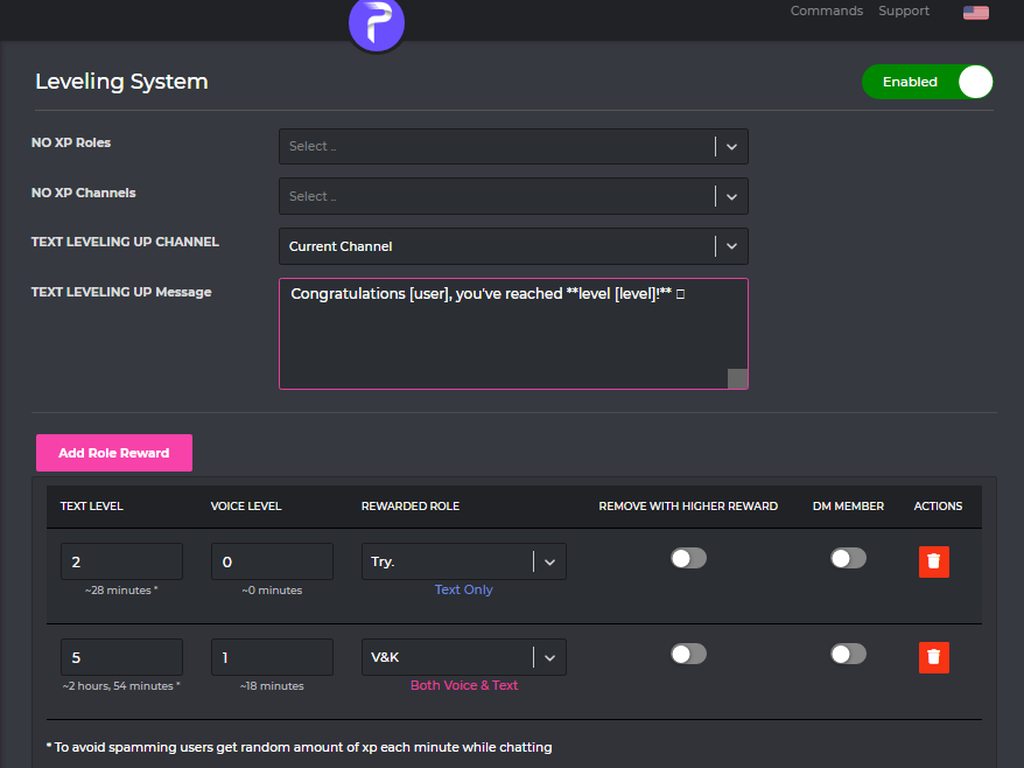
How to activate
1 - https://probot.io/dashboard login to your account and select your server
2 - On the left side click on "Leveling system"
3 - Press "add role reward" and set the required level to get the role
change the settings as you want and this is it ..
Welcome images, moderation, leveling, reaction roles, logs, high quality music and many many more!
 fleet ridge
Thanks
tender iris
You're welcome
west kelp
outer hinge
Yes, I know, but I want to ban forever, I enter #ban person and I check in the s...
you can change the time in the dashboard, just set it for 10 years or something
it's not like they're gonna desperately wait to join back in 10 years
outer hinge
thanks, have a nice evening❤
west kelp
you're welcome, you too
 carmine minnow
i’m not sure if this is a question easily answered, but i tried searching on google and couldn’t find it, is there a way to change the channel which probot posts update messages?? bc for me rn it shows up in general chat but i want to redirect the messages to a moderator/bot channel.
edit :: never mind, i was able to figure out out now, thank you!! i didn’t know there was a dashboard initially.
 native geyser
 cosmic folio
🙄 - I couldn't ban that user. Please check my permissions and role position.
Any suggestions
tender iris
Move the probot role above the user's role
tender iris
You're welcome
 cloud badge
Support how can I get credit in that bot
tender iris
Voting and dailies
cloud badge
How dailies
west kelp
Go to https://probot.io/daily
Welcome images, moderation, leveling, reaction roles, logs, high quality music and many many more!
native geyser
drag the bots role above other roles
server settings -> roles -> click and hold on the role name called probot -> move it all the way up
yw
nocturne flax
can I get a refund for the credits on my disabled discord account?
I can prove It's mine
north hinge
@nocturne flax You can not
lean badgerBOT
:white_check_mark: **@Shiraz. warned! **
north hinge
Did you select the emoji?
 proper portal
hey so I’ve had my server for a while and I just decided to set up the leveling role rewards,
Everyone has levels but I just set up the roles
Do the people who have the level currently get the role too or no?
west kelp
north hinge
Did you select the emoji?
Im literally here dude
north hinge
Oh now iam sorry
west kelp
You need to follow the rules
north hinge
yes, I think you are not there
west kelp
Did you set them up?
north hinge
I will go
west kelp
proper portal
hey so I’ve had my server for a while and I just decided to set up the leveling ...
Hello, they have to get XP (send a message) then the bot will give them the roles
Are you sure it's the right message?
proper portal
west kelp
Hello, they have to get XP (send a message) then the bot will give them the role...
OH
so if someone is already level 30, they just need to send a message and they will get their role reward from level 5?
west kelp
@nocturne flax invite me to your server in DMs
west kelp
proper portal
OH
so if someone is already level 30, they just need to send a message and they...
Yes
If that's how you set it up of course
 unreal lake
!rank
west kelp
Sure thing, feel free to ask help here because I might not be available, but can you try re-adding the reaction role in the dashboard? Could work
Also
Make sure that ProBot has admin
west kelp
unreal lake
MagyR
Can I help you
nocturne flax
هلا
west kelp
#support-ar
nocturne flax
How much i can transfer credit if my account is new?
north hinge
nocturne flax
How much i can transfer credit if my account is new?
@west kelp
west kelp
he got answered in #support-ar
nocturne flax
Where can i get info about prime servers and premium?
 wispy summit
Probot not letting me select message for a role react, any one assist please. I have everything setup

 silent dawn
What is the cooldown for xp gain
Like is there any cooldown for how much xp u can get if ur spamming
west kelp
@silent dawn 2 minutes
silent dawn
west kelp
<@280106858692214784> 2 minutes
So if u send a message every 2 minutes you’ll get the same amount of xp as someone who sends a message every 20 seconds?
west kelp
Yup
silent dawn
Ok thx
 somber bloom
Anyone know if you can log when moderators use the #vkick command
or when they disconnect someone from a vc
 analog quail
i was in a server which had pro bot and whenever u said ligma it would reply with balls
HOW DO I GET PROBOT TO RESPOND TO A MESSGAEEEE
 analog quail
TYSM
 eternal parcel
Hey just paid
With the levelling system is do both voice and text have to reach the same before applying the role
Also any help with Reacion Roles
split needle
eternal parcel
With the levelling system is do both voice and text have to reach the same befor...
Yes both
split needle
eternal parcel
Also any help with Reacion Roles
And reaction roles
go to https://probot.io/dashboard, select your server, go to embed messages module to create and send embed messages for the reaction roles to where you want. Then go to reaction role module to setup the feature on the sent embed messages
Welcome images, moderation, leveling, reaction roles, logs, high quality music and many many more!
 rough sequoia
Hello, probot in my server stopped welcoming new members and I don't know why, although all settings are enabled
anyone knows how to fix it?
split needle
A screenshot of the settings?
rough sequoia
but the last welcome message was 4 months ago
split needle
Then try reupload the welcome image
eternal parcel
Are timers going to be added with custom commands? Would love this to take on Dyno and the others
split needle
eternal parcel
Are timers going to be added with custom commands? Would love this to take on Dy...
No and there isn't custom command yet to add that
rough sequoia
split needle
Then try reupload the welcome image
thank you so much
eternal parcel
is there a way to make both profile and level the same?
 split needle
Profile is not a server thing, it's a global thing
eternal parcel
Is there a way to change tthe voice levels so its not 18 minutes etc but our own time?
split needle
No
eternal parcel
shame
 icy plaza
Hello
 past mural
icy plaza
Hello
past mural
icy plaza
Hello
Hi
hollow tide
Hey friends, can we use Credits to Upgrade to Premium?
 magic perch
is there no way to log who muted which person?
it only seems to log that x person got muted / unmuted
split needle
hollow tide
Hey friends, can we use Credits to Upgrade to Premium?
Yes
split needle
magic perch
it only seems to log that x person got muted / unmuted
There's mod log on the dashboard but I don't know if they did fixed it to work properly
hollow tide
split needle
Yes
Would you please tell me how?
split needle
Go to https://probot.io/premium, click/tap on recharge and select amount, then select credit (last option) amd use that to purchase premium/prime
Welcome images, moderation, leveling, reaction roles, logs, high quality music and many many more!
It would cost a lot credits
hollow tide
split needle
Go to https://probot.io/premium, click/tap on recharge and select amount, then s...
Ohh! Thanks a lot!
nocturne flax
automod doesnt works help
when i tried mute command it works
but when i test automod it doesnt
i muted an alt and when im on the alt i cant send any messages but when i spam on alt the automod wont mute it
woops
 barren coral
Yeah same problem happened to me . The automod doesnt work.even after spamming and sending all caps and all of that
nocturne flax
the role is higher than member and muted
its just the automod that doesnt works
manual moderation works
barren coral
yup
nocturne flax
<@&675070424748654593>
i got probot cus dyno sucks
but now probot's automod doesnt works
split needle
nocturne flax
but when i test automod it doesnt
Bot ignores administrators
 mint drum
how do i start youtube with probot
barren coral
yup and i still can chat in some channels using an alt after manual muting <@&675070424748654593>
nocturne flax
manual muting works for me
split needle
nocturne flax
and it dont work
Maybe try to check about the settings
Set the mute violation count to 1 per day
nocturne flax
i been making discord servers for like 1-2 years
ik the perms stuff
the mute works
mute command works
its jsut the bot wont automod
split needle
mint drum
how do i start youtube with probot
Join a voice channel and use /youtube
nocturne flax
split needle
Maybe try to check about the settings
Set the mute violation count to 1 per day
alr
nope doesnt works
momji
mint drum
split needle
Join a voice channel and use /youtube
not working idk y
split needle
barren coral
yup and i still can chat in some channels using an alt after manual muting <@&67...
Check channel's perm with other roles
And next time don't try to do support work if you don't really know things
nocturne flax
hey
mint drum
do i need nitro?
split needle
nocturne flax
nope doesnt works
A screenshot of the settings?

 split needle
mint drum
not working idk y
split needle
mint drum
not working idk y
Are you on mobile?
If yes then it'll not work since they're not supported
mint drum
no pc
split needle
nocturne flax
Send me an invite to your server in dm
nocturne flax
alr
split needle
mint drum
no pc
Try use with tradition prefix instead
mint drum
what does that mean
split needle
mint drum
what does that mean
The original prefixes
Like for this bot was #
split needle
 edgy lintel
How to activate rep function
edgy lintel
How to activate rep function
It's been disabled by developer
edgy lintel
Why ?
mint drum
ok thank u
edgy lintel
Just curious
edgy lintel
split needle
It's been disabled by developer
Can you tell me why they disabled it !?.. just curious
 thorny burrow
we can't really say.. Only devs
edgy lintel
What's thr use of credits?
thorny burrow
ProBot currency is global, however. you can use this currency in any server to run giveaways, trade it with your friends, etc.. but since trading some items is disallowed by discord and is breaking the discord ToS, we're not responsible for any scams happens to you! this is up to you.. cause of this, we are offering limited ways where you can safely use the currency.
1 } ~ custom your #profile background
2 } ~ custom your #profile badges
3 } ~ custom your #rank background
4 } ~ subscribe to paid version of probot
https://probot.io/premium (note: the cheapest will cost you 375,000 monthly)
#664737031414480896 for more informations.
in case you had any suitable ideas for the credits usages, we're absolutely glad to hear you by #573053418017521664
Welcome images, moderation, leveling, reaction roles, logs, high quality music and many many more!
Welcome images, moderation, leveling, reaction roles, logs, high quality music and many many more!
Welcome images, moderation, leveling, reaction roles, logs, high quality music and many many more!
Welcome images, moderation, leveling, reaction roles, logs, high quality music and many many more!
edgy lintel
thorny burrow
**ProBot currency is global, however. you can use this currency in any server to...
Thanks a lot 😊
thorny burrow
any time
nocturne flax
Why there's 2 probot
split needle
1 paid 1 free
edgy lintel
What's the use of badges ?
split needle
Decoration for your /profile
 fierce girder
It does not work
 edgy lintel
#profile
split needle
fierce girder
It does not work
Enable moderation module
split needle
edgy lintel
#profile
edgy lintel
Where will the badge be placed... If I buy it?
 split needle
After buying, you'll need to select its possition on the top and select which one you want to put there
edgy lintel
split needle
After buying, you'll need to select its possition on the top and select which on...
Thank you
 elfin kite
My welcomer hasn't been working for months. I Assumed it was causee my premium ran out. But I just repaid, and made a quick account to join the server. Still not working : (
split needle
elfin kite
My welcomer hasn't been working for months. I Assumed it was causee my premium r...
Try reupload the welcome image
elfin kite
reuploaded, making quick account from web
oop, they be like "something sus here" Well ya, I made 3 accounts so far, and deleted them all in an hour
:/// L
 strong jewel
Is there any feature
Which allows
To see
Deleted mssg
And edited mssg
I am renovating a se4verr
Redesign
I want it
Last time
I think
I saw that
Feature
In probot
strong jewel
thorny burrow
sorry for the late respond
No probs
thorny burrow
strong jewel

 exotic kettle
Hi, is there any way to loop the whole playlist? We're trying to see which bot could replace groovy in a big server and the playlist needs to loop for it to work.
tender iris
@exotic kettle Not possible. The command only loops 1
 heavy glade
Hello, is it possible to set this up in probot? With the accept rules thing?
 split needle
heavy glade
Hello, is it possible to set this up in probot? With the accept rules thing?
split needle
heavy glade
Hello, is it possible to set this up in probot? With the accept rules thing?
That's discord's feature
heavy glade
split needle
That's discord's feature
Oh okay thanks, I'll look into that!
And also, can I tag @ roles in a message sent from probot?
exotic kettle
tender iris
<@539517296020815902> Not possible. The command only loops 1
Will it become possible in the near future or is it not going to be an option at all?
split needle
heavy glade
And also, can I tag @ roles in a message sent from probot?
Yes by using their id
<@&id>
heavy glade
like this? <@ moderator> (without the space) does not seem to be working
split needle
Missing &
heavy glade
I tried with & too
split needle
And the id, not name
 heavy glade
split needle
And the id, not name
heavy glade
split needle
And the id, not name
Thank you, it's working
 warm sky
can someone under warn list still comment in the server?
tender iris
Yes, because they're not muted
 obsidian crane
Is possible that @lean badger will shut down because he is a music bot and Youtube is putting all the music bots to shut down? Now is shuting down Groovy, and what i understand will afect all the music bots.
tender iris
Not really
We are mainly a moderation bot. So if that happens we will unfortunately remove the music section from our bot
But we'll see what will happen until so
obsidian crane
tender iris
We are mainly a moderation bot. So if that happens we will unfortunately remove ...
k thanks
tender iris
You're welcome
warm sky
tender iris
Yes, because they're not muted
so we dont have to use removewarn?
tender iris
Yes
nova grove
split needle
That's discord's feature
How to do that?
nova grove
heavy glade
Hello, is it possible to set this up in probot? With the accept rules thing?
<@&675070424748654593>
nova grove
tender iris
<@!509756610739175427> Search google for that
Ok
nocturne flax
kaixo ni korearra naiz
nocturne flax
yes
 wide stump
Hi all,
why Pro Bot Dashboard shows me that I got 0 online members on server, and total member number is also 0? I also noticed that today counter for messages in last 24h also shows 0. And this is on both servers I have.
nocturne flax
tender iris
Can i help you?
Laguntza komandoa probotarekin idatzi nuen eta esteka etorri zen
tender iris
Its a visual bug that we're working on fixing @wide stump
@nocturne flax #support-int
wide stump
tender iris
Its a visual bug that we're working on fixing <@!143700393178824704>
Thanks for help. I have to add that support response is amazing.
tender iris
❤️
 deep jungle
hi ya, why i cant add role to reaction roles, it that cuz role have too much ppl?
west kelp
Hello, put the probot role at the top of the roles list
deep jungle
wow... its work. tks for support :3
west kelp
You're welcome
 sand moat
<@&675070424748654593> i need help the bot isnt removing links i want it to delete links though the moderation thing
native geyser
make sure it has required permissions and keep in mind that it wont work against people with admin perms
 unreal slate
<@&675070424748654593> how do you make it so when someone @ everyone a mute get given
 west kelp
disable them in all roles
unreal slate
a server i am admin got spamed everyone because of it
unreal slate
west kelp
disable them in all roles
i did it in member and everyone
hello
anyone there
sand moat
native geyser
make sure it has required permissions and keep in mind that it wont work against...
it is
not sure how to make it work
west kelp
unreal slate
i did it in member and everyone
disable it in all roles
if they can still ping everyone then one of their roles is letting them do it
native geyser
sand moat
not sure how to make it work
as i said it wont work against ppl with admin perms
sand moat
no one on my server has admin but me and my assistant principal
unreal slate
😳
west kelp
unreal slate
does not goes other roles
?
sand moat
native geyser
as i said it wont work against ppl with admin perms
only me and my assistant got admin but the rest it dosnnt
native geyser
invite me in dms please
sand moat
native geyser
invite me in dms please
me
unreal slate
 west kelp
@unreal slate hey, please type your whole message in one sentence
west kelp
unreal slate
that means members can mention everyone
native geyser
sand moat
me
me
sand moat
native geyser
me
i ment do you want me to send it
native geyser
yes
 west kelp
yes
west kelp
you're welcome
 west kelp
@unreal slate invite me to your server
unreal slate
ok
west kelp
fixed
west kelp
np
tender iris
The admins are the highest
 tired crystal
west kelp
tired crystal
west kelp
op game?
 dusky bramble
anyone know why i cant see roles to assign to emojis ?
 tender iris
Move the probot role above the roles you want to show there
dusky bramble
tender iris
Move the probot role above the roles you want to show there
perfect thank you
tender iris
You're welcome
 dapper crow
hi guys i have question .. how can i get my name @dapper crow to number like @1234567890 ? for use u show my profile in msge with probot
native geyser
you mean user id i assume?
dapper crow
ye i think
native geyser
on discord settings enable developer mode
dapper crow
ty very much 🙌
native geyser
yw
hollow tide
Hey friends, does upgrading to Premium by ProBot Credits give some benefits to the Developer?
west kelp
nope
hollow tide
west kelp
nope
Ohkkay! Thanks a lot!
west kelp
yw
magic perch
split needle
There's mod log on the dashboard but I don't know if they did fixed it to work p...
doesn't seem to log vkicks (disconnecting someone from vc), and vmutes only log whether someone was muted or not, not the person who muted them:
 tender iris
#help role
lean badgerBOT
tender iris
#help role
**Command: role**
Add/remove a role(s) for a user.
**Usage:**
#role [user] (+/-)[roles names separated by comma]
#role all (+/-)[role name]
**Examples:**
#role @tender iris Admin
#role all members
#role bots System
#role humans members

 sacred cedar
#help give
split needle
nocturne flax
What is erorr?
Don't mention role, only use its name
split needle
sacred cedar
#help give
?
split needle
This bot does not have give away feature
split needle
Then not ask in this channel
This place only mean for @lean badger
And google exist so search on that instead
sacred cedar
Ok thanks
nocturne flax
split needle
Don't mention role, only use its name
It gives the same error again
split needle
nocturne flax
It gives the same error again
How was the command you used?
nocturne flax
\role all members name role dont type @
split needle
Bruh
lean badgerBOT
**Command: role**
Add/remove a role(s) for a user.
**Usage:**
#role [user] (+/-)[roles names separated by comma]
#role all (+/-)[role name]
**Examples:**
#role @split needle Admin
#role all members
#role bots System
#role humans members
nocturne flax
We changed the settings to /
split needle
This is command example, not what you copy exactly
Replace the members with the role name you want to give because it's an example name
Example: /role all cool role
nocturne flax
Sorry man how to remove all role members?
 night fable
i have questions, is this where i ask? my question is this, i used the bot to setup voice chat ranks that automatically give members roles when they reach certain vc ranks, it moves in increments of 5 levels. what is happening is that when certain members reach level 10 voice chat, the role isnt automatically givento them, but for others, they get the role automatically, so why is the bot skipping members even though the have reached the level for the role?
tender iris
@night fable That means the users who got the role typed in chat. Aka gained text xp.
So the rest needs to do the same
split needle
nocturne flax
Sorry man how to remove all role members?
Add - right before the role name without space
night fable
tender iris
<@!220388145886134272> That means the users who got the role typed in chat. Aka ...
but they way i set it in the dashboard, the dont need any text exp level to get the vc level role
its set to level 0 text, and level 10 vc
for the role requirement
tender iris
They just need to gain text xp once
tender iris
For the bot to acknowledge they've reached the required voice level
 lethal sphinx
Hi
I don't understand this perfectly

can someone explain me please on how it works thanks in advance
west kelp
Required levels for the role reward
lethal sphinx
Ikr but what does it mean by text level "1" = 7 minutes
west kelp
Ah, that's the estimated time for you to reach that level
lethal sphinx

so for example to reach level 10 you need to spend 24h and 5h in the voice chat am i right
lethal sphinx
thank you sir
west kelp
You're welcome
 distant mist
How do you change what channel auto-mod actions are logged in?
split needle
#ban @nocturne flax fake link
lean badgerBOT
split needle
#ban <@456226577798135808> fake link
:white_check_mark: fane. banned from the server! :airplane:
west kelp
distant mist
How do you change what channel auto-mod actions are logged in?
From logs
 glad thunder
Heya, is there any way to play spotify playlists with ProBot?? Or is it just YouTube??
west kelp
Not possible
glad thunder
Ah fair enough, ty
somber bloom
anyone know if there's any valid coupon codes that give you a discount?

conversion to my currency ended up being a bit pricy
 clear plover
Hi!
split needle
somber bloom
anyone know if there's any valid coupon codes that give you a discount?
No
@nocturne flax @clear plover #chat-en
nocturne flax
What is different between the light probot and the dark probot
 west kelp
The top one is the free bot and the bottom one is the prime version
west kelp
ProBot currency
nocturne flax
How do we earn credit
west kelp
You can claim your dailies at https://probot.io/daily
And you can vote
Welcome images, moderation, leveling, reaction roles, logs, high quality music and many many more!
Vote
lean badgerBOT
@west kelp https://top.gg/bot/probot/vote
 west kelp
Here
nocturne flax
Voted
somber bloom
Anyone know how to log moderator actions such as mute / disconnecting from vc, etc
got premium thinking it would display the person who muted someone but it didn't
 west kelp
Mute can be logged through Role Update
somber bloom
Where can I find that option?
west kelp
It doesn't specificly say that someone used a mute command but you can tell that the mute command was used
In Logs, "Member Roles Update"
nocturne flax
Hello
Hmmm
Why pro bot is deleting me 500 messages when I asked to delete just 10 for example?!
somber bloom
west kelp
In Logs, "Member Roles Update"
That would be really spammy for my server since it has 13 active voice chats where members are given a role each time they enter it 😔
not sure if there's a way to disable x roles from being logged
west kelp
Nope
west kelp
nocturne flax
Hello
Hmmm
Why pro bot is deleting me 500 messages when I asked to delete just...
What did you type
nocturne flax
#clear 10
west kelp
Did it do that multiple times
nocturne flax
Yes
west kelp
Try using /clear instead
 west kelp
You're welcome
 shadow cape
I my no Russian
magic perch
I thought that this option would log all moderator commands, but apparently most of the moderator commands aren't logged. Anyone know if there's any way I can log them?
 shadow cape
Chat errado Sorry
magic perch
I have the prime bot and it still doesn't work
elfin kite
Hey, so I got my welcome message fixed, but it won't do the [inviter] placeholder thing. Any chance I can get a refund for my premium bot?
split needle
magic perch
I thought that this option would log all moderator commands, but apparently most...
That log isn't done yet so it will not work
split needle
elfin kite
Hey, so I got my welcome message fixed, but it won't do the [inviter] placeholde...
Did you used it right or you're just still using the normal bot?
shadow cape
split needle
<@878461637760253962> <#743366318509654068>
I do not speak Russian
split needle
shadow cape
I do not speak Russian
That's international channel
elfin kite
got the premium & all. But even if you are so kind as to help me get it fixed. Lowkey would prefer a refund
split needle
elfin kite
got the premium & all. But even if you are so kind as to help me get it fixed. L...
You could dm @deep sierra to ask for a refund
elfin kite
tthanks ^_^
@deep sierra
Salutations and greetings! Sorry to bother, I was sent to you to talk about getting a refund
split needle
You can just dm him
elfin kite
it said I need him as a friend
magic perch
split needle
That log isn't done yet so it will not work
oh, so it's still being worked on?
elfin kite
 magic perch
nice, I got the premium version mostly to log voice mutes and kicks, hopefully it gets worked on soon 🙂
split needle
Check your settings @elfin kite
elfin kite
Checked, enabled the messaging from shared servers. Now gonna wait, greatly appreciate all your help!
magic perch
when I type #24/7 the bot says it's only enabled in premium plans
does prime not count as a premium plan
unreal slate
how to do you make it so probot can onlu play music in 1 vc
elfin kite
unreal slate
how to do you make it so probot can onlu play music in 1 vc
disable probot's permission to access any other vc
unreal slate
😳
elfin kite
channel settings > permissions > probot > and disable it all
split needle
magic perch
does prime not count as a premium plan
Yea
west kelp
@elfin kite read channel rules??
elfin kite
Oh, am I not allowed to help other people? My bad sorry
west kelp
You are, but you have to ping the support role and wait 5 minutes
magic perch
split needle
Yea
Oh, so I'd have to pay more for this feature?

thought vip = premium 😔
split needle
magic perch
Oh, so I'd have to pay more for this feature?
No need to
24/7 option is enabled as default for any paid plan
magic perch
oh, you know how i can summon the bot to my vc?
split needle
Just use the play command
magic perch
ah thanks
 primal relic
Give me the link to vote
west kelp
Vote
lean badgerBOT
@west kelp https://top.gg/bot/probot/vote
magic perch
Sorry to bother you, do you know the command to change the bots profile picture?
 gusty gate
So how can I set the mute-role?
magic perch
Can't seem to find it
split needle
magic perch
Sorry to bother you, do you know the command to change the bots profile picture?
Premium only feature
west kelp
gusty gate
So how can I set the mute-role?
It's automatically added when you invite the bot
magic perch
split needle
Premium only feature
oh, not a prime feature?
gusty gate
west kelp
It's automatically added when you invite the bot
Can i rename it maybe?
split needle
magic perch
oh, not a prime feature?
Prime is still a public version of the bot which is being used in multiple servers
magic perch
hm didn't realize that there was another purchase plan
split needle
There's premium bot under the prime server one
split needle
You can ask for a plan transfering I think because you can't upgrade from prime to premium
west kelp
gusty gate
Can i rename it maybe?
No
 long pond

Um wtf is wrong with this
Im getting this msg from like 8 days
Got like 50+ msgs
All the same
Probot high
split needle
Probot high
long pond
Bruh
split needle
Tell server owner temporary disable dm member upon getting reward roles
 long pond
split needle
Tell server owner temporary disable dm member upon getting reward roles
long pond
split needle
Tell server owner temporary disable dm member upon getting reward roles
Im the owner
So like
long pond

I got this msg
Of getting gold
And then
It keeps spamming me of silver messages
 long pond
split needle
Did you got the role yet?
long pond
split needle
Did you got the role yet?
For some reason i have both
long pond
Been 13 days
split needle
The bot might used too much drug
Disable dm member
west kelp
it's role rewards in a server he's in
 high quiver
Hey guys, question about the anti raid. How customizable is it? Is there any documention about that?
sacred cedar
I need all the order of the probot
long pond
and its still sending me messages help me
 west kelp
high quiver
Hey guys, question about the anti raid. How customizable is it? Is there any doc...
west kelp
high quiver
Hey guys, question about the anti raid. How customizable is it? Is there any doc...
What is Anti-Raid?
NOTE: This feature is only available for VIP bots. (Prime and Premium)
This feature will automatically deal with server raiders, and it is even customizable.
How can I set it up?
1- Select the minimum age for potential raiders. (Example: 2 months)
2- Select the minimum amount of potential raiders. (Example: 10)
3- Select the time that the bot will start the anti-raid. (Example: 1 minute)
So now, if 10 accounts join in the span of 1 minute and all of them are under 2 months old, the anti-raid will start.
4- Select the punishment for the potential raiders.
You can even send a warning message for server staff so they can notice.
high quiver
west kelp
**What is Anti-Raid?**
**NOTE**: This feature is only available for VIP bots. (...
can you even go under 1 minute?
because i feel like 1 minute is already enough sometimes to get raided
 nimble orbit
Hello, I would like to remove my probot from my server but you must not clear
high quiver
west kelp
yes you can
how far can you go down?
west kelp
nimble orbit
Hello, I would like to remove my probot from my server but you must not clear
what's the issue?
west kelp
high quiver
how far can you go down?
one second
high quiver
damn
sacred cedar
Hello
nimble orbit
@west kelp I can't remove it I kick it the ban it doesn't work
west kelp
?
west kelp
يعمري في روم للدعم العربي
#support-ar
sacred cedar
west kelp
يعمري في روم للدعم العربي
<#743365286132056094>
I know bro
 rough elbow
Is there a tutorial how to create reaction roles
west kelp
How do I set up reaction roles?
1- Go to the dashboard https://probot.io/dashboard then select your server.
2- Select "Reaction Roles"
3- Click on "Add Message", then select an embed. You can manage these embeds by clicking on the "Embed Messages" button.
4- Click on "Choose a message", and then select a message where the selected embed was sent.
To add a reaction role, click on "Add Reaction".
There are 3 different types of a reaction role message:
- Switch - Upon reacting, you will get the role, and upon removing the reaction, the role will be removed as well.
- Give - Upon reacting, you will get the role, and upon removing the reaction, the role won't be removed.
- Take - Upon reacting, the role will be removed from you, and upon removing the reaction, you won't get it back.
Welcome images, moderation, leveling, reaction roles, logs, high quality music and many many more!
 gray otter
Ñ
west kelp
high quiver
where can i add the probot for prime?
https://probot.io/premium -> Recharge
Welcome images, moderation, leveling, reaction roles, logs, high quality music and many many more!
high quiver
thank uu
west kelp
yw
high quiver
damn i am hyped
we had over 2000 bots raiding us in the last days kekw
anti raid was working perfect i guess
north hinge
<@&675070424748654593> ^
west kelp
north hinge
<@&675070424748654593> ^
??
 nocturne wraith
Hi there
I have a question about pro bot reaction roles
<@&675070424748654593>
So when I select a reaction and then I dissect the react the role doesn’t go away how come
nocturne wraith
Can I send a vid
west kelp
Yes
 quartz wagon
Good Morning, how do I change the server in which the probot premium is? I created a second server and I wanna move it. I already paid for the subscription and dont wanna pay for a second server