#support-en
1 messages · Page 180 of 1
 odd mural
 lyric frost
 brave topaz
You need to be patient. Someone will respond you when available.
 dusky hatch
I'm not sure what I did differently but it works! I appreciate your help man, thank you! @brave topaz
brave topaz
No problem!
 nocturne flax
is there a way to delete the dms between me and probot
I want to delete the messages probot sent me but idk how
please help me this is critical
<@&675070424748654593>
nocturne flax
I'm cooked
nocturne flax
nocturne flax
is there a way to delete the dms between me and probot
.
No
but someone alr answered and said no
yeah
 versed pendant
I got 18hrs or something for leveling but it's popping every 10 minutes?
How I can slow it?
 glad swan
Marked as spoiler to save peoples eyes. Warning: White ss.
So.. Shortly speaking. Can someone explain to me what Meow just happened?
I know I was updating the bot and its roles to be added when a user enters the server (its an scp related polish server. I wanted to give these separators between divisions and its roles) I went for a bath and I'm back to this view.
What did I do??? Did I clicked it too fast? Clicked Save button too many times, bc it was not responding fast enough due my poor network connection? Why did it blocked me?
PS: Pls ping me so I won't miss the answer.

 carmine zealot
I paid for the Premium Tier 2 but I don't see any bot to add to the server.


<@&675070424748654593> sorry for ping
 warm dew
glad swan
> Marked as spoiler to save peoples eyes. **Warning: White ss.**
So.. Shortly s...
warm dew
glad swan
> Marked as spoiler to save peoples eyes. **Warning: White ss.**
So.. Shortly s...
Whenever this happens, I just use a VPN. Works fine
brave topaz
carmine zealot
I paid for the Premium Tier 2 but I don't see any bot to add to the server.
Answered elsewhere.
brave topaz
glad swan
> Marked as spoiler to save peoples eyes. **Warning: White ss.**
So.. Shortly s...
Wait for a while (~30-60 mins) before trying to access the site again if refreshing doesn't work.
brave topaz
warm dew
Whenever this happens, I just use a VPN. Works fine
Read the channel topic please.
brave topaz
versed pendant
I got 18hrs or something for leveling but it's popping every 10 minutes?
What do you mean?
warm dew
brave topaz
Read the channel topic please.
What about it
brave topaz
You need to mention the support role if you want to provide support.
 carmine arch
what is the dashboard
 smoky temple
carmine arch
what is the dashboard
smoky temple
carmine arch
what is the dashboard
<@&675070424748654593>
glad swan
warm dew
Whenever this happens, I just use a VPN. Works fine
I don't use VPN..
warm dew
glad swan
I don't use VPN..
That's on you
 versed pendant
brave topaz
What do you mean?
versed pendant
brave topaz
What do you mean?
The leveling up is so fast at first message user gets level up and soon again. I don't want it as fast, even I have set it 18h hours something and it's how it is.
 thorny inlet
Hi i have problem with points, because when im on channel my points doesn't count

 paper rune
Twitch feature is giving me some trouble filling in I believe all the info necessary is there but when I go to save it says, "please try again later" I have done this 3 times now on separate days thinking it might be an outage but maybe the error message is a bit vague? I am thinking now that maybe im missing input somewhere. am I missing something?
 brave topaz
Twitch module doesn't accept new setups at the moment, sorry for the inconvenience.
paper rune
ah...
brave topaz
versed pendant
The leveling up is so fast at first message user gets level up and soon again. I...
Can I see your setup?
 leaden belfry
hello
i wanna track this transion

my discord token account has been hacked i wanna just where do the transion
 sage flint
leaden belfry
my discord token account has been hacked i wanna just where do the transion
sage flint
leaden belfry
my discord token account has been hacked i wanna just where do the transion
We can’t help you with that.
leaden belfry
sage flint
We can’t help you with that.
no problem
brave topaz
#chat-ar
 small smelt
sore
carmine zealot
I paid for the Premium Tier 2 but I don't see any bot to add to the server.
<@&675070424748654593>

 brave topaz
Stick to #support-es please.
carmine zealot
I also speak English and es support has not been helpful.
I can't ask for a refund either because I don't have a premium role.
Invoice number 11303F85-0001
 muted ridge
sage flint
We can’t help you with that.
muted ridge
sage flint
We can’t help you with that.
The bot premium2846 disappeared from my account and I can't renew the subscription.

 muted socket
anyone else having problems where you enable the welcome message in probot + send welcome image, then it sends for a few people then all of a sudden stops? i have to keep disabling it and then enabling it again..
 lean badgerBOT
muted socket
anyone else having problems where you enable the welcome message in probot + sen...
lean badgerBOT
muted socket
anyone else having problems where you enable the welcome message in probot + sen...
We noticed that you are a premium user, for faster response go to #premium-support
 scenic forge
is it possible to get embedded messages into a forum channel, It would make it so much more organized for my FAQ channel with message builder
versed pendant
brave topaz
Can I see your setup?

 uneven atlas
what's new?
brave topaz
ProBot doesn't have a music system.
brave topaz
 worthy summit
why in the gift to give me cridit do not work
worthy summit
why in the gift to give me cridit do not work
Did you read the error message?
brave topaz
uneven atlas
what's new?
As was stated, we'll keep you updated. We haven't heard anything yet.
brave topaz
scenic forge
is it possible to get embedded messages into a forum channel, It would make it s...
ProBot doesn't support forum channels at the moment, sorry for the inconvenience.
scenic forge
All good
brave topaz
muted socket
anyone else having problems where you enable the welcome message in probot + sen...
Can you reset the XP of all members with the /reset command and check if this happens again?
worthy summit
brave topaz
Did you read the error message?
yes
want to see it?
mention me if it is a yes
brave topaz
I'm not sure what you mean. As the error message says, daily is temporary disabled.
worthy summit
brave topaz
I'm not sure what you mean. As the error message says, daily is temporary disabl...
ye
brave topaz
So there's no reason I need to ask you for a screenshot of something we've been repeating to users for months. 
worthy summit
brave topaz
So there's no reason I need to ask you for a screenshot of something we've been ...
wwhat is it 🤨
brave topaz
worthy summit
wwhat is it 🤨
Daily is temporarily disabled. You cannot get credits.
brave topaz
Management decision. Though you have the possibility to get credits with a golden/diamond membership.
worthy summit
that means i need to pay
brave topaz
That's correct.

 prime eagle
Hello
brave topaz
worthy summit
is there any way
Without paying? No.
brave topaz
prime eagle
Hello
Hello, do you need help? Otherwise head to #chat-en please.
worthy summit
brave topaz
Without paying? No.
how to get cridit to get nitro and stuff and why everything not cheap visa for 1m WHY??
prime eagle
brave topaz
Hello, do you need help? Otherwise head to <#608047244276531245> please.
How I change the pic in #id and #profile commands
brave topaz
worthy summit
how to get cridit to get nitro and stuff and why everything not cheap visa for 1...
I won't discuss this because I'm just a member of the support team. As I said, this is a management decision.
brave topaz
prime eagle
How I change the pic in #id and #profile commands
 How can I use credits?
worthy summit
but whats the sneaky ways to get nitro
brave topaz
worthy summit
but whats the sneaky ways to get nitro
This is the ProBot support server, you are in the wrong place.
brave topaz
Np.
scenic forge
is it possible to make auto responder reply with embedded messages
brave topaz
Not currently. Feel free to suggest it in #1234622065810739291 though.
scenic forge
Will do ty
brave topaz
Of course.
 trim pine
hello
 crude spire
Any indication of when dailies will be back up?
brave topaz
trim pine
hello
Hello, do you need help? Otherwise head to #chat-en please.
brave topaz
crude spire
Any indication of when dailies will be back up?
There's no estimated time for that, no.
crude spire
I see
Is there a specific reason why they're temporarily disabled?
Or are you guys rolling out an update?
brave topaz
crude spire
Is there a specific reason why they're temporarily disabled?
Management decision. This has nothing to do with any update.
 tough tusk
Hey guys, I'm having an issue with ProBot and Discord's AutoMod. I added a few websites for the bot to block, but it doesn't add them to Discord's AutoMod rules
tough tusk
I've also added some bad words and it doesn't register on discord, the bot is supposed to add his own rules

This is how it looks in my other server where it works
 tough tusk
Hey guys, I'm having an issue with ProBot and Discord's AutoMod. I added a few w...
tough tusk
tough tusk
Hey guys, I'm having an issue with ProBot and Discord's AutoMod. I added a few w...
ProBot has the admin permission and all the others are checked too
scenic forge
tough tusk
Hey guys, I'm having an issue with ProBot and Discord's AutoMod. I added a few w...
Are you wanting to whitelist or blacklist websites
tough tusk
scenic forge
Are you wanting to whitelist or blacklist websites
Blacklist
I put the words and the links in ProBot but it doesn’t create those rules inside discord
scenic forge
Ah, I’ve only done whitelist for tenor/gifs. If you wanna dm websites I can test it on mine and see if I can find a solution
scenic forge
tough tusk
I put the words and the links in ProBot but it doesn’t create those rules inside...
Have you tested the links/words yourself or did you have someone else test it
 raven cosmos
I tried but still not updating. Sorry for the delay.
tough tusk
scenic forge
Have you tested the links/words yourself or did you have someone else test it
Yes and it didn’t delete them
scenic forge
Owner/admin can bypass it
tough tusk
They were regular members
scenic forge
Ah
tough tusk
There’s a problem between the integration of AutoMod and ProBot, because the scanning is powered by AutoMod
It’s supposed to add the rules itself like it does here

That’s my other server where it does work
scenic forge
Ah ur using build in auto mod?
 scenic forge
Have you added the words to Probot dashboard
 digital ledge
how come some people can use daily but others cant
tough tusk
scenic forge
Have you added the words to Probot dashboard
Yes, and I saved the settings
Now ProBot is supposed to add them to discord
scenic forge
I don’t remember enabling discord auto mod when using Probot, might be overriding something. Maybe try disabling the built in one idk
tough tusk
Check your settings, you should see it
The built in automod isn’t working, but that’s the point
ProBot is supposed to make the rules inside AutoMod and add all the blacklisted words/links
muted ridge
muted ridge
The bot premium2846 disappeared from my account and I can't renew the subscript...
<@&675070424748654593> Any solution for me? please
scenic forge
No ping
nocturne flax
scenic forge
No ping
You can ping read the rules in the channel caption pls
nocturne flax
muted ridge
<@&675070424748654593> Any solution for me? please
@flat spire pls give him the role for #premium-support
nocturne flax
Dw
 flat spire
nocturne flax
<@741448125318824017> pls give him the role for <#1004836965276987443>
flat spire
nocturne flax
<@741448125318824017> pls give him the role for <#1004836965276987443>
already have a ticket
nocturne flax
👍
 timber hemlock
@flat spire
Hello, how are you? Can you, my dear brother, give me a link to the website for the simple ID that appears next to your username?
 brave topaz
timber hemlock
<@741448125318824017>
Hello, how are you? Can you, my dear brother, give me a l...
brave topaz
timber hemlock
<@741448125318824017>
Hello, how are you? Can you, my dear brother, give me a l...
This is for ProBot support, head to #chat-en please.

 floral current
 static raven
<@749895975694499930>
static raven
<@749895975694499930>
Error 1015 / "You are being rate limited..." / "Too many requests..."
You got restricted due to excessive traffic, possible causes of this are reloading too many times, clicking buttons or switching pages too fast.
Wait at least half an hour before accessing the site again. If you keep trying to access the website, the block may take longer.
static raven
floral current
# Error 1015 / "You are being rate limited..." / "Too many requests..."
You got ...
Ok thanks
floral current
static raven
Ok thanks
Anytime
 karmic skiff
I'm trying to set autorole but bot always shows an error that you must have higher role even though I'm admin
brave topaz
karmic skiff
I'm trying to set autorole but bot always shows an error that you must have hig...
That error means that the ProBot role has to be above all roles in your server settings > roles.
karmic skiff
Oh
carmine arch
how to set welcome messege
brave topaz
https://probot.io/dashboard > your server > welcome & goodbye.
More info: https://docs.probot.io/docs/modules/welcome
karmic skiff
brave topaz
That error means that the ProBot role has to be above all roles in *your server ...
It isn't working showing same error I've granted all the permission even administrator too
 jolly quail
Sorry for barging into the convo; would the role list also be why, even when I use /lock reason:[], some users (that are definitely below ProBot in their assigned roles) can still post messages in the locked channels?
 oblique elbow
jolly quail
Sorry for barging into the convo; would the role list also be why, even when I u...
oblique elbow
jolly quail
Sorry for barging into the convo; would the role list also be why, even when I u...
Could be the reason, that they have writing permission from another role, which is set in the channel specified permission settings.
If your native language is turkish move to https://discord.com/channels/224308865427046402/664951350228156436
jolly quail
I'm fine with English, but thank you! 🙂
jolly quail
oblique elbow
Could be the reason, that they have writing permission from another role, which ...
Hm, should I set "Send messages" to non-defined, instead of permitted, then? Would that solve the issue, do you think?
karmic skiff
brave topaz
Can I see your role list?
 brave topaz
karmic skiff
brave topaz
karmic skiff
Which role would you like to set as the autorole?
karmic skiff
member
brave topaz
Move ProBot role above member role then.
karmic skiff
how can i do that
brave topaz
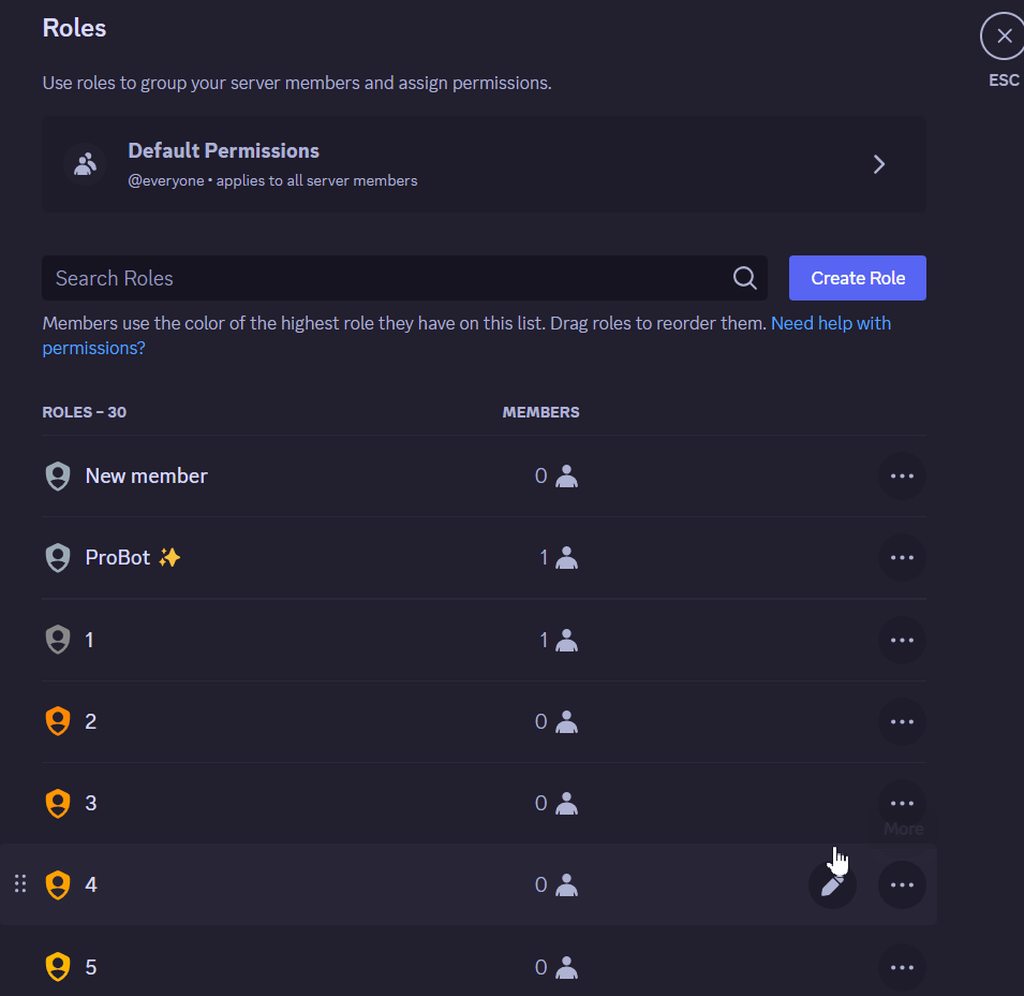 karmic skiff
oh thx
brave topaz
Np.
 flat zinc
can i set cooldown in ar ?
brave topaz
What do you mean?
 warped reef
i jus got blocked to be able to go in the site isn't my first time using the bot & i need help
flat zinc
brave topaz
What do you mean?
like a cooldown for the autoresponder, like i have put hi in autoresponder and in chat ppl spam the ar (autoresponder)
so i need the bot not say anything for 3 sec or 5
brave topaz
warped reef
i jus got blocked to be able to go in the site isn't my first time using the bot...
Wait for a while (~30-60 mins) before trying to access the site again if refreshing doesn't work.
brave topaz
flat zinc
like a cooldown for the autoresponder, like i have put hi in autoresponder and i...
That's not possible, sorry for the inconvenience.
flat zinc
ok
 crimson patio
hello
Can i ping a server's channel in a welcome text?
brave topaz
<#ChannelID> should work. :)
crimson patio
thank you
brave topaz
@unborn stream this isn't a place for that, sorry.
brave topaz
crimson patio
thank you
No problem.
 marsh moth
Hey
Why i can't get daily rewards when I enter the website it says disabled
I didn't do anything wrong why is it happening?
brave topaz
It's disabled for everyone, management decision.
marsh moth
Is it enable again?
 brave topaz
marsh moth
Is it enable again?
brave topaz
marsh moth
Is it enable again?
Probably, but there's no estimated time for that.
brave topaz
 vast ivy
MY friend can claim his daily
vast ivy
MY friend can claim his daily
I doubt that since it's disabled for everyone.
 fervent sky
.
 latent lark
how do I disable a spcecific command?
brave topaz
latent lark
how do I disable a spcecific command?
From the dashboard.
brave topaz
 ashen cargo
<@155037590859284481>
ashen cargo
<@155037590859284481>
Do not ping developers without any reason please.
latent lark
brave topaz
From the [dashboard](<https://probot.io/dashboard>).
Thanks!
brave topaz
No prob!
ashen cargo
brave topaz
Do not ping developers without any reason please.
No just i look new owner probot
brave topaz
ProBot is owned by a company, not by a person.
ashen cargo
brave topaz
ProBot is owned by a company, not by a person.
Arab say we this buy probot and have a photo
Look

 shrewd drum
Can I take a profile picture of myself?
oblique elbow
shrewd drum
Can I take a profile picture of myself?
That's your decision if you like to reveal yourself or not - this's nothing related to ProBot 🙄
shrewd drum
oblique elbow
That's your decision if you like to reveal yourself or not - this's nothing rela...
sorry
Thanks
 drifting stag
oblique elbow
That's your decision if you like to reveal yourself or not - this's nothing rela...
drifting stag
oblique elbow
That's your decision if you like to reveal yourself or not - this's nothing rela...
😨
oblique elbow
drifting stag
😨
How may I help you?
sage flint
Stop falling into fake news spread on intermet, also this is not proper channel for such staff.
 chilly wolf
Why when I write the /rank command or the /profile command, nothing is sent in the /profile command, and in the /rank command it sends an empty file like this one with the message?


 golden ermine
Hi
lean badgerBOT
golden ermine
Hi
We noticed that you are a premium user, for faster response go to #premium-support
oblique elbow
chilly wolf
May you please try it again in #commands 🙂 it works for me
chilly wolf
oblique elbow
May you please try it again in <#771147667660996618> 🙂 it works for me
I tried for a whole week and two days in Arabic support but they just wasted my time and I forgot to say that even my picture was erased from the dashboard😭
 digital ledge
@sage flint how do you do that in your about me 😭
digital ledge
oh mb gang
brave topaz
Yes?
 viral wadi
can we go in a voice ch to show you?
brave topaz
No
 brave topaz
Twitch module doesn't accept new setups at the moment, sorry for the inconvenience.
 oblique elbow
Read again what Dymidless wrote
viral wadi
können wir nicht deutsch reden bitte
oblique elbow
#support-int
 languid lark
I recently added Probot Prime to my server and now am having issues with reaction roles. I also want to stop the bot from dming members if there's an issue
 lean badgerBOT
languid lark
I recently added Probot Prime to my server and now am having issues with reactio...
lean badgerBOT
languid lark
I recently added Probot Prime to my server and now am having issues with reactio...
We noticed that you are a premium user, for faster response go to #premium-support
 oblique elbow
 hollow vale
i did this and everything but its not showing up
hollow vale
i did this and everything but its not showing up
The maximum file size of the image is 1 MB - check this pls
raven cosmos
My welcome message is still not posting despite toggling it on and off and switching where it was to post.
 plush ember
Why ??? Please help me
 floral current
plush ember
Why ??? Please help me
floral current
plush ember
Why ??? Please help me
Error 1015 / "You are being rate limited..." / "Too many requests..."
You got restricted due to excessive traffic, possible causes of this are reloading too many times, clicking buttons or switching pages too fast.
Wait at least half an hour before accessing the site again. If you keep trying to access the website, the block may take longer.
floral current
raven cosmos
My welcome message is still not posting despite toggling it on and off and switc...
1/ Check the permissions of ProBot ( Like Administrator )
if still the same problem
2/ Try to kick the bot and add it again
plush ember
floral current
# Error 1015 / "You are being rate limited..." / "Too many requests..."
You got ...
Ty
floral current
plush ember
Ty
Anytime <33
 nova kernel
Someone help me, ProBot is offline on my server @oblique elbow
floral current
nova kernel
Someone help me, ProBot is offline on my server <@851507992259199006>
Please give me your server id
 hollow aurora
floral current
Please give me your server id
hollow aurora
floral current
Please give me your server id
I'm on another account
1213534679857369149
floral current
hollow aurora
1213534679857369149
Okay, i will escalate the matter to the programmers
hollow aurora
floral current
Okay, i will escalate the matter to the programmers
Okay, I'm waiting, thank you.
floral current
hollow aurora
Okay, I'm waiting, thank you.
Welcome <33
nocturne flax
Can we disable /roles command?
smoky temple
nocturne flax
Can we disable /roles command?
<@&675070424748654593>
 oblique elbow
smoky temple
oblique elbow
smoky temple
No not the /role command! The /role command is the command for good giving and removing roles.
To disable a command switch off the the slide button at its dashboard setting.
smoky temple
oblique elbow
No not the /role command! The /role command is the command for good giving and r...
Sorry I didn't notice that
 smoky temple
smoky temple
smoky temple
He meant this command

 oblique elbow
 primal sorrel
How can I invite him after buying this?
primal sorrel
How can I invite him after buying this?
Choose the server where you like to use the bot and tap on „Use premium“
primal sorrel
oblique elbow
Choose the server where you like to use the bot and tap on „Use premium“
I did not see
oblique elbow
primal sorrel
I did not see
Huh?
Btw what is your native language?
oblique elbow
Please answer my question
primal sorrel
oblique elbow
Choose the server where you like to use the bot and tap on „Use premium“
I don't see the premium place that could useSenior
primal sorrel
oblique elbow
Please answer my question
what
oblique elbow
We have international support #support-int move there and write in your language please there!
primal sorrel
Good
brave topaz
You can DM @surreal jetty
 indigo kraken
hi
brave topaz
indigo kraken
hi
Hi there, do you need help? Otherwise head to #chat-en
 vagrant grove
how does text level and voice level works?

<@&675070424748654593>
please ping me or dm if you want to help me
 somber trout
why rate limit? i just upload image and... it display rate limit
 oblique elbow
somber trout
why rate limit? i just upload image and... it display rate limit
oblique elbow
somber trout
why rate limit? i just upload image and... it display rate limit
Error 1015 / "You are being rate limited..." / "Too many requests..."
You got restricted due to excessive traffic, possible causes of this are reloading too many times, clicking buttons or switching pages too fast.
Wait at least half an hour before accessing the site again. If you keep trying to access the website, the block may take longer.
 visual jacinth
Why most of time when somebody left its says unknown user? What is that please fix it or let me know what should i do
Thanks
 somber trout
oblique elbow
# Error 1015 / "You are being rate limited..." / "Too many requests..."
You got ...
somber trout
oblique elbow
# Error 1015 / "You are being rate limited..." / "Too many requests..."
You got ...
thx
oblique elbow
visual jacinth
Why most of time when somebody left its says unknown user? What is that please f...
This’s related to Discord not to ProBot.
This is happening when your client didn’t load the userinfos if the shown user. Discord handled this before with showing the ID, now they are displaying it with unknown user
 spiral hare
Hi, can anyone help me pls? My pro bot on my discord channel refuses to connect with my Twitch stream account, so I cannot make notifications for my stream starting. Thank you
somber trout
probot is broken? i just set welcome msg. but it doesn't work

 oblique elbow
spiral hare
Hi, can anyone help me pls? My pro bot on my discord channel refuses to connect ...
oblique elbow
spiral hare
Hi, can anyone help me pls? My pro bot on my discord channel refuses to connect ...
The twitch feature is currently disabled and in maintenance.
oblique elbow
somber trout
probot is broken? i just set welcome msg. but it doesn't work
Did you check if ProBot has the required permissions?
somber trout
oblique elbow
Did you check if ProBot has the required permissions?
admin
 oblique elbow
somber trout
admin
oblique elbow
somber trout
admin
Ok 👍 show me a uncut screenshot of the dashboard setting
somber trout
oblique elbow
Ok 👍 show me a uncut screenshot of the dashboard setting


do i need to change to english?

 spiral hare
oblique elbow
The twitch feature is currently disabled and in maintenance.
spiral hare
oblique elbow
The twitch feature is currently disabled and in maintenance.
uhuh, I see, so that is the reason 😄 Well, it is still on the pro bot page as the opportunity to set and there is no note set for users to be notified about this. Thank you 🙂
oblique elbow
somber trout
The image file size should not be greater than 1 MB!
somber trout
oblique elbow
The image file size should not be greater than 1 MB!
ok i try it
probot is loading

why
i cant enter it my friend too
oblique elbow
Did you cleared cache and 🍪 s?
somber trout
oblique elbow
Did you cleared cache and 🍪 s?
okk i clear now
fixed thx !!


chinese text
why
unicode?
vagrant grove
how does text level and voice level works?
 oblique elbow
vagrant grove
how does text level and voice level works?
oblique elbow
vagrant grove
how does text level and voice level works?

With ProBot levelling system, active server members will be automatically rewarded with extraordinary level roles, privileged permissions, and access to mystery channels once they reach a specific level!
vagrant grove
so if i set text level to 5 and make a role for level 5 when he will get to level he will get level 5 role automatically
sry for bad english
somber trout
somber trout
does chinese not support probot?
oblique elbow
somber trout
does chinese not support probot?
Wht is exactly the issue? 🤔
oblique elbow
vagrant grove
sry for bad english
What is your native language?
vagrant grove
polish
somber trout

 oblique elbow
vagrant grove
polish
oblique elbow
vagrant grove
polish
move to #support-int pls - We've polish staff
somber trout
oblique elbow
Wht is exactly the issue? 🤔
I set chinese, but it doesn't display. It showed me unicode.
oblique elbow
I'll look into this ⏳
somber trout
oblique elbow
I'll look into this ⏳
ok
 brave topaz
 fair smelt
Hey can somebody please help me?
fair smelt
Hey can somebody please help me?
Yes?
brave topaz
ProBot doesn't have a music system.
fair smelt
Then how can I?
brave topaz
With other bots, however, we cannot help you with that here.
fair smelt
😞
 ornate needle
where can I find the setting so that the user gets banned after 10 warnings?
oblique elbow
this is not setable at ProBot
Where did you read this?
 brave topaz
 jagged abyss
whyyy?
jagged abyss
whyyy?
Wait for a while (~30-60 mins) before trying to access the site again if refreshing doesn't work.
 upbeat tangle
hey u just bought the permium bot and i cant find where to invite him on my server, when i choose my server it automaticly invites the normal one
oblique elbow
upbeat tangle
hey u just bought the permium bot and i cant find where to invite him on my serv...
Choose your server where you like to invite the bot and tap on the „Premium...“ button in the list
There you should be able to invite your premium bot
 oblique elbow
No not there - go on https://probot.io/dashboard and choose your server in the left side bar and then tap on "Get Premium"
 upbeat tangle
darf ich dir auf deutsch schreiben ?
oblique elbow
#support-int
 kindred hearth
why does the owner of the website hates me!?
 oblique elbow
kindred hearth
why does the owner of the website hates me!?
oblique elbow
kindred hearth
why does the owner of the website hates me!?
Error 1015 / "You are being rate limited..." / "Too many requests..."
You got restricted due to excessive traffic, possible causes of this are reloading too many times, clicking buttons or switching pages too fast.
Wait at least half an hour before accessing the site again. If you keep trying to access the website, the block may take longer.
 north crown
hello <@&675070424748654593> ! i added those specific channels as "images only" channels & it doesn't seem to be working :/
i had someone else testing it & their message (text) came through

what can i do pls ❤️
oblique elbow
Show me please a uncut screenshot
north crown
oblique elbow
Show me please a uncut screenshot
ok!
north crown
oblique elbow
Show me please a uncut screenshot
 oblique elbow
Did you check the required permissions the bot need to work?
north crown
oblique elbow
Did you check the required permissions the bot need to work?
it has Administrator permission
oblique elbow
ok, and the problem is that other messages than images in the choosen channels didn't got deleted? right?
north crown
oblique elbow
ok, and the problem is that other messages than images in the choosen channels d...
i haven't tested with images, because i would think that they would come through the auto-mod, since it's made for that purpose, if that makes sense, but no, text messages did "by-pass" the rule yes.
oblique elbow
It's called "Only images channel" ...
north crown
oblique elbow
It's called "Only images channel" ...
no yeah, i think you misunderstood, i tested the opposite, to see if text messages would indeed be deleted automatically or not by the bot, & they didn't get deleted by the bot :/
kindred hearth
oblique elbow
# Error 1015 / "You are being rate limited..." / "Too many requests..."
You got ...
It auto spammed the refresh button for some reason... thx anyways
oblique elbow
north crown
no yeah, i think you misunderstood, i tested the opposite, to see if text messag...
May I take a look on your server with admin perms or is this not possible?
north crown
oblique elbow
May I take a look on your server with admin perms or is this not possible?
no that won't be possible sorry 🙂
i will try to make some other tests
oblique elbow
I can do a voice on monday if needed
oblique elbow
north crown
i will try to make some other tests
I forgot! Did you try the feature as admin or did another user without admin permission test it?
north crown
oblique elbow
I forgot! Did you try the feature as admin or did another user without admin per...
i’m the server owner
oblique elbow
The bot is ignoring admins (and owners)
You should test it with another user which has default member permissions
 cold bone

bro
i can't anymore
stupid cloudflare
I just want to set up my server
help
@oblique elbow
smoky temple
cold bone
help
<@&675070424748654593>
brave topaz
cold bone
Wait for a while (~30-60 mins) before trying to access the site again if refreshing doesn't work.
 autumn bronze
Is there where I can go if I am having an issue with Probot on a server I am helping moderate?
<@&675070424748654593>
oblique elbow
autumn bronze
Is there where I can go if I am having an issue with Probot on a server I am hel...
What’s the problem?
 ruby shadow
I want: bot writing the rules
brave topaz
What do you mean?
autumn bronze
oblique elbow
What’s the problem?
Cant get self assigning roles to work. Have them set up to assign a role with Probot before seeing all the other channels
 brave topaz
ruby shadow
How?
brave topaz
ruby shadow
How?
You can use the message embedder module:
https://docs.probot.io/docs/modules/embed
autumn bronze
Has access to everything, is the top role, have switched browsers, still cant get it to work
ruby shadow
Thanks
brave topaz
No prob!
oblique elbow
autumn bronze
Cant get self assigning roles to work. Have them set up to assign a role with Pr...
You must send the embed to the channel and then you can set the reaction roles on it.
autumn bronze
oblique elbow
You must send the embed to the channel and then you can set the reaction roles o...
Already in the server
 oblique elbow
autumn bronze
Already in the server
oblique elbow
autumn bronze
Already in the server
So, and then you should be able to choose the message in the dashboard
sage flint
autumn bronze
Already in the server
Send it again, the message is very old
autumn bronze
It doesnt appear in the Dashboard
I will try again, but this was also an issue when the Embed was first sent. I tried waiting a bit to see if it was a bug but it has not been fixed it seems
 urban ice
hello
so i've been blacklisted for 2 years or smt like that and i sent to the bot @surreal jetty but nothing happend so
how long does it take the team to respond
sage flint
be patient
 novel smelt
All
lean badgerBOT
novel smelt
All
We noticed that you are a premium user, for faster response go to #premium-support
novel smelt
Alo
novel smelt
lean badger
We noticed that you are a premium user, for faster response go to <#100483696527...
Idk how to find the bots id
💀
I need to know why it’s been 2 moths my logs are fked and not working as well

nocturne flax
why am i blocked from the site lol
this is my first time entering it
never had probot in one of my serversx
 warm peak
how do I reset everyone's levels in the server, alr I managed to reset everyones points but everyone still has their roles from when they leveled up
brave topaz
nocturne flax
why am i blocked from the site lol
Wait for a while (~30-60 mins) before trying to access the site again if refreshing doesn't work.
brave topaz
warm peak
how do I reset everyone's levels in the server, alr I managed to reset everyones...
You will have to remove the roles manually
warm peak
but its a big server though
with tons of people
I will probs just use some other bot from now on for my leveling system ngl
brave topaz
You could use the /role multiple command.
nocturne flax
brave topaz
Wait for a while (~30-60 mins) before trying to access the site again if refresh...
Tried that
brave topaz
novel smelt
I need to know why it’s been 2 moths my logs are fked and not working as well
Create a new ticket please.
brave topaz
nocturne flax
Tried that
Have you tried using another browser or VPN?
novel smelt
brave topaz
Create a new ticket please.
How ?
nocturne flax
brave topaz
Have you tried using another browser or VPN?
I’ll try that since I believe opera does have
A built in vpn
brave topaz
Although I doubt the block will persist after 2 hours.
brave topaz
novel smelt
How ?
novel smelt
brave topaz
<#1004836965276987443>
Where can I find the bots id
This discord changed so much
brave topaz
With the /vip info command.
novel smelt
brave topaz
With the `/vip info` command.
 warm peak
brave topaz
You could use the `/role multiple` command.
warm peak
brave topaz
You could use the `/role multiple` command.
that doesn't work

nvm fixed it thx
hollow aurora
floral current
Welcome <33
Has my problem been resolved?
brave topaz
warm peak
nvm fixed it thx
Alrighty.
brave topaz
novel smelt
Now that you have the bot number, feel free to create a new ticket.
novel smelt
brave topaz
Now that you have the bot number, feel free to create a new ticket.
Done ✅
lean badgerBOT
novel smelt
Done ✅
We noticed that you are a premium user, for faster response go to #premium-support
 carmine hornet
Hello can any one help me
 dapper solstice
You should ask your question, and wait for a response. Asking for asking, will likely delay it.
 lost pagoda
I want to report a person who sells the Probot currency in exchange for dinars and a special balance in the country of Libya, and this is illegal and spoils the Probot currency.
brave topaz
lost pagoda
I want to report a person who sells the Probot currency in exchange for dinars a...
You can DM @surreal jetty
raven cosmos
So, the saga continues. I have kicked/reinvited the bot and also toggled on/off the welcome message and its just not working. Is there a ticket I can open for this to be escalated?
brave topaz
raven cosmos
So, the saga continues. I have kicked/reinvited the bot and also toggled on/off ...
Tickets are only available for premium users. Can I see your setup?
 stable scarab
Hey i bought Probot Premium, how can i invite the bot now?
brave topaz
Can I see what you mean please?

 stray moat
brave topaz
<@805459517566353429> head to <#608047244276531245> if you don't need help pleas...
stray moat
brave topaz
<@805459517566353429> head to <#608047244276531245> if you don't need help pleas...
Help me
brave topaz
stable scarab
Can you click on bezahlung and send another screenshot?
stable scarab
 brave topaz
Also, if English isn't your main language head to #support-int please.
stable scarab
stable scarab
Its paid and everything and when i try to invite the bot it invites the normal bot
brave topaz
@stable scarab I will open a new premium ticket to continue with this.
nocturne flax
 stable scarab
brave topaz
<@445613032358281236> I will open a new premium ticket to continue with this.
stable scarab
brave topaz
<@445613032358281236> I will open a new premium ticket to continue with this.
Thank you
stray moat
nocturne flax
Bann this Guy
brave topaz
@stray moat @nocturne flax Head to #chat-en if you don't need ProBot support, I won't ask for it again.
nocturne flax
brave topaz
<@805459517566353429> <@456226577798135808> Head to <#608047244276531245> if you...
alles gut bruder
mach ich
stray moat
brave topaz
<@805459517566353429> <@456226577798135808> Head to <#608047244276531245> if you...
I ned helpt with the Bot
brave topaz
Then state your issue or ask your question, otherwise you'll be muted.
stable scarab
brave topaz
<@445613032358281236> I will open a new premium ticket to continue with this.
anything else i can do rn?
stray moat
How can i Invite the Bot
brave topaz
brave topaz
stable scarab
anything else i can do rn?
Simply take screenshots showing payment information, invoice, etc.
stable scarab
brave topaz
Simply take screenshots showing payment information, invoice, etc.
When will the ticket be opened?
nocturne flax
Hello, i wanted use Starboard function, but not working. I understand it like "ENABLED CHANNELS" where stars count and "CHANNEL" where Starboard going to send message. I set "STARS LIMIT" to 1 and i gave ⭐ or ✨ emoji to second user post. Not work. Why?
sage flint
nocturne flax
Hello, i wanted use Starboard function, but not working. I understand it like "E...
Hello, starred message should be sent after the starboard is configurated and the only reaction that works is ⭐
nocturne flax
sage flint
Hello, starred message should be sent after the starboard is configurated and th...
How should it work? Is the "CHANNEL" the target place where the Plugin will send configurated messages? And is "ENABLED CHANNELS" where the stars count? Maybe is there something wrong with my permissions? Because the messages don't appear in "CHANNEL". Nothing is sent.
I have sometimes "An error occurred on client" when I refresh the tab "Starboard" from the probot.io browser panel. Is the fault mine or yours?
And do you mean :star: emoji, that's right?
 dense lance
when i try t add probot it says iThis server requires setup.
raven cosmos
brave topaz
Tickets are only available for premium users. Can I see your setup?

My "bad word" moderation isn't working either.
brave topaz
Can you invite me to your server? I'll need admin permissions.
brave topaz
dense lance
when i try t add probot it says iThis server requires setup.
Is ProBot offline on your server?
raven cosmos
Yes sir. I'll DM you now.
warm dew
Why is probot.io blocked? I can Bypass the blocking by using some trashy free vpn. I just want to know why its blocked though. Does my WiFi company block this because it thinks its an NSFW site or what. <@&675070424748654593>
 tidal flare
Hi, if you are blocked, you'll need to wait around 30 minutes
You Wi-Fi is not blocking anything, it may happen
If nothing works, try on another device, or use a VPN
warm dew
Damn. Aight.
 livid hearth
 barren compass
i added the probot in my server but i cant put music on?
barren compass
i added the probot in my server but i cant put music on?
hi 👋 as it’s mentioned in #announcements music is no longer a thing on probot
warm dew
Someone was spamming Links in the general channel in my server. I used /lock and after I cleared the chat I used /unlock and it SAID the channel was unlocked. It wasn't.
Just something yall might wanna look out for
nocturne flax
<@&675070424748654593>
 dusk lintel
@stone cloud
floral current
warm dew
Someone was spamming Links in the general channel in my server. I used /lock and...
Hello sir, can i get your server link in private and i need also administrator role
floral current
 neat raft
Embends doesn't work
neat raft
Embends doesn't work
Can you send pics ?
warm dew
floral current
Hello sir, can i get your server link in private and i need also administrator r...
Sure.
 placid shale
I've been scammed
floral current
placid shale
I've been scammed
Sorry we cannot help you, this is your problem with protecting your account
placid shale
floral current
Sorry we cannot help you, this is your problem with protecting your account
But I didn't open any link
 sick bone
#support-ar message :))
 next quarry
hello can someone help me its been a month that the pro bot in my server is offline and not responding
floral current
next quarry
hello can someone help me its been a month that the pro bot in my server is offl...
I'm sorry for the delay, try to kick the bot and add it again
floral current
Hello sir, you can do it from here
https://probot.io/
 next quarry
floral current
I'm sorry for the delay, try to kick the bot and add it again
next quarry
floral current
I'm sorry for the delay, try to kick the bot and add it again
I've done it like 8times and its still not working
brave topaz
next quarry
I've done it like 8times and its still not working
Can you show me how ProBot is physically offline on your server?
 cobalt matrix
what command plays music?
brave topaz
cobalt matrix
what command plays music?
ProBot doesn't have a music system.
 runic gazelle
why i cant git daily rewad
brave topaz
Did you read the error message?
 sour swan
i cant do the 𝖶𝖾𝗅𝖼𝗈𝗆𝖾
brave topaz
sour swan
i cant do the 𝖶𝖾𝗅𝖼𝗈𝗆𝖾
Can you elaborate please?
sour swan
I did the 𝖶𝖾𝗅𝖼𝗈𝗆𝖾 but They enter the bot does not send the message
brave topaz
Can I see your welcome setup?
runic gazelle
this feature is temporarily disabled
brave topaz
And you expected us to tell you something different here?
sour swan
brave topaz
Can I see your welcome setup?
 brave topaz
Head to #support-ar please.
 near kite
How can I custom a command, like for example customize credit command with 'C'
To trigger the featur
oblique elbow
near kite
How can I custom a command, like for example customize credit command with 'C'
 near kite
oblique elbow
near kite
oblique elbow
Ohh, will try that out later, also how can admin customize their credit amount in the system ?
oblique elbow
Credit are a global economy system 👀
near kite
oblique elbow
Credit are a global economy system 👀
Can I know more about that ?
First time seeing this so yea
oblique elbow
This is not a system for certain servers, this is a economy system which is existing on all servers, where ProBot is
near kite
How can I get the credit then
oblique elbow
Currently only as a membership user
oblique elbow
Which points?
near kite
/points thingy
oblique elbow
Do you have a screenshot of this? 👀 🤔
near kite
oblique elbow
Do you have a screenshot of this? 👀 🤔
This one sir
 oblique elbow
This are points you can give and remove to users for your own system you like to show
You can also manage how this commands should get used
 near kite
oblique elbow
You can also manage how this commands should get used
near kite
oblique elbow
You can also manage how this commands should get used
Can I like set a sortcut custom command to trigger this feature as well ?
oblique elbow
Yes if you set in Aliases f.ex. the letter G you can trigger the command /points list with G list
near kite
oblique elbow
Yes if you set in `Aliases` f.ex. the letter `G` you can trigger the command `/p...
Ohh cool, and one more thing I would like to ask. I saw that there's an auto response features right? By triggering a certain keyword. I wanna know is there possible to trigger the bot to send a command by auto responses.
Like for example:
User A send 'claim', then auto responses detected the key word 'claim' and send out a response of '/points @User A 1 point'
oblique elbow
The command for showing a certain users point stats is not existing
you can only use for this /points list
near kite
oblique elbow
The command for showing a certain users point stats is not existing
What if the auto responses direct an auto message that sending out a command to add points to the user ?
 cinder osprey
<@&675070424748654593> Hi, when someone levels up in my server they don't recive the new role but they just have level 1 role even if they're level 5, how can i fix it?
oblique elbow
Show me please your leveling setup on the dashboard
oblique elbow
This is not related to ProBot but for Discord how your client is showing the role colours or not.
 sleek kestrel

 oblique elbow
Error 1015 / "You are being rate limited..." / "Too many requests..."
You got restricted due to excessive traffic, possible causes of this are reloading too many times, clicking buttons or switching pages too fast.
Wait at least half an hour before accessing the site again. If you keep trying to access the website, the block may take longer.
sleek kestrel
?
nocturne flax
@sleek kestrel Whats your native language?
sleek kestrel
english-arabic
nocturne flax
sleek kestrel
english-arabic
If you want to have support in your native language, check #support-ar
 glossy lark
In my server ProBot has been offline and refuses to respond at all. It is been doing this for a while, what do I do?
<@&675070424748654593>?
floral current
glossy lark
In my server ProBot has been offline and refuses to respond at all. It is been d...
Try to kick and add it again
glossy lark
👍
 floral current
glossy lark
It is still down.
floral current
glossy lark
It is still down.
Okay please give me your server id
glossy lark
floral current
Okay please give me your server id
1158634666413260871
floral current
glossy lark
1158634666413260871
Well, we will contact the programmers regarding your problem. Please be patient. Thank you
glossy lark
Alright, thank you!
 obsidian orbit
need some help
how do i make the bot @ someone when they've leved up in a certain channel
i can't seem to get it to do so
@floral current
obsidian orbit
<@&675070424748654593>
brave topaz
obsidian orbit
how do i make the bot @ someone when they've leved up in a certain channel
Dashboard > Your server > Leveling system > Select a channel in the Text leveling up message section > Edit the message.

-# Do not ping individuals for support next time please.
obsidian orbit
brave topaz
[Dashboard](<https://probot.io/dashboard>) > Your server > Leveling system > Sel...
wait so i have to edit it then levels will show up
obsidian orbit
brave topaz
[Dashboard](<https://probot.io/dashboard>) > Your server > Leveling system > Sel...
been trying everything
but it wont show up
in a testing server or my main server
brave topaz
Can I see your setup?
obsidian orbit
brave topaz
Can I see your setup?
yeah hold on
obsidian orbit
brave topaz
Can I see your setup?
this?

i just need it to @ people when they've leved up in that channel just like it does here
but everything i do it just doesn't want to
also was trying in a test server and still nothing
obsidian orbit
brave topaz
Can I see your setup?
if you need i can stream the setup
just wanna get this thing working
sleek kestrel
nocturne flax
If you want to have support in your native language, check <#743365286132056094>
i am good in english support
 barren iris
Can any of the prime subscribers or supporters take a picture of me a manag prim page? I want to see where the parameters of the two I bought is
sage flint
barren iris
Can any of the prime subscribers or supporters take a picture of me a manag prim...
You mean this?
 barren iris
sage flint
You mean this?
barren iris
sage flint
You mean this?
Yes, haw i can change name or avatar bot
sage flint
barren iris
Yes, haw i can change name or avatar bot
Little arrow on the right next to the cancel button
After clicking a menu will pop up where you can edit everything
You can also customize your bot via /vip command

 tardy solar
Still not fixed the button role assignment?
brave topaz
What do you mean?
tardy solar
I came here because the Buttons are not working for the Self-Assignable Role function. With a server search I found alot of people having the same problem and the answer was always "its a known issue" and "they are working on it"
I just would like to know if it still is being worked on, or if it is an issue on my end here?
brave topaz
That was fixed months ago.
Can I see your setup? Also, make sure ProBot's role is above the other roles.
tardy solar
Thats just the order right?
So it has to be above the other roles?
Or is there a setting for it?

If someone presses on the Button, to reassign the role, it says: "This interaction failed"
brave topaz
tardy solar
Got it. Have you tried cloning the self-assignable roles panel?
tardy solar
brave topaz
Got it. Have you tried cloning the self-assignable roles panel?
Yes. I also redone the whole thing to be sure there wasnt any issue.
I changed it to emoji reactions, and it still doesn nothing. I suspect it might be an issue regarding the bots ability to change roles, what could that be?
I also activated the "Notify" user interaction, oddly when I click on an emoji, it adds my reaction but I get no notification from the bot. Only after I remove the emoji reaction again, the bot shoots me a MD with "no change chappened"
Ok. So, something mustve gone wrong with the permission setup of the bot.
I, as the server admin, can use the reaction emojis, to give myself roles but other normal members can not.
 mystic surge
Hi how to.setup the welcome message
tardy solar
Grrr. Nevermind.
The issue was my own stupidity. I am very sorry to have wasted your time Dymidless.
I only setup automatic role assignment for new joining members to give them the guest role, so they can access the role pick channel.
This wouldve worked great, but I tried it with members that were already on the channel and did not receive the needed guest role to even assign a role.
It was my logical misthinking.
oblique elbow
mystic surge
Hi how to.setup the welcome message
 mystic surge
oblique elbow
mystic surge
oblique elbow
Hmm can u plz explain me details I am new to it
oblique elbow
Open the dashboard https://probot.io/dashboard and log in there, then choose your server and then you see the option for "Welcome & Goodbye"
mystic surge
oblique elbow
Open the dashboard https://probot.io/dashboard and log in there, then choose you...
Ok and then
 fallen valve
I'm looking for some support. My leveling system doesn't seem to work.


It only gave me the first row. Not getting the 2nd row
 bold nexus
Dashboard
 wary elbow
.
tidal flare
fallen valve
You need to keep talking to reach level 2
 silver crown
how many time i need to transfer credit i have new acc
barren iris
what happen if i cancel ?
 wary elbow
Steps to add a rank that is immune to mute and warning.
sick bone
wary elbow
Steps to add a rank that is immune to mute and warning.
#support-ar message
 upbeat abyss
Hello bro bot I have a problem I lost my old account and There was 80m Credit card, if I can prove to you that it is me, and you withdraw credit from that account and give me even half of that account, I will do anything possible, and I hope you help me as soon as possible💗
The reason I lost my account is that my phone was formatted and I couldn’t register for an account because of 2f I am communicating with Discord, but there is no hope
sage flint
upbeat abyss
Hello bro bot I have a problem I lost my old account and There was 80m Credit c...
Hey, unfortunately we can’t do that. They only way to get your stuff back is getting our membership in at least gold tier. With the gold/diamond membership you can recover credits and the rest of your data by yourself.
 This is possible only when you still have access to the email address linked to the old account.
 brave topaz
upbeat abyss
brave topaz
upbeat abyss
Wait for a while (~30-60 mins) before trying to access the site again if refreshing doesn't work.
-# In the future, don't ping individuals for support please.
 oak swan
does the twitch notification work?
brave topaz
Twitch doesn't accept new setups at the moment if that's what you mean, sorry for the inconvenience.
oak swan
No inconvenience, was just on the dashboard trying to set up Twitch notifications in my server, but it wasn't working. now I know why lol. Thank you!
brave topaz
Of course. 😄
oak swan
is there a bot for twitch notifications you can recommend?
brave topaz
Streamcord is the best option I know of.
oak swan
Awesome, thank you!
nocturne flax
Hi
 warped cloak
where can i invite my premium bot
oblique elbow
warped cloak
where can i invite my premium bot
Choose your server on the dashboard and choose the tap „manage premium“

 nocturne flax
oblique elbow
Choose your server on the dashboard and choose the tap „manage premium“
nocturne flax
oblique elbow
Choose your server on the dashboard and choose the tap „manage premium“
Why probot is not working in my server?
oblique elbow
nocturne flax
Why probot is not working in my server?
What’s the issue exactly?
The information „not working“ is not really helpful 😉
nocturne flax
oblique elbow
What’s the issue exactly?
The information „not working“ is not really helpful 😉
I can't use any command
oblique elbow
Some screenshots of the problem would be really helpful.
 gentle garnet
however i try to setup twitch notification it keeps saying - try again later
any help?
 oblique elbow
gentle garnet
however i try to setup twitch notification it keeps saying - try again later
any...
oblique elbow
gentle garnet
however i try to setup twitch notification it keeps saying - try again later
any...
Twitch is currently disabled and under maintenance!
gentle garnet
oblique elbow
Twitch is currently disabled and under maintenance!
oohh, any notes on when it will turn back on?
oblique elbow
I don’t have this information sorry, but I’m sure this will get announced
 queen anvil
Hello, I have problem with probot. We have it in our servers, but now he deletes ALL massages. Why he do it, and can you please fix it?
 languid flower
Hi, it's been 30 minutes since I purchased 2 premium level 2 subscriptions and I haven't received the bots to add, what should I do?
brave topaz
Can you send a screenshot of your premium and billing page please?
brave topaz
queen anvil
Hello, I have problem with probot. We have it in our servers, but now he deletes...
Did you check your audit log to verify that?
languid flower

 queen anvil
brave topaz
Did you check your audit log to verify that?
queen anvil
brave topaz
Did you check your audit log to verify that?
In audit log is nothing. But something deletes messages and it can be only from probot
brave topaz
queen anvil
In audit log is nothing. But something deletes messages and it can be only from ...
Did you check the automod module from the dashboard?
brave topaz
languid flower
Give me a moment please.
 queen surge
Hi, I just subscribed with the premium bot but I couldn't see the bot in the premium bot list. what's the issue here?

 brave topaz
Give me a moment please.
queen anvil
brave topaz
Did you check the automod module from the [dashboard](<https://probot.io/dashboa...
No, I didnt
Here is screenshot

In logs it is, but audit log is empety
 toxic wren
help when i try to enter any probot commands its say The application did not respond
brave topaz
Is ProBot offline on your server?
brave topaz
queen anvil
Here is screenshot
ProBot's action logs module records any message deleted in the server, regardless of whether it was removed by the user who sent it, a moderator or someone with "manage messages" permissions, or another bot.
queen anvil
toxic wren
but this happends every day i enter a command
Try kick him and invite again.
Sometimes it help
toxic wren
thanks
brave topaz
Thanks for the help, but I've got this 
queen anvil
brave topaz
ProBot's action logs module records any message deleted in the server, regardles...
True
queen anvil
toxic wren
thank you
Np
queen anvil
brave topaz
Did you check the automod module from the [dashboard](<https://probot.io/dashboa...
All is off, only anti spam and discord invites are on
And still deleting
toxic wren
hello now when i kick the bot to invite it again it is says Application error: a client-side exception has occurred (see the browser console for more information).
when i want to enter the dashboard
any help now
oblique elbow
toxic wren
any help now
Clear your client cache and cookies and try it again then.
lean badgerBOT
We noticed that you are a premium user, for faster response go to #premium-support
queen anvil
I had on my server friend bot. I kicked him. Maybe now it will be good. Now only wait, until member write something
 placid python
I'm blocked
brave topaz
Wait for a while (~30-60 mins) before trying to access the site again if refreshing doesn't work.
 languid sage
Guys, can you tell me how to get credit? Please reply
brave topaz
Using the /daily command with a golden/diamond membership. Otherwise, you cannot get credits currently.
 analog spire
hello
brave topaz
Hiya! Do you need help?
barren iris
barren iris
what happen if i cancel ?
????
sage flint
barren iris
????
The bot will be canceled?
It means it will not automatically renew on it's end
 lucid fiber
I need help
lucid fiber
brave topaz
Hiya! Do you need help?
I need help
brave topaz
Please state your issue or ask your question instead of pinging individuals.
 gloomy ice
hello! i have some reaction roles already set up in my server via probot, but my latest one wont work and i dont know why. when i have the notifications turned on for role changes, i only get sent a message if i remove my reaction, never when i toggle it on. the settings look exactly like my other two reactions and the probot role is higher than the ones im trying to assign so i have no idea what the problem is


here is one of mine that works. i dont think anything settings wise is different at all so im super stumped

other than the notification for changes but i only have that on for troubleshooting
<@&675070424748654593>
 valid venture
brave topaz
valid venture
brave topaz
Add that channel to the No XP channels section.
 flat zinc
how i can see that how many max mention is set in auto mod, and can i set the numbers in automod ?
i got it. automod is working by disocrd's automod
 frail hazel
hey
oblique elbow
frail hazel
hey
How may I help you?
 marble geyser
How can i make the bot respond to every message sent?
 hexed nexus
marble geyser
How can i make the bot respond to every message sent?
hexed nexus
marble geyser
How can i make the bot respond to every message sent?
Sadly thats not possible.
marble geyser
hexed nexus
Sadly thats not possible.
Oh
scenic forge
is it possible to disable auto responder from responding in an announcement channel, cant seem to get it to not respond in there
 random shore
I need help lmao. so i banned a friend to test something (using probot). and i tried to unban him immediately. didn't work, so i checked the discord ban logs and he wasn't there. banned and tried to unban him several times. went to the probot website and tried to undo the ban from there and it keeps giving me an error.
PLEASE SOMEBODY HELP 😭
 unkempt pine
<@&675070424748654593>
brave topaz
random shore
I need help lmao. so i banned a friend to test something (using probot). and i t...
Are they on the Discord ban list? (Server settings > bans)
brave topaz
random shore
No
Then they have another account banned. We are unable to assist with this as we ban using Discord which uses IP bans.
brave topaz
Just to rule something out, ask them to refresh their Discord client.
But if that doesn't work, their best option is to contact Discord's support team.
brave topaz
Technically they are not banned.
random shore
gotcha
it worked! finally
he tried restarting the client awhile ago when we had the problem
thank you!
brave topaz
No problem.
 manic prawn
Is there any possible way for the auto responder to respond to a specific @ ? Preferably a user.
 oak shore
How do I set up on of the question forms on my server?
sage flint
manic prawn
Is there any possible way for the auto responder to respond to a specific @ ? Pr...
Put the user nickname as trigger
sage flint
oak shore
How do I set up on of the question forms on my server?
Please keep this channel only for ProBot related questions, thanks
oak shore
sage flint
Please keep this channel only for ProBot related questions, thanks
This is a ProBot related questions. I asked a friend for a bot like DraftBot and she suggested ProBot
sage flint
oak shore
This is a ProBot related questions. I asked a friend for a bot like DraftBot and...
We do not offer any type of question forms
oak shore
Huh, okay. Sorry I’ve never used ProBot
manic prawn
sage flint
Put the user nickname as trigger
Thank you
 brave topaz
 clever meteor
Wait for a while (~30-60 mins) before trying to access the site again if refreshing doesn't work.
 tidal quartz
hello i have a question regarding leveling system im having how time understanding how level tresholds are determined. Could someone explain it to me or point to a resource of how it works?


 brave topaz
tidal quartz
hello i have a question regarding leveling system im having how time understandi...
brave topaz
tidal quartz
hello i have a question regarding leveling system im having how time understandi...
The XP is awarded to users with a randomized amount after a cooldown period whenever they send text messages. Each message will contribute XP, but once a message is sent, there is a cooldown before the bot resumes awarding XP. During this cooldown, any subsequent messages will not count towards XP gain, regardless of their length.
tidal quartz
yeah but how level up treshold is determined? it seems odd that lvl 65 have 11k level up treshold, but lvl 87 has 8k it seems like a bug
 elder snow
<@&675070424748654593> how to fix it
 unkempt pine
<@&675070424748654593>
unkempt pine
elder snow
<@&675070424748654593> how to fix it
you have to enable the Leveling System Module.
 elder snow
unkempt pine
you have to enable the Leveling System Module.
elder snow
unkempt pine
you have to enable the Leveling System Module.
Im gonna try
unkempt pine
okay
unkempt pine
elder snow
Im gonna try
does it work now?
 reef loom
Sheeshhh
brave topaz
Do you need help?
reef loom
Nah bro, thanks
 wraith pebble
is there a way to set it up so when someone joins they have to type something to get verified, instead of react?
tidal quartz
<@&675070424748654593>
#support-en message
Im still looking for an anwser to this question its really bothering my server users
 prime rover
When users join my server, they are auto assigned the "traveler" role. In order to see the rest of the server they have select a button. Is there a way to remove the role automagically while giving them the other role?
 verbal marsh
tidal quartz
<@&675070424748654593>
https://discord.com/channels/224308865427046402/66494191...
verbal marsh
tidal quartz
<@&675070424748654593>
https://discord.com/channels/224308865427046402/66494191...
Did you enable the leveling system?
prime rover
I did, I see maybe that would work
brave topaz
wraith pebble
is there a way to set it up so when someone joins they have to type something to...
Not doable with our system, sorry!
brave topaz
prime rover
When users join my server, they are auto assigned the "traveler" role. In order ...
That's not possible, sorry!
wraith pebble
brave topaz
Not doable with our system, sorry!
thank you for answering!
brave topaz
Of course.
prime rover
brave topaz
That's not possible, sorry!
What If I made traveller a reward at the bottom
hmm
brave topaz
What do you mean?
prime rover
verbal marsh
Did you enable the leveling system?
have you done this?
 split needle
prime rover
have you done this?
split needle
prime rover
have you done this?
that answer was for someone else. the feature that you just mentioned is not within our bot
prime rover
Okay thank you
oblique elbow
Just speak, what’s the problem
 candid narwhal
oblique elbow
Just speak, what’s the problem
candid narwhal
oblique elbow
Just speak, what’s the problem
can u plz join the vc ?
oblique elbow
No, describe your issue please
candid narwhal
all the commands are not working, like mute text and clear ect
oblique elbow
What is the bot showing?
candid narwhal
nothing
oblique elbow
Screenshot...
candid narwhal
oblique elbow
Screenshot...
what excactly ?
oblique elbow
A screenshot what is happening would help more
candid narwhal
okay
candid narwhal
oblique elbow
A screenshot what is happening would help more


i cant use any of the commands
oblique elbow
What is this language? Are you speaking Arabic?
candid narwhal
oblique elbow
What is this language? Are you speaking Arabic?
yes
oblique elbow
Then move to #support-ar pls, and ask my mates there!
candid narwhal
oblique elbow
Then move to <#743365286132056094> pls, and ask my mates there!
okay
tidal quartz
verbal marsh
Did you enable the leveling system?
Yes leveling is turned on i would just like to know how level up treshhold values are determined. It seems odd that lower level has higher value to reach a treshhold then high ones
 dusk tundra
Hello I think I have a problem with the logs? It’s activated on the dashboard and should be sending messages to the corresponding channel when my server is edited but it hasn’t for a while now. Any advice?
brave topaz
Did you try changing the logging channel?
dusk tundra
Will do now
Yes I do not think that is working either
OOP DONT WORRY
I got it working thank you
brave topaz
dusk tundra
I got it working thank you
What was the issue?
dusk tundra
It didn’t have perms 😭😂
brave topaz
Oh okay, glad to hear it's working now!
obsidian orbit
<@&675070424748654593> just a question is there a way to get notified about levling in in the voice chat levels?
people get @'d about chat leveling up but I don't see a way to do the same for voice leveling
 fervent fulcrum
i need help
 little ledge
brave topaz
Oh okay, glad to hear it's working now!
little ledge
brave topaz
Oh okay, glad to hear it's working now!
I'm in the same server as rick haha I just saw the contact, we were both panicking about the permissions!
sorry about the ping
sage flint
fervent fulcrum
i need help
Don’t text „I need help”, just ask your question or describe the problem…
fervent fulcrum
sage flint
Don’t text „I need help”, just ask your question or describe the problem…
i fixed it thanks tho
 lone canyon
Can I Play an Music From YouTube In Voice Room ?
 wooden gust
Hello
brave topaz
wooden gust
Hello
Hiya, how can I help you?
Can you click on billing and send a screenshot of what you see?
Alright, give me a moment please.
 jovial pulsar
Hello, I have a problem with Probot levelling system.
The bot levels users but don't attach roles according to level.
Am I missing something obvious?
(yes the bot is above all roles,
yes I moved it to the bottom and back to the top as I've seeen it can work,
yes, all the roles are described and conditions for level up are established in the dashboard)
 peak hollow
Hello, i have a question, we have tryd, but we are not using your bot, and everyone in our server trys to add some pictures or links, they are not allowed, but at the same moment we didn't have your bot... now we added your bot again, but we can't do something as we are banned, atleast that's what your web dash says. Can we get some assistance in this?
 quiet temple
jovial pulsar
Hello, I have a problem with Probot levelling system.
The bot levels users but ...
quiet temple
jovial pulsar
Hello, I have a problem with Probot levelling system.
The bot levels users but ...
Does ProBot has necessary permissions?
jovial pulsar
yes
quiet temple
jovial pulsar
yes
Is ProBot online in the server?
jovial pulsar
yes, it is
quiet temple
jovial pulsar
yes, it is
Can you show me your configuration on the dashboard?
jovial pulsar

(and so on..)
and users do level up:

but the roles are not being assigned to them
quiet temple
jovial pulsar
Can I see the permissions configuration of ProBot?
jovial pulsar


 wise raft
hello can someone help me its been 2 weeks that the pro bot in my server is offline and not responding
wise raft
 brave topaz
What's your server ID?
 buoyant path
My dashboard dont want to load
 brave topaz
Can you try using another browser please?
 brave topaz
Alright, we're looking into it.
wise raft
brave topaz
What's your server ID?
810500457096151042
brave topaz
buoyant path
Should be resolved now btw.
brave topaz
wise raft
810500457096151042
Alright, give me a moment please.
buoyant path
Works!
 timber wharf
I'm creating a server for a class that will require students to change their server nicknames to their real names so the instructor knows who they're talking to. Ideally they would be required to change it before being able to post or view other channels in the server.
What's the best way to do this with ProBot?
oblique elbow
timber wharf
I'm creating a server for a class that will require students to change their ser...
A special way with ProBot is not available for this, but you can activate the logging of the „nickname changes“ to hold the control.
And additionally you can manage this with a manual verification system via your server staff. This verification is not included in ProBot.
timber wharf
Thank you
I was thinking about creating a rule that has ProBot prompt new users to reply with their full name, then responds to their reply with something like /setnick <quote_of_user_response> but couldn't find a way to do the <quote_of_user_response> bit. That's not possible?
sage flint
timber wharf
I was thinking about creating a rule that has ProBot prompt new users to reply w...
Hello, unfortunately not
You can share your idea on #1234622065810739291 if you want to, maybe we will implant it!
 tacit robin
Anyone know why the bot doesn’t let people link to previous messages? Even when everything is toggled off
It’s happening in every server I use this bot in. Not every single time, but like half the time people can’t link messages
oblique elbow
tacit robin
It’s happening in every server I use this bot in. Not every single time, but lik...
This is included in the AutoMod setting of the „discord invites“ you can solve this, when you open the serversettings in discord > security settings > automod and then search for the rule of the invitelinks. Open this rule and in the field for allowed words put in *https://discord.gg/channels*
tacit robin
oblique elbow
This is included in the AutoMod setting of the „discord invites“ you can solve t...
Awesome thank you! And it will still block discord invites?
oblique elbow
Yes, because discord invites doesn’t contain the part /channels/
tacit robin
Awesome tysm
oblique elbow
tacit robin
Awesome tysm
Btw sorry, it's better only to put in */channels/* because discord also has a .com domain!
 oblique elbow
You got it 
tacit robin
Ty!
oblique elbow
yw
 rough nova
@brave topaz Can you help me with something please, I can’t figure this problem out.
I want to give permission to my HICOM members to use the /point increase command but it does not let him.
<@&675070424748654593>
oblique elbow
rough nova
I want to give permission to my HICOM members to use the /point increase command...
You can set the permitted roles on the dashboard at each command which are allowed to use the command! So look at the dashboard and at the command /point you can set the roles who are allowed to use the command!
rough nova
oblique elbow
You can set the permitted roles on the dashboard at each command which are allow...
I see, thanks!
rough nova
oblique elbow
You can set the permitted roles on the dashboard at each command which are allow...
Heya, sorry to bug again but may you give me specific instructions or a video/screenshots)
oblique elbow
rough nova
Heya, sorry to bug again but may you give me specific instructions or a video/sc...
This would help you more 😉
Get started with ProBot and take your Discord server to new heights with our comprehensive ProBot Docs! Discover tips, tricks, and best practices for using this powerful bot.
sleek kestrel
please we want probot updates
versed pendant
versed pendant
@brave topaz ⬆️
nocturne flax
hello
hexed nexus
nocturne flax
hello
Hey, this channel is only for support. Please use #chat-en instead.
 weak tinsel
Hi! Quick question following an explanation
I'm trying to add reaction-based role selection, and I have the embed set up, but it wants me to select a message, and I don't know what that means. Like, I selected the embed I created, but the section "Select a Message" is what I'm having issues with. What does that mean, and how do I work with it?
unkempt pine
<@&675070424748654593>
unkempt pine
weak tinsel
I'm trying to add reaction-based role selection, and I have the embed set up, bu...
You create a Embeded message send it to the channel you want for Self Assignable Roles.
After you send it to the channel, you can select the msg in Select a Message.
unkempt pine
👍
weak tinsel
New question! ProBot has admin privilege, putting it above all but me and my co-admin, but the website isn't seeing all of the roles I have in place
<@&675070424748654593>
weak tinsel
I figured it out :3
sage flint
:3
sage flint
 viral dune
I need help about something
viral dune
I need help about something
So just describe your problem or ask question
viral dune
I want to add an image to level auto message

Like that
Without the link of photo/gif being ahown
sage flint
viral dune
Without the link of photo/gif being ahown
There’s no option to attach an image without using a link
viral dune
sage flint
There’s no option to attach an image without using a link
İ know but i don't want it to show
 south bloom
Hello, I have a problem, I wanted to add the bot to my server but I'm stuck 😟
 oblique elbow
south bloom
Hello, I have a problem, I wanted to add the bot to my server but I'm stuck 😟
oblique elbow
south bloom
Hello, I have a problem, I wanted to add the bot to my server but I'm stuck 😟
Wait for a while (~30-60 mins) before trying to access the site again if refreshing doesn't work.
south bloom
oblique elbow
Wait for a while (~30-60 mins) before trying to access the site again if refresh...
Okay thank you
 tidal portal
Hello, I would like to add a Twitch channel but it doesn't want to allow this, what am I doing wrong? or do I have to upgrade the bot for this?
 dull lotus
<@&675070424748654593> ^^
 proud kayak
tidal portal
Hello, I would like to add a Twitch channel but it doesn't want to allow this, w...
proud kayak
tidal portal
Hello, I would like to add a Twitch channel but it doesn't want to allow this, w...
You have to set it up at probot website dashboard. For this feature you don't have to upgrade to premium
tidal portal
Yes, that's my problem. When I want to save I get the message:
Try again later
I've tried it a few times now and every time I get the same message
proud kayak
tidal portal
Yes, that's my problem. When I want to save I get the message:
Try again later
I...
Sorry for the inconvenience, this feature is not available for new configs at the moment.
tidal portal
Ok, so can I forget about this for now?
proud kayak
Sadly Yes : (
tidal portal
Ok, will this change in the future?
proud kayak
tidal portal
Ok, will this change in the future?
I hope so, keep an eye on #changelog for future updates : )
tidal portal
I hope so too and thank you for the help
proud kayak
tidal portal
I hope so too and thank you for the help
Anytime 😄
flat zinc
can we buy premium for 2 server , and is thier any discount ?
sage flint
flat zinc
can we buy premium for 2 server , and is thier any discount ?
There’s no discount, if you want premium on two servers, you need to buy premium twice
 buoyant pagoda
Hi is there a way to remove a user that has been removed from the server from showing up in the rank system?
buoyant pagoda
also I'm having troube with the /user command it says The module of the command is not enabled
nocturne flax
Peace be upon you, I have a problem, I can't receive the daily salary
sage flint
nocturne flax
Peace be upon you, I have a problem, I can't receive the daily salary
#support-ar, and just read the error message
sage flint
buoyant pagoda
Hi is there a way to remove a user that has been removed from the server from sh...
Hi, yes, just use /xp reset command providing their ID
sage flint
buoyant pagoda
also I'm having troube with the /user command it says The module of the command...
go to the dashboard and enable the module
nocturne flax
sage flint
<#743365286132056094>, and just read the error message
?
buoyant pagoda
sage flint
go to the dashboard and enable the module
thank you
sage flint
nocturne flax
?
If you have troubles with understanding English, please head to the Arabic channel as i mentioned you
buoyant pagoda
sage flint
Hi, yes, just use /xp reset command providing their ID
how do I finf their ID they have been kicked from the server
sage flint
Right click on a user and then press Copy ID
You need to have enabled developer mode in your Discord client settings to have access to it.
 buoyant pagoda
thanks
sage flint
No problem
 warped palm
 formal cape
on my probot server is offline
formal cape
on my probot server is offline
Try kick the probot and bringing it back
I use it as normal for me
 warped palm
formal cape
warped palm
formal cape
Try using Another Command
I expect that this is a problem that happens to most people, as it is normal for me
warped palm
formal cape
it works but not /move all
I think it's a premium only
 lavish prairie
formal cape
lavish prairie
formal cape
I'm having a similar issue, but with the entire bot in just a specific server.
If I run any commands on another one, it works.
Nevermind, now it works.
Bah...
 alpine plank
 mortal oak
In my server my probot leveling roles don't work. Can someone help? <@&675070424748654593>
 oblique elbow
mortal oak
In my server my probot leveling roles don't work. Can someone help? <@&675070424...
oblique elbow
mortal oak
In my server my probot leveling roles don't work. Can someone help? <@&675070424...
You set all roles at the same requirements!
mortal oak
OHHH thank you!!
mortal oak
oblique elbow
You set all roles at the same requirements!
It still doesn't work, do I disable remove with higher reward?
oblique elbow
Show me a Screenshot pls
mortal oak
oblique elbow
Show me a Screenshot pls
Of this?

 weak fog
nocturne flax
weak fog
nocturne flax
Not it's temporarily disabled
 verbal nimbus
why do autorole and levels not work
quiet temple
verbal nimbus
why do autorole and levels not work
Does the bot not give you level roles or the levels not work?
verbal nimbus
nobody has been getting a single level role for the past several months
the bot is at the top of the list
and eveyrbody is getting xp
but not the roles
quiet temple
Does the bot have appropriate permissions?
verbal nimbus
yes
quiet temple
Can I see the configuration of the level role?
verbal nimbus
yeah
heres an image of the bot role

and heres a picture of the levels on the website
 quiet temple
verbal nimbus
and heres a picture of the levels on the website
quiet temple
verbal nimbus
and heres a picture of the levels on the website
You have to earn both Text Level and Voice Level in order to get the role.
verbal nimbus
everybody i know have talked enough and been in vc long enough to qualify for the roles
quiet temple
verbal nimbus
everybody i know have talked enough and been in vc long enough to qualify for th...
Is ProBot online in your server?
verbal nimbus
yes
quiet temple
Are the users chatting in any other channel than general?
verbal nimbus
yes
quiet temple
Weird, try again after setting the role to Text only once.
verbal nimbus
ok
im just gonna set it to text only
and if like a week from now nobody is getting roles ill come back
quiet temple
verbal nimbus
and if like a week from now nobody is getting roles ill come back
Alright!
verbal nimbus
i think it was fixed
this guy sent 1 message and got every level he was supposed to have
 quiet temple
verbal nimbus
this guy sent 1 message and got every level he was supposed to have
quiet temple
verbal nimbus
this guy sent 1 message and got every level he was supposed to have
Yep!
verbal nimbus
awesome thanks
quiet temple
verbal nimbus
awesome thanks
My pleasure!
 pliant aurora
Can I use this channel for emotional support because I'm getting abused heavily right now and I don't have any one who cares enough about me to actually talk with me about it
quiet temple
pliant aurora
Can I use this channel for emotional support because I'm getting abused heavily ...
Please DM me you need someone to talk to.
pliant aurora
Really?