#support-en
1 messages · Page 69 of 1
 nocturne flax
 fading ore
Thx 🙏
 timber helm
fading ore
Thx 🙏
timber helm
fading ore
Thx 🙏
my pleasure
 vocal ocean
So in the "Leveling System" when I add the Rewarded Role, it doesn't show all the roles on my server?
 timid jewel
make sure that probot role position is the highest role in ur server
vocal ocean
I had a role for the bot so it had all server permissions, didn't realize I deleted the role by accident
its working now thanks
 round bobcat
im black listed
 hearty tendon
Hi
 rustic karma
Can anyone help me, how do i make a message appear in the "select a message" box when making a reaction role system?
hearty tendon
why I'm blacklisted from credit transfer
timber helm
hearty tendon
why I'm blacklisted from credit transfer
use one support channel please 🙏🏼
timber helm
rustic karma
Can anyone help me, how do i make a message appear in the "select a message" box...
only embed from probot appears
rustic karma
timber helm
only embed from probot appears
i mean this, the right box, after you select an embed

thanks beforehand!
timber helm
rustic karma
i mean this, the right box, after you select an embed
you must create a embed after setuping your reaction role
timber helm
 timber helm
my pleasure
 haughty pewter
any help pls i got blacklisted
 sage flint
are you using multiple accounts?
haughty pewter
yes i was
and then i deleted
the other acount
now i am still in the clack list
black
in this acount
sage flint
haughty pewter
yes i was
You already asked me about that a few days ago and then you said that you are not using multiple accounts
 haughty pewter
yes i know i didnt notice i have another acount in browser
thats why i told u i delet ed
when i hit in discord shannel to recive the gift it take to the browser wre the other acount in there
any solution pls if u can ban the other acount from probot
sage flint
haughty pewter
any solution pls if u can ban the other acount from probot
i requested your blacklist removal last time when you asked about that, its still pending, be patient
haughty pewter
okay thank u ❤️
 neat forge
Hey, we just had a bot/hack hit our server last night and they sent an invite to an 18+ server. Can Probot monitor and kick for that kind of thing? What would I do to dlset that up?
sage flint
neat forge
Hey, we just had a bot/hack hit our server last night and they sent an invite to...
Hi, its not possible to automatically kick those people but its possible to delete messages with invites and mute members that sends such a messages
Go to dashboard (https://probot.io/dashboard) choose your server and head to automod module and setup a Discord invites
neat forge
Could Probot notify an admin that it happened?
sage flint
unfortunately not, you can only see those messages in deleted messages logs
neat forge
Alright, thanks for the speedy replies.
sage flint

 main tulip
Hello, question about leveling system, it seems it's not working properly in our server. It doesn't automatically give the role for a specific level (for most of our members)
sage flint
main tulip
Hello, question about leveling system, it seems it's not working properly in our...
Hi, can you show me your leveling settings?
main tulip
sage flint
Hi, can you show me your leveling settings?
where can I find it?
sage flint
https://probot.io/dashboard > your server > leveling module
main tulip
 sage flint
You have only that 2 rewards or more?

 sage flint
Okay, make sure that Probot role is above rest of roles in your server settings also make sure that bot has permissions to menage roles
main tulip
It was working before, until we noticed that it didn't update us with new level and role anymore (though some of the members still being updated in roles). It has the permissions needed and it is above the rest of roles.
Also, some of us still getting exp in text and voice, but others wont get any exp in text even they are active in text channels
sage flint
Invite me to your server via DMs please
sage flint
 vagrant thistle
need help please
vagrant thistle
need help please
are you using multiple accounts?
sage flint
@vagrant thistle you already got respond from Tiger in this case, please be patient
vagrant thistle
okay
 candid roost
timber helm
you must create a embed after setuping your reaction role
candid roost
timber helm
you must create a embed after setuping your reaction role
how do you create it?
 lean badgerBOT
Embed Message Configuration
1 - Go to the dashboard (https://probot.io/dashboard) and log in.
2 - Next, go to the Embed Messages module and click on Create.
3 - Finally, configure it as desired by selecting the Add Fields button.
Keep in mind: If the embed message is not being sent, you must fill out every selected element without leaving a blank. If this is done and the message is still not being sent, you may have reached the embed character limits.
sage flint
@candid roost ⬆️
candid roost
sage flint
<@705790097722703914> ⬆️
 sage flint
Choose your server from the bar on the left
 wintry herald
Hi
i ve been blacklisted beacause i voted on the pro bot in the bot.gg
why??
me and my freinds
we are 3
timber helm
wintry herald
we are 3
hi hi, are you using the same network?
 final lichen
How do I make it level everyone up each they speak for a certain amount of time)/ say a certain amount of words??
sage flint
final lichen
How do I make it level everyone up each they speak for a certain amount of time)...
If you have enabled leveling module your users always get exp when they're active
final lichen
How do I do that??
lean badgerBOT
Leveling System Configuration
1 - Go to the dashboard (https://probot.io/dashboard) and log in.
2 - Next, go to the Leveling System module and click on Add Role Reward
3 - Finally, configure it as desired by adding the required text and voice levels.
Keep in mind: You can add NO-XP-ROLES and NO-XP-CHANNELS to prevent that role and channel from gaining xp. Furthermore, if you have both text and voice set up, the user will need to reach both in order to receive the role reward role.
sage flint
btw it should be enabled by default
final lichen
Tysm
sage flint
 torn siren
lean badgerBOT
torn siren
lean badgerBOT
Embed Message Configuration
1 - Go to the dashboard (https://probot.io/dashboard) and log in.
2 - Next, go to the Embed Messages module and click on Create.
3 - Finally, configure it as desired by selecting the Add Fields button.
Keep in mind: If the embed message is not being sent, you must fill out every selected element without leaving a blank. If this is done and the message is still not being sent, you may have reached the embed character limits.
Auto Responder Configuration
1 - Go to the dashboard (https://probot.io/dashboard) and log in.
2 - Next, go to the Auto Responder module and click on Add Response
3 - Finally, fill out both the Trigger and the Response fields.
Keep in mind: You have three options for the response you added. Wildcard:which will cause the response you added in long sentences to be triggered and responded to. Send as reply: which will respond to your trigger with the discord reply. Ping the author: which will respond by pinging the user.
timid jewel
@torn siren only from these ways you can send messages via probot
 tawny dirge
hey, I'm trying to make an embed message that includes a channel link of my server for example #support-en . Is that possible to do with embed because I know Dyno can do it but it doesn't work the same way with ProBot.
<@&675070424748654593>
timber helm
tawny dirge
hey, I'm trying to make an embed message that includes a channel link of my serv...
hi hi, you want to send a embed message on a specific channel?
tawny dirge
Yes, but when I write a channel name on the embed message, I wanted to make it highlight blue so people can click on it and it'll redirect you to that channel. But even with the correct channel name it won't be highlighted.
timber helm
tawny dirge
Yes, but when I write a channel name on the embed message, I wanted to make it h...
check the pinned message to see variables
tawny dirge
oh thanks
timber helm
 gleaming gate
hello guys , im trying to use bot so i can Temp role give to a user , but when i try it , doesnt remove it back !
i use /role give @user @role bulk: 1 min to try out!
<@&675070424748654593>
timber helm
gleaming gate
hello guys , im trying to use bot so i can Temp role give to a user , but when i...
hi hi, not support yet Sir, you can’t do that at the moment
 vestal pollen
Hi guys, I'm tryna to use the /play command in a non-admin user and even if I gave it all the permissions I always receive in response "This field is required".

 west kelp
round bobcat
west kelp
round bobcat
are you using multiple accounts?
west kelp
vestal pollen
Hi guys, I'm tryna to use the /play command in a non-admin user and even if I ga...
can you provide a screenshot?
 sick bane
wintry herald
timber helm
hi hi, are you using the same network?
sick bane
wintry herald
timber helm
hi hi, are you using the same network?
NO
vestal pollen
west kelp
can you provide a screenshot?

 granite idol
i talked to you many times
granite idol
timid jewel
and please dont mention admins
my account didnt complete 2 weeks
why i have blacklisted
timid jewel
ill report this problem to the staff
granite idol
timid jewel
ill report this problem to the staff
okay ineed help
granite idol
icant do my my work for 2 days because black list
granite idol
timid jewel
but there's anything else i can help with?
no . please let him talk to me
timid jewel
just be patient
I sent your problem to the staff
and the only thing you can do is waiting

 elfin dune
the level role doesnt work, when i go to add a role, it wont let me
west kelp
elfin dune
the level role doesnt work, when i go to add a role, it wont let me
Put the probot role at the top of the roles list
 frail bison
whats the format used for embeds to ping a role
sage flint
<@&roleID>
frail bison
thanks also is there a way auto responder automatically deletes the trigger message
sage flint
No, you can suggest to add such a feature on #573053418017521664
 livid walrus
How can allow users on my server play a song?
It only works with me.. Even Mods are not able to play it, me seeing server with their permissions i can play it
sage flint
livid walrus
How can allow users on my server play a song?
Whats bot replays when someone try to use /play?
 uneven palm
I keep getting "The application did not respond" when i try /play
sage flint
use aliases instead of slash commands
nocturne flax
Hello, i cant see my roles in the self roles tab. Yes the Probot role is the highest
<@&675070424748654593>
Please
I need help
Please i need help
Hello??
sage flint
nocturne flax
Hello, i cant see my roles in the self roles tab. Yes the Probot role is the hig...
Check if Probot has every necessary permissions, if so, drag Probot role a little bit lower then move it on the top again and refresh the site
nocturne flax
sage flint
Check if Probot has every necessary permissions, if so, drag Probot role a littl...
Probot has administrator
But
I will do that with dragging
Nope still wont work
never mikd
it just popped up
Thanks
sage flint
You're welcome
livid walrus
sage flint
Whats bot replays when someone try to use `/play`?
You are not allowed to use this command
sage flint
livid walrus
You are not allowed to use this command
Go to dashboard (https://probot.io/dashboard) > choose your server > head to music module > if you have chosen DJ role, remove it > click edit button next to /play command > if you have some disabled/enabled roles remove it
 keen pendant
Hey, I've heard this bot allows us to schedule the message. But I am not sure where can I set it up. How can I do it?
sage flint
keen pendant
Hey, I've heard this bot allows us to schedule the message. But I am not sure wh...
Hi, i dont know where you heard that, but its not possible. Only messages that you can send with our bot is embed messages and autoresponder and any of those messages cant be scheduled
keen pendant
Oh I see, thank you for answering.
 worthy nova
I'm confused. I created 3 embed messages for self assignable roles (reaction roles basically). Message was fully edited and sent but when I went to the self assignable roles to add on the reactions it reverted it back to "new embed" and all the edits are gone?? but the message still exists in my server?? not sure if this is just a temporary glitch or if I did something wrong. Used the bot plenty of times before between 3 servers and I have never ran into this issue.
 lucid robin
worthy nova
I'm confused. I created 3 embed messages for self assignable roles (reaction rol...
lucid robin
worthy nova
I'm confused. I created 3 embed messages for self assignable roles (reaction rol...
You probably didn't save it
worthy nova
It fully sent the message, I promise I saved it.
lucid robin
Probably a temporary glitch then
worthy nova
hmm. kinda sucks lol. I dont wanna go through all the work again if it's going to glitch like that.
lucid robin
U should copy all of it somewhere and paste it in some notes app
That's what I would do
worthy nova
Yeah for sure. Guess ill try it again and hope it works this time.
lucid robin
Good luck
worthy nova
Go to the server you're working on in the Dashboard and go to the "Welcome & Goodbye" tab
for sure
lucid robin
 worthy nova
Can confirm, even after saving its still glitching. Now my embed for my regional reaction role was replaced with a different embed? Dow does that even happen 🙃 this is incredibly frustrating so I guess ill just try again tomorrow
sage flint
worthy nova
Can confirm, even after saving its still glitching. Now my embed for my regional...
I never seen such a issue before. If your embeds doesn't appear in self roles make sure that bot still has access to them, maybe it does not have read message history perms or something. Try to grand admin perms to the bot and refresh the site. Also if you saved your embeds you dont need to create it from scrach again so you can try to send them one more time. When you check all this things and you will still have problems with it, let me know
sage flint
lucid robin
Appreciate your help but next time please follow the channel topic
worthy nova
sage flint
I never seen such a issue before. If your embeds doesn't appear in self roles ma...
Just double checked and the bot does have all proper permissions and such. To be fair this was an embed that that been created before they updated the self-assignable roles tab so maybe thats whats causing the issue? I just really dont want to go through and redo all of the old ones either if thats the case 🥹
Also, I have saved them, double then triple checked that I saved and they still reverted back to "new embed" or alternately merged with an old embed(?). I honestly have no idea whats going on or if im truly just messing something up on my own 😅
 cerulean grail
with regards to logging chats if i get premium can i ignore set text channels?
 split needle
cerulean grail
with regards to logging chats if i get premium can i ignore set text channels?
split needle
cerulean grail
with regards to logging chats if i get premium can i ignore set text channels?
not yet. is a planned feature and may comes to free plan as well
 cloud inlet
I'm trying to set up a level system, but when I test it out, the level roles aren't applied. The ProBot role is on top of every level role, so does anyone have any idea why it still doesn't work?

 sullen tusk
Does this bot have something like dyno where it auto reacts to any msg posted in a specific channel? (Ping when reply please)
<@&675070424748654593>
split needle
cloud inlet
I'm trying to set up a level system, but when I test it out, the level roles are...
make sure the reward roles have no managing permissions, and the users must reach both required levels to get the roles
split needle
 supple gate
Is there anyway to make this voice OR chat.
supple gate
Is there anyway to make this voice OR chat.
make one for text only and another for voice only
it may not work like wanted but will still work
split needle
sullen tusk
Does this bot have something like dyno where it auto reacts to any msg posted in...
not yet
supple gate
@split needle I tried that It gives me role position error and members aren't rewarded the role for level underneath.
 split needle
it do work like that, and also I mentioned it may not work like wanted
supple gate
Then it doesn't work like that?
split needle
used to work like that though. worry not that we've planned an option to make it either requires both or only 1 for each
for now try tweak it around that, and make a list of either text or voice only first before making the other one
the bot will be confused as the required level goes from 0 to 5 and back to 0
supple gate
Lemme try that, Thanks!
sullen tusk
split needle
not yet
so it’s coming in future updates? since you said “yet” lol
split needle
perhaps as I've only heard about it from them but you can still suggest it in #573053418017521664
supple gate
@split needle That didn't work
split needle
kick the bot out then invite it back from there
you will not lose any setting you've made
split needle
supple gate
<@453088549739167745> That didn't work
then I have no idea about it
nocturne flax
 supple gate
Never set a voice rank
nocturne flax
Somehow the voice exp is maxed out. Does someone know a fix to this?
nocturne flax
supple gate
Never set a voice rank
I did set the roles

Or is there another option I'm missing?
split needle
nocturne flax
Somehow the voice exp is maxed out. Does someone know a fix to this?
it's just like that for lvl 0, nothing to worry about
nocturne flax
split needle
it's just like that for lvl 0, nothing to worry about
Oh, thank you
 orchid silo
I have a question, and forgive me if I am just a noob with the bot. Is there an announcement command for Probot? I went through the commands available and I didn't find one.
split needle
orchid silo
I have a question, and forgive me if I am just a noob with the bot. Is there an ...
there's no feature like that, but you can use embed messages feature as a replacement
orchid silo
OK. Thank you so much! I'll test that out. 😊
 low copper
When i use slash setxp probot ask me that are you sure you want to set xp for .... and i don't know how to accept can someone help me ?
timber helm
low copper
When i use slash setxp probot ask me that are you sure you want to set xp for ....
 low copper
There is no bottom like that when use /setxp
timber helm
low copper
There is no bottom like that when use /setxp
screenshot please

for the default version
low copper
 split needle
either your app is not up to date, or the bot is missing some permissions to show the buttons, which has a smaller chance to happen
low copper
it's probably the first one, however i can't fix that but thanks
nocturne flax
If I get premium will it only do 1 server or can I get it to do multiple
sage flint
Only one
nocturne flax
Ahh ok no worries
 shrewd falcon
Does Probot automatically start the game in the server you have it join in?
Like for people to level up and stuff
sage flint
Yes
shrewd falcon
Do I have access to the dashboard on mobile?
sage flint
Yes
 arctic topaz
how does twitch response work?
how to configure that when you start a stream it sends a message by itself?
timber helm
arctic topaz
how does twitch response work?
how to configure that when you start a stream it ...
ahead to > https://probot.io/dashboard > select your server icon from the left corner > click on twitch module > then add a channel > then select embed fonction & your twitch user name


 arctic topaz
timber helm
ahead to > <https://probot.io/dashboard> > select your server icon from the left...
arctic topaz
timber helm
ahead to > <https://probot.io/dashboard> > select your server icon from the left...
oh yeah it works. ty
round bobcat
im black listed
timber helm
round bobcat
im black listed
why are you repeating your question?
last time i warned you bro no need to repeat your question please 🙏🏼
round bobcat
i have 7 days black listed
 blissful pewter
Hi
timber helm
round bobcat
and they dont remove the black list
be patient
timber helm
blissful pewter
Hi
Hello sir, how may I help you?
round bobcat
timber helm
be patient
7 days ??
timber helm
round bobcat
7 days ??
maybe more we don’t know
blissful pewter
Apply to Staff is open?
timber helm
blissful pewter
Apply to Staff is open?
nope
round bobcat
im oldeady pation, 7 days enough
timber helm
round bobcat
im oldeady pation, 7 days enough
no need to repeat your question too many times right? your request is pending at the moment
round bobcat
stop repeating the same information
lean badgerBOT
:white_check_mark: @omgh muted from the text! :zipper_mouth:
timber helm

shrewd falcon
Can you make probot assign an admin or moderator role as a reward for leveling up?
lean badgerBOT
Leveling System Configuration
1 - Go to the dashboard (https://probot.io/dashboard) and log in.
2 - Next, go to the Leveling System module and click on Add Role Reward
3 - Finally, configure it as desired by adding the required text and voice levels.
Keep in mind: You can add NO-XP-ROLES and NO-XP-CHANNELS to prevent that role and channel from gaining xp. Furthermore, if you have both text and voice set up, the user will need to reach both in order to receive the role reward role.
ProBot
Welcome images, moderation, leveling, reaction roles, logs, high quality music and many many more!
timber helm
 @shrewd falcon
shrewd falcon
Right but rn only my color roles are allowed to be assigned
timber helm
shrewd falcon
Right but rn only my color roles are allowed to be assigned
you can use another fonction for colors
#1 ~ 👉 Go to server settings -> Roles.
#2 ~ 👉 Add numbered roles like the picture below.
#3 ~ 👉 Save and you're good to go.
https://i8.ae/7hM2w
Now you are ready to use these colors.
/colors
Shows the colors list
/color number
Choose/change your color in the server.
to remove your current color: /color 0
 shrewd falcon
Could an admin/support member please private message me?
split needle
shrewd falcon
Could an admin/support member please private message me?
we don't do that actually
any inquiry just tell us in here
shrewd falcon
Okay well I’m trying to add a role to my rewards for my server
When I go on there it only allows me to assign my color roles as rewards but I don’t want to use those, I want to use something else.
 lost valve
Hi 🙂
can some one please help me. idk why i got blacklisted i just redeem my daily 😦
 timber helm
lost valve
Hi 🙂
can some one please help me. idk why i got blacklisted i just redeem my da...
timber helm
lost valve
Hi 🙂
can some one please help me. idk why i got blacklisted i just redeem my da...
hi hi, are you using multiple accounts?
 placid pendant
ok
timber helm
shrewd falcon
!roles
lean badgerBOT
I can't see my server roles in the dashboard
1 - Go to your server settings.
2 - Next, drag the probot's role above all other roles.
3 - Finally, refresh the page and you're done!
shrewd falcon
timber helm
!roles
Gratitude 🙏🏾
 sleek abyss
hello, can someone help me set up the option to change colour? I can't figure it out 😅
 kindred valley
<@&675070424748654593> 👆
lean badgerBOT
kindred valley
<@&675070424748654593> 👆
We noticed that you are a premium user, for faster response go to #premium-support
sage flint
sleek abyss
hello, can someone help me set up the option to change colour? I can't figure it...
Hi, Simply create some roles with only numbers in name like 1, 2, 3, etc... and set colors for them
 sleek abyss
I see, and then I add them in the 'alias' section?
sage flint
No, aliases is different thing, just create that roles then its will be automatically available in /colors command
 remote hollow
Hey, How can i make probot do that??
 timber helm
remote hollow
Hey, How can i make probot do that??
timber helm
remote hollow
Hey, How can i make probot do that??
hi hi, type " ``` " on the start & end of the text, should work properly with you, but you can’t do that with probot only for auto-messages
remote hollow
Thank you!
timber helm
yw yw
remote hollow
Much appreciated <3
timber helm
remote hollow
Wish u all the best
timber helm
remote hollow
Wish u all the best
you’re welcome, friendly reminder you can user ``` in a embed-message, no worries have a great day
` text `
timber helm
sleek abyss
sage flint
No, aliases is different thing, just create that roles then its will be automati...
okay thank you
I'm sorry but it still doesn't work :(
nevermind it's working now eheh
timber helm

 cursive pasture
<@&675070424748654593> I am blacklisted (idk why)
sage flint
cursive pasture
<@&675070424748654593> I am blacklisted (idk why)
are you using multiple accounts?
timber helm

sage flint
cursive pasture
i used to
Its against our rules
cursive pasture
timber helm
<:GWcmeisterPeepoShrug:403295315685539852>
it had been a bit long so my bad
cursive pasture
sage flint
Its against our rules
k got it
nocturne flax
Can't probot do announcements?
sage flint
nocturne flax
Can't probot do announcements?
What do you mean?
 sand tulip
Gyus when i tape any command it says that im blacklisted Who knows how to fix that
@sage flint
sage flint
sand tulip
Gyus when i tape any command it says that im blacklisted Who knows how to fix th...
are you using multiple accounts?
sand tulip
No im not
sage flint
Okay, i'll check that for you
sage flint
i'll mention you when we remove your blacklist
 shell tree
I am in the blacklist how i can fix it @sage flint
timber helm
are you using multiple accounts by any chance ?
 round canopy
Which do levels system check message?
timber helm
round canopy
Which do levels system check message?
!level
lean badgerBOT
Leveling System Configuration
1 - Go to the dashboard (https://probot.io/dashboard) and log in.
2 - Next, go to the Leveling System module and click on Add Role Reward
3 - Finally, configure it as desired by adding the required text and voice levels.
Keep in mind: You can add NO-XP-ROLES and NO-XP-CHANNELS to prevent that role and channel from gaining xp. Furthermore, if you have both text and voice set up, the user will need to reach both in order to receive the role reward role.
ProBot
Welcome images, moderation, leveling, reaction roles, logs, high quality music and many many more!
round canopy
I didn't mean how do you make it so that a notification is sent by the bot that you level up, as if it means a test
@timber helm
timber helm
round canopy
I didn't mean how do you make it so that a notification is sent by the bot that ...
 **level message notification **
ahead to https://probot.io/dashboard > leveling system > choose channel and set up your custom message
 timber helm
round canopy
Can someone help me?
timber helm
round canopy
Can someone help me?
by being active on the chat
 open fable
<@&675070424748654593> Hello! I am very new to using probot and i would like to know it's commands please
timber helm
open fable
<@&675070424748654593> Hello! I am very new to using probot and i would like to...
ProBot
Welcome images, moderation, leveling, reaction roles, logs, high quality music and many many more!

open fable
Oh alright thanks
timber helm
open fable
Oh alright thanks
yw yw, have any trouble let us know
open fable
Ok thank you very much!
 terse mountain
thanks
timber helm
 ebon tapir
.
timber helm
ebon tapir
.
Heyo! How can I help? :0
ebon tapir
sori
ebon tapir
am arabic
timber helm
timber helm
ebon tapir
am arabic
welcome any time brother
ebon tapir
timber helm
welcome any time brother
tnx bro
timber helm
my pleasure
remote hollow
I have a question
ebon tapir
.
west kelp
remote hollow
Can i use probot for on or off?
what do you mean by on or off?
 west kelp
you can do that with premium, not the free bot
west kelp
it doesn't have a name but it's changeable via the command /vip status
west kelp
you're welcome
sand tulip
Heyy can someone remove my blacklist
I dont use multiple accounts
And i dont know why i got blacklisted
sand tulip
Ok
west kelp
remote hollow
@remote hollow hello, i apologize, i did not understand what you meant, you can do that with our Self-Assignable Roles module in the website
Self-Assignable Roles Configuration
1 - Go to the dashboard (https://probot.io/dashboard) and log in.
2 - Next, go to the Self-Assignable Roles module and select Add Message, then choose the embed message you created and sent to a channel.
3 - Finally, you can choose between Buttons - Select Menus - Reaction to have them implemented.
Keep in mind: To make the Self-Assignable Roles work properly, you must create an embed message and send it to a channel.
ProBot
Welcome images, moderation, leveling, reaction roles, logs, high quality music and many many more!
low copper
Im not the person who add probot to my server so that mean i can't make probot respond to some words or sentences?
west kelp
sorry i cant right now
west kelp
low copper
Im not the person who add probot to my server so that mean i can't make probot r...
if you have admin, you can access the dashboard via https://probot.io/dashboard
ProBot
Welcome images, moderation, leveling, reaction roles, logs, high quality music and many many more!
remote hollow
Is someone able? It would help a lot🙏🙏
remote hollow
west kelp
if you have admin, you can access the dashboard via https://probot.io/dashboard
I have i just need some further help
I cant figure it out
Is anyone available? 🙏
west kelp
you can send screenshots
 gaunt dew
could anyone get rid of this..
 cobalt yew
Whats wrong there? 👀

is [userName] wrong? what do i have to put in to set the username?
 quaint sentinel
cobalt yew
Whats wrong there? 👀
quaint sentinel
cobalt yew
Whats wrong there? 👀
it's [user.username] not [userName]
cobalt yew
ima try thx brb
ty it worked
is there also a variable for [reward]?
So i can make the message "Username you reached Diamond-Rank"
sage flint
cobalt yew
is there also a variable for [reward]?
nope
cobalt yew
ok hmm thx tho
 tidal shale
i want the invite real quick please
 tired venture
help the bot won’t let me edit my server stuff

I have it already setup in the past, welcome message and everything. but for some reason it won’t recognise my server
sage flint
just click continue
frail bison
Is there a option to change the nickname of the bot?
tidal shale
i did the role command and it didn't give the role
sage flint
frail bison
Is there a option to change the nickname of the bot?
Right click and edit nickname
sage flint
tidal shale
i did the role command and it didn't give the role
Check bot permissions and role order. Probot role should be above rest of roles
 sage flint
tidal shale
sage flint
tidal shale
In server settings
 sage flint
good
sage flint
My pleasure
 sonic path
for some reason our Probot only responds to admin's music commands, but not regular members. Is there a way to fix this issue?
sage flint
sonic path
for some reason our Probot only responds to admin's music commands, but not regu...
on the dashboard (https://probot.io/dashboard) in music module check if you have chosen DJ role, if so, remove it. Also check /play command settings
 zinc umbra
hi! im trying to set up self roles but its telling me to choose a message and i quite dont understand
sonic path
sage flint
on the dashboard (<https://probot.io/dashboard>) in music module check if you ha...
there's not a DJ role, and these are my /play settings
 zinc umbra
you have to make a dj role
sonic path
zinc umbra
you have to make a dj role
doesn't work
sage flint
zinc umbra
you have to make a dj role
No, and please follow the channel topic
sage flint
sonic path
there's not a DJ role, and these are my /play settings
Grand your users Use application Commands permission, also make sure if you have enabled commands for your users in server settings > integrations > probot
sage flint
zinc umbra
hi! im trying to set up self roles but its telling me to choose a message and i ...
Hi, you need to make a embed message
lean badgerBOT
Embed Message Configuration
1 - Go to the dashboard (https://probot.io/dashboard) and log in.
2 - Next, go to the Embed Messages module and click on Create.
3 - Finally, configure it as desired by selecting the Add Fields button.
Keep in mind: If the embed message is not being sent, you must fill out every selected element without leaving a blank. If this is done and the message is still not being sent, you may have reached the embed character limits.
ProBot
Welcome images, moderation, leveling, reaction roles, logs, high quality music and many many more!
sonic path
sage flint
Grand your users Use application Commands permission, also make sure if you have...
am I missing something here? I don't see the options you described

Theres also this
 sage flint
sonic path
Theres also this
sage flint
sonic path
Theres also this
what about this?
 sonic path
sage flint
what about this?
sonic path
sage flint
what about this?
yeah
 split needle
@sonic path add a role as dj role, save change, remove it and save again
sonic path
split needle
<@147890743409770506> add a role as dj role, save change, remove it and save aga...
tried that twice now unfortunately
nocturne flax
how do i work reaction roles
sonic path
sage flint
what about this?
I even went through and doublechecked, every single self assignable role has Use Application Commands enabled
sage flint
sonic path
I even went through and doublechecked, every single self assignable role has Use...
Invite me to your server via DMs
lean badgerBOT
Self-Assignable Roles Configuration
1 - Go to the dashboard (https://probot.io/dashboard) and log in.
2 - Next, go to the Self-Assignable Roles module and select Add Message, then choose the embed message you created and sent to a channel.
3 - Finally, you can choose between Buttons - Select Menus - Reaction to have them implemented.
Keep in mind: To make the Self-Assignable Roles work properly, you must create an embed message and send it to a channel.
Embed Message Configuration
1 - Go to the dashboard (https://probot.io/dashboard) and log in.
2 - Next, go to the Embed Messages module and click on Create.
3 - Finally, configure it as desired by selecting the Add Fields button.
Keep in mind: If the embed message is not being sent, you must fill out every selected element without leaving a blank. If this is done and the message is still not being sent, you may have reached the embed character limits.
sage flint
nocturne flax
how do i work reaction roles
⬆️
sage flint
You're welcome
 winged ginkgo
Howdy! Just a thing I’ve been wondering for a bit now and haven’t figured out. So I figured I would come here and ask.
I have people who are no longer active within my server/discord at all, but still appear on my points list. Is there a way to remove their points at all? I’ve tried using their snowflake IDs as displayed ( / point set User: ### points:0) but it doesn’t seem to work.
This is also for members no longer in my server, I cannot put their username in the User: box. It just gives me an error.


 jaunty mountain
Hello
 viral sundial
<@&675070424748654593> -
viral sundial
jaunty mountain
Hello
hello, how may i help you?
viral sundial
!auto-role
lean badgerBOT
Auto Roles Configuration
1 - Go to the dashboard (https://probot.io/dashboard) and log in.
2 - Next, go to the Auto Roles module and begin adding roles.
3 - Finally, add a role that does not have administrative privileges.
Keep in mind: In order for the bot to assign that role to a newly joined member, it must be higher up in the role hierarchy in the role settings. Also, if you have the discord-welcome-screen enabled, users must accept it before they can receive the role.
ProBot
Welcome images, moderation, leveling, reaction roles, logs, high quality music and many many more!
viral sundial
@nocturne flax ^^
sage flint
winged ginkgo
Howdy! Just a thing I’ve been wondering for a bit now and haven’t figured out. S...
Hi, you need to use user ID, example: 180807634075516928. To get this, head to your settings and in advanced tab enable developer mode. Then right click on the user that you wanna to reset point and hit copy ID. And simply put this ID in user section in points command
nocturne flax
Ok thanks
 marble nimbus
Ybuur? crbn fshrsb nqbfv xs Dfbnfo Nxqybo raanbm eh 6? myfm jrluc eb zobfm xa nrtbrsb cxc.
west kelp
marble nimbus
Ybuur? crbn fshrsb nqbfv xs Dfbnfo Nxqybo raanbm eh 6? myfm jrluc eb zobfm xa nr...
#support-int
marble nimbus
jyfm crbn myfm tbfs?
nocturne flax
How can I have ProBot mention a specific role when it makes an automatic message?
 copper dragon
so can you remove me
timber helm
copper dragon
so can you remove me
are you using multiple accounts?
 austere ridge
There is one impersonates you
 lean badgerBOT
Self-Assignable Roles Configuration
1 - Go to the dashboard (https://probot.io/dashboard) and log in.
2 - Next, go to the Self-Assignable Roles module and select Add Message, then choose the embed message you created and sent to a channel.
3 - Finally, you can choose between Buttons - Select Menus - Reaction to have them implemented.
Keep in mind: To make the Self-Assignable Roles work properly, you must create an embed message and send it to a channel.
ProBot
Welcome images, moderation, leveling, reaction roles, logs, high quality music and many many more!
timber helm
@shrewd falcon
 limber shuttle
Hi! Can you help me how to my bot to count how many invites my members send and if a member invites x new people they get a role?
shrewd falcon
I don’t want self assigning roles. I want to give the bot a command to give a person a role
west kelp
limber shuttle
Hi! Can you help me how to my bot to count how many invites my members send and ...
You need premium tier 1 for the imvites feature, but no you can't reward roles for reaching invites milestobes
limber shuttle
west kelp
You need premium tier 1 for the imvites feature, but no you can't reward roles f...
I know multiple servers how using your bot for something like that. What are the invite features? Can you explain? Thanks!
 cosmic elk
limber shuttle
I know multiple servers how using your bot for something like that. What are the...
cosmic elk
limber shuttle
I know multiple servers how using your bot for something like that. What are the...
<@&675070424748654593> ^^
lean badgerBOT
:white_check_mark: **@'OneBullet. warned! **
timber helm
cosmic elk
<@&675070424748654593> ^^
 #chat-ar
cosmic elk
i cant help him ?
timber helm
nope
cosmic elk
check the channel topic
lean badgerBOT
:white_check_mark: @'OneBullet. muted from the text! :zipper_mouth:
timber helm
@limber shuttle invite feature show you the invite board
 silent lotus
west kelp
silent lotus
west kelp
Do you use multiple accounts?
west kelp
If you continue using them they'll all get blacklisted eventually
Plus you should only use one support channel
 wheat trout
How can I make pro bot transfer credits in my server
cosmic elk
<@&675070424748654593>
timber helm
wheat trout
How can I make pro bot transfer credits in my server
</credits:1> @west kelp 100
wheat trout
Thx
 native geyser
https://probot.io/dashboard -> select your server -> moderation module -> edit bad words option
ProBot
Welcome images, moderation, leveling, reaction roles, logs, high quality music and many many more!
round canopy
what now? @native geyser
 native geyser

 native geyser
create the words you want the bot to block
round canopy
It does not work @native geyser
native geyser
did you create the words you want the bot to block?
round canopy
yes
native geyser
are you the one testing
round canopy
native geyser
are you the one testing
I tried
native geyser
automod does not work against server owners and people with admin perms so please get someone who does not have admin perms to test it
round canopy
native geyser
automod does not work against server owners and people with admin perms so pleas...
ok
nocturne flax
Dear ProBot support...
How do I make it so the bot doesn't ping users, but mentions their name (without the @) instead when a user levels up?
I tried using [username] and [userName] and those don't work.
Image of the issue at hand:

Ah, nevermind
I checked via searching and the issue was resolved with [user.name]
 lunar spire
nocturne flax
I tried using [username] and [userName] and those don't work.
Image of the issue...
lunar spire
nocturne flax
I tried using [username] and [userName] and those don't work.
Image of the issue...
delete the ! in the first line
timber helm
nocturne flax
I tried using [username] and [userName] and those don't work.
Image of the issue...
hi, check the pinned message to see variables
timber helm
lunar spire
delete the `!` in the first line
follow the channel topic please
for what?
no need to contact admin’s for that reason, we will mention you when you are able to transfer credits
timber helm
 young whale
Why when i added the role bot it tells me "My highest role is under your role"
young whale
Why when i added the role bot it tells me "My highest role is under your role"
!roles
lean badgerBOT
I can't see my server roles in the dashboard
1 - Go to your server settings.
2 - Next, drag the probot's role above all other roles.
3 - Finally, refresh the page and you're done!
timber helm
@young whale hi hi
young whale
i don't understand
timber helm
follow the steps above
young whale
i mean i want to make a role that when any one joins my server it auto make them in the role
lean badgerBOT
Auto Roles Configuration
1 - Go to the dashboard (https://probot.io/dashboard) and log in.
2 - Next, go to the Auto Roles module and begin adding roles.
3 - Finally, add a role that does not have administrative privileges.
Keep in mind: In order for the bot to assign that role to a newly joined member, it must be higher up in the role hierarchy in the role settings. Also, if you have the discord-welcome-screen enabled, users must accept it before they can receive the role.
ProBot
Welcome images, moderation, leveling, reaction roles, logs, high quality music and many many more!
timber helm
@young whale here 
young whale
Ty
timber helm
yw yw
young whale
But sorry i can't find auto roles
west kelp
do you use multiple accounts?
west kelp
young whale
But sorry i can't find auto roles
what do you mean?
 orchid dawn
No
west kelp
ok, i will contact the mods regarding your blacklist
young whale
west kelp
what do you mean?
i got to the site of discord and @timber helm told me to go to auto roles
i can't find auto roles
split needle
young whale
i can't find auto roles
select the server on the left side first
split needle
what does it say actualy?
if you're having trouble understanding english, there's arabic support channel for you to continue #support-ar
 white ravine
Is there a limit to the amount of embedded messages you can save with basic ProBot?
timber helm
white ravine
Is there a limit to the amount of embedded messages you can save with basic ProB...
there’s no limit Sir
white ravine
Very nice, thanl you!
nocturne flax
nocturne flax
How can I have ProBot mention a specific role when it makes an automatic message...
I use ProBot to automatically send a new message whenever I do a Twitch Stream, but for some reason it doesn't seem to @ the Twitch Notification role I made.
split needle
known issue(?) - developers
nocturne flax
Is this the right way for the bot to mention a specific role?
 split needle
well no
but even you did with the right format, it will not mention the role as well
most it could do by now is render the role
split needle
nocturne flax
Is this the right way for the bot to mention a specific role?
just got update from devs
you can let the bot mention roles now
just follow the format <@&id> with id is the id number of the role
nocturne flax
Gotcha! Thanks!
 dire turtle
hello is there any way to have multiple temporairies channels creation ?
timber helm
dire turtle
hello is there any way to have multiple temporairies channels creation ?
hi hi, you can’t just use </temp on:1> once. sorry for the delay
dire turtle
np 🙂
timber helm
 bronze pecan
hi can someone help me to know how to get off permissions of member like ban or something else?
<@&675070424748654593> ?
timber helm
bronze pecan
hi can someone help me to know how to get off permissions of member like ban or ...
for non-probot related questions #chat-en please
bronze pecan
timber helm
for non-probot related questions <#608047244276531245> please
we can ban with pro-bot, that's why i say that
timber helm
bronze pecan
we can ban with pro-bot, that's why i say that
- go on https://probot.io/dashboard select your server on the left corner > click on moderation module > then select your role on the MOD role section.
 https://i8.ae/DwPcZ

 urban hornet
How to loop all song on queue so once it finishes, it goes back to the first song
native geyser
currently not possible, will be in the future though
urban hornet
dang that sucks, ty
 hollow dagger
native geyser
currently not possible, will be in the future though
hollow dagger
native geyser
currently not possible, will be in the future though
Can you help me blacklist I have done nothing

Bruh
 sinful robin
Probot keeps warning people from posting discord ads even though I’ve put it on not warn In the channels on the dashboard. It isn’t warning for the other channels only 2 of them
timber helm
hollow dagger
<:Peeped:671044605801922610>
use one support channel please
timber helm
sinful robin
Probot keeps warning people from posting discord ads even though I’ve put it on ...
show me your settings
hollow dagger
timber helm
use one support channel please
sinful robin
timber helm
show me your settings
 timber helm
sinful robin
timber helm
sinful robin
drag the probot role above all this roles
sinful robin
Wdym
timber helm
sinful robin
Wdym
make sure the role position of @stone cloud is higher than all of the other roles
sinful robin
timber helm
make sure the role position of <@282859044593598464> is higher than all of the o...
Like above owner or the main member role
timber helm
sinful robin
Like above owner or the main member role
above the owner
sinful robin
timber helm
above the owner
Thx it’s working now
timber helm
sinful robin
Thx it’s working now
my pleasure
sinful robin
timber helm
my pleasure
Wait it’s not working it only works for my discord ad
 prisma wolf
Moderation commands do not auto delete even when selected. How do I fix this?
 fossil ferry
Hey, Is there any way to get free credits?
timber helm
fossil ferry
Hey, Is there any way to get free credits?
use one support channel please
timber helm
prisma wolf
Moderation commands do not auto delete even when selected. How do I fix this?
which command are you using?
prisma wolf
the /mute
timber helm
prisma wolf
the /mute
delete only two weeks old messages
timber helm
sinful robin
Wait it’s not working it only works for my discord ad
you’re getting the messages from disabled channel deleted, not not being deleted
prisma wolf
When I use any moderator command, the command does not auto delete. For example if I mute someone, it shows "ok used /mute" in the chat. But I do not what that to be show in the chat.
prisma wolf
timber helm
delete only two weeks old messages
What do you mean by this?
 icy topaz
timber helm
are you using multiple accounts?
icy topaz
timber helm
are you using multiple accounts?
Yes
young whale
hi tiger can i send a invite to my server on chat en
timber helm
icy topaz
Yes
it’s illegal to use multiple accounts
icy topaz
Ok
timber helm
young whale
hi tiger can i send a invite to my server on chat en
we do not offer support via dm’s
icy topaz
You cant remove me from black list
timber helm
prisma wolf
When I use any moderator command, the command does not auto delete. For example ...
show me your settings
winged ginkgo
sage flint
Hi, you need to use user ID, example: `180807634075516928`. To get this, head to...
Still having issues with this, I apologize, I pulled their ID as told and it still didn’t remove points.
 timber helm
winged ginkgo
Still having issues with this, I apologize, I pulled their ID as told and it sti...
timber helm
winged ginkgo
Still having issues with this, I apologize, I pulled their ID as told and it sti...
use aliases to remove the points
timber helm
icy topaz
You cant remove me from black list
nope
fossil ferry
Why the reputation cmd doesn't work anymore?
prisma wolf
timber helm
show me your settings
all auto delete options are checked and saved
 timber helm
fossil ferry
Why the reputation cmd doesn't work anymore?
timber helm
fossil ferry
Why the reputation cmd doesn't work anymore?
i said above use one support channel please 🙏🏼
timber helm
prisma wolf
all auto delete options are checked and saved
make sure probot have all permission required
fossil ferry
I just use this chanell
timber helm
fossil ferry
I just use this chanell
use your main language support channel, no need to use two support channels, as a answer for your question </rep:1> under maintenance at the moment.
winged ginkgo
timber helm
use aliases to remove the points
What do you mean by “Aliases”?
I’ve tried Username#XXXX, I’ve tried just their Username, and I’ve tried their User ID, I don’t know what other identification method there is.
As when they leave the server or discord they lose any server identification.
timber helm
winged ginkgo
What do you mean by “Aliases”?
I’ve tried Username#XXXX, I’ve tried just their U...
https://probot.io/dashboard -> select your server -> find and edit the points command -> you'll see "aliases" on top of the list
ProBot
Welcome images, moderation, leveling, reaction roles, logs, high quality music and many many more!
prisma wolf
timber helm
make sure probot have all permission required
ProBot has all permissions
timber helm
prisma wolf
ProBot has all permissions
kick & re-invite the bot
prisma wolf
Did that, issue still persists
winged ginkgo
timber helm
https://probot.io/dashboard -> select your server -> find and edit the points co...
Gotcha, so then for Aliases I just put in their user IDs?
timber helm
prisma wolf
Did that, issue still persists
are you using prefix or </slash command:1>
prisma wolf
Im using /slash command
timber helm
winged ginkgo
Gotcha, so then for Aliases I just put in their user IDs?
add to your server i’ll check that for you
timber helm
prisma wolf
Im using /slash command
should work properly with you, try later i’ll report that to dev’s
winged ginkgo
timber helm
add to your server i’ll check that for you
Add you specifically? Can do
prisma wolf
alright 👍
timber helm
winged ginkgo
Add you specifically? Can do
share with me a invite link in dm’s
winged ginkgo
timber helm
share with me a invite link in dm’s
Sent
timber helm
@GamerBlackBolt#0001 
 lapis fable
Just saying purge will purge messeges?
Is thier a way I can turn this off?
One of my mods accidentally just purged 2 weeks worth if messeges
timber helm
lapis fable
One of my mods accidentally just purged 2 weeks worth if messeges
hi hi, go to the https://probot.io/dashboard  moderation section disable </clear:1> … command
lapis fable
Thank you
timber helm

 upper sigil
how do I get pictures for my welcome message on probot?
sage flint
You can use your own pictures
upper sigil
yeah but what’s the command?
sage flint
There is no command for that, this is configured on the dashboard. (https://probot.io/dashboard) > your server > welcome message
upper sigil
oh ok ty
 violet whale
For some reason when I try to apply a role for the auto roles, no roles pop up. The bot is the highest role in the server so IDK whats going on.
timber helm
violet whale
For some reason when I try to apply a role for the auto roles, no roles pop up. ...
hi hi, you meant reaction roles?
violet whale
yeah
timber helm
violet whale
yeah
it’s a little bit bugged, when you add that many reactions, try to add one more reaction with any role and save changes then remove it .
make sure that roles doesn’t have administrative permission
 timber helm
violet whale
this is where nothing pops up
timber helm
violet whale
this is where nothing pops up
!roles
lean badgerBOT
I can't see my server roles in the dashboard
1 - Go to your server settings.
2 - Next, drag the probot's role above all other roles.
3 - Finally, refresh the page and you're done!
violet whale
thanks
timber helm
my pleasure
 candid acorn
@lean badger
timber helm
violet whale
is that supposed to happen?
nope did you delete it?
candid acorn
Thanks
violet whale
Happened to another embed but when I made a new one it popped back up
timber helm
violet whale
nope its still there in the roles channel as werll
did probot have all permission required?
violet whale
yeah
timber helm
refresh your page https://probot.io/dashboard
are you using the default ProBot version ?
timid jewel
if you're banned from discord i cant do anything to help you
 hallow cloud
You can get me off that list
timid jewel
are you blacklisted from probot?
timid jewel
ill report this problem to the staff
do you use any multiple accounts to get credits?
or spamming in servers to get levels etc?
timid jewel
alright please be patient until the high staff check out your problem
hallow cloud
Well, I'm waiting for an answer
timid jewel
ill mention you when its done 🤗
hallow cloud
I'm changing my username
timid jewel
np, I have your ID
hallow cloud
Im changed username to KP AKA#9378
timid jewel
👍
violet whale
Is there an option for a Now Live role for members of the server
w/ twitch integration or something
timber helm
violet whale
w/ twitch integration or something
ahead to > https://probot.io/dashboard > select your server icon from the left corner > click on twitch module > then add a channel > then select embed fonction & your twitch user name
violet whale
Im refering to just a role that updates
Depending on current live status that anyone with twitch linked can access
timber helm
violet whale
Im refering to just a role that updates
nope not yet supported, you can suggest that here #573053418017521664
violet whale
W
timber helm

violet whale
 timber helm
violet whale
timber helm
violet whale
use aliases
violet whale
Whatcha mean
timber helm
violet whale
Whatcha mean
https://probot.io/dashboard -> select your server -> find and edit the </top:1> command -> you'll see "aliases" on top of the list > put for example Top
violet whale
ty
timber helm
my pleasure
hallow cloud
@timid jewel Will they take me off the list
violet whale
I bought premium
lean badgerBOT
violet whale
I bought premium
We noticed that you are a premium user, for faster response go to #premium-support
timber helm
violet whale
I bought premium
timber helm
violet whale
How long until it becomes available?
refresh
timber helm
violet whale
do I need to relog?
nope, just use </vip move:1> bot number , then you will reserve a dm with bot invite link
How do i get the bot number?
Method “1”
if the bot is on your server:
Type the command </vip info:1> and you will see the bot information and the bot number
Method “2”
if the bot isn’t in your server:
1 ~ Go to the subscriptions section of the control panel :
https://probot.io/premium/manage
2 ~ Click on the invitation button of your bot
3- You will be taken to a new page and you will see the name of the bot and on its side a number such as [2739]
**  picture of method [1] :**
https://i8.ae/BNYYE
** picture of method [2] :**
https://i8.ae/NwgCO

 violet whale
So with my custom bot name and stuff how do I make the new embeded messages match that
timber helm
violet whale
So with my custom bot name and stuff how do I make the new embeded messages matc...
you can’t much between the default version and the premium version make a new one
violet whale
Okay should I kick the non premium and remake the customizations?
timber helm
feel free to kick it yea
 ebon cloak
what happened to probot
west kelp
what do you mean?
ebon cloak
its not working for me
west kelp
how so?
west kelp
did you use the /play command?

 west kelp
try putting it at 100%?
 livid linden
Had a quick question (and please let me know if this is not the appropriate place to ask).
In the automod settings there is a setting that says “Mute violations count”. Can anyone clarify what this does?
 west kelp
try restarting your discord
west kelp
livid linden
Had a quick question (and please let me know if this is not the appropriate plac...
yes, it is the right place
it means how many times this automod section has to be triggered for someone to get muted
west kelp
you're welcome
 sturdy marsh
I have black list why
 dense wharf
Hey there. Since Discord had the API issues this tuesday I can't seem to access the dashboard for one of my servers.
When I select one of my servers where I have probot running it basically shows the message "This server requires setup." With the continue to discord button.
Probot is still in the server and /-commands still work. Other stuff probot logs is all still working.
Should I just do the setup again or might that remove some of the links that pre-existed like embeds? Or is there a /-command I can run to refresh?
 pseudo tusk
/vip move3251
lean badgerBOT
pseudo tusk
/vip move3251
We noticed that you are a premium user, for faster response go to #premium-support
gaunt dew
<@&675070424748654593> ^
nocturne flax
How do I set up self roles? <@&675070424748654593>
 finite niche
<@&675070424748654593> Can someone help me understand how it works and how to set it up.

 subtle flax
<@&675070424748654593> I have the leveling system working, but it does not promote rewarded roles - roles aren't admin, they have no perms - Probot is admin so it should be able to do the rewarded roles. As well after adding some rewards, the rewarded roles show "no options" even tho I have many more roles left - with the same permission levels (nothing different)

 fallen axle
Hello
lean badgerBOT
fallen axle
Hello
We noticed that you are a premium user, for faster response go to #premium-support
split needle
sturdy marsh
I have black list why
Only use 1 support channel at a time
split needle
dense wharf
Hey there. Since Discord had the API issues this tuesday I can't seem to access ...
Kick and reinvite the bot
No changed setting will be reset whilr doing it so you don't need to worry
split needle
nocturne flax
How do I set up self roles? <@&675070424748654593>
!rr
lean badgerBOT
Self-Assignable Roles Configuration
1 - Go to the dashboard (https://probot.io/dashboard) and log in.
2 - Next, go to the Self-Assignable Roles module and select Add Message, then choose the embed message you created and sent to a channel.
3 - Finally, you can choose between Buttons - Select Menus - Reaction to have them implemented.
Keep in mind: To make the Self-Assignable Roles work properly, you must create an embed message and send it to a channel.
ProBot
Welcome images, moderation, leveling, reaction roles, logs, high quality music and many many more!
split needle
finite niche
<@&675070424748654593> Can someone help me understand how it works and how to se...
Warn command uses to warn a user for doing something against your server's rules
Usually, it don't need any further setting unless you need to
split needle
subtle flax
<@&675070424748654593> I have the leveling system working, but it does not prom...
Move the ProBot✨ role higher in your server role list then refresh the site
 raven yew
Hello, Can probot play lists or links from url's like youtube or spotify?
split needle
Youtube is no longer supported. Spotify is not supported
raven yew
raven yew
Hello, Can probot play lists or links from url's like youtube or spotify?
also, can it play mp3 files i have saved localy or one/mt drive's?
split needle
Files playing is not supported either
nocturne flax
split needle
!rr
Ty
nocturne flax
Hey, I want to transfer my account data because it was locked by Discord
split needle
nocturne flax
Hey, I want to transfer my account data because it was locked by Discord
profile transferring is not open
also use only 1 support channel. you seem to already got your answer in #support-ar
 tired plume
is there a time estimate for when twitch notifications can do more than one channel?
lean badgerBOT
tired plume
is there a time estimate for when twitch notifications can do more than one chan...
We noticed that you are a premium user, for faster response go to #premium-support
split needle
no
ebon cloak
west kelp
try restarting your discord
not working
split needle
shrewd falcon
Is there a server for discord support?
no
do that via their mailing support system instead
https://dis.gd/support
 sullen lotus
How do I make the bot automatically reply to a message like: Good morning, [bot] Good morning to you too
timber helm
sullen lotus
How do I make the bot automatically reply to a message like: Good morning, [bot]...
**  How to add auto responder?**
1 - enter https://probot.io/dashboard
2 - make sure to be logged in, open your server's control panel from the left side, enter Auto Responder section
**3 **- press "Add Response", make your message as well and save changes, test it in your server :).
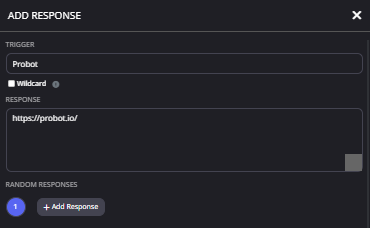 timber helm
@austere kestrel ??
 austere kestrel
Dear Probot Support Team,
I am writing to implore your esteemed organization's prompt attention to a matter of paramount importance. It would be greatly appreciated if a representative of your esteemed organization could reach out to me posthaste, so that we may engage in a discourse of the utmost gravity and acumen.
Furthermore, I would like to commend your organization for its exceptional use of the English language, and would kindly request that any correspondence be conducted with a similar level of linguistic sophistication and erudition.
I look forward to your expeditious response, and thank you in advance for your attention to this matter of the utmost importance.
Sincerely,
Farouk
timber helm
austere kestrel
Dear Probot Support Team,
I am writing to implore your esteemed organization's ...
what is your main language bro?
austere kestrel
I wish any Support Dm Me for Importants.
timber helm
austere kestrel
I wish any Support Dm Me for Importants.
we do not offer support in dm’s
austere kestrel
timber helm
we do not offer support in dm’s
Importants.
timber helm
austere kestrel
Importants.
use your main language support channel please 🙏🏼
austere kestrel
timber helm
use your main language support channel please 🙏🏼
I need An moderator
timber helm
austere kestrel
I need An moderator
as i said above ask your issue right away we don’t offer support in dm’s
austere kestrel
What about its very important thing?
timber helm
austere kestrel
What about its very important thing?
tell me here what is this very important thing?
austere kestrel
timber helm
tell me here what is this very important thing?
Cant.
timber helm
austere kestrel
Cant.
is it related to probot ?
austere kestrel
Yes.
timber helm
austere kestrel
Dear Probot Support Team,
I am writing to implore your esteemed organization's ...
and why you are using google translator use #support-ar instead
timber helm
austere kestrel
If u didn’t hear me
what’s the problem
austere kestrel
I cant say it hear
timber helm
austere kestrel
I cant say it hear
say it in dms if you’re scared
timber helm
austere kestrel
I cant say it hear
but just why you’re using this channel and not #support-ar if it’s an important thing
 scarlet hollow
@lean badger
timber helm
scarlet hollow
<@567703512763334685>
Heyo! How can I help? :0
austere kestrel
Awnser dm
timber helm
austere kestrel
Awnser dm
no just ask your issue right there please
and as i said we do not offer support via dms
 proper marten
What's the permissions of probot prime and probot?
 native saddle
hey
timber helm
proper marten
What's the permissions of probot prime and probot?
!premium
lean badgerBOT
Premium Tier 1 :
- Adjust your music volume
- Inviter variable for the welcomer message
- The accessibility to check the action executioner in the logs
- Voice Online
- Link feature
- The possibility to unbanned the whole banned list on your server
- An advanced anti raid system which includes 12 features that being constantly updated
- A stand-alone bot that runs on a separate server, to ensure better performance and higher speeds
💰 Premium Tier 1 Prices :
- 5$ / Monthly
- 30$ / Yearly
🔷 ProBot Premium :
- All the typical premium tier 1 features
- The possibility of changing the name and avatar of the bot
💰 Premium Prices :
- 10$ / Monthly
- 60$ / Yearly
timber helm
native saddle
hey
Heyo! How can I help? :0
native saddle
i don't know how to work ih ai can you help me
timber helm
native saddle
i don't know how to work ih ai can you help me
elaborate please?
native saddle
sure
timber helm
what is your main language?
native saddle
you mean programming
timber helm
native saddle
you mean programming
for non-probot related questions #chat-en
 lunar atlas
I have a problem with ProBot. The problem is that when someone enter or leave my server, it doesn't send join-and-leave message. Initially it worked, but after some days the bot had this bug
timber helm
lunar atlas
I have a problem with ProBot. The problem is that when someone enter or leave my...
add me to your server lemme check that for you
via dms
lunar atlas
Yes, wait that I ask the owner
nocturne flax
how to get coins
timber helm

Top.gg
Spice up your Discord experience with our diverse range of Discord Bots and Servers as well as other spaces to discover DAOs.
ProBot
Welcome images, moderation, leveling, reaction roles, logs, high quality music and many many more!
nocturne flax
only that?
timber helm
yea
nocturne flax
no gambeling or givecoins
timber helm
nocturne flax
no gambeling or givecoins
nope
lunar atlas
@timber helm i send server's invite ok?
timber helm
young whale
how do i put it

ProBot
Welcome images, moderation, leveling, reaction roles, logs, high quality music and many many more!
young whale
yes i did this
timber helm
lunar atlas
<@485134005105197071> i send server's invite ok?
ok
young whale
and i press use
timber helm
young whale
yes i did this
show me which one you bought
 timber helm
young whale
Look
timber helm
young whale
Look
you bought a rank background note a profile card
young whale
How do i get profile card
timber helm
young whale
How do i get profile card
ProBot
Welcome images, moderation, leveling, reaction roles, logs, high quality music and many many more!
young whale
Ok Ty!!
timber helm
yw
timber helm
 granite vine
Hello, what ia the command for the chat join/leave? Thanks, i'm new
granite vine
Hello, what ia the command for the chat join/leave? Thanks, i'm new
elaborate please?
split needle
granite vine
Hello, what ia the command for the chat join/leave? Thanks, i'm new
there's no command for it
go to https://probot.io/dashboard, select the server on the left, then go to welcome & goodbye module to set up them
granite vine
Thanks
 lime wharf
My probot is lag Do you know what happened?
timber helm
lime wharf
My probot is lag Do you know what happened?
hi hi, working properly with me, try now
lime wharf
@timber helm hihi I try now but not good for me it's lagging
nocturne flax
i am blacklisted it is an error
timber helm
kick & re-invite the bot
timber helm
timber helm
kick & re-invite the bot
@lime wharf
lime wharf
@timber helm okay
timber helm
nocturne flax
i am blacklisted it is an error
are you using multiple accounts?
 twin warren
Bdo
Bro can i ask
Why cant i do C command
I just joint
Only do Daily
Can u help me sir @timber helm
I guess i am blacklisted too
west kelp
What is C command?
 fickle reef
twin warren
fickle reef
twin warren
Yes
I cant do that
Why
Like i dont registered on commands
But i can claim daily
west kelp
Unless you have an alias for the credits command, you can't just simply type c
Use /credits
nocturne flax
c
timber helm
nocturne flax
c
?
twin warren
west kelp
Unless you have an alias for the credits command, you can't just simply type c
Cant
No one can Transfer to my account too
Like my account doesnt exist
timber helm
cause you are black listed
timber helm
twin warren
How to unblacklist
are you using multiple accounts
timber helm
twin warren
Maybe Because of it
it’s illegal to use multiple accounts
twin warren
Like we are 3
twin warren
timber helm
it’s illegal to use multiple accounts
I wasnt
timber helm
3 accounts?
twin warren
3 account diffrent persons
timber helm
what is the purpose of doing it?
twin warren
He says that i can trade in those server so i ask for it and he gave me the links
And when i join ,i claim daily and cant see my Coins
The conclusions is I came for trade
timber helm
twin warren
He says that i can trade in those server so i ask for it and he gave me the link...
trading ?
timber helm
twin warren
The conclusions is I came for trade
twin warren
timber helm
what is the purpose of doing it?
Purpose? We are trader?
Like He got free Faith bundles from Coins
split needle
well you're using our credit system for trading, which is against our rules of using credits, therefore we can not help
split needle
we don't, and never supply anything other than our cosmetics on the site
twin warren
What
split needle
any single thing you trade outside our system is deemed illegal, and will be blacklisted automatically by our system
twin warren
Oo then what coins for
Like all player doin that , and i got blacklisted in my first day join the server
split needle
cosmetics provided on our site https://probot.io/dashboard under the credits store section

ProBot
Welcome images, moderation, leveling, reaction roles, logs, high quality music and many many more!
anything outside that place is not supplied by us, nor safe to buy or trade
split needle
I have no idea what and who you mentioned earlier
like what is magyar 30k coins and what is faith bundle?
 verbal egret
What is the reputation stat? How does it get increased?
twin warren
split needle
like what is magyar 30k coins and what is faith bundle?
So like i mentioned earlier , i gave an examples somone (i mean maybe its a supplier you mean , because i have no idea what and who is the person) is selling like skin in skin server , avatar in avatar server and etc. And for the example i wanna buy the magyar bundle in skin server for 30k coins which its also called trade. Does it illegally?
split needle
twin warren
So like i mentioned earlier , i gave an examples somone (i mean maybe its a supp...
it is illegal as it is not in our shop, nor does it provided by us
west kelp
verbal egret
What is the reputation stat? How does it get increased?
You used to be able to recieve rep points from others but its disabled now
twin warren
Thiss
split needle
I have answered the same thing for 3 times now
twin warren
I send you a pic
split needle
we have nothing you mentioned in our credits shop
twin warren
split needle
it is illegal as it is not in our shop, nor does it provided by us
And server say Shop
verbal egret
west kelp
You used to be able to recieve rep points from others but its disabled now
Okie, thank you.
west kelp
Yw
split needle
twin warren
And server say Shop
that server saying shop, doesn't mean it's official
timber helm
@vagrant thistle , @trim folio , @ionic hornet try now guy’s, should </credits:1> work properly with you
twin warren
split needle
that server saying shop, doesn't mean it's official
So where can i officially buy the server one
split needle
nowhere
twin warren
I just wanna do clean buyin and trading
split needle
as we provide nothing like that
most you could buy are cosmetic for /rank and /profile commands, nothing else
split needle
no
twin warren
Like
Shopping cart Logos on their name
Is it yours or ?
Because i cant saying anything on the server
split needle
how much time do I have to repeat the same thing?
twin warren
I dont get it
twin warren
How to check what inside the credit shop
I dont know how discord works and i just new
split needle
get on to our site https://probot.io/dashboard and go to the tabs under the credits shop section
ProBot
Welcome images, moderation, leveling, reaction roles, logs, high quality music and many many more!
that is not in discord
split needle

 coral atlas
So I'm getting hate from my IT team because I supposedly only banned them for 3 months even tho I used /ban <ID>


Any help on the reason why
timber helm
coral atlas
Any help on the reason why
hey, you can use aliases to unban them
 strong pelican
I need stop music bot
timber helm
timber helm
hey, you can use aliases to unban them
https://probot.io/dashboard -> select your server -> find and edit the </unban:1> command -> you'll see "aliases" on top of the list > put for example !unban
strong pelican
Ok thanks
timber helm
yw
coral atlas
timber helm
<https://probot.io/dashboard> -> select your server -> find and edit the </unban...
Thank you
timber helm
my pleasure
lost valve
Hi, can please some one help me
IDK why i got blacklisted I swear i did nothing 😦
timber helm
timber helm
hi hi, are you using multiple accounts?
@lost valve
lost valve
No
timber helm
i’ll mention you when you are able to transfer credits
lost valve
okay
 shrewd lake
Why is my pro bot so glitchy when playing music?
lean badgerBOT
Auto Roles Configuration
1 - Go to the dashboard (https://probot.io/dashboard) and log in.
2 - Next, go to the Auto Roles module and begin adding roles.
3 - Finally, add a role that does not have administrative privileges.
Keep in mind: In order for the bot to assign that role to a newly joined member, it must be higher up in the role hierarchy in the role settings. Also, if you have the discord-welcome-screen enabled, users must accept it before they can receive the role.
ProBot
Welcome images, moderation, leveling, reaction roles, logs, high quality music and many many more!
sage flint
@nocturne flax ⬆️
nocturne flax
Thanks
 wary salmon
#credit
timber helm
wary salmon
#credit
 gentle token
I have a weird question
Is it possible to run the probot level system across two servers
sage flint
Nope
gentle token
So you level on one server and it transfers to another server
sage flint
sage flint
Nope
^
 thorn grail
Hi
sage flint
hi, how may i help you?
 noble anvil
@sage flint how to reset all server members xp? When i use /reset and type target i can reset only members
sage flint
type @everyone in target
noble anvil
sage flint
type `@everyone` in target
cant
sage flint
noble anvil
cant
