#support-en
1 messages · Page 31 of 1
 quasi rover
 sweet warren
why is this a thing now?
 quasi rover
just type the song name without links or use soundcloud link if you wanna play a playlist
sweet warren
I know, but why did this get changed?
quasi rover
due to discord reasons
 warm pewter
heya I am unable to check the 2nd page of /top leaderboard
quasi rover
warm pewter
heya I am unable to check the 2nd page of /top leaderboard
please copy the slash command you used and paste it here
warm pewter
the thing I typed was
/top text day 2
quasi rover
warm pewter
the thing I typed was
/top text day 2
give it another try
sometimes it responds with this message when it has a little bit high ping which makes it late in responding so it gives an error instead
 lyric timber
Hey, what i should or maybe what i can do? I try to get in the Dashboard but its Loading and Loading again over a long time. I try other Browser but i dont open the Dashboard for me
quasi rover
do you have any other device to try on?
lyric timber
i try it in 3 brower. the problem more is its loading around 5 min then working. idc why it is like that atm
i had think first its my router or some problems with my computer/internet
but its not
quasi rover
quasi rover
do you have any other device to try on?
device not browser ^^
lyric timber
oh brainlag and my english sucks
quasi rover
lyric timber
oh brainlag and my english sucks
meaning does it work on your phone?
lyric timber
yeah its loading faster.... but it make no sens xD i just startet my pc and open first browser to check something in the probot
and i have also other question. I remember that i not only use the prefix "/" . we also used &. did something changed what i missed?
quasi rover
probot no longer supports any prefix but just the slash / according to discord decisions for the verified bots
lyric timber
hm sad that not works
 flat compass
how to i send a reaction role embed message into a channel? there is no choice for this
pls ping me when u reply, thanks
quasi rover
flat compass
how to i send a reaction role embed message into a channel? there is no choice f...
are you done with writing the embed message on the dashboard?
flat compass
yes
quasi rover
there is a broadcast (send) button at the bottom, you click it and select the channel then click send new message
quasi rover
yes please
flat compass
 flat compass
you mean click on embed messages?
quasi rover
yes
flat compass
 quasi rover
fair enough, did you use the "send new message" at the bottom?
flat compass
yes and it didn't come up with reaction buttons
quasi rover
flat compass
yes because you have to select the embed message you've sent through the second option here from the top
where it says "choose a message"
flat compass
when i click that it only shows "Select a message"
quasi rover
flat compass
send this embed message again then
 quasi rover
have u saved changes after selecting the embed from "choose a message"
flat compass
i told you, when i clicked "choose a message" it didnt show any of my embeds
quasi rover
flat compass
yes but it should show the message you just sent here
try refreshing your browser ig
quasi rover
no worries, have a good day/night
 marble fjord
Is there any Option to change that Probot doesn't respond to the Prefix "?" when i use it for other Bots?
quasi rover
probot only works with slash now
/
marble fjord
quasi rover
probot only works with slash now
/
Yes, i know. But if i want to use the command ?help for an other Bot he responds too. Is there a way to deny this?
quasi rover
oh i see, looks like your last bot prefix was "?"
unfortunately it looks like there's no way to fix it atm but I'll make sure to report this to the admins so they be aware of it
marble fjord
Okay thank you^^
quasi rover
no worries
 sudden nova
Hi everyone. Sorry to bother but I completely forgot how to add colours to the bot! lol
warm pewter
quasi rover
give it another try
Every time I do it I get the same reply
 celest spoke
Hi <@&675070424748654593> , who can give me all this variables, I can't find them anywhere, please! 

 frozen pilot
welcomer variables
[user] ~ mentions the newcomer member
[inviter] ~ mentions the inviter (vip only)
[server] ~ server name
[userName] ~ just says the newcomer member name
[inviterName] ~ just says the inviter name (vip only)
[memberCount] ~ amount of members reached
<@user_id> ~ mentions a specific user using his id
<#channel_id> ~ mentions a specific channel using its id
<@&role_id> ~ mentions a specific role using its id
auto responder variables
[user] ~ mentions the member who typed the trigger
[userName] ~ types the name of the user who typed the trigger
[invites] ~ types the amount of invites you've reached (vip only)
<@user_id> ~ mentions a specific user using his id
<#channel_id> ~ mentions a specific channel using its id
<@&role_id> ~ mentions a specific role using its id
embed messages variables
text ~ creates a hyperlink
<@user_id> ~ mentions a specific user using his id
<#channel_id> ~ mentions a specific channel using its id
<@&role_id> ~ mentions a specific role using its id
celest spoke
frozen pilot
welcomer variables
[user] ~ mentions the newcomer member
[inviter] ~ mentions th...
thank you so much !! < 3
frozen pilot
Yw <3
 deep axle
@lean badger u istiyorum volkana vermişsiniz
 limber lintel
How do I change the command prompt? I had it as #, but Discord changed it so we can only use /, but Probot still thinks it's # on my server.
 native geyser
limber lintel
How do I change the command prompt? I had it as #, but Discord changed it so we ...
native geyser
limber lintel
How do I change the command prompt? I had it as #, but Discord changed it so we ...
What do you mean by probot still thinks it's #
We already do have slash commands and # is being removed so you should be able to use slash commands at the moment
 south tulip
Probot
 north slate
Heya, should be a quick one, been struggling to find an answer for this. The person in charge of managing ProBot on our Discord server unfortunately left so I've been given the job of taking over it's administration. However, I can't seem to get the server to appear in my dashboard despite being granted the admin role. I'm trying to figure out the exact permission that role requires to be able to access the bot on the dashboard. Alternatively, is it possible that access to the bot is still in the hands of the old account and it would need to be removed and re-added?
EDIT: Server owner granted me the Administration Permission directly and that opened up access. Was hoping for a way around that but that's fine. 🙂
 errant ocean
Hey, jumped in cuz my group had a question. Was there a change to prob that that stops us from using links?
 nocturne flax
errant ocean
Hey, jumped in cuz my group had a question. Was there a change to prob that that...
nocturne flax
errant ocean
Hey, jumped in cuz my group had a question. Was there a change to prob that that...
<@&675070424748654593>
nocturne flax
errant ocean
Hey, jumped in cuz my group had a question. Was there a change to prob that that...
I’m not fully understanding your question, but I think its related to the /play command.
There has been a change where youtube links aren’t supported any more, you can use SoundCloud links tho. Hope this helped. 
errant ocean
Oh ya that was it, sorry for the poor wording
 acoustic hill
Hello i buy probot prime with paypal but i don't receive any things
please can you check it
 quaint sentinel
acoustic hill
Hello i buy probot prime with paypal but i don't receive any things
quaint sentinel
acoustic hill
Hello i buy probot prime with paypal but i don't receive any things
I assume the payment is still pending from PayPal or has been declined. Please double-check it.
 frosty spear
hi. can i reset the completely leveling system instantly?
native geyser
Yes, /reset command
acoustic hill
quaint sentinel
I assume the payment is still pending from PayPal or has been declined. Please d...
Check your dm bro
quaint sentinel
acoustic hill
Check your dm bro
👍
nocturne flax
Hello
 empty yoke
Hey. It seems that the "/rank" command is generating a .png fiole and not displaying a user rank. What is wrong with that? Am I missing a permission or is is a bug?
I can see that only people with admin privelages are getting their XP cars shown.
quasi rover
empty yoke
Hey. It seems that the "/rank" command is generating a .png fiole and not displa...
we've knowledge of this issue and working on a fix already. As for now, you can manually fix it for each user by mentioning them in /credits command
ex - /credits user:@empty yoke
empty yoke
So if I mentione them in a credit command then they can see their XP cards?
quasi rover
yes
 maiden narwhal
Hi, does pro bot work with spotify? it just comes up with not found if i tell it to play and i post a link to a playlist or to a song
quaint sentinel
hey, unfortunately we only support song name & Soundcloud links. More platforms will be supported soon.
maiden narwhal
ok thanks
quaint sentinel
you're welcome
 sly zenith
hi, im new to using bots, how do i make it so only certain roles can use commandss like playing music?
nevermind
empty yoke
maiden narwhal
Hi, does pro bot work with spotify? it just comes up with not found if i tell it...
thanks
 verbal stone
How change the prefix pls ?
verbal stone
sly zenith
hi, im new to using bots, how do i make it so only certain roles can use command...
Go on probot's site, go in musique and "rôle DJ"
quasi rover
verbal stone
How change the prefix pls ?
not possible
 smoky nexus
Hello, I have an question.
what's wrong with the probot. I have to use the slash command and not allowed to use a normal prefix?
native geyser
Yes because prefix has been removed due to discords request
 hexed folio
Reaction Roles doesnt work:
Created Embed, Posted it, Created Reaction Roles, Connected Embed to roles, saved but nothing
(Doing it via website)
 celest pier
Hello
I have a question about the utilisation of probot in voice stages
I don’t know if it’s relative to the bot or the stage channel, but in the servers which I’m in, the bot need to be kind of activated by a mod when playing music
Do you know how to do it ?
native geyser
hexed folio
Reaction Roles doesnt work:
Created Embed, Posted it, Created Reaction Roles, C...
Can I see your dashboard settings for reaction roles
native geyser
celest pier
I don’t know if it’s relative to the bot or the stage channel, but in the server...
Does it work for normal users in non-stage channels?

 native geyser
Does the bot have required permissions
hexed folio
will check it
celest pier
native geyser
Does it work for normal users in non-stage channels?
Nope the bot seems to be locked on the stage channel
hexed folio
native geyser
Does the bot have required permissions
all good now thx...
native geyser
celest pier
Nope the bot seems to be locked on the stage channel
What does the bot reply with to normal users in that case
celest pier
If you try to make it join another, he wont and will tell you you must be in the stage channel named x
« you must be in X to use that »
native geyser
It's because the bot is currently in that channel and unless you move or disconnect the bot you won't be able to use that command in other channels
celest pier
Ooh
native geyser
It's not a stage channel thing it works the same way for other voice channels too
native geyser
Yw
 eager spear
@deep sierra if I knew a discord bot DEV interested in joining a team, how would he apply to assist?
 lean badgerBOT
eager spear
<@157605500488384512> if I knew a discord bot DEV interested in joining a team, ...
lean badgerBOT
eager spear
<@157605500488384512> if I knew a discord bot DEV interested in joining a team, ...
We noticed that you are a premium user, for faster response go to #premium-support
 deep sierra
eager spear
<@157605500488384512> if I knew a discord bot DEV interested in joining a team, ...
deep sierra
eager spear
<@157605500488384512> if I knew a discord bot DEV interested in joining a team, ...
We don’t hire for full-time jobs yet, we do hire for part-time remote hi@probot.io
lean badgerBOT
deep sierra
We don’t hire for full-time jobs yet, we do hire for part-time remote hi@probot...
We noticed that you are a premium user, for faster response go to #premium-support
 muted aurora
hexed folio
muted aurora
hexed folio
How did you put emoji on the description tab? I want to put an emoji so I can organize well the things I want to put.
quaint sentinel
muted aurora
How did you put emoji on the description tab? I want to put an emoji so I can or...
The emojis in the picture @PEKKTAS sent are default emojis, you can either search for them in Discord and copy and paste them into the description, or search for them on Google.
If you want to add custom emojis, put a \before the emoji name, then send it and copy its ID
muted aurora
quaint sentinel
The emojis in the picture `@PEKKTAS` sent are default emojis, you can either sea...
Oooohhh thanks @quaint sentinel . I'll try now
quaint sentinel
muted aurora
Oooohhh thanks <@924286729949675590> . I'll try now
You're welcome!
nocturne flax
quaint sentinel
You're welcome!
Hello I needed help regarding my rank in my server it never updates and whenever I check my own rank it just uploads a file 13 bytes and nothing is in the file.
 neat crescent
Hello! Can someone tell me how can i change ProBot prefix?
nocturne flax
I needed help regarding my rank in my server it never updates and whenever I check my own rank it just uploads a file 13 bytes and nothing is in the file.
<@&336913504051265537>
 dire spoke
Yo what are the bots prefixes, and why can't I level up and it just says 13bytes everytime I try to see my rank
 copper swan
neat crescent
Hello! Can someone tell me how can i change ProBot prefix?
copper swan
neat crescent
Hello! Can someone tell me how can i change ProBot prefix?
<@&675070424748654593>
 split needle
dire spoke
Yo what are the bots prefixes, and why can't I level up and it just says 13bytes...
split needle
dire spoke
Yo what are the bots prefixes, and why can't I level up and it just says 13bytes...
Use slash
And to temporary resolve the rank image, try using /credits and check the rank again
split needle
nocturne flax
I needed help regarding my rank in my server it never updates and whenever I che...
Try using /credits and check your rank again
Also next time don't ping mod for support
split needle
neat crescent
Hello! Can someone tell me how can i change ProBot prefix?
Removed feature
Use slash for now
split needle
 sharp kelp
Does pro bot have auto bot
sharp kelp
Does pro bot have auto bot
What do you mean auto bot?
sharp kelp
Auto mod
split needle
It has
Go to https://probot.io/dashboard, select the server on the left go to the automod module and set up what you want in there
 hot badge
i’m having problems with commands, it says the application did not respond
its also becoming problematic as we have a points system set up and we cant get access to it
dire spoke
split needle
Use slash
And to temporary resolve the rank image, try using /credits and check ...
can you go into a litte more detail please
split needle
dire spoke
can you go into a litte more detail please
that's the most I could
just use the /credits command in either your server or in #commands and try using the rank command again
split needle
hot badge
its also becoming problematic as we have a points system set up and we cant get ...
let me ask dev if this is a problem
slash is giving more difficulty to users and developers but we're forced to use it so we have no other choice
 civic vessel
Hi! We have a similar problem, but the slash command is not working for a small percentage of our users.
It's been an ongoing issue, sorry for not flagging it earlier.
But it's been inconsistent (the same users but seemingly random set of users)
 bronze grove
Hey, I want to inform you that the "temporary channels" can't be tuned off after I turned it on. Anyways. As I switched it to on and joined the selected channel the whole server category just got deleted. I hope you will fixing these bugs ASAP because this can cause trouble for some server owners. Thanks :D
 quaint osprey
Hi there, I understand there are changes to /play command etc., but is there a way to at least show the URL or link of whatever it plays? It's now harder to go back and copy old commands.
nocturne flax

 modern yarrow
Hi all, I need help with making probot mention a specific channel in the server as part of a welcome message. Is there any way to do this?
 cosmic elk
<@&675070424748654593>
cosmic elk
modern yarrow
Hi all, I need help with making probot mention a specific channel in the server ...
<#channel ID>
cosmic elk
quaint osprey
Hi there, I understand there are changes to /play command etc., but is there a w...
youtube links is not supported any more due discord , you could use the song name or use soundcloud url
quaint osprey
cosmic elk
youtube links is not supported any more due discord , you could use the song nam...
Yeah I know we can't use YT links anymore, but can probot display them? instead of imbedding them in the play command
cosmic elk
bronze grove
Hey, I want to inform you that the "temporary channels" can't be tuned off after...
thanks for informing us !
cosmic elk
quaint osprey
Yeah I know we can't use YT links anymore, but can probot display them? instead ...
no
quaint osprey
OK thank you
cosmic elk
civic vessel
Hi! We have a similar problem, but the slash command is not working for a small ...
show me the bot response when they use slash command
cosmic elk
quaint osprey
OK thank you
yw
 solid hamlet
modern yarrow
Hi all, I need help with making probot mention a specific channel in the server ...
solid hamlet
modern yarrow
Hi all, I need help with making probot mention a specific channel in the server ...
write the channel id in the welcome message
for example: <#channelD>
lean badgerBOT
solid hamlet
write the channel id in the welcome message
for example: <#channelD>
We noticed that you are a premium user, for faster response go to #premium-support
cosmic elk
solid hamlet
write the channel id in the welcome message
for example: <#channelD>
pls read the channel topic before helping
cosmic elk
cosmic elk
<#channel ID> <:takeoff:702503859905364040>
i already answerd him !
 solid hamlet
cosmic elk
i already answerd him !
solid hamlet
cosmic elk
i already answerd him !
oh i didn't see it
cosmic elk
civic vessel
its a database issue due pressure
civic vessel
And it happens to only a select few people? While others are still able to use it at the same time? O.o
It still happens when they try another day, is it the same thing?
cosmic elk
civic vessel
It still happens when they try another day, is it the same thing?
i will try to inform the devs about this issue , thanks !
civic vessel
Thank you, hope it's an easy fix.
cosmic elk
civic vessel
Thank you, hope it's an easy fix.
yw 🌸
 summer dawn
hey guys, are there anymore variables that I can use aside from [user], [oldLevel] and [level] in the text leveling up message. Is there a documentation?
 cosmic elk
summer dawn
hey guys, are there anymore variables that I can use aside from [user], [oldLeve...
cosmic elk
summer dawn
hey guys, are there anymore variables that I can use aside from [user], [oldLeve...
Next to the selected section on the left you will see Variables
summer dawn
here?
 cosmic elk
summer dawn
here?
cosmic elk
summer dawn
here?
no , the levling system right now has these variables
[user]
[level]
[oldLevel]
i hope that the devs add more !
summer dawn
oh I see, thanks for fast answers
cosmic elk
summer dawn
oh I see, thanks for fast answers
yw
cosmic elk
summer dawn
here?
example
 summer dawn
ohhh thanks for this
cosmic elk
summer dawn
ohhh thanks for this
yw
 limber charm
Are there currently any ways to edit the leaderboard exp manually?
lean badgerBOT
**Command: setxp**
Changes member's xp
**Usage:**
/setxp [action] [user] [xp]
**Examples:**
/setxp add @cosmic elk 500
/setxp add @cosmic elk 500
/setxp remove @cosmic elk 500
/setxp remove @cosmic elk 500
cosmic elk
but you can change the amount xp of a user
 rough estuary
hello my problem is that why option are not desactivable
 split needle
known issue
rough estuary
oh okay :(
because i have bug/conflict with other bot ;--;
oh i have resolve that ahah goodbye :)
split needle
m - minute
h - hour
d - day
w - week
mo - month
split needle
right after numbers like 5m 6d 12w
rough estuary
OK I have a bug is that I do not see my rank but for the other ranks it works

 dim saffron
Hi, when someone from my server uses #rank or /rank, the bot does not show the image. It sends a file named rank.png, and when I open it, I see nothing
Can someone explain me why this is happening?
<@&675070424748654593>
rough estuary
dim saffron
Hi, when someone from my server uses `#rank` or `/rank`, the bot does not show t...
same for me
dim saffron
it works for me and other members, but when he (one of my server members) uses the command, it does not show the image.
it's same when I or someone else try to view his rank using /rank <user>
quasi rover
dim saffron
it works for me and other members, but when he (one of my server members) uses t...
we've knowledge of this issue and working on a fix already. As for now, you can manually fix it for each user by mentioning them in /credits command
ex - /credits user:@llll.llll#0700
dim saffron
oh okay I'll try
rough estuary
THANKS YOUUU
dim saffron
It works! thank you!!
quasi rover
no worries, have a nice day ahead
dim saffron
you too💗
 mighty scroll
Hallo, I'm just curious again xD, are these two (txt and vc) the "global rank system"? Thanks!

 rapid garden
<@&675070424748654593> ok simple question, how do i add my youtube playlist to the music queue? every since they updated the play command i havent been able to add youtube playlist
split needle
youtube is no longer supported
 sand trellis
How to do the / color
rapid garden
why has god forsaken us
does youtube hate music bots or do music bots hate youtube, why cant we all get along
quasi rover
sand trellis
How to do the / color
#1 ~ 👉 Go to server settings -> Roles.
#2 ~ 👉 Add numbered roles like the picture below.
#3 ~ 👉 Save and you're good to go.
https://i8.ae/7hM2w
Now you are ready to use these colors.
/colors
Shows the colors list
/color number
Choose/change your color in the server.
to remove your current color: /color 0

 blissful moon
how i can change prefix ?
split needle
rapid garden
does youtube hate music bots or do music bots hate youtube, why cant we all get ...
youtube's end
split needle
blissful moon
how i can change prefix ?
removed feature
mighty scroll
split needle
the global one is in /profile
ohhh okay okay, tysm for the info, have a great day or night !
mighty scroll
split needle
removed feature
oh yea now that's been mentioned, why was the prefix removed?
split needle
mighty scroll
oh yea now that's been mentioned, why was the prefix removed?
discord asked us (a verified bot) to
more information can be found here https://discord.com/blog/welcome-to-the-new-era-of-discord-apps
The Future is Soon — Your favorite Discord apps and bots are nearly done switching to Slash Commands: the new and improved way to interact with apps. Check out all the new things you can do today!
mighty scroll
split needle
discord asked us (a verified bot) to
more information can be found here https://...
ohhh, alr! imma check that oit later xD thanks again for helping 😄
 celest obsidian
hey
quasi rover
celest obsidian
hey
how can i help
nocturne flax
hi. im trying to implement the colors feature but i dont know where to set the actual available colors
oh nm i just found it haha
 timid jasper
how to change the prefix ?
quasi rover
timid jasper
how to change the prefix ?
you can't, slash commands is the only way to interact with verified bots
timid jasper
quasi rover
you can't, slash commands is the only way to interact with verified bots
tks for ur sp
quasi rover
np
 onyx yacht
i cant find it , why ?
 cosmic elk
<@&675070424748654593>
quasi rover
onyx yacht
i cant find it , why ?
try #help
nocturne flax
Hello, I need help with accessing the website
quasi rover
sure, how may i?
nocturne flax
Hi, I'll send a screenshot
quasi rover
okay
nocturne flax
Copy-pasting from reddit post: I can't access the dashboard for some reason. Not sure what the issue is, I've had it for a few days now. I'm on mobile and use Chrome. I visit the website, it loads fine, tap on Dashboard and the three loading buttons in the pic appear. Then it just never loads or switch to dashboard, it's stuck on the three buttons bouncing.
My internet connection works fine, I've clicked out and reloaded the page several times and the website always load back, but it never lets me access the dashboard. Was told to clear cache, and I did. I tried using a vpn and it still won't load the dashboard. Is there something else I can do?
 quasi rover
if you have another device it should work, as for this one i have reported the admins and unfortunately haven't got a reply to solve this yet
maybe try restarting your router, different browser or anything that could make any difference
nocturne flax
Ah, I don't really have another device atm, and I'm on mobile data not wifi
Any idea what the problem maybe? Never had this issue before with my browser, it's very recent
quasi rover
no idea sorry
 fathom notch
help
i tried to get my probot to play music but it says it adds it to the que and doesnt play any sound
how do i fix it
 errant void
how can i repeat a track with music?
quasi rover
fathom notch
i tried to get my probot to play music but it says it adds it to the que and doe...
try /stop and play it again
fathom notch
ok
quasi rover
errant void
how can i repeat a track with music?
/repeat — repeats the current song
fathom notch
still not working
errant void
yes but it cant repeat the entire track?
quasi rover
errant void
yes but it cant repeat the entire track?
not possible yet sorry
errant void
ok
quasi rover
fathom notch
still not working
I'm pretty sure this is a problem from your end, ask your friends to try and it should work for them
fathom notch
yeah ok
quasi rover
please ask your question right away, if you don't have any head to #chat-en
no it's not allowed here
no, please head #chat-en if you don't have questions about the bot itself
 glass grotto
Can someone tell me why i can't put YouTube link to play music on bot?
 quasi rover
Youtube is no longer supported by probot as it shouldn't be either for any other music bot due to some terms
you may only type the song name or use soundcloud links
glass grotto
okay, thank you for answer
quasi rover
no worries, have a nice day ahead
glass grotto
u2 ^^
 unreal parrot
Hello
nocturne flax
nocturne flax
Copy-pasting from reddit post: I can't access the dashboard for some reason. Not...
Updating the browser worked. All's good now.
Thanks anyways @quasi rover
hot badge

every time i try to use a command it returns this^
also i had to censor name cuz bad word
 frozen oyster
hello, how to add emoji to embed message?
nocturne flax
ProBot's new slash command for points does not include an option to view any page other than the first one. Is there an alternative way to see the other pages on my points leaderboards that I can use as a temporary solution? Image attached.
Also, as a side note, the filter parameter does not work properly. It displays the same names even with a filter. This is also shown in the image I attached to this message, as almost nobody on the leaderboard has the "[HR] Lieutenant" role in our server. Thanks.

<@&675070424748654593>
 unborn sparrow
hello I faced a problem with not being able to add picture or gif into my auto responder without having an URL above it, is there is any solutions to it? And also is there is any limit in auto responder?
<@&675070424748654593>
quasi rover
frozen oyster
hello, how to add emoji to embed message?
send \:emoji_name: in your server, copy & paste the id which pops up in the embed msg
hot badge
quasi rover
This error occurs sometimes cause of high ping try again
still isn’t working
quasi rover
then try later, maybe kick and reinvite
hot badge
i’ll give that a shot
quasi rover
nocturne flax
ProBot's new slash command for points does not include an option to view any pag...
I'll let the admins know, it should be fixed in the next bot restart
nocturne flax
OK, thank you.
quasi rover
unborn sparrow
hello I faced a problem with not being able to add picture or gif into my auto r...
the response should only have the url and no other letters
unborn sparrow
is there is limit?
hot badge
hot badge
i’ll give that a shot
the slash commands have never actually worked for me in doing anything actually. i just kicked and re added the bot and still nothing
quasi rover
no just add the url alone in the response if u add any characters with the link it will show, this is from discord
unborn sparrow
thank you so much
quasi rover
hot badge
the slash commands have never actually worked for me in doing anything actually....
Try updating discord then
hot badge
i updated earlier today,,,, also the only commands that are working are ping and help
same issues on the pc btw
quasi rover
does any other command work like /profile /credits
hot badge
nope
quasi rover
have u tried to kick and reinvite?
hot badge
yep
quasi rover
try again later then it must be lagging
 dull rune
Hi, Probot reaction roles dosen´t work on my server, i tried to kick and re invite, he is at the bottom of the server roles list, on the website i can´t even pick wich role the bot should give the persons
found the problem ^^"
reaction roles still dosen´t work
 quasi rover
dull rune
Hi, Probot reaction roles dosen´t work on my server, i tried to kick and re invi...
quasi rover
dull rune
Hi, Probot reaction roles dosen´t work on my server, i tried to kick and re invi...
Is the bot's role position above these roles you selected or still going to select?
quasi rover
 silent radish
how to fix
silent radish
how to fix
don't use yt link just type song name or use soundcloud link for playing a playlist
 sour fulcrum
#c
dull rune
quasi rover
Is the bot's role position above these roles you selected or still going to sele...
made it now above and it works again, thx :3
sour fulcrum
#credit
quasi rover
sour fulcrum
#credit
 bleak kite
how do i change the prefix
quasi rover
you can't, slash commands is the only way to interact with verified bots
 crisp lion
I’ve seen some use cases that I’m having trouble finding documentation on how to implement. First is reaction role assignments. Second is verifications. Any help please?
quasi rover
crisp lion
I’ve seen some use cases that I’m having trouble finding documentation on how to...
for reaction roles; first of all you gotta send a embed message by creating it via the dashboard and sending it into your server
then you'll have to select this embed message you just sent from "reaction roles" module and then add the reactions under it

as for verifications this is not something possible with probot
crisp lion
quasi rover
for reaction roles; first of all you gotta send a embed message by creating it v...
Thank you
quasi rover
no worries
 soft fable
alright so automod is not deleting links, even though probot has perms
but not admin perm
quasi rover
it ignores those with administrator permission in case it was u sending the links
soft fable
quasi rover
it ignores those with administrator permission in case it was u sending the link...
no no
i meant normal user
sending youtube link for example
and not getting deleted and it's not whitelisted
quasi rover
then it can't read this channel and or manage messages at least
double check the permissions
 north folio
hello it would be possible to put back the commands of the past on probot? example of music commands; #play/#p #queue #search #stop #volume #pause #resume #np/ #now_playing #skip #s #repeat #shuffle #seek #24/7.....please
(/play no 😦
crisp lion
So I’ve set up the roles and the embed. Confirmed the message is present. But there’s no roles popping up when I try to add them. Confirmed that the test subject isn’t getting the roles added.


 ornate sand
hi i need help
 elder zealot
I see a banner for a code to use to get 25% off for orders on your website but when i try to apply it on an order it says that is invalid.
ornate sand
elder zealot
I see a banner for a code to use to get 25% off for orders on your website but w...
I know the solution
crisp lion
ornate sand
I know the solution
Tell us more.
quasi rover
north folio
hello it would be possible to put back the commands of the past on probot? examp...
No sorry, verified bots are only allowed to use slash commands now
native geyser
crisp lion
So I’ve set up the roles and the embed. Confirmed the message is present. But th...
refresh your page
north folio
::((((
crisp lion
native geyser
refresh your page
Browser? No joy there.
quasi rover
elder zealot
I see a banner for a code to use to get 25% off for orders on your website but w...
use another browser
north folio
quasi rover
No sorry, verified bots are only allowed to use slash commands now
it's a waste of time. /
#s
lean badgerBOT
north folio
#s
:no_entry_sign: You must join a voice channel to use that!
quasi rover
Aliases still work like #p as well
quasi rover
?
crisp lion
native geyser
refresh your page
tried switching browsers too.
quasi rover
crisp lion
So I’ve set up the roles and the embed. Confirmed the message is present. But th...
Change the bot role position to the bottom then to the top again
crisp lion
quasi rover
Change the bot role position to the bottom then to the top again
Are you referring to the position inside the discord roles list?
crisp lion
quasi rover
Yep
Worked. Thanks.
quasi rover
no worries, have a nice day ahead
crisp lion
quasi rover
no worries, have a nice day ahead
Is there per chance a way to add conditionals based on the existence of another role?
quasi rover
I'm not sure if i get what you mean but since you can't find this on the dashboard then it's not possible i believe
crisp lion
Wish list item for the dev(s) then. Thanks!
 warm silo
When I try to add a welcome image to the channel it dosen't show up. But text shows up on the farewell channel when the person leaves
 gentle marlin
What will happen if you mute someone for a long time and there is a problem like last time the bot became offline Will the time keep working and the counting does not stop ?
<@&675070424748654593>
 untold arch
<@&675070424748654593>
 prisma lion
How do you loop a song?
quasi rover
/repeat
quasi rover
gentle marlin
What will happen if you mute someone for a long time and there is a problem like...
Yes it won't stop
quasi rover
warm silo
When I try to add a welcome image to the channel it dosen't show up. But text sh...
try another image with less than 3mb size
quasi rover
it's no longer supported, just type the song name or use soundcloud link for playing a playlist
@vernal narwhal #1008159189664800778
 eternal owl
quasi rover
it's no longer supported, just type the song name or use soundcloud link for pla...
eternal owl
quasi rover
it's no longer supported, just type the song name or use soundcloud link for pla...
okay thanks mate
gentle marlin
quasi rover
Yes it won't stop
And the ban ?
quasi rover
yes
gentle marlin
Thanks
quasi rover
No worries, you both have a nice day ahead!
 gusty shadow
how to make the bot give out a role when mute or warn?
 pulsar wren
Can't find our server on dashboard / our users cannot use probot's command anymore, only moderator can
idk whats the problem, can help?
quasi rover
gusty shadow
how to make the bot give out a role when mute or warn?
when u mute it gives the muted role automatically and u can't make it for warns
gusty shadow
quasi rover
when u mute it gives the muted role automatically and u can't make it for warns
how to choose mute role?
quasi rover
pulsar wren
Can't find our server on dashboard / our users cannot use probot's command anymo...
make sure u are. Logged. Into the right account and make sure u have admin perms
gusty shadow
or bot create that role
quasi rover
the bot creates the role
gusty shadow
okay thanks
pulsar wren
quasi rover
make sure u are. Logged. Into the right account and make sure u have admin perms
i'm logged in right acc for dashboard, the bot has own role with moderator toggled
quasi rover
pulsar wren
i'm logged in right acc for dashboard, the bot has own role with moderator toggl...
kick and reinvite the bot also what are the commands does not work for the members?
 obtuse isle
@quasi rover توب الكردت لو سمحت
quasi rover
obtuse isle
<@451833165393428489> توب الكردت لو سمحت
#support-ar
obtuse isle
quasi rover
<#743365286132056094>
عربي انت لو اجنبي ؟
quasi rover
#support-ar?
obtuse isle
ها تمام
pulsar wren
quasi rover
kick and reinvite the bot also what are the commands does not work for the membe...
wait sorry channel setting was the prob
thank lot tho with love
quasi rover
No worries
obtuse isle
@quasi rover سؤال بسيط ياخي عربي لو اجنبي انت ؟
lean badgerBOT
:white_check_mark: Changed roles for ْicy, +Only Arabic
 wintry zodiac
how to change bot command prefix?
quasi rover
wintry zodiac
how to change bot command prefix?
you can't, slash commands is the only way to interact with verified bots now according to discord decisions
wintry zodiac
quasi rover
you can't, slash commands is the only way to interact with verified bots now acc...
i cannot use the /np command since its interfering with carl bot. what should i do
quasi rover
wintry zodiac
i cannot use the /np command since its interfering with carl bot. what should i ...
It is /now_playing
wintry zodiac
ok ill try that
hot badge
quasi rover
try again later then it must be lagging
still getting “application did not respond”
quasi rover
send me ur server in dm
 lament cedar
how can i put links and not song names
quasi rover
you can't, youtube isn't supported anymore but however you can use soundcloud links

 quasi rover
@nocturne flax please don't share these cases or links here we are not responsible for that you can apparently see that this is a bot support server and not somewhere to take care of discord business
if u don't have anything for probot head to #chat-en and please don't share images with links in it
nocturne flax
why is it no longer possible to put the music directly with a link?
 quasi rover
nocturne flax
why is it no longer possible to put the music directly with a link?
quasi rover
nocturne flax
why is it no longer possible to put the music directly with a link?
Youtube is no longer supported as it says in the response message you can either type the song name only or use soundcloud links if you'd like to play a playlist
nocturne flax
ok tkx
quasi rover
no worries, have a nice day ahead
 stable bobcat
keeps restarting wont play a full song
quasi rover
stable bobcat
keeps restarting wont play a full song
try changing your voice channel region & make sure nobody's disconnecting it manually or through /stop command
stable bobcat
only 2 of us on now and was doing it with only one person on as well
quasi rover
ight then try changing the channel region
stable bobcat
ty we will see
quasi rover
send me your server in dm if it still occurs as well
stable bobcat
nope still keeps stoping and restarting
quasi rover
dm then
 warm fulcrum
Bot dosnt react at all >.<
 quasi rover
kick both premium and free bot then ask your premium bot owner to reinvite the premium through https://probot.io/premium/manage
ProBot
Welcome images, moderation, leveling, reaction roles, logs, high quality music and many many more!
warm fulcrum
quasi rover
kick both premium and free bot then ask your premium bot owner to reinvite the p...
still the same probs
lean badgerBOT
warm fulcrum
still the same probs
We noticed that you are a premium user, for faster response go to #premium-support
quasi rover
i just noticed it's happening to more people so please give it some time, it should be fixed anytime soon
warm fulcrum
👍
 urban zodiac
My friends don't have permission to call the bot, how do I give them permission?
quasi rover
urban zodiac
My friends don't have permission to call the bot, how do I give them permission?
what is the bot response?
 urban oxide
 quartz ridge
How can i stop it?
quartz ridge
How can i stop it?
type #stop
native geyser
quartz ridge
The pro bot still in the call
/stop
native geyser
urban oxide
type `#stop`
read the channel description
urban oxide
native geyser
read the channel description
alright sorry
 summer rover
how ican get transfered amount f credit with discord.js
native geyser
you can only transfer credits by using /credits command
you cant edit bots files and stats
 sand roost
Any help?
 quasi rover
sand roost
Any help?
quasi rover
sand roost
Any help?
try updating your browser or use different one
hexed folio
Hey 👋
Leveling system doesn’t work properly ig.
Set up text&voice level roles but roles doesn’t assign after special level reached
quasi rover
hexed folio
Hey 👋
Leveling system doesn’t work properly ig.
Set up text&voice level rol...
Hey, i guess you have set both text & voice levels in 1 spot for the same role reward which makes it so they have to reach both text & voice levels in order to obtain the reward
if you wanna make it text OR voice then create 2 rewards by selecting the same role. as for the first reward set the text to 5, voice to 0 — for the second reward set text to 0, voice to 5
hopefully this makes it more clear to u
hexed folio
quasi rover
Hey, i guess you have set both text & voice levels in 1 spot for the same role r...
Hmm can work ig. Thx
quasi rover
no worries, have a nice day ahead
 next plank
How do you set up music?
 ornate rock
is the proprotection bot not working ?
quasi rover
next plank
How do you set up music?
music commands can be found by https://probot.io/commands
ProBot
Welcome images, moderation, leveling, reaction roles, logs, high quality music and many many more!
next plank
But how do you add it to the channel
quasi rover
ornate rock
is the proprotection bot not working ?
this is probot support server we have nothing to do with the bot you mentioned
quasi rover
next plank
But how do you add it to the channel
like it says in the commands page
/play song_name
ornate rock
quasi rover
this is probot support server we have nothing to do with the bot you mentioned
is not yours ?
quasi rover
ornate rock
is not yours ?
nope
ornate rock
quasi rover
nope
does your bot contain any type of protection
quasi rover
it's for premium
nocturne flax
Hello, is there a way to "reset" the bot without losing any customization in the dashboard ? Because Probot won't send welcome messages even if enabled :/ Thanks !
quasi rover
nocturne flax
Hello, is there a way to "reset" the bot without losing any customization in the...
please screenshot your welcomer page settings
nocturne flax
@quasi rover
 quasi rover
- enable image
- select 'send to a channel' option
- select the welcoming channel
- save
- disable image
- save
try this ^^
nocturne flax
Thank you so much !! Just did what you said and it's working ! Thanks !
 quasi rover
no worries! have a nice day ahead
nocturne flax
Ty !
 nimble moon
I have a question.
How can I mention someone in embedded messages?
quaint sentinel
nimble moon
I have a question.
How can I mention someone in embedded messages?
<@userID>
 plain dagger
is it possible to give access to the dashboard to non admin users of a discord?
nimble moon
quaint sentinel
<@userID>
Lol, I tried exactly this, and it didn't worked... Seems like I forgot to save or something....
Thanks.
quaint sentinel
plain dagger
is it possible to give access to the dashboard to non admin users of a discord?
nope
 hollow shore
I made a reaction embedded post. It posted but the reactions are not being added. I have resaved reactions, I have edited and resent the message.

 vivid fog
ENG : is there '' change language '' setting? KOR : '언어 변경'' 설정이 있습니까?
split needle
hollow shore
I made a reaction embedded post. It posted but the reactions are not being added...
Have you selected the message from the reaction roles settings?
split needle
vivid fog
ENG : is there '' change language '' setting? ...
/setlang language:korean
nocturne flax
<@&675070424748654593>
nocturne flax
 zealous stone
how do I play music
zealous stone
how do I play music
First you must join a voice chanel then use command :
/play song name or song link
 steady belfry
So I'm new to this whole thing my members said a reaction role would be good for the server and make it more fun but I am so confused on everything lol I know you have been using slash commands but when I am not sure how to set up a reaction role
 inland spindle
I have quite a few members of our discord that get this image when they try to check their rank:

 silk tusk
<@&675070424748654593>
split needle
steady belfry
So I'm new to this whole thing my members said a reaction role would be good for...
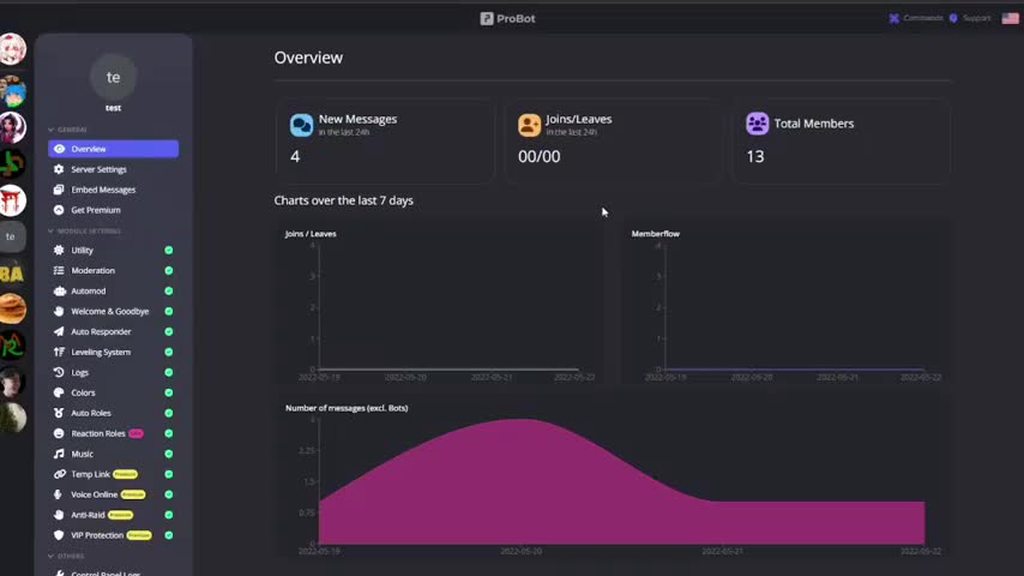
go to https://probot.io/dashboard, select your server, go to embed messages module to create and send embed messages for the reaction roles to where you want. Then go to reaction role module to setup the feature on the sent embed messages.
Notice: Be sure the Probot✨ role is higher than other roles. Embed message should not have any blank element (better to remove them if not using).
https://i.imgur.com/NK4xOTC.mp4
 split needle
inland spindle
I have quite a few members of our discord that get this image when they try to c...
split needle
inland spindle
I have quite a few members of our discord that get this image when they try to c...
known issue
tell them to use /credits command and check their rank again
steady belfry
split needle
go to https://probot.io/dashboard, select your server, go to embed messages modu...
Thank you I'll give it a try
inland spindle
split needle
known issue
tell them to use /credits command and check their rank again
YES! That worked. Thank you!
 pine wadi
there is currently no youtube integrations right?
 lapis terrace
Youtube is no longer supported as it says in the response message you can either type the song name only or use soundcloud links if you'd like to play a playlist
lapis terrace
wait for someone else to answer who knows this topic better
quasi rover
pine wadi
I mean like video notifactions
soon
 wooden pecan
我是雨恩
 zinc nacelle
hey guys, the /roles command isnt working in one of my servers, just responds with 'the application did not respond'
any idea how to fix this?
quasi rover
is it the free bot or the probot prime version?
quasi rover
try again, this error occurs when it's lagging a little bit
quasi rover
send me ur server in dm
 modern lily
Q! Is there a way for Probot to list members in a specific role?
quasi rover
modern lily
Q! Is there a way for Probot to list members in a specific role?
sorry wdym by listing them?
modern lily
For example I want to see who are in the MOD Role
quasi rover
i see, unfortunately this is not a thing yet
modern lily
Ok thank you!
quasi rover
no worries, have a nice day ahead
 celest yoke
For some reason the bot returns this error when using the /roles command

All the other commands work fine though
celest yoke
celest yoke
For some reason the bot returns this error when using the /roles command
This happened ever since the move to slash commands
quasi rover
celest yoke
For some reason the bot returns this error when using the /roles command
we've knowledge of this error, please create an alias through the dashboard temporarily till it's back to normal
aliases is another way of typing the command — https://probot.io/dashboard > select your server > utility > edit /roles command
ProBot
Welcome images, moderation, leveling, reaction roles, logs, high quality music and many many more!
celest yoke
Thank you 🙏
quasi rover
no worries, have a great day
celest yoke
Does it take a while for the new alias command to appear on the slash commands list?
quasi rover
it won't appear on the slash commands list, if you add like "test" to the alias then sending just "test" in your server will give the same response of /roles
celest yoke
Oh got it, yup it works. Thank you again.
quasi rover
no worries!
 rain harbor
Guys
How can i make my bot chat
like if i say bruh then my server probot would say lol
quasi rover
rain harbor
like if i say bruh then my server probot would say lol
https://probot.io/dashboard > select your server > auto responder
ProBot
Welcome images, moderation, leveling, reaction roles, logs, high quality music and many many more!
 modern star
Question: i am trying out the music module of pro-bot. While searching for song/video title to be played/added to queue works, it can't use YouTube link or Spotify links.
Tho it works with youtube music links.
 weak pagoda
Question: if i tag a role in a embed how can i make that role in the color it has on the server ? All the roles i tag are blue-ish in color
quasi rover
modern star
Question: i am trying out the music module of pro-bot. While searching for song/...
youtube isn't supported you can only type the song name or use a soundcloud link if you wanna play a playlist — spotify is getting supported soon as well
quasi rover
weak pagoda
Question: if i tag a role in a embed how can i make that role in the color it ha...
you can't do that inside an embed message, this is from discord end
modern star
quasi rover
youtube isn't supported you can only type the song name or use a soundcloud link...
Thing is:
I searched for a YouTube video to be added to queue, and it was found.
Using YouTube music links adds the right song to the queue
Why won't normal yt links work? Is due to the change to terms from a while ago that made all music bots break?
Also, one last question: how soon will Spotify be supported?
weak pagoda
quasi rover
you can't do that inside an embed message, this is from discord end
And can i give a word a color in an embed ?
quasi rover
modern star
Thing is:
I searched for a YouTube video to be added to queue, and it was found....
we've not been provided with much information regarding this but as far as i can tell no youtube links will work and soon enough they will remove the youtube from the search engine of the play command
as for Spotify there's no eta
quasi rover
weak pagoda
And can i give a word a color in an embed ?
no you can't
weak pagoda
quasi rover
no you can't
Ok. Thank you for the help.
quasi rover
no worries, have a great day ahead
modern star
quasi rover
we've not been provided with much information regarding this but as far as i can...
Thanks
quasi rover
no worries. Have nice day
 violet lagoon
Is there a Muslim here?
 sour rampart
Hello does someone know why I can't see my rank card ?
quasi rover
sour rampart
Hello does someone know why I can't see my rank card ?
U should be able to, now
sour rampart
quasi rover
U should be able to, now
thank you really much 🫡
quasi rover
No worries
 grand marsh
When we do /lock command, why does it not deny messaging in that channel?
gotta go through the roles and remove that perm manually.
I thought that command does it automatically
lean badgerBOT
grand marsh
When we do /lock command, why does it not deny messaging in that channel?
gotta ...
We noticed that you are a premium user, for faster response go to #premium-support
quasi rover
it denies sending messages for "@everyone" only. If u have any other roles in this channel permission settings u must set its send messages permission to /
grand marsh
and how do we do that?
quasi rover
like i said from your channel settings set every other role send messages permission to /
grand marsh
u want me to activate slash commands for where the bot is?
quasi rover
no mate, / is the middle option between ☑ and ❌
does it even respond to your lock slash command?
grand marsh
it comes up with the message its been locked but the channel is still messagable
quasi rover
because u have administrator, how about others without this permission
Can they still send messages?
grand marsh
yes dude, y i came here for support
quasi rover
screenshot your channel permissions please
 little walrus
I don't why but ony some people can access slash commands in my server
 mint gulch
Hello, is it possible to amend the prefix from the slash command?
native geyser
little walrus
I don't why but ony some people can access slash commands in my server
check role perms
native geyser
mint gulch
Hello, is it possible to amend the prefix from the slash command?
prefix has been removed
mint gulch
native geyser
prefix has been removed
Thank you.
native geyser
yw
little walrus
native geyser
check role perms
They can use other bot's by slash commands but except probot
Umm
<@&675070424748654593> sorry
 ebon lintel
I can't figure it out so
my reaction roles aren't working :stare;
it let's me send them out but the reactions aren't applying 🗿
quasi rover
ebon lintel
I can't figure it out so
my reaction roles aren't working :stare;
it let's me ...
screenshot your reactions role page
rain harbor
quasi rover
https://probot.io/dashboard > select your server > auto responder
But hey how can i setup texts like if anyone say hi then bot will say whatsup
rain harbor
lean badger
We noticed that you are a premium user, for faster response go to <#100483696527...
Like how this probot responded
 slow bone
Hi
rain harbor
Hello
quasi rover
rain harbor
But hey how can i setup texts like if anyone say hi then bot will say whatsup
Like i said from the dashboard, auto responder module
rain harbor
Um k
slow bone
my Discord account was banned for no reason, and it had 13 million credits. I just want to contact Dreamex, so that he can transfer my profile to a new Account please
@quasi rover
I hope so
quasi rover
not possible
slow bone
I lost 13m !?
quasi rover
u are responsible for ur account we can't give it back
your issue is with discord not us
 quasi rover
Click edit on the one not working and screenshot
ebon lintel
none of them are working lmao
they send out but when people in the server try using them it doesn't give them the roles
quasi rover
ebon lintel
they send out but when people in the server try using them it doesn't give them ...
Is probot's role position higher than the roles u selected?
 quasi rover
ebon lintel
quasi rover
ebon lintel
then can u please click edit on any of these and screenshot
ebon lintel

 quasi rover
ebon lintel
quasi rover
ebon lintel
kick and reinvite the bot
Discord
Discord is the easiest way to communicate over voice, video, and text. Chat, hang out, and stay close with your friends and communities.
 pale sierra
is there any way to give xp for leveling roles ?
 lone hare
any news on this?
native geyser
pale sierra
is there any way to give xp for leveling roles ?
/setxp
/setlevel
native geyser
lone hare
any news on this?
they're available to use
lone hare
they work now? cool man thanks alot!
native geyser
yw
 wary panther
How much time I need to listen music to get 10 points in leaderboard
Hello
Any helper here
Hellloooo
lean badgerBOT
We noticed that you are a premium user, for faster response go to #premium-support
quasi rover
@nocturne flax
 quasi rover
wary panther
How much time I need to listen music to get 10 points in leaderboard
quasi rover
wary panther
How much time I need to listen music to get 10 points in leaderboard
there's no specific time and since it gives random amount of xp there's no answer for that
quasi rover
because it gives tens only, but still
it doesn't update your xp immediately after passing the 2 mins which is the cooldown
wary panther
2 min = 10 xp?
quasi rover
we haven't been provided with any information on how it works, all we know is it gives random amount every 2 minutes which doesn't update immediately on your leaderboard
wary panther
The server I'm in gives in 10 no other digit
quasi rover
quasi rover
because it gives tens only, but still
like i said it gives tens but doesn't update immediately
so it could take u 3 mins, 2, 5
quasi rover
quasi rover
we haven't been provided with any information on how it works, all we know is it...
^
wary panther
Ok sir
BTW I am talking about voice leaderboard
quasi rover
so am i
quasi rover
no worries
 north sage
Hello everyone, is there a limitation of image weight for the image when a new user join the server ?
I ask this because I have a problem, the image is displayed halfway and when I save, I receive neither the message nor the image 😕
quasi rover
your image size shouldn't be over 3mb
north sage
aa, okay 3mb max, okay
the picture do 5,58 Mo 😬
thanks you for your answer 😊
quasi rover
no worries, have a nice day ahead
north sage
thanks you, have a nice day you too 😊
quasi rover

 pale acorn
Can someone help me?
The /setxp and the /setlevel don't work on people that are not on my server anymore. I was told that it works with the ID but it doesn't How can I fix it?
native geyser
use /reset command to reset their id if you dont want them on the leaderboard
instead of mentioning use their user id
pale acorn
native geyser
use /reset command to reset their id if you dont want them on the leaderboard
Thank you it works ^^
native geyser
yw
ornate rock
why does probot automoderation not working i did remove links when someone posts them and its not working
lean badgerBOT
We noticed that you are a premium user, for faster response go to #premium-support
quasi rover
bro for the 2nd time read channel description
quasi rover
 uneven phoenix
Does the bot play music using Spotify?
uneven phoenix
Does the bot play music using Spotify?
Spotify isn't supported yet but soon
you may use soundcloud links
uneven phoenix
Ah okay thank you
quasi rover
no worries
ornate rock
native geyser
also did you use main domains?
wdym
nocturne flax
Hi guys
native geyser
nocturne flax
Hi guys
how can i help you?
 storm harbor
Dashboard seems to be down, fyi
 cursive bobcat
Heya, the probot in my server doesn't always show the ranks of users, sometimes just an empty file. These are users that have been around for a while / been active so they should atleast have a level or so.
The bot does show my rank / image.
Is there anything I can do to make sure it does?
 modest depot
https://probot.io is down
 native geyser
website issue is known being worked on
native geyser
nocturne flax
How to improve music sounds
check the bots ping
native geyser
cursive bobcat
Heya, the probot in my server doesn't always show the ranks of users, sometimes ...
use /credits command on them
little walrus
little walrus
I don't why but ony some people can access slash commands in my server
.
native geyser
permissions or discord bug
little walrus
little walrus
They can use other bot's by slash commands but except probot
What should i do now
cursive bobcat
native geyser
use /credits command on them
Balance = 0$
native geyser
their balance isnt important just use the command on those people and it should work
native geyser
little walrus
What should i do now
can certain people still use slash commands for probot?
native geyser
then it must be either permission issue or discord bug
cursive bobcat
native geyser
their balance isnt important just use the command on those people and it should ...
Oh cool thanks 🙂
little walrus
Is probot dashboard down ?
native geyser
it should be fine atm
little walrus
Problem with my internet ?
 native geyser
try again in a bit please
 dreamy inlet
hello!
i got a problem when i use "/rank" command
it apears like this picture
How can i solve this problem?
 native geyser
dreamy inlet
hello!
i got a problem when i use "/rank" command
it apears like this picture...
native geyser
dreamy inlet
hello!
i got a problem when i use "/rank" command
it apears like this picture...
hi, use /credits command on that person and it should be fixed
dreamy inlet
native geyser
hi, use /credits command on that person and it should be fixed
ohh it fixed Thank you so much !! :))
native geyser
yw
nocturne flax
Hey there just curious about rule number 2, does that include with advertising on your profile as well ?
native geyser
you can have a link on your about me as long as you dont ask people to check it out, then it simply becomes advertising since you want people to check the link / join your server
nocturne flax
Probot doesnt show the rank of a new member. Can anyone help?
 native geyser
use /credits command on that person
nocturne flax
native geyser
use /credits command on that person
Thanks alot! Its fixed now
native geyser
yw
native geyser
yw
nocturne flax
how do i enable commands in a text channel
probot wont let me use commands anywhere
native geyser
what does it reply with to your commands?
 cedar agate
How do i make ProBot greet people in a channel?


 quick swift
 brittle needle
Hi, this keeps coming up for some users
brittle needle
Hi, this keeps coming up for some users
you mean the file?
quick swift
native geyser
use /credits command on that person
using this solved issue at my side
 restive fulcrum
Probot is only announcing the leaving members, but not the joining ones, can someone pls help?
Using this message:
Welcome [user] ([userName]) to [server]!
We wish you a great time here!
Visit [#1026602650466275369](/guild/224308865427046402/channel/1026602650466275369/) to get full access to the server!
Go to [#1026602239592247316](/guild/224308865427046402/channel/1026602239592247316/) for informative infos :D
Get smarter by reading the rules in [#1026589386072141956](/guild/224308865427046402/channel/1026589386072141956/)
Personalise your account in [#1026599049211686942](/guild/224308865427046402/channel/1026599049211686942/)

You are member nr. [memberCount]
https://probot.io/dashboard -> select your server -> welcomer module
ProBot
Welcome images, moderation, leveling, reaction roles, logs, high quality music and many many more!
native geyser
quick swift
received this on using `/top duration:all`
does the bot reply to other command with this response?
native geyser
restive fulcrum
Probot is only announcing the leaving members, but not the joining ones, can som...
can i see your welcomer settings please
restive fulcrum
native geyser
can i see your welcomer settings please
 native geyser
restive fulcrum
native geyser
restive fulcrum
- enable image
- select 'send to a channel' option
- select 'joins-leaves- channel
- save
- disable image
- save
quick swift
native geyser
does the bot reply to other command with this response?
yh it replies to duration: day, week, month but not to all
native geyser
try kicking and reinviting the bot
brittle needle
quick swift
you mean the file?
Yeh their profile
native geyser
brittle needle
Yeh their profile
use /credits command on them it'll fix it
restive fulcrum
native geyser
1) enable image
2) select 'send to a channel' option
3) select 'joins-leaves- ch...
Didnt work :/
native geyser
invite me to you server in dms please as long as the bot has perms to send messages in your target channel this will fix your issue
quick swift
native geyser
try kicking and reinviting the bot
is there any difference in /top and /top duration:all??
as doing this is not really possible for me
native geyser
quick swift
is there any difference in `/top` and `/top duration:all`??
as doing this is not...
there isn't a difference, what i was asking is 'is the bot replying to other commands with the same response'
quick swift
native geyser
there isn't a difference, what i was asking is 'is the bot replying to other com...
no it is not
other commands are working completely fine
native geyser
https://probot.io/dashboard -> select your server -> leveling system module -> edit rank command -> check if there are any limitations
ProBot
Welcome images, moderation, leveling, reaction roles, logs, high quality music and many many more!
nocturne flax
move my profile 🙂
native geyser
profile transfer is not open
 marsh sandal
hey guys
lean badgerBOT
marsh sandal
hey guys
We noticed that you are a premium user, for faster response go to #premium-support
native geyser
cedar agate
How do i make ProBot automatically give a role to someone who joined a server?
native geyser
https://probot.io/dashboard -> select your server -> autoroles module
ProBot
Welcome images, moderation, leveling, reaction roles, logs, high quality music and many many more!
 flint mirage
I’m struggling to figure out how to give reward roles for when people get to a text level, the bot says there are “no options” when I have the roles. How does this work and here’s proof
 native geyser
in your server drag the bots role above other roles
flint mirage
Thanks
 minor summit
hi! im trying to let everyone use the rank command but i only get it to work for mods
the picture of the problem ^^
native geyser
they're supposed to select the command from slash commands list

 fading arch
what is loop command now ?
minor summit
?
fading arch
to loop song
untold arch
<@&675070424748654593>
minor summit
fading arch
to loop song
/repeat maybe?
fading arch
dont it start music from beggining ?
quaint sentinel
minor summit
this is when i try to use it for them this happens
use /credits command
quaint sentinel
fading arch
what is loop command now ?
/repeat
quaint sentinel
minor summit
/repeat maybe?
read the channel topic please
minor summit
quaint sentinel
use /credits command
for /rank?
quaint sentinel
minor summit
for /rank?
use /credits then use /rank again
minor summit
okay
minor summit
quaint sentinel
read the channel topic please
sorry english isnt my first language, i didnt saw it
quaint sentinel
np
minor summit
quaint sentinel
use /credits then use /rank again
it still doesnt work
quaint sentinel
minor summit
it still doesnt work
u sure?
minor summit
ye
quaint sentinel
Could you please send a screenshot showing that you used the credits command first, then the rank command?
minor summit
i have 3 options after the credits command
which one should i pick maybe i chose the wrong one
quaint sentinel
don't use any, just /credits
minor summit
 quaint sentinel
Go to https://probot.io/dashboard, select your server, and then go to the Utility section and enable the credits command. Then try once more.
 quaint sentinel
minor summit
quaint sentinel
minor summit
now use /rank command

 leaden kelp
Hey, i read that you cant change the prefix for this bot anymore, but how come that you can still change the prefix for other bots? Just curious
minor summit
quaint sentinel
/credits then / rank
 quaint sentinel
leaden kelp
Hey, i read that you cant change the prefix for this bot anymore, but how come t...
quaint sentinel
leaden kelp
Hey, i read that you cant change the prefix for this bot anymore, but how come t...
Discord started asking that verified bots use slash as their first prefix rather than the main one. Because we follow what they say, we started to use the slash command and recommend it to users to make the process easier. Remember that you can still use any prefix you want by going to any commands aliases and adding one.
quaint sentinel
minor summit
ask him to use the command properly, it should look like same as you used here @minor summit
minor summit
he did
quaint sentinel
As far as I can see no he didn't
minor summit
it looks like only mods have a link with the bot
minor summit
quaint sentinel
As far as I can see no he didn't
iknow thats kinda the whole problem
quaint sentinel
Then go to their role settings and make sure they have Use Application Commands permissions enabled. Then ask them to try it again.
leaden kelp
quaint sentinel
Discord started asking that verified bots use slash as their first prefix rather...
Sorry i don't quite understand your last sentence. Can you please tell me how to change the prefix? ^^
quaint sentinel
leaden kelp
Sorry i don't quite understand your last sentence. Can you please tell me how to...
Go to https://probot.io/dashboard, select your server, then go to any command settings you'd like to add aliases to, and then add aliases. Aliases can be numbers, names, or signs. The image bow shows an example.
 leaden kelp
quaint sentinel
Go to https://probot.io/dashboard, select your server, then go to any command se...
leaden kelp
quaint sentinel
Go to https://probot.io/dashboard, select your server, then go to any command se...
Thanks!
minor summit
quaint sentinel
Then go to their role settings and make sure they have **Use Application Command...
done, told him to press the rank popup after typing and he said that he doesnt have a popup

it works still only for mods
quaint sentinel
minor summit
done, told him to press the rank popup after typing and he said that he doesnt h...
can I have your server in dms please
quaint sentinel
leaden kelp
Thanks!
you're welcome
minor summit
quaint sentinel
can I have your server in dms please
uh sure, its not mine, im just a mod, so i cant give u any mod permissions
and everything is dutch
quaint sentinel
np
 honest tendon
Hi. I've a question. Is there a way to remove a banned member from the xp leaderboard?
I've tried using setxp command but it doesn't detect banned members
nocturne flax
why this happens, this only with a few users not with all

with my own it works perfectly

 near sluice
hello sir,
hello sir i dont know why my server members are not able to use probot bot and commands for music purpose please i want someone to help me
<@&675070424748654593>
nocturne flax
Hey quick question our server is often offered lately but anti raid does not intervene is it currently bugged? Anti raid is also on the lowest settings.
also botted members idk how i call it
quasi rover
we've knowledge of this issue and working on a fix already. As for now, you can manually fix it for each user by mentioning them in /credits command
ex - /credits user:@nocturne flax
nocturne flax
quasi rover
we've knowledge of this issue and working on a fix already. As for now, you can ...
thank u so much ❤️
near sluice
sir help me please
 normal palm
How do I add roles to color list?
 sinful thorn
quasi rover
near sluice
hello sir i dont know why my server members are not able to use probot bot and c...
sinful thorn
quasi rover
near sluice
hello sir i dont know why my server members are not able to use probot bot and c...
What is the bot response
 primal axle
Hi - i'm trying to add a role to reactionrolls but I can't search for my role at all. It's always empy no matter if I enter my ID for the role or the name, any suggestion for this?
quasi rover
normal palm
How do I add roles to color list?
#1 ~ 👉 Go to server settings -> Roles.
#2 ~ 👉 Add numbered roles like the picture below.
#3 ~ 👉 Save and you're good to go.
https://i8.ae/7hM2w
Now you are ready to use these colors.
/colors
Shows the colors list
/color number
Choose/change your color in the server.
to remove your current color: /color 0
quasi rover
nocturne flax
Hey quick question our server is often offered lately but anti raid does not int...
u using what tier of premium?
quasi rover
primal axle
Hi - i'm trying to add a role to reactionrolls but I can't search for my role at...
Change the bot role position and preferably drag it above the roles u wanna select
nocturne flax
quasi rover
u using what tier of premium?
we use rang 2
primal axle
quasi rover
Change the bot role position and preferably drag it above the roles u wanna sele...
it's at the top
normal palm
quasi rover
#1 ~ 👉 Go to server settings -> Roles.
#2 ~ 👉 Add numbered roles like the pic...
Understandable, Thanks
near sluice
hello sir i dont know why my server members are not able to use probot bot and commands for music purpose please i want someone to help me HELP
i have given roles too
quasi rover
nocturne flax
we use rang 2
try /vip restart
primal axle
nvm always refresh the browser to make changes now it works. @quasi rover
nocturne flax
quasi rover
try /vip restart
okey we will try
quasi rover
quasi rover
What is the bot response
@near sluice
i already asked bro don't repeat....
near sluice
as a admin of server i can only use command but my server memeber cant use
they see nothing when they press /
primal axle
@near sluice give the rights to the role: use application commands
quasi rover
near sluice
they see nothing when they press /
allow application commands in your channel permission settings
quasi rover
primal axle
<@920733937737818164> give the rights to the role: use application commands
#chat-en please
quasi rover
No worries
quasi rover
 lilac wasp
Helloo??
lilac wasp
quasi rover
<#608047244276531245>
lilac wasp
Helloo??
lilac wasp
quasi rover
<#608047244276531245>
My 2nd account buy probot prime and didnt get the premium tier 1 role
@hexed walrus
This account
 dense tide
;-;
quasi rover
lilac wasp
My 2nd account buy probot prime and didnt get the premium tier 1 role
we can't do it manually, even though this is not a big deal if u have encountered any issues with it u can just say it here.
lilac wasp
Ok thank you
quasi rover
dense tide
;-;
do u have any questions?
dense tide
quasi rover
do u have any questions?
To Transfer A Credit From A New Account I Should wait for 1 month of creating the Account , yea ?
quasi rover
yes
dense tide
ok thx
 quasi rover
 hot kettle
???
hot kettle
???
try with #p song name
quasi rover
enter https://probot.io/dashboard > select your server > Music
edit play command, add #pl as an alias, then use #pl in your server to play music
ProBot
Welcome images, moderation, leveling, reaction roles, logs, high quality music and many many more!
 fierce copper
how can i play a whole youtube playlist with the pro bot? Or can i just play single songs now?
hot kettle
quasi rover
enter https://probot.io/dashboard > select your server > Music
edit play command...
I can't find how to edit an order
native geyser
fierce copper
how can i play a whole youtube playlist with the pro bot? Or can i just play sin...
youtube is no longer supported
native geyser
hot kettle
I can't find how to edit an order
follow that instructions
native geyser
👍
fierce copper
native geyser
follow that instructions
but why
native geyser
discord
fierce copper
i can play a single song but cant play a playlist
so its because of discord and you cant do anithing
hot kettle
native geyser
👍
it does'nt work
native geyser
did you set your alias
 lean badgerBOT
hot kettle
look
lean badgerBOT
hot kettle
look
We noticed that you are a premium user, for faster response go to #premium-support
native geyser
you cant say aliases didnt work without using aliases though 
hot kettle
how to use an alias?
native geyser
 hot kettle
it's doesn't work
native geyser
can you show me a screenshot of how you're using the command
 sharp shuttle
hi, how can i see the second page of points using probot slash commands
i use the /points list but then when i want to see the 2nd page i cant figure it out
hot kettle
 native geyser
and what does the bot reply with
hot kettle
nothing
lean badgerBOT
hot kettle
nothing
We noticed that you are a premium user, for faster response go to #premium-support
native geyser
check its permissions please
hot kettle
lean badger
We noticed that you are a premium user, for faster response go to <#100483696527...
i wait a response i have ticket-49
lean badgerBOT
hot kettle
i wait a response i have ticket-49
We noticed that you are a premium user, for faster response go to #premium-support
native geyser
alrighty then
hot kettle
 lean badgerBOT
hot kettle
lean badgerBOT
hot kettle
We noticed that you are a premium user, for faster response go to #premium-support
sharp shuttle
sharp shuttle
hi, how can i see the second page of points using probot slash commands
when someone has the answer feel free to tag me, i dont mind
native geyser
sharp shuttle
when someone has the answer feel free to tag me, i dont mind
can you show me what is the bot replying to you with when you use the regular version of the command
sharp shuttle
 native geyser
as it says use the command with slash commands
native geyser
and thats the screenshot i asked for specifically
sharp shuttle

i asked how to look for the 2nd page
and no, the suggestion to use the x#points 2 doesnt work
it does prompt the command has moved to slash version
 high wagon
are youtube playlists no longer supported for probot
sharp shuttle
native geyser
no, youtube is no longer supported
@high wagon
high wagon
why the change?
native geyser
sharp shuttle
and no, the suggestion to use the x#points 2 doesnt work
yes it doesnt work since prefix has been removed, i just asked devs and they said one of them is currently working on it
native geyser
high wagon
why the change?
discord
high wagon
copyright or something?
sharp shuttle
okapa, thank you for the quick answer
native geyser
high wagon
copyright or something?
i dont know the details, we were asked to remove it the way we had to remove regular prefix and switch to slash commands
high wagon
huh
native geyser
hm?
 spiral jacinth
how do i disable probot in certain channels? I dont want it to delete links in a specific channel
 royal sky
Hi my probot custom bot is offline
native geyser
spiral jacinth
how do i disable probot in certain channels? I dont want it to delete links in a...
edit links feature on dashboard and add 'disabled channels'
native geyser
royal sky
Hi my probot custom bot is offline
what is its number
royal sky
native geyser
what is its number
3309
lean badgerBOT
royal sky
3309
We noticed that you are a premium user, for faster response go to #premium-support
native geyser
royal sky
3309
there seems to be a general issue hopefully will be fixed as soon as possible
royal sky
K
 jaunty lynx
why this?
 native geyser
text level is gained by sending messages
voice level is gained by sitting in calls
native geyser
jaunty lynx
why this?
use /credits command on that person
jaunty lynx
native geyser
use /credits command on that person
ohhh alr ty
native geyser
yw
shows the level
it shows how long does it take to reach to that level from zero
to help users to understand it better basically
yw
 brisk prairie
quaint sentinel
Go to https://probot.io/dashboard, select your server, then go to any command se...
brisk prairie
quaint sentinel
Go to https://probot.io/dashboard, select your server, then go to any command se...
some commands have aliases that cannot be removed, the one i created has the X on it but the old default cannot be changed

on a different older server i had used the prefix command, its now also unchangeable in the same way

 lament zinc
I set levels of all server members to 0, but now none of them are gaining experience
quasi rover
lament zinc
I set levels of all server members to 0, but now none of them are gaining experi...
-
make sure you haven't added any "no xp roles & no xp channels" by the leveling system module through the dashboard https://probot.io/dashboard
-
if probot doesn't have administrator permission then allow it to read the channel where they type in
-
in case the utility module is disabled from your server control panel, enable it and try again
ProBot
Welcome images, moderation, leveling, reaction roles, logs, high quality music and many many more!
 forest ginkgo
Can I have the bot mention users (in this case myseld) in its embed message?
quasi rover
<@user id>
for you it'd be @forest ginkgo
forest ginkgo
alright thanks!
quasi rover
no worries, have a nice day ahead
forest ginkgo
hey its me again, is there any way to have the bot use server emoji in its messages?
nocturne flax
<@&675070424748654593> -
 north scarab
split needle
forest ginkgo
hey its me again, is there any way to have the bot use server emoji in its messa...
Use their ids like how you did with user mention but in different format
forest ginkgo
I tried a lot of different things but none of them give me an emote
what is the exact format for it?
split needle
<:name:id>
You can decode the emoji from the app to use without having to just find its id numbers
https://i.imgur.com/I32H7cn.mp4
 forest ginkgo
okay, thank you!
nocturne flax
<@&675070424748654593> -
no, there's not any command like this .
you can suggest this here : #573053418017521664 .
 ruby girder
how to change the /play to other like #play
quasi rover
ruby girder
how to change the /play to other like #play
while editing the command add an alias

please don't give false answers
 safe aurora
I need help with perms anyone able to help me for a moment '?
the bot will not allow anyone but mod or higher to use it.
quasi rover
Can you explain how others can't use it? does the it respond with error or doesn't the slash commands window pop up at all?
safe aurora
so /play will not work for anyone. says they are not allowed but are very much so allowed within the perms
quasi rover
enter https://probot.io/dashboard > select ur server > Music
ProBot
Welcome images, moderation, leveling, reaction roles, logs, high quality music and many many more!
make sure you don't have any roles added into "dj roles" on the top page, edit /play command and make sure u have no enabled & disabled roles
safe aurora
yeah that did the trick. I didn't have any roles selected so I selected the ones I wanted for DJ and it allowed it.
thank you, I appreciate the speedy help.
quasi rover
u don't have to add dj roles because everybody's allowed until you select a role
maybe it's because u have specified a role or more to use the command /play through its settings
safe aurora
yeah I would rather it be the few I selected.
quasi rover
i see
safe aurora
otherwise it doesn't work
normal palm
probot doesn't send a welcome message, tho I have given required permission to the bot
quasi rover
normal palm
probot doesn't send a welcome message, tho I have given required permission to t...
- enable image
- select 'send to a channel' option
- select the welcoming channel
- save
- disable image
- save
normal palm
quasi rover
1) enable image
2) select 'send to a channel' option
3) select the welcoming cha...
still doesn't work
quasi rover
please screenshot your welcomer page
normal palm
 quasi rover
is it free or premium
normal palm
free
quasi rover
try kick & reinvite
lean badgerBOT
We noticed that you are a premium user, for faster response go to #premium-support
 robust karma
Hi. we've been using your product in order to give different customed roles for different links. However, the function failed to do so.
quasi rover
is the premium bot's role position above the roles you selected?
nocturne flax
So hey, where can i set the role for reaction role?
 subtle galleon
How do i transfer credits to another account?
quasi rover
/credits user: amount:
subtle galleon
Thanks
quasi rover
nocturne flax
So hey, where can i set the role for reaction role?
https://probot.io/dashboard — select your server, enter "Embed Messages"
create an embed message, send it into your server then select this message after sending it from the reaction roles module
ProBot
Welcome images, moderation, leveling, reaction roles, logs, high quality music and many many more!
quasi rover
?
 outer cedar
Hey my Probot on my server is no longer reading songs, any help with that?
quasi rover
outer cedar
Hey my Probot on my server is no longer reading songs, any help with that?
what is the response message
 pastel forge
Bot cant listen to my friends commands
quasi rover
what is the response message?
quasi rover
he should select the command from the window which comes up while typing the play command
pastel forge
okay wait
pastel forge
quasi rover
he should select the command from the window which comes up while typing the pla...
okay thanks
quasi rover
no worries
outer cedar
quasi rover
what is the response message
 quasi rover
is he using the song name or link
pastel forge
links dont work right?
quasi rover
I believe he's using a link of an un supported provider so ask him to use soundcloud link or just type the song name
quasi rover
pastel forge
links dont work right?
soundcloud links only that works, spotify soon
pastel forge
no youtube links huh
quasi rover
nope
pastel forge
bummer
honest tendon
Hi. I've a question. Is there a way to remove a banned member from the xp leaderboard?
I've tried using setxp command but it doesn't detect banned members