#support-en
1 messages · Page 14 of 1
 timid jewel
 past pine
you too
 turbid minnow
does xp count in voice's text channel?
 native geyser
yes it should
 thorny radish
yo, im trynna set up reaction roles, but when i actually try assigning a role to the reaction no roles show up on the list

 primal coral
thorny radish
yo, im trynna set up reaction roles, but when i actually try assigning a role to...
primal coral
thorny radish
yo, im trynna set up reaction roles, but when i actually try assigning a role to...
<@&675070424748654593>..
native geyser
thorny radish
drag the bots role above other roles
thorny radish
the bots role is above the roles that im trynna assign but they still dont show up
 native geyser
there might be bug with discord order make a change -> save -> drag the bots role all the way up again -> save -> refresh your page
 balmy shell
Hey kings, anyone know if I can change the amount of pinged users required to trigger a mass mention warning? 5 is a bit low
native geyser
not possible unfortunately
balmy shell
alright, thanks anyway mate
 pale hearth
<@&675070424748654593> can u help me with #points?
pale hearth
how to set up so that points could issue certain roles? Or are there only roles from senior administration who have admin rights?
Sorry for english. Im russian. They don't know it.
timid jewel
pale hearth
how to set up so that points could issue certain roles? Or are there only roles...
unfortunately thats not possible.
pale hearth
and who can give prints then?
timid jewel
go for dashboard
https://probot.io/dashboard
move to utility section
click on edit for /points command

ProBot
Welcome images, moderation, leveling, reaction roles, logs, high quality music and many many more!
add the roles that you want to manage the points and save settings
pale hearth
And what is the functionality in anti-raid and VIP protection?
timid jewel
pale hearth
And what is the functionality in anti-raid and VIP protection?
Vip protection is Prevents potential nukes, and protect your server against everything
What is Anti-Raid?
NOTE: This feature is only available for VIP bots. (Prime and Premium)
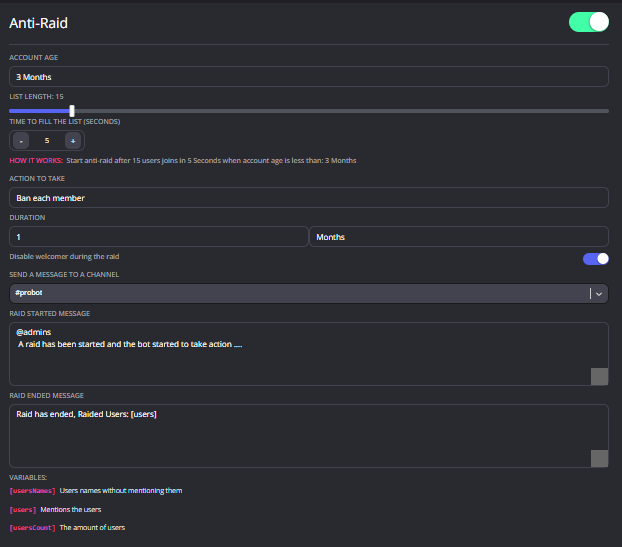
This feature will automatically deal with server raiders, and it is even customizable.
How can I set it up?
1 - Select the minimum age for potential raiders. (Example: 2 months)
2 - Select the minimum amount of potential raiders. (Example: 10)
3 - Select the time that the bot will start the anti-raid. (Example: 1 minute)
So now, if 10 accounts join in the span of 1 minute and all of them are under 2 months old, the anti-raid will start.
4 - Select the punishment for the potential raiders.
You can even send a warning message for server staff so they can notice.
 jovial jewel
is there a xp booster?
timid jewel
jovial jewel
is there a xp booster?
unfortunately not yet.
jovial jewel
timid jewel
unfortunately not yet.
also no way to combine text lvl and voice lvl into one level right
primal coral
<@&675070424748654593>..
timid jewel
jovial jewel
also no way to combine text lvl and voice lvl into one level right
no we dont have the feature but you can suggest #573053418017521664
pale hearth
@timid jewel can you show vip protection?
native geyser


 chrome junco
So I am trying to subscribe to tier 2 and it says i need to invite the premium bot. Where do i do that
 ebon viper
how to find the page number?
timid jewel
chrome junco
So I am trying to subscribe to tier 2 and it says i need to invite the premium b...
ProBot
Welcome images, moderation, leveling, reaction roles, logs, high quality music and many many more!
ebon viper
timid jewel
can you explain more?
I need to see the top by activity on the server, namely by text, for this I need a page number
help pls
timid jewel
you can write
#top text 1
to see page number 1 for text
and
#top voice 1
to see page number 1 for voice
if you want to change the page write another number like 2
chrome junco
timid jewel
https://probot.io/premium/manage
i did that and its not showing up
timid jewel
chrome junco
i did that and its not showing up
have you bought a premium yet?
chrome junco
timid jewel
have you bought a premium yet?
i just tried to. Do i need to add money or can i just pay with my card?
Tier one is highlighted blue the others are grey does that mean i can only get tier1?
timid jewel
no you can get both
do you need prime or premium
prime is tier 1 and premium is tier 2
chrome junco
I need what ever it takes to be able to change avatar and access to utilize the bot to the fullest
ebon viper
@timid jewel
 timid jewel
chrome junco
I need what ever it takes to be able to change avatar and access to utilize the ...
timid jewel
chrome junco
I need what ever it takes to be able to change avatar and access to utilize the ...
so its tier 2
10$ monthly
timid jewel
ebon viper
<@591155056779460608>
go to dashboard and enable the utility module
ProBot
Welcome images, moderation, leveling, reaction roles, logs, high quality music and many many more!
chrome junco
timid jewel
so its tier 2
i went through the purchasing process but nothing happened.
timid jewel
chrome junco
i went through the purchasing process but nothing happened.

have you get this page?
chrome junco
did that
timid jewel
okay wait a little bit
chrome junco
ahh okay
ebon viper
timid jewel
go to dashboard and enable the utility module
can you take a screenshot of where to find the service module
@timid jewel
 ebon viper
I have it enabled but it still doesn't work.
timid jewel
ebon viper
I have it enabled but it still doesn't work.
can I have screenshot of your /top settings command
timid jewel
 nocturne flax
I need help
nocturne flax
I need help
how can I help u
nocturne flax
It keeps saying this

 brazen python
Hey, sorry to bother. I just need a quick question about /play command. I tried to play via link and also search for some songs but always comes the same msg: The application did not respond. What can I do ?
nocturne flax
nocturne flax
It keeps saying this
@timid jewel it keeps saying this for me
Why does it say this

Can someone help
<@&675070424748654593>
nocturne flax
brazen python
Hey, sorry to bother. I just need a quick question about /play command. I tried ...
do u still face this issue ?
brazen python
nocturne flax
do u still face this issue ?
Yes I do, but found out that #play is working but /play is not
nocturne flax
nocturne flax
Why does it say this
you may be claiming daily from multiple devices or someone using your internet maybe claiming it too which may cause this error
to fix it only claim daily from 1 account.
nocturne flax
brazen python
Yes I do, but found out that #play is working but /play is not
try kicking the bot and re-inviting it.
native geyser
nocturne flax
Why does it say this
you cant use multiple accounts
you cant use multiple devices
native geyser
brazen python
Yes I do, but found out that #play is working but /play is not
what is the bot replying with to /play command
nocturne flax
imma go.
brazen python
nocturne flax
try kicking the bot and re-inviting it.
My dumb ass did not think of this solution 😄 thank you
 steep notch
I need help at this
 steep notch
I didn't use multiple accounts
native geyser
i also mentioned that using multiple devices can cause the issue too
native geyser
log off from dashboard and also click on 'log off from all devices' then wait for 24 hours and try again
native geyser
vote issue is a lot different than daily issue
steep notch
native geyser
vote issue is a lot different than daily issue
I have issues with vote too
native geyser
is it saying bad vote request?
steep notch
Yes
native geyser
well its due to using multiple accounts so
steep notch
Ok
 foggy cradle
Am I able to apply as Proofreader?
native geyser
we're currently not looking for more people
 native osprey
does probot have reaction roles?
nocturne flax
<@&675070424748654593> Hello how did i use the /24/7 it’s dont work ;-;
native geyser
native osprey
does probot have reaction roles?
Yes it does
https://probot.io/dashboard -> reaction roles module
ProBot
Welcome images, moderation, leveling, reaction roles, logs, high quality music and many many more!
native geyser
nocturne flax
<@&675070424748654593> Hello how did i use the /24/7 it’s dont work ;-;
Hi, 24/7 is for premium only
nocturne flax
Oh ok tkt
native osprey
native geyser
Yes it does
https://probot.io/dashboard -> reaction roles module
With reaction roles
Can i make it so they can only have 1 role?
And if they react on another, it’ll remove previous role and give the role they click the second time
 calm hollow
<@&675070424748654593> .
 junior orbit
native osprey
With reaction roles
Can i make it so they can only have 1 role?
And if they reac...
junior orbit
native osprey
With reaction roles
Can i make it so they can only have 1 role?
And if they reac...
To be Frank that's not a thing in the reaction roles, unlike the leveling system which does that
 velvet gulch
Can someone help me understand why ProBot is constantly going down?
calm hollow
<@&675070424748654593> .
@velvet gulchhow so?
@nocturne flaxyou cant create a whole server with probot
heres the commands https://probot.io/commands
heres the dashboard https://probot.io/dashboard
as i said you cant do such thing with probot it only helps you moderating your server
?
can i help you ?
hmm?
you should probably use #support-ar
ok then how could i help you?
nocturne flax
#role @rough tendon only
 lean badgerBOT
nocturne flax
#role <@894073453316046850> only
lean badgerBOT
nocturne flax
#role <@894073453316046850> only
:white_check_mark: Changed roles for Farisx67, +Only Arabic
 fringe pagoda
Hello there for some reason our server premium bot became offline
could anybody help ?
 crude estuary
fringe pagoda
Hello there for some reason our server premium bot became offline
crude estuary
fringe pagoda
Hello there for some reason our server premium bot became offline
maybe the bot ended
crude estuary
nocturne flax
What are the advantages of the bot?
check it through > https://probot.io/dashboard
ProBot
Welcome images, moderation, leveling, reaction roles, logs, high quality music and many many more!
nocturne flax
Thank you
crude estuary
yw
velvet gulch
calm hollow
<@520742268815015936>how so?
Keep getting lags when we are putting commands in for moderation.
Do /ping and if times out.
Happens quite regularly
fringe pagoda
crude estuary
check it through > https://probot.io/dashboard
Alright thank you !
 uncut wadi
<@&675070424748654593>
I was trying to make a command to moderate submissions in my server for an event.
Is there anyone who can help me in the process of how to make a command so the bot sends the image first for moderators and after it's verified, it shows up at the submissions chat with the name of the person who submitted?
Is this doable with Probot?
calm hollow
<@&675070424748654593> .
 split needle
velvet gulch
Keep getting lags when we are putting commands in for moderation.
Do /ping and ...
split needle
velvet gulch
Keep getting lags when we are putting commands in for moderation.
Do /ping and ...
It's been happening lately and we haven't know the cause
May take a long while before it's being figured and fixed
split needle
uncut wadi
<@&675070424748654593>
I was trying to make a command to moderate submissions ...
Not possible
uncut wadi
split needle
Not possible
K, thank you either way
nocturne flax
<@&675070424748654593>
I am currently having a problem with ProBot listing Mod actions / Logs in the Dashboard.
The logs show in the designated Discord channel but are not showing within the ProBot Dashboard.
Is this a bug or have I missed something?
calm hollow
<@&675070424748654593>
calm hollow
nocturne flax
<@&675070424748654593>
I am currently having a problem with ProBot listing Mod...
Logs are meant to show in discord channels not in probots dashboard is that your problem?
nocturne flax
is there a way to make them show in the "Mod Actions" section of the Dashboard?
calm hollow
Nope mod actions only shows you (moderators actions) bans , mutes eta
nocturne flax
it still doesnt seem to be showing that, that is my problem. how would i fix that?
calm hollow
@nocturne flax did you use the command?
nocturne flax
I did not set the bot up, so i am unsure. but for clarification what command would that command be?
calm hollow
/ban , /mute
 quaint sentinel
calm hollow
quaint sentinel
calm hollow
@nocturne flax that's weird it works on my server can i have a link to your server in my dms?
nocturne flax
sadly i cannot, as i do not have the permissions to do so, was just curious if this was a bug or a common issue
calm hollow
no it's not Bugged or something i just tried it on my server i used the command (#ban) on a user and it appeared in that section so you guys might have done something wrong 🤷♀️@nocturne flax
nocturne flax
ill look through it thank you for your time
calm hollow
your welcome
 verbal yew
Seeking a fix for this...
Issue: Name and/or Text on the Welcome Image Tool goes missing. Randomly and repeatedly,
Screenshots: These are just a few examples, but it's occurred more than a few times.
Thank you kindly

 frail gust
<@&675070424748654593> ^^
frail gust
verbal yew
Seeking a fix for this...
**Issue:** Name and/or Text on the Welcome Image Tool ...
Use these coordinates .
Default coordinates


 verbal yew
Wonderful, so this could be due to my coordinates being bad?
frail gust
verbal yew
Wonderful, so this could be due to my coordinates being bad?
yeah maybe , use these are the default coordinates it should fix it
verbal yew
Lord knows it's not the first time my coordinates have been wonky 😉
I greatly appreciate your help...
Thank you
frail gust
Your welcome

 cunning grail
calm hollow
<@295961213731602432> try logging out from your other accounts
cunning grail
calm hollow
<@295961213731602432> try logging out from your other accounts
didn't work
calm hollow
What does it show you? @wet fog
 wet fog
 calm hollow
@cunning grail try again after a day
wet fog
Is using multiple accounts out of low?
calm hollow
yep
wet fog
Ok i didn't know and thx for help
 misty summit
C
 coral kettle
Is this where I get supoort
I need help managing pro bot
This is my first time using a bot
nocturne flax
<@&675070424748654593>
lean badgerBOT
nocturne flax
<@&675070424748654593>
We noticed that you are a premium user, for faster response go to #premium-support
 arctic ore
How do I use spotify with Probot?
nocturne flax
arctic ore
How do I use spotify with Probot?
Probot does not support spotify
lean badgerBOT
nocturne flax
Probot does not support spotify
We noticed that you are a premium user, for faster response go to #premium-support
 errant pelican
السلام عليكم
nocturne flax
errant pelican
السلام عليكم
#support-ar
primal coral
coral kettle
This is my first time using a bot
<@&675070424748654593>..
lean badgerBOT
We noticed that you are a premium user, for faster response go to #premium-support
primal coral
coral kettle
This is my first time using a bot
You can invite our bot into your server from
https://probot.io/invite
then you can manage your server by our bot from
https://probot.io/dashboard
- Can i help you in a specific thing or you're done?
- ProBot Have many features as Moderating and leveling system and Welcoming Messages and many many more!
 civic crescent
 rustic canyon
Hi, may I ask how these /role disable/enable work?
<@&675070424748654593>
 steep notch
How many days does it take for a new account to transfer credits?
<@&675070424748654593>
 spring ether
rustic canyon
Hi, may I ask how these /role disable/enable work?
<@&675070424748654593>
spring ether
rustic canyon
Hi, may I ask how these /role disable/enable work?
<@&675070424748654593>
hello , u can choose role from above to give him prem to use /role and specific role*
by enabling specific role or disable specific role
spring ether
steep notch
How many days does it take for a new account to transfer credits?
1 month
steep notch
ok
 blissful meadow
when am i going to be able to get credits per vote on my new account? <@&675070424748654593>
spring ether
blissful meadow
when am i going to be able to get credits per vote on my new account? <@&6750704...
u can get it only from 1 account
blissful meadow
spring ether
u can get it only from 1 account
so I can only get credits from a single account and I can only get the daily rewards with the rest of my accounts?
spring ether
vote + daily from 1 account only
blissful meadow
Because I tried making 2 new accounts and tried to vote for probot but It kept saying that I have already voted without It giving me any creds
spring ether
yw
 opaque raptor
hi
spring ether
how can i help you
 upbeat reef
native geyser
upbeat reef
native geyser
what is the error message
 native geyser
blacklisted from vote due to using multiple accounts
spring ether
nocturne flax
Is there refund for probot premium tire 2


 split prawn
native geyser
blacklisted from vote due to using multiple accounts
split prawn
native geyser
blacklisted from vote due to using multiple accounts
whats the solution
what can i do
 neat hedge
even with the proper settings welcome messages are not getting triggered, need help
 calm hollow
<@&675070424748654593> ..
split needle
nocturne flax
Is there refund for probot premium tire 2
yes
you can dm @native geyser with your payment method and premium number
split needle
split prawn
whats the solution
if you want provide proof that you're not using multiple accounts to vote, we can check it and remove the blacklist. otherwise, it will just be like that
split needle
neat hedge
even with the proper settings welcome messages are not getting triggered, need h...
can you make sure the text message is not too long?
also can I see the image setting at the background tab?
I did not ask you to send the message here
neat hedge
split needle
I did not ask you to send the message here
i wanted to know if its too long
 split needle
webp is not a supported file type
try convert it to png or jpg instead
neat hedge
changed it
split needle
you don't need to send it to me
after changing it, check it again if it works now
neat hedge
my bad, sorry
neat hedge
the welcome message works perfectly, but the image is not getting added. I reduced the size too and tried
native geyser
can i see your image settings
native geyser
how big is it
neat hedge
23682 bytes
native geyser
i think its way too small try scaling it up a bit
neat hedge
scaled to 340 kb still no luck
 past walrus
what language is probot written in?
calm hollow
<@&675070424748654593> .
native geyser
 slender hornet
hello
slender hornet
hello
you can ask your question right away
native geyser
neat hedge
scaled to 340 kb still no luck
are you able to scale it up a bit more?
native geyser
past walrus
what language is probot written in?
probot is not open source so
past walrus
native geyser
probot is not open source so
but do yk which language it is?
cuz my friend asking me since his python bot doesnt like threads
native geyser
no i do not
past walrus
aight
 pliant cove
why sell/buy credits for real currency is against Probot roles
native geyser
because it creates a black market
pliant cove
native geyser
because it creates a black market
and how is that
native geyser
besides trading is against discord tos anyway
pliant cove
then why you don't add feature to by credits for real currency in your website
native geyser
because there is no need
if you're gonna get backgrounds you can in few days
if you're gonna get a bot you can just purchase the bot directly
pliant cove
Some people just want to be in the leaderboard
native geyser
good luck to them then
 wet quail
Hi! So we've had this issue with probot not generating usernames upon user join randomly - we are on pro version tier 2. We were recommended by someone to restart it and it temporarily fixed the issue - we have observed it's back again

here's the settings

 native geyser
weird let me report the issue to devs meanwhile please restart the bot again
 royal tendon
HI we had a premimum bot. The user has rage quit the server now we cant get the normal one to play music again
Any way it can be removed
native geyser
what does the bot reply with to the play command
royal tendon
"Another bot is in use for this server"
native geyser
have you guys kicked the premium bot
 slim ledge
i got warned from the probot but idk why
native geyser
the warn shows why you were warned
 short meteor
primal coral
short meteor
primal coral
<@&675070424748654593>..
native geyser
yes?
nocturne flax
Does anyone know how to mute someone automatically if they spam Without typing in the command It automatically does it
native geyser
https://probot.io/dashboard -> select your server -> automod
ProBot
Welcome images, moderation, leveling, reaction roles, logs, high quality music and many many more!
 cold furnace
How do I change the prefix?
Currently on /
But I want something else, as example #
<@&675070424748654593>
native geyser
default prefix is already # you cant change / its slash commands
native geyser
yes because slash commands
cold furnace
Oh so / goes with every bot?
Btw am I even allowed to ping the support role here? Shouldn't I? I'm new here sorry
native geyser
you can and / does work with bots that have slash commands installed (most of the big bots do have it)
cold furnace
Aight ty!
native geyser
yw
 kind rampart
<@&675070424748654593> Hi! I made some progress on setting up Reaction Roles for my server but then I can't assign roles to the emojis. It has a little message that says "ProBot should be in a role with a higher position" but I gave it all the permissions including admin. I have the roles already created in the server too. Any help is appreciated!
native geyser
drag the bots role above other roles
kind rampart
Oh I see, thanks so much!
native geyser
yw
native geyser
hi how can i help you?
 limpid swift
Hi I was trying to make an edit to a reaction role setup from the dashboard, but I no longer have access to emojis that were once there. We have a language selection channel and use flags for reactions but country flags don't show up anymore. These are the only one's available now... Is there any way to add emojis to probot or to restore previous emojis?

 lyric plover
native geyser
lyric plover
native geyser
any error message?
native geyser
limpid swift
Hi I was trying to make an edit to a reaction role setup from the dashboard, but...
it'll be fixed soon apologies for the inconvenience
limpid swift
native geyser
it'll be fixed soon apologies for the inconvenience
No prob. Thank you
 west turtle
hello i was using the music section of the bot and for some reason it only repeats the same song even tho there are other in the cue
native geyser
use /repeat
west turtle
omg im so stupid sorry to waste your time
native geyser
no worries
native geyser
drag the bots role above other roles
 jagged nova
oh alr thank you ruru
wet quail
native geyser
weird let me report the issue to devs meanwhile please restart the bot again
Thanks Ruru. Hope it get's resolved soon, I do not support idea of restarting it a few times a day 🙂
native geyser
yw
ProBot
Welcome images, moderation, leveling, reaction roles, logs, high quality music and many many more!
native geyser
can i see your dashboard welcomer settings please
 native geyser
yw
native geyser
jagged nova
are you able to zoom out a bit
jagged nova
uh i can try
native geyser
jagged nova
uh i can try
or just provide me with these
is text enabled
is your image bigger than 3mb
what is your image format
 sage ermine
Hello, can I play songs on spotify by this bot?
native geyser
spotify is currently not supported will be added though
 fervent fulcrum
i need help
native geyser
you can ask your question right away
fervent fulcrum
so like the bot isnt working at all
like i do #top
and it doesn’t work
does it need its own role with permission
native geyser
fervent fulcrum
like i do #top
use it with slash commands (as /top) and let me know the bot response
currently you cant
because you cant thats why
a way for it isn't made yet
@wet quailcan you let me know if it happens again
nocturne flax
My ProBot is on maintenance how can i get it out of maintenance?
 vagrant grail
idk it happend to me too
native geyser
music is being worked on thats why, will be available as soon as possible
native geyser
check again please
native geyser
alright let me report back
native geyser
waiting on a reply please be patient
 rustic timber
i keep getting this message
Music is under maintenance, please contact us at the support server.
what should i do??
 delicate sapphire
wait lads
native geyser
read above please
native geyser
i'm not a developer please be patient
delicate sapphire
waitin
 simple plinth
guys how can i add another language to pro bot please
native geyser
you can change its language on dashboard or by using /setlang command
simple plinth
thanks bro
native geyser
yw
delicate sapphire
dont worry wont work anyway
native geyser
setlang command is not related to music module also if you dont have any other questions please stop keeping the channel busy
try again now please @delicate sapphire
native geyser
alrighty
wet quail
native geyser
<@366689758388158464>can you let me know if it happens again
Two people have joined the server since restart and no issues so far
But it's not every other person, it happens at random
native geyser
please let us know if it happens again
wet quail
Sometimes 5 people join and no issues, sometimes one joins and the next is missing the text
 hardy imp
Hi
native geyser
yw
hardy imp
I have a question
native geyser
yes?
hardy imp
Who invented the Probot
native geyser
Dramex is the main developer
delicate sapphire
yo i got a question
hardy imp
Ok
native geyser
yes?
native geyser
probot related questions only please as its mention in the channel description
wet quail
Jeez I had a stroke trying to read that. Good night all and thanks for the help once again
native geyser
np np
delicate sapphire
gd man
native geyser
have a good night
lean badgerBOT
We noticed that you are a premium user, for faster response go to #premium-support
nocturne flax
Hello
native geyser
hi how can i help you?
lean badgerBOT
nocturne flax
<@&675070424748654593>
We noticed that you are a premium user, for faster response go to #premium-support
native geyser
nocturne flax
hello, ill like to restore my premium
what happened to your premium?
 next night
I need help/support with the new reaction role feature in the dash board. I have an embed that I wanna use, but when I go into the reaction role menu of the dash board and select my embed to get the emoji I want I can’t find nothing where it says the role I want
native geyser
in your server settings drag the bots role above other roles
nocturne flax
native geyser
what happened to your premium?
my account got termed
that was a while back, and ill like to use the remaining of my membership
native geyser
in dms can you show me a payment receipt regarding the old bot
 native geyser
open your dms please you can close them when we're done
nocturne flax
done
 next night
native geyser
in your server settings drag the bots role above other roles
next night
native geyser
in your server settings drag the bots role above other roles
Are you replying to me ?
native geyser
yes
 trim sundial
in my server I made a new text channel, but nobody is gaining xp from it, there is a slow mode, but I wouldn't think that would affect it, and I made sure it wasnt a no xp channel
<@&675070424748654593>
native geyser
enable utility module on dashboard
trim sundial
it is already enabled
native geyser
since its also a no-xp channel there isn't a reason for people to not gain any xp
can you ask them to send a message in 2-3 minutes and check again
trim sundial
okay
trim sundial
native geyser
can you ask them to send a message in 2-3 minutes and check again
its still not working
native geyser
invite me to your server in dms please
trim sundial
sure
nocturne flax
native geyser
invite me to your server in dms please
how can i invite the premium bot?
i dont see a link to invite it
native geyser
ProBot
Welcome images, moderation, leveling, reaction roles, logs, high quality music and many many more!

 tawny iris
is it possible to get this prompt to not show up at all?
 native geyser
tawny iris
is it possible to get this prompt to not show up at all?
native geyser
tawny iris
is it possible to get this prompt to not show up at all?
disable application commands perms on discord
tawny iris
native geyser
disable application commands perms on discord
how do i do that lol
native geyser
nocturne flax
i mean i paid
you might have gotten website balance check it please click on new subscriptions
native geyser
tawny iris
how do i do that lol
discord settings -> roles
tawny iris
native geyser
discord settings -> roles
will that mean none of the commands will do that tho?
nocturne flax
native geyser
discord settings -> roles
negative, nothing shows....

 ionic flint
Can I use probot to set up a welcome/verification channel?
native geyser
tawny iris
will that mean none of the commands will do that tho?
yes
native geyser
nocturne flax
negative, nothing shows....
there might be a pending wait for a bit please
native geyser
ionic flint
Can I use probot to set up a welcome/verification channel?
https://probot.io/dashboard -> select your server -> welcomer
ProBot
Welcome images, moderation, leveling, reaction roles, logs, high quality music and many many more!
nocturne flax
native geyser
there might be a pending wait for a bit please
hmm been 25 minutes since payment verification
ionic flint
 nocturne flax
native geyser
there might be a pending wait for a bit please
nocturne flax
native geyser
there might be a pending wait for a bit please
can i dm u my web receipt?
native geyser
yes
native geyser
ionic flint
apologies fixed the link
nocturne flax
native geyser
yes
open dms plz
ionic flint
I do not see a selection "welcomer"
native geyser
did you select your server first
ionic flint
Yes
native geyser
can you show me what you're seeing on your screen
nocturne flax
native geyser
already open
web receipt sent
ionic flint

 native geyser
 ionic flint
 native geyser
thats it
ionic flint
I want to make a channel where they have to react to gain access to the full server.
Verify
native geyser
for verification:
-
from embed messages module create an embed message and send it to your server (the message you'll have to select in step 2 basically)
-
from reaction roles module select the embed message you just sent
-
add reactions
-
add roles by clicking on the plus signs right next to the reactions you added
native geyser
yw
jagged nova
Yo ruru i got everything up in running thanks for the help
native geyser
you're welcome ^^
jagged nova
Quick question can I make interactives roles with the probot cause mee6 aint working and i tried to ask for help but no one respond
native geyser
can you explain what exactly you mean by interactive roles
jagged nova
Like in some serves you can have roles set up in a channel and you can click them and it would be added to your roles
native geyser
oh reaction roles yeah we do have it
to set it:
Get on https://probot.io/dashboard and select your server
-
from embed messages module create an embed message and send it to your server (the message you'll have to select in step 2 basically)
-
from reaction roles module select the embed message you just sent
-
add reactions
-
add roles by clicking on the plus signs right next to the reactions you added
ProBot
Welcome images, moderation, leveling, reaction roles, logs, high quality music and many many more!
jagged nova
Alr thank you for the help
native geyser
yw
 rare pollen
native geyser
rare pollen
native geyser
it currently isnt possible will be added though
 lusty apex
Can I reset a servers xp?
native geyser
yes
#reset text all
#reset voice all
lusty apex
Thank you
One more thing
How do I get the bot to give roles based on xp?
I don't know the commands for it
native geyser
you can do it based on levels
https://probot.io/dashboard -> select your server -> leveling system module
ProBot
Welcome images, moderation, leveling, reaction roles, logs, high quality music and many many more!
lusty apex
So how do I select what levels reward certain roles
native geyser
native geyser
you can do it based on levels
https://probot.io/dashboard -> select your server ...
have you checked this yet
lusty apex
Yes I have
native geyser
on there click on add reward and you'll see the rest
lusty apex
OOOH
I'm big dumb
I'm using a phone so I didn't see the other things
Whoops
Thank you homie
native geyser
yw
nocturne flax
Is there a way I could restart someones levels?
 untold arch
<@&675070424748654593>
untold arch
nocturne flax
Is there a way I could restart someones levels?
if you mean reset
#help reset
lean badgerBOT
untold arch
#help reset
**Command: reset**
Reset text/voice/invites/limits xp points for all or specific member.
**Usage:**
/reset [text / voice / invites / limits] [all / user]
**Examples:**
/reset text all
/reset voice all
/reset invites all
/reset text @Dramex
/reset limits @Dramex
nocturne flax
untold arch
if you mean reset
mhm
nocturne flax
untold arch
#help reset
ty
untold arch
yw
nocturne flax
Hello
untold arch
nocturne flax
Hello
hello, how can i help you?
untold arch
yeah, what's the problem
 sleek cove
I need help with image only channel setting
I set a bunch of channels to image only, probot has complete access to them and its role is the highest yet when i or anyone else send a text it just stays there
nocturne flax
<@&675070424748654593>
lean badgerBOT
nocturne flax
<@&675070424748654593>
We noticed that you are a premium user, for faster response go to #premium-support
nocturne flax
sleek cove
I set a bunch of channels to image only, probot has complete access to them and ...
Can you please send me a picture of the auto mod panel
lean badgerBOT
nocturne flax
Can you please send me a picture of the auto mod panel
We noticed that you are a premium user, for faster response go to #premium-support
 calm stump

So for some reason without any tampering at all in the ProBot dashboard (I checked the Control Panel Logs) ProBot changed the syntax from [userName] to [user.name]. I went in and fixed it, but even afterwards it still now only says quite literally “[userName]” instead of saying who leveled up as it did a few days ago. What should I do?
nocturne flax
calm stump
So for some reason without any tampering at all in the ProBot dashboard (I check...
It's [user] not [userName]
lean badgerBOT
nocturne flax
It's [user] not [userName]
We noticed that you are a premium user, for faster response go to #premium-support
calm stump
I set it up as [userName] just a few days ago, what made it work up until just now?
Oh ew no
I’m not using [user], that pings the user
That’s why I’m using [userName]
nocturne flax
calm stump
That’s why I’m using [userName]
oh okay i understand now
@calm stump okay could you please try make it "[user.name]" and see if it works?
calm stump
Doesn’t seem to be working either. I don’t see it in the Probot variables also
nocturne flax
calm stump
Doesn’t seem to be working either. I don’t see it in the Probot variables also
it seems that i can't help you with this as i don't know the solution for this problem right now there is no English Support Available, You have to wait until they come, thank you for your patience
 lean badgerBOT
nocturne flax
it seems that i can't help you with this as i don't know the solution for this p...
lean badgerBOT
nocturne flax
it seems that i can't help you with this as i don't know the solution for this p...
We noticed that you are a premium user, for faster response go to #premium-support
 hollow slate
calm stump
Doesn’t seem to be working either. I don’t see it in the Probot variables also
hollow slate
calm stump
Doesn’t seem to be working either. I don’t see it in the Probot variables also
just write it like that [user.name] without any space then save changes

 obsidian isle
Hey! How do i remove all warnings ? /warn_remove all doesnt do what its supposed to
 steep fiber
.
nocturne flax
obsidian isle
Hey! How do i remove all warnings ? /warn_remove all doesnt do what its suppo...
 lean badgerBOT
nocturne flax
lean badgerBOT
nocturne flax
We noticed that you are a premium user, for faster response go to #premium-support
steep fiber
.
obsidian isle
nocturne flax
doesnt work
steep fiber
.
obsidian isle
returns an error
nocturne flax
obsidian isle
returns an error
what does it tells you?
obsidian isle
that theres no warningto remove ( cant find warning, you are looking for. - in polish since its set to polish language)
now that i think about it ill try to change it to english
just to be sure
seems to be working fine now, well sorry for bothering then
nocturne flax
obsidian isle
seems to be working fine now, well sorry for bothering then
that's totally okay, if you have anything else i will be more than happy to help you
obsidian isle
Thanks ❤️
Oh i've got one more question actually
is there any way to log warnings ?
checking users by /warnings nickname is kinda annoying, we got separate channels for logs, so if it could push notifications about warns there
that would be perfect
its a discord with around 2k people, hard to track all of them ^
next night
I put the pro bot role above all my other roles & in the reaction menu it’s still not letting me select a role
nocturne flax
obsidian isle
is there any way to log warnings ?
unfortunately there is nothing like that
lean badgerBOT
nocturne flax
unfortunately there is nothing like that
We noticed that you are a premium user, for faster response go to #premium-support
obsidian isle
ouch
thats kinda sad
echhh well, we will have to check warnings by hand then
thanks for replying !
next night
This is all I’m seeing
 nocturne flax
next night
This is all I’m seeing
nocturne flax
next night
This is all I’m seeing
click add reaction then chose an emoji after that u will see + button next to the emoji which you have chosed there you can select the role you want
like this @next night
 nocturne flax
obsidian isle
thanks for replying !
nocturne flax
obsidian isle
thanks for replying !
u welcome, anytime
 nocturne flax
 unique vault
What is color number in /color?
unique vault
What is color number in /color?
could you please try typing this command "/colors"
 next night
nocturne flax
like this <@415074096934813706>
next night
nocturne flax
like this <@415074096934813706>
I found it
nocturne flax
unique vault
it gives me the list of nothing
because there is no colors
unique vault
How to add them
nocturne flax
unique vault
How to add them
You have to create roles then name it a number like this:
and give the roles colors
then they will be automatically added to the color list
 lean badgerBOT
nocturne flax
You have to create roles then name it a number like this:
and give the roles col...
lean badgerBOT
nocturne flax
You have to create roles then name it a number like this:
and give the roles col...
We noticed that you are a premium user, for faster response go to #premium-support
unique vault
nocturne flax
You have to create roles then name it a number like this:
and give the roles col...
oh that's sound bad
anyways thank you
❤️
nocturne flax
unique vault
anyways thank you
you welcome, if you have anything else i will be more than happy to help you
nocturne flax
next night
I found it
do u have any other questions?
 vivid fog
How much is premium in Korean won or Philippines peso?
nocturne flax
vivid fog
How much is premium in Korean won or Philippines peso?
which premium exactly?
tier 1 or tier 2?
vivid fog
Both
nocturne flax
vivid fog
Both
this is the monthly and the yearly in dollars you can calculate it and see how much it costs on your currency

 vivid fog
Ty!
nocturne flax
unique vault
do i have to /skip everytime?
if the loop is already on you can try typing /loop again and it will turns off
nocturne flax
vivid fog
Ty!
you welcome, if you have anything else i will be more than happy to help you
unique vault
nocturne flax
if the loop is already on you can try typing /loop again and it will turns off
will the bot react on this command somehow?
nocturne flax
unique vault
will the bot react on this command somehow?
can you please explain more?
unique vault
i'm typing /loop and bot doesnt respond
nocturne flax
unique vault
i'm typing /loop and bot doesnt respond
first of all do you use slash commands? or the prefix?
nocturne flax
unique vault
/skip works /loop does not
i'm sry i meant /repeat
unique vault
yes
nocturne flax
try it
nocturne flax
unique vault
works
yea sry for that
so do u have any other qustions? @unique vault
unique vault
Nope, thank you!
nocturne flax
unique vault
Nope, thank you!
you welcome, if you have anything else i will be more than happy to help you.
 bitter glade
How do I change the prefix of probot?
nocturne flax
bitter glade
How do I change the prefix of probot?
go to the dashboard then select a server go to server settings and there you can change it:
 lean badgerBOT
nocturne flax
go to the dashboard then select a server go to server settings and there you can...
lean badgerBOT
nocturne flax
go to the dashboard then select a server go to server settings and there you can...
We noticed that you are a premium user, for faster response go to #premium-support
bitter glade
Ok Thanks
nocturne flax
bitter glade
Ok Thanks
you welcome, if you have anything else i will be more than happy to help you.
 topaz crest
 shell thunder
hey i wonder why the probot doesnt work from yesterday if any one can help i would be thankful
 sullen prism
shell thunder
hey i wonder why the probot doesnt work from yesterday if any one can help i wou...
sullen prism
shell thunder
hey i wonder why the probot doesnt work from yesterday if any one can help i wou...
<@&675070424748654593>
nocturne flax
shell thunder
hey i wonder why the probot doesnt work from yesterday if any one can help i wou...
it seems that i can't help you with this as i don't know the solution for this problem right now there is no English Support Available, You have to wait until they come, thank you for your patience
sullen prism
@nocturne flax ????
nocturne flax
sullen prism
<@456226577798135808> ????
What
sullen prism
 sullen prism
Nope
shell thunder
nocturne flax
it seems that i can't help you with this as i don't know the solution for this p...
i will wait and btw i just wonder why the bot is online and doesnt work
nocturne flax
shell thunder
i will wait and btw i just wonder why the bot is online and doesnt work
To be honest I don’t know because of that you have to wait for the english support thank you for your patience
lean badgerBOT
nocturne flax
To be honest I don’t know because of that you have to wait for the english suppo...
We noticed that you are a premium user, for faster response go to #premium-support
primal coral
shell thunder
hey i wonder why the probot doesnt work from yesterday if any one can help i wou...
<@&675070424748654593>...
primal coral
shell thunder
hey i wonder why the probot doesnt work from yesterday if any one can help i wou...
how can i help you?
some command is not working or the whole bot
 leaden nymph
<@&675070424748654593>
primal coral
leaden nymph
When was this bot made?
2017
shell thunder
primal coral
how can i help you?
some command is not working or the whole bot
thw whole bot with me the daily, profile ,avatar
thats the things i have tried
leaden nymph
Who made this bot? <@&675070424748654593>
primal coral
leaden nymph
Who made this bot? <@&675070424748654593>
Dramex and don't mention again please
primal coral
shell thunder
thw whole bot with me the daily, profile ,avatar
send me a screnshot for your problem
leaden nymph
Ok
primal coral
or explain it
shell thunder
primal coral
send me a screnshot for your problem
okay wait 1sec
primal coral
tyt
shell thunder
here as u see using any commands the bot does nothing this is form like 12h idk
 primal coral
daily is moved to https://probot.io/daily
ProBot
Welcome images, moderation, leveling, reaction roles, logs, high quality music and many many more!
try profile with slash command and send me a screnshot
 leaden nymph
How famous is the bot?
primal coral
shell thunder
go to https://probot.io/dashboard
and open utlity moudle and others and be sure profile command is not closed at this channel or just turned off
ProBot
Welcome images, moderation, leveling, reaction roles, logs, high quality music and many many more!
primal coral
leaden nymph
How famous is the bot?
ProBot is in 7M servers
leaden nymph
K thanks
shell thunder
primal coral
go to https://probot.io/dashboard
and open utlity moudle and others and be sure ...
okay thanks for helping me
primal coral
yw
shell thunder
primal coral
go to https://probot.io/dashboard
and open utlity moudle and others and be sure ...
with the utilty on i am still having the same problem

and the bot has the highest role in the server
 nocturne flax
<@&675070424748654593>
lean badgerBOT
nocturne flax
<@&675070424748654593>
We noticed that you are a premium user, for faster response go to #premium-support
nocturne flax
@shell thunder the bot is having issues with responding to commands on some servers
shell thunder
nocturne flax
<@888135966500466700> the bot is having issues with responding to commands on so...
when will it work or shall i just kick him and add him again
nocturne flax
shell thunder
when will it work or shall i just kick him and add him again
I don’t know to be honest if you want you can kick him and add him again buy on your responsibility cause i don’t know if it will work
Help, how do i remove someones warns.
primal coral
nocturne flax
Help, how do i remove someones warns.
<@&675070424748654593>..
primal coral
nocturne flax
Help, how do i remove someones warns.
all warns?
nocturne flax
primal coral
all warns?
specific amount of warns
primal coral
nocturne flax
specific amount of warns
use the command with the warn id you can get the warn id from /warnings
nocturne flax
wdym
primal coral
a specific warn right?
use /warnings(user)
and get the warn id
and remove it by the command
#help removewarn
lean badgerBOT
primal coral
#help removewarn
**Command: removewarn**
Removes warnings from all members or specific user.
**Aliases:**
#warn_remove, #unwarn
**Usage:**
/removewarn [warnID]
/removewarn [user]
/removewarn all
**Examples:**
/removewarn 56323094912
/removewarn @Dramex
/removewarn all
 fresh zephyr
Bonjours
primal coral
fresh zephyr
Bonjours
#support-int for french support
nocturne flax
I don't find any removewarn
option in the probot commands menu
It doesn
it does not do anything when i do /removewarn
spring ether
nocturne flax
it does not do anything when i do /removewarn

and make sure u have prem for that
spring ether
 raven hull
and my profile is the same
raven hull
and my profile is the same
#support-ar for better support in your language
wet quail
@native geyser
 nocturne flax
@stone cloud How do i remove warning with this probot. normally
Why its not working for me. i have administrator perms. i can warn but i can't unwarn/removewarn
royal tendon
native geyser
have you guys kicked the premium bot
yes
primal coral
<@&675070424748654593> ...
primal coral
nocturne flax
Why its not working for me. i have administrator perms. i can warn but i can't u...
i told you how to remove a warn please don't repeat your question my dude.
if its not working send me a screenshot for the bot's respond
primal coral
royal tendon
yes
Kick both probot premium and the normal then invite just 1 of them.
primal coral
 lilac tulip
Is it ok to sell nitro in exchange of credits?
lilac tulip
Is it ok to sell nitro in exchange of credits?
yea , but you can't sell credits for real money
primal coral
 next abyss
How to redeem A nitro code
next abyss
How to redeem A nitro code
its nothing-related to probot please ask at #chat-en
split needle
steep notch
When I send credits to someone it decreases by how much percents? <@&675070424748654593>
like when I send credits to someone it doesn't send the exact Credits
native geyser
5% is the tax
steep notch
ok
native geyser
5% of what you're sending is the tax therefore 95% is what you're gonna be sending
You can use a calculator though the bot already calculates it for you and tells you how much is gonna be sent
pliant cove
what does /shuffle do?
steep notch
ok I want to send 772 how much do I have to send?
native geyser
pliant cove
what does /shuffle do?
Shuffles the queue
native geyser
steep notch
ok I want to send 772 how much do I have to send?
Use a calculator please this is no longer a probot related thing
steep notch
bruh
pliant cove
why if i paused the queue and added other song it resume without me typing the command
native geyser
Due to play command being used
pliant cove
native geyser
Due to play command being used
but i didn't type resume 🙂 maybe i want to add music while its not playing
native geyser
Play command was being used before resume command was added, which is quite recently, I do believe it'll be changed
 silent garnet
Y’a des fr
split needle
silent garnet
Y’a des fr
#support-int
pliant cove
native geyser
Play command was being used before resume command was added, which is quite rece...
also if song has ended well it be deleted from queue? + is there is a repeat for the queue command
native geyser
Currently no the repeat command only repeats the current song that is playing
 limpid comet
Transfering log link pls
 toxic ibex
how do i invite the Premium pro bot i dont see an inivite
split needle
limpid comet
Transfering log link pls
https://probot.io/transactions
you can just find it on the user dashboard on the site
ProBot
Welcome images, moderation, leveling, reaction roles, logs, high quality music and many many more!
split needle
toxic ibex
how do i invite the Premium pro bot i dont see an inivite
you need to buy it first
https://probot.io/premium
ProBot
Welcome images, moderation, leveling, reaction roles, logs, high quality music and many many more!
toxic ibex
I did tho
nocturne flax
<@&675070424748654593> Hi there, I emailed the team 4 days ago and have not had a reply, did I use the right email?
split needle
then you should be redirected to the premium manage site unless they messed that up
the link is https://probot.io/premium/manage
ProBot
Welcome images, moderation, leveling, reaction roles, logs, high quality music and many many more!
 faint fox
how to buy prime vs credits !
split needle
nocturne flax
<@&675070424748654593> Hi there, I emailed the team 4 days ago and have not had ...
we don't do support in email unless you're looking for another thing
nocturne flax
Custom plan I was looking for
split needle
faint fox
how to buy prime vs credits !
click on recharge and select the credit option to recharge your balance with credits, then buy the subscription you want
nocturne flax
I emailed hi@probot.io
split needle
nocturne flax
I emailed hi@probot.io
you can dm @native geyser about it instead for now
nocturne flax
Thanks, I'll message them 🙂
faint fox
split needle
click on recharge and select the credit option to recharge your balance with cre...

when ?
 faint fox
 toxic ibex
split needle
then you should be redirected to the premium manage site unless they messed that...
toxic ibex
split needle
then you should be redirected to the premium manage site unless they messed that...
i just get this

 faint fox
toxic ibex
i just get this
faint fox
toxic ibex
i just get this
me too
split needle
toxic ibex
i just get this
did you actually purchased the subscription though?
split needle
faint fox
i have +600k
1 month of prime is 850k credits
toxic ibex
i bought monthly via paypal
faint fox
split needle
1 month of prime is 850k credits
that okaay
split needle
not sure if this is server issue but maybe wait for a while then refresh the site since if you already gotten the subscription, you will have a role in this server
toxic ibex
ok ill check bacj
 ivory yoke
Hello , did you find out from the developers what is going on with the ANUAL VOICE MUTE DURATION function and why it does not work?
 nocturne flax
<@&675070424748654593>
lean badgerBOT
nocturne flax
<@&675070424748654593>
We noticed that you are a premium user, for faster response go to #premium-support
 magic scaffold
play is not working
nocturne flax
toxic ibex
still nothing i bought it twice ?
you bought the premium and you didn't recive anything?
toxic ibex
exactly yea
nocturne flax
toxic ibex
exactly yea
in which payment method did you buy the bot with?
toxic ibex
paypal
nocturne flax
magic scaffold
play is not working
do u user slash commands or the prefix?
magic scaffold
yeah
nocturne flax
toxic ibex
paypal
can you please take a screen shot for the recipe
nocturne flax
magic scaffold
yeah
yeah?
toxic ibex
nocturne flax
can you please take a screen shot for the recipe


i dont have the invire
magic scaffold
got it
nocturne flax
toxic ibex
will first of all thank you for supporting probot by buying the prime version,
second i will mention on of the admin/developers and they will receive your bot as soon as possible
lean badgerBOT
nocturne flax
will first of all thank you for supporting probot by buying the prime version,
s...
We noticed that you are a premium user, for faster response go to #premium-support
nocturne flax
magic scaffold
got it
oh that's good
magic scaffold
 toxic ibex
nocturne flax
will first of all thank you for supporting probot by buying the prime version,
s...
toxic ibex
nocturne flax
will first of all thank you for supporting probot by buying the prime version,
s...
thank you
magic scaffold
I use the command once its populated then fill in the song block
nocturne flax
toxic ibex
thank you
you welcome, if you have anything else i will be more than happy to help you.
@magic scaffold tell me now if you are using the /play could you please try typing the commend using the prefix
Example "#play"
Why can't i remove someones warn with /warnremove or /unwarn or -removewarn
nocturne flax
nocturne flax
Why can't i remove someones warn with /warnremove or /unwarn or -removewarn
what does it tells you?
Nothing happends
 nocturne flax
i can only warn but i can't remove one

guys try sending the command using the prefix
example "#removewarn [Id] "
toxic ibex
is there a way to cancel the subscription I mean I need to save the money anyway
nocturne flax
toxic ibex
is there a way to cancel the subscription I mean I need to save the money anyway
yes you can cancel it (the bot stops renew) by going to the dashboard ---> Premium ----> Click Menage on the subscription you want to cancel and click on cancel subscription
 magic scaffold
sorry nothing has changed
toxic ibex
I don't even get that page
split needle
ivory yoke
Hello , did you find out from the developers what is going on with the ANUAL VOI...
sorry but did not get any answer from developers so I guess it's intentional or they missed my question
will try to inform them
split needle
toxic ibex
I don't even get that page
can you dm @native geyser about it? you can ask for refunds and subscription activation with her and she will sort that out
split needle
magic scaffold
sorry nothing has changed
are you the server owner or have admin permission in that server? if not, as a server admin or owner to go to the server dashboard on the site (https://probot.io/dashboard) select the server, go to the music module, add a role as dj role, save the change, then remove it and save again
ProBot
Welcome images, moderation, leveling, reaction roles, logs, high quality music and many many more!
 dreamy sundial
how do i change the prefix?
split needle
nocturne flax
i can only warn but i can't remove one
the command is /warn_remove, not /unwarn
and check if the command is enabled or not on the site
split needle
dreamy sundial
how do i change the prefix?
#prefix <new prefix> or you can do so on the site
I recommend to get used to the slash now as discord will force slash to all available bots
dreamy sundial
tysm
toxic ibex
I dm them thank you
split needle
ivory yoke
Hello , did you find out from the developers what is going on with the ANUAL VOI...
forced one to respond and yes it's a bug
it is being checked by now
magic scaffold
Thank you, going to the dash board didn't work. I kicked from server then reinvited.. it's working again!
nocturne flax
<@&675070424748654593>
lean badgerBOT
nocturne flax
<@&675070424748654593>
We noticed that you are a premium user, for faster response go to #premium-support
nocturne flax
 reef kettle
hey guys, the bot is not working for me
reef kettle
hey guys, the bot is not working for me
What exactly is not working?
reef kettle
nocturne flax
What exactly is not working?
support-tr is helping right now sir
nocturne flax
reef kettle
support-tr is helping right now sir
Alright
 brave elk
calm hollow
<@417332680758394880> drag the bots role above autorole
brave elk
calm hollow
<@417332680758394880> drag the bots role above autorole
I've fix it, i must disable community rules to enable the auto roles so yea
calm hollow
yep they actually have to accept it first so they can get their role you can make a guide or something for it @brave elk
 opal bear
Hello guys the premium sub not worth for me
but my account paypal notify me the transac
sorry for bad english ^^'
nocturne flax
@opal bear What is ur language
 stone fox
Hello folks. We have this one user on our server for who probot does not seem to resolve [user.name] and I wonder if you could look into it. I can dm you their ID, username and display name
<@&675070424748654593>
nocturne flax
<@&675070424748654593>
 dim saffron
Hi, is the autorole feature on Probot have delay?
It does not add the roles immediately when a new member joins, and it adds the roles when I manually added a role to a user.
stone fox
stone fox
Hello folks. We have this one user on our server for who probot does not seem to...
adding more info to this: It does not resolve the username in the levelup messages, it will resolve it in the output of commands like /rank, /profile and /user

and it works correctly for other users
primal coral
<@&675070424748654593>...
pliant cove
is there is any way to remove a specified song from the queue?
primal coral
@dim saffron
check if this role hasnt any admin perms
primal coral
pliant cove
is there is any way to remove a specified song from the queue?
no
@stone fox
try
[userName]
stone fox
primal coral
<@221388208909320193>
try
[userName]
even if [user.name] works for the other users?
primal coral
stone fox
even if [user.name] works for the other users?
check the pinned message to see the variables
dim saffron
primal coral
<@740993476870537237>
check if this role hasnt any admin perms
they are not admin roles
they don't have any perms except see channes and read message history
calm hollow
stone fox
even if [user.name] works for the other users?
It only works for cartain members?
stone fox
calm hollow
It only works for cartain members?
It works on all except this one user
I can't try changing the variable because I can't reach our server owner who has access to the dashboard
calm hollow
Changing it won't change anything unless you want to change how it displays users names
stone fox
that's what I thought. It seems to me to not be a configuration problem, especially since nobody has touched the dashboard in months
calm hollow
Is that certain user we're talking about new to probot or discord in general?
stone fox
calm hollow
Is that certain user we're talking about new to probot or discord in general?
the user has been on discord for a year, joined our server 14 hours ago at which time Probot had a chance to see them, and leveled to level 3 over the last 14 hrs with the last levelup being less than two hours ago
also ProBot correctly shows their username in commands like /rank
calm hollow
does probot show other usernames correctly? Or user.name variable is not working for every one
calm hollow
do you have community rules on?
dim saffron
The autorole works properly, but after I added a role manually
calm hollow
dim saffron
The autorole works properly, but after I added a role manually
How exactly?
dim saffron
calm hollow
How exactly?
like Probot did not add the roles after a new member joined, but it added all the auto roles when I added a different role to that new member.
calm hollow
calm hollow
do you have community rules on?
.
dim saffron
calm hollow
.
I'm not sure what that is
can you tell me what community rules feature is/
calm hollow
when users have to accept rules so they can talk in channels
calm hollow
Sure how can i help
 gilded turret
How to make that only "role" can use #skip #stop for music
dim saffron
calm hollow
when users have to accept rules so they can talk in channels
oh yeah
It is enabled
calm hollow
You can add a dj role https://probot.io/dashboard > music > dj roles section @gilded turret
gilded turret
Oh
calm hollow
@dim saffron that's probably why they get their role when you add a role for them
@gilded turret but they can use music commands as well
Others can't
gilded turret
calm hollow
<@580754123494785035> but they can use music commands as well
In my own server right?
calm hollow
yep
dim saffron
calm hollow
<@740993476870537237> that's probably why they get their role when you add a rol...
hmm but the auto roles are needed so the members can chat
I guess it does not add the roles even after the member accepts the rules
calm hollow
If you want them to use #stop / skip only do the following
Head to https://probot.io/dashboard > select your server > music > edit (stop/skip) commands and add an enabled role
@gilded turret
@dim saffron it should tho
Unless the bot doesn't have perms or its role is under the autorole
 dim rapids
hey question ive been sitting hereeating a hotpocket for the last 10 mins waiting for the cooldown
How do i change a prefix?
calm hollow
dim rapids
hey question ive been sitting hereeating a hotpocket for the last 10 mins waitin...
Sure ask it right away
#prefix (new prefix)
dim rapids
omg tysm
calm hollow
your welcome
gilded turret
calm hollow
<@580754123494785035>
Tysm I'll try it now
dim rapids
i was bout to have a stroke over it istg
calm hollow
gilded turret
Tysm I'll try it now
Your welcome
calm hollow
Your welcome 
stone fox
calm hollow
does probot show other usernames correctly? Or user.name variable is not working...
it works for the others. Here are the last 7 level up messages. The top three are for the user who it doesn't work for
 dim rapids
calm hollow
Your welcome <:Ruru:818884137187409951>
dim rapids
calm hollow
Your welcome <:Ruru:818884137187409951>
i broke it again
stone fox
(and yes their username is not [user.name])
calm hollow
i see i actually don't know what the exact problem is but i suggest changing the variable to [user] and see the outcome @stone fox
dim rapids
lmfao
calm hollow
@dim rapids what happened
calm hollow
dim rapids
its not playing music
What does it reply with?
dim saffron
calm hollow
Unless the bot doesn't have perms or its role is under the autorole
hmm okie will try
calm hollow
No sound? @dim rapids
calm hollow
Can you see a green circle around its pfp?
calm hollow
Can you send me your server in dms? I'll check it out
calm hollow
np
calm hollow
You can try changing the channels region as well as stopping and replaying the song
dim rapids
calm hollow
You can try changing the channels region as well as stopping and replaying the s...
alright
i fixed it
lmao
calm hollow
Glad to hear
dim saffron
calm hollow
when users have to accept rules so they can talk in channels
If I disable this feature, will Probot give the autoroles immediately when a member joins?
calm hollow
It should
native geyser
 frigid bridge
What does the Voice Online do i am considering to buy premium but i like to know what that is first
native geyser
shows the amount of online members in calls under a category
yes?
can you show me an entire screenshot of your reaction roles module
does the list appear when you click on 'add reaction' button?
refresh your page and try again please
yw
 compact timber
how can i put custom emojis in embed?
native geyser
compact timber
how can i put custom emojis in embed?
-
go to your discord servers chat
-
-if you're on mobile discord use the emoji you want to add use in between `` symbols https://imgur.com/F2ckAUV
-if you're on pc use your emoji and put \ before it and send it https://imgur.com/XjCo32W
-
copy the message you just sent and paste it on dashboard


click on the plus sign right next to the emoji you added
yw
lean badgerBOT
We noticed that you are a premium user, for faster response go to #premium-support
 royal hedge
guys
i buy the bot
but where i can find where i can add it
to my server
<@&336913504051265537>
native geyser
first please do not mention the mod role
second which bot did you purchase exactly?
royal hedge
probot prime
native geyser
you should be able to invite it from https://probot.io/premium/manage though if you had the subscription you'd have a role indicating it
ProBot
Welcome images, moderation, leveling, reaction roles, logs, high quality music and many many more!
royal hedge
native geyser
you should be able to invite it from https://probot.io/premium/manage though if ...

 native geyser
clearly you do not have the subscription (not having the role also shows it)
royal hedge
native geyser
clearly you do not have the subscription (not having the role also shows it)
wtf
wait
 native geyser
when was the purchase made
royal hedge
native geyser
when was the purchase made
25min
native geyser
the transaction might be on hold please wait for like 35 minutes and let me know if its still the same
royal hedge
native geyser
the transaction might be on hold please wait for like 35 minutes and let me know...
Okay i will see
native geyser
clear your cache and try again
royal hedge
native geyser
the transaction might be on hold please wait for like 35 minutes and let me know...
not yet broo
native geyser
it has only been 8 minutes
native geyser
show you what
royal hedge
how can i invite the bot after the payment
native geyser
you currently do not have the bot that is the reason why im asking you to wait the transaction might be on hold
so please let me know when the time is up, not every 3 minutes
royal hedge
native geyser
so please let me know when the time is up, not every 3 minutes
bcs i have to go
that's why
native geyser
im trying to see if the transaction gets completed within an hour of the payment apologies there is nothing much i can do, when its completed however you'll have premium role so i will be able to see that you got it even if you're not here i can create a bot for you if you still dont get the role
can you try https://probot.io/dashboard
ProBot
Welcome images, moderation, leveling, reaction roles, logs, high quality music and many many more!
royal hedge
native geyser
im trying to see if the transaction gets completed within an hour of the payment...
Okay thank you broo
royal hedge
native geyser
yw
done