#support-en
1 messages · Page 13 of 1
 nocturne flax
 lean badgerBOT
 native geyser
#help reset
native geyser
#help reset
**Command: reset**
Reset text/voice/invites/limits xp points for all or specific member.
**Usage:**
/reset [text / voice / invites / limits] [all / user]
**Examples:**
/reset text all
/reset voice all
/reset invites all
/reset text @Dramex
/reset limits @Dramex
nocturne flax

native geyser
for reset command use the regular prefix though not slash commands
 keen herald
 spring ether
command not working?
 wet timber
native geyser
for reset command use the regular prefix though not slash commands
wet timber
native geyser
for reset command use the regular prefix though not slash commands
Ok thanks
nocturne flax
native geyser
5%
if it's 5%
When I multipled 0.05*45000 results were 2250 then I added it to the 45000 and came out with 47250 but when I tried to transfer 47250 to another user the results were Transfer Fees: 2363, Amount :$44887
so how do I calculate the taxes because maybe it's a math problem on my end
I don't want a site or a bot that calculates taxes, I just wanna know how to do it manually
native geyser
5%
nocturne flax
nocturne flax
if it's 5%
When I multipled 0.05*45000 results were 2250 then I added it to the ...
.
native geyser
it is 5%
nocturne flax
then how come I couldn't get the amount "45000" when I tried to transfer 47250
native geyser
because 5% of 47250 is 2362,5
 errant musk
<@&675070424748654593> is there anyway to use embeds in the role reward message?
native geyser
not possible
errant musk
aight, thanks
native geyser
yw
nocturne flax
native geyser
because 5% of 47250 is 2362,5
ok help me fix my brain, you just made me error a dozen times
how do I calculate the taxes 
 junior orbit
pretty easy
nocturne flax
hm
native geyser
when you transfer credits the bot already shows you so you can check that too
or use a calculator, 5% is tax 95% is transferred
nocturne flax
I want to do it manually though
native geyser
calculators and maths then
junior orbit
have fun breaking your head
nocturne flax
junior orbit
have fun breaking your head
fr
nocturne flax
native geyser
calculators and maths then
how do I do it on a calculator 😂
omg I just broke my brain badly
native geyser
thats a thing schools are supposed to teach you sorry
nocturne flax
native geyser
thats a thing schools are supposed to teach you sorry
Right, I'm a 18 yo who doesn't know how to calc 5%
Well I did try multiplying 0.05 but it didn't work out
native geyser
the tax is 5% you can be sure of that
nocturne flax
native geyser
the tax is 5% you can be sure of that
yes but if 2250 is 5% of 45000 why I can't send 45000 to another user when I transfer 47250
native geyser
because 45000 and 47250 are not the same
since this issue is no longer probot related please either use #chat-en or pay attention to maths classes
nocturne flax
<@&675070424748654593>
native geyser
 novel coral
how long does it take for a new account to trade
novel coral
how long does it take for a new account to trade
30 days
novel coral
native geyser
30 days
for voting too?
novel coral
why does it give me error when i vote then
lean badgerBOT
native geyser
#unmute <@1008884479873519626>
:white_check_mark: joesus unmuted!
native geyser
its due to using multiple accounts to vote
 high ginkgo
how do i disable the cooldown for moderation commands
native geyser
cooldowns can not be disabled unfortunately
high ginkgo
well thats stupid
novel coral
native geyser
cooldowns can not be disabled unfortunately
is there any other way to get credits other from top.gg and daily?
native geyser
no there is not
 fervent marsh
For me, nothing is displayed under welcome, only the names are listed under leave. Why is that?
<@&675070424748654593>
native geyser
can i see your welcomer settings
native geyser
its alright please show me a screenshot of your dashboard welcomer setitngs
fervent marsh
 native geyser
- make sure the bot has perms to upload images in the said channel
- make sure your image is not bigger than 3mb
- if its smaller than 3mb try scaling it up a bit
fervent marsh
Thank you Bro ❤️
 lone pivot
How does the point system work?
fervent marsh
its work
native geyser
lone pivot
How does the point system work?
xp system or points system cause they're two different things
lone pivot
Points
native geyser
#help points
lean badgerBOT
native geyser
#help points
**Command: points**
A server based points that can be given by moderators.
**Usage:**
/points - see all points
/points [user] 1 - set the points of a user
/points [user] +1 - increase the points of a user
/points [user] -1 - decrease the points of a user
/points [user] 0 - reset the points of a user
/points reset - resets all points
/points [role name] - filters the points by a role
**Examples:**
/points @native geyser 1
/points @native geyser +1
/points @native geyser -1
/points @native geyser 0
/points reset
/points Admin
lone pivot
But what do they do lol😂
native geyser
just cosmetic doesnt really give anything
lone pivot
Ah, okay
native geyser
can be used in competitions to keep a track for example
native geyser
there are two different xp systems we have one for text one for voice for text you get xp once around every minute as you send messages and for voice you get it once around every 2 minutes as you stay in calls, the bot can award people with roles for being active depending on how you set it
lone pivot
Ahh okay sweet thanks
native geyser
yw
native geyser
not possible
native geyser
#help reset
lean badgerBOT
native geyser
#help reset
**Command: reset**
Reset text/voice/invites/limits xp points for all or specific member.
**Usage:**
/reset [text / voice / invites / limits] [all / user]
**Examples:**
/reset text all
/reset voice all
/reset invites all
/reset text @Dramex
/reset limits @Dramex
native geyser
instead of slash commands use regular prefix though
 leaden igloo
ok thank you
native geyser
yw
leaden igloo
native geyser
yw
tell me one more thing
as soon as I reset the roles will the reward roles go away from the people
native geyser
when people send a message they will lose their roles
leaden igloo
native geyser
when people send a message they will lose their roles
ok once it recognises that they are not at the right level it will take away the roles am I right ?
native geyser
yes
leaden igloo
native geyser
yes
so I have to remove the roles from inactive members manually ?
native geyser
yes you can do that or you can use /role_multiple command to remove certain roles from everyone
leaden igloo
@native geyser no response
 native geyser
on dashboard enable moderation module
leaden igloo
native geyser
on dashboard enable moderation module
enabled
native geyser
is # not your regular prefix?
leaden igloo
it is
native geyser
then edit reset command and see if there are any enabled/disabled channels set
native geyser
yw
 ivory bear
no, except the /help one
 zealous hazel
How can i mention a role in an embed?
 calm hollow
<@&675070424748654593> .
spring ether
zealous hazel
How can i mention a role in an embed?
<@&role_id> ~ mentions a specific role using its id
zealous hazel
okie thx!
spring ether

 steel plover
\credits
 cinder river
!credits
 primal coral
<@&675070424748654593> ..
lean badgerBOT
primal coral
<@&675070424748654593> ..
We noticed that you are a premium user, for faster response go to #premium-support
lean badgerBOT
:rolling_eyes: - You must be the owner of this bot.
 winged drift
quick question, i just started with probot and i'm using /clear , it's enabled, but it keeps saying 0 messages deleted, even though i'm adding 500 to clear all or even just with 1, same 0 messages deleted
 split needle
ivory bear
no, except the /help one
split needle
ivory bear
no, except the /help one
may you try sending something to the bot in dm and attempt to vote again?
split needle
winged drift
quick question, i just started with probot and i'm using /clear , it's enabled, ...
bot can not delete messages older than 2 weeks
split needle
discord's limitation for bots
winged drift
interesting... what do you recommend in this situation? i've heard of bots that nukes channels
split needle
basically duplicate and delete old channel
you can easily do that as an admin on desktop app
winged drift
i am an admin and i have the desktop app, so i'll give that a try... ty! you're not rude btw... totally change your name!
 neat locust
how do i make it auto apply a role to new joins
nocturne flax
I forgot my Prefix so what i can do
split needle
@tired crescent mind checking out channel topic?
split needle
nocturne flax
I forgot my Prefix so what i can do
use @stone cloud help and it should dm you with the prefix
?
split needle
neat locust
how do i make it auto apply a role to new joins
go to https://probot.io/dashboard, select your server on the left side, go to auto roles module and add the roles you want to be assigned to new joins there
also check the channel topic before helping anyone
nocturne flax
split needle
use <@282859044593598464> help and it should dm you with the prefix
Ok thx sir
 stark nexus
<@&675070424748654593> Hey i have a problem on my server when i try to setup the message when a user joins the server it dont work but when i have setup message when a user leave the server it work
split needle
stark nexus
<@&675070424748654593> Hey i have a problem on my server when i try to setup the...
can I see the welcome settings? including the image part, the background tab if using
stark nexus
split needle
can I see the welcome settings? including the image part, the background tab if ...
Here is the text one

And the image one
 split needle
is the image bigger than 3Mb? if then try size it down
stark nexus
split needle
is the image bigger than 3Mb? if then try size it down
The size of the picture is 198 Ko
split needle
have you ever changed the bot's permission since inviting it?
stark nexus
No and more than that i have give all the perms to the bot
As you can see here the leave text work
 split needle
stark nexus
No and more than that i have give all the perms to the bot
split needle
stark nexus
No and more than that i have give all the perms to the bot
may you check that again and make sure it at least have permission to send and attach files to the said channel? having administrative will bypass permission issue
other than that, try reuploading the image
stark nexus
split needle
may you check that again and make sure it at least have permission to send and a...
I have change the picture (It Was The Problem)
The original picture was .webp and i have change it to png
And that was causing a problem now its fixed
Thanks for the help
 worn vale
How to whitelist a role from automod of probot?
split needle
nocturne flax
How to get credit
get /daily and vote for the bot on top.gg
use /credits to check your credits
split needle
worn vale
How to whitelist a role from automod of probot?
add a role as ignored role in the automod module
worn vale
Ok
ivory bear
split needle
may you try sending something to the bot in dm and attempt to vote again?
it's working now, thanks
 clever scarab
someone tell me please if can i add a mixtape/playlist on probot
 tired crescent
clever scarab
someone tell me please if can i add a mixtape/playlist on probot
tired crescent
clever scarab
someone tell me please if can i add a mixtape/playlist on probot
<@&675070424748654593>
clever scarab
?
split needle
clever scarab
someone tell me please if can i add a mixtape/playlist on probot
you can play a playlist from soundcloud or youtube
for youtube, use #play pl <link> (must be using prefix), for soundcloud, just use play command with the playlist link
 native osprey
Does ProBot log Update Server logging in this server?
 queen solar
<@&675070424748654593> ^ ^
queen solar
native osprey
what does Servers Invites logging do?
it logs when ppl create an invite link
native geyser
nocturne flax
Hi
 turbid crater
Hey, can you give text and voice points extra? I deleted them from my server due to an error from me. 💩
nocturne flax
 arctic anvil
i need help
arctic anvil
i need help
<@&675070424748654593> i have tag the support team for you , just wait 
lean badgerBOT
nocturne flax
<@&675070424748654593> i have tag the support team for you , just wait <:smile:9...
We noticed that you are a premium user, for faster response go to #premium-support
turbid crater
nocturne flax
<@&675070424748654593> i have tag the support team for you , just wait <:smile:9...
Thank you so much 🙏
arctic anvil
k
nocturne flax
turbid crater
Thank you so much 🙏
Yw
nocturne flax
turbid crater
Hey, can you give text and voice points extra? I deleted them from my server due...
Can u explain more?
turbid crater
nocturne flax
Can u explain more?
I only wanted to set the points to zero by one person but was too fast and added 'all' and the ID of the person.. I pressed confirmed and all server dots were deleted... Can this be undone?
Or can you as an owner distribute voice/text points yourself?
nocturne flax
turbid crater
I only wanted to set the points to zero by one person but was too fast and added...
Oh , use
**/reset text all **
lean badgerBOT
nocturne flax
Oh , use
**/reset text all **
We noticed that you are a premium user, for faster response go to #premium-support
nocturne flax
#help reset
lean badgerBOT
nocturne flax
#help reset
**Command: reset**
Reset text/voice/invites/limits xp points for all or specific member.
**Usage:**
/reset [text / voice / invites / limits] [all / user]
**Examples:**
/reset text all
/reset voice all
/reset invites all
/reset text @Dramex
/reset limits @Dramex
nocturne flax
nocturne flax
#help reset
And for more
turbid crater
I took this to delete the points 🥺
nocturne flax
turbid crater
Or can you as an owner distribute voice/text points yourself?
Yes
nocturne flax
turbid crater
I took this to delete the points 🥺
What did you type ?
arctic anvil
nocturne flax
<@661628403073679372> hi
how make reaction role work
turbid crater
nocturne flax
What did you type ?
I type
!reset text all <ID from the person woh left the server>
turbid crater
nocturne flax
Yes
How exactly does that work? With !points I distribute specific points in the server. But I don't know what they're for
nocturne flax
arctic anvil
how make reaction role work
**How to activate the reaction rolls! **
- You must login to https://i8.ae/fMJAq And then choose your server Then go to the "Reaction Rolls" section. - Arrange the selection message from the embed website with the message being prepared in the 'embed messages' option - Then adjust the settings that suit you!
ProBot
Welcome images, moderation, leveling, reaction roles, logs, high quality music and many many more!
nocturne flax
turbid crater
How exactly does that work? With !points I distribute specific points in the ser...
Points use for events
Like a user win in a game in your server
And you can give him a point
And when he rich like 10 points you give him a gift or something 
turbid crater
nocturne flax
And when he rich like 10 points you give him a gift or something <:sparkles:7366...
Oh ok, good idea... But what about the text/voice points?
nocturne flax
turbid crater
Oh ok, good idea... But what about the text/voice points?
What do you want to know about them
lean badgerBOT
nocturne flax
What do you want to know about them
We noticed that you are a premium user, for faster response go to #premium-support
turbid crater
nocturne flax
What do you want to know about them
Can I distribute some myself?
nocturne flax
turbid crater
Can I distribute some myself?
Yes
turbid crater
How do I do this? How can I give text/voice points to my users? Undo the mistake
nocturne flax
Wait , do u mean
You want to reset the text and voice points?
nocturne flax
turbid crater
How do I do this? How can I give text/voice points to my users? Undo the mistak...
Sorry but you can't r
There is no command u can use it to
Undo this mistake of reset points
turbid crater
nocturne flax
Sorry but you can't r
Ok, this is very sad, but thank you for your help!
nocturne flax
turbid crater
Ok, this is very sad, but thank you for your help!
I'm so sorry
You are welcome 

nocturne flax
 tough locust
Is the rtx2060 good?
tough locust
Is the rtx2060 good?
This room is for probot suuport only
lean badgerBOT
nocturne flax
This room is for probot suuport only <:smile:950381514401665024>
We noticed that you are a premium user, for faster response go to #premium-support
nocturne flax
 scenic hornet
Hi
scenic hornet
Hi
Hi sir how can i help u?
scenic hornet
But it's not assigning my members the roles
native geyser
Can I see your reaction roles module settings
 native geyser
Click on the plus sign and attach the role you want the bot to give
You currently have no roles attached
native geyser
You're welcome
nocturne flax
I'm know out of helping ? @native geyser
scenic hornet
I appreciate you so much! Thank you.
nocturne flax
Do i have to Tag support another time when someone need help? @native geyser
native geyser
Yes
nocturne flax
native geyser
Yes
Oh ok , thank you
native geyser
Np
native geyser
https://probot.io/dashboard -> select your server -> auto moderation module
ProBot
Welcome images, moderation, leveling, reaction roles, logs, high quality music and many many more!
nocturne flax
native geyser
https://probot.io/dashboard -> select your server -> auto moderation module
how to i make only 1 channel can everyone send the link
native geyser
There will be a disabled channel option for links feature in that module, add that channel as a disabled channel so the feature will be disabled in that channel and people will be free to send links
nocturne flax
like this ?
 primal coral
<@&675070424748654593>...
lean badgerBOT
primal coral
<@&675070424748654593>...
We noticed that you are a premium user, for faster response go to #premium-support
native geyser
nocturne flax
like this ?
no, edit 'links' feature and do it there
 fierce terrace
native geyser
fierce terrace
native geyser
it is #prefix new prefix
if your prefix is not # use your prefix instead of #
native geyser
yw
nocturne flax
Does anyone know how to do the autorol?
 frozen pilot
nocturne flax
Does anyone know how to do the autorol?
frozen pilot
nocturne flax
Does anyone know how to do the autorol?
https://probot.io/dashboard - > select your - > auto roles module
ProBot
Welcome images, moderation, leveling, reaction roles, logs, high quality music and many many more!
 primal monolith
Hi, can I tag a channel in the welcome message ? When I simply write the channel name in the message, it doesn't work
native geyser
yes check the pinned message in this channel
primal monolith
You're lovely 😄 thanks !
native geyser
yw ^^
 whole blaze
guys
what permission you need so you can add points to ppl?
@native geyser
<@&336913504051265537>
native geyser
on dashboard edit points command and add 'point managers'
and please do not mention mod for this
 kindred hill
hello, im confused i have made me embed message but when i go to post into a channle on my discord it comes up with this message can someone help me please
 native geyser
select and fill elements
native geyser
there is an add field button click on it and select whatever you want to add
there is a preview so you can see what you're doing
kindred hill
ok thank you 🙂
native geyser
yw
nocturne flax
is probot music down? i keep getting "this video is not available" error when trying to play music
native geyser
its not down the video might have restrictions
 solid cliff
The displayed date is displayed in reverse
 nocturne flax
native geyser
its not down the video might have restrictions
nocturne flax
native geyser
its not down the video might have restrictions
does it also play spotify songs?
native geyser
solid cliff
The displayed date is displayed in reverse
yes dont know why though
native geyser
nocturne flax
does it also play spotify songs?
currently no only youtube and soundcloud are supported
solid cliff
native geyser
yes dont know why though
How can I fix this?
is this a bug?
native geyser
no its just made that way
nocturne flax
native geyser
currently no only youtube and soundcloud are supported
dam
solid cliff
native geyser
no its just made that way
So how do I get the correct date to be displayed?
native geyser
it's already correct just shows up from right to left there is no other difference
 craggy dragon
how come you can't change the trigger of an auto response, I would really like to do so but it just doesn't let you (at least it's not straight forward). If it really just doesn't let you change it, can this be changed in the future, that you can change the trigger after the creation of the auto response? And if it will not change, why is this the case?
Love the bot btw.
native geyser
hi currently you can not edit the trigger you should create a new one
 fickle narwhal
hello, don't know where to ask this question but the probot in my server is not allowing anyone but myself (server owner) to use any commands for music. how do i fix that?
native geyser
fickle narwhal
hello, don't know where to ask this question but the probot in my server is not ...
remove the dj role on dashboard
native geyser
 shrewd garnet
None of my commands work in discord
shrewd garnet
None of my commands work in discord
is it your server?
shrewd garnet
native geyser
is it your server?
Yes
native geyser
then the bot is supposed to reply to slash commands even though they do not work you'll get an error message
fickle narwhal
native geyser
remove the dj role on dashboard
how would i go about doing that? is that an option in the server or through the probot site?
 limber obsidian
hi guys
native geyser
hi how can i help you?
 past stump
Hi
craggy dragon
native geyser
hi currently you can not edit the trigger you should create a new one
the problem is that if I have around 16 responses it is very painful to just create a new trigger just to remove a question mark
native geyser
sorry cant really do anything about it
craggy dragon
alr thanks for acknowledging it though.
native geyser
np
 austere charm
How do I use pro bot?
 crude estuary
by using > https://probot.io/dashboard and > https://probot.io/commands
 knotty vine
Hi, I'm trying to create a function that ranks up a member when they react in a channel. How would I go about doing this?
native osprey
Does server invites only work if some1 joined?
through invite?
ok server invites logging doesnt work
nocturne flax
knotty vine
Hi, I'm trying to create a function that ranks up a member when they react in a ...
<@&675070424748654593> -
I have Tag The support Team For you ,
Just wait
spring ether
knotty vine
Hi, I'm trying to create a function that ranks up a member when they react in a ...
hello , sorry u can't do this , they can only rank up with being active in text channels or vc
spring ether
native osprey
ok server invites logging doesnt work
under development
native osprey
spring ether
under development
BRUUUUH
spring ether
native osprey
BRUUUUH

knotty vine
Ive found another solution dont worry
native geyser
you manually can there isnt a setting to automatically import settings to another server
native geyser
yw
native geyser
/repeat
nocturne flax
ty
native geyser
yw
 subtle ingot
hello what command to use to create welcome message in a text channel and tagging that new user
 tawdry mango
Hello, when I try to send a message i can't see the whole message that I write


 plucky quail
Hi. I just started using the bot. I've already taken all of the steps to integrate it into my server, but I'm having a hard time getting the reaction role message to display with the emojis I've selected. I've tried using the custom ones, and the stock ones with neither yielding any positive results. help?
native geyser
subtle ingot
hello what command to use to create welcome message in a text channel and taggin...
http://probot.io/dashboard -> select your server -> welcomer module
ProBot
Welcome images, moderation, leveling, reaction roles, logs, high quality music and many many more!
native geyser
tawdry mango
Hello, when I try to send a message i can't see the whole message that I write
can you show me a screenshot after you send the message
native geyser
plucky quail
Hi. I just started using the bot. I've already taken all of the steps to integra...
you mean in embed message or in reaction roles module?
tawdry mango
native geyser
you mean in embed message or in reaction roles module?
In Embed message
native geyser
-
go to your discord servers chat
-
-if you're on mobile discord use the emoji you want to add use in between `` symbols https://imgur.com/F2ckAUV
-if you're on pc use your emoji and put \ before it and send it https://imgur.com/XjCo32W
-
copy the message you just sent and paste it on dashboard

 plucky quail
native geyser
you mean in embed message or in reaction roles module?
plucky quail
native geyser
you mean in embed message or in reaction roles module?
when i embed the message so i can add the reactions after
native geyser
tawdry mango
In Embed message
that message wasn't meant for you
 native geyser
tawdry mango
native geyser
tawdry mango
send your message and show me a screenshot of how it looks
native geyser
plucky quail
when i embed the message so i can add the reactions after
-
go to your discord servers chat
-
-if you're on mobile discord use the emoji you want to add use in between `` symbols https://imgur.com/F2ckAUV
-if you're on pc use your emoji and put \ before it and send it https://imgur.com/XjCo32W
-
copy the message you just sent and paste it on dashboard
tawdry mango
native geyser
send your message and show me a screenshot of how it looks
This is the message that i see in my server
 native geyser
give the bot permissions to embed messages + upload images
tawdry mango
native geyser
send your message and show me a screenshot of how it looks
And this is what I'm trying to send

 calm terrace
Hi
native geyser
calm terrace
Hi
hi please use only one support channel -> #support-ar
plucky quail
native geyser
1) go to your discord servers chat
2)
-if you're on mobile discord use the...
thank you. i'll try that message in a moment
native geyser
yw
calm terrace
native geyser
hi please use only one support channel -> <#743365286132056094>
OK but no body answer there
native geyser
you just sent your message please be patient
calm terrace
native geyser
you just sent your message please be patient
oh OK sorry
tawdry mango
native geyser
give the bot permissions to embed messages + upload images
I gave him all permissions
 native geyser
does it look the way it looks for you for other people?
 iron carbon
How do you make trial moderators delete messages with the #clear cmd
when one of my staff does it it doesnt delete the messages
 serene sigil
<@&675070424748654593> ^
native geyser
iron carbon
How do you make trial moderators delete messages with the #clear cmd
https://probot.io/dashboard -> select your server -> moderation module -> edit clear command -> add their role as an enabled role
ProBot
Welcome images, moderation, leveling, reaction roles, logs, high quality music and many many more!
iron carbon
ty
native geyser
Yw
 echo latch
Mr @native geyser Are you legalizing probot credit selling and exchanging to real money? I am saying this because the server i reported few days ago probot staff did not take any actions possibile.
With best regards
crude estuary
echo latch
Mr <@324937717441888256> Are you legalizing probot credit selling and exchanging...
we must be 100% sure then we will take action about that
echo latch
crude estuary
we must be 100% sure then we will take action about that
I've sent the proofs
crude estuary
however we must be sure
 tight ledge
Hi! so im not sure if this is the place to bug report, or if this is even a bug to begin with.
I have two issues to mention, one of which has happened on multiple bots.
So the first issue is that people are able to set NSFW avatars and then do /avatar. This then posts the NSFW image in chat. this happens on multiple bots.
The 2nd issue just happened tonight. People took a NSFW image discord link and used the /short command. the bot then posted the shortened link in chat, which posted the NSFW image in chat. Not sure if we can use probot here to replicate it with a benign picture.
Again, not sure if this is a bug or if this is even the correct place to report them. It's just an interaction i feel is not desired for most servers, and just serves as a way for trolls to post the images. <@&675070424748654593>
split needle
tight ledge
Hi! so im not sure if this is the place to bug report, or if this is even a bug ...
for the avatar thing, there's currently no work around with it from the bots since if the image can be set as avatar, it's fine to be posted on discord, so it's more about discord itself
for the second one, the same thing with discord's nsfw content detection since if the content is nsfw, it will not be attached, or embeded by links
tight ledge
i suppose discords NSFW detection just sucks, then. the first one is understandable it missed, but the 2nd one was very graphic
split needle
yes ik when you can just flip an image horizonally to bypass it
tight ledge
Well, i suppose we'll get by with just disabling the commands
have yall had the 2nd one happen before?
split needle
have never gotten anyone doing that
tight ledge
it was two people
or two accounts, anyway
names were Black and White and like +Stephen or something
 ruby osprey
When I invite someone to my server and they arrive, the probot automatically sends a message. What is the command to shut down?
split needle
tight ledge
names were Black and White and like +Stephen or something
we can not do anything about that so giving us their usernames wouldn't help
but just hope discord would improve their nsfw filter
 tawdry berry
hello
how can I add a member who doesnt have administrative permission to have access to pro bots control panel ?
tight ledge
yep. alright, thanks!
split needle
ruby osprey
When I invite someone to my server and they arrive, the probot automatically sen...
can you make sure it's the bot sending the messages instead of discord?
split needle
tawdry berry
hello
how can I add a member who doesnt have administrative permission to have ...
go to protection module and add role which can access the dashboard at the near end
tawdry berry
split needle
go to protection module and add role which can access the dashboard at the near ...
Like this ?
 split needle
tawdry berry
Like this ?
split needle
tawdry berry
Like this ?
in that module but at lower place

but it still requires the members to have administrative permission
ruby osprey
split needle
can you make sure it's the bot sending the messages instead of discord?
Yes
tawdry berry
split needle
but it still requires the members to have administrative permission
oh , thanks
split needle
guess that haven't added feature to allow a certain roles to access the dashboard
split needle
ruby osprey
Yes
then go to https://probot.io/dashboard, select the server on the left, go to the welcome & goodbye module and disable it there
ruby osprey
Ok thanks
 mortal sequoia
Reaction role setup?
split needle
mortal sequoia
Reaction role setup?
go to https://probot.io/dashboard, select your server, go to embed messages module to create and send embed messages for the reaction roles to where you want. Then go to reaction role module to setup the feature on the sent embed messages.
Notice: Be sure the Probot✨ role is higher than other roles. Embed message should not have any blank element (better to remove them if not using).
https://i.imgur.com/NK4xOTC.mp4
 mortal sequoia
👍
 mellow rivet
Trying to make some users on my server unable to use the bots commands because they abuse it but idk how oof
 stone scarab
How do I check levels?
split needle
not a feature
split needle
stone scarab
How do I check levels?
/rank
stone scarab
Thanks
 exotic juniper
Who has maked the bot ?
 nocturne flax
exotic juniper
Who has maked the bot ?
nocturne flax
exotic juniper
Who has maked the bot ?
<@&675070424748654593>
lean badgerBOT
nocturne flax
<@&675070424748654593>
We noticed that you are a premium user, for faster response go to #premium-support
 tiny siren
ДУРА ЕБАННАЯ
primal coral
<@&675070424748654593> ...
lean badgerBOT
primal coral
<@&675070424748654593> ...
We noticed that you are a premium user, for faster response go to #premium-support
primal coral
exotic juniper
Who has maked the bot ?
Dramex
primal coral
 prisma wing
Hello
prisma wing
Hello
hey, how can i help you?
primal coral
tiny siren
ДУРА ЕБАННАЯ
???
#chat-en + behave
exotic juniper
primal coral
Dramex
Dramex#0001 right?
primal coral
yes
exotic juniper
Okay thank you
primal coral
yw
prisma wing
primal coral
hey, how can i help you?
I wants to know that how probot credit works
primal coral
prisma wing
I wants to know that how probot credit works
the benefits?
lean badgerBOT
primal coral
the benefits?
We noticed that you are a premium user, for faster response go to #premium-support
 elder lichen
hello Why in the rank system I put rewards at each level but when you reach the level it does not give the rewards
spring ether
elder lichen
hello Why in the rank system I put rewards at each level but when you reach the ...
the user need to reach the lvl voice + text
spring ether
prisma wing
Yes
you can buy paid probot with it , and backgrounds profile + id
spring ether
prisma wing
<@546761848767250472> paid probot pirce?
850,000 1 month - tier 1
1.700,000 1 month - tier 2
spring ether
prisma wing
You mean <@567703512763334685> this probot
ye
calm hollow
<@&675070424748654593> .
You can find the differences here https://probot.io/premium @prisma wing
calm hollow
yw
nocturne flax
Who can I talk to about a custom plan <@&675070424748654593>
calm hollow
https://probot.io/premium > click on contact us
 nocturne flax
Thanks
calm hollow
yw
nocturne flax
Thought I might be able to talk to someone here but I guess if only by email, that can work
calm hollow
yep
calm hollow
Nope not yet
calm hollow
you get xp points every 2 minutes the amount of messages doesn't matter
spring ether
 jolly gyro
Having a problem, can't prefix Jockie music anymore since Probot Pro was installed even though I deleted the /play command...etc
nocturne flax
<@&675070424748654593>
spring ether
jolly gyro
Having a problem, can't prefix Jockie music anymore since Probot Pro was install...
that has nothing with probot tho
nocturne flax
H
spring ether
how can i help you
spring ether
 how can i help you
nocturne flax
Uhh how do I start
 dense pebble
@spring ether hey how do I get a lot of xp fast
spring ether
by being active in text
dense pebble
spring ether
by being active in text
Okay
dense pebble
spring ether
by being active in text
Is there a way for a xp boost or something like that?
Because someone has less messages than me but more xp so I’m confused
spring ether
dense pebble
Is there a way for a xp boost or something like that?
nope
spring ether
dense pebble
Because someone has less messages than me but more xp so I’m confused
maybe private channels
dense pebble
spring ether
maybe private channels
Nope I’m staff in that server I can see all channels
native geyser
You can ask your question right away
nocturne flax
I set up my bot in the browser and all that but the welcome message is not loading when new people join
native geyser
Can you show me your dashboard welcomer settings
 native geyser
- enable image
- select 'send to a channel' option
- select #wilkommen channel
- save
- disable image
- save again
nocturne flax
native geyser
1) enable image
2) select 'send to a channel' option
3) select #wilkommen channe...
so it just needs to be send with an image
ah gotcha
thanks!
native geyser
No it doesn't need to that's why with the 5th step you're disabling it again
It's a small bug that will be fixed
nocturne flax
let me try 🙂
@native geyser worked! thanks! the bot tagged the person joining but the person didnt see a red dot as ''notification''
any idea?
native geyser
If they're tagged they'll get notified unless a discord bug happened
Do they have access to see that channel though
nocturne flax
they can see the channel but didnt see the red dot
native geyser
You used [user] right?
native geyser
Get on https://probot.io/dashboard and select your server
-
from embed messages module create an embed message and send it to your server (the message you'll have to select in step 2 basically)
-
from reaction roles module select the embed message you just sent
-
add reactions
-
add roles by clicking on the plus signs right next to the reactions you added
ProBot
Welcome images, moderation, leveling, reaction roles, logs, high quality music and many many more!
yw ^^
dense pebble
My friend has less messages than me in the server but he has 9.5k xp while I have 6.4k can someone give me tips to get more xp
calm hollow
<@&675070424748654593> .
split needle
dense pebble
My friend has less messages than me in the server but he has 9.5k xp while I hav...
just chat like a normal user
message count does not count toward xp gained, they count after a cooldown when sending messages
dense pebble
split needle
just chat like a normal user
message count does not count toward xp gained, they...
can i know how long is that cooldown?
split needle
2 minutes
dense pebble
split needle
2 minutes
oh okay so if i wanna fasr xp i count 2 minutes in between each message and then say like hi and that will keep getting me xp?
split needle
yea kinda like that
 reef laurel
Hello, how is Probot not violating Discord's ToS with music streaming?
split needle
reef laurel
Hello, how is Probot not violating Discord's ToS with music streaming?
there's nothing said in tos about music streaming
and we're following some rules of using the youtube api to stream content to users as they asked, discord has nothing to do with this
 vestal nexus
Does someone know why the bot doesnt work on my server and hes offline?
 native geyser
kick and reinvite
vestal nexus
native geyser
kick and reinvite
i did it like 5 times
native geyser
can you send me an invite link in dms so i can report the issue and devs can check it out
vestal nexus
native geyser
can you send me an invite link in dms so i can report the issue and devs can che...
to the discord?
native geyser
yes to your server
 wise apex
Any idea why, even after buying premium & inviting the premium bot, I don't have access to all these premium options

 lean badgerBOT
wise apex
Any idea why, even after buying premium & inviting the premium bot, I don't have...
lean badgerBOT
wise apex
Any idea why, even after buying premium & inviting the premium bot, I don't have...
We noticed that you are a premium user, for faster response go to #premium-support
native geyser
wise apex
Any idea why, even after buying premium & inviting the premium bot, I don't have...
invite your new bot from https://probot.io/premium/manage
ProBot
Welcome images, moderation, leveling, reaction roles, logs, high quality music and many many more!
wise apex
Ive got the premium bot in already
native geyser
fixed ✅
 young granite
hi
 analog ore
hi
native geyser
hi how can i help you guys?
native geyser
yes you can ask your question right away
 vapid copper
@native geyser i got help ty btw
native geyser
alright next time please only use one support channel
 lilac orchid
How do i make it so probot is in music
native geyser
/play
native geyser
native geyser
> /play
^
native geyser
yw
 zenith arch
How do I show a welcome image
native geyser
https://probot.io/dashboard -> select your server -> welcomer module
ProBot
Welcome images, moderation, leveling, reaction roles, logs, high quality music and many many more!
zenith arch
How do you show it
native geyser
it shows automatically when someone joins
zenith arch
Ok thanks
 native cairn
Logs haven't been sent on my server since the 19th. I've tried turning them off and on on the website and they still don't show up. Is there anything else I can do?
native geyser
check the bots perms to send messages + embed messages in the target channel
native cairn
native geyser
check the bots perms to send messages + embed messages in the target channel
Yeah that was it, thanks
nocturne flax
what is the fastest way to get credits?
native geyser
there are only two ways
voting on https://top.gg/bot/probot/vote
daily on https://probot.io/daily

Top.gg
Spice up your Discord experience with our diverse range of Discord Bots and Servers as well as other spaces to discover DAOs.
ProBot
Welcome images, moderation, leveling, reaction roles, logs, high quality music and many many more!
native osprey
How to make it to log whoever leaves the server
And whoever was manually kicked
And manually banned
 pastel schooner
How to make the bot give out roles on its own?
How to set up a bot, where can I find it?
native osprey
<@&675070424748654593>
native geyser
native osprey
How to make it to log whoever leaves the server
https://probot.io/dashboard -> select your server -> logs module
ProBot
Welcome images, moderation, leveling, reaction roles, logs, high quality music and many many more!
native geyser
pastel schooner
How to make the bot give out roles on its own?
Like roles to new members or self assign reactions roles?
pastel schooner
Assign roles to new members
native osprey
native osprey
And whoever was manually kicked
@native geyser
pastel schooner
so that the player enters, the role "player" has already been
nocturne flax
native osprey
And whoever was manually kicked
u can see it on the server dashboard here:
https://probot.io/dashboard
 split needle
native osprey
<@324937717441888256>
split needle
native osprey
<@324937717441888256>
in the same place
split needle
pastel schooner
so that the player enters, the role "player" has already been
go to https://probot.io/dashboard, select the server on the left side, go to auto roles module and add the roles there
split needle
nocturne flax
u can see it on the server dashboard here:
https://probot.io/dashboard
mind checking channel topic?
split needle
there's member banned and kicked logs but member kick is only for premium tier 2

 native osprey
Ok zaddy
nocturne flax
Чо нах
pastel schooner
What?
 timid jewel
how can i help
 merry swan
uhm wait can i send a s?
ss
ok wait so- the reaction roles thing- i have it set up but how can i get it on the server?
timid jewel
** How do I set up reaction roles?**
1 - Go to the dashboard https://probot.io/dashboard then select your server.
2 - Select "Reaction Roles"
3 - Click on "Add Message", then select an embed. You can manage these embeds by clicking on the "Embed Messages" button.
4 - Click on "Choose a message", and then select a message where the selected embed was sent.
To add a reaction role, click on "Add Reaction".
There are 3 different types of a reaction role message:
- Switch - Upon reacting, you will get the role, and upon removing the reaction, the role will be removed as well.
- Give - Upon reacting, you will get the role, and upon removing the reaction, the role won't be removed.
- Take - Upon reacting, the role will be removed from you, and upon removing the reaction, you won't get it back.
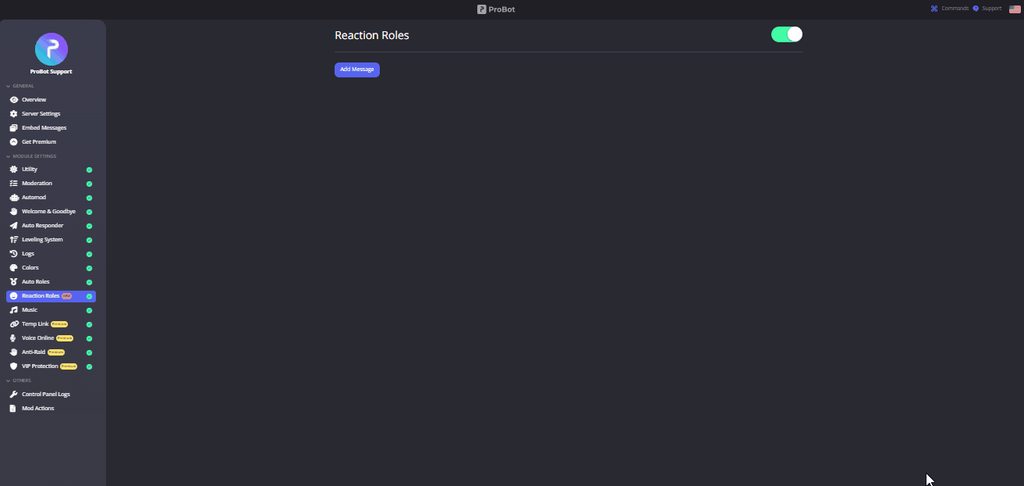
@merry swan
merry swan
OHH! tysm
timid jewel
Glad to help, thanks for contacting probot suppport have a great one!
merry swan
mhm! tyy
Wait am i stupid so how do i get that command thingy on the server
or do you have to use a link
like i have done that but how do i get it on the server
@timid jewel help :')
timid jewel
merry swan
like i have done that but how do i get it on the server
well first thing u need to send an embed with probot from the website https://probot.io/dashboard then select your server from left side , and then you select the reaction roles to that embed message ( after you finish ur setup on the reaction roles ) and send the message..
ProBot
Welcome images, moderation, leveling, reaction roles, logs, high quality music and many many more!
and you have to invite probot first
Discord
Discord is the easiest way to communicate over voice, video, and text. Chat, hang out, and stay close with your friends and communities.
timid jewel
yes when you sent that embed message go to reaction roles and set it up for that embed message and send new message and save settings
timid jewel
timid jewel
** <:smile:950381514401665024> How do I set up reaction roles?**
1 `-` Go to th...
look at this again
 native geyser
select a message
merry swan
it only has the select the message option
native geyser
well send your message first from embed messages module then
native geyser
yes you first need to send an embed message so that you can select the embed message you've sent
thats the reason why its asking you to select an embed here too

 native geyser
embed mesasges module
 merry swan
OH
 bold tartan
what is this amazing grammer btw
 native geyser
its fixed not updated yet
merry swan
TY I GOT IT I HAVE TO FIX 1 THING BUT YES TYSM
 midnight token
I have a problem with leveling system. My server got different roles for each level people reach, but it seems to have stopped, anyone else have problems?
this problem*
native geyser
can i see you leveling system settings
 native geyser
do you have utility module enabled?
 native geyser
yes, even though you have it set to only voice people still need to get text xp (not levels just xp is enough) to update their stats and make the bot give roles so ask your members to send messages
midnight token
It worked for some time, but seems to have stopped
native geyser
dashboard settings are fine so check the bots permissions
also make sure the reward roles do not have any kind of manage permissions
 native geyser
no
midnight token
hmm weird doesn't seem like they have any manage permissions
native geyser
have you asked someone who is supposed to get a role to send a message in a channel where they can get xp?
midnight token
I see the problem - people couldnt get over a certain level, because my bot was not over the new roles I have made on discord - sorry for wasting ur time :/
native geyser
oh i see glad you have it sorted out now ^^
midnight token
Have a nice day!
native geyser
likewise
native geyser
you'll be able to change your username thats the only benefit you'll get as far as i know
 vernal valve
help me
native geyser
you can ask your question right away
 native geyser
ProBot
Welcome images, moderation, leveling, reaction roles, logs, high quality music and many many more!
native geyser
as i asked please do try that link
vernal valve
I tried that it will be ruined again and this link will not be included
native geyser
well there are no issue on websites so i do believe the issue is on your end
try clearing your cache
vernal valve
Okay, give me a hand. How do I delete my treasure
native geyser
i do believe it'll be better if you use your own languages support channel
native geyser
yeah we dont have kurdish support
you can google how to clear cache though it doesnt have anything to do with probot
vernal valve
Okay, give me a hand. How do I delete my cache
native geyser
native geyser
you can google how to clear cache though it doesnt have anything to do with prob...
^
vernal valve
I don't know if I'm coming to help me
native geyser
get on google and type 'how to clear cache' in your own language
vernal valve
You don't have any pro bot in Google
native geyser
because your issue is not about probot
vernal valve
In my own language, he doesn't have any procedures
vernal valve
native geyser
because your issue is not about probot
i Do not know
native geyser
then do it in English please cause as i mentioned the websites are find and working therefore the issue is on your side
vernal valve
Well, which site can I find? You can give me a web page
native geyser
Search the world's information, including webpages, images, videos and more. Google has many special features to help you find exactly what you're looking for.
vernal valve
thankyou bro
native geyser
np
 light girder
has there been any issues with updating the avatar on a tier 2 premium bot, or have I just lost my mind?
lean badgerBOT
light girder
has there been any issues with updating the avatar on a tier 2 premium bot, or h...
We noticed that you are a premium user, for faster response go to #premium-support
native geyser
light girder
has there been any issues with updating the avatar on a tier 2 premium bot, or h...
have you tried on the website or with #vip commands
light girder
Through the dashboard on the website. It'll update the name, The status, but not the avatar
lean badgerBOT
native geyser
#help vip
**Command: vip**
Displays info about your premium bot.
**Usage:**
/vip
/vip move (bot's number)
/vip transfer (bot's number) [user]
/vip restart
/vip avatar [avatar link]
/vip username [new name]
/vip status (new status)
/vip whitelist (user)
**Examples:**
/vip
/vip move
/vip move 1000
/vip transfer 1000 @Dramex
/vip restart
/vip avatar http://i8.ae/sN6XG
/vip username SystemBot
/vip status SystemBot
light girder
Will do. thank you
vernal valve
@native geyser ok
native geyser
yw
vernal valve
/Vip profile
vernal valve
/Vip
 marsh basalt
What is voice online for probot premium?
lean badgerBOT
marsh basalt
What is voice online for probot premium?
We noticed that you are a premium user, for faster response go to #premium-support
native geyser
shows the amount of online members in calls under one category
marsh basalt
Is there a way for probot to record audio in said voice channels
native geyser
no not possible
marsh basalt
native geyser
no not possible
Confirmed thankyou
native geyser
yw
 subtle valley
why does pro bot not work with commands send by another bot??
native geyser
to stop an infinite spam
native geyser
you cant
native geyser
subtle valley
ok
lean badgerBOT
We noticed that you are a premium user, for faster response go to #premium-support
 feral current
am i able to put the member count of the server in the embeds?
 safe bison
what happens if we legit just talk in here and have fun???
or do they have a general in here???
native geyser
feral current
am i able to put the member count of the server in the embeds?
there isn't a variable for that
safe bison
ok
timid jewel
How can i help you
 soft heath
Earlier today, people in a server I manage utilised ProBot in order to send Gore and other disturbing content, through slash commands. How was this achieved? I see no slash command correlating to being able to manipulate ProBot into saying/sending something.
native geyser
can it be /avatar command? if their profile pictures were containing those disturbing images they might have used that command to show their profile picture
soft heath
I am pretty sure when someone runs /avatar it says they do that, but the slash command that was used hid the user that ran it, and hid the command itself
Other bots have similar things. Maki's "Say" command hides who executed it.
native geyser
thats not how it works with slash commands though
it shows it as User used this command
soft heath
For some commands, not all
native geyser
it works like that for all
can you make sure you haven't been trolled by someone who has access to dashboard?
soft heath

It does a prompt, for the user who executed it only, for this bot.
no one else sees the command execution
And the dashboard shows nothing out of the ordinary
native geyser
for probot it does show who used what like in this picture here, still i'll need you to explain further so i can identify which feature was used
 nocturne flax
Hi! How does ProBot work?
soft heath
native geyser
for probot it does show who used what like in this picture here, still i'll need...
I'm very unsure what feature was used. All I was told is it posted gore in chat.
And I have just verified it was ProBot, this bot, and not someone called Probot.

ProBot ✨#5803
junior orbit
Probot only variable in images are avatars for normal users
native geyser
nocturne flax
Hi! How does ProBot work?
dashboard on https://probot.io/dashboard
commands on https://probot.io/commands
if you get confused with anything feel free to ask here
nocturne flax
Does anyone know how to create a bot?
native geyser
soft heath
I'm very unsure what feature was used. All I was told is it posted gore in chat.
there are two ways to make the bot post something and you need access to dashboard for it
- embed messages, posted manually via dashboard
- autoresponder, makes the bot respond to a certain triggering word/sentence
so what i believe is whoever did this has access to dashboard
native geyser
nocturne flax
Does anyone know how to create a bot?
#chat-en for non-probot related questions
 patent garnet
Is there a system to give the most posts level?
native geyser
manually giving xp/levels is not a thing yet
patent garnet
native geyser
manually giving xp/levels is not a thing yet
What
native geyser
sorry have you asked about something else?
soft heath
native geyser
there are two ways to make the bot post something and you need access to dashboa...
There are no embed messages nor autoresponders present or setup on the dashboard
native geyser
then i believe its avatar command there cant be any other way
 opal quest
How do we put a slow mode ?
native geyser
/slowmode
opal quest
Thx
native geyser
yw
 severe garnet
Hi, I have a server with ProBot, but the members who do not have special permissions can't use the music commands in it
native geyser
severe garnet
Hi, I have a server with ProBot, but the members who do not have special permiss...
on dashboard remove the dj role
severe garnet
I solved the problem, the channel just didn't allow slash commands, thanks anyway ^^
native geyser
ah alrighty
lean badgerBOT
We noticed that you are a premium user, for faster response go to #premium-support
 lean hill
 midnight mountain
hi
native geyser
hi how can i help you?
midnight mountain
how do you put spotify playlists?
?
because it tells me not found
@native geyser
native geyser
we currently do not support spotify though in the future it'll be added
iron carbon
Is there a way to put an image in auto responder
midnight mountain
native geyser
we currently do not support spotify though in the future it'll be added
how long do we talk about?
native geyser
no ETA sorry
midnight mountain
ok tnx
native geyser
iron carbon
Is there a way to put an image in auto responder
not directly, you can put its link though
native geyser
yw
 zenith ice
How do I get someone off of the top leaderboard if they are no longer in the server?
native geyser
#reset text
user id
#reset voiceuser id
zenith ice
Thanks!!
native geyser
yw ^^
nocturne flax
how do I make it so pro bot is only allowed in one text channel
 slate solar
Add him to the channel and then put the channel private I think
nocturne flax
but I want other people to be able to use it too
split needle
@slate solar mind checking channel topic?
slate solar
Oki
split needle
nocturne flax
how do I make it so pro bot is only allowed in one text channel
If you don't mind about other features like moderation or leveling, just limit the bot's permissions to only see and send messages in that channel
Otherwise, you will need to go to the dashboard and set the channel as enabled channel for every command in command settings (edit button)
nocturne flax
ok\
nocturne flax
split needle
If you don't mind about other features like moderation or leveling, just limit t...
thanks
 unique hill
how can i loop queue?
split needle
Not possible for now
 flat siren
Hey I made a ticket but idk if anyone saw it so I’ll just ask here I guess
lean badgerBOT
flat siren
Hey I made a ticket but idk if anyone saw it so I’ll just ask here I guess
We noticed that you are a premium user, for faster response go to #premium-support
flat siren
I did tho 
This has been an on going issue, sometimes it sends a message for people joining other times it doesn’t
 split needle
flat siren
This has been an on going issue, sometimes it sends a message for people joining...
split needle
flat siren
This has been an on going issue, sometimes it sends a message for people joining...
I will head to your ticket now so just stay in there
nocturne flax
Is there a way to slow down the level xp or make it harder? People level up too fast compared to mee6
native geyser
xp gain is randomized so not possible
nocturne flax
native geyser
xp gain is randomized so not possible
No way to slow it down? Or change the cooldown or some way to make it harder
native geyser
nope
flat siren
nocturne flax
No way to slow it down? Or change the cooldown or some way to make it harder
I got around this by upping the level requirment
lean badgerBOT
flat siren
I got around this by upping the level requirment
We noticed that you are a premium user, for faster response go to #premium-support
flat siren
Like I changed levels to 5 to 10 for the lvl role
nocturne flax
flat siren
Like I changed levels to 5 to 10 for the lvl role
Isn’t 100 the max?
flat siren
nocturne flax
Isn’t 100 the max?
I think so but it takes a while to get to that point, I just got to lvl 20 on my server and im the second highest. We have been using probot for about a week and a half
And of course im doing behind the scenes stuff so I have leveled up quicker without people seeing me typing in the general area
nocturne flax
flat siren
I think so but it takes a while to get to that point, I just got to lvl 20 on my...
Yeah, too fast for me haha. I ran a server for 7 years so I need something way slower for this new server 😂
flat siren
This is how our levels go
 nocturne flax
I see, thank you 🙏
flat siren
 of course!
split needle
flat siren
<a:HOB_Sniffnodcat:1011105412025692220> of course!
you might wanna check out the channel topic before helping anyone
flat siren
my bad! just wanted to give a suggestion since I had a similar issue and I found a way around it. All the support that was given was that there was nothing they could do
And I knew there was,
Also, they had a admin help them, and it was more than 5 minutes
I am confused on that issue especially since my ticket was ignored for multiple hours while people were in here. I get it, yall are busy, but I truly do not think I did anything wrong by giving a format suggestion
lean badgerBOT
flat siren
I am confused on that issue especially since my ticket was ignored for multiple ...
We noticed that you are a premium user, for faster response go to #premium-support
 vocal swallow
Hey guys, how do i add reaction roles and level roles to my server?
native geyser
Get on https://probot.io/dashboard and select your server
-
from embed messages module create an embed message and send it to your server (the message you'll have to select in step 2 basically)
-
from reaction roles module select the embed message you just sent
-
add reactions
-
add roles by clicking on the plus signs right next to the reactions you added
ProBot
Welcome images, moderation, leveling, reaction roles, logs, high quality music and many many more!
 azure token
Um..Hello. I made a sever recently, and I was told “bots make servers better.” So I decided to install them in my server. The thing is: they are a bit more complex than I thought. So I am here to try and figure out everything I need to know about them and how to function them properly. Your assistance is highly appreciated.
native geyser
regarding probot only
dashboard on https://probot.io/dashboard
commands on https://probot.io/commands
almost everything is self explanatory if you still get questions dont hesitate to ask here
azure token
native geyser
regarding probot only
dashboard on https://probot.io/dashboard
commands on https...
I thank you kindly. However, I am intrigued as to how one can add “multiple bots”? Or is that already in there?
 verbal yew
azure token
Um..Hello. I made a sever recently, and I was told “bots make servers better.” S...
verbal yew
azure token
Um..Hello. I made a sever recently, and I was told “bots make servers better.” S...
That’s a very big yet important question. Because each bot is different, personally, I would recommend to visit the website of various bots that you see being used. Read about them. From there you can follow their instructions and the details.
The best way to probably begin, is to visit YouTube. There are thousands of tutorials there. Look for the ones that speak specifically to the type of needs you are looking for.
native geyser
azure token
I thank you kindly. However, I am intrigued as to how one can add “multiple bots...
i assume you dont mean multiple probots, top.gg website can help you with that
native geyser
verbal yew
That’s a very big yet important question. Because each bot is different, persona...
read the channel description please
azure token
native geyser
i assume you dont mean multiple probots, top.gg website can help you with that
Alright. Thank you.
native geyser
yw
azure token
verbal yew
That’s a very big yet important question. Because each bot is different, persona...
I thank you as well.
verbal yew
native geyser
read the channel description please
Thank you so much. Read and acknowledged.
azure token
native geyser
i assume you dont mean multiple probots, top.gg website can help you with that
Well reason why I ask is: I must ask this question first, before I can give reasoning to my original question. “Does mentioning a server you saw with specific bots in action violate any rules?” (And yes. I already read them, but one can never be too cautious.)
native geyser
other servers and bots are not supposed to be mentioned here since this server is for probot only
azure token
I see, understand, and acknowledge. Thank you.
native geyser
yw
azure token
native geyser
other servers and bots are not supposed to be mentioned here since this server i...
Just trying to get a better understanding of what I am working with. If you can see my point, clearly.
azure token
I thank you, but am sad@to inform you that I am unsure of what you mean. As in, I do not know what “top.gg” is. Please enlighten me.
azure token
Ah. Thank you. I thought it was a channel of the server. Forgive me.
native geyser
no worries
azure token
I am also trying to understand this server a bit better. Is this, not only a support server, but is it also a “chatting room/server” too?
native geyser
#chat-en is a chatting channel so please use that one instead since you dont have any questions regarding the bot anymore
vocal swallow
how do i create a leveling-roles system in my server
azure token
Thank you. Will do. Your assistance has been highly appreciated. Allow me to take a screenshot or two and I will be on my way. Have a Good day
split needle
vocal swallow
how do i create a leveling-roles system in my server
go to https://probot.io/dashboard, select your server on the left, go to leveling system module, scroll down a bit to see the reward roles table and add roles to it using the "add reward" button under it. you can change the target level for them, set them as 0 to disable one section (text or voice). having both active will require members to reach both target levels to get the roles
flat siren
Was my message seriously deleted?
 regal blaze
Hello, There has been recently a problem in my server where if i try to mute someone the bot would say they have been muted but without giving them the Muted role how do i fix this?
split needle
flat siren
Was my message seriously deleted?
since it's not related to the channels' topics, I removed them to keep the channels clean
the suggestion channels are meant for the bot, however #573053418017521664 can also be used for giving feedbacks about server as well, but not for chit chat-like topics
flat siren
split needle
since it's not related to the channels' topics, I removed them to keep the chann...
I cant respond there because there is slow mode on?
split needle
regal blaze
Hello, There has been recently a problem in my server where if i try to mute som...
can you check the server audit log to see if the bot did give them the role?
split needle
flat siren
I cant respond there because there is slow mode on?
there's slowmode with a purpose of keeping people from spamming same thing in there over and over again
and if you have nothing to as about the bot, you can go to #chat-en instead
regal blaze
split needle
can you check the server audit log to see if the bot did give them the role?
Just checked, it did not
split needle
then make sure the muted role in the server role list is lower than the probot role, and the probot role is also higher than the user's highest role (you can have it just lower than administrator or moderator role)
regal blaze
split needle
then make sure the muted role in the server role list is lower than the probot r...
It is already that way since before this problem occurred
split needle
then can you take a double check?
also there's possibility it no longer work because of another role being created with the name as muted role, which makes the bot confuse which role to use (yes this works based on role name, not role id)
nocturne flax
@split needle
split needle
nocturne flax
<@453088549739167745>
?
regal blaze
split needle
then can you take a double check?
also there's possibility it no longer work bec...
Just double checked, and also i know about the whole Muted name for the role thing so i made sure not to make another role with the same name
split needle
the role naming still happen when adding another bot since most them will act almost the same
regal blaze
split needle
the role naming still happen when adding another bot since most them will act al...
yeah i always keep an eye out for these when doing so, i tried to rearrange the roles like you said and it still doesn’t work
split needle
send me an invite to your server in dm and I'll check it out
administrative permission may be asked
regal blaze
split needle
send me an invite to your server in dm and I'll check it out
administrative perm...
Sure no problem
flat siren
So I was wondering if yall knew the dimensions for the probot welcome picture?
lean badgerBOT
flat siren
So I was wondering if yall knew the dimensions for the probot welcome picture?
We noticed that you are a premium user, for faster response go to #premium-support
 pliant mason
how do i do the colors command it keeps telling me wrong color number
timid jewel
pliant mason
how do i do the colors command it keeps telling me wrong color number
:smile: To do your "Colors List" you've to create numbered roles ascendengly, which means you've to create roles as the image below explains.
colors roles only works with exact numbers, they can't have mod permissions otherwise it won't work. dragging these roles above your moderators roles position is not recommended as they'll have the access through it to higher position roles.
the image below shows how to correctly use the commands as how does it effect your nickname.
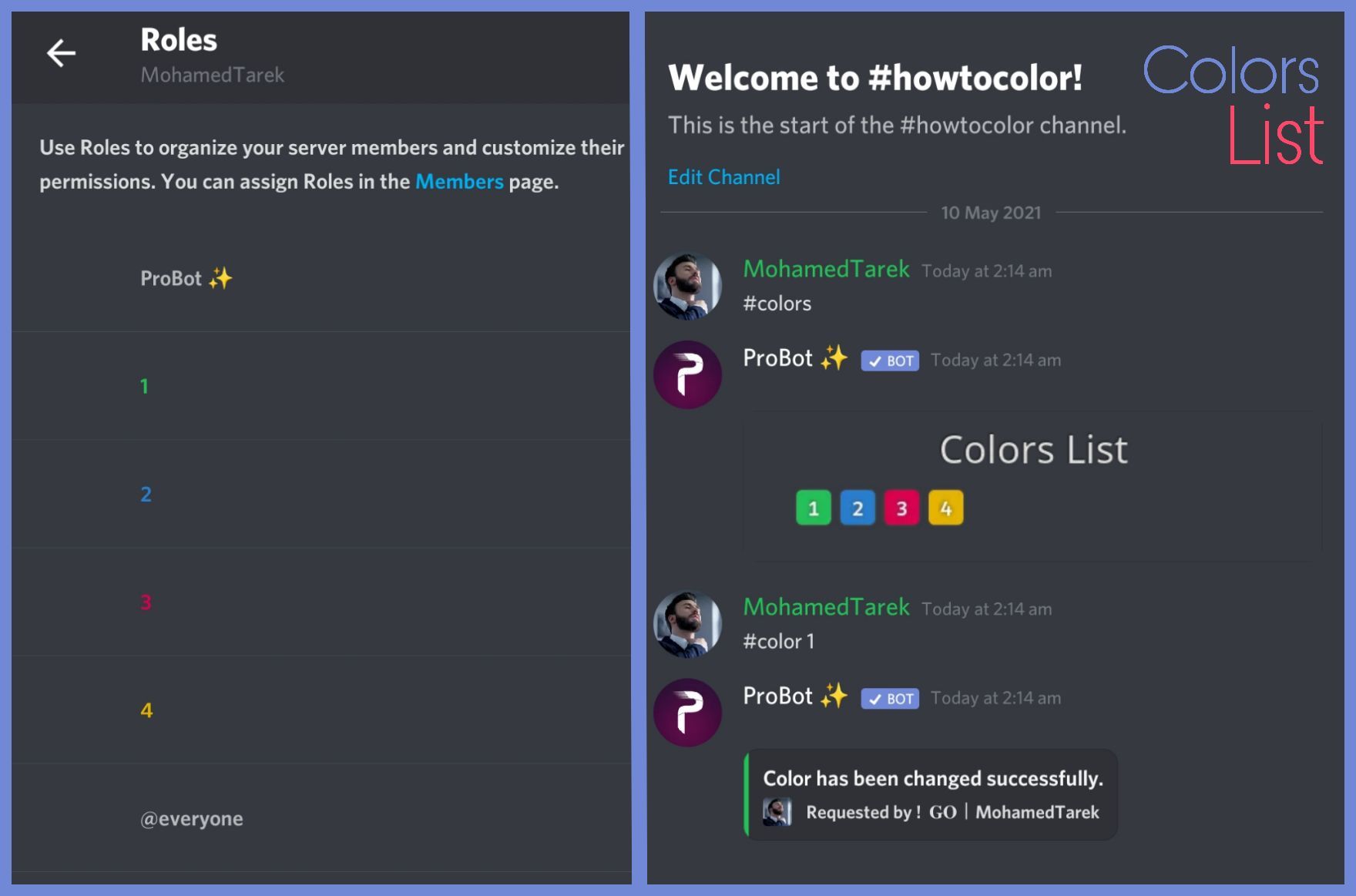 native geyser
flat siren
So I was wondering if yall knew the dimensions for the probot welcome picture?
native geyser
flat siren
So I was wondering if yall knew the dimensions for the probot welcome picture?
that does depend on the image 
flat siren
native geyser
that does depend on the image <:retar:639303051118903296>

Ill test it out a bit
Oh also does the welcome message support gifs? Wanna know before I go to the trouble of making one
native geyser
no only png and jpg are supported currently
flat siren
okee dokee glad i asked then!!!
native geyser
👍
nocturne flax
Help
timid jewel
how can i help you
nocturne flax
<@&675070424748654593>
split needle
 wet fog
Why i can't get the voting reward?
wet fog
Why i can't get the voting reward?
do you get dms from the bot after voting?
pliant mason
last question why isnt my friends able to control the music portion of the bot
nocturne flax
pliant mason
last question why isnt my friends able to control the music portion of the bot
<@&675070424748654593>
nocturne flax
pliant mason
last question why isnt my friends able to control the music portion of the bot
What exactly your friends want to control?
pliant mason
nocturne flax
What exactly your friends want to control?
i got it to work i had to give them slash command perm. for there role
nocturne flax
pliant mason
i got it to work i had to give them slash command perm. for there role
Alright, glad to hear that
lean badgerBOT
nocturne flax
Alright, glad to hear that
We noticed that you are a premium user, for faster response go to #premium-support
 sand osprey
how can i turn off the shades in welcome msg image?
 nocturne flax
sand osprey
how can i turn off the shades in welcome msg image?
nocturne flax
sand osprey
how can i turn off the shades in welcome msg image?
<@&675070424748654593>
lean badgerBOT
nocturne flax
<@&675070424748654593>
We noticed that you are a premium user, for faster response go to #premium-support
nocturne flax
sand osprey
how can i turn off the shades in welcome msg image?
I don't think it is possible.
sand osprey
nocturne flax
I don't think it is possible.
ohhhh
nocturne flax
sand osprey
ohhhh
anything else?
 harsh garden
hello why is probot saying my spotify playlist is not found when it does exist? <@&675070424748654593> please help me :(
 spring ether
probot don't support spotify that's why
spring ether
yw
native geyser
https://probot.io/dashboard -> select your server -> server settings module
ProBot
Welcome images, moderation, leveling, reaction roles, logs, high quality music and many many more!
 robust pond
thanks
native geyser
yw
 glad pier
native geyser
glad pier
native geyser
/repeat
 undone forum













crude estuary
undone forum
<:699262015251808276:736686100935868427> <:Peeped:671044605801922610> <:Pwease:9...
?
 hardy narwhal
Whenever I go to edit my "Embed Messages" and attempt to "Edit Sent Message" I get the following error which does not update the embedded message. Please help! DiscordRESTError [50035]: Invalid Form Body
embeds.0.description: This field is required
hardy narwhal
hardy narwhal
Whenever I go to edit my "Embed Messages" and attempt to "Edit Sent Message" I g...
I have "Embed Name" and "Message Content" filled in with the info that I need. For some reason it is not updating on Discord when I go to "Edit Sent Message"
native geyser
show me your embedd message please
hardy narwhal
native geyser
show me your embedd message please
From the probot website...
 native geyser
is this before the editing or after the editing?
hardy narwhal
native geyser
is this before the editing or after the editing?
This is before.
native geyser
yes?
 tardy cairn
uh, well i wanna use the points thing for promoting my staff in my server ok?
but the fact i wanna use the command "#top" to see who's being active
hardy narwhal
native geyser
can i see the message you're trying to send
Just removed 1 game (Albion) from the list and added a new one (No Man's Sky)
 tardy cairn
so i can give them points
but it's not working in the room of promoting,
i got to utility and i enabled it but it still says its unenabled.
native geyser
hardy narwhal
Just removed 1 game (Albion) from the list and added a new one (No Man's Sky)
there isn't a reason for it to not send weird try adding another field + save + remove the field + save again
tardy cairn
i also used the slash command and it says this
native geyser
tardy cairn
i got to utility and i enabled it but it still says its unenabled.
enable utility and leveling system modules
hardy narwhal
native geyser
there isn't a reason for it to not send weird try adding another field + save + ...
I agree. I'll try it..
hardy narwhal
native geyser
there isn't a reason for it to not send weird try adding another field + save + ...
Hey! It looks like adding the field, saving, removing the field, saving, and then reuploading worked. Thank you much!
native geyser
you're welcome ^^
 solar galleon
excuse me, I have a problem with claiming my daily reward, for the first time today I decided to claim my rewards but an error occurred, when I clicked at the claimingbutton it said error internal server error, I tried multiple times but nothing changed, i asked my friend and he said let me try on his device, he tried and it worked, that happened toady
so what's the problem then?
from my device?
calm hollow
<@&675070424748654593>
This problem usually occurs when you use more than 1 account to take your dailies , try logging out from your other accounts and restarting your internet router @solar galleon
nocturne flax
calm hollow
This problem usually occurs when you use more than 1 account to take your dailie...
don't spread missinformation.
calm hollow
🤨
it might be a glitch or a region issue or even a blacklist thingy and the only way that would probably fix it is the method i said above so please head to #chat-en and read the channel description
 mellow ridge
I love pro bot
nocturne flax
calm hollow
it might be a glitch or a region issue or even a blacklist thingy and the only w...
or
 calm hollow
mellow ridge
I love pro bot
calm hollow
mellow ridge
I love pro bot
For chatting #chat-en
@nocturne flax it actually works for some ppl and doesn't for some please head to #chat-en i know what im dealing with
mellow ridge
calm hollow
For chatting <#608047244276531245>
You are not admin
calm hollow
mellow ridge
You are not admin
the channels name describes itself ..
it's only for probot-related questions so please #chat-en
mellow ridge
?
 alpine orchid
question
so
with the leveling system, its split in 2
i want to unlock a level 5 text channel if you get enough exp combined from text and voice channels
so, for example, level 2 text and level 3 voice would unlock the channel
is there a way to do that?
native geyser
you need to set 6 different rewarding systems for that
text 5 voice 0
text 4 voice 1
text 3 voice 2
text 2 voice 3
text 1 voice 4
text 0 voice 5
native geyser
yw
split needle
not posible for now
 subtle oar
oh okey thanks
 waxen mortar
Im trying to re-invite probot pro after it left and it just wont join back
native geyser
any error messages?
 bitter swallow
I am trying to start my very first server and I have put probot in it. I need help with pretty much everything from setting up probot as well as my channel. Is anyone willing to work with me on this?
native geyser
commands on https://probot.io/commands
dsahboard on https://probot.io/dashboard
all settings are on dsahboard and almost everything is self explanatory so check them out first if you get confused with anything feel free to ask here
bitter swallow
I am trying to work with this

 junior quiver
hello pls help me wat comad by lisining music&
native geyser
junior quiver
hello pls help me wat comad by lisining music&
/play
bitter swallow
I want to be able to setup leveling system, auto mod, and auto respond.
native geyser
bitter swallow
I want to be able to setup leveling system, auto mod, and auto respond.
click on the modules that are named with those
bitter swallow
I am not completely illiterate It's just been a long time I used to use IRC years ago.
bitter swallow
native geyser
click on the modules that are named with those
Yes I got that far but I am just not exactly sure what everything means yet.
native geyser
then please do ask with what you're getting confused with
bitter swallow
I am not exactly sure how tomuse these.

matter of fact this whole thing

What does the no xp roles mean?
native geyser
-no-xp roles makes it so that if you have those roles you can not gain any xp
-you can not gain any xp in no-xp channels
-text leveling up channel shows it when someone levels up in chat
native geyser
yes though you can only select one
bitter swallow
Now selecting a channel means if someone levels up on a different channel they will not be told in the channel they are in?
Oh ok that answers that question
So I could or maybe should make a channel just for leveling messages
Pls be patient with me I have many questions
I won't be asking them all today I have stuff to do. but I will Be on and off throughout the day
native geyser
sure
lean badgerBOT
We noticed that you are a premium user, for faster response go to #premium-support
nocturne flax
hi , is there any way to delete the probot's messages in my dm ?
native geyser
not possible
 past pine
hey, does anyone know why the role rewards arent being given, probot is above the roles i want to give and he has the appropriate perms and the module is enabled
timid jewel
Hey, make sure that the members reach the voice/chat selected level on the dashboard
past pine
they did, thats why im confused
its set to level 2 for text and they are at level 2 for text
timid jewel
what about the voice?
past pine
its text only
timid jewel
well make sure that your reward roles dont have any kind of admin or manage permissions
timid jewel
yes.