#support-en
1 messages · Page 8 of 1
 fervent plank

im sorry but i didnt understand how this work
i cant change his avatar or his name and save button doesnt work..
help pleasee
 modest river
<@&675070424748654593> ^^
 split needle
fervent plank
this mean its refunded ?
split needle
fervent plank
this mean its refunded ?
most likely yeah
fervent plank
no it isn't, i will wait for Ruru its ok, but how can i use it ..
 granite cypress
It's not an IP ban, is it a glitch with unbanning him via Discord and not Probot?
split needle
for now with the active one, you can invite it to your server using #vip move 2492 in #commands, use the #vip command in your server after inviting it to know some of its commands to change its appearance or just do so on the site
all the setting up steps are just same with normal bot, and if you did set up things in your server, they will be kept with the new one
@fervent plank ^
split needle
granite cypress
It's not an IP ban, is it a glitch with unbanning him via Discord and not Probot...
not too sure
granite cypress
It says if I buy premium I can "unban everyone". Do I need that?!
split needle
not really
granite cypress
I'll look around to see if I can do anything
fervent plank
okey do i need to click on this ? cuz save button doesn't work
 split needle
no since it's just an indicator showing that your subscription is working and its end date


 vestal seal
Can I play a Spotify playlist on probot?
fervent plank
thanks a lot ♥ i feel so dump here xD

 inner crest
How do I make a verification system with this bot? ❤️
split needle
inner crest
How do I make a verification system with this bot? ❤️
there's no actual verification feature but you can use reaction role as a soft replacement
go to https://probot.io/dashboard, select your server, go to embed messages module to create and send embed messages for the reaction roles to where you want. Then go to reaction role module to setup the feature on the sent embed messages.
Notice: Be sure the Probot✨ role is higher than other roles. Embed message should not have any blank element (better to remove them if not using).
 torpid jasper
I need help with Reaction roles
split needle
torpid jasper
I need help with Reaction roles
what with it?
torpid jasper
I'm having a bit of trouble with this... I'm also from the cell phone so it's a little harder to control a dashboard
And im Israeli so my English is bad...
split needle
I can not help if you can not get into the issue instead of going around
torpid jasper
I will try again to do it, if I fail I will tell
split needle
#ban @surreal lantern spam
 lean badgerBOT
split needle
#ban <@922118134171832362> spam
lean badgerBOT
split needle
#ban <@922118134171832362> spam
:white_check_mark: CJ WINEWOOD banned from the server! :airplane:
 nocturne flax
hi all! i need help when i add a server emoji too reaction role it isnt showing up in the selection below the text how can i fix that?


 normal solar
<@&675070424748654593> ^^
nocturne flax
Thankyou haha
 deep sierra
nocturne flax
hi all! i need help when i add a server emoji too reaction role it isnt showing...
deep sierra
nocturne flax
hi all! i need help when i add a server emoji too reaction role it isnt showing...
1 sec let me check
 stiff halo
I've been having the same issue just now aswell in regards to reaction roles not working with newer embeds
deep sierra
stiff halo
I've been having the same issue just now aswell in regards to reaction roles not...
we have fix the role not giving custom emojis
stiff halo
I'm trying to have react roles work with newer embeds that i post, but the bot isn't reacting to the post
 primal coral
stiff halo
I'm trying to have react roles work with newer embeds that i post, but the bot i...
primal coral
stiff halo
I'm trying to have react roles work with newer embeds that i post, but the bot i...
<@&675070424748654593>..
deep sierra
@primal coral @nocturne flax @stiff halo fixed. sorry this took long. it was caused by a new update to our emoji picker, you might need to change the emoji to something else then pick it again.
stiff halo
Alright, thank you, i'll check now
nocturne flax
will do
primal coral
deep sierra
<@891051226261782598> <@456226577798135808> <@113985503748947975> fixed. sorry t...
i was here to just help, nvm good luck!
nocturne flax
@deep sierra still nothing 😦


 spring ether
nocturne flax
<@157605500488384512> still nothing 😦
spring ether
nocturne flax
<@157605500488384512> still nothing 😦
try to remove the emoji and put it back again
nocturne flax
Done but still nothing
spring ether
nocturne flax
Done but still nothing
can i get you're server in dm
nocturne flax
Sure
stiff halo
Same for me
deep sierra
Maybe becouse u didn't refresh the website @stiff halo @nocturne flax
nocturne flax
lets try that
deep sierra
becouse it's website change
sorry i didn't mention that before
refresh & pick the emoji again
nocturne flax
working thank you so much 😄 have a great day
spring ether
yw < 3
nocturne flax
is it just me or? if you remove a emoji isnt deleted in the message?
spring ether
nocturne flax
is it just me or? if you remove a emoji isnt deleted in the message?
it's working for me , try to send new embed message and pick emoji again and try again
nocturne flax
ok cool thankyou
spring ether
yw
spring ether
how can i help you?
spring ether
u can't be admin
 junior fiber
Hm Why ?
spring ether
we are not looking for admins
nocturne flax
Can these emoji be bigger?
 junior fiber
No @nocturne flax
nocturne flax
ok cool thankyou
junior fiber
N.p
spring ether
junior fiber
Can You Tell Who is The Owner Of ProBot ? <@546761848767250472>
dramex + read channel topic
junior fiber
spring ether
dramex + read channel topic
Can You Mention The Channel ...
Dramco ... @swift cypress
spring ether
channel topic ?
junior fiber
spring ether
channel topic ?
Yeah yeah
 spring ether
yes
 unreal lantern
ok thanks
spring ether
yw
 old copper
Hi is there anyway to restrict bot respond to the specific channel?
spring ether
old copper
Hi is there anyway to restrict bot respond to the specific channel?
hello , u can disable specific commands from the channel u want
old copper
spring ether
hello , u can disable specific commands from the channel u want
Which command to disable? Cause roles I do everything but I still able to play music
 shut swallow
V
spring ether
old copper
Which command to disable? Cause roles I do everything but I still able to play m...
u can choose any command u want from the control panel
 timid jewel
shut swallow
V
timid jewel
shut swallow
V
👋
nocturne flax
how do i stop repeat on the music command thingy
timid jewel
Glad to help 
 brave basin
Vote
lean badgerBOT
@brave basin https://top.gg/bot/probot/vote

Top.gg
Spice up your Discord experience with our diverse range of Discord Bots and Servers as well as other spaces to discover DAOs.
 ivory yoke
hello , why the "VOICE OFF TIMER" stopped working?
ivory yoke
Disable voice manually for a while function does not work
 low estuary
timid jewel
low estuary
timid jewel

ivory yoke
@timid jewel can you help or not?
timid jewel
ivory yoke
<@591155056779460608> can you help or not?
i have no idea about this problem 😓
timid jewel
nocturne flax
When possible i also would like <@&675070424748654593>
currently we are not looking for new supports.
timid jewel
it's for making a simple color selecting feature where your members can get a color role by using a command.
nocturne flax
But how do i "mark" a color role being a "color role" for it to appear on the color list?
timid jewel
any numebr with color it will be appear in #colors command list
like 1 with blue color
timid jewel
#1 ~ 👉 Go to server settings, Roles.
#2 ~ 👉 Add Numbered Roles Like The picture down.
#3 ~ 👉 Save and go out.
https://i8.ae/7hM2w
Now you are ready to use this colors.
/colors
Shows the colors list
/color number
Choose/change your color in server.
to remove your current color: /color 0

this is the method 🙋
timid jewel
nocturne flax
Mixing letters and numbers to make a especific color?
no letters, the bot only defined the number roles as colors
timid jewel
Glad to help! 👋
 dire wagon
#help
 crude estuary
dire wagon
#help
crude estuary
dire wagon
#help
 mossy pasture
Is XP gained by Inviting added to Text XP or Voice XP? And how much XP is added?
lean badgerBOT
mossy pasture
Is XP gained by Inviting added to Text XP or Voice XP? And how much XP is added?
We noticed that you are a premium user, for faster response go to #premium-support
 abstract prawn
Is there anyway to get probot to recognise Public AND Private threads? i.e when one is made and or deleted and its contents?
I need to be able to moderate private threads made by my moderators (have a box for a box kinda thing lol)
nocturne flax
abstract prawn
Is there anyway to get probot to recognise Public AND Private threads? i.e when ...
This is feature is not available with ProBot ✨.
If you would like to suggest it -> #573053418017521664
nocturne flax
nocturne flax
Thanks
How may I help you ?
nocturne flax
What does this error mean? (Trying to create reaction embed)

<@&675070424748654593>
nocturne flax
nocturne flax
What does this error mean? (Trying to create reaction embed)
Your message length should be less that 2000 characters.
You can use an online counter to check if it’s 2000+
ok
nocturne flax
nocturne flax
ok
If it is you can use embeds to send it successfully. (On the same page)
 quaint sentinel
.
 blissful bronze
Is there a way to reset the levels of the whole server?

 primal coral
blissful bronze
primal coral
blissful bronze
<@&675070424748654593> ^^
 native geyser
blissful bronze
native geyser
blissful bronze
points reset is not the same as reset
blissful bronze
oh ok
 blazing depot
Trying to add react roles via the online dashboard, created the embed post, posted to channel, created roles on server, but when I click on the "Add reaction" button on nothing happens
split needle
blazing depot
Trying to add react roles via the online dashboard, created the embed post, post...
click on the + button next to the reactions
blazing depot
split needle
click on the + button next to the reactions
This is all that is showing on the probot dashboard
 split needle
the add reaction will add a reaction bellow that
blazing depot
I have clicked "add reaction" but nothing happens
split needle
are you sure about that?
blazing depot
I'm starting from scratch again. Would one emoji not showing in the embed message preview cause an issue?
split needle
no
blazing depot
okay
same thing again, click on "add reaction" and nothing changes. I am doing it via private browsing on chrome would that be an issue?
 vivid patrol
Hello Probot team,
So.. I bought premium for a year last night for our server and renamed/changed the pic of the premium probot etc, and I figured it would take over the server for the Probot services so I kicked the old ugly one and now I can't access our dashboard on Probot.io.
It just loops with no effect the "invite" process. I continue to discord, invite, yada yada, and nothing changes. Have tried refreshing, etc.
lean badgerBOT
vivid patrol
Hello Probot team,
So.. I bought premium for a year last night for our server a...
We noticed that you are a premium user, for faster response go to #premium-support
split needle
vivid patrol
Hello Probot team,
So.. I bought premium for a year last night for our server a...
try kick the premiumout as well with its user id, or but number remembered, then use the command #vip move <number> in #commands to invite it back to your server
vivid patrol
rip
copied ID and it's saying wrong bot number
already kicked
figured it out.
Thanks!
 forest shadow
Hello, I was wondering if there was a way to change the bot's prefix ? Might look like a stupid question but I don't seem to find it on the website
forest shadow
Oh alright, thx for answering
native geyser
yw
 steep basalt
How can I apply in en support? Are you still looking for members?
native geyser
no we're not looking for people at the moment
 steel owl
How to delete probot messages
native geyser
in the server? #clear @probot
steel owl
native geyser
in the server? #clear `@probot`
Private messages I mean
native geyser
not possible
steel owl
That's unfortunate
nocturne flax
yo can i got help ..

 calm hollow
<@&675070424748654593>
nocturne flax
Hi, could anybody please help? I try to get the /color en /colors functions to work, but the list is empty. How can I add the colors to the list?
split needle
nocturne flax
yo can i got help ..
try logging out with log out from all devices option, then log back in after a day and try again
split needle
 gloomy heron
can i still trasfer my profile to another account by sending an email
gloomy heron
can i still trasfer my profile to another account by sending an email
no as it's currently closed
split needle
nocturne flax
Hi, could anybody please help? I try to get the /color en /colors functions to w...
create roles with name as only numbers in your server list and they should show on /colors
nocturne flax
split needle
create roles with name as only numbers in your server list and they should show ...
thank you very much!
edit: FIXED! ❤️
gloomy heron
split needle
no as it's currently closed
how long would it be ?
split needle
gloomy heron
how long would it be ?
no eta for it
 signal forge
How does the Reaction Roles work? Add Reaction button doesn't work
calm hollow
<@&675070424748654593> .
@signal forge how is it not working? You just click on ( add reaction button ) and choose an emoji
signal forge
calm hollow
<@103153099866124288> how is it not working? You just click on ( add reaction bu...
Where do I choose a emoiji from? Doesn't come up with any
signal forge
Yup, solved
 vague furnace
<@&675070424748654593>
My account got hacked and im unable to gain access to it is there anyway i can get the credits in it before its too late ?
calm hollow
vague furnace
My account got hacked and im unable to gain access to it is there anyway i can g...
im afraid to say no there's no way
vague furnace
calm hollow
im afraid to say no there's no way
One of my friends said they can help me with that
And that they just want proof that iam the owner of the account
calm hollow
they actually can't they're not responsible with your acc safety that's one and two profile transfer is currently closed tho it won't help any way
vague furnace
Alright
calm hollow
 static topaz
im trying to upload a colour list but im not sure how to
static topaz
im trying to upload a colour list but im not sure how to
#1 ~ Go to server settings, Roles.
#2 ~ Add Numbered Roles with different colors
#3 ~ Save and go out.
Now you are ready to use this colors.
/colors
Shows the colors list
/color number
Choose/change your color in server.
to remove your current color: /color 0
native geyser
/stop
static topaz
calm hollow
#1 ~ Go to server settings, Roles.
#2 ~ Add Numbered Roles with different co...
i did the command /colors but it shows up empty
native geyser
static topaz
i did the command /colors but it shows up empty
that is how you set the color roles to fill the list
 tiny jewel
Hey! Is there a possibility to put a new pfp in the bot or doing mine?
static topaz
native geyser
that is how you set the color roles to fill the list
huh? so what do i do
static topaz
static topaz
huh? so what do i do
wait nvm i got it

 tidal bobcat
how to mention other channel in the welcome msg ?
native geyser
you can only do it from role settings the bot might have admin perms check again
native geyser
tidal bobcat
how to mention other channel in the welcome msg ?
check the pinned messages to see the variables
 limpid depot
when im trying to authorize, its sending me here and i cant do anything
 native geyser
clear your cache and try again please
 outer nymph
Hello . How can I know who's give me credits on probot?
native geyser
limpid depot
same error
are you able to try on a different browser
native geyser
outer nymph
Hello . How can I know who's give me credits on probot?
on dashboard there is credit transactions menu you can use that to see
 glad flax
Hello! I'm trying to make automod ban people when they send discord links to the server but there's only warn mute and delete options. And mute has a time duration it isn't even permanent. Is there a way to make it so when someone sends a discord invite they get banned from the server permanently?
<@&675070424748654593>
native geyser
nope its not possible
limpid depot
native geyser
are you able to try on a different browser
yes i can
native geyser
then try please
outer nymph
native geyser
on dashboard there is credit transactions menu you can use that to see
Okay . Is there have a maximum in the credit transaction?
native geyser
no
outer nymph
OK
limpid depot
its finnaly worked, thanks
native geyser
yw
 mellow path
hey uh idk how to get probot to automatically assign level roles
i gave him administrator stuff and all that
native geyser
drag its role above other roles and make sure your members reached both of the target levels
 mint stone
Hello.
How do I make the bot send a message in a specific chat ?( reaction role message)
<@&675070424748654593> 🫡
native geyser
dashboard -> embed messages module
mint stone
native geyser
dashboard -> embed messages module
Ty 🙂
native geyser
yw
mellow path
native geyser
drag its role above other roles and make sure your members reached both of the t...
so you mean put probot over all the other roles?
native geyser
yes
mellow path
ok
THAT KINDA WORKS
CAPS
caps
but it gives all the level roles
instead of the ones they earned
native geyser
it only gives the earned ones ask your members to send messages
native geyser
yw
static topaz
hi i dont know how to link a channel into another one
native geyser
check the pinned messages
static topaz
like put the tag in it
static topaz
native geyser
check the pinned messages
i have and im confused of where im meant to put the command
native geyser
where are you trying to mention the channel?
static topaz
umm on the joining channel of my server
native geyser
then do it there
native geyser
you're doing it on embed messages module right? can you show me how you're doing it
static topaz
sure
wait what
no im like doing it on the goodbye and welcome bit
not the embed message
native geyser
the usage is still going to be the same so please show me your dashboard settings on how you're typing it
native geyser
yes please
static topaz
 native geyser
you haven't used <#channel id> here though
tiny jewel
So the bot will appear like customize server bot if I have tier 2 premium, right?
native geyser
tiny jewel
So the bot will appear like customize server bot if I have tier 2 premium, right...
yes
native geyser
static topaz
where do i put the name of it?
you dont put the name you put its id number as i said above
 chilly mural
Как сделать так что бы цвета ника командой менялись?
native geyser
chilly mural
Как сделать так что бы цвета ника командой менялись?
#support-int / #chat-int
static topaz
native geyser
you dont put the name you put its id number as i said above
where can i find the id number?
native geyser
enable developer mode on discord settings then right click on the channel and click on copy id
static topaz
thankyou so much
native geyser
yw
chilly mural
How do you make the team's nickname colors change?
Asks for admin permission, I don't know how to give it (
native geyser
you need to talk to your server admins for it
native geyser
then check google for tutorials it doesnt have anything to do with probot
chilly mural
Where do I give permission to resolve the /color command?
native geyser
server settings -> roles
as i mentioned its basic discord things you can find answers to them on discord articles
chilly mural
I don't understand your language much, I translate everything through a translator, and it doesn't translate well. Let me be answered in support int
 tepid island
Hello admin ser! 🙏 Help needed deploying Auto-replies please., I have:
- Assigned Roles & Channels
- Added /names as Triggers
- Added probot to server
But they do not deploy, not as replies nor standalone posts....what am I missing? 😅
native geyser
can i see your dashboard settings
tepid island
native geyser
can i see your dashboard settings
Thanks! Dashboard in Probot ...or discord settings?
tepid island
native geyser
auto responder module
 native geyser
so what?
native geyser
tepid island
do you have any of these enabled roles and can you make sure you're using the bot in those enabled channels
i can check the reason of the ban can you give me his id
yes he can on dashboard
tepid island
native geyser
do you have any of these enabled roles and can you make sure you're using the bo...
Checking now...btw if I do not specify any channels, will that apply it to all channels?
native geyser
tepid island
Checking now...btw if I do not specify any channels, will that apply it to all c...
if you do not add any enabled/disabled channels it means the feature will be available on all channels
your friend is not banned, they just left the server

yes the upgrade button
np
 burnt edge
i cant get auto roll to work
role*
is it suppose to give a role to a new person that joins?
native geyser
yw
 brisk tapir
can some1 help
native geyser
yes?
brisk tapir
what do credits do?
native geyser
you can use it to customize your rank and profile commands cards on the credits shop on dashboard and to purchase the paid versions of the bot on https://probot.io/premium
ProBot
Welcome images, moderation, leveling, reaction roles, logs, high quality music and many many more!
native geyser
 pine escarp
How to reset top chat and voice
pine escarp
How to reset top chat and voice
#reset text all
#reset voice all
nocturne flax
all i know is #daily
tepid island
native geyser
do you have any of these enabled roles and can you make sure you're using the bo...
Ahh thanks you, resolved - 1st class support! 🙏
native geyser
nocturne flax
all i know is #daily
there is no other command you can also vote though on https://top.gg/bot/probot/vote
Top.gg
Spice up your Discord experience with our diverse range of Discord Bots and Servers as well as other spaces to discover DAOs.
native geyser
tepid island
Ahh thanks you, resolved - 1st class support! 🙏
glad to hear that ^^
 foggy geode
Hi! have bought prime, but it says that i dont have it
lean badgerBOT
foggy geode
Hi! have bought prime, but it says that i dont have it
We noticed that you are a premium user, for faster response go to #premium-support
native geyser
foggy geode
Hi! have bought prime, but it says that i dont have it
invite it from https://probot.io/premium/manage
ProBot
Welcome images, moderation, leveling, reaction roles, logs, high quality music and many many more!
foggy geode
native geyser
invite it from https://probot.io/premium/manage
did it
native geyser
kick and reinvite then please
native geyser
yw
 austere oracle
I did everything and tapped finished and refreshed the probot thing but it isn’t working I need help

 nocturne flax
<@&675070424748654593>
native geyser
austere oracle
I did everything and tapped finished and refreshed the probot thing but it isn’t...
refresh the page
native geyser
the bot is in your server correct?
native geyser
wdym it doesnt let you
native geyser
np
 dark hill
Does probot do tickets
native geyser
no it does not
dark hill
Ok thanks
native geyser
np
 sly fiber
Question: (Leveling System) - How do I address the issue of how some ppl prefer to join voice channels and some prefer to just speak in text channels? Do I make duplicates of each role with one "Text Level" set to 1 and then "Voice Level" set to 0 and the other set with "Text Level 0" and the other "Voice Level 1"?
When I do that, it shows "Role Position" underneath both of them. I'm not sure if that is meant to be an error message or not.
 native geyser
sly fiber
Question: (Leveling System) - How do I address the issue of how some ppl prefer ...
native geyser
sly fiber
Question: (Leveling System) - How do I address the issue of how some ppl prefer ...
yes thats correct
just make sure different roles do not have the same requirements
sly fiber
native geyser
just make sure different roles do not have the same requirements
Ty, so where it says "Role Position", that's not saying that the role is now invalid because theres a duplicate.
native geyser
role position basically indicates that the role order on discord is going to be the case if 'remove with higher role' option is enabled
 atomic quest
how do I make custom roles?
native geyser
Probot doesn't have such feature
native geyser
Get on https://probot.io/dashboard and select your server
-
from embed messages section create an embed message and send it to your server (the message you'll have to select in step 2 basically)
-
from reaction roles section select the embed message you just sent
-
add reactions
-
add roles by clicking on the plus signs right next to the reactions you added
ProBot
Welcome images, moderation, leveling, reaction roles, logs, high quality music and many many more!
atomic quest
it won’t let me click add reaction
native geyser
Did you select the embed message first?
native geyser
In your server settings -> roles -> drag the bots role above other roles
Discord role hierarchy
atomic quest
does it work in mobile?
yes it does
alright let me test it out
there!
thank u for ur assistance
native geyser
Yw ^^
 solid drum
Can everyone use probot in my discord server? or do i have to give them perm?
 iron carbon
How do you buy probot prime or premuim using credits
solid drum
How do i give permissions?
quaint sentinel
iron carbon
How do you buy probot prime or premuim using credits
Head to https://probot.io/premium then select the tier you want add pay with credits.
ProBot
Welcome images, moderation, leveling, reaction roles, logs, high quality music and many many more!
iron carbon
thanks
quaint sentinel
solid drum
How do i give permissions?
you can either give them the permission manually in server settings > roles or through dashboard, and add their role as enabled roles.
https://probot.io/dashboard
ProBot
Welcome images, moderation, leveling, reaction roles, logs, high quality music and many many more!
quaint sentinel
iron carbon
thanks
yw.
nocturne flax
can i play a spotify playlist on the bot
quaint sentinel
nocturne flax
can i play a spotify playlist on the bot
unfortunately we don't support spotify.
 slender stone
how to transfer money pro bot to another user
quaint sentinel
slender stone
how to transfer money pro bot to another user
#help credits
lean badgerBOT
quaint sentinel
#help credits
**Command: credits**
Shows your or someone's balance or transfer credits for someone
**Aliases:**
#credit
**Usage:**
/credits
/credits [user]
/credits [user] [amount]
/credits [user] [amount] (reason)
**Examples:**
/credits
/credits @quaint sentinel
/credits @quaint sentinel 15000
/credits @quaint sentinel 15000 Hello
slender stone
quaint sentinel
#help credits
thank
quaint sentinel
slender stone
<:Ruru:818884137187409951> thank
yw
nocturne flax
how to make reaction roles?
quaint sentinel
nocturne flax
how to make reaction roles?
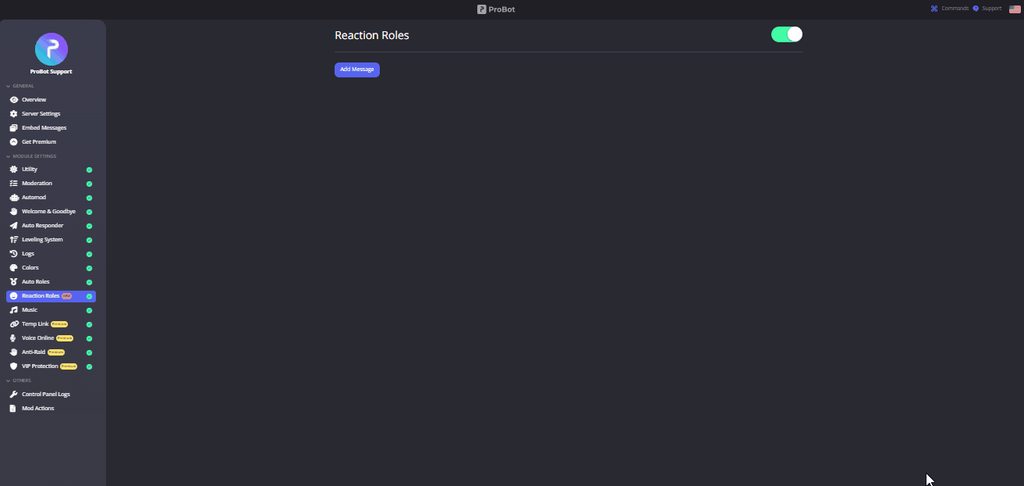
** How do I set up reaction roles?**
1 - Go to the dashboard https://probot.io/dashboard then select your server.
2 - Select "Reaction Roles"
3 - Click on "Add Message", then select an embed. You can manage these embeds by clicking on the "Embed Messages" button.
4 - Click on "Choose a message", and then select a message where the selected embed was sent.
To add a reaction role, click on "Add Reaction".
There are 3 different types of a reaction role message:
- Switch - Upon reacting, you will get the role, and upon removing the reaction, the role will be removed as well.
- Give - Upon reacting, you will get the role, and upon removing the reaction, the role won't be removed.
- Take - Upon reacting, the role will be removed from you, and upon removing the reaction, you won't get it back.

 lean badgerBOT
We noticed that you are a premium user, for faster response go to #premium-support
split needle
 pallid star
Hi ! do you have a command to add levels?
pallid star
Hi ! do you have a command to add levels?
no for now
pallid star
Thanks !
 spare torrent
Hello. I am trying to get probot to automatically add new people under "new" role. Just don't quite know where to go for it to work
split needle
spare torrent
Hello. I am trying to get probot to automatically add new people under "new" rol...
go to https://probot.io/dashboard, select your server on the left panel (tapping on the 3 lines button on top corner), then go to auto roles module and add roles there
 cedar pivot
I need some help
 inland zodiac
How do I get my probot to rank automatically people through reactions?
split needle
quaint sentinel
** <:smile:950381514401665024> How do I set up reaction roles?**
1 `-` Go to th...
@inland zodiac you mean setting up reaction roles? if then just follow the replied message above
inland zodiac
Oki
cedar pivot
How can i add something like this to my server?

 final flicker
What is the prefix of the bot @stone cloud
split needle
cedar pivot
How can i add something like this to my server?
go to https://probot.io/dashboard, select your server on the left side, then go to embed messages module to set up it
if you want to only like the message in there, just use content
split needle
final flicker
What is the prefix of the bot <@282859044593598464>
slash as discord default, other than that is # as bot's default
bot's default prefix can be changed using #prefix <new prefix>
 steep moat
The ProBot Is Not Responding To My Commands
 rose siren
<@&675070424748654593> how can i have it start leveling my server up
split needle
steep moat
The ProBot Is Not Responding To My Commands
which set of command?
split needle
rose siren
<@&675070424748654593> how can i have it start leveling my server up
just make sure both utility module and leveling system on the dashboard of your server on the site are enabled
https://probot.io/dashboard, then select your server on the left to check it
steep moat
split needle
which set of command?
The Music Command
split needle
ask the server admin (actual admins, not just those with role named admin) to go to the site https://probot.io/dashboard, go to the server dashboard on there, in the music module, add a role as dj role, save change, then remove it and save again
steep moat
Thanks for the Help its now working
 clear dust
Hello.. We have probot in one of our servers.. And we are using it to check who are the top msg and voice senders over the week.. When does the bot reset the data for the weekly?
split needle
clear dust
Hello.. We have probot in one of our servers.. And we are using it to check who...
every monday at 0am utc
 proper thunder
how exactly do you add more colors to your servers list?
proper thunder
server settings only has prefix and language
i have color roles in my server, i just don’t know how to add them to the colors list when members use the /colors list command
hmm, i think where i’m getting confused is where to add the roles specifically… do i change the name of the role to a number? or do i add the role to somewhere on the dashboard?
i’m sorry if i’m missing something i should be understanding
split needle
create color roles in your server and name them as only number
ivory yoke
<@&675070424748654593> Hello, why does the VOICE MUTE TIME no longer work?
 jovial jewel
how do i make the levelling system so that the bot says
"u just leveled up u now have the lvl.10 role"
split needle
ivory yoke
<@&675070424748654593> Hello, why does the VOICE MUTE TIME no longer work?
what do you mean?
split needle
jovial jewel
how do i make the levelling system so that the bot says
"u just leveled up u no...
not possible for now
ivory yoke
@split needleManual voice mute for a certain time does not work
 split needle
when muting in voice, you used bot or mute via user voice setting?
ivory yoke
@split needle I turned it off as usual with the button, everything worked before
split needle
not too sure about that
perhaps try to change the duration, save change then change back and try again
ivory yoke
@split needlestopped working around August 5 or 6
split needle
have you tried what I asked you to?
ivory yoke
@split needleI tried but it does not work, could you send information about this problem to the developers Probot?
 velvet gulch
Helloing.
With the /clear command
In our server the admins are able to use it to clear a bot called Nick Bot (user submit nickname change request)
However, when our moderators go to do the Same thing pro bot ignores their command.
They are enabled to use the command in command settings.
Any idea why??
split needle
velvet gulch
Helloing.
With the /clear command
In our server the admins are able to use it...
have they waited for the command to show up when using slash?
if they can not see any, check their permission and allow them to use application commands in your server
velvet gulch
split needle
have they waited for the command to show up when using slash?
if they can not se...
We use custom prefix. Not slash commands
In probot commands it’s listed as /clear.
We have prefix set as -
split needle
then it should work for them unless they have disabled role set for the command
could you check that and just remove all enabled/disabled roles/channels? since they will only allow administrators and moderators roles to use them
velvet gulch
We have a third level of helpers who only have access to certain commands. Will double check when home on Pc
split needle
you can still check them on mobile site as it's just roughly the same as on pc
 crisp trellis
So basically if they have the helper & mod roles and helper is in “disabled roles”, it wont work for them?
split needle
I still have no idea how the role override work for this bot but seems like it
clear dust
But i saw the top text leaderboard reset around Sunday 8am PST..
split needle
yea so monday 0am, or sunday 12pm utc or gmt
@ivory yoke asking right now if it's actually an issue or any update of the bot
ivory yoke
@split needle And when will you be able to give an answer?
split needle
not sure about that as it's also depends on them
 tough furnace
<@&336913504051265537> <@&675070424748654593> hello guys how can i reset levels ? (e.g i am now lvl16 i want all user to be lvl1 again, how can i do it ? )
primal coral
<@&675070424748654593>^
crude estuary
tough furnace
<@&336913504051265537> <@&675070424748654593> hello guys how can i reset levels...
hey, text level or voice?
tough furnace
crude estuary
hey, text level or voice?
on everything !
crude estuary
#reset text all
#reset voice all
tough furnace
crude estuary
> #reset text all
> #reset voice all
i press that command ?
crude estuary
tough furnace
i press that command ?
yes
tough furnace
crude estuary
yes
tnx u mate u help me a lot ❤️
crude estuary
yw, have a good day 
tough furnace
crude estuary
yw, have a good day <:takeoff:1001807118099296288>
u 2
 chrome adder
Ive paid for probot premium and it keeps telling me I need the premium hot and can’t find it
lean badgerBOT
chrome adder
Ive paid for probot premium and it keeps telling me I need the premium hot and c...
We noticed that you are a premium user, for faster response go to #premium-support
crude estuary
How can I help you?
 fierce lodge
lean badger
We noticed that you are a premium user, for faster response go to <#100483696527...
fierce lodge
lean badger
We noticed that you are a premium user, for faster response go to <#100483696527...
I need the pfp of pro bot
fierce lodge
crude estuary
How can I help you?
You can send me in dm pls?
tidal bobcat
what can i do with the credits ?
spring ether
you can buy probot with it or buy rank/profile backgrounds
 limber holly
spring ether
limber holly
spring ether
use /clear
native geyser
#support-ar
 oak plaza
okey
 floral void
I think there are some missing emoji for role reactions. I wanted to set flag emoji, but it appears those aren't selectable yet.
crude estuary
take screenshot and show me
floral void
 floral void
 crude estuary
Well, I will check the problem and let you know in DM
 worthy terrace

 topaz falcon
Hi is it possible to reset ranks with PROBOT?
Or at least take out someone who’s left our server from the PROBOT ranks?
crude estuary
topaz falcon
Hi is it possible to reset ranks with PROBOT?
hey, sure
crude estuary
topaz falcon
Or at least take out someone who’s left our server from the PROBOT ranks?
#reset text @user/userID
#reset voice @user/userID
topaz falcon
Great, thank you!
crude estuary
yw، have a good day
topaz falcon
So I just tried that and it didn’t work when I checked the top ranks again… am I doing something wrong?
crude estuary
It takes a little time
topaz falcon
It showed this when I sent the message
 topaz falcon
When I copied their ID it’s what was copied
Is there a different version I should use?
It’s the same one that shows up in the top text box too
crude estuary
Give me your server in DM
topaz falcon
crude estuary
Give me your server in DM
Just DMed
 quartz wagon
If I enable the temp link option and configure it....will everyone in the server be able to get a link even if they don't have permissions to generate invites?
lean badgerBOT
quartz wagon
If I enable the temp link option and configure it....will everyone in the server...
We noticed that you are a premium user, for faster response go to #premium-support
crude estuary
topaz falcon
Just DMed
Done
 lament plume
Hello, I got a question.
when using the clear command. Its not deleting any messages.
I tried the commands,
!clear
!clear 1000
!clear @languid mauve 100.
what is the reason its not deleting messages?
 native geyser
discord does not allow bots to delete messages that are older than 2 weeks
lament plume
Thanks @native geyser for your fast answer.
Is there a easy solution to clear up that channel besides deleting channel?
native geyser
either manually delete all messages which might not be possible or clone the channel and delete the old one
lament plume
thanks again!
native geyser
yw
 tough mortar
is it possible to link probot custom bot to own created one through discord?
while pretty sure the answer is no, I still wanted to ask
quaint sentinel
tough mortar
is it possible to link probot custom bot to own created one through discord?
nope
tough mortar
would that even be a thing?
quaint sentinel
As far as I know not it won't be a thing, you still can suggest it tho in #573053418017521664.
tough mortar
that would allow more customization to the bots and people could create their own bots instead of getting pre-made and link it with the token
quaint sentinel
Well, the premium bots are customizable you can change their avatar - name - and status that's basically a full customization.
tough mortar
that's still not a full customization.
you could take a look at discord.com/developers/applications
and see what other customization are also available there
quaint sentinel
Like I said currently we don't have such a thing like that, and I do belive the reason is that we have protection for each bot. Anyways, you can still suggest it in #573053418017521664.
 sonic ore
I have admin privileges and probot is above all of the roles I want to use for reactions. But when I try to create reaction roles, it doesn’t show me any roles at all

I’m not sure what I’m missing
native geyser
drag the bots role above other roles
sonic ore
Does it need to be above admin and owner roles? It’s above every other role
native geyser
just the ones you want the bot to be able to give
 native geyser
did you refresh your page after this?
sonic ore
Yes 
native geyser
there might be a discord bug with role order then i believe make a change in the order again -> save -> revert the changes -> save -> refresh your website
sonic ore
Okay, I’ll try that! Thank you
native geyser
yw
sonic ore
It worked! Thank you!
native geyser
yw
primal coral
 worn tiger
how do i make it oin more than 1
worn tiger
how do i make it oin more than 1
<@&675070424748654593>...
primal coral
worn tiger
how do i make it oin more than 1
You can't, because it just 1 bot so this bot can't join more than 1 room.
 sturdy lantern
Hello
lean badgerBOT
sturdy lantern
Hello
We noticed that you are a premium user, for faster response go to #premium-support
 frozen pilot
 native osprey
what does the @grizzled heron role do?
native geyser
makes so that only people with dj roles can use music commands
primal coral
 kind blaze
how do i make /colors work
kind blaze
how do i make /colors work
<@&675070424748654593>..
native geyser
kind blaze
how do i make /colors work
#1 ~ 👉 Go to server settings -> Roles.
#2 ~ 👉 Add numbered roles like the picture below.
#3 ~ 👉 Save and you're good to go.
https://i8.ae/7hM2w
Now you are ready to use these colors.
/colors
Shows the colors list
/color number
Choose/change your color in the server.
to remove your current color: /color 0
kind blaze
native geyser
#1 ~ 👉 Go to server settings -> Roles.
#2 ~ 👉 Add numbered roles like the pi...
thanks
native geyser
Yw
 turbid minnow
does probot have reaction delete log?
primal coral
turbid minnow
does probot have reaction delete log?
<@&675070424748654593>..
primal coral
turbid minnow
does probot have reaction delete log?
Nope
 barren tendon
#stop
primal coral
@barren tendon !
lean badgerBOT
barren tendon
#stop
:notes: The player has stopped and the queue has been cleared.
frozen pilot
barren tendon
#stop
komutlar kanalını kullan kanka
 hidden bison
Hi, Our moderators cannot use the command
?role @User + Rolename , although the role is entered in the dashboard.Does anyone have any idea what rights may be missing?
native geyser
hidden bison
Hi, Our moderators cannot use the command
?role `@User` + `Rolename` , although...
What does the bot reply with to the command?
hidden bison
Assigns a role
native geyser
When your mods use the command
Did you add their role as an enabled role for /role command on dashboard?
hidden bison
If you have administrator rights on the server it goes
 latent wagon
Hello, is 0/max in the card normal? Provided that I wrote to the chat

<@&675070424748654593>
 wide fable
Hello
latent wagon
Hi
crude estuary
hidden bison
If you have administrator rights on the server it goes
yes
crude estuary
latent wagon
Hello, is 0/max in the card normal? Provided that I wrote to the chat
hey, you just have to write for a little while
crude estuary
wide fable
Hello
hey, how can I help you?
latent wagon
crude estuary
hey, you just have to write for a little while
well, thanks!
crude estuary
yw, have a good day
hidden bison
crude estuary
yes
Is it then also somehow without admin rights?
crude estuary
native geyser
Did you add their role as an enabled role for /role command on dashboard?
@hidden bison
ProBot
Welcome images, moderation, leveling, reaction roles, logs, high quality music and many many more!
 valid lotus
Just a question since I experienced from a different bot. If I buy all stuff from Probot, there won't be a glitch or reset?
I'm always addicted to getting everything (including games).. 🙈 But not with real money, just achievements or virtual stuff
 violet vessel
who can edit my server?
valid lotus
Oh, I do mean the probot currency thing. I've been trying to buy all backgrounds and whatever stuff there.
The game is related to me, I meant video games 😅
Anyway, the main question is if I buy all the background, badge, whatever in probot, it won't get glitchy or reset?
nocturne flax
how to make a forum? I saw a friend made on his server via probot.
valid lotus
Cool! Thanks for the reply 🤘
hidden bison
native geyser
Did you add their role as an enabled role for /role command on dashboard?
yes, the Channel to
 sacred coral
Hello! How to clear the top voice and text chat?
crude estuary
crude estuary
hidden bison
yes, the Channel to
is it work or not?
crude estuary
sacred coral
Hello! How to clear the top voice and text chat?
#reset voice all
#reset text all
sacred coral
Thank you
crude estuary
yw
hidden bison
crude estuary
is it work or not?
no
 nocturne holly
help? the colors list is empty
 nocturne flax
channel

 lyric oar
Hi
Can someone tell me how to show the logs with probot on a channel
?
<@&675070424748654593>
hidden bison
Even if the bot has full rights in this channel, it only works for those who have admin rights. Not with the moderators.
lyric oar
Please help
nocturne holly
thank youuuu!
primal coral
lyric oar
Can someone tell me how to show the logs with probot on a channel
<@&675070424748654593>..
nocturne flax
moderation not work

 nocturne flax
the automoderation not work
hidden bison
ok
nocturne flax
the automoderation does not work
help me
in what way?
only automoderation and welcome message with images
I don't know if nothing else works
ok aspect
ok then that's why
and for automod?
for automod?
quaint sentinel
.
worn tiger
@primal coral but why cant i connect the bot to more than one channel even though its not connected to any
native geyser
worn tiger
<@891051226261782598> but why cant i connect the bot to more than one channel e...
1 user (including bots) can only join into 1 single voice call at one time
 honest acorn
native geyser
honest acorn
honest acorn
native geyser
honest acorn
hi how can i help you?
 raven crow
So here is the situation: Users are talking and are not getting EXP. (See photo below)
This user specifically has been talking for the most part of two days... and has gained none of the preset lvl roles or even gained one XP point
What should I do?

If I need to take a picture of my roles I have preset or my dashboard I am more than willing
native geyser
on dashboard
- enable utility module
- if this person has any no-xp roles remove them (from leveling system module)
 little fog
can i do custom emoji's for reaction roles?
raven crow
native geyser
on dashboard
1) enable utility module
2) if this person has any no-xp roles remo...
OH THATS THE REASON!?
native geyser
yup
native geyser
little fog
can i do custom emoji's for reaction roles?
yes you can use them
raven crow
Well I may have just screwed the whole server over
Hold on
I thought No-XP roles mean they had none
native geyser
no-xp roles make it so that people with those roles do not get any xp
little fog
native geyser
yes you can use them
how do i go about using those? i'm only seeing the default added on the list and a command doesnt seem to work to add them into the reaction plugin
native geyser
which command are you talking about? cause you do not set reaction roles by using commands
raven crow
Thank you folks!
 burnt sparrow
native geyser
burnt sparrow
native geyser
hi, for arabic please use #support-ar
little fog
native geyser
which command are you talking about? cause you do not set reaction roles by usin...
the command that copies the id of an emote using developer mode. i'm not seeing how to get custom emotes for reaction roles set for a reaction on an embed
native geyser
oh thats what you mean
-
go to your discord servers chat
-
-if you're on mobile discord use the emoji you want to add use in between `` symbols https://imgur.com/F2ckAUV
-if you're on pc use your emoji and put \ before it and send it https://imgur.com/XjCo32W
-
copy the message you just sent and paste it on dashboard


 warped meteor
When I type /clear 99 it said 0 message cleared
native geyser
discord doesnt allow bots to delete messages that are older than 2 weeks
warped meteor
Thank you
native geyser
yw
 median karma
Anyone else struggling with the lock command
lean badgerBOT
median karma
Anyone else struggling with the lock command
We noticed that you are a premium user, for faster response go to #premium-support
crude estuary
median karma
Anyone else struggling with the lock command
We are working on it
crude estuary
 strong nexus
how do i get music on my vc
strong nexus
how do i get music on my vc
/play
strong nexus
how do i get it on my vc called probot
crude estuary
you can join in the room and use the command
crude estuary
crude estuary
you can join in the room and use the command
do this
Then use the command in any text channel
strong nexus
on any channel while in vc
crude estuary
yes
strong nexus
do i do /play and yt link?
crude estuary
/play term:link or name of the song
strong nexus
ok so like this is?
crude estuary
yes

 jaunty mason
Hey is there a way to add Probot to the server without going through a link
native geyser
not really it can only be invited through https://probot.io/invite
Discord
Discord is the easiest way to communicate over voice, video, and text. Chat, hang out, and stay close with your friends and communities.
jaunty mason
Dang I can’t go through the link cause of parental setting lol well I’ll try to get someone to invite him to my server thanks
native geyser
yw
 hexed igloo
Probot won’t mute people
native geyser
what does the bot reply with to your command?
hexed igloo
native geyser
what does the bot reply with to your command?
It replies like normal but they can type still
native geyser
then its an issue from your channel settings permission
channel settings -> permission -> muted roles send message permission will be set to ❌ leave it as it is, for the rest of the permissions that are set there however for all permissions that have their send message permission on ✅ find them and set them to / instead
hexed igloo
native geyser
then its an issue from your channel settings permission
channel settings -> perm...
It’s not working
hexed igloo
native geyser
then its an issue from your channel settings permission
channel settings -> perm...
Could you come into my discord sever and find out?
native geyser
then clearly there is at least one or more roles overriding muted roles permission
native geyser
hexed igloo
Could you come into my discord sever and find out?
have you checked your channel permission settings yet?
hexed igloo
native geyser
then clearly there is at least one or more roles overriding muted roles permissi...
I’m so confused could you just check
hexed igloo
native geyser
have you checked your channel permission settings yet?
Yes if done that
native geyser
is there any role with send message permission on ✅
hexed igloo
native geyser
is there any role with send message permission on ✅
No there is none
native geyser
then there shouldn't be any issues so invite me in dms i'll find whats overriding the muted roles permission
 wheat wharf
Hello I'm new here can I know how to buy credit ?
 regal sorrel
i need help for the reaction roles for my server
 native geyser
Get on https://probot.io/dashboard and select your server
-
from embed messages section create an embed message and send it to your server (the message you'll have to select in step 2 basically)
-
from reaction roles section select the embed message you just sent
-
add reactions
-
add roles by clicking on the plus signs right next to the reactions you added
ProBot
Welcome images, moderation, leveling, reaction roles, logs, high quality music and many many more!
 fickle tinsel
Hello, how do I block someone who sends links in the ROM?
native geyser
https://probot.io/dashboard -> select your server -> automod
ProBot
Welcome images, moderation, leveling, reaction roles, logs, high quality music and many many more!
fickle tinsel
@jaunty mason
Hello, how do I block someone who sends links in the ROM?
native geyser
jaunty mason
Hey can u tell me how to set up the level up system lol
https://probot.io/dashboard -> select your server -> leveling system module
ProBot
Welcome images, moderation, leveling, reaction roles, logs, high quality music and many many more!
native geyser
fickle tinsel
<@680587963461009430>
Hello, how do I block someone who sends links in the ROM...
i just answered you above
fickle tinsel
native geyser
i just answered you above
I got in and I couldn't do anything I don't understand how
native geyser
did you click on the link i sent
jaunty mason
Lol I’ll figure it out myself cause I can’t open links but thanks Ruru
fickle tinsel
native geyser
did you click on the link i sent
yes
native geyser
jaunty mason
Lol I’ll figure it out myself cause I can’t open links but thanks Ruru
well it can only be set from dashboard so there is nothing much we can do without you not being on dashboard
jaunty mason
Okay thanks
native geyser
fickle tinsel
yes
did you get to 'automod module'
fickle tinsel
@native geyser Yes, I did and a list appeared. What did he choose?
native geyser
you said you want to block links so you click on links and set it up as you wish
fickle tinsel
native geyser
you said you want to block links so you click on links and set it up as you wish
Is there a picture or video of the new me on Discord?
native geyser
fickle tinsel
Is there a picture or video of the new me on Discord?
can you show me a screenshot of which page are you seeing after getting on automod module
 native geyser
as i asked above select your server from left side and get on automod module
 native geyser
automod module click on it
native geyser
yw
 void forum
how are you able to do these
 split needle
void forum
how are you able to do these
split needle
void forum
how are you able to do these
Go to https://probot.io/dashboard, select your server, then go to embed messages module to make them
 split needle
You should be able to send them under the editor of each one
void forum
thanks
 deep hedge
Why am I always getting bad request vote
 untold arch
<@&675070424748654593>
native geyser
Blacklisted from vote due to using multiple accounts
 half spire
Bad req vote ?
jaunty mason
How do I set up a welcoming thing that gives a role once you react with it lol
half spire
Ok, thanks
 dense frigate
jaunty mason
dense frigate
jaunty mason
How do I set up a welcoming thing that gives a role once you react with it
What ?? Idk what that means
… @nocturne flax am I muted now or something
Ahh so I can’t do it lol cause of parental setting 🥲
Lol I’ll try my best to do what I can
 upper gale
@quaint oar
upper gale
Tüm hizmetimin çağrısını ve metin xp düzeyini sıfırlamak için yardıma ihtiyacım var

 quaint oar
Good Can I help others without the rank of Support؟؟
Well thank you very much brother
split needle
 pearl sundial
is this the kind of bot for adding text channels
pearl sundial
is this the kind of bot for adding text channels
almost no bot does that as it's already a discord default feature
pearl sundial
i mean like automatic
split needle
no
pearl sundial
what all does it do
split needle
mostly moderation
split needle
this bot is not an all in one bot, it does not help you build a discord server either
you might need to learn how to build a discord server first before looking for any bot
pearl sundial
ok
nocturne flax
How can I find the music source code of probot?
split needle
we have no information with backend
nocturne flax
😒 no github link, etc.?
split needle
like if it's public
 tropic steppe
jaunty mason
tropic steppe
jaunty mason
Lol I couldn’t do it but I tried and it took hours
 exotic juniper
Hi who can help me? I would like to have an emoji which unfortunately does not fit for discord
 true sand
hi
bot filter links work wrong, he allow to post only www without https
split needle
true sand
hi
bot filter links work wrong, he allow to post only www without https
since those are not clickable, the bot tend to ignore them
but you can set www as badword and make it auto delete
true sand
split needle
but you can set `www` as badword and make it auto delete
No, I mean, I want the bot to only allow links to be published in a certain channel beginning with www and http/https
split needle
I don't think that's a thing then
true sand
but I don't know how to set-up it
split needle
there's only completely not allowing members to send links, or allow/disallow them to send certain links
true sand
split needle
there's only completely not allowing members to send links, or allow/disallow th...
I set-up links only channel, but bot delete any clickable link, whats totally wrong
split needle
there's no feature as link only channel
just youtube link only channel
which can be overrode by link filter
true sand
split needle
there's no feature as link only channel
I see, wrong translation, translated as 'only for links'

 split needle
alright let me report that to translator
true sand
split needle
alright let me report that to translator
is there no way to create a function that would delete text messages and leave only those that have any link with or without text?
split needle
for now no
you can suggest said feature in #573053418017521664
true sand
split needle
for now no
you can suggest said feature in <#573053418017521664>
thanks for answering
nocturne flax
Yo how Do I purge an entire channel of messages
My dumbass can't figure it out
I'm Trying to Clean an Entire channel of messages sent by members
split needle
nocturne flax
Yo how Do I purge an entire channel of messages
use /clear but it has limitations
only clear up to 100 messages at a time for free version, and can not delete messages older than 2 weeks old (discord limit)
better way is clone the channel and delete the old one
mind checking the channel topic?
nocturne flax
split needle
use /clear but it has limitations
only clear up to 100 messages at a time for fr...
Mhm
primal coral
latent wagon
What are points? what do they give? <@&675070424748654593>
<@&675070424748654593> ^^
split needle
latent wagon
What are points? what do they give? <@&675070424748654593>
those are for server held events that you can use to count points for users
and it's just a server side feature so no impact to any global feature like credit for profile level, and have no relation to server level as well
latent wagon
split needle
and it's just a server side feature so no impact to any global feature like cred...
Okay, thanks!
primal coral
 timid minnow
How can I make welcome messages with probot?
timid minnow
How can I make welcome messages with probot?
<@&675070424748654593>..
primal coral
timid minnow
How can I make welcome messages with probot?
https://probot.io/dashboard »» select your server »» Welcoming Moudle.
ProBot
Welcome images, moderation, leveling, reaction roles, logs, high quality music and many many more!
timid minnow
Thanks
primal coral
timid minnow
Thanks
yw
crude estuary
nocturne flax
Does probot show lyrics?
where?
nocturne flax
Like hydra bot can show lyrics
crude estuary
Can you picture an example?
 shadow sphinx
hi, where to report someone who scams people and sell credits for cash?
crude estuary
shadow sphinx
hi, where to report someone who scams people and sell credits for cash?
You can report the sale of credits only in @native geyser DM
 blazing cape
Hello. Probot doesnt show a server in the dashboard,nor i can invite it there,even tho it is already in the server. Also it says it doesnt have permission to undo a command even tho it did it
split needle
blazing cape
Hello. Probot doesnt show a server in the dashboard,nor i can invite it there,ev...
it more like you're missing permission in said server
blazing cape
Oh
frozen pilot
nocturne flax
Does probot show lyrics?
no
 crimson sundial
hey i am facing while setting voice time spent roles
like unable to configure the specific hrs. I have a study server i want like begginer tier <3h-6h> but i can't set like this
split needle
because it does not work like that
 icy ruin
how i can add a reaction role?
crude estuary
**  How do I set up reaction roles?**
1 - Go to the dashboard https://probot.io/dashboard then select your server.
2 - Select "Reaction Roles"
3 - Click on "Add Message", then select an embed. You can manage these embeds by clicking on the "Embed Messages" button.
4 - Click on "Choose a message", and then select a message where the selected embed was sent.
To add a reaction role, click on "Add Reaction".
There are 3 different types of a reaction role message:
- Switch - Upon reacting, you will get the role, and upon removing the reaction, the role will be removed as well.
- Give - Upon reacting, you will get the role, and upon removing the reaction, the role won't be removed.
- Take - Upon reacting, the role will be removed from you, and upon removing the reaction, you won't get it back.
icy ruin
but when i use reaction bot didnt give me the role
 valid sierra
How can I link a channel in Probot Embed?
crude estuary
do you mean to send the embed to a specific channel?
valid sierra
No
crude estuary
or mention the channel in the message
valid sierra
Like #announcements
crude estuary
<#channelID>
valid sierra
Hmm that does not work in the preview
valid sierra
Okay I will try, thanks!
crude estuary
yw, have a good day
valid sierra
You too :)
 modern lily
Q. What does voice online and colors do? What's the use cases? Thanks a ton.
crude estuary
voice online to see how much person in the voice channels
colors to change your color
 cursive ermine
split needle
cursive ermine
split needle
/stop
and next time mention the support role, not individual
modern lily
crude estuary
voice online to see how much person in the voice channels
colors to change your...
Why would people change color though. You mean the color of the name???
 odd wagon
Hey, when my premium ends will it stop/disable all the premium features or will i just not be able to edit it before rebuying?
crude estuary
modern lily
Why would people change color though. You mean the color of the name???
yes like my color
crude estuary
odd wagon
Hey, when my premium ends will it stop/disable all the premium features or will ...
hey, it will go offline if you sub in premium tier 2
premium tier 1 will out automatically
odd wagon
hmm, is there anyway to selfhost it/buy sourcecode?
crude estuary
no
odd wagon
Is there a limit to how many Embed messages i can create without premium?
crude estuary
no
odd wagon
thanks for your help.
crude estuary
yw, have a good day
 mild sable
can i help here @crude estuary
 sand schooner
It cant find any roles on reaction roles
 split needle
sand schooner
It cant find any roles on reaction roles
split needle
sand schooner
It cant find any roles on reaction roles
move the probot role higher in your server role list and refresh the site
split needle
mild sable
can i help here <@697940568684101642>
?
sand schooner
split needle
move the probot role higher in your server role list and refresh the site
Oh okay
Thanks
split needle
check the channel description
sand schooner
Still nothing after reload
 split needle
have you actually moved the probot role up? or just giving it a higher role? because that will not work
sand schooner
split needle
have you actually moved the probot role up? or just giving it a higher role? bec...
Yea its already fixed
The changes dont saved on my iphone
modern lily
crude estuary
yes like my color
Thanks!
crude estuary
yw, have a good day
untold arch
<@&675070424748654593>
split needle
 wispy fractal
guys how to stop the bot from replaying music?
wispy fractal
guys how to stop the bot from replaying music?
Use the repeat/loop command again
jaunty mason
Hey … how do I set up the reaction role on a welcome page it doesn’t give the option to put it in the channel
native geyser
jaunty mason
Hey … how do I set up the reaction role on a welcome page it doesn’t give the op...
Get on https://probot.io/dashboard and select your server
-
from embed messages section create an embed message and send it to your server (the message you'll have to select in step 2 basically)
-
from reaction roles section select the embed message you just sent
-
add reactions
-
add roles by clicking on the plus signs right next to the reactions you added
ProBot
Welcome images, moderation, leveling, reaction roles, logs, high quality music and many many more!
jaunty mason
native geyser
Get on https://probot.io/dashboard and select your server
1) from embed messag...
Okay thanks I got it now
native geyser
yw
jaunty mason
About her thing how does the auto roles work
Does it just sit give roles to people ?
Automatically *
crude estuary
yes
jaunty mason
Okay thanks
crude estuary
yw
 wet herald
owo h
crude estuary
@wet herald how can I help you?
wet herald
what is probot
crude estuary
wet herald
what is probot
@stone cloud
quaint sentinel
.
 languid lake
hello can I get someone to talk with (higher manager )
languid lake
there is server are using your server bot to scam and to abuse people and they scammed me with 1m discord credit
50k plus members
@native geyser
@near canopy@tender obsidian
native geyser
native geyser
and please use only one support channel
i see that you already got an answer in #support-ar so please continue there
languid lake
native geyser
i see that you already got an answer in <#743365286132056094> so please continue...
they told me that they cant handle it
native geyser

languid lake
native geyser
<:shrug:474185677156909066>
so what?
native geyser
so there is nothing we can do as they already told you
the original bot can easily be noticed thanks to 'verified bot' badge so if users are not careful its not really our responsibility
 languid lake
if you cant do nothing with it so who will ?
native geyser
nobody due to the reasons i mentioned above
languid lake
ok ill use your bot to scam is that ok ?
native geyser
there is a difference between what we're telling you and what you're trying to understand so do as you wish i guess
languid lake
native geyser
there is a difference between what we're telling you and what you're trying to u...
ok thank you
 loud swallow
dont deleted
native geyser
@loud swallow since clearly you dont have any bot related questions or anything move to #chat-en instead
native geyser
would it be okay for you if you got scammed
 feral scaffold
 lean badgerBOT
feral scaffold
lean badgerBOT
feral scaffold
We noticed that you are a premium user, for faster response go to #premium-support
loud swallow
native geyser
would it be okay for you if you got scammed
yea noone will help them and noone will help me
 solemn shoal
Hello
loud swallow
solemn shoal
Hello
hey buddy
native geyser
hi how can i help you?
native geyser
for Russian please use #support-int
native geyser
yw
loud swallow
he bout to swear
native geyser
loud swallow
he bout to swear
as i told you before, move to #chat-en
native geyser
solemn shoal
No Russians
i mentioned our Russian support member he should answer you soon
loud swallow
ok ma'am
solemn shoal
Ok