#support-en
1 messages · Page 6 of 1
 timber adder
 untold flume
hey there how can i help you ?
timber adder
Excuse me, I have a question, how do I use the bot's clear command?
in the music player.
untold flume
#help clear
 lean badgerBOT
untold flume
#help clear
lean badgerBOT
untold flume
#help clear
**Command: clear**
Cleans messages from a channel.
**Usage:**
/clear (number of messages)
/clear bots (number of messages)
/clear [user] (number of messages)
**Examples:**
/clear 1000
/clear bots 10
/clear @untold flume 10
timber adder
write me this ❌ The module of the command is not enabled
untold flume
what do you mean by auto delete ?
timber adder
I accidentally put a music playlist and I can't remove it lmao
untold flume
aha
it's not clear it's #skip
try it
nah sadly you can't, you have to do it by yourself every one minute xd
feel free to suggest here #573053418017521664
timber adder
untold flume
it's not clear it's #skip
skin 1 by 1?
untold flume
timber adder
skin 1 by 1?
type the command and it will skip it auto
as i told you, u can suggest it here #573053418017521664 
timber adder
untold flume
type the command and it will skip it auto
Thanks bro, u helped me a lot.
untold flume
no problem anytime, and have a nice day/night
 untold flume
mhm same
 teal depot
woa, ok, after like a minute it loaded
untold flume
yeah sometimes some of these problems happen so yeah
 nocturne flax
Can I tag role ID in embed message? <@role-id> doesn't work
 signal plume
My friend is getting the same award over and over again. Would submit a bug report but yall dont have that channel

<@&675070424748654593>
untold flume
send me your servers link in my dm's please
signal plume
okay
nocturne flax
How to change prefix on probot?
untold flume
/prefix new prefix
untold flume
nocturne flax
I doesn't see a command for this
the bot doesnt reply?
@rocky marsh my bad, its #prefix
 dim mesa
untold flume
dim mesa
untold flume
we are full now, we don't need more supports
 orchid orbit
Ok thanks for letting me know have a great day😁
untold flume
you're welcome, have a nice day you too ! 
untold flume
its paid
Premium Tier 2 Prices($) 
ـ
10$ / monthly
60$ / yearly
ـ
Premium Tier 2 Prices(probot credits)
ـ
1,700,000 monthly
10,200,000 yearly
ـ
Premium Tier 1 Prices($)
ـ
5$ / monthly
30$ / yearly
ـ
Premium Tier 1 Prices(probot credits)
ـ
850,000 monthly
5,100,000 yearly
untold flume
yeah you can
orchid orbit
Can I please get a link
untold flume
ProBot
Welcome images, moderation, leveling, reaction roles, logs, high quality music and many many more!
you can find here everything
untold flume
np
orchid orbit
What can 7,000 creds do for me?
untold flume
orchid orbit
What can 7,000 creds do for me?
you can actually buy badges/profile backgrounds and ID backgrounds for credits; https://probot.io/store/rank, https://probot.io/badges, https://probot.io/store/profile.
orchid orbit
What do badges do?
 orchid orbit
Wait what?
untold flume
its for profile command
orchid orbit
I don’t get it? Sorry.
untold flume
 untold flume
yep exactly
orchid orbit
OHHHH OK THANK YOU
untold flume
you're welcome have a great day
untold flume
hey
orchid orbit
Can I ask about nitro backgrounds in this channel or do I have to dm you?
untold flume
orchid orbit
Can I ask about nitro backgrounds in this channel or do I have to dm you?
you can ask here #chat-en
 fickle reef
But there's no one for Kurdish
untold flume
fickle reef
But there's no one for Kurdish
we're not looking for any supports atm
fickle reef
Okay thank you bud.
 storm dirge
Profile
untold flume
can i help you ?
storm dirge
Can I make orders in one chat?
I mean I mean a person can't use commands about a specific thing
؟؟؟؟؟
untold flume
yeah go to dashboard https://probot.io/dashboard choose your server on the left bar go to either utility or moderation, click at edit of any command you want
ProBot
Welcome images, moderation, leveling, reaction roles, logs, high quality music and many many more!
and choose enabled channels

choose the channels that you want, and thats it
untold flume

 cyan parcel
Есть русскоязычные модераторы?
untold flume
cyan parcel
Есть русскоязычные модераторы?
#support-int please
 fringe geyser
<@&675070424748654593>
so i just bought premium tier 2
and i cant change the pfp and the nickname, well ican on the website but it doenst change in the server ... what am i doing wrong ?
untold flume
#help vip
lean badgerBOT
untold flume
#help vip
**Command: vip**
Displays info about your premium bot.
**Usage:**
/vip
/vip move (bot's number)
/vip transfer (bot's number) [user]
/vip restart
/vip avatar [avatar link]
/vip username [new name]
/vip status (new status)
/vip whitelist (user)
**Examples:**
/vip
/vip move
/vip move 1000
/vip transfer 1000 @Dramex
/vip restart
/vip avatar http://i8.ae/sN6XG
/vip username SystemBot
/vip status SystemBot
untold flume
@fringe geyser make sure that ur using these commands exactly
fringe geyser
untold flume
<@612390117725831168> make sure that ur using these commands exactly
i cant even use the ''/vip''
 fringe geyser
untold flume
solved, <@612390117725831168> <:sparkles:736686100613038182> <:happy:95390176080...
fringe geyser
untold flume
solved, <@612390117725831168> <:sparkles:736686100613038182> <:happy:95390176080...

 tawdry berry
yes hello , I got pro bot premium 3 times and it is still not working . I would like someone to help me in any room.
 split needle
tawdry berry
yes hello , I got pro bot premium 3 times and it is still not working . I would ...
split needle
tawdry berry
yes hello , I got pro bot premium 3 times and it is still not working . I would ...
have you invited the premium to your server?
tawdry berry
split needle
have you invited the premium to your server?
yes
split needle
when using #help, which bot in the server respond?
if it's the normal one, try kick both normal and premium bot out and invite only the premium back in
tawdry berry
split needle
if it's the normal one, try kick both normal and premium bot out and invite only...
when I kick them the dashboard doesn't open . I am required to invite the normal pro bot
split needle
but have you done the thing I said?
tawdry berry
split needle
but have you done the thing I said?
yes , I have
could you come to the voice support ?
@split needle
split needle
I'm not voice support
tawdry berry
split needle
I'm not voice support
who is ?
split needle
and if you're having trouble understanding english, you can continue in arabic in #support-ar
tawdry berry
split needle
and if you're having trouble understanding english, you can continue in arabic i...
I am not having trouble but it is easier to say it than write it
split needle
I see no problem when peopel comes here with same problem as yours and got resolved in a while
tawdry berry
split needle
I see no problem when peopel comes here with same problem as yours and got resol...
I prefer voice channel
thank you
split needle
and there's just no voice support available either
I suggest you to either read my message closely, or head to #support-ar for better understanding in your language
if the normal bot is the one responding to commands, try kick both normal and premium bot out and invite only the premium back in
tawdry berry
thank you 
 ocean frost
ooo
 mighty linden
C
 quasi oxide
hello can anyone tell me why it will only let me play songs but not my friends in my discord channel?
 little fog
im currently trying to set up the reaction role but im having an issue where it isnt even seeing that there are any roles created in my server. permissions are set exactly how it was when probot joined but no dice getting it to see roles
this is what i see when trying to get a role selected
 split needle
quasi oxide
hello can anyone tell me why it will only let me play songs but not my friends i...
split needle
quasi oxide
hello can anyone tell me why it will only let me play songs but not my friends i...
go to https://probot.io/dashboard, select your server on the left side, go to music module, add a role as dj role, save change, then remove it and save again
quasi oxide
ok thank you
split needle
little fog
this is what i see when trying to get a role selected
move the probot role higher in your server role list then refresh the site
little fog
split needle
move the probot role higher in your server role list then refresh the site
thank you!
 teal mesa
How do I do reaction roles
split needle
teal mesa
How do I do reaction roles
go to https://probot.io/dashboard, select your server, go to embed messages module to create and send embed messages for the reaction roles to where you want. Then go to reaction role module to setup the feature on the sent embed messages.
Notice: Be sure the Probot✨ role is higher than other roles. Embed message should not have any blank element (better to remove them if not using).
 hollow gyro
Any idea on what’s goin on?

When I use / it just thinks for a long time

Ignore my username 💀💀💀💀
 rough birch
is the dashboard down?
 vagrant fjord
bruh, i might have crashed it
vagrant fjord
same here
 cobalt seal
Hi, is it possible to set up a voice level channel ? When a member moves to a next voice level, the bot sends a message in this channel (like it does for text level)
hollow gyro
ahh ok
 primal forge
rank cmd is broken
 bronze void
Hey probot wont let me authorize to log into my dashboard, I click the button to allow it to but it wont
 wanton geyser
 lyric scaffold
Pro bot dashboard broken
lyric scaffold
Pro bot dashboard broken
 Exactly
 midnight viper
 floral templeBOT
 it seems our databases' servers are offline due to network issue, we are in contact with the provider and will let you know with any updates.
nocturne flax
floral temple
<:dnd:664754430058561556> it seems our databases' servers are offline due to net...
that explains it lol
floral templeBOT
 Network back to normal, All Systems Operational.
 warm sigil
hi,sorry en so not good.
Automod in 「ONLY IMAGES CHANNELS」the set 「images message and text」?
 mental ore
Do these only work on the message commands, if so, how would I make it delete the slash command?

 hoary jacinth
is there any way to reset levels for all members?
nocturne flax
<@&675070424748654593>
split needle
warm sigil
hi,sorry en so not good.
Automod in 「ONLY IMAGES CHANNELS」the set 「images mess...
if you mean what does it do, it deletes all messages not containing directly uploaded images in the set channels
split needle
mental ore
Do these only work on the message commands, if so, how would I make it delete th...
still working on it
split needle
hoary jacinth
is there any way to reset levels for all members?
#help reset
lean badgerBOT
split needle
#help reset
**Command: reset**
Reset text/voice/invites/limits xp points for all or specific member.
**Usage:**
/reset [text / voice / invites / limits] [all / user]
**Examples:**
/reset text all
/reset voice all
/reset invites all
/reset text @Dramex
/reset limits @Dramex
mental ore
split needle
still working on it
when does it plan to release ?
split needle
not having any information about it
hoary jacinth
split needle
#help reset
thanks!
warm sigil
split needle
if you mean what does it do, it deletes all messages not containing directly upl...
NO,
Because after setting it, I still can't eat it. I can't let the probot delete the pictures with words.
split needle
oh then it's not an option so text messages containing images will not be deleted
I will suggest this option so it can be implemented
warm sigil
where is it option?
split needle
it is not here yet, so you will need to wait
warm sigil
split needle
it is not here yet, so you will need to wait
OK
 unkempt quest
when u make a reaction role and u choose the role, how do u choose it because i tried and idk how to
split needle
click on the + button next to the added reactions
if no role shows up, move the probot role higher in your server role list and refresh the site to update
unkempt quest
ok
unkempt quest
split needle
click on the + button next to the added reactions
if no role shows up, move the ...
i tried that and i still dont see the roles
split needle
did you moved the ProBot✨ role or any other role?
unkempt quest
yeah i moved it to the highest role possible
split needle
then you should be able to see them on the site after a refresh if you haven't done that
split needle
can I see a screenshot of the role list in your server?
 split needle
yea I asked to move the probot role up, and I'm not seeing it
 split needle
member list position does nothing if its system role is not at the high place
unkempt quest
It’s the highest role though
split needle
and I asked you to move the <@&692974405311135764> role, not other roles you gave it
 weak phoenix
what is the formula for this bot to count someone's exp?
unkempt quest
 split needle
unkempt quest
split needle
unkempt quest
yes
unkempt quest
Ok lemme try it
split needle
weak phoenix
what is the formula for this bot to count someone's exp?
for text, counts on messages sent with 2 minutes cooldown
for voice, 2 minutes cooldown while staying in a voice channel
unkempt quest
Ok it worked
split needle
the xp rate for text is randomized in the range from 10 to 40 xp, while voice xp is fixed 10
weak phoenix
split needle
for text, counts on messages sent with 2 minutes cooldown
for voice, 2 minutes c...
1 text message, get exp then 2 minutes cd?
split needle
yes
 cerulean shell
Hello, I come to see if it is normal that the ping bot does not play a role in the welcome message even though it has the permissions? Is it impossible for security reasons or not? So thank you for your response.
I had to use Google Translate sorry in advance because I'm French..
Do not hesitate to mention me when you answer me so that I do not forget thank you in advance
 tacit gazelle
so i purchase a premium bot a couple of weeks ago and am not sure which one is the premium bot. is it the light purple on or the dark purple?
split needle
cerulean shell
Hello, I come to see if it is normal that the ping bot does not play a role in t...
you can ask your question in french in #support-int since we have a french supporter
split needle
tacit gazelle
so i purchase a premium bot a couple of weeks ago and am not sure which one is t...
your subscription is tier 1 so your bot is the prime one, which is the one with light color
tacit gazelle
split needle
your subscription is tier 1 so your bot is the prime one, which is the one with ...
so the light color... can do volume changes..
split needle
yea for server wide
also it will replace the free bot in your server once being added
tacit gazelle
split needle
your subscription is tier 1 so your bot is the prime one, which is the one with ...
so it was not working and i was told to remove it but when i want to reinstall it , it wants me to pay for it again. and i paid for a year.
split needle
you should reinvite it from https://probot.io/premium/manage instead of from the server dashboard
ProBot
Welcome images, moderation, leveling, reaction roles, logs, high quality music and many many more!
tacit gazelle
i just reinstalled my premium bot and now it will not let me do anything because it says another bot is being used. i already kicked the regular bot from my server but it was still saying it. now there is a bot named Clyde who is there. He is not listed under members so i am not sure how to get rid of him or if he even is causing the conflict.
split needle
clyde is discord's system bot and is not a visible one
if you're still getting the issue of another bot being used, try kick the prime out again, then reinvite it back in
tacit gazelle
split needle
clyde is discord's system bot and is not a visible one
if you're still getting t...
okay i will try that. does clyde interfere with your bots?
split needle
no
 grave island
quick question... what's the "Voice Online" feature?
split needle
it will show how many users are in voice channels on a category's name like how you can see on the general category
grave island
Ah! Awesome, thank you
cobalt seal
Hi, is it possible to set up a voice level channel ? When a member moves to a next voice level, the bot sends a message in this channel (like it does for text level)
split needle
no as voice level can not update by itself without being triggered by text level, which mean voice level up notify will not come up until you get some text xp
cobalt seal
Alright thanks
 gloomy peak
Hi, I have a problem. The whole server I'm in can hear the music that's played by probot, but I can't. It's happening when I use the command or anyone else use it. I have it on max volume and still can't hear it. What should I do?
 native geyser
The issue is from your side therefore I can't tell much about how to fix it though check your settings in general
nocturne flax
i cant use / command of bot beacuse it doesn't show
native geyser
That's a permission issue as your server admins to give you perms
 native geyser
Hi, try on another browser please
 native geyser
If clearing your cache doesn't fix it the issue might be related to your connection
 native geyser
yes
 native geyser
its completely okay for me so let me ask devs to see if there are any minor problems (unlikely so i do believe the issue is from your side)

 naive quest
native geyser
its completely okay for me so let me ask devs to see if there are any minor prob...
naive quest
native geyser
its completely okay for me so let me ask devs to see if there are any minor prob...
Was there any Problems???
native geyser
no
naive quest
Ok
 tardy cape
Alright Im Very Confused on like 3 things can i get some Help?
..
<@&675070424748654593>
 tidal bronze
<@&675070424748654593>
tardy cape
oh no
native geyser
yes?
tardy cape
Hey, So i need Help with the Reaction ROLE Thingy SO I have added a Auto Role Which makes It so the Member Cant do anything THen when they click the Checkmark reaction roles I dont know if it will remove the ROle?
They get a new Role which Does let them do stuff
native geyser
its currently not possible to remove the role automatically upon reaction to one
native geyser
that depends on your role permissions
tardy cape
Alright hear me out
THe Unverified Role. YOu cant do ANYTHING except View The channels.
THe New role you get Lets you do Normal THings a Normal member could do
native geyser
instead of using an unverified role you can just use everyone role i guess and when they get their new role by reaction they will be able to interact with the server
tardy cape
Oh Smart
Alright and the Last thing is uhhh...
Lol
The actual Reaction Role Isnt working Like Idk how to add it to the message
native geyser
-
from embed messages section create an embed message and send it to your server (the message you'll have to select in step 2 basically)
-
from reaction roles section select the embed message you just sent
-
add reactions
-
add roles by clicking on the plus signs right next to the reactions you added
native geyser
did you create and send an embed message first?
tardy cape
Yea I got it But I have to keep taking it off it just says only 1 role per Reaction thinngy
 tardy cape
Oh lemme Try
Oh Awesome Thanks SO much that's all I needed. Great Bot Just a Bit Complex TY!
native geyser
yw ^^
tardy cape
prolly THe best Bot Ive had Yet ngl
naive quest
I hate my life
 native geyser
there is no general issue so you can try restarting your router too hopefully it fixes your issue
naive quest
ok
split needle
?
 weak grove
Hello,
I have a problem when adding a role in the reaction role section. I was able to link my "embed" to my "reaction", but I could not link my "reaction" to a "role".
split needle
weak grove
Hello,
I have a problem when adding a role in the reaction role section. I was a...
there should be a + button next to the added reactions to add role
if no role shows up, move the probot role higher in your server role list then refresh the site
weak grove
Thank you very much. It was very simple xD
 desert fossil
Nitro 😥😥🥺😭
 quaint sentinel
desert fossil
Nitro 😥😥🥺😭
quaint sentinel
desert fossil
Nitro 😥😥🥺😭
Read #573048353458356234.
 kindred finch
Hi, I have a question regarding embed messages. I want to link to a channel inside of the embed message like this (#573048353458356234 ). I haven't found anything useful online. Can anybody help me?
 frozen pilot
kindred finch
Hi, I have a question regarding embed messages. I want to link to a channel insi...
frozen pilot
kindred finch
Hi, I have a question regarding embed messages. I want to link to a channel insi...
<#channel_id>
kindred finch
frozen pilot
<#channel_id>
oh ok, i see. Thank you very much
frozen pilot
Yw 
 shrewd rivet
In the leveling system, how to I make it so that the level up message doesn't ping the user?
<@&675070424748654593>
 untold flume
Yep
untold flume
shrewd rivet
Ty!
Yw
shrewd rivet
Ty again
 glad flax
Yo can anyone help me?
I've been using probot for a long time but Im trying something new. I want to add an auto response and the response being a message like (time to ping @pingable-members) but for some reason it doesn't work. I want the ping to actually work. @everyone works and @here in auto response but not roles
<@&675070424748654593>
split needle
glad flax
I've been using probot for a long time but Im trying something new. I want to ad...
developers disable role mentioning so best it can do is render the roles on its messages
glad flax
So there's no way to ping any roles when I use an auto responder?
I was trying to make the bot say the roles in a #roleinfo channel
By using an auto responder cause I have no idea if there's any other way to do this lol
Actually is there?
split needle
like I just said, it can render the roles, but will not mention them
glad flax
Hmmm
glad flax
split needle
like I just said, it can render the roles, but will not mention them
No I'm also asking if there's a way to make the bot say stuff in chat like what you guys have done in #573048403429425162 without using auto response
split needle
then no
glad flax
Damn guess I'll do it myself or find a different bot. Thanks tho see ya guys
 wind kettle
i need help
split needle
better to just tell your problem
split needle
go to https://probot.io/dashboard, select your server on the left side, go to automod module and set up what you think you would need in there
 violet canopy
@split needle whene I do /colors it shows COLOR LIST but not the colors
split needle
the color roles will need to be named with only numbers to be shown on the list
wind kettle
split needle
better to just tell your problem
fixed
 abstract prawn
Guys whats the easiest way to check if someone is timed out or muted?
There was no evidence of a member being in timeout (red clock by name, in the ProBot dashboard) but yet he showed me screenshots..... can they be automatically timedout?
untold flume
abstract prawn
Guys whats the easiest way to check if someone is timed out or muted?
currently timeout log isn't available on probot, i think its going to be available as soon as possible
untold flume
 golden plinth
If I get banned by Dino bot. Is it forever?
golden plinth
If I get banned by Dino bot. Is it forever?
please don't talk about others bots, check #573048353458356234
native geyser
Since this server has nothing to do with other bots we do not know more than you do about your question
 odd storm
Just got Premium and says i have to invite premium bot to the server. ???
quaint sentinel
odd storm
Just got Premium and says i have to invite premium bot to the server. ???
yes you should invite it first so you can access to premium features.
odd storm
ok where do I invite it
quaint sentinel
https://probot.io/premium/manage , here you can manage your premium bots and invite them to your server.
ProBot
Welcome images, moderation, leveling, reaction roles, logs, high quality music and many many more!
#help vip
lean badgerBOT
quaint sentinel
#help vip
**Command: vip**
Displays info about your premium bot.
**Usage:**
/vip
/vip move (bot's number)
/vip transfer (bot's number) [user]
/vip restart
/vip avatar [avatar link]
/vip username [new name]
/vip status (new status)
/vip whitelist (user)
**Examples:**
/vip
/vip move
/vip move 1000
/vip transfer 1000 @Dramex
/vip restart
/vip avatar http://i8.ae/sN6XG
/vip username SystemBot
/vip status SystemBot
quaint sentinel
these are the premium commands too, in case you need them.
odd storm
ty got it now. apreciate the help
quaint sentinel
yw
 deep perch
Bruh, where chat-ru?
deep perch
k
 lavish current
Something is wrong with probot. Its giving what is configured to be a level 10 reward to people that reach level 1. Is it something with the dash board or is the bot being weird?

 quaint sentinel
lavish current
Something is wrong with probot. Its giving what is configured to be a level 10 r...
quaint sentinel
lavish current
Something is wrong with probot. Its giving what is configured to be a level 10 r...
can I see your level system settings.
 quaint sentinel
probably someone gave him that role manually
lavish current
hmm
quaint sentinel
can you recheck your server logs please?
lavish current
ok
yes
probot has no metion of doing anything for a couple of pages in the audit log and nethier does a user. I think it must have been a diffrent bot
 echo latch
@quaint sentinel dude
 wintry oasis
any idea why auto responder doesn't trigger on a single word in a statement even when "wildcard" is selected?
quaint sentinel
echo latch
<@924286729949675590> dude
sup
quaint sentinel
wintry oasis
any idea why auto responder doesn't trigger on a single word in a statement even...
invite me in dms please
 junior pawn
i kicked probot
without meaing and i had premier i lost control with my bot
it tells me to buy premier again
native geyser
invite your bot from https://probot.io/premium/manage again
ProBot
Welcome images, moderation, leveling, reaction roles, logs, high quality music and many many more!
 iron carbon
can auto responder respond to a user ping
untold flume
iron carbon
can auto responder respond to a user ping
wdym ?
iron carbon
if someone pings me like @iron carbon is it possible for auto responder to respond to the ping
nocturne flax
How do I see all my channels for embed messages
untold flume
iron carbon
if someone pings me like <@846578496435781633> is it possible for auto responder...
aha sadly you can't
untold flume
nocturne flax
How do I see all my channels for embed messages
u wanna to mention channels on embed message ?
nocturne flax
Ye I can’t see all my channels when I try to send an embed
untold flume
show me a pic please
 spiral vapor
Is it possible to set it up so it ranks someone automatically?
untold flume
spiral vapor
Is it possible to set it up so it ranks someone automatically?
What ranks someone automatically?
spiral vapor
untold flume
What ranks someone automatically?
Probot.
untold flume
it does rank members automatically
spiral vapor
oh?
untold flume
as they interacting
spiral vapor
oh
nocturne flax
untold flume
show me a pic please

 spiral vapor
well can i make it give a certain rank when they join?
untold flume
https://probot.io/dashboard > select your server > autoroles module @spiral vapor
ProBot
Welcome images, moderation, leveling, reaction roles, logs, high quality music and many many more!
nocturne flax
Ok
spiral vapor
thx,sir.
untold flume
yw
untold flume
nocturne flax
send me your servers link
untold flume
#help credits
lean badgerBOT
untold flume
#help credits
**Command: credits**
Shows your or someone's balance or transfer credits for someone
**Aliases:**
#credit
**Usage:**
/credits
/credits [user]
/credits [user] [amount]
/credits [user] [amount] (reason)
**Examples:**
/credits
/credits @untold flume
/credits @untold flume 15000
/credits @untold flume 15000 Hello
untold flume
 uncut lion
How to transfer credits
uncut lion
How to transfer credits
^^
uncut lion
untold flume
^^
Thanks
untold flume
you're welcome, have a nice day
echo latch
quaint sentinel
sup
Do i can transfer all my probot data to another account?
I could've done that before like about 2y ago but idk for now
 copper rapids
Hallo
native geyser
echo latch
Do i can transfer all my probot data to another account?
I could've done that be...
profile transfer is not open atm
native geyser
copper rapids
Hallo
hi how can i help you?
native geyser
do you have any bot related questions?
copper rapids
native geyser
hi how can i help you?
Nope just a hello
copper rapids
native geyser
alrighty hello to you too, and please use <#608047244276531245> instead
My bad
echo latch
native geyser
profile transfer is not open atm
When will open?
native geyser
no information about that sorry
 solid osprey
Is there a way to manually give someone a specific level?
echo latch
native geyser
no information about that sorry
Okay ty for helping
native geyser
np
native geyser
solid osprey
Is there a way to manually give someone a specific level?
currently no
nocturne flax
How i can do the bot make the rules?
native geyser
https://probot.io/dashboard -> select your server -> embed messages module
ProBot
Welcome images, moderation, leveling, reaction roles, logs, high quality music and many many more!
spiral vapor
why is probot not playing music?
native geyser
what is the bot replying with to you when you use /play command?
native geyser
can other people in the server hear anything?
spiral vapor
im alone in the server right now
echo latch

echo latch
Say #stop then again play the music
native geyser
spiral vapor
maybe its copyrighted?
the bot will let you know if thats the case, does a green circle appear around the bots profile picture in call or?
native geyser
echo latch
Say #stop then again play the music
read the channel description please
spiral vapor
no circles
native geyser
try /stop then /play and let me know if it still doesnt work
echo latch
native geyser
read the channel description please
Sorry
native geyser
invite me to your server in dms please
native geyser
invite me to your server so i can check it out
spiral vapor
also it is an actual server,not a group
native geyser
i know the bot can not join groups
native geyser
create an invite link -> click on my name -> click on message -> send the invite link

 shut gulch
why does probot move to slash-commands without the bot working with slash commands?
For example, if I use a slash-command (/play) and have set the option to delete the bots reply message after 5 seconds, the bot does not do it
native geyser
spiral vapor
but when i try to invite you it doesnt show
do you have your dms closed? i believe you do so please open it for this server and try sending the invite link again
native geyser
shut gulch
why does probot move to **slash-commands** without the bot working with slash co...
discords request
shut gulch
the slash commands?
native geyser
yes
spiral vapor
my dms are open and i see you in my messages but my server doesnt show your name when i try to invite you.
shut gulch
ok, but can you give an answer why the bot only deletes its reply message, when I use and command with a prefix "!"?
native geyser
spiral vapor
my dms are open and i see you in my messages but my server doesnt show your name...
did you send the message? because i did not receive anything
native geyser
shut gulch
ok, but can you give an answer why the bot only deletes its reply message, when ...
im not really sure it might not have been implemented yet
shut gulch
hmm, okay, would be a great idea to do this, since you've switched to /-commands
 weary stratus
How does this reaction role thing work? I got the bot on my server, do I just send a message??
native geyser
-
from embed messages section create an embed message and send it to your server (the message you'll have to select in step 2 basically)
-
from reaction roles section select the embed message you just sent
-
add reactions
-
add roles by clicking on the plus signs right next to the reactions you added
ProBot
Welcome images, moderation, leveling, reaction roles, logs, high quality music and many many more!
 halcyon hazel
Hi
native geyser
hi how can i help you?
 arctic jackal
hi
native geyser
yes?
halcyon hazel
I can't get the bonus code and I can't pass the fourth step
weary stratus
native geyser
https://probot.io/dashboard
1) from embed messages section create an embed mess...
If I may ask, what’s the embed messages section?
native geyser
halcyon hazel
I can't get the bonus code and I can't pass the fourth step
elaborate please
native geyser
weary stratus
If I may ask, what’s the embed messages section?
this module here that allows you to send a message by using the bot
 weary stratus
Thanks!!
 grizzled lake
ok
weary stratus
native geyser
https://probot.io/dashboard
1) from embed messages section create an embed mess...
How to do step 2&3?
native geyser
from reaction roles module settings as it is mentioned in the second step
weary stratus
Ohh I found it, thanks again
native geyser
yw
 dusk escarp
hello, the bot keeps playing the music at a much faster speed we barely can hear any word. any thing i can do to solve it pls
 uncut pawn
Hey, I have a question, is it possible to disable from automatic moderation the whole category?
<@&675070424748654593>
frozen pilot
uncut pawn
Hey, I have a question, is it possible to disable from automatic moderation the ...
coming soon
uncut pawn
frozen pilot
coming soon
O! meaning it will be?
It's a pity that it's not here now, because I have my own bot that creates a channel in the category from partnerships and it's messing with the automoderation~.
frozen pilot
dusk escarp
hello, the bot keeps playing the music at a much faster speed we barely can hear...
kick the probot and add it again
nocturne flax
My bot is set to automatically give someone a role so they can see the server, but right now it's not allowing anyone to see the server. Just a blank screen. Can anyone suggest how to fix this? Thank you. <@&675070424748654593>
frozen pilot
uncut pawn
O! meaning it will be?
yes
frozen pilot
nocturne flax
My bot is set to automatically give someone a role so they can see the server, b...
so probot doesn't give roles to ur users ?
nocturne flax
Yes. It's set to give a role but it currently isn't assigning a role.
uncut pawn
nocturne flax
My bot is set to automatically give someone a role so they can see the server, b...
i think you get problem with permisions
nocturne flax
Would that be in discord itself or the bot?
 exotic mica
The pro bot isn't auto moderating
frozen pilot
nocturne flax
Yes. It's set to give a role but it currently isn't assigning a role.
drag the role of the probot to the higher position of the role you specified
nocturne flax
I will do that and get back with you. Thank you.
frozen pilot
exotic mica
The pro bot isn't auto moderating
admins can bypass automod
exotic mica
?
frozen pilot
nocturne flax
I will do that and get back with you. Thank you.
sure yw
uncut pawn
nocturne flax
Would that be in discord itself or the bot?
It seems to me that discord, most likely you have not set a permissions/private category for this role so that it can see these channels, possibly probot is lower than the rank it is supposed to give
frozen pilot
exotic mica
?
exactly which automod isnt working ?
frozen pilot
uncut pawn
It seems to me that discord, most likely you have not set a permissions/private ...
channel topic please.
exotic mica
frozen pilot
exactly which automod isnt working ?
I have it set to block swear words and it doesn't do anything when a regular member swears
uncut pawn
frozen pilot
channel topic please.
oh okay, sorry
uncut pawn
uncut pawn
~~It's a pity that it's not here now, because I have my own bot that creates a c...
So, currently nothing can be done about it? ;/
frozen pilot
exotic mica
I have it set to block swear words and it doesn't do anything when a regular mem...
Did you add a "delete message" moderation?
exotic mica
yes I think so
frozen pilot
uncut pawn
So, currently nothing can be done about it? ;/
unfortunately, you just have to wait for the feature to arrive 😔
uncut pawn
frozen pilot
unfortunately, you just have to wait for the feature to arrive 😔
does anyone even know when there will be this feature with categories disabled?
well I have a slight problem, because automatic moderation is needed on the server, but it bites the function.
 frozen pilot
exotic mica
frozen pilot
exotic mica
Can you go into bad words settings and send a screenshot?
frozen pilot
uncut pawn
does anyone even know when there will be this feature with categories disabled?
...
nah just dramex told me it was planned
uncut pawn
frozen pilot
nah just dramex told me it was planned
Okay, thanks for your help. Well, so far I have a dilemma what to do in this case.
 uncut pawn
That is, manually yes, although it will be sometimes with a delay, because I will not be available 24/7
albeit, that's the plan! Thanks for suggesting the idea, I know how to temporarily embrace it
 frozen pilot
frozen pilot
exotic mica
setting it like this means you only set it to text
exotic mica
?
frozen pilot
if you try this way the problem will be solved
 frozen pilot
yw
 modern lily
Hi Guys. Is there a way for Probot to share to everyone that a user leveled up?
 wide mulch
Hi
untold flume
modern lily
Hi Guys. Is there a way for Probot to share to everyone that a user leveled up?
https://probot.io/dashboard > leveling system module > level up message
ProBot
Welcome images, moderation, leveling, reaction roles, logs, high quality music and many many more!
untold flume
wide mulch
Hi
hi how can i help?
 lyric crater
C
 timid jewel
Hey @lyric crater , how can I help you today?
nocturne flax
hey uh
i cant get reaction roles to work
i made sure the bots roles were above the ones its giving
and ive watched like 3 tutorials at this point
i dont get why it isnt working
timid jewel
can I have screenshot of your reaction roles settings?

 timid jewel
Can I have your server link in dm?
nocturne flax
sent it
timid jewel
✅
nocturne flax
10/10
 cedar pivot
I have a question
untold flume
cedar pivot
I have a question
ask
cedar pivot
untold flume
ask
I’m trying to setup my server where they have click like a ✅ before see the whole server, how would i go about doing that
untold flume
cedar pivot
I’m trying to setup my server where they have click like a ✅ before see the whol...
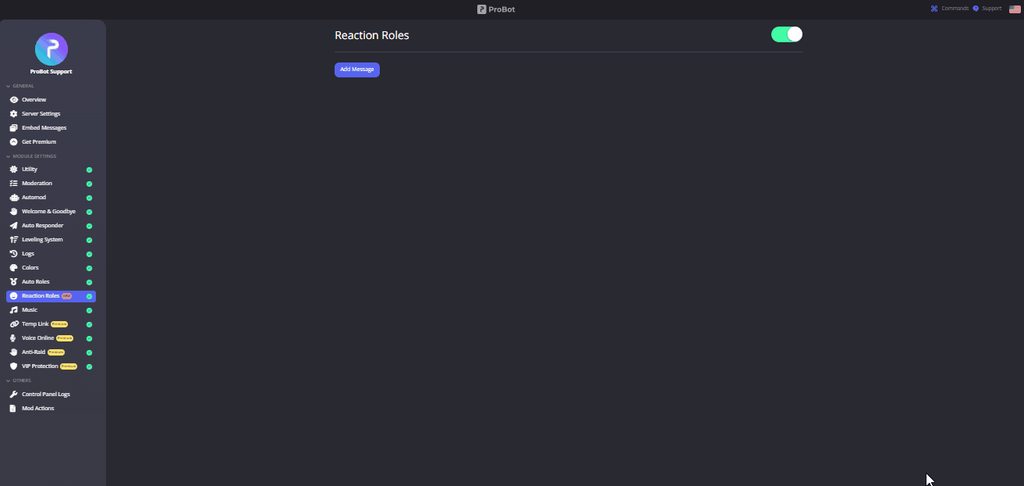
**  How do I set up reaction roles?**
1 - Go to the dashboard https://probot.io/dashboard then select your server.
2 - Select "Reaction Roles"
3 - Click on "Add Message", then select an embed. You can manage these embeds by clicking on the "Embed Messages" button.
4 - Click on "Choose a message", and then select a message where the selected embed was sent.
To add a reaction role, click on "Add Reaction".
There are 3 different types of a reaction role message:
- Switch - Upon reacting, you will get the role, and upon removing the reaction, the role will be removed as well.
- Give - Upon reacting, you will get the role, and upon removing the reaction, the role won't be removed.
- Take - Upon reacting, the role will be removed from you, and upon removing the reaction, you won't get it back.
 untold flume
nocturne flax
i have a qestion
untold flume
nocturne flax
i have a qestion
go ahead
nocturne flax
untold flume
go ahead
how to work auto role
cedar pivot
untold flume
** <:smile:950381514401665024> How do I set up reaction roles?**
1 `-` Go to th...
Thank you
untold flume
nocturne flax
how to work auto role
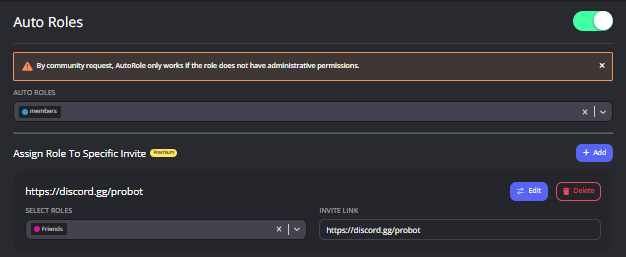
** How to enable auto roles? **
1 - enter https://probot.io/dashboard
2 - make sure to be logged in, open your server's control panel from the left side, enter Auto Roles section
set the role, saves changes.
Note: make sure probot's role isn't below the auto role (from server settings) for not facing issues.
 untold flume
cedar pivot
Thank you
untold flume
cedar pivot
Thank you
you're welcome, and thanks for using probot 
nocturne flax
Ok tysm
untold flume
you're welcome, take care
wide mulch
untold flume
hi how can i help?
How can I become in the administrative staff
wide mulch
Thanks
untold flume
no problem, take care
 untold bay
Is there a way to add hyperlinks in the embedded messages or do I need to just post a raw .com address? PLEASE PING
untold flume
wdym by hyperlinks ?
untold bay
untold flume
wdym by hyperlinks ?
Basically is there a way to have a URL disguised as a word or label... Ex: "Click here for info" (clicking "here" directs to a URL address)
The same thing you can do for the "Title" and "URL" boxes but I want it in a "FIeld"
Let me know if that is confusing
untold flume
untold bay
Basically is there a way to have a URL disguised as a word or label... Ex: "Cli...
untold flume
 uncut shale
I want to buy netflix account 1 week pls
uncut shale
I want to buy netflix account 1 week pls
Read the server name please as well as the rules #573048353458356234
untold bay
untold flume
[text](link)
Thank you so much! Is there a guide or code style this follows that I can look up so I don't have to ask for different aspects?
untold flume
No actually but you can ask here if you faced a problem
untold bay
Great, thank you! Is there a way to make a sort of box like this
untold flume
ye just add the discord codes thingy
untold bay
woah, this didn't work before I thought but maybe I made a mistake - thank you!
 willow elbow
native geyser
willow elbow
native geyser
Hi, it can't
untold bay
How can I create a bullet point in the embedded message?
native geyser
What do you mean by bullet point exactly
untold bay
like a dot next to a new line, similar to a "-"
also, is there a way to create a solid line across the embed to separate sections?
native geyser
There isn't a way of doing such thing apart from manually adding the dot you're mentioning, regarding the line I guess the only way is to send multiple embeds and adding another embed that only contains content in between those embeds and sending the line with it
untold bay
How would I manually add the dot?
 white whale
what do i do if it says 'The application did not respond'?
in response to a command for music
 patent moss
That the same
untold flume
patent moss
That the same
?
nocturne flax
i m from german
untold flume
welcome, if you want a german support head to #support-int
untold flume
gehe zu #support-int @nocturne flax
nocturne flax
ok
 remote ocean
hello I'm new but my bot isn't playing music and wondering why?
untold flume
can you show the problem ?
remote ocean
nvm got it I disconnected it from the chat and it worked
untold flume
alright have fun
 nova berry
i need some help
untold flume
how can i help you
nova berry
how do i get pro bot to mange roles
untold flume
what do you mean ?
nova berry
so if someone wants a specific role they just a emoji
untold flume
aha reaction role
nova berry
yes
untold flume
** How do I set up reaction roles?**
1 - Go to the dashboard https://probot.io/dashboard then select your server.
2 - Select "Reaction Roles"
3 - Click on "Add Message", then select an embed. You can manage these embeds by clicking on the "Embed Messages" button.
4 - Click on "Choose a message", and then select a message where the selected embed was sent.
To add a reaction role, click on "Add Reaction".
There are 3 different types of a reaction role message:
- Switch - Upon reacting, you will get the role, and upon removing the reaction, the role will be removed as well.
- Give - Upon reacting, you will get the role, and upon removing the reaction, the role won't be removed.
- Take - Upon reacting, the role will be removed from you, and upon removing the reaction, you won't get it back.
here is the way
nova berry
thank you
untold flume
you're welcome, thanks for using probot
 trail geode
Is it possible for you guys to reset 2 servers dashboards?
untold flume
wdym by reset ?
trail geode
I accidentally deleted my hard work from pro bot on my reaction role server dashboard because I didn't know how to add another role message and title, so I completely deleted the whole thing because I added other reaction roles without adding a new title and description.
untold flume
ops sadly you can't :/
trail geode
and now I can't find a way to reset it back to create embed all it shows is this
untold flume
as i told you, you can't sadly you have to do it again
trail geode
how ? cause I keep doing it again and it only show's reaction roles not message and title.
I gtg 4 now we can talk more about my problom 2marrow
untold flume
alright tyt

 craggy python
Is there any Arabic support?
untold flume
#support-ar
craggy python
Thank
 mighty scroll
Halloooo, I'm just wondering on how I can "increase" my reputation points? Tyy.
 untold flume
currently rep feature is disabled
untold flume
you're welcome, and thanks for using probot
untold flume
mighty scroll
Have a great day.
you too !
mighty scroll
untold flume
you're welcome, and thanks for using probot
I love Probot, i love the credits system, anyway Thanks sm for the help xD
untold flume
mighty scroll
I love Probot, i love the credits system, anyway Thanks sm for the help xD
i'm super glad and happy that you use probot and you enjoyed it
thanks for using it 
mighty scroll
ofc!
untold flume
tacit gazelle
Do I have to purchase a premium bot for each server I create?
untold flume
nope, you can move it to any server
tacit gazelle
But it can only do 1 server at a time?
untold flume
yep, when you move it to another server it will leave from the old server
tacit gazelle
So if I want one in 2 different servers how could I do that?
Purchase another one?
untold flume
exactly
tacit gazelle
Can I adjust the volume setting on the base model bot?
lean badgerBOT
**Command: vol**
Changes/Shows the current volume.
**Aliases:**
#volume
**Usage:**
/vol (volume)
**Examples:**
/vol
/vol 100
untold flume
here is the way
tacit gazelle
Wonderful. Thank you so mucj..
untold flume
tacit gazelle
Wonderful. Thank you so mucj..
you're welcome, and thanks for using probot
tacit gazelle

Is there a way to make a permanent change to the regular bots volume, like set it to 10%
untold flume
yup volume command is for premium only
tacit gazelle
Ah.. so no volume control for that server. Hey what they don't know won't hurt them. Thank you again..
untold flume
no problem, take care
untold flume
hey there
nocturne flax
How do I put the hours
?
I want it at 2 hours and 17 minutes
I tried 02:17
2:17
20:17
tardy cape
I'm not in need Of support But I Need some cool ideas TO do with the Bot...
nocturne flax
nvm figured it out
untold flume
nocturne flax
nvm figured it out
alright i was going to tell you
nocturne flax
untold flume
alright i was going to tell you
ty for the help
untold flume
tardy cape
I'm not in need Of support But I Need some cool ideas TO do with the Bot...
can i help you ?
untold flume
nocturne flax
ty for the help
you're welcome take care
tardy cape
Idk WHat can i do
 cunning pulsar
Hey how do you set reaction roles and welcome messages. I can’t find where that would be
untold flume
cunning pulsar
Hey how do you set reaction roles and welcome messages. I can’t find where that ...
** How do I set up reaction roles?**
1 - Go to the dashboard https://probot.io/dashboard then select your server.
2 - Select "Reaction Roles"
3 - Click on "Add Message", then select an embed. You can manage these embeds by clicking on the "Embed Messages" button.
4 - Click on "Choose a message", and then select a message where the selected embed was sent.
To add a reaction role, click on "Add Reaction".
There are 3 different types of a reaction role message:
- Switch - Upon reacting, you will get the role, and upon removing the reaction, the role will be removed as well.
- Give - Upon reacting, you will get the role, and upon removing the reaction, the role won't be removed.
- Take - Upon reacting, the role will be removed from you, and upon removing the reaction, you won't get it back.
cunning pulsar
Thank you so much!
untold flume
you're welcome, have a nice day
cunning pulsar
You as well
untold flume

 vital lion
I need help with roles
timid jewel
vital lion
I need help with roles
Hey @vital lion , How can i help you today!
vital lion
I need help with reaction roles
timid jewel
what is the problem
iron carbon
What are the features in probot premuim
untold flume
iron carbon
What are the features in probot premuim
You can see the difference on https://probot.io/premium
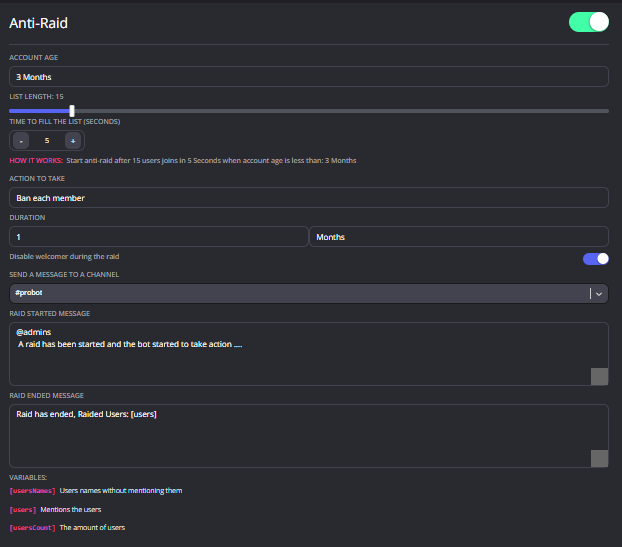
What is Anti-Raid?
NOTE: This feature is only available for VIP bots. (Prime and Premium)
This feature will automatically deal with server raiders, and it is even customizable.
How can I set it up?
1 - Select the minimum age for potential raiders. (Example: 2 months)
2 - Select the minimum amount of potential raiders. (Example: 10)
3 - Select the time that the bot will start the anti-raid. (Example: 1 minute)
So now, if 10 accounts join in the span of 1 minute and all of them are under 2 months old, the anti-raid will start.
4 - Select the punishment for the potential raiders.
You can even send a warning message for server staff so they can notice.
 iron carbon
Thanks
timid jewel
#play
song name
untold flume
iron carbon
Thanks
you're welcome, have a nice day
 sharp goblet
How do I gain rank or set up rank?
untold flume
sharp goblet
How do I gain rank or set up rank?
you want to set up leveling system ?
sharp goblet
untold flume
you want to set up leveling system ?
Yes
untold flume
sharp goblet
Yes
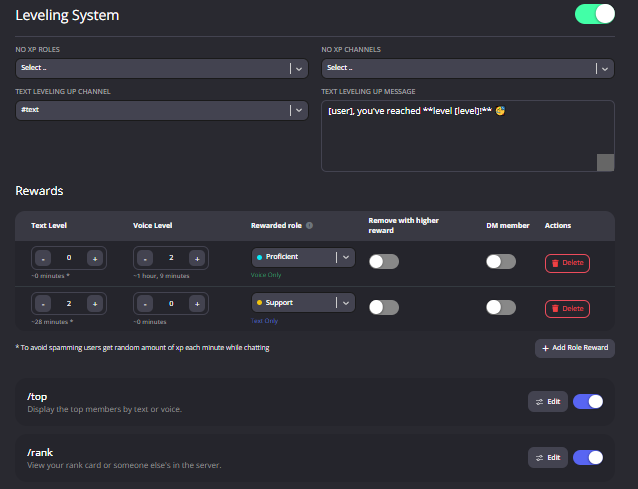
Enabling the leveling system
How to activate
1 ~ https://probot.io/dashboard login to your account and select your server
2 ~ on the left side click on "Leveling system"
3 ~ press "add role reward" and set the required level to get the role
change the settings as you want and this is it ..
ProBot
Welcome images, moderation, leveling, reaction roles, logs, high quality music and many many more!
 sharp goblet
Thank you.
untold flume
you're welcome, have a nice day
sharp goblet
You too
untold flume
timid jewel
#reset text all
#reset voice all
 safe drum
Thanks ❤️
 scarlet aspen
hello, i want to ask how to get some credit?
timid jewel
How do I get credits?
-
Claim your dailies
Visit https://probot.io/daily and claim your dailies every 24 hours. (300-4000 creds.) -
Vote for ProBot
Visit https://top.gg/bot/probot/vote every 12 hours and vote for us. (500-2600 creds.)
⚠️ Trading/Selling credits for real life money is not allowed.
ProBot
Welcome images, moderation, leveling, reaction roles, logs, high quality music and many many more!

Top.gg
Spice up your Discord experience with our diverse range of Discord Bots and Servers as well as other spaces to discover DAOs.
timid jewel
Hey there!
 floral bloom
how to gain credits
timid jewel
timid jewel
How do I get credits?
- <:cc:736686101070348338> Claim your dailies
Visit https...
@floral bloom
floral bloom
i have alot of questions can i ask them ?
timid jewel
Sure.
timid jewel
Enabling the leveling system :smile:
How to activate
1 ~ https://probot.io/dashboard login to your account and select your server
2 ~ on the left side click on "Leveling system"
3 ~ press "add role reward" and set the required level to get the role
change the settings as you want and this is it ..
ProBot
Welcome images, moderation, leveling, reaction roles, logs, high quality music and many many more!
floral bloom
how to set up reaction roles ?
timid jewel
:smile: How do I set up reaction roles?
1 - Go to the dashboard https://probot.io/dashboard then select your server.
2 - Select "Reaction Roles"
3 - Click on "Add Message", then select an embed. You can manage these embeds by clicking on the "Embed Messages" button.
4 - Click on "Choose a message", and then select a message where the selected embed was sent.
To add a reaction role, click on "Add Reaction".
There are 3 different types of a reaction role message:
- Switch - Upon reacting, you will get the role, and upon removing the reaction, the role will be removed as well.
- Give - Upon reacting, you will get the role, and upon removing the reaction, the role won't be removed.
- Take - Upon reacting, the role will be removed from you, and upon removing the reaction, you won't get it back.
 https://imgur.com/iuLBLw4
floral bloom
and how can i buy premium version ?
timid jewel
ProBot
Welcome images, moderation, leveling, reaction roles, logs, high quality music and many many more!
you can get all details on this page.
floral bloom
alright thanks
timid jewel
Gladly!
modern lily
untold flume
https://probot.io/dashboard > leveling system module > level up message
Thanks. Will check it out. I'm trying to figure out the different use cases. 😛
untold flume
you're welcome, have a nice day
 mental wedge
Quick question
timid jewel
Hey @mental wedge , How can I help you today.
mental wedge
Can anyone use the kick command in your server to kick anyone? Or just me as I am the owner?
timid jewel
anyone have " Kick Members " Permission in their roles can use that command
mental wedge
I was worried for a minute because I didn't want to be kicked from my own server because the command was just there to use
Thank you! This is an amazing bot! Took me a second to figure out that I have to add a space to initiate the command but overall, I love it!
mental wedge
Verexa i think its called, was a music bot and it randomly just stopped working. So I found you guys and this is way better!
Have a good day!
Thanks again!

😁
1 more question
What does this mean for /rank?

 uncut delta
mental wedge
What does this mean for /rank?
uncut delta
mental wedge
What does this mean for /rank?
This is your current level and rank in the server.
mental wedge
But is it the amount of messages I sent? If so, what does the mic mean? And how to increase level?
 blazing valve
mental wedge
blazing valve
mental wedge
So it doesn't matter how many messages in the server i send? I am confused.
So it is random?
Hmm ok thank you. I will figure that one out. Just making the server fun lol
Oh nice!
So if I spam chat, it increases?
 mental wedge
I meant if I type 100 messages it will level the message or is it based on how long I stay in that certain channel
 hasty drift
How i delete all messages for my server?
mental wedge
Type /clear ?
 elfin lava
Ok
 mental wedge
Is # a command too? What is the difference between # and /
Oof thats typical discord command #
I tried # for command it just implied members and channels

No promtps show
Sorry I meant to cut that lower
Oh okay
Thanks again im sorry for talking so much. I really want to learn all of the privileges of this bot
leaves chat 😁
 tacit steppe
Hello
hi how i can make the temp voice channel
can i ask another question
how i can make the leveling system
thank you very much @nocturne flax
 fierce oyster
 spring ether
 strong vapor
hi
im having an issue with react roles
I can get the react role working except it won't show the roles on the dashboard
I've tried that and making new roles then refreshing it doesn't show any roles
after chosing the emoji and clicking on the plus it shows the search screen but even if i type the name of the role it pops up empty
the bot is an administrator on my server
 wise abyss
 sullen prism
@frozen pilot how can i play song ? 
frozen pilot
/play
sullen prism
thank you so much XD
frozen pilot
Yw yw
 drifting dune
Hello! May I have a question regarding the levelling system?
 mortal summit
<@&675070424748654593>
split needle
drifting dune
Hello! May I have a question regarding the levelling system?
you may ask it without waiting
modern lily
untold flume
https://probot.io/dashboard > leveling system module > level up message
Tried the leveling. Set the levels etc. But one thing I noticed it seemed to ignore the rank I got and have not granted the roles I instated. Is it correct to assume that the Leveling module rewards will start once it's been initiated not the same as what we get on the Rank?
drifting dune
split needle
you may ask it without waiting
Sorry, I was raised way too polite it seems.. .:) So the only thing I do not understand are the levels themselves... What does "-7 minutes" mean for example for text level 1?
split needle
they're like the estimate time you can get to the set level from 0
drifting dune
split needle
they're like the estimate time you can get to the set level from 0
The time spent with typing? Or does it take an estimate based on how much an average user posts in a 7 minute timeframe?
split needle
the level is counts within a cooldown, so it takes around 7 minutes while chatting to reach to level 1 for example
if the user time perfectly as well
drifting dune
I'm just trying to get a feel for how "hard" the levels should be to remain motivating but not too boring
split needle
as far as I can see, it's not too hard but as well not too fast to reach next level
drifting dune
split needle
the level is counts within a cooldown, so it takes around 7 minutes while chatti...
Ah, I think I understand! And the time it displays for level 2 ... is it from 0 or from already having reached lvl1?
split needle
from 0
drifting dune
split needle
from 0
Awesome, thank you!
untold flume
modern lily
Tried the leveling. Set the levels etc. But one thing I noticed it seemed to ign...
You should send some messages to get some xp points to obtain the role you specified
 cosmic root
Can you make it so the bot commands is only able to function in 1 text channel?
 rough locust
Hello I need help I am inviting my premium bot to my discord server and it does not enter
split needle
cosmic root
Can you make it so the bot commands is only able to function in 1 text channel?
you can either set the bot's permission to only see and send messages in the channel you want but other features require it to check each channel will not work correctly or will be completely broke
if you still want it to work for moderation as well, go to https://probot.io/dashboard select your server on the left side, go to command module and set enabled channels for them
ProBot
Welcome images, moderation, leveling, reaction roles, logs, high quality music and many many more!
split needle
rough locust
Hello I need help I am inviting my premium bot to my discord server and it does ...
is the premium in your server or is it left right after added it to the server?
rough locust
i click to invited and dont get in
 modern lily
untold flume
You should send some messages to get some xp points to obtain the role you speci...
modern lily
untold flume
You should send some messages to get some xp points to obtain the role you speci...
Agree. But does it mean the XP that I got before setting this up is ignored?
split needle
rough locust
i click to invited and dont get in
now then try this
click on the invite button, and stop at the Oauth screen, remember the 4 numbers at the end of the bot's name (not tag) like premium__1234__, then use the command #vip move <number> in any server having probot and you can invite it again using the link sent to you in dm
untold flume
modern lily
Agree. But does it mean the XP that I got before setting this up is ignored?
Nope it isn't ignored
But you should get some xp points not levels before you get the role
modern lily
untold flume
Nope it isn't ignored
Where did I go wrong then ? 😦 I've clocked in over 10 hours. My rank is like 10/11 text/voice. I'm not getting promoted into any role
untold flume
then probots role position must be the issue here check if its above reward roles
modern lily
untold flume
then probots role position must be the issue here check if its above reward role...
way above

Was trying to base the leveling on the rank

Which is like so:
 untold flume
@modern lily did you reach both target levels?
Voice and chat
Also make sure your bot has permissions to assign roles
modern lily
This you mean?

yup. It has.
Ok I've tested again and tweaked the role visibility by separating. Finally it works. But only for me it seems. I have another use I checked the rank

He should have been a Level 1 in the Roles since my threshold is bot level 2
untold flume
Let him interact alittle more
 untold flume
Let him interact alittle more
untold flume
untold flume
Let him interact alittle more
.
Or you can simply
Reset the top
And start over again
Without getting confused
modern lily
untold flume
Reset the top
If I reset the top wont it lose all progress?
untold flume
ye but they'll probably get their roles once they get to target levels
Or they can send some messages as i said above and get some xp points so they can get their roles
untold flume
yw
rough locust
split needle
now then try this
click on the invite button, and stop at the Oauth screen, reme...
its work thank you!
quaint sentinel
@remote marsh sup?
next time please ask your question right away.
vote blacklist due to using multiple accounts.
ask what?
untold flume
.
ProBot
Welcome images, moderation, leveling, reaction roles, logs, high quality music and many many more!
untold flume
trail geode
Hi I'm back
how can i help you?
trail geode

I deleted my whole entire reaction roles yesterday includeing the message due to adding extra emotes and now I can't figure out what I need to do in order to set it up again.
 supple trench
How do I edit published embedded message?
untold flume
trail geode
I deleted my whole entire reaction roles yesterday includeing the message due t...
embed messages can be created in "embed messages modue"
untold flume
supple trench
How do I edit published embedded message?
theres a send button just click on it and choose a channel
supple trench
untold flume
theres a send button just click on it and choose a channel
It is already sent, I need to edit existing one
untold flume
i assume theres an edit button too?
supple trench
Ok, I figured it out, thanks
trail geode
where can I find that?
untold flume
supple trench
Ok, I figured it out, thanks
yw
untold flume
trail geode
where can I find that?
ProBot
Welcome images, moderation, leveling, reaction roles, logs, high quality music and many many more!
after you make the embed send it to your server then it should appear in that message section
 neat sparrow
<@&675070424748654593> The music feature on my server is bugged? :( What can I do?
 untold flume
try stopping and replaying
neat sparrow
untold flume
try stopping and replaying
TY :D But does it also clear queue? :o
untold flume
yes it does
trail geode
I clicked the link where do I go from there?
untold flume
the lin?
trail geode
sorry LOL
untold flume
after you make the embed message from "embed messages module " send it to your server then go to "reaction roles module" it should appear in choose message section choose the message and do the other steps
 untold flume
ye select an embed edit it as you like and then send it to your server
 patent lodge
@untold flumehey , how can i be a support ?
untold flume
follow the channels topic tho we dont need more support members
patent lodge
untold flume
follow the channels topic tho we dont need more support members
how can i know if u need ?
untold flume
idk im not the one in charge
patent lodge
nice
 untold flume
why cant you? just head to "embed messages module" and create from there after creating you should send it to your server so it appears in there
trail geode
where is embed modules? if it's in reaction roles it dosen't show.
untold flume
trail geode
where is embed modules? if it's in reaction roles it dosen't show.
you see that general category above?
on the left bar
trail geode
yes
untold flume
click on it
then other modules should appear
and embed module should be one of them
untold flume
yw
 marsh tapir
How send a message from bot name ?
 frail gust
<@&675070424748654593> ^^
spring ether
marsh tapir
How send a message from bot name ?
wdym?
 sterile wren
does this bot have a randomise/shuffle option for playlists?
marsh tapir
spring ether
wdym?
 spring ether
marsh tapir
spring ether
marsh tapir
Go to https://probot.io/dashboard go to embed messages module and compose one on there
ProBot
Welcome images, moderation, leveling, reaction roles, logs, high quality music and many many more!
spring ether
sterile wren
does this bot have a randomise/shuffle option for playlists?
Coming soon 
 gleaming hamlet
When you use the reset command does it take a bit to reset everyones text, and voice xp? We want to start the the leveling system from 0xp for everyone again
I used it but when I check my rank I still have the xp
gleaming hamlet
I was using this

also will it automatical reset everyone's roles that are tied to different xp or does that need to be done manually?
 supple lodge
Is @stone cloud offline?
native geyser
gleaming hamlet
also will it automatical reset everyone's roles that are tied to different xp or...
try with regular prefix not slash commands, and yes it does remove the roles after people send a message
native geyser
supple lodge
Is <@282859044593598464> offline?
no


 daring briar
supple lodge
It just died in a couple of servers
daring briar
supple lodge
It just died in a couple of servers
same problem in another server
 kindred trench
Is dead
spring ether
already reported to the devs
supple lodge
👍
kindred trench
spring ether
already reported to the devs
ok ty
spring ether
yw
kindred trench
spring ether
already reported to the devs
pls do a announcement
spring ether
it's up to the admins : c
modern lily
untold flume
yw
Ok finally did a test.
So after setting the threshold and rewards, the bot categorizes them once the user sends a text. Regardless of the voice. Yay.
gleaming hamlet
native geyser
try with regular prefix not slash commands, and yes it does remove the roles aft...
Do you mean the prefix in server settings? Ours is # but when I did that with reset nothing happened
gleaming hamlet
yeah I do
native geyser
then the command is supposed to work
can you invite me in dms so i can check it out
gleaming hamlet
Looks like I just go it to work, I had to post the command in a channel that everyone was in for some reason. I was trying in a private log channel to do it
although it looks like the xp went to zero but everyone kept the same roles as before
native geyser
maybe the bot didn't have permissions in that channel?
if you haven't added any enabled/disabled channels option for reset command as long as the bot has perms in channels its supposed to work everywhere
gleaming hamlet
it was a no xp channel but the bot had access to the channel
So it looks like with the reset everyone went back down to the bottom role and it reset their xp but it didn't delete their current roles. So they have two now from the leveling system. It's a small enough server I can do it manually unless there is another way
native geyser
to clear their roles people need to send a message and gain text xp
only then bot updates the stats
gleaming hamlet
gotcha gotcha
it looks like people have started getting xp, I checked the ranks and I am getting notified that people have been moved to the bottom role but doesn't look like it removed the other role
native geyser
did you reset both text and voice? if you only reset one and they still meet the required levels for some roles their roles will not be removed
gleaming hamlet
yeah reset both, ours is based just on text xp too
 quartz flint
Wth?!?

 echo vigil
This feature not working when someone joining my server ;/ someone help? or only image with discord avatar appears without text on it
 untold flume
quartz flint
Wth?!?
untold flume
quartz flint
Wth?!?
try again
untold flume
echo vigil
This feature not working when someone joining my server ;/ someone help? or only...
send me your servers link please
problem solved, @echo vigil
 sick sinew
Hello, a question, in the stage channels is the bot xp awarded?
<@&675070424748654593> (sorry for the ping)
frozen pilot
sick sinew
<@&675070424748654593> (sorry for the ping)
please use only 1 channel
sick sinew
Is there a way to remove that?
 untold flume
currently you can just mute and warn the member
 maiden thorn
Alright
sick sinew
untold flume
currently you can just mute and warn the member
Ban too
maiden thorn
How
sick sinew
 untold flume
nope you can't
maiden thorn
I mean auto
untold flume
maiden thorn
How
auto you can't
untold flume
you can suggest here #580383034117980160
 alpine oak
level system is not working anymore for me (it was worked in before)
untold flume
whats the problem exactly ?
alpine oak
untold flume
whats the problem exactly ?
sometimes glitching giving roles and sometimes not giving roles
untold flume
i've never seen a problem like this actually
 untold flume
nocturne flax
untold flume
nocturne flax
what are embed messages?
Embed messages represents a Discord Embed object. An Embed object is another component of Discord messages that can be used to present data with special formatting and structure.
An embed can contain the following components:
-Author, including link and avatar
-Title, including url (optional to do a hyperlink)
-Description
-Field(s), including name and value
-Thumbnail image
-Image
-Footer, including text and icon
-Color (sets the color of the left sidebar of the embed)
**you can send an embed message by heading to the dashboard https://probot.io/dashboard - log into your account and enter your server dashboard using the left side bar, enter "embed messages" module and click "compose" then start moderating your embed message, send it via "send mew message" button at the bottom.
**
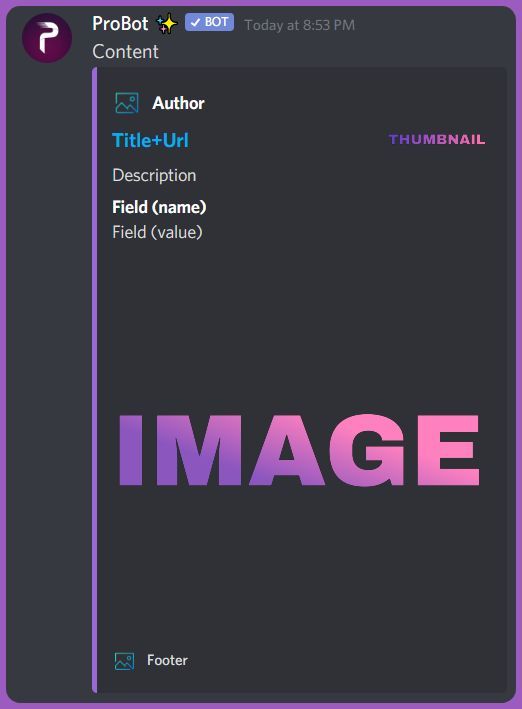 native geyser
hi how can i help you?

 untold flume
try with #
nocturne flax
Everything is active but gives an error
 untold flume
make sure you didn't enable the command on a specific channel
 untold flume
send me your servers link please
untold flume
@nocturne flax, 
native geyser
only with premium tier 2 you can
 hushed vigil
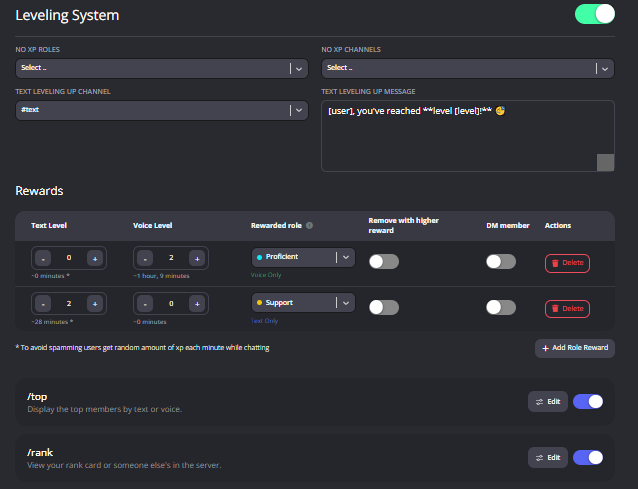 untold flume
you want them with embed ?
 wanton steppe
H
untold flume
can i help you ?
 median mortar
How do you do reaction roles?