#Tech Lab forum - General Discussions!
1 messages · Page 16 of 1
 iron rock
 jade scaffold
Oh what keyboard is it?
iron rock
its a red dragon of some kind
I dont like mech boards in general so I can get away with cheaper stuff for keyboards. I do really want one of Wooting ones because analog inputs would be so useful for me but I cant justify a 200 dollar keyboard
 mossy gull
I like maglev keys
jade scaffold
Never tried a magnetic one before
Would imagine they have pretty good reliability switch wise due to the almost total lack of mechanical parts
mossy gull
jade scaffold
Never tried a magnetic one before
I only tried on a convention on the Flux Keyboard
They feel just nice and responsiveness is completely adjustable
jade scaffold
Oh they're electro magnetic?
That's pretty sick actually
If the actual switching is done magnetically too then you could have analogue switches as well as something similar to Sonya adaptive triggers that's awesome actually
Set the actuation point at any point too
mossy gull
jade scaffold
Oh they're electro magnetic?
This is their introduction vid
https://fluxkeyboard.com/
https://youtu.be/N7OVagiblPo?si=CCrFIdh0Knep9Oie


A keyboard which adapts to you. Any software, any language, any style.
More info at https://fluxkeyboard.com/
Prototype Shown.
It's so far I know a Japanese company
I am thinking of getting 1 because of the versatility.
For me it's like a "touchscreen keyboard" which I have been looking for for ages.
I currently have a Belgian K100 Air, but have a secondary cheap International keyboard for games that don't respond correctly, and this keyboard just is a dream for someone who is multi-langual
jade scaffold
I wonder how hard it'd be to build a magnetic switch
I feel like the main challenge would be the controller for the electro magnets
If you wanted each switch to be customisable anyways
mossy gull
Welcome to the Japanese, 1 of the most stubborn folk
iron rock
hall effect switches are the best from what I have heard simply because they dont get screwed up by pet hair or dust. not sure if that is what you guys are talking about with magnetic switches or if they are also using magnets as springs, that seems a little pointless
 olive fiber
mossy gull
I currently have a Belgian K100 Air, but have a secondary cheap International ke...
olive fiber
mossy gull
I currently have a Belgian K100 Air, but have a secondary cheap International ke...
I just got a k100 Air.. I love it so much
I think I told you about my new keyboard, though
mossy gull
olive fiber
I think I told you about my new keyboard, though
If you did, I forgot
olive fiber
mossy gull
If you did, I forgot
You told me 'Well why don't you go and marry it' ;p
Was just a week ago.. I was gushing over how awesome my new K100 air is
mossy gull
@olive fiber I am almost like a goldfish 
I say many shite and forget about it
olive fiber
mmhmm
mossy gull
I help way too many people with PC problems
jade scaffold
iron rock
hall effect switches are the best from what I have heard simply because they don...
Mainly you can do some funky stuff with magnet "springs"
Like adjusting actuation force and overall switch feel. There's some argument for better lifespan too though I feel they'd get gunked up the same as any mechanical one does
You could have a keyboard that could be tactile or linear at the users will maybe even a membrane feel if you'd prefer that. Potential for analogue switches. Stuff that you don't need but would be pretty cool to have. Could even do switch haptics with them if you wanna be real fancy
olive fiber
Magnets as a 'spring' also behave differently than a spring will, in terms of response curve. Magnetic field strength is a power of 3, I think... springs are linear for most of them, but in some regions maybe a power of 2? I'd have to look it up. Don't think you could make it to a power of 3 sort of curve..
jade scaffold
If you use an electro magnet to push a permanent magnet up in theory you could achieve linear springiness with software right?
iron rock
are you sure these keyboards are actually using magnetic springs? that just sounds like the worst idea of all time. drop something metal near your keboard, oops it gets pulled into it and under the key caps.
I wouldnt want one anywhere near my desks because I do allot of work other then computer shit on it. always screws and washers and shit on there.
hall effect sensors (magnetic sensors) makes lots of sense. easy to clean, wont be effected by pet hair or dust. but not at all convicned by the idea of magnetic springs
jade scaffold
As I said they have unusual use cases that could be fun
Hall effect sensors have little to no place in computer keyboards really either
Reason being they wouldnt be able to function off of a typical keyboard PCB and so would need to be proprietary either that or have logic on each switch making them incredibly costly to produce and kinda negating their reliability advantage over typical mechanical key types
 surreal moss
They exist though. Corsair had one
jade scaffold
Yea they exist in the same position laser actuated ones do
surreal moss
And then there’s this thing
https://fluxkeyboard.com/
jade scaffold
Yea that's pretty cool
It's using perma magnets so no fancy software stuff for switch feel but probably very structurally reliable
The issue with most types of fancy switches Is they aren't compatible with the standards out there
iron rock
hall effect sensors do have a place. one of the biggest problems with mech boards is they need to be in a clean enviroment. dust and pet hair is a realy problem for most of them, inculding optical ones. if you want a good reliable mech board and you have a cat sleeping on your keyboard... its kinda nice to have those hall effect switches
or like me you do sanding and shit near your computer
also like optical they let you do analog input
jade scaffold
Your mechanical keyboard would have to be astonishingly garbage to be effected by hair and dust
The switches them selfs are pretty well sealed fine dust I will grant can get in them
iron rock
cat hair can get threw anything, not only can it, it will
it uses some quantum tunneling BS I think
jade scaffold
Haul effect switches also wouldn't be immune to it then
iron rock
I dont know about vs regular swtiches but they have a huge advantage here vs optical. as I said the only think I have ever looked at a mech board for was one with analog input. I couldnt care less about the other "advantages" they have, for me membrane boards work more then well enough. but for analoge you need one or the other and the common complaint I heard about optical was they are stupid sensitive
sensitive to dust and hair I mean
jade scaffold
yea haul would have an advantage over optical in every way but price
iron rock
that is the funny thing, the Wooting isnt really anymore exspensive then the other analoge ones I saw and it uses hall effect switches. fairly sure the other one I was looking at was a razer of some kind and it used optical but was more exspensive... maybe its just the big name tax
jade scaffold
That's big name tax
iron rock
the down side on them and I am not sure I could get used to it, is the keys have almost no tactile feedback. bit of a requirement of an analog switch I guess. would probably be very hard to get used to
jade scaffold
Razer products are super expensive
But also haul effect switches will break in an identical way to mechanical ones
iron rock
what I mean is that bit of resistance you have to overcom
jade scaffold
As the physical part responsible for actuation will be the same as in a mechanical switch
So you personally would probs be better off with a membrane keyboard
They are just a bit more resistant to fine dust and shit
iron rock
I would be better off with a membrane because its all I can afford. I just want analoge wasd and space.
jade scaffold
Or even a perma magnet based mag Lev key where there's no really mechanical parts to it just a magnet pushing another magnet away from itself
iron rock
or an exstension to my keyboard with just those key or something. basically what I wanted was to play driving games without a stupid controller and still be able to use my mouse look
jade scaffold
You could probs get a tiny keyboard PCB stick your movement keys on it and buy haul effect switches for it
iron rock
been considering it
jade scaffold
If there are any self contained haul effect switches anyway
iron rock
yeah you can buy them, hell you can buy the switches right from wooting I think
jade scaffold
Holy shit haul effect keyboard switches are vially expensive
I can get a haul effect joystick for less
iron rock
a pack of 70 of the Lekker Switches used on the wooting keyboard is $40. is that bad? I honestly have no idea
jade scaffold
That's not bad
The ones I'm seeing here are about a £ per key
Which is rather pricey
iron rock
hm, I wonder if these are not full switches. if maybe the sensor is in the board or something
yeah, I think that is what is going on. that is why the switch is cheapper. I am guessing the other ones are fully self contained and would work on any board
no idea, the ones I see on scamazon are the same. so I guess the sensors are always on the board.
jade scaffold
Yea the sensors need different wiring to what is used by a normal keyboard a adaption board would only give you on/off functionality and need some onboard logic
Though the output for haul sensors is pretty basic so you can probs design the wiring for just 4-6 keys yourself without much difficulty then get a PCB printing company to make your PCB design
 pearl moon
jade scaffold
The ones I'm seeing here are about a £ per key
pearl moon
jade scaffold
The ones I'm seeing here are about a £ per key
Damn, and I thought the $0.6usd/switch boba u4t's i bought were expensive.
jade scaffold
Was looking round the internet searching for any threadripper news
And I found a 1920x going for £100
 frozen igloo
I got the prebuilt today, do you know what could be causing it to not post when everything is getting powered
 sonic meadow
Check the internal power cabling (main 24 pin, cpu 8/4 pin, graphics card).
Check that the ram and graphics card is seated completely.
If you aren't getting any sign of life at all double check the PSU power switch, and that the front panel connector (ie power button) is actually connected
If that all seems to not work, reset the bios, power it on and leave it for a few minutes. The first POST can take a few minutes for things like RAM training
frozen igloo
sonic meadow
If that all seems to not work, reset the bios, power it on and leave it for a fe...
Should the fans be pulsing or solid?
I've already checked all of the cables (they are now good
If the third farthest dimm is populated the fans are solid, if not they pulse
I currently have the CMOS pulled to reset the bios
sonic meadow
Solid usually, but I don't know your motherboard
sonic meadow
I'm meaning in a more familiarity sense
sonic meadow
Pull it and short the CMOS clear pins for 10 seconds
 sacred seal
First unplug your PSU and power on the system
frozen igloo
sonic meadow
Pull it and short the CMOS clear pins for 10 seconds
Where would I find the CMOS clear pins?
sacred seal
That will drain any ambiant power in the system
frozen igloo
sacred seal
First unplug your PSU and power on the system
Will do that in a second
sacred seal
Its probably easier to just wait for the cmos to clear itself, give it 10 minutes without power and it should reset
Otherwise you are going to be digging in the manual
frozen igloo
It is now plugged back in and powered on, cpu fan 100% exhaust fan 100% gpu fans 0% but has it's leds illuminated
How long would you expect ram training to take?
frozen igloo
It seems to me like the motherboard is dead so I'm going to go through the return process
sacred seal
Yea, that sounds like it's deffective
Could possibly fix it yourself, but I would say its not worth the hassle
frozen igloo
I’m seeing if the seller has anything to say, if not it’s getting returned and i’m going to try and convince someone to go to microcenter with me
What price range would you say is the best price to performance and/or the ability to upgrade
mossy gull
frozen igloo
Where would I find the CMOS clear pins?
You also can press the power button if the CMOS is removed
 cinder lagoon
sonic meadow
Check the internal power cabling (main 24 pin, cpu 8/4 pin, graphics card).
Che...
cinder lagoon
sonic meadow
Check the internal power cabling (main 24 pin, cpu 8/4 pin, graphics card).
Che...
every first response to new systems or changed configuration should be Memory training
its soooo often being forgotten!!
cinder lagoon
frozen igloo
I got the prebuilt today, do you know what could be causing it to not post when ...
..in addition to "is the monitor plugged into the correct port"
sonic meadow
cinder lagoon
..in addition to "is the monitor plugged into the correct port"
knew I was forgetting something 🤔
olive fiber
Ugh. Samsung has some of the worst usability in the world. At least for a company so large. nyone have any clever ideas on how to keep these two together AND on a keyring, without like, just using two lanyards attached to each other or a third?

And those lanyard holes are.. tiny. Like string type lanyards.
Not found a metal clip small enough yet. Probably could find a wire clip somewhere
Not even 2mm wide. Looks a little bigger than 1.5mm
Well, in the shortest dimension. Probably couldn't use more than a 1mm cord
surreal moss
That's a USB drive?
olive fiber
Yeah
Little tiny thing
And it's a nice anodized aluminum, so I don't want to scratch it up trying to get a split ring through it
If I can avoid it, at least
surreal moss
Thoughts that come to my mind are a rubber band or a 3d printed plug
olive fiber

Here's what I did for now.. but I don't like the giant strap on it, nor that I have to lossen it to pull the cap off
olive fiber
surreal moss
Thoughts that come to my mind are a rubber band or a 3d printed plug
How would either of those work? I'm not following
surreal moss
Just a rubber band you can slip around the long ends
Or a small plastic 3d printed plug to fit in the holes
olive fiber
The cap stays on fine.. but when I go to use it, I don't want to worry about losing it
I'd like to attach it to the body, but also want to attach both to a key ring
They had an older one which just had no cap, but it collected dust and crap inside and got dinged up
Sandisk has one that has a metal band that pivots over it, which is nice.
But this one was 400MB/s and cheap.
surreal moss
Bend a paperclip through it?
olive fiber
surreal moss
Bend a paperclip through it?
Yeah, that's kinda what I was thinking of. I'd like something a little nicer looking.. but not many options
Was thinking abotu one of those steel cable keyrings.. but they have the threaded end to loop them back, which is bigger than the 1.5mm slot
Hmm.. aparently titanium split rings are much softer to bend, yet still spring back neatly. Maybe I can find a thin one
Or.. another suggestion I saw while browsing amazon for ideas.. get jump rings and solder it closed ;p
They could have designed these better so you could fit normal rings into them or something. >.<
olive fiber
Ohh, maybe,. I have some guitar string.
mossy gull
olive fiber
Ugh. Samsung has some of the worst usability in the world. At least for a compan...
To be honest, I have no idea if they changed it.
But their older smart TVs have no shutdown and restart feature, cannot turn-off apps which means if an app becomes buggy you have to pull the TV out of the wall to make it work again.
It's like Samsung is so confident that their system is do flawless that people don't need a restart option on their buggy smart TV.
olive fiber
mossy gull
To be honest, I have no idea if they changed it.
But their older smart TVs have ...
I think every samsung devices that has some level of user interaction (so like, not counting an internal SSD) that I have used, has had some sort of atrocious UX failure. Stuff like this.. the cap is bound to get lost while you copy a file.. and the little lanyard holes are too small to put anything but a little string through it (and it didn't come with any), and they're so close together that you either need a large loop, or if you make it smaller, you can't get the cap off.
All of these are just like.. they don't even think about having to use their product.. except for maybe 'Wow I'm using the best product ever, this is so amazing'.. not anyone who'd dare and point out flaws.
We had a lot of the same issues with our German team, now that I think about it. Only it was just the engineers that had the issue.. the rest of the team was well aware.. they just couldn't dare tell the engineers their design was flawed
mossy gull
olive fiber
I think every samsung devices that has some level of user interaction (so like, ...
Fans never look at the flaws.
I have a PlayStation and Apple fan colleague.
They constantly try to tell others how gold the products are.
But when someone dares to point out a flaw of either product they make sure to try to completely obliterate competing products.
olive fiber
Yeah, exactly. I like apple stuff a lot.. great design.. but there's plenty of flaws.. especially in Apple's ego.
It's gotten a little better since Steve Jobs passed away.. like putting normal power cables, HDMI and SD card slots on the laptop instead of the 'pure' type-c only design ;p
And the EU having to finally kick them into putting type-c on the phone. Ugh. So stupid
But yeah, I use windows comptuers, linux, whatever works for the job I'm doing ;p
mossy gull
olive fiber
Yeah, exactly. I like apple stuff a lot.. great design.. but there's plenty of f...
Fun fact: Apparently Apple is the 1st company to use a magnetic ring for wireless charging, completely ignoring what Palm has done in the past.
Fun fact: Apparently Thunderbolt makes iPhones charge faster, completely false and just meant for data.
Fun fact: PS5 still has the fastest SSD on the market and loading 2 worlds simultaneously is only possible on the PS5, completely ignoring Quantum Break and Titanfall 2 that did it on Sata SSDs without loading times.
olive fiber
Microsoft has come a long way as well.. but their windows internal design is a fricken bonfire
Like all the issues with supporting HDR, resolution scaling, or anything
But I really respect MS's CEO and their internal restructuring
mossy gull
olive fiber
Microsoft has come a long way as well.. but their windows internal design is a f...
I want my full-screen start back, please stop using miniscule icons Microsoft, I am not a monitor hugger.
mossy gull
olive fiber
Like all the issues with supporting HDR, resolution scaling, or anything
Fun fact: Any Linux desktop distro supports OLED displays without problems before they were a thing😃
olive fiber
mossy gull
Fun fact: Apparently Apple is the 1st company to use a magnetic ring for wireles...
One thing I've found is that when Apple launches something, they'll drum it up and get people excited.. but then people somehow misread the message and go tell everyone 'Apple is the first...<whatever>' when in actuality, nothing of the kind was said. The fanbois are so rabid that they themselves are a big part of the problem
Quite to the contrary, Apple is rarely the first to the market with anything, very intentionally.
Apple is the kind that takes it very safe from a technology perspective
mossy gull
olive fiber
One thing I've found is that when Apple launches something, they'll drum it up a...
I know, like did you know that Apple was the 1st with 120Hz OLED display?
Completely ignoring the Asus ROG which had it years earlier.
olive fiber
But instead, they are aggressive about refining a well proven tech, then putting huge resources and push behind it (like the type-c connector).
olive fiber
mossy gull
I know, like did you know that Apple was the 1st with 120Hz OLED display?
Comple...
No, I didn't.. because they weren't
Nor did apple claim they were. But I'm sure plenty of apple fanbois claimed they were
I had a 120Hz long before apple put it on anything
mossy gull
olive fiber
But instead, they are aggressive about refining a well proven tech, then putting...
Apple keeps trying to add some weird protocols so fast charging only works with Apple chargers.
olive fiber
mossy gull
Apple keeps trying to add some weird protocols so fast charging only works with ...
Yeah, and for good reason
mossy gull
olive fiber
Yeah, and for good reason
EU keeps shutting it down
olive fiber
Most people don't appreiate this at all, or even believe it, but after over a decade in the medical device industry, the vast majority of our problems are people plugging something into the device that wasn't tested to work with it properly, and often, isn't rated to work with it properly. It damages one or both devices, and sometimes causes injury. At the very least, we get complaints and calls about it, and each call literally costs our business at least $1000 to handle.
mossy gull
olive fiber
Most people don't appreiate this at all, or even believe it, but after over a de...
Or you do like Google does with the Pixel, only charge on chargers that can communicate with the phone, like any certified charger on the market
olive fiber
So yeah, we lock that shit down as much as we can. And with apple being popular and people having such hugely inflated expectations for apple stuff 'just working'.. the only way they can even hope to make things 'just work' is to try and lock down the ports, validate the connections and everything else. If they don't, they're left to the wide disaster that is 0 quality control chinese chargers and lord knows what else
olive fiber
mossy gull
Or you do like Google does with the Pixel, only charge on chargers that can comm...
That sounds.. even worse
You do know what's why even android phones, mostly quit allowing user memory cards for storage?
mossy gull
You still need a memory card with 512GB storage?
I found them vastly inconvenient as they were in the sim tray
olive fiber
They said over half of the complaints about the phone crashing or otherwise having an issue, was someone putting a crappy memory card in it. And the OS couldn't take managing the corrupted data (or would have part of the file system on it), and the phone would die. Then again, the phone dealers, manufacturers, etc, were spending tons of money dealing with it. So they just said 'nope, no more' and removed all of the user-memory expansion.
Similar issue with user replacable batteries.. constantly a tech support headache.. not to mention it made waterproofing the phone impossible.. and added at least 1-2mm to the phone (and the pointless race to thinner phones for some reason)
mossy gull
olive fiber
They said over half of the complaints about the phone crashing or otherwise havi...
I mean, people try to be as cheap as possible.
olive fiber
Sorry, I'll gladly give up my audio jack and replaceable battery for waterproofing ;p
olive fiber
mossy gull
I mean, people try to be as cheap as possible.
Yep. You have to count on that
mossy gull
olive fiber
Similar issue with user replacable batteries.. constantly a tech support headach...
Fun fact: the Z Fold 4 is water resistant and full of holes 😃
olive fiber
And.. I guess it was cheaper for the company to just not allow users to put their own card in, than make the OS/hardware more robust against bad cards. Maybe some things just couldn't be worked around
olive fiber
mossy gull
Fun fact: the Z Fold 4 is water resistant and full of holes 😃
Well, one thing people forget is water resistant doesn't mean no holes.. just means it can still work. But there's a reason you probably won't see apple do that. Because they know that if water gets in there and sits.. all kinds of bad things happen. Salt build up and corrosion.. mold, fungus.. bacteria..
That's why even the apple watch has a feature that uses the speaker to eject water out of the speaker ports.
sonic meadow
water resistant also has different ratings
olive fiber
They knew it would cause problems
sonic meadow
sonic meadow
water resistant also has different ratings
amount of water, duration, type of water, etc
olive fiber
sonic meadow
water resistant also has different ratings
Yeah, I learned a lot about that one a few years back from a work design. Needed to have a surgical light rated at.. IP67, or something
Whatever where they use a fire hose on it for like, half an hour
But just short of submerging
sonic meadow
I have a waterproof camera (has seals and everything) that has specific instructions for "if you get salt water on this"
dont know what nature of waterproof/resistant though
been a while since I acquired it
olive fiber
But, a lot of people don't realize how much it costs a phone/computer/whatever company to manage complaints and failures that customers may have. Usually it's cheaper to give the person a $500 brand new device than it is to try and sort out their issue. Just because the company will end up spending well over $500 in labor and everyrhing else in the end
So they're going to do whatever they can to avoid you doing something dumb and then calling in to complain
sonic meadow
the real fun is when the hospital starts accidentally killing all the iphones
olive fiber
sonic meadow
the real fun is when the hospital starts accidentally killing all the iphones
When I was in the Army, that was a fun one
Didn't last long.. but they tried to ban all electronic devices.
They had to come to grips with reality.. technology is so part of your life now, you can't just ban it.
Even in secure areas.. only the real high security ones have the strict rules anymore
mossy gull
olive fiber
Well, one thing people forget is water resistant doesn't mean no holes.. just me...
And yet we still find salt water in iPhone 😃
sonic meadow
turned to be a helium leak from an MRI machine: https://www.dailymail.co.uk/sciencetech/article-6338235/Helium-kill-iPhone-Hospital-finds-gas-leaks-completely-disabled-Apple-phones-watches.html

Mail Online
An IT employee at a Chicago hospital discovered a bizarre phenomenon that temporarily turns iPhones and Apple Watches into very expensive paperweights.
olive fiber
mossy gull
And yet we still find salt water in iPhone 😃
Well, with all the bending and twisting and seams, yeah, it's bound to happen
I mean, it has holes all over it too
olive fiber
sonic meadow
turned to be a helium leak from an MRI machine: https://www.dailymail.co.uk/scie...
Oh! Yeah, I heard about that. Same with some supposedly 'waterprof' watches.
It gets through all the seals because it's smaller than water molecules
Then can over/under pressurize the device
mossy gull
olive fiber
Well, with all the bending and twisting and seams, yeah, it's bound to happen
Samsung just gave up and waterproofed the components inside the phone instead of making it air tight
olive fiber
Rolex had a big problem with that
olive fiber
mossy gull
Samsung just gave up and waterproofed the components inside the phone instead of...
That's what we did in the aviation world.
I'm surprised apple hasn't.. at least, doesn't seem like it
mossy gull
olive fiber
That's what we did in the aviation world.
We do in the entire aerospace industry
olive fiber
We'd put this thick clear goo over the whole thing. Like someon blew snot all over the circuit board
olive fiber
mossy gull
We do in the entire aerospace industry
Well yeah, kinda what I meant
Problem is, it can be a bad thermal insulator. That may be why apple's avoiding it
mossy gull
I would love a new Smartwatch, but none has a battery like my 1st gen Samsung Galaxy Watch Classic, 1.5 weeks.
Watches these days do 18 hours.
olive fiber
mossy gull
I would love a new Smartwatch, but none has a battery like my 1st gen Samsung Ga...
Yeah, I really hate charging my watch every day. That's the only reason I got the fancy one.. battery lasts 36 hours
Which means if I try to charge it every day.. chances are I'll actually charge it every other day.. but still be good ;p
mossy gull
olive fiber
Yeah, I really hate charging my watch every day. That's the only reason I got th...
I got an old 1, lasts 1.5 weeks😃
olive fiber
Just ordered an arduino smart watch board.. it's like a 30mm-ish OLED display with an RP2040 (I think) on the back. See if I can make it last longer than 18 hours
I'm sure the biggest issue is the display
mossy gull
olive fiber
Just ordered an arduino smart watch board.. it's like a 30mm-ish OLED display wi...
I have been wanting to build an arm computer like they have in movies and games
I wish LG still made phones, their displays were flexible
 keen geyser
An Arm Computer?
sacred seal
Think pipboy I think
jade scaffold
keen geyser
An Arm Computer?
Same type of processor a phone used
Or one of apple's new computers uses
keen geyser
If I get a chance, I'd love to dive deeper into that. I'm not the most tech-savvy person out there, but I'm always eager to learn more.
olive fiber
mossy gull
I have been wanting to build an arm computer like they have in movies and games
You can get those on amazon now
mossy gull
olive fiber
You can get those on amazon now
The LG Flex phones?
olive fiber
That's kinda what I'm thinking of doing. You can buy the smart-watch displays.. sometimes with an ARM microcontroller on the back
olive fiber
mossy gull
The LG Flex phones?
No, but like the screens
mossy gull
Oh
olive fiber
Even saw a flexible OLED
mossy gull
Nice
olive fiber
Like.. https://a.co/d/4nMOM5T

RP2040 Microcontroller Development Board, with 1.28inch Round Touch LCD, Compact size, Accelerometer And Gyroscope Sensor Overview RP2040-Touch-LCD-1.28 is a low-cost, tiny size, with onboard 1.28inch capacitive touch display, Li-ion battery recharge manager, 6-axis sensor (3-axis accelerometer a...
So has the RP2040 dual core on the back of a round touch sensitive display
Just add a housing, strap, and battery
Or, for more of the bigger screen...

Put a raspberri pi on one of those
Pretty expensive, but would be pretty awesome
keen geyser

The term "CPU" no longer just covers multi-core, PC processors...
Squarespace link: Visit http://squarespace.com/linus and use offer code LINUS to save 10% off your first order.
Follow: http://twitter.com/linustech
Join our community forum: http://linustechtips.com
I was curious about the topic you guys were discussing, so I took some time to familiarize myself with it. Can you confirm if this is the subject you were referring to?
jade scaffold
Yes it is
keen geyser
It does look like it is a really good concept for technology. I mean could it be used in Personal Desktop Computers now?
jade scaffold
Apple already do use arm based cpus for their desktops
Things like raspberry pies also use arm processor's
keen geyser
I was thinking about a video that I watched recently and it got me wondering. The video was made around 2015, which was almost a decade ago, and we all know how fast technology advances. I mean, just look at all the digitization and advancements in AI since then! So, I was wondering if it might be possible to switch my CPU for an ARM CPU. I think that could really help fix some of the issues I'm having with my computer, especially the heat problem. What do you think?
keen geyser
jade scaffold
Things like raspberry pies also use arm processor's
Never heard of Raspberry Pies, but I will brief myself on those to, and also the MAC Arm stuff
jade scaffold
And as far as servers or custom built desktops are concerned there's a company called Ampere and they have a socket based line of arm CPU called the Ampere altra
The main issue with switching to Arm is you need a compatability layer because programs written for the x86 architecture are not natively compatible with arm processor's
Arm CPUs also aren't as fast as x86 ones and need more cores to match an x86 processor's performance
They are still however typically much lower power than x86 processor's
sonic meadow
keen geyser
Never heard of Raspberry Pies, but I will brief myself on those to, and also the...
the Raspberry Pi is credit card sized "Single board computer". the first version was released in 2012, and the fifth version was announced in september. they have broadcom cpus, and memory ranging form 256MB in the first one, up to 8GB in the Pi 4/5.
They are used a lot in industrial applications, and the hobbiest community loves using them for portable emulation consoles
 keen geyser

If you keep your ear to the Tinkering community, I'm sure you've heard whispers (and shouts) of the Raspberry Pi. And if you wanted to get into making, tinkering, computing, or electronics, the Raspberry Pi is a great tool to have in your tool belt. But what is it? And why is it so popular? Let's find out!

Apple is switching from Intel x86 to ARM processors in its next generation of desktop and laptop computers. This video explains what is going on, and examines the broader implications of the “RISC Revolution”.
Microsoft's "Windows on ARM" page is here:
https://docs.microsoft.com/en-us/windows/uwp/porting/apps-on-arm
Amazon’s Graviton2 ARM serv...
keen geyser
jade scaffold
They are still however typically much lower power than x86 processor's
ARM processors have gained a lot of popularity due to their power efficiency and impressive performance. As I was watching the new MAC ARM computer, I couldn't help but wonder if there could be a processor that combines the power of x86 processors with the energy efficiency of ARM processors. Although this may seem like a difficult task, it would be a remarkable achievement in the world of technology. As someone who lacks technical knowledge, I can only imagine the possibilities such a processor could offer.
jade scaffold
There's something called the big little architecture where you have a
Lower power processor for doing basic things and a high power one for doing complex things
Usually both processors have the same base architecture tho
It's theoretically possible to have a arm processor as the low power portion of such a CPU
However software is the big issue with that you'd need compatibility layers which is less than ideal to need
keen geyser
I am excited to dive deep into this fascinating technology and learn as much as I can. I'm eager to explore its potential and perhaps even experiment with it myself in the future.
keen geyser
jade scaffold
However software is the big issue with that you'd need compatibility layers whic...
But what if, in the future, we can have the tech already in place and then use the "big little architecture."
Again, I barely know anything about this stuff. So, I am just being really optimistic and dreamy here. Just some ideas that popped into my head watching this stuff.
I will add Big Little Architecture and Compatibility Layers my research project. I may even add it to my blog after I finish the post I am working on now.
olive fiber
keen geyser
It does look like it is a really good concept for technology. I mean could it be...
Yeah, that's how Apple got such a huge performance gain in their first generation of CPUs over Intel
mossy gull
keen geyser
But what if, in the future, we can have the tech already in place and then use t...
ARM CPUs are more efficient than the current X86, so sooner or later they will end up also in desktops
olive fiber
A lot of people don't realize (apparently Intel included?) the real bottleneck for processor performance isn't the clock rate, it's the power and power density. As heat goes up, the chip slows down, consumes more power (causing more heat) and creates more noise. And with higher clock rates, you concentrate those heat spikes with each clock in smaller areas of the chip. By the way ARM chips are fundamentally designed (or any other RISC processor), the thermal load is spread out more evenly around the chip, because it does simpler instructions in parallel instead of very complex instructions (even on a single core).
So Intel was always going to run into a bottle neck with their architecture. But, they can't easily go and re-invent a whole new chip architecture. Apple had about a decade of expereince with the phone processors.
mossy gull
AMD and their efficiency over Intel, on paper slower, in real life faster
olive fiber
Yeah, AMD is still CISC (I think?) but much less complex than Intel did. So yeah, more spread out, more efficient. Clock rate isn't everything
mossy gull
olive fiber
Yeah, AMD is still CISC (I think?) but much less complex than Intel did. So yeah...
Yes, but still in X86 architecture.
But much better than what Intel's been doing.
Like Intel can be 5% faster, but consumes like twice the power.
olive fiber
Intel constantly has to throttle back parts of the CPU because they just get too hot. It might be a little 1 square mm spot, but it has to shut down if it gets warm. Before they'd just shut the whole computer down.. then they started letting the CPU throttle back the clock.. then even throttle back just specific components
keen geyser
mossy gull
ARM CPUs are more efficient than the current X86, so sooner or later they will e...
I am really excited about this tech! It's something I could definitely get behind. I'm glad I stumbled upon it and will definitely be keeping a close eye on it.
olive fiber
mossy gull
Yes, but still in X86 architecture.
But much better than what Intel's been doing...
Exactly, and that's the huge problem. Any electrical engineer (or at least, computer/digital one) would know that is fundamentally bad
Consuming power is what will kill your processor in the end.
Every watt consumed is a watt of heat. And ever degree C you go up, that's more and more heat (makign it worse) and lower and lower performance
The only way to beat it is more power efficient.. and really, less power dense.. CPUs.
olive fiber
keen geyser
I am really excited about this tech! It's something I could definitely get behin...
There's several options.. most embedded devices run on some variant of ARM. ARM gave out a good licensing deal for people to buy the technology, so just about everything has an ARM controller. About the only things that don't are Intel or AMD CPUs
keen geyser
olive fiber
A lot of people don't realize (apparently Intel included?) the real bottleneck f...
It seems that the CPU of my computer is the root cause of the issues I've been experiencing. Although I had ignored the overheating notifications, the computer is still working fine. However, the disk usage is running high, but it has decreased since I removed all the games and other unnecessary files. Your explanation about the increase in heat causing a decrease in chip speed was insightful, and it has given me a clear direction for fixing my computer. Thank you for your valuable information.
olive fiber
Even GPUs, while probably not ARM, are designed in a similar way
olive fiber
keen geyser
It seems that the CPU of my computer is the root cause of the issues I've been e...
No problem! Glad I could help!
jade scaffold
The thing of cpus having a arm controller is somewhat if a myth
keen geyser
olive fiber
So Intel was always going to run into a bottle neck with their architecture. But...
It is never too late. Branch off at least and start looking into Arm Style processers. Again, it may take a while, but it is achievable in my eyes.
jade scaffold
The controllers in them while not an x86 one are not an arm CPU they are pretty much entirely custom built
The issue with arm is also the same as with x86
Arm cores are very very dense this helps alot with efficiency however makes cross talk an issue which limits their speed
It's the main reason x86 cores are comparatively so massive
keen geyser
olive fiber
There's several options.. most embedded devices run on some variant of ARM. ARM ...
My computer is AMD CPU.
jade scaffold
X86 cores can be super compacted in the same way Arm cores are making them much more efficient but introducing the same problem of cross talk
olive fiber
jade scaffold
Arm cores are very very dense this helps alot with efficiency however makes cros...
Well, fundamentally, ARM is a RISC processor.. reducced instruction set. It relies on simple instructions.. so it doesn't do a lot of complex things in a single pass like Intel's architecture. So yes, in one command, less gets done. But the ARM chip can do more of them, and more efficiently and take up less space, too. It's a simpler instruction. That lets you get dense, but even that density isn't like cramming a complex instruction together.
keen geyser
jade scaffold
Arm cores are very very dense this helps alot with efficiency however makes cros...
What is Cross Talk?
olive fiber
So they both get dense, but in different ways
jade scaffold
Yes their simpler instructions also help with density
jade scaffold
keen geyser
What is Cross Talk?
Let's say you have 2 wires transmitting data
And you put them really close together
They can then "hear" eachother basically
olive fiber
Yeah, each wire emits a little electromagnetic noise with each clock pulse, that noise will get picked up by any wires close.. if it gets too much, it'll overwhelm the signal on the wires and they can't tell what the data is anymore
Another big problem is when you put current through a wire, it creates a little force on it, to the side. As the wires get thinner and thinner, that force from the data going through them starts to become enough to actually cause the atoms in the wire to start nudging over.. and eventually snap the wire
So they can't put more and more power in them to overcome that noise.. or the wires rip themselves apart
This is also how railguns work.. except instead of the wire breaking, it's a conductive bullet that gets shot out
jade scaffold
If you really want to get deep into how processor's function and actually think
I recommend learning to program and then from there learn the assembly language for RISC-V processor's which is another architecture which is very very simple used in all sorts of embedded systems.
There are 3 main architectures in CPU processing
X86 which is the most complex with over 900 individual mnemonics and well over 3600 total instruction variants
ARM which is much simpler than x86 and has only has like 232 instructions or something
RISC-V this is the simplest architecture and only has 47 instructions. It's the simplest which is why I always recommend learning it before other instruction sets, but regardless of how simple it is it still forces you to understand the way modern processors generally think.
olive fiber
I think I learned on .. I don't even remember. Was a microcontroller, and yeah, had a few dozen instructions
keen geyser
olive fiber
So they can't put more and more power in them to overcome that noise.. or the wi...
So, another thing is looking into options to make these wires more durable. We really do have a lot of work to perfect computers
olive fiber
I found the most useful perspective for me, was learning digital logic.. how and gates work, nor gates, etc. Then from there, learn how to make an adder.. then a flip flop. Then how to convert the adder to a subtractor.. then how to store a 4 bit nnumber in 4 flipflops, then clock them into a 4 bit adder.. then clock the result out to another 4 flipflops. Then, add a single input to switch it from add to subtract
And there you have built the most basic processor.. with 2 instructions
Conceptually, from there, it's fairly straight forward. Not easy, but the concept is all the same.. just different ways to do more than just add and subtract of course.. ways to optimize it to go faster and handle bigger numbers, etc.
keen geyser
I remember no idea what any of that is
olive fiber
In fact, I'd even say learning to program might just confuse things and have you asking more questions than you have answers for
keen geyser
So I will just put Computer Logic into my to-do list for research
olive fiber
keen geyser
I remember no idea what any of that is
Well, of course.. that's why it's about learning digital logic first 😉
keen geyser
Oh...
Opps
Thanks for pointing that out

This is how I plan to go through learning about this stuff to start with
olive fiber
THere's also two sorts of programming you'll hit pretty quick.. maybe three depending on your perspective. Microcontrollers, or more like PC/application CPU programming
Some stuff seems pretty similar, but as you get into it, the things you have to worry about start quickly changing
Like, do you want to control little LEDs and motors and read sensors, or write programs that people use on their laptop with windows and buttons and whatnot
Just something to think about.
keen geyser
Microcontrollers & PC/application Programming are two different things right?
olive fiber
You can obviously do both, but they're fairly different once you get into it.
Yeah
I went the microcontroller route
keen geyser
I may start with going through one and then going through the other
olive fiber
Yeah, good to get a feel for both
See what kind of things you like. The basics are all very similar
keen geyser
And I think that since the microcontroller is the computer itself I might go with that one first
It can be advantageous to have proficiency in both.
olive fiber
There's also other categories like terminal/server programming, scripting, etc.
scripting is one of the easiest.. but it's that way for a reason.. its role in the grand scheme of things is to just get simple stuff done quickly. The level of 'simple stuff' has grown quite a bit over the years, especially recently.. as they allow you to connect to much more sophisticated software easily.. but the idea is you don't do any of the hard work. You just say 'Hey go fetch me this data.. write this data here.. draw a box here', etc
So, easy to learn, hard to screw things up too bad.. but not as technically challenging (or as valuable) as the other categories
But it's very useful to learn.. it's a great tool to help with most anything, like your other code.. write a quick script to test things out, or to help automate something
Also good to just teach you how to think like a programmer
Basically, when non-programmers want to program, they use scripting. 🙂
keen geyser
Thank you
jade scaffold

Look at this thing
jeeeeez
its got a bunch of switches on it i wonder what they all do
 timber barn
@olive fiber https://www.youtube.com/watch?v=_L4r9_6U0Wg

Do your typing fingers a favor and check out the LUMINKEY 80 Mechanical Keyboard at https://bit.ly/46G0UYt
Plouffe has an Alienware AW2334DW QD-OLED monitor and doesn't understand people who want to go further than ultrawide with the 32:9 aspect ratio a super ultrawide provides. Well, he didn't until he saw the new ROG Swift QD-OLED 2 ultrawide...
keen geyser
Where can I find information on Compatibility Layers?
cinder lagoon
keen geyser
Where can I find information on Compatibility Layers?
regarding what?
whats the context here?
I'd be assuming programming but thats still far too general
keen geyser
Just in general for now but yes, programming
cinder lagoon
....what language. there is no "general" and compatibility layers for what?
do you want to design a comp layer (API) for something?
do you want to use one?
keen geyser
Haven't found anything
cinder lagoon
if you can't give more context you can't be helped
jade scaffold
Compatability layer is a very very general term
If you are looking for an example of a compatability layer rosetta is one made by apple for running x86 based programs in arm processor's
mossy gull
But it doesn't always work
jade scaffold

Noctua NH-U14S TR5-SP6
Noctua already got a cooler for sp6
So do alpha cool they have some blocks that apparently fit
Kinda stuck between going for an aio or not
sacred seal
AIO's are basically just cosmetic unless you get the really big ones
If you are looking at a TR, you probably want the reliability of a air cooler
 cerulean helm
I use the modular Alphacool "AIO" thats serviceable for my 13700k. And I believe they make a pro version for TR.
jade scaffold
sacred seal
AIO's are basically just cosmetic unless you get the really big ones
its not really an AIO its a Full custom loop
but like pre assembeld
cerulean helm
This is what I was talking about. Not sure if its what you are though.
https://shop.alphacool.com/en/shop/cpu-water-cooling/intel/13074-alphacool-eisbaer-pro-hpe-aurora-360-cpu-aio

Alphacool
The Eisbaer Pro HPE Aurora 360 CPU AIO water cooling features the extremely powerful NexXxos HPE Performance all-copper radiator equipped with the…
cinder lagoon
... are there X570 boards on AM4 socket???
 sonic meadow
yes, that is the socket that chipset is for
tis what I am currently using in fact (Gigabyte X570 Aorus Elite Wifi), with an AM4 cpu (5800x)
cinder lagoon
ohh bruh I fumbled
sonic meadow
x670 is am5 iirc
cinder lagoon
totally forgot that AM5 is on x670 chipsets xF
and honestly never thought of X570 as an option for AM4
sonic meadow
it was always a so-so option.
expensive, and didnt offer much over b550 (which admittedly came after).
it offered some over x470, but still wasnt really worth it for most people
mine was a replacement for a x470 board that I killed somehow
cinder lagoon
sonic meadow
expensive, and didnt offer much over b550 (which admittedly came after).
..which certainly was a downgrade from x470 except of PCIe 4.0
I mean the b chipsets always had fewer ports and stuff
alright thats that
jade scaffold
Where my pcie 6.0 at
mossy gull
jade scaffold
Where my pcie 6.0 at
Yes
sonic meadow
what you do is you use a PLX in reverse to combine 6x [email protected] slots
jade scaffold
No
Stop that
A 16x gen 6 slot would have equivalent bandwidth to a 32 lane gen 5 slot a 64 lane gen 4 slot and a 128 lane gen 3 slot I think
Which is pretty mad
sonic meadow
well yeah, the bandwidth essentially doubles every gen
jade scaffold
Yea
sonic meadow
to think that in the late '00s I had a motherboard with 62 pcie lanes 😆
well the chipset did, dont remember how many ports the board had
only 50 exposed by the look of it (3x16, 2x1)
nvidia did some silly chipsets in the early/mid days of sli
jade scaffold
I miss high pcie lanes counts
mossy gull
jade scaffold
I miss high pcie lanes counts
Threadripper 😃
jade scaffold
Yea that's what I'm stuck with
And it's not ideal tbh
I'm so out of pcie lanes on my ryzen 7 I can't even plug more sata into my sata ports
sonic meadow
main bus bandwidth wasnt especially high back then. you were looking at around 10GB/s for lga775 intels (which was when that chipset was), and PCIe 2.0 x16 is around 8GB/s, so that chipset alone had something like 24GB/s just in PCIe lanes. which seems so piddly these days 😆
jade scaffold
Yea
sonic meadow
I actually ran SLI in that system for a while (2x 9800gt)
jade scaffold
Looks at epyc systems with 256 gen 5 lanes
sonic meadow
funnily enough I am actually using 3 slots at the moment 🤔
I guess thats what two capture cards will do
sonic meadow
jade scaffold
I'm so out of pcie lanes on my ryzen 7 I can't even plug more sata into my sata ...
if only plx cards/chips werent so damn expensive
sonic meadow
sonic meadow
nvidia did some silly chipsets in the early/mid days of sli
The northbridge dissipates 48W when running
and people complained about x570 being 15w and needing a fan
mossy gull
jade scaffold
I'm so out of pcie lanes on my ryzen 7 I can't even plug more sata into my sata ...
I usually run a hybrid GPU system, I run out of lanes pretty quickly
jade scaffold
If I plug another sata drive in I loose the pcie lanes to my sound card
 wary frigate
Cnc machine go brrrrrrrr vrrrr click brrrr vrrrr click
But it’s not cnc
It’s a knife grinder
mossy gull
jade scaffold
If I plug another sata drive in I loose the pcie lanes to my sound card
Be happy, I lose NVMe slots
frozen igloo
Assuming microcenter still has the 7700x deal when/if I go there would this pc https://pcpartpicker.com/list/jqKgPF be a good price to performance. I would be checking open box alternatives though those seem to change fairly quickly
Part List - AMD Ryzen 7 7700X, GeForce RTX 4070, Corsair iCUE 4000D RGB AIRFLOW ATX Mid Tower
sacred seal
Its not bad, I would go with a cheaper 4070 though
frozen igloo
That's one I saw open box at microcenter for cheaper, I would be looking fo the cheapest one in store
sacred seal
Windforce is about 50$s less and with a tripple fan I am betting it will perform better

Gigabyte WINDFORCE OC GeForce RTX 4070 12 GB Video Card (GV-N4070WF3OC-12GD)
frozen igloo
Microcenter stocks it as well so I would should be able to pick it up in one swoop if I decide to go through with it
I'm returning the prebuilt, it doesn't have terrible parts though for some reason won't boot
mossy gull
sacred seal
Windforce is about 50$s less and with a tripple fan I am betting it will perform...
I remember when Windforce were the fans were just the rule of cool and actually were trash
sacred seal
I don't recall gigabytes fans ever bieng awful. They were never pack leading, but they were never the worst ither
mossy gull
sacred seal
I don't recall gigabytes fans ever bieng awful. They were never pack leading, bu...
They still were trash😃
sacred seal
Looking at a random sampling of models, it seems like GPUs were running at the same temps and noise levels as their competitors, and I cant find any indication that they had a higher failure rate, not sure how you define trash.
mossy gull
sacred seal
Looking at a random sampling of models, it seems like GPUs were running at the s...
Gigabyte is just trash🙃
sacred seal
That is not a argument. The way they handled the PSU fiasco was trash, but everything else is fairly middling.
If gigabyte is trash, so is every other company
Except for perhaps sapphire, they fairly consistently produce the best GPUs
And I don't think they have had any defective products
mossy gull
sacred seal
If gigabyte is trash, so is every other company
I mean, Asus has started to become trash.
But I absolutely dislike that finding a customer support number from Gigabyte is 1 of the hardest things in the world
 barren juniper
Mom wants to start getting into some light photo editing. She was thinking an all in one. I was thinking monitor plus mini pc (like something from minisforum). Any thoughts?
mossy gull
barren juniper
Mom wants to start getting into some light photo editing. She was thinking an al...
Depends, what's the budget?
barren juniper
ideally less than 500 for everything
something that i dont have to be tech support for and should last at least a few years
the first idea was to get a used optiplex off ebay and chuck a graphics card in it but she wasn't fond of that idea
sacred seal
I would go for a refurbished full sized desktop. A mini pc will work, but they tend to be over priced for the hardware in them
surreal moss
A 9th or 10th gen ipad would fit the criteria
barren juniper
yeah no. not teaching her another os, which is one i don't know my self
if we were to go the route of full sized desktop, which of the major oems are the least trash/least effort to get working right
(i know those can be a minefield)
mossy gull
A refurbished office PC with an i7 would do the trick, build in an SSD and 16GB or 32GB RAM and you're golden
barren juniper
k
mossy gull
Although I would get a more recent refurb office PC
barren juniper
yeah she was looking at an HP with a 12100 16 ddr4 1tb ssd for 630 im like yeah no thats not a good deal
mossy gull
barren juniper
yeah she was looking at an HP with a 12100 16 ddr4 1tb ssd for 630 im like yeah ...
That's a terrible deal to be honest
barren juniper
i wanted to wait for the 8000g to come out so i wouldn't have to touch this for a few years but sadly it appears this cant wait
mossy gull
Look for the Dell Optiplex, 1 of the most popular office PCs

eBay
I5-9500T 256 GB SSD m.2 sata 8 GB ddr4. a/c adapter and wi-fi antenna are included. 1x ethernet port. 1 x USB Type C.
barren juniper
yeah i guess that should be fine for her needs. i doubt she needs anything really powerful, as from what i understand this will be very light photo editing
pretty sure im just overthinking this
i would build her one, but as ive never done it my self i dont want to become tech support
mossy gull
barren juniper
yeah i guess that should be fine for her needs. i doubt she needs anything reall...
Light photo editing I see like changing the filter and colours, nothing too intensive.
I don't think she's gonna use AI and some complete picture overhauls, although it's still somewhat possible.
barren juniper
probably not
right now she has some hp laptop with a quad core 10th gen i5 i believe, still works but the screen is terrible. i was just gonna have her keep it and get an external monitor for it, but i believe the idea is to give that computer to her mom as she needs a new computer as well
mossy gull
If you want to go the extra mile, some laptops with broken displays can be build into a small desktop, but that's more technical.
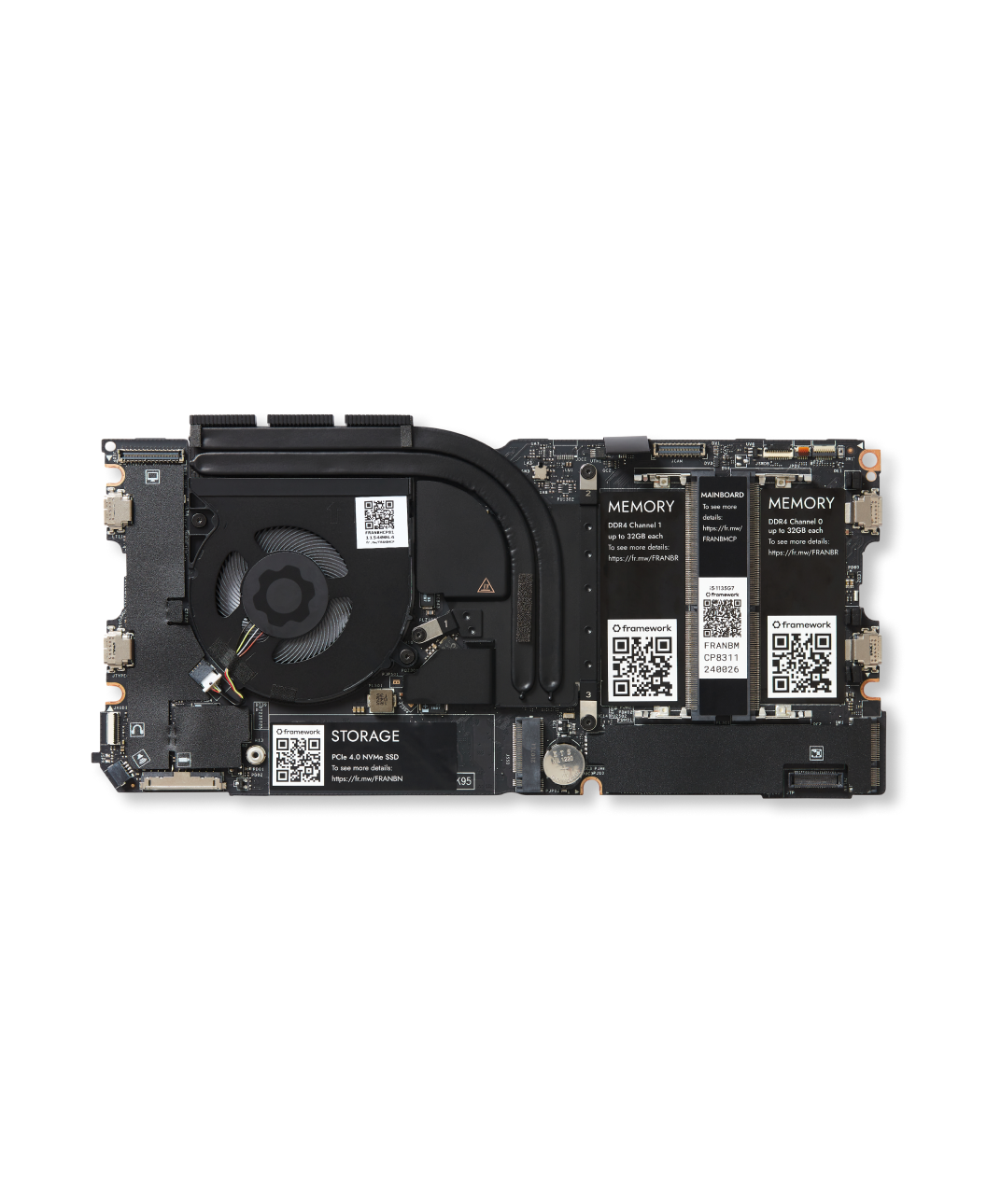
Framework
Available in three configurations of Intel 11th Gen Core i5 and i7 processors, offering fantastic performance, great power efficency, PCIe 4.0, and Intel’s new Xe Graphics, delivering a massive leap over previous generations. The Mainboard is easy to replace and upgrade, and comes with the Heatsink
Yes you can buy a case for them as well

Framework
Cooler Master and Framework team up to produce a transparent case for the Framework Laptop 13 Mainboard.
All you need is a decent USB-C powerbrick for a laptop and you're golden
Oh and some RAM and storage
barren juniper
damn i just wish there was a microcenter near me that was not a pain in the ass to get to
mossy gull
I doubt they would sell Framework parts
mossy gull
barren juniper
damn i just wish there was a microcenter near me that was not a pain in the ass ...
Maybe you can look if you can find a store nearby that sells refurbished PCs
barren juniper
no i was looking at the microcenter site for prebuilts, as i know theirs are known to be better than most (less os bloat, and bs random parts)
mossy gull
barren juniper
no i was looking at the microcenter site for prebuilts, as i know theirs are kno...
Fair enough, just don't trust Amazon
barren juniper
yeah i know she was looking there its a fucking minefield
mossy gull
barren juniper
yeah i know she was looking there its a fucking minefield
Welcome to computers
barren juniper
apparently she has narrowed it down to some dell optiplex with a 13100 and a powerspec with a 5600g. the optiplex is a bit cheaper but only has a 180 watt power supply (didn't know they made them that small)
cinder lagoon
yeah practically bare minimum and they tend to go out easily and loudly
mossy gull
barren juniper
apparently she has narrowed it down to some dell optiplex with a 13100 and a pow...
As long the Optiplex doesn't have a dedicated GPU the 180w PSU is fine
sonic meadow
thats a pretty common kind of size for OEM office pcs like those
often lets you install a low powered GPU (ie under 75w/slot powered/no power connector)
barren juniper
yeah i was surprised. my laptop has a 330 watt power supply
sonic meadow
big laptop
my laptop psu is overkill at 65w. I think it came with a 45w when new
my old old laptop had a 90w brick, which was great for charging up flat batteries on my dads work laptops with their 45w ones.
jade scaffold
Iove that usb c chargers have gotten so small and so powerful it's great for laptops
Like you can power a pretty good gaming laptop with usb c pd now
sonic meadow
my laptop doesnt have usb-c :(, despite being relatively modern (R5 3450U, aka a 2020 apu)
mossy gull
barren juniper
yeah i was surprised. my laptop has a 330 watt power supply
Then you have a very big laptop, even mine barely does 240w
jade scaffold
Everything that can should be using it now imo
mossy gull
jade scaffold
Everything that can should be using it now imo
Thanks to the EU
jade scaffold
You could get a ryzen 7 and a 4070 in a laptop within USBC PDs max power output
sonic meadow
ah yes google, thank you for that unit conversion... was very helpful 😆

related: I wish AMD actually had an equivalent to intels ARK. half the time I cant find anything from AMD about their laptop cpus
jade scaffold
I believe they do but it's like hidden in the bowels of their website
sonic meadow
and they like killing the product pages (such as what is used for as references on wikipedia), so links end up being dead
sonic meadow
jade scaffold
I believe they do but it's like hidden in the bowels of their website
I did eventually find it. but its like they dont want it to be, ARK shows up easily in web searches
I just wanted to figure out what the difference between these two chips was... ([note 1] was just saying it was available as a PRO version)
 mossy gull
sonic meadow
and they like killing the product pages (such as what is used for as references ...
mossy gull
sonic meadow
and they like killing the product pages (such as what is used for as references ...
I know bits and bobs, what do you want to know about your CPU?
sonic meadow
3500C:
- 12-25w
- Radeon Graphics
3500U - 12-35w
- Radeon Vega 8 Graphics
- PCIe 3.0 (the C just doesnt mention connectivity at all)
mossy gull
Oh you already got it
jade scaffold
I gotta say I do love Intel's ark website it's a really nice convenience
sonic meadow
mossy gull
I know bits and bobs, what do you want to know about your CPU?
mines a 3450U, so not either of those 😆
it was a pain to get drivers though, as AMD seems to have already forgotten it from all of their front end stuff...
mossy gull
jade scaffold
I gotta say I do love Intel's ark website it's a really nice convenience
Till you have to download intel drivers, then even 2 Gbps even won't save you time.
jade scaffold
Average amd driver moment
sonic meadow
mossy gull
Till you have to download intel drivers, then even 2 Gbps even won't save you ti...
and finding which driver you need too.
why do they seem to just include everything for three generations either side of your product in the "drivers" section?
mossy gull
sonic meadow
mines a 3450U, so not either of those 😆
it was a pain to get drivers though, a...
Alienware drivers are even harder to download.
Especially if you forgot your serial of your device.
barren juniper
yeah like the 5700u is actually zen 2, not zen 3 like the 5600u and 5800u
mossy gull
sonic meadow
and finding *which* driver you need too.
why do they seem to just include everyt...
Don't forget the 32-bit drivers that clutter the driver section, then the difference between manual install drivers and EXE files.
sonic meadow
I got my laptop with no drive, so needed all the drivers
luckily windows got most of them for me
dont remember how I ended up getting the graphics ones (which were a bit of a pain too)
jade scaffold
barren juniper
yeah like the 5700u is actually zen 2, not zen 3 like the 5600u and 5800u
Amds Apu naming scheme is some intel level stupidity sometimes
sonic meadow
the APUs are typically a generation behind what their naming would suggest 😢
jade scaffold
Untill sometimes they aren't
mossy gull
sonic meadow
luckily windows got *most* of them for me
Story time:
I upgraded my SSD from 1TB to 4TB.
All went great, reinstalled Windows.
Windows obviously wants its own GPU drivers and here it went wrong.
I was faster than Windows and Windows Update got stuck on GPU updates, which prevented my GPUs from working correctly, I had to reinstall Windows all over again.
jade scaffold
Because fuck you apparently
mossy gull
sonic meadow
the APUs are typically a generation behind what their naming would suggest 😢
Luckily this will be fixed with the 8000 series
jade scaffold
Hopefully
Still kinda upset threadripper is 7000 based because 7000 is nearing the end of its generation now
I know why it took so long to make 7000tr hopefully future ones come out not too long after their consumer counterparts
sonic meadow
just gimme a TR APU: "normal" cpu, but with a silly big GPU taking up the rest of the socket and allowed to use much more memory bandwidth because of all the extra channels 🙂
and slap some HBM in there too for good measure
jade scaffold
sonic meadow
just gimme a TR APU: "normal" cpu, but with a silly big GPU taking up the rest o...
The mi300

Want some GPU with your CPU
And like 96gb of hbm2e
sonic meadow
yeah, but I want something that can be used for gpu stuff, as opposed to... ai stuff
an APU not an AIPU 😛
jade scaffold
I mean it can be used for GPU stuff it just can't output it's own video
I don't think
I hope not if it can output video that's kinda cursed
sonic meadow
TPU says it cant do video or dx10/11, at least for the plugin card: https://www.techpowerup.com/gpu-specs/radeon-instinct-mi300.c4019
jade scaffold
Yea it can't do direct x
sonic meadow
but that kind of thing is pretty standard for compute cards
jade scaffold
But it supports open cl and gl iirc
sonic meadow
the (OG) Titan was a bizarre product
jade scaffold
So you could get it to work though a compatibility layer
mossy gull
jade scaffold
I mean it can be used for GPU stuff it just can't output it's own video
Challenge accepted.
jade scaffold
Which is very cursed
mossy gull
jade scaffold
But it supports open cl and gl iirc
So if it supports that, it probably also supports Vulkan
jade scaffold
It doesn't support vulkan from what I can see
Regardles it's like a 30 grand Apu
I would love a desktop Apu though of that kinda calibre tho
But threadripper can't be crammed into an itx board like epyc can
Though maybe the new trs can hmmm
Regardless we probs won't see a giant Apu for the consumer or prosumer market
mossy gull
jade scaffold
I would love a desktop Apu though of that kinda calibre tho
I have the feeling AMD is trying behind closed doors to make an APU more powerful than dedicated GPUs.
jade scaffold
Well the mi 300 already is
mossy gull
I mean for consumers and prosumers
jade scaffold
The issue is the mi 300 is massive
jade scaffold
mossy gull
I mean for consumers and prosumers
No they aren't
It doesn't make sense for a consumer or prosumer to use something like a mi 300
mossy gull
I mean, their 8000 series is already more powerful than low end dedicated GPUs if rumours are true.
sonic meadow
the mi300 has a use case that is nowhere near typical consumers
jade scaffold
It's probably not
Considering they said the same about 7000 before it came out
And 7000s apus are some piddly weak shit
mossy gull
jade scaffold
It doesn't make sense for a consumer or prosumer to use something like a mi 300
I mean something equivalent for consumers and prosumers'
jade scaffold
Yea there's no use for it
mossy gull
jade scaffold
And 7000s apus are some piddly weak shit
I mean, the Ally can run Cyberpunk at low settings pretty well
jade scaffold
Well yea but I was more talking about their desktop chips
The mobile apus have been faster than some desktop gpus for atleast 3 years now
That's nothing even remotely new
mossy gull
jade scaffold
Well yea but I was more talking about their desktop chips
There's Ryzen 7000 APUs?
I haven't seen any of them on the market yet
jade scaffold
The closest we'll see to something like an mi300 will be a CPU chiplet with a GPU chiplet sat next to it
jade scaffold
mossy gull
There's Ryzen 7000 APUs?
I haven't seen any of them on the market yet
Their main line cpus are all apus
They all have Radeon intergreated graphics
sonic meadow
they arent APUs, they are CPUs with integrated graphics
jade scaffold
Which is great on paper but the GPU in them is just troubleshooting
mossy gull
jade scaffold
Their main line cpus are all apus
I see them the same as Intel CPUs, with APU I mean the ones with stronger GPUs.
With APUs they also replace some CPU cores with GPU chiplets.
jade scaffold
Them and what room
A 3 chiplet processor is already too big for something like a steam deck
They'll have to atleast combine the GPU and io dye as they have been doing
mossy gull
jade scaffold
A 3 chiplet processor is already too big for something like a steam deck
Steam Deck also uses previous gen shit.
The Ally uses a newer generation APU than the Deck
mossy gull
Yet the Ally has 8 cores instead of 4.
RDNA 3 instead of 2
sonic meadow
iirc the issue is more that at low powers as monolithic design uses less power than a chiplet design
dont remember where I heard that though
jade scaffold
You could use a zen 4c chiplet and try cram them as close as possible to the GPU chiplet but with separated chips you need more substrate nomatter which is the issue
mossy gull
sonic meadow
dont remember where I heard that though
That moment when AMD(Chiplet) is still more efficient than Intel(monolithic).
jade scaffold
Yea but amds chiplets still aren't as efficient as their monolithic designs

But here
Even if you use a zen 4c chiplet which is about 2\3rd the size of a normal chiplet that's not alot of room for a separated GPU
So something needs to be combined with Io meaning either the CPU won't use a standard chiplet
Or the GPU won't use a standard chiplet
sonic meadow
laptop/handhelds can get away with a smaller IO die. less pcie/usb/etc
mossy gull
jade scaffold
So something needs to be combined with Io meaning either the CPU won't use a sta...
Or both😃
mossy gull
sonic meadow
laptop/handhelds can get away with a smaller IO die. less pcie/usb/etc
Ever seen the 6800M, which has roughly same power as the 6700, and yet it's freaking tiny.
jade scaffold
sonic meadow
laptop/handhelds can get away with a smaller IO die. less pcie/usb/etc
Yes but they chip I showed is a laptop chip
sonic meadow
was thinking out loud, rather than talking about any specific product
jade scaffold
Alot of the issue with chiplet designs is trace routing
mossy gull
AMD probably knows what they're doing, they're the crazy ones here
I heard their RX 7xxxM and RX 8xxxM are respectively desktop GPUs that just miss a few shader cores.
jade scaffold
Monolithic designs just make more sense ATM than a chiplet design like mi300 for an Apu
jade scaffold
mossy gull
I heard their RX 7xxxM and RX 8xxxM are respectively desktop GPUs that just miss...
Yea that is how that usually goes
Even for Nvidia
mossy gull
jade scaffold
Monolithic designs just make more sense ATM than a chiplet design like mi300 for...
Tell that to the Ryzen 8000 APUs which I think are big.LITTLE APUs.
jade scaffold
Unless it's a maxQ design they usually totally different from their desktop gpus
jade scaffold
mossy gull
Tell that to the Ryzen 8000 APUs which I think are big.LITTLE APUs.
Yes they are
mossy gull
jade scaffold
Yea that is how that usually goes
I mean the 7800M is basically a tuned down 7800XT.
While with Nvidia the 4090 Laptop is a tuned down 4080.
jade scaffold
Yea because a 4090 won't fit in a laptop
And they want to use that branding
They really should have just named it what it is
A 4080 mobile
mossy gull
jade scaffold
Yea because a 4090 won't fit in a laptop
Yet, why don't theh just call it the 4080?
Like how AMD is gonna do it?
barren juniper
its a way for them to get rid of the 4080 dies as well since no one buys the 4080
mossy gull
Like the 7800M is just a 7800XT with less CCUs.
Not a whole step down GPU like Nvidia
jade scaffold
It makes some sense the 4090 is the proper design for the node the 4080 is a design for a larger node which is part of the reason NVidias current gen is as efficient as it is especially the 4090
mossy gull
jade scaffold
It makes some sense the 4090 is the proper design for the node the 4080 is a des...
It wouldn't be efficient if they still went with Samsung
jade scaffold
How?
You know the node size advertised by different manufacturers holds no meaning right
sonic meadow
its an advertising point, and can not be compared between fabs.
jade scaffold
The 4090 is 8nm and it's the most efficient GPU outside of its quadro counterparts because it's just an overclocked quadro p much
mossy gull
jade scaffold
How?
Before the 4090 was released, there was rumoured they went with Samsung instead of TSMC, and it was rumoured it would consume well over 500w, and that TSMC which apparently is more efficient saved the day
jade scaffold
Yea that's not what happened
mossy gull
Their original design indicates it was to be Samsung and that Nvidia last minute changed to TSMC
jade scaffold
4090 is tsmc 4nm
mossy gull
Also, Samsung more or less equals toasty.
So far all their chips perform worse than their counterpart
jade scaffold
Which is a node ahead of where it should be 8nm Samsung was the original plan because that was inline with what next gen node should be
Nvidia then decided to skip a node and tsmcs 4N node was cheaper than Samsung's equivalent
But 4N was still very much brand new which is a part of the reason 4000 is so expensive as well as the winning team tax you have to pay going with Nvidia for the moment
But it's also why the 4090 is a better value than the 4080 the 4080 wasn't designed with the 4N node in mind the 4090 actually was which is why it outpaces the 3090 as well as everything in its generation so massively while not pulling all that much more power
mossy gull
Sadly the size wants me to stay with AMD, yes they perform less, but they don't need 4.5 slots and a crutch to not break.
jade scaffold
Yea the 4090s cooler is overkill
It's actually more efficient than amds GPUs
But for some reason Nvidia felt the need to crank the power up to 450w
Coulda left it at 350w and it still would have been faster
But nope 450w tdp
They'll probs do the same shit with the 5090 and crank the power as far as it'll go reasonably
They should really leave some more headroom in the GPU if it's that much faster it'd be really fun to overclock if they left it with a bunch of headroom like they did with pascal
mossy gull
Still, I see 4090 failing left and right because of sagging.
I just don't want that to happen to me.
Also Nvidia, please modernise the drivers, you're the only 1 left with 2 drivers instead of 1.
jade scaffold
They should make a "lite" line of gpus where they get binned chips and cut the tdp by 100w and make a smaller version of the GPU
mossy gull
jade scaffold
They should make a "lite" line of gpus where they get binned chips and cut the t...
So they fit in ITX cases.
Currently the 7900XTX from AMD is the strongest that fit in an ITX case, with Nvidia it's just the 4070 Ti.
jade scaffold
You can squeeze anything in an itx case with a water block
mossy gull
True true, but I'll still stick with AMD, Fluid Motion for all games
jade scaffold
The 4090 will fit in alot of 3 slot cases but it's cooler and PCB while not very long are very tall so in some cases they struggle
I have a 3090 and I still can't get over this image

Gotta say Nvidia nailed the design of their fe cards in 3000 and 4000
mossy gull
jade scaffold
The 4090 will fit in alot of 3 slot cases but it's cooler and PCB while not very...
I still can't get over the idea that back in the day a full fledged GPU was tad longer than the PCIe slot, loved the size of the Fury X.

 mossy gull
I imagine the 5090 to be like this
 jade scaffold
Nah they are gonna keep making it shorter and fatter
mossy gull
jade scaffold
Okay, I still love the clean design of the blower
mossy gull
jade scaffold
Have you seen the 1050ti Fe hold up
I don't usually pay attention to any xx50 card
jade scaffold

Holy shit look at it
It's not real
But it was a official image at one point or another
I want that for the 5090
But like just a single 140mm fan stuck to a cube
mossy gull
jade scaffold
Now have twice the power
 mossy gull
jade scaffold
I want that for the 5090
mossy gull
jade scaffold
I want that for the 5090
I want smaller top of the line GPUs,
jade scaffold
Hoping for hbm on next gen gpus cooling memory is becoming a genuine issue and they are now fast enough that hbm makes a actual difference
mossy gull
We're in 2024 almost, not 1970
mossy gull
jade scaffold
Hoping for hbm on next gen gpus cooling memory is becoming a genuine issue and t...
Imagine, AMD RX Navi Frontier Edition with 48GB HBM3
mossy gull
jade scaffold
For Nvidia sadly only their highest end chips get hbm
I personally don't know what Nvidia's doing and have the feeling for a while now that eventually they'll give up the consumer market, leaving Intel and AMD to fight.
mossy gull
I just hope Intel won't give up on the GPU market
mossy gull
It's good to have a 3rd player
jade scaffold
If they get their drivers sorted they are gonna be really really competitive in the low and mid range market
mossy gull
I am most curious what AMD's gonna do.
Yes rumours indicate they are going to only build mid-range GPUs, but once they sorted out the MCM GPU shinanigans then Mid-range GPU's is all they need as they just tie multiple together
jade scaffold
Yea
barren juniper
yeah i hope rnda5 is good
jade scaffold
I hope all the next gen ones are good
jade scaffold
5 days till threadrippers release 🥳
3 or 4 days till we know all their pricing I think
jade scaffold
barren juniper
pricing is out for all but 12 and 16 core
Yep and the 12 core is what I want
mossy gull
I want ghe 24-core
jade scaffold
going for the HEDT one?
Also currently being driven mad by the lack of half decent ECC RDIMMs
Nothin has heat spreaders
nothing has a black PCB
the on that has a heatspreader is overpriced af
and the only other that has a black PCB is in a state of permenantly unavailable
cinder lagoon
jade scaffold
Nothin has heat spreaders
nothing has a black PCB
the on that has a heatspread...
That's because up until now this has been a Server Standart and you know how these chassisses normally look
jade scaffold
yea but its still anoying
mossy gull
jade scaffold
going for the HEDT one?
For Threadripper yes, I need the PCIe lanes and PCIe bifurcation
My idea is also to have swappable NVMe bays in the back in-case I have to back-up or recover data.
cerulean helm
New Windows 11 update made my cpu more stable at a higher OC.
 cinder lagoon
cerulean helm
New Windows 11 update made my cpu more stable at a higher OC.
cinder lagoon
cerulean helm
New Windows 11 update made my cpu more stable at a higher OC.
thats during idle, aint it?
cerulean helm
cinder lagoon
thats during idle, aint it?
Yes, at heavy load the like a Cinebench run the P cores clock down to 5.6 and the E cores clock down to 4.2.
Here is my OC per core settings.
 mossy gull
As long MS isn't bringing back movable taskbar and full-screen start I am not gonna go to W11
cerulean helm
Taskbar has been movable for a long while. Left, center or right. As far as full screen start menu, thats not happening as far as MS has mentioned.
And I moved to 11 cause I have a 13th gen Intel cpu and the scheduler for 11 is way better than 10. Also, 10 will be EOL October 2025.
sacred seal
I think you are the only person who actually liked the full screen start menu. Its off by default in 10
mossy gull
cerulean helm
Taskbar has been movable for a long while. Left, center or right. As far as full...
Last time I tried W11, 1 month ago, I couldn't natively move it
mossy gull
sacred seal
I think you are the only person who actually liked the full screen start menu. I...
I have it pop-up instead of my desktop when I go to my desktop.
It has nice big icons, nicely sorted.
barren juniper
yeah i personally still use windows 10
its funny, 2 of the 3 computers that ive bought for my self, i got them like a week before a major windows update
first was 7, a week later 8 came out. same thing happened with this one from 10 to 11
cerulean helm
mossy gull
Last time I tried W11, 1 month ago, I couldn't natively move it
I upgraded to 11 in Feb with my new pc build and was immediately able to move my taskbar. Its currently sitting on the bottom left.
 mossy gull
cerulean helm
I upgraded to 11 in Feb with my new pc build and was immediately able to move my...
mossy gull
cerulean helm
I upgraded to 11 in Feb with my new pc build and was immediately able to move my...
I never found those options on my installs oddly enough
cinder lagoon
what do yall think of the fact that depending on where you set up your device windows will allow you to remove bloatware and use non-edge and non-bing things from Microsoft apps and integrations?
surreal moss
I missed this one. What?
cinder lagoon
yeah the EU is legislating for consumer freedom and basically something is coming that if you (at least pretend to be) are in the EEA (European economic area) during setup they have to let you uninstall

Check out Seasonic’s MagFlow fans at: https://lmg.gg/GoFuo
► GET MERCH: https://lttstore.com
► GET EXCLUSIVE CONTENT ON FLOATPLANE: https://lmg.gg/lttfloatplane
► LISTEN TO THE TECH NEWS: https://lmg.gg/TechLinkedPodcast
► SPONSORS, AFFILIATES, AND PARTNERS: https://lmg.gg/partners
► OUR PODCAST GEAR: https://lmg.gg/podcastgear
NEWS SOURCES: h...
surreal moss
You can already uninstall tho
 ionic tusk
It took a while but carabiner first casualty from last I heard they still having production issues with the replacement.
Pretty sure something about payment and manufacturer changing terms on wan show.

Was hopping it wouldn’t happen but finally this morning zipping it up it broke
cinder lagoon
ahh rip
 balmy flicker
what brand of mouce skates dose boss use again?
cinder lagoon
who is boss?
 tender plank
I'd guess W4sted.
balmy flicker
yep he mentioned a brand a few months back and I for got what it was I think it was hyper slides but dont remember
my OG scates are falling off after 5 + years
it seems they did a good job on the g502
cinder lagoon
ahhh
mouse glides always come down to the combination of the "desk" material beneath.
jade scaffold
Also down to the type of mouse you have
Some heavy mice aren't great with glass ones
Though if you are wanting glass skates your mouse probs are quite light weight
mossy gull
jade scaffold
Some heavy mice aren't great with glass ones
Lexip have these ceramic feet, I put them under my mouse and got a metal mouse pad and it glides better than most ultra-light mice.
It's so slippery that my mouse glides down my desk, that's only angled down by max 1°.
jade scaffold

Support our deep-dive testing! Get 10% off any GN Modmats, Solder Mats, or tools during the sale: https://store.gamersnexus.net/
This review and benchmark of the AMD Threadripper 7980X & 7970X HEDT CPUs tests for power efficiency, thermals, power consumption, Spec Workstation performance, Adobe Premiere and Photoshop performance, rendering, code...
sacred seal
I just bought a MX master 2s 2022 bluetooth edition mouse, and I am thoughourly unimpressed. This is a 100$ mouse normally, and apparently it does not include the USB adapter, and it charges via mico B. Also despite claiming the "hyper fast scroll wheel" it does not include the smooth scroll feature that is found in a lot of their other (less pricy) options
sonic meadow
bluetooth peripherals do not usually come with an adaptor
sacred seal
Sorry, it claims it is both a bluetooth and RF capable, but it does not include the RF adapter

I was not expecting it to include a USB bluetooth adapter
sonic meadow
have you checked inside the mouse? its not uncommon for wireless mice to have an internal storage for their dongle
sacred seal
Nope, nadda. Box even says dongle not included
sonic meadow
wow, thats a pain
sacred seal
Which is made even more annoying as logitech does not seem to sell a "unifying usb"
Whatever the heck that is supposed to be
NVM, just found it, for some reason the gadgetsmaster knockoff was the only thing showing up for me...
Its about 22$ on top of the 100$ mouse
On that note, anyone have any good mouse recommendations? I would like to avoid corsair, I have had four of their mice fail in fairly recent history and there customer support team has been a massive turd. While I like the 502, the grip material literally started degrading in my hand. Currently using the 604 from my laptop, but I prefer a wired (or rechargable) mouse for my desktop
mossy gull
sacred seal
Sorry, it claims it is both a bluetooth and RF capable, but it does not include...
RF transceiver are sold separately

Want to wirelessly connect a Logitech Flow or Easy-Switch mouse to a second computer? Simply add an extra Unifying receiver and plug it into your second computer. Then use a Logitech Flow mouse to seamlessly cut, paste and move files between computers. With Flow technology, the cursor automatical...
pearl moon
sacred seal
On that note, anyone have any good mouse recommendations? I would like to avoid ...
I greatly enjoy my wired razer deathadder, they also sell them wireless, and at a few different price points depending on your taste in rgb. I've wanted to try the larger mice out there than it but I haven't wanted to gamble that kind of money so I stuck with what I had. It's been working without issue since 2020. It is larger than most mice out there but I prefer it like that, and it's not much if any heavier either.
mossy gull
I have the Corsair Scimitar Elite Wireless & Dark Core RGB Pro SE
jade scaffold
sacred seal
I just bought a MX master 2s 2022 bluetooth edition mouse, and I am thoughourly ...
I have the 2s and it does come with the adaptor it also does have smooth scrolling
What the hell kinda knock off have you managed to get yourself
sacred seal
I got the bluetooth edition
jade scaffold
Yea they all have Bluetooth
 jade scaffold
Right above the mous wheel
Also why the hell would you get the 2s
The 3s is marginally more expensive and blatantly superior in every way

 jade scaffold
Yea
sacred seal
Its a dpi toggle on mine...
At least I think it is? Button does not do anything mechanical
jade scaffold
Omg you got a knock off lmao
sacred seal
Its sold and shipped by amazon, I would hope its legit
mossy gull
On the 2S it's a DPI button
mossy gull
I found a 2S yesterday from a colleague, and it doesn't have the smooth scrolling they said.
sacred seal
Mabey we are not talking the same thing here? The smooth scroll button should be a mechanical button?
jade scaffold
Just flicking the scroll wheel should put it in smooth scrolling mode
mossy gull
sacred seal
Mabey we are not talking the same thing here? The smooth scroll button should be...
Like on most high end mice from Logitech
jade scaffold
mossy gull
I found a 2S yesterday from a colleague, and it doesn't have the smooth scrollin...
I used one for half a decade I can assure you the mx master 2s has smooth scrolling
mossy gull
jade scaffold
I used one for half a decade I can assure you the mx master 2s has smooth scroll...
Huh, how does it work then?
Is it software toggle?
jade scaffold
Regardless install Logitech options and see if there's an option in there
sacred seal
If its a knockoff its a damn good one. Packaging is canadian compliant with both english and french
Ah, figured it out. For some reason the button is not mechanical on the master. Mouse was not on so it just did not work...
jade scaffold
You really should have got the 3 though the 2 has a design flaw or 2 which means it'll eventually break and need some modifying to fix
Mind you mine lasted 5 years before that
mossy gull
sacred seal
Ah, figured it out. For some reason the button is not mechanical on the master. ...
That's, not really a good design, there's enough people, who never install the software.
jade scaffold
And actually works again now though I upgraded to the 3
sacred seal
Given my corsair mice died between 1 and 2 years I will happily take 5
jade scaffold
mossy gull
That's, not really a good design, there's enough people, who never install the s...
No it just wasn't turned on
sacred seal
Though I am not sure I want to dump 130$ cad on a mouse
jade scaffold
Yea it needs power to cycle between ratcheted and free spin
sacred seal
That just seems needlessly complicated compared to the 502 or 604
Also mico B charging?
mossy gull
sacred seal
Given my corsair mice died between 1 and 2 years I will happily take 5
Odd, my Dark Core SE still works, and got it since release
jade scaffold
It's an upgrade of the OG master just a slight refresh
Better sensor software support ect
The design is atleast 7 years old at this point
sacred seal
Its 2017 for the s2, and apparently I got the 2022 model. Why amazon differenceates between the 2017, 2022 and 2023 models I don't quite understand
sacred seal
Different price apparently...
 jade scaffold
Maybe the newer ones have the design flaw fixed
But yea the mx master mice are durable mfs
My 2s went on Holliday with me many a time and was dropped far more often than it should and after some modification actually still works
sacred seal
I love the 602 and the 604. I keep them in my laptop bag where they are not particularly well treated. The only reason I retired my 502 is that the rubber material it was made out of literally started melting
jade scaffold
The one on the mx master just becomes polished after a while
sacred seal
Both mine and my brothers m65 elite developed issues with left clicking, and before that we both had m65s that had issues with the scroll wheel. His scrolling died but the click still worked, my click died but the scrolling was fine
Hopefully the 3 goes on sale for black friday proper (though it doesn't seem likely). Having to spend a extra 22$ cad to get the s2 working when it has a micro b on it does not seem worth it to me
On top of it bieng already a very expensive mouse
The 3s for mac costs 130cad, and the 3s base costs 140cad
jade scaffold
dont get the mac
and dont get the S
just get the base 3
no s
unless you need it to be super quiet
jade scaffold
go somewhere other than amazon
sacred seal
I'm only finding the 3s at all vendors I can find
jade scaffold
the 3 has USB C and comes with a dongle
the Mac version is BT only
because duh a dongle wont fit in a mac
no USB A ports
i mean i think the Mac version CAN connect to dongles
because all of logitechs 2.4ghz dongles are all inter compatible
unless the mouse/keyboard uses BOLT
sacred seal
Well mac pro or imac has type A
jade scaffold
as apposed to the 2.4
jade scaffold
odd
maybe it was never released in canada for some reason
the 3S has weird quiet switches
the 3s Web browsing buttons for forward and backward are also better placed than on the 2
though i'd be lying if i said i dint miss the funky placement of the 2s forward and backward buttons
sacred seal
The us store does not seem to have the base 3 either
Only place I have found it so far is ebay
jade scaffold
interesting i can still get it in the UK
also micro b is annoying but you wont have to charge it more than every 2 or 3 months these things have an insane battery life somehow
probably because they are massive mice with no care for weight so they can cram huge batteries into them
sacred seal
Well even the 604 runs on a single AA and it lasts like a month of use
I could probably live with the mico b, but the extra 22 dollars to get 2.4 seems too steep for me
jade scaffold
do you not already have a 2.4 from another mouse?
or keyboard
i have like 300 of the stupid fucking things
sacred seal
I have one, but its for my 604 which I have for my laptop
jade scaffold
ah
because they are all compatible with eachother
so if you had another just laying arround you would have been able to use it
sacred seal
Actually, I might... I ended up loosing my 603, may have the dongle still...
mossy gull
sacred seal
Both mine and my brothers m65 elite developed issues with left clicking, and be...
M65, that's an old 1
sonic meadow
You want old? I'm running an original MX518
sacred seal
I found a dongle, it says logitech on it. Now time to try to pair it...
jade scaffold
i think you'll need the logitech options app to pair it to the 2s specifically
sacred seal
I mispoke (mistyped?) It was the m65 pro
Not the base m65
Well it seems to have paired, but its not working...
 mossy gull
sacred seal
I mispoke (mistyped?) It was the m65 pro
mossy gull
sacred seal
I mispoke (mistyped?) It was the m65 pro
Still old
sacred seal
Not that old. Bought it in 2018
mossy gull
sacred seal
Not that old. Bought it in 2018
Earliest release I can find is 2016, I call that old
sacred seal
That's not too bad. On the otherhand I got my keyboard in 2015
Repaired the master, its working now. Thanks for the suggestion for using a old dongle
mossy gull
I never have a keyboard longer than 2 years
sacred seal
K70 rgb with MX browns. Still works fine and there is nothing really to upgrade to
Can't beat perfection
jade scaffold
sacred seal
Repaired the master, its working now. Thanks for the suggestion for using a old ...
i wish my MX Master 3 had support for the same dongle my Keyboard uses
but only the 3S has support for the Bolt type dongle
jade scaffold

where the fuck is my 12 core AMD
why is it only 1 website that has any of them up for sale ATM
AMD the hells going on
mossy gull
jade scaffold
where the fuck is my 12 core AMD
I think that's the R9-7900X
jade scaffold
mossy gull
I think that's the R9-7900X
its not
i dont want a ryzen 9
i want a threadripper
and there is a 12 core one according to amd that was supposed to release with the rest
mossy gull
jade scaffold
and there is a 12 core one according to amd that was supposed to release with th...
I am curious why they have a 12-core Threadripper
jade scaffold
mossy gull
I am curious why they have a 12-core Threadripper
for people who need PCIE lanes but dont want to be drawing 50w at idle
mossy gull
Fair enough
mossy gull
I still go for the 24-core so I can run VMs and multi-GPU system easier
jade scaffold
mossy gull
I still go for the 24-core so I can run VMs and multi-GPU system easier
im going for the pro cpu line rather than the hedt
mossy gull
I don't see the advantage of pro for myself
jade scaffold
PCIE Lanes
you wont need them tho i dont think
and youll get the same performance out of the HEDT one regardless
mossy gull
I need to be able to run 8 NVMe drives and 2 GPUs
cinder lagoon
jade scaffold
funny how the word "PRO" in the name instantly adds 47% to the price 🥸
I don't really get why companies buy these pro chips...
I mean sure they are apparently with some service contract or whatever but with every two CPUs you buy you could get a spare one instead of having the contract
jade scaffold
cinder lagoon
funny how the word "PRO" in the name instantly adds 47% to the price 🥸
I don't...
yes but they are cheaper than epyc have 8 channel memory support have Memory encyption and a bunch of other data centre features
cinder lagoon
so you're telling me the hardware for all that is not physically on the other CPUs?
jk but to me it just seems ridiculous
jade scaffold
cinder lagoon
so you're telling me the hardware for all that is not physically on the other CP...
well no not nessesarilly
the Substrate between HEDT and the pros is totally different
it would stand to reason that the HEDT uses a different IO die rather than using the same one used on the Epycs like the pros do
or one that simply cannot do what a fully functional one can do like is done with the CCDs and GPUs
cinder lagoon
jade scaffold
the Substrate between HEDT and the pros is totally different
ohhh forgot that was a possibility with multi-die CPUs 😅
barren juniper

NVIDIA H100 80 GB Graphic Card PCIe HBM2e Memory 350W 900-21010-0000-000 GPU Card NVIDIA 900-21010-0000-000 Graphics Processing unit (GPU) H100 80GB HBM2e Memory FHFL Datacenter Server Graphics Processing Unit (GPU) H100 Tensor Core GPU, On-board: 80GB High-bandwidth Memory (HBM2e), 5120-bit, PCI...
sonic meadow
Only a tidy 35 grand
barren juniper
literally in the featured section
between a gt710 and arc a750
yeah apparently 4090s dont exist anymore. microcenter doesnt have any
just a 4080 for 1700
checked pretty much all the stores around nyc, didnt see one
olive fiber
So, I've got this OLED TV that I want to hook up to my computer again.. but one real annoying part was the TV doesn't shut off when the computer does.
olive fiber
barren juniper
yeah apparently 4090s dont exist anymore. microcenter doesnt have any
Heard than NVIDIA stopped production and is gearing up for the 'Super' series of 4000s now
Anyway, so the OLED TV doesn't shut off when the PC does. Any one know of like a thunderbolt dock or something else to get it to detect the shut down and put the display to sleep as well?
Also.. I may have mentioned before how much I really got annoyed by the RWGB subpixel array on the OLED and the weird color fringing? Yeah, MacOS handles it fine. Completely gone somehow.
Okay, the color fringing is on because the mac is running it in sorta 1440 mode. A little different than how windows handles it, but cleans up subpixel issues.
mossy gull
olive fiber
Anyway, so the OLED TV doesn't shut off when the PC does. Any one know of like a...
Your TV doesn't shut off because PCs usually don't support ARC or eARC
sonic meadow
And its a pain in the ass, cmon Nvidia/and... with how much your products cost
barren juniper
olive fiber
Heard than NVIDIA stopped production and is gearing up for the 'Super' series of...
nah its because they are about to get banned in china, and so they are shipping literally every single one they can back in before the ban hits. the 4080 super will use a different die to the 4090
i believe it will use the full die from the 4080. anything that is not fully enabled will go to the 4070ti super from what i understand. 4080 and 4070ti will cease to exist, with only the 4070 staying in production as its the only one of the 3 selling well right now
olive fiber
mossy gull
Your TV doesn't shut off because PCs usually don't support ARC or eARC
Why doesn't the display support the normal monitor power off thing?
olive fiber
barren juniper
nah its because they are about to get banned in china, and so they are shipping ...
Heh. That doesn't surprise me either
barren juniper
"just tv things"
sonic meadow
ive never had a monitor that powers off with my pc
olive fiber
Really?
barren juniper
and now 4080s are becoming the price of 4090s because reasons?
olive fiber
Every one of mine has, and I've had dozens of monitors over the years
sonic meadow
the go in to a sleep/ no image mode, but dont shut off
barren juniper
i run my monitors off an egpu dock so no idea here
olive fiber
TV's don't because 'they're TVs', which is a stupid excuse when these days, any TV (especially expensive ones) can and are used as monitors.
mossy gull
olive fiber
Why doesn't the display support the normal monitor power off thing?
Monitors are actually looking if they lose signal and then turn off, nothing more nothing less.
As long the display port keeps sending data even if it's just a black image they stay on.
ARC or eARC for that matter is a communication protocol, and the device can control the TV or vice versa.
barren juniper
i remember linus had some issue like this with his remote gaming set up
olive fiber
mossy gull
Monitors are actually looking if they lose signal and then turn off, nothing mor...
RIght. The problem is, mine says 'no signal', but instead of then shutting off, it just keeps floating this 'no signal' image around
sonic meadow
it might have a setting somewhere. dont ask me where
the tv that is
its entirely on the display to do stuff like that, not the image source
mossy gull
olive fiber
RIght. The problem is, mine says 'no signal', but instead of then shutting off, ...
Exactly, it didn't receive a shutdown signal, so it keeps looking for the signal.
Monitors never receive a shutdown signal, they just lose it.
mossy gull
So summary:
Monitors loses signal = stand-by
TV loses signal = keeps looking for signal
sonic meadow
though saying that... my dads tv (some recentish samsung thing) will go no-signal for a few moments and then a backlight-off black screen. It will also do this on black screens (like a video paused on the 1st frame if it is black)
mossy gull
I always turn off my display as 1 of my systems keep sending a faulty empty signal and the TV jumps to that.
olive fiber
Apparently there's a series of little submenus and whatnot you can go through on the C1 to turn all this off.
Which is supposed to go to the CX model as well. I got it to turn off with the images are being displayed, but can't find the hidden menu to turn it off on the blank screen
sonic meadow
mossy gull
Monitors are actually looking if they lose signal and then turn off, nothing mor...
you might have been thinking of CEC instead of ARC.
CEC: Consumer Electronics Control (allows devices to talk and send commands to each other)
ARC: Audio Return Channel (allows a display device to send sound back to a audio reciever/etc. the opposite direction signal usually goes)
mossy gull
olive fiber
Which is supposed to go to the CX model as well. I got it to turn off with the i...
You need a remote that can open the "service menu" I think it's called.
You can't do it through a normal remote
olive fiber
Just got the service remote. Was going to give that a try
mossy gull
sonic meadow
you might have been thinking of CEC instead of ARC.
CEC: Consumer Electronics C...
Funny enough that devices with eARC can control the TV and the TV can control the soundbar.
sonic meadow
that will be because they are both CEC devices
mossy gull
Well, all I know it only works on 2 out of 4 HDMI ports
sonic meadow
arc is only usually supported on one or two ports on a tv
mossy gull
sonic meadow
arc is only usually supported on one or two ports on a tv
I know, but other ports don't receive signals, found that out when I accidentally plugged the soundbar into the HDMI in the wrong port
olive fiber
mossy gull
You need a remote that can open the "service menu" I think it's called.
You can'...
Can't find anything about the no signal message
mossy gull
olive fiber
Can't find anything about the no signal message
Then I don't know, I don't have it turned on as I just turn off the display myself
olive fiber
Just get tired of doing a laundry list of things to shut down. ;p
mossy gull
olive fiber
Just get tired of doing a laundry list of things to shut down. ;p
Get rekt, I have to stretch to turn off my upper monitor because it hangs upside-down, so the button is on the top.
sonic meadow
you can get hdmi-cec adapters (to allow the pc to send commands to a tv), but they cost a few bucks, and I dont know how easy it would be to get an "off" command sent when turning the PC off. or an "on" command when turning it on 🤔
I usually see it advertised for media player software like kodi
mossy gull
Kodi, haven't heard that name in a while, they use to be like hot cakes over the counter back in the day
sonic meadow
Kodi is still going strong. Used to be called XBMC back in the day
mossy gull
I don't like Kodi machines, they're overpriced and weaker than my Pi4
sonic meadow
so run kodi off your pi
cinder lagoon
mossy gull
Your TV doesn't shut off because PCs usually don't support ARC or eARC
you mean the HDMI (/DP) communication standart. ARC stands for AudioReturnChannel
sonic meadow
its available on just about everything
cinder lagoon
sonic meadow
you *can* get hdmi-cec adapters (to allow the pc to send commands to a tv), but ...
*this
sonic meadow
most of those over the counter media player boxes (running kodi typically) were basically smartphones in a box (hardware wise). they didnt need to be any more powerful to... run their hardware decoder
mossy gull
cinder lagoon
you mean the HDMI (/DP) communication standart. ARC stands for AudioReturnChanne...
It says eARC on the port, nothing else
sonic meadow
to let you know that that is the port you plug your soundbar/receiver in to. nothing specifically about cec
cinder lagoon
what I mean is no variant of ARC has anything to do with Shutdown (and sometimes volume) communication
sonic meadow
eARC is just a more modern variant supporting object based audio formats or something. ie atmos/etc
olive fiber
Another random question.. anyone use Corsair gaming mice?
mossy gull
olive fiber
Another random question.. anyone use Corsair gaming mice?
I do, 2 different ones to be exact
olive fiber
mossy gull
I do, 2 different ones to be exact
Nice! I got a free one with my corsair computer to replace my dell. I forget the name, but it's the wired one with the FPS aim button on the side.
The cheapest version of it.. but I really like it. The M65, I guess. I really like the smooth ball bearing scroll wheel on my logitech mouse.. but the Corsair one feels more accurate. Anyway, was debating getting a wireless one I can use with my mac as well for modeling and stuff, but was wondering if the Darkstar (the one with the hex keypad on the thumb) might be better.. since often I'm playing some sort of MMO or RTS sort of game.. and figured that mightbe useful for shortcuts in blender.
But, not sure how it feels compared with the M65. Can't find any local stores that have it
mossy gull
olive fiber
Nice! I got a free one with my corsair computer to replace my dell. I forget the...
I have the Dark Core Pro SE & Scimitar Elite Wireless
olive fiber
I also have a wired scimitar somewhere around here
Should try that one out and see how the cursor feels in comparison
Though, this M65 is supposed to have tilt sensors to do tilt gestures.. but don't see that anywhere in the settings
mossy gull
olive fiber
Though, this M65 is supposed to have tilt sensors to do tilt gestures.. but don'...
Maybe they removed it as probably not many used it, or you have a different generation M65 that doesn't have the tilt sensor
olive fiber
Hm, maybe not. Looking at it on my phone it seemed to. On the laptop, only the wireless one seems to have it
Oh, no, just my model of wired one. The newer wired one does as well (which is cheaper than mine, for some reason)
jade scaffold
i love that AMD have in effect paper launched these TRs atleast in the UK
No motherboards
missing CPUs from the roster
olive fiber
mossy gull
Maybe they removed it as probably not many used it, or you have a different gene...
Do any of your corsair mice have smooth scroll wheels? Or all have detents?
Heh. One guy went and flattened the metal detent in the mouse so it scrolls smooth
mossy gull
olive fiber
Do any of your corsair mice have smooth scroll wheels? Or all have detents?
All have detends, or well mine have
olive fiber
I really like the smooth, ball bearing scrolling. Often I'm going through really long documents and the detents really slow me down.. and I don't want to try and find the scroll bar to drag it
But for things like Blender, I like detents.. logitech has a switchable one, using a magnet, I think.
Feels like a magnet
cinder lagoon
some mice have a wheel with an adjustable "click" force, like my razer basilisk v2 BUT
for some reason I'm always getting mis-inputs even when not touching it at all
random up scroll while rolling down etc
mossy gull
olive fiber
But for things like Blender, I like detents.. logitech has a switchable one, usi...
I don't like detends, I like a rattle mechanic
olive fiber
cinder lagoon
some mice have a wheel with an adjustable "click" force, like my razer basilisk ...
Logitech has a little electromagnet next to the wheel, and the wheel seems to have little magnetic or iron ribs that get attracted to it. And it can electrically turn that magnet off or lower the force.. so for example, as you start scrolling faster, the clicks in the wheel get weaker and weaker, until it's perfectly smooth at high speed
At least, that's how it seems to feel. Feels very much like a magnetic bump. If you turn it on, it'll even pop the wheel back into a detent.. but it's not like a mechanical feel, definitely magnetic sort of feel.
barren juniper
anyone here have any experience with optiplex 3060. 5060, or 7060? family member needs a new computer, has some laptop with a dual core fx in it. was looking at the used/refurb/open box section on newegg
sacred seal
All "office grade" PCs tend to be very similar.
timber barn
uuuh new VR headset https://www.youtube.com/watch?v=TdBnkxxImwI

Unify and simplify your PC components! Check out Corsair’s iCUE Link Smart Ecosystem at https://lmg.gg/CorsairiCUELink
Shop the holiday sale by going to https://www.ridge.com/LINUS and get up to 30% off through December 20th.
PS VR2? I don’t want to use a Playstation 5. Valve Index? Too Big. Meta Quest 3? I don’t want to deal with Mark Zuckerb...
makes me excited for a Index refresh
jade scaffold
It's not really new
It could also do with some improvement
Hopefully valves next vr headset is plug and play with their current controllers and base stations
Because honestly the headset is the only thing that lets the index down
 signal star
Anyone have a Steamdeck? Saw LTT's video on it and it seems cool, but idk if its worth it. ATM only game i would play is KOTOR and KOTOR 2, but that might change as time goes on
jade scaffold
I'd wait a little personally valve started a little war in the industry with the steam deck if you wait a while we might get some seriously crazy stuff come out in all the competition
cinder lagoon
timber barn
uuuh new VR headset https://www.youtube.com/watch?v=TdBnkxxImwI
I'd probably take a spec-down second gen of it
cinder lagoon
signal star
Anyone have a Steamdeck? Saw LTT's video on it and it seems cool, but idk if its...
I suggest only taking the OLED versions. Steam Deck does not have the best performance but I would take it over the competitors!
mossy gull
signal star
Anyone have a Steamdeck? Saw LTT's video on it and it seems cool, but idk if its...
Asus, Lenovo, GPD all have a very good compatitor, and they all have a stronger APU.
cinder lagoon
yes... but in all of those cases the price comes lacking and imo the overall "finish" of the product (not only outer shell) is worse
mossy gull
I take better performance over an OLED display.
Especially with how heavy games have become.
Also my choice falls on the GPD Win 4 for actually being portable, and not be massive like the other 3.
cinder lagoon
I think whats really missing from these things is a non-proprietary eGPU connector
mossy gull
cinder lagoon
I think whats really missing from these things is a non-proprietary eGPU connect...
Which only Asus has