#Tech Lab forum - General Discussions!
1 messages · Page 11 of 1
 mossy gull
 sonic meadow
standalone headsets have active cooling because they have an sbc wedged in the middle of a dense plastic housing
mossy gull
I only have displays, I kinda never owned an HMD
sonic meadow
my vivepro has been sitting for an irritatingly long amount of time unused. still not sure if the... ~2k was a good idea or not
mossy gull
sonic meadow
my vivepro has been sitting for an irritatingly long amount of time unused. stil...
What about the 8K Pimax
sonic meadow
mossy gull
What about the 8K Pimax<:NatsukiLaugh:604403629151223828>
well I dont have one of those 😛
 jade scaffold
sonic meadow
my vivepro has been sitting for an irritatingly long amount of time unused. stil...
jade scaffold
sonic meadow
my vivepro has been sitting for an irritatingly long amount of time unused. stil...
Yea the vive pro was really expensive for what it was
sonic meadow
it was even more expensive here.
a friend (when he was in aus) bought an index (imported probably), and also imported two compatible wireless units becuase it was cheaper than buying one locally
mossy gull
sonic meadow
well I dont have one of those 😛
Me neither🙃
 pearl moon
I phrased it wrong, but what I meant is a software like OculusKiller that guts out all the oculus stuff and optimizes it to only be a steamvr headset.
mossy gull
pearl moon
I phrased it wrong, but what I meant is a software like OculusKiller that guts o...
I hate you need to log into an HMD
pearl moon
Plus the hoops you need to jump through to do anything that requires a developer account.
which is alot
i needed to make my account a dev account if i wanted to use handtracking in DCS World for example
mossy gull
pearl moon
i needed to make my account a dev account if i wanted to use handtracking in DCS...
I mean, I don't even have a Facebook account nor do I want to make 1
jade scaffold
pearl moon
i needed to make my account a dev account if i wanted to use handtracking in DCS...
Yea because the link pass through for hand eye and face movement was in beta
I'm used to making dev accounts so it wasn't much of an issue for me
 glacial canyon
Quick quesh, any technical/security objections regarding the use of DroidCam to use my phone as a webcam?
 cinder lagoon
glacial canyon
Quick quesh, any technical/security objections regarding the use of DroidCam to ...
cinder lagoon
glacial canyon
Quick quesh, any technical/security objections regarding the use of DroidCam to ...
I Use xSplit Connect or IP Webcam for that purpose
Don't expect great latency, most of them provide a secure connection.
mossy gull

 sacred seal
As much as I like Louis, he is not known to validate his sources all that well. Hopefully GN or someone similar does a deep dive. Its certainly shitty that Gigabyte is not covering PCB defects, but when looking at Ebay to see the scope of the issue I found Asus and MSI cards with the same story.
It seems to be a question of scale, there certainly are a lot more gigabyte cards listed as dead (about 5x as many as other vendors by my loose count), but when perusing the descriptions many of them are not PCB related
sonic meadow
however there could also be more dead ones available if they have sold more cards. I don't know who actually sells more
sacred seal
Well if most of them are from prebuilts, it could be from the assembly/ shipping of those machiens are sub par
I don't think Gigabyte has any OEM cards?
mossy gull
You know there's some ugly laptops that can attach watercooling, so I thought by myself, why not make my Asus Advantage Edition watercooled.
So I was thinking of a 3D printed bottom panel with a spot for a Alphacool ES Stream LGA 4677 1U and some tubes and quick disconnects.
Oh and extra fans
Bigger fans
If I have the place for it
Yes, I know, I act dumb.
But if it works well, I have a laptop that can properly overclock
And maybe sell some kits for people who want to do the same
And before you say that that block is too expensive or big, it was the only 1 flat enough with side ports that I could find
pearl moon
Took me a couple days to get it set up and dialed in (including a factory reset cause my brother forgot the login to his old facebook), but hot damn it is amazing.
pearl moon
DCS is so much better with it
jade scaffold
We need more half life alyx type games
jade scaffold
pearl moon
DCS is so much better with it
MSFS is also really fun need to try dcs in vr
Left 4 dead 3 as a vr+regular title would be awesome
jade scaffold
Oh I only play payday 2 in vr
pearl moon
i'm excited to try it
jade scaffold
It's chaotic as hell because the games made on an engine from like the 90s
pearl moon
jade scaffold
It's chaotic as hell because the games made on an engine from like the 90s
Tbf the first game to come out on it was released in 2001
pearl moon
I'm just glad they realized it's a shit engine and not worth using anymore
PD3 will be on UE4
I just hope it has VR, and is actually made with vr in mind instead of just tacking it on years after release.
jade scaffold
Yea though payday 2s tack on vr is actually very well executed
Weirdly the some of the best vr I've ever played
jade scaffold
hey @mossy gull sorry for le ping but you seem to know some stuffs about getting things ran at higher resolutions than a monitor otherwise would allow
Trying to run a game in VR using Reshade which is working fine however my monitors a much lower resolution than my VR headset only being 3440x1440p compared to my VR headsets 3600x1920 and to make that worse to maintain immersion im actually very close to the image thats projected which leads to me actually viewing a much smaller portion of the image. Idealy i want to use somthing akin to DLSS or FSR or what ever intels alternative is so im not nuking performance from a game that already doesnt run too good
 surreal moss
What headset are you running?
jade scaffold
Meta Quest Pro
mossy gull
jade scaffold
hey <@290608448637239296> sorry for le ping but you seem to know some stuffs abo...
AMD has native support for it, I sadly do not know if other manufacturers have the same stuff.
On AMD it's called AMD Super Resolution
Not to mention why use something like Super Resolution and upscaling tech?
That almost sounds counter productive
surreal moss
Nvidia is also able to upscale although I haven’t used the feature in a few years
sacred seal
I presume you are running this though steam VR? If I am not mistaken the resolution settings for VR are entirely different from the monitor
I belive the occulus app has settings for adjusting the resolution of the device
mossy gull
Also keep in mind, I only use Super Resolution only to avoid anti-aliasing or whatever how you pronounce it
jade scaffold
sacred seal
I presume you are running this though steam VR? If I am not mistaken the resolut...
no because this isnt actual VR its using reshade to basically split my display and using 3D image data from reshade to make the VR image look 3D so its based on monitor res
 barren juniper
they wont fill that gap until rnda2 sells out
barren juniper
like if you need something mid range right now, 6700xt, or a770.
while supplies last
pearl moon
https://www.reddit.com/r/OculusQuest/comments/1446je4/quest_update_v54_causing_wifi_performance/ right as i get my quest 2 setup and running good

reddit
227 votes and 94 comments so far on Reddit
a dev who makes Virtual Desktop tweeted "literally the only solution is a factory reset... yeah we aren't kidding" and even then alot of users are saying factory reset only solves it temporarily
barren juniper
i have the oculus go that my dad won as the second place prize at a business conference and gave to me because he had no use for it and i have used literally twice
but yeah that sucks
sonic meadow
my favourite brand of laptop
 mossy gull
sonic meadow
my favourite brand of laptop
mossy gull
sonic meadow
my favourite brand of laptop
That's some terrible specs, also Dell these days are mediocre
sonic meadow
its not new. that was a second hand auction site
and 32GB is terrible specs on a laptop?
mossy gull
sonic meadow
and 32GB is terrible specs on a laptop?
It isn't, but the CPU is mediocre
sonic meadow
all it says is intel i5, that isnt enough to make any real assumptions about its quality or fitness for purpose
mossy gull
sonic meadow
all it says is intel i5, that isnt enough to make any real assumptions about its...
All I can find is it's a rugged laptop, which usually have weaker versions of certain CPU
sonic meadow
cool. you have looked at it more than I have. I saw a funny typo when scrolling past an posted it
mossy gull
sonic meadow
cool. you have looked at it more than I have. I saw a funny typo when scrolling ...
My brain autocorrects things, so I rarely see spelling mistakes unless I focus on it
sonic meadow
fair
I have been on and off looking for a replacement laptop (mines went and died months ago), so have been lingering on them for a bit longer than I would have otherwise
surreal moss
drops Dell Latitude in a pelican case
I dub thee an Attitude
jade scaffold
pearl moon
https://www.reddit.com/r/OculusQuest/comments/1446je4/quest_update_v54_causing_w...
yea not much of an issue if you are using it through cabled link but a big isssue if you use virtual desktop/ALVR or Airlink
cinder lagoon
Discord asked me to change my name today. Instead of Chaos_02#5921 I am now the one and only chaos_02 😁
 cerulean helm
Okay need some help here. Just went and bought 2 LG 27GP83B monitors and have run into some weird problems, already exchanged one as I believe it was defective.
Problems:
Screen one one monitor randomly turns black (no power loss or disconnect sound made) 3 or 4 times then returns. Swapped DP cables, no change.
Monitor I returned the screen turned green on me and stayed green even after recenting the vido driver (also reinstalled gpu driver just to be safe).
Replacement monitor plugged into same DP port on my GPU green screen, swapped to 3rd DP port on GPU and screen is normal, but the random black screen issue remains on the display that is picked as my main monitor.
cinder lagoon
Sounds like a defective monitor batch. Does this behaviour happen with other monitors or other refresh rates (or HDR modes)?
cerulean helm
So far I have had the random black screen happen to both monitors, though not at the same time, and I think its only when its set as my main monitor but can't be sure.
I dropped the refresh rate from 165 to 144, and that seemed to work but after I manually reinstalled the monitor drivers it started happening again. My monitor calibration also stopped working as I did this.
Just now, I recalibrated the replacement monitor (I use a DataColor Spyder Pro) and haven't seen a black screen yet.
mossy gull
cerulean helm
Okay need some help here. Just went and bought 2 LG 27GP83B monitors and have ru...
What GPU do you have?
cerulean helm
3080
I'm going to grab some DP 1.4 cables tomorrow as I don't have any spares. Though it would be weird that both DP cables from the monitors would be faulty.
mossy gull
cerulean helm
3080
I'm going to grab some DP 1.4 cables tomorrow as I don't have any spares. T...
Did you have any LG or Samsung display before getting this particular LG?
cerulean helm
No, my previous monitors are Acer Predator xb271hu which released in 2016.
mossy gull
Sorry if I come and go, I personally have seen some trouble between LG/Samsung and NVidia cards.
It looks like a handshake protocol problem.
You can change display all you want but it won't change the turn on/off constantly.
You can try a completely different model display.
This is my personal experience but I seen this happening between a Microsoft GTX 1060, Dell RTX 2070, Gigabyte RTX 3070 and the LG C1 and 1st gen Samsung Super Ultra Wide.
I haven't seen this problem yet with AMD Vega FE and AMD RX 6700XT.
You can vaguely fix it with a so called Active DisplayPort or Active HDMI.
You can recognise these cables by the little box in the cable.
 silk jasper
Hey lads so long story short I have a Lenovo Yoga 7i that I have just factory reset. Prior to factory reset had 0 issues after reset we ran all the driver updates the software windows everything that needed updates to make sure it was ready for the sale we had intended for it and the touchpad has since stopped working Post factory reset does anyone have any ideas as to why this may be?
mossy gull
silk jasper
Hey lads so long story short I have a Lenovo Yoga 7i that I have just factory re...
Best is to download MediaCreationTool, install it on an USB thumbdrive, and fully reinstall Windows and its drivers.
Windows 10:
https://www.microsoft.com/software-download/windows10
Windows 11:
https://www.microsoft.com/software-download/windows11
This way you'll have all recent Windows updates installed from the get-go and then you only have to download the drivers.
It also has a much lower chance to be buggy.
cinder lagoon
We're talking about like 400% lower chance of being buggy
mossy gull
Pushing through a lot of updates in a short time does corrupt files which cause bugs
silk jasper
Tysm
mossy gull
silk jasper
Tysm
I am sorry you have to go through reinstall again
silk jasper
Another day in my world at this point
 timber barn
not sure if I did it wrong but I posted this instead of asking here: https://discord.com/channels/222052888531173386/1117562574108635217
barren juniper
thoughts on the 5600x3d? theres some rumors floating around about it
jade scaffold
might actually be a pretty good mid-low budget option
depending on price
i can get a 5600g for like £110 which is really good so if the 5600x3d can be got for more like £160 or somthing that might be really good epescially for the X3Ds gaming performance
cinder lagoon
If the 5600X3D is compatible with X470 just as the 5800X3D it's a pretty ballin gaming value!
mossy gull
cinder lagoon
If the 5600X3D is compatible with X470 just as the 5800X3D it's a pretty ballin ...
If they still release an BIOS update for it for X470
cinder lagoon
Mine is still kinda getting updates and the code would've likely been implemented in the 5800X3D bios already
jade scaffold
mossy gull
If they still release an BIOS update for it for X470
why X470
cinder lagoon
Cuuz its a good budget option and there's no point for going X570 or B550
jade scaffold
Second hand X470s really do go cheap
the new ones arent going all that cheap but the second hand ones are real cheap
barren juniper
if they are doing this maybe they will do a 7600x3d too like they should have done instead of the 7900x3d?
mossy gull
jade scaffold
why X470
I mean I still would go for X570, especially with the newer GPUs.
sonic meadow
why not b550? x570 is mostly unnecessary
mossy gull
sonic meadow
why not b550? x570 is mostly unnecessary
PCIe slots, X570 has more PCIe slots
sonic meadow
fair
cinder lagoon
Budget option is x470 (used), optimal is probably B550 (also used)
mossy gull
For me I need the PCIe slots, which X570 has more of
Especially PCIe 4.0, which isn't a given on X470
cinder lagoon
Afaik it isn't given at all on x470 - 4.0 is nice to have but I wouldn't really pay extra
mossy gull
cinder lagoon
Afaik it isn't given at all on x470 - 4.0 is nice to have but I wouldn't really ...
It will on newer GPUs
jade scaffold
mossy gull
PCIe slots, X570 has more PCIe slots
Yea but you can't use them
Not for anything that needs more than x4 performance because the ryzen cpus don't have enough pcie lanes
mossy gull
jade scaffold
Yea but you can't use them
I always rock a hybrid GPU rig, so the extra displays don't consume resources from the main GPU.
I also like tons of storage
jade scaffold
yea but a Ryzen CPU doesnt have enough PCIE Lanes
so you have to play the good ol sacrifice game
use PCIE slot 2 loose sata 5 and 6
use M.2 3 loose PCIE slot 3
thats how both B550 and X570 boards work
X570 just has the advantage of everything near enough being Gen 4 not a bit of Gen 4 and the rest Gen 3
mossy gull
jade scaffold
use PCIE slot 2 loose sata 5 and 6
i don't use SATA
jade scaffold
regardless X570 doesnt have more PCIE slots
it just has higher bandwidth ones
and is willing to bottleneck things more
mossy gull
jade scaffold
regardless X570 doesnt have more PCIE slots
I rather have PCIe 4.0 over 3.0
jade scaffold
thats cool and all
but that means if you have 2 PCIE Gen 4 M.2 drives
they can never run at the sime time and get full speed
honestly you have a server just throw some Intel or Kioxia drives in throw them in a Raid array and get some 100gb networking going will be faster than and M.2 Gen 4 or 5 drive that currently exsists
sonic meadow
jade scaffold
regardless X570 doesnt have more PCIE slots
It has 6 more pcie lanes than b550
 jade scaffold
physically yea
sonic meadow
Whether or not you get more slots is entirely dependent on the motherboard
jade scaffold
but a ryzen CPU doesnt have more PCIE Lanes to support it
and the chipsets PCIE lanes arent beefed up
so you still end up effectivly with a shared x4 lane to the CPU for most of the available slots
sonic meadow
And most devices aren't continuous throughput so that is usually fine
jade scaffold
yea thats fine if you are willing to sacrifice the odd pair of sata ports and 1 of the pcie slots for the M.2 slot
most people dont fill out PCIE slots anyway
sonic meadow
However you have said multiple time that x570 doesn't have more lanes/whatever than b550, which is false
jade scaffold
i said slots
which they really dont past having the extra M.2 if you wanna count that
you have the rare super varients of the boards which cost more than some midrange gpus
which have some electrically 16X slots linked up to the chipset because funny i guess
anything that needs a 16x slot is probably gonna kick the chipset in the balls asking for more throughput
sonic meadow
a quick perusal of around 80 boards (44 b550, 38 x570) shows that x570 boards have on average both more pcie slots and more bigger slots. though the data I use is just the physical slot not the electrical, nor does it show m.2 slots

(ignore the first few headers, that was from the source data which wasnt formatted well)
(that last column is total slots)
so yes, x570 boards do tend to have more slots
jade scaffold
is that only including ATX boards
cerulean helm
So, after several days of trying to find a solution to my new LG monitors flickering I may have found the culprit. There is a Nvidia driver hotfix for exactly my problem:
"When using multiple monitors which support adaptive sync, users may see random flicker on certain displays when G-SYNC is enabled after updating to driver 535.98"
NVIDIA
Posted by Manuel@NVIDIA: “Announcing GeForce Hotfix Driver 536.09 (Released 6/1/23)”
sonic meadow
jade scaffold
is that only including ATX boards
It was all boards (on local pricespy, since I knew I could get info out of it), minus a few that had null information. I probably should have gone through and culled all that stated 0 slots too since they would be bad data.
cerulean helm
Can confirm the hotfix driver has fixed the problem, no flickering at all for 30 min now at max refresh rate.
sonic meadow
nice!
jade scaffold
Seeing some info arround that the mi300 has over 14k cores
That would be over 2x the 7900xtx which just doesn't make sense
mossy gull
jade scaffold
That would be over 2x the 7900xtx which just doesn't make sense
Why not?
It's a bigger die
mossy gull
jade scaffold
In theory that's beyond 4090 levels of power
An unlocked 7900XTX is already faster than the 4090
So if you have an unlocked MI300, then NVidia can't beat you at all
jade scaffold
mossy gull
An unlocked 7900XTX is already faster than the 4090
It's really not tho
I should rephrase that in specific picked benchmarks it can be
Which mainly comes down to amds better support for vulcan and opengl
I guess the reason why the mi 300 has such insane specs is because of its chiplet design really it's like 3 gpus glued to each other and then with a cpu. Imagine if Nvidia would pull their head out their ass imagine the kinda chiplet gpus they could make
sonic meadow
not sure I want to see their power consumption for that
jade scaffold
Betting it'll be arround 550w
The gpu and cpu cores will likely be slower for stability sakes
Than consumer varients
mossy gull
sonic meadow
not sure I want to see their power consumption for that
An unlocked 7900XTX does almost 700w.
jade scaffold
Yea having full power and voltage control let's you do crazy stuff
sonic meadow
mossy gull
An unlocked 7900XTX does almost 700w.
an unlocked and hyper-cooled 7900xtx does almost 700w
jade scaffold
But it also let's you do reverse crazy stuff
If you can tune your voltages really well you can maintain like 98% of your performance and drop like 15-20% of your power consumption
Which I think is a much better use of unlimited processor controls
Additional note on the mi300 no vulkan openGL or DirectX support ;-;
I get why
I'm still not happy about it
mossy gull
sonic meadow
an unlocked and *hyper-cooled* 7900xtx does almost 700w
But it was a custom water cooling, not liquid nitrogen
sonic meadow
it was chilled water
jade scaffold
Which almost may as well be liquid nitrogen
mossy gull
But for Liquid Nitrogen you need a complete set-up and you only can run it temporarily.
With chilled water you can use off the shelve components.
sonic meadow
chilled water (like ln2) is a setup basically only used by overclockers
and can get you notable gains over air-cooled coolant
mossy gull
sonic meadow
chilled water (like ln2) is a setup basically only used by overclockers
But you can get chilled water with off the shelve components, while you can't with liquid nitrogen
sonic meadow
and?
mossy gull
It's still a difference if one does something with off the shelve components or liquid nitrogen
sonic meadow
ln2 can also be done with off the shelf components, you can buy the ln2 pot/heatsink
mossy gull
sonic meadow
ln2 can also be done with off the shelf components, you can buy the ln2 pot/heat...
In a lot of countries you actually can't, I can't buy it in the entire Benelux without having a license.
 amber fable
Both need about the same amount of board prep.
sonic meadow
you cant buy a small nickel plated copper box without a license?
mossy gull
sonic meadow
you cant buy a small nickel plated copper box without a license?
We can't buy LN2 without a license.
amber fable
Also, WTF kind of license would you need for LN2?!?
sonic meadow
the original point however was that chilled water is not a common or everyday setup, and as milo pointed out needs very similar board/system prep to LN2 anyway
mossy gull
We can easily buy water chillers😃
I think it has to do with safety of the product, and the government has to approve it here if it's safe enough for consumers
amber fable
"safety" Sure. Ok.
sonic meadow
people dont use water chillers, they stick a radiator in a bucket full of ice water/brine
mossy gull
amber fable
"safety" Sure. Ok.
I mean, for longest of times electric sliding doors on cars were illegal because it could hurt the user.
But yeah, we need a license for tons and tons of stuff.
mossy gull
sonic meadow
people dont use water chillers, they stick a radiator in a bucket full of ice wa...
Oddly enough we can buy chillers here, like you know, thos big units that pull more juice than a breaker can provide.
Easiest way to get liquid nitrogen are fire extinguishers.
Even CO2 is easier to get
mossy gull
So I did something nuts, and I think I'll watercool my laptop next and rebuild the bottom chassis.
But I took an old GPU cooler, put it on my laptop's vapour chamber, and funny enough it dropped 15°c.
So if this works, I think I may be able to sell laptop mods that only require replacing the bottom panel
cinder lagoon
"sell" is a little ambiguous..
If the vapor chamber is painted, the heat transfer will be shit and you don't know how the paint would interact with any thermal shmoo.
Do the Vapor chambers have any mounting hardware? - No, probably not.
Do Vapor chambers support mounting a cooler by screwing in somewhere else? No. They will probably collapse.
"replacing" the bottom panel is first of all: not always possible,
2. Not always of the same material,
3. Always not of the same form
4. Really stupid because:
- what are ye gonna do?? Let two metal spikes with tubes run out the bottom?
- Have a block stick out and prevent users from putting it into backpacks or pouches?
- never have it on a table again?
So all in all: yes you did something nuts 😂
mossy gull
cinder lagoon
"sell" is a little ambiguous..
If the vapor chamber is painted, the heat transfe...
Actually if you take a 1U water cooling block you can keep the system somewhat flat as the tube exit are on the side of the block.
Like 2cm thicker.
I tested the temps by using an old GPU cooler(MSI R9 270X), and it dropped by 15°c, went from 95°c to 80°c by just putting it on the vapor chamber.
So if I can make a custom bottom chassis with the 1U CPU block which has a much bigger surface area with tubes leading to the back(with quick disconnects) you can attach an external water cooler.
With the test I done all the cooler did was laying on top with some support and thermal paste
And it still will fit in laptop bags, I once took 2 laptops in 1 compartment with me, aka an SB2 and the ROG G15 AE
And the vapour chamber can have some tension as the bottom panel directly leans on it.
mossy gull
Ubiquiti, what?
 cinder lagoon
What?? Tf is an "Apple of Eden"? 😂
 tender plank
I'd guess that's the name of their AP.
Giving forbidden knowledge, seems accurate for the internet 😄
mossy gull
cinder lagoon
What?? Tf is an "Apple of Eden"? 😂
My modem is called Yggdrasil
But the update is a downgrade
 hasty rose
Err, I accidentally ran an old bat file that I found on my pc...
I forgot what it did...
Seems like it's deleting a lot of temp files?
This won't cause me issues at any point right?
sacred seal
Well history and cookies could be fun, but other then that probably not
hasty rose
So that is all it did... I wonder why i made this bat...
 inland dove
Definitely not going to download that
hasty rose
Well its a text file, so it wont do anything, but yeah don't download stuff you don't understand or trust
I was more wondering if someone could tell me what it did, other than the obvious del (delete)
cinder lagoon
hasty rose
Err, I accidentally ran an old bat file that I found on my pc...
I forgot what i...
Seemingly something that this window now does - looks really old. As in "pretty sure there are no history or cookies folders in C:\Windows anymore" old. Something from an era where multi-user systems were still new

And we've already got a replacement for that one aswell xD
hasty rose
Strange, the file was "Created" September 2020...
mossy gull
@hasty rose look in Windows Settings for Storage Sense.
It cleans junk automatically and in a safe way.
jade scaffold
Quest 2 and Quest Pro performance boost now out Update V55
26% CPU Clock increase for both devices with a 19% clock increase for the quest 2s GPU and 11% for the Quest Pros GPU
Pretty dam good from just an update
 lusty heart
Just did a fresh install of Windows 10 and a BIOS update. Trying to squeeze a little more performance out of my 7800X3D. Running a -30 offset and P95 pretty stable so far. 1hr in.
 mossy gull
lusty heart
Just did a fresh install of Windows 10 and a BIOS update. Trying to squeeze a li...
mossy gull
lusty heart
Just did a fresh install of Windows 10 and a BIOS update. Trying to squeeze a li...
Why are you trying to overclock an X3D CPU?
sonic meadow
Undervolting means less current, which means less heat, which on AMD usually means it boosts better at the same settings. The stock voltage is pretty conservative, set to work reliably on even bad chips
jade scaffold
Also undervolting is a must on 7000 imo
The ihs is just too thicc not to
Also coolers aren't designed ideally to deal with them it's why the offset bracket exists
Also have decided I'm going to be picking up a low end skew of their next gen threadripper for the pcie lanes mainly
sonic meadow
tasty tasty pcie lanes. the extra ram channels can be nice too
mossy gull
jade scaffold
Also have decided I'm going to be picking up a low end skew of their next gen th...
That's my original plan as well
mossy gull
jade scaffold
Also undervolting is a must on 7000 imo
Fair enough, personally I am going direct die cooling
jade scaffold
mossy gull
That's my original plan as well
Hoping they do a 12 core
lusty heart
Well so far -30 failed testing. Crashed several times. I dropped it to -20 and so far so good. Did an overnight test on Prime95 and it ran smoothly. Could maybe fine tune it but this is stable for now so I'm gonna stick with it. Question is, should I leave it to Ryzen Master to do the offset or should I use the BIOS setting?
cinder lagoon
Probably bios. Just in case your undervolt becomes unstable some day, you'd wanna be able to revert manually. RM has some built-in safety disable feature I think but I wouldn't bet on it!
lusty heart
cinder lagoon
Probably bios. Just in case your undervolt becomes unstable some day, you'd wann...
I think it does. It reverted my offset to "off" when it crashed last time.
cinder lagoon
Ahh good
sacred seal
Don't you love it when programs blame their problems on others.
Oculus app: We have detected an issue with your GPU drivers, try reinstalling them
Reinstalls the oculus app instead
Fixes the problem
cinder lagoon
Well, programmatic error recognition is really hard, otherwise we would not have to reinstall windows constantly or have crashing programs.
Wrong error recognition on the other hand is really easy 0:)
Surprised the satement doesn't include "reinstall the app, if you haven't done so yet"
mossy gull
sacred seal
Don't you love it when programs blame their problems on others.
Oculus app: We ...
I love when your GPU drivers tell you that YOU removed the GPU
sacred seal
What I find amusing is it is so assertive that the issue is with your driver. Its not "we encountered an error and we think its with your GPU drivers", its "Your GPU drivers have an error, reinstall them now"
mossy gull
sacred seal
What I find amusing is it is so assertive that the issue is with your driver. It...
YOU know it's always YOU that is the problem with YOUR pc because YOU created the problem so YOU need to fix it.
cinder lagoon
YOU know it's always YOU, that is the problem with YOUR pc. because YOU created the problem so YOU need to fix it.
mossy gull
cinder lagoon
YOU know ~~it's always~~ YOU, that is the problem with YOUR pc. ~~because~~ YOU ...
YOU YOU YOUR YOU YOU
 deep island
Hey fellas, I have a very specific question for anyone who works with carbon fiber. When carbon fiber fails under compression, does it tend to crack, shatter, or flex?
mossy gull
deep island
Hey fellas, I have a very specific question for anyone who works with carbon fib...
It shatters
jade scaffold
It depends on treatment actually
There's ones that are made with a resin like substance they shatter
There's some ones that are a bit more fabric like that tear
mossy gull
True carbon fiber, like ones used on cars, is usually made in a single shape, and when bend it shatters
jade scaffold
Very few deform into a bend
Though you can make super flexible carbon fibre like on planes which can carry crazy weight as well as bend under stress to avoid damage as well as help with aircraft performance sometimes
mossy gull
jade scaffold
Though you can make super flexible carbon fibre like on planes which can carry c...
It still doesn't bend like what you can do with plastics
jade scaffold
See if you can find out what the intel 7th gen dell XPS laptops had their keyboard area made out of
Best feeling laptop I have ever felt
mossy gull
jade scaffold
See if you can find out what the intel 7th gen dell XPS laptops had their keyboa...
There were a few that were made out of carbon fibre, but also a few made out of plastic that looked like carbon fibre.
jade scaffold
The 7th gen xps laptops were carbon fibre you cannot make plastic that Immensely solid and light
If you use good quality carbon fibre the chance of anything breaking it is slim
mossy gull
jade scaffold
The 7th gen xps laptops were carbon fibre you cannot make plastic that Immensely...
They weren't that solid, the deck really flexed.
jade scaffold
No they really didn't I was renounting the cooler on my mums one and that thing had next to 0 flex probay because it's other than cf solid aluminium
mossy gull
jade scaffold
If you use good quality carbon fibre the chance of anything breaking it is slim
I like it on cars, even though many people don't like it.
jade scaffold
Also fantastic keyboard
mossy gull
jade scaffold
Also fantastic keyboard
Dell makes fantastic laptop keyboards, I just hate they overheat so easily.
jade scaffold
They don't overheat they do need regular cleaning tho
The vents get clogged up very quickly
deep island
mossy gull
It shatters
Thank you. I wanted to verify some stuff that's being reported about the loss of the Titan this week
mossy gull
jade scaffold
They don't overheat they do need regular cleaning tho
Ones I used thermal throttled so much they were near overheating, even after a good clean.
mossy gull
deep island
Thank you. I wanted to verify some stuff that's being reported about the loss of...
Are you gonna break some Carbon Fibre?
deep island
No, I just wanted to do a sanity check on the materials science being thrown around online
I know a fair bit about implosions and how submarines sink already, but the failure modes of carbon fiber is decidedly not something I know much about in that context.
If it shatters, then that means that it goes slightly faster than a metal hull would, and any debris field will be larger than normal
mossy gull
deep island
I know a fair bit about implosions and how submarines sink already, but the fail...
Steel is heavy and strong, and not too expensive so that's why they use it.
I am a scuba diver with a carbon fibre air tank, the advantage is my scuba tank is smaller and can carry more pressure, but I need to carry more weight with me compared to my buddies with a bigger steel tank.
surreal moss
deep island
I know a fair bit about implosions and how submarines sink already, but the fail...
@peak shale Do you use carbon fiber at your work?
 peak shale
Quite a lot, but not in the same mechanical form.
It's not a magic miracle material.
I do have a fair bit of experience with fuckin up carbon fiber as similar to the sub though and while it's amazingly stiff it will snap when it does break.
All of my arrows and a fair bit of motorcycle helmets and parts I've managed to break are carbon fiber. The issue is we have no idea what type of resin system they used, but at the end of the day it likely prioritized stiffness over flexibility and when it did, it would likely sheared off the surface of any titanium it's bonded to and broken into pieces
Whether is plastic reinforced by the stuff or fiber sheets it's stiff and breaks
I wouldn't say it shatters necessarily as that's a very specific failure mode that implies the whole thing fails when a small section fails, like tempered glass does, but it does fracture in the immediate region of the failure, and when it does that region effectively loses all of its strength at once.
mossy gull
Shatter is a litteral translation from my language, it's the same if it comes down to glass shatter or fibre shatter, wood also can shatter in my language.
With the word fracture it's more like it breaks apart, which we use for bones.
amber fable
I would absolutely buy more memory if something like this was made into a modern BIOS feature.

I have no words for the horrifying acts I've uncovered in this video. Wait. Yes I do. I have like an hour and fifteen minutes of words. Well, carry on.
Support me on Patreon: https://www.patreon.com/cathoderaydude
Tip me: https://ko-fi.com/cathoderaydude
I made a shirt based on the patent text in this video since several people suggested it:
h...
This is such an amazing idea, and I want it to work on my computer.
deep island
peak shale
All of my arrows and a fair bit of motorcycle helmets and parts I've managed to ...
You might find this useful. He goes over the pressure hull construction from 3:45, and has video of the endcaps being adhered to the carbon fiber.

Oceangate Expedition lost communication with its deep diving 5-person submarine on June 18th 2023 while transiting submerged to the Titanic wreck site. 5 people onboard were: Stockton Rush, PH Nargeolet, Shahzada Dawood, Suleman Dawood, and Hamish Harding.
In this video I describe the incident in detail. I review the construction, design and sy...
peak shale
mossy gull
Shatter is a litteral translation from my language, it's the same if it comes do...
Understandable.
 ionic tusk
Any sff recommendations that fit nhd15?
mossy gull
ionic tusk
Any sff recommendations that fit nhd15?
Why are you trying to put a humongous cooler in an ITX case?
The biggest ITX cases I know are the Fractal Design Nano, Razer Tomahawk Mini and Thermaltake The Tower 100 Mini.
But even those can't fit humongous coolers.
sonic meadow
I'm sure they can if you take the side panel off :p
mossy gull
sonic meadow
I'm sure they can if you take the side panel off :p
Then why not just get a test bench
ionic tusk
@mossy gull just trying to find a case so I can off load my nh d15 to my brother
He only likes sff I-I
mossy gull
ionic tusk
<@290608448637239296> just trying to find a case so I can off load my nh d15 to ...
The NH-D15 already has height clearance on full size cases, I doubt it'll fit any ITX case
sonic meadow
Some miniitx cases are basically just short mini/atx cases
It supposedly fits an the Nzxt h200i (cooler height of 165mm, in a case with cooler height support of 165mm)
mossy gull
sonic meadow
It supposedly fits an the Nzxt h200i (cooler height of 165mm, in a case with coo...
Sooo, depending on the CPU it will or won't fit
sonic meadow
I'm not sure how much variance there is between different sockets
No more than a few mm regardless
mossy gull
sonic meadow
I'm not sure how much variance there is between different sockets
Few millimeters, for example an PGA is few mm taller than LGA
sonic meadow
I think that pairing would be a case where you should check if other people have done it, and with which socket/cpu
The cooler master nr200p however only had CPU cooler support up to 155mm, so wouldn't fit.
tender plank
mossy gull
Shatter is a litteral translation from my language, it's the same if it comes do...

Birch, Oak, Aspen and Pine vs. our press
Thanks to Puutyöliike Ojanen for the wood samples http://puutyot.fi
Slow motion videos were filmed with chronos 1.4 high speed camera
Music: Monster Action Metal 1 - Magnus Melander
We Are All Fighters 3 - Andreas Ericson
Our second channel https://www.youtube.com/channel/UCveB47lgzZJ1WOf4XYVJNBw
Our ...
mossy gull
tender plank
https://youtu.be/deWKSD6KBzQ
Fun fact: every object can explode if you compress it too much.
tender plank
Yep
barren juniper
https://www.notebookcheck.net/Intel-Core-i7-8809G-SoC.275832.0.html apparently this was a thing at one point in time. Intel cpu with vega graphics and HBM2
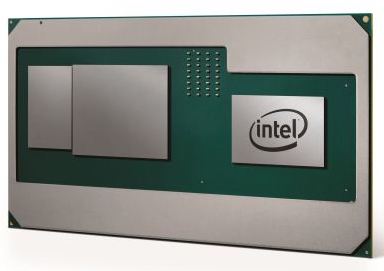
Notebookcheck
Benchmarks, information, and specifications for the Intel Core i7-8809G Laptops processor (CPU).

Notebookcheck
In an interesting development, CPU arch rivals Intel and AMD have collaborated together to create a unique new entrant to Intel's 8th generation CPU family — a combination of an Intel H-series chip coupled to a...wait for it...a custom AMD Radeon GPU with HBM2 memory!
ahh it was for nucs
 sacred seal
That's always a fun bug
 balmy flicker
not working at all
cinder lagoon
If there's still some process lingering enter taskkill /IM explorer.exe /Fbefore
balmy flicker
I am not getting the Run menu
cinder lagoon
Ohh tried opening task manager via ctrl+alt+delete
It has a run dialog in the top left
balmy flicker
no luck
I can fix it by loging out I have done this befor
but this is the first time it was because of a crash instead of me killing the program from task manager
cinder lagoon
If its fixed by relogging, my method should work
balmy flicker
it would but I am not geting task manager
sacred seal
I would try dism, I used to have a problem where explorer would crash every time I went into the "open with" tab when right clicking on things
cinder lagoon
Incase of any confusion:
open a run dialog (win+R, taskmanager top left run)
enter taskkill /IM explorer.exe /Fand press enter
open a run dialog again
enter explorer.exe
cinder lagoon
balmy flicker
it would but I am not geting task manager
Tried ctrl + shift + esc yet?
balmy flicker
ctrl shift esc does not work either
sacred seal
Should be able to run explorer.exe in command prompt as well
Though opening it without exlporer could be interesting
winkey+x might do it
balmy flicker
no luck
sacred seal
Also opening a folder from your desktop might cause the thing to restart
balmy flicker
explorer is still crashing can't use win key
cinder lagoon
Is the desktop still white-ish?
balmy flicker
yepo
cinder lagoon
If you spam click a non-responding "window" you will get the option to force quit it
cinder lagoon
Yes the desktop is a window behind the scenes
balmy flicker
I am aware but end process does nothing
cinder lagoon
I mean quitting the "troubleshooting" popup, this should do it
balmy flicker
the x and end do nothign same for cancel
 cinder lagoon
Hmm
mossy gull
Sounds like Windows needs a reinstall
cinder lagoon
Ahh hell nah, try the dism stuff first
mossy gull
Dism never worked on my side
cinder lagoon
for ($i = 0; $i -lt 5; $i++) {
    Write-Host "${$i+1} of 5"
    dism /online /cleanup-image /restorehealth
    sfc /scannow
}
powershell loop to help windows actually fix things
I always gotta run it a bunch of times before it actually does anything
balmy flicker
so how do I run stuff when my start key does not do anything and I can't even open task manager
sacred seal
Well you will have to relog/ restart first
balmy flicker
then what is the power shell for?
cinder lagoon
Windows error checking after restart
sacred seal
To hopefully prevent something like this from happening in the futrure
mossy gull
balmy flicker
then what is the power shell for?
More advanced version of Command Promp
balmy flicker
so now that I have restarted how would I run that?
sacred seal
You just open up shell and copy and paste the command
balmy flicker
k
cinder lagoon
...so did it work?
you used powershell, right?
balmy flicker
have not used it yet

also has any one knoticed that brave is having a skill now working corectly atm
I have internet and can load youtube on chrome but it will not load on brave
corection chrom will not load new tabs either
cinder lagoon
balmy flicker
Yeah, dism needs admin rights...
cinder lagoon
balmy flicker
corection chrom will not load new tabs either
At this point I recommend a full reinstall
Start powershell as admin and run it again
barren juniper
damn power color xtx for 830
also there was that microcenter deal for the xt at like 700 or something like that
balmy flicker
restarted and got the brosers working again I think them crashing is unrelated to power shell
balmy flicker
ran, came up clean looking
cinder lagoon
barren juniper
damn power color xtx for 830
The red dragons are really good cards (better than most other brands!)
mossy gull
barren juniper
damn power color xtx for 830
They go here for 650.-
 manic vale
Hi there, I am looking for a Klinke 3,5 Switch (pc to 1 Headset or 2 Speakers) u have some idears?
sacred seal
Could you be more specific as to what you are looking for? You just want a device with one audio in and two audio out that you can toggle between?
mossy gull
manic vale
Hi there, I am looking for a Klinke 3,5 Switch (pc to 1 Headset or 2 Speakers) ...
Usually audio interfaces can do that.
If you want to use both at the same time then you need a splitter.
Also Windows can switch between outputs if you have multiple outputs
manic vale
Well I want to avoid to switch output via software
so im using this so far

But it seems, the mechanic inside is goin down slowly. I have contact issues and sometimes one side of my Headset goes mute. With USB both sides work ^^ My guess is that the mechanics inside there weathering down by now
Now I look for a replace
mossy gull
manic vale
Well I want to avoid to switch output via software
You know that speaker and headphones have a different soundstage and dynamic range?
That's why companies usually opt for software switches.
sacred seal
Assuming you have enough ports on your desktop, I would just use ear trumpet (which is a piece of software)
If you want hardware, basically anything will work. There is not a lot of sofisitication in a device like that
Its basically two lightswitches glued together
mossy gull

3.5mm Audio Switcher, 2 Input 1 Output / 1 Input 2 Output Audio Splitter Switcher, Audio Switcher Box, One-Key Mute Button, No External Power Required
That's all I can find that doesbreak the bank, and works in both way apparently, but personally I don't have any experience with these devices as I use an audio interface and a software toggle. @manic vale
manic vale

Alle LiNKFOR Produkte kommen mit 18 Monaten Garantie und lebenslangen Kundensupport 3,5 mm Audio-Wähler: Dies ist ein bidirektionaler Schalter für 3,5 mm Audio-Ports. 3,5 mm Audio-Auswahlschalter für Kunden mit mehreren Audioquellen und -ausgängen. Hauptfunktionen: ① Drücken Sie die Taste auf dem...
found a similar one
sacred seal
Under the hood they are all the same
manic vale
Well I like this kind of device for practical access ^^
manic vale
sacred seal
Under the hood they are all the same
Well I think so too by now
sacred seal
Untimiatly the exact one you choose is not going to matter much, as long as its reasonably well reviewed
manic vale
well amazon revieves arent most trusted by me but a lot positive feedback has to say something at last ^^
sacred seal
No, your right that amazon reviews are not great, but typically if it is well reviewed you can be reasonably sure its not going to fall apart right away
manic vale
The eartrumpet software will be on test also i think ^^
mossy gull
manic vale
Well I like this kind of device for practical access ^^
My Avermedia AX310 has a touch display, on there I have a software toggle to switch between my soundbar and headphones.
Primarily because my soundbar is Dolby Atmos and my headphones aren't.
mossy gull
manic vale
well amazon revieves arent most trusted by me but a lot positive feedback has to...
Read what the reviews say, sometimes bad reviews are just dumb things like people expecting stuff like having all cables in the box.
manic vale
sacred seal
No, your right that amazon reviews are not great, but typically if it is well re...
I also look the hardware up in reseller stores, when they listed there its also a good thing. here in germany is conrad an example
mossy gull
@manic vale
This may interest you, it's a lot more expensive but the headphone stand from NZXT has a switch on it so it automatically switches your audio when you put your headphones on the stand.
https://nzxt.com/product/switchmix
https://youtu.be/aAqWv24tM5k

NZXT
NZXT SwitchMix PC gaming headset stand & audio mixer with seamless switching between headset & speaker audio and surround sound.

Learn more about NZXT’s Relay setup at: https://nzxt.co/RelaySC
Adam had a chance to test out NZXT's new Relay headphones, speakers, subwoofer, and microphone stand. Does their Switchmix actually make a difference? Can the subwoofer interrupt calls in other buildings? Let's find out.
Buy an NZXT Relay Gaming Headset: https://lmg.gg/zteh6
Buy N...
manic vale
Nice one, but to expensive for what I need ^^
sacred seal
I would also never trust LTT with sponsored content
mossy gull
sacred seal
I would also never trust LTT with sponsored content
I mean, people trust it faster than a random's word these days.
surreal moss
You could also look into a two channel mixer. Would take a bit to adapt things though
They start around $30 iirc
cinder lagoon
sacred seal
I would also never trust LTT with sponsored content
Well, sponsored content is explicitly not a review, just an unboxing and opinion at best
cinder lagoon
manic vale
Well I want to avoid to switch output via software
Why is that specifically?
If you had bluetooth headphones set as default output device in windows and turned them off, it would automatically fall back to the last default device besides the bluetooth headphones (the speakers, for example)
There would be a miniscule delay between that but it works fairly relaibly and also for 3.5mm jack audio equipment (although, the motherboard must support sensing if there is a device attached)
cinder lagoon
manic vale
... wait... if you have a good mic plugged into that why would you want to switch to a wired headset one? 🤔
mossy gull
cinder lagoon
... wait... if you have a good mic plugged into that why would you want to switc...
Or they have an old fashioned headset or mic.
This is why software solutions are much better, you have way more control.
surreal moss
Gonna disagree there. More flexibility maybe in some ways. Definitely not more control in all aspects
manic vale
cinder lagoon
... wait... if you have a good mic plugged into that why would you want to switc...
Its to switch between speakers and headset/mike. I just want to push a button to switch between them on the fly. Even in game etc instead of tapping out or clicking software. Well I dont know if there is software, where I can use a keybind to do the trick also. I had no other fancy thoughts with it ^^
sonic meadow
not all games like switching audio devices on the fly
manic vale
Had no trouble with this aspect so far.
 west mirage
hey
Need a new college lap top
My college gets discounts on lenovo, dell, and Mac's
I want something with very neg gen hardware, like 7000 Series AMD GPU's, and Ryzen 7000's
cinder lagoon
manic vale
Had no trouble with this aspect so far.
Tbf, your solution was handled in hardware - the games were just simply not aware of it.
If that is the case, there are programs to set key combinations as hotkeys to toggle the audio device but given that games do not like it, I would actually recommend sticking to the hardware solution
mossy gull
west mirage
I want something with very neg gen hardware, like 7000 Series AMD GPU's, and Ryz...
What's your budget
west mirage
ain't got one
@mossy gull
Something I can also game on would be nice for Star Citizen lmao
cinder lagoon
I think there are no laptops (yet?) with modern dedicated AMD GPUs..
Ryzen 5000 + NVidea dGPUs should exist tho
Yea, found some r5000 Strix laptops and an IdeaPad with r6000 + 3050Ti
mossy gull
west mirage
Something I can also game on would be nice for Star Citizen lmao
Closest I can think of is the Corsair Voyager
mossy gull

CORSAIR
Game, stream, and create with the CORSAIR VOYAGER. Built with CORSAIR performance engineering to empower your creativity while delivering an ultra-portable gaming experience.
mossy gull
cinder lagoon
I think there are no laptops (yet?) with modern dedicated AMD GPUs..
Ryzen 5000 ...
AMD hadn't released any of them.
cinder lagoon
Yea there are no r7000 laptop CPUs yet
west mirage
Also forgot to mention
I get educational discounts for lenovo and dell @cinder lagoon @mossy gull
Ryzen 5000 + the newest nvidia gpus would be nice tho
cinder lagoon
west mirage
My college gets discounts on lenovo, dell, and Mac's
Said that - tho I'm pretty positive that they don't have ryzen 5000 yet
west mirage
32gb ram is required
mossy gull
west mirage
I get educational discounts for lenovo and dell <@265895468876169226> <@29060844...
Then there's no full AMD systems, only Asus and Corsair make them.
You do have the laptops with AMD CPU and NVidia GPU.
cinder lagoon
Why do you want an AMD GPU specifically?
mossy gull
@west mirage look for the Lenovo Legion Pro 5 or Slim 5.
Those are the only Lenovo laptops that can game that have an AMD CPU.
If you go to Dell the only thing you can get are Alienware M15, M16, M17, M18.
west mirage
Alienware 🤮
mossy gull
west mirage
Alienware 🤮
Dell gaming series is way worse
cinder lagoon
Dell in general is sucky, with all their upsells and extended warranty bs
mossy gull
cinder lagoon
Dell in general is sucky, with all their upsells and extended warranty bs
Funny enough, here they're actually pretty good
Here Acer is the 1 to avoid
cinder lagoon
Gotta say where "here" is tho
mossy gull
cinder lagoon
Gotta say where "here" is tho
Netherlands
manic vale
Found a switch for my issue, was about to order then read. For 3 Pin only, checking headset 4 pin cause mic < - <
cinder lagoon
Well you can always split a 4-contact jack into mic and audio
manic vale
Mean with y cable?
But will the 4 pin will be pulled through the switch and go through the y cable that connects the switch to the PC then?
surreal moss
I would have to draw that out to understand it
manic vale
Headset/Mic > 4 Pin Cable > Switch (can only handle 3 PIN in/out slot?) > Cable to PC end in Y cable for Sound and Mic port.
The other out switch port is for my normal speakers, there would be no issue
sonic meadow
bah. ups batteries died on me... 😦
only three years old too, which is the minimum of the age ranges I am seeing online for batteries in a UPS application
mossy gull
sonic meadow
only three years old too, which is the minimum of the age ranges I am seeing onl...
If they have a lead acid battery(car battery) inside then 3 to 4 years is normal.
If they have a Lithium battery they last a lot longer but are way more expensive.
sonic meadow
One source I squinted at said 3-5 years, with a few others suggesting a bit longer. Just a bit irksome as I'm not working so would rather not have to spend the money on replacements
Of course it doesn't help that it's winter at the moment
mossy gull
Sadly this is the nature of lead acid batteries
sonic meadow
Yup
cinder lagoon
sonic meadow
bah. ups batteries died on me... 😦
What kind of UPS is it?
LiFePo4 batteries (as in most UPS) hold literal ages and are very hard to mistreat!
sonic meadow
~7Ah lead acid bricks. for a probably 20 year old APC ups
cinder lagoon
Ahhh hmm okay seems possible at least xD
sonic meadow
I got it... 15 years ago and it had just been sitting on a shelf
cinder lagoon
But the lead-acid cells are the same 20 year old things and it's just been "active" for 3 years?
And active as in "daily backup power" or active as in "been pretty much just idle"
sonic meadow
nope, these ones i bought 3 years ago. I had shelved the unit years earlier after the batteries I got with it started failing on me
as far as I am aware the power at the site is reliable. but my servers havent been going down so I dont actually know 😆
balmy flicker
I need a web cam for an interview and need recommendations
I was thinking a c270 from Logitech
sacred seal
Personally I would just get a cheapo 1080p afair off of amazon
They tend to have a bit more fisheye, but the image quality is a decent degree better then the 720
270*
barren juniper
hmm so apparently star citizen gets massive gains from x3d chips. good to know
my next build will have one
if i didnt already have a pretty decent laptop id probably consider the 5600x3d am4 ram bundles
cinder lagoon
...is it just me or is this windows download page empty in only firefox? 🤔
https://www.microsoft.com/software-download/windows11
mossy gull
cinder lagoon
...is it just me or is this windows download page empty in *only* firefox? 🤔
h...
Just on your side I think
jade scaffold
barren juniper
hmm so apparently star citizen gets massive gains from x3d chips. good to know
Yea that's not atall surprising anything to do with memory you can make better will run the mess that is star citizen better
So more cache more RAM faster RAM will all help star citizen enormously
pearl moon
barren juniper
if i didnt already have a pretty decent laptop id probably consider the 5600x3d ...
Important to note that the 5800x3d is only $100 more
But frankly if you're doing a whole new mobo build anyways, am5 might be the way to go if you can find a good deal.
cinder lagoon
pearl moon
Important to note that the 5800x3d is only $100 more
yes but 100 bucks less for great gaming performance (if you don't need the multicore stuff) is a great deal.
Also: kinda sad, its not global...
barren juniper
though id probably just get the cpu, as since the store i go to is on manhattan and you have to take the subway, id rather not have a bunch of large boxes with me
but if its just a cpu i can put that in my pocket
cerulean helm
Oi, so my pc randomly shut off while watching a video. No BSOD,, no reboot, just straight powered off.
Rebooted and went to check the event viewer to see if I could find anything and holy crap I had an error message spamming every second:
A corrected hardware error has occurred.
Component: PCI Express Root Port
Error Source: Advanced Error Reporting (PCI Express)
Primary Bus:Device:Function: 0x0:0x1C:0x4
Secondary Bus:Device:Function: 0x0:0x0:0x0
Primary Device Name:PCI\VEN_8086&DEV_7A3C&SUBSYS_88821043&REV_11
Secondary Device Name:
Did a quick search and found several posts on ASUS forums (I run a Z790 Asus board) about checking the PCIE power management setting in bios and disabling it if it its enabled.
Went and checked and yep it was enabled. Turned it off and I haven't had the error in the 20 min the pc has been on.
sonic meadow
Damnit HP/Dell. Stop shrinking your damn PSU plugs by fractions of a mm...
Tested my project laptop (dell) with a charger from a modern hp laptop. Assumed it was blue tip (since I'm pretty sure it visually was) which is 4.5mm. and after buying a 4.5mm from dell it doesn't fit, the hole is 4mm.
That's what I get for not checking the damn hole/plug with calipers first
Was hoping to get the thing charging so I could install and test the replacement screen.
Well it would help if dell actually sold something small enough to fit their own laptop... (Locally that is)
Oh wait. Ignore me. I was trying to plug it in to the headphone jack
🤦
mossy gull
cerulean helm
Oi, so my pc randomly shut off while watching a video. No BSOD,, no reboot, just...
Have you checked your systems temps?
cinder lagoon
cerulean helm
Oi, so my pc randomly shut off while watching a video. No BSOD,, no reboot, just...
try updating your chipset drivers.
cinder lagoon
sonic meadow
Damnit HP/Dell. Stop shrinking your damn PSU plugs by fractions of a mm...
Test...
if you frequently have to do with laptops without USB-C charging, I strongly recommend getting one of these barrel plug laptop kits and a variable power supply
It seems like for some reason, many laptop manufacturers literally just changed them just so its different
sonic meadow
nah, I had just fucked up when trying to plug it in.
this is going to hopefully be my new "daily" runner laptop (not that I use my laptop that often). so I wanted as un-jank for the charging as possible. I had originally planned on using an old chunky hp charger with a blue tip adaptor. but I cant find the adaptor I purchased ages ago
I am a bit irritated it doesnt have usb-c on the laptop though. its a ryzen-something so its new enough I would have expected it. but it just wasnt something I was paying attention to, it was a cheap laptop with a busted screen
jade scaffold
found a carrier board I actually like and am gonna get

Has a lil hdmi ribbon cable connector and is only 16mm thick soooo with me soon to own a 3d printer it might be time to try my hand at making a bootleg steam deck
Wonder when thoes piezoelectric electric fans are gonna become available for normies would be awesome to have for a hand held
cinder lagoon
jade scaffold
Wonder when thoes piezoelectric electric fans are gonna become available for nor...
Fo sho
jade scaffold
Hoping this carrier doesn't die on me
mossy gull
jade scaffold
Wonder when thoes piezoelectric electric fans are gonna become available for nor...
If they ever become available, so far everything that's been an amazing PC invention so far has been cancelled because nobody liked them
jade scaffold
Nah these have real advantages
Quieter more efficient In cooling and power consumption
I very much would expect them to show as a real thing considering when we saw them last they were gearing up for production
they are also turbo reliable
like lowkey can last for 5 years and beyond with only the filter needing to be replaced and the filter is just a cheap paper filter
also they are backed by intel and Qualcomm so they got some really big names behind them
cerulean helm
mossy gull
Have you checked your systems temps?
Temps were fine, both the cpu and gpu are watercooled. And other than a newer Bios, my all my drivers are up to date.
mossy gull
I love German logic
 mossy gull
cerulean helm
Temps were fine, both the cpu and gpu are watercooled. And other than a newer Bi...
mossy gull
cerulean helm
Temps were fine, both the cpu and gpu are watercooled. And other than a newer Bi...
Even Chipset drivers?
cinder lagoon
Because the dvice ID is specifically an Intel PCI Express root port - maybe check for more up-to-date drivers on the intel side
cinder lagoon
...yeah, great Microsoft. I wanted two Anti Virus interfaces...
 cerulean helm
mossy gull
Even Chipset drivers?
cerulean helm
mossy gull
Even Chipset drivers?
Yup, up to date from the Asus support page. Nothing listed to update on Armory Crate either, nor using Intel Driver and Support Assistant.
cerulean helm
cinder lagoon
Because the dvice ID is specifically an Intel PCI Express root port - maybe chec...
Its been 2 days since I turned off Asus PCIE Power Management in the Bios and have not seen that error message return since.
And using Intel Driver and Support Assistant shows nothing needs to be updated.
inland dove
Would this work if I'm using a CPU with integrated graphics?
 mossy gull
inland dove
Would this work if I'm using a CPU with integrated graphics?
mossy gull
inland dove
Would this work if I'm using a CPU with integrated graphics?
Depends, what CPU are you using?
inland dove
Intel Core i3-1005G1, in my laptop.
I did set the priority to above normal and it did improve my game's performance by a bit.
But didn't want to go beyond that.
I'm running off integrated graphics.
mossy gull
inland dove
Intel Core i3-1005G1, in my laptop.
Keep in mind, some older games don't understand when you use an Intel iGPU because it lacks VRAM.
And if the game runs I doubt that high priority will make a huge difference because that's just for the CPU, not GPU.
inland dove
So I didn't know if that would break anything if I limited it's cores.
inland dove
mossy gull
Keep in mind, some older games don't understand when you use an Intel iGPU becau...
No dedicated GPU.
Would limiting it to only one core help or potentially break anything?
mossy gull
inland dove
So I didn't know if that would break anything if I limited it's cores.
It won't
mossy gull
inland dove
Would limiting it to only one core help or potentially break anything?
Depends on the game, all Windows does is moving the game's processes to 1 core.
inland dove
EAW is an old game and from what I've been told it can only utilize one core.
Is there a way I can tell what cores are doing what?

This probably wouldn't help my performance.
With this CPU.
mossy gull
inland dove
Is there a way I can tell what cores are doing what?
There is, but it'll probably break your mind more than it answers stuff as all your programs jump between the cores unless you aks them specifically to stay on 1.
 inland dove
What does that mean?
surreal moss
It's a fancy trick to get double the amount of work out of each core
mossy gull
inland dove
What does that mean?
Eh kinda hard to explain, but hyper threads are slower than the actual core.
surreal moss
Basically it's a way to have a physical core give you two virtual ones
inland dove
So If I wanted better performance I would have the game only using 0 or 2?
surreal moss
You don't normally have to understand much beyond having 4 cores to work with
well... 0 wouldn't work to well for you
oh, if the game isn't written to handle more than one core then you're limited to your cpu speed
mossy gull
I usually explain an hyper thread as a rush-hour lane on a highway, but we probably only have those in the Netherlands 😃
inland dove
The game can only do single core to my knowledge.
surreal moss
SPOILER: ||Netherlands isn't the only place with those||
surreal moss
inland dove
The game can only do single core to my knowledge.
Then unfortunately more cores won't help you there
mossy gull
surreal moss
SPOILER: ||Netherlands isn't the only place with those||
Wait, other countries have them too?
I literally never seen them outside the Netherlands 🤣
inland dove
I'm going to try and set it to using core 2 only.
That way maybe I can squeeze a bit more performance out.
Setting the priority to above normal actually did make the game run a little smoother and I haven't noticed any detrimental side effects to doing that yet.
surreal moss
Just read through. You're trying to improve performance of EAW on a laptop?
surreal moss
and your base speed is 1.2 GHz? That is technically slower than the min spec requirements for EaW
so increasing the priority makes sense that you would see improvement
but I'm not sure you'll be able to get it "perfect"
inland dove
The game runs fine in battles, but I've been testing for the new Big GC map for AOTR and it's really been a tough time with the poor performance on the GC map.
surreal moss
Yeah that likely isn't going to get better from what I'm reading
mossy gull
surreal moss
and your base speed is 1.2 GHz? That is technically slower than the min spec req...
1.2GHz now is miles faster than the probably 3GHz from back then though.
surreal moss
Changing cores won't make any difference
inland dove
From what I read it's more a fix for higher end systems or CPU's with more cores but I think it's worth trying.
mossy gull
Sims 4 requires a 3.2 GHz 2-core Intel 3rd gen CPU, but my SB2 1.9 GHz 4-core 8th gen, while speed is under spec, blows the Intel 3rd gen out of the water.
surreal moss
How much memory do you have?
surreal moss
mossy gull
Sims 4 requires a 3.2 GHz 2-core Intel 3rd gen CPU, but my SB2 1.9 GHz 4-core 8t...
That's probably multithreading working in your favor
inland dove
I have 12gb at 2667MHz
mossy gull
surreal moss
That's probably multithreading working in your favor
Or IPC improvements of the CPU
surreal moss
Nice
inland dove
RAM was bottlenecking me before I upgraded but now it's my CPU that's bottlenecking my whole system.
A lot of games will push my CPU utilization to 100% or close to 100%.
mossy gull
surreal moss
That's probably multithreading working in your favor
The i3-3220 Sims 4 requires has a single core score of ±1700, the SB2 i7-8650u has a single core of ±2100.
Even though on paper the i3 is almost 1.5 times faster, it's actually slower thanks to generational leap.
So Cheesy's CPU is probably fast enough for the game they want to play, especially because it's an older game.
inland dove
My game performance seems to have been improved in space battles.
GC map is still pretty laggy though, but I don't think there is any fixing that without just building a desktop system with better components than what is in my laptop.
mossy gull
@inland dove does your CPU support DDR4?
mossy gull
From time to time I get broken laptops from people because I reuse some components.
If I come across a 16GB RAM stick I don't mind sending it up
inland dove
I appreciate the offer.
But I think I'll end up just saving for a desktop system and not worry about upgrading the laptop further.
inland dove
inland dove
My game performance seems to have been improved in space battles.
It's possible that this small performance boost was the result of setting this priority to above normal and not forcing it into core 2 though.
I'm not 100% sure, maybe a little bit of both.
mossy gull
I usually throw away or give away RAM sticks
To me they're the most useless components to resell.
Literally if I sell them to a nearby shop I get 5.-, if I sell them to people I get scammed
inland dove
ooh that's interesting
I restarted my game and it reset the changes I made.
I think setting it to core 2 made it worse.
It's hard to tell.
It's probably not worth worrying about too much.
mossy gull
inland dove
ooh that's interesting
I restarted my game and it reset the changes I made.
Yeah, to permanently save the changes you have to change something in the registry, but if you're not comfortable with that I wouldn't recommend it.
As doing something wrong can brick Windows.
mossy gull
inland dove
I'll be headed on my way now.
Stay safe
mossy gull
inland dove
I wont brick my laptop (hopefully)
Just don't
mossy gull
Why, just why......
https://www.reddit.com/r/computers/comments/14v79dq/can_anyone_identify_what_cord_im_missing/?utm_source=share&utm_medium=android_app&utm_name=androidcss&utm_term=1&utm_content=1
reddit
0 votes and 22 comments so far on Reddit
cerulean helm
Ugh, why is it so hard to find a pcie 4.0 to m.2 expansion card that has its own chipset on it for lane bifurcation that doesn't cost $500.
I can find pcie 3.0 expansion cards just fine for $200 or less.
sonic meadow
well if its got a chipset its probaly not doing lane bifurcation but lane switching, and those chips are expensive
cerulean helm
This one is pcie 3.0 and has the chipset on it and is on sale for $180. They just don't make one pcie 4.0.
Only one I found that is, has 8 m.2 slots and costs $800.

The I/O CREST SI-PEX40129 is a great accelerated secondary storage solution for any workstation with true PCIe 3.0 x8 bandwidth (x16 Interface). It has two M.2 NVMe ports to accept two NVMe M.2 SSDs, so each NVMe M.2 SSD has dedicated PCIe 3.0 x4 bus bandwidth. It delivers transfer speeds 20 time...
sonic meadow
sounds about right tbh
cerulean helm
I need one thats pcie 4.0, with chipset and only 2 m.2 slots,
sonic meadow
that means its not doing bifurcation you silly product...
 cerulean helm
No, that means it does not require the motherboard to have pcie lane bifurcation.
Because it has its own chipset.
Unlike the Asus Hyper m.2 carrier I have that does require motherboard to have lane bifurcation.
 sonic meadow
ah, yup thats definitely a pcie switch
nothing bifurcation going on there at all
supports up to twelve downstream devices over 16 lanes
cerulean helm
It would enable me to install 2 m.2 drives into a single pcie slot and use both drives.
sonic meadow
here you go 😆 https://www.sonnettech.com/product/m2-8x4-pcie-card/overview.html
8 slots m.2 gen4 😛
Eight M.2 NVMe SSD slots on a PCIe 4.0 x16 card. Silent operation. Add your own ultra-fast SSDs for Mac, Windows, and Linux.
cerulean helm
Thats the $800 card I was talking about earlier. Way to expensive and I don't need 8x drives.
sonic meadow
well do you Need gen4 speeds?
cerulean helm
The drives are gen 4, and the board has gen 4 (and 5 for the first slot), no point in not getting an expansion card thats gen 4 otherwise I'm just underutilizing a main feature.
sonic meadow
ahh, so you just want gen 4 but dont actually have a need for it.
ssds for consumer applications dont usually get much benefit from the higher bandwidths. we arent usually i/o limited by that point, typically processing limited (because we arent just copying stuff in to ram)
cerulean helm
Well this is interesting, Samsung Magician is not showing one of my drives having a volume, yet it shows up in disk management in windows and I have over 200 gb of data currently on it. Thats kinda weird.
Ah, its cause that drive is a dynamic drive.
mossy gull
cerulean helm
Ugh, why is it so hard to find a pcie 4.0 to m.2 expansion card that has its own...
Look for a RAID card
jade scaffold
Me and my inability to use the extra 8tb of SSDs in my pc because I don't got the pcie lanes
mossy gull
jade scaffold
Me and my inability to use the extra 8tb of SSDs in my pc because I don't got th...
RAID controller
mossy gull
Fair enough
jade scaffold
Like £700 unless you wanna import from China
Is rather not have to spend £1400 on just raid controllers I'll take my chances getting a new cpu platform
Besides I do need better single thread performance my 3090 is bottlknecked most of the time
mossy gull

Checkout iFixit's toolkits at: https://www.iFixit.com/LTT
The Thermaltake Smart 600W is the most popular power supply on Amazon... but that doesn't mean it is good.
Discuss on the forum: https://linustechtips.com/topic/1518710-why-is-everyone-buying-this-power-supply/
Buy an EVGA 450 BR PSU: https://geni.us/qAuje2
Buy a Seasonic Prime TX 650 ...
cerulean helm
mossy gull
Look for a RAID card
Still expensive af, like why are all of them over $350 for just a dual m.2 card?
mossy gull
cerulean helm
Still expensive af, like why are all of them over $350 for just a dual m.2 card?
Be happy, in the Netherlands the cheapest I can find is €500.-
Sadly in my server I needed 2 of them.
 stiff wing
Afternoon, been looking around for a new modern-ish gaming computer for $800 USD. Been looking at Microcenter mostly, but thought I would ask here for suggestions before I pull any triggers.
mossy gull
stiff wing
Afternoon, been looking around for a new modern-ish gaming computer for $800 USD...
My personal advice would be to save up more till you can get a PC with at least 12GB VRAM GPU.
There's games that run poorly with 8GB or less.
stiff wing
personally I just want a card with more than my current 2GB right now
could go intel a770...
mossy gull
stiff wing
personally I just want a card with more than my current 2GB right now
What's your overall system spec?
stiff wing
right now or what I'm looking at?
mossy gull
stiff wing
right now or what I'm looking at?
What you currently have
stiff wing
I7-7700
16GB duel channel memory
Some crap HP motherboard
1TB M.2 SSD
GTX 1050
all in a non expandable case
think the psu is hp as well, non expandable
hence the thought of just getting a new prebuild
mossy gull
stiff wing
I7-7700
16GB duel channel memory
Some crap HP motherboard
1TB M.2 SSD
GTX 1050
If you have a decent enough PSU(below 500w), go with the AMD RX 6700XT if you want to save money, or if you have more than a decent PSU like 500w or more get the AMD RX 6950XT.
Yes they're last gen GPUs, but they pack a punch
stiff wing
by non-expandable psu, I mean they have the bare minimal cables to run it as is, gpu is motherboard powered
mossy gull
stiff wing
by non-expandable psu, I mean they have the bare minimal cables to run it as is,...
Does the motherboard have a 24-pin cable on the right side of the board?
mossy gull
stiff wing
it's mini-ITX I think
Doesn't matter ATX, M-ATX and ITX have them
stiff wing
the case is crap, the psu is crap, the motherboard is crap, and back to my just replace it
it's a 180w unit
mossy gull
stiff wing
the case is crap, the psu is crap, the motherboard is crap, and back to my just ...
Trust me, an 800.- "gaming" pc is also crap.
mossy gull
But if your motherboard has an 24-pin motherboard cable, then you can replace the PSU for an 850w
sacred seal
You can get a very decent piece of kit for 800 if you self build
mossy gull
stiff wing
this seems good to me
Just know majority of very cheap PCs have shitty PSUs and motherboards, it's how they keep the cost down.
So don't expect much.
sacred seal
You get more value for your money, and you generally get something that is upgradeable.
stiff wing
I'm aware of the possibility, one sec I think I had a list somewhere
sacred seal
I would guess that that pre-built would be 2-3x faster than what you currently have
mossy gull
sacred seal
I would guess that that pre-built would be 2-3x faster than what you currently h...
They are
But I thought if they could keep the PC a bit longer, then they can have a much faster GPU
stiff wing
stiff wing
mossy gull
But if your motherboard has an 24-pin motherboard cable, then you can replace th...
I understand your argument but it's a LGA1151
sacred seal
Odds are if it takes a single slot cards it's not a standard psu
mossy gull
stiff wing
https://www.microcenter.com/site/content/custom-pc-builder.aspx?load=d3b98b6a-b7...
I would get the previous 1, and maybe later switch out the motherboard.
stiff wing
Well the goal was to get on am5 and not be end of life on am4
sacred seal
The parts list is not awful, but I would not touch that case with a 10ft pole
Speaking from experience
stiff wing
cheapest I could find at microcenter, could reuse the 15 year old one next to me
mossy gull
I also would avoid cheap MSI motherboards, I had too much problems with them after 1 years of use.
sacred seal
I'm on mobile rn so I can't mock up an alternative
mossy gull
From dead PCIe slots, to dead RAM slots, to dead SATA ports.
stiff wing
I remember wasted saying the other day the industry as a whole has a reputation problem
sacred seal
Yea, you refuse to buy from a shitty vendor, you can't buy anything
mossy gull
Cheap MSI boards are the worst, I personally had more luck with cheap Asus and Gigabyte boards.
sacred seal
That's why you look at the skew level.
stiff wing
I think I have some months old list somewhere...
mossy gull
Last MSI board I worked with, was an Tomahawk, had 3 of 4 dead RAM slots and 5 out of 6 dead SATA ports, 2 year board by the way, oh, the M.2 was self destructive.
stiff wing
here it is, better?
https://pcpartpicker.com/list/z8hJY9
Part List - AMD Ryzen 5 7600, Radeon RX 6600, Cougar MX330 ATX Mid Tower
the gpu likely needs to be changed
mossy gull
The other PC you send, the crappy 1 has a much faster CPU and tad faster GPU
But I don't know what parts they used.
sacred seal
The mx330 is a way nicer case then what you had before
sonic meadow
cerulean helm
Still expensive af, like why are all of them over $350 for just a dual m.2 card?
Because they have a chip on them that costs like 100-200 dollars
mossy gull
@stiff wing
I did this very quickly, I have to get back to sleep soon.
https://pcpartpicker.com/list/bvcymr
Part List - AMD Ryzen 5 5600X, GeForce RTX 3060 12GB, Corsair 4000D Airflow ATX Mid Tower
You maybe can find a cheaper PSU, motherboard and case to keep the cost down, CPU comes with a cooler so don't worry about that
The 3060 is a bargain and actually has VRAM for days
You also can find Windows keys only fir like 20.- instead of 150.-
@sacred seal is this list maybe a better choice?
stiff wing
that looks good, I will consider it
sacred seal
That's closer to how I would part it out
stiff wing
alright, was thinking it was too early to go to am5 anyways
$90 case? nm, I'm sure I can find something with mesh filter for cheeper
mossy gull
stiff wing
$90 case? nm, I'm sure I can find something with mesh filter for cheeper
I tend to stay with Corsair and NZXT, but you probably can find cheaper.
stiff wing
I would as well, but case seems like the least bad thing to drop price on
mossy gull
@stiff wing NZXT H5 flow should be cheaper
jade scaffold
Fractal do good cases and some of the really cheap phanteks too
I'm also gonna need to solve my up and comming psu problem
cinder lagoon
stiff wing
I would as well, but case seems like the least bad thing to drop price on
what makes cases expensive is the development process:
- You need to ensure compatibility!
- You build many, many systems in them and look for things that could be improved (more space for plugging in cables, better maintainability, etc.)
The more expensive a case is, the better it was tested (and it actually makes a huge difference, as you find out by buying really cheap cases)
I would recommend just waiting on getting at least a medium quality case or buying used (but make sure all screws etc are included!)
You don't actually need a case right away
ionic tusk
The NUC going away is hard on me lol
Just convince my company to get some nuc extremes for convention pc
Ik they said they divest and will support partners in making NUCs
Just wondering do I have to pivot to a different PC I have to procure like atleast 4 more they do say they will support existing customers
 vestal stirrup
This might be an odd question but trying to find the correct description/name of my hobby. I do a lot of homeserver stuff, things like proxmox and such, so a mix of hardware and software experience. If I were to do that as a job, what role would that fall under?
sacred seal
Server admin/tech
vestal stirrup
sacred seal
Server admin/tech
Can I expand on that?
stiff wing
What do you mean expand?
vestal stirrup
Like does it fall under just that category or can it fall under other other sectors?
surreal moss
Depending on the size and market of the company you’re looking at the job role will be as specific as shadow started out as broad as Systems Administrator
stiff wing
Well, last day of prime day sale and I come to realise most of the recomended list is not on sale. Plus add windows which is $120 I... I can't spend a $1000 on this. Plus my friend insists I get a prebuild. I just... what I am trying to say is does anyone have any suggestions for a system like what was recommended but with prime day sales?
cinder lagoon
vestal stirrup
Like does it fall under just that category or can it fall under other other sect...
I'd say "Network infrastructure admin" - I do something similar, except I also have the roles "Internal processes" and "Tech Support"...
cinder lagoon
stiff wing
Well, last day of prime day sale and I come to realise most of the recomended li...
not using prime day nor buying prebuilt.
Both will make you pay way more than neccesary.
I suggest you try sites like NewEgg or micro center or more local Stores (depending on your location, i have "NoteBooksBilliger.de" as an example) because if it's primeday they often have actual sales, not the fake amazon ones where they pump shit up a week earlier.
But you should look on pcpartpicker for your configuration because they support many retailers and also rebates.
Also: I've never really paid for Windows 10 Pro, I always went for the ebay bulk-sale-leftover keys for like 10 bucks
On another note:
I'm having problems with c++ which seemingly don't make sense:
class Specification_Info {
  unsigned int SI;
public:
  Specification_Info(unsigned int BitMap) {
    SI = BitMap;
  }
};

class Battery {
private:
/*
  */
  unsigned int designCapacity() {
    return SMB.fetchWord(address, 0x18);
  }

  /*
    */
  unsigned int designVoltage() {
    return SMB.fetchWord(address, 0x19);
  }

  /*
    */
  Specification_Info specificationInfo() {
    return Specification_Info(SMB.fetchWord(address, 0x1a));
  }

public:
  uint8_t address;
  unsigned int DesignCapacity;
  unsigned int DesignVoltage;
  Specification_Info SpecificationInfo;

  Battery(uint8_t Address) {
    address = Address;

    DesignCapacity = designCapacity();
    DesignVoltage = designVoltage();
    SpecificationInfo = specificationInfo();
  }
};
However I get the following error message:
C:\Users\Chaos02\src\SmartBatteryInterface.cpp: In constructor 'Battery::Battery(uint8_t)':
C:\Users\Chaos02\src\SmartBatteryInterface.cpp:350:41: error: no matching function for call to 'Specification_Info::Specification_Info()'
   Battery(uint8_t Address) {
                                         ^
C:\Users\Chaos02\src\SmartBatteryInterface.cpp:233:3: note: candidate: Specification_Info::Specification_Info(unsigned int)
   Specification_Info(unsigned int BitMap) {
   ^~~~~~~~~~~~~~~~~~
C:\Users\Chaos02\src\SmartBatteryInterface.cpp:233:3: note:   candidate expects 1 argument, 0 provided
C:\Users\Chaos02\src\SmartBatteryInterface.cpp:230:7: note: candidate
Maybe someone has some idea?
sonic meadow
  Specification_Info specificationInfo() {
    return Specification_Info(SMB.fetchWord(address, 0x1a));
  }
``` should this be `return new Specification...` instead?since you dont have a function anywhere public with the name you are calling. its only as a method on a class
and you werent calling it on an instance of that class
cinder lagoon
...wait I want to construct a new Specification...
I should say I'm coding arduino rn and they seem to have changed some syntax some bit to make it more beginner friendly so that you don't use a new Keyword afaik
I just want to call the public constructor of SpecInfo
sonic meadow
new calls the constructor iirc
its been a while since I have done any c++ admittedly
and the arduino stuff (if going through the arduino ide) is a bit special
or was at one point 🤔
sonic meadow
can you post the relevant snippet of the class and how it was called?
just to see if you are doing something different
cinder lagoon
Pastebin
Pastebin.com is the number one paste tool since 2002. Pastebin is a website where you can store text online for a set period of time.
note that i had commented the problematic bit out by now
sonic meadow
I said relevant snippet 😛 I didnt really want to fish through 500 lines right now 😆
battery_mode looks to be doing the same thing 🤔
cinder lagoon
ohh I forget that ctrl + click and find all references doesnt exist on pastebin ^^'
relevant lines are:
- 83 class Battery_Mode
- 178 class Battery_Status
- 230 class Specification_Info
- 339 Battery Public parts
- 364 BatteryMode()
I've already tried setting the Spec field directly with the constructor but same result
sonic meadow
honestly I cant see why its not working /shrug
vestal stirrup
cinder lagoon
I'd say "Network infrastructure admin" - I do something similar, except I also h...
There are so many different labels now
cinder lagoon
Fellow Windows fixers, what do you think?
https://www-deskmodder-de.translate.goog/wiki/index.php?title=Windows_11_Inplace_Upgrade_Reparatur_oder_Feature_Update&_x_tr_sl=auto&_x_tr_tl=de&_x_tr_hl=en&_x_tr_pto=wapp
(Google translate Website Link)
Deskmodder Wiki
I for one think it's a very welcome addition but I would really like to know what it does - I hope they document it soon on the Microsoft website
 cinder lagoon
jade scaffold
https://nothing.tech/products/phone-2?variant=41493187756171
cinder lagoon
jade scaffold
https://nothing.tech/products/phone-2?variant=41493187756171
you seen the first one? its almost exactly the same - if you don't need the greatest camera get the first one instead for way less money!
i have it and its great
surreal moss
That sounds like the better option. Figure if I’m spending that much might as well stick with iphone
cinder lagoon
just their OS is a few sometimes a tiny bit wonky
cinder lagoon
cinder lagoon
## On another note:
I'm having problems with c++ which seemingly don't make sen...
if now there are any c++ gurus here - any input on this convo?
surreal moss
Been a long time for me but I think I’d be looking at the initial declaration of Specification_Info
cinder lagoon
Read the other couple messages following - I already answered most of the questions here
jade scaffold
the issue with the Nothing 1 is the poor battery life and the RAM
the main issue with my current phone is it doesnt have alot of ram
so everythings a bit sluggish
especially when i got all my work stuff google and discord open
cinder lagoon
jade scaffold
the issue with the Nothing 1 is the poor battery life and the RAM
what do you mean poor battery life??? mine literally lasts me two full days before I need to recharge it and I use it 3-4 hours a day
cinder lagoon
jade scaffold
the main issue with my current phone is it doesnt have alot of ram
phone two has the same RAM options - 8G and 12G
cinder lagoon
jade scaffold
so everythings a bit sluggish
nothing (hah) on it is sluggish. nothing gets in the way. The OS sometimes has a little hang up when dealing with login or power button
biggest feature for me: not bloatware
jade scaffold
cinder lagoon
what do you mean poor battery life??? mine literally lasts me two full days befo...
20hr of battery life vs 25 hr and it's processor is also the same one in my current phone which is ok but not particularly great again when dealing with things like chrome and discord and such being open at once
Does the nothing 1 have dual sim?
surreal moss
cinder lagoon
Read the other couple messages following - I already answered most of the questi...
I’m talking about the class, mot the constructor
cinder lagoon
surreal moss
I’m talking about the class, mot the constructor
the entire file is in the pastebin link following
cinder lagoon
cinder lagoon
https://pastebin.com/QYBvG7HT fo sho
here
cinder lagoon
jade scaffold
20hr of battery life vs 25 hr and it's processor is also the same one in my curr...
yes, dual sim - everything I had open at once ran fine but I do not do heavy multitasking
jade scaffold
aparently the nothing phone 2s software is alot better too but i heard somthing about them migrating the newer software to the nothing 1 too
so ill wait a bit see what happens
cinder lagoon
there is neither a guarantee that they'll do that nor a statement - quite the opposite: they "don't know wether they'll do it or not"
Its not such a big deal tho
jade scaffold
kinda is a big deal to me the software of the Nothing 2 is whats selling it for me the better CPU and battery life are great too but the software of the nothing 1 is natoriously a little jank and ive had enough a little jank from my current phone
cinder lagoon
I wouldn't really bet that its less jank but I wasn't very invested in the phone 2
jade scaffold
Yea I should probs wait for it to come out proper and see what people think of it
cinder lagoon
you could also go on the Nothing Discord but odds are that your opinions (by each one) will be skewed, if getting multiple tho probably an accurate image
jade scaffold
i really like how the apple esque design look i want good battery life and a phone that can handle me having far more than is reasonable numbers of things open at a time
Wait i can get a student discount on it
cinder lagoon
ouhh damn nice
mossy gull
$900.- costing 32:9
https://youtu.be/ZBnk09mW58k

Level up your desk game! Check out the Secretlab Magnus Desk Pro: https://lmg.gg/kdg6f
LG is back with a new ultragear that features local dimming, HDR, and a 240Hz refresh rate, but does it handle any of it well? With a high price point and interesting labs results, Plouffe is here to see if LG's newest ultrawide is worth your time.
Buy an LG...
mossy gull
It's a really decent display for currently 900.-
Ofcoarse it ain't the best, but if you want local dimming zones you'll already pay at least 500.- extra.
ionic tusk
I Hate SAP not user friendly lol when the interface changed I had no save button
jade scaffold
SAP is a nightmare
also

new phone
wasnt sure how much longer my student discount was gonna last considering ive long since finished college now
 cinder lagoon
Noice but its significantly more gray than I thought it to be
jade scaffold
yup its very much grey
though honestly lighting conditions really do effect what it looks like
mossy gull
I discovered something.....nice?
If your system has an AMD APU or CPU with iGPU and an AMD dGPU.
When the GPU uses shared memory, it 1st uses the 512MB VRAM from the APU or iGPU
Also, there's a rumour where AMD 8000 series APUs will have 40 CU Navi 3.5 GPUs, that's stronger than the RX 6700 which has 32 CU Navi 2 GPU.
Which is insane.
cerulean helm
I'd say my OC and undervolt is quite successful.
Max 1 P core 6ghz with the next 2 at 5.9, 5 P cores at 5.8 and the last 3 maxing at 5.7. All E cores at 4.4.

This is on a 13700k.
jade scaffold
mossy gull
Also, there's a rumour where AMD 8000 series APUs will have 40 CU Navi 3.5 GPUs,...
as well as being guarenteed to be total bs
as the most powerfull amd APU at the moment is the ones in the current gen consoles which uhhh arent even close to that fast despite having Enormous power budget dedicated to graphics
so unless AMD are gonna build a APU that pulls 200w which is very unlikely i doubt we'll see such a thing
not to mention where the hell is that kinda GPU meant to be fit
theres not all that much room on AM5 chips as is for chiplets and you cant really rearrange the chiplets too easilly to make more space for a dedicated GPU
also CUs are very poor representers of rendering performance
when comparing I GPUs to desktop GPUs because desktop GPUs also have a metric shit tonne of stream procesors and APUs generally have alot less
sonic meadow
there is also another big different between dGpus and iGpus, the memory bandwidth. vram is setup in such a way to get massive bandwidth, especially compared to a systems main ram
jade scaffold
yea that too
and overall clock speed
mainly because of vastly reudced power concumption
as having a too power hungry gpu sat practically next to your CPU will kick the CPUs performance in the balls
sonic meadow
thats an implementation detail really. they could have higher power targets, but you have packaging issues, as well as sharing it with the CPU. plus of course with the reduced memory bandwidth they dont work as well inteh first place
jade scaffold
the Ultimate APU is one with onboard memory
sadly to make such an APU youd have to sacrifice one CCD to the GPU gods
and find somewhere to cram some HBM
then you could actually have a ultra efficient APU especially if you use the Cut down version of x86
sonic meadow
sonic meadow
there is also another big different between dGpus and iGpus, the memory bandwidt...
wikipedia has the bandwidth of DDR5 listed at 32-64GB/s, where the RX 7600 has a memory bandwidth of... 288GB/s
jade scaffold
and 288GB/s for a GPU is also still really fukin low
the higher end bois range closer to the 1000GB/s
sonic meadow
yeah. I deliberately grabbed a "cheap"/lower end card for my comparison
the 7900 xtx is 960GB/s
jade scaffold
yea
though again in theory not impossible for AMD to make a baller APU i mean they already made the MI300 they could in theory super shrink the concept
but a smaller AM5 varient with how crammed it would be comparitivly would run HOT
i mean youd have CPU cores a GPU HBM the IO Die all crammed into a space maybe 2cmx2cm
sonic meadow
the 7600 core is only about 15mm square, (204mm^2), which is plenty fittable on an am5 pcb. though as you said without one ccd
jade scaffold
yea it could fit
though you couldnt fit it in place of 1 CCD its still even too big for that
sonic meadow
I always thought it would be more interesting to try with the TR platform though, you have the much bigger socket, and the extra memory channels (4 early, 8 on TR pro I think) to help with that issue
jade scaffold
people under exstimate how much space is under that heat spreader
jade scaffold
sonic meadow
I always thought it would be more interesting to try with the TR platform though...
well on the Epyc platform we do have MI 300
sonic meadow
oh yeah, that thing
jade scaffold
128gb of HBM3 24 CPU cores

its got alot of GPU tiles
i think 3 of tyhem if i remember correctly
14k shading units 880TMUs 220 Compute units
oh and just a tiny power draw of 600w
sonic meadow
heh
and thats why... watercooling (also this is a blade, which have space constraints... but whatever)


 sonic meadow
die shrink the io chiplet
jade scaffold
that would be expensive
you'd have to shrink it
move it to the side move 1 CCD right next to it
then under it you would have to have a GPU tile and then a HBM tile
tbh in theory a HBM tile of that size could be like 64gb or 32gb or somthing which is a hell of alot of built in RAM
and would be especially good as a shared pool
i wonder how HBM3 compares to L3 cache
sonic meadow
higher latency if nothing else I would be guessing
HBM gets its bandwidth by being silly wide right? even more so than GDDR implementations
jade scaffold
yea
8192bit or some shit
which like obliterates anything GDDR does
GDDR tops out at 1024bit
and 1 module of HBM3 alone is only 100 GB/s short in data trasfer rates of a 7900xtx
which is crazy
which means with chips of HBM3 on something youd be doing like 1.7TB/s which is a frankly absurd ammount
sonic meadow
jade scaffold
i wonder how HBM3 compares to L3 cache
though cache doesnt always compare in a meaningfull way (its usually more latency tied, not always especially wide)

not mine, just what I found when digging online
mossy gull
jade scaffold
so unless AMD are gonna build a APU that pulls 200w which is very unlikely i dou...
The 6800M uses around 100w.
The CPU part only has to pull 45w.
So you actually already can make a powerful APU.
mossy gull
CPUs these days pull more than that these days funny enough
And X3D chips usually sit around a snuggly 35-45w when gaming.
So AMD could pull off a very powerful APU
jade scaffold
except for they cant because they cant fit much on an AM5 CPU
the best apu currently is pathetically weak if you compare it to any modern dedicated GPU
it doesnt even compete with a 4 gen old mid range gpu
excluding the MI300 that is but the MI300 is missing most features that a GPU has making it kinda hard to call it a GPU because it cant actually do graphics
sonic meadow
it will also cost more than a top range gaming rig. on its own
mossy gull
jade scaffold
except for they cant because they cant fit much on an AM5 CPU
The RX 6800M is tiny, like as big as a single CPU die.
mossy gull
It's small, my laptop has 1, it fits in a CPU package
sonic meadow
335mm2, or a 18.3mm square
jade scaffold
then youve been ripped off because its 335 square mm
sonic meadow
which would you believe is a similar area to cpu silicon?
jade scaffold
the CCD on Zen 4 is 70mm2 squared
sonic meadow
however the package area is more tied to pin count than silicon area
jade scaffold
this is true
but you need thoes pins
you cant just like shrink the pin area without quadrupling the cost
sonic meadow
I could fully see a 6800m having a similar package area to a laptop cpu
jade scaffold
thats bacause laptop CPUs are Monolithic though
sonic meadow
heck, most of the laptop chips I have seen have been similarly sized
jade scaffold
yea
a 6800m would fit on an AM5 CPU
but you couldnt then have an IO die or and CPU cores or any onboard memory
meaning its gonna be turbo bottleknecked by lack of memory bandwidth and also then its just a GPU in a CPU socket not an APU
mossy gull
What about, we'll see what happens.
The Navi 3.5 40CU can be the same size if not smaller than the 6800M
jade scaffold
so no we cant have turbo powerfull APUs unless AMD shrink the IO die drop a CCD and cut the size of their current GPUs into a 3rd their origional size
which last i checked it was literally not possible to go 3x smaller than than what we currently have without running into serious issues electrons
sonic meadow
well we could have turbo powerful APUs, but it wouldnt be using their desktop/laptop chips. it would still be a cut down version of their larger siblings
which they have done before.
jade scaffold
and it would still likely loose to a 4 generation old desktop GPU
sonic meadow
admittedly they let intel do the CPU on Devils Canyon
or was it a different one? I dont really remember anymore
mossy gull
The 6800M is a pretty powerful GPU though, in some games as powerful as the 6700 if not the XT variant.
jade scaffold
yes it is
but you cant shrink it by 3x the size
which is what would be nessesary to cram it onto a CPU package
unless you are fine having it utilise main memory for its memory
sonic meadow
at a third of the size you have a 6550m (107mm2)
jade scaffold
which will kick its performance so hard in the balls you may as well just buy a second hand 1080
mossy gull
But if the 40 CU Navi 3.5 is the same size as a 32 CU Navi 2, then you could fit it in a CPU/GPU package
sonic meadow
jade scaffold
which will kick its performance so hard in the balls you may as well just buy a ...
at which point you have to package a full discrete gpu
jade scaffold
mossy gull
But if the 40 CU Navi 3.5 is the same size as a 32 CU Navi 2, then you could fit...
CUs are awefull representers of performance
especially for rendering
mossy gull
jade scaffold
CUs are awefull representers of performance
All they said was 40 CU Navi 3.5 at 2.5GHz.
jade scaffold
who said this
is it from any reputable source or is it just from one of thoes hardware channels that over hype literally everything that might come out
so far the only APU i can find that might end up having 40CUs is one designed for embeded systems
all the leaks point at the actual socketed CPUs only having 16
performance estimations still only put the 40CU "apu" at competing with the 4070 maxQ which is a low end GPU Given a high end designation if ever i have seen one
which is about as fast as a 1070 desktop which dont get me wrong is good performance for something clearly designed for mobile devices like hand helds or laptops though the power draw of the entire package would be at a minimum 60w not making it particularly efficient and probably only the low end varients of it will make it into hand helds
mossy gull
Who knows, AMD put a decent APU in handheld devices that are strong enough to embarrass the GPUs twice the size.
jade scaffold
except they didnt
the only gpus that were that much bigger than them that they embaressed were ones from 3-4 generations ago
when the size of the nodes GPUs were built on were literally 2x the size
mossy gull
The Z1 Extreme/7840U are as powerful as the GTX 1650 Ti.
Which is currently 1 of the most popular GPUs
jade scaffold
and is also a gpu 4 generations old
being literally node shrunk pascal
also the 1650 ti is strictly a mobile GPU its only just as fast as the desktop 1650
mossy gull
jade scaffold
also the 1650 ti is strictly a mobile GPU its only just as fast as the desktop 1...
Then I meant the 1650, seriously NVidia is confusing
jade scaffold
which was if you remember relentlessly bullied for being a slow peice of shit
if this new 40CU APU is actually going to be a thing its not making it into a hand held
probably into some thin and lights maybe as it will take up less space than 2 seperate CPUs and GPUs
so more room in for cooling it
which would be interesting atleast
mossy gull
It's so far I think meant for either laptop or desktop.
If it's a 100w chip it would be very very efficient laptop APU
jade scaffold
its not meant for desktop
we pretty much know so for a fact that it wont make it into a desktop chip
sonic meadow
the leak claims 120w for the apu
sonic meadow
do you even know how efficiency works in cpus/gpus?
because you have used that term a few times now
jade scaffold
im saying power consumed for performance
sonic meadow
which tends to go waaaay up as you go to lower power chips
jade scaffold
120w for a CPU that has 12 cores and a gpu thats only about as fast as a 4070 Max Q
sonic meadow
a 75w laptop part has way more than twice the "performance" of its 150w desktop counterpart
sonic meadow
jade scaffold
120w for a CPU that has 12 cores and a gpu thats only about as fast as a 4070 M...
as fast as a... 115w part
mossy gull
jade scaffold
thats horrendously inefficient
The 7950X3D has a TDP of 125w, but people say it's often around between 65w in games because of the X3D
jade scaffold
the 4070 maxQ is 35W allegedly
sonic meadow
oh wait. the maxq is 35w. nevermind
jade scaffold
YEA
sonic meadow
i was going off wiki, which didnt list it
mossy gull
jade scaffold
the 4070 maxQ is 35W allegedly
That's why the Max-Q were just dumb
jade scaffold
im comparing it to the MaxQ one
which is what the leaks say its competing with
sonic meadow
jade scaffold
im not comparing it to a desktop 4070
I was looking at the mobile one. which has a tdp range of 35-115w. which compares to the leaks tdp range of 20-120w
jade scaffold
the leaks compare it to the Max Q varient
theres not a chance in hell this thing goes anywhere near 120w thats far too much
sonic meadow
to the 4060 max-q
jade scaffold
im seeing 4070 maxQ for the 40CU one
sonic meadow
The GPU side gets an even bigger upgrade with up to 40 RDNA 3.5 CUs in 20 WGPs plus 32 MB of on-die infinity cache. This is expected to perform similarly to RTX 4070 & RTX 4060 Max-Q GPUs.
hmm. though that could mean either the 4070 or 4070 max q. I hate english at times
jade scaffold
The Strix APU series would compete with up to RTX 4070 Max-Q GPU in their 40CU configuration
from Moore's law is dead aparently
i find this statement to actuall make more sense than it even touching the full fat laptop 4070
as if your statement is true it means AMD have more than trippled APU performance in one generation which is just very unlikely
the 4070 MaxQ statement would suggest a arround 35-50% increase in performance
which makes alot more sense for a generational improvement imo
sonic meadow
however... the closest zen4 mobile chip (7645hx) is a 55-75w part. if we assume the new chip has a similar draw (ie probably about 50w), then thats around half the power budget. leaving ~70w at the high end of the stated tdp
jade scaffold
yes but i belive that might mostly go to the CPU
as reading through other leaks there seems to be potential for a 16 core CPU
sonic meadow
7645hx is 16 core, the reason I used it as a comparison
sonic meadow
I would have expected a bit more comparitive performance for the power levels. but if nothing else, the 40 series chips are stupidly efficient, especially at the shittier skus
jade scaffold
the 40 serise generally is silly efficient
really its efficiency shouldnt have been enormously higher than 3000s
the only reason the effciency is so good this gen is because NVidia wanted to make the 4090 a think which to get that kinda performance nessesitated a node shrink if they didn't do that then this gen would have been much like Turring was to pascal just slightly more efficient then overclocked a bit. which you can really see in how the 4090 pulls so far ahead of everything else NVidia are offering
sonic meadow
efficiency is good for a few reasons. one of them being that they arent pushing them as hard as the 30 series chips
jade scaffold
yea 3000 isnt very fun to overclock because of that
unlike the 1080ti my beloved
clock speed improvement out the ass from a CPU water cooler crammed onto it and alot of tweeking
2115 MHZ on the GPU core
sonic meadow
sonic meadow
> The GPU side gets an even bigger upgrade with up to 40 RDNA 3.5 CUs in 20 WGPs...
I guess the big question is: what tdp were they making that comparison at? were they doing it at the same gpu tdp? were they comparing the chip (in a test system) against another system using the chip (ie looking at system load and performance, not part load/performance)? are they blowing magic smoke out of their arses?
as with all leaks, it says what amounts to be a lot of nothing when you look at it harder
mossy gull
sonic meadow
I guess the big question is: what tdp were they making that comparison at? were ...
Or an APU with 35w CPU and 90w GPU?