#Tech Lab forum - General Discussions!
1 messages · Page 10 of 1
 pearl moon
 cinder lagoon
Bruh I totally misread that yeah
pearl moon
and even then, the memory cards could hold a whole bunch of saves, as long as you didn't play many games with huge save files like Gran Turismo 4 with it's 2MB save files.
with the homebrew functionality i could store saves on the HDD, but alot of games aren't compatible and otherwise there is a higher risk of corruption.
for context, Monster Hunter World save file size is only 11MB
and that's an xb1/ps4 game
 balmy flicker
done thanks now lest see if it does the other stupid thing again

 jade scaffold
im disapointed that this atrocity isnt a consumer chip

its an APU btw
more of an SOC really
its got a CPU a GPU its got Onboard HBM3 Memory
3TB/s speeds and because HBM is so close to the chip itself the access latency is super super low probably equivalent access latency to L3/L4 Cache
 mossy gull
jade scaffold
its got a CPU a GPU its got Onboard HBM3 Memory
mossy gull
jade scaffold
its got a CPU a GPU its got Onboard HBM3 Memory
Still can be an APU
SoC is what your phone has and usually also has the OS on the die
cinder lagoon
mossy gull
SoC is what your phone has and usually also has the OS on the die
Nope, The OS is almost always on a separate eMMC flash chip!
jade scaffold
its actually not all that common that they have RAM On the SOC itself and not on the main board the things attached to
but that chip there is everything except for permanent storage on one chip which is simply amazing
mossy gull
So far I can read an SoC has the CPU, GPU, modems and the whole shenanigans on it.
An APU is basically just a CPU with a "dedicated" GPU
cinder lagoon
jade scaffold
its actually not all that common that they have RAM On the SOC itself and not on...
This however is getting more and more common. Think M1, also many phones.
mossy gull
Apple M are SoCs
jade scaffold
we know
cinder lagoon
https://www.golem.de/2012/153043-253470-253469_rc.jpg
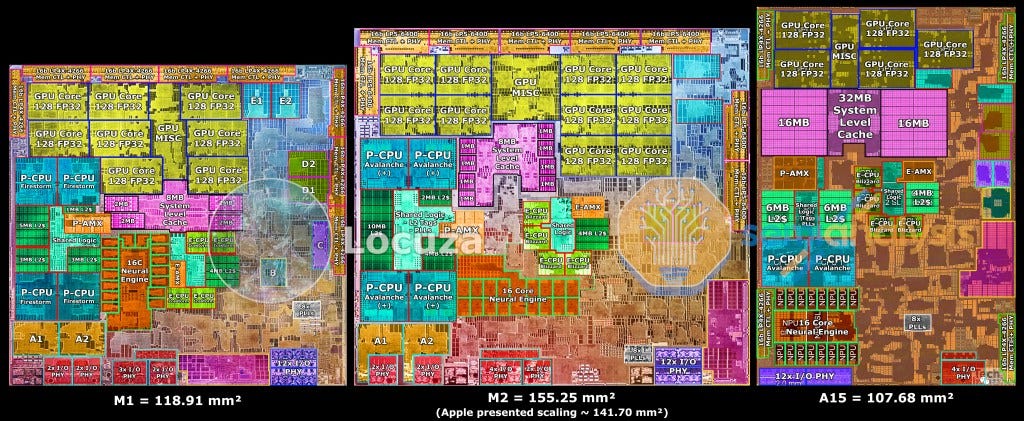
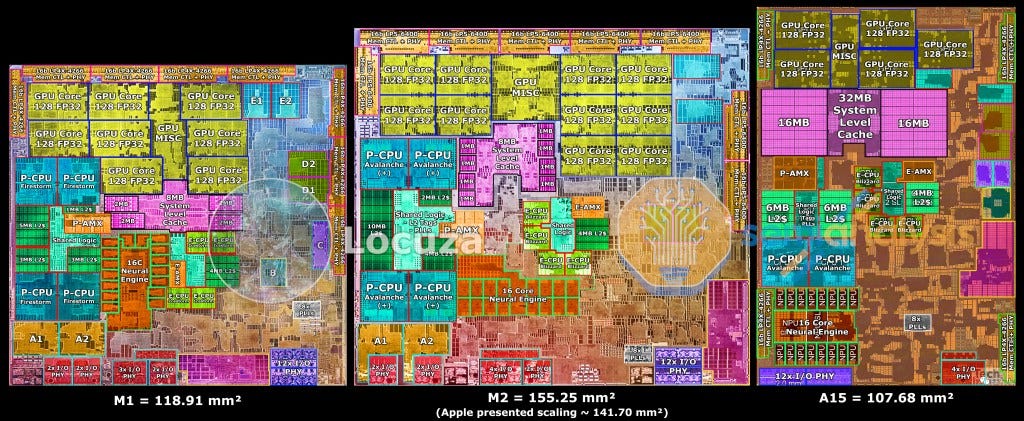
M1 die shot. DDR is on chip
 mossy gull
And also the network modems
jade scaffold
thoes are some really small DRAM modules
mossy gull
jade scaffold
thoes are some really small DRAM modules
Or RAM chips are unnecessarily huge
jade scaffold
no ram chips arent unnecessarilly huge
they do have a lil protective layer over them but that only adds like a mm in all directions if that
mossy gull
If I compare to HBM, then RAM is unnecessarily huge
mossy gull
I know
cinder lagoon
jade scaffold
no ram chips arent unnecessarilly huge
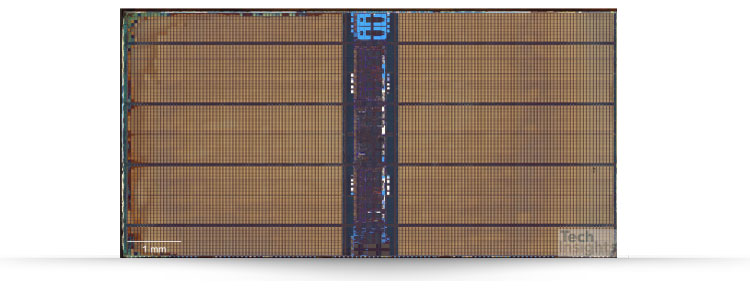
https://www.techinsights.com/sites/default/files/2019-04/samsung-18-nm-dram-analysis-1.jpg
Samsung memory die. Not much wasted space.
 mossy gull
I wish more GPUs or memory existed of HBM
jade scaffold
you can get like 96gb of HBM with 6 modules i think it is
jade scaffold
mossy gull
I wish more GPUs or memory existed of HBM
same most GPUs wouldnt benefit from it
but the space savings would be nice

what the hell are these chips on the M2 then
they cant be SSD can they
no they arent
mossy gull
jade scaffold
same most GPUs wouldnt benefit from it
It will be amazing for smaller PCs, like now we need to humongous systems, but with HBM RAM and VRAM the system can be a lot lot smaller.
 tender plank
jade scaffold
what the hell are these chips on the M2 then
tender plank
jade scaffold
what the hell are these chips on the M2 then
L1 cache?
 sonic meadow
l1 and l2 cache are on the same physical bit of silicon as the cpu
jade scaffold
L1 has to practically be touching the core
sonic meadow
would be too slow anywhere else
cinder lagoon
 jade scaffold
infact L1 im pretty sure is literally ON the processor
jade scaffold
cinder lagoon
M2 die shot
https://substackcdn.com/image/fetch/f_auto,q_auto:good,fl_progressiv...
Thoes DRAM modules i dont think are actual DRAM
cinder lagoon
jade scaffold
This on top looks like regular DDR
jade scaffold
i think they are just where they connectors are
i dont see much point in putting DDR on chip then also putting it off chip because that negates any advantage of putting it on chip
sonic meadow
jade scaffold
infact L1 im pretty sure is literally ON the processor
yeah, literally in the cpu (zen2 die shot)

also wow the branch predictor has a lot of storage
jade scaffold
unless its just a very very tiny amount of DRAM they are using as cache
jade scaffold
sonic meadow
yeah, literally *in* the cpu (zen2 die shot)
thats not how i meant
sonic meadow
well if that wasnt what you meant, then you were quite likely wrong
jade scaffold
i meant on the Proccessor not on the CPU die as in very much physically touching the CPU Core itself
cinder lagoon
https://cdn.wccftech.com/wp-content/uploads/2020/11/AMD-Ryzen-5000-Zen-3-Desktop-CPU_Vermeer_Die-Shot_1-scaled.jpg
higher res M2
 jade scaffold
yea L1 cache inside the Core itself
cinder lagoon
Also at the top: "Global memory interconnect"
jade scaffold
thought so L1 cache access has to be as close to instant as physically possible
mossy gull
I wouldn't be surprised if Apple has found a way to put massive amounts of DRAM on their SoCs
cinder lagoon
It is memory on the M2 because putting so much RAM on die just isn't feasible
(as you would probably not scale down memory because it doesn't gain you anything)
jade scaffold
apple havent found a way to do shit
apple have done nothing that no one else haven't already done all apple have done is implement it
cinder lagoon
They have found a way to have 2 separate GPUs acting as literally one, no driver or whatever support needed!
jade scaffold
the issue with DRAM is DRAM Cells are nigh impossible to shrink
jade scaffold
cinder lagoon
They ***have*** found a way to have 2 separate GPUs acting as literally one, no ...
NVidia already did that one first too
sonic meadow
DRAM cells are already the smallest bit of storage anyway
its a transistor. 1 transistor per bit
cinder lagoon
jade scaffold
the issue with DRAM is DRAM Cells are nigh impossible to shrink
You can just put them on a smaller node but it won't gain you anything and it gets less error tolerable
sonic meadow
faster storage is typically bulkier, as it relies on things like flip flops instead of semiconductor implementation details (DRAM is technically a bug 😆 )
cinder lagoon
jade scaffold
NVidia already did that one first too
Nope, also they have always needed special software / driver support!
jade scaffold
cinder lagoon
Nope, also they have always needed special software / driver support!
on consumer GPUs yea
sonic meadow
has apple figured out how to do it, or just their drivers make it seamless to the end user?
jade scaffold
their Data center ones just go through a chip set on their carrier boards and get immediate unified memory
sonic meadow
since they control the platform from top to bottom
cinder lagoon
jade scaffold
NVidia already did that one first too
Radeon 3870X2
ATI/AMD was the first company to put dual-GPUs on a single PCB, something Nvidia only attempted with the second version of the GTX295
sonic meadow
unified memory is not the same thing as two gpus acting as one
jade scaffold
correct
but they also all act as one big GPU
they all do the same Work
and yea AMD had the first dual GPU i believe
but its somthing apple had nothing to do with
cinder lagoon
sonic meadow
has apple figured out how to do it, or just their drivers make it seamless to th...
Afaik they have literally used that infinity fabric thing to connect to another GPU and it is not seamless because of drivers
sonic meadow
cinder lagoon
They ***have*** found a way to have 2 separate GPUs acting as literally one, no ...
so you are saying that what you said isnt correct then?
jade scaffold
cinder lagoon
Afaik they have literally used that infinity fabric thing to connect to another ...
they did what they still do have a controler, PCIE Chip thingy what they call them changes every generation that then can split out load between the 2 seperate GPUs
or in data centres cases 8 GPUs
both AMD and NVidias Data Centre GPUs can do this
a notable Dual GPU tho is the Dual Vega 7 that amd made for apple
sonic meadow
for non-gaming tasks, having them just be a giant threadpool is going to be a lot easier. you dont have the silly latency issues getting in the way
jade scaffold
which is a crazy lil thing
cinder lagoon
What I mean is some ULTRA MAX PRO chip that has just a second unit fused to it but it does not need special driver support afaik
jade scaffold
 cinder lagoon
No, not this
jade scaffold
cinder lagoon
What I mean is some ULTRA MAX PRO chip that has just a second unit fused to it b...
you mean they did a Chiplet design?
sonic meadow
cinder lagoon
What I mean is some ULTRA MAX PRO chip that has just a second unit fused to it b...
or being apple, does it just already have the drivers installed?
jade scaffold
because thats also been a thing for a while now
cinder lagoon

Save 15% with code LinusTechTips at http://vessi.com/LinusTechTips
Try Zoho One free for 30 days with no credit card required here: https://www.zoho.com/one/lp/linus.html
Multi-GPU setups like SLI and Crossfire once ruled the PC gaming scene, but micro stuttering and development complexity have made them obsolete. Why, then, are we boldly pred...
14:46
jade scaffold
Yea thats not a new thing
Apple didnt invent that
both NVidia and AMD have been considering using such a design, I think actually Next gen thats what they are going to be Chiplet GPUs
sonic meadow
so its a modern AMD cpu, but a gpu instead
jade scaffold
yea
sonic meadow
a dual core GPU 😆
we have already had seamless 4-way gpus though 😛 https://www.youtube.com/watch?v=-aMiEszQBik

Grab our BRAND NEW Silicone Project & Solder Mat! https://store.gamersnexus.net/products/gn-project-soldering-mat
This review looks at the unreleased 3dfx Voodoo 5 6000 video card -- except it was hand-made by an enthusiast who specializes in retro hardware resurrections. It's a quad-GPU monster that competed with the likes of NVIDIA back in the...
jade scaffold
also as linus mentions the main issue with Multi GPU is Bandwidth somthing data centres GPUs dont have an issue with because they have specific hard ware made especially for effectively gluing 8 4090+ calibure GPUs into 1 big GPU
sonic meadow
its an interconnect issue. if "because datacentres", then it would have been doable via SLI/crossfire bridges previously
jade scaffold
the SLI and Crossfire bridges were extreemly low bandwidth
sonic meadow
yes, because getting the bandwidth necessary (which makes 16 lane PCIe look like PCI) isnt an easy task
jade scaffold
yea which makes it really exspensive which is why NVLink took so long to get to consumer GPUs and even then it was a stripped back version of the thing
sonic meadow
for reference, a 4070 has memory bandwidth of approximately 500GB/s, where a pcie gen5 x16 link is approximately 500Gb/s
jade scaffold
yea
NVLink3 which is what the A100 uses can do 600GB/s
which isnt anywhere near as fast as the GPUs memory
but in most cases its definatly fast enough for the GPUs to function and it also does not include the PCIE Lanes which i think on an A100 system would be Gen 4 not 5 i think
we do actually have SMX5 now which has an NVLink Speed of 900GB/s advertised by NVidia though HBM3 is like 3TB/s speeds because 5120-bit bus go brrr
sonic meadow
it does slightly surprise me that vram bus width hasnt really gotten any wider. the rtx 4000 series has basically the same range of bus widths as the... geforce 8 series cards
At an introductory price of US$300, the GeForce 7950 GT...
/cries
sonic meadow
yeah, and chips got faster. waaaay faster
sonic meadow
but they arent really using more chips, which is one of those things that would give rise to higher buswidths
jade scaffold
the only reason its data transfer rate is lower than HBM is because HBM a crazy ass bus width
sonic meadow
yeah. hbm is silly wide
embarrassingly wide, for those embarrassingly parallel tasks
jade scaffold
but anyway back to AMDs goofy SOC APU thingy
the CPU and GPU appear to share memory
sonic meadow
is that the new EPYC chip? or something else
jade scaffold
they both appear to share the HMB
jade scaffold
sonic meadow
is that the new EPYC chip? or something else
kinda
i think it might be the same socket
is that Bigger than EPYC?

i really cant tell
the Die area sure as hell is though jeeez never seen so much die on one chip
sonic meadow
SP5 is 75*72mm
jade scaffold
lets play count the die

i think im counting 20 dies there
the chips called MI300 btw
there is some older versions that have a similar concept
Mi100 and Mi200
sonic meadow
13 chiplets, 24 cores, graphics, hbm3
sonic meadow
yeah, IO is under everything else 😆
jade scaffold
just like burry it under there hope to god the probably 500w worth of Compute sat ontop of it doesnt incinerate the poor thing
cinder lagoon
...interesting to see that apparently the Type-C port of my motherboard shares power rails with all other ones... And has no diodes in it!
I plugged in my phone for some charging and the USB OTG system checks for devices.
Ignore the crumbs I was eating chips 🤤
jade scaffold
is it possible to split 1 16x slot into 2 shared bandwidth 16x PCIE Slots
sonic meadow
Depends on the motherboard. Look up pcie bifurcation (you would end dup with two X8 slots though)
For two x16 slots you would need a pcie switch (PLX). But those are silly expensive. They also work on any motherboard
mossy gull
jade scaffold
is it possible to split 1 16x slot into 2 shared bandwidth 16x PCIE Slots
Depends really on the motherboard, but they won't stay x16, you'll get 2 x8.
jade scaffold
sonic meadow
Depends on the motherboard. Look up pcie bifurcation (you would end dup with two...
I can probs aquire a pcie switch for a reasonable price somewhere
mossy gull
jade scaffold
I can probs aquire a pcie switch for a reasonable price somewhere
I would not skimp on that, but your motherboard has to support it
jade scaffold
im not saying skimp on it
and yea i think the high end server mobo probably supports it
mossy gull
Check with the manufacturer to be sure
jade scaffold
infact defiantly supports it because it otherwise only has its M.2 and U.2 ports for other expansion
other than the 1 16x slot it has
i know there are cards that have both U.2 ports and 10GB Ethernet on them but im not sure how easy they will be to nab for reasonable prices
sonic meadow
I don't think you need motherboard support for pcie switches, though I might be mistaken (or just some boards don't work for .. reasons)
jade scaffold
its a server board so even if you need bifurcation for some dumb reason which for a switch you shouldnt atall need it has it because servers NEED to be able to alocate their PCIE lanes
cinder lagoon
jade scaffold
is it possible to split 1 16x slot into 2 shared bandwidth 16x PCIE Slots
So you want 2 pcie devices to share the same bandwidth because you know that only 1 will be active at any given time?
Not possible. PCI protocol needs a constant link and does not support differentiating between two devices.
Bifurcation only works because each has their own connections which don't get interrupted.
cinder lagoon
sonic meadow
I don't think you need motherboard support for pcie switches, though I might be ...
If at all, this is it
jade scaffold
cinder lagoon
So you want 2 pcie devices to share the same bandwidth because you know that onl...
yes it require a seperate chipset i know
what im asking for is a device that can take that 16x slot and run 2 seperate devices through it
sonic meadow
something like this: https://c-payne.com/collections/pcie-packet-switch-plx-pcbs
pearl moon
Holy crap, that's more expensive than most consumer mobos
mossy gull
Half the price of a motherboard overhere
jade scaffold
pearl moon
Holy crap, that's more expensive than most consumer mobos
Yea for server stuff tho that's pretty cheap
sonic meadow
I also saw server targeted stuff. looked to be starting around the $1200 mark
plus I think it was part of a larger solution (ie you need to buy the board with the PLX switch on it, and then buy the daughterboards with the slots themselves, plus cabling, etc)
the big issue is that the PLX chip is expensive, last I saw a price it was something like $100. and that was likely in the pcie 2/3 days
jade scaffold
i only need PCIE 3 my servers not got PCIE 4 or 5
has an old boi CPU
On another note
had another instance of Something knocking out 12V power on my PCs
and only 12V
as RGB and Fans all still worked and they are all 5V and 3.3V if i remember correctly
sonic meadow
12v going down would knock out the entire system
jade scaffold
well the CPU and GPU arent getting any power but the RGB and Fans were still getting power
sonic meadow
pc standard fans are all 12v
jade scaffold
but PWM 4 pin fans use 5v typicaly
sonic meadow
nope, still 12v. the pwm pin might be 5v. but the actual fan spinning power is 12
jade scaffold
then not sure why power is cut to PCIE and CPU
and nothing else
thats just weird
sonic meadow
very
sonic meadow
is your psu split or single rail (for 12v)?
sonic meadow
how do you know you are losing 12v, and that its not some other issue?
jade scaffold
Sound card looses power completely the only place it can get power is the PCI Power lanes the system also doesnt respond atall to the power button being held down
at some point down the line PCIE Power is totally cut
had the issue once as well and the servers heat sink went cold
sonic meadow
have you shoved a multimeter across the 12v pins after its gone weird?
or are you just guessing its a 12v issue?
jade scaffold
im guessing Power IS Cut to the CPU and PCIE Lanes which is fact something has to be causing that and i dont know what
best guess sofar is OCP though OCP usually shuts off the entire system not just power to the CPU and PCIE Slots
sonic meadow
OCP would be on the PSU. which would either shut down (taking everything with it). or shutting down the rail (which would have the same effect). there is typically only a single 12v rail going from the PSU to the motherboard/other. and even in cases where they have multiple rails (which isnt common anymore), the entire motherboard bar the CPU is all off the same one. that means the fans and the pcie slots
jade scaffold
yea which is why i didnt think it was the PCU
However
the exact same thing happens to 2 systems
both loose power to the CPU and both then keep their fans running
which is just Odd
it happening to both systems makes me think the PSU is reacting to somthing
i might try speaking to phanteks and getting the PSU replaced the thing has a 12 year warrantee though it could be an external stimulus like a Power spike or somthing causing it though why this would cause a partial shut down when i ran a 550w PSU for years without such an issue off the same sockets and surge protected plugs as before is beyond me
jade scaffold
sonic meadow
have you shoved a multimeter across the 12v pins after its gone weird?
Next time it happens ill go poke the Test headers and some of the 12V Pins,
What i really want to do tho is find a way to recreate the occurrence see if its an external stimulus or an internal one
it only happens very rarely so if its an eternal one it might be very hard to pin down
 sacred seal
https://www.youtube.com/watch?v=xJKzKbqxa0A&ab_channel=GamersNexus Steve is still mad at Asus

Grab the special GN T-Shirt to support our hardware journalism! Sales close THIS WEEK! https://store.gamersnexus.net/products/limited-edition-foil-gn15-tshirt-design
ASUS has responded to our prior concerns regarding its warranty. Finally, after a mixture of extended silence and conflict, the company has reworked its position to be more reasonab...
Though it seems like the issue is mostly resolved at this point
sacred seal
Also Asus apparently bricked a bunch of their routers for two days by having them download a courupted config file, even on devices where automatic updates were turned off.
jade scaffold
asus taking AMDs place of being so bad at making software their devices are sometimes unuseable
 surreal moss

David's here with his classic tri-copter, but he's also got something new! How does it fly...?
Get Drones & Parts in our store! https://rotorriot.com
Support Rotor Riot by purchasing from our store:
https://rotorriot.com
Want to fly FPV like the pros? Start here:
https://learn.rotorriot.com
Get Rotor Riot Apparel her...
mossy gull
surreal moss
Not sure where else to stick this:
https://youtu.be/9DwcerOzLJw
<@198635813490...
Been ages ago I seen that vid, also you tagged the wrong Equinox I think
 olive fiber
Still annoyed my ryzen CPU sits there for 15 seconds checking ram each time I turn it on
Just to keep you guys updated on what annoys me.
surreal moss
Oops
cinder lagoon
olive fiber
Still annoyed my ryzen CPU sits there for 15 seconds checking ram each time I tu...
Haven't had that yet... is fastboot turned on in the BIOS? Do you unplug it over night? Is the BIOS battery still good?
 sudden pike
surreal moss
Not sure where else to stick this:
https://youtu.be/9DwcerOzLJw
<@198635813490...
sudden pike
surreal moss
Not sure where else to stick this:
https://youtu.be/9DwcerOzLJw
<@198635813490...
Did you ping the wrong Equinox lmao
surreal moss
I did. Enjoy? 😬
olive fiber
cinder lagoon
Haven't had that yet... is fastboot turned on in the BIOS? Do you unplug it over...
Brand new machine, I do not unplug it, and yes, I think fastboot was enabled. I'd have to double check.
I googled it and found others had the same issue. Power on, and it sits for 15 seconds before it gives any indication that it's POSTing
Then you get the normal 'Hit F2 to enter bios' prompt and whatever
Sounded like it was normal for AMD 7xxx
Just annoying since the entire rest of the boot sequence is like, 5 seconds to windows desktop. 😛
cinder lagoon
olive fiber
Then you get the normal 'Hit F2 to enter bios' prompt and whatever
Afaik this behaviour happens without fast boot. But I'm not sure. Mine also takes its sweet time but its 5800X3D with x470
olive fiber
I got the 7900X3D. Dunno if it's the 3D cache that's the issue?
I'll look again for the fast boot setting
Yeah, fast boot is enabled. I also ready someone comment about having automatic ram timings enabled causes this? I don't know. Wasn't easy to find people that seemed to know what they were talking about
cinder lagoon
It should be in the "boot" tab - I would just say that you probably can't do much about it.
It could be that the motherboard does some additional memory training if the XMP (or whatever the new fkn name is) is enabled
sonic meadow
The am5 ryzens do ram training on every POST rather than on config changes, that's why it's taking so much longer
cinder lagoon
AHA!!
mossy gull

reddit
204 votes and 175 comments so far on Reddit
Damn, AMD, why not give us that card
cinder lagoon
Needing a small reactor at home to be able to run that thing would certainly be a factor xD
Pretty sure they created the limit so that pretty much no where in the world, you'd need two separate circuits to run that machine
sonic meadow
its a *hey, we arent doing an Nvidia and letting our cards draw silly amounts of power" limit. or thats how it smelled to me.
the person got a ~15% performance uplift (which is solid) for a... 50% power increase?
cinder lagoon
That ratio has been pretty much the same on AMD cards since like forever (at least talking from personalnexperience)
So kinda checks out
sonic meadow
tbh I was expecting the cards to be further along the efficiency curve than that stock, they could have raised it a bit more for still noticeable gains.
however, the card in the link has three pcie power connectors. this give the card a power limit over them of <drumroll> 450w, plus another 75 over the slot for a total of 525w. this suggests they were wanting to stay within the limits of the three 8 pin pcie connectors since it has a power slider limit of 430w
cinder lagoon
Seems reasonable (ahem 12VHP fires ahem)
 barren juniper
sacred seal
Also Asus apparently bricked a bunch of their routers for two days by having the...
barren juniper
sacred seal
Also Asus apparently bricked a bunch of their routers for two days by having the...
apparently hp did this recently with some printers for some reason.
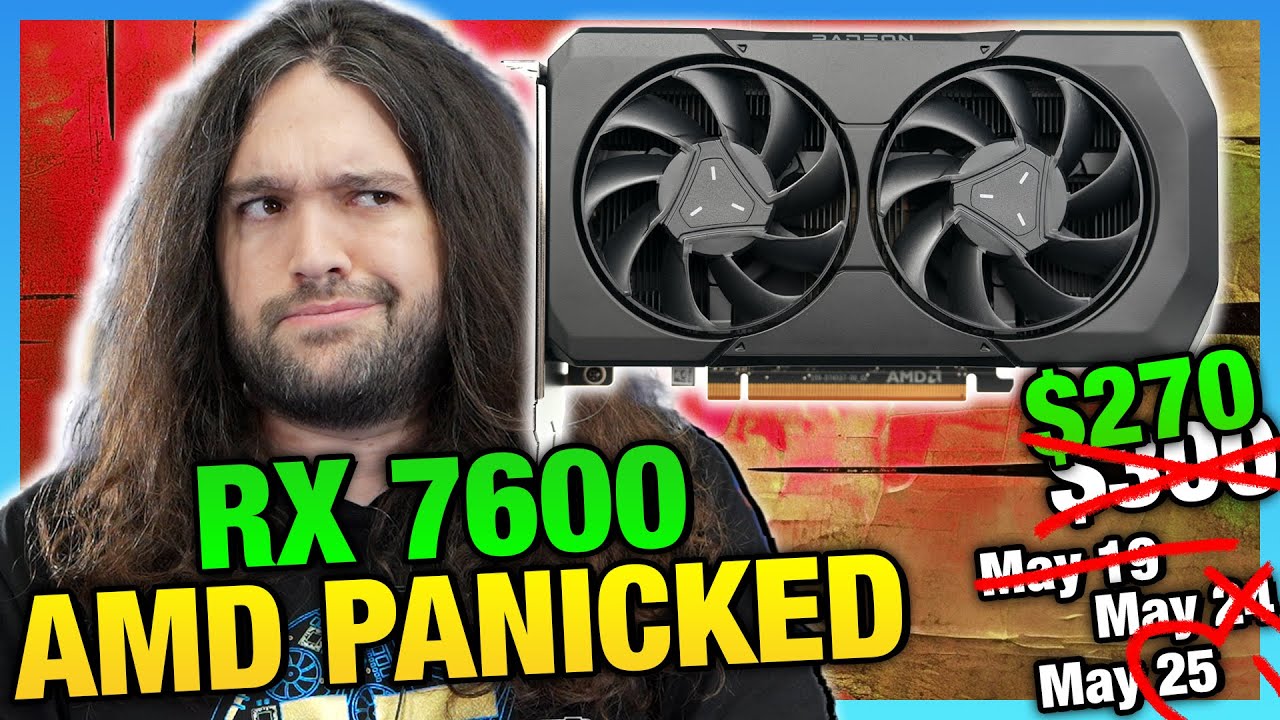
also, not sure if this was posted here or not, but https://www.youtube.com/watch?v=3XlxEIIF22I rx 7600 is 269$

I leak RTX 4060 Performance, 4060 Ti Supply, and analyze the RX 7600!
[SPON: Get 10% off Tasty Vite Ramen with code BROKENSILICON: https://bit.ly/3wKx6v1 ]
0:00 Nvidia tried this before with the 128-bit GTX 960 2GB
1:30 RTX 4060 Ti Performance Analysis
3:20 RTX 4060 Ti Supply & Early Sales Leak
9:02 RX 7600 Analysis & RTX 4060 Performance Leak...
apparently 77% performance of 4060ti for 67% price so not much better
jade scaffold
this generation of gpus is really shit
sonic meadow
yeah. most of the 40 series has been... weirdly placed in the lineup
the 4060 is (outside of framegen, and other "software" bits), functionally the same as a 3060 (or was it the 3060ti?). which is bizarre
jade scaffold
the most anoying part especially on NVidias part they could have made vastly more powerful GPUs this gen, and were 100% capable of just obliterating anything AMD Offered but they didnt do that they made 1 actual Good gpu then just went the rout of 2000 series where the cards are just overclocked last gen with a smaller node size
sonic meadow
the vram available yoyos up and down as you go up the lineup, which is also fun
jade scaffold
the xx70 cards should be faster than the previous gen 80ti cards and in 2000 and 4000 they just fucking arent
sonic meadow
I still wish I got a 2070s instead of the 2060s I got. silly not currently in stock products... (I could have waited, but there was something I needed urgently so piggybacked my GPU order off that)
jade scaffold
the 2060s honestly is the only card from 2000 i would ever recomend
tender plank
barren juniper
also, not sure if this was posted here or not, but https://www.youtube.com/watch...
Sponsor: Phanteks G300A Mesh Mid-Tower Case on Amazon https://geni.us/2i3nqpE
AMD launched its Radeon RX 7600 GPU today. No, wait -- it's actually tomorrow, but reviews go up today. AMD changed its mind on that. Our review and benchmarks compare it to other modern price equivalent options, including tests vs. the AMD RX 6700 XT (now much cheaper...
jade scaffold
the 1080ti is just vastly superior to the 2070s and you could get it for arround the same price at the time of release
sonic meadow
not sure how the prices were here at the time. wouldnt have surprised me if the 1080ti was still over 1k when I got the 2060s, and I do remember the 2070s being sub-1k
cinder lagoon
Pcpartpicker has price history
sonic meadow
the 20 series also has RT cores, which the 10 series doesnt
now you could argue that the RT cores in most of the 20 series werent really worth it, but they were something that distinguished them from the previous gen
jade scaffold
sonic meadow
not sure how the prices were here at the time. wouldnt have surprised me if the ...
1K???????
i bought my 1080ti a month or 2 after the 2070 Super launched for £400the 2070s was £440ish iirc
the RT Cores on 2000 are barely functional as well
performance in raytracing on the 2070s is just flat out aweful
sonic meadow
400 quid is 800nzd (currently)
jade scaffold
3000 and 4000 raytracing is much better its actually what i would consider useable too bad raytracing is wasted on AAA Games which dont hardly benefit from it anyway
sonic meadow
I have done a bit of RT stuff on my 2060s without too many issues. performance wasnt great obviously, but the few things I tried have been playable
jade scaffold
depends on resolution i guess
but the 2070s cant do 1440p Raytracing at 60fps most of the time the RT Cores in 2000 were just sadly bad
not to mention the fact that the 2070s can in some cases be upto 15% slower than the 1080ti nevermind overclocked 1080tis or liquid cooled ones
the 4070ti has a similar issue on paper its about as fast as the 3090 but it has nowhere near as much headroom as the 3090 as such a well cooled 3090 can out perform the 4070ti quite significantly
sonic meadow
cinder lagoon
Pcpartpicker has price history
doesnt go back far enough 😦
did some skimming on pricespy. and from what is still there, none of the 1080ti variants looked to go under $1k at all, while the 2070s went down to about 750. I think the one I was looking at was about 8-900 when I got the 2060s
jade scaffold
the thing thats really annoying about 4000 is that the 4090 is 82% Faster than the 3090 why the hell are the rest of the GPUs not 82% faster than last gen
Hell i would have took 50% faster or even 30% faster but nooooo we get marginal improvements for the rest of them at best
sonic meadow
yeah, most of the 40 series feels like its functionally 1 number higher than it should be
which is mostly exemplified by the 4060/ti and 4070(non ti)
it does sadden me that the xx70 cards are now considered by many to be mid-range, when they used to be high-end cards. but that was back when nvidia actually sold low end cards
jade scaffold
yup
Nvidias Jetson Mini computers annoyingly enough fit perfectly as a low end to NVidias current gpus showing they do have the ability to make really cool low power high performance GPUs and they just DONT
with the efficiency of the 4090 and it is a dam efficient card you could make a 30w card that shit stomps a 1070 imagine how awesome that'd be for a ultra thin and light laptop
sonic meadow
to be fair, AMD and Intels integrated have been "good enough" for a few generations now, and unless you need extra display outputs then the low end stuff is basically not necessary
at which point a 1030 or something is still perfectly fine
an actual low end gaming card that supports RT-adjacent stuff like DLSS/etc, and was available in low profile (pleeeeeease) would be amazing
jade scaffold
the Jetsons have tensor cores and like not even the limited ones the Gforce cards have they are fully enabled tensor cores DLSS on a tiny little 15w Chip for somthing like a steam deck would be epic
 inland dove
I don't really keep track of this stuff.
Is the GPU market really bad still like it was during the pandemic?
jade scaffold
its not as bad price wise especially if you wanna go second hand
and i really would recomend going second hand ATM NVidias 4000 serise dont deserve any money and AMD arent doing amazingly better at the lower ends
inland dove
Oh no.
That wouldn't be in my price range.
And that'd be way overkill for the games I play.
barren juniper
tender plank
https://youtu.be/MCxYfXe1DAA
ahh see that hadnt come out yet. i will watch now
but yeah this current gen cards out side of the 4090 and xtx has been a let down
barren juniper
inland dove
Oh no.
That wouldn't be in my price range.
6700xt is like less than 300? get that.
its the best value card we will have for a while
if you cant afford that, go down the rx 6000 stack until you can, but if you cant afford an rx 6600 then go used, as anything below it is not really worth it unless you need the small form factor of the 6400
barren juniper
jade scaffold
with the efficiency of the 4090 and it is a dam efficient card you could make a ...
there is one. its the rtx 4000 sff. it costs the same price as a 4090 and uses 70 watts i believe. it pretty much performs as well as the current 4060ti
jade scaffold
do you mean the A4000?
barren juniper
yeah that thing
rtx ada a 4000 sff or whatever it is called
i almost considered getting one because of its form factor but not for that price i wont
barren juniper
which is the main reason why nvidia restricts its vram on gamer cards
jade scaffold
made for professional applications and such
barren juniper
and is why the 3060 series sold so well
jade scaffold
barren juniper
which is the main reason why nvidia restricts its vram on gamer cards
its actually not
VRAM isnt the main feature of the Quadro type cards
their main selling point is their drivers and expanded feature set
barren juniper
why sell someone a card for 600 that they can sell for 3k
its why the 3070 only had 8
jade scaffold
no thats literally just NVidia being cheap
like they have been with the 4060ti
with its 128bit memory bus
barren juniper
well i guess them doing segmentation like that could be considering them being cheap
jade scaffold
8gb of GDDR6x costs nvidia like $30 or somthing like that
jade scaffold
so they just like dont put it on the gamer cards and upcharge
jade scaffold
barren juniper
and its finally biting them in the ass
except its not
because no one is actually competing with them to any reasonable level
so they can get away with it
barren juniper
"We fully expect zero sales in some of our stores this time around." Microcenter execs referring to interest in the 4060ti
barren juniper
60 series are where they usually make the most sales, at least in the past, and their launches have been big events. not this time
jade scaffold
Sales =/= proffit
barren juniper
but i guess they are an ai company now
jade scaffold
selling 1000 4060tis is less profitable than 500 4080s
and NVidia have been an AI Company since Maxwell 2.0
arguably since Kepler
the H100 is basically a 4090 with HBM Memory and High end NVLink and it'll cost nearly 7x as much per GPU Data centres and super computers will buy hundereds if not thousends of them NVidia couldn't give less of a shit about low end
NVidia have also developed a poor tendancy to make a really good generation then make a nearly worthless generation then make a really good one again then a next to worthless one again See 1000 and 2000 then see 3000 and 4000
barren juniper
yeah outside of the 4090 this generation has been completely pointless for gamers
though part of that i think is because of the over supply of last gen cards
also according to Wendle from level 1 techs, the rx 7600 is a plug and play for linux, though I don't think that would effect many in the gaming department
cinder lagoon
Nvidias consumer ones less so
mossy gull
jade scaffold
Nvidias consumer ones less so
Because "gamers don't play on Linux"
jade scaffold
cinder lagoon
Nvidia~~s consumer ones~~ less so
Their server and workstation gpus have proper Linux drivers that work
Their server ones almost flat out don't work on Windows i don't think
Because what crazy mf using windows server on a data centre or super computer
surreal moss
Oh they’re out there. Normally because the software only runs on windows
cinder lagoon
jade scaffold
Their server and workstation gpus have proper Linux drivers that work
I'd consider it "work™️"
jade scaffold
surreal moss
Oh they’re out there. Normally because the software only runs on windows
it is extremely rare that a data centre would Use windows for anything as theres nothing Windows can do in the data centre that linux cant do substantially better
most things you'd do with a super computer as well couldnt really be done on windows as im pretty sure windows has no support for splitting the workload of multiple machines
jade scaffold
cinder lagoon
I'd consider it "work™️"
they work pretty flawlessly, the reason AMD Cards work so well even at their consumer level is because AMDs GPU Software stuffs is all open source
NVidias Kernel on their very high end enterprise stuff are open source but things like their CUDA and Drivers aren't
mossy gull
I am waiting till AMD finishes their emulation layer for Cuda applications
jade scaffold
its actually out on some of their enterprise stuffs i do believe
however its gonna be pretty meh
it sure as hell will be nice to have
mossy gull
They also want to release it on their consumer cards
jade scaffold
but if an application supports both CUDA and OpenCL its not gonna be worth an AMD GPU trying to brute force CUDA even if CUDA is typically alot faster
surreal moss
jade scaffold
it is extremely rare that a data centre would Use windows for anything as theres...
I am willing to be that every datacenter has at least one windows server in it
sonic meadow
probably a considerable number in some of them
mossy gull
My dad's company servers run on Unix
 surreal moss
The datacenter I administer have both. Thankfully I only have to focus on the Linux side
Mostly
sonic meadow
'nix isnt too different. usually
mossy gull
I never worked solely with Unix
jade scaffold
im thinking of doing somthing really dumb im Eying up Audeze Euclids
cinder lagoon
...need to change my dynamic DNS IP cuz some russian ass keeps trying to log into my router 🙄
jade scaffold
russain moment
balmy flicker
fun
cinder lagoon
Ye
barren juniper
so my local microcenter has 70 rx 7600s in stock, while 67 4060tis. i guess they were right when they said they wont sell well
i believe this is the one on manhattan too
mossy gull
barren juniper
so my local microcenter has 70 rx 7600s in stock, while 67 4060tis. i guess they...
Funny enough, in EU the RX 7600XT has sold almost 4 times as much as the 4060👔
 ornate geyser
Hey guys 🙂
This may be a super long shot but I love playing star citizen and would like to upgrade my pc to boost my performance for less than 300$ do you guys have any recommendations? My specs are down below.
GPU: AMD Radeon RX 5700 XT
CPU: Intel(R) Core(TM) i5-9600KF @ 3.70GHz 6 Cores
Motherboard: ASRock Z390 Phantom Gaming 4S-IB
RAM: 16gb
SSD: 225gb
HDD: 1tb
sacred seal
I presume SC is on your SSD already?
Not much you can do for 300. Possibly get a better cooler and overclock your CPU
ornate geyser
yes, and thank you
sacred seal
Depending on the quality of the SSD, you might see some benifits from upgrading it.
mossy gull
ornate geyser
Hey guys 🙂
This may be a super long shot but I love playing star citizen and w...
You can get the RX 7600XT
mossy gull
I believe you can get it around 300.-
cinder lagoon
Yeah, the 5700XT was never particularly fast
mossy gull
This is on AMD EU
https://shop-eu-en.amd.com/amd-radeon-rx-7600-graphics/
cinder lagoon
Not sure if they realize that they currently have this massive price gap...
how about a medium tier GPU for like 500?
 mossy gull
cinder lagoon
Not sure if they realize that they currently have this massive price gap...
how ...
mossy gull
cinder lagoon
Not sure if they realize that they currently have this massive price gap...
how ...
The problem is the 6900XT currently kinda fills that gap
There's webshops that sell them for 500.- to 800.-
cinder lagoon
Yea but they're old and gulp power
mossy gull
cinder lagoon
Yea but they're *old* and gulp power
But they sell them for that low, then they need a 7700XT that's more powerful than the 6900XT for around the same price, that'll be pretty hard to do
jade scaffold
cinder lagoon
Yeah, the 5700XT was never particularly fast
the 5700XT at the time was pretty good it was 2070 Super level which isnt too bad especially when it was priced like a 2060
obviously missing some of the fun features of NVidias RTX cards but at the time nothing could even use thoes features and the games that came out with said features used the later gen varients of them which NVidia arbitrarily blocked from 2000
jade scaffold
cinder lagoon
Not sure if they realize that they currently have this massive price gap...
how ...
also yea its a bit of an issue they need a 500 and 700 priced cards but then they would have a bit of a weird and missleading performance skew when compared to NVidia so they really need to be careful with how they make them
cinder lagoon
jade scaffold
the 5700XT at the time was pretty good it was 2070 Super level which isnt too ba...
Huh apparently GN ranked the 5700XT best of 2019 (thought they were kinda like last gen's 'meh' )
jade scaffold
yea no the 5700XT after the first 6 months was by far the best price to performance gpu arround
sonic meadow
the issue with the radeon 5xxx series at the time was that a bunch of people were having driver issues when using them
jade scaffold
oh yea
cinder lagoon
Ahhh yes I remember actually
jade scaffold
at launch you would be better off with a 1050ti than a 5700xt
my friend personally verified that one for me
jade scaffold
also just dont get the reference version of the 5700xt
it would overheat real easily
cinder lagoon
ornate geyser
Hey guys 🙂
This may be a super long shot but I love playing star citizen and w...
...where were we?
Ahh yea $300 PC upgrade for SC
jade scaffold
you'd need a card with more VRAM me thinks
though im struggling to think of somthing the for $300 that has more than 8GB of RAM and is actually a decent improvement over the 5700xt in performance
not sure how the 7600 stacks up?
the 7600 is only slightly better not a worth while upgrade atall
perhaps if you're willing to go second hand you might be able to find something half decent for that price
you can get 3070s for just over 300 where i live
cinder lagoon
jade scaffold
you'd need a card with more VRAM me thinks
Also this
Yea but then a 12G variant, pls
mossy gull
jade scaffold
the 7600 is only slightly better not a worth while upgrade atall
The 5700XT is more or less on-par with the 3060.
While the 7600XT is on-par with the 4060 Ti, so there's an performance jump
jade scaffold
mossy gull
The 5700XT is more or less on-par with the 3060.
While the 7600XT is on-par with...
literally just watched a comparison video worst case the 7600 was about 5% slower best case it was 15% faster on average they 7600 is about 5% faster 300 for a 5% performance improvement is not worth it in any world that exsists
the only option to get a card that is actually reasonably better will be at the moment to buy a second hand one
mossy gull
jade scaffold
literally just watched a comparison video worst case the 7600 was about 5% slowe...
Benchmarks don't say much, especially not with AMD
jade scaffold
mossy gull
Benchmarks don't say much, especially not with AMD
what lmao
people playing games and recording the averages an minimums of 2 cards while playing a game isnt representative of their gaming performance?
lmao
been looking arround ebay odly enough the 3070 is going for less on average here than the 6800xt is or the 6700xt is which is odd i woulda thought the AMD cards being worse off feature wise might have a lower price tag
i also coulda swore they were a lil cheaper at launch
cinder lagoon
Nope cuz still nobody really cares about RTX and DLSS3
jade scaffold
just kinda surprised the 6700xt is going for more than alot of 3070s tho
even though they basically perform the same in alot of things
was kinda hoping to see some really good 6700xt deals its got more VRAM than the 3070 and is far faster than the 5700xt and the Extra VRAM would be nice for star citizen
sonic meadow
Noctua finally coming back in to the game with updated stuff... soon™️ https://www.youtube.com/watch?v=Cng_J4sBaNs

Sponsor: Arctic Liquid Freezer II ARGB on Amazon https://geni.us/8BokJ
Noctua brought a host of prototype fans to show where it's been for the last 8 years -- and the answer is designing & developing fans. We have a separate interview with one of Noctua's technical staff members coming up after the show, but for now, we can cover the product-lev...
jade scaffold
thats some funky fan geometry
sonic meadow
aero/fluid dynamics is weird
jade scaffold
i know they work really well in water
im not sure they are capable of high static pressure in air though
cinder lagoon
Not so much static pressure but quiet high flow
jade scaffold
yea
cinder lagoon
Those are basically prototypes tho
jade scaffold
which might be good for a air cooled case fans
mossy gull
jade scaffold
even though they basically perform the same in alot of things
When you need VRAM the 3070 loses a lot, the 3070 has a problem where it won't use all 8GB VRAM and already started using shared memory around 7.5GB
jade scaffold
all GPUs will do that
mossy gull
jade scaffold
all GPUs will do that
My 6700XT will go to full 12GB before using shared memory
mossy gull
Also, in Cyberpunk 2077, the 6700XT wins over the 3070 in 1440p
jade scaffold
yea it will do
the 3070 is conventionally speking more powerfull but NVidia being the forever cheapskates that they are cheaped out on VRAM so in games that can use alot of VRAM it struggles
mossy gull
My little brother had the 3070, and it lost in a lot of games vs my 6700XT in 3440x1440, it's kinda sad considering his 3070 was more expensive
jade scaffold
yea
what NVidia really need to do is allow DLSS 2 to work on everything and anything
not 3 tho DLSS 3 can gargle my balls its so shit
mossy gull
jade scaffold
not 3 tho DLSS 3 can gargle my balls its so shit
Fun fact: DLSS 3 even works on AMD cards, it ain't optimal but it still works.
But NVidia keeps saying it keeds the Tensor cores of that generation card to work.
jade scaffold
yea but DLSS 3 looks like ASSS
any yea as long as your card can do or brute force tensor flow operations it can run DLSS
or any AI thing
just like RTX voice works on anything
mossy gull
DLSS or any upscaling looks like ass to me, I always prefer native rendering
jade scaffold
but on cards without tesor core has a small peroformance impact
DLSS 2 cant really be told apart from native
not unless you go full peformance crazy with it
like upscaling 640p to 4k
quality mode basically gives you a little more FPS and vastly superior AA
mossy gull
I can easily see artefacting.
So anything that looks out of place or over sharpened I notice it.
jade scaffold
so you play all games with AA and Post processing turned off
mossy gull
jade scaffold
quality mode basically gives you a little more FPS and vastly superior AA
I use AMD Super Resolution instead of any AA
jade scaffold
because both of thoes create some pretty goofy artifacts
jade scaffold
so why dont you just play all your games on a low end card
because everything you play is gonna look streight out of the Xbox 360 anyway
mossy gull
Or you play everything on higher resolution than intended
jade scaffold
Post processing is responsible for lighting
its what makes game lighting not look turbo flat
but it also leads to artifacting especially when screen space effects are involved
mossy gull
jade scaffold
its what makes game lighting not look turbo flat
On most games it barely makes a difference.
jade scaffold
yes it really does
mossy gull
I had post processing make lighting look jarring, like pixelated lighting, so I usually turn it off.
jade scaffold
what?
mossy gull
That was when I still used my 1060
jade scaffold
if you turn it off you practically dont have propper lighting
you get old school lighting
which to say the least is aweful
and you arent gonna use any kinda raytracing to off set that because your so artifact sensative
mossy gull
jade scaffold
and you arent gonna use any kinda raytracing to off set that because your so art...
When Raytracing is available, I turn it on usually
mossy gull
jade scaffold
so you can see Quality DLSS artifacts
I don't use DLSS because I have a fancy dandy 6700XT
jade scaffold
mossy gull
DLSS or any upscaling looks like ass to me, I always prefer native rendering
literally you saying you think it looks like ass followed by you saying you can see the artifacting pretty much implying that you wouldnt use it because of that
But the static effect that raytracing will throw on things if your card isn't insanely fast at raytracing doesn't bother you?
mossy gull
jade scaffold
literally you saying you think it looks like ass followed by you saying you can ...
I rather have Raytracing over shit that looks blurry or over sharpened in the distance.
jade scaffold
but you'll use AMD super resolution which has the exact same problems?
mossy gull
I don't mean FSR, I mean Super Resolution, which basically lets you for example play 4K on a 1080p panel
sonic meadow
aka MSAA
mossy gull
sonic meadow
aka MSAA
But without the MSAA oddities
sonic meadow
oops, meant SSAA. MSAA is a subset of that 😆
mossy gull
Except Super Resolution isn't AA, it funny enough tasks the card a tad less compared to any kinda AA
sonic meadow
you cant easily test it against msaa or ssaa since games havent offered that as an option for a long time (it doesnt mix as well with deferred rendering)
mossy gull
sonic meadow
you cant easily test it against msaa or ssaa since games havent offered that as ...
Most games just look at the resolution of your panel these days, funny enough my games think it's higher than it actually is.
It's also not used very often, only by idiots like me
I still play games that don't go above 1600x900,and a few that are stuck at 1280x1024.
jade scaffold

Get hooked up with the latest and greatest audio gear at https://lmg.gg/Sweetwater.
Get 69% off any of XSplit’s video tools. Use code LINUS at https://lmg.gg/XSplit
It ain't much to look at but Frore System's Airjet cooling inventions could revolutionize PC cooling in the next few years. Here at Computex 2023, they're showing of a new version ...
:o
Hyper thin hand held PC with these fans?
mossy gull
jade scaffold
Hyper thin hand held PC with these fans?
Or full blown high powered laptops
jade scaffold
im more excited for hyper thinn devices with these
mossy gull
jade scaffold
im more excited for hyper thinn devices with these
Hyper thin laptops with tons of power 😃
jade scaffold
they arent that amazing at cooling but like i could see someone lining like 5 of them along the back side of a laptop as well as using the shell for some passive dissipation on a 45w laptop
sacred seal
If I am remembering correctly they basically just are good for thin and lights. They can't scale it up to handle more airflow
jade scaffold
you can just attach a bunch of them to a big vapor chamber tho
sacred seal
Yea, but how big of a vapor chamber would you need to cool something like a 3070
jade scaffold
Depends on power draw
sacred seal
You would need like 25 modules if my math is correct
jade scaffold
Laptop 3070s can go as low as 45w iirc
sacred seal
Yea, but at that point are they really useful as 3070s?
jade scaffold
He showed 2 of them could do like 15w so in theory 6 of them could do a lower end laptop 3070
sacred seal
The spec I found was 115 watt for the laptop variant
jade scaffold
115 is for the real high ends
Thoes are for desktop replacement devices
But you could do like a razor blade or somthing with these things
Or even better a steam deck esque device
sacred seal
I was responding to Little's comment about a device with tones of power
jade scaffold
Or any actual thin and light
sacred seal
Yea, for thin and lights these things could be amazing.
jade scaffold
The only way you are doing somthing really really high power is lining the edge of a 17 inch laptop with the things
sacred seal
Seems like the base power rating for a 3070 in a laptop is 80 watts?
jade scaffold
thats deffos not right
sacred seal
I have not found anything with lower power

I presume that TGP is supposed to read as TDP
mossy gull
sacred seal
If I am remembering correctly they basically just are good for thin and lights. ...
For now, maybe soon they'll be good enough for gaming machines
sacred seal
The tech is fundamentally limited. You need to make them exponentially larger to get more cooling
sacred seal
That's what they said in an interview
They were asked if they could make a larger unit for higher power devices and they basically said it wasn't possible if I am rembering correct (this was a few months ago)
jade scaffold
they are saying that higher frequency's and higher amplitudes could vastly improve performance and that its something they are working towards
sacred seal
Improve, yes. How much of an improvement do they need to be viable for higher power draw applications
jade scaffold
a 17 inch laptop could likely do 100w at the moment if you just lined the back side of it with them
mossy gull
sacred seal
They were asked if they could make a larger unit for higher power devices and th...
I mean, Intel couldnt get past 14nm for ages, yet TSMC got down to 7nm back then
sacred seal
Couldn't do it economically
mossy gull
The thing is, technology ain't standing still, it's only a matter of time it's possible
jade scaffold
100w is a fair bit if they can even get a 20% improvement thats 120W and with GPUs getting vastly more efficient its feasable to get a 70 class laptop cooled by these things
sacred seal
They still have to deal with physics
jade scaffold
these things also see the same Manufacturing issues TVs and Processors have meaning in theory these can in mass production be extremely cheap to build
mossy gull
jade scaffold
100w is a fair bit if they can even get a 20% improvement thats 120W and with GP...
Even if you go for a hybrid solution, 100w of these flat flippers and your fans to cool if it gets too much for them.
Then you have a hybrid solution
jade scaffold
you can also do some passive cooling if you are willing to make your laptop out of not shit materials
sacred seal
Passive cooling gets difficult when dealing with higher power draw systems. You don't really want the laptop to start cooking the users hands if the active cooling fails
jade scaffold
if active cooling fail it'll just you know
sacred seal
Thats my understanding why its not really used on modern devices
mossy gull
sacred seal
Passive cooling gets difficult when dealing with higher power draw systems. You ...
For example, I have an Asus G15 Advantage Edition, even if it had these tiny flip floppers the system could cool passively when not gaming, and turn the fans on when gaming.
sacred seal
You still need to fit a larger cooling solution into the laptop
mossy gull
sacred seal
You still need to fit a larger cooling solution into the laptop
There's enough space between the cooler and the housing though
sacred seal
For the required heat pipes and the modules?
mossy gull
sacred seal
For the required heat pipes and the modules?
It has a vapor chamber, but the lower spec has the thicker heatpipes, they basically share the housing
jade scaffold
the performance of these things relative to other cooling methods depends on scale
but the fans and heatsink in a standard thin and lights get pretty brutally shit on by these things at the moment
a much bigger fan will obviously do better as a larger fan can be scaled in 3 dimensions unlike these lil things which can only really be scaled in 2
while you wont see any full fat like 100+W TDP GPUs in laptops with these you will be seeing the lower end skew 70 type cards in laptops with these in them
sacred seal
Fans get exponentially better the larger they are. These can only be scaled linearly, and I believe only in one dimension (making them deeper gives limited benefit)
jade scaffold
do you know what exponentially means
mossy gull
I am just waiting for an hybrid solution with these flipper floppers
sacred seal
Yes. You double the size of a fan you get far more then double the airflow output
jade scaffold
thats because you arent doubling the fan size
you are increasing the size by 8x if you double all dimensions
sacred seal
If I am not mistaken you double the volume of a fan you still get far more then double its output
Due to the fact that the further from the center the blades are, the more air they move for a given RPM
jade scaffold
ehhhhhh
kinda
its next to impossible to compare a small fan to a big one
because blade geometry has to totally change based on size
otherwise that extra speed you get on the edges will only get you more noise
sacred seal
Yes, its not exactly a 1:1, but there is a reason why people buy 240mm fans instead of 4 120s
mossy gull
jade scaffold
otherwise that extra speed you get on the edges will only get you more noise
Reminds me instantly of this
https://youtu.be/GIGlQBx4tys

Sign up to Nebula here: https://go.nebula.tv/realengineering
Links to everything I do:
https://beacons.ai/brianmcmanus
Credits:
Writer/Narrator: Brian McManus
Writer/Researcher: Sophia Mayet
Editor: Dylan Hennessy
Animator: Mike Ridolfi
Sound: Graham Haerther
Thumbnail: Simon Buckmaster
References:
Some references cannot be shared here on ...
jade scaffold
yea larger fans by nature have to spin slower
unless you give 0 fucks about sound
also you get to a point where your blades just hit the air and cause cavitation in the air which is less than ideal as now the outer edge of your big spinny thing is doing a whole lot of absolutly fuck all
mossy gull
The problem with spinning a fan faster is also turbulence.
Sometimes a fan is steady flow at lower speeds, but turbulence at higher speeds.
mossy gull
I noticed this on those cheap fans you can buy around summer.
At full speed most just feel way too turbulent and are very loud, moving air pretty badly, they basically move the air just as much as at lower speeds.
jade scaffold
the main advantage i see with these new blowy majigs not right to call them a fan really i dont think is the Enormous static pressure they can produce this means they can pull air past things like small holes in the case of a laptop keeping the surface of it very cool and because they bypass the issue of boundy layers with good ol brute force they can pretty much instantly heat their output to nearly the same temperature as the cooler. the cooling ability of these fans is entirely based on the surface area they can cover pretty much so so while possibly more limited than big fans we have already seen for a given volume they are far better than small fans
im also pretty sure you could have a 2 sided vapour chamber and within 1cm thick fit like 20 of them along the back edge of a laptop
though the ammount of air that would move out the back i think would probably be annoying to someone because the output of air is at like 100mph now imagine 20 of them stacked 2x10
mossy gull
I think it was Alienware that actually placed fans in front in their laptops to cool the laptop better, these flippy floppers can take over that function
sacred seal
They deffinatly could do that. Each module looks to be about 1" wide, so 10"s total
jade scaffold
then with a double sided vapor chamber make a cooling sandwich
if each can do lets say 10w 20 of them could do 200w
sacred seal
The minis are only rated for 5 watts
jade scaffold
you know what high power laptops might not be as unfeasible as i thought
they have slightly longer ones
mossy gull
jade scaffold
then with a double sided vapor chamber make a cooling sandwich
Hybride cooling
jade scaffold
which are more efficient
sacred seal
I wouldent say slightly
jade scaffold
but are basically 2 minis long
just under 2 long overall
also they are Really efficient
i think one large fan would be more efficient
but for the compactness
sacred seal
I think the larger ones are good for 15 watts?
jade scaffold
i'd say thats a worth while trade off
jade scaffold
sacred seal
I think the larger ones are good for 15 watts?
wair really
i thought it was 10
20x15 is like 300w
jeezus christ
it wouldnt translate perfectly to that
sacred seal
Yea, but then you have a very large cooling assemblage
jade scaffold
yea its long
very long
but also very thinnn
and if its a gaming laptop you can like forgo the track pad and cram it on where the num keys are
sacred seal
Basically 3-4x larger then you would find on a equivalent laptop
jade scaffold
yes
cinder lagoon
They plan on practically doubling the cooling capacity per area about every two years
jade scaffold
500w thin and light laptop when
cinder lagoon
So we jus gotta wait a lil to get high-power laptops.
cinder lagoon
jade scaffold
500w thin and light laptop when
Ayoo think about them batteries, alright? 🤠
sacred seal
I guess I am misremembering the interview... I thought they were looking to do like 20% every 2 years
cinder lagoon
Just saw the LTT vid, think they said 50% "like moores law"
mossy gull
jade scaffold
500w thin and light laptop when
The problem is the American Aviation shenanigans only allow power bricks up to 330w.
Who have been holding back stuff like powerful laptops and powerful batteries.
cinder lagoon
mossy gull
The problem is the American Aviation shenanigans only allow power bricks up to 3...
The problem is that they only allow 99Wh batteries...
The bricks themselves are not entirely the problem if you max tier laptop only lasts 30mins during idle away from the wall
mossy gull
cinder lagoon
The bricks themselves are not entirely the problem if you max tier laptop only l...
Most powerful laptop bricks are and have been for over 10 years around 330w.
cinder lagoon
Yes, and if more is needed there are two.
330W should be more than enough
For most people at least
sacred seal
Well even if they did not limit the size of the batteries, there is a limit to how big of a battery you could physically fit
A 1000 watt laptop is sort of pointless if it dies in 30 seconds
mossy gull
cinder lagoon
Yes, and if more is needed there are two.
But what if people want 1 brick?
Like I prefer 1 brick over 2, because 2 just adds unnecessary bulk.
I basically want a decent and efficient enough laptop on the go, but a true powerhouse at home, but I dislike having 2+ machines but have no choice because of these dumb limitations.
cinder lagoon
So a portable workstation
They already exist but are pretty much useless without 1 or even both bricks
sacred seal
Its called having a EGPU
jade scaffold
cinder lagoon
The bricks themselves are not entirely the problem if you max tier laptop only l...
a max teir laptop isnt really meant to be a laptop tho its what you would call a desktop replacement
though dual processor laptops would be cool
like a lil arm CPU just to run the os and browser and music apps and a big chunky boi processor to game/video edit or what ever
mossy gull
sacred seal
Its called having a EGPU
Then give me ePCIe 8x or Thunderbolt that supports PCIe 5.0, but nooooo, we're still stuck with Thunderbolt with PCIe 3.0 4x
jade scaffold
thounderbolt can do PCIE 4.0
mossy gull
jade scaffold
though dual processor laptops would be cool
MacBook
jade scaffold
MacBooks are single processors
they just have 2 processor dies linked to eachother
i more so meant dual architecture
cinder lagoon
mossy gull
Then give me ePCIe 8x or Thunderbolt that supports PCIe 5.0, but nooooo, we're s...
Thunderbolt is getting to its physical limits.
jade scaffold
though i imagine that would require some serious driver tomfoolery
cinder lagoon
You mean like intel GPU plus nVidea but for CPUs?
jade scaffold
ehhh more so multiple architectures built on one actual CPU
cinder lagoon
Technically, linux and android can already do that, it's CPU hotplug.
jade scaffold
like intels big little architecture
but with much more efficient ARM Processors as the little ones
mossy gull
jade scaffold
thounderbolt can do PCIE 4.0
Most laptops still carry Thunderbolt 3, which is PCIe 3.0
cinder lagoon
jade scaffold
like intels big little architecture
ARMs*
jade scaffold
rather than the just reduced X86 that intels little processors use
jade scaffold
cinder lagoon
ARMs*
everyone has done it
it doesnt belong to everyone intels just the most prominant advertiser of the thing
cinder lagoon
jade scaffold
rather than the just reduced X86 that intels little processors use
Please google big.LITTLE architecture and look what it exactly is
They are more efficient because they don't need to be as compatible as the "big" ones. They are also clocked down for energy saving.
jade scaffold
YES
i know
intels little processors though are still ifaik X86
they are just the bare bones varient of X86
mossy gull
1 thing I dislike about big.LITTLE is that MS won't update W10 to support it.
And W11 is bullpoop
jade scaffold
where as fully fleged processors have several other extra instructions on them relating to FPUs and other accelerators
mossy gull
Like MS wants Windows to be more tablet like.
But where's my goddamn full-screen start menu
Or easily changeable themes
jade scaffold
AMDs current gen EPYC can actually go up to 128 cores but it has to loose some of thoes nice to have features to do it but what loosing these features also does is increase efficiency as they take power to run and actually take up physical space
cinder lagoon
mossy gull
Like MS wants Windows to be more tablet like.
But where's my goddamn full-screen...
You want Windows 8.
sacred seal
Or windows 10 in tablet mode
mossy gull
cinder lagoon
You want Windows 8.
I have W10 with full-screen start in desktop mode
It's an option actually.
cinder lagoon
jade scaffold
intels little processors though are still ifaik X86
Nop, they are a reduced instruction set.
jade scaffold
they are listed as exclusivly x86
i cant find anything about the little processors being anything other than X86 anywhere
cinder lagoon
They crashed when the windows scheduler didn't know about certain missing features
mossy gull
cinder lagoon
Nop, they are a reduced instruction set.
Intel's e cores are still X86, they just lack hyper threading and other instruction sets like AVX-512
cinder lagoon
So "reduced" as in the regular cores are just bloated?
jade scaffold
no
the regular core have vastly more feature support
these extra features are often physical constructs on the CPU core that support things like little said of AVX-512 or even some of the FPUs
the E Cores are actually just X86 no extra instructions or feature which makes they VERY efficient
cinder lagoon
Ahh hmm
Tho x86 is already pretty bloated, intel even wants to revise it to remove unused legacy crap
jade scaffold
yea
X86 itself is fine
but theres alot of extra features in modern processors
which just arent used
or can be now emulated with minimal performance loss
Some people will miss these features but in intels and AMDs eyes they can get fucked
i coulda swore intel nuked AVX512 on their 12 gen CPUs
mossy gull
jade scaffold
which just arent used
They actually want to completely remove native 16-bit and 32-bit support and only use 64-bit support
jade scaffold
but like the physical Cores for the AVX 512 was still there
mossy gull
jade scaffold
i coulda swore intel nuked AVX512 on their 12 gen CPUs
They did
jade scaffold
mossy gull
They actually want to completely remove native 16-bit and 32-bit support and onl...
tbf you can emulate 16 bit and 32bit without any issue atall
mossy gull
jade scaffold
tbf you can emulate 16 bit and 32bit without any issue atall
That's why they want to nuke the native support
It's being used less and less
jade scaffold
like the performance loss is near none existent for doing so and the CPUs will likely be able through drivers to emulate without any extra steps
mossy gull
jade scaffold
like the performance loss is near none existent for doing so and the CPUs will l...
Funny enough, they said that removing native support for 32-bit and 16-bit increases 64-bit performance
jade scaffold
i think when our current method of designing processors eventually gets stuck all the peformance improvements we will see will come from these kinda little optimisations as well as the addition of new acellerators
mossy gull
When you say "accelerators" it reminds me instantly of Xeon Phi
jade scaffold
are thoes the weird PCIE Xeon CPUS
mossy gull
jade scaffold
are thoes the weird PCIE Xeon CPUS
You mean, bunch of Atom cores smacked onto a PCIe card
jade scaffold
pretty much
jade scaffold
you could also take the CPUs out of them
and they would go in the standard Xeon socket
the 3647 one at the time i do beleive
mossy gull
jade scaffold
you could also take the CPUs out of them
The ones I held were cooked onto the card
jade scaffold
some of them ere yea
like this one


but some looked like this

and despite their weird nubbin they did actually fit into and work in normal Xeon sockets
mossy gull
I always loved how wack PC shit was back then


 mossy gull
I miss HBM consumer GPUs
jade scaffold
from one of the weird nubbin havvers

the only reason to put HBM on a consumer GPU is Compactness
and its real expensive so they dont
but i'd like a comically tiny 4090
however i have some potentially good news for you
AMDs MI300 serise should be out soonish
which are full on APUs with high end GPUs and CPUs and 128gb of HBM3 Memory on them
not consumer but probably the best use of HBM memory ever
mossy gull
jade scaffold
which are full on APUs with high end GPUs and CPUs and 128gb of HBM3 Memory on t...
Whoohoo, powerful tiny PCs
mossy gull
I dislike how big GPUs have become.
I want smaller top of the line cards again.
jade scaffold
as thats where all the wacky tiny mobos that support stupid server CPUs come from
their coolers are big but the PCBs on GPUs have actually gotten smaller
like the 3080s PCB is the same size of the R9 furry xs PCB its silly small
the 3090s was a bit taller sadly but only because it had to mount such a massive cooler
i really wanna desodder a Super computers GPU core
mossy gull
I am just tired of their oversizeness and the inefficiency of having the VRAM so far away from the GPU.
I remember the Vega being the "VRAM" king for so many freaking years. 16GB of HBM2 memory, and people would look weird at you for having 1, yet only you could play RE1 remake at highest possible settings.
jade scaffold
because they have HBM they look enormours real cool looking things
jade scaffold
mossy gull
I am just tired of their oversizeness and the inefficiency of having the VRAM so...
theres no disadvantage other than size to keeping VRAM away from the GPU
the things a consumer would use a gpu for just do not benifit from HBM or ultra low latency
mossy gull
jade scaffold
the things a consumer would use a gpu for just do not benifit from HBM or ultra ...
I am not the average consumer though, nor do I care about highest gaming performance, as long my simulations run fast.
jade scaffold
your sims are unlikely to benifit
mossy gull
jade scaffold
your sims are unlikely to benifit
But they suck tons and tons of VRAM 😃
jade scaffold
the things that do benifit are enormous learning models such as AI or Data center level Data management where you are trying to move data at several TB/s
jade scaffold
mossy gull
But they suck tons and tons of VRAM 😃
yea not nearly as much as HBM will benifit to you
mossy gull
You know the simulations I run are dynamic?
Or well they are when I am at work, but not when I am at home
jade scaffold
for HBM3 to really be viable you need calculations that will eat well over 100GB sometimes several hundred GB
otherwise GDDR is more than fast enough
so for memory amounts under really 46gb HBM3 will offer next to no advantages because you just arnt moving data fast enough
when you get to massive simulations like simulating accurately re-entery on a planet thats when you need these enormous GPUs with 128gb of HBM3 and then you need 8 of them linked together through high speed NVLink each connection way is 900GB/s thats when GDDR just isnt fast enough
mossy gull
All I know is going from 32GB HBM2 to 12GB GDDR6 was a mistake for my simulations 
jade scaffold
yea from 32gb to 12 probs wasnt a good switch up
but i bet if you picked up a quadro with 48gb you'd be dandy
i think the new quadros might actually do 96gb
mossy gull
jade scaffold
yea from 32gb to 12 probs wasnt a good switch up
Well, lets say, I had 2 working Vega FE, then 1 died, so I went from 32GB to 16GB, sadly AMD stopped supporting them so I was forced to move on, sadly me being a poor sod, I got the 6700XT, damn that was the biggest mistake in a while.
jade scaffold
alot of the old Radeon Pro GPUs are going real cheap
mossy gull
jade scaffold
but i bet if you picked up a quadro with 48gb you'd be dandy
Depends which 1 will be more powerful the coming years between AMD and NVidia.
Considering it barely makes a difference for the programs I use, as long the drivers work properly.
jade scaffold
there was a point where the Pro varient of the 6900xt GPU was actually going for less than just look arround big company
NVidia will be more powerful
mossy gull
jade scaffold
alot of the old Radeon Pro GPUs are going real cheap
I know, I need to find a good deal
jade scaffold
the 4090 isnt even close to their best GPU
mossy gull
jade scaffold
NVidia will be more powerful
But 4 times the price as well
jade scaffold
its actually kinda scary how much power the H100 pulls
yes
its like a 500w chip in the SMX5 socket varient
and thats at lower clocks
mossy gull
20% performance for 4 times the price is already a no-no for me, As long I got the VRAM I am good.
jade scaffold
not sure on the exact specs that power draw might be from having absurd ammounts of tensor cores
hey
maybe the MI300 from AMD will be good for you
mossy gull
jade scaffold
its actually kinda scary how much power the H100 pulls
If I can find 1 for cheap I'll beat my little brother for years
jade scaffold
128gb of HBM3 24 CPU cores the GPU can likely be virtualised
though we dont know the exact specs of the GPU
yet
but its likely actually gonna be quite good
mossy gull
We'll see, I just currently hate waiting for each dumb sim I do
jade scaffold
the GPU Die looks almost as big as the ones on their actual gaming GPUs
mossy gull
It's 1 of the reasons my 3D models stay unfinished, I keep running out of VRAM during rendering and sim stuff.
Lets wait 1 hour for 1 bloody frame and lets replace the SSD each half year.
@jade scaffold I found W6800 for 1K😃
Although I may can wait for the next Titan, it should have 32GB or 48GB VRAM 
jade scaffold
mossy gull
<@365943390984208394> I found W6800 for 1K😃
thats not bad
mossy gull
jade scaffold
thats not bad
It's the same price of the 7900XTX 
jade scaffold
but with more VRAM i thinks right
mossy gull
Yes, what if, just hear me out, what if you could trick the old Crossfire to stretch the VRAM to 64GB
jade scaffold
im not ure it'll let you
i dont think crossfire can achive the bandwidth needed for making a big pool of memory
mossy gull
It won't, reason I didn't get the 3rd Vega FE after mine broke
And AMD basically stopped supporting it after NVidia stopped supporting their solution on anything but server GPUs
jade scaffold
for Nvidias NV link to do that it needs to do 900GB/s which is a interconnect as fast as GDDR6X
i mean the older NVlinks werent that fast
but they were more so meant for 2 GPUs not 8 at the time
mossy gull
I mean, NVidia removed NVlink on anything that ain't some fancy dandy high performing AI card
jade scaffold
yea
mossy gull
I miss having the amazingness of stacked GPUs🥲
The times when you could show off your quad GPU system🥲
mossy gull
Lets get a bunch of 2nd hand Vega FE and have a bronze stack in your PC
Is it me or do I like colours otjers hate
jade scaffold
i liked the weird water cooled gold ones
mossy gull
jade scaffold
i liked the weird water cooled gold ones
I have 2 of them, currently in their box
Their radiators were in the front of my case.
1 had Conductonaut on it and the other Kryonaut, the Kryonaut 1 died sadly enough
jade scaffold
just thought of something
you know the weird fans we were talking about before
in theory right shouldnt they pretty much last for ever bar changing out their dust filters
because i know the big versions of them or rather the things they are based off can like live forever pretty much
mossy gull
jade scaffold
because i know the big versions of them or rather the things they are based off ...
Depends on the motor, you know most fans still use a brushed motor instead of brushless
jade scaffold
Not actual fans
The little cooling thingies that blast air at like 120mph or what ever it was
cinder lagoon
Piezo-electric vibrating fan-blades
pearl moon
ornate geyser
Hey guys 🙂
This may be a super long shot but I love playing star citizen and w...
Idk if the others mentioned this, as they went on several side tangents that I didn't wanna read through, but you could also upgrade to 32gb ram. It won't be an immediately noticable difference, but it makes the game run smoother and somewhat reduces stutters and such.
 cerulean helm
Oh, the New ICUE update fixed a long standing issue, the software bloat. No longer does it require 3+ GB of space for the program as it only installs the modules you need for your system. As in it doesn't store hoards of data for devices you don't have installed.
ornate geyser
mossy gull
I believe you can get it around 300.-
What kind of performance increase should I see. And would this be a simple install?
surreal moss
ornate geyser
What kind of performance increase should I see. And would this be a simple insta...
Gpu would be a simple install but I don’t think you’ll see much performance improvement. Looking at your specs I want to ask which drive you have SC installed on?
If SC is on you hdd and you don’t have room in the ssd then you can buy another 1 tb ssd to add to your system. Google for me says they start at around $60.
The other thing that sticks out to me is 16 gb ram. Like play3rxthr33 suggested you could look into upgrading/adding additional sticks there as well.
cinder lagoon
ornate geyser
What kind of performance increase should I see. And would this be a simple insta...
We have outlined the increase further above but I remember it being somewhere around wacky 15%.
mossy gull
Plus it's more efficient if you want a more efficient GPU
jade scaffold
Honestly I'd recommend waiting for the 7700xt to drop and just saving up money till then
cinder lagoon
Ye
jade scaffold
That I hope will have like 16gb of vram and will be substantially faster than your old gpu
cerulean helm
pearl moon
bruh i was on v3, and it had me install v4 before it would install v5
Uh, I would have done a fun uninstall (including deleting the Corsair App Data folder) before updating as you may have lingering files over from the old version.
 signal star
Got 16GB of 3600 CL 16 ram, is there a faster set of RAM and more of it? 64GBs?
mossy gull
signal star
Got 16GB of 3600 CL 16 ram, is there a faster set of RAM and more of it? 64GBs?
There's more and there is faster.
But with faster RAM your motherboard and CPU have to be able to support it properly or else you'll have an unstable system
cinder lagoon
signal star
Got 16GB of 3600 CL 16 ram, is there a faster set of RAM and more of it? 64GBs?
Faster? Not really. Everything above comes with higher latencies at the benefit of faster transferspeed.
More? Certainly. 2x16G would be the ideal configuration for gaming.
jade scaffold
More fun server issues my main switch that I was using decided to behave weirdly because that's what u get for being jank so I went and got my cheap un managed switch as a temporary replacement
My server refuses to even acknowledge it's exsistance
No flashing lights and troubleshooting yeilds the blatantly incorrect statement that there is no ethernet cable plugged in
The server has to have some kind of block I'm not aware off on unmanaged connections
mossy gull
jade scaffold
The server has to have some kind of block I'm not aware off on unmanaged connect...
Can also be a router/modem problem for not assigning an IP over the unmanaged switch
jade scaffold
dont know why it would only not assign an ip to the Server
mossy gull
jade scaffold
dont know why it would only not assign an ip to the Server
Ask your modem, some modems also have to be reset to understand the change
jade scaffold
So it could assign ips to 5 other devices but not the server
The other computers and TV are all good just not the server
mossy gull
jade scaffold
The other computers and TV are all good just not the server
Then I don't know, I know static IPs can get buggy at times
jade scaffold
the only reason i went to use the shittle little unmanaged switch was because the Old router i was using as a switch decided it wanted to try Eat the fucking network
mossy gull
jade scaffold
the only reason i went to use the shittle little unmanaged switch was because th...
Then check how everything's set-up
cinder lagoon
Discord now supports basic Markdown:
- Headings
- unordered lists
- Hyper Links (supposedly... seemingly not.)
Search the world's information, including webpages, images, videos and more. Google has many special features to help you find exactly what you're looking for.

Discord is a popular free messaging and team collaboration application.
mossy gull

pcgamer
Gigabyte is also in the process of uploading beta BIOS fixes which should mitigate the issue.
cinder lagoon
Afaik there is no setting and it's basically a root kit
But the fixes should have automatically installed themselves given the root kit :topkek:
sacred seal
The article is confusing, is the issue with the motherboard or there stupid sofware suite?
sonic meadow
(about half way down) it sounds like its about the auto bios updater in their software suite
but the option to disable it is apparently in the bios?
cinder lagoon
The motherboard has something embedded in the BIOS that auto installs to System32 which is basically an auto BIOS updater but the webrequests are catastrophically insecure
And it apparently does not have a way to turn it off
sonic meadow
and mine isnt on the list. it could do with a bios update though, currently running a late 2020 one 😆
cinder lagoon
The issue exists on like 270 models of Motherboards
sacred seal
Yea, basically anything 400 series or newer.
Automatic bios update seems like a very dumb idea, given the difficulty and risk involved in updating a bios normally
sonic meadow
I think that was how I bricked my last motherboard...
either that or it wanted to take half an hour for ram training /shrug
jade scaffold
sacred seal
Yea, basically anything 400 series or newer.
Automatic bios update seems like a ...
not necessarily you can build protections to prevent any kind of corruption while updating not sure if gigbyte ones have such protections though
cinder lagoon
sacred seal
Yea, basically anything 400 series or newer.
Automatic bios update seems like a ...
They made it a safe process with the online exec tho
jade scaffold
Opinions on Apples Vission pro? Both technologically and possible future implications for VR/AR headset development as a whole and any Hopes for the Device.
Personally other than the goofy front facing screen I actually really like the look of it
the the panels and lenses as well as the tracking are likely gonna be the some of the best ever seen on VR Headsets
in addition i love the use of actual good materials on the headset and it actually looks super comfy and actually suitable to lay down with.
My main hope i think is support for Open source standards as well as standard PC support but this is apple we are talking about so it very well could be locked into their own ecosystem which would be a real shame i think. I really hope the release of this headset as well as the Meta quest pro at its current pricing cause valve to get their heads out of their ass and build a more modern headset with new lenses and screens.
Another thing i love about it thats a huge upside when compared to certain headsets like the meta quest pro is apple show it being very modular in the way of the head strap speakers and face cushion which i think is a thing the Meta Quest Pro Should have really embraced more as not much other than the cussions on the pro can be swapped out which is a shame really

 pearl moon
I agree, it needs PC support, not just Mac support, and some way of modifying it like people do now with Quest 2s.
and not be $1000 for no reason
jade scaffold
apple showed it being modular as far as head band and face cushion go which is really good that way people can get the fit they want on it
but also i dont think alot of people will do that unless they want like a head mounted battery pack
because i gotta be honest that headstrap with how its built looks really dam comfy
apple are also boasting a 12ms response time from doing somthing to it getting to your eyes
which is AMAZING
i really hope this sparks some good competition and causes Valve to really strive to build an absolute baller VR Headset
jade scaffold
oh yea its expensive
pearl moon
I can guarantee $1500 of that is Apple name alone
jade scaffold
but its also substantially better than the previous holder of the title "Best VR Headset" while somehow being cheaper than it
so while no doubt it has that apple tax on it
pearl moon
we need competition in the $500ish range, not at the top
jade scaffold
oh yea
but i mean more in the 1000 range for competition for the still somewhat available to your average consumer if they want to save up for it
and the quest 3 and PSVR2 pretty much have a choke hold on the $500 range
theres very little that can beat them
pearl moon
Does PSVR2 work on PC?
jade scaffold
in theory you could make somthing with the same specs as the Quest 3 minus the whole ass computer thats in it and sell that as a PC VR headset which would imidiatly obliterate the Indexes Value propesition past its controlers
jade scaffold
pearl moon
Does PSVR2 work on PC?
some modders have made a steam tool that works i believe
pearl moon
jade scaffold
in theory you could make somthing with the same specs as the Quest 3 minus the w...
Oh 100%, they could easily take $100+ off the pricetag if they removed all the guts and just made it a PC only headset.
jade scaffold
yea
and the Quest 3 the head set part of it atleast
is just superior to the index in every way but refresh rate
and like do you really care about 24hz
or rather is sacrificing 24hz worth vastly superior visual clarity
i just wish the Quest controlers were a little more like the valve knuckle controlers
pearl moon
It's probably more like the system they have inside it couldn't handle 24 more fps
jade scaffold
its not that its just they use 120hz screens
the 120hz mode is made mainly for PCVR use
pearl moon
ah
pearl moon
Index headset only is $500
jade scaffold
yea but a quest 3 will be 500 including controlers
and you dont need base stations for it to work
for a fully functional index system you need to spend atleast $1000
pearl moon
yeah, but atleast for me i'd be almost exclusively be headset only for DCS World and Racing Sims
jade scaffold
yes but you still need base stations
and you need 2 of them for the headset to track
which is another $300? ish
pearl moon
I didn't think you did for the small amount of movement a seated position has.
jade scaffold
they have gyros but trust me if you loose headset tracking and it has to rely on gyros all racing sims and whats not will cause you to drift a bit
also it makes you kinda motion sick
pearl moon
Though one thing i would be willing to spend money on is some vr gloves
jade scaffold
and for just the headset alone $500 for the index is dreadfull value
pearl moon
oh yeah i'm not saying index is good at $500
jade scaffold
its using Older frenell lenses and its screen resolution... oof
the res on the index is super low compared to even the quest 2
pearl moon
ah yes, me and Fresnel go way back
jade scaffold
1440x1600 per eye for a combined 2880x1600 overall
pearl moon
I do technical theatre, and Fresnel is a family of light fixures
pearl moon
jade scaffold
1440x1600 per eye for a combined 2880x1600 overall
On which one?
jade scaffold
thats the Index
pearl moon
what's Quest 3?
and Quest 2?
All this VR talk makes me want to ask my brother if I could borrow his Quest 2 he has lying in a box, probably buried in his closet somewhere.
jade scaffold
im not sure we know im seeing some numbers but the Quest 2 is 1832x1920 per eye for 3664x1920 overall, the Quest 3 is rumored to be 2064 x 2208 per eye or 4128x2208 overall
hey if you can test drive a VR headset before you buy your own thats probably the best way to do it
that way you know if VR is right for you
pearl moon
Yeah
jade scaffold
personally i started on a Oculus CV1
my friend sold it to me for £70
even came with an extra sensor which like thats a bargin
now i run a Quest Pro and the screens on the Quest pro despite not actually being that high resolution actuall loosing 32 pixles horizontally per eye over the Quest 2 look awesome full array local dimming supported both in stand alone and Link mode leads to some truly Sexy visuals in games
pearl moon
The main thing that will decide if i wanna get a quest 3 is if/when the community figures out how to bypass the need to login to facebook on it
mossy gull
Before you go crazy on the price.
The Apple Vision Pro is in the same ballpark as the Microsoft Hololens 2.
Then the displays Apple use are more or less 1 of a kind and there's no VR headset with displays of the same quality.
Yes it's overpriced, but it's only competition literally stopped producing for consumers.
Besides, the Hololens 2 is 3500.- and the Industrial version is 5000.-
jade scaffold
the Holo Lense is also a very different type of device
the Apple Vision can do full VR as well as AR much like the Quest pro
it just has substantially better build quality and an ungodly ammount of cameras and sensors
though meta need to real quick coppy apples menu function they are using on the Vision pro
on the vision pro you just look at things and tap your finger and thumb together
and like the Quest pro Could 100% do that and that would make navigating menus so insanely fast
jade scaffold
pearl moon
The main thing that will decide if i wanna get a quest 3 is if/when the communit...
just make a burner facebook account
im honestly not too sure why anyone cares
"but oh my data" valve and literally everyone else do the EXACT same shit as Meta do, meta are just more well known for doing so
mossy gull
jade scaffold
the Apple Vision can do full VR as well as AR much like the Quest pro
I tried 1 a few times and felt the Quest Pro to feel cheap and it's still ungodly huge.
Not to mention, everywhere I look, the inside out tracking of the Quest Pro is in black and white and looks pretty bad.
I don't call that a proper AR.
jade scaffold
mossy gull
I tried 1 a few times and felt the Quest Pro to feel cheap and it's still ungodl...
Then you havn't tried a quest Pro?
The quest Pro is is full colour
mossy gull
jade scaffold
Then you havn't tried a quest Pro?
Doesn't feel much different to me, still feels laggy
jade scaffold
And the pro is tiny what are you on
mossy gull
jade scaffold
And the pro is tiny what are you on
I still feel its big and bulky
jade scaffold
It's smaller than a quest 2
Which is already pretty small when compared to am index
And tracking latency lower than the index
I think who ever quest Pro you tried was busted af
mossy gull
What all VR headsets have in common for me is they feel bulky and make me feel nauseous from motion sickness
jade scaffold
Yea that's never gonna change then
mossy gull
I have worked with the Hololens, even though bulky, I like playing around with holograms that don't feel all jittery with each movement I make.
jade scaffold
I think you may be talking out your ass the hollo lens was natoriously jittery
mossy gull
jade scaffold
I think you may be talking out your ass the hollo lens was natoriously jittery
Oh I know, VR headsets haven't changed much, but with Hololens it more or less was less visible to me because it "blends" in with the surroundings.
jade scaffold
I really don't see how you can try a headset that has full colour tracking then think it's black and white
That's not a mistake that someone who's actually tried a product should be able to make
mossy gull
It wasn't my own headset, I don't know how someone set something up.
Nor is communication easy when you can't properly see what you're typing on your phone
jade scaffold
I think you might be mixing up the pro with a different headset
sonic meadow
I have vague recollections of the passthrough on my vive pro being rather washed out, but that wasnt intended to really be used to actually look at or do stuff
mossy gull
I think it was the Meta Pro, glossy front with 2 weird eyes, battery pack in the back
I so far only use the Hololens 2 extensively because that's the only AR headset not making me nauseous.
Keep in mind Ibif anything Apple says its true, the AR feature would be better than any headset currently on the market
jade scaffold
The pro is built for vr and ar on my pro I an use my monitor just fine while wearing it
It's cams do really blow out room lighting tho for some reason even though it can adapt fine to monitors
mossy gull
Maybe it's my phone where I rarely crank up the display brightness that make it appear (near) black
@jade scaffold do VR headsets still use LCD displays?
I rarely look into them but that can cause my nausea the most
jade scaffold
It depends
The quest Pro is micro led
The psvr 2 is OLED
The new apple one is micro OLED
mossy gull
Micro LED, aka LCD with full-array local dimming
PSVR, I never tried it because I lack the PlayStation
Was it the Vive that had an OLED?
Like the original Vive
jade scaffold
I don't think so
Oleds look pretty bad with frenell lenses
Though if you use pancake lenses with OLEDs you need much higher resolutions which is why the vision pro is micro OLED with a 4k res per eye
Well over 4k resolution
sonic meadow
I think it was the index which had an OLED display
mossy gull
jade scaffold
Oleds look pretty bad with frenell lenses
I see LCDs flicker, I don't have that problem with OLEDs.
jade scaffold
sonic meadow
I think it was the index which had an OLED display
Nope
sonic meadow
led backlit lcds? ccfl backlit lcds? all of the above?
jade scaffold
Index is lcd
sonic meadow
oh yeah. it used ips panels when other stuff wasnt
jade scaffold
Yee
sonic meadow
people were worried it would have a more noticeable screendoor effect
jade scaffold
Micro OLED +pancake lenses is the dream
mossy gull
sonic meadow
led backlit lcds? ccfl backlit lcds? all of the above?
Yes, I see all LCDs flicker.
With IPS and TN panels being really bad for me.
sonic meadow
huh. weird. then again i know some people are way more susceptible to flicker than others
had never heard it being panel related though, usually backlight
with some techs (like bfi) being substantially worse for them
jade scaffold
Yea also oleds strobe and flicker well the good ones do
mossy gull
jade scaffold
Yea also oleds strobe and flicker well the good ones do
They do, but not like LCDs
jade scaffold
If oleds don't strobe then they are susceptible to burn in which might not be a huge problem with a vr headset
Oleds strobe weirdly they act like sideways crts
mossy gull
jade scaffold
If oleds don't strobe then they are susceptible to burn in which might not be a ...
LG uses active cooling to prevent burn-in