#Tech Lab forum - General Discussions!
1 messages · Page 8 of 1
 sacred seal
 merry bay
Ok. Give me just a minute. I'm eating lunch.
It was set to auto select. I'm guessing I should change that to the gpu?
The 3070, I mean.
 surreal moss
Worth a try
sacred seal
I don't have a nvidia card anymore, don't remember the actual settings
But you need to select the game and then assign it to use the high performance gpu
sacred seal
Screen grab just to sanity check the settings?
merry bay
 sacred seal
That looks right to me. Is there any other X4 EXEs?
Sometimes you have a launcher and a game that are separate
merry bay
 sacred seal
Ah, that could be it then. Brother had a similar issue
Stock Acer drivers for the AMD GPU tends to break things
Try downloading the AMD driver fresh from AMD
Note that windows will keep trying to revert the new install back to the old install, so you may want to disable driver updates for windows
merry bay
How do I do that?
sacred seal
Which thing are you referencing with "that"?
merry bay
Sorry. Disabling the driver updates
sacred seal
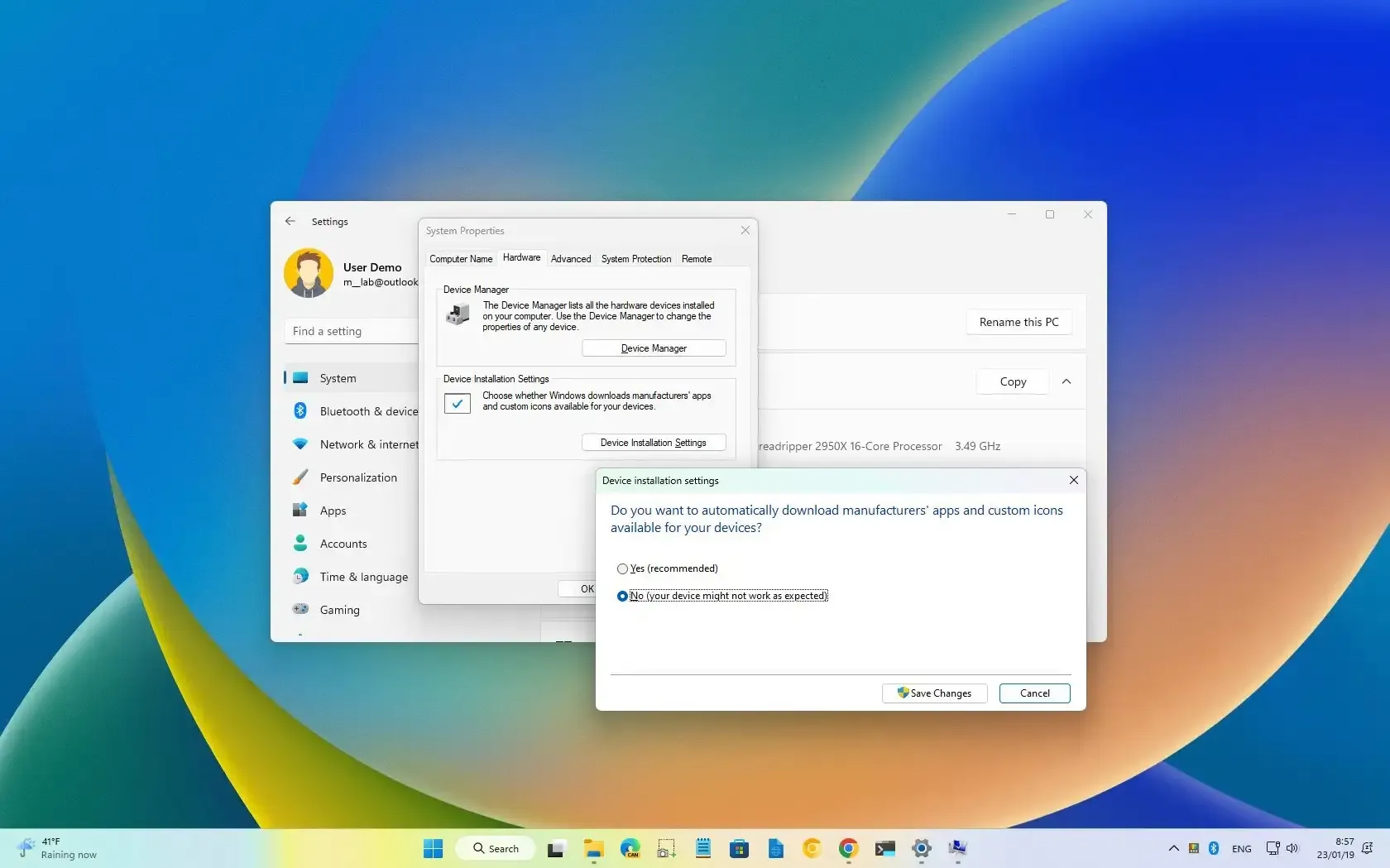
To DISABLE AUTOMATIC DRIVER INSTALL on Windows 11, open Advanced system settings, and in “Device Installation Settings” turn off the option.
This is for 11, should be the same in 10
merry bay
Thanks. Installing the driver now.
Lets see if this works.
That worked! Thanks, guys! I really appreciate it!
 dull garnet
3060 it or 6750 xt and now 6750 xt just now if diver problem is fix
Do not spend more 500$ for gpu
 cinder lagoon
dull garnet
3060 it or 6750 xt and now 6750 xt just now if diver problem is fix
cinder lagoon
dull garnet
3060 it or 6750 xt and now 6750 xt just now if diver problem is fix
What?
I can recommend getting a cheap 6800 if you're looking for buying advice
 mossy gull
Also has more Raytracing cores
cinder lagoon
????
Where do you live to account for pricing? I will pick the best value for under $500
 mossy gull
@dull garnet what kinda games do you play and at what resolution?
cinder lagoon
This one is pretty much your best bet:
https://pcpartpicker.com/product/P36qqs/asrock-radeon-rx-6800-16-gb-phantom-gaming-d-oc-video-card-rx6800-pgd-16go
Here are other ones I would deem a good value:
https://pcpartpicker.com/products/video-card/#X=41397,50559&c=499,497,494,501,495,496&sort=-price&page=1

ASRock Phantom Gaming D OC Radeon RX 6800 16 GB Video Card (RX6800 PGD 16GO)
Choose A Video Card
cinder lagoon
Yes, the one I recommended is just below $500. If you wanted to spend less and $500 is your hard limit, you gotta say that :P
 cinder lagoon
It is a good value but you'd get more performance with the ones I sent tho at a higher price
dull garnet
Trying to work on the budget
mossy gull
dull garnet
I was think got 3060ti
Keep in mind, the 8GB VRAM will hamper newer games performance.
8GB is just not enough anymore these days unless you want to play with worse looking textures
dull garnet
I've already have a monster of cpu get on sell i7 13700k
Amd is than
So go be 6700xt or 6750xt
cinder lagoon
You're speaking in riddles, dude 😅
mossy gull
I recommend the 6800, it's maybe less budget but it'll last longer for sure
If you really want to save money get the 6750XT
dull garnet
That go for @mossy gull
I can upgrade Again 4 or more year's
I kind of built this t pc to future proof
But i'm trying 2operateonabudgetsound
mossy gull
dull garnet
I can upgrade Again 4 or more year's
Then get as powerful as possible, we're gonna take some performance leaps especially now that Pathtracing becomes a thing
dull garnet
In my pc have now 1660 s
mossy gull
dull garnet
In my pc have now 1660 s
I have a 6700XT and its the lowest I recommend currently if you can afford it
SC takes 10GB VRAM on 3440x1440
sacred seal
So my discord is stuck showing a notification for my direct messages

Best I can tell I do not have any unread DMs or anything else that would trigger it though
Its not showing in the task bar ither, and when I open discord up on a different device it also does not have it.
I have already restarted both discord and my PC, anyone have any ideas (other then reinstall it)?
 sonic meadow
Do you have any message or friend requests?
sacred seal
Best I can tell no
 inland dove
skill issue
mossy gull
When people say VRAM is unimportant, these GPUs both have a Passmark score around 22400 points.
https://youtu.be/Rh7kFgHe21k

Hetzner: http://hetzner.com/hub/ex-line
Support us on Patreon: https://www.patreon.com/hardwareunboxed
Join us on Floatplane: https://www.floatplane.com/channel/HardwareUnboxed
Buy relevant products from Amazon, Newegg and others below:
Radeon RX 7900 XTX - https://geni.us/OKTo
Radeon RX 7900 XT - https://geni.us/iMi32
GeForce RTX 4090 - https...
dull garnet
mossy gull
When people say VRAM is unimportant, these GPUs both have a Passmark score aroun...
I say it's 2 parts. The more vram have the more buff But what's Navidia do They're trying to get them the process Faster more of Efficiently.
But what do I know
I7 13700k
Cl 16 ddr4
1tb ssd
5tb hdd
For now 1660 s gpu but get 6750xt

Not bad for my first build on a budget
Got the c p u on sale for like two hundred less at micro center
Sorry about the spelling errors
mossy gull
dull garnet
I say it's 2 parts. The more vram have the more buff But what's Navidia do They'...
Nvidia tries to use faster and faster VRAM, while AMD has slower & more VRAM which is more beneficial, their cards aren't that expensive either.
Efficiency only gets you so far.
AMD uses a cache die to make up for the slower VRAM, which really pays off it seems.
sacred seal
Synthetic benchmarks are just that, synthetic. At launch the 6800xt was fairly well paired against the 3080, not the 3070.
If you have a 3070 you should be running at 1440 or higher. If you hit the vram limit, performance is going to suffer, but if you factor in the fact that the 3070 is slower out of the gate, and that many of these benchmarks are bieng run at unreasonable quality settings (the 6800xt is managing less then 60fps), you are left with a small subset of games which actually exhibit problems due to vram limitations. There are more games where the 3070 is faster then the 6800xt then there are games that are unreasonably hampered by the lack of vram.
mossy gull
If I take SC, which I use to ran on a Vega FE, now on a 6700XT or 6800M.
On 3440x1440 the game always uses around 10GB VRAM, which a 3070 doesn't have.
In Cyberpunk 2077, it apparently can use up to 18GB VRAM, the less you have the more bottleneck your GPU is.
mossy gull
sacred seal
Synthetic benchmarks are just that, synthetic. At launch the 6800xt was fairly w...
Well, we're talking about the 6800 non XT, and games that use less VRAM may come to an end, more and more people want 4K gaming, so textures will become bigger.
sacred seal
I played cyberpunk 2077 on a 6900xt. You are not getting playable framerates if the GPU is using more then 10GBs
dull garnet
Am go 6750xt I have look at 6800xt will can not found that pre own than 500 or over msrp and live usa
Why one I found is that micro center and that's like 499
sacred seal
These games are somewhat future proofed. You can run them at settings far in excess of what a top of the line PC can handle today
dull garnet
And the reason why I'm want for 500. Do not want to have to save for like 4 or 5 months
I work Minimum wage job
sacred seal
More vram is better, but that is still far from the main consideration when picking a new GPU.
dull garnet
I Go for 6750xt
mossy gull
sacred seal
I played cyberpunk 2077 on a 6900xt. You are not getting playable framerates if ...
But the excess VRAM is useful, especially if you look at games likes SC that really benefit from it.
CP2077 is just extremely heavy, but still, even if you use 10GB VRAM, you have that tiny buffer the 3070 doesn't have.
sacred seal
Again, reported usage is not the same as actual usage, and cyberpunk is still not the most optimized affair
dull garnet
sacred seal
Again, reported usage is not the same as actual usage, and cyberpunk is still no...
Indeed
sacred seal
The performance lost due to vram could still be made up by a more powerful GPU core
For the most part that is not the case, but for the right price a 8GB gpu is still plenty good
dull garnet
The cost to Performance the 6750xt is batter buy for me
The only difference is with the 3060ti is It does lighting and reflections better
mossy gull
sacred seal
Again, reported usage is not the same as actual usage, and cyberpunk is still no...
When my little brother still had his 3070, we found out it started using Shared memory way faster, which slowed down a the game.
While my 6700XT had it all in its VRAM and used no shared memory.
On the NVidia card we only used Taskmanager to see in the details tab, on AMD we used both AMD Radeon Software and Taskmanager.
sacred seal
Vram does not work like ram.
dull garnet
No not
mossy gull
Also with Resident Evil 1 Remake.
I can flawlessly run the game on 4K ultra settings on a Vega FE, while the 3070, a more powerful card started to badly stutter.
Resident Evil Remake can use 16GB VRAM in 4K Ultra.
sacred seal
Games have no clue how much ram they need at any given time, so they just ask for a bunch. The worst case I have seen tested was for honor which was requesting 2x as much memory as it was actually using
mossy gull
sacred seal
Vram does not work like ram.
I know, that's why shared memory fucks with your performance
sacred seal
No, that is a entirely unrealted issue
With ram, what is reported as used is generally fairly close to what is actually used
mossy gull
I mean, a faster a GPU uses shared memory the more it hampers its performance
sacred seal
With vram, that 16GBs of vram it is reportedly using could be as low as 8 in reality
mossy gull
sacred seal
With vram, that 16GBs of vram it is reportedly using could be as low as 8 in rea...
But it can be as high as 16GB,
sacred seal
Nope, best case it would probably be 14
mossy gull
All I know, DWM is a VRAM sucker with high res displays
sacred seal
Stuff is swapped in and out of memory so frequently that developers do not bother releasing it when not in use
Its common practice to bake in 10-20% overhead for any vram request
Just in case there is a super high spike that is unexpected
DWM reports itself as a vram sucker. Again, the numbers you see when it comes to vram have little to do with the actual stuff that is going on behind the scenes
I run 2 4k displays, and before I got my 6900xt I was running a 1080
According to task manager, chrome is running on 5GBs of ram and 5GBs of vram right now
You think that chrome is actually using 5 GBs of vram?
Actually even better, my total vram ussage is about 10GBs. Only things of note that I have open are chrome and UE. This is the exact same workload I used to run on my 8GB 1080
Yet not only could I run it without issue on the 1080, I could also play a game while doing so
If you have more vram, programs will use more vram
mossy gull
@sacred seal but then why does CP2077 run fine in 1080p with 8GB VRAM.
But as soon you got to 1440p it starts to lose against a 6700XT which has a bit more VRAM?
I tested without any upscaling tech and without Raytracing
The 3070 reported 90% VRAM usage(7.2GB) and 10% RAM usage(4GB) in Taskmanager, but the 6700XT only reported 11GB VRAM usage on the card.
cinder lagoon
sacred seal
So my discord is stuck showing a notification for my direct messages
If it's still there, open up the inbox at the top right of the client. Maybe something there...
cinder lagoon
sacred seal
If you have more vram, programs will use more vram
data everything will fill the space it is constraint to.
sacred seal
mossy gull
<@221476957936812033> but then why does CP2077 run fine in 1080p with 8GB VRAM.
...
The better question would be why the 3070 was only running at 90% and not 100% vram if it was fully loaded and cyberpunk was hitting vram limitations.
Its defiantly possible that vram was at play, but it could also be that settings were not applied identically between the two systems (cyberpunk is notoriously difficult to benchmark properly, even big youtubers like LTT and Jay messed up the settings on I think it was the 4090 review).
Or something else entirely. Computers are weird.
sacred seal
cinder lagoon
If it's still there, open up the inbox at the top right of the client. Maybe som...
Nothing in my inbox. As this only is affecting my deskop and not my laptop I am thinking a re install is in order
mossy gull
sacred seal
The better question would be why the 3070 was only running at 90% and not 100% v...
Because the 3070 never hit 100% for some dumb reason
cinder lagoon
sacred seal
Nothing in my inbox. As this only is affecting my deskop and not my laptop I am ...
Make sure to delete the folder in %AppData%
 balmy flicker
so I have a dumb issue my old android phone says there is no internet despite my computer being conected to the same router and actively streaming
sonic meadow
Can the phone browse the internet? It could be that the location it pings to check online-ness doesn't exist anymore
balmy flicker
no it will not
that is part of the issue I is talking to a router that has access but after a update / crash it stoped talking to the rest of the world it works on my internal Wifi
cinder lagoon
balmy flicker
so I have a dumb issue my old android phone says there is no internet despite ...
Proxy and DHCP settings? Maybe overriding the IP of some other already connected device
Best to "forget the network"
balmy flicker
joy thanks will do
 cinder lagoon
...is this a threat or a prophecy? 🤔
balmy flicker
cinder lagoon
Best to "forget the network"
Tried that and nothing
I am getting dns probe finished bad config
 cinder lagoon
What is the configured DNS server of that network?
You can try overriding it in android in the settings of the particular network.
Try 8.8.8.8 for google's DNS.
 deft star
RTX 4070 reviews are going live from all your favourite yt channels

Sponsor: Thermal Grizzly Kryonaut thermal paste (on Amazon - https://geni.us/JMVNtOE ) & Hydronaut for water cooling (Amazon - https://geni.us/Fsray )
The NVIDIA GeForce RTX 4070 has a release date of April 13, 2023 and an MSRP of $600. We're reviewing the video card today, testing the RTX 4070 GPU with the NVIDIA Founders Edition model. One of ...
mossy gull
deft star
RTX 4070 reviews are going live from all your favourite yt channels
At least they gave it 12GB VRAM and not 8GB they wanted to do 1st.
cinder lagoon
Question:
Intel ax1675 "Killer" low-latency WiFi6E card PCIe or
Intel ax211 WiFi6E M.2 card?
Want it to be versatile (use on different devices), long lasting with high performance
Basically same price
 jade scaffold
the M.2 card will require antennas atatching to it
i have the AX 210 on my jetson PC
sonic meadow
a large percentage of PCIe wifi cards are just m.2 cards on a pcie adaptor with some antenna flyleads going to the slot cover
cinder lagoon
Antennas no problem, prolly more versatile than fixed pcie but not sure
jade scaffold
yea you'd just have to rout the antennas somewhere if it goes in a desktop
cinder lagoon
I know but I can't decide which is the better solution
Better performance but less versatility or the other way around...
jade scaffold
the performance thing mostlikely will not be an issue for you
its not like you are gonna have internet over 1gigabit anyway or even need internet speeds of 1 gigabit
mossy gull
cinder lagoon
Question:
Intel ax1675 "Killer" low-latency WiFi6E card PCIe or
Intel ax211 WiFi...
I have the AX210, amazing card and never had problems with it
cinder lagoon
jade scaffold
the performance thing mostlikely will not be an issue for you
I intend to use it for display streaming mostly. "Killer" products advertise up to 75% lower latency. Sounds good, considering practically no price difference
Should've leaded with that
jade scaffold
latency thing is also pretty much total bull shit
that 75% better latency is like 3ms most of the time
cinder lagoon
So you'd say go for better versatility with an ax211 M.2
jade scaffold
yes but keep in mind if its going into a desktop you need some antena leads and some actual antenas
cinder lagoon
Yope
mossy gull
cinder lagoon
I intend to use it for display streaming mostly. "Killer" products advertise up ...
The latency is utter bullcrap, Killer cards are more troublesome than stable.
And with normal Intel AX210/310 you can turn on settings to reduce the latency.
I had tons and tons of problems with Killer cards, I highly recommend against
cinder lagoon
Okay thats a good reason! Will go with the "old" one
mossy gull
cinder lagoon
Okay thats a good reason! Will go with the "old" one
Majority of Intel cards are good, except ones from 6 years ago, they had a faulty chip that made them overheat even under low load
balmy flicker
cinder lagoon
What is the configured DNS server of that network?
You can try overriding it in ...
I am using 1.1.1.1
mossy gull
balmy flicker
I am using 1.1.1.1
I use 1.1.1.2
balmy flicker
Ill try that
mossy gull
balmy flicker
Ill try that
It's a more secured version of yours
balmy flicker
It will not let me enter it in unless it is 1.1.1.2.

and now it is being dumb and will not conect to my hidden network I wonder if something got corrupted
surreal moss
Is automatic mode not an option?
balmy flicker
trying to figure out why a phone connected to the same router as the rest as my PC does not have internet while actively streaming YouTube at the same time
sacred seal
Does the phone connect to any other networks?
Or more accurately does it work with internet from other sources
balmy flicker
I have one other router I can try but no it has a dead sim card
sacred seal
I'm talking more like can it connect to a free wifi
balmy flicker
it is connected to the WIFI just not my hiden network
and at the same time claims to have no internet connection despite talking to the same router as my PC
sacred seal
This would be a diagnostic mesure to see if the no internet issue is caused by the router/netowrk config or the device itself
mossy gull
balmy flicker
trying to figure out why a phone connected to the same router as the rest as m...
How old is the phone
balmy flicker
it is a MOTO G power and is about 2-3 years old
cinder lagoon
balmy flicker
I am getting dns probe finished bad config
Imma say router config, hence I recommended other DNS. (DNY_PROBE_FINISHED_BAD_CONFIG)
Try 8.8.8.8
balmy flicker
Every thing works on my other devices just the old phone will not conect
And all this happened after the battery ran dry and it failed to boot
And i tested 8.8.8.8 to no result so I told it to use the default DNS
mossy gull
balmy flicker
Every thing works on my other devices just the old phone will not conect
Have you tried keeping it on default 
mossy gull
If nothing works I would reset the phone.
balmy flicker
that was the last thing I tried I need to test another router first but yah
cinder lagoon
You can also try clearing the browser app's cache but that probably won't help...
Already tried some stuff from googling android dns_probe_finished_bad_config?
balmy flicker
looked it up I have done all the steps slightly out of order the issue is the phone I tested my ISP provided modem/router to the same results
I even set the DNS at the router and still nothing
cinder lagoon
Can you try with a hotspot from your regular phone or its simcard?
balmy flicker
no because verison is a PITA
and for some reason when ever I get a phone for them the sim cards are not swapable
cinder lagoon
Ahh
It's called a SIM-lock and it is used by ISPs who provide phones with their plans.
The phone could be reflashed with a non-ISP version of the firmware to unlock it
 cerulean helm
So apparently Noctua was able to air cool a Xeon W9-3495x on a continuous 700W load. Just wow.


Would you say 700W on air cooling is impossible? Here’s our NH-U14S DX-4677 cooling the Intel Xeon w9-3495X at a continuous load of more than 700W! @intel @ASUS @Seasonic @SKhynix
Likes
287
 Twitter
·
Twitter
·
 lusty heart
Noctua will always be my go to.
Their coolers are built like a brick shit house.


Hopefully if Best Buy is accurate I will have a 7800X3D in my system this Saturday. Had to order because my store doesn't ever get shit on release day.
cinder lagoon
I think release day's been a few weeks but good for you! :D
cinder lagoon
Huh, okay microsoft.... 8 months of daily usage means your battery looses >26% of it's already pitiful capacity of 51Wh (it has 2 seperate batteries which both have space and could legally be 99Wh to still be be taken on a plane
 mossy gull
cinder lagoon
Huh, okay microsoft.... 8 months of daily usage means your battery looses >26% o...
mossy gull
cinder lagoon
Huh, okay microsoft.... 8 months of daily usage means your battery looses >26% o...
On what type of device?
cinder lagoon
Surface book one, keyboard (base) battery
mossy gull
cinder lagoon
Surface book one, keyboard (base) battery
Oh, it's kinda normal the battery dies that fast, it's because of the heat of the device + the natural cycle of Lithium-Ion batteries.
cinder lagoon
The base does not get warm for mine does not have a GPU in it.
Just kinda disappointing that a laptop battery looses 25% already in under a year of daily (normal) usage
mossy gull
I have a SB2 with a top part battery that's only 25% left
So it can be worse.
Although I think I am gonna replace it with a the ROG Flow
Although I hope Asus will make a Flow Z13 with an AMD chip because Intel sucks ass for battery and it shows time and time again.
cinder lagoon
mossy gull
I have a SB2 with a top part battery that's only 25% left<:NatsukiLaugh:60440362...
Betcha you used it more, tho ^^'
Mine sat idle at 50% for a good amount of time
mossy gull
cinder lagoon
Betcha you used it more, tho ^^'
A lot more, I use it like a drawing display these days.
balmy flicker
cinder lagoon
It's called a SIM-lock and it is used by ISPs who provide phones with their plan...
Well figured out the issue the clock was thinking it was 2022 and that prevented it from talking to the Internet
Once I fix the date and time it connected to the Internet instantaneously
cinder lagoon
Ohhh such an obvious but yet obstruse mistake
A design flaw that should not return "BAD DNS"... but instead something like "out of sync" or whatever 🙄
sonic meadow
what happens is that the timestamp on the dns request is too far out, so the dns server ignores it basically
cinder lagoon
I mean There should be a separate error code for it
sonic meadow
usually time related errors show up as a security error. at least in other spaces
mossy gull
cinder lagoon
A design flaw that should not return "BAD DNS"... but instead something like "ou...
It actually has to do with once in a while stuff gets changed and these changes are bound to date and time
balmy flicker
so what happened is my phone rest its clock to the last time it had cell service when it crashed which was a year ago hence the issues and becuse I use a watch I did not notice until I tried to reset the clock to control smart light then when checked the browser it then told me that the date was to far out to pull the offline page up when I fixed the date and time it all of a sudden had internet
lusty heart
cinder lagoon
I think release day's been a few weeks but good for you! :D
1 week. It was on the 6th
cinder lagoon
Ohh wtf I've seen reviews for like ages xD
Hmm something must be wrong with the WiFi of my laptop...
But only in my personal home network?? Sometimes it just randomly disconnects and when using linux it more or less just straight up refuses to connect to either the guest or the regular network, after disconnecting a couple minutes after boot.
mossy gull
cinder lagoon
Hmm something must be wrong with the WiFi of my laptop...
But only in my persona...
Have you updated the machine?
cinder lagoon
It's the surface book 1 - dualboot linux and windows, both most up-to-date but updating linux has gotten more difficult because the internet cuts out like I said
mossy gull
cinder lagoon
It's the surface book 1 - dualboot linux and windows, both most up-to-date but u...
How long has it been doing it?
dull garnet
dids the asus vg277q1a support 10 bit format
cinder lagoon
Does not specify on the product page so probably not
dull garnet
K
cinder lagoon
You can look for monitors that specify 1.07 billion colors instead of the regular 16.5 million
dull garnet
K thanks am think upgrade one my monitor to 1440p.i have 6750xt
cinder lagoon
You won't find 10 bit at the pricpoint of 300 bucks tho.
1440p is a good choice. The GPU might not be able to upkeep 144hz tho
cinder lagoon
Imma look if I can find some recommendations for 1440p HDR monitors but I'd expect $300-$400
dull garnet
I just go with 1080p and get same monitor have but has the hdr
cinder lagoon
Which one do you mean?
mossy gull
dull garnet
dids the asus vg277q1a support 10 bit format
No, it does not.
HDR or not, cheaper monitors are rarely 10-bit.
And some have it but then you also decrease the max Hz.
mossy gull
cinder lagoon
Like 1-2 months
Maybe it's a faulty firmware update 
sacred seal
Basically all hdr specs require 10 bit, so with very few exceptions if a display is hdr it is also 10 bit
mossy gull
sacred seal
Basically all hdr specs require 10 bit, so with very few exceptions if a displa...
Sadly majority of displays are HDRn't as they call them.
They support HDR, but at 8-bit and lower brightness
The Odyssey G3 for example is a nice 8-bit HDR display
sacred seal
G3 supports hdr10 supposedly
Which the specs require support for 10bit

HDR10 Media Profile, more commonly known as HDR10, is an open high-dynamic-range video (HDR) standard announced on 27 August 2015 by the Consumer Technology Association. It is the most widespread of the HDR formats.HDR10 is not backward compatible with SDR. It includes HDR static metadata but not dynamic metadata. It doesn't offer the ability to...
mossy gull
2 family members in my house have the G3 and it lacks a 10-bit mode, Windows only shows 8-bit on highest framerate.
With the G5 you can turn it on 100Hz and get 10-bit
sacred seal
NVM, I misread the page on it. Why the heck would you have a checkbox for HDR10?
No, its not a HDR display
mossy gull
sacred seal
NVM, I misread the page on it. Why the heck would you have a checkbox for HDR10?
It sells faster that way.
HDR10 is an open standard, unlike HDR12 and Dolby Vision.
So any manufacturer can put HDR10 on the box.
sacred seal
If they meet the reqirements
mossy gull
Many Vizio displays do the exact same thing, slap HDR10 on every box, even when it doesn't properly support it.
sacred seal
Freesync is a open standard, but it has to actually do it
Define properly support. HDR10 is a fairly lax standard. Basically all it gaurentees is 10 bit color, there is no brightness requirement
Which means its useless in 99% of cases
mossy gull
Unless you see HDR12, 400, 600, 800, 1000, 1200, 1400, Dolby Vision or Technicolor.
Your display doesn't properly support HDR in any way.
The HDR10 badge is basically being abused just to sell a display
sacred seal
You are conflating looking good with properly supporting. I agree that HDR10 is not going to look good in HDR mode, but it will be a 10 bit display
mossy gull
sacred seal
You are conflating looking good with properly supporting. I agree that HDR10 is ...
Then how don't the G3 from my family members support 10-bit, but only 8-bit?
While they're certified HDR10.
sacred seal
Because I misread the label and they had a box that said HDR10 --------- No
So they are not HDR10 certified
To the origional point I have heard decent things about this display
https://www.newegg.com/p/N82E16824012018?Item=N82E16824012018&nm_mc=AFC-RAN-COM&cm_mmc=afc-ran-com-_-PCPartPicker&utm_medium=affiliate&utm_campaign=afc-ran-com-_-PCPartPicker&utm_source=afc-PCPartPicker&AFFID=2558510&AFFNAME=PCPartPicker&ACRID=1&ASID=https%3A%2F%2Fpcpartpicker.com%2F&ranMID=44583&ranEAID=2558510&ranSiteID=8BacdVP0GFs-dCdhPWnNW_dH._SCf3cN3g
High refresh 1440 with HDR400 for 300$s
mossy gull
sacred seal
Because I misread the label and they had a box that said HDR10 --------- No
HDR10 is from Samsung, they made it open-source or open-standard so everyone can use it.
Unlike all the others, which are from VESA, Dolby and Technicolor.
sacred seal
Yes, everyone can use it assuming they support the requirements. Other then some low level stuff the only requirement for a display to be HDR10 is 10 bit color.
mossy gull
Which some don't even support, but hey, that HDR10 logo looks nice on the box, and because everyone wants an HDR display, but will never use it in any way, they can hide the lie.
sacred seal
Show me a HDR10 certified monitor that does not support 10 bit color
The g3 is not HDR10
sacred seal
Legally if Vizio puts HDR10 on the box, it has to support 10 bit color. If it does not, they could be sued. I cant find any lawsuits pertaining to them and HDR, so presumably they have not released any fake HDR displays
mossy gull
sacred seal
Legally if Vizio puts HDR10 on the box, it has to support 10 bit color. If it do...
But who's gonna verify the HDR10 shinanigans?
There's dozens of fake HDR10 displays, you want to verify and sue all companies who do abuse the logo?
The display mainboard may support 10-bit, doesn't mean the panel does.
The Huawei MateView GT shows un the specs only 17 million colours, which is 8-bit, and rocks a HDR10 logo.
10-bit is 1 billion colours.
The iiyama G-Master GB3266QSU-B1 Red Eagle, LG UltraWide 29WP500 do the exact same thing
Just because a display rocks a HDR10 logo, doesn't mean anything these days.
It just means the monitor "support" HDR content, no matter how bad it is.
sacred seal
As far as I am aware none of the standards require 10 bit panels.
mossy gull
If HDR10 would be 10-bit, then tell NVidia to call the RTX 4090 laptop the 4080 Laptop.
They perform almost the same.
sacred seal
But if that is the argument you are making, then I misunderstood, and you are right
mossy gull
It's just a scam a lot of companies pull off
And they easily get away with it
That's why when browsing for any HDR display, see if they have a VESA HDR verification, then you know it supports 10-bit
sacred seal
Well it applies to all HDRs (HDR400-1000, Dolby vision), not just HDR10
Nope, vesa only requires 8 bit

 mossy gull
Dolby Vision requires at least 99% DCI-P3, which they say is 10-bit
Although it's very very vague, like Dolby
sonic meadow
Dci-p3 is a colour space not a bit depth though 🤔
sacred seal
Gamit and volume are different things
mossy gull
Like I said, Vague, it's hard to find, but Dolby Vision seems to need at least 10-bit.
Now I want to see what a Dolby Vision 12-bit looks like
sonic meadow
Vague and meaningless are two separate things :p
sacred seal
10bit input, not 10bit display
sonic meadow
A decent chunk of 10bit panels are actually 8bit using temporal colour magic
Same with 8bit actually being 6 or 7
mossy gull
sonic meadow
Same with 8bit actually being 6 or 7
No wonder 8-bit TN panels look absolute dogshite
sacred seal
TN is a entirely unrelated issue to the color depth of the panel
mossy gull
sacred seal
TN is a entirely unrelated issue to the color depth of the panel
I am saying this because there's many very cheap TN monitors with that spec and they look horrendous
sonic meadow
Yeah. That's a separate issue
Imo all TN panels look like shite, but that's because of colours, contrast, and viewing angles
sacred seal
You could manufacture a IPS and a TN with true 8 bit and the TN still looks like dog shit
mossy gull
Also, what the F is HLG
My C1 supports it but I have no HLG content to test it
sacred seal
Some quick reading its SDR with additional metadata to make it look better on a hdr display
Useful for broadcast
mossy gull
So basically the true HDRn't
sonic meadow
sacred seal
Some quick reading its SDR with additional metadata to make it look better on a ...
It took them this long for something that should have been there at the start... Damn
Somewhat unrelated... I have an issue.
I want a 4070/ti 😢
mossy gull
sonic meadow
It took them this long for something that should have been there at the start......
I mean, there's many things that should've been there but aren't, I am not calling any names Apple
mossy gull
sonic meadow
Somewhat unrelated... I have an issue.
I want a 4070/ti 😢
Get the Ti, not the 4070, there's almost a 20% performance gap and it's only 50.- difference in price.
sonic meadow
Where you are maybe 😆
(I haven't actually looked at price differences here)
sacred seal
Metadata seems to be the wrong word
nstead of starting with an HDR signal, HLG begins with a standard dynamic range (SDR) signal that any TV can use. The extra information for HDR rendering is added on, so an HDR TV that knows to look for this information can use it to display a broader range of colors and a wider range of brightness. To get a little more technical, HLG uses the same gamma curve that an SDR signal uses but adds a logarithmic curve with extra brightness over the top of the signal, hence the “log” and “gamma” in Hybrid Log Gamma.
mossy gull
sacred seal
Metadata seems to be the wrong word
```nstead of starting with an HDR signal, HL...
HDRn't 😃
mossy gull
sonic meadow
Where you are maybe 😆
(I haven't actually looked at price differences here)
That's the MSRP😃
In my area they don't sell the non-Ti yet
sonic meadow
mossy gull
Get the Ti, not the 4070, there's almost a 20% performance gap and it's only 50....
Cheapest for both:
4070: $1230
4070ti: $1600
sacred seal
Your NZ, right? Or am I remembering the wrong person?
sonic meadow
Yeah
sacred seal
How easy is it to get stuff in from ozzyland? Prices seem a bit lower over there (accounting for the dollar difference)
sonic meadow
Would hit import duties. AU prices are usually basically the same as ours (if not slightly worse)
sacred seal
1k start price for 4070 and 1300 for 4070ti
Granted thats in aud, but tack on 10% and thats still less then what you are looking at
No clue what import would be though
That could eat any savings
sonic meadow
1k comes up to about 170 in taxes/duties
sacred seal
Ah, OK, NVM then
sonic meadow
1.3k about 215
sacred seal
That is a lot more then I was expecting
sonic meadow
Plus support becomes awkward if it's needed
sacred seal
Between the canada and US boarder you are looking at less then 10% for import and taxes in most cases
sonic meadow
Including exchange rate the 1300 bucks comes out at around 1650 or so
sacred seal
Yea, not feasible
sonic meadow
Which is.. the same as here 😆
mossy gull
@sonic meadow
Why's NZ so expensive
sacred seal
Its not so much that its so expensive as it is that the dollar is weak
The rest is from the fact its logistically difficult to service
1 NZD is worth only 0.62usd
mossy gull
Fun fact: New Zealand is named after a province in the Netherlands called Zeeland😃
It's original name by the VoC was Nieuw Zeeland, later renamed to New Zealand😃
Oddly enough not New Sealand🧐
sonic meadow
sacred seal
1 NZD is worth only 0.62usd
Stuff has been expensive even when the dollars were closer. It's a combination of distance and "smaller" market
mossy gull
sacred seal
Its not so much that its so expensive as it is that the dollar is weak
So what you're saying, it needs to go to the gym?
cinder lagoon
mossy gull
Maybe it's a faulty firmware update <:kannaLook:674500689640161290>
This thing aint gettin no firmware updates 🥴
cinder lagoon
sacred seal
Basically all hdr specs require 10 bit, so with very few exceptions if a displa...
This one for sure aint 10-bit
 cinder lagoon
jade scaffold
https://media.discordapp.net/attachments/1028314607552565260/1097253984634413126...
cinder lagoon
jade scaffold
https://media.discordapp.net/attachments/1028314607552565260/1097253984634413126...
That is indeed shit. Is that the jetson nano?
Would be fairly repairable tho since it only seems to be a single component. Short to ground through it?
jade scaffold
thats the carrier board
and i have no fucking idea what caused that
all i know is one moment there was no burning smell the next there was
cinder lagoon
What area is this capacitor in?
jade scaffold
next to the POE at the end of the sodim slot and on the opposite side of the PCB where the M.2 is
mossy gull
cinder lagoon
Are you using POE?
Shouldn't PoE autodetect?
jade scaffold
The poe through holes aren't even occupied
cinder lagoon
mossy gull
Shouldn't PoE autodetect?
Yes, PoE does some sort of auto detecting, if it's not a passive injector or something.
cinder lagoon
jade scaffold
The poe through holes aren't even occupied
Does the device still work?
Can you send some files of PCB schematics for this board? I can read them and check what this one's for.
And probably why it could've failed
jade scaffold
cinder lagoon
Does the device still work?
No it's dead
The capacitor has gone from a capacitor to a fucking resistor
And you aren't gonna be able to figure out why it failed just from the pcb design
sonic meadow
Might tell us what fed it, and therefore where an errant voltage spike or reverse might have come from
jade scaffold
I can't find any pcb schematics anywhere the carrier board is the seeed studio j202 if you wanna try look for yourself
What ever the capacitor does it's important as without it not even the power led lights up
And this is the component that failed
 cinder lagoon
Okay I'll have a look
jade scaffold
If you look at the damage pic I sent it looks like the pcb is also damaged arround the top cap but weather or not this is a result of the capacitor burning up or the cause is still a mystery
cinder lagoon
Well if you have a multimeter you could start by measuring resistance to ground on the contacts of that cap.
If it is low your board is damaged
Resistance with the cap removed at least means broken PCB
jade scaffold
Or I could just send it back honestly no sense in spending money to fix it when I can just be sent a new one
cinder lagoon
Ohh I thought that would be off the table because you damaged it yourself
But a blown cap usually doesn't just happen without user intervention
jade scaffold
I literally hadn't touched it in a day and it ate shit
Also caps are literally the most common thing to just up and die
cinder lagoon
They can die due to manufacturing defects but if nothing works anymore this one has been victim of a short or similar
Caps are basically 1MO resistors if they don't malfunction
jade scaffold
There is nothing I have done to it that would cause a short
cinder lagoon
Short could happen internally, both in the cap or on the board. Something on there is shorted out.
jade scaffold
It's probs a bad cap tbh it was completely out of no where
cerulean helm
Any phone gurus here? I have a brand new s23 that the setup wizard keeps crashing on. Tried factory reset and cache wipe.
 amber fable
Sounds like return time TBH. How sure are you that it is actually brand new?
cerulean helm
amber fable
Sounds like return time TBH. How sure are you that it is actually brand new?
It arrived in its sealed box from Samsung. I was able to get it activated just not via my end. For whatever reason my phone carrier had to manually activate it.
cinder lagoon
Ahhh, yee ol carrier ROMs, probably faulty from the factory...
 pearl moon
Something made me decide to make my old family pc into a NAS, and man it's been a headache
Though i hope most of it's issues will be fixed by formatting the drive
Cause rn it's still on win7, and my parents have stuff on their that i have to pull off before i can format it
Had to go to the thrift store to get a VGA cable and compatible monitor, luckily they had such a thing, and the monitor also has full YPbPr component so i can run my OG Xbox and wii on it.
cinder lagoon
You should get yourself a TrueNAS installer and set it up with a tutorial. It's the most versatile and probably best free solution.
The effort between using W10 and TrueNAS as a NAS is about the same but Windows sucks at it.
pearl moon
I'd rather use a dedicated nas os, as the pc in question was not very good even when we got it
it's a small cheap 2010 eMachines desktop
It's something athlon
cinder lagoon
pearl moon
I'd rather use a dedicated nas os, as the pc in question was not very good even ...
TrueNAS it is, then.
Or linux at least, is more or less the same in this scenario.
Does it have gigabit LAN or do you want to use it via WiFi?
pearl moon
cinder lagoon
TrueNAS it is, then.
Or linux at least, is more or less the same in this scenari...
It has some sorta lan atleast, idk about wifi
But i'd rather use the cable if i can
Much more stable that way
I'm still in the planning stages tho
I got the pc to boot into the omv installer atleast. i'm not committed to omv at all, was just the first one i found so i could make sure i could even boot from usb
cinder lagoon
Hah good
I'd pull the drive and just connect it to another PC.
Even tho windows' user system prevents you from accessing the users folders, you can just click "I'm the admin, gimme access"
pearl moon
Yeah
Glad i have a sata to usb already
i just gotta go through it with my mom to make sure i'm not getting rid of anything she wants to keep
And do the same with my grandparents old hard drives, then i will have quite a few drives, but only 2 of them are 500gb afaik
cinder lagoon
Ohh I'd just clone the drive to a virtual disk so you can start doing the NAS part
Can use the Sysutils DiskToVhd
Getting new drives would certainly be my way to go tho.
Would set up the 2 500GB disks in raid0 for non-important data like backups (how likely is it that both the source and the backup fail at the same time!?) and put important stuff in raid1 or raid5 on 2/3 new 2TB drives
pearl moon
The 2 500gb will just be game .ISOs for my ps2 and emulators on my pc, and backed up music. Then like you said i wanna eventually expand it with a few other drives for other things
will i need to setup a 3rd smaller disk to run the system off of, or can i just do that with one of the 500gb disks?
cinder lagoon
If you go raid5/raid10 (more expandable) I would choose 3+ 2TB drives, if not I'd say choose bigger raid1 disks
cinder lagoon
pearl moon
will i need to setup a 3rd smaller disk to run the system off of, or can i just ...
NAS systems usually boot of a small (4G) USB drive which stores the configuration and stuff
pearl moon
Oh ok sweet
cinder lagoon
You could use a disk but you'd waste the majority of it
pearl moon
yeah
pearl moon
cinder lagoon
Ohh I'd just clone the drive to a virtual disk so you can start doing the NAS pa...
Could you go into more detail on what this is? I'm still new and trying to learn
cinder lagoon
Yea sure
When using a virtual machine for example, the programs makes a file on your hard drive that stores everything of that virtual PC (Operatiing system, user files, etc) it is a virtual disk
Windows supports using these virtual disk files as a regular disk/USB.
You can "image" the real disk to a virtual disk file to preserve the data and then wipe the real ones so you can start before going through everything on the actual machine.
https://learn.microsoft.com/en-us/sysinternals/downloads/disk2vhd
Use this program for it. You will be able to just doubleclick it (if needed, assign a drive letter) and browse it through windows explorer just like it would be with a real disk

Disk2vhd simplifies the migration of physical systems into virtual machines.
Tho make sure to check the "use .vhdx" box, the file format is superior to vhd.
A virtual disk file is most likely smaller than the size of the physical disk. These formats support only storing the used space of the real disk and expand the file as needed.
pearl moon
Wait so let me clarify. I store a virtual copy of the disk on my pc, format the original, then put it back into my NAS machine to set everything up?
cinder lagoon
Yea basically.
Test the virtual copy first tho
pearl moon
Wdym
cinder lagoon
See if you can open it etc, open some images or whatever to see if the data got stored correctly
pearl moon
ah yeah
deft star
cinder lagoon
NAS systems usually boot of a small (4G) USB drive which stores the configuratio...
that is very much user choice and not a general rule
cinder lagoon
Have you ever used a NAS os? It is the "default" option for basically all of them
pearl moon
Certainly seems like the easiest for me, cause otherwise that's another thing i'd have to buy
When i have plenty of little usb drives lying around
But yeah, my first goal with the nas is to be able to set it up to be able to load games to my ps2 using it
Cause yeah that's something people have figured out how to do on ps2
And i'd like to use it for music storage for my pc and my phone
cinder lagoon
Understandable but beware of the Armco rules
mossy gull
WAVs are big😃
pearl moon
and the ps2 games are rips of my own physical copies cause my ps2's disc drive broke, but i pulled the sata disc drive out of the to-be-NAS
I love when i get a windows defender notification as soon as i plug in the hdd
cinder lagoon
pearl moon
and the ps2 games are rips of my own physical copies cause my ps2's disc drive b...
Technically not legal but ethically fine imo
sonic meadow
depends on where you are, and local laws
mossy gull
In many countries it isn't piracy if you don't upload it and/or sell it.
sonic meadow
precisely
if your backups are just for yourself, and not shared or sold, then its okay
mossy gull
But I know in some countries it's a crime to temper with files, this includes copying stuff off a disc.
But those are in the minority
pearl moon
@cinder lagoon yeah something tells me truenas ain't the play
 sonic meadow
if you are under 8TB (or so) of storage then its likely to be fine
sonic meadow
... maybe? its been a while since i have set up truenas tbh. I might have installed it to a disk anyway 🤔
cinder lagoon
pearl moon
<@265895468876169226> yeah something tells me truenas ain't the play
It only needs some ram to calculate some parity data or cache some stuff but I doubt it's gonna be an issue.
Afaik you burn the image directly to the USB
Not use it as an installer
Been a while tho
sonic meadow
there own setup guide mentions having two usb's connected during install
Make sure that both the boot device and the TrueNAS installation media are inserted in the machine that you chose to run TrueNAS.
apparently booting from usb flash storage hasnt been recommended for a few years now 🤔
and that a small ssd or dom is recommended (because they last much longer)
pearl moon
This is just short term learning how it works rn, not long term anything
If truenas doesn't run, i know this system is within omv specs
Omv is 1gb minimum vs truenas's 8gb
My install Usb is not showing up in install list, but the boot usb is
pearl moon
Yeah somethings up with this system and usb, it's now refusing to boot if a usb disk is connected, i'm having to boot to win7, then restart into the usb boot disk
and truenas installer is refusing to acknowledge my already formatted 4gb drive
pearl moon
The only other thing i can think of is using my main pc to install truenas to the usb, then use it on the nas, or try omv
Or just actually use like a 120 or 240gb hdd for truenas
which is a waste
sonic meadow
heh, the 120GB SSD in mine has... 1.1G used apparently
pearl moon
Yeah, cause it refuses to boot anything with usb disks plugged in
It hangs on the boot screen
like, the one that the manufacturer of the pc/mobo puts their logo on
I hate going to bed after spending hours on a project only to come up empty handed
I'll either try again tomorrow, or next week when my spare power cable comes in for it, i've been swapping my main pc's power cable back and forth.
sonic meadow
oh damn, that kind of thing gets really irritating really quick
pearl moon
here's the specs if anyone's curious 😆

if it was ddr4 i'd be fine ram wise, i have a spare kit of 16gb ddr4 2400mhz i accidentally bought.
but ddr4 ain't exactly backwards compatible
sonic meadow
oh god, ddr2
pearl moon
Oh it's not even dual core
sonic meadow
Just reached in to the drawer next to me and pulled out 4GB (attached to a zotac atom+ion board 😆)
 pearl moon
Fml
Shit, do i go back to the thrift store tomorrow and buy the $10 pentium 4 mobo and transplant it? (Assuming it fits which i doubt)
Nvm pentium 4 is worse
I thought it was dual core lmao
sonic meadow
nah, would need to be a pentium D for that (and even some of those were single core)
pearl moon
In that case i should be able to run omv, as it's min spec is pentium 4, 1gb ram
Truenas is dual core, 8gb min
sonic meadow
the pentium dual core (which wasnt actually a pentium... smh intel), which was a low cost Core series processor instead of one from the "pentium" lines, which were old tech then
pearl moon
Yeah like i said at the start, it's a bottom of the barrel 2010 desktop, or maybe even older than that
i assume the only reason it has 2gb ram is to run win7
mossy gull
sonic meadow
nah, would need to be a pentium D for that (and even some of those were single c...
I remember that time, when AMD actually got hyper threading and crushed Intel like no tomorrow.
sonic meadow
AMD did a full dual core setup before intel (intels were two cpus on one board, rather than two cpus on one bit of silicon). not quite sure about the hyperthreading timeline tbh
mossy gull
Oh wait, I mixed things up, yes it was AMD who got multiple cores and destroyed Intel like no other
sonic meadow
sonic meadow
AMD did a full dual core setup before intel (intels were two cpus on one board, ...
what this functionally meant for the Pentium D chips was that each CPU was running half the FSB (so instead of 800MHz they were each getting 400Mhz)
mossy gull
No wonder they were so terrible
cinder lagoon
CRAP
even tho I googled before the ax210 (E+A key) I bought doesn't fit into my M-key motherboard... who would have thought...
Off to ebay then, getting a converter board which also connects to USB for power it seems
sonic meadow
whoops
mossy gull
cinder lagoon
CRAP
even tho I googled before the ax210 (E+A key) I bought doesn't fit into my ...
I personally never heard of an E+A key
cinder lagoon
There are like up to M keys and some of them are combinable
cinder lagoon
mossy gull
I personally never heard of an E+A key<:ConfusedKanna:725917276632776706>
It's apparently the standard for WiFi cards
sonic meadow
cinder lagoon
CRAP
even tho I googled before the ax210 (E+A key) I bought doesn't fit into my ...
nah, the USB isnt for power. its because E and A both have USB 2.0 capability
 sonic meadow
nah. pcie x4, sata, and smbus
(should have pasted the whole table the first time)

B key does usb 2.0 and 3.0 though
DisplayPort on A key is interesting though
cinder lagoon
...wondering why motherboards don't have at least one B key since at leats one of the ports is shared with SATA or whatever anyways
sonic meadow
because it doesnt offer anything for consumer use that M key doesnt, but has less PCIe lanes
cinder lagoon
It is the most versatile tho
sonic meadow
the interesting thing about A and E though is that they offer two PCIe endpoint by the look of it. ie you can split it without bifurcation
eh, most of the devices people are going to want to connect to the ssd slot are... ssds. for add-in cards there are the full pcie slots (though getting to be less of them).
the USB and audio are better off broken out directly than being routed via a card (though you could have internal USB bus devices that way). and the other stuff is... niche
cinder lagoon
Also: what the heck is "Future Memory Interface"? :D
sonic meadow
hmmm
cinder lagoon
Cant find anything bout it
sonic meadow
neither
Some parts of the M.2 standard are fading into obscurity, and are no longer accessible on laptops out there – if they’ve ever been in the first place. If you want to go down a rabbithole, the M.2 Electromechanical Specification Rev1.0 document can be found online, and you can learn a lot from its 201 pages. For instance, you will find that the F-key is reserved for some obscure thing called Future Memory Interface, no doubt a shelved Intel project only described on some Blogspot page that’s not even indexed by Google anymore.
(emph mine)
which is so far the only reference I have found other than the keying lists...
cinder lagoon
Ahh absolutely makes sense xD
Here I was, thinking that M.2 is one of the holy grails of component connectivity
sonic meadow
and this, which suggests it might get used for things using the connector that arent m.2
 cinder lagoon
Yayyyy the nuclear energy in Germany is being replaced by fckn coal🙄🫠

Also: props to google for translating "Kohle" as Money instead of Coal... totally out of context lol
jade scaffold
cinder lagoon
Yayyyy the nuclear energy in Germany is being replaced by fckn coal🙄🫠
yea for some reason they decided to do that because german politicians and green activists have 0 fucking clue how nuclear power actually works
 sacred seal
Why a U.2?
jade scaffold
a few factors Price, Reliability, Software compatibility
also storage density I cant get as many M.2s of the same storage amount for the same price that would fit onto 1 PCIE Slot
sacred seal
M.2 and U.2 are the same thing, just with different interfaces. You can put 4 m.2 drives on a pcie or 4 u.2 (though I guess u.2 allows you to mount the drives elsewhere in the case easier). I guess you found those u.2 drives dirt cheap though, u.2 hardware tends to cost way more then m.2
jade scaffold
YES I KNOW
if you read what i said i said i cannot get the same ammount of storeage in 1 slot for the same price
sacred seal
So you got these drives for about 100$s each? Well thats a steal
sacred seal
New? Or refurbed?
jade scaffold
for 2tb with well over half their life time left which means they have well over the life time of any m.2 drive in exsistance bar some optane drives pretty much
jade scaffold
sacred seal
New? Or refurbed?
refurbed
sacred seal
Ah, that explains the price then
jade scaffold
some data centre just phased them out im lucky i saw them they have only been on ebay for a day and there was only 5 left
they put up like 200 of them and they just vanished lmao
sacred seal
Strictly speaking m.2 would still be cheaper (70 per drive with a cheaper interface), but these are higher performance
sacred seal
80*, sorry typo

Intel 670p 2 TB M.2-2280 PCIe 3.0 X4 NVME Solid State Drive (SSDPEKNU020TZX1)
sacred seal
Ah, we are talking pounds, not dollards
jade scaffold
which is £45 ish which is still really good
but then i'd need far more expansion to hold them which i dont have
sacred seal
Well what kind of u.2 interface are you running?
Most of the ones I found were over 100$s
And that is in USD
jade scaffold
as in the adapter card from PCIE to the u.2 Mini SAS port thingys
sacred seal
Yea
jade scaffold
i have no idea what it is or who made it
all i know is that it worked and it was taken from an old server that upgraded
was free
jade scaffold
yup
sacred seal
Do they still have any of there 5 year warrenty left?
jade scaffold
i belive they do
pearl moon
cinder lagoon
TrueNAS it is, then.
Or linux at least, is more or less the same in this scenari...
No wifi 😆
it has none


Fixed
It's not letting me type a password
Nvm i'm dumb
It just doesn't show anything in the password field
I got into root, admin needs network tho
Which means i need to go get an ethernet cable
Turns out my usb issues with not booting were just truenas, omv install had no problems with hanging
Which makes sense considering this system is way under truenas's minspec
pearl moon
Well, i got the nas kinda working, i can log into the web control panel, but now i'm more or less lost
Completely overwhelmed with options lmao
pearl moon
Ok, it's fully working, have read/write access on my phone now
@cinder lagoon @sonic meadow thanks for the encouragement to stick with it
sonic meadow
On the subject of servers... Am finally replacing the scratch disc on my server, and apparently it's slightly unhappier than I thought. (The time remaining has stayed fairly consistent for the last 20 hours)

 sonic meadow
pearl moon
Ok, it's fully working, have read/write access on my phone now
sonic meadow
pearl moon
Ok, it's fully working, have read/write access on my phone now
Yay!
pearl moon
sonic meadow
On the subject of servers... Am finally replacing the scratch disc on my server,...
Yeah that's a little bit of uptime
pearl moon
sonic meadow
Yay!
Maybe you could help me real quick? I logged out of the web interface during an update, and now i can't get in to it. I tried rebooting the system and still no dice
It goes into the dashboard for a second, then right back to the login page
Nvm i found the command to continue the update, so i guess i'll just leave it running overnight
Found the problem, usb boot drive got full
Which means reinstall on bigger usb
cinder lagoon
Ahh oof
 tender plank
Why the hell does all the high end memory look like trash? I just want good, speed, I don't want my computer to look like a dictator's bathroom.
https://c1.neweggimages.com/ProductImageCompressAll1280/20-374-254-V01.jpg
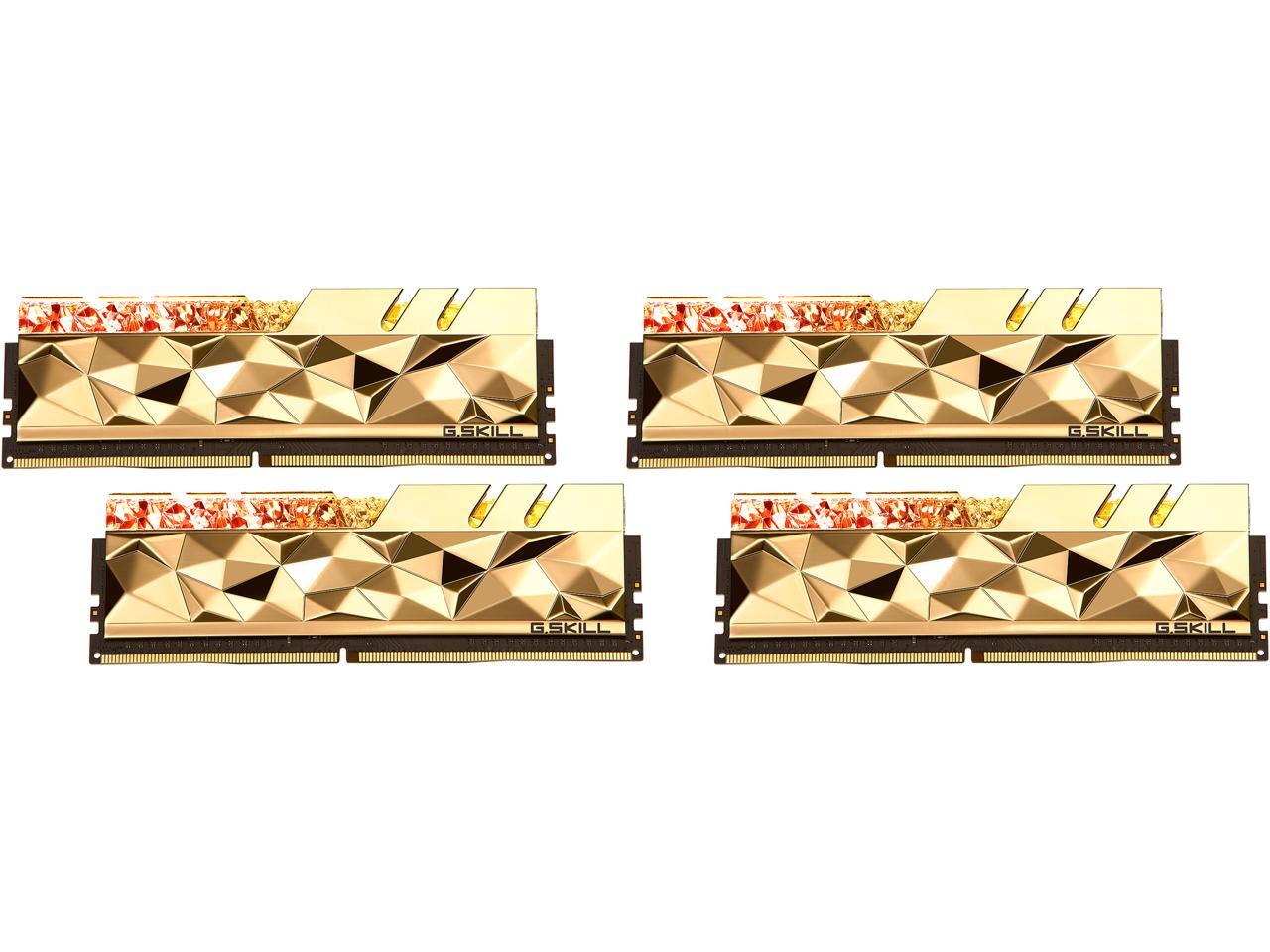
Like, why can't I get this with high specs?
https://c1.neweggimages.com/ProductImageCompressAll1280/20-226-993-01.jpg?ex=2
 cinder lagoon
true, simple heat spreaders should also be an option on the high end...
however I think the heatspreaders on those kits generally are better at cooling so maybe they serve their purpose that way? 🤔
jade scaffold
The ballistics series of ram have high end speeds and are pretty simple and industrial looking
 sonic meadow
Here you go:

I had that fan (still do somewhere) and the matching ddr2 Corsair dominator
2x1GB pc2-8500 cl...15?
Actually had four sticks, but it was two different revisions at different voltage 😦
tender plank
jade scaffold
The ballistics series of ram have high end speeds and are pretty simple and indu...
Doesn't seem like Crucial carries the Ballistics in 64GB kits.
cinder lagoon
Well, do you mean 2x32G? Because depending on platform those are too tall for the ballistics heatsink iirc
pearl moon
jade scaffold
The ballistics series of ram have high end speeds and are pretty simple and indu...
Those are discontinued tho, but you might still be able to find existing stock
jade scaffold
Let there be ssd
 jade scaffold
pearl moon
Those are discontinued tho, but you might still be able to find existing stock
jade scaffold
pearl moon
Those are discontinued tho, but you might still be able to find existing stock
Sad they were nice looking kits
how about Corsair ram
they have vengeance and dominator
dominator i think it their higher end shiz
 cinder lagoon
Still RGB tho xD
cinder lagoon
tender plank
Why the hell does all the high end memory look like trash? I just want good, spe...
What exactly are you looking for in your RAM? Price worthy? Industrial look? Highest performance?
pearl moon
cinder lagoon
Still RGB tho xD
Can always turn the rgb off
pearl moon
jade scaffold
Whoever's pc that is has the ram slots wrong. Are they using 2 and 3? Wtf
sonic meadow
Nope, looks like it's using the only two slots. The other slot is a ssd daughterboard
pearl moon
sonic meadow
Nope, looks like it's using the only two slots. The other slot is a ssd daughter...
What ssd daughterboard? The ones google is pulling up are either for pcie slots, or for non-atx boards.
sonic meadow
pearl moon
What ssd daughterboard? The ones google is pulling up are either for pcie slots,...
DIMM.2
 pearl moon
though i also wish i had bought a 2tb m.2 as my 2nd drive instead of the 1tb i got
pearl moon
cinder lagoon
More drives or more slots? :D
I guess both
i guess i could get a pcie m.2 board if i really wanted
sonic meadow
The issue is that you need the pcie lanes. And afaik each m.2 drive is 4 lanes
pearl moon
i have a spare x16
sonic meadow
Physical or electrical?
cinder lagoon
It is probably only wired with 8x tho
sonic meadow
Usually the second x16 is only x8 or x4
pearl moon
 cinder lagoon
I see an E key - I'm sad cuz I need a converter for it :/
pearl moon
I don't use it, i run ethernet and a usb bluetooth adapter
cinder lagoon
Heh oof how much did you pay for the bluetooth adapter? :D
cinder lagoon
Not speaking CAD, are you?
pearl moon
usd
this pc was also put together right after lockdown, so prices were all over the place
cinder lagoon
pearl moon
No i mean cheaper than the wifi version of the mobo
Ahh yes, thats understandably true lol
pearl moon
I'm still glad my friend sold me his 2070 super for $500, when online prices were $1000
cinder lagoon
Ohh yea those really were desperate times
pearl moon
They're like $300 NIB nowadays
inland dove
tender plank
Why the hell does all the high end memory look like trash? I just want good, spe...
That looks so bad lol.
jade scaffold
dam it this U.2 card is just a PCIE Splitter its not running the drives through an onboard chipset first B550s only have 1 functioning X16 slot as well the other ones are all pinned out like X16 slots but either run in X4 mode or in X2 mode why you like this
jade scaffold
pearl moon
I'm still glad my friend sold me his 2070 super for $500, when online prices wer...
jeeez thats alot
pearl moon
Yeah, if i had spent $500 today instead of 2 years ago i could've gotten a new 3070ti
jade scaffold
i got my 1080ti for £400
pearl moon
Or a used 3080
jade scaffold
and now my Sound card isnt working :I
i know it works
just for some dipshit reaon not in the X1 slot
the X1 slots dont even share bandwidth with anything
and like the sound card is showing up as being there and it lit up and everything kinda feeling like a windows being borderline dysfunctional
pearl moon
jade scaffold
and now my Sound card isnt working :I
What soundcard is it?
cinder lagoon
A soundcard might need more than x1, depending on how it interfaces
pearl moon
If it's an EVGA soundcard, you might have to dual boot a 2020 version of win10 to install and configure the firmware
assuming that even works, haven't tried it yet myself
jade scaffold
cinder lagoon
A soundcard might need more than x1, depending on how it interfaces
The sound cards interface is x1
Tho I think the issue is the x1 slots are pcie 1.0
jade scaffold
Which couldn't even use sata it's so slow
pearl moon
What soundcard is it tho?
jade scaffold
Sound blaster AE7
pearl moon
jade scaffold
Which couldn't even use sata it's so slow
Audio doesn't actually use much data
The highest bitrate flac file i've ever downloaded was 3000Kbps
tender plank
cinder lagoon
A soundcard might need more than x1, depending on how it interfaces
Sound data is miniscule. Even 1x on modern motherboards is overkill.
tender plank
You'd be hard pressed to find a new in box device these days with PCIe 3.0 let alone 1.0.
pearl moon
my asrock b550 mobo only has 1 pcie 4.0 slot, rest are 3.0
tender plank
Huh, interesting.
jade scaffold
Maybe the sound card just doesn't support being run at pcie 1 speeds
pearl moon
jade scaffold
Maybe the sound card just doesn't support being run at pcie 1 speeds
It 100% does
pearl moon
then why not keep it in the 3.0 slot?
jade scaffold
Because I was gonna use it for the u.2 card
It's going back in the 3.0 slot now as the u.2 splitter is just a hardware splitter and can't run things plugged into it through just an x4 lane
Kinda annoying the sound card won't run on pcie 1.0 but hey ho
pearl moon
Could be that the slot on the mobo might not be working either
jade scaffold
Nope slots working fine
It knows the card is there it actively shows in the Bois the slot being occupied
And neither of the x1 slots work
Well with the sound card anyway
Don't have anything else I can cram into one
pearl moon
Weird
Might be worth asking support if it doesn't support 1.0 if you're actually curious if it's a design issue or something isn't right with the unit you purchased.
jade scaffold
while all PCIE Devices are electronically compatible not all are software compatible the computer picks up the exsistance of the card it can identify it but for some reason cant send sound to it if it can pick it up and identify it chances are its some kind of software limitation
doesnt matter anyway
if i want to be able to use these U.2 drives on the PC im most likely gonna need a new Mobo B550s extremely limits what slots can do what
cinder lagoon
Hmmm... decided to fiddle with Windows group policies cause I found you can prevent windows from automatically installing drivers for specific devices or manufacturers...
Blacklisted both, AMD and nVidea GPUs to the policy, clicked "apply to already installed devices"...
immediate blackscreen.
Turns out, this also counts for manually installed drivers (generally all drivers), not just windows update...
At least group policies seem to not apply in safe mode
🗒️ note to self: don't do that. Windows is stupid and indescriptive about things it will do.
Windows startup repair will at least also find this group policy and disable it for you
 olive fiber
Welp, finally did it. https://imgur.com/Q4rfaln
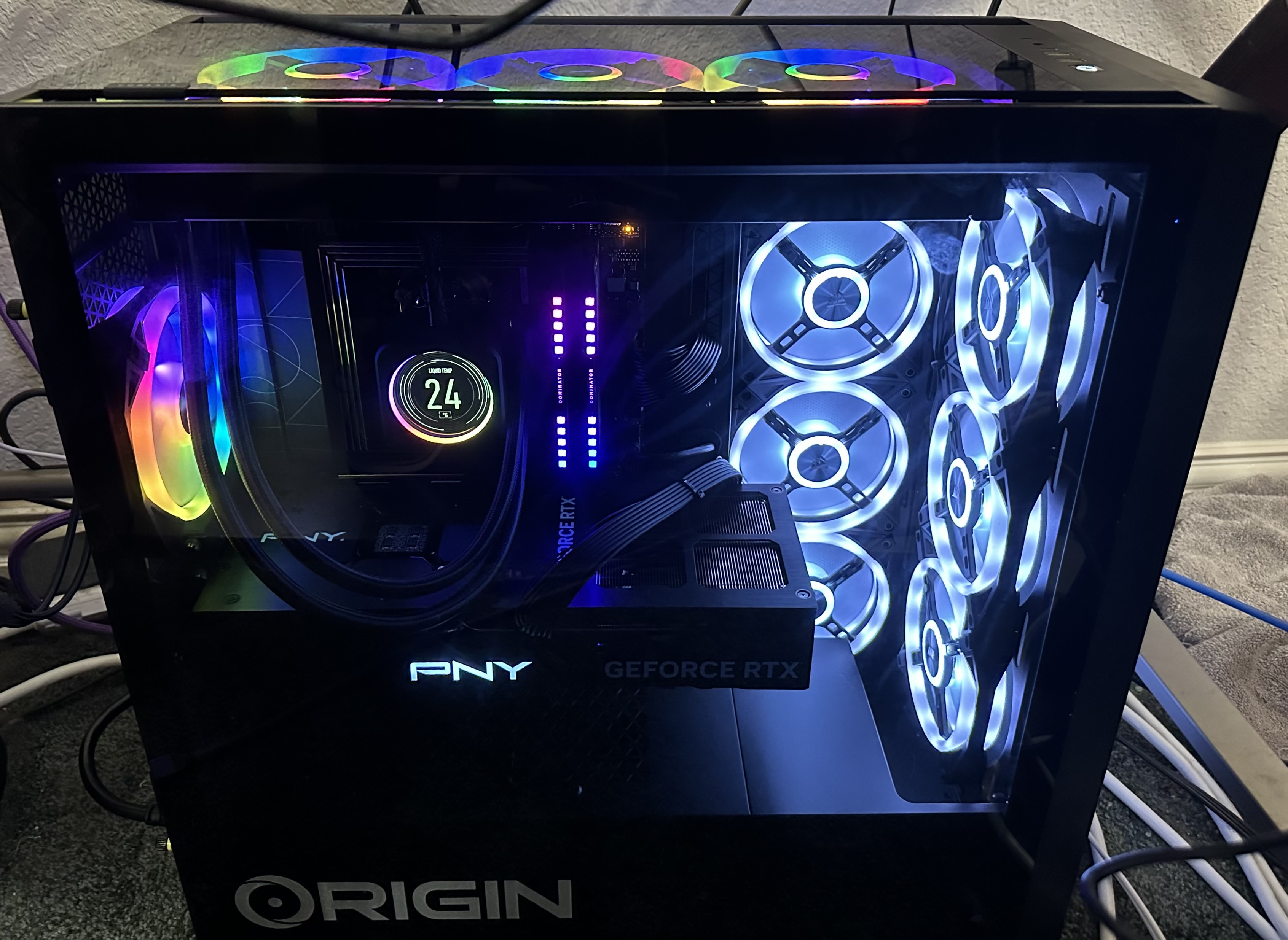
Got rid of the dell
And now have all the rainbows
mossy gull
olive fiber
Welp, finally did it. https://imgur.com/Q4rfaln
Nice Corsair rig
jade scaffold

New mobo for my brothers PC and new CPU
also repasted the GPU

trusty ol 1080ti
pearl moon
jade scaffold
also repasted the GPU
how many times has that 1080ti been repasted?
pearl moon
My 2070 super got repasted a few times before i got it
I haven't done one yet cause my friend repasted it for me when he sold it to me
and idk if i will
 ionic tusk
Looks like I need to replace my ram I-I or rma the kits


Gonna see if I get a bios update first if it fixes anything
mossy gull
ionic tusk
Gonna see if I get a bios update first if it fixes anything
That's a weird BIOS screen
ionic tusk
mossy gull
That's a weird BIOS screen
It’s memtest86
ionic tusk
mossy gull
That's a weird BIOS screen
Does your motherboard not have memtest built in?
mossy gull
ionic tusk
Does your motherboard not have memtest built in?
Not like that.
I have the Asus UI
ionic tusk
mossy gull
Not like that.
I have the Asus UI
I did it from the asus bios ui it gave me a thing to press to open memtest
ionic tusk
mossy gull
Not like that.
I have the Asus UI
I’ll take a photo once I’m done with it still running no errors after bios update
Will go back to testing stability with prime 95 trying to get rid of the freezing of pc
ionic tusk
Second run so far so good
 sacred seal
https://www.youtube.com/watch?v=kiTngvvD5dI&ab_channel=GamersNexus
Seems like Asus ffed up its OCP on its 600 series boards causing them to explode
Also most vendor have issues with there 600 series bioses

GRAB THE LIMITED GN15 ANNIVERSARY FOIL SHIRT! https://store.gamersnexus.net/products/limited-edition-foil-gn15-tshirt-design | Grab one of the brand new, LIMITED EDITION FOIL 'GN15' shirts to help out while getting something commemorative for 15 years of GamersNexus in return! This research piece took us a straight week of nonstop work to comple...
ionic tusk
@mossy gull bios update later fixed
 ionic tusk
sacred seal
https://www.youtube.com/watch?v=kiTngvvD5dI&ab_channel=GamersNexus
Seems like As...
ionic tusk
sacred seal
https://www.youtube.com/watch?v=kiTngvvD5dI&ab_channel=GamersNexus
Seems like As...
Don’t really know if it’s just asus
That will cause explosion
@mossy gull top right memtest
 mossy gull
ionic tusk
<@290608448637239296> top right memtest
mossy gull
ionic tusk
<@290608448637239296> top right memtest
And I have it in just that UI
cinder lagoon
Anybody know of some site like PCpartpicket but for smart home devices?
Looking to buy EU Window Shade wall switches/controllers (controllers as in "set shades to half closed" etc)
Obviously choosing z-wave / zigbee devices and they better have some form of HomeAssistant integration, local only is preferred.
mossy gull
cinder lagoon
Anybody know of some site like PCpartpicket but for smart home devices?
Looking ...
You lazy bugger, well sadly I don't, I think it's best to look for shops that sell them and if they have 1 of the 2 or both signals
cinder lagoon
Hmmmm darnit
mossy gull
Sadly I currently stay away from "Smart home" devices till their security gets better
cinder lagoon
Btw Discord is finally getting that more or less full markdown support...
It was already enabled but they found some security issues and had to pull it again.
Somewhere along the lines of
Heading 2
and Text
mossy gull
Ofcoarse, but Discord's support is still sub-par
I am waiting till Ubiquiti releases smart lamps or Hue support
At least Ubiquiti is mostly safe


 cinder lagoon
Uhmmm where was I?
Ahh yes:
Ubiquity will most likely not make smart home gear.
They are a networking company and afaik stick to the broad Ethernet stuff
Also: what do you find particularly unsafe about smart home devices?
Z-wave and zigbee both have AES encryption
mossy gull
cinder lagoon
They are a networking company and afaik stick to the broad Ethernet stuff
Says you, they have a doorbell that can unlock a smart lock, 360° security cameras and more weird shit I never knew they were building
cinder lagoon
Ohhh okay wtf didnt know that
mossy gull
cinder lagoon
Also: what do you find particularly unsafe about smart home devices?
Last time, a half year ago I read an article how easy it was to hack a z-wave hub, and thanks to that intrude the network it was on.
cinder lagoon
mossy gull
Last time, a half year ago I read an article how easy it was to hack a z-wave hu...
Physical access?
mossy gull
cinder lagoon
Ohhh okay wtf didnt know that
Actually the doorbell supports NFC unlock and fingerprint unlock.
Which is kinda cool.
mossy gull
cinder lagoon
Physical access?
Nope, WiFi access.
Because as soon you surpass the "security" which isn't that hard these days, most hubs had the logs for grabs, which did include the WiFi password
cinder lagoon
mossy gull
Nope, WiFi access.
Because as soon you surpass the "security" which isn't that h...
First off - thats unreasonably stupid to write passwords to plaintext logs. Shame on that company in that regard.
Second - Why would a z-wave device need WiFi? As a hub it should probably just have a wired connection.
But good to know! Gonna be avoiding that! Also I'll keep to thigns like lights and blinds
mossy gull
cinder lagoon
First off - thats unreasonably stupid to write passwords to plaintext logs. Sham...
The devices don't need it, but their hubs want it.
And that's why I rather stay away from them for now.
You may have no problems though, but my family has an family enemy, so for me better safe than sorry
cinder lagoon
Ohh okay ^^'
Then I'm sure you know about "LockPickingLawyer" and which locks are absolutely useless and which aren't
mossy gull
cinder lagoon
Then I'm sure you know about "LockPickingLawyer" and which locks are absolutely ...
Yep, I preferably want the outside lock to "disappear", preferably hidden
amber fable
sacred seal
https://www.youtube.com/watch?v=kiTngvvD5dI&ab_channel=GamersNexus
Seems like As...
Huh. Looks like ASUS doesn't even have OCP for all intents and purposes.
 barren juniper
so if you plan on getting an x3d chip dont get an asus board got it
then again im still waiting for the 7600x3d
for me efficiency is more important than anything
otherwise i would already have a 13900ks and 4090
cinder lagoon
barren juniper
so if you plan on getting an x3d chip dont get an asus board got it
If you plan on getting a 7000 chip, don't get any of the motherboards until this issue is resolved.
And not half-assed bios updates that may or may not have resolved this issue temporarily
barren juniper
i would, but the one i really want (the 6 core) hasnt been announced yet
not sure why they made the 7900x3d though
honestly, i dont think they know why they made it either, considering they did not seed it to reviewers
cinder lagoon
Well, it's a middle ground between productivity and gaming, optimized for gaming
mossy gull
barren juniper
not sure why they made the 7900x3d though
The 7800X3D, 7900X3D and 7950X3D all have the same X3D chip.
cinder lagoon
Ahh, so just different bins then
mossy gull
cinder lagoon
Ahh, so just different bins then
Well, basically on the 7800X3D all it's cores are able to use the X3D, on the 7900X3D and 7950X3D only the 1st 8.
So they basically share the 1st 8 cores, just 1 is clocked slightly higher than the other.
To have the 7600X3D, they have to make an entire new die.
Keep in mind AMD CPUs, or well the more core variants are just multiple chips bound together instead of an entirely different chip
barren juniper
oh, for some reason i thought the 7900x3d had the 6 core ccd with the vcache and the second 6 core ccd did not. my bad
mossy gull
barren juniper
oh, for some reason i thought the 7900x3d had the 6 core ccd with the vcache and...
To my knowledge it has a 8-core CCD and 4-core CCD
sacred seal
Its 6 and 6

AMD Ryzen 9 7900X3D is almost here, but where are the reviews? AMD sheds more light on the configuration of its 12-core Ryzen 9 CPU with 3D V-Cache. Yesterday AMD lifted the review embargo on its Ryzen 9 7000X3D desktop CPU series. The only problem is that almost no one had access to a 12-core […]
mossy gull
sacred seal
https://videocardz.com/newz/amd-ryzen-9-7900x3d-has-6-active-cores-in-each-chipl...
Maybe they're chips with deactivated cores, that's also a possibility.
But then AMD won't tell much
sacred seal
Its almost certain that they are deactivated/ non functional cores
sacred seal
ionic tusk
Don’t really know if it’s just asus
Too my knowledge all of the dead boards so far are Asus. Not that other vendors are off the hook for killing CPUs, but my understanding is that most of that is from bios controlled systems, not deflective hardware.
If your CPU dies because of this AMD will replace it, but Asus has not yet committed to replacing there boards as far as I am aware
mossy gull
sacred seal
If your CPU dies because of this AMD will replace it, but Asus has not yet commi...
Even then, Asus is probably gonna fix it 1st before they'll replace the entirety of dead boards.
mossy gull
sacred seal
Its almost certain that they are deactivated/ non functional cores
So it can be that the 7600 is a completely different chip compared to the 7900X3D
It could be that the 7600 is a dedicated 6-core instead of an 8-core with deactivated cores.
sacred seal
If Asus had plans to replace boards that have died with new boards after the problem has been resolved they would have announced it. As they have not offered to replace any of the affected boards as of yet, its safe to assume that they are waiting to see how big public backlash is
Right now you have to go through the RMA system, and if approved you have to pay shipping one way
Given AMDs history, it would be very weird for them to manufacture a 6 core specific chip, expecially since the 7900 and 7600 are using the 8 core dies
mossy gull
sacred seal
Right now you have to go through the RMA system, and if approved you have to pay...
This is different per country though, if a board dies within warranty period in my country they most likely will take it in for free, we don't have to pay shipping, only if it's bought from a company outside the EU.
sacred seal
Yea, but that is the country policy, not Asus
You can't give asus the benefit of the doubt because they are following the law
AMD is comiting to replace any of there CPUs and ship both ways (within the US, they have not guaranteed free shipping elsewhere yet), when arguably the CPU itself not at fault. This is the proper way to handle the situation. The fact that Asus is not matching AMD when the problem is very clearly there fault speaks volumes. They may be better with customers then other companies, but they are a corporation and will happily screw over the customer if they think they can get away with it.
And that is assuming that they accept "CPU exploded" as a valid reason for RMA, because technically the board did not fail
Same way vendors won't replace hardware if your AIO starts leaking and kills them
I have not heard any reports ither way on this though, so we will have to wait and see what Asus ultimately does.
mossy gull
Am I the only fucker who wants to direct die cool my future PC?
sacred seal
Yes, because
A- it is very easy to kill the CPU
B- It is very difficult to mount a cooler
C- It may not even be possible/ beneficial with MCM type CPUs
D- The thermal gains are fairly minimal
mossy gull
sacred seal
Yes, because
A- it is very easy to kill the CPU
B- It is very difficult to mount...
Tell that to Derbauer.
sacred seal
As far as I am aware Derbauer does not run a delidded chip in his rig
jade scaffold
he just made a part thats easy to mount that can be made to work with nearly any cooler
sacred seal
Oh, NVM then, that is nice
jade scaffold
the thermal improvements are quite good too
sacred seal
for intel or AMD?
mossy gull
sacred seal
for intel or AMD?
Yes
jade scaffold
you're talking way higher clocks
people seem to forget modern processors are self overclocking
mossy gull

Thermal Grizzly
Hochwertige Wärmeleitlösungen für Computerchips
jade scaffold
they will boost as much as they possibly can within safe limits
if you drop temps by 10C a CPUs just gonna up clocks and power consumption till that 10C difference is gone
sacred seal
Did intel stop doing soldered IHSs?
mossy gull
jade scaffold
if you drop temps by 10C a CPUs just gonna up clocks and power consumption till ...
Am I the only fucker who power limits the CPU
jade scaffold
sacred seal
Did intel stop doing soldered IHSs?
no
mossy gull
sacred seal
Did intel stop doing soldered IHSs?
Long time ago
jade scaffold
intel do Soldered IHS's now too again because they need it
the issue is that the IHS on AMD and Intel CPUs are SHIT
and that mainly comes down to the insane volume they are made at
mossy gull
jade scaffold
the issue is that the IHS on AMD and Intel CPUs are SHIT
This is why I want to direct die cooling.
jade scaffold
AMDs7000 serise IHS are like 4mm thick it makes fast thermal transfer nearly impossible
sacred seal
I know they started with I think the 8th gen, and that is when delidding largely died out because A- delidding soldered CPUs without killing them is exceptionally difficult, and B- Thermal gains were fairly minimal
jade scaffold
deliding soldered CPUs is not difficult
its more of a process than none Soldered ones sure
but difficult lmao
no
theres more tools than ever now to delid CPUs safely and easilly
sacred seal
Seems like debauer is only releasing stuff for 8th and 9th gen intel, or am I missing something
jade scaffold
you are missing somthing
mossy gull
Thermal Grizzly
Hochwertige Wärmeleitlösungen für Computerchips
sacred seal
The page you linked only shows 9th and skylake x CPUs
jade scaffold
i watched a video literally today of him showing off this new super easy to mount heat spreader hes planning on releaseing for Ryzen 7000
sacred seal
Ah, so its not out yet, that explains why its not showing up
 sacred seal
Yea, that is pretty good
jade scaffold
thats going from Silicon degradation temps to actually safe temps
and it works with the majority of coolers
sacred seal
Still be concerned with someone bumping the desk having the die crack though
 mossy gull
sacred seal
Still be concerned with someone bumping the desk having the die crack though
mossy gull
sacred seal
Still be concerned with someone bumping the desk having the die crack though
I am surprised laptops survive that much then, they're basically all direct die cooling.
sacred seal
Well not with a AIO, but a big tower cooler and no real support protecting the CPU itself
jade scaffold
the CPUs still protected tho
the Mobo the Back plate the heat spreader itself are all protecting it
mossy gull
sacred seal
Well not with a AIO, but a big tower cooler and no real support protecting the C...
Tell that to thin and light laptops that get tortured everyday as a work laptop on-the-go
jade scaffold
YO They're making this too Direct Di Water block if i get a ryzen 7000 this is going on it
 sacred seal
With direct die cooling, all the weight of the cooler is in direct contact with the die. This is not a problem with GPUs and Laptops becuse the bit that actually contacts the die is fairly light weight
mossy gull
jade scaffold
YO They're making this too Direct Di Water block if i get a ryzen 7000 this is g...
That's 1 sexy block
sacred seal
And every well mounted
mossy gull
sacred seal
With direct die cooling, all the weight of the cooler is in direct contact with ...
I prefer watercooling anyways
jade scaffold
sacred seal
With direct die cooling, all the weight of the cooler is in direct contact with ...
except we aren't talking direct di we are talking delid and replacing heatspreaders
sacred seal
It looks like the spacer used for cooler mounting is slightly smaller then the hight of the die
mossy gull
Anyways, I am gonna nap, too tired to stay awake.
jade scaffold

honest to god these kinda heatspreaders should come standard
infact direct die should be standard
you can just do what large GPU chips do
and put a big metal box that prevents a cooler from crushing the di
sacred seal
Ok, again I misunderstood what you are talking about. I was looking at an different vid talking about direct die. Finally found the correct video
I thought we were talking about putting a d15 or something directly on a die
In that case I think I am warranted in believing that a bump of the desk would kill a CPU
jade scaffold
they should just have CPUs like this

this makes it so mounting a cooler directly to the di isnt gonna crush the di
it improves thermals
it does mean users have to be more carefull to cover the di
but there are ultra high performance thermal pads that exsist
sacred seal
Only if the "gaurd" material is taller then the die, and is resistant enough that some sudden jolt wont cause it to bend in
jade scaffold
the guard material doesnt have to be taller than the Die
as its further out than the di if the cooler is put under pressure guess what happens it then peels away from the di because thats how moments work
and if you are putting enough pressure on a CPU to BEND ALUMINIUM your mobo and by extension probably the CPUs PCB is toast anyway
so as long as the guard thing is as tall as the di its nearly impossible for a jolt to cause a CPU cooler to crack the di
sacred seal
The risk is that some sudden impulse will cause the cooler to transfer the majority of its load to one of the edges of the die
 jade scaffold
otherwise we'd see alot more Dead GPUs because thoes coolers are typically FAR heavier
jade scaffold
sacred seal
The risk is that some sudden impulse will cause the cooler to transfer the major...
where did i say they'ed be shorter ofcourse it'd break if it was shorter
it would also neglect the 2nd main function of that metal square
sacred seal
the guard material doesnt have to be taller
jade scaffold
and that is to ensure the cooler is mounted to the processor Flatly
jade scaffold
sacred seal
`the guard material doesnt have to be taller`
yea which is true
it being taller comprimised thermal contact
it being shorter neglects both advantages of the metal square
sacred seal
Ok, I think I get where we are talking past eachother
jade scaffold
the metal square being the same height however helps ensure adequate contact and prevents Die damage
sacred seal
I use taller to mean greater then such that there is some minimal clearance as a safety factor
And you are interpreting it to mean that it has to be sinificantly taller
Is this correct?
jade scaffold
yes because thats exactly what it implies
sacred seal
Its a question of how big of a cooler you can reaonably mount. While GPU coolers are heavier then say a d15, they are at lower risk because they have less "leverage". The further the cooler is from the die, the more leverage it has
A 4 slot cooler will be a maxumum of 5ish cm away from the supporting structure
A d15 is something like what, 20?
jade scaffold
sacred seal
A 4 slot cooler will be a maxumum of 5ish cm away from the supporting structure
They have pivot in another direction than pcie slot of he mobo too
The force required to bypass that metal frame is so much that the computer is DEAD if something cracks your die anyway
sacred seal
If you are having the cooler put direct force on the die (which is required for optimal cooling), it is nessasarraly going to be able to transfer energy into the die. If done evenly this is fine, the risk is this happening on the edge or corner of the die
You try breaking a windshield with your fists, it aint going to happen. You use a windshield hammer though and it takes next to no force
You could probably get it to work, but you would need to have a fairly precision engineered cooler mount
Finally finished the video, that waterblock looks like it will work quite well, though I would still be hesitant to put a large cooler on the improved heat spreader. This is a precision part, but I don't exactly trust that the plastic CPU holder thing has that great of tolerances.
 fickle bluff
Is this the right part of Tech Lab to ask about hardware recommendations?
sacred seal
As good as any
fickle bluff
Ok cool, I've been thinking of doing some PC upgrades starting with the CPU. I'm planning to get a 3090ti eventually so ideally I want something that works well with one of those
sacred seal
3090ti is last gen tech, probably would be looking at a 4070 or 4080
What kind of hardware are you currently running
surreal moss
3000 series is still relevant imo
sacred seal
If you are buying used
fickle bluff
Well my current CPU is an AMD Ryzen 5 2600X, and the GPU is a 2080
sacred seal
And what res/refresh do you run at?
fickle bluff
3840 x 2160 at 59 hertz
sacred seal
Ok, so 4k
CPU is decent, but could probably stand a upgrade. Depending on the motherboard you may be able to get a 5800x in there
Otherwise you are looking at buying a new platform
Other then that your main concern is your PSU. How many watts do you have?
fickle bluff
550
sacred seal
So you are going to want at least a 800 watt to run any modern high end card
fickle bluff
Good to know that hadn't occurred to me that might be an issue
sacred seal
The last concideration is how big is your case? The 30 and 40 series cards are massive
fickle bluff
It looks like a 3090 would fit although it may be a bit tight
pearl moon
You know what's bs? I was given a wifi extender by my gma who doesn't even have wifi anymore, set it up, and i'm somehow getting more than double the speed and better ping using it in my room with no antennas than i would be connecting it directly to comcasts proprietary wifi extender, which is halfway down the hall, alot closer to the router.
But that's only on my pc. Phone gets 250mbps in my room off the comcast extender, and only 100 with my own extender.
I only really got it to act as a wifi adapter for my PS2 and NAS, but i guess my pc is going on it too
cinder lagoon
The comcast thing might be using older protocol and wifi mode
...since it's comcast, probably both
mossy gull
sacred seal
CPU is decent, but could probably stand a upgrade. Depending on the motherboard ...
Not the 5800X3D?
cinder lagoon
fickle bluff
3840 x 2160 at 59 hertz
At 4k def a 5800X3D
jade scaffold
yea youll want the 5800X3D if you are running a 3090 or above idealy
the 3090 i have is too fast for my 5800x
maybe at 4k you can push a 3090 or above enough that a 5800x will be fine
cinder lagoon
Btw The Ryzen 7000 failures seem to stem from a voltage differential between the onboard GPU parts and the CPU cores. GPU is (partially) being fed by the IO die (SOC) voltage.
It can happen during boot that the CPU requests all the power and thereby voltage could potentially jump between the two rails
jade scaffold
but for me at 3440x1440 my 3090 almost never hits 100% even when game settings are maxed
jade scaffold
cinder lagoon
Btw The Ryzen 7000 failures seem to stem from a voltage differential between the...
yea the thing is this happens on all CPUs the reason why its obliterating Ryzen 7000 processors tho is because the mobo manufactures are allowing for the CPUs to pull voltages WELL above what they are really rated for
and then OCP on some mobo vendors being total wank
1.5V is a fucking shit tonne no wonder the voltage is leaping across rails
i think the processors are only supposed to run at like 1.3V or somthing 1.4 is apparently enough to cause accelerated aging in the processor
cinder lagoon
There are about 3 separate problems, sometimes combining to form rapid unplanned disassembly
jade scaffold
and then sometimes forming additional disassembly of the CPU socket too
cinder lagoon
Socket disassembly seems to stem from MOBO manufacturers not ensuring OCP and error state checking
jade scaffold
yea
it was pretty impressive tho to see the VRMs of Mobos just eat 38 amps without so much as the slightest bit of strain
cinder lagoon
jade scaffold
it was pretty impressive tho to see the VRMs of Mobos just eat 38 amps without s...
Well, at nearly 2V thats just 70W
jade scaffold
the VRMs wont be at 2V they might convert down to that as that what they do but what goes into the VRM is 12V
cinder lagoon
Ohhh I wasnt aware the current was measure "in front" of the VRMs
Well thats some absurdly high power consumption then xD no wonder these chips delidded without outside input
sonic meadow
the amount the vrms dissipate is based upon the current through them, and their voltage drop
mossy gull
jade scaffold
but for me at 3440x1440 my 3090 almost never hits 100% even when game settings a...
Challenge accepted, I can make it reach 100% in no-time
sonic meadow
well, strictly it all does


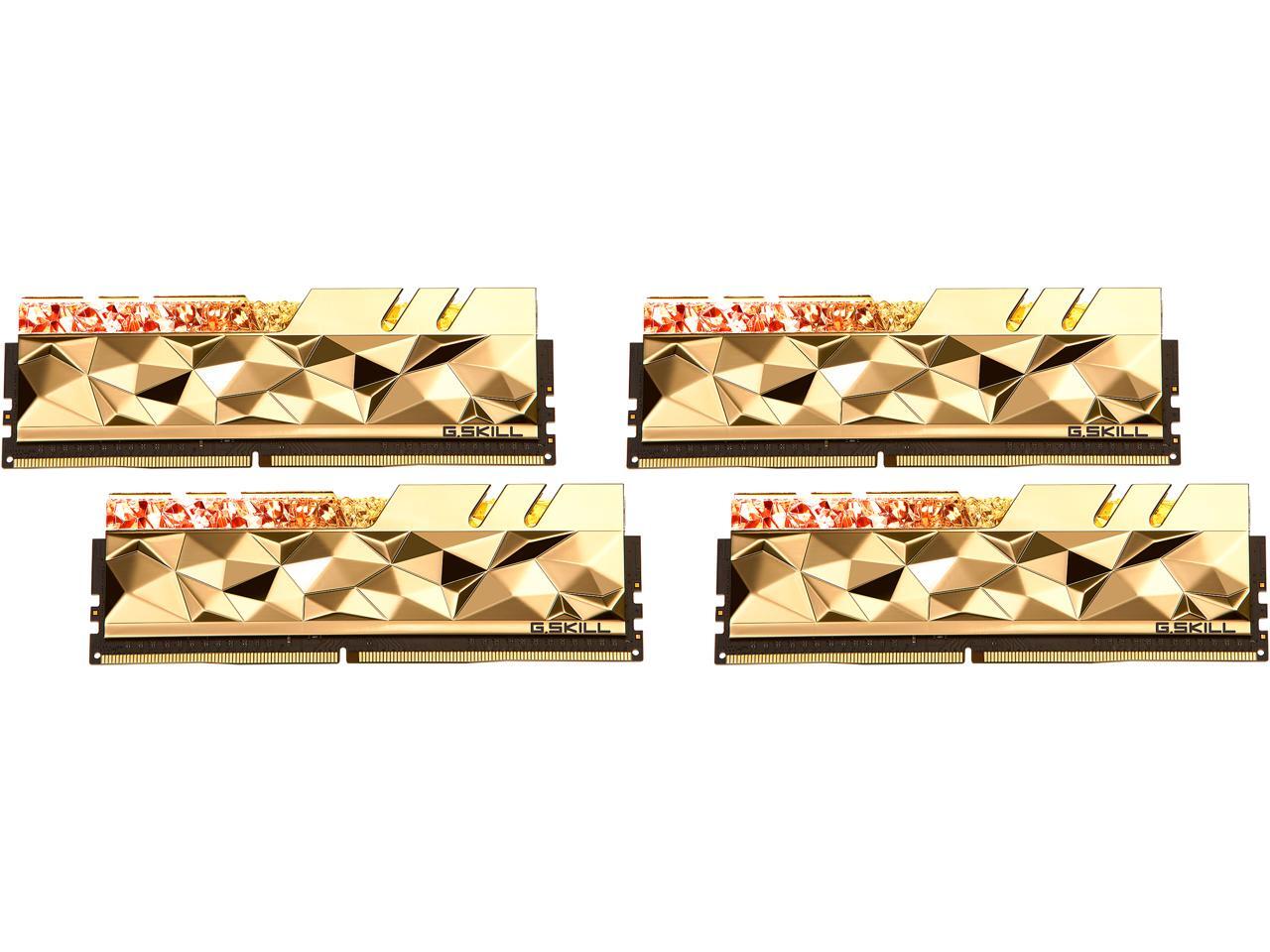
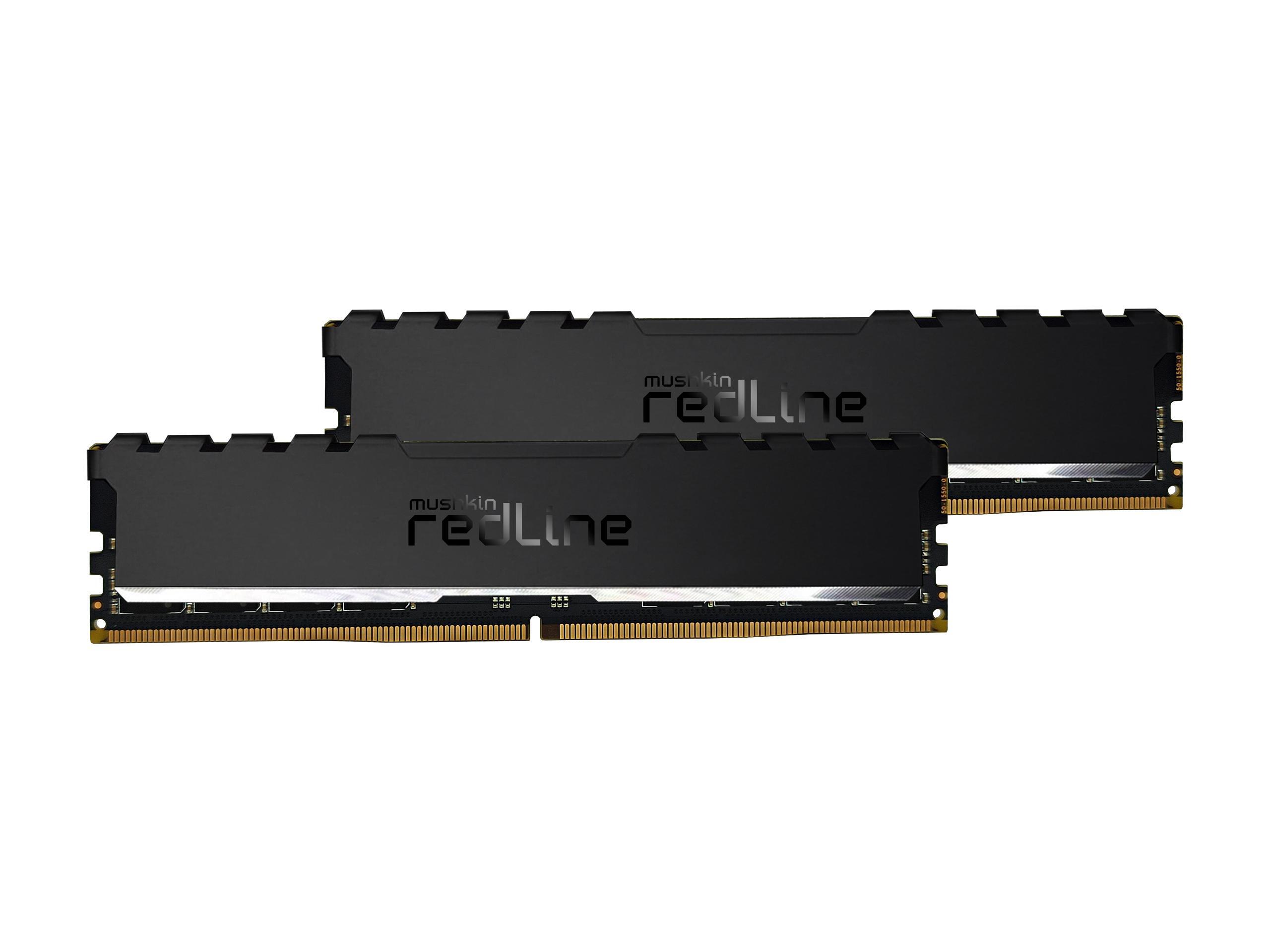

 cinder lagoon
Yea
sacred seal
If you are running 4k 60 you do not need a beefy cpu. Extra frames don't do you much good if you can't see them, and if you are gaming at 60fps you probably don't care about the frame latency.
My 2700x is reasonably capable of keeping my 6900xt fed
mossy gull
sacred seal
My 2700x is reasonably capable of keeping my 6900xt fed
This will vary per game though, some clearly need a faster CPU
sacred seal
Yes, it will very per game, but games that are CPU bound enough to where 5800x3d would make a noticeable difference are few and far between.
Especially concidering that the 5800x3d costs 1.5x more than the 5800x
And we are dealing with a 400 series chipset, givin the current cpu likely a b450.
mossy gull
sacred seal
Yes, it will very per game, but games that are CPU bound enough to where 5800x3d...
Actually games love the extra cache😃
sacred seal
Yes, but games that run under 60fps on a 5800x are rare
You are looking at some crazy heavy modded games or something like a very late game strategy titles, and in those cases you are looking at like a 7 fps difference.
If they were running 144 then the 3d would make sense hands down
jade scaffold
sacred seal
My 2700x is reasonably capable of keeping my 6900xt fed
then your 6900xt must be deffective or some shit
my 2700x couldnt feed my 3090
sacred seal
No, I run at 60FPS
jade scaffold
yea mine couldnt get my 3090 to 50% useage
sacred seal
I don't max out my 6900xt in most games, and that is because I don't need to
jade scaffold
in like 99% of things even absolutly cranked out GTA5