
#I updated the app and now it's asking me to reinstall my mod collection for cyberpunk.
53 messages · Page 1 of 1 (latest)
 kindred citrus
 tropic havenBOT
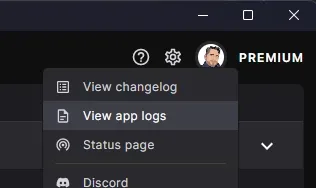
Log files can be found by clicking the help icon at the top of the app and selecting "View App logs" as shown below.
-# Having problems? Read the full help page.
 Last updated by Pickysaurus
·
Last updated by Pickysaurus
·
 thin briar
kindred citrus
I updated the app and now it's asking me to reinstall my mod collection for cybe...
thin briar
kindred citrus
I updated the app and now it's asking me to reinstall my mod collection for cybe...
Would you be able to provide the log files?
Kinda curious how we got into this situation.
Which exact files do they show as modified?
Are all of these from the DYSTOPIA collection?
I presume you're opening the issue because you're stuck- unable to Apply, is that correct?
kindred citrus
I can apply it but then nothing happens. It's back to square one and I have to open the game using the regular launcher. The game is modded and works fine but I can no longer launch it through the Nexus app
thin briar
kindred citrus
I can apply it but then nothing happens. It's back to square one and I have to o...
Please do upload the log files, yup.
That'd be quite handy here.
kindred citrus
I will after work today
thin briar
All's good 👌
kindred citrus
thin briar
All's good 👌
Where do i find my logs?
thin briar
tropic haven
By using the instructions here
kindred citrus
thin briar
Would you be able to provide the log files?
Kinda curious how we got into this s...
CliWrap.Exceptions.CommandExecutionException: Command execution failed because the underlying process (explorer.exe#3392) returned a non-zero exit code (1).

Command:
explorer.exe /select,"C:\Users\resin\AppData\Local\NexusMods.App\Logs\nexusmods.app.main.current.log"

You can suppress this validation by calling `WithValidation(CommandResultValidation.None)` on the command.
   at CliWrap.Command.ExecuteAsync(ProcessEx process, CancellationToken forcefulCancellationToken, CancellationToken gracefulCancellationToken) in /_/CliWrap/Command.Execution.cs:line 277
   at CliWrap.Command.ExecuteAsync(ProcessEx process, CancellationToken forcefulCancellationToken, CancellationToken gracefulCancellationToken) in /_/CliWrap/Command.Execution.cs:line 293
   at CliWrap.Command.ExecuteAsync(ProcessEx process, CancellationToken forcefulCancellationToken, CancellationToken gracefulCancellationToken) in /_/CliWrap/Command.Execution.cs:line 293
   at CliWrap.Command.ExecuteAsync(ProcessEx process, CancellationToken forcefulCancellationToken, CancellationToken gracefulCancellationToken) in /_/CliWrap/Command.Execution.cs:line 293
   at NexusMods.Backend.Process.ProcessRunner.ExecuteCommand(Command command, Boolean logOutput, CancellationToken cancellationToken) in /_/src/NexusMods.Backend/Process/Runner.cs:line 63
   at NexusMods.Sdk.TaskExtensions.<>c__DisplayClass0_0.<<FireAndForget>b__0>d.MoveNext() in /_/src/NexusMods.Sdk/Extensions/Task.cs:line 18
 thin briar
Yeah, seems good.
Will get someone to have a look later.
I've got a lot to catch up on myself 😅
kindred citrus
ok
kindred citrus
Okay so an update. It applies the 62.2Mb change and lets me select play now, but when I close the app and re-open it it wants me to process the update again
thin briar
Check Preview Changes, curious what the file is.
Which is being changed
It's beside Apply button
thin briar
That shows a folder, can you get the file?
 kindred citrus
@thin briar What file do you need inside that folder?
I don't see a text file to share
ohh I see what you mean.
the blue file indicates what is being changed
I will look
No files in blue, but there are green files that have been added
 kindred citrus
yes
every time i restart it keeps having to add those files
or play remains greyed out
thin briar
I'll leave to @ashen pelican , he know CP2077. I wouldn't as much.
They can either be files from before you managed the game, or files downloaded from within the game, or something else. I'm not quite sure.
(Give it a few hours- sleepy time for them)
kindred citrus
okay thanks
kindred citrus
Where is he
 ashen pelican
If they keep getting added in, that means they were likely added from somewhere, either external changes, or a mod. Most likely external changes. Those aren’t part of the game or any of its dlc
kindred citrus
this only happened when i updated the app. It didn't do this before
kindred citrus
No idea how but the problem just fixed itself.