
#Collisions between 2 CharacterBody2Ds pushing the other
270 messages · Page 1 of 1 (latest)
 tulip gale
 urban bronze
tulip gale
I am making a puzzle game, where all of the blocks are CharacterBody2Ds. Once ...
urban bronze
tulip gale
I am making a puzzle game, where all of the blocks are CharacterBody2Ds. Once ...
I am not sure how to a velocity.x to the stack that are ontop of the matched blocks.
please clarify this question, i think there's a grammar mistake that's making it hard for me to parse
tulip gale
Basically, I want to apply a force going in the positive X direction.
I had an x velocity, and changed it to velocity.x and deleted apply somehow.
@urban bronze right now I was trying changing them from CharacterBody2Ds to RigidBody2Ds and use Gravity instead of move_and_collide (The F in the photo is falling from the right and landing on the stack. The game is played left to right and not top to bottom like a normal match 3)
Unfortunately, with my Gravity attempt, when they collide, all of the blocks under it collide and shake the entire tower of blocks.
 urban bronze
with CharacterBody2D you need to use the move_and_slide() function
tulip gale
This was my attempt at that.
urban bronze
            var direction = Vector2(X,Y)
            velocity = direction * speed_float
            move_and_slide()
#if matched:
#velocity.x += 200
#
#
#for index in get_slide_collision_count():
#var collision = get_slide_collision(index)
#if collision:
#print(collision)
#velocity.x += 200
#
#if velocity.x:
#move_and_slide()
(How do I paste code like you have?)
urban bronze
did you do that in _phyiscs_process(delta)?
tulip gale
yes it's in the physics process, but I was not using delta because I was trying to get it to move period
urban bronze
tulip gale
(How do I paste code like you have?)
 urban bronze
tulip gale
yes it's in the physics process, but I was not using delta because I was trying ...
urban bronze
tulip gale
yes it's in the physics process, but I was not using delta because I was trying ...
move_and_slide uses delta automatically
tulip gale
    if to_pos:
        if move_and_collide((to_pos - position).normalized() * speed * delta):
            to_pos = 0
            check_match.emit()

    if matched:
        velocity.x += 200


    for index in get_slide_collision_count():
        var collision = get_slide_collision(index)
        if collision:
            print(collision)
            velocity.x += 200

    if velocity.x:
move_and_slide()```so you don't have to worry about it, as long as it's in process
tulip gale
That was my entire physics process for that attempt
urban bronze
tulip gale
```func _physics_process(delta):
if to_pos:
if move_and_collide((to_...
can you print("test") after "if velocity.x:"?
tulip gale
It will absolutely print, I had it printing the word matched
tulip gale
 urban bronze
so first remove the += lmao
that's going to set some wonky numbers
make it just = 200
tulip gale
makes no different.
One sec

(I don't have one shot installed or I'd send you a screenshot of the console and the game)
urban bronze
are you able to take a short video?
urban bronze
basically I'd like to see what the behavior currently is, and then you tell me what you want it to do instead of what it shows
unfortunately movement and physics debugging requires a bit of visuals :x
tulip gale
nothing moves sadly.
urban bronze
hmm
tulip gale
It appears to very slightly shake, but none of the blocks move
urban bronze
do you have gravity affecting them entirely
tulip gale
Does gravity work on CharacterBody2D?
urban bronze
it "can"
tulip gale
No
I didn't know it can. I was trying to use Gravity because I know I can push RigidBody2Ds
My next solution is to go though the game loop and add the force to every block on top of the match, I was hoping I could use the matched blocks to push the other characterBody2ds
urban bronze
how pixel perfect is your collision
tulip gale
relatively close, top and bottom I had to remove a pixel from the collision on both sides or the game would think they would sometimes collide when falling in.
This is what I am trying to do ultimately.
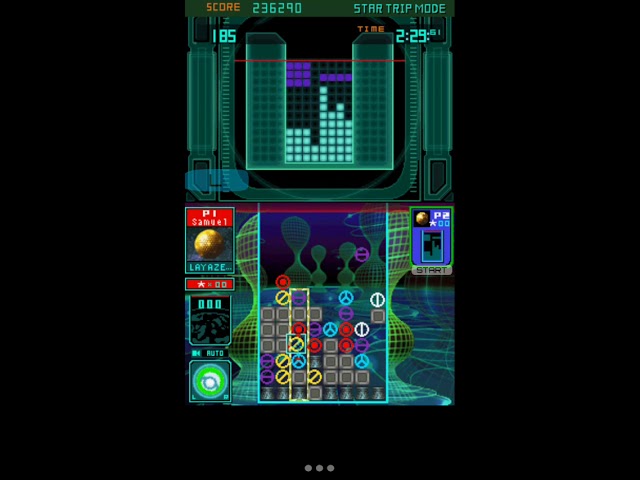
This classic DS game is a true gem among DS games around it's time. This game has had am xbox 360 remake with better graphics and more characters or aliens if you prefer. Sadly the Xbox does not make the game better because the stylus gameplay is crucial for this game which is why an emulator is used to play this on my mobile device. This game d...
This game functions top down, and I want to make it similiar just function left right
tulip gale
It's a match 3.
When you match, a "rocket" is applied to the blocks and they fire off at the opponent.
The more "booster" blocks in a row the higher the rocket goes.
urban bronze
I would turn off any collision when that happens before applying velocity, so that they fly off without friction
right now my belief is everything's "catching"
then you'd have an Area2D to detect when they "hit" something
tulip gale
I sadly need things to collid though
Okay.
I can do 90% of that in my head, my one hang up is how would I then make the blocks land ontop.
urban bronze
new blocks, after it launches?
tulip gale
Basically, block is falling in, I start to launch off the "rocket" and the falling block needs to land on the stack and fly with the stack
tulip gale
Thats why I am using move_and_collide because I need to detect the collision
urban bronze
 tulip gale
yes, it is trying to move and vibrates
tulip gale
Inherited object, all are the same
I am using filler images, I don't make the art, my wife does that.
urban bronze
what's your Safe Margin set to
 urban bronze
set it to 0.
tulip gale
So, earlier you said change it away from velocity.x += 200, is there a problem with using +=?
I wanted to use that so as other blocks "hit" in the same row it would trigger more force.
tulip gale
exactly.
urban bronze
in 4 seconds it travels 2000 pixels
tulip gale
Any idea how to make them move though? lol
urban bronze
move and collide will have them stop when they collide
unless they have something telling them otherwise
your code hasn't changed right?
tulip gale
The move and collide is ONLY used when they are falling in
urban bronze
ah gotcha
tulip gale
Afterwards, it's all move and slide
I just want the collide part so a falling in block will land on top of the stack if the top of the start has changed since it was calculated and set to fall.
urban bronze
trynna think
i would recommend
using move_and_collide for the rocket liftoff as well
because that returns the object it collides with
which can then call the function to move THAT object
right now it's move_and_sliding into objects and stopping.
tulip gale
Okay, how do you turn them all off at the same time?
urban bronze
wdym turn them all off
tulip gale
All blocks are going in a positive x for a... second? And all blocks need to start falling back to their board position after that second
urban bronze
only the blocks that are colliding should be positive x
i may be confused about the end goal here
Gameplay loop:
- Blocks fall from right
- You combine 3
- Those blocks fly to the right and explode/queue_free on colliding with [target], collecting more blocks along the way
correct?
tulip gale
Okay, so they CAN fly off and explode, but its not garantteed. Basically, the blocks have to reach the max height of your gameboard and then they are removed. BUT the postive X force is only applied to the blocks for a short period of time.
Now, if you have 3 in the same row that were matched, += 200
urban bronze
use either a timer node, or a float timer function
build up the timer using whatever mechanic you want
on timer complete, it falls back left
tulip gale
I come from a web gaming background, and I think I am overthinking it.
Javascript forces you to do a lot of.... cleanup to make sure things go smoothly, and I am thinking that the force is going to be applied not uniformly in one single delta of time.
Oh wait, if I use move_and_collid won't the block that collids stop moving and the block on top of it would start?
urban bronze
only if you stop applying velocity
tulip gale
Oh.
urban bronze
if you have move_and_collide under an if statement and it just keeps going, it won't stop
it may reset velocity but it won't stop
tulip gale
Yeah yeah....
I'll play with it, if you don't mind I might mention you later and pick your brain, if that's okay.
urban bronze
tulip gale
Javascript forces you to do a lot of.... cleanup to make sure things go smoothly...
eh, at the scale you're talking about, 1 pixel left or right won't be an issue, or even noticeable
urban bronze
tulip gale
I'll play with it, if you don't mind I might mention you later and pick your bra...
np, just @ me
tulip gale
@urban bronze Really quickly, I use this all the time, is there anything wrong with doing it?
await get_tree().create_timer(randf_range(1.7, 3.3)).timeout
Instead of making a timer node
urban bronze
no that's perfect
i alternate between them depending on what im doing with it
for my weapon cooldowns I'll use a timer node for example
but for things like a timer for hitflash I'll just use a scenetree timer
tulip gale
I use a timernode for anything I might need to cancel
urban bronze
yeah
tulip gale
If it is what it is, then it is what it is
urban bronze
i think a good rule of thumb is, if it's going to just fire once and can't be interrupted? just use a scenetree timer
tulip gale
I am new to godot, so I am doing a gamejam and using it.
urban bronze
when you're done w/ the gamejam, i recommend this thorough, in depth, and easy to follow tutorial

This video is sponsored by NordPass Business: An amazing password manager that allows you to securely store and access unlimited passwords, including wifi credentials and credit card information. You can use it for yourself or for entire teams or share your own passwords easily.
You can get a 3 month trial at:
https://nordpass.com/clearcode/
...
it's 15 hours, which is why i recommend it after the gamejam
tulip gale
Already did it
urban bronze
oh lmao
tulip gale
 urban bronze
then you're about where I'm at technical-wise 
tulip gale
lol
urban bronze
i just have experience w/ more "difficult" engines, like UDK before it was Unreal 4
tulip gale
I did a lot differnet hen he did
urban bronze
so godot is extremely easy for me to pick up 🤷♀️
tulip gale
It was, I hated Unity


I made flashlight, and played with things while making it, best way to learn is to challenge yourself.
He never taught inline timeout method for example.
urban bronze
fair
tulip gale
I made games for girls for a living since 2007, and that's been my primary source of income, covid changed things, had kids and now I want to make stand alone games.
urban bronze
i look forward to seeing what you put out!
tulip gale
I am going to make horror games
lol
Ahhh
Okay, small question I thought it worked this way and it appears I am in error.
var body = move_and_collide(velocity * delta)
I thought move_and_collide would return the object I collided with?
  func _physics_process(delta):
    if to_pos:
        if move_and_collide((to_pos - position).normalized() * speed * delta):
            to_pos = 0
            check_match.emit()

    if !flying && (matched || launched):
        flying = true
        velocity.x += 200

    if velocity.x:
        print(velocity.x)
        var body = move_and_collide(velocity * delta)
        if !body.launched && !body.matched:
            body.launched = true

        stop_launch()

func stop_launch():
    await get_tree().create_timer(1.0).timeout
velocity.x = -speed```@urban bronze
urban bronze
tulip gale
I thought move_and_collide would return the object I collided with?
it returns a reference to multiple things about what you collided with
hang on
tulip gale
https://docs.godotengine.org/en/stable/tutorials/physics/physics_introduction.html this wasn't helping me sadly.
Godot Engine documentation
In game development, you often need to know when two objects in the game intersect or come into contact. This is known as collision detection. When a collision is detected, you typically want somet...
urban bronze
tulip gale
https://docs.godotengine.org/en/stable/tutorials/physics/physics_introduction.ht...

func KnockbackMovement(delta):
    velocity = KnockbackDir * AdjKnockbackDis
    var CollideData = move_and_collide(velocity * delta)
    if is_instance_valid(CollideData):
        KnockbackActive = false
        SetCanMove(true)
        CollidedObj = CollideData.get_collider()
so you move_and_collide into a variable
then you check if it's valid
and then you can get_collider to get the colliding object
basically, move_and_collide returns a kinematicbody2d
https://docs.godotengine.org/en/3.0/tutorials/physics/using_kinematic_body_2d.html
Godot offers a number of collision objects to provide both collision detection and response. Trying to decide which one to use for your project can be confusing. You can avoid problems and simplify development if you...
now it doesn't QUITE work the same way as Godot 3
but it still works mostly like this
the returned object has information about the collision. one of those is the collider.
does that make sense?
urban bronze
show me your code
tulip gale

Invalid get index launched
launched should be a variable inside of the collided object, and once it does collide that object should itself fly upwards
urban bronze
it's colliding with a staticbody
tulip gale
Nevermind, I found why but...
Yeah it was colliding with the floor I set when I was using the area solution
I am going to need to add a small gap between rows, so it stops colliding with anothe row
urban bronze
use the .has_method(string) method to check
tulip gale
 urban bronze
OH GOD LMAO
tulip gale
yeah right
That's horrible. lol
I may need to go through them all manually, as it's tiggering on blocks below it.
urban bronze
make sure your collision is pixel-perfect inside the scenes 🤷♀️
tulip gale
I wish there was somewhere to type in exactly what I want it to be
I don't have a way to set a CollisionShape2D to 64x64 and not just draw it by hand.
I used ctrl when making it.
Safe Margin, minimum is 0.001
urban bronze
maybe shrink the top/bottom
tulip gale
I already had,
urban bronze
but have an area that checks adjacent tiles instead of checking for collision
 tulip gale
Tried adding a margin and the landing blocks shake like michael j fox
urban bronze
i'll let you play with it, this is above my pay grade now
tulip gale
lol
urban bronze
and i have deadlines (that i set myself for myself) to hit :V
tulip gale
Or a Zombie Survivor?
tulip gale
@urban bronze Okay, so I want to get away from using a physics process in this. Any idea how to detect a collision in move_and_slide?
urban bronze
_physics_process(delta) is actually the recommended place to have ANY movement
tulip gale
The phyics processes add so much vibration that this seems like the wrong hill to die on
urban bronze
but i see what you mean
Godot Engine documentation
Inherits: PhysicsBody2D< CollisionObject2D< Node2D< CanvasItem< Node< Object A 2D physics body specialized for characters moved by script. Description: CharacterBody2D is a specialized class for ph...
"no but"
tulip gale
I am trying to fix bugs, where all I really want is this to move to a pixel perfect position, with the exception of a block falling in and when it would collide with a rising block, instead just have it's... velocity become that of the rising block
urban bronze
If the other body is a CharacterBody2D or RigidBody2D, it will also be affected by the motion of the other body. You can use this to make moving and rotating platforms, or to make nodes push other nodes.
I am using a CharacterBody2D for everything, I just feel like I'd rather go back to an node2D and use a tween, if I could only get that one collision
urban bronze
you have to use a Body™️ for collision
tulip gale
Even if I had an area2D instead it?
With a collision body?
Otherwise is there a way to turn the phyics processes off?
I want no jitter.
urban bronze
$Door/DoorCollision/CollisionShape2D.set_deferred("disabled", true)

apply it to the shape
call it deferred so it happens after the tick and not during a physics process
urban bronze
what no lol
instantiate does something entirely different
you were asking how to turn physics off
tulip gale
(game went terrible that's why lol)
urban bronze
that's how lol
tulip gale
I am going to eat something and see if I get an epiphany.
tulip gale
@urban bronze So basically I went back to Node2Ds and away form physics because there is no easing on the physics settings. I detect if the block before current blocks X position is <= 64 of current and then go with that block. I am making this in Godot, but Godot is not being used as a game engine, its no different then if I had just made it in Canvas.
If you're curious, Canvas the HTML element.
tulip gale
I've done this for years, honestly it's disappointing
Godot isn't doing anything to help me in this game, it's just... a holding at this point
Obviously in your game, the engine does a lot more, but in my case Physics needs something it doesn't have in the engine. I have no way to say an object once colliding can only move in the X direction and there set 0 Y physics.
urban bronze
i mean it might, im just not that good at it :V
im a very good "basics" kinda guy but outside of that 🤷♀️
tulip gale
@urban bronze No it doesn't, I talked to a bunch of people last night. Also, do you happen to know if anyone has made bubble bobble in this engine? I have one I made in just native Javascript, I am curious to see what they used to do it.
urban bronze
tulip gale
<@259541163583864833> No it doesn't, I talked to a bunch of people last night. ...
i dont know, no, but you could always check the godot showcases to see what people have made 🤔
tulip gale
It is my current belief that Godot is not well suited at things like that.
tulip gale
@urban bronze Do you know if there is an operand in GD script where I can say x = 15 or y whichever is higher
urban bronze
tulip gale
<@259541163583864833> Do you know if there is an operand in GD script where I ca...
Godot Engine documentation
GDScript is a high-level, object-oriented, imperative, and gradually typed programming language built for Godot. It uses an indentation-based syntax similar to languages like Python. Its goal is to...
 slim tartan
tulip gale
<@259541163583864833> Do you know if there is an operand in GD script where I ca...
slim tartan
tulip gale
<@259541163583864833> Do you know if there is an operand in GD script where I ca...
Not an operand, but there's a function called 'max' that you can pass two arguments and have it return the larger of the two. So in the example you'd do x = max(15, y).
slim tartan
tulip gale
I am making a puzzle game, where all of the blocks are CharacterBody2Ds. Once ...
As for the original problem, sorry, I just got here but from a skim of the thread my advice would be to ditch the built in godot physics engine and roll your own physics where you can have absolute control over everything that's happening.
The purpose of a general physics engine is to simulate the kinds of unpredictably complex interactions you would see in a real physical space. But you're making a puzzle game, which by its nature is a highly controlled theoretical space. So the two concepts are at odds here and that's why it's giving you so much trouble.
slim tartan
I suppose an alternative would be using rigid bodies instead of character bodies and providing a custom _integrate_forces function that keeps tiles snapped to their row's y position, but I can't say if that would address all of your problems. It should keep things from drifting up or down incorrectly though.
tulip gale
@slim tartan I rebuilt the entire thing using node2Ds and it just checks is another block is within 64px of itself. It works, it's just no different from using javascript to make the game.
Thank you for your suggestions though, I will look into _intergrate_forces later this week.
@slim tartan I have also never thought of using max that way, most languages have a better Ternary functionally than GDscript does. x = (x < 1) ? x : 1
slim tartan
I kind of like gdscript's ternary operator. It's easier to read than c++ at least, just more verbose.
tulip gale
In most languages the agreed upon nomenclature is the x = (x < 1) ? x : 1
I think in max() is an excellent suggestion though.
It's just what I have been used to for years.
slim tartan
Most c-like languages, I guess. gdscript is more in the python family so does ternaries in that way.