#How to achieve a circular crop?
31 messages · Page 1 of 1 (latest)
 warm thunder
 novel scarab
warm thunder
```
shader_type canvas_item;
uniform sampler2D texture;
uniform vec2 texture_si...
novel scarab
warm thunder
```
shader_type canvas_item;
uniform sampler2D texture;
uniform vec2 texture_si...
Right on let me try 🙂
novel scarab
warm thunder
```
shader_type canvas_item;
uniform sampler2D texture;
uniform vec2 texture_si...
Where do I get TEXCOORD0 from?
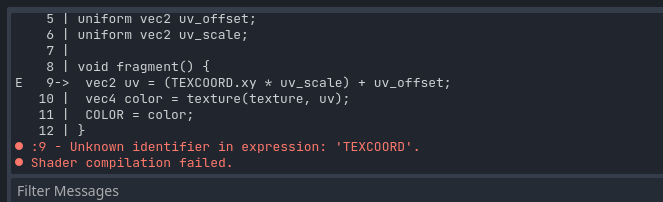
 novel scarab
warm thunder
does it not work with 0 as well?
novel scarab
warm thunder
does it not work with 0 as well?
I'm sorry; could you provide the code? I'm clueless with shaders.
warm thunder
uniform sampler2D texture;
uniform vec2 texture_size;
uniform vec2 uv_offset;
uniform vec2 uv_scale;

void fragment() {
    // UV coords offset and scale calc
    vec2 uv = (TEXCOORD0.xy * uv_scale) + uv_offset;

    // texture sampling modified UV coordinates
    vec4 color = texture(texture, uv);

    // output
    COLOR = color;
}```I need to be passing in:
uniform vec2 texture_size;
uniform vec2 uv_offset;
uniform vec2 uv_scale;
Somehow right?
warm thunder
look at the right side
of the screen
you can set the variable there
its like export variabls
novel scarab
Hmm, I'm setting the shader via code:
    var shader_material = ShaderMaterial.new()
    shader_material.shader = load("res://shaders/CircleCropShader.gdshader")
    shader_material.set_shader_parameter('texture', texture)
okie
novel scarab
Thanks again for the help
warm thunder
gotcha ❤️
novel scarab
novel scarab
I need to be passing in:
```
uniform vec2 texture_size;
uniform vec2 uv_offset;...
What should I pass in for these?
warm thunder
novel scarab
What should I pass in for these?
just input some random floats
and work your way to accuracy 😄
texture_size is prolly 1080x1920
novel scarab
Can you show me an example? I'm clueless on what to pass, sorry 😦
warm thunder
like this:
uniform vec2 texture_size = vec2(1024.0, 1024.0);
uniform vec2 uv_offset = vec2(0.0, 0.0);
uniform vec2 uv_scale = vec2(0.5, 0.5);
as you like to do things by code
novel scarab
@warm thunder I actually managed to somehow do it using a parent texturerect and clip only under visability
I can't thank you enough for your help though, you've inspired me to learn shaders 🙂
warm thunder
OMG nice!
novel scarab
Only took 11 or so hours.
warm thunder
novel scarab
<@450268280867913750> I actually managed to somehow do it using a parent textur...
lets goooooooooooooooooo