#@SylenThunder I'm still trying to sort
1 messages · Page 1 of 1 (latest)
 honest saffron
Making a thread for you. I'm a bit busy atm with doing some hauling and swapping out a swaybar linkage. Dump the info here, and I'll take a look. What ports are you using for each server, and how did you set it all up? I know we spoke a few days ago, but refresh my memory.
 hearty fossil
Gimme a sec to find all the bits from the other channel.
And how DARE you have a life outside of gaming! I'm shocked, shocked I say, to hear that you do. 🙂
I'm gonna post data first, problem description second, analysis last.
This is the log file from a successful restart and login on an A21.1 (Stable) server that's been running for a few months - taken yesterday. It's a clean log segment (starts right at the restart and runs through the end of the login and character entering world until things are stable there).
Pastebin
Pastebin.com is the number one paste tool since 2002. Pastebin is a website where you can store text online for a set period of time.
This is the log file from a server that I tried to create a few days ago. I'd been running four servers on a dedicated, owned Ubuntu LTS linux box (system information is in the log file). I killed and deleted two of the four to rebuild them with a clean start. They START just fine, but as soon as anyone tries to log in remotely, they crash and restart.
Pastebin
Pastebin.com is the number one paste tool since 2002. Pastebin is a website where you can store text online for a set period of time.
I've still got two servers running and I can stop and restart them just fine. The problem seems to be isolate to logging into newly created servers only. I've moved the "A" server (the one involved the the failed login) from 27015 to 27027 on advice from . . . someone - I forget who . . . and it made no difference.
This was all working just fine a week ago (probably closer to 4 or 5 days - I've had very little sleep trying to sort this out and I've lost track a bit).
Nothing on my end changes. No update to Linux (It's an LTS distro - I get very few updates anyway). No updates to the server management software for several weeks. No updates to the game itself (A21.1 Stable - plus I keep a sequestered copy in a different library as a reference copy and it fails from there as well).
Absolutely nothing on my end changed except deleting two instances and recreating them using the same basic parameters as the ones that were deleted (different maps, different sizes, different player counts - but all the technical stuff was exactly the same as the deleted ones).
I ran through the restart/login process today on one of my good servers and the A server that's failing and pulled the logs with an eye towards running compares between them to look for differences.
The problem there was that I couldn't run a straight literal compare because of the date/time stamps.
So I started masking some of the data in the logs.
There were other essentially trivial differences between them which I also masked (chunk counts, milliseconds to complete tasks, things like that).
One by one, I investigated each difference and masked them out for the compares if I understood what they were and that they had nothing to do with connectivity. I also removed from the failed run, all of the lines related to the restart as there was no parallel in the successful run to compare to (the original log files are intact and unmodified, I'm talking about the files I used for the compares themselves).
What I have left is clean enough to probably paste here, but the comparison tool I have doesn't have a "save compare" function, so I'll have to do it with screen shots.
Those are coming nowish. I haven't taken them yet. It's up on another window. and I'll start now.


That's the lot.
My problem is that I can't tell from what's left what's significant and what are normal differences between starting and logging into an established server and what are actual problems.
If it's easier for you, I have the masked-data versions of the two log files. I could paste-bin them and let you use your own comparison tool to look at them rather than deal with the screenshots.
Looking at this, it appears to me that something at Steam's end changed - something I/we don't have access to. The establishment of the game itself appears to be successful. There's just no way to connect to it without failure and that connection is managed by Steam, not by TFP (I think).
The problem there is that Steam's help channels don't allow for arbitrary contact with support and if you go through "can't connect to my game" they dump it off on the game devs to fix it.
SIGSEGV is a memory usage error - attempting to read or write to memory that doesn't belong to the process making the attempt. I can't tell from the dump that follows what was actually executing at the time of the failure.
honest saffron
Ubuntu what flavor?
What size is your swap set to?
What ports are the servers configured on? both server port and console/telnet
hearty fossil
Gimme a sec. I gotta pull the system data from the log file.
2023-11-04THH:MM:SS sss.sss INF System information:
2023-11-04THH:MM:SS sss.sss INF OS: Linux 5.15 Ubuntu 22.04 64bit
2023-11-04THH:MM:SS sss.sss INF CPU: AMD Ryzen 5 1600 Six-Core Processor (cores: 12)
2023-11-04THH:MM:SS sss.sss INF RAM: 32034 MB
2023-11-04THH:MM:SS sss.sss INF GPU: Null Device (128 MB)
2023-11-04THH:MM:SS sss.sss INF Graphics API: NULL 1.0 [1.0] (shader level 5.0)
I gotta telnet in to find my swap file size, but it's never been a problem in the 4 months I've been running these servers and the existing servers aren't having problems. Just the news ones are failing.
Also, I don't recall the command to discover my swap file size. I'm gonna have to look that up. I'm not terribly console command fluent in Linux. I've been a GUI user for years, but my gaming box is Windows 11.
               total        used        free      shared  buff/cache   available
Mem:           32034        7706        7426           1       16901       23890
Swap:              0           0           0
Does that mean my swap file is gone? I had one once. I recall someone helping me set it up.
For the 27024 entry point server, Telnet is 27026.
For the 27029 entry point server, Telnet is 27029.
honest saffron
I use swapon to check swap. It will tell you the type and what size it is. For Unity games like 7 Days you must have a minimum of 8GB swap. I set it so it will almost never get used, but it has to exist.
https://i.gyazo.com/c0e6ac9beba8b9460f6a9cceba5a7637.png


For your game ports, you are configuring them all incorrectly. Which is probably the biggest source of your issue.
First, never use the range of 27000-27099. Most of those are used by Steam services or common server ports. Even if you don't have those ports in use on your system, they will be congested elsewhere.
I recommend a gap of 10 ports between servers. one sec while I type out an example.
hearty fossil
Okay, I get a different answer from virtually everyone about ports - but the salient fact is that a week ago all four servers were up and running just fine. I was able to knock them down and bring them up just fine.
While there may be differing opinions about hat is correct and what is not, it was, in fact working for more than four months.
This is a repeatable problem with a memory usage error in something somewhere.
My swap file disappearing is more concerning, but again, two servers are up and running right now with exactly that configuration. The problem is that while I can create new servers, as soon as anyone logs into them, they crash and restart.
swapon wasn't giving a response, so I used mem which indicates that my swap file is no longer there. I probably need to redo it. I"m gonna have to do some quick research as to how as I'm not command-line Linux fluent. Be alt tabbed for a few moments.
honest saffron
Server port 31030
Server also uses 31031-31033, so you cannot use those ports for anything else.
Leave a gap of 1 port for safety and future expansion of the client. Put the web console on 31035
Telnet goes on 31036
Then if you run Allocs Legacy tools, the map for that will be on 30137
CPM or server tools can run on 30138/9 and then the next server starts on 31040
Keep that kind of a setup in mind always, and you won't ever have port issues.
How it worked with you having telnet/console overlapping the game ports is pure luck.
hearty fossil
I don't run web console. It says so in the log files.
Have you looked at the log files at all?
honest saffron
Yeah, the logs mostly showed socket errors and the memory crash
hearty fossil
Again, this is a repeatable, new problem related to NEW servers only. I'm not the only person who has reported it (although I don't know how many have in total, there is a thread on CubeCoders with multiple victims of it).
Which lines are you referring to.
The problem with changing the ports is this: If you're not addressing the root cause of the problem and I bring down my two working servers and redo them with the new port schemes and it fails, I'm left with zero functioning servers. I have four MONTHS of experience with this working just fine. Hearing, "This won't work" in the face of that without anything addressing the issue I'm raising is worrying to me. I can't risk being totally shut down and NOTHING I've done has worked to day. I am going to TRY to set up a new server in the ranges you're suggesting, but if that does NOT work (as I suspect - the last person who told me to use a different range gave me that 27027 number for an entry port and I'm unable to evaluate the accuracy of what folks tell me about this but he sounded just as authoritative as you do now) and moving the 27015 entry point server to 27027 had no effect at all.
I'll do that now. It'll take me about 20 minutes to get it set up that way. I'll post back with the results.
When you say "31030" as the "server port" that's in lieu of the 27027 I'm using now? I want to be sure. I'll need to open ports on my router as well.
honest saffron
yeah, I would recommend setting up the ports as I outlined, and see how that goes.
Yes.
Here, one sec and I'll show you what my setup is like
hearty fossil
Just for one new server. I'm not changing the two that are working. Too high a risk.
So, open 31030 to 31039. I don't have any way to say which ports get used for what beyond the entry point as far as I know. The system just assigns it all.
honest saffron
This is my basic outline for the games we have on this one Linux machine.
https://i.gyazo.com/7933f692f12087deffd5e9538be178f9.png
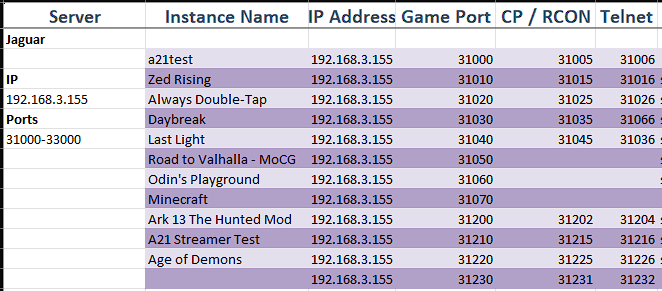

It ensures there is no overlap between the servers, and they have the additional ports they need for all of the tools we use.
hearty fossil
Okay. I'll take a few minutes and get that set up and then get back with you. If I get the same error, I won't repeat the log compare. That took me 18 hours to finish. 🙂 We'll just work from the assumption that the port assignments are the issue with the logs I have. Does that sound all right to you?
honest saffron
Sure
hearty fossil
Options on setup were RCON and Control Panel. I set RCON to 31035 and Control Panel to 31036. No choice for choosing TelNet. From experience, it'll get set to some relative port above the entry point (31030 in this case is the entry point).,
Installing. Takes a while to do that. This is a clean, fresh server install (like before).
Server "failed to connect" and is erroring exactly the same as before.
honest saffron
The server doesn't use RCON. How are you setting up the configs?
hearty fossil
Options on the setup screen to set RCON and Control Panel. I used the values above.
honest saffron
Setup screen? I thought you were on Linux. You should be using CLI to edit the config files.
hearty fossil
AMP server management software.
honest saffron
Oh AMP is shit. No wonder. You might as well use Pterodactyl.
hearty fossil
Before you bag on AMP, remember, THIS ALL WORKED A WEEK AGO and I've had no updates to their software in three weeks.
honest saffron
Yeah, but when it was "working" you still had the wrong port configs and it honestly shouldn't have been.
hearty fossil
Four months of flawless performance and a repeatble error starting about 4 days ago. I don't mean to be argumentative, but can you move away from the management software unless you can see something specific in the logs that points to them?
honest saffron
Manually edit the config files to set the ports
hearty fossil
I don't know how to edit the file directly. As I've said a few times, I'm GUI user only on Linux and this is a headless LTS Server edition.
I'll dump the log file and show the ports. It's in there.
honest saffron
CLI doesn't even require high-school English to understand. Most likely part of your issue is AMP is setting up the configuration wrong.
hearty fossil
That's the restart - the ports are in there.
I'm extracting them now. It'll take me a minute.
2023-11-04T16:04:57 2.828 INF Started Telnet on 31035
Server port: 31030
Only two ports referenced in the log. With no console, I wouldn't expect any others, would i?
I haven't a clue how to set up a server on a Linux server without management software. Unless you're prepared to walk me through that (I'm willing), there's nothing I can do about that side of it, but just assuming "AMP = Bad" in the face of four months of flawless performance seems . . . draconian.
honest saffron
I actually wrote a guide for setting up a server with LGSM. It's all CLI though so no pretty interface.
hearty fossil
honest saffron
CLI doesn't even require high-school English to understand. Most likely part of ...
There's more to this than just editing a file. I've no idea how to manage a server without server management software to help. I'm not stupid or non-technical. I just am not fluent in Linux command line work. You wanna talk DB2 or JCL or JES2 or Easytrieve or PL/1 or ReXX I'm your guy.
What's LGSM?
honest saffron
AMP isn't "bad" per-se, but it only works well with the servers it is directly designed for, and 7 Days isn't one of them.
Linux Game Server Manager.
hearty fossil
They have it on the drop down and it has worked flawlessly for four months. I keep repeating that and I'm not sure why that's not getting through. Four days ago ONLY new servers started failing, they fail at the interface with Steam (apparently). I've moved the entry point twice now based on folks telling me what I had couldn't possibly work (despite having worked for four months).
I can TRY to set up a server that way, apart from AMP, but only if I don't have to knock down AMP because, AGAIN, if this is not the solution, I can't afford to lose the two servers that are currently working just fine.
honest saffron
Or you can just follow their page. I recommend configuring a user account for each server.
https://linuxgsm.com/servers/sdtdserver/

LinuxGSM is the command-line tool for quick, simple deployment and management of Linux 7 Days to Die dedicated game servers.
Just because it was working fine for months, does not mean it was working the way it should.
After changing the ports to the new configuration, did you restart the machine?
hearty fossil
No. You didn't say anything about doing that. I opened the ports on the router, then killed and deleted the server, then built a new server with the new ports, then started the server up.
I did not cycle the hardware.
I can try that, but to be honest, I've been down this path before and I'm not optimistic. I'll try it. Kill and delete, restart hardware, rebuild and start. Back in 20 minutes or so.
Crap. I need to ufw allow 31030-31039. Forgot that part.
Okay that bit's done. Rebuiding server now.
When I start listening to a port, does that setting survive a hardware reset?
using ufw in Ubuntu?
honest saffron
UFW or IPTables, whichever you prefer. That wouldn't survive wiping and re-installing Linux.
hearty fossil
No, not that, just power off/power on.
honest saffron
Nah, that wouldn't reset the firewall settings.
hearty fossil
Hardware reset as in "I pressed the reset button" 🙂
honest saffron
LOL I usually just use the shutdown command.
hearty fossil
Again, headless box, no command line interface unless I TelNet in. No real experience with command line linux. Sorry.
Reset button, from experience, does a soft shutdown - things close gracefully. I've watched them when I had a monitor on it.
We're not talking an abrupt power off situation.
honest saffron
Headless means no GUI. Are you running desktop? And yeah, Linux is nice that way.
hearty fossil
No gui. None.
It's Ubuntu LTS Server - version listed above
Doesn't have a mouse, keyboard, or monitor attached.
honest saffron
So you connect to a web interface?
hearty fossil
I telnet in for the few commands I need to make.
I use putty.
Yes, I know. there are better ones. I don't need flash. I need simple.
honest saffron
I use telnet for everything.
hearty fossil
I was doign this with some dude yesterday and got a 20 minute lecture on how I was using the wrong TTY app.
Mostly I loathe community support. They can't focus on the issues that I come to them with.
honest saffron
The only one I'm aware of that causes issues is ... damnit forgot the name. Starts with M I think
hearty fossil
Q: "What shoes should I wear with this suit?"
A: "You should trim your beard and maybe get laid."
That's pretty much my experience with anything at all to do with Linux community support. 🙂
honest saffron
MobaXterm. That's the one. It has issues with Tmux sessions. Only one I wouldn't recommend.
On the other hand, if you want to remotely connect to a Linux desktop, it's the go-to choice. 😛
hearty fossil
I used to have to TTY in to the bank's mainframe where I started in IT in 19-way-too-damned-long-ago. Over a 400 baud modem.
honest saffron
God those were the days.
hearty fossil
I grew up with computers. Wrote my first programs in 1968. Built an Altair 8800 in 1975. I absolutely love having lived in this particular time.
honest saffron
For my current setup, I personally prefer mRemoteNG as I get a tab for each different session, and I can run them all in the same window.
hearty fossil
I can do that in AMP, but I keep all four servers on the same page.
honest saffron
Yeah, I didn't really get started until the late 70's, but was writing pseudo AI on a TRS-80.
hearty fossil
I wrote a printer driver, a database program, a communications protocol, and a suite of accounting functions for a pair of networked Osborne II computers in 1979. Carried those fuckers to work every day, 3 mile walk in from home. 54 pounds each and a 4 inch screen. Thought I was king shit in the IT world at the time because I had two of them.
I'm surprised I didn't pull my arms out of their sockets.
All in 8080 assembler. The only thing that really was available at the time. CP/M OS.
honest saffron
back when you overclocked it by swapping some resistors
hearty fossil
I've had two strokes since then. Lost a step with the technical stuff or I'd still be at work. Disabled, veteran, living alone with my cat in Southern Indiana. Life is good. I get to play all day with my online friends, assuming I can get my freaking server creation process back up and running. 🙂
"C" server, I have two Finns, a Brit, a Japanese dude, and three midwesterners (including myself in that last one) playing almost every night. District Zero overhaul mod.
honest saffron
I thought about firing up a server with that mod.
hearty fossil
Okay, install and start is done. Gonna try logging in after the hardware reset.
Holy shit it's letting me in. Okay, I might not have ufw'd all the ports I needed for the 27027 one from this result.
Sylen, thank you. I"ve been beating my head on this for DAYS. Little sleep, and no peace. I really appreciate it. You got a patreon account I can buy you a beer at or something?
honest saffron
No, I should probably set something up, but all I have is PayPal LOL.
hearty fossil
I dumped them and burnt some bridges doing so when they got hacked and I lost a good deal of money. But Thanks. I really do appreciate it.
honest saffron
So is it just changing the ports around that fixed it up?
hearty fossil
Probably. LIkely also, it was combined with my not having opened the full range of ports needed for the server. I think I may have only opened up 27027.
honest saffron
Ahh, yeah that could do it too
hearty fossil
This time I opened all of them 31030-31039 (ufw'd them).
I know i could bash it, but I'm only just barely aware of bash. I do them one at a time.
I'll set up 31040-31049 and that will get me further along. Thanks!
If I ever take down the C and D servers, I'll move them up as well.